




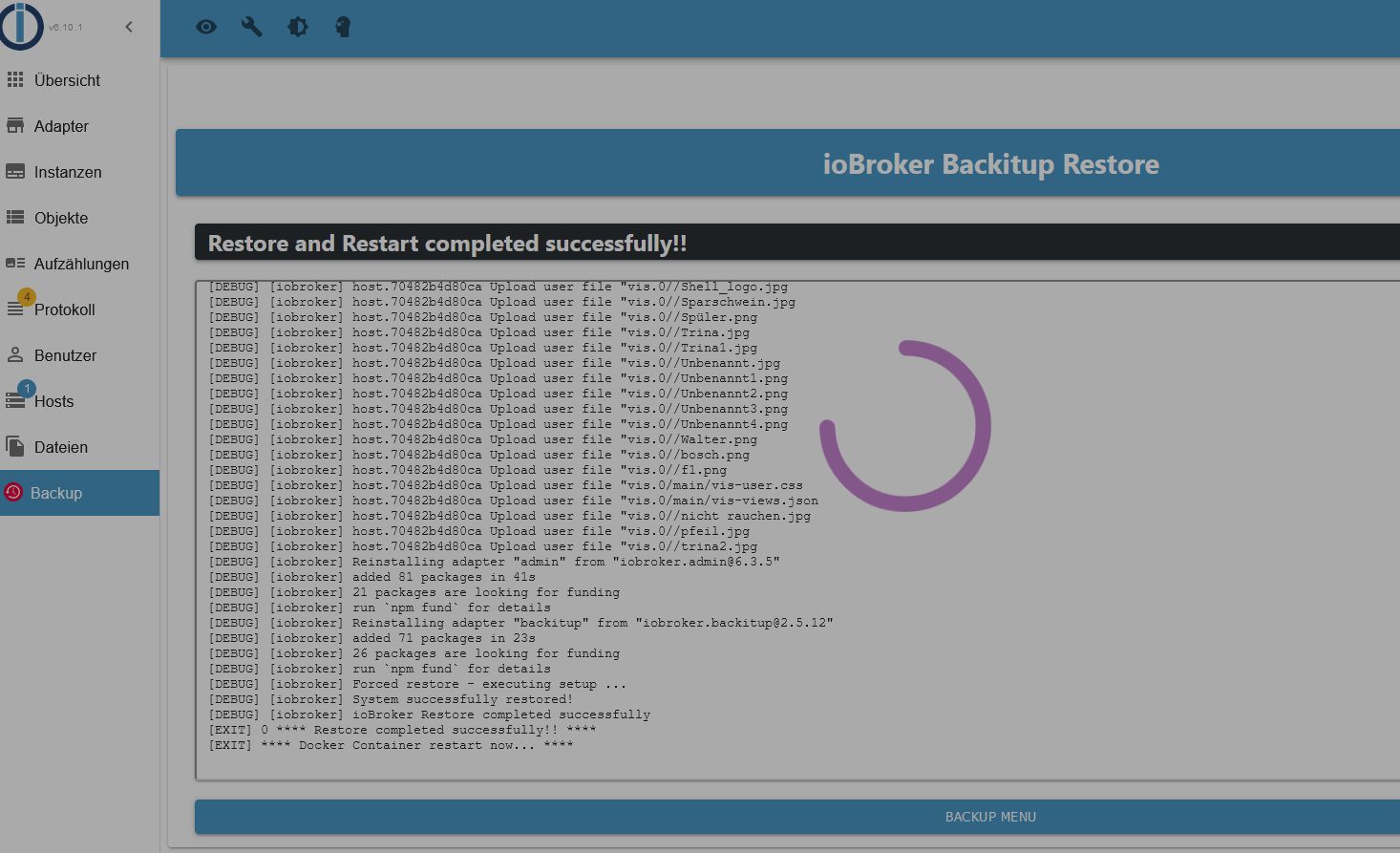
io broker startet nicht nach backitup
-
@mario-blass
Da ist nichts laut deinem Log belegt .
Hast du noch das alte ioBroker laufen !?
Starte die Qnap mal neu .
@glasfaser Ja, das alte ioBroker läuft noch. Möchte es ungern löschen, da es noch läuft. Im Container habe ich es schon gestoppt, bringt aber auch nichts.
ioBroker auf QNAP NAS
Visualisiert wird das ganze über ein Galaxy View 18,4"
-
@glasfaser Ja, das alte ioBroker läuft noch. Möchte es ungern löschen, da es noch läuft. Im Container habe ich es schon gestoppt, bringt aber auch nichts.
-
@glasfaser Ja, das alte ioBroker läuft noch. Möchte es ungern löschen, da es noch läuft. Im Container habe ich es schon gestoppt, bringt aber auch nichts.
-
@glasfaser
Was mir noch auffällt in der Fehlermeldung:2023-09-29 17:31:44.428 - info: host.2edb3017894a ip addresses: 192.168.178.125 2023-09-29 17:31:47.318 - info: host.2edb3017894a-Server Error inMem-objects listening on port 9001: Error: listen EADDRINUSE: address already in use 127.0.0.1:9001Die Meldung mit host.2edb301..... IP am Ende IP 125 da passt etwas nicht.
Die IP mit der 125 sollte laut Container Station diese ID haben:
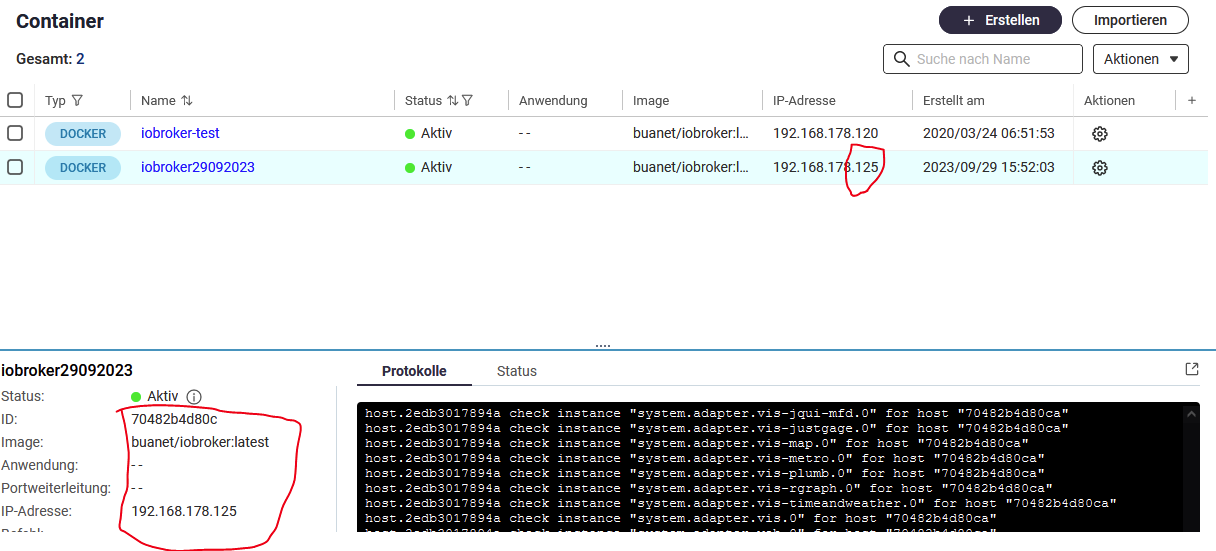
Meine alte Version hat die IP 120 und hat aber die ID aus der Fehlermeldung:
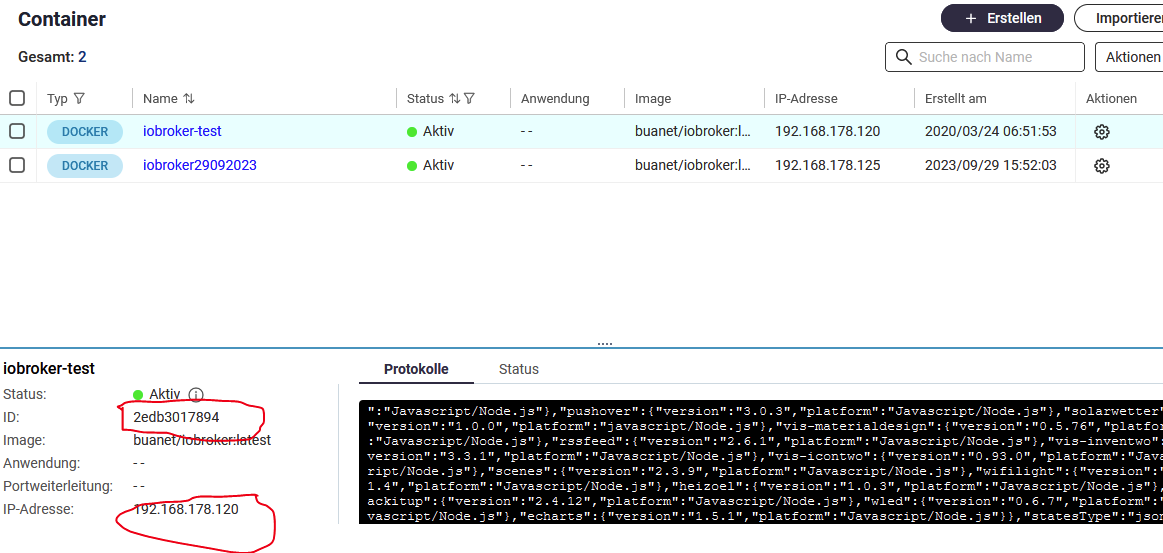
LAut Fehler kann er den host mit der info: host.2edb3017894a-Server Error inMem-objects listening on port 9001: Erro
nicht erreichen, aber die alte läuft doch ??ioBroker auf QNAP NAS
Visualisiert wird das ganze über ein Galaxy View 18,4"
-
@glasfaser
Was mir noch auffällt in der Fehlermeldung:2023-09-29 17:31:44.428 - info: host.2edb3017894a ip addresses: 192.168.178.125 2023-09-29 17:31:47.318 - info: host.2edb3017894a-Server Error inMem-objects listening on port 9001: Error: listen EADDRINUSE: address already in use 127.0.0.1:9001Die Meldung mit host.2edb301..... IP am Ende IP 125 da passt etwas nicht.
Die IP mit der 125 sollte laut Container Station diese ID haben:
Meine alte Version hat die IP 120 und hat aber die ID aus der Fehlermeldung:
LAut Fehler kann er den host mit der info: host.2edb3017894a-Server Error inMem-objects listening on port 9001: Erro
nicht erreichen, aber die alte läuft doch ??@mario-blass sagte in io broker startet nicht nach backitup:
aber die alte läuft doch ??
Deshalb die alte ausschalten !! ( Laut Screenshot laufen beide )
Dann den neu aufgesetzten Container starten .... -
@glasfaser
Hier das Startlog:----- ----- ----- Version Information ----- ----- image: v8.0.1 ----- ----- build: 2023-07-19T23:45:22+00:00 ----- ----- node: v18.17.0 ----- ----- npm: 9.6.7 ----- ----- ----- ----- Environment Variables ----- ----- SETGID: 1000 ----- ----- SETUID: 1000 ----- -------------------------------------------------------------------------------- -------------------------------------------------------------------------------- ----- Step 1 of 5: Preparing container ----- -------------------------------------------------------------------------------- This is not the first run of this container. Skipping first run preparation. -------------------------------------------------------------------------------- ----- Step 2 of 5: Detecting ioBroker installation ----- -------------------------------------------------------------------------------- Existing installation of ioBroker detected in "/opt/iobroker". -------------------------------------------------------------------------------- ----- Step 3 of 5: Checking ioBroker installation ----- -------------------------------------------------------------------------------- (Re)setting permissions (This might take a while! Please be patient!)... Done. Fixing "sudo-bug" by replacing sudo with gosu... Done. Checking Database connection... Done. Hostname in ioBroker matches the hostname of this container. No action required. -------------------------------------------------------------------------------- ----- Step 4 of 5: Applying special settings ----- -------------------------------------------------------------------------------- Some adapters have special requirements/ settings which can be activated by the use of environment variables. For more information see ioBroker Docker Image Docs (https://docs.buanet.de/iobroker-docker-image/docs/). -------------------------------------------------------------------------------- ----- Step 5 of 5: ioBroker startup ----- -------------------------------------------------------------------------------- Starting ioBroker... ##### #### ### ## # iobroker.js-controller log output # ## ### #### ##### ================================== > LOG REDIRECT system.adapter.admin.0 => true [starting] host.2edb3017894a check instance "system.adapter.admin.0" for host "70482b4d80ca" host.2edb3017894a check instance "system.adapter.history.0" for host "70482b4d80ca" host.2edb3017894a check instance "system.adapter.javascript.0" for host "70482b4d80ca" host.2edb3017894a check instance "system.adapter.scenes.0" for host "70482b4d80ca" host.2edb3017894a check instance "system.adapter.alexa2.0" for host "70482b4d80ca" host.2edb3017894a check instance "system.adapter.fritzbox.0" for host "70482b4d80ca" host.2edb3017894a check instance "system.adapter.hm-rega.0" for host "70482b4d80ca" host.2edb3017894a check instance "system.adapter.hm-rpc.0" for host "70482b4d80ca" host.2edb3017894a check instance "system.adapter.hm-rpc.1" for host "70482b4d80ca" host.2edb3017894a check instance "system.adapter.hm-rpc.2" for host "70482b4d80ca" host.2edb3017894a check instance "system.adapter.ical.0" for host "70482b4d80ca" host.2edb3017894a check instance "system.adapter.mihome-vacuum.0" for host "70482b4d80ca" host.2edb3017894a check instance "system.adapter.ping.0" for host "70482b4d80ca" host.2edb3017894a check instance "system.adapter.tr-064.1" for host "70482b4d80ca" host.2edb3017894a check instance "system.adapter.yr.0" for host "70482b4d80ca" host.2edb3017894a check instance "system.adapter.discovery.0" for host "70482b4d80ca" host.2edb3017894a check instance "system.adapter.backitup.0" for host "70482b4d80ca" host.2edb3017894a check instance "system.adapter.dwd.0" for host "70482b4d80ca" host.2edb3017894a check instance "system.adapter.echarts.0" for host "70482b4d80ca" host.2edb3017894a check instance "system.adapter.feiertage.0" for host "70482b4d80ca" host.2edb3017894a check instance "system.adapter.growatt.0" for host "70482b4d80ca" host.2edb3017894a check instance "system.adapter.heizoel.0" for host "70482b4d80ca" host.2edb3017894a check instance "system.adapter.homeconnect.0" for host "70482b4d80ca" host.2edb3017894a check instance "system.adapter.info.0" for host "70482b4d80ca" host.2edb3017894a check instance "system.adapter.rssfeed.0" for host "70482b4d80ca" host.2edb3017894a check instance "system.adapter.snmp.0" for host "70482b4d80ca" host.2edb3017894a check instance "system.adapter.socketio.0" for host "70482b4d80ca" host.2edb3017894a check instance "system.adapter.tankerkoenig.0" for host "70482b4d80ca" host.2edb3017894a check instance "system.adapter.tvspielfilm.0" for host "70482b4d80ca" host.2edb3017894a check instance "system.adapter.vis-bars.0" for host "70482b4d80ca" host.2edb3017894a check instance "system.adapter.vis-canvas-gauges.0" for host "70482b4d80ca" host.2edb3017894a check instance "system.adapter.vis-colorpicker.0" for host "70482b4d80ca" host.2edb3017894a check instance "system.adapter.vis-fancyswitch.0" for host "70482b4d80ca" host.2edb3017894a check instance "system.adapter.vis-google-fonts.0" for host "70482b4d80ca" host.2edb3017894a check instance "system.adapter.vis-history.0" for host "70482b4d80ca" host.2edb3017894a check instance "system.adapter.vis-hqwidgets.0" for host "70482b4d80ca" host.2edb3017894a check instance "system.adapter.vis-jqui-mfd.0" for host "70482b4d80ca" host.2edb3017894a check instance "system.adapter.vis-justgage.0" for host "70482b4d80ca" host.2edb3017894a check instance "system.adapter.vis-map.0" for host "70482b4d80ca" host.2edb3017894a check instance "system.adapter.vis-metro.0" for host "70482b4d80ca" host.2edb3017894a check instance "system.adapter.vis-plumb.0" for host "70482b4d80ca" host.2edb3017894a check instance "system.adapter.vis-rgraph.0" for host "70482b4d80ca" host.2edb3017894a check instance "system.adapter.vis-timeandweather.0" for host "70482b4d80ca" host.2edb3017894a check instance "system.adapter.vis.0" for host "70482b4d80ca" host.2edb3017894a check instance "system.adapter.web.0" for host "70482b4d80ca" host.2edb3017894a check instance "system.adapter.wled.0" for host "70482b4d80ca" host.2edb3017894a check instance "system.adapter.worx.0" for host "70482b4d80ca" -
@mario-blass sagte in io broker startet nicht nach backitup:
aber die alte läuft doch ??
Deshalb die alte ausschalten !! ( Laut Screenshot laufen beide )
Dann den neu aufgesetzten Container starten ....@glasfaser
Ja, wenn ich den laufenden stoppe, ist das gleiche Fehlerbild da. -
@mario-blass sagte in io broker startet nicht nach backitup:
host.2edb3017894a check instance "system.adapter.vis.0" for host "70482b4d80ca"
OK da ist der Fehler
im Terminal vom neuen Container dann :
pkill -u iobroker
iob host this
Container dann neu starten !
-
@mario-blass sagte in io broker startet nicht nach backitup:
host.2edb3017894a check instance "system.adapter.vis.0" for host "70482b4d80ca"
OK da ist der Fehler
im Terminal vom neuen Container dann :
pkill -u iobroker
iob host this
Container dann neu starten !
@glasfaser sagte in io broker startet nicht nach backitup:
iob host this
Qnap fährt neu hoch, Container ist am starten, es sieht jedenfalls schon mal besser aus wie eben....mal sehen.
-
@glasfaser sagte in io broker startet nicht nach backitup:
iob host this
Qnap fährt neu hoch, Container ist am starten, es sieht jedenfalls schon mal besser aus wie eben....mal sehen.
Ich glaub er installiert immer noch die Adapter
ioBroker auf QNAP NAS
Visualisiert wird das ganze über ein Galaxy View 18,4"
-
Ich glaub er installiert immer noch die Adapter
@mario-blass sagte in io broker startet nicht nach backitup:
Ich glaub er installiert immer noch die Adapter
Schau in's Log.


Hey! Du scheinst an dieser Unterhaltung interessiert zu sein, hast aber noch kein Konto.
Hast du es satt, bei jedem Besuch durch die gleichen Beiträge zu scrollen? Wenn du dich für ein Konto anmeldest, kommst du immer genau dorthin zurück, wo du zuvor warst, und kannst dich über neue Antworten benachrichtigen lassen (entweder per E-Mail oder Push-Benachrichtigung). Du kannst auch Lesezeichen speichern und Beiträge positiv bewerten, um anderen Community-Mitgliedern deine Wertschätzung zu zeigen.
Mit deinem Input könnte dieser Beitrag noch besser werden 💗
Registrieren Anmelden290
Online33.0k
Benutzende83.7k
Themen1.3m
Beiträge