



Skip to content
  • Home
  • Aktuell
  • Tags
  • 0 Ungelesen 0
  • Kategorien
  • Unreplied
  • Beliebt
  • GitHub
  • Docu
  • Hilfe
Skins
  • Light
  • Brite
  • Cerulean
  • Cosmo
  • Flatly
  • Journal
  • Litera
  • Lumen
  • Lux
  • Materia
  • Minty
  • Morph
  • Pulse
  • Sandstone
  • Simplex
  • Sketchy
  • Spacelab
  • United
  • Yeti
  • Zephyr
  • Dark
  • Cyborg
  • Darkly
  • Quartz
  • Slate
  • Solar
  • Superhero
  • Vapor

  • Standard: (Kein Skin)
  • Kein Skin
Einklappen
ioBroker Logo

Community Forum

donate donate
  1. ioBroker Community Home
  2. Deutsch
  3. ioBroker Allgemein
  4. io broker startet nicht nach backitup
NEWS

  • Jahresrückblick 2025 – unser neuer Blogbeitrag ist online! ✨
    BluefoxB
    Bluefox
    14
    1
    276

  • Neuer Blogbeitrag: Monatsrückblick - Dezember 2025 🎄
    BluefoxB
    Bluefox
    13
    1
    591

  • Weihnachtsangebot 2025! 🎄
    BluefoxB
    Bluefox
    25
    1
    1.8k

io broker startet nicht nach backitup

Geplant Angeheftet Gesperrt Verschoben ioBroker Allgemein
41 Beiträge 6 Kommentatoren 3.5k Aufrufe 2 Watching
  • Älteste zuerst
  • Neuste zuerst
  • Meiste Stimmen
Antworten
  • In einem neuen Thema antworten
Anmelden zum Antworten
Dieses Thema wurde gelöscht. Nur Nutzer mit entsprechenden Rechten können es sehen.
  • W Wildbill

    @thomas-braun Wieso schreibst Du immer das, was ich auch schreibe, nur eine Sekunde vor mir? :blush:

    Thomas BraunT Online
    Thomas BraunT Online
    Thomas Braun
    Most Active
    schrieb am zuletzt editiert von
    #22

    @wildbill sagte in io broker startet nicht nach backitup:

    nur eine Sekunde vor mir?

    Bin Lucky Luke, der Kerl der schneller postet als sein Schatten.

    Linux-Werkzeugkasten:
    https://forum.iobroker.net/topic/42952/der-kleine-iobroker-linux-werkzeugkasten
    NodeJS Fixer Skript:
    https://forum.iobroker.net/topic/68035/iob-node-fix-skript
    iob_diag: curl -sLf -o diag.sh https://iobroker.net/diag.sh && bash diag.sh

    1 Antwort Letzte Antwort
    -1
    • M mario.blass

      @wildbill Reicht es den Container der alten Version zu stoppen oder muss ich diesen löschen ?
      Wollte eigentlich vorerst nicht löschen bevor der neue läuft.

      W Online
      W Online
      Wildbill
      schrieb am zuletzt editiert von
      #23

      @mario-blass sagte in io broker startet nicht nach backitup:

      @wildbill Reicht es den Container der alten Version zu stoppen oder muss ich diesen löschen ?
      Wollte eigentlich vorerst nicht löschen bevor der neue läuft.

      Stoppen sollte reichen.

      @Thomas-Braun Qualität vor Quantität :grinning:

      Thomas BraunT 1 Antwort Letzte Antwort
      0
      • W Wildbill

        @mario-blass sagte in io broker startet nicht nach backitup:

        @wildbill Reicht es den Container der alten Version zu stoppen oder muss ich diesen löschen ?
        Wollte eigentlich vorerst nicht löschen bevor der neue läuft.

        Stoppen sollte reichen.

        @Thomas-Braun Qualität vor Quantität :grinning:

        Thomas BraunT Online
        Thomas BraunT Online
        Thomas Braun
        Most Active
        schrieb am zuletzt editiert von
        #24

        @wildbill sagte in io broker startet nicht nach backitup:

        Qualität vor Quantität

        Da hast du natürlich vollkommen Recht. Ich ollen Spammer...

        Linux-Werkzeugkasten:
        https://forum.iobroker.net/topic/42952/der-kleine-iobroker-linux-werkzeugkasten
        NodeJS Fixer Skript:
        https://forum.iobroker.net/topic/68035/iob-node-fix-skript
        iob_diag: curl -sLf -o diag.sh https://iobroker.net/diag.sh && bash diag.sh

        M 1 Antwort Letzte Antwort
        1
        • Thomas BraunT Thomas Braun

          @wildbill sagte in io broker startet nicht nach backitup:

          Qualität vor Quantität

          Da hast du natürlich vollkommen Recht. Ich ollen Spammer...

          M Offline
          M Offline
          mario.blass
          schrieb am zuletzt editiert von
          #25

          @thomas-braun
          Hilft nicht, Mist.....

          ioBroker auf QNAP NAS

          Visualisiert wird das ganze über ein Galaxy View 18,4"

          1 Antwort Letzte Antwort
          0
          • GlasfaserG Online
            GlasfaserG Online
            Glasfaser
            schrieb am zuletzt editiert von
            #26

            @mario-blass

            Zeige mal

            netstat -tulpn | grep 9001
            

            Synology 918+ 16GB - ioBroker in Docker v9 , VISO auf Trekstor Primebook C13 13,3" , Hikvision Domkameras mit Surveillance Station .. CCU RaspberryMatic in Synology VM .. Zigbee CC2538+CC2592 .. Sonoff .. KNX .. Modbus ..

            M 1 Antwort Letzte Antwort
            0
            • GlasfaserG Glasfaser

              @mario-blass

              Zeige mal

              netstat -tulpn | grep 9001
              
              M Offline
              M Offline
              mario.blass
              schrieb am zuletzt editiert von
              #27

              @glasfaser sagte in io broker startet nicht nach backitup:

              netstat -tulpn | grep 9001

              Active Internet connections (only servers)
              Proto Recv-Q Send-Q Local Address Foreign Address State PID/Program name
              tcp 0 0 127.0.0.1:9000 0.0.0.0:* LISTEN -
              tcp 0 0 127.0.0.1:9001 0.0.0.0:* LISTEN -
              tcp 0 0 127.0.0.11:37213 0.0.0.0:* LISTEN -
              udp 0 0 127.0.0.11:46000 0.0.0.0:* - ```

              ioBroker auf QNAP NAS

              Visualisiert wird das ganze über ein Galaxy View 18,4"

              GlasfaserG 1 Antwort Letzte Antwort
              0
              • M mario.blass

                @glasfaser sagte in io broker startet nicht nach backitup:

                netstat -tulpn | grep 9001

                Active Internet connections (only servers)
                Proto Recv-Q Send-Q Local Address Foreign Address State PID/Program name
                tcp 0 0 127.0.0.1:9000 0.0.0.0:* LISTEN -
                tcp 0 0 127.0.0.1:9001 0.0.0.0:* LISTEN -
                tcp 0 0 127.0.0.11:37213 0.0.0.0:* LISTEN -
                udp 0 0 127.0.0.11:46000 0.0.0.0:* - ```

                GlasfaserG Online
                GlasfaserG Online
                Glasfaser
                schrieb am zuletzt editiert von
                #28

                @mario-blass sagte in io broker startet nicht nach backitup:

                          LISTEN      
                

                nach muß noch was stehen !?

                Synology 918+ 16GB - ioBroker in Docker v9 , VISO auf Trekstor Primebook C13 13,3" , Hikvision Domkameras mit Surveillance Station .. CCU RaspberryMatic in Synology VM .. Zigbee CC2538+CC2592 .. Sonoff .. KNX .. Modbus ..

                M 1 Antwort Letzte Antwort
                0
                • GlasfaserG Glasfaser

                  @mario-blass sagte in io broker startet nicht nach backitup:

                            LISTEN      
                  

                  nach muß noch was stehen !?

                  M Offline
                  M Offline
                  mario.blass
                  schrieb am zuletzt editiert von
                  #29

                  @glasfaser Oh, mein Fehler:

                  Active Internet connections (only servers)
                  Proto Recv-Q Send-Q Local Address           Foreign Address         State       PID/Program name    
                  tcp        0      0 127.0.0.1:9000          0.0.0.0:*               LISTEN      -                   
                  tcp        0      0 127.0.0.1:9001          0.0.0.0:*               LISTEN      -                   
                  tcp        0      0 127.0.0.11:37213        0.0.0.0:*               LISTEN      -                   
                  udp        0      0 127.0.0.11:46000        0.0.0.0:*                           -
                  

                  ioBroker auf QNAP NAS

                  Visualisiert wird das ganze über ein Galaxy View 18,4"

                  GlasfaserG 1 Antwort Letzte Antwort
                  0
                  • M mario.blass

                    @glasfaser Oh, mein Fehler:

                    Active Internet connections (only servers)
                    Proto Recv-Q Send-Q Local Address           Foreign Address         State       PID/Program name    
                    tcp        0      0 127.0.0.1:9000          0.0.0.0:*               LISTEN      -                   
                    tcp        0      0 127.0.0.1:9001          0.0.0.0:*               LISTEN      -                   
                    tcp        0      0 127.0.0.11:37213        0.0.0.0:*               LISTEN      -                   
                    udp        0      0 127.0.0.11:46000        0.0.0.0:*                           -
                    
                    GlasfaserG Online
                    GlasfaserG Online
                    Glasfaser
                    schrieb am zuletzt editiert von
                    #30

                    @mario-blass

                    Da ist nichts laut deinem Log belegt .

                    Hast du noch das alte ioBroker laufen !?

                    Starte die Qnap mal neu .

                    Synology 918+ 16GB - ioBroker in Docker v9 , VISO auf Trekstor Primebook C13 13,3" , Hikvision Domkameras mit Surveillance Station .. CCU RaspberryMatic in Synology VM .. Zigbee CC2538+CC2592 .. Sonoff .. KNX .. Modbus ..

                    M 1 Antwort Letzte Antwort
                    0
                    • GlasfaserG Glasfaser

                      @mario-blass

                      Da ist nichts laut deinem Log belegt .

                      Hast du noch das alte ioBroker laufen !?

                      Starte die Qnap mal neu .

                      M Offline
                      M Offline
                      mario.blass
                      schrieb am zuletzt editiert von
                      #31

                      @glasfaser Ja, das alte ioBroker läuft noch. Möchte es ungern löschen, da es noch läuft. Im Container habe ich es schon gestoppt, bringt aber auch nichts.

                      ioBroker auf QNAP NAS

                      Visualisiert wird das ganze über ein Galaxy View 18,4"

                      GlasfaserG 2 Antworten Letzte Antwort
                      0
                      • M mario.blass

                        @glasfaser Ja, das alte ioBroker läuft noch. Möchte es ungern löschen, da es noch läuft. Im Container habe ich es schon gestoppt, bringt aber auch nichts.

                        GlasfaserG Online
                        GlasfaserG Online
                        Glasfaser
                        schrieb am zuletzt editiert von
                        #32

                        @mario-blass

                        Dann starte die Qnap mal neu

                        Synology 918+ 16GB - ioBroker in Docker v9 , VISO auf Trekstor Primebook C13 13,3" , Hikvision Domkameras mit Surveillance Station .. CCU RaspberryMatic in Synology VM .. Zigbee CC2538+CC2592 .. Sonoff .. KNX .. Modbus ..

                        M 1 Antwort Letzte Antwort
                        0
                        • M mario.blass

                          @glasfaser Ja, das alte ioBroker läuft noch. Möchte es ungern löschen, da es noch läuft. Im Container habe ich es schon gestoppt, bringt aber auch nichts.

                          GlasfaserG Online
                          GlasfaserG Online
                          Glasfaser
                          schrieb am zuletzt editiert von
                          #33

                          @mario-blass

                          und bitte vom Container ioBroker ,das Start Log zeigen .

                          Synology 918+ 16GB - ioBroker in Docker v9 , VISO auf Trekstor Primebook C13 13,3" , Hikvision Domkameras mit Surveillance Station .. CCU RaspberryMatic in Synology VM .. Zigbee CC2538+CC2592 .. Sonoff .. KNX .. Modbus ..

                          M 1 Antwort Letzte Antwort
                          0
                          • GlasfaserG Glasfaser

                            @mario-blass

                            Dann starte die Qnap mal neu

                            M Offline
                            M Offline
                            mario.blass
                            schrieb am zuletzt editiert von mario.blass
                            #34

                            @glasfaser
                            Was mir noch auffällt in der Fehlermeldung:

                            2023-09-29 17:31:44.428  - info: host.2edb3017894a ip addresses: 192.168.178.125
                            
                            2023-09-29 17:31:47.318  - info: host.2edb3017894a-Server  Error inMem-objects listening on port 9001: Error: listen EADDRINUSE: address already in use 127.0.0.1:9001
                            

                            Die Meldung mit host.2edb301..... IP am Ende IP 125 da passt etwas nicht.

                            Die IP mit der 125 sollte laut Container Station diese ID haben:
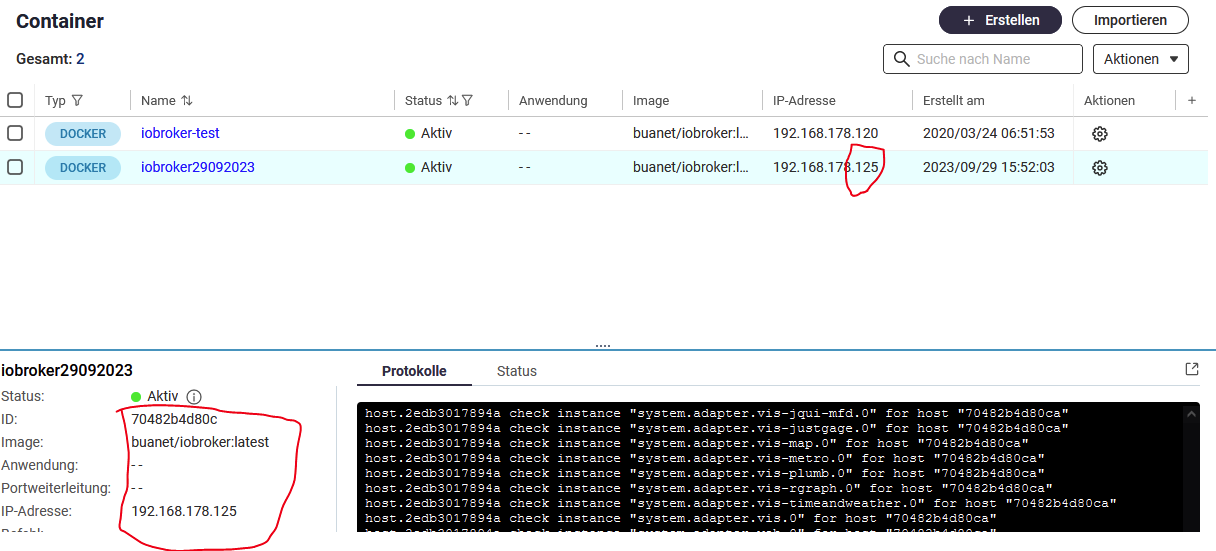
                            37f0d958-1727-4ce9-9a2b-8695dcdd7b14-grafik.png

                            Meine alte Version hat die IP 120 und hat aber die ID aus der Fehlermeldung:
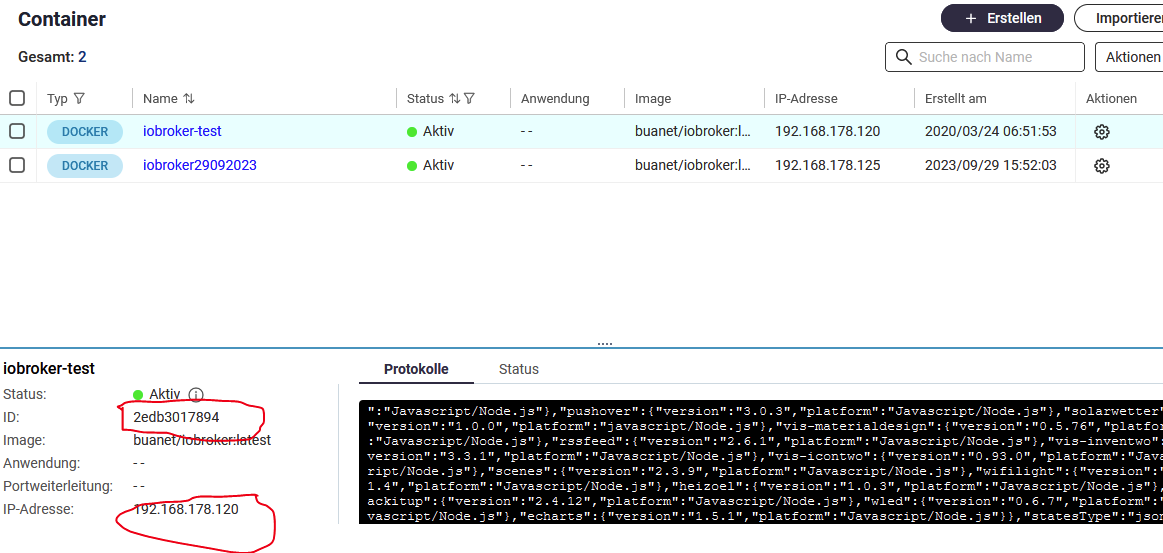
                            ce847187-3b5b-47e1-9a83-b01f08a98e00-grafik.png

                            LAut Fehler kann er den host mit der info: host.2edb3017894a-Server Error inMem-objects listening on port 9001: Erro
                            nicht erreichen, aber die alte läuft doch ??

                            ioBroker auf QNAP NAS

                            Visualisiert wird das ganze über ein Galaxy View 18,4"

                            GlasfaserG 1 Antwort Letzte Antwort
                            0
                            • M mario.blass

                              @glasfaser
                              Was mir noch auffällt in der Fehlermeldung:

                              2023-09-29 17:31:44.428  - info: host.2edb3017894a ip addresses: 192.168.178.125
                              
                              2023-09-29 17:31:47.318  - info: host.2edb3017894a-Server  Error inMem-objects listening on port 9001: Error: listen EADDRINUSE: address already in use 127.0.0.1:9001
                              

                              Die Meldung mit host.2edb301..... IP am Ende IP 125 da passt etwas nicht.

                              Die IP mit der 125 sollte laut Container Station diese ID haben:
                              37f0d958-1727-4ce9-9a2b-8695dcdd7b14-grafik.png

                              Meine alte Version hat die IP 120 und hat aber die ID aus der Fehlermeldung:

                              ce847187-3b5b-47e1-9a83-b01f08a98e00-grafik.png

                              LAut Fehler kann er den host mit der info: host.2edb3017894a-Server Error inMem-objects listening on port 9001: Erro
                              nicht erreichen, aber die alte läuft doch ??

                              GlasfaserG Online
                              GlasfaserG Online
                              Glasfaser
                              schrieb am zuletzt editiert von Glasfaser
                              #35

                              @mario-blass sagte in io broker startet nicht nach backitup:

                              aber die alte läuft doch ??

                              Deshalb die alte ausschalten !! ( Laut Screenshot laufen beide )
                              Dann den neu aufgesetzten Container starten ....

                              Synology 918+ 16GB - ioBroker in Docker v9 , VISO auf Trekstor Primebook C13 13,3" , Hikvision Domkameras mit Surveillance Station .. CCU RaspberryMatic in Synology VM .. Zigbee CC2538+CC2592 .. Sonoff .. KNX .. Modbus ..

                              M 1 Antwort Letzte Antwort
                              0
                              • GlasfaserG Glasfaser

                                @mario-blass

                                und bitte vom Container ioBroker ,das Start Log zeigen .

                                M Offline
                                M Offline
                                mario.blass
                                schrieb am zuletzt editiert von
                                #36

                                @glasfaser
                                Hier das Startlog:

                                -----                                                                      -----
                                -----                          Version Information                         -----
                                -----                    image:               v8.0.1                       -----
                                -----                    build:               2023-07-19T23:45:22+00:00    -----
                                -----                    node:                v18.17.0                     -----
                                -----                    npm:                 9.6.7                        -----
                                -----                                                                      -----
                                -----                        Environment Variables                         -----
                                -----                    SETGID:              1000                         -----
                                -----                    SETUID:              1000                         -----
                                --------------------------------------------------------------------------------
                                 
                                --------------------------------------------------------------------------------
                                -----                   Step 1 of 5: Preparing container                   -----
                                --------------------------------------------------------------------------------
                                 
                                This is not the first run of this container. Skipping first run preparation.
                                 
                                --------------------------------------------------------------------------------
                                -----             Step 2 of 5: Detecting ioBroker installation             -----
                                --------------------------------------------------------------------------------
                                 
                                Existing installation of ioBroker detected in "/opt/iobroker".
                                 
                                --------------------------------------------------------------------------------
                                -----             Step 3 of 5: Checking ioBroker installation              -----
                                --------------------------------------------------------------------------------
                                 
                                (Re)setting permissions (This might take a while! Please be patient!)... Done.
                                 
                                Fixing "sudo-bug" by replacing sudo with gosu... Done.
                                 
                                Checking Database connection... Done.
                                 
                                Hostname in ioBroker matches the hostname of this container.
                                No action required.
                                 
                                --------------------------------------------------------------------------------
                                -----                Step 4 of 5: Applying special settings                -----
                                --------------------------------------------------------------------------------
                                 
                                Some adapters have special requirements/ settings which can be activated by the use of environment variables.
                                For more information see ioBroker Docker Image Docs (https://docs.buanet.de/iobroker-docker-image/docs/).
                                 
                                 
                                --------------------------------------------------------------------------------
                                -----                    Step 5 of 5: ioBroker startup                     -----
                                --------------------------------------------------------------------------------
                                 
                                Starting ioBroker... 
                                 
                                ##### #### ### ## # iobroker.js-controller log output # ## ### #### #####
                                ================================== > LOG REDIRECT system.adapter.admin.0 => true [starting]
                                host.2edb3017894a check instance "system.adapter.admin.0" for host "70482b4d80ca"
                                host.2edb3017894a check instance "system.adapter.history.0" for host "70482b4d80ca"
                                host.2edb3017894a check instance "system.adapter.javascript.0" for host "70482b4d80ca"
                                host.2edb3017894a check instance "system.adapter.scenes.0" for host "70482b4d80ca"
                                host.2edb3017894a check instance "system.adapter.alexa2.0" for host "70482b4d80ca"
                                host.2edb3017894a check instance "system.adapter.fritzbox.0" for host "70482b4d80ca"
                                host.2edb3017894a check instance "system.adapter.hm-rega.0" for host "70482b4d80ca"
                                host.2edb3017894a check instance "system.adapter.hm-rpc.0" for host "70482b4d80ca"
                                host.2edb3017894a check instance "system.adapter.hm-rpc.1" for host "70482b4d80ca"
                                host.2edb3017894a check instance "system.adapter.hm-rpc.2" for host "70482b4d80ca"
                                host.2edb3017894a check instance "system.adapter.ical.0" for host "70482b4d80ca"
                                host.2edb3017894a check instance "system.adapter.mihome-vacuum.0" for host "70482b4d80ca"
                                host.2edb3017894a check instance "system.adapter.ping.0" for host "70482b4d80ca"
                                host.2edb3017894a check instance "system.adapter.tr-064.1" for host "70482b4d80ca"
                                host.2edb3017894a check instance "system.adapter.yr.0" for host "70482b4d80ca"
                                host.2edb3017894a check instance "system.adapter.discovery.0" for host "70482b4d80ca"
                                host.2edb3017894a check instance "system.adapter.backitup.0" for host "70482b4d80ca"
                                host.2edb3017894a check instance "system.adapter.dwd.0" for host "70482b4d80ca"
                                host.2edb3017894a check instance "system.adapter.echarts.0" for host "70482b4d80ca"
                                host.2edb3017894a check instance "system.adapter.feiertage.0" for host "70482b4d80ca"
                                host.2edb3017894a check instance "system.adapter.growatt.0" for host "70482b4d80ca"
                                host.2edb3017894a check instance "system.adapter.heizoel.0" for host "70482b4d80ca"
                                host.2edb3017894a check instance "system.adapter.homeconnect.0" for host "70482b4d80ca"
                                host.2edb3017894a check instance "system.adapter.info.0" for host "70482b4d80ca"
                                host.2edb3017894a check instance "system.adapter.rssfeed.0" for host "70482b4d80ca"
                                host.2edb3017894a check instance "system.adapter.snmp.0" for host "70482b4d80ca"
                                host.2edb3017894a check instance "system.adapter.socketio.0" for host "70482b4d80ca"
                                host.2edb3017894a check instance "system.adapter.tankerkoenig.0" for host "70482b4d80ca"
                                host.2edb3017894a check instance "system.adapter.tvspielfilm.0" for host "70482b4d80ca"
                                host.2edb3017894a check instance "system.adapter.vis-bars.0" for host "70482b4d80ca"
                                host.2edb3017894a check instance "system.adapter.vis-canvas-gauges.0" for host "70482b4d80ca"
                                host.2edb3017894a check instance "system.adapter.vis-colorpicker.0" for host "70482b4d80ca"
                                host.2edb3017894a check instance "system.adapter.vis-fancyswitch.0" for host "70482b4d80ca"
                                host.2edb3017894a check instance "system.adapter.vis-google-fonts.0" for host "70482b4d80ca"
                                host.2edb3017894a check instance "system.adapter.vis-history.0" for host "70482b4d80ca"
                                host.2edb3017894a check instance "system.adapter.vis-hqwidgets.0" for host "70482b4d80ca"
                                host.2edb3017894a check instance "system.adapter.vis-jqui-mfd.0" for host "70482b4d80ca"
                                host.2edb3017894a check instance "system.adapter.vis-justgage.0" for host "70482b4d80ca"
                                host.2edb3017894a check instance "system.adapter.vis-map.0" for host "70482b4d80ca"
                                host.2edb3017894a check instance "system.adapter.vis-metro.0" for host "70482b4d80ca"
                                host.2edb3017894a check instance "system.adapter.vis-plumb.0" for host "70482b4d80ca"
                                host.2edb3017894a check instance "system.adapter.vis-rgraph.0" for host "70482b4d80ca"
                                host.2edb3017894a check instance "system.adapter.vis-timeandweather.0" for host "70482b4d80ca"
                                host.2edb3017894a check instance "system.adapter.vis.0" for host "70482b4d80ca"
                                host.2edb3017894a check instance "system.adapter.web.0" for host "70482b4d80ca"
                                host.2edb3017894a check instance "system.adapter.wled.0" for host "70482b4d80ca"
                                host.2edb3017894a check instance "system.adapter.worx.0" for host "70482b4d80ca"
                                

                                ioBroker auf QNAP NAS

                                Visualisiert wird das ganze über ein Galaxy View 18,4"

                                1 Antwort Letzte Antwort
                                0
                                • GlasfaserG Glasfaser

                                  @mario-blass sagte in io broker startet nicht nach backitup:

                                  aber die alte läuft doch ??

                                  Deshalb die alte ausschalten !! ( Laut Screenshot laufen beide )
                                  Dann den neu aufgesetzten Container starten ....

                                  M Offline
                                  M Offline
                                  mario.blass
                                  schrieb am zuletzt editiert von
                                  #37

                                  @glasfaser
                                  Ja, wenn ich den laufenden stoppe, ist das gleiche Fehlerbild da.

                                  ioBroker auf QNAP NAS

                                  Visualisiert wird das ganze über ein Galaxy View 18,4"

                                  1 Antwort Letzte Antwort
                                  0
                                  • GlasfaserG Online
                                    GlasfaserG Online
                                    Glasfaser
                                    schrieb am zuletzt editiert von Glasfaser
                                    #38

                                    @mario-blass sagte in io broker startet nicht nach backitup:

                                    host.2edb3017894a check instance "system.adapter.vis.0" for host "70482b4d80ca"

                                    OK da ist der Fehler

                                    im Terminal vom neuen Container dann :

                                    pkill -u iobroker
                                    iob host this
                                    

                                    Container dann neu starten !

                                    Synology 918+ 16GB - ioBroker in Docker v9 , VISO auf Trekstor Primebook C13 13,3" , Hikvision Domkameras mit Surveillance Station .. CCU RaspberryMatic in Synology VM .. Zigbee CC2538+CC2592 .. Sonoff .. KNX .. Modbus ..

                                    M 1 Antwort Letzte Antwort
                                    0
                                    • GlasfaserG Glasfaser

                                      @mario-blass sagte in io broker startet nicht nach backitup:

                                      host.2edb3017894a check instance "system.adapter.vis.0" for host "70482b4d80ca"

                                      OK da ist der Fehler

                                      im Terminal vom neuen Container dann :

                                      pkill -u iobroker
                                      iob host this
                                      

                                      Container dann neu starten !

                                      M Offline
                                      M Offline
                                      mario.blass
                                      schrieb am zuletzt editiert von
                                      #39

                                      @glasfaser sagte in io broker startet nicht nach backitup:

                                      iob host this

                                      Qnap fährt neu hoch, Container ist am starten, es sieht jedenfalls schon mal besser aus wie eben....mal sehen.

                                      ioBroker auf QNAP NAS

                                      Visualisiert wird das ganze über ein Galaxy View 18,4"

                                      M 1 Antwort Letzte Antwort
                                      0
                                      • M mario.blass

                                        @glasfaser sagte in io broker startet nicht nach backitup:

                                        iob host this

                                        Qnap fährt neu hoch, Container ist am starten, es sieht jedenfalls schon mal besser aus wie eben....mal sehen.

                                        M Offline
                                        M Offline
                                        mario.blass
                                        schrieb am zuletzt editiert von mario.blass
                                        #40

                                        Ich glaub er installiert immer noch die Adapter

                                        ioBroker auf QNAP NAS

                                        Visualisiert wird das ganze über ein Galaxy View 18,4"

                                        Thomas BraunT 1 Antwort Letzte Antwort
                                        0
                                        • M mario.blass

                                          Ich glaub er installiert immer noch die Adapter

                                          Thomas BraunT Online
                                          Thomas BraunT Online
                                          Thomas Braun
                                          Most Active
                                          schrieb am zuletzt editiert von
                                          #41

                                          @mario-blass sagte in io broker startet nicht nach backitup:

                                          Ich glaub er installiert immer noch die Adapter

                                          Schau in's Log.

                                          Linux-Werkzeugkasten:
                                          https://forum.iobroker.net/topic/42952/der-kleine-iobroker-linux-werkzeugkasten
                                          NodeJS Fixer Skript:
                                          https://forum.iobroker.net/topic/68035/iob-node-fix-skript
                                          iob_diag: curl -sLf -o diag.sh https://iobroker.net/diag.sh && bash diag.sh

                                          1 Antwort Letzte Antwort
                                          0
                                          Antworten
                                          • In einem neuen Thema antworten
                                          Anmelden zum Antworten
                                          • Älteste zuerst
                                          • Neuste zuerst
                                          • Meiste Stimmen


                                          Support us

                                          ioBroker
                                          Community Adapters
                                          Donate
                                          FAQ Cloud / IOT
                                          HowTo: Node.js-Update
                                          HowTo: Backup/Restore
                                          Downloads
                                          BLOG

                                          681

                                          Online

                                          32.5k

                                          Benutzer

                                          81.9k

                                          Themen

                                          1.3m

                                          Beiträge
                                          Community
                                          Impressum | Datenschutz-Bestimmungen | Nutzungsbedingungen | Einwilligungseinstellungen
                                          ioBroker Community 2014-2025
                                          logo
                                          • Anmelden

                                          • Du hast noch kein Konto? Registrieren

                                          • Anmelden oder registrieren, um zu suchen
                                          • Erster Beitrag
                                            Letzter Beitrag
                                          0
                                          • Home
                                          • Aktuell
                                          • Tags
                                          • Ungelesen 0
                                          • Kategorien
                                          • Unreplied
                                          • Beliebt
                                          • GitHub
                                          • Docu
                                          • Hilfe
