




[gelöst] Update von Debian 10 auf 11?
-
@thomas-braun
das ist jetzt für einen raspberry . geht das dann auch für ein reines debian?
Bin da nicht so linux erfahren.@alero sagte in Update von Debian 10 auf 11?:
das ist jetzt für einen raspberry
das hinkt etwas hinterher
@alero sagte in Update von Debian 10 auf 11?:
für ein reines debian
gibt es Bookworm schon länger
-
@alero sagte in Update von Debian 10 auf 11?:
das ist jetzt für einen raspberry
das hinkt etwas hinterher
@alero sagte in Update von Debian 10 auf 11?:
für ein reines debian
gibt es Bookworm schon länger
-
@alero backup machen - neu installieren - backup zurückspielen
....und alles ist neu
-
@alero sagte in Update von Debian 10 auf 11?:
kann ich von 10 auch direkt auf 12 gehen?
Nein.
Vermutlich geht es schneller, ein Debian 12 aus dem Hut zu zaubern und flugs ein Backup über den ioBroker zu ziehen.
-
@alero sagte in Update von Debian 10 auf 11?:
kann ich von 10 auch direkt auf 12 gehen?
Nein.
Vermutlich geht es schneller, ein Debian 12 aus dem Hut zu zaubern und flugs ein Backup über den ioBroker zu ziehen.
Hi,
habe jetzt einen neue Maschine aufgesetzt mit debian 12.
zusätzlich habe ich noch einen user angelegt und die Net-tools, curl und apt update und apt upgrade ausgeführt. Danach den Iobroker installiert mitcurl -sLf https://iobroker.net/install.sh | bash -Hier kam eine FM. hier sollte ich auf Github nachschauen was ich auch getan habe.
dann habe ich folgendes gemacht.apt-get update apt-get install -y ca-certificates curl gnupg mkdir -p /etc/apt/keyrings curl -fsSL https://deb.nodesource.com/gpgkey/nodesource-repo.gpg.key | gpg --dearmor -o /etc/apt/keyrings/nodesource.gpgNODE_MAJOR=18 echo "deb [signed-by=/etc/apt/keyrings/nodesource.gpg] https://deb.nodesource.com/node_$NODE_MAJOR.x nodistro main" | tee /etc/apt/sources.list.d/nodesource.listapt-get update apt-get install nodejs -yDann habe ich auf chrome den iobroker aufgerufen und eingerichtet. liz usw.
Dann habe ich von meinem Alten noch laufenden Iobroker die Konfig des Backup adapter gesichert und auf dem neunen System importiert.
Der Backup Adatpter lässt sich nicht starten bzw. baut keine Verbindung auf.
(Keine Verbindung zum host rot und lebenszechen rot
und
Dann habe ich mal folgendes aufgerufenroot@iobroker-prod-12:/opt/iobroker# sudo ln -s /usr/bin/node /usr/bin/nodejs uname -m && which nodejs node npm && nodejs -v && node -v && npm -v && whoami && pwd && sudo apt update &> /dev/null && sudo apt update && apt policy nodejs ln: failed to create symbolic link '/usr/bin/nodejs': File exists x86_64 /usr/bin/nodejs /usr/bin/node /usr/bin/npm v18.18.0 v18.18.0 9.8.1 root /opt/iobroker Hit:1 http://security.debian.org bookworm-security InRelease Hit:2 http://deb.debian.org/debian bookworm InRelease Hit:3 http://deb.debian.org/debian bookworm-updates InRelease Hit:4 https://deb.nodesource.com/node_18.x nodistro InRelease Reading package lists... Done Building dependency tree... Done Reading state information... Done All packages are up to date. nodejs: Installed: 18.18.0-1nodesource1 Candidate: 18.18.0-1nodesource1 Version table: *** 18.18.0-1nodesource1 500 500 https://deb.nodesource.com/node_18.x nodistro/main amd64 Packages 100 /var/lib/dpkg/status 18.17.1-1nodesource1 500 500 https://deb.nodesource.com/node_18.x nodistro/main amd64 Packages 18.17.0-1nodesource1 500 500 https://deb.nodesource.com/node_18.x nodistro/main amd64 Packages 18.16.1-1nodesource1 500 500 https://deb.nodesource.com/node_18.x nodistro/main amd64 Packages 18.16.0-1nodesource1 500 500 https://deb.nodesource.com/node_18.x nodistro/main amd64 Packages 18.15.0-1nodesource1 500 500 https://deb.nodesource.com/node_18.x nodistro/main amd64 Packages 18.14.2-1nodesource1 500 500 https://deb.nodesource.com/node_18.x nodistro/main amd64 Packages 18.14.1-1nodesource1 500 500 https://deb.nodesource.com/node_18.x nodistro/main amd64 Packages 18.14.0-1nodesource1 500 500 https://deb.nodesource.com/node_18.x nodistro/main amd64 Packages 18.13.0+dfsg1-1 500 500 http://deb.debian.org/debian bookworm/main amd64 Packages 18.13.0-1nodesource1 500 500 https://deb.nodesource.com/node_18.x nodistro/main amd64 Packages 18.12.0-1nodesource1 500 500 https://deb.nodesource.com/node_18.x nodistro/main amd64 Packages 18.11.0-1nodesource1 500 500 https://deb.nodesource.com/node_18.x nodistro/main amd64 Packages 18.10.0-1nodesource1 500 500 https://deb.nodesource.com/node_18.x nodistro/main amd64 Packages 18.9.1-1nodesource1 500 500 https://deb.nodesource.com/node_18.x nodistro/main amd64 Packages 18.9.0-1nodesource1 500 500 https://deb.nodesource.com/node_18.x nodistro/main amd64 Packages 18.8.0-1nodesource1 500 500 https://deb.nodesource.com/node_18.x nodistro/main amd64 Packages 18.7.0-1nodesource1 500 500 https://deb.nodesource.com/node_18.x nodistro/main amd64 Packages 18.6.0-1nodesource1 500 500 https://deb.nodesource.com/node_18.x nodistro/main amd64 Packages 18.5.0-1nodesource1 500 500 https://deb.nodesource.com/node_18.x nodistro/main amd64 Packages 18.4.0-1nodesource1 500 500 https://deb.nodesource.com/node_18.x nodistro/main amd64 Packages 18.3.0-1nodesource1 500 500 https://deb.nodesource.com/node_18.x nodistro/main amd64 Packages 18.2.0-1nodesource1 500 500 https://deb.nodesource.com/node_18.x nodistro/main amd64 Packages 18.1.0-1nodesource1 500 500 https://deb.nodesource.com/node_18.x nodistro/main amd64 Packages 18.0.0-1nodesource1 500 500 https://deb.nodesource.com/node_18.x nodistro/main amd64 Packagesjs controller auch auf 5.012 gebracht
was mache ich falsch? -
Hi,
habe jetzt einen neue Maschine aufgesetzt mit debian 12.
zusätzlich habe ich noch einen user angelegt und die Net-tools, curl und apt update und apt upgrade ausgeführt. Danach den Iobroker installiert mitcurl -sLf https://iobroker.net/install.sh | bash -Hier kam eine FM. hier sollte ich auf Github nachschauen was ich auch getan habe.
dann habe ich folgendes gemacht.apt-get update apt-get install -y ca-certificates curl gnupg mkdir -p /etc/apt/keyrings curl -fsSL https://deb.nodesource.com/gpgkey/nodesource-repo.gpg.key | gpg --dearmor -o /etc/apt/keyrings/nodesource.gpgNODE_MAJOR=18 echo "deb [signed-by=/etc/apt/keyrings/nodesource.gpg] https://deb.nodesource.com/node_$NODE_MAJOR.x nodistro main" | tee /etc/apt/sources.list.d/nodesource.listapt-get update apt-get install nodejs -yDann habe ich auf chrome den iobroker aufgerufen und eingerichtet. liz usw.
Dann habe ich von meinem Alten noch laufenden Iobroker die Konfig des Backup adapter gesichert und auf dem neunen System importiert.
Der Backup Adatpter lässt sich nicht starten bzw. baut keine Verbindung auf.
(Keine Verbindung zum host rot und lebenszechen rot
und
Dann habe ich mal folgendes aufgerufenroot@iobroker-prod-12:/opt/iobroker# sudo ln -s /usr/bin/node /usr/bin/nodejs uname -m && which nodejs node npm && nodejs -v && node -v && npm -v && whoami && pwd && sudo apt update &> /dev/null && sudo apt update && apt policy nodejs ln: failed to create symbolic link '/usr/bin/nodejs': File exists x86_64 /usr/bin/nodejs /usr/bin/node /usr/bin/npm v18.18.0 v18.18.0 9.8.1 root /opt/iobroker Hit:1 http://security.debian.org bookworm-security InRelease Hit:2 http://deb.debian.org/debian bookworm InRelease Hit:3 http://deb.debian.org/debian bookworm-updates InRelease Hit:4 https://deb.nodesource.com/node_18.x nodistro InRelease Reading package lists... Done Building dependency tree... Done Reading state information... Done All packages are up to date. nodejs: Installed: 18.18.0-1nodesource1 Candidate: 18.18.0-1nodesource1 Version table: *** 18.18.0-1nodesource1 500 500 https://deb.nodesource.com/node_18.x nodistro/main amd64 Packages 100 /var/lib/dpkg/status 18.17.1-1nodesource1 500 500 https://deb.nodesource.com/node_18.x nodistro/main amd64 Packages 18.17.0-1nodesource1 500 500 https://deb.nodesource.com/node_18.x nodistro/main amd64 Packages 18.16.1-1nodesource1 500 500 https://deb.nodesource.com/node_18.x nodistro/main amd64 Packages 18.16.0-1nodesource1 500 500 https://deb.nodesource.com/node_18.x nodistro/main amd64 Packages 18.15.0-1nodesource1 500 500 https://deb.nodesource.com/node_18.x nodistro/main amd64 Packages 18.14.2-1nodesource1 500 500 https://deb.nodesource.com/node_18.x nodistro/main amd64 Packages 18.14.1-1nodesource1 500 500 https://deb.nodesource.com/node_18.x nodistro/main amd64 Packages 18.14.0-1nodesource1 500 500 https://deb.nodesource.com/node_18.x nodistro/main amd64 Packages 18.13.0+dfsg1-1 500 500 http://deb.debian.org/debian bookworm/main amd64 Packages 18.13.0-1nodesource1 500 500 https://deb.nodesource.com/node_18.x nodistro/main amd64 Packages 18.12.0-1nodesource1 500 500 https://deb.nodesource.com/node_18.x nodistro/main amd64 Packages 18.11.0-1nodesource1 500 500 https://deb.nodesource.com/node_18.x nodistro/main amd64 Packages 18.10.0-1nodesource1 500 500 https://deb.nodesource.com/node_18.x nodistro/main amd64 Packages 18.9.1-1nodesource1 500 500 https://deb.nodesource.com/node_18.x nodistro/main amd64 Packages 18.9.0-1nodesource1 500 500 https://deb.nodesource.com/node_18.x nodistro/main amd64 Packages 18.8.0-1nodesource1 500 500 https://deb.nodesource.com/node_18.x nodistro/main amd64 Packages 18.7.0-1nodesource1 500 500 https://deb.nodesource.com/node_18.x nodistro/main amd64 Packages 18.6.0-1nodesource1 500 500 https://deb.nodesource.com/node_18.x nodistro/main amd64 Packages 18.5.0-1nodesource1 500 500 https://deb.nodesource.com/node_18.x nodistro/main amd64 Packages 18.4.0-1nodesource1 500 500 https://deb.nodesource.com/node_18.x nodistro/main amd64 Packages 18.3.0-1nodesource1 500 500 https://deb.nodesource.com/node_18.x nodistro/main amd64 Packages 18.2.0-1nodesource1 500 500 https://deb.nodesource.com/node_18.x nodistro/main amd64 Packages 18.1.0-1nodesource1 500 500 https://deb.nodesource.com/node_18.x nodistro/main amd64 Packages 18.0.0-1nodesource1 500 500 https://deb.nodesource.com/node_18.x nodistro/main amd64 Packagesjs controller auch auf 5.012 gebracht
was mache ich falsch?@alero sagte in Update von Debian 10 auf 11?:
habe ich noch einen user angelegt
@alero sagte in Update von Debian 10 auf 11?:
root
??
@alero sagte in Update von Debian 10 auf 11?:
Der Backup Adatpter lässt sich nicht starten bzw. baut keine Verbindung auf.
wohin soll er eine Verbindung aufbauen, bzw wo liegen die backups?
-
@alero sagte in Update von Debian 10 auf 11?:
habe ich noch einen user angelegt
@alero sagte in Update von Debian 10 auf 11?:
root
??
@alero sagte in Update von Debian 10 auf 11?:
Der Backup Adatpter lässt sich nicht starten bzw. baut keine Verbindung auf.
wohin soll er eine Verbindung aufbauen, bzw wo liegen die backups?
-
eigentlich auf mein nas. ich habe aber auch schon das letzte Backup lokal auf dem server unter opt/backups abgelegt.
@alero sagte in Update von Debian 10 auf 11?:
habe aber auch schon das letzte Backup lokal auf dem server unter opt/backups abgelegt.
und was bringt der backitup Adapter für eine Fehlermeldung?
-
@alero sagte in Update von Debian 10 auf 11?:
habe aber auch schon das letzte Backup lokal auf dem server unter opt/backups abgelegt.
und was bringt der backitup Adapter für eine Fehlermeldung?
-
@crunchip
backup adapter mittlerweile grün.
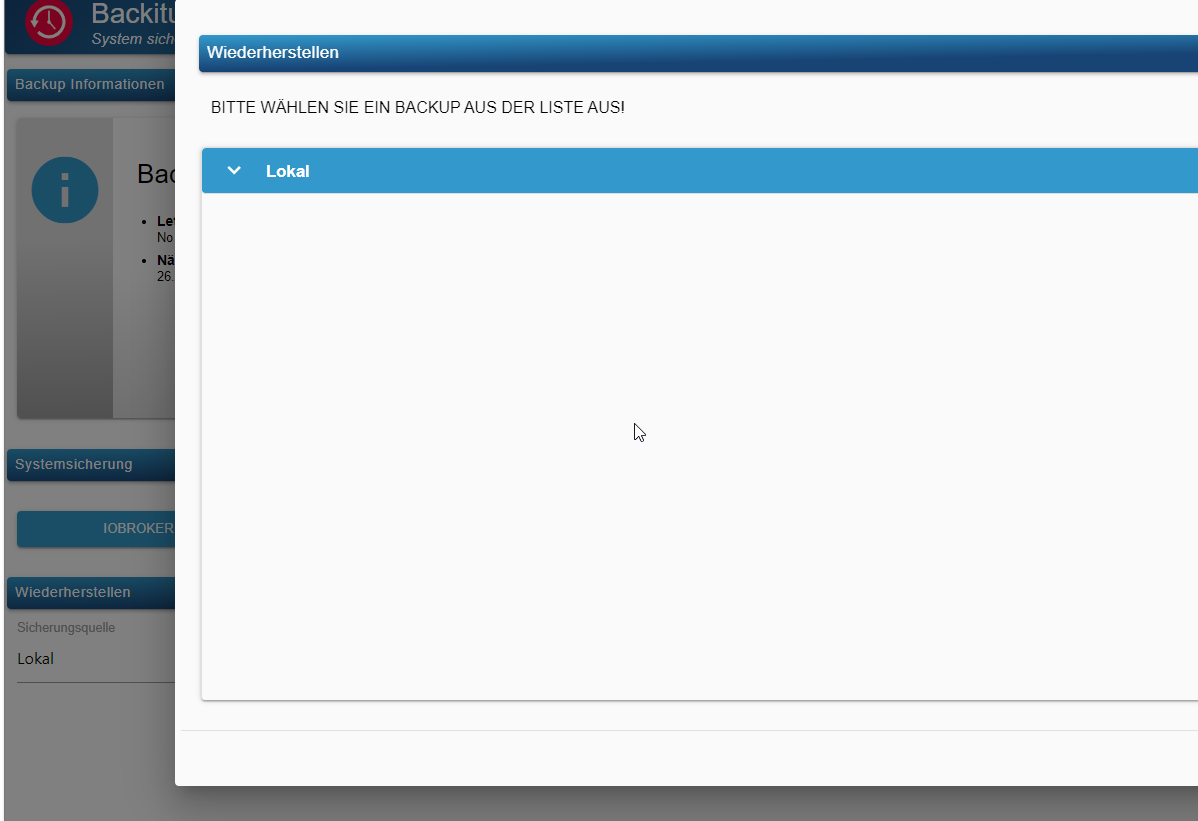
egal ob ich local oder nas aufrufe kommt nur das :
@alero und wo liegt dein Backup in der neuen Installation?
BTW. Wenn du vis nutzst musst du sie vor dem Restore einmal manuell installieren.
-
@crunchip
backup adapter mittlerweile grün.
egal ob ich local oder nas aufrufe kommt nur das :
-
@crunchip
backup adapter mittlerweile grün.
egal ob ich local oder nas aufrufe kommt nur das :
@alero sagte in Update von Debian 10 auf 11?:
oder nas
cifs, nfs oder was auch immer installiert?
@alero sagte in Update von Debian 10 auf 11?:
egal ob ich local
passen die Rechte!?
-
@alero sagte in Update von Debian 10 auf 11?:
oder nas
cifs, nfs oder was auch immer installiert?
@alero sagte in Update von Debian 10 auf 11?:
egal ob ich local
passen die Rechte!?
-
cifs
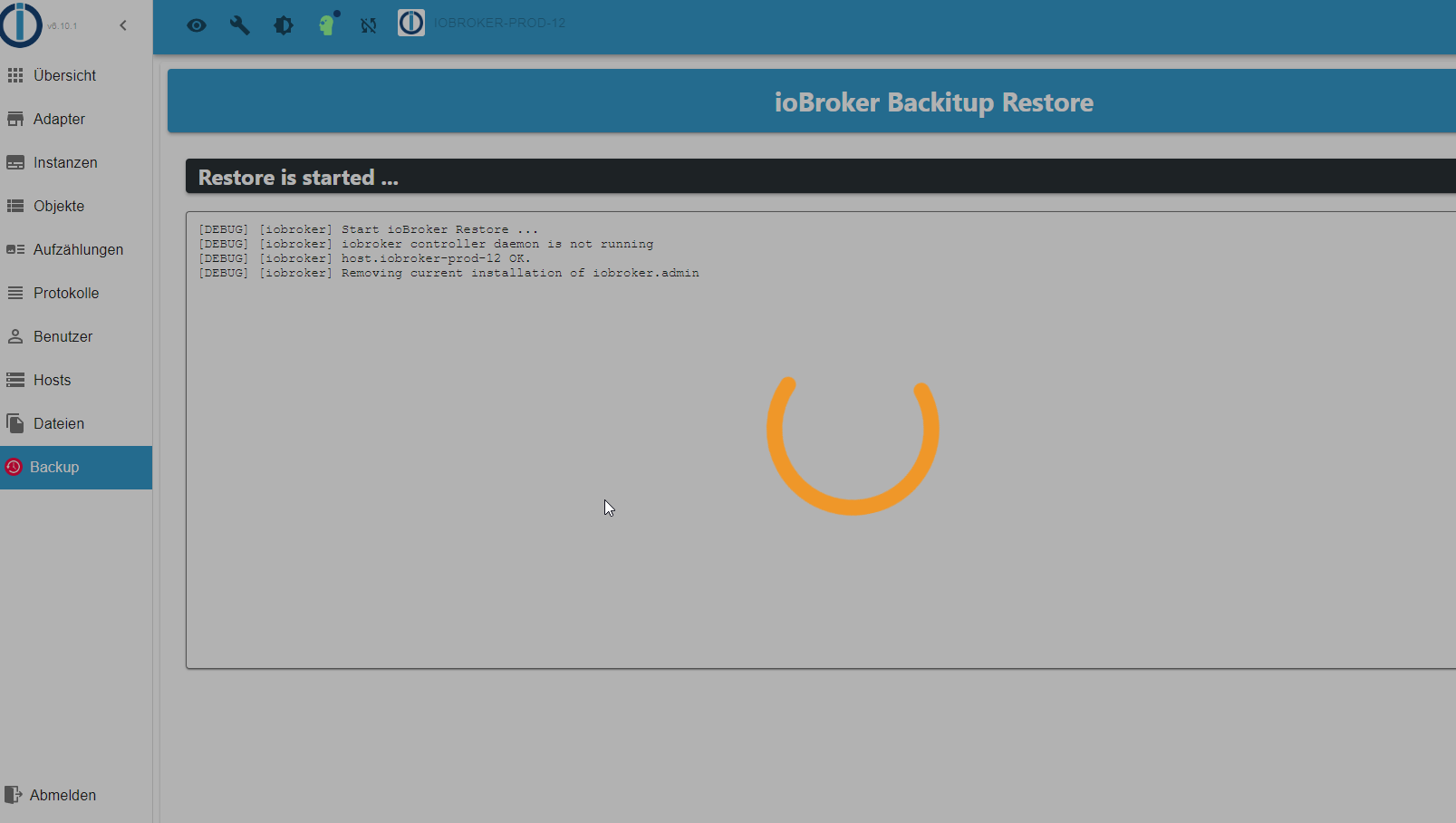
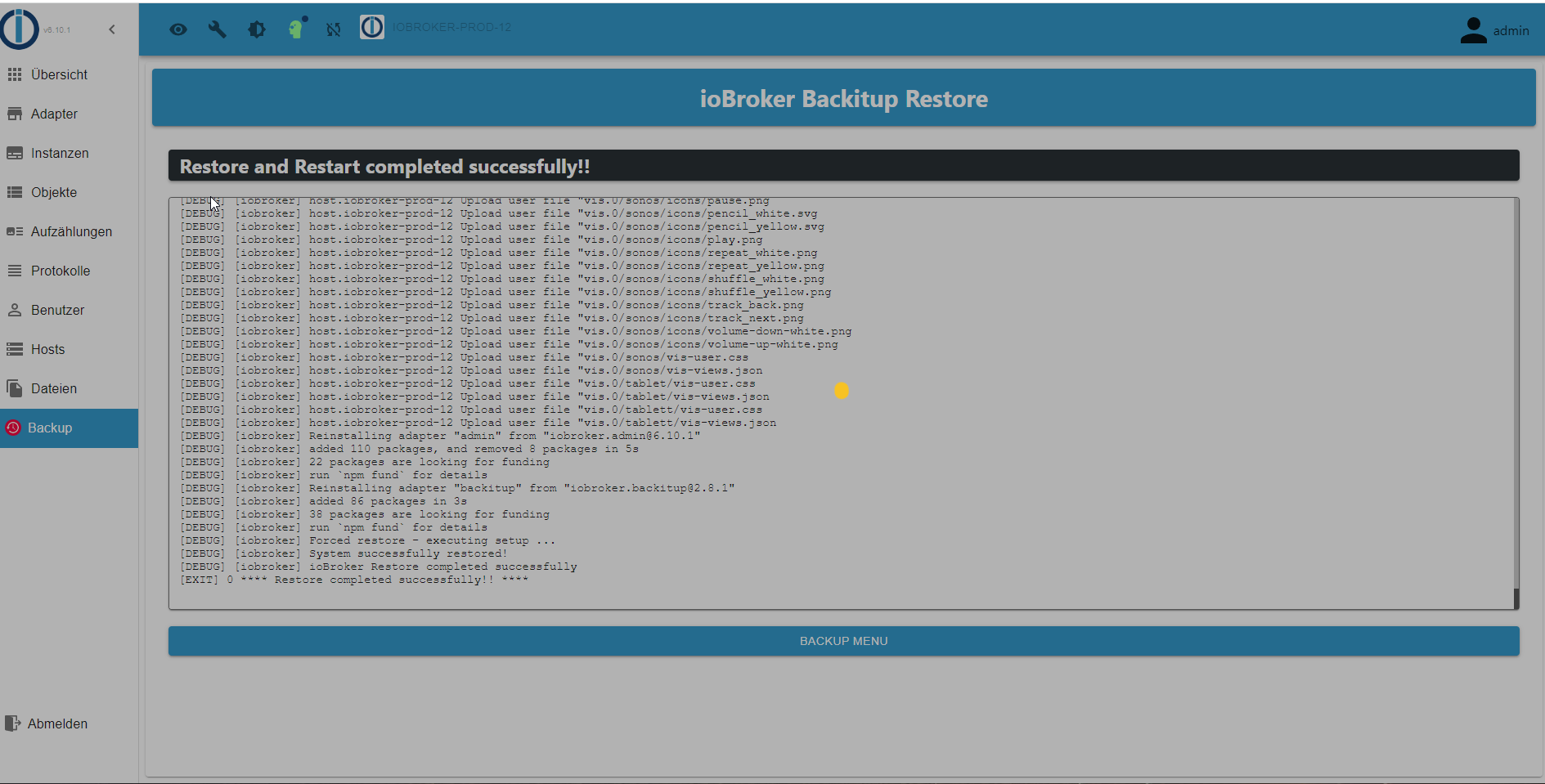
so,habe jetzt en restore ausgeführt.
hat auch soweit geklappt
Muss ich jetzt iobroker von hand starten oder einfach mal was warten?@alero sagte in Update von Debian 10 auf 11?:
oder einfach mal was warten?
ja, das dauert ne ganze Weile
kannst du nebenbei per shell beobachteniob logs --watch -
@alero sagte in Update von Debian 10 auf 11?:
oder einfach mal was warten?
ja, das dauert ne ganze Weile
kannst du nebenbei per shell beobachteniob logs --watch -
@crunchip sagte in Update von Debian 10 auf 11?:
iob logs --watch
danke.
ich denke sonst habe ich es doch soweit in der richtigen Reihenfolge installiert, oder?
@alero sollte passen, ausser wie oben schon erwähnt, falls vis genutzt wird, muss dies Aufgrund eines bugs, vor dem restore manuell installiert werden
-
@alero sollte passen, ausser wie oben schon erwähnt, falls vis genutzt wird, muss dies Aufgrund eines bugs, vor dem restore manuell installiert werden
@crunchip
jo sieht so aus als müsste ich das noch einmal machench block, or by rejecting a promise which was not handled with .catch(). 2023-09-25 12:33:25.584 - error: vis.0 (20936) unhandled promise rejection: Not exists 2023-09-25 12:33:25.584 - error: vis.0 (20936) Error: Not exists at ObjectsInRedisClient._readFile (/opt/iobroker/node_modules/@iobroker/db-objects-redis/build/lib/objects/objectsInRedisClient.js:854:19) at Immediate.<anonymous> (/opt/iobroker/node_modules/@iobroker/db-objects-redis/build/lib/objects/objectsInRedisClient.js:891:59) at process.processImmediate (node:internal/timers:478:21) 2023-09-25 12:33:25.584 - error: vis.0 (20936) Not exists 2023-09-25 12:33:26.087 - info: vis.0 (20936) terminating 2023-09-25 12:33:26.088 - warn: vis.0 (20936) Terminated (UNCAUGHT_EXCEPTION): Without reason 2023-09-25 12:33:25.226 - info: vis.0 (20936) starting. Version 1.4.16 in /opt/iobroker/node_modules/iobroker.vis, node: v18.18.0, js-controller: 5.0.12 2023-09-25 12:33:25.403 - info: vis.0 (20936) vis license is OK. 2023-09-25 12:33:25.583 - error: vis.0 (20936) Unhandled promise rejection. This error originated either by throwing inside of an async function without a catch block, or by rejecting a promise which was not handled with .catch(). 2023-09-25 12:33:25.584 - error: vis.0 (20936) unhandled promise rejection: Not exists 2023-09-25 12:33:25.584 - error: vis.0 (20936) Error: Not exists at ObjectsInRedisClient._readFile (/opt/iobroker/node_modules/@iobroker/db-objects-redis/build/lib/objects/objectsInRedisClient.js:854:19) at Immediate.<anonymous> (/opt/iobroker/node_modules/@iobroker/db-objects-redis/build/lib/objects/objectsInRedisClient.js:891:59) at process.processImmediate (node:internal/timers:478:21) 2023-09-25 12:33:25.584 - error: vis.0 (20936) Not exists 2023-09-25 12:33:26.087 - info: vis.0 (20936) terminating 2023-09-25 12:33:26.088 - warn: vis.0 (20936) Terminated (UNCAUGHT_EXCEPTION): Without reason 2023-09-25 12:33:26.698 - error: host.iobroker-prod-12 iobroker npm-install: npm ERR! code 6npm ERR! path /opt/iobroker/node_modules/iobroker.visnpm ERR! command failednpm ERR! command sh -c node main.js --installnpm ERR! A complete log of this run can be found in: /home/iobroker/.npm/_logs/2023-09-25T12_33_20_977Z-debug-0.log 2023-09-25 12:33:26.698 - error: host.iobroker-prod-12 iobroker npm-install: host.iobroker-prod-12 Cannot install iobroker.vis@1.4.16: 6 2023-09-25 12:33:26.698 - error: host.iobroker-prod-12 iobroker npm-install: npm ERR! code 6npm ERR! path /opt/iobroker/node_modules/iobroker.visnpm ERR! command failednpm ERR! command sh -c node main.js --installnpm ERR! A complete log of this run can be found in: /home/iobroker/.npm/_logs/2023-09-25T12_33_20_977Z-debug-0.log 2023-09-25 12:33:26.698 - error: host.iobroker-prod-12 iobroker npm-install: host.iobroker-prod-12 Cannot install iobroker.vis@1.4.16: 6 2023-09-25 12:33:27.715 - info: host.iobroker-prod-12 iobroker npm-install: exit 25 2023-09-25 12:33:27.715 - info: host.iobroker-prod-12 iobroker npm-install: exit 25 2023-09-25 12:33:28.716 - warn: host.iobroker-prod-12 startInstance cannot find adapter "vis@1.4.16". Try to install it... 3 attempt 2023-09-25 12:33:28.716 - info: host.iobroker-prod-12 iobroker install vis@1.4.16 using installedVersion 2023-09-25 12:33:28.716 - warn: host.iobroker-prod-12 startInstance cannot find adapter "vis@1.4.16". Try to install it... 3 attempt 2023-09-25 12:33:28.716 - info: host.iobroker-prod-12 iobroker install vis@1.4.16 using installedVersion 2023-09-25 12:33:29.977 - info: host.iobroker-prod-12 iobroker npm-install: NPM version: 9.8.1 2023-09-25 12:33:29.979 - info: host.iobroker-prod-12 iobroker npm-install: Installing iobroker.vis@1.4.16... (System call) 2023-09-25 12:33:29.977 - info: host.iobroker-prod-12 iobroker npm-install: NPM version: 9.8.1 2023-09-25 12:33:29.979 - info: host.iobroker-prod-12 iobroker npm-install: Installing iobroker.vis@1.4.16... (System call) 2023-09-25 12:33:34.448 - info: vis.0 (21173) starting. Version 1.4.16 in /opt/iobroker/node_modules/iobroker.vis, node: v18.18.0, js-controller: 5.0.12 2023-09-25 12:33:34.597 - info: vis.0 (21173) vis license is OK. 2023-09-25 12:33:34.759 - error: vis.0 (21173) Unhandled promise rejection. This error originated either by throwing inside of an async function without a catch block, or by rejecting a promise which was not handled with .catch(). 2023-09-25 12:33:34.759 - error: vis.0 (21173) unhandled promise rejection: Not exists 2023-09-25 12:33:34.760 - error: vis.0 (21173) Error: Not exists at ObjectsInRedisClient._readFile (/opt/iobroker/node_modules/@iobroker/db-objects-redis/build/lib/objects/objectsInRedisClient.js:854:19) at Immediate.<anonymous> (/opt/iobroker/node_modules/@iobroker/db-objects-redis/build/lib/objects/objectsInRedisClient.js:891:59) at process.processImmediate (node:internal/timers:478:21) 2023-09-25 12:33:34.760 - error: vis.0 (21173) Not exists 2023-09-25 12:33:35.275 - info: vis.0 (21173) terminating 2023-09-25 12:33:35.276 - warn: vis.0 (21173) Terminated (UNCAUGHT_EXCEPTION): Without reason 2023-09-25 12:33:34.448 - info: vis.0 (21173) starting. Version 1.4.16 in /opt/iobroker/node_modules/iobroker.vis, node: v18.18.0, js-controller: 5.0.12 2023-09-25 12:33:34.597 - info: vis.0 (21173) vis license is OK. 2023-09-25 12:33:34.759 - error: vis.0 (21173) Unhandled promise rejection. This error originated either by throwing inside of an async function without a catch block, or by rejecting a promise which was not handled with .catch(). 2023-09-25 12:33:34.759 - error: vis.0 (21173) unhandled promise rejection: Not exists 2023-09-25 12:33:34.760 - error: vis.0 (21173) Error: Not exists at ObjectsInRedisClient._readFile (/opt/iobroker/node_modules/@iobroker/db-objects-redis/build/lib/objects/objectsInRedisClient.js:854:19) at Immediate.<anonymous> (/opt/iobroker/node_modules/@iobroker/db-objects-redis/build/lib/objects/objectsInRedisClient.js:891:59) at process.processImmediate (node:internal/timers:478:21) 2023-09-25 12:33:34.760 - error: vis.0 (21173) Not exists 2023-09-25 12:33:35.275 - info: vis.0 (21173) terminating 2023-09-25 12:33:35.276 - warn: vis.0 (21173) Terminated (UNCAUGHT_EXCEPTION): Without reason 2023-09-25 12:33:35.890 - error: host.iobroker-prod-12 iobroker npm-install: npm ERR! code 6npm ERR! path /opt/iobroker/node_modules/iobroker.visnpm ERR! command failednpm ERR! command sh -c node main.js --installnpm ERR! A complete log of this run can be found in: /home/iobroker/.npm/_logs/2023-09-25T12_33_30_247Z-debug-0.log 2023-09-25 12:33:35.891 - error: host.iobroker-prod-12 iobroker npm-install: host.iobroker-prod-12 Cannot install iobroker.vis@1.4.16: 6 2023-09-25 12:33:35.890 - error: host.iobroker-prod-12 iobroker npm-install: npm ERR! code 6npm ERR! path /opt/iobroker/node_modules/iobroker.visnpm ERR! command failednpm ERR! command sh -c node main.js --installnpm ERR! A complete log of this run can be found in: /home/iobroker/.npm/_logs/2023-09-25T12_33_30_247Z-debug-0.log 2023-09-25 12:33:35.891 - error: host.iobroker-prod-12 iobroker npm-install: host.iobroker-prod-12 Cannot install iobroker.vis@1.4.16: 6 2023-09-25 12:33:36.906 - info: host.iobroker-prod-12 iobroker npm-install: exit 25 2023-09-25 12:33:36.906 - info: host.iobroker-prod-12 iobroker npm-install: exit 25 2023-09-25 12:33:37.906 - warn: host.iobroker-prod-12 startInstance cannot find adapter "vis@1.4.16". Try to install it... 4 attempt 2023-09-25 12:33:37.907 - info: host.iobroker-prod-12 iobroker install vis@1.4.16 using installedVersion 2023-09-25 12:33:37.906 - warn: host.iobroker-prod-12 startInstance cannot find adapter "vis@1.4.16". Try to install it... 4 attempt 2023-09-25 12:33:37.907 - info: host.iobroker-prod-12 iobroker install vis@1.4.16 using installedVersion 2023-09-25 12:33:39.151 - info: host.iobroker-prod-12 iobroker npm-install: NPM version: 9.8.1Installing iobroker.vis@1.4.16... (System call) 2023-09-25 12:33:39.151 - info: host.iobroker-prod-12 iobroker npm-install: NPM version: 9.8.1Installing iobroker.vis@1.4.16... (System call) 2023-09-25 12:33:43.691 - info: vis.0 (21411) starting. Version 1.4.16 in /opt/iobroker/node_modules/iobroker.vis, node: v18.18.0, js-controller: 5.0.12 2023-09-25 12:33:43.848 - info: vis.0 (21411) vis license is OK. 2023-09-25 12:33:44.005 - error: vis.0 (21411) Unhandled promise rejection. This error originated either by throwing inside of an async function without a catch block, or by rejecting a promise which was not handled with .catch(). 2023-09-25 12:33:44.005 - error: vis.0 (21411) unhandled promise rejection: Not exists 2023-09-25 12:33:44.006 - error: vis.0 (21411) Error: Not exists at ObjectsInRedisClient._readFile (/opt/iobroker/node_modules/@iobroker/db-objects-redis/build/lib/objects/objectsInRedisClient.js:854:19) at Immediate.<anonymous> (/opt/iobroker/node_modules/@iobroker/db-objects-redis/build/lib/objects/objectsInRedisClient.js:891:59) at process.processImmediate (node:internal/timers:478:21) 2023-09-25 12:33:44.006 - error: vis.0 (21411) Not exists 2023-09-25 12:33:43.691 - info: vis.0 (21411) starting. Version 1.4.16 in /opt/iobroker/node_modules/iobroker.vis, node: v18.18.0, js-controller: 5.0.12 2023-09-25 12:33:43.848 - info: vis.0 (21411) vis license is OK. 2023-09-25 12:33:44.005 - error: vis.0 (21411) Unhandled promise rejection. This error originated either by throwing inside of an async function without a catch block, or by rejecting a promise which was not handled with .catch(). 2023-09-25 12:33:44.005 - error: vis.0 (21411) unhandled promise rejection: Not exists 2023-09-25 12:33:44.006 - error: vis.0 (21411) Error: Not exists at ObjectsInRedisClient._readFile (/opt/iobroker/node_modules/@iobroker/db-objects-redis/build/lib/objects/objectsInRedisClient.js:854:19) at Immediate.<anonymous> (/opt/iobroker/node_modules/@iobroker/db-objects-redis/build/lib/objects/objectsInRedisClient.js:891:59) at process.processImmediate (node:internal/timers:478:21) 2023-09-25 12:33:44.006 - error: vis.0 (21411) Not exists 2023-09-25 12:33:44.511 - info: vis.0 (21411) terminating 2023-09-25 12:33:44.512 - warn: vis.0 (21411) Terminated (UNCAUGHT_EXCEPTION): Without reason 2023-09-25 12:33:44.511 - info: vis.0 (21411) terminating 2023-09-25 12:33:44.512 - warn: vis.0 (21411) Terminated (UNCAUGHT_EXCEPTION): Without reason 2023-09-25 12:33:45.131 - error: host.iobroker-prod-12 iobroker npm-install: npm ERR! code 6npm ERR! path /opt/iobroker/node_modules/iobroker.visnpm ERR! command failednpm ERR! command sh -c node main.js --installnpm ERR! A complete log of this run can be found in: /home/iobroker/.npm/_logs/2023-09-25T12_33_39_422Z-debug-0.log 2023-09-25 12:33:45.132 - error: host.iobroker-prod-12 iobroker npm-install: host.iobroker-prod-12 Cannot install iobroker.vis@1.4.16: 6 2023-09-25 12:33:45.131 - error: host.iobroker-prod-12 iobroker npm-install: npm ERR! code 6npm ERR! path /opt/iobroker/node_modules/iobroker.visnpm ERR! command failednpm ERR! command sh -c node main.js --installnpm ERR! A complete log of this run can be found in: /home/iobroker/.npm/_logs/2023-09-25T12_33_39_422Z-debug-0.log 2023-09-25 12:33:45.132 - error: host.iobroker-prod-12 iobroker npm-install: host.iobroker-prod-12 Cannot install iobroker.vis@1.4.16: 6 2023-09-25 12:33:46.157 - info: host.iobroker-prod-12 iobroker npm-install: exit 25 2023-09-25 12:33:46.157 - info: host.iobroker-prod-12 iobroker npm-install: exit 25 2023-09-25 12:33:47.157 - error: host.iobroker-prod-12 Cannot download and install adapter "vis@1.4.16". To retry it disable/enable the adapter or restart host. Also check the error messages in the log! 2023-09-25 12:33:47.157 - error: host.iobroker-prod-12 Cannot download and install adapter "vis@1.4.16". To retry it disable/enable the adapter or restart host. Also check the error messages in the log! -
@crunchip
jo sieht so aus als müsste ich das noch einmal machench block, or by rejecting a promise which was not handled with .catch(). 2023-09-25 12:33:25.584 - error: vis.0 (20936) unhandled promise rejection: Not exists 2023-09-25 12:33:25.584 - error: vis.0 (20936) Error: Not exists at ObjectsInRedisClient._readFile (/opt/iobroker/node_modules/@iobroker/db-objects-redis/build/lib/objects/objectsInRedisClient.js:854:19) at Immediate.<anonymous> (/opt/iobroker/node_modules/@iobroker/db-objects-redis/build/lib/objects/objectsInRedisClient.js:891:59) at process.processImmediate (node:internal/timers:478:21) 2023-09-25 12:33:25.584 - error: vis.0 (20936) Not exists 2023-09-25 12:33:26.087 - info: vis.0 (20936) terminating 2023-09-25 12:33:26.088 - warn: vis.0 (20936) Terminated (UNCAUGHT_EXCEPTION): Without reason 2023-09-25 12:33:25.226 - info: vis.0 (20936) starting. Version 1.4.16 in /opt/iobroker/node_modules/iobroker.vis, node: v18.18.0, js-controller: 5.0.12 2023-09-25 12:33:25.403 - info: vis.0 (20936) vis license is OK. 2023-09-25 12:33:25.583 - error: vis.0 (20936) Unhandled promise rejection. This error originated either by throwing inside of an async function without a catch block, or by rejecting a promise which was not handled with .catch(). 2023-09-25 12:33:25.584 - error: vis.0 (20936) unhandled promise rejection: Not exists 2023-09-25 12:33:25.584 - error: vis.0 (20936) Error: Not exists at ObjectsInRedisClient._readFile (/opt/iobroker/node_modules/@iobroker/db-objects-redis/build/lib/objects/objectsInRedisClient.js:854:19) at Immediate.<anonymous> (/opt/iobroker/node_modules/@iobroker/db-objects-redis/build/lib/objects/objectsInRedisClient.js:891:59) at process.processImmediate (node:internal/timers:478:21) 2023-09-25 12:33:25.584 - error: vis.0 (20936) Not exists 2023-09-25 12:33:26.087 - info: vis.0 (20936) terminating 2023-09-25 12:33:26.088 - warn: vis.0 (20936) Terminated (UNCAUGHT_EXCEPTION): Without reason 2023-09-25 12:33:26.698 - error: host.iobroker-prod-12 iobroker npm-install: npm ERR! code 6npm ERR! path /opt/iobroker/node_modules/iobroker.visnpm ERR! command failednpm ERR! command sh -c node main.js --installnpm ERR! A complete log of this run can be found in: /home/iobroker/.npm/_logs/2023-09-25T12_33_20_977Z-debug-0.log 2023-09-25 12:33:26.698 - error: host.iobroker-prod-12 iobroker npm-install: host.iobroker-prod-12 Cannot install iobroker.vis@1.4.16: 6 2023-09-25 12:33:26.698 - error: host.iobroker-prod-12 iobroker npm-install: npm ERR! code 6npm ERR! path /opt/iobroker/node_modules/iobroker.visnpm ERR! command failednpm ERR! command sh -c node main.js --installnpm ERR! A complete log of this run can be found in: /home/iobroker/.npm/_logs/2023-09-25T12_33_20_977Z-debug-0.log 2023-09-25 12:33:26.698 - error: host.iobroker-prod-12 iobroker npm-install: host.iobroker-prod-12 Cannot install iobroker.vis@1.4.16: 6 2023-09-25 12:33:27.715 - info: host.iobroker-prod-12 iobroker npm-install: exit 25 2023-09-25 12:33:27.715 - info: host.iobroker-prod-12 iobroker npm-install: exit 25 2023-09-25 12:33:28.716 - warn: host.iobroker-prod-12 startInstance cannot find adapter "vis@1.4.16". Try to install it... 3 attempt 2023-09-25 12:33:28.716 - info: host.iobroker-prod-12 iobroker install vis@1.4.16 using installedVersion 2023-09-25 12:33:28.716 - warn: host.iobroker-prod-12 startInstance cannot find adapter "vis@1.4.16". Try to install it... 3 attempt 2023-09-25 12:33:28.716 - info: host.iobroker-prod-12 iobroker install vis@1.4.16 using installedVersion 2023-09-25 12:33:29.977 - info: host.iobroker-prod-12 iobroker npm-install: NPM version: 9.8.1 2023-09-25 12:33:29.979 - info: host.iobroker-prod-12 iobroker npm-install: Installing iobroker.vis@1.4.16... (System call) 2023-09-25 12:33:29.977 - info: host.iobroker-prod-12 iobroker npm-install: NPM version: 9.8.1 2023-09-25 12:33:29.979 - info: host.iobroker-prod-12 iobroker npm-install: Installing iobroker.vis@1.4.16... (System call) 2023-09-25 12:33:34.448 - info: vis.0 (21173) starting. Version 1.4.16 in /opt/iobroker/node_modules/iobroker.vis, node: v18.18.0, js-controller: 5.0.12 2023-09-25 12:33:34.597 - info: vis.0 (21173) vis license is OK. 2023-09-25 12:33:34.759 - error: vis.0 (21173) Unhandled promise rejection. This error originated either by throwing inside of an async function without a catch block, or by rejecting a promise which was not handled with .catch(). 2023-09-25 12:33:34.759 - error: vis.0 (21173) unhandled promise rejection: Not exists 2023-09-25 12:33:34.760 - error: vis.0 (21173) Error: Not exists at ObjectsInRedisClient._readFile (/opt/iobroker/node_modules/@iobroker/db-objects-redis/build/lib/objects/objectsInRedisClient.js:854:19) at Immediate.<anonymous> (/opt/iobroker/node_modules/@iobroker/db-objects-redis/build/lib/objects/objectsInRedisClient.js:891:59) at process.processImmediate (node:internal/timers:478:21) 2023-09-25 12:33:34.760 - error: vis.0 (21173) Not exists 2023-09-25 12:33:35.275 - info: vis.0 (21173) terminating 2023-09-25 12:33:35.276 - warn: vis.0 (21173) Terminated (UNCAUGHT_EXCEPTION): Without reason 2023-09-25 12:33:34.448 - info: vis.0 (21173) starting. Version 1.4.16 in /opt/iobroker/node_modules/iobroker.vis, node: v18.18.0, js-controller: 5.0.12 2023-09-25 12:33:34.597 - info: vis.0 (21173) vis license is OK. 2023-09-25 12:33:34.759 - error: vis.0 (21173) Unhandled promise rejection. This error originated either by throwing inside of an async function without a catch block, or by rejecting a promise which was not handled with .catch(). 2023-09-25 12:33:34.759 - error: vis.0 (21173) unhandled promise rejection: Not exists 2023-09-25 12:33:34.760 - error: vis.0 (21173) Error: Not exists at ObjectsInRedisClient._readFile (/opt/iobroker/node_modules/@iobroker/db-objects-redis/build/lib/objects/objectsInRedisClient.js:854:19) at Immediate.<anonymous> (/opt/iobroker/node_modules/@iobroker/db-objects-redis/build/lib/objects/objectsInRedisClient.js:891:59) at process.processImmediate (node:internal/timers:478:21) 2023-09-25 12:33:34.760 - error: vis.0 (21173) Not exists 2023-09-25 12:33:35.275 - info: vis.0 (21173) terminating 2023-09-25 12:33:35.276 - warn: vis.0 (21173) Terminated (UNCAUGHT_EXCEPTION): Without reason 2023-09-25 12:33:35.890 - error: host.iobroker-prod-12 iobroker npm-install: npm ERR! code 6npm ERR! path /opt/iobroker/node_modules/iobroker.visnpm ERR! command failednpm ERR! command sh -c node main.js --installnpm ERR! A complete log of this run can be found in: /home/iobroker/.npm/_logs/2023-09-25T12_33_30_247Z-debug-0.log 2023-09-25 12:33:35.891 - error: host.iobroker-prod-12 iobroker npm-install: host.iobroker-prod-12 Cannot install iobroker.vis@1.4.16: 6 2023-09-25 12:33:35.890 - error: host.iobroker-prod-12 iobroker npm-install: npm ERR! code 6npm ERR! path /opt/iobroker/node_modules/iobroker.visnpm ERR! command failednpm ERR! command sh -c node main.js --installnpm ERR! A complete log of this run can be found in: /home/iobroker/.npm/_logs/2023-09-25T12_33_30_247Z-debug-0.log 2023-09-25 12:33:35.891 - error: host.iobroker-prod-12 iobroker npm-install: host.iobroker-prod-12 Cannot install iobroker.vis@1.4.16: 6 2023-09-25 12:33:36.906 - info: host.iobroker-prod-12 iobroker npm-install: exit 25 2023-09-25 12:33:36.906 - info: host.iobroker-prod-12 iobroker npm-install: exit 25 2023-09-25 12:33:37.906 - warn: host.iobroker-prod-12 startInstance cannot find adapter "vis@1.4.16". Try to install it... 4 attempt 2023-09-25 12:33:37.907 - info: host.iobroker-prod-12 iobroker install vis@1.4.16 using installedVersion 2023-09-25 12:33:37.906 - warn: host.iobroker-prod-12 startInstance cannot find adapter "vis@1.4.16". Try to install it... 4 attempt 2023-09-25 12:33:37.907 - info: host.iobroker-prod-12 iobroker install vis@1.4.16 using installedVersion 2023-09-25 12:33:39.151 - info: host.iobroker-prod-12 iobroker npm-install: NPM version: 9.8.1Installing iobroker.vis@1.4.16... (System call) 2023-09-25 12:33:39.151 - info: host.iobroker-prod-12 iobroker npm-install: NPM version: 9.8.1Installing iobroker.vis@1.4.16... (System call) 2023-09-25 12:33:43.691 - info: vis.0 (21411) starting. Version 1.4.16 in /opt/iobroker/node_modules/iobroker.vis, node: v18.18.0, js-controller: 5.0.12 2023-09-25 12:33:43.848 - info: vis.0 (21411) vis license is OK. 2023-09-25 12:33:44.005 - error: vis.0 (21411) Unhandled promise rejection. This error originated either by throwing inside of an async function without a catch block, or by rejecting a promise which was not handled with .catch(). 2023-09-25 12:33:44.005 - error: vis.0 (21411) unhandled promise rejection: Not exists 2023-09-25 12:33:44.006 - error: vis.0 (21411) Error: Not exists at ObjectsInRedisClient._readFile (/opt/iobroker/node_modules/@iobroker/db-objects-redis/build/lib/objects/objectsInRedisClient.js:854:19) at Immediate.<anonymous> (/opt/iobroker/node_modules/@iobroker/db-objects-redis/build/lib/objects/objectsInRedisClient.js:891:59) at process.processImmediate (node:internal/timers:478:21) 2023-09-25 12:33:44.006 - error: vis.0 (21411) Not exists 2023-09-25 12:33:43.691 - info: vis.0 (21411) starting. Version 1.4.16 in /opt/iobroker/node_modules/iobroker.vis, node: v18.18.0, js-controller: 5.0.12 2023-09-25 12:33:43.848 - info: vis.0 (21411) vis license is OK. 2023-09-25 12:33:44.005 - error: vis.0 (21411) Unhandled promise rejection. This error originated either by throwing inside of an async function without a catch block, or by rejecting a promise which was not handled with .catch(). 2023-09-25 12:33:44.005 - error: vis.0 (21411) unhandled promise rejection: Not exists 2023-09-25 12:33:44.006 - error: vis.0 (21411) Error: Not exists at ObjectsInRedisClient._readFile (/opt/iobroker/node_modules/@iobroker/db-objects-redis/build/lib/objects/objectsInRedisClient.js:854:19) at Immediate.<anonymous> (/opt/iobroker/node_modules/@iobroker/db-objects-redis/build/lib/objects/objectsInRedisClient.js:891:59) at process.processImmediate (node:internal/timers:478:21) 2023-09-25 12:33:44.006 - error: vis.0 (21411) Not exists 2023-09-25 12:33:44.511 - info: vis.0 (21411) terminating 2023-09-25 12:33:44.512 - warn: vis.0 (21411) Terminated (UNCAUGHT_EXCEPTION): Without reason 2023-09-25 12:33:44.511 - info: vis.0 (21411) terminating 2023-09-25 12:33:44.512 - warn: vis.0 (21411) Terminated (UNCAUGHT_EXCEPTION): Without reason 2023-09-25 12:33:45.131 - error: host.iobroker-prod-12 iobroker npm-install: npm ERR! code 6npm ERR! path /opt/iobroker/node_modules/iobroker.visnpm ERR! command failednpm ERR! command sh -c node main.js --installnpm ERR! A complete log of this run can be found in: /home/iobroker/.npm/_logs/2023-09-25T12_33_39_422Z-debug-0.log 2023-09-25 12:33:45.132 - error: host.iobroker-prod-12 iobroker npm-install: host.iobroker-prod-12 Cannot install iobroker.vis@1.4.16: 6 2023-09-25 12:33:45.131 - error: host.iobroker-prod-12 iobroker npm-install: npm ERR! code 6npm ERR! path /opt/iobroker/node_modules/iobroker.visnpm ERR! command failednpm ERR! command sh -c node main.js --installnpm ERR! A complete log of this run can be found in: /home/iobroker/.npm/_logs/2023-09-25T12_33_39_422Z-debug-0.log 2023-09-25 12:33:45.132 - error: host.iobroker-prod-12 iobroker npm-install: host.iobroker-prod-12 Cannot install iobroker.vis@1.4.16: 6 2023-09-25 12:33:46.157 - info: host.iobroker-prod-12 iobroker npm-install: exit 25 2023-09-25 12:33:46.157 - info: host.iobroker-prod-12 iobroker npm-install: exit 25 2023-09-25 12:33:47.157 - error: host.iobroker-prod-12 Cannot download and install adapter "vis@1.4.16". To retry it disable/enable the adapter or restart host. Also check the error messages in the log! 2023-09-25 12:33:47.157 - error: host.iobroker-prod-12 Cannot download and install adapter "vis@1.4.16". To retry it disable/enable the adapter or restart host. Also check the error messages in the log!@alero versuch
iob install vis@1.4.10und anschließend wieder update -
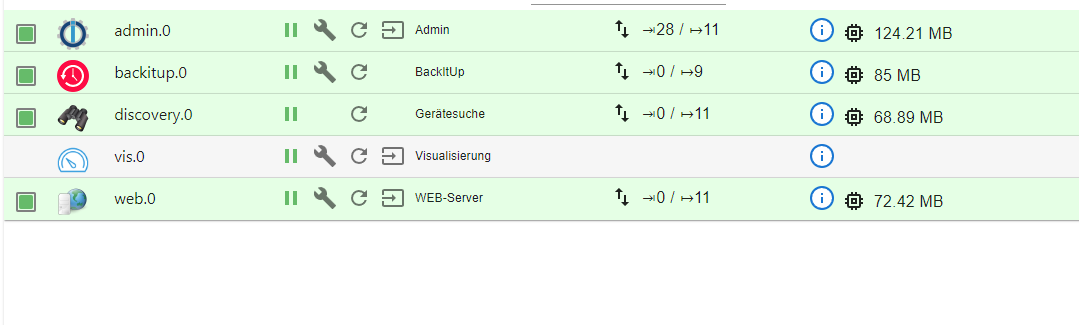
So
habe eben neu installiert.
sieht jetzt so aus.
jetzt will ich den restore anstoßen. Wenn niemand was dagegen hat ;-)Bekomme noch einen Fehler beim zugriff aufs Nas SMB.
Error: Command failed: sudo mount -t cifs -o username=backup,password=****,rw,uid=iobroker,gid=iobroker,file_mode=0777,dir_mode=0777 //192.168.42.100/backup/Iobroker/Standard /opt/iobroker/backupsmount error(1): Operation not permittedRefer to the mount.cifs(8) manual page (e.g. man mount.cifs) and kernel log messages (dmesg)


Hey! Du scheinst an dieser Unterhaltung interessiert zu sein, hast aber noch kein Konto.
Hast du es satt, bei jedem Besuch durch die gleichen Beiträge zu scrollen? Wenn du dich für ein Konto anmeldest, kommst du immer genau dorthin zurück, wo du zuvor warst, und kannst dich über neue Antworten benachrichtigen lassen (entweder per E-Mail oder Push-Benachrichtigung). Du kannst auch Lesezeichen speichern und Beiträge positiv bewerten, um anderen Community-Mitgliedern deine Wertschätzung zu zeigen.
Mit deinem Input könnte dieser Beitrag noch besser werden 💗
Registrieren AnmeldenSupport us
510
Online33.0k
Benutzer83.6k
Themen1.3m
Beiträge