




Troubleshooting NodeJS update
-
@mcm57 sagte in Troubleshooting NodeJS update:
@stoni said in Troubleshooting NodeJS update:
Jetzt läuft mein System seit etwa drei Stunden. Einzig der yeelight Adapter wird regelmäßig beendet, weil er abgestürzt ist
Wenn du uns sagst wo den Adapter der Schuh (oder das Bit :-) ) drückt, können wir ev was sagen. 'Stürzt ab' ist da zu wenig. Also bitte
-) Installierte Adapter Version
-) Log des AbsturzesGuten Morgen,
Der Yeelight Adapter ist erstmal nicht so schlimm. Der deconz Adapter spinnt ziemlich rum, siehe log oben. Den musste ich jetzt pausieren, dadurch sind natürlich diverse Schalter, Sensoren und Leuchter außer Betrieb.
Kannst Du dazu etwas sagen?
VG Stoni -
@stoni
zu deconz nein.Generell würde ich anregen diene Fragen betreffend der beiden Adapter in einen eigenen, neuen Thread zu verlagern. Mit dem NoideJS update an sich hat das wenig bis nichts zu tun.
-
@stoni du hast sicher auch deConz geupdated oder?
Im Phoscon Forum findet sich der Fehler 951 auch: https://forum.phoscon.de/t/authenticated-request-resulting-in-internal-error-951/2943Hallo zusammen ich wollte um etwas Hilfe bitten.
wollte mal alles auf Stand bringen, komme aber nicht weiter.iobroker läuft in Proxmox und hat Backups.
Debian GNU/Linux 10 (buster)
nodejs: v14.21.3
js Controller: 4.0.23wenn ich dieseen Befehl ausführe
curl -fsSL https://deb.nodesource.com/setup_18.x | sudo -E bash -SCRIPT DEPRECATION WARNING This script, located at https://deb.nodesource.com/setup_X, used to install Node.js is deprecated now and will eventually be made inactive. Please visit the NodeSource distributions Github and follow the instructions to migrate your repo. https://github.com/nodesource/distributions The NodeSource Node.js Linux distributions GitHub repository contains information about which versions of Node.js and which Linux distributions are supported and how to install it. https://github.com/nodesource/distributions SCRIPT DEPRECATION WARNING ================================================================================ ▓▓▓▓▓▓▓▓▓▓▓▓▓▓▓▓▓▓▓▓▓▓▓▓▓▓▓▓▓▓▓▓▓▓▓▓▓▓▓▓▓▓▓▓▓▓▓▓▓▓▓▓▓▓▓▓▓▓▓▓▓▓▓▓▓▓▓▓▓▓▓▓▓▓▓▓▓▓▓▓ ================================================================================ TO AVOID THIS WAIT MIGRATE THE SCRIPT Continuing in 60 seconds (press Ctrl-C to abort) ... ## Installing the NodeSource Node.js 18.x repo... ## Populating apt-get cache... + apt-get update OK:1 http://security.debian.org/debian-security buster/updates InRelease OK:2 http://deb.debian.org/debian buster InRelease OK:3 http://deb.debian.org/debian buster-updates InRelease OK:4 https://deb.nodesource.com/node_14.x buster InRelease Ign:5 https://ookla.bintray.com/debian generic InRelease Fehl:6 https://ookla.bintray.com/debian generic Release Certificate verification failed: The certificate is NOT trusted. The name in the certificate does not match the expected. Could not handshake: Error in the certificate verification. [IP: 52.5.94.237 443] Paketlisten werden gelesen... Fertig E: Das Depot »https://ookla.bintray.com/debian generic Release« enthält keine Release-Datei mehr. N: Eine Aktualisierung von solch einem Depot kann nicht auf eine sichere Art durchgeführt werden, daher ist es standardmäßig deaktiviert. N: Weitere Details zur Erzeugung von Paketdepots sowie zu deren Benutzerkonfiguration finden Sie in der Handbuchseite apt-secure(8). Error executing command, exitingich komme leider nicht weiter aufgrund der Certificate Meldung.
Wäre für Hilfestellung dankbar -
Hallo zusammen ich wollte um etwas Hilfe bitten.
wollte mal alles auf Stand bringen, komme aber nicht weiter.iobroker läuft in Proxmox und hat Backups.
Debian GNU/Linux 10 (buster)
nodejs: v14.21.3
js Controller: 4.0.23wenn ich dieseen Befehl ausführe
curl -fsSL https://deb.nodesource.com/setup_18.x | sudo -E bash -SCRIPT DEPRECATION WARNING This script, located at https://deb.nodesource.com/setup_X, used to install Node.js is deprecated now and will eventually be made inactive. Please visit the NodeSource distributions Github and follow the instructions to migrate your repo. https://github.com/nodesource/distributions The NodeSource Node.js Linux distributions GitHub repository contains information about which versions of Node.js and which Linux distributions are supported and how to install it. https://github.com/nodesource/distributions SCRIPT DEPRECATION WARNING ================================================================================ ▓▓▓▓▓▓▓▓▓▓▓▓▓▓▓▓▓▓▓▓▓▓▓▓▓▓▓▓▓▓▓▓▓▓▓▓▓▓▓▓▓▓▓▓▓▓▓▓▓▓▓▓▓▓▓▓▓▓▓▓▓▓▓▓▓▓▓▓▓▓▓▓▓▓▓▓▓▓▓▓ ================================================================================ TO AVOID THIS WAIT MIGRATE THE SCRIPT Continuing in 60 seconds (press Ctrl-C to abort) ... ## Installing the NodeSource Node.js 18.x repo... ## Populating apt-get cache... + apt-get update OK:1 http://security.debian.org/debian-security buster/updates InRelease OK:2 http://deb.debian.org/debian buster InRelease OK:3 http://deb.debian.org/debian buster-updates InRelease OK:4 https://deb.nodesource.com/node_14.x buster InRelease Ign:5 https://ookla.bintray.com/debian generic InRelease Fehl:6 https://ookla.bintray.com/debian generic Release Certificate verification failed: The certificate is NOT trusted. The name in the certificate does not match the expected. Could not handshake: Error in the certificate verification. [IP: 52.5.94.237 443] Paketlisten werden gelesen... Fertig E: Das Depot »https://ookla.bintray.com/debian generic Release« enthält keine Release-Datei mehr. N: Eine Aktualisierung von solch einem Depot kann nicht auf eine sichere Art durchgeführt werden, daher ist es standardmäßig deaktiviert. N: Weitere Details zur Erzeugung von Paketdepots sowie zu deren Benutzerkonfiguration finden Sie in der Handbuchseite apt-secure(8). Error executing command, exitingich komme leider nicht weiter aufgrund der Certificate Meldung.
Wäre für Hilfestellung dankbar@dos1973 sagte in Troubleshooting NodeJS update:
ich komme leider nicht weiter aufgrund der Certificate Meldung.
Ja, versuch es mit:
https://forum.iobroker.net/topic/68035/iob-node-fix-skriptUnd bring dein 'Buster' auf eine lebendige Version. Wir sind bei Debian 12 'Bookworm'.
Die .list-Datei zu ookla-Speedtest musst du löschen, die wird nun so installiert:
curl -s https://packagecloud.io/install/repositories/ookla/speedtest-cli/script.deb.sh | sudo bash sudo apt update sudo apt install speedtest -
@dos1973 sagte in Troubleshooting NodeJS update:
ich komme leider nicht weiter aufgrund der Certificate Meldung.
Ja, versuch es mit:
https://forum.iobroker.net/topic/68035/iob-node-fix-skriptUnd bring dein 'Buster' auf eine lebendige Version. Wir sind bei Debian 12 'Bookworm'.
Die .list-Datei zu ookla-Speedtest musst du löschen, die wird nun so installiert:
curl -s https://packagecloud.io/install/repositories/ookla/speedtest-cli/script.deb.sh | sudo bash sudo apt update sudo apt install speedtest -
Danke Dir für die Antwort.
Ja das Buster läuft. Ewig… mir grauts etwas vor dem update. Kann ich direkt auf 12 gehen, oder muss ich erst auf die 11. anders gefragt, hast du ein Tipp/ Vorgehensweise?@dos1973 sagte in Troubleshooting NodeJS update:
Ewig…
Nichts läuft ewig. Buster ist schon seit einem Jahr tot:
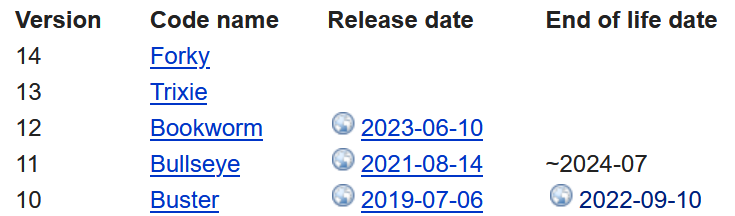
Beerdige das. Ich hab mal, als das Thema aktuell war, ein HowTo dazu geschrieben. Schau durch meine Themen durch. Ein direkter Sprung auf Bookworm ist nicht zu empfehlen, nimm Bullseye mit.
-
@dos1973 sagte in Troubleshooting NodeJS update:
Ewig…
Nichts läuft ewig. Buster ist schon seit einem Jahr tot:
Beerdige das. Ich hab mal, als das Thema aktuell war, ein HowTo dazu geschrieben. Schau durch meine Themen durch. Ein direkter Sprung auf Bookworm ist nicht zu empfehlen, nimm Bullseye mit.
Danke Dir für die Update Hilfe.
PRETTY_NAME="Debian GNU/Linux 12 (bookworm)"
NAME="Debian GNU/Linux"
VERSION_ID="12"
VERSION="12 (bookworm)"
VERSION_CODENAME=bookworm
ID=debian
HOME_URL="https://www.debian.org/"
SUPPORT_URL="https://www.debian.org/support"
BUG_REPORT_URL="https://bugs.debian.org/"
:-)
-
Danke Dir für die Update Hilfe.
PRETTY_NAME="Debian GNU/Linux 12 (bookworm)"
NAME="Debian GNU/Linux"
VERSION_ID="12"
VERSION="12 (bookworm)"
VERSION_CODENAME=bookworm
ID=debian
HOME_URL="https://www.debian.org/"
SUPPORT_URL="https://www.debian.org/support"
BUG_REPORT_URL="https://bugs.debian.org/"
:-)
Und war es so grauenvoll wie befürchtet?
-
Und war es so grauenvoll wie befürchtet?
@thomas-braun
nein, deiner Beschreibung gefolgt (1A) und alles lief Perfekt. -
"curl -fsSL https://deb.nodesource.com/setup_18.x | sudo -E bash -" hat funktioniert und hat mich von von 16.20.1 (nur) auf 18.7.1 gehoben (18.8.0 ist empfohlen)
es kam aber folgende Meldung:
================================================================================
▓▓▓▓▓▓▓▓▓▓▓▓▓▓▓▓▓▓▓▓▓▓▓▓▓▓▓▓▓▓▓▓▓▓▓▓▓▓▓▓▓▓▓▓▓▓▓▓▓▓▓▓▓▓▓▓▓▓▓▓▓▓▓▓▓▓▓▓▓▓▓▓▓▓▓▓▓▓▓▓
================================================================================

                           SCRIPT DEPRECATION WARNING


  This script, located at https://deb.nodesource.com/setup_X, used to
  install Node.js is deprecated now and will eventually be made inactive.

  Please visit the NodeSource distributions Github and follow the
  instructions to migrate your repo.
  https://github.com/nodesource/distributions

  The NodeSource Node.js Linux distributions GitHub repository contains
  information about which versions of Node.js and which Linux distributions
  are supported and how to install it.
  https://github.com/nodesource/distributions


                          SCRIPT DEPRECATION WARNING

================================================================================
▓▓▓▓▓▓▓▓▓▓▓▓▓▓▓▓▓▓▓▓▓▓▓▓▓▓▓▓▓▓▓▓▓▓▓▓▓▓▓▓▓▓▓▓▓▓▓▓▓▓▓▓▓▓▓▓▓▓▓▓▓▓▓▓▓▓▓▓▓▓▓▓▓▓▓▓▓▓▓▓
================================================================================

TO AVOID THIS WAIT MIGRATE THE SCRIPT
Continuing in 60 seconds (press Ctrl-C to abort) ...
nach 1min gehts dann weiter mit:
## Installing the NodeSource Node.js 18.x repo...


## Populating apt-get cache...

+ apt-get update
OK:1 http://de.archive.ubuntu.com/ubuntu focal InRelease
OK:2 http://de.archive.ubuntu.com/ubuntu focal-updates InRelease
OK:3 http://de.archive.ubuntu.com/ubuntu focal-backports InRelease
OK:4 http://de.archive.ubuntu.com/ubuntu focal-security InRelease
OK:5 https://deb.nodesource.com/node_18.x focal InRelease
Paketlisten werden gelesen... Fertig

## Confirming "focal" is supported...

+ curl -sLf -o /dev/null 'https://deb.nodesource.com/node_18.x/dists/focal/Release'

## Adding the NodeSource signing key to your keyring...

+ curl -s https://deb.nodesource.com/gpgkey/nodesource.gpg.key | gpg --dearmor | tee /usr/share/keyrings/nodesource.gpg >/dev/null

## Creating apt sources list file for the NodeSource Node.js 18.x repo...

+ echo 'deb [signed-by=/usr/share/keyrings/nodesource.gpg] https://deb.nodesource.com/node_18.x focal main' > /etc/apt/sources.list.d/nodesource.list
+ echo 'deb-src [signed-by=/usr/share/keyrings/nodesource.gpg] https://deb.nodesource.com/node_18.x focal main' >> /etc/apt/sources.list.d/nodesource.list

## Running `apt-get update` for you...

+ apt-get update
OK:1 http://de.archive.ubuntu.com/ubuntu focal InRelease
OK:2 http://de.archive.ubuntu.com/ubuntu focal-updates InRelease
OK:3 http://de.archive.ubuntu.com/ubuntu focal-backports InRelease
OK:4 http://de.archive.ubuntu.com/ubuntu focal-security InRelease
OK:5 https://deb.nodesource.com/node_18.x focal InRelease
Paketlisten werden gelesen... Fertig

## Run `sudo apt-get install -y nodejs` to install Node.js 18.x and npm
## You may also need development tools to build native addons:
     sudo apt-get install gcc g++ make
## To install the Yarn package manager, run:
     curl -sL https://dl.yarnpkg.com/debian/pubkey.gpg | gpg --dearmor | sudo tee /usr/share/keyrings/yarnkey.gpg >/dev/null
     echo "deb [signed-by=/usr/share/keyrings/yarnkey.gpg] https://dl.yarnpkg.com/debian stable main" | sudo tee /etc/apt/sources.list.d/yarn.list
     sudo apt-get update && sudo apt-get install yarn
Ich hab dann gemäß der Anleitung mit "sudo apt install -y nodejs" weitergemacht
dann kam
Paketlisten werden gelesen... Fertig
Abhängigkeitsbaum wird aufgebaut.
Statusinformationen werden eingelesen.... Fertig
Die folgenden NEUEN Pakete werden installiert:
  nodejs
0 aktualisiert, 1 neu installiert, 0 zu entfernen und 14 nicht aktualisiert.
Es müssen 28,9 MB an Archiven heruntergeladen werden.
Nach dieser Operation werden 188 MB Plattenplatz zusätzlich benutzt.
Holen:1 https://deb.nodesource.com/node_18.x focal/main amd64 nodejs amd64 18.17.1-deb-1nodesource1 [28,9 MB]
Es wurden 28,9 MB in 5 s geholt (5.334 kB/s).
Vormals nicht ausgewähltes Paket nodejs wird gewählt.
(Lese Datenbank ... 121482 Dateien und Verzeichnisse sind derzeit installiert.)
Vorbereitung zum Entpacken von .../nodejs_18.17.1-deb-1nodesource1_amd64.deb ...
Entpacken von nodejs (18.17.1-deb-1nodesource1) ...
nodejs (18.17.1-deb-1nodesource1) wird eingerichtet ...
Trigger für man-db (2.9.1-1) werden verarbeitet ...
? wie komm ich nun auf die 18.8.0 ?
-
"curl -fsSL https://deb.nodesource.com/setup_18.x | sudo -E bash -" hat funktioniert und hat mich von von 16.20.1 (nur) auf 18.7.1 gehoben (18.8.0 ist empfohlen)
es kam aber folgende Meldung:
================================================================================
▓▓▓▓▓▓▓▓▓▓▓▓▓▓▓▓▓▓▓▓▓▓▓▓▓▓▓▓▓▓▓▓▓▓▓▓▓▓▓▓▓▓▓▓▓▓▓▓▓▓▓▓▓▓▓▓▓▓▓▓▓▓▓▓▓▓▓▓▓▓▓▓▓▓▓▓▓▓▓▓
================================================================================

                           SCRIPT DEPRECATION WARNING


  This script, located at https://deb.nodesource.com/setup_X, used to
  install Node.js is deprecated now and will eventually be made inactive.

  Please visit the NodeSource distributions Github and follow the
  instructions to migrate your repo.
  https://github.com/nodesource/distributions

  The NodeSource Node.js Linux distributions GitHub repository contains
  information about which versions of Node.js and which Linux distributions
  are supported and how to install it.
  https://github.com/nodesource/distributions


                          SCRIPT DEPRECATION WARNING

================================================================================
▓▓▓▓▓▓▓▓▓▓▓▓▓▓▓▓▓▓▓▓▓▓▓▓▓▓▓▓▓▓▓▓▓▓▓▓▓▓▓▓▓▓▓▓▓▓▓▓▓▓▓▓▓▓▓▓▓▓▓▓▓▓▓▓▓▓▓▓▓▓▓▓▓▓▓▓▓▓▓▓
================================================================================

TO AVOID THIS WAIT MIGRATE THE SCRIPT
Continuing in 60 seconds (press Ctrl-C to abort) ...
nach 1min gehts dann weiter mit:
## Installing the NodeSource Node.js 18.x repo...


## Populating apt-get cache...

+ apt-get update
OK:1 http://de.archive.ubuntu.com/ubuntu focal InRelease
OK:2 http://de.archive.ubuntu.com/ubuntu focal-updates InRelease
OK:3 http://de.archive.ubuntu.com/ubuntu focal-backports InRelease
OK:4 http://de.archive.ubuntu.com/ubuntu focal-security InRelease
OK:5 https://deb.nodesource.com/node_18.x focal InRelease
Paketlisten werden gelesen... Fertig

## Confirming "focal" is supported...

+ curl -sLf -o /dev/null 'https://deb.nodesource.com/node_18.x/dists/focal/Release'

## Adding the NodeSource signing key to your keyring...

+ curl -s https://deb.nodesource.com/gpgkey/nodesource.gpg.key | gpg --dearmor | tee /usr/share/keyrings/nodesource.gpg >/dev/null

## Creating apt sources list file for the NodeSource Node.js 18.x repo...

+ echo 'deb [signed-by=/usr/share/keyrings/nodesource.gpg] https://deb.nodesource.com/node_18.x focal main' > /etc/apt/sources.list.d/nodesource.list
+ echo 'deb-src [signed-by=/usr/share/keyrings/nodesource.gpg] https://deb.nodesource.com/node_18.x focal main' >> /etc/apt/sources.list.d/nodesource.list

## Running `apt-get update` for you...

+ apt-get update
OK:1 http://de.archive.ubuntu.com/ubuntu focal InRelease
OK:2 http://de.archive.ubuntu.com/ubuntu focal-updates InRelease
OK:3 http://de.archive.ubuntu.com/ubuntu focal-backports InRelease
OK:4 http://de.archive.ubuntu.com/ubuntu focal-security InRelease
OK:5 https://deb.nodesource.com/node_18.x focal InRelease
Paketlisten werden gelesen... Fertig

## Run `sudo apt-get install -y nodejs` to install Node.js 18.x and npm
## You may also need development tools to build native addons:
     sudo apt-get install gcc g++ make
## To install the Yarn package manager, run:
     curl -sL https://dl.yarnpkg.com/debian/pubkey.gpg | gpg --dearmor | sudo tee /usr/share/keyrings/yarnkey.gpg >/dev/null
     echo "deb [signed-by=/usr/share/keyrings/yarnkey.gpg] https://dl.yarnpkg.com/debian stable main" | sudo tee /etc/apt/sources.list.d/yarn.list
     sudo apt-get update && sudo apt-get install yarn
Ich hab dann gemäß der Anleitung mit "sudo apt install -y nodejs" weitergemacht
dann kam
Paketlisten werden gelesen... Fertig
Abhängigkeitsbaum wird aufgebaut.
Statusinformationen werden eingelesen.... Fertig
Die folgenden NEUEN Pakete werden installiert:
  nodejs
0 aktualisiert, 1 neu installiert, 0 zu entfernen und 14 nicht aktualisiert.
Es müssen 28,9 MB an Archiven heruntergeladen werden.
Nach dieser Operation werden 188 MB Plattenplatz zusätzlich benutzt.
Holen:1 https://deb.nodesource.com/node_18.x focal/main amd64 nodejs amd64 18.17.1-deb-1nodesource1 [28,9 MB]
Es wurden 28,9 MB in 5 s geholt (5.334 kB/s).
Vormals nicht ausgewähltes Paket nodejs wird gewählt.
(Lese Datenbank ... 121482 Dateien und Verzeichnisse sind derzeit installiert.)
Vorbereitung zum Entpacken von .../nodejs_18.17.1-deb-1nodesource1_amd64.deb ...
Entpacken von nodejs (18.17.1-deb-1nodesource1) ...
nodejs (18.17.1-deb-1nodesource1) wird eingerichtet ...
Trigger für man-db (2.9.1-1) werden verarbeitet ...
? wie komm ich nun auf die 18.8.0 ?
Mit dem Skript aus meiner Signatur.
-
Mit dem Skript aus meiner Signatur.
@thomas-braun sagte in Troubleshooting NodeJS update:
Mit dem Skript aus meiner Signatur.
Klasse Script! Hatte 'gefühlt' alle Zustände bzgl. des 18.18.0 er Updates:
- 1x iOMaster, dediziert auf Raspi4B, mit in Info angezeigtem Update, allerdings keine Anzeige/Update per 'sudo apt update'.
- 4x vermeintlich gleiche iOSlaves unter Proxmox, allerdings manchmal mit angezeigtem Update in Info und manchmal nicht und dann wiederum manchmal möglichem 'sudo apt update' per Konsole, allerdings auch nicht jeweils gleich bzgl. der in Info angezeigten Updates.
Also eine bunte Mischung, wobei Ausgangslage überall der letzte Stand mit Node 18.17.1 inkl. passendem NPM war und ich auch im Glauben war, dass ich alle Instanzen immer gleich behandelt hatte.
Mit dem Script habe ich sie alle 'gerade' bekommen. Danke @thomas-braun
-
Hallo zusammen.
Ich wollte auf meinem IOB Slave (Raspi 3+) NodeJS von 16 auf 18 updaten.Ich fürchte ich habe das Teil komplett abgeschossen. Habe jetzt einen Raspi mit IOB ohne NodeJS.
Es lässt sich auch das erstellte Backup nicht mehr zurückspielen.@Thomas-Braun Dein Script knackt meine vermurkste Installation auch nicht :(
*** nodejs is NOT correctly installed ***
We found these nodejs versions available for installation:

nodejs:
  Installed: (none)
  Candidate: 18.18.2-1nodesource1
  Version table:
     18.18.2-1nodesource1 1001
        500 https://deb.nodesource.com/node_18.x nodistro/main armhf Packages
     18.18.1-1nodesource1 1001
        500 https://deb.nodesource.com/node_18.x nodistro/main armhf Packages
     18.18.0-1nodesource1 1001
        500 https://deb.nodesource.com/node_18.x nodistro/main armhf Packages
     18.17.1-1nodesource1 1001
        500 https://deb.nodesource.com/node_18.x nodistro/main armhf Packages
     18.17.0-1nodesource1 1001
        500 https://deb.nodesource.com/node_18.x nodistro/main armhf Packages
     18.16.1-1nodesource1 1001
        500 https://deb.nodesource.com/node_18.x nodistro/main armhf Packages
     18.16.0-1nodesource1 1001
        500 https://deb.nodesource.com/node_18.x nodistro/main armhf Packages
     18.15.0-1nodesource1 1001
        500 https://deb.nodesource.com/node_18.x nodistro/main armhf Packages
     18.14.2-1nodesource1 1001
        500 https://deb.nodesource.com/node_18.x nodistro/main armhf Packages
     18.14.1-1nodesource1 1001
        500 https://deb.nodesource.com/node_18.x nodistro/main armhf Packages
     18.14.0-1nodesource1 1001
        500 https://deb.nodesource.com/node_18.x nodistro/main armhf Packages
     18.13.0-1nodesource1 1001
        500 https://deb.nodesource.com/node_18.x nodistro/main armhf Packages
     18.12.0-1nodesource1 1001
        500 https://deb.nodesource.com/node_18.x nodistro/main armhf Packages
     18.11.0-1nodesource1 1001
        500 https://deb.nodesource.com/node_18.x nodistro/main armhf Packages
     18.10.0-1nodesource1 1001
        500 https://deb.nodesource.com/node_18.x nodistro/main armhf Packages
     18.9.1-1nodesource1 1001
        500 https://deb.nodesource.com/node_18.x nodistro/main armhf Packages
     18.9.0-1nodesource1 1001
        500 https://deb.nodesource.com/node_18.x nodistro/main armhf Packages
     18.8.0-1nodesource1 1001
        500 https://deb.nodesource.com/node_18.x nodistro/main armhf Packages
     18.7.0-1nodesource1 1001
        500 https://deb.nodesource.com/node_18.x nodistro/main armhf Packages
     18.6.0-1nodesource1 1001
        500 https://deb.nodesource.com/node_18.x nodistro/main armhf Packages
     18.5.0-1nodesource1 1001
        500 https://deb.nodesource.com/node_18.x nodistro/main armhf Packages
     18.4.0-1nodesource1 1001
        500 https://deb.nodesource.com/node_18.x nodistro/main armhf Packages
     18.3.0-1nodesource1 1001
        500 https://deb.nodesource.com/node_18.x nodistro/main armhf Packages
     18.2.0-1nodesource1 1001
        500 https://deb.nodesource.com/node_18.x nodistro/main armhf Packages
     18.1.0-1nodesource1 1001
        500 https://deb.nodesource.com/node_18.x nodistro/main armhf Packages
     18.0.0-1nodesource1 1001
        500 https://deb.nodesource.com/node_18.x nodistro/main armhf Packages


Your nodejs-Installation seems to be faulty. Shall we try to fix it?
Press <y> to continue or any other key to quit

Fixing your nodejs setup
*** Deleting  ***
rm: cannot remove '': No such file or directory
*** Deleting  ***
rm: cannot remove '': No such file or directory
*** Deleting  ***
rm: cannot remove '': No such file or directory

Wrong paths have been fixed. Run 'iob diag' or 'iob node-fix' again to check if your installation is fine now
./iob_node_update: line 248: node: command not found

You are running nodejs . Do you want to install latest version from nodejs v.18 branch?

Press <y> to continue or any other key to quit

Trying to fix your installation now. Please be patient.
Waiting for ioBroker to shut down - Give me a minute...
############################################################

*** Removing previous installations of nodejs
E: Unable to locate package nodejs
E: Unable to locate package libnode*
E: Couldn't find any package by glob 'libnode*'
E: Couldn't find any package by regex 'libnode*'
E: Unable to locate package node-*
E: Couldn't find any package by glob 'node-*'
E: Couldn't find any package by regex 'node-*'

*** These repos are active on your system:
Ign:1 http://raspbian.raspberrypi.org/raspbian stretch InRelease
Ign:2 http://raspbian.raspberrypi.org/raspbian stretch Release
Ign:3 http://raspbian.raspberrypi.org/raspbian stretch/main all Packages
Ign:4 http://raspbian.raspberrypi.org/raspbian stretch/main armhf Packages
Ign:5 http://raspbian.raspberrypi.org/raspbian stretch/main Translation-en
Ign:6 http://raspbian.raspberrypi.org/raspbian stretch/contrib all Packages
Ign:7 http://raspbian.raspberrypi.org/raspbian stretch/contrib armhf Packages
Ign:8 http://raspbian.raspberrypi.org/raspbian stretch/contrib Translation-en
Ign:9 http://raspbian.raspberrypi.org/raspbian stretch/non-free armhf Packages
Ign:10 http://raspbian.raspberrypi.org/raspbian stretch/non-free all Packages
Ign:11 http://raspbian.raspberrypi.org/raspbian stretch/non-free Translation-en
Ign:12 http://raspbian.raspberrypi.org/raspbian stretch/rpi all Packages
Ign:13 http://raspbian.raspberrypi.org/raspbian stretch/rpi armhf Packages
Ign:14 http://raspbian.raspberrypi.org/raspbian stretch/rpi Translation-en
Ign:3 http://raspbian.raspberrypi.org/raspbian stretch/main all Packages
Ign:4 http://raspbian.raspberrypi.org/raspbian stretch/main armhf Packages
Ign:5 http://raspbian.raspberrypi.org/raspbian stretch/main Translation-en
Ign:6 http://raspbian.raspberrypi.org/raspbian stretch/contrib all Packages
Ign:7 http://raspbian.raspberrypi.org/raspbian stretch/contrib armhf Packages
Ign:8 http://raspbian.raspberrypi.org/raspbian stretch/contrib Translation-en
Ign:9 http://raspbian.raspberrypi.org/raspbian stretch/non-free armhf Packages
Ign:10 http://raspbian.raspberrypi.org/raspbian stretch/non-free all Packages
Ign:11 http://raspbian.raspberrypi.org/raspbian stretch/non-free Translation-en
Ign:12 http://raspbian.raspberrypi.org/raspbian stretch/rpi all Packages
Ign:13 http://raspbian.raspberrypi.org/raspbian stretch/rpi armhf Packages
Ign:14 http://raspbian.raspberrypi.org/raspbian stretch/rpi Translation-en
Ign:3 http://raspbian.raspberrypi.org/raspbian stretch/main all Packages
Ign:4 http://raspbian.raspberrypi.org/raspbian stretch/main armhf Packages
Ign:5 http://raspbian.raspberrypi.org/raspbian stretch/main Translation-en
Ign:6 http://raspbian.raspberrypi.org/raspbian stretch/contrib all Packages
Ign:7 http://raspbian.raspberrypi.org/raspbian stretch/contrib armhf Packages
Ign:8 http://raspbian.raspberrypi.org/raspbian stretch/contrib Translation-en
Ign:9 http://raspbian.raspberrypi.org/raspbian stretch/non-free armhf Packages
Ign:10 http://raspbian.raspberrypi.org/raspbian stretch/non-free all Packages
Ign:11 http://raspbian.raspberrypi.org/raspbian stretch/non-free Translation-en
Ign:12 http://raspbian.raspberrypi.org/raspbian stretch/rpi all Packages
Ign:13 http://raspbian.raspberrypi.org/raspbian stretch/rpi armhf Packages
Ign:14 http://raspbian.raspberrypi.org/raspbian stretch/rpi Translation-en
Ign:3 http://raspbian.raspberrypi.org/raspbian stretch/main all Packages
Ign:4 http://raspbian.raspberrypi.org/raspbian stretch/main armhf Packages
Ign:5 http://raspbian.raspberrypi.org/raspbian stretch/main Translation-en
Ign:6 http://raspbian.raspberrypi.org/raspbian stretch/contrib all Packages
Ign:7 http://raspbian.raspberrypi.org/raspbian stretch/contrib armhf Packages
Ign:8 http://raspbian.raspberrypi.org/raspbian stretch/contrib Translation-en
Ign:9 http://raspbian.raspberrypi.org/raspbian stretch/non-free armhf Packages
Ign:10 http://raspbian.raspberrypi.org/raspbian stretch/non-free all Packages
Ign:11 http://raspbian.raspberrypi.org/raspbian stretch/non-free Translation-en
Ign:12 http://raspbian.raspberrypi.org/raspbian stretch/rpi all Packages
Ign:13 http://raspbian.raspberrypi.org/raspbian stretch/rpi armhf Packages
Ign:14 http://raspbian.raspberrypi.org/raspbian stretch/rpi Translation-en
Ign:3 http://raspbian.raspberrypi.org/raspbian stretch/main all Packages
Ign:4 http://raspbian.raspberrypi.org/raspbian stretch/main armhf Packages
Ign:5 http://raspbian.raspberrypi.org/raspbian stretch/main Translation-en
Ign:6 http://raspbian.raspberrypi.org/raspbian stretch/contrib all Packages
Ign:7 http://raspbian.raspberrypi.org/raspbian stretch/contrib armhf Packages
Ign:8 http://raspbian.raspberrypi.org/raspbian stretch/contrib Translation-en
Ign:9 http://raspbian.raspberrypi.org/raspbian stretch/non-free armhf Packages
Ign:10 http://raspbian.raspberrypi.org/raspbian stretch/non-free all Packages
Ign:11 http://raspbian.raspberrypi.org/raspbian stretch/non-free Translation-en
Ign:12 http://raspbian.raspberrypi.org/raspbian stretch/rpi all Packages
Ign:13 http://raspbian.raspberrypi.org/raspbian stretch/rpi armhf Packages
Ign:14 http://raspbian.raspberrypi.org/raspbian stretch/rpi Translation-en
Ign:3 http://raspbian.raspberrypi.org/raspbian stretch/main all Packages
Err:4 http://raspbian.raspberrypi.org/raspbian stretch/main armhf Packages
  404  Not Found [IP: 2a00:1098:0:80:1000:75:0:3 80]
Ign:5 http://raspbian.raspberrypi.org/raspbian stretch/main Translation-en
Ign:6 http://raspbian.raspberrypi.org/raspbian stretch/contrib all Packages
Ign:7 http://raspbian.raspberrypi.org/raspbian stretch/contrib armhf Packages
Ign:8 http://raspbian.raspberrypi.org/raspbian stretch/contrib Translation-en
Ign:9 http://raspbian.raspberrypi.org/raspbian stretch/non-free armhf Packages
Ign:10 http://raspbian.raspberrypi.org/raspbian stretch/non-free all Packages
Ign:11 http://raspbian.raspberrypi.org/raspbian stretch/non-free Translation-en
Ign:12 http://raspbian.raspberrypi.org/raspbian stretch/rpi all Packages
Ign:13 http://raspbian.raspberrypi.org/raspbian stretch/rpi armhf Packages
Ign:14 http://raspbian.raspberrypi.org/raspbian stretch/rpi Translation-en
Reading package lists... Done
W: The repository 'http://raspbian.raspberrypi.org/raspbian stretch Release' does not have a Release file.
N: Data from such a repository can't be authenticated and is therefore potentially dangerous to use.
N: See apt-secure(8) manpage for repository creation and user configuration details.
E: Failed to fetch http://raspbian.raspberrypi.org/raspbian/dists/stretch/main/binary-armhf/Packages  404  Not Found [IP: 2a00:1098:0:80:1000:75:0:3 80]
E: Some index files failed to download. They have been ignored, or old ones used instead.

*** Installing ca-certificates, curl and gnupg, just in case they are missing.

*** Creating new /etc/apt/sources.list.d/nodesource.list and pinning source

deb [signed-by=/etc/apt/keyrings/nodesource.gpg] https://deb.nodesource.com/node_18.x nodistro main
Package: nodejs
Pin: origin deb.nodesource.com
Pin-Priority: 1001

*** These repos are active after the adjustments:
Ign:1 http://raspbian.raspberrypi.org/raspbian stretch InRelease
Ign:2 http://raspbian.raspberrypi.org/raspbian stretch Release
Ign:3 http://raspbian.raspberrypi.org/raspbian stretch/main all Packages
Hit:4 https://deb.nodesource.com/node_18.x nodistro InRelease
Ign:5 http://raspbian.raspberrypi.org/raspbian stretch/main armhf Packages
Ign:6 http://raspbian.raspberrypi.org/raspbian stretch/main Translation-en
Ign:7 http://raspbian.raspberrypi.org/raspbian stretch/contrib all Packages
Ign:8 http://raspbian.raspberrypi.org/raspbian stretch/contrib armhf Packages
Ign:9 http://raspbian.raspberrypi.org/raspbian stretch/contrib Translation-en
Ign:10 http://raspbian.raspberrypi.org/raspbian stretch/non-free all Packages
Ign:11 http://raspbian.raspberrypi.org/raspbian stretch/non-free armhf Packages
Ign:12 http://raspbian.raspberrypi.org/raspbian stretch/non-free Translation-en
Ign:13 http://raspbian.raspberrypi.org/raspbian stretch/rpi armhf Packages
Ign:14 http://raspbian.raspberrypi.org/raspbian stretch/rpi all Packages
Ign:15 http://raspbian.raspberrypi.org/raspbian stretch/rpi Translation-en
Ign:3 http://raspbian.raspberrypi.org/raspbian stretch/main all Packages
Ign:5 http://raspbian.raspberrypi.org/raspbian stretch/main armhf Packages
Ign:6 http://raspbian.raspberrypi.org/raspbian stretch/main Translation-en
Ign:7 http://raspbian.raspberrypi.org/raspbian stretch/contrib all Packages
Ign:8 http://raspbian.raspberrypi.org/raspbian stretch/contrib armhf Packages
Ign:9 http://raspbian.raspberrypi.org/raspbian stretch/contrib Translation-en
Ign:10 http://raspbian.raspberrypi.org/raspbian stretch/non-free all Packages
Ign:11 http://raspbian.raspberrypi.org/raspbian stretch/non-free armhf Packages
Ign:12 http://raspbian.raspberrypi.org/raspbian stretch/non-free Translation-en
Ign:13 http://raspbian.raspberrypi.org/raspbian stretch/rpi armhf Packages
Ign:14 http://raspbian.raspberrypi.org/raspbian stretch/rpi all Packages
Ign:15 http://raspbian.raspberrypi.org/raspbian stretch/rpi Translation-en
Ign:3 http://raspbian.raspberrypi.org/raspbian stretch/main all Packages
Ign:5 http://raspbian.raspberrypi.org/raspbian stretch/main armhf Packages
Ign:6 http://raspbian.raspberrypi.org/raspbian stretch/main Translation-en
Ign:7 http://raspbian.raspberrypi.org/raspbian stretch/contrib all Packages
Ign:8 http://raspbian.raspberrypi.org/raspbian stretch/contrib armhf Packages
Ign:9 http://raspbian.raspberrypi.org/raspbian stretch/contrib Translation-en
Ign:10 http://raspbian.raspberrypi.org/raspbian stretch/non-free all Packages
Ign:11 http://raspbian.raspberrypi.org/raspbian stretch/non-free armhf Packages
Ign:12 http://raspbian.raspberrypi.org/raspbian stretch/non-free Translation-en
Ign:13 http://raspbian.raspberrypi.org/raspbian stretch/rpi armhf Packages
Ign:14 http://raspbian.raspberrypi.org/raspbian stretch/rpi all Packages
Ign:15 http://raspbian.raspberrypi.org/raspbian stretch/rpi Translation-en
Ign:3 http://raspbian.raspberrypi.org/raspbian stretch/main all Packages
Ign:5 http://raspbian.raspberrypi.org/raspbian stretch/main armhf Packages
Ign:6 http://raspbian.raspberrypi.org/raspbian stretch/main Translation-en
Ign:7 http://raspbian.raspberrypi.org/raspbian stretch/contrib all Packages
Ign:8 http://raspbian.raspberrypi.org/raspbian stretch/contrib armhf Packages
Ign:9 http://raspbian.raspberrypi.org/raspbian stretch/contrib Translation-en
Ign:10 http://raspbian.raspberrypi.org/raspbian stretch/non-free all Packages
Ign:11 http://raspbian.raspberrypi.org/raspbian stretch/non-free armhf Packages
Ign:12 http://raspbian.raspberrypi.org/raspbian stretch/non-free Translation-en
Ign:13 http://raspbian.raspberrypi.org/raspbian stretch/rpi armhf Packages
Ign:14 http://raspbian.raspberrypi.org/raspbian stretch/rpi all Packages
Ign:15 http://raspbian.raspberrypi.org/raspbian stretch/rpi Translation-en
Ign:3 http://raspbian.raspberrypi.org/raspbian stretch/main all Packages
Ign:5 http://raspbian.raspberrypi.org/raspbian stretch/main armhf Packages
Ign:6 http://raspbian.raspberrypi.org/raspbian stretch/main Translation-en
Ign:7 http://raspbian.raspberrypi.org/raspbian stretch/contrib all Packages
Ign:8 http://raspbian.raspberrypi.org/raspbian stretch/contrib armhf Packages
Ign:9 http://raspbian.raspberrypi.org/raspbian stretch/contrib Translation-en
Ign:10 http://raspbian.raspberrypi.org/raspbian stretch/non-free all Packages
Ign:11 http://raspbian.raspberrypi.org/raspbian stretch/non-free armhf Packages
Ign:12 http://raspbian.raspberrypi.org/raspbian stretch/non-free Translation-en
Ign:13 http://raspbian.raspberrypi.org/raspbian stretch/rpi armhf Packages
Ign:14 http://raspbian.raspberrypi.org/raspbian stretch/rpi all Packages
Ign:15 http://raspbian.raspberrypi.org/raspbian stretch/rpi Translation-en
Ign:3 http://raspbian.raspberrypi.org/raspbian stretch/main all Packages
Err:5 http://raspbian.raspberrypi.org/raspbian stretch/main armhf Packages
  404  Not Found [IP: 2a00:1098:0:80:1000:75:0:3 80]
Ign:6 http://raspbian.raspberrypi.org/raspbian stretch/main Translation-en
Ign:7 http://raspbian.raspberrypi.org/raspbian stretch/contrib all Packages
Ign:8 http://raspbian.raspberrypi.org/raspbian stretch/contrib armhf Packages
Ign:9 http://raspbian.raspberrypi.org/raspbian stretch/contrib Translation-en
Ign:10 http://raspbian.raspberrypi.org/raspbian stretch/non-free all Packages
Ign:11 http://raspbian.raspberrypi.org/raspbian stretch/non-free armhf Packages
Ign:12 http://raspbian.raspberrypi.org/raspbian stretch/non-free Translation-en
Ign:13 http://raspbian.raspberrypi.org/raspbian stretch/rpi armhf Packages
Ign:14 http://raspbian.raspberrypi.org/raspbian stretch/rpi all Packages
Ign:15 http://raspbian.raspberrypi.org/raspbian stretch/rpi Translation-en
Reading package lists... Done
W: The repository 'http://raspbian.raspberrypi.org/raspbian stretch Release' does not have a Release file.
N: Data from such a repository can't be authenticated and is therefore potentially dangerous to use.
N: See apt-secure(8) manpage for repository creation and user configuration details.
E: Failed to fetch http://raspbian.raspberrypi.org/raspbian/dists/stretch/main/binary-armhf/Packages  404  Not Found [IP: 2a00:1098:0:80:1000:75:0:3 80]
E: Some index files failed to download. They have been ignored, or old ones used instead.

Installing the recommended nodejs version now!

./iob_node_update: line 336: [: : integer expression expected
Exact recommended version unknown, installing a fallback!
E: Unable to correct problems, you have held broken packages.

Updating fallback to latest nodejs v18 release
W: The repository 'http://raspbian.raspberrypi.org/raspbian stretch Release' does not have a Release file.
E: Failed to fetch http://raspbian.raspberrypi.org/raspbian/dists/stretch/main/binary-armhf/Packages  404  Not Found [IP: 2a00:1098:0:80:1000:75:0:3 80]
E: Some index files failed to download. They have been ignored, or old ones used instead.
E: Broken packages
./iob_node_update: line 349: node: command not found
 has been installed! You are using the latest version now!
./iob_node_update: line 353: [: : integer expression expected
Installing the recommended nodejs version!
W: The repository 'http://raspbian.raspberrypi.org/raspbian stretch Release' does not have a Release file.
E: Failed to fetch http://raspbian.raspberrypi.org/raspbian/dists/stretch/main/binary-armhf/Packages  404  Not Found [IP: 2a00:1098:0:80:1000:75:0:3 80]
E: Some index files failed to download. They have been ignored, or old ones used instead.
E: Broken packages

We tried our best to fix your nodejs. Please run iob diag again to verify.

*** RESTARTING ioBroker NOW! ***
 Please refresh or restart your browser in a few moments.
Gibt es noch eine Möglichkeit das ding zu retten?
Danke für eure Hilfe schon mal im voraus.
-
Hallo zusammen.
Ich wollte auf meinem IOB Slave (Raspi 3+) NodeJS von 16 auf 18 updaten.Ich fürchte ich habe das Teil komplett abgeschossen. Habe jetzt einen Raspi mit IOB ohne NodeJS.
Es lässt sich auch das erstellte Backup nicht mehr zurückspielen.@Thomas-Braun Dein Script knackt meine vermurkste Installation auch nicht :(
*** nodejs is NOT correctly installed ***
We found these nodejs versions available for installation:

nodejs:
  Installed: (none)
  Candidate: 18.18.2-1nodesource1
  Version table:
     18.18.2-1nodesource1 1001
        500 https://deb.nodesource.com/node_18.x nodistro/main armhf Packages
     18.18.1-1nodesource1 1001
        500 https://deb.nodesource.com/node_18.x nodistro/main armhf Packages
     18.18.0-1nodesource1 1001
        500 https://deb.nodesource.com/node_18.x nodistro/main armhf Packages
     18.17.1-1nodesource1 1001
        500 https://deb.nodesource.com/node_18.x nodistro/main armhf Packages
     18.17.0-1nodesource1 1001
        500 https://deb.nodesource.com/node_18.x nodistro/main armhf Packages
     18.16.1-1nodesource1 1001
        500 https://deb.nodesource.com/node_18.x nodistro/main armhf Packages
     18.16.0-1nodesource1 1001
        500 https://deb.nodesource.com/node_18.x nodistro/main armhf Packages
     18.15.0-1nodesource1 1001
        500 https://deb.nodesource.com/node_18.x nodistro/main armhf Packages
     18.14.2-1nodesource1 1001
        500 https://deb.nodesource.com/node_18.x nodistro/main armhf Packages
     18.14.1-1nodesource1 1001
        500 https://deb.nodesource.com/node_18.x nodistro/main armhf Packages
     18.14.0-1nodesource1 1001
        500 https://deb.nodesource.com/node_18.x nodistro/main armhf Packages
     18.13.0-1nodesource1 1001
        500 https://deb.nodesource.com/node_18.x nodistro/main armhf Packages
     18.12.0-1nodesource1 1001
        500 https://deb.nodesource.com/node_18.x nodistro/main armhf Packages
     18.11.0-1nodesource1 1001
        500 https://deb.nodesource.com/node_18.x nodistro/main armhf Packages
     18.10.0-1nodesource1 1001
        500 https://deb.nodesource.com/node_18.x nodistro/main armhf Packages
     18.9.1-1nodesource1 1001
        500 https://deb.nodesource.com/node_18.x nodistro/main armhf Packages
     18.9.0-1nodesource1 1001
        500 https://deb.nodesource.com/node_18.x nodistro/main armhf Packages
     18.8.0-1nodesource1 1001
        500 https://deb.nodesource.com/node_18.x nodistro/main armhf Packages
     18.7.0-1nodesource1 1001
        500 https://deb.nodesource.com/node_18.x nodistro/main armhf Packages
     18.6.0-1nodesource1 1001
        500 https://deb.nodesource.com/node_18.x nodistro/main armhf Packages
     18.5.0-1nodesource1 1001
        500 https://deb.nodesource.com/node_18.x nodistro/main armhf Packages
     18.4.0-1nodesource1 1001
        500 https://deb.nodesource.com/node_18.x nodistro/main armhf Packages
     18.3.0-1nodesource1 1001
        500 https://deb.nodesource.com/node_18.x nodistro/main armhf Packages
     18.2.0-1nodesource1 1001
        500 https://deb.nodesource.com/node_18.x nodistro/main armhf Packages
     18.1.0-1nodesource1 1001
        500 https://deb.nodesource.com/node_18.x nodistro/main armhf Packages
     18.0.0-1nodesource1 1001
        500 https://deb.nodesource.com/node_18.x nodistro/main armhf Packages


Your nodejs-Installation seems to be faulty. Shall we try to fix it?
Press <y> to continue or any other key to quit

Fixing your nodejs setup
*** Deleting  ***
rm: cannot remove '': No such file or directory
*** Deleting  ***
rm: cannot remove '': No such file or directory
*** Deleting  ***
rm: cannot remove '': No such file or directory

Wrong paths have been fixed. Run 'iob diag' or 'iob node-fix' again to check if your installation is fine now
./iob_node_update: line 248: node: command not found

You are running nodejs . Do you want to install latest version from nodejs v.18 branch?

Press <y> to continue or any other key to quit

Trying to fix your installation now. Please be patient.
Waiting for ioBroker to shut down - Give me a minute...
############################################################

*** Removing previous installations of nodejs
E: Unable to locate package nodejs
E: Unable to locate package libnode*
E: Couldn't find any package by glob 'libnode*'
E: Couldn't find any package by regex 'libnode*'
E: Unable to locate package node-*
E: Couldn't find any package by glob 'node-*'
E: Couldn't find any package by regex 'node-*'

*** These repos are active on your system:
Ign:1 http://raspbian.raspberrypi.org/raspbian stretch InRelease
Ign:2 http://raspbian.raspberrypi.org/raspbian stretch Release
Ign:3 http://raspbian.raspberrypi.org/raspbian stretch/main all Packages
Ign:4 http://raspbian.raspberrypi.org/raspbian stretch/main armhf Packages
Ign:5 http://raspbian.raspberrypi.org/raspbian stretch/main Translation-en
Ign:6 http://raspbian.raspberrypi.org/raspbian stretch/contrib all Packages
Ign:7 http://raspbian.raspberrypi.org/raspbian stretch/contrib armhf Packages
Ign:8 http://raspbian.raspberrypi.org/raspbian stretch/contrib Translation-en
Ign:9 http://raspbian.raspberrypi.org/raspbian stretch/non-free armhf Packages
Ign:10 http://raspbian.raspberrypi.org/raspbian stretch/non-free all Packages
Ign:11 http://raspbian.raspberrypi.org/raspbian stretch/non-free Translation-en
Ign:12 http://raspbian.raspberrypi.org/raspbian stretch/rpi all Packages
Ign:13 http://raspbian.raspberrypi.org/raspbian stretch/rpi armhf Packages
Ign:14 http://raspbian.raspberrypi.org/raspbian stretch/rpi Translation-en
Ign:3 http://raspbian.raspberrypi.org/raspbian stretch/main all Packages
Ign:4 http://raspbian.raspberrypi.org/raspbian stretch/main armhf Packages
Ign:5 http://raspbian.raspberrypi.org/raspbian stretch/main Translation-en
Ign:6 http://raspbian.raspberrypi.org/raspbian stretch/contrib all Packages
Ign:7 http://raspbian.raspberrypi.org/raspbian stretch/contrib armhf Packages
Ign:8 http://raspbian.raspberrypi.org/raspbian stretch/contrib Translation-en
Ign:9 http://raspbian.raspberrypi.org/raspbian stretch/non-free armhf Packages
Ign:10 http://raspbian.raspberrypi.org/raspbian stretch/non-free all Packages
Ign:11 http://raspbian.raspberrypi.org/raspbian stretch/non-free Translation-en
Ign:12 http://raspbian.raspberrypi.org/raspbian stretch/rpi all Packages
Ign:13 http://raspbian.raspberrypi.org/raspbian stretch/rpi armhf Packages
Ign:14 http://raspbian.raspberrypi.org/raspbian stretch/rpi Translation-en
Ign:3 http://raspbian.raspberrypi.org/raspbian stretch/main all Packages
Ign:4 http://raspbian.raspberrypi.org/raspbian stretch/main armhf Packages
Ign:5 http://raspbian.raspberrypi.org/raspbian stretch/main Translation-en
Ign:6 http://raspbian.raspberrypi.org/raspbian stretch/contrib all Packages
Ign:7 http://raspbian.raspberrypi.org/raspbian stretch/contrib armhf Packages
Ign:8 http://raspbian.raspberrypi.org/raspbian stretch/contrib Translation-en
Ign:9 http://raspbian.raspberrypi.org/raspbian stretch/non-free armhf Packages
Ign:10 http://raspbian.raspberrypi.org/raspbian stretch/non-free all Packages
Ign:11 http://raspbian.raspberrypi.org/raspbian stretch/non-free Translation-en
Ign:12 http://raspbian.raspberrypi.org/raspbian stretch/rpi all Packages
Ign:13 http://raspbian.raspberrypi.org/raspbian stretch/rpi armhf Packages
Ign:14 http://raspbian.raspberrypi.org/raspbian stretch/rpi Translation-en
Ign:3 http://raspbian.raspberrypi.org/raspbian stretch/main all Packages
Ign:4 http://raspbian.raspberrypi.org/raspbian stretch/main armhf Packages
Ign:5 http://raspbian.raspberrypi.org/raspbian stretch/main Translation-en
Ign:6 http://raspbian.raspberrypi.org/raspbian stretch/contrib all Packages
Ign:7 http://raspbian.raspberrypi.org/raspbian stretch/contrib armhf Packages
Ign:8 http://raspbian.raspberrypi.org/raspbian stretch/contrib Translation-en
Ign:9 http://raspbian.raspberrypi.org/raspbian stretch/non-free armhf Packages
Ign:10 http://raspbian.raspberrypi.org/raspbian stretch/non-free all Packages
Ign:11 http://raspbian.raspberrypi.org/raspbian stretch/non-free Translation-en
Ign:12 http://raspbian.raspberrypi.org/raspbian stretch/rpi all Packages
Ign:13 http://raspbian.raspberrypi.org/raspbian stretch/rpi armhf Packages
Ign:14 http://raspbian.raspberrypi.org/raspbian stretch/rpi Translation-en
Ign:3 http://raspbian.raspberrypi.org/raspbian stretch/main all Packages
Ign:4 http://raspbian.raspberrypi.org/raspbian stretch/main armhf Packages
Ign:5 http://raspbian.raspberrypi.org/raspbian stretch/main Translation-en
Ign:6 http://raspbian.raspberrypi.org/raspbian stretch/contrib all Packages
Ign:7 http://raspbian.raspberrypi.org/raspbian stretch/contrib armhf Packages
Ign:8 http://raspbian.raspberrypi.org/raspbian stretch/contrib Translation-en
Ign:9 http://raspbian.raspberrypi.org/raspbian stretch/non-free armhf Packages
Ign:10 http://raspbian.raspberrypi.org/raspbian stretch/non-free all Packages
Ign:11 http://raspbian.raspberrypi.org/raspbian stretch/non-free Translation-en
Ign:12 http://raspbian.raspberrypi.org/raspbian stretch/rpi all Packages
Ign:13 http://raspbian.raspberrypi.org/raspbian stretch/rpi armhf Packages
Ign:14 http://raspbian.raspberrypi.org/raspbian stretch/rpi Translation-en
Ign:3 http://raspbian.raspberrypi.org/raspbian stretch/main all Packages
Err:4 http://raspbian.raspberrypi.org/raspbian stretch/main armhf Packages
  404  Not Found [IP: 2a00:1098:0:80:1000:75:0:3 80]
Ign:5 http://raspbian.raspberrypi.org/raspbian stretch/main Translation-en
Ign:6 http://raspbian.raspberrypi.org/raspbian stretch/contrib all Packages
Ign:7 http://raspbian.raspberrypi.org/raspbian stretch/contrib armhf Packages
Ign:8 http://raspbian.raspberrypi.org/raspbian stretch/contrib Translation-en
Ign:9 http://raspbian.raspberrypi.org/raspbian stretch/non-free armhf Packages
Ign:10 http://raspbian.raspberrypi.org/raspbian stretch/non-free all Packages
Ign:11 http://raspbian.raspberrypi.org/raspbian stretch/non-free Translation-en
Ign:12 http://raspbian.raspberrypi.org/raspbian stretch/rpi all Packages
Ign:13 http://raspbian.raspberrypi.org/raspbian stretch/rpi armhf Packages
Ign:14 http://raspbian.raspberrypi.org/raspbian stretch/rpi Translation-en
Reading package lists... Done
W: The repository 'http://raspbian.raspberrypi.org/raspbian stretch Release' does not have a Release file.
N: Data from such a repository can't be authenticated and is therefore potentially dangerous to use.
N: See apt-secure(8) manpage for repository creation and user configuration details.
E: Failed to fetch http://raspbian.raspberrypi.org/raspbian/dists/stretch/main/binary-armhf/Packages  404  Not Found [IP: 2a00:1098:0:80:1000:75:0:3 80]
E: Some index files failed to download. They have been ignored, or old ones used instead.

*** Installing ca-certificates, curl and gnupg, just in case they are missing.

*** Creating new /etc/apt/sources.list.d/nodesource.list and pinning source

deb [signed-by=/etc/apt/keyrings/nodesource.gpg] https://deb.nodesource.com/node_18.x nodistro main
Package: nodejs
Pin: origin deb.nodesource.com
Pin-Priority: 1001

*** These repos are active after the adjustments:
Ign:1 http://raspbian.raspberrypi.org/raspbian stretch InRelease
Ign:2 http://raspbian.raspberrypi.org/raspbian stretch Release
Ign:3 http://raspbian.raspberrypi.org/raspbian stretch/main all Packages
Hit:4 https://deb.nodesource.com/node_18.x nodistro InRelease
Ign:5 http://raspbian.raspberrypi.org/raspbian stretch/main armhf Packages
Ign:6 http://raspbian.raspberrypi.org/raspbian stretch/main Translation-en
Ign:7 http://raspbian.raspberrypi.org/raspbian stretch/contrib all Packages
Ign:8 http://raspbian.raspberrypi.org/raspbian stretch/contrib armhf Packages
Ign:9 http://raspbian.raspberrypi.org/raspbian stretch/contrib Translation-en
Ign:10 http://raspbian.raspberrypi.org/raspbian stretch/non-free all Packages
Ign:11 http://raspbian.raspberrypi.org/raspbian stretch/non-free armhf Packages
Ign:12 http://raspbian.raspberrypi.org/raspbian stretch/non-free Translation-en
Ign:13 http://raspbian.raspberrypi.org/raspbian stretch/rpi armhf Packages
Ign:14 http://raspbian.raspberrypi.org/raspbian stretch/rpi all Packages
Ign:15 http://raspbian.raspberrypi.org/raspbian stretch/rpi Translation-en
Ign:3 http://raspbian.raspberrypi.org/raspbian stretch/main all Packages
Ign:5 http://raspbian.raspberrypi.org/raspbian stretch/main armhf Packages
Ign:6 http://raspbian.raspberrypi.org/raspbian stretch/main Translation-en
Ign:7 http://raspbian.raspberrypi.org/raspbian stretch/contrib all Packages
Ign:8 http://raspbian.raspberrypi.org/raspbian stretch/contrib armhf Packages
Ign:9 http://raspbian.raspberrypi.org/raspbian stretch/contrib Translation-en
Ign:10 http://raspbian.raspberrypi.org/raspbian stretch/non-free all Packages
Ign:11 http://raspbian.raspberrypi.org/raspbian stretch/non-free armhf Packages
Ign:12 http://raspbian.raspberrypi.org/raspbian stretch/non-free Translation-en
Ign:13 http://raspbian.raspberrypi.org/raspbian stretch/rpi armhf Packages
Ign:14 http://raspbian.raspberrypi.org/raspbian stretch/rpi all Packages
Ign:15 http://raspbian.raspberrypi.org/raspbian stretch/rpi Translation-en
Ign:3 http://raspbian.raspberrypi.org/raspbian stretch/main all Packages
Ign:5 http://raspbian.raspberrypi.org/raspbian stretch/main armhf Packages
Ign:6 http://raspbian.raspberrypi.org/raspbian stretch/main Translation-en
Ign:7 http://raspbian.raspberrypi.org/raspbian stretch/contrib all Packages
Ign:8 http://raspbian.raspberrypi.org/raspbian stretch/contrib armhf Packages
Ign:9 http://raspbian.raspberrypi.org/raspbian stretch/contrib Translation-en
Ign:10 http://raspbian.raspberrypi.org/raspbian stretch/non-free all Packages
Ign:11 http://raspbian.raspberrypi.org/raspbian stretch/non-free armhf Packages
Ign:12 http://raspbian.raspberrypi.org/raspbian stretch/non-free Translation-en
Ign:13 http://raspbian.raspberrypi.org/raspbian stretch/rpi armhf Packages
Ign:14 http://raspbian.raspberrypi.org/raspbian stretch/rpi all Packages
Ign:15 http://raspbian.raspberrypi.org/raspbian stretch/rpi Translation-en
Ign:3 http://raspbian.raspberrypi.org/raspbian stretch/main all Packages
Ign:5 http://raspbian.raspberrypi.org/raspbian stretch/main armhf Packages
Ign:6 http://raspbian.raspberrypi.org/raspbian stretch/main Translation-en
Ign:7 http://raspbian.raspberrypi.org/raspbian stretch/contrib all Packages
Ign:8 http://raspbian.raspberrypi.org/raspbian stretch/contrib armhf Packages
Ign:9 http://raspbian.raspberrypi.org/raspbian stretch/contrib Translation-en
Ign:10 http://raspbian.raspberrypi.org/raspbian stretch/non-free all Packages
Ign:11 http://raspbian.raspberrypi.org/raspbian stretch/non-free armhf Packages
Ign:12 http://raspbian.raspberrypi.org/raspbian stretch/non-free Translation-en
Ign:13 http://raspbian.raspberrypi.org/raspbian stretch/rpi armhf Packages
Ign:14 http://raspbian.raspberrypi.org/raspbian stretch/rpi all Packages
Ign:15 http://raspbian.raspberrypi.org/raspbian stretch/rpi Translation-en
Ign:3 http://raspbian.raspberrypi.org/raspbian stretch/main all Packages
Ign:5 http://raspbian.raspberrypi.org/raspbian stretch/main armhf Packages
Ign:6 http://raspbian.raspberrypi.org/raspbian stretch/main Translation-en
Ign:7 http://raspbian.raspberrypi.org/raspbian stretch/contrib all Packages
Ign:8 http://raspbian.raspberrypi.org/raspbian stretch/contrib armhf Packages
Ign:9 http://raspbian.raspberrypi.org/raspbian stretch/contrib Translation-en
Ign:10 http://raspbian.raspberrypi.org/raspbian stretch/non-free all Packages
Ign:11 http://raspbian.raspberrypi.org/raspbian stretch/non-free armhf Packages
Ign:12 http://raspbian.raspberrypi.org/raspbian stretch/non-free Translation-en
Ign:13 http://raspbian.raspberrypi.org/raspbian stretch/rpi armhf Packages
Ign:14 http://raspbian.raspberrypi.org/raspbian stretch/rpi all Packages
Ign:15 http://raspbian.raspberrypi.org/raspbian stretch/rpi Translation-en
Ign:3 http://raspbian.raspberrypi.org/raspbian stretch/main all Packages
Err:5 http://raspbian.raspberrypi.org/raspbian stretch/main armhf Packages
  404  Not Found [IP: 2a00:1098:0:80:1000:75:0:3 80]
Ign:6 http://raspbian.raspberrypi.org/raspbian stretch/main Translation-en
Ign:7 http://raspbian.raspberrypi.org/raspbian stretch/contrib all Packages
Ign:8 http://raspbian.raspberrypi.org/raspbian stretch/contrib armhf Packages
Ign:9 http://raspbian.raspberrypi.org/raspbian stretch/contrib Translation-en
Ign:10 http://raspbian.raspberrypi.org/raspbian stretch/non-free all Packages
Ign:11 http://raspbian.raspberrypi.org/raspbian stretch/non-free armhf Packages
Ign:12 http://raspbian.raspberrypi.org/raspbian stretch/non-free Translation-en
Ign:13 http://raspbian.raspberrypi.org/raspbian stretch/rpi armhf Packages
Ign:14 http://raspbian.raspberrypi.org/raspbian stretch/rpi all Packages
Ign:15 http://raspbian.raspberrypi.org/raspbian stretch/rpi Translation-en
Reading package lists... Done
W: The repository 'http://raspbian.raspberrypi.org/raspbian stretch Release' does not have a Release file.
N: Data from such a repository can't be authenticated and is therefore potentially dangerous to use.
N: See apt-secure(8) manpage for repository creation and user configuration details.
E: Failed to fetch http://raspbian.raspberrypi.org/raspbian/dists/stretch/main/binary-armhf/Packages  404  Not Found [IP: 2a00:1098:0:80:1000:75:0:3 80]
E: Some index files failed to download. They have been ignored, or old ones used instead.

Installing the recommended nodejs version now!

./iob_node_update: line 336: [: : integer expression expected
Exact recommended version unknown, installing a fallback!
E: Unable to correct problems, you have held broken packages.

Updating fallback to latest nodejs v18 release
W: The repository 'http://raspbian.raspberrypi.org/raspbian stretch Release' does not have a Release file.
E: Failed to fetch http://raspbian.raspberrypi.org/raspbian/dists/stretch/main/binary-armhf/Packages  404  Not Found [IP: 2a00:1098:0:80:1000:75:0:3 80]
E: Some index files failed to download. They have been ignored, or old ones used instead.
E: Broken packages
./iob_node_update: line 349: node: command not found
 has been installed! You are using the latest version now!
./iob_node_update: line 353: [: : integer expression expected
Installing the recommended nodejs version!
W: The repository 'http://raspbian.raspberrypi.org/raspbian stretch Release' does not have a Release file.
E: Failed to fetch http://raspbian.raspberrypi.org/raspbian/dists/stretch/main/binary-armhf/Packages  404  Not Found [IP: 2a00:1098:0:80:1000:75:0:3 80]
E: Some index files failed to download. They have been ignored, or old ones used instead.
E: Broken packages

We tried our best to fix your nodejs. Please run iob diag again to verify.

*** RESTARTING ioBroker NOW! ***
 Please refresh or restart your browser in a few moments.
Gibt es noch eine Möglichkeit das ding zu retten?
Danke für eure Hilfe schon mal im voraus.
Dein 'stretch' ist so tot, das stinkt nicht mal mehr. Installier da zunächst ein lebendes Betriebssystem.
-
Dein 'stretch' ist so tot, das stinkt nicht mal mehr. Installier da zunächst ein lebendes Betriebssystem.
-
Röchtösch!
-
Röchtösch!
@thomas-braun
Danke
Dann weis ich schon was ich am Feiertag mache ;) -
Hallo,
ich habe mit dem Befehl sudo apt install -y nodejs Probleme.
Und zwar erhalte ich die Meldung "Fehlschlag beim Holen von...".sudo apt-get update habe ich schon versucht. Hat für die Installation nichts gebracht - derselbe Fehler wird angezeigt.
Was genau muss ich machen, damit die Installation klappt?Danke schonmal!
pi@phoscon-iob:~ $ sudo apt install -y nodejs
Paketlisten werden gelesen... Fertig
Abhängigkeitsbaum wird aufgebaut.
Statusinformationen werden eingelesen.... Fertig
Die folgenden NEUEN Pakete werden installiert:
  nodejs
0 aktualisiert, 1 neu installiert, 0 zu entfernen und 0 nicht aktualisiert.
Es müssen 25,9 MB an Archiven heruntergeladen werden.
Nach dieser Operation werden 177 MB Plattenplatz zusätzlich benutzt.
Fehl:1 https://deb.nodesource.com/node_18.x buster/main armhf nodejs armhf 18.17.1-deb-1nodesource1
  404  Not Found [IP: 172.67.10.205 443]
E: Fehlschlag beim Holen von https://deb.nodesource.com/node_18.x/pool/main/n/nodejs/nodejs_18.17.1-deb-1nodesource1_armhf.deb 404  Not Found [IP: 172.67.10.205 443]
E: Einige Archive konnten nicht heruntergeladen werden; vielleicht »apt-get update« ausführen oder mit »--fix-missing« probieren?
pi@phoscon-iob:~ $ sudo apt-get update OK:1 http://phoscon.de/apt/deconz buster InRelease OK:2 http://raspbian.raspberrypi.org/raspbian buster InRelease OK:3 http://archive.raspberrypi.org/debian buster InRelease OK:4 https://deb.nodesource.com/node_18.x buster InRelease Paketlisten werden gelesen... Fertig -
Hallo,
ich habe mit dem Befehl sudo apt install -y nodejs Probleme.
Und zwar erhalte ich die Meldung "Fehlschlag beim Holen von...".sudo apt-get update habe ich schon versucht. Hat für die Installation nichts gebracht - derselbe Fehler wird angezeigt.
Was genau muss ich machen, damit die Installation klappt?Danke schonmal!
pi@phoscon-iob:~ $ sudo apt install -y nodejs
Paketlisten werden gelesen... Fertig
Abhängigkeitsbaum wird aufgebaut.
Statusinformationen werden eingelesen.... Fertig
Die folgenden NEUEN Pakete werden installiert:
  nodejs
0 aktualisiert, 1 neu installiert, 0 zu entfernen und 0 nicht aktualisiert.
Es müssen 25,9 MB an Archiven heruntergeladen werden.
Nach dieser Operation werden 177 MB Plattenplatz zusätzlich benutzt.
Fehl:1 https://deb.nodesource.com/node_18.x buster/main armhf nodejs armhf 18.17.1-deb-1nodesource1
  404  Not Found [IP: 172.67.10.205 443]
E: Fehlschlag beim Holen von https://deb.nodesource.com/node_18.x/pool/main/n/nodejs/nodejs_18.17.1-deb-1nodesource1_armhf.deb 404  Not Found [IP: 172.67.10.205 443]
E: Einige Archive konnten nicht heruntergeladen werden; vielleicht »apt-get update« ausführen oder mit »--fix-missing« probieren?
pi@phoscon-iob:~ $ sudo apt-get update OK:1 http://phoscon.de/apt/deconz buster InRelease OK:2 http://raspbian.raspberrypi.org/raspbian buster InRelease OK:3 http://archive.raspberrypi.org/debian buster InRelease OK:4 https://deb.nodesource.com/node_18.x buster InRelease Paketlisten werden gelesen... Fertig@baki074
Buster ist tot. Muss ersetzt werden.
Und das Update von nodejs geht überiob nodejs-update(Ggfls. zuvor
iob fixausführen).




Hey! Du scheinst an dieser Unterhaltung interessiert zu sein, hast aber noch kein Konto.
Hast du es satt, bei jedem Besuch durch die gleichen Beiträge zu scrollen? Wenn du dich für ein Konto anmeldest, kommst du immer genau dorthin zurück, wo du zuvor warst, und kannst dich über neue Antworten benachrichtigen lassen (entweder per E-Mail oder Push-Benachrichtigung). Du kannst auch Lesezeichen speichern und Beiträge positiv bewerten, um anderen Community-Mitgliedern deine Wertschätzung zu zeigen.
Mit deinem Input könnte dieser Beitrag noch besser werden 💗
Registrieren AnmeldenSupport us
361
Online33.0k
Benutzer83.6k
Themen1.3m
Beiträge