




ioBroker aktualisiert Homematic Datenpunkte nicht mehr
-
@djmarc75 Hallo DJMarc75 hier in Codetags

Auch von mir ein Hallo in die Runde,
ich habe ein änliches problem, es wird alles synchronisiert bis auf die Objekt-Namen. Ich habe schon mehrere Neuinstallationen von ioBroker, CCU, hm-rpc, hm-rega.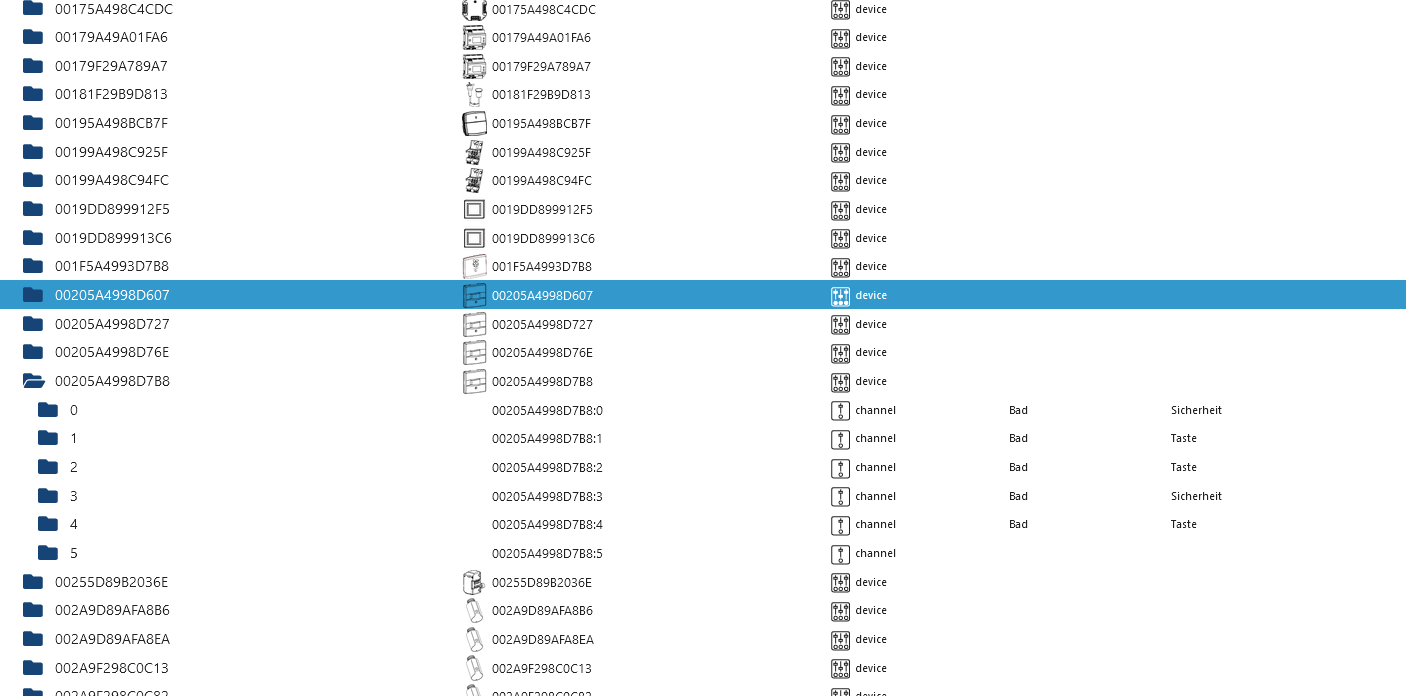
Das Problem tauchte aber erst nach einem Backup auf ein neu installiertes 64Bit System und das iobroker Backup war von dem 32Bit System.
Bekomme immer diese Fehlermeldung.
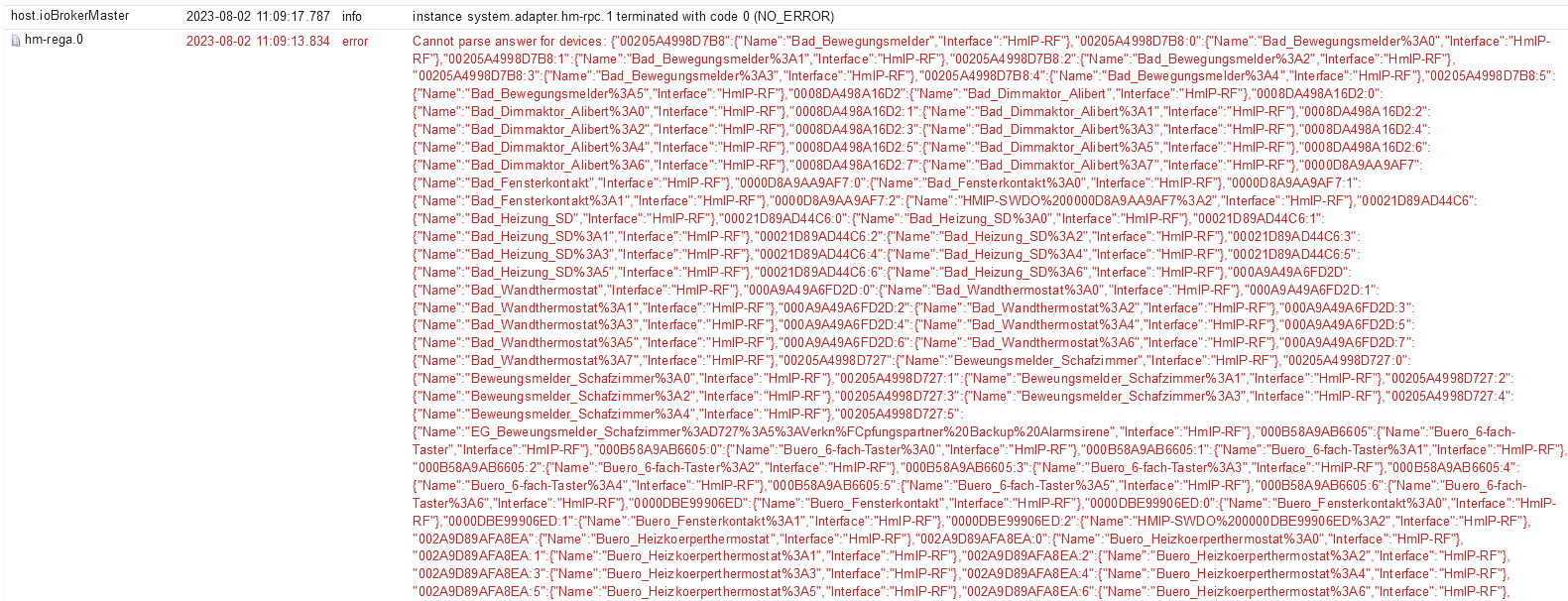
Kann mir bitte jemand weiter helfen, ich habe keine Idee mehr?
ioBroker:
Plattform: linux
Betriebssystem: linux
Architektur: arm64
CPUs: 4
Geschwindigkeit: 1800 MHz
Modell: Cortex-A72
RAM: 7.6 GB
System-Betriebszeit: 00:04:18
Node.js: v18.17.0
time: 1690967161861
Adapter-Anzahl: 485
NPM: 9.6.7
Datenträgergröße: 1833.6 GB
Freier Festplattenspeicher: 1827.3 GB
Betriebszeit: 00:03:15iob diag
======== Start marking the full check here ========= Skript v.2023-04-16 *** BASE SYSTEM *** Model : Raspberry Pi 4 Model B Rev 1.4 Architecture : aarch64 Docker : false Virtualization : none Distributor ID: Debian Description: Debian GNU/Linux 11 (bullseye) Release: 11 Codename: bullseye PRETTY_NAME="Debian GNU/Linux 11 (bullseye)" NAME="Debian GNU/Linux" VERSION_ID="11" VERSION="11 (bullseye)" VERSION_CODENAME=bullseye ID=debian HOME_URL="https://www.debian.org/" SUPPORT_URL="https://www.debian.org/support" BUG_REPORT_URL="https://bugs.debian.org/" Systemuptime and Load: 17:35:31 up 1:14, 3 users, load average: 0.54, 0.72, 0.64 CPU threads: 4 Raspberry only: throttled=0x0 Other values than 0x0 hint to temperature/voltage problems temp=53.0'C volt=0.9060V *** Time and Time Zones *** Local time: Wed 2023-08-02 17:35:31 CEST Universal time: Wed 2023-08-02 15:35:31 UTC RTC time: n/a Time zone: Europe/Berlin (CEST, +0200) System clock synchronized: yes NTP service: active RTC in local TZ: no *** User and Groups *** iobroker /home/iobroker iobroker adm tty dialout cdrom sudo audio video plugdev games users input render netdev bluetooth lpadmin gpio i2c spi *** X-Server-Setup *** X-Server: true Desktop: Terminal: tty Boot Target: graphical.target *** MEMORY *** total used free shared buff/cache available Mem: 7.8G 2.5G 4.3G 35M 968M 5.1G Swap: 99M 0B 99M Total: 7.9G 2.5G 4.4G 7811 M total memory 2522 M used memory 2759 M active memory 507 M inactive memory 4320 M free memory 97 M buffer memory 871 M swap cache 99 M total swap 0 M used swap 99 M free swap Raspberry only: oom events: 0 lifetime oom required: 0 Mbytes total time in oom handler: 0 ms max time spent in oom handler: 0 ms *** FILESYSTEM *** Filesystem Type Size Used Avail Use% Mounted on /dev/root ext4 1.8T 6.3G 1.8T 1% / devtmpfs devtmpfs 3.6G 0 3.6G 0% /dev tmpfs tmpfs 3.9G 0 3.9G 0% /dev/shm tmpfs tmpfs 1.6G 1.2M 1.6G 1% /run tmpfs tmpfs 5.0M 4.0K 5.0M 1% /run/lock /dev/sda1 vfat 255M 31M 225M 13% /boot tmpfs tmpfs 782M 20K 782M 1% /run/user/1000 Messages concerning ext4 filesystem in dmesg: [Wed Aug 2 16:20:58 2023] Kernel command line: coherent_pool=1M 8250.nr_uarts=0 snd_bcm2835.enable_headphones=0 snd_bcm2835.enable_headphones=1 snd_bcm2835.enable_hdmi=1 snd_bcm2835.enable_hdmi=0 smsc95xx.macaddr=DC:A6:32:B4:7F:C6 vc_mem.mem_base=0x3eb00000 vc_mem.mem_size=0x3ff00000 console=ttyS0,115200 console=tty1 root=PARTUUID=85dbb105-02 rootfstype=ext4 fsck.repair=yes rootwait quiet splash plymouth.ignore-serial-consoles [Wed Aug 2 16:21:02 2023] EXT4-fs (sda2): mounted filesystem with ordered data mode. Quota mode: none. [Wed Aug 2 16:21:02 2023] VFS: Mounted root (ext4 filesystem) readonly on device 8:2. [Wed Aug 2 16:21:08 2023] EXT4-fs (sda2): re-mounted. Quota mode: none. Show mounted filesystems (real ones only): TARGET SOURCE FSTYPE OPTIONS / /dev/sda2 ext4 rw,noatime `-/boot /dev/sda1 vfat rw,relatime,fmask=0022,dmask=0022,codepage=437,iocharset=ascii,shortname=mixed,errors=remount-ro Files in neuralgic directories: /var: 766M /var/ 392M /var/lib 208M /var/lib/influxdb/engine 208M /var/lib/influxdb 199M /var/lib/influxdb/engine/data/2d0dd83dd19d7bdf/autogen Archived and active journals take up 96.0M in the file system. /opt/iobroker/backups: 128M /opt/iobroker/backups/ /opt/iobroker/iobroker-data: 546M /opt/iobroker/iobroker-data/ 360M /opt/iobroker/iobroker-data/files 138M /opt/iobroker/iobroker-data/backup-objects 88M /opt/iobroker/iobroker-data/files/echarts.admin 57M /opt/iobroker/iobroker-data/files/echarts The five largest files in iobroker-data are: 35M /opt/iobroker/iobroker-data/files/devices.admin/static/js/main.24f2bb56.js.map 32M /opt/iobroker/iobroker-data/objects.jsonl 23M /opt/iobroker/iobroker-data/files/echarts/static/js/main.eb0afecd.js.map 23M /opt/iobroker/iobroker-data/files/echarts.admin/static/js/main.7952f0f7.js.map 23M /opt/iobroker/iobroker-data/files/echarts.admin/chart/static/js/main.eb0afecd.js.map *** NodeJS-Installation *** /usr/bin/nodejs v18.17.0 /usr/bin/node v18.17.0 /usr/bin/npm 9.6.7 /usr/bin/npx 9.6.7 nodejs: Installed: 18.17.0-deb-1nodesource1 Candidate: 18.17.0-deb-1nodesource1 Version table: *** 18.17.0-deb-1nodesource1 500 500 https://deb.nodesource.com/node_18.x bullseye/main arm64 Packages 100 /var/lib/dpkg/status 12.22.12~dfsg-1~deb11u4 500 500 http://security.debian.org/debian-security bullseye-security/main arm64 Packages 12.22.12~dfsg-1~deb11u3 500 500 http://deb.debian.org/debian bullseye/main arm64 Packages Temp directories causing npm8 problem: 0 No problems detected *** ioBroker-Installation *** ioBroker Status iobroker is running on this host. Objects type: jsonl States type: jsonl MULTIHOSTSERVICE/enabled: false Core adapters versions js-controller: 4.0.24 admin: 6.6.1 javascript: 7.0.3 Adapters from github: 0 Adapter State + system.adapter.admin.0 : admin : ioBrokerMaster - enabled, port: 8081, bind: 172.36.0.10, run as: admin + system.adapter.alarm.0 : alarm : ioBrokerMaster - enabled system.adapter.alias-manager.0 : alias-manager : ioBrokerMaster - disabled + system.adapter.backitup.0 : backitup : ioBrokerMaster - enabled + system.adapter.backitup.1 : backitup : iob-slave1-Nowak-Automatisierung - enabled system.adapter.bshb.0 : bshb : ioBrokerMaster - disabled system.adapter.device-reminder.0 : device-reminder : ioBrokerMaster - disabled system.adapter.devices.0 : devices : ioBrokerMaster - disabled + system.adapter.discovery.0 : discovery : ioBrokerMaster - enabled + system.adapter.doorbird.0 : doorbird : ioBrokerMaster - enabled system.adapter.dwd.0 : dwd : ioBrokerMaster - enabled + system.adapter.echarts.0 : echarts : ioBrokerMaster - enabled system.adapter.feiertage.0 : feiertage : ioBrokerMaster - enabled system.adapter.geofency.0 : geofency : ioBrokerMaster - disabled, port: 7999, bind: 0.0.0.0 + system.adapter.growatt.0 : growatt : ioBrokerMaster - enabled + system.adapter.harmony.0 : harmony : ioBrokerMaster - enabled system.adapter.heatingcontrol.0 : heatingcontrol : ioBrokerMaster - disabled + system.adapter.hm-rega.0 : hm-rega : ioBrokerMaster - enabled + system.adapter.hm-rpc.0 : hm-rpc : ioBrokerMaster - enabled, port: 0 + system.adapter.hm-rpc.1 : hm-rpc : ioBrokerMaster - enabled, port: 0 + system.adapter.hue.0 : hue : ioBrokerMaster - enabled, port: 443 system.adapter.ical.0 : ical : ioBrokerMaster - disabled + system.adapter.influxdb.0 : influxdb : ioBrokerMaster - enabled, port: 8086 + system.adapter.info.0 : info : ioBrokerMaster - enabled + system.adapter.iot.0 : iot : ioBrokerMaster - enabled + system.adapter.jarvis.0 : jarvis : ioBrokerMaster - enabled + system.adapter.javascript.0 : javascript : ioBrokerMaster - enabled + system.adapter.linkeddevices.0 : linkeddevices : ioBrokerMaster - enabled system.adapter.luftdaten.0 : luftdaten : ioBrokerMaster - enabled system.adapter.netatmo.0 : netatmo : ioBrokerMaster - disabled + system.adapter.nina.0 : nina : ioBrokerMaster - enabled system.adapter.odl.0 : odl : ioBrokerMaster - enabled system.adapter.owfs.0 : owfs : ioBrokerMaster - disabled, port: 4304 + system.adapter.pollenflug.0 : pollenflug : ioBrokerMaster - enabled system.adapter.pvforecast.0 : pvforecast : ioBrokerMaster - disabled + system.adapter.rpi2.0 : rpi2 : ioBrokerMaster - enabled + system.adapter.rpi2.1 : rpi2 : iob-slave1-Nowak-Automatisierung - enabled system.adapter.sayit.0 : sayit : ioBrokerMaster - disabled + system.adapter.scenes.0 : scenes : ioBrokerMaster - enabled + system.adapter.shuttercontrol.0 : shuttercontrol : ioBrokerMaster - enabled + system.adapter.smartmeter.0 : smartmeter : iob-slave1-Nowak-Automatisierung - enabled + system.adapter.sonos.0 : sonos : ioBrokerMaster - enabled + system.adapter.sony-bravia.0 : sony-bravia : ioBrokerMaster - enabled + system.adapter.sprinklecontrol.0 : sprinklecontrol : ioBrokerMaster - enabled + system.adapter.statistics.0 : statistics : ioBrokerMaster - enabled system.adapter.synology.0 : synology : ioBrokerMaster - disabled, port: 5000 + system.adapter.tankerkoenig.0 : tankerkoenig : ioBrokerMaster - enabled + system.adapter.telegram.0 : telegram : ioBrokerMaster - enabled, port: 8443, bind: 0.0.0.0 + system.adapter.telegram.1 : telegram : ioBrokerMaster - enabled, port: 8443, bind: 0.0.0.0 system.adapter.tr-064.0 : tr-064 : ioBrokerMaster - disabled + system.adapter.unifi.0 : unifi : ioBrokerMaster - enabled + system.adapter.web.0 : web : ioBrokerMaster - enabled, port: 8082, bind: 0.0.0.0, run as: admin + system.adapter.yahka.0 : yahka : ioBrokerMaster - enabled system.adapter.yr.0 : yr : ioBrokerMaster - enabled + instance is alive Enabled adapters with bindings + system.adapter.admin.0 : admin : ioBrokerMaster - enabled, port: 8081, bind: 172.36.0.10, run as: admin + system.adapter.hm-rpc.0 : hm-rpc : ioBrokerMaster - enabled, port: 0 + system.adapter.hm-rpc.1 : hm-rpc : ioBrokerMaster - enabled, port: 0 + system.adapter.hue.0 : hue : ioBrokerMaster - enabled, port: 443 + system.adapter.influxdb.0 : influxdb : ioBrokerMaster - enabled, port: 8086 + system.adapter.telegram.0 : telegram : ioBrokerMaster - enabled, port: 8443, bind: 0.0.0.0 + system.adapter.telegram.1 : telegram : ioBrokerMaster - enabled, port: 8443, bind: 0.0.0.0 + system.adapter.web.0 : web : ioBrokerMaster - enabled, port: 8082, bind: 0.0.0.0, run as: admin ioBroker-Repositories stable : http://download.iobroker.net/sources-dist.json beta : http://download.iobroker.net/sources-dist-latest.json Active repo(s): stable Installed ioBroker-Instances Used repository: stable Adapter "admin" : 6.3.5 , installed 6.6.1 Adapter "alarm" : 3.3.12 , installed 3.3.12 Adapter "alias-manager": 1.2.4 , installed 1.2.4 Adapter "backitup" : 2.6.23 , installed 2.6.23 Adapter "bshb" : 0.2.4 , installed 0.2.4 Adapter "device-reminder": 1.2.9 , installed 1.2.9 Adapter "devices" : 1.1.5 , installed 1.1.5 Adapter "discovery" : 3.1.0 , installed 3.1.0 Adapter "doorbird" : 1.0.5 , installed 1.0.5 Adapter "dwd" : 2.8.5 , installed 2.8.5 Adapter "echarts" : 1.5.1 , installed 1.5.1 Adapter "feiertage" : 1.1.0 , installed 1.1.0 Adapter "geofency" : 1.2.4 , installed 1.2.4 Adapter "growatt" : 3.0.2 , installed 3.0.2 Adapter "harmony" : 1.2.2 , installed 1.2.2 Adapter "heatingcontrol": 2.10.6 , installed 2.10.6 Adapter "hm-rega" : 3.0.46 , installed 3.0.46 Adapter "hm-rpc" : 1.15.18 , installed 1.15.18 Adapter "hue" : 3.9.3 , installed 3.9.3 Adapter "ical" : 1.13.3 , installed 1.13.3 Adapter "influxdb" : 3.2.0 , installed 3.2.0 Adapter "info" : 1.9.26 , installed 1.9.26 Adapter "iot" : 1.14.5 , installed 1.14.5 Adapter "jarvis" : 3.1.2 , installed 3.1.2 Adapter "javascript" : 7.0.3 , installed 7.0.3 Controller "js-controller": 4.0.24 , installed 4.0.24 Adapter "linkeddevices": 1.5.5 , installed 1.5.5 Adapter "luftdaten" : 3.0.0 , installed 3.0.0 Adapter "netatmo" : 3.1.0 , installed 3.1.0 Adapter "nina" : 0.0.25 , installed 0.0.25 Adapter "odl" : 2.0.5 , installed 2.0.5 Adapter "owfs" : 0.7.0 , installed 0.7.0 Adapter "pollenflug" : 1.0.6 , installed 1.0.6 Adapter "pvforecast" : 2.7.1 , installed 2.7.1 Adapter "rpi2" : 1.3.2 , installed 1.3.2 Adapter "sayit" : 3.0.5 , installed 3.0.5 Adapter "scenes" : 2.3.9 , installed 2.3.9 Adapter "shuttercontrol": 1.5.0 , installed 1.5.0 Adapter "simple-api" : 2.7.2 , installed 2.7.2 Adapter "smartmeter" : 3.3.4 , installed 3.3.4 Adapter "socketio" : 4.2.0 , installed 4.2.0 Adapter "sonos" : 2.3.1 , installed 2.3.1 Adapter "sony-bravia" : 1.0.9 , installed 1.0.9 Adapter "sprinklecontrol": 0.2.13 , installed 0.2.13 Adapter "statistics" : 2.3.0 , installed 2.3.0 Adapter "synology" : 2.1.13 , installed 2.1.13 Adapter "tankerkoenig" : 3.3.7 , installed 3.3.7 Adapter "telegram" : 1.16.0 , installed 1.16.0 Adapter "tr-064" : 4.2.18 , installed 4.2.18 Adapter "unifi" : 0.6.6 , installed 0.6.6 Adapter "web" : 4.3.0 , installed 4.3.0 Adapter "ws" : 1.3.0 , installed 1.3.0 Adapter "yahka" : 0.17.0 , installed 0.17.0 Adapter "yr" : 5.3.0 , installed 5.3.0 Objects and States Please stand by - This may take a while Objects: 21538 States: 18501 *** OS-Repositories and Updates *** Hit:1 http://archive.raspberrypi.org/debian bullseye InRelease Hit:2 http://deb.debian.org/debian bullseye InRelease Hit:3 http://deb.debian.org/debian bullseye-updates InRelease Hit:4 http://security.debian.org/debian-security bullseye-security InRelease Hit:5 https://deb.nodesource.com/node_18.x bullseye InRelease Hit:6 https://repos.influxdata.com/debian bullseye InRelease Reading package lists... Pending Updates: 1 *** Listening Ports *** Active Internet connections (only servers) Proto Recv-Q Send-Q Local Address Foreign Address State User Inode PID/Program name tcp 0 0 172.36.0.10:8081 0.0.0.0:* LISTEN 1000 17099 1873/io.admin.0 tcp 0 0 172.36.0.10:8100 0.0.0.0:* LISTEN 1000 19677 2222/io.doorbird.0 tcp 0 0 127.0.0.1:631 0.0.0.0:* LISTEN 0 15410 553/cupsd tcp 0 0 127.0.0.1:33633 0.0.0.0:* LISTEN 1000 22964 2974/io.yahka.0 tcp 0 0 172.36.0.10:9000 0.0.0.0:* LISTEN 1000 18846 680/iobroker.js-con tcp 0 0 172.36.0.10:9001 0.0.0.0:* LISTEN 1000 18725 680/iobroker.js-con tcp 0 0 0.0.0.0:42001 0.0.0.0:* LISTEN 1000 18222 2149/io.hm-rpc.1 tcp 0 0 0.0.0.0:42010 0.0.0.0:* LISTEN 1000 19586 2133/io.hm-rpc.0 tcp 0 0 0.0.0.0:22 0.0.0.0:* LISTEN 0 11878 585/sshd: /usr/sbin tcp 0 0 0.0.0.0:8400 0.0.0.0:* LISTEN 1000 20703 2409/io.jarvis.0 tcp6 0 0 :::8086 :::* LISTEN 999 13075 462/influxd tcp6 0 0 :::8082 :::* LISTEN 1000 22845 2967/io.web.0 tcp6 0 0 :::3500 :::* LISTEN 1000 19181 2072/io.sonos.0 tcp6 0 0 ::1:631 :::* LISTEN 0 15409 553/cupsd tcp6 0 0 :::61991 :::* LISTEN 1000 20583 2355/io.harmony.0 tcp6 0 0 :::22 :::* LISTEN 0 11880 585/sshd: /usr/sbin tcp6 0 0 :::41159 :::* LISTEN 1000 20441 2974/io.yahka.0 udp 0 0 0.0.0.0:43281 0.0.0.0:* 108 2032 403/avahi-daemon: r udp 0 0 0.0.0.0:68 0.0.0.0:* 0 11930 475/dhcpcd udp 0 0 0.0.0.0:61991 0.0.0.0:* 1000 20584 2355/io.harmony.0 udp 0 0 0.0.0.0:631 0.0.0.0:* 0 14949 609/cups-browsed udp 0 0 0.0.0.0:5353 0.0.0.0:* 108 2030 403/avahi-daemon: r udp6 0 0 :::546 :::* 0 12024 475/dhcpcd udp6 0 0 :::58029 :::* 108 2033 403/avahi-daemon: r udp6 0 0 :::5353 :::* 108 2031 403/avahi-daemon: r *** Log File - Last 25 Lines *** "000A9D89B93E49:1":{"Name":"Buero_Wandthermostat%3A1","Interface":"HmIP-RF"}, "000A9D89B93E49:2":{"Name":"Buero_Wandthermostat%3A2","Interface":"HmIP-RF"}, "000A9D89B93E49:3":{"Name":"Buero_Wandthermostat%3A3","Interface":"HmIP-RF"}, "000A9D89B93E49:4":{"Name":"Buero_Wandthermostat%3A4","Interface":"HmIP-RF"}, "000A9D89B93E49:5":{"Name":"Buero_Wandthermostat%3A5","Interface":"HmIP-RF"}, "000A9D89B93E49:6":{"Name":"Buero_Wandthermostat%3A6","Interface":"HmIP-RF"}, "000A9D89B93E49:7":{"Name":"Buero_Wandthermostat%3A7","Interface":"HmIP-RF"}, "OEQ1019551":{"Name":"Carport_Bewegungsmelder","Interface":"BidCos-RF"}, "OEQ1019551:0":{"Name":"Carport_Bewegungsmelder%3A0","Interface":"BidCos-RF"}, "OEQ1019551:1":{"Name":"10_Carport_Bewegungsmelder_Einfahrt%3A1","Interface":"BidCos-RF"}, "OEQ1019551:2":{"Name":"10_Carport_Bewegungsmelder_Hof%3A2","Interface":"BidCos-RF"}, "OEQ1019551:3":{"Name":"10_Carport_frei%3A3","Interface":"BidCos-RF"}, "OEQ2264080":{"Name":"Carport_Licht_SD","Interface":"BidCos-RF"}, "OEQ2264080:0":{"Name":"Carport_Licht_SD%3A0","Interface":"BidCos-RF"}, "OEQ2264080:1":{"Name":"20_Carport_Beleuchtung%3A1","Interface":"BidCos-RF"}, "OEQ2264080:2":{"Name":"20_Carport_SD%3A2","Interface":"BidCos-RF"} 2023-08-02 17:25:00.335 - info: host.ioBrokerMaster instance system.adapter.dwd.0 started with pid 8749 2023-08-02 17:25:07.379 - info: host.ioBrokerMaster instance system.adapter.dwd.0 terminated with code 11 (ADAPTER_REQUESTED_TERMINATION) 2023-08-02 17:30:00.313 - info: host.ioBrokerMaster instance system.adapter.dwd.0 started with pid 10675 2023-08-02 17:30:04.363 - info: host.ioBrokerMaster instance system.adapter.luftdaten.0 started with pid 10690 2023-08-02 17:30:09.045 - info: host.ioBrokerMaster instance system.adapter.dwd.0 terminated with code 11 (ADAPTER_REQUESTED_TERMINATION) 2023-08-02 17:30:15.019 - warn: luftdaten.0 (10690) State "luftdaten.0.38240.timestamp" has no existing object, this might lead to an error in future versions 2023-08-02 17:30:15.654 - info: host.ioBrokerMaster instance system.adapter.luftdaten.0 terminated with code 0 (NO_ERROR) 2023-08-02 17:35:00.359 - info: host.ioBrokerMaster instance system.adapter.dwd.0 started with pid 11975 2023-08-02 17:35:07.726 - info: host.ioBrokerMaster instance system.adapter.dwd.0 terminated with code 11 (ADAPTER_REQUESTED_TERMINATION) ============ Mark until here for C&P ============= iob diag has finished. Press any key for a summary Copy text starting here: ======================= SUMMARY ======================= v.2023-04-16 Operatingsystem: Debian GNU/Linux 11 (bullseye) Kernel: 6.1.21-v8+ Installation: Native Timezone: Europe/Berlin (CEST, +0200) User-ID: 1000 X-Server: true Boot Target: graphical.target Pending OS-Updates: 1 Pending iob updates: 0 Nodejs-Installation: /usr/bin/nodejs v18.17.0 /usr/bin/node v18.17.0 /usr/bin/npm 9.6.7 /usr/bin/npx 9.6.7 Recommended versions are nodejs 18.x.y and npm 9.x.y Your nodejs installation is correct MEMORY: total used free shared buff/cache available Mem: 7.8G 2.5G 4.3G 35M 972M 5.1G Swap: 99M 0B 99M Total: 7.9G 2.5G 4.4G Active iob-Instances: 37 Active repo(s): stable ioBroker Core: js-controller 4.0.24 admin 6.6.1 ioBroker Status: iobroker is running on this host. Objects type: jsonl States type: jsonl Status admin and web instance: + system.adapter.admin.0 : admin : ioBrokerMaster - enabled, port: 8081, bind: 172.36.0.10, run as: admin + system.adapter.web.0 : web : ioBrokerMaster - enabled, port: 8082, bind: 0.0.0.0, run as: admin Objects: 21538 States: 18502 Size of iob-Database: 32M /opt/iobroker/iobroker-data/objects.jsonl 20M /opt/iobroker/iobroker-data/states.jsonl =================== END OF SUMMARY ====================Grüße
Markus@markus-now sagte in ioBroker aktualisiert Homematic Datenpunkte nicht mehr:
hier in Codetags
@markus-now sagte in ioBroker aktualisiert Homematic Datenpunkte nicht mehr:
Bekomme immer diese Fehlermeldung.
wo sind da code-tags?
https://forum.iobroker.net/topic/51555/hinweise-für-gute-forenbeiträge/1Außerdem kommt es mir vor als hätte ich das alles schon irgendwo gesehen.
-
@djmarc75 Hallo DJMarc75 hier in Codetags
Auch von mir ein Hallo in die Runde,
ich habe ein änliches problem, es wird alles synchronisiert bis auf die Objekt-Namen. Ich habe schon mehrere Neuinstallationen von ioBroker, CCU, hm-rpc, hm-rega.Das Problem tauchte aber erst nach einem Backup auf ein neu installiertes 64Bit System und das iobroker Backup war von dem 32Bit System.
Bekomme immer diese Fehlermeldung.
Kann mir bitte jemand weiter helfen, ich habe keine Idee mehr?
ioBroker:
Plattform: linux
Betriebssystem: linux
Architektur: arm64
CPUs: 4
Geschwindigkeit: 1800 MHz
Modell: Cortex-A72
RAM: 7.6 GB
System-Betriebszeit: 00:04:18
Node.js: v18.17.0
time: 1690967161861
Adapter-Anzahl: 485
NPM: 9.6.7
Datenträgergröße: 1833.6 GB
Freier Festplattenspeicher: 1827.3 GB
Betriebszeit: 00:03:15iob diag
======== Start marking the full check here ========= Skript v.2023-04-16 *** BASE SYSTEM *** Model : Raspberry Pi 4 Model B Rev 1.4 Architecture : aarch64 Docker : false Virtualization : none Distributor ID: Debian Description: Debian GNU/Linux 11 (bullseye) Release: 11 Codename: bullseye PRETTY_NAME="Debian GNU/Linux 11 (bullseye)" NAME="Debian GNU/Linux" VERSION_ID="11" VERSION="11 (bullseye)" VERSION_CODENAME=bullseye ID=debian HOME_URL="https://www.debian.org/" SUPPORT_URL="https://www.debian.org/support" BUG_REPORT_URL="https://bugs.debian.org/" Systemuptime and Load: 17:35:31 up 1:14, 3 users, load average: 0.54, 0.72, 0.64 CPU threads: 4 Raspberry only: throttled=0x0 Other values than 0x0 hint to temperature/voltage problems temp=53.0'C volt=0.9060V *** Time and Time Zones *** Local time: Wed 2023-08-02 17:35:31 CEST Universal time: Wed 2023-08-02 15:35:31 UTC RTC time: n/a Time zone: Europe/Berlin (CEST, +0200) System clock synchronized: yes NTP service: active RTC in local TZ: no *** User and Groups *** iobroker /home/iobroker iobroker adm tty dialout cdrom sudo audio video plugdev games users input render netdev bluetooth lpadmin gpio i2c spi *** X-Server-Setup *** X-Server: true Desktop: Terminal: tty Boot Target: graphical.target *** MEMORY *** total used free shared buff/cache available Mem: 7.8G 2.5G 4.3G 35M 968M 5.1G Swap: 99M 0B 99M Total: 7.9G 2.5G 4.4G 7811 M total memory 2522 M used memory 2759 M active memory 507 M inactive memory 4320 M free memory 97 M buffer memory 871 M swap cache 99 M total swap 0 M used swap 99 M free swap Raspberry only: oom events: 0 lifetime oom required: 0 Mbytes total time in oom handler: 0 ms max time spent in oom handler: 0 ms *** FILESYSTEM *** Filesystem Type Size Used Avail Use% Mounted on /dev/root ext4 1.8T 6.3G 1.8T 1% / devtmpfs devtmpfs 3.6G 0 3.6G 0% /dev tmpfs tmpfs 3.9G 0 3.9G 0% /dev/shm tmpfs tmpfs 1.6G 1.2M 1.6G 1% /run tmpfs tmpfs 5.0M 4.0K 5.0M 1% /run/lock /dev/sda1 vfat 255M 31M 225M 13% /boot tmpfs tmpfs 782M 20K 782M 1% /run/user/1000 Messages concerning ext4 filesystem in dmesg: [Wed Aug 2 16:20:58 2023] Kernel command line: coherent_pool=1M 8250.nr_uarts=0 snd_bcm2835.enable_headphones=0 snd_bcm2835.enable_headphones=1 snd_bcm2835.enable_hdmi=1 snd_bcm2835.enable_hdmi=0 smsc95xx.macaddr=DC:A6:32:B4:7F:C6 vc_mem.mem_base=0x3eb00000 vc_mem.mem_size=0x3ff00000 console=ttyS0,115200 console=tty1 root=PARTUUID=85dbb105-02 rootfstype=ext4 fsck.repair=yes rootwait quiet splash plymouth.ignore-serial-consoles [Wed Aug 2 16:21:02 2023] EXT4-fs (sda2): mounted filesystem with ordered data mode. Quota mode: none. [Wed Aug 2 16:21:02 2023] VFS: Mounted root (ext4 filesystem) readonly on device 8:2. [Wed Aug 2 16:21:08 2023] EXT4-fs (sda2): re-mounted. Quota mode: none. Show mounted filesystems (real ones only): TARGET SOURCE FSTYPE OPTIONS / /dev/sda2 ext4 rw,noatime `-/boot /dev/sda1 vfat rw,relatime,fmask=0022,dmask=0022,codepage=437,iocharset=ascii,shortname=mixed,errors=remount-ro Files in neuralgic directories: /var: 766M /var/ 392M /var/lib 208M /var/lib/influxdb/engine 208M /var/lib/influxdb 199M /var/lib/influxdb/engine/data/2d0dd83dd19d7bdf/autogen Archived and active journals take up 96.0M in the file system. /opt/iobroker/backups: 128M /opt/iobroker/backups/ /opt/iobroker/iobroker-data: 546M /opt/iobroker/iobroker-data/ 360M /opt/iobroker/iobroker-data/files 138M /opt/iobroker/iobroker-data/backup-objects 88M /opt/iobroker/iobroker-data/files/echarts.admin 57M /opt/iobroker/iobroker-data/files/echarts The five largest files in iobroker-data are: 35M /opt/iobroker/iobroker-data/files/devices.admin/static/js/main.24f2bb56.js.map 32M /opt/iobroker/iobroker-data/objects.jsonl 23M /opt/iobroker/iobroker-data/files/echarts/static/js/main.eb0afecd.js.map 23M /opt/iobroker/iobroker-data/files/echarts.admin/static/js/main.7952f0f7.js.map 23M /opt/iobroker/iobroker-data/files/echarts.admin/chart/static/js/main.eb0afecd.js.map *** NodeJS-Installation *** /usr/bin/nodejs v18.17.0 /usr/bin/node v18.17.0 /usr/bin/npm 9.6.7 /usr/bin/npx 9.6.7 nodejs: Installed: 18.17.0-deb-1nodesource1 Candidate: 18.17.0-deb-1nodesource1 Version table: *** 18.17.0-deb-1nodesource1 500 500 https://deb.nodesource.com/node_18.x bullseye/main arm64 Packages 100 /var/lib/dpkg/status 12.22.12~dfsg-1~deb11u4 500 500 http://security.debian.org/debian-security bullseye-security/main arm64 Packages 12.22.12~dfsg-1~deb11u3 500 500 http://deb.debian.org/debian bullseye/main arm64 Packages Temp directories causing npm8 problem: 0 No problems detected *** ioBroker-Installation *** ioBroker Status iobroker is running on this host. Objects type: jsonl States type: jsonl MULTIHOSTSERVICE/enabled: false Core adapters versions js-controller: 4.0.24 admin: 6.6.1 javascript: 7.0.3 Adapters from github: 0 Adapter State + system.adapter.admin.0 : admin : ioBrokerMaster - enabled, port: 8081, bind: 172.36.0.10, run as: admin + system.adapter.alarm.0 : alarm : ioBrokerMaster - enabled system.adapter.alias-manager.0 : alias-manager : ioBrokerMaster - disabled + system.adapter.backitup.0 : backitup : ioBrokerMaster - enabled + system.adapter.backitup.1 : backitup : iob-slave1-Nowak-Automatisierung - enabled system.adapter.bshb.0 : bshb : ioBrokerMaster - disabled system.adapter.device-reminder.0 : device-reminder : ioBrokerMaster - disabled system.adapter.devices.0 : devices : ioBrokerMaster - disabled + system.adapter.discovery.0 : discovery : ioBrokerMaster - enabled + system.adapter.doorbird.0 : doorbird : ioBrokerMaster - enabled system.adapter.dwd.0 : dwd : ioBrokerMaster - enabled + system.adapter.echarts.0 : echarts : ioBrokerMaster - enabled system.adapter.feiertage.0 : feiertage : ioBrokerMaster - enabled system.adapter.geofency.0 : geofency : ioBrokerMaster - disabled, port: 7999, bind: 0.0.0.0 + system.adapter.growatt.0 : growatt : ioBrokerMaster - enabled + system.adapter.harmony.0 : harmony : ioBrokerMaster - enabled system.adapter.heatingcontrol.0 : heatingcontrol : ioBrokerMaster - disabled + system.adapter.hm-rega.0 : hm-rega : ioBrokerMaster - enabled + system.adapter.hm-rpc.0 : hm-rpc : ioBrokerMaster - enabled, port: 0 + system.adapter.hm-rpc.1 : hm-rpc : ioBrokerMaster - enabled, port: 0 + system.adapter.hue.0 : hue : ioBrokerMaster - enabled, port: 443 system.adapter.ical.0 : ical : ioBrokerMaster - disabled + system.adapter.influxdb.0 : influxdb : ioBrokerMaster - enabled, port: 8086 + system.adapter.info.0 : info : ioBrokerMaster - enabled + system.adapter.iot.0 : iot : ioBrokerMaster - enabled + system.adapter.jarvis.0 : jarvis : ioBrokerMaster - enabled + system.adapter.javascript.0 : javascript : ioBrokerMaster - enabled + system.adapter.linkeddevices.0 : linkeddevices : ioBrokerMaster - enabled system.adapter.luftdaten.0 : luftdaten : ioBrokerMaster - enabled system.adapter.netatmo.0 : netatmo : ioBrokerMaster - disabled + system.adapter.nina.0 : nina : ioBrokerMaster - enabled system.adapter.odl.0 : odl : ioBrokerMaster - enabled system.adapter.owfs.0 : owfs : ioBrokerMaster - disabled, port: 4304 + system.adapter.pollenflug.0 : pollenflug : ioBrokerMaster - enabled system.adapter.pvforecast.0 : pvforecast : ioBrokerMaster - disabled + system.adapter.rpi2.0 : rpi2 : ioBrokerMaster - enabled + system.adapter.rpi2.1 : rpi2 : iob-slave1-Nowak-Automatisierung - enabled system.adapter.sayit.0 : sayit : ioBrokerMaster - disabled + system.adapter.scenes.0 : scenes : ioBrokerMaster - enabled + system.adapter.shuttercontrol.0 : shuttercontrol : ioBrokerMaster - enabled + system.adapter.smartmeter.0 : smartmeter : iob-slave1-Nowak-Automatisierung - enabled + system.adapter.sonos.0 : sonos : ioBrokerMaster - enabled + system.adapter.sony-bravia.0 : sony-bravia : ioBrokerMaster - enabled + system.adapter.sprinklecontrol.0 : sprinklecontrol : ioBrokerMaster - enabled + system.adapter.statistics.0 : statistics : ioBrokerMaster - enabled system.adapter.synology.0 : synology : ioBrokerMaster - disabled, port: 5000 + system.adapter.tankerkoenig.0 : tankerkoenig : ioBrokerMaster - enabled + system.adapter.telegram.0 : telegram : ioBrokerMaster - enabled, port: 8443, bind: 0.0.0.0 + system.adapter.telegram.1 : telegram : ioBrokerMaster - enabled, port: 8443, bind: 0.0.0.0 system.adapter.tr-064.0 : tr-064 : ioBrokerMaster - disabled + system.adapter.unifi.0 : unifi : ioBrokerMaster - enabled + system.adapter.web.0 : web : ioBrokerMaster - enabled, port: 8082, bind: 0.0.0.0, run as: admin + system.adapter.yahka.0 : yahka : ioBrokerMaster - enabled system.adapter.yr.0 : yr : ioBrokerMaster - enabled + instance is alive Enabled adapters with bindings + system.adapter.admin.0 : admin : ioBrokerMaster - enabled, port: 8081, bind: 172.36.0.10, run as: admin + system.adapter.hm-rpc.0 : hm-rpc : ioBrokerMaster - enabled, port: 0 + system.adapter.hm-rpc.1 : hm-rpc : ioBrokerMaster - enabled, port: 0 + system.adapter.hue.0 : hue : ioBrokerMaster - enabled, port: 443 + system.adapter.influxdb.0 : influxdb : ioBrokerMaster - enabled, port: 8086 + system.adapter.telegram.0 : telegram : ioBrokerMaster - enabled, port: 8443, bind: 0.0.0.0 + system.adapter.telegram.1 : telegram : ioBrokerMaster - enabled, port: 8443, bind: 0.0.0.0 + system.adapter.web.0 : web : ioBrokerMaster - enabled, port: 8082, bind: 0.0.0.0, run as: admin ioBroker-Repositories stable : http://download.iobroker.net/sources-dist.json beta : http://download.iobroker.net/sources-dist-latest.json Active repo(s): stable Installed ioBroker-Instances Used repository: stable Adapter "admin" : 6.3.5 , installed 6.6.1 Adapter "alarm" : 3.3.12 , installed 3.3.12 Adapter "alias-manager": 1.2.4 , installed 1.2.4 Adapter "backitup" : 2.6.23 , installed 2.6.23 Adapter "bshb" : 0.2.4 , installed 0.2.4 Adapter "device-reminder": 1.2.9 , installed 1.2.9 Adapter "devices" : 1.1.5 , installed 1.1.5 Adapter "discovery" : 3.1.0 , installed 3.1.0 Adapter "doorbird" : 1.0.5 , installed 1.0.5 Adapter "dwd" : 2.8.5 , installed 2.8.5 Adapter "echarts" : 1.5.1 , installed 1.5.1 Adapter "feiertage" : 1.1.0 , installed 1.1.0 Adapter "geofency" : 1.2.4 , installed 1.2.4 Adapter "growatt" : 3.0.2 , installed 3.0.2 Adapter "harmony" : 1.2.2 , installed 1.2.2 Adapter "heatingcontrol": 2.10.6 , installed 2.10.6 Adapter "hm-rega" : 3.0.46 , installed 3.0.46 Adapter "hm-rpc" : 1.15.18 , installed 1.15.18 Adapter "hue" : 3.9.3 , installed 3.9.3 Adapter "ical" : 1.13.3 , installed 1.13.3 Adapter "influxdb" : 3.2.0 , installed 3.2.0 Adapter "info" : 1.9.26 , installed 1.9.26 Adapter "iot" : 1.14.5 , installed 1.14.5 Adapter "jarvis" : 3.1.2 , installed 3.1.2 Adapter "javascript" : 7.0.3 , installed 7.0.3 Controller "js-controller": 4.0.24 , installed 4.0.24 Adapter "linkeddevices": 1.5.5 , installed 1.5.5 Adapter "luftdaten" : 3.0.0 , installed 3.0.0 Adapter "netatmo" : 3.1.0 , installed 3.1.0 Adapter "nina" : 0.0.25 , installed 0.0.25 Adapter "odl" : 2.0.5 , installed 2.0.5 Adapter "owfs" : 0.7.0 , installed 0.7.0 Adapter "pollenflug" : 1.0.6 , installed 1.0.6 Adapter "pvforecast" : 2.7.1 , installed 2.7.1 Adapter "rpi2" : 1.3.2 , installed 1.3.2 Adapter "sayit" : 3.0.5 , installed 3.0.5 Adapter "scenes" : 2.3.9 , installed 2.3.9 Adapter "shuttercontrol": 1.5.0 , installed 1.5.0 Adapter "simple-api" : 2.7.2 , installed 2.7.2 Adapter "smartmeter" : 3.3.4 , installed 3.3.4 Adapter "socketio" : 4.2.0 , installed 4.2.0 Adapter "sonos" : 2.3.1 , installed 2.3.1 Adapter "sony-bravia" : 1.0.9 , installed 1.0.9 Adapter "sprinklecontrol": 0.2.13 , installed 0.2.13 Adapter "statistics" : 2.3.0 , installed 2.3.0 Adapter "synology" : 2.1.13 , installed 2.1.13 Adapter "tankerkoenig" : 3.3.7 , installed 3.3.7 Adapter "telegram" : 1.16.0 , installed 1.16.0 Adapter "tr-064" : 4.2.18 , installed 4.2.18 Adapter "unifi" : 0.6.6 , installed 0.6.6 Adapter "web" : 4.3.0 , installed 4.3.0 Adapter "ws" : 1.3.0 , installed 1.3.0 Adapter "yahka" : 0.17.0 , installed 0.17.0 Adapter "yr" : 5.3.0 , installed 5.3.0 Objects and States Please stand by - This may take a while Objects: 21538 States: 18501 *** OS-Repositories and Updates *** Hit:1 http://archive.raspberrypi.org/debian bullseye InRelease Hit:2 http://deb.debian.org/debian bullseye InRelease Hit:3 http://deb.debian.org/debian bullseye-updates InRelease Hit:4 http://security.debian.org/debian-security bullseye-security InRelease Hit:5 https://deb.nodesource.com/node_18.x bullseye InRelease Hit:6 https://repos.influxdata.com/debian bullseye InRelease Reading package lists... Pending Updates: 1 *** Listening Ports *** Active Internet connections (only servers) Proto Recv-Q Send-Q Local Address Foreign Address State User Inode PID/Program name tcp 0 0 172.36.0.10:8081 0.0.0.0:* LISTEN 1000 17099 1873/io.admin.0 tcp 0 0 172.36.0.10:8100 0.0.0.0:* LISTEN 1000 19677 2222/io.doorbird.0 tcp 0 0 127.0.0.1:631 0.0.0.0:* LISTEN 0 15410 553/cupsd tcp 0 0 127.0.0.1:33633 0.0.0.0:* LISTEN 1000 22964 2974/io.yahka.0 tcp 0 0 172.36.0.10:9000 0.0.0.0:* LISTEN 1000 18846 680/iobroker.js-con tcp 0 0 172.36.0.10:9001 0.0.0.0:* LISTEN 1000 18725 680/iobroker.js-con tcp 0 0 0.0.0.0:42001 0.0.0.0:* LISTEN 1000 18222 2149/io.hm-rpc.1 tcp 0 0 0.0.0.0:42010 0.0.0.0:* LISTEN 1000 19586 2133/io.hm-rpc.0 tcp 0 0 0.0.0.0:22 0.0.0.0:* LISTEN 0 11878 585/sshd: /usr/sbin tcp 0 0 0.0.0.0:8400 0.0.0.0:* LISTEN 1000 20703 2409/io.jarvis.0 tcp6 0 0 :::8086 :::* LISTEN 999 13075 462/influxd tcp6 0 0 :::8082 :::* LISTEN 1000 22845 2967/io.web.0 tcp6 0 0 :::3500 :::* LISTEN 1000 19181 2072/io.sonos.0 tcp6 0 0 ::1:631 :::* LISTEN 0 15409 553/cupsd tcp6 0 0 :::61991 :::* LISTEN 1000 20583 2355/io.harmony.0 tcp6 0 0 :::22 :::* LISTEN 0 11880 585/sshd: /usr/sbin tcp6 0 0 :::41159 :::* LISTEN 1000 20441 2974/io.yahka.0 udp 0 0 0.0.0.0:43281 0.0.0.0:* 108 2032 403/avahi-daemon: r udp 0 0 0.0.0.0:68 0.0.0.0:* 0 11930 475/dhcpcd udp 0 0 0.0.0.0:61991 0.0.0.0:* 1000 20584 2355/io.harmony.0 udp 0 0 0.0.0.0:631 0.0.0.0:* 0 14949 609/cups-browsed udp 0 0 0.0.0.0:5353 0.0.0.0:* 108 2030 403/avahi-daemon: r udp6 0 0 :::546 :::* 0 12024 475/dhcpcd udp6 0 0 :::58029 :::* 108 2033 403/avahi-daemon: r udp6 0 0 :::5353 :::* 108 2031 403/avahi-daemon: r *** Log File - Last 25 Lines *** "000A9D89B93E49:1":{"Name":"Buero_Wandthermostat%3A1","Interface":"HmIP-RF"}, "000A9D89B93E49:2":{"Name":"Buero_Wandthermostat%3A2","Interface":"HmIP-RF"}, "000A9D89B93E49:3":{"Name":"Buero_Wandthermostat%3A3","Interface":"HmIP-RF"}, "000A9D89B93E49:4":{"Name":"Buero_Wandthermostat%3A4","Interface":"HmIP-RF"}, "000A9D89B93E49:5":{"Name":"Buero_Wandthermostat%3A5","Interface":"HmIP-RF"}, "000A9D89B93E49:6":{"Name":"Buero_Wandthermostat%3A6","Interface":"HmIP-RF"}, "000A9D89B93E49:7":{"Name":"Buero_Wandthermostat%3A7","Interface":"HmIP-RF"}, "OEQ1019551":{"Name":"Carport_Bewegungsmelder","Interface":"BidCos-RF"}, "OEQ1019551:0":{"Name":"Carport_Bewegungsmelder%3A0","Interface":"BidCos-RF"}, "OEQ1019551:1":{"Name":"10_Carport_Bewegungsmelder_Einfahrt%3A1","Interface":"BidCos-RF"}, "OEQ1019551:2":{"Name":"10_Carport_Bewegungsmelder_Hof%3A2","Interface":"BidCos-RF"}, "OEQ1019551:3":{"Name":"10_Carport_frei%3A3","Interface":"BidCos-RF"}, "OEQ2264080":{"Name":"Carport_Licht_SD","Interface":"BidCos-RF"}, "OEQ2264080:0":{"Name":"Carport_Licht_SD%3A0","Interface":"BidCos-RF"}, "OEQ2264080:1":{"Name":"20_Carport_Beleuchtung%3A1","Interface":"BidCos-RF"}, "OEQ2264080:2":{"Name":"20_Carport_SD%3A2","Interface":"BidCos-RF"} 2023-08-02 17:25:00.335 - info: host.ioBrokerMaster instance system.adapter.dwd.0 started with pid 8749 2023-08-02 17:25:07.379 - info: host.ioBrokerMaster instance system.adapter.dwd.0 terminated with code 11 (ADAPTER_REQUESTED_TERMINATION) 2023-08-02 17:30:00.313 - info: host.ioBrokerMaster instance system.adapter.dwd.0 started with pid 10675 2023-08-02 17:30:04.363 - info: host.ioBrokerMaster instance system.adapter.luftdaten.0 started with pid 10690 2023-08-02 17:30:09.045 - info: host.ioBrokerMaster instance system.adapter.dwd.0 terminated with code 11 (ADAPTER_REQUESTED_TERMINATION) 2023-08-02 17:30:15.019 - warn: luftdaten.0 (10690) State "luftdaten.0.38240.timestamp" has no existing object, this might lead to an error in future versions 2023-08-02 17:30:15.654 - info: host.ioBrokerMaster instance system.adapter.luftdaten.0 terminated with code 0 (NO_ERROR) 2023-08-02 17:35:00.359 - info: host.ioBrokerMaster instance system.adapter.dwd.0 started with pid 11975 2023-08-02 17:35:07.726 - info: host.ioBrokerMaster instance system.adapter.dwd.0 terminated with code 11 (ADAPTER_REQUESTED_TERMINATION) ============ Mark until here for C&P ============= iob diag has finished. Press any key for a summary Copy text starting here: ======================= SUMMARY ======================= v.2023-04-16 Operatingsystem: Debian GNU/Linux 11 (bullseye) Kernel: 6.1.21-v8+ Installation: Native Timezone: Europe/Berlin (CEST, +0200) User-ID: 1000 X-Server: true Boot Target: graphical.target Pending OS-Updates: 1 Pending iob updates: 0 Nodejs-Installation: /usr/bin/nodejs v18.17.0 /usr/bin/node v18.17.0 /usr/bin/npm 9.6.7 /usr/bin/npx 9.6.7 Recommended versions are nodejs 18.x.y and npm 9.x.y Your nodejs installation is correct MEMORY: total used free shared buff/cache available Mem: 7.8G 2.5G 4.3G 35M 972M 5.1G Swap: 99M 0B 99M Total: 7.9G 2.5G 4.4G Active iob-Instances: 37 Active repo(s): stable ioBroker Core: js-controller 4.0.24 admin 6.6.1 ioBroker Status: iobroker is running on this host. Objects type: jsonl States type: jsonl Status admin and web instance: + system.adapter.admin.0 : admin : ioBrokerMaster - enabled, port: 8081, bind: 172.36.0.10, run as: admin + system.adapter.web.0 : web : ioBrokerMaster - enabled, port: 8082, bind: 0.0.0.0, run as: admin Objects: 21538 States: 18502 Size of iob-Database: 32M /opt/iobroker/iobroker-data/objects.jsonl 20M /opt/iobroker/iobroker-data/states.jsonl =================== END OF SUMMARY ====================Grüße
Markus@markus-now
-User "iobroker" ist ungünstig da der iobroker eben diesen User selbst anlegt ... nur für sich selbst
-Desktop ausknipsen
-Sentry im HM-Adapter deaktivieren -
@markus-now
-User "iobroker" ist ungünstig da der iobroker eben diesen User selbst anlegt ... nur für sich selbst
-Desktop ausknipsen
-Sentry im HM-Adapter deaktivieren -
@djmarc75 Sentry war schon deaktiviert, was meinst du mit Desktop ausknipsen.
Soll ich den user ändern?@markus-now sagte in ioBroker aktualisiert Homematic Datenpunkte nicht mehr:
Sentry war schon deaktiviert
wo genau ?
@markus-now sagte in ioBroker aktualisiert Homematic Datenpunkte nicht mehr:
was meinst du mit Desktop ausknipsen
auf einem Server läuft kein Desktop (grafische Oberfläche)
@markus-now sagte in ioBroker aktualisiert Homematic Datenpunkte nicht mehr:
Soll ich den user ändern?
Eine Empfehlung :)
-
@markus-now sagte in ioBroker aktualisiert Homematic Datenpunkte nicht mehr:
Sentry war schon deaktiviert
wo genau ?
@markus-now sagte in ioBroker aktualisiert Homematic Datenpunkte nicht mehr:
was meinst du mit Desktop ausknipsen
auf einem Server läuft kein Desktop (grafische Oberfläche)
@markus-now sagte in ioBroker aktualisiert Homematic Datenpunkte nicht mehr:
Soll ich den user ändern?
Eine Empfehlung :)
@djmarc75 sagte in ioBroker aktualisiert Homematic Datenpunkte nicht mehr:
@markus-now sagte in ioBroker aktualisiert Homematic Datenpunkte nicht mehr:
Soll ich den user ändern?
Eine Empfehlung :)
// als root oder mit sudo adduser xxx //nicht am stück kopieren usermod -aG sudo xxx -
@markus-now sagte in ioBroker aktualisiert Homematic Datenpunkte nicht mehr:
Sentry war schon deaktiviert
wo genau ?
@markus-now sagte in ioBroker aktualisiert Homematic Datenpunkte nicht mehr:
was meinst du mit Desktop ausknipsen
auf einem Server läuft kein Desktop (grafische Oberfläche)
@markus-now sagte in ioBroker aktualisiert Homematic Datenpunkte nicht mehr:
Soll ich den user ändern?
Eine Empfehlung :)
@djmarc75
hier hab ich das gemacht

Habe eigentlich kein Desktop installiert, kann ich das prüfen
ich habe noch einen iobroker slave im netzwerk
-
@djmarc75
hier hab ich das gemacht
Habe eigentlich kein Desktop installiert, kann ich das prüfen
ich habe noch einen iobroker slave im netzwerk
-
@djmarc75
Sorry, aber ich habe auch schon fast keine Lust mehr. Über eine Woche beschäftige ich mich schon mit dem Problem, bevor ich mich hier gemeldet hab.
Bin nicht so ein Profi wie ihr. -
@djmarc75
hier hab ich das gemacht
Habe eigentlich kein Desktop installiert, kann ich das prüfen
ich habe noch einen iobroker slave im netzwerk
@markus-now sagte in ioBroker aktualisiert Homematic Datenpunkte nicht mehr:
Habe eigentlich kein Desktop installiert, kann ich das prüfen
Stell es z. B. in
sudo raspi-configein. Dort dann
1 System Options S5 Boot / Auto Login B1 Console -
@djmarc75
Sorry, aber ich habe auch schon fast keine Lust mehr. Über eine Woche beschäftige ich mich schon mit dem Problem, bevor ich mich hier gemeldet hab.
Bin nicht so ein Profi wie ihr.@markus-now
Mache bitte mal Bilder von der Konfigurationsseite jedes hm adapters.btw. man fragt immer 12 stunden bevor man total genervt ist :) da ist die zündschnur noch länger.
-
@djmarc75
Sorry, aber ich habe auch schon fast keine Lust mehr. Über eine Woche beschäftige ich mich schon mit dem Problem, bevor ich mich hier gemeldet hab.
Bin nicht so ein Profi wie ihr.@markus-now sagte in ioBroker aktualisiert Homematic Datenpunkte nicht mehr:
fast keine Lust mehr.
Was heißt das?
willste noch oder eben nicht mehr?Um das ganze von Anfang beurteilen zu können braucht man:
ccu:
- screenshot firewall
- screenshot systemsteuerung.sicherheit (Authentifizierung und Https)
- Hast du viele Programme auf der ccu ?
iob hm-rega:
- screenshot config
iob hm-rpc:
- screenshot config
-
@djmarc75
Sorry, aber ich habe auch schon fast keine Lust mehr. Über eine Woche beschäftige ich mich schon mit dem Problem, bevor ich mich hier gemeldet hab.
Bin nicht so ein Profi wie ihr.@markus-now sagte in ioBroker aktualisiert Homematic Datenpunkte nicht mehr:
Sorry, aber ich habe auch schon fast keine Lust mehr. Über eine Woche beschäftige ich mich schon mit dem Problem
bin hiermit raus !
-
@markus-now sagte in ioBroker aktualisiert Homematic Datenpunkte nicht mehr:
fast keine Lust mehr.
Was heißt das?
willste noch oder eben nicht mehr?Um das ganze von Anfang beurteilen zu können braucht man:
ccu:
- screenshot firewall
- screenshot systemsteuerung.sicherheit (Authentifizierung und Https)
- Hast du viele Programme auf der ccu ?
iob hm-rega:
- screenshot config
iob hm-rpc:
- screenshot config
@bahnuhr
Hallo an alle ,
natürlich will ich es schaffen habe auch schon Zisch Tage hinter mir und kein Plan mehr.ccu:
Vorher war raspberrymatic installiert mitlerweille habe ich PVCCU aufgespiet (Raspberry pi 4)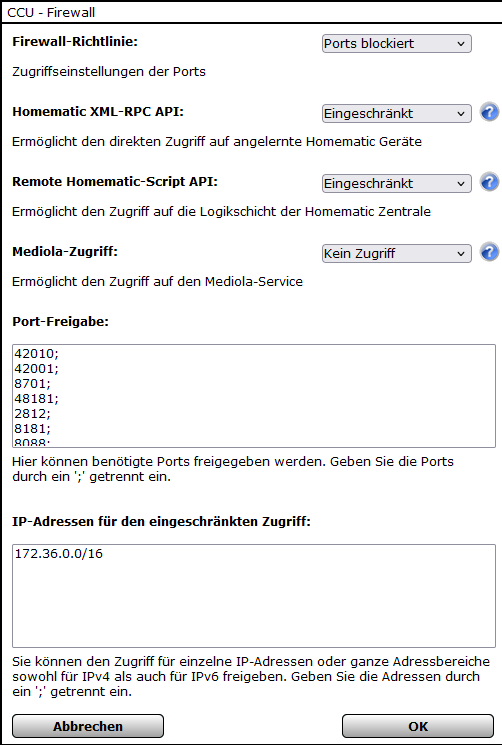
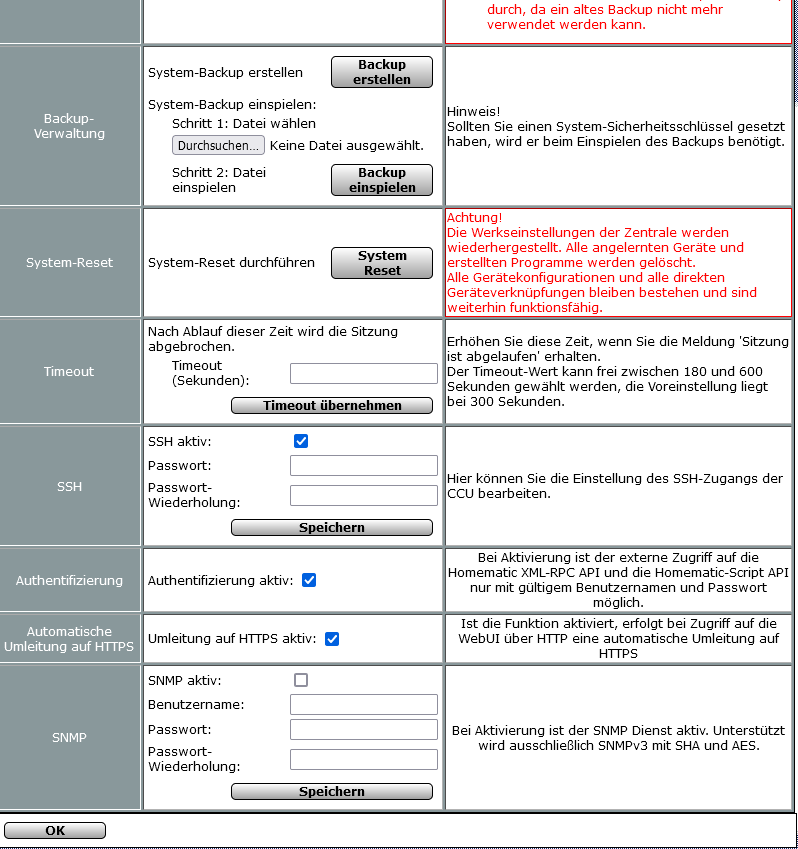
Programme sind nur noch wenige auf der PIVCCU vorhanden.
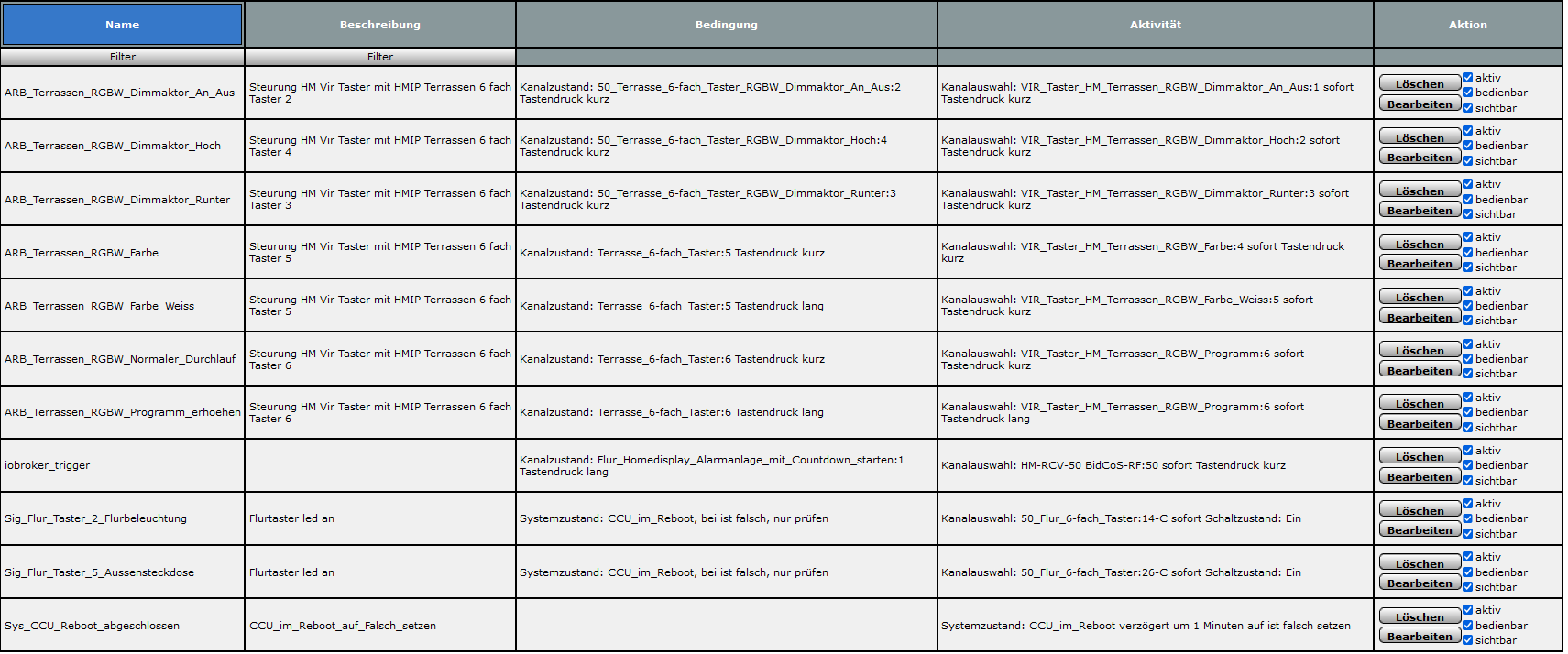
iob hm-rega:
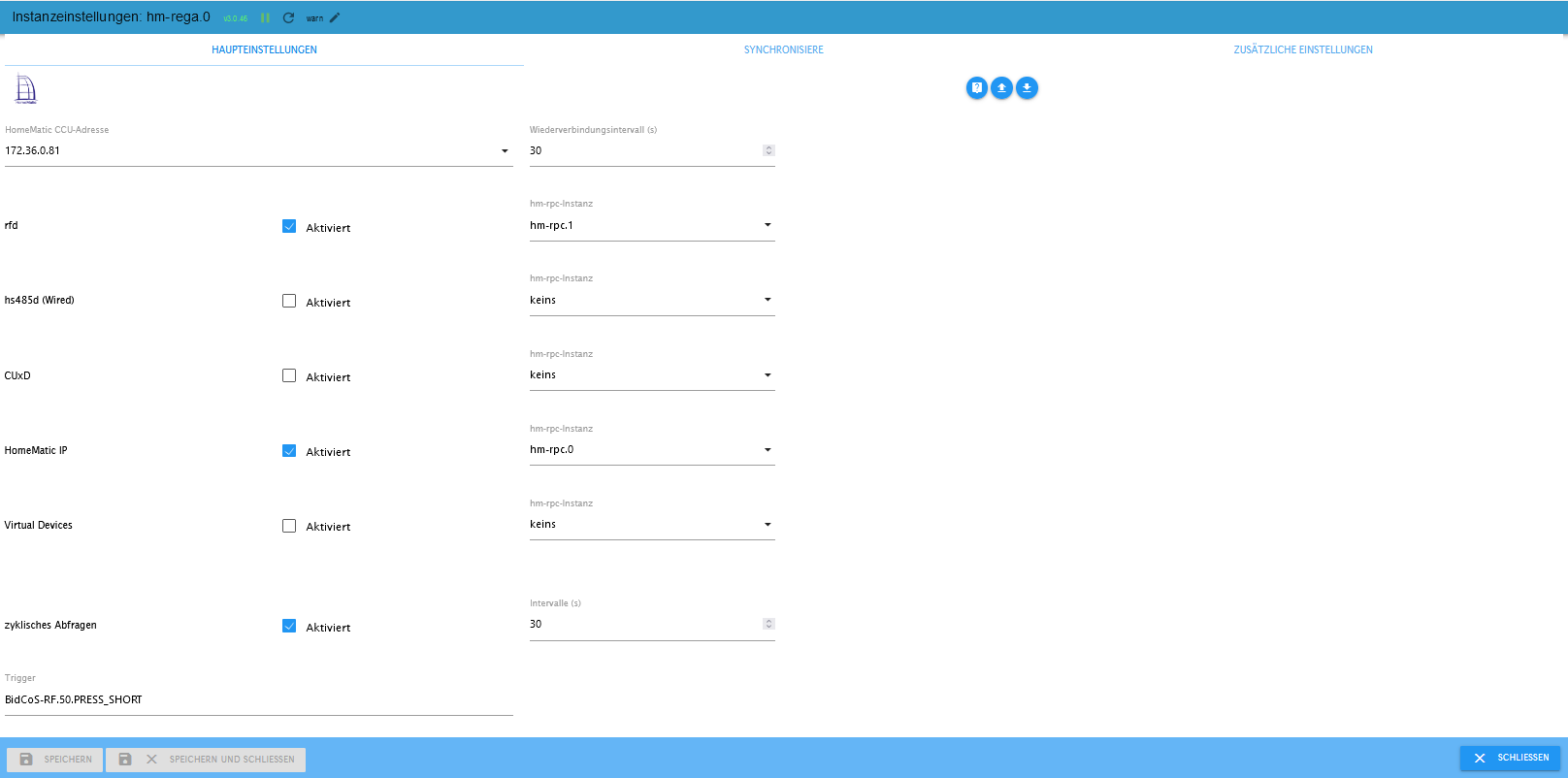
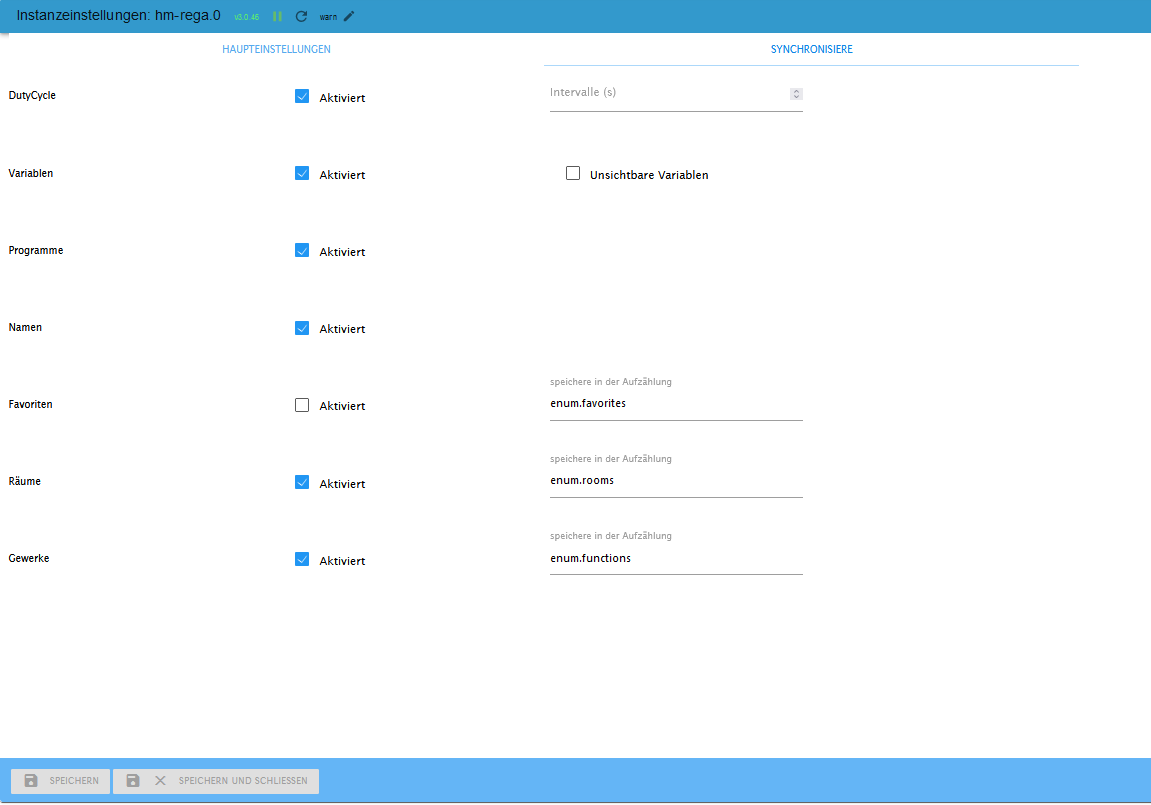
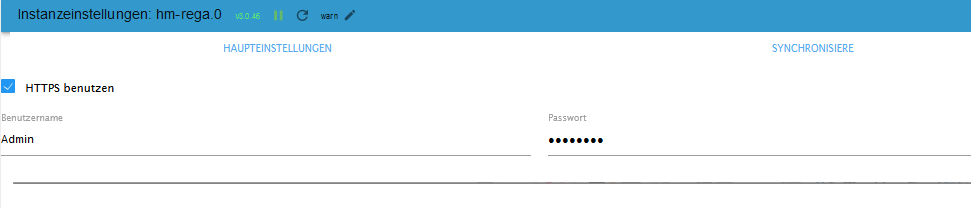
iob hm-rpc:
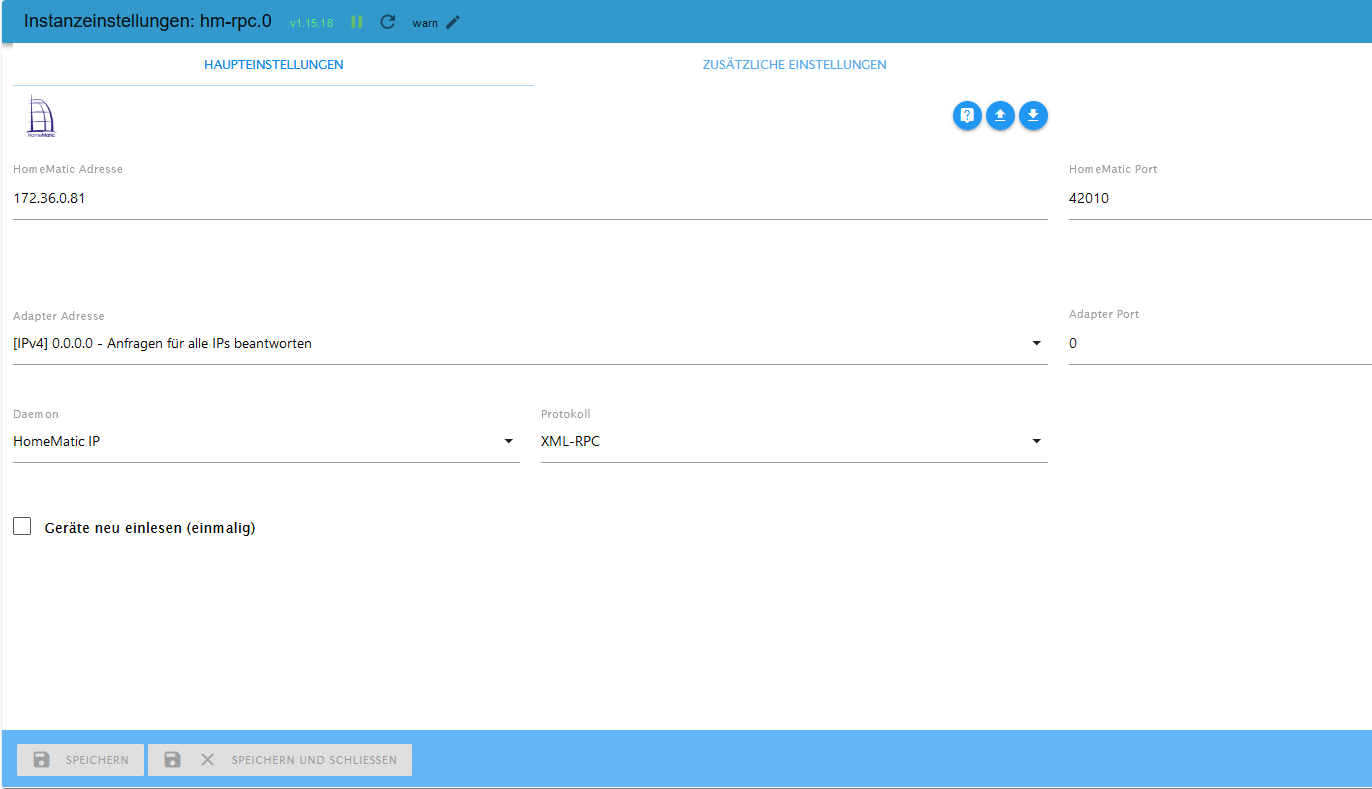
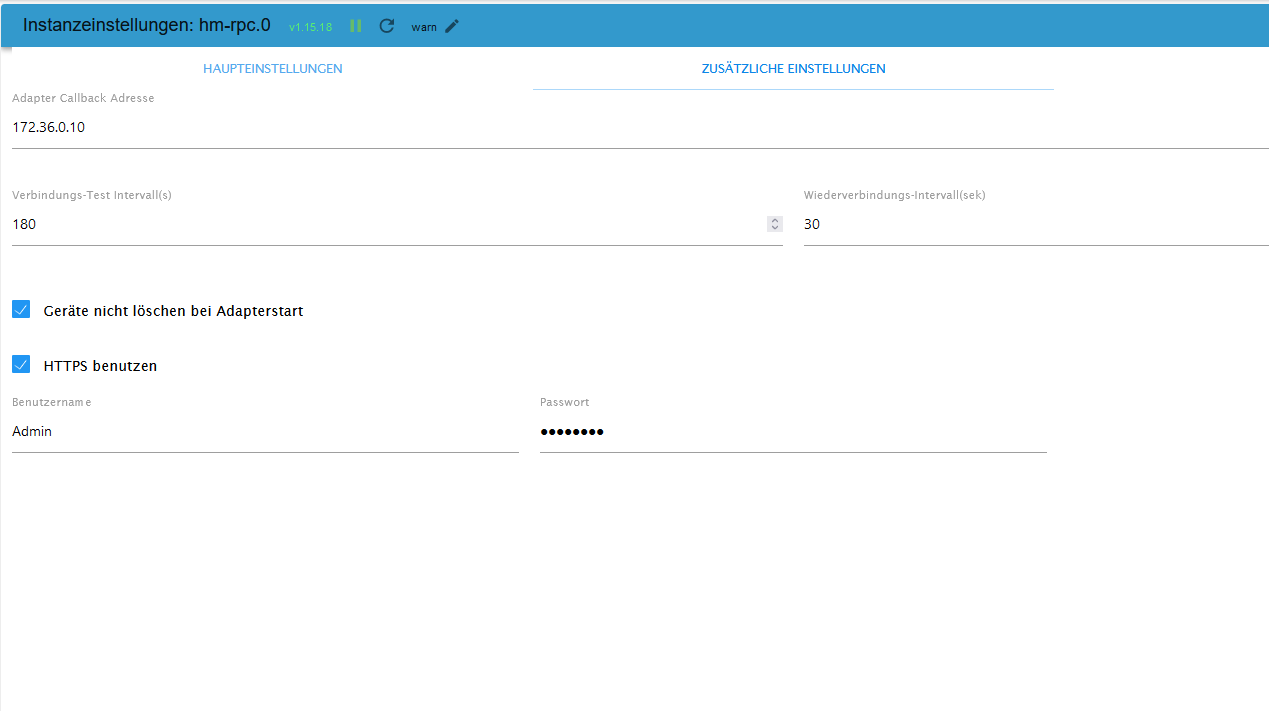
-
@bahnuhr
Hallo an alle ,
natürlich will ich es schaffen habe auch schon Zisch Tage hinter mir und kein Plan mehr.ccu:
Vorher war raspberrymatic installiert mitlerweille habe ich PVCCU aufgespiet (Raspberry pi 4)Programme sind nur noch wenige auf der PIVCCU vorhanden.
iob hm-rega:
iob hm-rpc:
@markus-now
Warum benutzt man als Anfänger nicht mal einfache Sachen.zur ccu:
warum https ?
warum authentifizierung ?
was sind das für port Freigaben?
bei https müsste doch 42001 und 42010 reichen.
Was sind das für andere, wo kommen die her ?Was hast du generell für einen Netzwerkbereich ?
Sind das firmennetzwerke?
normal ist doch 192.168......
Das hast du nicht !zu hm-rpc.0
Adapter Adresse dürfte nicht stimmen. Muss hier nicht die IP von iob rein !hm-rpc.1 fehlt!
warum ? -
@markus-now
Warum benutzt man als Anfänger nicht mal einfache Sachen.zur ccu:
warum https ?
warum authentifizierung ?
was sind das für port Freigaben?
bei https müsste doch 42001 und 42010 reichen.
Was sind das für andere, wo kommen die her ?Was hast du generell für einen Netzwerkbereich ?
Sind das firmennetzwerke?
normal ist doch 192.168......
Das hast du nicht !zu hm-rpc.0
Adapter Adresse dürfte nicht stimmen. Muss hier nicht die IP von iob rein !hm-rpc.1 fehlt!
warum ?@bahnuhr sagte in ioBroker aktualisiert Homematic Datenpunkte nicht mehr:
zu hm-rpc.0
Adapter Adresse dürfte nicht stimmen. Muss hier nicht die IP von iob rein !Jup
Was hast du generell für einen Netzwerkbereich ?
-
@bahnuhr sagte in ioBroker aktualisiert Homematic Datenpunkte nicht mehr:
zu hm-rpc.0
Adapter Adresse dürfte nicht stimmen. Muss hier nicht die IP von iob rein !Jup
Was hast du generell für einen Netzwerkbereich ?
@ticaki sagte in ioBroker aktualisiert Homematic Datenpunkte nicht mehr:
und was ist fürn Kram ?
kenn ich nicht! -
@ticaki sagte in ioBroker aktualisiert Homematic Datenpunkte nicht mehr:
und was ist fürn Kram ?
kenn ich nicht!@bahnuhr
Einfach nur ein Beleg für deine Aussage. Ist eine IP von T-Mobile USA -
-
@bahnuhr sagte in ioBroker aktualisiert Homematic Datenpunkte nicht mehr:
zu hm-rpc.0
Adapter Adresse dürfte nicht stimmen. Muss hier nicht die IP von iob rein !Jup
Was hast du generell für einen Netzwerkbereich ?
@ticaki warum lässt Du eigentlich nicht
den TE@markus-now antworten ? Kapier ich nichtLehrling seit 1975 !!!
Beitrag geholfen ? dann gerne ein upvote rechts unten im Beitrag klicken ;)
https://forum.iobroker.net/topic/51555/hinweise-f%C3%BCr-gute-forenbeitr%C3%A4ge -
@ticaki warum lässt Du eigentlich nicht
den TE@markus-now antworten ? Kapier ich nicht@djmarc75
wir schreiben einfach nur so hin und her!Aber im ernst.
Ich versteh so manche nicht.Man ist Anfänger und muss alles kompliziert machen. Und dann wundert man sich, dass etwas nicht läuft.
aus meiner Sicht richtige Vorgehensweise:
- Doku von hm-rega und hm-rpc lesen und versuchen zu verstehen.
- im Heimnetz ist https, etc. nicht erforderlich
- und versuchen Sonderfälle zu vermeinden.
erst einmal sehen, dass das Einfache läuft.
Und dann (wenn überhaupt) verschlimmbessern ;-)




Hey! Du scheinst an dieser Unterhaltung interessiert zu sein, hast aber noch kein Konto.
Hast du es satt, bei jedem Besuch durch die gleichen Beiträge zu scrollen? Wenn du dich für ein Konto anmeldest, kommst du immer genau dorthin zurück, wo du zuvor warst, und kannst dich über neue Antworten benachrichtigen lassen (entweder per E-Mail oder Push-Benachrichtigung). Du kannst auch Lesezeichen speichern und Beiträge positiv bewerten, um anderen Community-Mitgliedern deine Wertschätzung zu zeigen.
Mit deinem Input könnte dieser Beitrag noch besser werden 💗
Registrieren AnmeldenSupport us
506
Online33.0k
Benutzer83.6k
Themen1.3m
Beiträge