




ioBroker aktualisiert Homematic Datenpunkte nicht mehr
-
Hi, danke für deine fixe Rückmeldung.
Anbei die gewünschten Infos:
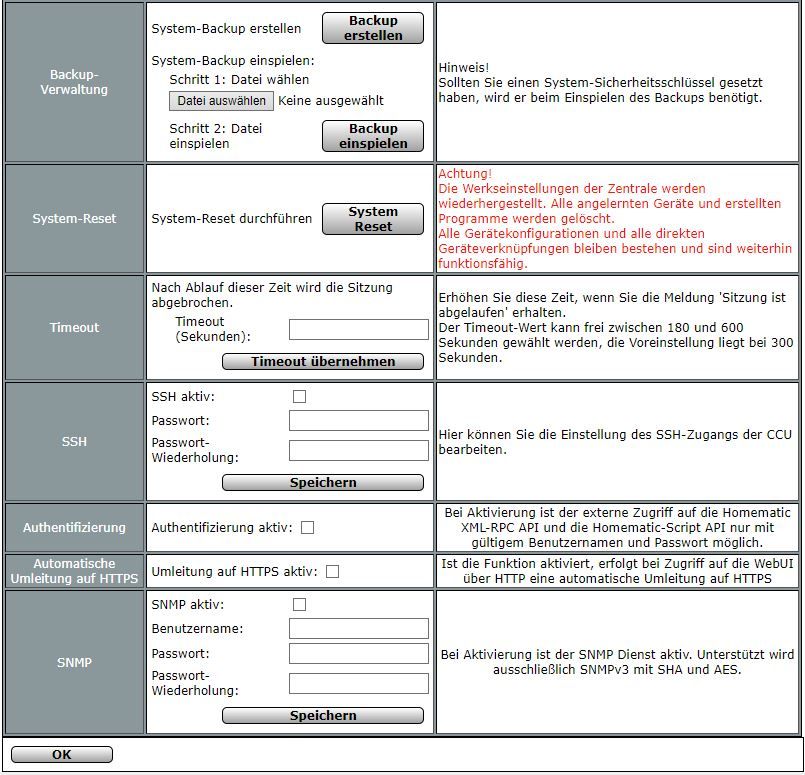
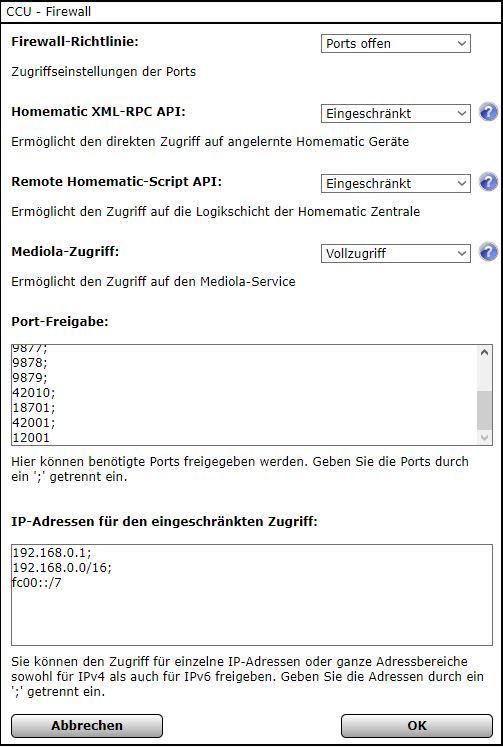
Nein, habe nur HAP zwecks einfacherer Einbindung in HomeKit laufen.
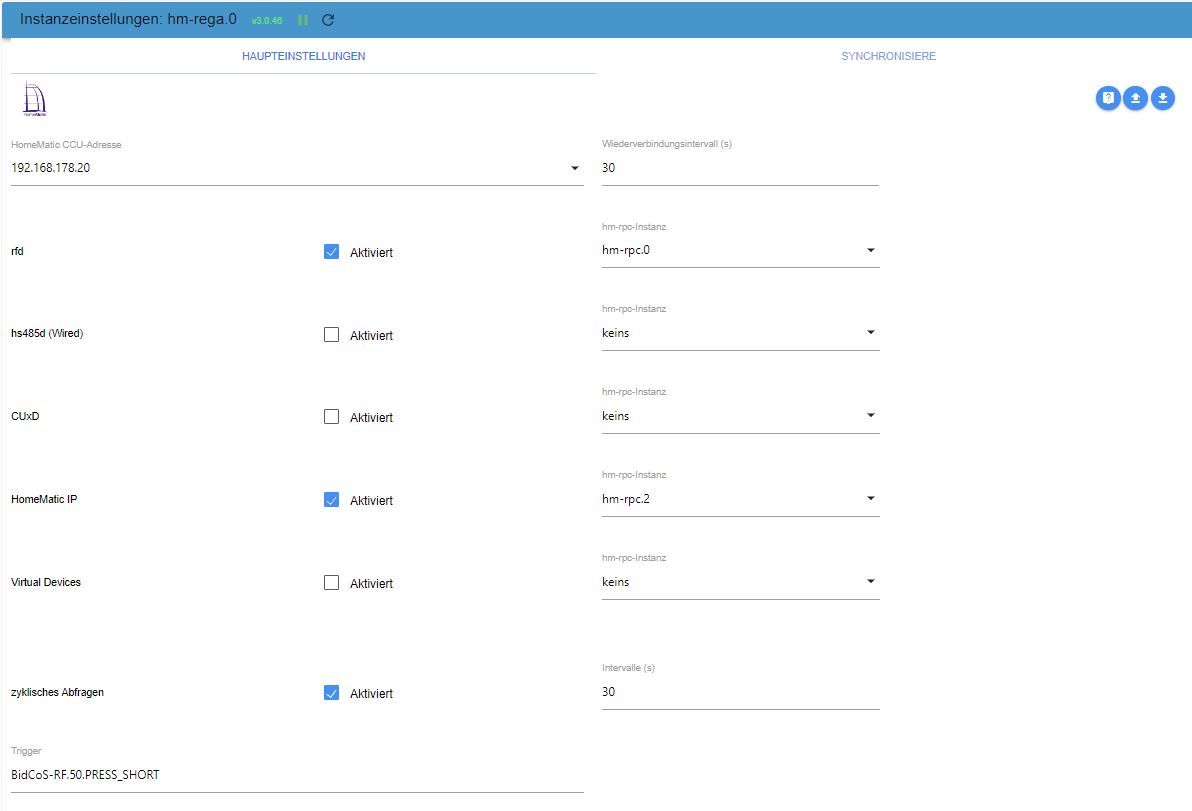
Rega Konfig:
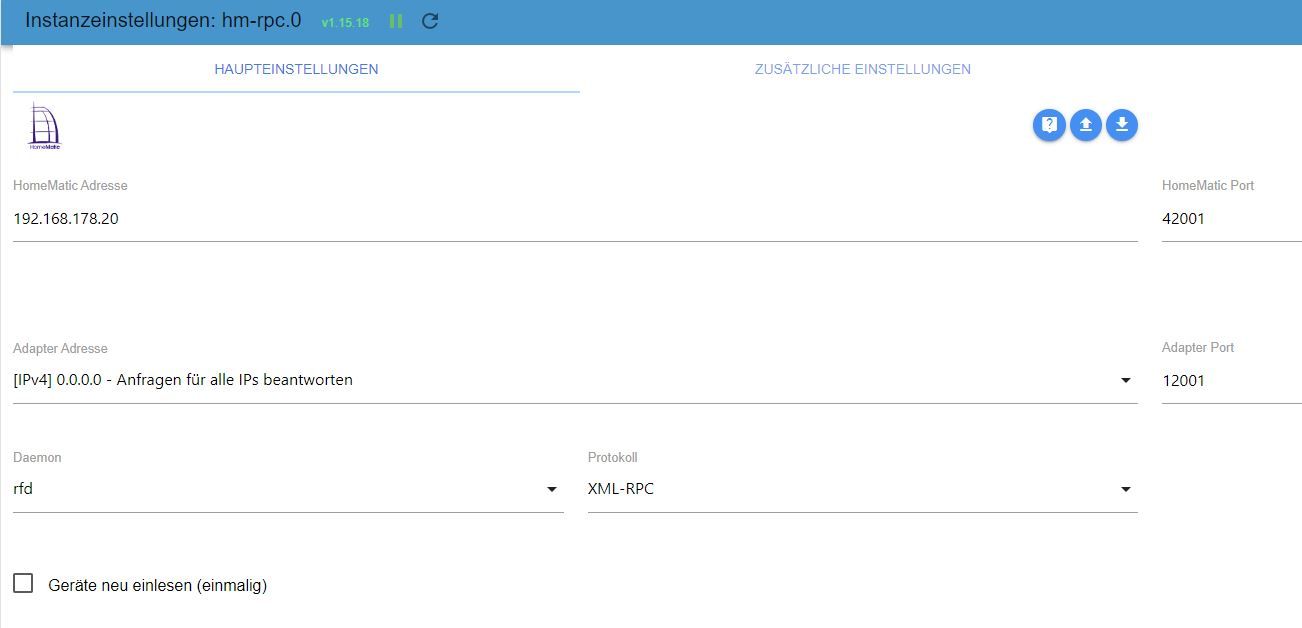
RPC_0 Konfig:
RPC_2 Konfig:
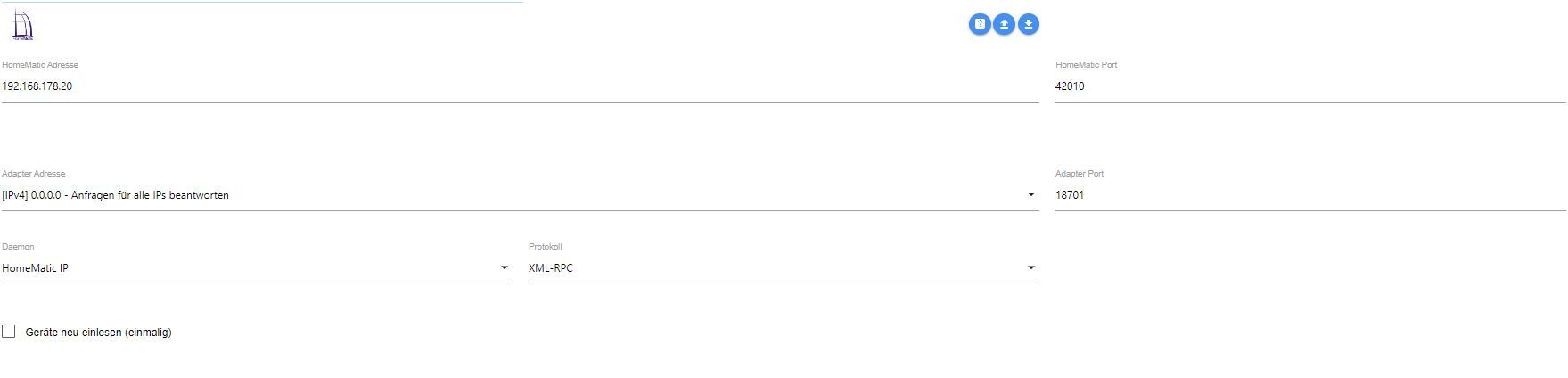
Wo bekomme ich den iob diag her? Ist das ein zu installierender Adapter?
Vielen Dank für die Hilfe!
-
Hi, danke für deine fixe Rückmeldung.
Anbei die gewünschten Infos:
Nein, habe nur HAP zwecks einfacherer Einbindung in HomeKit laufen.
Rega Konfig:
RPC_0 Konfig:
RPC_2 Konfig:
Wo bekomme ich den iob diag her? Ist das ein zu installierender Adapter?
Vielen Dank für die Hilfe!
@menuchim sagte in ioBroker aktualisiert Homematic Datenpunkte nicht mehr:
Wo bekomme ich den iob diag her? Ist das ein zu installierender Adapter?
iob diagist Teil des Installers und sollte automatisch als Kommandozeilenbefehl installiert worden sein. Einfach in einem Terminal ausführen.
-
Hi, danke für deine fixe Rückmeldung.
Anbei die gewünschten Infos:
Nein, habe nur HAP zwecks einfacherer Einbindung in HomeKit laufen.
Rega Konfig:
RPC_0 Konfig:
RPC_2 Konfig:
Wo bekomme ich den iob diag her? Ist das ein zu installierender Adapter?
Vielen Dank für die Hilfe!
zu ccu:
oben hast du eingestellt "Ports offen"
und bei port Freigabe hast du jede Menge drin; überprüf die mal.und dann hast du bei xml und api jeweils eingeschränkt.
und dann unten bei IP die 192.168.0.1
überprüfen ! glaube nicht dass der Bereich stimmt
du hast doch 192.168.178....@menuchim sagte in ioBroker aktualisiert Homematic Datenpunkte nicht mehr:
Nein, habe nur HAP zwecks einfacherer Einbindung in HomeKit laufen.
Hab ich beides nicht, kann ich nichts zu sagen!
zu hm-rega:
sieht ok aus.
Was ist mit hm-rpc.1 (dies fehlt !)zu rpc.0 und rpc.2
was sind das für ports.
Sind die normal ? Das müsste doch die sein für https
Und genau das hast du doch nicht eingeschaltet !
Auch die Adapter Adresse stimmt nicht. Müsste da nicht die IP von iob stehen ?Bitte auch die Doku für hm-rega und hm-rpc lesen.
Bringt bestimmt Aufklärung. -
@menuchim sagte in ioBroker aktualisiert Homematic Datenpunkte nicht mehr:
habe nur HAP zwecks einfacherer Einbindung in HomeKit laufen.
dann sind rega und rpc nichts für dich!
und nochmal
ich komme nicht mehr auf diese Seitehast du irgendwo unnötigen Mega code geposzet, so kürze ihn bitte
-
Hi, dann versuche ich es nochmal.
Anbei ein aktueller Log.
2023-07-24 08:00:42.225 - debug: hm-rpc.2 (32719) [KEEPALIVE] Check if connection is alive
2023-07-24 08:00:42.225 - debug: hm-rpc.2 (32719) Send PING...
2023-07-24 08:00:42.247 - debug: hm-rpc.2 (32719) PING ok
2023-07-24 08:02:12.226 - debug: hm-rpc.2 (32719) [KEEPALIVE] Check if connection is alive
2023-07-24 08:02:12.226 - debug: hm-rpc.2 (32719) [KEEPALIVE] Connection timed out, initializing new connection
2023-07-24 08:02:12.226 - debug: hm-rpc.2 (32719) Connect...
2023-07-24 08:02:12.226 - debug: hm-rpc.2 (32719) clear ping interval
2023-07-24 08:02:12.227 - debug: hm-rpc.2 (32719) start connecting interval
2023-07-24 08:02:42.227 - debug: hm-rpc.2 (32719) xmlrpc -> 192.168.178.20:42010/ init ["http://192.168.178.20:18701","ioBroker:hm-rpc.2:XXX"]
2023-07-24 08:02:42.301 - debug: hm-rpc.2 (32719) clear connecting interval
2023-07-24 08:02:42.301 - debug: hm-rpc.2 (32719) start ping interval
2023-07-24 08:04:12.302 - debug: hm-rpc.2 (32719) [KEEPALIVE] Check if connection is alive
2023-07-24 08:04:12.302 - debug: hm-rpc.2 (32719) Send PING...
2023-07-24 08:04:12.328 - debug: hm-rpc.2 (32719) PING ok
2023-07-24 08:05:32.846 - info:
2023-07-24 08:05:42.303 - debug: hm-rpc.2 (32719) [KEEPALIVE] Check if connection is alive
2023-07-24 08:05:42.303 - debug: hm-rpc.2 (32719) [KEEPALIVE] Connection timed out, initializing new connection
2023-07-24 08:05:42.303 - debug: hm-rpc.2 (32719) Connect...
2023-07-24 08:05:42.303 - debug: hm-rpc.2 (32719) clear ping interval
2023-07-24 08:05:42.304 - debug: hm-rpc.2 (32719) start connecting interval
2023-07-24 08:06:12.304 - debug: hm-rpc.2 (32719) xmlrpc -> 192.168.178.20:42010/ init ["http://192.168.178.20:18701","ioBroker:hm-rpc.2:XXX"]
2023-07-24 08:06:12.336 - debug: hm-rpc.2 (32719) clear connecting interval
2023-07-24 08:06:12.336 - debug: hm-rpc.2 (32719) start ping interval
2023-07-24 08:07:42.336 - debug: hm-rpc.2 (32719) [KEEPALIVE] Check if connection is alive
2023-07-24 08:07:42.337 - debug: hm-rpc.2 (32719) Send PING...
2023-07-24 08:07:42.367 - debug: hm-rpc.2 (32719) PING ok
2023-07-24 08:09:12.337 - debug: hm-rpc.2 (32719) [KEEPALIVE] Check if connection is alive
2023-07-24 08:09:12.337 - debug: hm-rpc.2 (32719) [KEEPALIVE] Connection timed out, initializing new connection
2023-07-24 08:09:12.338 - debug: hm-rpc.2 (32719) Connect...
2023-07-24 08:09:12.338 - debug: hm-rpc.2 (32719) clear ping interval
2023-07-24 08:09:12.338 - debug: hm-rpc.2 (32719) start connecting interval
2023-07-24 08:09:42.339 - debug: hm-rpc.2 (32719) xmlrpc -> 192.168.178.20:42010/ init ["http://192.168.178.20:18701","ioBroker:hm-rpc.2:XXX"]
2023-07-24 08:09:42.399 - debug: hm-rpc.2 (32719) clear connecting interval
2023-07-24 08:09:42.400 - debug: hm-rpc.2 (32719) start ping interval
2023-07-24 08:10:35.693 - info:
2023-07-24 08:11:12.400 - debug: hm-rpc.2 (32719) [KEEPALIVE] Check if connection is alive
2023-07-24 08:11:12.401 - debug: hm-rpc.2 (32719) Send PING...
2023-07-24 08:11:12.420 - debug: hm-rpc.2 (32719) PING ok
2023-07-24 08:12:42.401 - debug: hm-rpc.2 (32719) [KEEPALIVE] Check if connection is alive
2023-07-24 08:12:42.401 - debug: hm-rpc.2 (32719) [KEEPALIVE] Connection timed out, initializing new connection
2023-07-24 08:12:42.402 - debug: hm-rpc.2 (32719) Connect...
2023-07-24 08:12:42.402 - debug: hm-rpc.2 (32719) clear ping interval
2023-07-24 08:12:42.402 - debug: hm-rpc.2 (32719) start connecting interval
2023-07-24 08:13:12.402 - debug: hm-rpc.2 (32719) xmlrpc -> 192.168.178.20:42010/ init ["http://192.168.178.20:18701","ioBroker:hm-rpc.2:XXX"]
2023-07-24 08:13:12.431 - debug: hm-rpc.2 (32719) clear connecting interval
2023-07-24 08:13:12.431 - debug: hm-rpc.2 (32719) start ping interval
2023-07-24 08:14:42.431 - debug: hm-rpc.2 (32719) [KEEPALIVE] Check if connection is alive
2023-07-24 08:14:42.432 - debug: hm-rpc.2 (32719) Send PING...
2023-07-24 08:14:42.451 - debug: hm-rpc.2 (32719) PING ok
2023-07-24 08:15:38.471 - info:
2023-07-24 08:16:12.432 - debug: hm-rpc.2 (32719) [KEEPALIVE] Check if connection is alive
2023-07-24 08:16:12.432 - debug: hm-rpc.2 (32719) [KEEPALIVE] Connection timed out, initializing new connection
2023-07-24 08:16:12.432 - debug: hm-rpc.2 (32719) Connect...
2023-07-24 08:16:12.432 - debug: hm-rpc.2 (32719) clear ping interval
2023-07-24 08:16:12.432 - debug: hm-rpc.2 (32719) start connecting interval
2023-07-24 08:16:42.432 - debug: hm-rpc.2 (32719) xmlrpc -> 192.168.178.20:42010/ init ["http://192.168.178.20:18701","ioBroker:hm-rpc.2:XXX"]
2023-07-24 08:16:42.491 - debug: hm-rpc.2 (32719) clear connecting interval
2023-07-24 08:16:42.492 - debug: hm-rpc.2 (32719) start ping interval
2023-07-24 08:18:12.492 - debug: hm-rpc.2 (32719) [KEEPALIVE] Check if connection is alive
2023-07-24 08:18:12.492 - debug: hm-rpc.2 (32719) Send PING...
2023-07-24 08:18:12.516 - debug: hm-rpc.2 (32719) PING ok
2023-07-24 08:19:42.491 - debug: hm-rpc.2 (32719) [KEEPALIVE] Check if connection is alive
2023-07-24 08:19:42.492 - debug: hm-rpc.2 (32719) [KEEPALIVE] Connection timed out, initializing new connection
2023-07-24 08:19:42.492 - debug: hm-rpc.2 (32719) Connect...
2023-07-24 08:19:42.492 - debug: hm-rpc.2 (32719) clear ping interval
2023-07-24 08:19:42.492 - debug: hm-rpc.2 (32719) start connecting interval
2023-07-24 08:20:12.492 - debug: hm-rpc.2 (32719) xmlrpc -> 192.168.178.20:42010/ init ["http://192.168.178.20:18701","ioBroker:hm-rpc.2:XXX"]
2023-07-24 08:20:12.528 - debug: hm-rpc.2 (32719) clear connecting interval
2023-07-24 08:20:12.529 - debug: hm-rpc.2 (32719) start ping interval
2023-07-24 08:20:41.574 - info:
2023-07-24 08:21:42.528 - debug: hm-rpc.2 (32719) [KEEPALIVE] Check if connection is alive
2023-07-24 08:21:42.528 - debug: hm-rpc.2 (32719) Send PING...
2023-07-24 08:21:42.554 - debug: hm-rpc.2 (32719) PING ok
2023-07-24 08:23:12.529 - debug: hm-rpc.2 (32719) [KEEPALIVE] Check if connection is alive
2023-07-24 08:23:12.529 - debug: hm-rpc.2 (32719) [KEEPALIVE] Connection timed out, initializing new connection
2023-07-24 08:23:12.529 - debug: hm-rpc.2 (32719) Connect...
2023-07-24 08:23:12.529 - debug: hm-rpc.2 (32719) clear ping interval
2023-07-24 08:23:12.529 - debug: hm-rpc.2 (32719) start connecting interval
2023-07-24 08:23:42.529 - debug: hm-rpc.2 (32719) xmlrpc -> 192.168.178.20:42010/ init ["http://192.168.178.20:18701","ioBroker:hm-rpc.2:XXX"]
2023-07-24 08:23:42.578 - debug: hm-rpc.2 (32719) clear connecting interval
2023-07-24 08:23:42.578 - debug: hm-rpc.2 (32719) start ping interval
2023-07-24 08:25:12.579 - debug: hm-rpc.2 (32719) [KEEPALIVE] Check if connection is alive
2023-07-24 08:25:12.579 - debug: hm-rpc.2 (32719) Send PING...
2023-07-24 08:25:12.602 - debug: hm-rpc.2 (32719) PING ok
2023-07-24 08:25:44.667 - info:
2023-07-24 08:26:42.580 - debug: hm-rpc.2 (32719) [KEEPALIVE] Check if connection is alive
2023-07-24 08:26:42.580 - debug: hm-rpc.2 (32719) [KEEPALIVE] Connection timed out, initializing new connection
2023-07-24 08:26:42.580 - debug: hm-rpc.2 (32719) Connect...
2023-07-24 08:26:42.580 - debug: hm-rpc.2 (32719) clear ping interval
2023-07-24 08:26:42.581 - debug: hm-rpc.2 (32719) start connecting interval
2023-07-24 08:27:12.581 - debug: hm-rpc.2 (32719) xmlrpc -> 192.168.178.20:42010/ init ["http://192.168.178.20:18701","ioBroker:hm-rpc.2:XXX"]
2023-07-24 08:27:12.611 - debug: hm-rpc.2 (32719) clear connecting interval
2023-07-24 08:27:12.611 - debug: hm-rpc.2 (32719) start ping interval
2023-07-24 08:28:42.612 - debug: hm-rpc.2 (32719) [KEEPALIVE] Check if connection is alive
2023-07-24 08:28:42.612 - debug: hm-rpc.2 (32719) Send PING...
2023-07-24 08:28:42.635 - debug: hm-rpc.2 (32719) PING ok
2023-07-24 08:30:12.613 - debug: hm-rpc.2 (32719) [KEEPALIVE] Check if connection is alive
2023-07-24 08:30:12.613 - debug: hm-rpc.2 (32719) [KEEPALIVE] Connection timed out, initializing new connection
2023-07-24 08:30:12.613 - debug: hm-rpc.2 (32719) Connect...
2023-07-24 08:30:12.613 - debug: hm-rpc.2 (32719) clear ping interval
2023-07-24 08:30:12.613 - debug: hm-rpc.2 (32719) start connecting interval
2023-07-24 08:30:42.614 - debug: hm-rpc.2 (32719) xmlrpc -> 192.168.178.20:42010/ init ["http://192.168.178.20:18701","ioBroker:hm-rpc.2:XXX"]
2023-07-24 08:30:42.681 - debug: hm-rpc.2 (32719) clear connecting interval
2023-07-24 08:30:42.682 - debug: hm-rpc.2 (32719) start ping interval
2023-07-24 08:30:47.345 - info:
2023-07-24 08:32:12.683 - debug: hm-rpc.2 (32719) [KEEPALIVE] Check if connection is alive
2023-07-24 08:32:12.683 - debug: hm-rpc.2 (32719) Send PING...
2023-07-24 08:32:12.707 - debug: hm-rpc.2 (32719) PING ok
2023-07-24 08:33:42.684 - debug: hm-rpc.2 (32719) [KEEPALIVE] Check if connection is alive
2023-07-24 08:33:42.684 - debug: hm-rpc.2 (32719) [KEEPALIVE] Connection timed out, initializing new connection
2023-07-24 08:33:42.684 - debug: hm-rpc.2 (32719) Connect...
2023-07-24 08:33:42.685 - debug: hm-rpc.2 (32719) clear ping interval
2023-07-24 08:33:42.685 - debug: hm-rpc.2 (32719) start connecting interval
2023-07-24 08:34:12.685 - debug: hm-rpc.2 (32719) xmlrpc -> 192.168.178.20:42010/ init ["http://192.168.178.20:18701","ioBroker:hm-rpc.2:XXX"]
2023-07-24 08:34:12.707 - debug: hm-rpc.2 (32719) clear connecting interval
2023-07-24 08:34:12.707 - debug: hm-rpc.2 (32719) start ping interval
2023-07-24 08:35:42.708 - debug: hm-rpc.2 (32719) [KEEPALIVE] Check if connection is alive
2023-07-24 08:35:42.708 - debug: hm-rpc.2 (32719) Send PING...
2023-07-24 08:35:42.731 - debug: hm-rpc.2 (32719) PING ok
2023-07-24 08:35:51.412 - info:
2023-07-24 08:37:12.708 - debug: hm-rpc.2 (32719) [KEEPALIVE] Check if connection is alive
2023-07-24 08:37:12.709 - debug: hm-rpc.2 (32719) [KEEPALIVE] Connection timed out, initializing new connection
2023-07-24 08:37:12.709 - debug: hm-rpc.2 (32719) Connect...
2023-07-24 08:37:12.709 - debug: hm-rpc.2 (32719) clear ping interval
2023-07-24 08:37:12.709 - debug: hm-rpc.2 (32719) start connecting interval
2023-07-24 08:37:42.710 - debug: hm-rpc.2 (32719) xmlrpc -> 192.168.178.20:42010/ init ["http://192.168.178.20:18701","ioBroker:hm-rpc.2:XXX"]
2023-07-24 08:37:42.763 - debug: hm-rpc.2 (32719) clear connecting interval
2023-07-24 08:37:42.764 - debug: hm-rpc.2 (32719) start ping interval
2023-07-24 08:39:12.764 - debug: hm-rpc.2 (32719) [KEEPALIVE] Check if connection is alive
2023-07-24 08:39:12.764 - debug: hm-rpc.2 (32719) Send PING...
2023-07-24 08:39:12.790 - debug: hm-rpc.2 (32719) PING ok
2023-07-24 08:40:42.763 - debug: hm-rpc.2 (32719) [KEEPALIVE] Check if connection is alive
2023-07-24 08:40:42.764 - debug: hm-rpc.2 (32719) [KEEPALIVE] Connection timed out, initializing new connection
2023-07-24 08:40:42.764 - debug: hm-rpc.2 (32719) Connect...
2023-07-24 08:40:42.764 - debug: hm-rpc.2 (32719) clear ping interval
2023-07-24 08:40:42.764 - debug: hm-rpc.2 (32719) start connecting interval
2023-07-24 08:40:54.650 - info:
2023-07-24 08:41:12.764 - debug: hm-rpc.2 (32719) xmlrpc -> 192.168.178.20:42010/ init ["http://192.168.178.20:18701","ioBroker:hm-rpc.2:XXX"]
2023-07-24 08:41:12.793 - debug: hm-rpc.2 (32719) clear connecting interval
2023-07-24 08:41:12.794 - debug: hm-rpc.2 (32719) start ping interval
2023-07-24 08:42:42.795 - debug: hm-rpc.2 (32719) [KEEPALIVE] Check if connection is alive
2023-07-24 08:42:42.795 - debug: hm-rpc.2 (32719) Send PING...
2023-07-24 08:42:42.816 - debug: hm-rpc.2 (32719) PING ok
2023-07-24 08:44:12.794 - debug: hm-rpc.2 (32719) [KEEPALIVE] Check if connection is alive
2023-07-24 08:44:12.795 - debug: hm-rpc.2 (32719) [KEEPALIVE] Connection timed out, initializing new connection
2023-07-24 08:44:12.795 - debug: hm-rpc.2 (32719) Connect...
2023-07-24 08:44:12.795 - debug: hm-rpc.2 (32719) clear ping interval
2023-07-24 08:44:12.795 - debug: hm-rpc.2 (32719) start connecting interval
2023-07-24 08:44:42.795 - debug: hm-rpc.2 (32719) xmlrpc -> 192.168.178.20:42010/ init ["http://192.168.178.20:18701","ioBroker:hm-rpc.2:XXX"]
2023-07-24 08:44:42.852 - debug: hm-rpc.2 (32719) clear connecting interval
2023-07-24 08:44:42.852 - debug: hm-rpc.2 (32719) start ping interval
2023-07-24 08:45:57.392 - info:
2023-07-24 08:46:12.852 - debug: hm-rpc.2 (32719) [KEEPALIVE] Check if connection is alive
2023-07-24 08:46:12.852 - debug: hm-rpc.2 (32719) Send PING...
2023-07-24 08:46:12.876 - debug: hm-rpc.2 (32719) PING ok
2023-07-24 08:47:42.852 - debug: hm-rpc.2 (32719) [KEEPALIVE] Check if connection is alive
2023-07-24 08:47:42.852 - debug: hm-rpc.2 (32719) [KEEPALIVE] Connection timed out, initializing new connection
2023-07-24 08:47:42.853 - debug: hm-rpc.2 (32719) Connect...
2023-07-24 08:47:42.853 - debug: hm-rpc.2 (32719) clear ping interval
2023-07-24 08:47:42.853 - debug: hm-rpc.2 (32719) start connecting interval
2023-07-24 08:48:12.854 - debug: hm-rpc.2 (32719) xmlrpc -> 192.168.178.20:42010/ init ["http://192.168.178.20:18701","ioBroker:hm-rpc.2:XXX"]
2023-07-24 08:48:12.883 - debug: hm-rpc.2 (32719) clear connecting interval
2023-07-24 08:48:12.884 - debug: hm-rpc.2 (32719) start ping interval
2023-07-24 08:49:42.885 - debug: hm-rpc.2 (32719) [KEEPALIVE] Check if connection is alive
2023-07-24 08:49:42.885 - debug: hm-rpc.2 (32719) Send PING...
2023-07-24 08:49:42.942 - debug: hm-rpc.2 (32719) PING ok
2023-07-24 08:51:00.473 - info:
2023-07-24 08:51:12.886 - debug: hm-rpc.2 (32719) [KEEPALIVE] Check if connection is alive
2023-07-24 08:51:12.886 - debug: hm-rpc.2 (32719) [KEEPALIVE] Connection timed out, initializing new connection
2023-07-24 08:51:12.886 - debug: hm-rpc.2 (32719) Connect...
2023-07-24 08:51:12.886 - debug: hm-rpc.2 (32719) clear ping interval
2023-07-24 08:51:12.887 - debug: hm-rpc.2 (32719) start connecting interval
2023-07-24 08:51:42.887 - debug: hm-rpc.2 (32719) xmlrpc -> 192.168.178.20:42010/ init ["http://192.168.178.20:18701","ioBroker:hm-rpc.2:XXX"]
2023-07-24 08:51:42.918 - debug: hm-rpc.2 (32719) clear connecting interval
2023-07-24 08:51:42.918 - debug: hm-rpc.2 (32719) start ping interval
2023-07-24 08:53:12.919 - debug: hm-rpc.2 (32719) [KEEPALIVE] Check if connection is alive
2023-07-24 08:53:12.919 - debug: hm-rpc.2 (32719) Send PING...
2023-07-24 08:53:12.941 - debug: hm-rpc.2 (32719) PING ok
2023-07-24 08:54:42.920 - debug: hm-rpc.2 (32719) [KEEPALIVE] Check if connection is alive
2023-07-24 08:54:42.920 - debug: hm-rpc.2 (32719) [KEEPALIVE] Connection timed out, initializing new connection
2023-07-24 08:54:42.920 - debug: hm-rpc.2 (32719) Connect...
2023-07-24 08:54:42.921 - debug: hm-rpc.2 (32719) clear ping interval
2023-07-24 08:54:42.921 - debug: hm-rpc.2 (32719) start connecting interval
2023-07-24 08:55:12.922 - debug: hm-rpc.2 (32719) xmlrpc -> 192.168.178.20:42010/ init ["http://192.168.178.20:18701","ioBroker:hm-rpc.2:XXX"]
2023-07-24 08:55:12.981 - debug: hm-rpc.2 (32719) clear connecting interval
2023-07-24 08:55:12.981 - debug: hm-rpc.2 (32719) start ping interval
2023-07-24 08:56:03.755 - info:
2023-07-24 08:56:42.982 - debug: hm-rpc.2 (32719) [KEEPALIVE] Check if connection is alive
2023-07-24 08:56:42.982 - debug: hm-rpc.2 (32719) Send PING...
2023-07-24 08:56:43.010 - debug: hm-rpc.2 (32719) PING ok
2023-07-24 08:58:12.983 - debug: hm-rpc.2 (32719) [KEEPALIVE] Check if connection is alive
2023-07-24 08:58:12.983 - debug: hm-rpc.2 (32719) [KEEPALIVE] Connection timed out, initializing new connection
2023-07-24 08:58:12.983 - debug: hm-rpc.2 (32719) Connect...
2023-07-24 08:58:12.983 - debug: hm-rpc.2 (32719) clear ping interval
2023-07-24 08:58:12.983 - debug: hm-rpc.2 (32719) start connecting interval
2023-07-24 08:58:42.984 - debug: hm-rpc.2 (32719) xmlrpc -> 192.168.178.20:42010/ init ["http://192.168.178.20:18701","ioBroker:hm-rpc.2:XXX"]
2023-07-24 08:58:43.011 - debug: hm-rpc.2 (32719) clear connecting interval
2023-07-24 08:58:43.012 - debug: hm-rpc.2 (32719) start ping interval
2023-07-24 09:00:13.013 - debug: hm-rpc.2 (32719) [KEEPALIVE] Check if connection is alive
2023-07-24 09:00:13.013 - debug: hm-rpc.2 (32719) Send PING...
2023-07-24 09:00:13.042 - debug: hm-rpc.2 (32719) PING ok
2023-07-24 09:01:06.812 - info:
2023-07-24 09:01:43.012 - debug: hm-rpc.2 (32719) [KEEPALIVE] Check if connection is alive
2023-07-24 09:01:43.013 - debug: hm-rpc.2 (32719) [KEEPALIVE] Connection timed out, initializing new connection
2023-07-24 09:01:43.013 - debug: hm-rpc.2 (32719) Connect...
2023-07-24 09:01:43.013 - debug: hm-rpc.2 (32719) clear ping interval
2023-07-24 09:01:43.013 - debug: hm-rpc.2 (32719) start connecting interval
2023-07-24 09:02:13.014 - debug: hm-rpc.2 (32719) xmlrpc -> 192.168.178.20:42010/ init ["http://192.168.178.20:18701","ioBroker:hm-rpc.2:XXX"]
2023-07-24 09:02:13.077 - debug: hm-rpc.2 (32719) clear connecting interval
2023-07-24 09:02:13.078 - debug: hm-rpc.2 (32719) start ping interval
2023-07-24 09:03:43.079 - debug: hm-rpc.2 (32719) [KEEPALIVE] Check if connection is alive
2023-07-24 09:03:43.079 - debug: hm-rpc.2 (32719) Send PING...
2023-07-24 09:03:43.097 - debug: hm-rpc.2 (32719) PING ok
2023-07-24 09:05:13.078 - debug: hm-rpc.2 (32719) [KEEPALIVE] Check if connection is alive
2023-07-24 09:05:13.079 - debug: hm-rpc.2 (32719) [KEEPALIVE] Connection timed out, initializing new connection
2023-07-24 09:05:13.079 - debug: hm-rpc.2 (32719) Connect...
2023-07-24 09:05:13.079 - debug: hm-rpc.2 (32719) clear ping interval
2023-07-24 09:05:13.079 - debug: hm-rpc.2 (32719) start connecting interval
2023-07-24 09:05:43.080 - debug: hm-rpc.2 (32719) xmlrpc -> 192.168.178.20:42010/ init ["http://192.168.178.20:18701","ioBroker:hm-rpc.2:XXX"]
2023-07-24 09:05:43.109 - debug: hm-rpc.2 (32719) clear connecting interval
2023-07-24 09:05:43.109 - debug: hm-rpc.2 (32719) start ping interval
2023-07-24 09:06:09.823 - info:
2023-07-24 09:07:13.110 - debug: hm-rpc.2 (32719) [KEEPALIVE] Check if connection is alive
2023-07-24 09:07:13.110 - debug: hm-rpc.2 (32719) Send PING...
2023-07-24 09:07:13.130 - debug: hm-rpc.2 (32719) PING ok
2023-07-24 09:08:43.110 - debug: hm-rpc.2 (32719) [KEEPALIVE] Check if connection is alive
2023-07-24 09:08:43.111 - debug: hm-rpc.2 (32719) [KEEPALIVE] Connection timed out, initializing new connection
2023-07-24 09:08:43.111 - debug: hm-rpc.2 (32719) Connect...
2023-07-24 09:08:43.111 - debug: hm-rpc.2 (32719) clear ping interval
2023-07-24 09:08:43.111 - debug: hm-rpc.2 (32719) start connecting interval
2023-07-24 09:09:13.111 - debug: hm-rpc.2 (32719) xmlrpc -> 192.168.178.20:42010/ init ["http://192.168.178.20:18701","ioBroker:hm-rpc.2:XXX"]
2023-07-24 09:09:13.176 - debug: hm-rpc.2 (32719) clear connecting interval
2023-07-24 09:09:13.176 - debug: hm-rpc.2 (32719) start ping interval
2023-07-24 09:10:43.176 - debug: hm-rpc.2 (32719) [KEEPALIVE] Check if connection is alive
2023-07-24 09:10:43.177 - debug: hm-rpc.2 (32719) Send PING...
2023-07-24 09:10:43.197 - debug: hm-rpc.2 (32719) PING ok
2023-07-24 09:11:13.011 - info:
2023-07-24 09:12:13.177 - debug: hm-rpc.2 (32719) [KEEPALIVE] Check if connection is alive
2023-07-24 09:12:13.177 - debug: hm-rpc.2 (32719) [KEEPALIVE] Connection timed out, initializing new connection
2023-07-24 09:12:13.177 - debug: hm-rpc.2 (32719) Connect...
2023-07-24 09:12:13.177 - debug: hm-rpc.2 (32719) clear ping interval
2023-07-24 09:12:13.178 - debug: hm-rpc.2 (32719) start connecting interval
2023-07-24 09:12:43.179 - debug: hm-rpc.2 (32719) xmlrpc -> 192.168.178.20:42010/ init ["http://192.168.178.20:18701","ioBroker:hm-rpc.2:XXX"]
2023-07-24 09:12:43.207 - debug: hm-rpc.2 (32719) clear connecting interval
2023-07-24 09:12:43.207 - debug: hm-rpc.2 (32719) start ping interval
2023-07-24 09:14:13.208 - debug: hm-rpc.2 (32719) [KEEPALIVE] Check if connection is alive
2023-07-24 09:14:13.209 - debug: hm-rpc.2 (32719) Send PING...
2023-07-24 09:14:13.230 - debug: hm-rpc.2 (32719) PING ok
2023-07-24 09:15:43.209 - debug: hm-rpc.2 (32719) [KEEPALIVE] Check if connection is alive
2023-07-24 09:15:43.209 - debug: hm-rpc.2 (32719) [KEEPALIVE] Connection timed out, initializing new connection
2023-07-24 09:15:43.209 - debug: hm-rpc.2 (32719) Connect...
2023-07-24 09:15:43.209 - debug: hm-rpc.2 (32719) clear ping interval
2023-07-24 09:15:43.210 - debug: hm-rpc.2 (32719) start connecting interval
2023-07-24 09:16:13.210 - debug: hm-rpc.2 (32719) xmlrpc -> 192.168.178.20:42010/ init ["http://192.168.178.20:18701","ioBroker:hm-rpc.2:XXX"]
2023-07-24 09:16:13.270 - debug: hm-rpc.2 (32719) clear connecting interval
2023-07-24 09:16:13.270 - debug: hm-rpc.2 (32719) start ping interval
2023-07-24 09:16:15.742 - info:
2023-07-24 09:17:43.270 - debug: hm-rpc.2 (32719) [KEEPALIVE] Check if connection is alive
2023-07-24 09:17:43.270 - debug: hm-rpc.2 (32719) Send PING...
2023-07-24 09:17:43.294 - debug: hm-rpc.2 (32719) PING ok
2023-07-24 09:19:13.271 - debug: hm-rpc.2 (32719) [KEEPALIVE] Check if connection is alive
2023-07-24 09:19:13.271 - debug: hm-rpc.2 (32719) [KEEPALIVE] Connection timed out, initializing new connection
2023-07-24 09:19:13.271 - debug: hm-rpc.2 (32719) Connect...
2023-07-24 09:19:13.271 - debug: hm-rpc.2 (32719) clear ping interval
2023-07-24 09:19:13.271 - debug: hm-rpc.2 (32719) start connecting interval
2023-07-24 09:19:43.272 - debug: hm-rpc.2 (32719) xmlrpc -> 192.168.178.20:42010/ init ["http://192.168.178.20:18701","ioBroker:hm-rpc.2:XXX"]
2023-07-24 09:19:43.301 - debug: hm-rpc.2 (32719) clear connecting interval
2023-07-24 09:19:43.301 - debug: hm-rpc.2 (32719) start ping interval
2023-07-24 09:21:13.302 - debug: hm-rpc.2 (32719) [KEEPALIVE] Check if connection is alive
2023-07-24 09:21:13.302 - debug: hm-rpc.2 (32719) Send PING...
2023-07-24 09:21:13.323 - debug: hm-rpc.2 (32719) PING ok
2023-07-24 09:21:18.775 - info:
2023-07-24 09:22:43.303 - debug: hm-rpc.2 (32719) [KEEPALIVE] Check if connection is alive
2023-07-24 09:22:43.303 - debug: hm-rpc.2 (32719) [KEEPALIVE] Connection timed out, initializing new connection
2023-07-24 09:22:43.303 - debug: hm-rpc.2 (32719) Connect...
2023-07-24 09:22:43.303 - debug: hm-rpc.2 (32719) clear ping interval
2023-07-24 09:22:43.303 - debug: hm-rpc.2 (32719) start connecting interval
2023-07-24 09:23:13.303 - debug: hm-rpc.2 (32719) xmlrpc -> 192.168.178.20:42010/ init ["http://192.168.178.20:18701","ioBroker:hm-rpc.2:XXX"]
2023-07-24 09:23:13.363 - debug: hm-rpc.2 (32719) clear connecting interval
2023-07-24 09:23:13.363 - debug: hm-rpc.2 (32719) start ping interval
2023-07-24 09:24:43.364 - debug: hm-rpc.2 (32719) [KEEPALIVE] Check if connection is alive
2023-07-24 09:24:43.364 - debug: hm-rpc.2 (32719) Send PING...
2023-07-24 09:24:43.380 - debug: hm-rpc.2 (32719) PING ok
2023-07-24 09:26:13.364 - debug: hm-rpc.2 (32719) [KEEPALIVE] Check if connection is alive
2023-07-24 09:26:13.364 - debug: hm-rpc.2 (32719) [KEEPALIVE] Connection timed out, initializing new connection
2023-07-24 09:26:13.365 - debug: hm-rpc.2 (32719) Connect...
2023-07-24 09:26:13.365 - debug: hm-rpc.2 (32719) clear ping interval
2023-07-24 09:26:13.365 - debug: hm-rpc.2 (32719) start connecting interval
2023-07-24 09:26:21.857 - info:
2023-07-24 09:26:43.365 - debug: hm-rpc.2 (32719) xmlrpc -> 192.168.178.20:42010/ init ["http://192.168.178.20:18701","ioBroker:hm-rpc.2:XXX"]
2023-07-24 09:26:43.393 - debug: hm-rpc.2 (32719) clear connecting interval
2023-07-24 09:26:43.393 - debug: hm-rpc.2 (32719) start ping interval
2023-07-24 09:28:13.393 - debug: hm-rpc.2 (32719) [KEEPALIVE] Check if connection is alive
2023-07-24 09:28:13.394 - debug: hm-rpc.2 (32719) Send PING...
2023-07-24 09:28:13.418 - debug: hm-rpc.2 (32719) PING ok
2023-07-24 09:29:43.393 - debug: hm-rpc.2 (32719) [KEEPALIVE] Check if connection is alive
2023-07-24 09:29:43.394 - debug: hm-rpc.2 (32719) [KEEPALIVE] Connection timed out, initializing new connection
2023-07-24 09:29:43.394 - debug: hm-rpc.2 (32719) Connect...
2023-07-24 09:29:43.394 - debug: hm-rpc.2 (32719) clear ping interval
2023-07-24 09:29:43.394 - debug: hm-rpc.2 (32719) start connecting interval
2023-07-24 09:30:13.395 - debug: hm-rpc.2 (32719) xmlrpc -> 192.168.178.20:42010/ init ["http://192.168.178.20:18701","ioBroker:hm-rpc.2:XXX"]
2023-07-24 09:30:13.457 - debug: hm-rpc.2 (32719) clear connecting interval
2023-07-24 09:30:13.457 - debug: hm-rpc.2 (32719) start ping interval
2023-07-24 09:31:24.873 - info:
2023-07-24 09:31:43.457 - debug: hm-rpc.2 (32719) [KEEPALIVE] Check if connection is alive
2023-07-24 09:31:43.458 - debug: hm-rpc.2 (32719) Send PING...
2023-07-24 09:31:43.478 - debug: hm-rpc.2 (32719) PING ok
2023-07-24 09:33:13.457 - debug: hm-rpc.2 (32719) [KEEPALIVE] Check if connection is alive
2023-07-24 09:33:13.457 - debug: hm-rpc.2 (32719) [KEEPALIVE] Connection timed out, initializing new connection
2023-07-24 09:33:13.458 - debug: hm-rpc.2 (32719) Connect...
2023-07-24 09:33:13.458 - debug: hm-rpc.2 (32719) clear ping interval
2023-07-24 09:33:13.458 - debug: hm-rpc.2 (32719) start connecting interval
2023-07-24 09:33:43.458 - debug: hm-rpc.2 (32719) xmlrpc -> 192.168.178.20:42010/ init ["http://192.168.178.20:18701","ioBroker:hm-rpc.2:XXX"]
2023-07-24 09:33:43.490 - debug: hm-rpc.2 (32719) clear connecting interval
2023-07-24 09:33:43.490 - debug: hm-rpc.2 (32719) start ping interval
2023-07-24 09:35:13.491 - debug: hm-rpc.2 (32719) [KEEPALIVE] Check if connection is alive
2023-07-24 09:35:13.491 - debug: hm-rpc.2 (32719) Send PING...
2023-07-24 09:35:13.517 - debug: hm-rpc.2 (32719) PING ok
2023-07-24 09:36:27.870 - info:
2023-07-24 09:36:43.491 - debug: hm-rpc.2 (32719) [KEEPALIVE] Check if connection is alive
2023-07-24 09:36:43.491 - debug: hm-rpc.2 (32719) [KEEPALIVE] Connection timed out, initializing new connection
2023-07-24 09:36:43.491 - debug: hm-rpc.2 (32719) Connect...
2023-07-24 09:36:43.491 - debug: hm-rpc.2 (32719) clear ping interval
2023-07-24 09:36:43.492 - debug: hm-rpc.2 (32719) start connecting interval
2023-07-24 09:37:13.492 - debug: hm-rpc.2 (32719) xmlrpc -> 192.168.178.20:42010/ init ["http://192.168.178.20:18701","ioBroker:hm-rpc.2:XXX"]
2023-07-24 09:37:13.555 - debug: hm-rpc.2 (32719) clear connecting interval
2023-07-24 09:37:13.556 - debug: hm-rpc.2 (32719) start ping interval
2023-07-24 09:38:43.557 - debug: hm-rpc.2 (32719) [KEEPALIVE] Check if connection is alive
2023-07-24 09:38:43.558 - debug: hm-rpc.2 (32719) Send PING...
2023-07-24 09:38:43.578 - debug: hm-rpc.2 (32719) PING ok
2023-07-24 09:40:13.558 - debug: hm-rpc.2 (32719) [KEEPALIVE] Check if connection is alive
2023-07-24 09:40:13.558 - debug: hm-rpc.2 (32719) [KEEPALIVE] Connection timed out, initializing new connection
2023-07-24 09:40:13.558 - debug: hm-rpc.2 (32719) Connect...
2023-07-24 09:40:13.559 - debug: hm-rpc.2 (32719) clear ping interval
2023-07-24 09:40:13.559 - debug: hm-rpc.2 (32719) start connecting interval
2023-07-24 09:40:43.560 - debug: hm-rpc.2 (32719) xmlrpc -> 192.168.178.20:42010/ init ["http://192.168.178.20:18701","ioBroker:hm-rpc.2:XXX"]
2023-07-24 09:40:43.594 - debug: hm-rpc.2 (32719) clear connecting interval
2023-07-24 09:40:43.594 - debug: hm-rpc.2 (32719) start ping interval
2023-07-24 09:41:31.085 - info:
2023-07-24 09:42:13.595 - debug: hm-rpc.2 (32719) [KEEPALIVE] Check if connection is alive
2023-07-24 09:42:13.595 - debug: hm-rpc.2 (32719) Send PING...
2023-07-24 09:42:13.626 - debug: hm-rpc.2 (32719) PING ok
2023-07-24 09:43:43.596 - debug: hm-rpc.2 (32719) [KEEPALIVE] Check if connection is alive
2023-07-24 09:43:43.596 - debug: hm-rpc.2 (32719) [KEEPALIVE] Connection timed out, initializing new connection
2023-07-24 09:43:43.596 - debug: hm-rpc.2 (32719) Connect...
2023-07-24 09:43:43.596 - debug: hm-rpc.2 (32719) clear ping interval
2023-07-24 09:43:43.597 - debug: hm-rpc.2 (32719) start connecting interval
2023-07-24 09:44:13.597 - debug: hm-rpc.2 (32719) xmlrpc -> 192.168.178.20:42010/ init ["http://192.168.178.20:18701","ioBroker:hm-rpc.2:XXX"]
2023-07-24 09:44:13.664 - debug: hm-rpc.2 (32719) clear connecting interval
2023-07-24 09:44:13.664 - debug: hm-rpc.2 (32719) start ping interval
2023-07-24 09:45:43.665 - debug: hm-rpc.2 (32719) [KEEPALIVE] Check if connection is alive
2023-07-24 09:45:43.665 - debug: hm-rpc.2 (32719) Send PING...
2023-07-24 09:45:43.691 - debug: hm-rpc.2 (32719) PING ok
2023-07-24 09:46:34.294 - info:
2023-07-24 09:47:13.664 - debug: hm-rpc.2 (32719) [KEEPALIVE] Check if connection is alive
2023-07-24 09:47:13.665 - debug: hm-rpc.2 (32719) [KEEPALIVE] Connection timed out, initializing new connection
2023-07-24 09:47:13.665 - debug: hm-rpc.2 (32719) Connect...
2023-07-24 09:47:13.665 - debug: hm-rpc.2 (32719) clear ping interval
2023-07-24 09:47:13.665 - debug: hm-rpc.2 (32719) start connecting interval
2023-07-24 09:47:43.666 - debug: hm-rpc.2 (32719) xmlrpc -> 192.168.178.20:42010/ init ["http://192.168.178.20:18701","ioBroker:hm-rpc.2:XXX"]
2023-07-24 09:47:43.700 - debug: hm-rpc.2 (32719) clear connecting interval
2023-07-24 09:47:43.701 - debug: hm-rpc.2 (32719) start ping interval
2023-07-24 09:49:13.702 - debug: hm-rpc.2 (32719) [KEEPALIVE] Check if connection is alive
2023-07-24 09:49:13.702 - debug: hm-rpc.2 (32719) Send PING...
2023-07-24 09:49:13.721 - debug: hm-rpc.2 (32719) PING ok
2023-07-24 09:50:43.701 - debug: hm-rpc.2 (32719) [KEEPALIVE] Check if connection is alive
2023-07-24 09:50:43.702 - debug: hm-rpc.2 (32719) [KEEPALIVE] Connection timed out, initializing new connection
2023-07-24 09:50:43.702 - debug: hm-rpc.2 (32719) Connect...
2023-07-24 09:50:43.702 - debug: hm-rpc.2 (32719) clear ping interval
2023-07-24 09:50:43.702 - debug: hm-rpc.2 (32719) start connecting interval
2023-07-24 09:51:13.702 - debug: hm-rpc.2 (32719) xmlrpc -> 192.168.178.20:42010/ init ["http://192.168.178.20:18701","ioBroker:hm-rpc.2:XXX"]
2023-07-24 09:51:13.765 - debug: hm-rpc.2 (32719) clear connecting interval
2023-07-24 09:51:13.766 - debug: hm-rpc.2 (32719) start ping interval
2023-07-24 09:51:38.463 - info:
2023-07-24 09:52:43.767 - debug: hm-rpc.2 (32719) [KEEPALIVE] Check if connection is alive
2023-07-24 09:52:43.767 - debug: hm-rpc.2 (32719) Send PING...
2023-07-24 09:52:43.801 - debug: hm-rpc.2 (32719) PING ok
2023-07-24 09:54:13.767 - debug: hm-rpc.2 (32719) [KEEPALIVE] Check if connection is alive
2023-07-24 09:54:13.767 - debug: hm-rpc.2 (32719) [KEEPALIVE] Connection timed out, initializing new connection
2023-07-24 09:54:13.767 - debug: hm-rpc.2 (32719) Connect...
2023-07-24 09:54:13.767 - debug: hm-rpc.2 (32719) clear ping interval
2023-07-24 09:54:13.767 - debug: hm-rpc.2 (32719) start connecting interval
2023-07-24 09:54:43.767 - debug: hm-rpc.2 (32719) xmlrpc -> 192.168.178.20:42010/ init ["http://192.168.178.20:18701","ioBroker:hm-rpc.2:XXX"]
2023-07-24 09:54:43.807 - debug: hm-rpc.2 (32719) clear connecting interval
2023-07-24 09:54:43.808 - debug: hm-rpc.2 (32719) start ping interval
2023-07-24 09:56:13.808 - debug: hm-rpc.2 (32719) [KEEPALIVE] Check if connection is alive
2023-07-24 09:56:13.809 - debug: hm-rpc.2 (32719) Send PING...
2023-07-24 09:56:13.867 - debug: hm-rpc.2 (32719) PING ok
2023-07-24 09:56:41.254 - info:
2023-07-24 09:57:43.809 - debug: hm-rpc.2 (32719) [KEEPALIVE] Check if connection is alive
2023-07-24 09:57:43.809 - debug: hm-rpc.2 (32719) [KEEPALIVE] Connection timed out, initializing new connection
2023-07-24 09:57:43.809 - debug: hm-rpc.2 (32719) Connect...
2023-07-24 09:57:43.810 - debug: hm-rpc.2 (32719) clear ping interval
2023-07-24 09:57:43.810 - debug: hm-rpc.2 (32719) start connecting interval
2023-07-24 09:58:13.810 - debug: hm-rpc.2 (32719) xmlrpc -> 192.168.178.20:42010/ init ["http://192.168.178.20:18701","ioBroker:hm-rpc.2:XXX"]
2023-07-24 09:58:13.844 - debug: hm-rpc.2 (32719) clear connecting interval
2023-07-24 09:58:13.845 - debug: hm-rpc.2 (32719) start ping interval
2023-07-24 09:59:43.845 - debug: hm-rpc.2 (32719) [KEEPALIVE] Check if connection is alive
2023-07-24 09:59:43.845 - debug: hm-rpc.2 (32719) Send PING...
2023-07-24 09:59:43.865 - debug: hm-rpc.2 (32719) PING ok
2023-07-24 10:01:13.846 - debug: hm-rpc.2 (32719) [KEEPALIVE] Check if connection is alive
2023-07-24 10:01:13.846 - debug: hm-rpc.2 (32719) [KEEPALIVE] Connection timed out, initializing new connection
2023-07-24 10:01:13.846 - debug: hm-rpc.2 (32719) Connect...
2023-07-24 10:01:13.847 - debug: hm-rpc.2 (32719) clear ping interval
2023-07-24 10:01:13.847 - debug: hm-rpc.2 (32719) start connecting interval
2023-07-24 10:01:43.848 - debug: hm-rpc.2 (32719) xmlrpc -> 192.168.178.20:42010/ init ["http://192.168.178.20:18701","ioBroker:hm-rpc.2:XXX"]
2023-07-24 10:01:43.904 - debug: hm-rpc.2 (32719) clear connecting interval
2023-07-24 10:01:43.905 - debug: hm-rpc.2 (32719) start ping interval
2023-07-24 10:01:44.273 - info:
2023-07-24 10:03:13.906 - debug: hm-rpc.2 (32719) [KEEPALIVE] Check if connection is alive
2023-07-24 10:03:13.906 - debug: hm-rpc.2 (32719) Send PING...
2023-07-24 10:03:13.928 - debug: hm-rpc.2 (32719) PING ok
2023-07-24 10:04:43.907 - debug: hm-rpc.2 (32719) [KEEPALIVE] Check if connection is alive
2023-07-24 10:04:43.907 - debug: hm-rpc.2 (32719) [KEEPALIVE] Connection timed out, initializing new connection
2023-07-24 10:04:43.907 - debug: hm-rpc.2 (32719) Connect...
2023-07-24 10:04:43.907 - debug: hm-rpc.2 (32719) clear ping interval
2023-07-24 10:04:43.908 - debug: hm-rpc.2 (32719) start connecting interval
2023-07-24 10:05:13.908 - debug: hm-rpc.2 (32719) xmlrpc -> 192.168.178.20:42010/ init ["http://192.168.178.20:18701","ioBroker:hm-rpc.2:XXX"]
2023-07-24 10:05:13.937 - debug: hm-rpc.2 (32719) clear connecting interval
2023-07-24 10:05:13.937 - debug: hm-rpc.2 (32719) start ping interval
2023-07-24 10:06:43.938 - debug: hm-rpc.2 (32719) [KEEPALIVE] Check if connection is alive
2023-07-24 10:06:43.938 - debug: hm-rpc.2 (32719) Send PING...
2023-07-24 10:06:43.958 - debug: hm-rpc.2 (32719) PING ok
2023-07-24 10:06:47.287 - info:
2023-07-24 10:08:13.939 - debug: hm-rpc.2 (32719) [KEEPALIVE] Check if connection is alive
2023-07-24 10:08:13.939 - debug: hm-rpc.2 (32719) [KEEPALIVE] Connection timed out, initializing new connection
2023-07-24 10:08:13.939 - debug: hm-rpc.2 (32719) Connect...
2023-07-24 10:08:13.939 - debug: hm-rpc.2 (32719) clear ping interval
2023-07-24 10:08:13.939 - debug: hm-rpc.2 (32719) start connecting interval
2023-07-24 10:08:43.940 - debug: hm-rpc.2 (32719) xmlrpc -> 192.168.178.20:42010/ init ["http://192.168.178.20:18701","ioBroker:hm-rpc.2:XXX"]
2023-07-24 10:08:43.990 - debug: hm-rpc.2 (32719) clear connecting interval
2023-07-24 10:08:43.990 - debug: hm-rpc.2 (32719) start ping interval
2023-07-24 10:10:13.991 - debug: hm-rpc.2 (32719) [KEEPALIVE] Check if connection is alive
2023-07-24 10:10:13.991 - debug: hm-rpc.2 (32719) Send PING...
2023-07-24 10:10:14.014 - debug: hm-rpc.2 (32719) PING ok
2023-07-24 10:11:43.991 - debug: hm-rpc.2 (32719) [KEEPALIVE] Check if connection is alive
2023-07-24 10:11:43.991 - debug: hm-rpc.2 (32719) [KEEPALIVE] Connection timed out, initializing new connection
2023-07-24 10:11:43.991 - debug: hm-rpc.2 (32719) Connect...
2023-07-24 10:11:43.991 - debug: hm-rpc.2 (32719) clear ping interval
2023-07-24 10:11:43.992 - debug: hm-rpc.2 (32719) start connecting interval
2023-07-24 10:11:50.031 - info:
2023-07-24 10:12:13.992 - debug: hm-rpc.2 (32719) xmlrpc -> 192.168.178.20:42010/ init ["http://192.168.178.20:18701","ioBroker:hm-rpc.2:XXX"]
2023-07-24 10:12:14.021 - debug: hm-rpc.2 (32719) clear connecting interval
2023-07-24 10:12:14.021 - debug: hm-rpc.2 (32719) start ping interval
2023-07-24 10:13:44.021 - debug: hm-rpc.2 (32719) [KEEPALIVE] Check if connection is alive
2023-07-24 10:13:44.021 - debug: hm-rpc.2 (32719) Send PING...
2023-07-24 10:13:44.044 - debug: hm-rpc.2 (32719) PING ok
2023-07-24 10:15:14.022 - debug: hm-rpc.2 (32719) [KEEPALIVE] Check if connection is alive
2023-07-24 10:15:14.022 - debug: hm-rpc.2 (32719) [KEEPALIVE] Connection timed out, initializing new connection
2023-07-24 10:15:14.022 - debug: hm-rpc.2 (32719) Connect...
2023-07-24 10:15:14.023 - debug: hm-rpc.2 (32719) clear ping interval
2023-07-24 10:15:14.023 - debug: hm-rpc.2 (32719) start connecting interval
2023-07-24 10:15:44.024 - debug: hm-rpc.2 (32719) xmlrpc -> 192.168.178.20:42010/ init ["http://192.168.178.20:18701","ioBroker:hm-rpc.2:XXX"]
2023-07-24 10:15:44.085 - debug: hm-rpc.2 (32719) clear connecting interval
2023-07-24 10:15:44.086 - debug: hm-rpc.2 (32719) start ping interval
2023-07-24 10:16:52.965 - info:
2023-07-24 10:17:14.086 - debug: hm-rpc.2 (32719) [KEEPALIVE] Check if connection is alive
2023-07-24 10:17:14.087 - debug: hm-rpc.2 (32719) Send PING...
2023-07-24 10:17:14.118 - debug: hm-rpc.2 (32719) PING ok
2023-07-24 10:18:44.086 - debug: hm-rpc.2 (32719) [KEEPALIVE] Check if connection is alive
2023-07-24 10:18:44.087 - debug: hm-rpc.2 (32719) [KEEPALIVE] Connection timed out, initializing new connection
2023-07-24 10:18:44.087 - debug: hm-rpc.2 (32719) Connect...
2023-07-24 10:18:44.087 - debug: hm-rpc.2 (32719) clear ping interval
2023-07-24 10:18:44.087 - debug: hm-rpc.2 (32719) start connecting interval
2023-07-24 10:19:14.087 - debug: hm-rpc.2 (32719) xmlrpc -> 192.168.178.20:42010/ init ["http://192.168.178.20:18701","ioBroker:hm-rpc.2:XXX"]
2023-07-24 10:19:14.117 - debug: hm-rpc.2 (32719) clear connecting interval
2023-07-24 10:19:14.118 - debug: hm-rpc.2 (32719) start ping interval
2023-07-24 10:20:44.118 - debug: hm-rpc.2 (32719) [KEEPALIVE] Check if connection is alive
2023-07-24 10:20:44.119 - debug: hm-rpc.2 (32719) Send PING...
2023-07-24 10:20:44.139 - debug: hm-rpc.2 (32719) PING ok
2023-07-24 10:21:55.728 - info:
2023-07-24 10:22:14.118 - debug: hm-rpc.2 (32719) [KEEPALIVE] Check if connection is alive
2023-07-24 10:22:14.118 - debug: hm-rpc.2 (32719) [KEEPALIVE] Connection timed out, initializing new connection
2023-07-24 10:22:14.119 - debug: hm-rpc.2 (32719) Connect...
2023-07-24 10:22:14.119 - debug: hm-rpc.2 (32719) clear ping interval
2023-07-24 10:22:14.119 - debug: hm-rpc.2 (32719) start connecting interval
2023-07-24 10:22:44.120 - debug: hm-rpc.2 (32719) xmlrpc -> 192.168.178.20:42010/ init ["http://192.168.178.20:18701","ioBroker:hm-rpc.2:XXX"]
2023-07-24 10:22:44.188 - debug: hm-rpc.2 (32719) clear connecting interval
2023-07-24 10:22:44.189 - debug: hm-rpc.2 (32719) start ping interval
2023-07-24 10:24:14.190 - debug: hm-rpc.2 (32719) [KEEPALIVE] Check if connection is alive
2023-07-24 10:24:14.190 - debug: hm-rpc.2 (32719) Send PING...
2023-07-24 10:24:14.206 - debug: hm-rpc.2 (32719) PING ok
2023-07-24 10:25:44.191 - debug: hm-rpc.2 (32719) [KEEPALIVE] Check if connection is alive
2023-07-24 10:25:44.191 - debug: hm-rpc.2 (32719) [KEEPALIVE] Connection timed out, initializing new connection
2023-07-24 10:25:44.191 - debug: hm-rpc.2 (32719) Connect...
2023-07-24 10:25:44.192 - debug: hm-rpc.2 (32719) clear ping interval
2023-07-24 10:25:44.192 - debug: hm-rpc.2 (32719) start connecting interval
2023-07-24 10:26:14.192 - debug: hm-rpc.2 (32719) xmlrpc -> 192.168.178.20:42010/ init ["http://192.168.178.20:18701","ioBroker:hm-rpc.2:XXX"]
2023-07-24 10:26:14.221 - debug: hm-rpc.2 (32719) clear connecting interval
2023-07-24 10:26:14.222 - debug: hm-rpc.2 (32719) start ping interval
2023-07-24 10:26:58.530 - info:
2023-07-24 10:27:44.223 - debug: hm-rpc.2 (32719) [KEEPALIVE] Check if connection is alive
2023-07-24 10:27:44.223 - debug: hm-rpc.2 (32719) Send PING...
2023-07-24 10:27:44.241 - debug: hm-rpc.2 (32719) PING ok
2023-07-24 10:29:14.224 - debug: hm-rpc.2 (32719) [KEEPALIVE] Check if connection is alive
2023-07-24 10:29:14.224 - debug: hm-rpc.2 (32719) [KEEPALIVE] Connection timed out, initializing new connection
2023-07-24 10:29:14.224 - debug: hm-rpc.2 (32719) Connect...
2023-07-24 10:29:14.224 - debug: hm-rpc.2 (32719) clear ping interval
2023-07-24 10:29:14.225 - debug: hm-rpc.2 (32719) start connecting interval
2023-07-24 10:29:44.225 - debug: hm-rpc.2 (32719) xmlrpc -> 192.168.178.20:42010/ init ["http://192.168.178.20:18701","ioBroker:hm-rpc.2:XXX"]
2023-07-24 10:29:44.301 - debug: hm-rpc.2 (32719) clear connecting interval
2023-07-24 10:29:44.302 - debug: hm-rpc.2 (32719) start ping interval
2023-07-24 10:31:14.303 - debug: hm-rpc.2 (32719) [KEEPALIVE] Check if connection is alive
2023-07-24 10:31:14.303 - debug: hm-rpc.2 (32719) Send PING...
2023-07-24 10:31:14.318 - debug: hm-rpc.2 (32719) PING ok
2023-07-24 10:32:01.421 - info:
2023-07-24 10:32:03.159 - info:
2023-07-24 10:32:44.303 - debug: hm-rpc.2 (32719) [KEEPALIVE] Check if connection is alive
2023-07-24 10:32:44.303 - debug: hm-rpc.2 (32719) [KEEPALIVE] Connection timed out, initializing new connection
2023-07-24 10:32:44.303 - debug: hm-rpc.2 (32719) Connect...
2023-07-24 10:32:44.303 - debug: hm-rpc.2 (32719) clear ping interval
2023-07-24 10:32:44.303 - debug: hm-rpc.2 (32719) start connecting interval
2023-07-24 10:33:14.304 - debug: hm-rpc.2 (32719) xmlrpc -> 192.168.178.20:42010/ init ["http://192.168.178.20:18701","ioBroker:hm-rpc.2:XXX"]
2023-07-24 10:33:14.334 - debug: hm-rpc.2 (32719) clear connecting interval
2023-07-24 10:33:14.334 - debug: hm-rpc.2 (32719) start ping interval
2023-07-24 10:34:44.335 - debug: hm-rpc.2 (32719) [KEEPALIVE] Check if connection is alive
2023-07-24 10:34:44.335 - debug: hm-rpc.2 (32719) Send PING...
2023-07-24 10:34:44.361 - debug: hm-rpc.2 (32719) PING ok
2023-07-24 10:36:14.335 - debug: hm-rpc.2 (32719) [KEEPALIVE] Check if connection is alive
2023-07-24 10:36:14.336 - debug: hm-rpc.2 (32719) [KEEPALIVE] Connection timed out, initializing new connection
2023-07-24 10:36:14.336 - debug: hm-rpc.2 (32719) Connect...
2023-07-24 10:36:14.336 - debug: hm-rpc.2 (32719) clear ping interval
2023-07-24 10:36:14.336 - debug: hm-rpc.2 (32719) start connecting interval
2023-07-24 10:36:44.336 - debug: hm-rpc.2 (32719) xmlrpc -> 192.168.178.20:42010/ init ["http://192.168.178.20:18701","ioBroker:hm-rpc.2:XXX"]
2023-07-24 10:36:44.406 - debug: hm-rpc.2 (32719) clear connecting interval
2023-07-24 10:36:44.407 - debug: hm-rpc.2 (32719) start ping interval
2023-07-24 10:37:04.349 - info:
2023-07-24 10:37:06.126 - info:
2023-07-24 10:38:14.407 - debug: hm-rpc.2 (32719) [KEEPALIVE] Check if connection is alive
2023-07-24 10:38:14.408 - debug: hm-rpc.2 (32719) Send PING...
2023-07-24 10:38:14.429 - debug: hm-rpc.2 (32719) PING ok
2023-07-24 10:39:44.407 - debug: hm-rpc.2 (32719) [KEEPALIVE] Check if connection is alive
2023-07-24 10:39:44.408 - debug: hm-rpc.2 (32719) [KEEPALIVE] Connection timed out, initializing new connection
2023-07-24 10:39:44.408 - debug: hm-rpc.2 (32719) Connect...
2023-07-24 10:39:44.408 - debug: hm-rpc.2 (32719) clear ping interval
2023-07-24 10:39:44.408 - debug: hm-rpc.2 (32719) start connecting interval
2023-07-24 10:40:14.408 - debug: hm-rpc.2 (32719) xmlrpc -> 192.168.178.20:42010/ init ["http://192.168.178.20:18701","ioBroker:hm-rpc.2:XXX"]
2023-07-24 10:40:14.437 - debug: hm-rpc.2 (32719) clear connecting interval
2023-07-24 10:40:14.437 - debug: hm-rpc.2 (32719) start ping interval
2023-07-24 10:41:44.437 - debug: hm-rpc.2 (32719) [KEEPALIVE] Check if connection is alive
2023-07-24 10:41:44.438 - debug: hm-rpc.2 (32719) Send PING...
2023-07-24 10:41:44.464 - debug: hm-rpc.2 (32719) PING ok
2023-07-24 10:42:07.404 - info:
2023-07-24 10:43:14.437 - debug: hm-rpc.2 (32719) [KEEPALIVE] Check if connection is alive
2023-07-24 10:43:14.437 - debug: hm-rpc.2 (32719) [KEEPALIVE] Connection timed out, initializing new connection
2023-07-24 10:43:14.438 - debug: hm-rpc.2 (32719) Connect...
2023-07-24 10:43:14.439 - debug: hm-rpc.2 (32719) clear ping interval
2023-07-24 10:43:14.439 - debug: hm-rpc.2 (32719) start connecting interval
2023-07-24 10:43:44.439 - debug: hm-rpc.2 (32719) xmlrpc -> 192.168.178.20:42010/ init ["http://192.168.178.20:18701","ioBroker:hm-rpc.2:XXX"]
2023-07-24 10:43:44.511 - debug: hm-rpc.2 (32719) clear connecting interval
2023-07-24 10:43:44.511 - debug: hm-rpc.2 (32719) start ping interval
2023-07-24 10:45:14.511 - debug: hm-rpc.2 (32719) [KEEPALIVE] Check if connection is alive
2023-07-24 10:45:14.512 - debug: hm-rpc.2 (32719) Send PING...
2023-07-24 10:45:14.532 - debug: hm-rpc.2 (32719) PING ok
2023-07-24 10:46:44.511 - debug: hm-rpc.2 (32719) [KEEPALIVE] Check if connection is alive
2023-07-24 10:46:44.511 - debug: hm-rpc.2 (32719) [KEEPALIVE] Connection timed out, initializing new connection
2023-07-24 10:46:44.512 - debug: hm-rpc.2 (32719) Connect...
2023-07-24 10:46:44.512 - debug: hm-rpc.2 (32719) clear ping interval
2023-07-24 10:46:44.512 - debug: hm-rpc.2 (32719) start connecting interval
2023-07-24 10:47:10.426 - info:
2023-07-24 10:47:13.011 - info:
2023-07-24 10:47:14.512 - debug: hm-rpc.2 (32719) xmlrpc -> 192.168.178.20:42010/ init ["http://192.168.178.20:18701","ioBroker:hm-rpc.2:XXX"]
2023-07-24 10:47:14.542 - debug: hm-rpc.2 (32719) clear connecting interval
2023-07-24 10:47:14.543 - debug: hm-rpc.2 (32719) start ping interval
2023-07-24 10:48:44.544 - debug: hm-rpc.2 (32719) [KEEPALIVE] Check if connection is alive
2023-07-24 10:48:44.544 - debug: hm-rpc.2 (32719) Send PING...
2023-07-24 10:48:44.563 - debug: hm-rpc.2 (32719) PING ok
2023-07-24 10:50:14.545 - debug: hm-rpc.2 (32719) [KEEPALIVE] Check if connection is alive
2023-07-24 10:50:14.545 - debug: hm-rpc.2 (32719) [KEEPALIVE] Connection timed out, initializing new connection
2023-07-24 10:50:14.545 - debug: hm-rpc.2 (32719) Connect...
2023-07-24 10:50:14.546 - debug: hm-rpc.2 (32719) clear ping interval
2023-07-24 10:50:14.546 - debug: hm-rpc.2 (32719) start connecting interval
2023-07-24 10:50:44.547 - debug: hm-rpc.2 (32719) xmlrpc -> 192.168.178.20:42010/ init ["http://192.168.178.20:18701","ioBroker:hm-rpc.2:XXX"]
2023-07-24 10:50:44.611 - debug: hm-rpc.2 (32719) clear connecting interval
2023-07-24 10:50:44.611 - debug: hm-rpc.2 (32719) start ping interval
2023-07-24 10:52:14.232 - info:
2023-07-24 10:52:14.612 - debug: hm-rpc.2 (32719) [KEEPALIVE] Check if connection is alive
2023-07-24 10:52:14.612 - debug: hm-rpc.2 (32719) Send PING...
2023-07-24 10:52:14.630 - debug: hm-rpc.2 (32719) PING ok
2023-07-24 10:53:44.613 - debug: hm-rpc.2 (32719) [KEEPALIVE] Check if connection is alive
2023-07-24 10:53:44.613 - debug: hm-rpc.2 (32719) [KEEPALIVE] Connection timed out, initializing new connection
2023-07-24 10:53:44.614 - debug: hm-rpc.2 (32719) Connect...
2023-07-24 10:53:44.614 - debug: hm-rpc.2 (32719) clear ping interval
2023-07-24 10:53:44.614 - debug: hm-rpc.2 (32719) start connecting interval
2023-07-24 10:54:14.615 - debug: hm-rpc.2 (32719) xmlrpc -> 192.168.178.20:42010/ init ["http://192.168.178.20:18701","ioBroker:hm-rpc.2:XXX"]
2023-07-24 10:54:14.644 - debug: hm-rpc.2 (32719) clear connecting interval
2023-07-24 10:54:14.645 - debug: hm-rpc.2 (32719) start ping interval
2023-07-24 10:55:44.646 - debug: hm-rpc.2 (32719) [KEEPALIVE] Check if connection is alive
2023-07-24 10:55:44.646 - debug: hm-rpc.2 (32719) Send PING...
2023-07-24 10:55:44.667 - debug: hm-rpc.2 (32719) PING ok
2023-07-24 10:57:14.646 - debug: hm-rpc.2 (32719) [KEEPALIVE] Check if connection is alive
2023-07-24 10:57:14.646 - debug: hm-rpc.2 (32719) [KEEPALIVE] Connection timed out, initializing new connection
2023-07-24 10:57:14.646 - debug: hm-rpc.2 (32719) Connect...
2023-07-24 10:57:14.646 - debug: hm-rpc.2 (32719) clear ping interval
2023-07-24 10:57:14.647 - debug: hm-rpc.2 (32719) start connecting interval
2023-07-24 10:57:16.910 - info:
2023-07-24 10:57:44.647 - debug: hm-rpc.2 (32719) xmlrpc -> 192.168.178.20:42010/ init ["http://192.168.178.20:18701","ioBroker:hm-rpc.2:XXX"]
2023-07-24 10:57:44.706 - debug: hm-rpc.2 (32719) clear connecting interval
2023-07-24 10:57:44.706 - debug: hm-rpc.2 (32719) start ping interval
2023-07-24 10:59:14.707 - debug: hm-rpc.2 (32719) [KEEPALIVE] Check if connection is alive
2023-07-24 10:59:14.707 - debug: hm-rpc.2 (32719) Send PING...
2023-07-24 10:59:14.730 - debug: hm-rpc.2 (32719) PING ok
2023-07-24 11:00:44.707 - debug: hm-rpc.2 (32719) [KEEPALIVE] Check if connection is alive
2023-07-24 11:00:44.708 - debug: hm-rpc.2 (32719) [KEEPALIVE] Connection timed out, initializing new connection
2023-07-24 11:00:44.708 - debug: hm-rpc.2 (32719) Connect...
2023-07-24 11:00:44.708 - debug: hm-rpc.2 (32719) clear ping interval
2023-07-24 11:00:44.708 - debug: hm-rpc.2 (32719) start connecting interval
2023-07-24 11:01:14.708 - debug: hm-rpc.2 (32719) xmlrpc -> 192.168.178.20:42010/ init ["http://192.168.178.20:18701","ioBroker:hm-rpc.2:XXX"]
2023-07-24 11:01:14.731 - debug: hm-rpc.2 (32719) clear connecting interval
2023-07-24 11:01:14.732 - debug: hm-rpc.2 (32719) start ping interval
2023-07-24 11:02:21.192 - info:
2023-07-24 11:02:22.882 - info:
2023-07-24 11:02:44.732 - debug: hm-rpc.2 (32719) [KEEPALIVE] Check if connection is alive
2023-07-24 11:02:44.733 - debug: hm-rpc.2 (32719) Send PING...
2023-07-24 11:02:44.789 - debug: hm-rpc.2 (32719) PING ok
2023-07-24 11:04:14.732 - debug: hm-rpc.2 (32719) [KEEPALIVE] Check if connection is alive
2023-07-24 11:04:14.733 - debug: hm-rpc.2 (32719) [KEEPALIVE] Connection timed out, initializing new connection
2023-07-24 11:04:14.733 - debug: hm-rpc.2 (32719) Connect...
2023-07-24 11:04:14.733 - debug: hm-rpc.2 (32719) clear ping interval
2023-07-24 11:04:14.733 - debug: hm-rpc.2 (32719) start connecting interval
2023-07-24 11:04:44.733 - debug: hm-rpc.2 (32719) xmlrpc -> 192.168.178.20:42010/ init ["http://192.168.178.20:18701","ioBroker:hm-rpc.2:XXX"]
2023-07-24 11:04:44.764 - debug: hm-rpc.2 (32719) clear connecting interval
2023-07-24 11:04:44.764 - debug: hm-rpc.2 (32719) start ping interval
2023-07-24 11:06:14.764 - debug: hm-rpc.2 (32719) [KEEPALIVE] Check if connection is alive
2023-07-24 11:06:14.765 - debug: hm-rpc.2 (32719) Send PING...
2023-07-24 11:06:14.790 - debug: hm-rpc.2 (32719) PING ok
2023-07-24 11:07:24.158 - info:
2023-07-24 11:07:26.109 - info:
2023-07-24 11:07:44.764 - debug: hm-rpc.2 (32719) [KEEPALIVE] Check if connection is alive
2023-07-24 11:07:44.764 - debug: hm-rpc.2 (32719) [KEEPALIVE] Connection timed out, initializing new connection
2023-07-24 11:07:44.765 - debug: hm-rpc.2 (32719) Connect...
2023-07-24 11:07:44.765 - debug: hm-rpc.2 (32719) clear ping interval
2023-07-24 11:07:44.765 - debug: hm-rpc.2 (32719) start connecting interval
2023-07-24 11:08:14.765 - debug: hm-rpc.2 (32719) xmlrpc -> 192.168.178.20:42010/ init ["http://192.168.178.20:18701","ioBroker:hm-rpc.2:XXX"]
2023-07-24 11:08:14.828 - debug: hm-rpc.2 (32719) clear connecting interval
2023-07-24 11:08:14.828 - debug: hm-rpc.2 (32719) start ping interval
2023-07-24 11:09:44.828 - debug: hm-rpc.2 (32719) [KEEPALIVE] Check if connection is alive
2023-07-24 11:09:44.829 - debug: hm-rpc.2 (32719) Send PING...
2023-07-24 11:09:44.857 - debug: hm-rpc.2 (32719) PING ok
2023-07-24 11:11:14.828 - debug: hm-rpc.2 (32719) [KEEPALIVE] Check if connection is alive
2023-07-24 11:11:14.828 - debug: hm-rpc.2 (32719) [KEEPALIVE] Connection timed out, initializing new connection
2023-07-24 11:11:14.828 - debug: hm-rpc.2 (32719) Connect...
2023-07-24 11:11:14.829 - debug: hm-rpc.2 (32719) clear ping interval
2023-07-24 11:11:14.829 - debug: hm-rpc.2 (32719) start connecting interval
2023-07-24 11:11:44.830 - debug: hm-rpc.2 (32719) xmlrpc -> 192.168.178.20:42010/ init ["http://192.168.178.20:18701","ioBroker:hm-rpc.2:XXX"]
2023-07-24 11:11:44.857 - debug: hm-rpc.2 (32719) clear connecting interval
2023-07-24 11:11:44.857 - debug: hm-rpc.2 (32719) start ping interval
2023-07-24 11:12:27.074 - info:
2023-07-24 11:12:28.713 - info:
2023-07-24 11:13:14.858 - debug: hm-rpc.2 (32719) [KEEPALIVE] Check if connection is alive
2023-07-24 11:13:14.858 - debug: hm-rpc.2 (32719) Send PING...
2023-07-24 11:13:14.876 - debug: hm-rpc.2 (32719) PING ok
2023-07-24 11:14:44.859 - debug: hm-rpc.2 (32719) [KEEPALIVE] Check if connection is alive
2023-07-24 11:14:44.859 - debug: hm-rpc.2 (32719) [KEEPALIVE] Connection timed out, initializing new connection
2023-07-24 11:14:44.859 - debug: hm-rpc.2 (32719) Connect...
2023-07-24 11:14:44.859 - debug: hm-rpc.2 (32719) clear ping interval
2023-07-24 11:14:44.860 - debug: hm-rpc.2 (32719) start connecting interval
2023-07-24 11:15:14.860 - debug: hm-rpc.2 (32719) xmlrpc -> 192.168.178.20:42010/ init ["http://192.168.178.20:18701","ioBroker:hm-rpc.2:XXX"]
2023-07-24 11:15:14.910 - debug: hm-rpc.2 (32719) clear connecting interval
2023-07-24 11:15:14.910 - debug: hm-rpc.2 (32719) start ping interval
2023-07-24 11:16:44.911 - debug: hm-rpc.2 (32719) [KEEPALIVE] Check if connection is alive
2023-07-24 11:16:44.911 - debug: hm-rpc.2 (32719) Send PING...
2023-07-24 11:16:44.933 - debug: hm-rpc.2 (32719) PING ok
2023-07-24 11:17:29.784 - info:
2023-07-24 11:17:31.637 - info:
2023-07-24 11:18:14.911 - debug: hm-rpc.2 (32719) [KEEPALIVE] Check if connection is alive
2023-07-24 11:18:14.911 - debug: hm-rpc.2 (32719) [KEEPALIVE] Connection timed out, initializing new connection
2023-07-24 11:18:14.912 - debug: hm-rpc.2 (32719) Connect...
2023-07-24 11:18:14.912 - debug: hm-rpc.2 (32719) clear ping interval
2023-07-24 11:18:14.912 - debug: hm-rpc.2 (32719) start connecting interval
2023-07-24 11:18:44.913 - debug: hm-rpc.2 (32719) xmlrpc -> 192.168.178.20:42010/ init ["http://192.168.178.20:18701","ioBroker:hm-rpc.2:XXX"]
2023-07-24 11:18:44.942 - debug: hm-rpc.2 (32719) clear connecting interval
2023-07-24 11:18:44.943 - debug: hm-rpc.2 (32719) start ping interval
2023-07-24 11:20:14.944 - debug: hm-rpc.2 (32719) [KEEPALIVE] Check if connection is alive
2023-07-24 11:20:14.944 - debug: hm-rpc.2 (32719) Send PING...
2023-07-24 11:20:14.967 - debug: hm-rpc.2 (32719) PING ok
2023-07-24 11:21:44.944 - debug: hm-rpc.2 (32719) [KEEPALIVE] Check if connection is alive
2023-07-24 11:21:44.945 - debug: hm-rpc.2 (32719) [KEEPALIVE] Connection timed out, initializing new connection
2023-07-24 11:21:44.945 - debug: hm-rpc.2 (32719) Connect...
2023-07-24 11:21:44.945 - debug: hm-rpc.2 (32719) clear ping interval
2023-07-24 11:21:44.945 - debug: hm-rpc.2 (32719) start connecting interval
2023-07-24 11:22:14.946 - debug: hm-rpc.2 (32719) xmlrpc -> 192.168.178.20:42010/ init ["http://192.168.178.20:18701","ioBroker:hm-rpc.2:XXX"]
2023-07-24 11:22:15.014 - debug: hm-rpc.2 (32719) clear connecting interval
2023-07-24 11:22:15.015 - debug: hm-rpc.2 (32719) start ping interval
2023-07-24 11:22:32.559 - info:
2023-07-24 11:23:45.016 - debug: hm-rpc.2 (32719) [KEEPALIVE] Check if connection is alive
2023-07-24 11:23:45.016 - debug: hm-rpc.2 (32719) Send PING...
2023-07-24 11:23:45.036 - debug: hm-rpc.2 (32719) PING ok
2023-07-24 11:25:15.017 - debug: hm-rpc.2 (32719) [KEEPALIVE] Check if connection is alive
2023-07-24 11:25:15.017 - debug: hm-rpc.2 (32719) [KEEPALIVE] Connection timed out, initializing new connection
2023-07-24 11:25:15.017 - debug: hm-rpc.2 (32719) Connect...
2023-07-24 11:25:15.017 - debug: hm-rpc.2 (32719) clear ping interval
2023-07-24 11:25:15.017 - debug: hm-rpc.2 (32719) start connecting interval
2023-07-24 11:25:45.018 - debug: hm-rpc.2 (32719) xmlrpc -> 192.168.178.20:42010/ init ["http://192.168.178.20:18701","ioBroker:hm-rpc.2:XXX"]
2023-07-24 11:25:45.048 - debug: hm-rpc.2 (32719) clear connecting interval
2023-07-24 11:25:45.049 - debug: hm-rpc.2 (32719) start ping interval
2023-07-24 11:27:15.049 - debug: hm-rpc.2 (32719) [KEEPALIVE] Check if connection is alive
2023-07-24 11:27:15.049 - debug: hm-rpc.2 (32719) Send PING...
2023-07-24 11:27:15.070 - debug: hm-rpc.2 (32719) PING ok
2023-07-24 11:27:35.642 - info:
2023-07-24 11:28:45.048 - debug: hm-rpc.2 (32719) [KEEPALIVE] Check if connection is alive
2023-07-24 11:28:45.049 - debug: hm-rpc.2 (32719) [KEEPALIVE] Connection timed out, initializing new connection
2023-07-24 11:28:45.049 - debug: hm-rpc.2 (32719) Connect...
2023-07-24 11:28:45.049 - debug: hm-rpc.2 (32719) clear ping interval
2023-07-24 11:28:45.049 - debug: hm-rpc.2 (32719) start connecting interval
2023-07-24 11:29:15.049 - debug: hm-rpc.2 (32719) xmlrpc -> 192.168.178.20:42010/ init ["http://192.168.178.20:18701","ioBroker:hm-rpc.2:XXX"]
2023-07-24 11:29:15.111 - debug: hm-rpc.2 (32719) clear connecting interval
2023-07-24 11:29:15.111 - debug: hm-rpc.2 (32719) start ping interval
2023-07-24 11:30:45.111 - debug: hm-rpc.2 (32719) [KEEPALIVE] Check if connection is alive
2023-07-24 11:30:45.112 - debug: hm-rpc.2 (32719) Send PING...
2023-07-24 11:30:45.136 - debug: hm-rpc.2 (32719) PING ok
2023-07-24 11:32:15.111 - debug: hm-rpc.2 (32719) [KEEPALIVE] Check if connection is alive
2023-07-24 11:32:15.112 - debug: hm-rpc.2 (32719) [KEEPALIVE] Connection timed out, initializing new connection
2023-07-24 11:32:15.112 - debug: hm-rpc.2 (32719) Connect...
2023-07-24 11:32:15.112 - debug: hm-rpc.2 (32719) clear ping interval
2023-07-24 11:32:15.112 - debug: hm-rpc.2 (32719) start connecting interval
2023-07-24 11:32:38.316 - info:
2023-07-24 11:32:45.112 - debug: hm-rpc.2 (32719) xmlrpc -> 192.168.178.20:42010/ init ["http://192.168.178.20:18701","ioBroker:hm-rpc.2:XXX"]
2023-07-24 11:32:45.146 - debug: hm-rpc.2 (32719) clear connecting interval
2023-07-24 11:32:45.147 - debug: hm-rpc.2 (32719) start ping interval
2023-07-24 11:34:15.147 - debug: hm-rpc.2 (32719) [KEEPALIVE] Check if connection is alive
2023-07-24 11:34:15.148 - debug: hm-rpc.2 (32719) Send PING...
2023-07-24 11:34:15.172 - debug: hm-rpc.2 (32719) PING ok
2023-07-24 11:35:45.148 - debug: hm-rpc.2 (32719) [KEEPALIVE] Check if connection is alive
2023-07-24 11:35:45.148 - debug: hm-rpc.2 (32719) [KEEPALIVE] Connection timed out, initializing new connection
2023-07-24 11:35:45.149 - debug: hm-rpc.2 (32719) Connect...
2023-07-24 11:35:45.149 - debug: hm-rpc.2 (32719) clear ping interval
2023-07-24 11:35:45.149 - debug: hm-rpc.2 (32719) start connecting interval
2023-07-24 11:36:15.150 - debug: hm-rpc.2 (32719) xmlrpc -> 192.168.178.20:42010/ init ["http://192.168.178.20:18701","ioBroker:hm-rpc.2:XXX"]
2023-07-24 11:36:15.213 - debug: hm-rpc.2 (32719) clear connecting interval
2023-07-24 11:36:15.214 - debug: hm-rpc.2 (32719) start ping interval
2023-07-24 11:37:41.127 - info:
2023-07-24 11:37:45.215 - debug: hm-rpc.2 (32719) [KEEPALIVE] Check if connection is alive
2023-07-24 11:37:45.216 - debug: hm-rpc.2 (32719) Send PING...
2023-07-24 11:37:45.236 - debug: hm-rpc.2 (32719) PING ok
2023-07-24 11:39:15.216 - debug: hm-rpc.2 (32719) [KEEPALIVE] Check if connection is alive
2023-07-24 11:39:15.216 - debug: hm-rpc.2 (32719) [KEEPALIVE] Connection timed out, initializing new connection
2023-07-24 11:39:15.217 - debug: hm-rpc.2 (32719) Connect...
2023-07-24 11:39:15.217 - debug: hm-rpc.2 (32719) clear ping interval
2023-07-24 11:39:15.217 - debug: hm-rpc.2 (32719) start connecting interval
2023-07-24 11:39:45.218 - debug: hm-rpc.2 (32719) xmlrpc -> 192.168.178.20:42010/ init ["http://192.168.178.20:18701","ioBroker:hm-rpc.2:XXX"]
2023-07-24 11:39:45.247 - debug: hm-rpc.2 (32719) clear connecting interval
2023-07-24 11:39:45.247 - debug: hm-rpc.2 (32719) start ping interval
2023-07-24 11:41:15.248 - debug: hm-rpc.2 (32719) [KEEPALIVE] Check if connection is alive
2023-07-24 11:41:15.248 - debug: hm-rpc.2 (32719) Send PING...
2023-07-24 11:41:15.273 - debug: hm-rpc.2 (32719) PING ok
2023-07-24 11:42:43.798 - info:
2023-07-24 11:42:45.248 - debug: hm-rpc.2 (32719) [KEEPALIVE] Check if connection is alive
2023-07-24 11:42:45.248 - debug: hm-rpc.2 (32719) [KEEPALIVE] Connection timed out, initializing new connection
2023-07-24 11:42:45.249 - debug: hm-rpc.2 (32719) Connect...
2023-07-24 11:42:45.249 - debug: hm-rpc.2 (32719) clear ping interval
2023-07-24 11:42:45.249 - debug: hm-rpc.2 (32719) start connecting interval
2023-07-24 11:43:15.250 - debug: hm-rpc.2 (32719) xmlrpc -> 192.168.178.20:42010/ init ["http://192.168.178.20:18701","ioBroker:hm-rpc.2:XXX"]
2023-07-24 11:43:15.309 - debug: hm-rpc.2 (32719) clear connecting interval
2023-07-24 11:43:15.309 - debug: hm-rpc.2 (32719) start ping interval
2023-07-24 11:44:45.310 - debug: hm-rpc.2 (32719) [KEEPALIVE] Check if connection is alive
2023-07-24 11:44:45.310 - debug: hm-rpc.2 (32719) Send PING...
2023-07-24 11:44:45.331 - debug: hm-rpc.2 (32719) PING ok
2023-07-24 11:46:15.311 - debug: hm-rpc.2 (32719) [KEEPALIVE] Check if connection is alive
2023-07-24 11:46:15.311 - debug: hm-rpc.2 (32719) [KEEPALIVE] Connection timed out, initializing new connection
2023-07-24 11:46:15.311 - debug: hm-rpc.2 (32719) Connect...
2023-07-24 11:46:15.311 - debug: hm-rpc.2 (32719) clear ping interval
2023-07-24 11:46:15.312 - debug: hm-rpc.2 (32719) start connecting interval
2023-07-24 11:46:45.312 - debug: hm-rpc.2 (32719) xmlrpc -> 192.168.178.20:42010/ init ["http://192.168.178.20:18701","ioBroker:hm-rpc.2:XXX"]
2023-07-24 11:46:45.345 - debug: hm-rpc.2 (32719) clear connecting interval
2023-07-24 11:46:45.346 - debug: hm-rpc.2 (32719) start ping interval
2023-07-24 11:47:46.681 - info:
2023-07-24 11:48:15.346 - debug: hm-rpc.2 (32719) [KEEPALIVE] Check if connection is alive
2023-07-24 11:48:15.347 - debug: hm-rpc.2 (32719) Send PING...
2023-07-24 11:48:15.368 - debug: hm-rpc.2 (32719) PING ok
2023-07-24 11:49:45.346 - debug: hm-rpc.2 (32719) [KEEPALIVE] Check if connection is alive
2023-07-24 11:49:45.346 - debug: hm-rpc.2 (32719) [KEEPALIVE] Connection timed out, initializing new connection
2023-07-24 11:49:45.347 - debug: hm-rpc.2 (32719) Connect...
2023-07-24 11:49:45.347 - debug: hm-rpc.2 (32719) clear ping interval
2023-07-24 11:49:45.347 - debug: hm-rpc.2 (32719) start connecting interval
2023-07-24 11:50:15.347 - debug: hm-rpc.2 (32719) xmlrpc -> 192.168.178.20:42010/ init ["http://192.168.178.20:18701","ioBroker:hm-rpc.2:XXX"]
2023-07-24 11:50:15.406 - debug: hm-rpc.2 (32719) clear connecting interval
2023-07-24 11:50:15.407 - debug: hm-rpc.2 (32719) start ping interval
2023-07-24 11:51:45.407 - debug: hm-rpc.2 (32719) [KEEPALIVE] Check if connection is alive
2023-07-24 11:51:45.408 - debug: hm-rpc.2 (32719) Send PING...
2023-07-24 11:51:45.429 - debug: hm-rpc.2 (32719) PING ok
2023-07-24 11:52:49.812 - info:
2023-07-24 11:52:51.604 - info:
2023-07-24 11:53:15.407 - debug: hm-rpc.2 (32719) [KEEPALIVE] Check if connection is alive
2023-07-24 11:53:15.408 - debug: hm-rpc.2 (32719) [KEEPALIVE] Connection timed out, initializing new connection
2023-07-24 11:53:15.408 - debug: hm-rpc.2 (32719) Connect...
2023-07-24 11:53:15.408 - debug: hm-rpc.2 (32719) clear ping interval
2023-07-24 11:53:15.408 - debug: hm-rpc.2 (32719) start connecting interval
2023-07-24 11:53:45.408 - debug: hm-rpc.2 (32719) xmlrpc -> 192.168.178.20:42010/ init ["http://192.168.178.20:18701","ioBroker:hm-rpc.2:XXX"]
2023-07-24 11:53:45.437 - debug: hm-rpc.2 (32719) clear connecting interval
2023-07-24 11:53:45.438 - debug: hm-rpc.2 (32719) start ping interval
2023-07-24 11:55:15.438 - debug: hm-rpc.2 (32719) [KEEPALIVE] Check if connection is alive
2023-07-24 11:55:15.439 - debug: hm-rpc.2 (32719) Send PING...
2023-07-24 11:55:15.462 - debug: hm-rpc.2 (32719) PING ok
2023-07-24 11:56:45.438 - debug: hm-rpc.2 (32719) [KEEPALIVE] Check if connection is alive
2023-07-24 11:56:45.439 - debug: hm-rpc.2 (32719) [KEEPALIVE] Connection timed out, initializing new connection
2023-07-24 11:56:45.439 - debug: hm-rpc.2 (32719) Connect...
2023-07-24 11:56:45.439 - debug: hm-rpc.2 (32719) clear ping interval
2023-07-24 11:56:45.439 - debug: hm-rpc.2 (32719) start connecting interval
2023-07-24 11:57:15.439 - debug: hm-rpc.2 (32719) xmlrpc -> 192.168.178.20:42010/ init ["http://192.168.178.20:18701","ioBroker:hm-rpc.2:XXX"]
2023-07-24 11:57:15.496 - debug: hm-rpc.2 (32719) clear connecting interval
2023-07-24 11:57:15.496 - debug: hm-rpc.2 (32719) start ping interval
2023-07-24 11:57:52.846 - info:
2023-07-24 11:58:45.496 - debug: hm-rpc.2 (32719) [KEEPALIVE] Check if connection is alive
2023-07-24 11:58:45.497 - debug: hm-rpc.2 (32719) Send PING...
2023-07-24 11:58:45.518 - debug: hm-rpc.2 (32719) PING ok
2023-07-24 12:00:15.497 - debug: hm-rpc.2 (32719) [KEEPALIVE] Check if connection is alive
2023-07-24 12:00:15.498 - debug: hm-rpc.2 (32719) [KEEPALIVE] Connection timed out, initializing new connection
2023-07-24 12:00:15.498 - debug: hm-rpc.2 (32719) Connect...
2023-07-24 12:00:15.498 - debug: hm-rpc.2 (32719) clear ping interval
2023-07-24 12:00:15.498 - debug: hm-rpc.2 (32719) start connecting interval
2023-07-24 12:00:45.499 - debug: hm-rpc.2 (32719) xmlrpc -> 192.168.178.20:42010/ init ["http://192.168.178.20:18701","ioBroker:hm-rpc.2:XXX"]
2023-07-24 12:00:45.530 - debug: hm-rpc.2 (32719) clear connecting interval
2023-07-24 12:00:45.531 - debug: hm-rpc.2 (32719) start ping interval
2023-07-24 12:02:15.532 - debug: hm-rpc.2 (32719) [KEEPALIVE] Check if connection is alive
2023-07-24 12:02:15.532 - debug: hm-rpc.2 (32719) Send PING...
2023-07-24 12:02:15.552 - debug: hm-rpc.2 (32719) PING ok
2023-07-24 12:02:55.797 - info:
2023-07-24 12:02:57.804 - info:
2023-07-24 12:03:45.532 - debug: hm-rpc.2 (32719) [KEEPALIVE] Check if connection is alive
2023-07-24 12:03:45.533 - debug: hm-rpc.2 (32719) [KEEPALIVE] Connection timed out, initializing new connection
2023-07-24 12:03:45.533 - debug: hm-rpc.2 (32719) Connect...
2023-07-24 12:03:45.533 - debug: hm-rpc.2 (32719) clear ping interval
2023-07-24 12:03:45.533 - debug: hm-rpc.2 (32719) start connecting interval
2023-07-24 12:04:15.534 - debug: hm-rpc.2 (32719) xmlrpc -> 192.168.178.20:42010/ init ["http://192.168.178.20:18701","ioBroker:hm-rpc.2:XXX"]
2023-07-24 12:04:15.601 - debug: hm-rpc.2 (32719) clear connecting interval
2023-07-24 12:04:15.604 - debug: hm-rpc.2 (32719) start ping interval
2023-07-24 12:05:45.605 - debug: hm-rpc.2 (32719) [KEEPALIVE] Check if connection is alive
2023-07-24 12:05:45.605 - debug: hm-rpc.2 (32719) Send PING...
2023-07-24 12:05:45.625 - debug: hm-rpc.2 (32719) PING ok
2023-07-24 12:07:15.604 - debug: hm-rpc.2 (32719) [KEEPALIVE] Check if connection is alive
2023-07-24 12:07:16.745 - debug: hm-rpc.2 (32719) [KEEPALIVE] Connection timed out, initializing new connection
2023-07-24 12:07:16.745 - debug: hm-rpc.2 (32719) Connect...
2023-07-24 12:07:16.745 - debug: hm-rpc.2 (32719) clear ping interval
2023-07-24 12:07:16.746 - debug: hm-rpc.2 (32719) start connecting interval
2023-07-24 12:08:08.391 - debug: hm-rpc.2 (32719) xmlrpc -> 192.168.178.20:42010/ init ["http://192.168.178.20:18701","ioBroker:hm-rpc.2:XXX"]
2023-07-24 12:08:08.580 - debug: hm-rpc.2 (32719) clear connecting interval
2023-07-24 12:08:08.580 - debug: hm-rpc.2 (32719) start ping interval
2023-07-24 12:08:10.419 - info:
2023-07-24 12:10:37.529 - debug: hm-rpc.2 (32719) [KEEPALIVE] Check if connection is alive
2023-07-24 12:10:37.604 - debug: hm-rpc.2 (32719) Send PING...
2023-07-24 12:10:37.859 - debug: hm-rpc.2 (32719) PING ok
2023-07-24 12:13:50.168 - debug: hm-rpc.2 (32719) [KEEPALIVE] Check if connection is alive
2023-07-24 12:13:51.878 - debug: hm-rpc.2 (32719) [KEEPALIVE] Connection timed out, initializing new connection
2023-07-24 12:13:51.878 - debug: hm-rpc.2 (32719) Connect...
2023-07-24 12:13:51.878 - debug: hm-rpc.2 (32719) clear ping interval
2023-07-24 12:13:51.878 - debug: hm-rpc.2 (32719) start connecting interval
2023-07-24 12:14:59.498 - debug: hm-rpc.2 (32719) xmlrpc -> 192.168.178.20:42010/ init ["http://192.168.178.20:18701","ioBroker:hm-rpc.2:XXX"]
2023-07-24 12:15:08.607 - debug: hm-rpc.2 (32719) clear connecting interval
2023-07-24 12:15:08.607 - debug: hm-rpc.2 (32719) start ping interval
2023-07-24 12:15:09.731 - warn: hm-rega.0 (6431) Script "!# programs.fn 1.3 !# Dieses Script gibt eine Liste der Programme als JSON Strin" ignored, because still pending.
2023-07-24 12:15:38.109 - info:
at runMicrotasks ()
at processTicksAndRejections (node:internal/process/task_queues:96:5)
2023-07-24 12:16:38.607 - debug: hm-rpc.2 (32719) [KEEPALIVE] Check if connection is alive
2023-07-24 12:16:38.608 - debug: hm-rpc.2 (32719) Send PING...
2023-07-24 12:23:14.265 - debug: hm-rpc.2 (32719) [KEEPALIVE] Check if connection is alive
2023-07-24 12:23:14.265 - debug: hm-rpc.2 (32719) [KEEPALIVE] Connection timed out, initializing new connection
2023-07-24 12:23:14.265 - debug: hm-rpc.2 (32719) Connect...
2023-07-24 12:23:14.266 - debug: hm-rpc.2 (32719) clear ping interval
2023-07-24 12:23:14.266 - debug: hm-rpc.2 (32719) start connecting interval
at runMicrotasks ()
at processTicksAndRejections (node:internal/process/task_queues:96:5)
2023-07-24 12:25:18.726 - warn: hm-rega.0 (6431) Script "!# polling.fn 1.3 !# !# Dieses Script gibt die Werte aller Systemvariablen als J" ignored, because still pending.
2023-07-24 12:25:18.727 - warn: hm-rega.0 (6431) Script "!# programs.fn 1.3 !# Dieses Script gibt eine Liste der Programme als JSON Strin" ignored, because still pending.
2023-07-24 12:25:18.731 - warn: hm-rega.0 (6431) Script "!# polling.fn 1.3 !# !# Dieses Script gibt die Werte aller Systemvariablen als J" ignored, because still pending.
2023-07-24 12:25:18.732 - warn: hm-rega.0 (6431) Script "!# programs.fn 1.3 !# Dieses Script gibt eine Liste der Programme als JSON Strin" ignored, because still pending.
2023-07-24 12:25:18.732 - warn: hm-rega.0 (6431) Script "!# polling.fn 1.3 !# !# Dieses Script gibt die Werte aller Systemvariablen als J" ignored, because still pending.
2023-07-24 12:25:18.732 - warn: hm-rega.0 (6431) Script "!# programs.fn 1.3 !# Dieses Script gibt eine Liste der Programme als JSON Strin" ignored, because still pending.
2023-07-24 12:25:15.620 - debug: hm-rpc.2 (32719) xmlrpc -> 192.168.178.20:42010/ init ["http://192.168.178.20:18701","ioBroker:hm-rpc.2:XXX"]
2023-07-24 12:26:24.908 - debug: hm-rpc.2 (32719) xmlrpc -> 192.168.178.20:42010/ init ["http://192.168.178.20:18701","ioBroker:hm-rpc.2:XXX"]
2023-07-24 12:26:28.912 - debug: hm-rpc.2 (32719) PING ok
2023-07-24 12:26:28.953 - debug: hm-rpc.2 (32719) clear connecting interval
2023-07-24 12:26:28.953 - debug: hm-rpc.2 (32719) start ping interval
2023-07-24 12:29:25.488 - debug: hm-rpc.2 (32719) [KEEPALIVE] Check if connection is alive
2023-07-24 12:29:25.805 - warn: hm-rega.0 (6431) Script "!# programs.fn 1.3 !# Dieses Script gibt eine Liste der Programme als JSON Strin" ignored, because still pending.
2023-07-24 12:29:25.531 - debug: hm-rpc.2 (32719) Send PING...
2023-07-24 12:29:25.585 - debug: hm-rpc.2 (32719) PING ok
2023-07-24 12:30:17.831 - info:
2023-07-24 12:30:55.488 - debug: hm-rpc.2 (32719) [KEEPALIVE] Check if connection is alive
2023-07-24 12:30:55.492 - debug: hm-rpc.2 (32719) [KEEPALIVE] Connection timed out, initializing new connection
2023-07-24 12:30:55.492 - debug: hm-rpc.2 (32719) Connect...
2023-07-24 12:30:55.492 - debug: hm-rpc.2 (32719) clear ping interval
2023-07-24 12:30:55.492 - debug: hm-rpc.2 (32719) start connecting interval
2023-07-24 12:31:25.493 - debug: hm-rpc.2 (32719) xmlrpc -> 192.168.178.20:42010/ init ["http://192.168.178.20:18701","ioBroker:hm-rpc.2:XXX"]
2023-07-24 12:31:25.576 - debug: hm-rpc.2 (32719) clear connecting interval
2023-07-24 12:31:25.577 - debug: hm-rpc.2 (32719) start ping interval
2023-07-24 12:32:55.577 - debug: hm-rpc.2 (32719) [KEEPALIVE] Check if connection is alive
2023-07-24 12:32:55.577 - debug: hm-rpc.2 (32719) Send PING...
2023-07-24 12:32:55.595 - debug: hm-rpc.2 (32719) PING ok
2023-07-24 12:34:25.577 - debug: hm-rpc.2 (32719) [KEEPALIVE] Check if connection is alive
2023-07-24 12:34:25.577 - debug: hm-rpc.2 (32719) [KEEPALIVE] Connection timed out, initializing new connection
2023-07-24 12:34:25.578 - debug: hm-rpc.2 (32719) Connect...
2023-07-24 12:34:25.578 - debug: hm-rpc.2 (32719) clear ping interval
2023-07-24 12:34:25.578 - debug: hm-rpc.2 (32719) start connecting interval
2023-07-24 12:34:55.579 - debug: hm-rpc.2 (32719) xmlrpc -> 192.168.178.20:42010/ init ["http://192.168.178.20:18701","ioBroker:hm-rpc.2:XXX"]
2023-07-24 12:34:55.604 - debug: hm-rpc.2 (32719) clear connecting interval
2023-07-24 12:34:55.604 - debug: hm-rpc.2 (32719) start ping interval
2023-07-24 12:35:21.032 - info:
2023-07-24 12:36:25.609 - debug: hm-rpc.2 (32719) [KEEPALIVE] Check if connection is alive
2023-07-24 12:36:25.609 - debug: hm-rpc.2 (32719) Send PING...
2023-07-24 12:36:25.655 - debug: hm-rpc.2 (32719) PING ok
2023-07-24 12:37:55.609 - debug: hm-rpc.2 (32719) [KEEPALIVE] Check if connection is alive
2023-07-24 12:37:55.610 - debug: hm-rpc.2 (32719) [KEEPALIVE] Connection timed out, initializing new connection
2023-07-24 12:37:55.610 - debug: hm-rpc.2 (32719) Connect...
2023-07-24 12:37:55.610 - debug: hm-rpc.2 (32719) clear ping interval
2023-07-24 12:37:55.610 - debug: hm-rpc.2 (32719) start connecting interval
2023-07-24 12:38:25.610 - debug: hm-rpc.2 (32719) xmlrpc -> 192.168.178.20:42010/ init ["http://192.168.178.20:18701","ioBroker:hm-rpc.2:XXX"]
2023-07-24 12:38:25.649 - debug: hm-rpc.2 (32719) clear connecting interval
2023-07-24 12:38:25.650 - debug: hm-rpc.2 (32719) start ping interval
2023-07-24 12:39:55.651 - debug: hm-rpc.2 (32719) [KEEPALIVE] Check if connection is alive
2023-07-24 12:39:55.651 - debug: hm-rpc.2 (32719) Send PING...
2023-07-24 12:39:55.670 - debug: hm-rpc.2 (32719) PING ok
2023-07-24 12:40:24.181 - info:
2023-07-24 12:41:25.652 - debug: hm-rpc.2 (32719) [KEEPALIVE] Check if connection is alive
2023-07-24 12:41:25.653 - debug: hm-rpc.2 (32719) [KEEPALIVE] Connection timed out, initializing new connection
2023-07-24 12:41:25.653 - debug: hm-rpc.2 (32719) Connect...
2023-07-24 12:41:25.659 - debug: hm-rpc.2 (32719) clear ping interval
2023-07-24 12:41:25.661 - debug: hm-rpc.2 (32719) start connecting interval
2023-07-24 12:41:55.662 - debug: hm-rpc.2 (32719) xmlrpc -> 192.168.178.20:42010/ init ["http://192.168.178.20:18701","ioBroker:hm-rpc.2:XXX"]
2023-07-24 12:41:55.747 - debug: hm-rpc.2 (32719) clear connecting interval
2023-07-24 12:41:55.748 - debug: hm-rpc.2 (32719) start ping interval
2023-07-24 12:43:25.749 - debug: hm-rpc.2 (32719) [KEEPALIVE] Check if connection is alive
2023-07-24 12:43:25.749 - debug: hm-rpc.2 (32719) Send PING...
2023-07-24 12:43:25.771 - debug: hm-rpc.2 (32719) PING ok
2023-07-24 12:44:55.748 - debug: hm-rpc.2 (32719) [KEEPALIVE] Check if connection is alive
2023-07-24 12:44:55.749 - debug: hm-rpc.2 (32719) [KEEPALIVE] Connection timed out, initializing new connection
2023-07-24 12:44:55.749 - debug: hm-rpc.2 (32719) Connect...
2023-07-24 12:44:55.750 - debug: hm-rpc.2 (32719) clear ping interval
2023-07-24 12:44:55.750 - debug: hm-rpc.2 (32719) start connecting interval
2023-07-24 12:45:25.750 - debug: hm-rpc.2 (32719) xmlrpc -> 192.168.178.20:42010/ init ["http://192.168.178.20:18701","ioBroker:hm-rpc.2:XXX"]
2023-07-24 12:45:25.781 - debug: hm-rpc.2 (32719) clear connecting interval
2023-07-24 12:45:25.781 - debug: hm-rpc.2 (32719) start ping interval
2023-07-24 12:45:26.947 - info:
2023-07-24 12:46:55.782 - debug: hm-rpc.2 (32719) [KEEPALIVE] Check if connection is alive
2023-07-24 12:46:55.782 - debug: hm-rpc.2 (32719) Send PING...
2023-07-24 12:46:55.802 - debug: hm-rpc.2 (32719) PING ok
2023-07-24 12:48:25.781 - debug: hm-rpc.2 (32719) [KEEPALIVE] Check if connection is alive
2023-07-24 12:48:25.782 - debug: hm-rpc.2 (32719) [KEEPALIVE] Connection timed out, initializing new connection
2023-07-24 12:48:25.782 - debug: hm-rpc.2 (32719) Connect...
2023-07-24 12:48:25.782 - debug: hm-rpc.2 (32719) clear ping interval
2023-07-24 12:48:25.782 - debug: hm-rpc.2 (32719) start connecting interval
2023-07-24 12:48:55.782 - debug: hm-rpc.2 (32719) xmlrpc -> 192.168.178.20:42010/ init ["http://192.168.178.20:18701","ioBroker:hm-rpc.2:XXX"]
2023-07-24 12:48:55.844 - debug: hm-rpc.2 (32719) clear connecting interval
2023-07-24 12:48:55.844 - debug: hm-rpc.2 (32719) start ping interval
2023-07-24 12:50:25.845 - debug: hm-rpc.2 (32719) [KEEPALIVE] Check if connection is alive
2023-07-24 12:50:25.845 - debug: hm-rpc.2 (32719) Send PING...
2023-07-24 12:50:25.865 - debug: hm-rpc.2 (32719) PING ok
2023-07-24 12:50:29.936 - info:
2023-07-24 12:51:55.846 - debug: hm-rpc.2 (32719) [KEEPALIVE] Check if connection is alive
2023-07-24 12:51:55.846 - debug: hm-rpc.2 (32719) [KEEPALIVE] Connection timed out, initializing new connection
2023-07-24 12:51:55.846 - debug: hm-rpc.2 (32719) Connect...
2023-07-24 12:51:55.846 - debug: hm-rpc.2 (32719) clear ping interval
2023-07-24 12:51:55.846 - debug: hm-rpc.2 (32719) start connecting interval
2023-07-24 12:52:25.847 - debug: hm-rpc.2 (32719) xmlrpc -> 192.168.178.20:42010/ init ["http://192.168.178.20:18701","ioBroker:hm-rpc.2:XXX"]
2023-07-24 12:52:25.877 - debug: hm-rpc.2 (32719) clear connecting interval
2023-07-24 12:52:25.877 - debug: hm-rpc.2 (32719) start ping interval
2023-07-24 12:53:55.877 - debug: hm-rpc.2 (32719) [KEEPALIVE] Check if connection is alive
2023-07-24 12:53:55.878 - debug: hm-rpc.2 (32719) Send PING...
2023-07-24 12:53:55.902 - debug: hm-rpc.2 (32719) PING ok
2023-07-24 12:55:25.878 - debug: hm-rpc.2 (32719) [KEEPALIVE] Check if connection is alive
2023-07-24 12:55:25.878 - debug: hm-rpc.2 (32719) [KEEPALIVE] Connection timed out, initializing new connection
2023-07-24 12:55:25.878 - debug: hm-rpc.2 (32719) Connect...
2023-07-24 12:55:25.878 - debug: hm-rpc.2 (32719) clear ping interval
2023-07-24 12:55:25.878 - debug: hm-rpc.2 (32719) start connecting interval
2023-07-24 12:55:33.494 - info:
2023-07-24 12:55:55.878 - debug: hm-rpc.2 (32719) xmlrpc -> 192.168.178.20:42010/ init ["http://192.168.178.20:18701","ioBroker:hm-rpc.2:XXX"]
2023-07-24 12:55:55.941 - debug: hm-rpc.2 (32719) clear connecting interval
2023-07-24 12:55:55.941 - debug: hm-rpc.2 (32719) start ping interval
Die Konfigs für die Adapter im *.json Format zur Verfügung stellen oder auf einem anderen Weg?
Vielen Dank für die Geduld und Hilfe.
Kürze mal hier das log https://forum.iobroker.net/post/1020369
@Homoran kann diesen Thread nicht mehr öffnen und dir nicht ordentlich helfen.
-
Vielen Dank für deine Rückmeldung.
Habe tatsächlich in den Konfigs der beiden Adapter einige Böcke drin gehabt.
Habe diese nun gefixt und alles läuft und synchronisiert sich wunderbar.Nun muss ich nur noch verhindern, dass mein ioBroker alle naselang ne neue IP Adresse von meinem NAS bekommt, aber das ist ein anderes Problem.
Vielen Dank an alle, die mir ihre Hilfe angeboten haben.
Thread kann hiermit geschlossen werden.
-
Vielen Dank für deine Rückmeldung.
Habe tatsächlich in den Konfigs der beiden Adapter einige Böcke drin gehabt.
Habe diese nun gefixt und alles läuft und synchronisiert sich wunderbar.Nun muss ich nur noch verhindern, dass mein ioBroker alle naselang ne neue IP Adresse von meinem NAS bekommt, aber das ist ein anderes Problem.
Vielen Dank an alle, die mir ihre Hilfe angeboten haben.
Thread kann hiermit geschlossen werden.
@menuchim sagte in ioBroker aktualisiert Homematic Datenpunkte nicht mehr:
dass mein ioBroker alle naselang ne neue IP Adresse von meinem NAS bekommt,
wieso vom Nas?
nicht von der Fritzbox oder was auch immer du als Router nutzst? -
weil der ioBroker auf der Docking Station meines NAS läuft bzw. darüber "veröffentlicht" wird.
Aber ja, du hast recht. Ich habe mich falsch ausgedrückt. Warum auch immer startet mein NAS die Docking Station dann und wann neu.
Bei so einem Neustart bekommt der ioBroker vom Router dann eine neue IP zugewiesen. Das nervt etwas.Das Problem hat sich nun allerdings von selbst erledigt, da ich ein js.controller Update gemacht habe/machen musste und leider habe ich bei dem Update etwas falsch gemacht und mir den "alten" ioBroker zerschossen und weil ich beim Neuaufsetzen den Entrypunkt nicht gesetzt habe, habe ich nun einen frischen ioBroker. Immerhin hat er nun immer die gleiche IP.
Nun habe ich allerdings ein neues Problem. Dieser frische ioBroker kann zwar die Homematic-Geräte einlesen, aber er bekommt nicht zu jedem Gerät die Datenpunkte. Warum, habe ich ehrlich gesagt noch nicht herausgefunden. Bin strikt nach Doku vorgegangen beim einrichten der Adapter.
-
weil der ioBroker auf der Docking Station meines NAS läuft bzw. darüber "veröffentlicht" wird.
Aber ja, du hast recht. Ich habe mich falsch ausgedrückt. Warum auch immer startet mein NAS die Docking Station dann und wann neu.
Bei so einem Neustart bekommt der ioBroker vom Router dann eine neue IP zugewiesen. Das nervt etwas.Das Problem hat sich nun allerdings von selbst erledigt, da ich ein js.controller Update gemacht habe/machen musste und leider habe ich bei dem Update etwas falsch gemacht und mir den "alten" ioBroker zerschossen und weil ich beim Neuaufsetzen den Entrypunkt nicht gesetzt habe, habe ich nun einen frischen ioBroker. Immerhin hat er nun immer die gleiche IP.
Nun habe ich allerdings ein neues Problem. Dieser frische ioBroker kann zwar die Homematic-Geräte einlesen, aber er bekommt nicht zu jedem Gerät die Datenpunkte. Warum, habe ich ehrlich gesagt noch nicht herausgefunden. Bin strikt nach Doku vorgegangen beim einrichten der Adapter.
@menuchim sagte in ioBroker aktualisiert Homematic Datenpunkte nicht mehr:
Bei so einem Neustart bekommt der ioBroker vom Router dann eine neue IP zugewiesen.
dann pinne doch die IP auf dem Router an die MAC des iobroker fest
-
weil der ioBroker auf der Docking Station meines NAS läuft bzw. darüber "veröffentlicht" wird.
Aber ja, du hast recht. Ich habe mich falsch ausgedrückt. Warum auch immer startet mein NAS die Docking Station dann und wann neu.
Bei so einem Neustart bekommt der ioBroker vom Router dann eine neue IP zugewiesen. Das nervt etwas.Das Problem hat sich nun allerdings von selbst erledigt, da ich ein js.controller Update gemacht habe/machen musste und leider habe ich bei dem Update etwas falsch gemacht und mir den "alten" ioBroker zerschossen und weil ich beim Neuaufsetzen den Entrypunkt nicht gesetzt habe, habe ich nun einen frischen ioBroker. Immerhin hat er nun immer die gleiche IP.
Nun habe ich allerdings ein neues Problem. Dieser frische ioBroker kann zwar die Homematic-Geräte einlesen, aber er bekommt nicht zu jedem Gerät die Datenpunkte. Warum, habe ich ehrlich gesagt noch nicht herausgefunden. Bin strikt nach Doku vorgegangen beim einrichten der Adapter.
@menuchim sagte in ioBroker aktualisiert Homematic Datenpunkte nicht mehr:
Dieser frische ioBroker kann zwar die Homematic-Geräte einlesen, aber er bekommt nicht zu jedem Gerät die Datenpunkte. Warum, habe ich ehrlich gesagt noch nicht herausgefunden. Bin strikt nach Doku vorgegangen beim einrichten der Adapter.
schalt mal in den Instanzen sentry ab.
wenn das nicht hilft, bitte neuen Thread -
@menuchim sagte in ioBroker aktualisiert Homematic Datenpunkte nicht mehr:
Bei so einem Neustart bekommt der ioBroker vom Router dann eine neue IP zugewiesen.
dann pinne doch die IP auf dem Router an die MAC des iobroker fest
@homoran sagte in ioBroker aktualisiert Homematic Datenpunkte nicht mehr:
@menuchim sagte in ioBroker aktualisiert Homematic Datenpunkte nicht mehr:
Bei so einem Neustart bekommt der ioBroker vom Router dann eine neue IP zugewiesen.
dann pinne doch die IP auf dem Router an die MAC des iobroker fest
Oder man stellt den Container in der Container Station gleich so ein, dass er eine feste IP bekommt.
-
@homoran sagte in ioBroker aktualisiert Homematic Datenpunkte nicht mehr:
@menuchim sagte in ioBroker aktualisiert Homematic Datenpunkte nicht mehr:
Bei so einem Neustart bekommt der ioBroker vom Router dann eine neue IP zugewiesen.
dann pinne doch die IP auf dem Router an die MAC des iobroker fest
Oder man stellt den Container in der Container Station gleich so ein, dass er eine feste IP bekommt.
-
@menuchim sagte in ioBroker aktualisiert Homematic Datenpunkte nicht mehr:
Dieser frische ioBroker kann zwar die Homematic-Geräte einlesen, aber er bekommt nicht zu jedem Gerät die Datenpunkte. Warum, habe ich ehrlich gesagt noch nicht herausgefunden. Bin strikt nach Doku vorgegangen beim einrichten der Adapter.
schalt mal in den Instanzen sentry ab.
wenn das nicht hilft, bitte neuen Thread -
@menuchim sagte in ioBroker aktualisiert Homematic Datenpunkte nicht mehr:
wie genau mache ich das?
instanzen -> Expertenmodus -> hm-rpc -> sentry deaktivieren
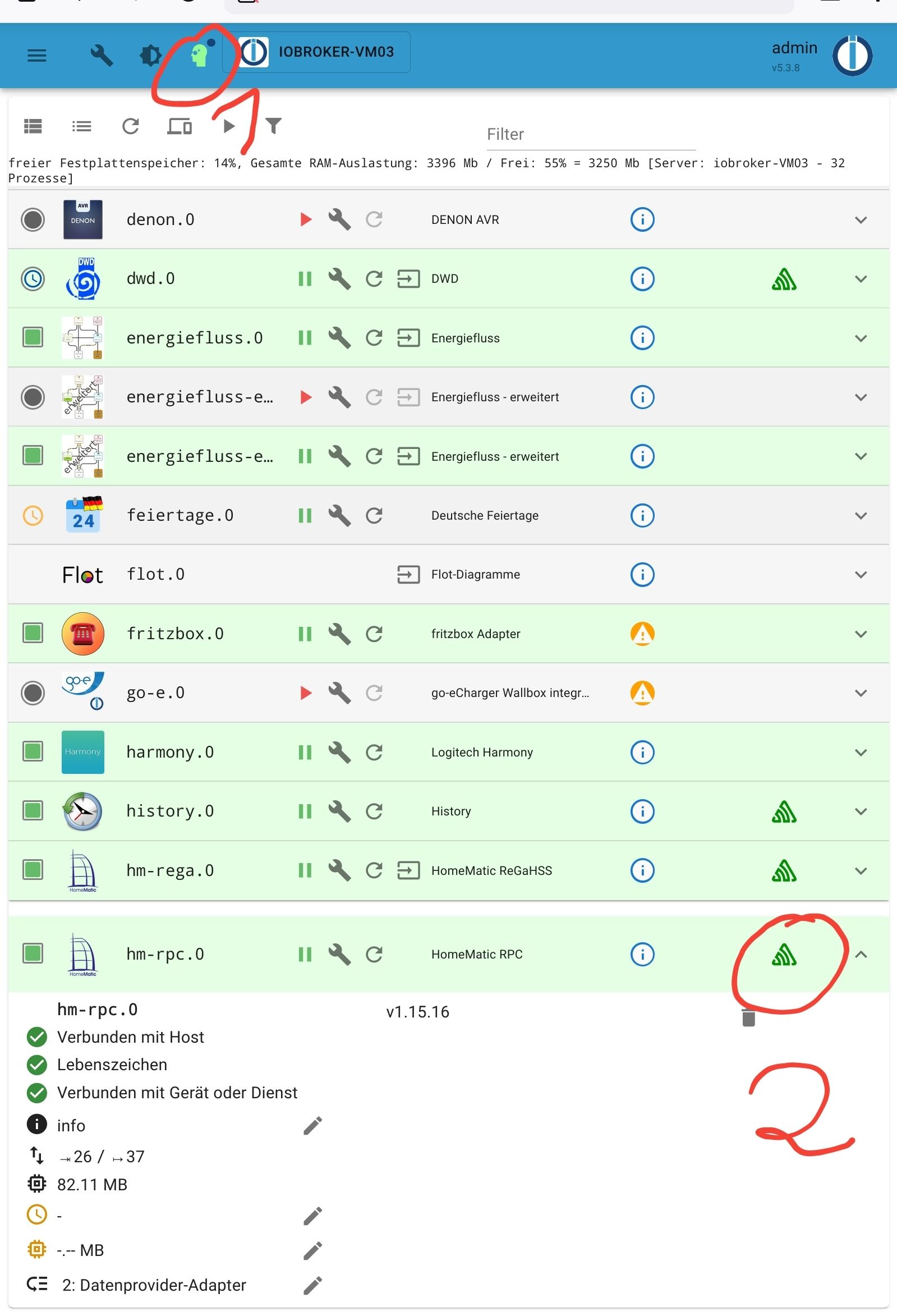
-
@homoran said in ioBroker aktualisiert Homematic Datenpunkte nicht mehr:
@menuchim sagte in ioBroker aktualisiert Homematic Datenpunkte nicht mehr:
Dieser frische ioBroker kann zwar die Homematic-Geräte einlesen, aber er bekommt nicht zu jedem Gerät die Datenpunkte. Warum, habe ich ehrlich gesagt noch nicht herausgefunden. Bin strikt nach Doku vorgegangen beim einrichten der Adapter.
schalt mal in den Instanzen sentry ab.
wenn das nicht hilft, bitte neuen Threadhabs gefunden, hat nur leider nichts gebracht. Oder muss das für hm-rega auch abgeschaltet werden?
-
@homoran said in ioBroker aktualisiert Homematic Datenpunkte nicht mehr:
@menuchim sagte in ioBroker aktualisiert Homematic Datenpunkte nicht mehr:
Dieser frische ioBroker kann zwar die Homematic-Geräte einlesen, aber er bekommt nicht zu jedem Gerät die Datenpunkte. Warum, habe ich ehrlich gesagt noch nicht herausgefunden. Bin strikt nach Doku vorgegangen beim einrichten der Adapter.
schalt mal in den Instanzen sentry ab.
wenn das nicht hilft, bitte neuen Threadhabs gefunden, hat nur leider nichts gebracht. Oder muss das für hm-rega auch abgeschaltet werden?
@menuchim sagte in ioBroker aktualisiert Homematic Datenpunkte nicht mehr:
hat nur leider nichts gebrach
@homoran sagte in ioBroker aktualisiert Homematic Datenpunkte nicht mehr:
wenn das nicht hilft, bitte neuen Thread
-
@ofbeqnpolkkl6mby5e13 @Homoran
habe nun bei beiden genau das gemacht - fixe IP zugewiesen. :-)
@menuchim sagte in ioBroker aktualisiert Homematic Datenpunkte nicht mehr:
@ofbeqnpolkkl6mby5e13 @Homoran
habe nun bei beiden genau das gemacht - fixe IP zugewiesen. :-)
Übliche Praxis ist es, nicht den gesamten IP-Adressbereich für DHCP zu verwenden, sondern z. B. von vorne oder hinten 20-30 Adressen für fest zugewiesene IPs freizulassen. Dann braucht man auch in DHCP keine Zuweisungen in der Form machen, dass bestimmten MAC-Adressen immer dieselben IP-Adressen zugewiesen werden.
-
Auch von mir ein Hallo in die Runde,
ich habe ein änliches problem, es wird alles synchronisiert bis auf die Objekt-Namen. Ich habe schon mehrere Neuinstallationen von ioBroker, CCU, hm-rpc, hm-rega.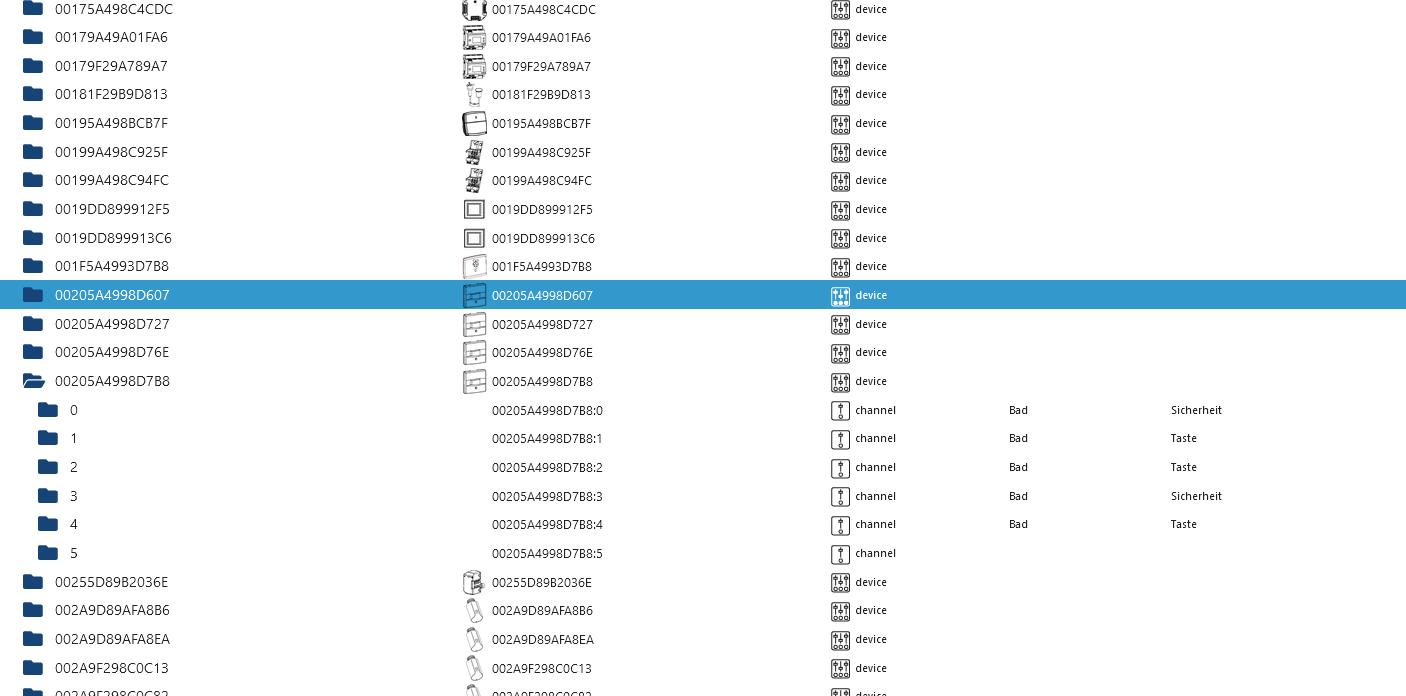
Das Problem tauchte aber erst nach einem Backup auf ein neu installiertes 64Bit System und das iobroker Backup war von dem 32Bit System.
Bekomme immer diese Fehlermeldung.
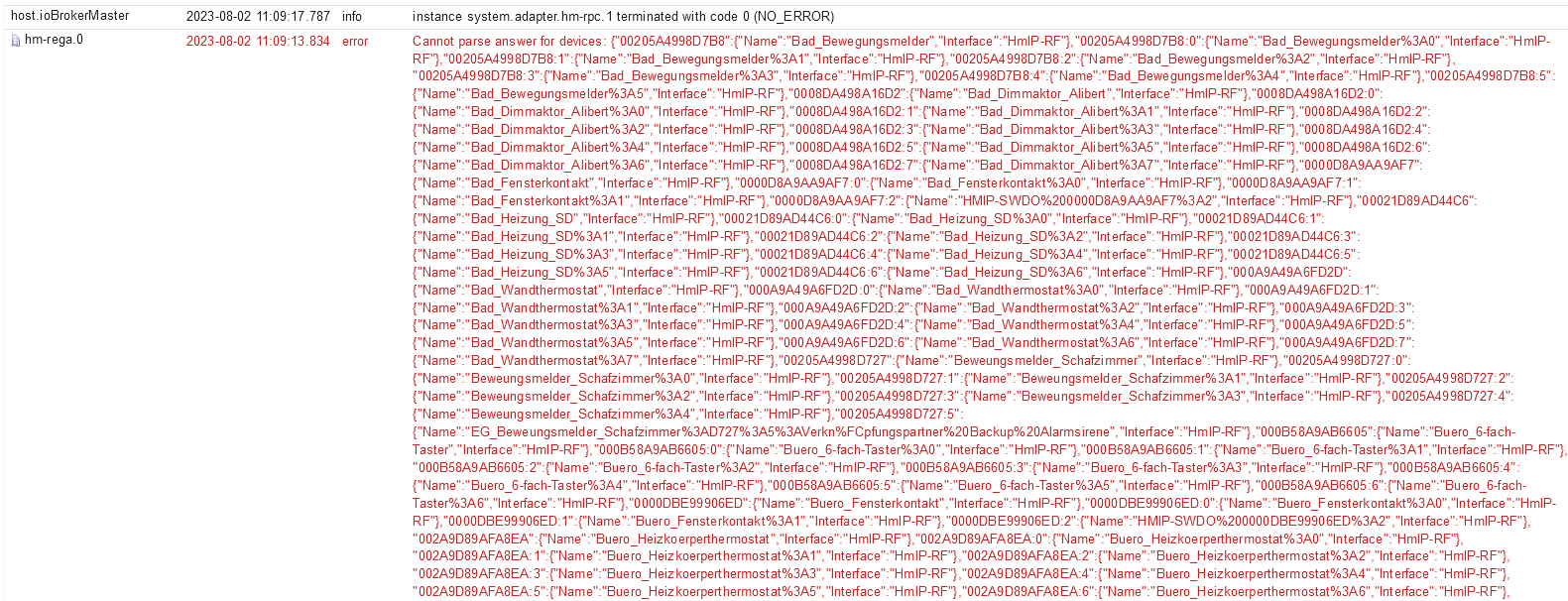
Kann mir bitte jemand weiter helfen, ich habe keine Idee mehr?
ioBroker:
Plattform: linux
Betriebssystem: linux
Architektur: arm64
CPUs: 4
Geschwindigkeit: 1800 MHz
Modell: Cortex-A72
RAM: 7.6 GB
System-Betriebszeit: 00:04:18
Node.js: v18.17.0
time: 1690967161861
Adapter-Anzahl: 485
NPM: 9.6.7
Datenträgergröße: 1833.6 GB
Freier Festplattenspeicher: 1827.3 GB
Betriebszeit: 00:03:15iob diag
[Link Text](======== Start marking the full check here =========
Skript v.2023-04-16 *** BASE SYSTEM *** Model : Raspberry Pi 4 Model B Rev 1.4 Architecture : aarch64 Docker : false Virtualization : none Distributor ID: Debian Description: Debian GNU/Linux 11 (bullseye) Release: 11 Codename: bullseye PRETTY_NAME="Debian GNU/Linux 11 (bullseye)" NAME="Debian GNU/Linux" VERSION_ID="11" VERSION="11 (bullseye)" VERSION_CODENAME=bullseye ID=debian HOME_URL="https://www.debian.org/" SUPPORT_URL="https://www.debian.org/support" BUG_REPORT_URL="https://bugs.debian.org/" Systemuptime and Load: 12:49:32 up 43 min, 3 users, load average: 1.04, 0.72, 0.66 CPU threads: 4 Raspberry only: throttled=0x0 Other values than 0x0 hint to temperature/voltage problems temp=53.5'C volt=0.9060V *** Time and Time Zones *** Local time: Wed 2023-08-02 12:49:32 CEST Universal time: Wed 2023-08-02 10:49:32 UTC RTC time: n/a Time zone: Europe/Berlin (CEST, +0200) System clock synchronized: yes NTP service: active RTC in local TZ: no *** User and Groups *** iobroker /home/iobroker iobroker adm tty dialout cdrom sudo audio video plugdev games users input render netdev bluetooth lpadmin gpio i2c spi *** X-Server-Setup *** X-Server: true Desktop: Terminal: tty Boot Target: graphical.target *** MEMORY *** total used free shared buff/cache available Mem: 7.8G 2.3G 4.6G 35M 945M 5.4G Swap: 99M 0B 99M Total: 7.9G 2.3G 4.7G 7811 M total memory 2252 M used memory 2492 M active memory 486 M inactive memory 4613 M free memory 93 M buffer memory 852 M swap cache 99 M total swap 0 M used swap 99 M free swap Raspberry only: oom events: 0 lifetime oom required: 0 Mbytes total time in oom handler: 0 ms max time spent in oom handler: 0 ms *** FILESYSTEM *** Filesystem Type Size Used Avail Use% Mounted on /dev/root ext4 1.8T 6.3G 1.8T 1% / devtmpfs devtmpfs 3.6G 0 3.6G 0% /dev tmpfs tmpfs 3.9G 0 3.9G 0% /dev/shm tmpfs tmpfs 1.6G 1.2M 1.6G 1% /run tmpfs tmpfs 5.0M 4.0K 5.0M 1% /run/lock /dev/sda1 vfat 255M 31M 225M 13% /boot tmpfs tmpfs 782M 20K 782M 1% /run/user/1000 Messages concerning ext4 filesystem in dmesg: [Wed Aug 2 12:05:54 2023] Kernel command line: coherent_pool=1M 8250.nr_uarts=0 snd_bcm2835.enable_headphones=0 snd_bcm2835.enable_headphones=1 snd_bcm2835.enable_hdmi=1 snd_bcm2835.enable_hdmi=0 smsc95xx.macaddr=DC:A6:32:B4:7F:C6 vc_mem.mem_base=0x3eb00000 vc_mem.mem_size=0x3ff00000 console=ttyS0,115200 console=tty1 root=PARTUUID=85dbb105-02 rootfstype=ext4 fsck.repair=yes rootwait quiet splash plymouth.ignore-serial-consoles [Wed Aug 2 12:05:58 2023] EXT4-fs (sda2): mounted filesystem with ordered data mode. Quota mode: none. [Wed Aug 2 12:05:58 2023] VFS: Mounted root (ext4 filesystem) readonly on device 8:2. [Wed Aug 2 12:06:04 2023] EXT4-fs (sda2): re-mounted. Quota mode: none. Show mounted filesystems (real ones only): TARGET SOURCE FSTYPE OPTIONS / /dev/sda2 ext4 rw,noatime `-/boot /dev/sda1 vfat rw,relatime,fmask=0022,dmask=0022,codepage=437,iocharset=ascii,shortname=mixed,errors=remount-ro Files in neuralgic directories: /var: 766M /var/ 392M /var/lib 209M /var/lib/influxdb/engine 209M /var/lib/influxdb 186M /var/lib/influxdb/engine/data Archived and active journals take up 96.0M in the file system. /opt/iobroker/backups: 117M /opt/iobroker/backups/ /opt/iobroker/iobroker-data: 531M /opt/iobroker/iobroker-data/ 360M /opt/iobroker/iobroker-data/files 138M /opt/iobroker/iobroker-data/backup-objects 88M /opt/iobroker/iobroker-data/files/echarts.admin 57M /opt/iobroker/iobroker-data/files/echarts The five largest files in iobroker-data are: 35M /opt/iobroker/iobroker-data/files/devices.admin/static/js/main.24f2bb56.js.map 23M /opt/iobroker/iobroker-data/objects.jsonl 23M /opt/iobroker/iobroker-data/files/echarts/static/js/main.eb0afecd.js.map 23M /opt/iobroker/iobroker-data/files/echarts.admin/static/js/main.7952f0f7.js.map 23M /opt/iobroker/iobroker-data/files/echarts.admin/chart/static/js/main.eb0afecd.js.map *** NodeJS-Installation *** /usr/bin/nodejs v18.17.0 /usr/bin/node v18.17.0 /usr/bin/npm 9.6.7 /usr/bin/npx 9.6.7 nodejs: Installed: 18.17.0-deb-1nodesource1 Candidate: 18.17.0-deb-1nodesource1 Version table: *** 18.17.0-deb-1nodesource1 500 500 https://deb.nodesource.com/node_18.x bullseye/main arm64 Packages 100 /var/lib/dpkg/status 12.22.12~dfsg-1~deb11u4 500 500 http://security.debian.org/debian-security bullseye-security/main arm64 Packages 12.22.12~dfsg-1~deb11u3 500 500 http://deb.debian.org/debian bullseye/main arm64 Packages Temp directories causing npm8 problem: 0 No problems detected *** ioBroker-Installation *** ioBroker Status iobroker is running on this host. Objects type: jsonl States type: jsonl MULTIHOSTSERVICE/enabled: false Core adapters versions js-controller: 4.0.24 admin: 6.6.1 javascript: 7.0.3 Adapters from github: 0 Adapter State + system.adapter.admin.0 : admin : ioBrokerMaster - enabled, port: 8081, bind: 172.36.0.10 (SSL), run as: admin + system.adapter.alarm.0 : alarm : ioBrokerMaster - enabled system.adapter.alias-manager.0 : alias-manager : ioBrokerMaster - disabled + system.adapter.backitup.0 : backitup : ioBrokerMaster - enabled + system.adapter.backitup.1 : backitup : iob-slave1-Nowak-Automatisierung - enabled system.adapter.bshb.0 : bshb : ioBrokerMaster - disabled system.adapter.device-reminder.0 : device-reminder : ioBrokerMaster - disabled system.adapter.devices.0 : devices : ioBrokerMaster - disabled + system.adapter.discovery.0 : discovery : ioBrokerMaster - enabled + system.adapter.doorbird.0 : doorbird : ioBrokerMaster - enabled system.adapter.dwd.0 : dwd : ioBrokerMaster - enabled + system.adapter.echarts.0 : echarts : ioBrokerMaster - enabled system.adapter.feiertage.0 : feiertage : ioBrokerMaster - enabled system.adapter.geofency.0 : geofency : ioBrokerMaster - disabled, port: 7999, bind: 0.0.0.0 + system.adapter.growatt.0 : growatt : ioBrokerMaster - enabled + system.adapter.harmony.0 : harmony : ioBrokerMaster - enabled system.adapter.heatingcontrol.0 : heatingcontrol : ioBrokerMaster - disabled system.adapter.hm-rega.0 : hm-rega : ioBrokerMaster - disabled system.adapter.hm-rpc.0 : hm-rpc : ioBrokerMaster - disabled, port: 0 system.adapter.hm-rpc.1 : hm-rpc : ioBrokerMaster - disabled, port: 0 + system.adapter.hue.0 : hue : ioBrokerMaster - enabled, port: 443 system.adapter.ical.0 : ical : ioBrokerMaster - disabled + system.adapter.influxdb.0 : influxdb : ioBrokerMaster - enabled, port: 8086 + system.adapter.info.0 : info : ioBrokerMaster - enabled + system.adapter.iot.0 : iot : ioBrokerMaster - enabled + system.adapter.jarvis.0 : jarvis : ioBrokerMaster - enabled + system.adapter.javascript.0 : javascript : ioBrokerMaster - enabled + system.adapter.linkeddevices.0 : linkeddevices : ioBrokerMaster - enabled system.adapter.luftdaten.0 : luftdaten : ioBrokerMaster - enabled system.adapter.netatmo.0 : netatmo : ioBrokerMaster - disabled + system.adapter.nina.0 : nina : ioBrokerMaster - enabled system.adapter.odl.0 : odl : ioBrokerMaster - enabled system.adapter.owfs.0 : owfs : ioBrokerMaster - disabled, port: 4304 + system.adapter.pollenflug.0 : pollenflug : ioBrokerMaster - enabled system.adapter.pvforecast.0 : pvforecast : ioBrokerMaster - disabled + system.adapter.rpi2.0 : rpi2 : ioBrokerMaster - enabled + system.adapter.rpi2.1 : rpi2 : iob-slave1-Nowak-Automatisierung - enabled system.adapter.sayit.0 : sayit : ioBrokerMaster - disabled + system.adapter.scenes.0 : scenes : ioBrokerMaster - enabled + system.adapter.shuttercontrol.0 : shuttercontrol : ioBrokerMaster - enabled + system.adapter.smartmeter.0 : smartmeter : iob-slave1-Nowak-Automatisierung - enabled + system.adapter.sonos.0 : sonos : ioBrokerMaster - enabled + system.adapter.sony-bravia.0 : sony-bravia : ioBrokerMaster - enabled + system.adapter.sprinklecontrol.0 : sprinklecontrol : ioBrokerMaster - enabled + system.adapter.statistics.0 : statistics : ioBrokerMaster - enabled system.adapter.synology.0 : synology : ioBrokerMaster - disabled, port: 5000 + system.adapter.tankerkoenig.0 : tankerkoenig : ioBrokerMaster - enabled + system.adapter.telegram.0 : telegram : ioBrokerMaster - enabled, port: 8443, bind: 0.0.0.0 + system.adapter.telegram.1 : telegram : ioBrokerMaster - enabled, port: 8443, bind: 0.0.0.0 system.adapter.tr-064.0 : tr-064 : ioBrokerMaster - disabled + system.adapter.unifi.0 : unifi : ioBrokerMaster - enabled + system.adapter.web.0 : web : ioBrokerMaster - enabled, port: 8082, bind: 0.0.0.0, run as: admin + system.adapter.yahka.0 : yahka : ioBrokerMaster - enabled system.adapter.yr.0 : yr : ioBrokerMaster - enabled + instance is alive Enabled adapters with bindings + system.adapter.admin.0 : admin : ioBrokerMaster - enabled, port: 8081, bind: 172.36.0.10 (SSL), run as: admin + system.adapter.hue.0 : hue : ioBrokerMaster - enabled, port: 443 + system.adapter.influxdb.0 : influxdb : ioBrokerMaster - enabled, port: 8086 + system.adapter.telegram.0 : telegram : ioBrokerMaster - enabled, port: 8443, bind: 0.0.0.0 + system.adapter.telegram.1 : telegram : ioBrokerMaster - enabled, port: 8443, bind: 0.0.0.0 + system.adapter.web.0 : web : ioBrokerMaster - enabled, port: 8082, bind: 0.0.0.0, run as: admin ioBroker-Repositories stable : http://download.iobroker.net/sources-dist.json beta : http://download.iobroker.net/sources-dist-latest.json Active repo(s): stable Installed ioBroker-Instances Used repository: stable Adapter "admin" : 6.3.5 , installed 6.6.1 Adapter "alarm" : 3.3.12 , installed 3.3.12 Adapter "alias-manager": 1.2.4 , installed 1.2.4 Adapter "backitup" : 2.6.23 , installed 2.6.23 Adapter "bshb" : 0.2.4 , installed 0.2.4 Adapter "device-reminder": 1.2.9 , installed 1.2.9 Adapter "devices" : 1.1.5 , installed 1.1.5 Adapter "discovery" : 3.1.0 , installed 3.1.0 Adapter "doorbird" : 1.0.5 , installed 1.0.5 Adapter "dwd" : 2.8.5 , installed 2.8.5 Adapter "echarts" : 1.5.1 , installed 1.5.1 Adapter "feiertage" : 1.1.0 , installed 1.1.0 Adapter "geofency" : 1.2.4 , installed 1.2.4 Adapter "growatt" : 3.0.2 , installed 3.0.2 Adapter "harmony" : 1.2.2 , installed 1.2.2 Adapter "heatingcontrol": 2.10.6 , installed 2.10.6 Adapter "hm-rega" : 3.0.46 , installed 3.0.46 Adapter "hm-rpc" : 1.15.18 , installed 1.15.18 Adapter "hue" : 3.9.3 , installed 3.9.3 Adapter "ical" : 1.13.3 , installed 1.13.3 Adapter "influxdb" : 3.2.0 , installed 3.2.0 Adapter "info" : 1.9.26 , installed 1.9.26 Adapter "iot" : 1.14.5 , installed 1.14.5 Adapter "jarvis" : 3.1.2 , installed 3.1.2 Adapter "javascript" : 7.0.3 , installed 7.0.3 Controller "js-controller": 4.0.24 , installed 4.0.24 Adapter "linkeddevices": 1.5.5 , installed 1.5.5 Adapter "luftdaten" : 3.0.0 , installed 3.0.0 Adapter "netatmo" : 3.1.0 , installed 3.1.0 Adapter "nina" : 0.0.25 , installed 0.0.25 Adapter "odl" : 2.0.5 , installed 2.0.5 Adapter "owfs" : 0.7.0 , installed 0.7.0 Adapter "pollenflug" : 1.0.6 , installed 1.0.6 Adapter "pvforecast" : 2.7.1 , installed 2.7.1 Adapter "rpi2" : 1.3.2 , installed 1.3.2 Adapter "sayit" : 3.0.5 , installed 3.0.5 Adapter "scenes" : 2.3.9 , installed 2.3.9 Adapter "shuttercontrol": 1.5.0 , installed 1.5.0 Adapter "simple-api" : 2.7.2 , installed 2.7.2 Adapter "smartmeter" : 3.3.4 , installed 3.3.4 Adapter "socketio" : 4.2.0 , installed 4.2.0 Adapter "sonos" : 2.3.1 , installed 2.3.1 Adapter "sony-bravia" : 1.0.9 , installed 1.0.9 Adapter "sprinklecontrol": 0.2.13 , installed 0.2.13 Adapter "statistics" : 2.3.0 , installed 2.3.0 Adapter "synology" : 2.1.13 , installed 2.1.13 Adapter "tankerkoenig" : 3.3.7 , installed 3.3.7 Adapter "telegram" : 1.16.0 , installed 1.16.0 Adapter "tr-064" : 4.2.18 , installed 4.2.18 Adapter "unifi" : 0.6.6 , installed 0.6.6 Adapter "web" : 4.3.0 , installed 4.3.0 Adapter "ws" : 1.3.0 , installed 1.3.0 Adapter "yahka" : 0.17.0 , installed 0.17.0 Adapter "yr" : 5.3.0 , installed 5.3.0 Objects and States Please stand by - This may take a while Objects: 13437 States: 11537 *** OS-Repositories and Updates *** Hit:1 http://deb.debian.org/debian bullseye InRelease Hit:2 http://deb.debian.org/debian bullseye-updates InRelease Hit:3 http://security.debian.org/debian-security bullseye-security InRelease Hit:4 http://archive.raspberrypi.org/debian bullseye InRelease Hit:5 https://repos.influxdata.com/debian bullseye InRelease Hit:6 https://deb.nodesource.com/node_18.x bullseye InRelease Reading package lists... Pending Updates: 1 *** Listening Ports *** Active Internet connections (only servers) Proto Recv-Q Send-Q Local Address Foreign Address State User Inode PID/Program name tcp 0 0 172.36.0.10:9001 0.0.0.0:* LISTEN 1000 19620 1301/iobroker.js-co tcp 0 0 172.36.0.10:9000 0.0.0.0:* LISTEN 1000 19627 1301/iobroker.js-co tcp 0 0 0.0.0.0:8400 0.0.0.0:* LISTEN 1000 20148 2402/io.jarvis.0 tcp 0 0 0.0.0.0:22 0.0.0.0:* LISTEN 0 14587 583/sshd: /usr/sbin tcp 0 0 127.0.0.1:33917 0.0.0.0:* LISTEN 1000 22669 3113/io.yahka.0 tcp 0 0 172.36.0.10:8100 0.0.0.0:* LISTEN 1000 18939 2211/io.doorbird.0 tcp 0 0 172.36.0.10:8081 0.0.0.0:* LISTEN 1000 20598 1901/io.admin.0 tcp 0 0 127.0.0.1:631 0.0.0.0:* LISTEN 0 14605 572/cupsd tcp6 0 0 :::61991 :::* LISTEN 1000 19027 2288/io.harmony.0 tcp6 0 0 :::22 :::* LISTEN 0 14589 583/sshd: /usr/sbin tcp6 0 0 :::32841 :::* LISTEN 1000 21472 3113/io.yahka.0 tcp6 0 0 ::1:631 :::* LISTEN 0 14604 572/cupsd tcp6 0 0 :::8082 :::* LISTEN 1000 22647 3098/io.web.0 tcp6 0 0 :::8086 :::* LISTEN 999 17164 462/influxd tcp6 0 0 :::3500 :::* LISTEN 1000 20891 2092/io.sonos.0 udp 0 0 0.0.0.0:68 0.0.0.0:* 0 13790 456/dhcpcd udp 0 0 0.0.0.0:61991 0.0.0.0:* 1000 19028 2288/io.harmony.0 udp 0 0 0.0.0.0:631 0.0.0.0:* 0 15687 607/cups-browsed udp 0 0 0.0.0.0:50295 0.0.0.0:* 108 13757 380/avahi-daemon: r udp 0 0 0.0.0.0:5353 0.0.0.0:* 108 13755 380/avahi-daemon: r udp6 0 0 :::40019 :::* 108 13758 380/avahi-daemon: r udp6 0 0 :::546 :::* 0 16422 456/dhcpcd udp6 0 0 :::5353 :::* 108 13756 380/avahi-daemon: r *** Log File - Last 25 Lines *** 2023-08-02 12:09:17.111 - warn: tankerkoenig.0 (3071) Overrides is missing in config from station Esso Tankstelle. Please check your configuration or reconfigure the stations => edit station => save 2023-08-02 12:09:20.444 - info: host.ioBrokerMaster instance system.adapter.yahka.0 started with pid 3113 2023-08-02 12:10:00.306 - info: host.ioBrokerMaster instance system.adapter.dwd.0 started with pid 3181 2023-08-02 12:10:06.743 - info: host.ioBrokerMaster instance system.adapter.dwd.0 terminated with code 11 (ADAPTER_REQUESTED_TERMINATION) 2023-08-02 12:15:00.275 - info: host.ioBrokerMaster instance system.adapter.dwd.0 started with pid 3536 2023-08-02 12:15:06.898 - info: host.ioBrokerMaster instance system.adapter.dwd.0 terminated with code 11 (ADAPTER_REQUESTED_TERMINATION) 2023-08-02 12:20:00.313 - info: host.ioBrokerMaster instance system.adapter.dwd.0 started with pid 3908 2023-08-02 12:20:06.935 - info: host.ioBrokerMaster instance system.adapter.dwd.0 terminated with code 11 (ADAPTER_REQUESTED_TERMINATION) 2023-08-02 12:25:00.261 - info: host.ioBrokerMaster instance system.adapter.dwd.0 started with pid 4263 2023-08-02 12:25:06.797 - info: host.ioBrokerMaster instance system.adapter.dwd.0 terminated with code 11 (ADAPTER_REQUESTED_TERMINATION) 2023-08-02 12:30:00.250 - info: host.ioBrokerMaster instance system.adapter.dwd.0 started with pid 4618 2023-08-02 12:30:04.309 - info: host.ioBrokerMaster instance system.adapter.luftdaten.0 started with pid 4633 2023-08-02 12:30:07.519 - info: host.ioBrokerMaster instance system.adapter.dwd.0 terminated with code 11 (ADAPTER_REQUESTED_TERMINATION) 2023-08-02 12:30:14.279 - warn: luftdaten.0 (4633) State "luftdaten.0.38240.timestamp" has no existing object, this might lead to an error in future versions 2023-08-02 12:30:14.869 - info: host.ioBrokerMaster instance system.adapter.luftdaten.0 terminated with code 0 (NO_ERROR) 2023-08-02 12:35:00.229 - info: host.ioBrokerMaster instance system.adapter.dwd.0 started with pid 5007 2023-08-02 12:35:06.628 - info: host.ioBrokerMaster instance system.adapter.dwd.0 terminated with code 11 (ADAPTER_REQUESTED_TERMINATION) 2023-08-02 12:40:00.194 - info: host.ioBrokerMaster instance system.adapter.dwd.0 started with pid 5351 2023-08-02 12:40:06.759 - info: host.ioBrokerMaster instance system.adapter.dwd.0 terminated with code 11 (ADAPTER_REQUESTED_TERMINATION) 2023-08-02 12:40:34.074 - info: host.ioBrokerMaster instance system.adapter.odl.0 started with pid 5369 2023-08-02 12:40:40.108 - info: host.ioBrokerMaster instance system.adapter.odl.0 terminated with code 0 (NO_ERROR) 2023-08-02 12:45:00.232 - info: host.ioBrokerMaster instance system.adapter.dwd.0 started with pid 5729 2023-08-02 12:45:07.300 - info: host.ioBrokerMaster instance system.adapter.dwd.0 terminated with code 11 (ADAPTER_REQUESTED_TERMINATION) 2023-08-02 12:50:00.068 - info: host.ioBrokerMaster instance system.adapter.dwd.0 started with pid 7529 2023-08-02 12:50:07.158 - info: host.ioBrokerMaster instance system.adapter.dwd.0 terminated with code 11 (ADAPTER_REQUESTED_TERMINATION)============ Mark until here for C&P =============
iob diag has finished.)
[Link Text](Copy text starting here:
======================= SUMMARY =======================
                     v.2023-04-16


Skript v.2023-04-16

*** BASE SYSTEM ***
Model           : Raspberry Pi 4 Model B Rev 1.4
Architecture    : aarch64
Docker          : false
Virtualization  : none
Distributor ID: Debian
Description:    Debian GNU/Linux 11 (bullseye)
Release:        11
Codename:       bullseye

PRETTY_NAME="Debian GNU/Linux 11 (bullseye)"
NAME="Debian GNU/Linux"
VERSION_ID="11"
VERSION="11 (bullseye)"
VERSION_CODENAME=bullseye
ID=debian
HOME_URL="https://www.debian.org/"
SUPPORT_URL="https://www.debian.org/support"
BUG_REPORT_URL="https://bugs.debian.org/"

Systemuptime and Load:
 12:49:32 up 43 min,  3 users,  load average: 1.04, 0.72, 0.66
CPU threads: 4

Raspberry only:
throttled=0x0
Other values than 0x0 hint to temperature/voltage problems
temp=53.5'C
volt=0.9060V

*** Time and Time Zones ***
               Local time: Wed 2023-08-02 12:49:32 CEST
           Universal time: Wed 2023-08-02 10:49:32 UTC
                 RTC time: n/a
                Time zone: Europe/Berlin (CEST, +0200)
System clock synchronized: yes
              NTP service: active
          RTC in local TZ: no

*** User and Groups ***
iobroker
/home/iobroker
iobroker adm tty dialout cdrom sudo audio video plugdev games users input render netdev bluetooth lpadmin gpio i2c spi

*** X-Server-Setup ***
X-Server:       true
Desktop:
Terminal:       tty
Boot Target:    graphical.target

*** MEMORY ***
               total        used        free      shared  buff/cache   available
Mem:            7.8G        2.3G        4.6G         35M        945M        5.4G
Swap:            99M          0B         99M
Total:          7.9G        2.3G        4.7G

         7811 M total memory
         2252 M used memory
         2492 M active memory
          486 M inactive memory
         4613 M free memory
           93 M buffer memory
          852 M swap cache
           99 M total swap
            0 M used swap
           99 M free swap

Raspberry only:
oom events: 0
lifetime oom required: 0 Mbytes
total time in oom handler: 0 ms
max time spent in oom handler: 0 ms

*** FILESYSTEM ***
Filesystem     Type      Size  Used Avail Use% Mounted on
/dev/root      ext4      1.8T  6.3G  1.8T   1% /
devtmpfs       devtmpfs  3.6G     0  3.6G   0% /dev
tmpfs          tmpfs     3.9G     0  3.9G   0% /dev/shm
tmpfs          tmpfs     1.6G  1.2M  1.6G   1% /run
tmpfs          tmpfs     5.0M  4.0K  5.0M   1% /run/lock
/dev/sda1      vfat      255M   31M  225M  13% /boot
tmpfs          tmpfs     782M   20K  782M   1% /run/user/1000

Messages concerning ext4 filesystem in dmesg:
[Wed Aug  2 12:05:54 2023] Kernel command line: coherent_pool=1M 8250.nr_uarts=0 snd_bcm2835.enable_headphones=0 snd_bcm2835.enable_headphones=1 snd_bcm2835.enable_hdmi=1 snd_bcm2835.enable_hdmi=0  smsc95xx.macaddr=DC:A6:32:B4:7F:C6 vc_mem.mem_base=0x3eb00000 vc_mem.mem_size=0x3ff00000  console=ttyS0,115200 console=tty1 root=PARTUUID=85dbb105-02 rootfstype=ext4 fsck.repair=yes rootwait quiet splash plymouth.ignore-serial-consoles
[Wed Aug  2 12:05:58 2023] EXT4-fs (sda2): mounted filesystem with ordered data mode. Quota mode: none.
[Wed Aug  2 12:05:58 2023] VFS: Mounted root (ext4 filesystem) readonly on device 8:2.
[Wed Aug  2 12:06:04 2023] EXT4-fs (sda2): re-mounted. Quota mode: none.

Show mounted filesystems (real ones only):
TARGET  SOURCE    FSTYPE OPTIONS
/       /dev/sda2 ext4   rw,noatime
`-/boot /dev/sda1 vfat   rw,relatime,fmask=0022,dmask=0022,codepage=437,iocharset=ascii,shortname=mixed,errors=remount-ro

Files in neuralgic directories:

/var:
766M    /var/
392M    /var/lib
209M    /var/lib/influxdb/engine
209M    /var/lib/influxdb
186M    /var/lib/influxdb/engine/data

Archived and active journals take up 96.0M in the file system.

/opt/iobroker/backups:
117M    /opt/iobroker/backups/

/opt/iobroker/iobroker-data:
531M    /opt/iobroker/iobroker-data/
360M    /opt/iobroker/iobroker-data/files
138M    /opt/iobroker/iobroker-data/backup-objects
88M     /opt/iobroker/iobroker-data/files/echarts.admin
57M     /opt/iobroker/iobroker-data/files/echarts

The Operatingsystem:    Debian GNU/Linux 11 (bullseye)
Kernel:                 6.1.21-v8+
Installation:           Native
Timezone:               Europe/Berlin (CEST, +0200)
User-ID:                1000
X-Server:               true
Boot Target:            graphical.target

Pending OS-Updates:     1
Pending iob updates:    0

Nodejs-Installation:    /usr/bin/nodejs         v18.17.0
                        /usr/bin/node           v18.17.0
                        /usr/bin/npm            9.6.7
                        /usr/bin/npx            9.6.7

Recommended versions are nodejs 18.x.y and npm 9.x.y
Your nodejs installation is correct

MEMORY:
               total        used        free      shared  buff/cache   available
Mem:            7.8G        2.4G        4.5G         35M        949M        5.3G
Swap:            99M          0B         99M
Total:          7.9G        2.4G        4.6G

Active iob-Instances:   34
Active repo(s): stable

ioBroker Core:          js-controller           4.0.24
                        admin                   6.6.1

ioBroker Status:        iobroker is running on this host.


Objects type: jsonl
States  type: jsonl

Status admin and web instance:
+ system.adapter.admin.0                  : admin                 : ioBrokerMaster                           -  enabled, port: 8081, bind: 172.36.0.10 (SSL), run as: admin
+ system.adapter.web.0                    : web                   : ioBrokerMaster                           -  enabled, port: 8082, bind: 0.0.0.0, run as: admin

Objects:                13437
States:                 11537

Size of iob-Database:

23M     /opt/iobroker/iobroker-data/objects.jsonl
13M     /opt/iobroker/iobroker-data/states.jsonl


=================== END OF SUMMARY ====================
iobroker@ioBrokerMaster:~ $ ======= Start marking the full check here =========
-bash: =======: Kommando nicht gefunden.
iobroker@ioBrokerMaster:~ $
iobroker@ioBrokerMaster:~ $ ```Skript v.2023-04-16
*** BASE SYSTEM ***
Model : Raspberry Pi 4 Model B Rev 1.4
Architecture : aarch64
Docker : false
Virtualization : none
Distributor ID: Debian
Description: Debian GNU/Linux 11 (bullseye)
Release: 11
Codename: bullseyePRETTY_NAME="Debian GNU/Linux 11 (bullseye)"
NAME="Debian GNU/Linux"
VERSION_ID="11"
VERSION="11 (bullseye)"
VERSION_CODENAME=bullseye
ID=debian
HOME_URL="https://www.debian.org/"
SUPPORT_URL="https://www.debian.org/support"
BUG_REPORT_URL="https://bugs.debian.org/"Systemuptime and Load:
12:49:32 up 43 min, 3 users, load average: 1.04, 0.72, 0.66
CPU threads: 4Raspberry only:
throttled=0x0
Other values than 0x0 hint to temperature/voltage problems
temp=53.5'C
volt=0.9060V*** Time and Time Zones ***
Local time: Wed 2023-08-02 12:49:32 CEST
Universal time: Wed 2023-08-02 10:49:32 UTC
RTC time: n/a
Time zone: Europe/Berlin (CEST, +0200)
System clock synchronized: yes
NTP service: active
RTC in local TZ: no*** User and Groups ***
iobroker
/home/iobroker
iobroker adm tty dialout cdrom sudo audio video plugdev games users input render netdev bluetooth lpadmin gpio i2c spi*** X-Server-Setup ***
X-Server: true
Desktop:
Terminal: tty
Boot Target: graphical.target*** MEMORY ***
total used free shared buff/cache available
Mem: 7.8G 2.3G 4.6G 35M 945M 5.4G
Swap: 99M 0B 99M
Total: 7.9G 2.3G 4.7G7811 M total memory 2252 M used memory 2492 M active memory 486 M inactive memory 4613 M free memory 93 M buffer memory 852 M swap cache 99 M total swap 0 M used swap 99 M free swapRaspberry only:
oom events: 0
lifetime oom required: 0 Mbytes
total time in oom handler: 0 ms
max time spent in oom handler: 0 ms*** FILESYSTEM ***
Filesystem Type Size Used Avail Use% Mounted on
/dev/root ext4 1.8T 6.3G 1.8T 1% /
devtmpfs devtmpfs 3.6G 0 3.6G 0% /dev
tmpfs tmpfs 3.9G 0 3.9G 0% /dev/shm
tmpfs tmpfs 1.6G 1.2M 1.6G 1% /run
tmpfs tmpfs 5.0M 4.0K 5.0M 1% /run/lock
/dev/sda1 vfat 255M 31M 225M 13% /boot
tmpfs tmpfs 782M 20K 782M 1% /run/user/1000Messages concerning ext4 filesystem in dmesg:
[Wed Aug 2 12:05:54 2023] Kernel command line: coherent_pool=1M 8250.nr_uarts=0 snd_bcm2835.enable_headphones=0 snd_bcm2835.enable_headphones=1 snd_bcm2835.enable_hdmi=1 snd_bcm2835.enable_hdmi=0 smsc95xx.macaddr=DC:A6:32:B4:7F:C6 vc_mem.mem_base=0x3eb00000 vc_mem.mem_size=0x3ff00000 console=ttyS0,115200 console=tty1 root=PARTUUID=85dbb105-02 rootfstype=ext4 fsck.repair=yes rootwait quiet splash plymouth.ignore-serial-consoles
[Wed Aug 2 12:05:58 2023] EXT4-fs (sda2): mounted filesystem with ordered data mode. Quota mode: none.
[Wed Aug 2 12:05:58 2023] VFS: Mounted root (ext4 filesystem) readonly on device 8:2.
[Wed Aug 2 12:06:04 2023] EXT4-fs (sda2): re-mounted. Quota mode: none.Show mounted filesystems (real ones only):
TARGET SOURCE FSTYPE OPTIONS
/ /dev/sda2 ext4 rw,noatime
-/boot /dev/sda1 vfat rw,relatime,fmask=0022,dmask=0022,codepage=437,iocharset=ascii,shortname=mixed,errors=remount-ro -bash: Skript: Kommando nicht gefunden. -bash: Bookshelf: Kommando nicht gefunden. -bash: Model: Kommando nicht gefunden. -bash: Architecture: Kommando nicht gefunden. -bash: Docker: Kommando nicht gefunden. -bash: Virtualization: Kommando nicht gefunden. -bash: Distributor: Kommando nicht gefunden. -bash: command substitution: Zeile 10: Syntaxfehler beim unerwarteten Symbol »(« -bash: command substitution: Zeile 10:Description: Debian GNU/Linux 11 (bullseye)'
-bash: -/boot: Datei oder Verzeichnis nicht gefunden
iobroker@ioBrokerMaster:~ $
iobroker@ioBrokerMaster:~ $ Files in neuralgic directories:
-bash: Files: Kommando nicht gefunden.
iobroker@ioBrokerMaster:~ $
iobroker@ioBrokerMaster:~ $ /var:
-bash: /var:: Datei oder Verzeichnis nicht gefunden
iobroker@ioBrokerMaster:~ $ 766M /var/
-bash: 766M: Kommando nicht gefunden.
iobroker@ioBrokerMaster:~ $ 392M /var/lib
-bash: 392M: Kommando nicht gefunden.
iobroker@ioBrokerMaster:~ $ 209M /var/lib/influxdb/engine
-bash: 209M: Kommando nicht gefunden.
iobroker@ioBrokerMaster:~ $ 209M /var/lib/influxdb
-bash: 209M: Kommando nicht gefunden.
iobroker@ioBrokerMaster:~ $ 186M /var/lib/influxdb/engine/data
-bash: 186M: Kommando nicht gefunden.
iobroker@ioBrokerMaster:~ $
iobroker@ioBrokerMaster:~ $ Archived and active journals take up 96.0M in the file system.
-bash: Archived: Kommando nicht gefunden.
iobroker@ioBrokerMaster:~ $
iobroker@ioBrokerMaster:~ $ /opt/iobroker/backups:
-bash: /opt/iobroker/backups:: Datei oder Verzeichnis nicht gefunden
iobroker@ioBrokerMaster:~ $ 117M /opt/iobroker/backups/
-bash: 117M: Kommando nicht gefunden.
iobroker@ioBrokerMaster:~ $
iobroker@ioBrokerMaster:~ $ /opt/iobroker/iobroker-data:
-bash: /opt/iobroker/iobroker-data:: Datei oder Verzeichnis nicht gefunden
iobroker@ioBrokerMaster:~ $ 531M /opt/iobroker/iobroker-data/
-bash: 531M: Kommando nicht gefunden.
iobroker@ioBrokerMaster:~ $ 360M /opt/iobroker/iobroker-data/files
-bash: 360M: Kommando nicht gefunden.
iobroker@ioBrokerMaster:~ $ 138M /opt/iobroker/iobroker-data/backup-objects
-bash: 138M: Kommando nicht gefunden.
iobroker@ioBrokerMaster:~ $ 88M /opt/iobroker/iobroker-data/files/echarts.admin
-bash: 88M: Kommando nicht gefunden.
iobroker@ioBrokerMaster:~ $ 57M /opt/iobroker/iobroker-data/files/echarts
-bash: 57M: Kommando nicht gefunden.
iobroker@ioBrokerMaster:~ $
iobroker@ioBrokerMaster:~ $ The five largest files in iobroker-data are:
-bash: The: Kommando nicht gefunden.
iobroker@ioBrokerMaster:~ $ 35M /opt/iobroker/iobroker-data/files/devices.admin/static/js/main.24f2bb56.js.map
-bash: 35M: Kommando nicht gefunden.
iobroker@ioBrokerMaster:~ $ 23M /opt/iobroker/iobroker-data/objects.jsonl
-bash: 23M: Kommando nicht gefunden.
iobroker@ioBrokerMaster:~ $ 23M /opt/iobroker/iobroker-data/files/echarts/static/js/main.eb0afecd.js.map
-bash: 23M: Kommando nicht gefunden.
iobroker@ioBrokerMaster:~ $ 23M /opt/iobroker/iobroker-data/files/echarts.admin/static/js/main.7952f0f7.js.map
-bash: 23M: Kommando nicht gefunden.
iobroker@ioBrokerMaster:~ $ 23M /opt/iobroker/iobroker-data/files/echarts.admin/chart/static/js/main.eb0afecd.js.map
-bash: 23M: Kommando nicht gefunden.
iobroker@ioBrokerMaster:~ $
iobroker@ioBrokerMaster:~ $ *** NodeJS-Installation ***
-bash: Bookshelf: Kommando nicht gefunden.
iobroker@ioBrokerMaster:~ $
iobroker@ioBrokerMaster:~ $ /usr/bin/nodejs v18.17.0
node:internal/modules/cjs/loader:1080
throw err;
^Error: Cannot find module '/home/iobroker/v18.17.0'
at Module._resolveFilename (node:internal/modules/cjs/loader:1077:15)
at Module._load (node:internal/modules/cjs/loader:922:27)
at Function.executeUserEntryPoint [as runMain] (node:internal/modules/run_main:81:12)
at node:internal/main/run_main_module:23:47 {
code: 'MODULE_NOT_FOUND',
requireStack: []
}Node.js v18.17.0
iobroker@ioBrokerMaster:~ $ /usr/bin/node v18.17.0
node:internal/modules/cjs/loader:1080
throw err;
^Error: Cannot find module '/home/iobroker/v18.17.0'
at Module._resolveFilename (node:internal/modules/cjs/loader:1077:15)
at Module._load (node:internal/modules/cjs/loader:922:27)
at Function.executeUserEntryPoint [as runMain] (node:internal/modules/run_main:81:12)
at node:internal/main/run_main_module:23:47 {
code: 'MODULE_NOT_FOUND',
requireStack: []
}Node.js v18.17.0
iobroker@ioBrokerMaster:~ $ /usr/bin/npm 9.6.7
Unknown command: "9.6.7"To see a list of supported npm commands, run:
npm help
iobroker@ioBrokerMaster:~ $ /usr/bin/npx 9.6.7
npm ERR! code E404
npm ERR! 404 Not Found - GET https://registry.npmjs.org/9.6.7 - Not found
npm ERR! 404
npm ERR! 404 '9.6.7@*' is not in this registry.
npm ERR! 404
npm ERR! 404 Note that you can also install from a
npm ERR! 404 tarball, folder, http url, or git url.npm ERR! A complete log of this run can be found in: /home/iobroker/.npm/_logs/2023-08-02T10_57_53_210Z-debug-0.log
iobroker@ioBrokerMaster:~ $
piobroker@ioBrokerMaster:~ $
iobroker@ioBrokerMaster:~ $ nodejs:
-bash: nodejs:: Kommando nicht gefunden.
iobroker@ioBrokerMaster:~ $ Installed: 18.17.0-deb-1nodesource1
-bash: Installed:: Kommando nicht gefunden.
iobroker@ioBrokerMaster:~ $ Candidate: 18.17.0-deb-1nodesource1
-bash: Candidate:: Kommando nicht gefunden.
iobroker@ioBrokerMaster:~ $ Version table:
-bash: Version: Kommando nicht gefunden.
iobroker@ioBrokerMaster:~ $ *** 18.17.0-deb-1nodesource1 500
-bash: Bookshelf: Kommando nicht gefunden.
iobroker@ioBrokerMaster:~ $ 500 https://deb.nodesource.com/node_18.x bullseye/main arm64 Packages
-bash: 500: Kommando nicht gefunden.
iobroker@ioBrokerMaster:~ $ 100 /var/lib/dpkg/status
-bash: 100: Kommando nicht gefunden.
iobroker@ioBrokerMaster:~ $ 12.22.12~dfsg-1~deb11u4 500
-bash: 12.22.12~dfsg-1~deb11u4: Kommando nicht gefunden.
iobroker@ioBrokerMaster:~ $ 500 http://security.debian.org/debian-security bullseye-security/main arm64 Packages
-bash: 500: Kommando nicht gefunden.
iobroker@ioBrokerMaster:~ $ 12.22.12~dfsg-1~deb11u3 500
-bash: 12.22.12~dfsg-1~deb11u3: Kommando nicht gefunden.
iobroker@ioBrokerMaster:~ $ 500 http://deb.debian.org/debian bullseye/main arm64 Packages
-bash: 500: Kommando nicht gefunden.
iobroker@ioBrokerMaster:~ $
0iobroker@ioBrokerMaster:~ $ Temp directories causing npm8 problem: 0
-bash: Temp: Kommando nicht gefunden.
iobroker@ioBrokerMaster:~ $ No problems detected
-bash: No: Kommando nicht gefunden.
iobroker@ioBrokerMaster:~ $
iobroker@ioBrokerMaster:~ $ *** ioBroker-Installation ***
-bash: Bookshelf: Kommando nicht gefunden.
iobroker@ioBrokerMaster:~ $
liobroker@ioBrokerMaster:~ $ ioBroker Status
-bash: ioBroker: Kommando nicht gefunden.
iobroker@ioBrokerMaster:~ $ iobroker is running on this host.
iobroker [command]Commands:
iobroker setup Setup ioBroker
iobroker start [all|<adapter>.<instance>] Starts the js-controller or a specified adapter instance
iobroker stop [<adapter>.<instance>] stops the js-controller or a specified adapter instance
iobroker restart [<adapter>.<instance>] Restarts js-controller or a specified adapter instance [aliases: r]
iobroker debug <adapter>[.<instance>] Starts a Node.js debugging session for the adapter instance
iobroker info Shows the host info
iobroker logs [<adapter>] Monitor log
iobroker add <adapter> [desiredNumber] Add instance of adapter [aliases: a]
iobroker install <adapter> Installs a specified adapter [aliases: i]
iobroker rebuild [<module>] Rebuild all native modules or path
iobroker url <url> [<name>] Install adapter from specified url, e.g. GitHub
iobroker del <adapter> Remove adapter and all instances from this host [aliases: delete]
iobroker del <adapter>.<instance> Remove adapter instance [aliases: delete]
iobroker update [<repositoryUrl>] Update repository and list adapters
iobroker upgrade Upgrade management
iobroker upload [all|<adapter>] Upload management [aliases: u]
iobroker object Object management [aliases: o]
iobroker state State management [aliases: s]
iobroker message <adapter>[.instance] <command> [<message>] Send message to adapter instance/s
iobroker list <type> [<filter>] List all entries, like objects
iobroker chmod <mode> <file> Change file rights
iobroker chown <user> <group> <file> Change file ownership
iobroker touch <file> Touch file
iobroker rm <file> Remove file
iobroker file File management
iobroker user User commands
iobroker group group management
iobroker host <hostname> Set host to given hostname
iobroker set <adapter>.<instance> Change settings of adapter config
iobroker license <license.file or license.text> Update license by given file
iobroker cert Certificate management
iobroker clean <yes> Clears all objects and states
iobroker backup Create backup
iobroker restore <backup name or path> Restore a specified backup
iobroker validate <backup name or path> Validate a specified backup
iobroker status [all|<adapter>.<instance>] Status of ioBroker or adapter instance [aliases: isrun]
iobroker repo [<name>] Show repo information
iobroker uuid Show uuid of the installation [aliases: id]
iobroker unsetup Reset license, installation secret and language
iobroker fix Execute the installation fixer script, this updates your ioBroker installation
iobroker multihost Multihost management
iobroker compact compact group management
iobroker plugin Plugin management
iobroker version [<adapter>] Show version of js-controller or specified adapter [aliases: v]Options:
--help Show help [boolean]
iobroker@ioBrokerMaster:~ $
iobroker@ioBrokerMaster:~ $
iobroker@ioBrokerMaster:~ $ Objects type: jsonl
-bash: Objects: Kommando nicht gefunden.
iobroker@ioBrokerMaster:~ $ States type: jsonl
-bash: States: Kommando nicht gefunden.
iobroker@ioBrokerMaster:~ $
iobroker@ioBrokerMaster:~ $ MULTIHOSTSERVICE/enabled: false
-bash: MULTIHOSTSERVICE/enabled:: Datei oder Verzeichnis nicht gefunden
iobroker@ioBrokerMaster:~ $
iobroker@ioBrokerMaster:~ $ Core adapters versions
-bash: Core: Kommando nicht gefunden.
iobroker@ioBrokerMaster:~ $ js-controller: 4.0.24
-bash: js-controller:: Kommando nicht gefunden.
iobroker@ioBrokerMaster:~ $ admin: 6.6.1
-bash: admin:: Kommando nicht gefunden.
iobroker@ioBrokerMaster:~ $ javascript: 7.0.3
-bash: javascript:: Kommando nicht gefunden.
iobroker@ioBrokerMaster:~ $
iobroker@ioBrokerMaster:~ $ Adapters from github: 0
-bash: Adapters: Kommando nicht gefunden.
iobroker@ioBrokerMaster:~ $
iobroker@ioBrokerMaster:~ $ Adapter State
-bash: Adapter: Kommando nicht gefunden.
iobroker@ioBrokerMaster:~ $ + system.adapter.admin.0 : admin : ioBrokerMaster - enabled, port: 8081, bind: 172.36.0.10 (SSL), run as: admin
-bash: Syntaxfehler beim unerwarteten Symbol »(«
iobroker@ioBrokerMaster:~ $ + system.adapter.alarm.0 : alarm : ioBrokerMaster - enabled
-bash: +: Kommando nicht gefunden.
iobroker@ioBrokerMaster:~ $ system.adapter.alias-manager.0 : alias-manager : ioBrokerMaster - disabled
-bash: system.adapter.alias-manager.0: Kommando nicht gefunden.
iobroker@ioBrokerMaster:~ $ + system.adapter.backitup.0 : backitup : ioBrokerMaster - enabled
-bash: +: Kommando nicht gefunden.
iobroker@ioBrokerMaster:~ $ + system.adapter.backitup.1 : backitup : iob-slave1-Nowak-Automatisierung - enabled
-bash: +: Kommando nicht gefunden.
iobroker@ioBrokerMaster:~ $ system.adapter.bshb.0 : bshb : ioBrokerMaster - disabled
-bash: system.adapter.bshb.0: Kommando nicht gefunden.
iobroker@ioBrokerMaster:~ $ system.adapter.device-reminder.0 : device-reminder : ioBrokerMaster - disabled
-bash: system.adapter.device-reminder.0: Kommando nicht gefunden.
iobroker@ioBrokerMaster:~ $ system.adapter.devices.0 : devices : ioBrokerMaster - disabled
-bash: system.adapter.devices.0: Kommando nicht gefunden.
iobroker@ioBrokerMaster:~ $ + system.adapter.discovery.0 : discovery : ioBrokerMaster - enabled
-bash: +: Kommando nicht gefunden.
iobroker@ioBrokerMaster:~ $ + system.adapter.doorbird.0 : doorbird : ioBrokerMaster - enabled
-bash: +: Kommando nicht gefunden.
iobroker@ioBrokerMaster:~ $ system.adapter.dwd.0 : dwd : ioBrokerMaster - enabled
-bash: system.adapter.dwd.0: Kommando nicht gefunden.
iobroker@ioBrokerMaster:~ $ + system.adapter.echarts.0 : echarts : ioBrokerMaster - enabled
-bash: +: Kommando nicht gefunden.
iobroker@ioBrokerMaster:~ $ system.adapter.feiertage.0 : feiertage : ioBrokerMaster - enabled
-bash: system.adapter.feiertage.0: Kommando nicht gefunden.
iobroker@ioBrokerMaster:~ $ system.adapter.geofency.0 : geofency : ioBrokerMaster - disabled, port: 7999, bind: 0.0.0.0
-bash: system.adapter.geofency.0: Kommando nicht gefunden.
iobroker@ioBrokerMaster:~ $ + system.adapter.growatt.0 : growatt : ioBrokerMaster - enabled
-bash: +: Kommando nicht gefunden.
iobroker@ioBrokerMaster:~ $ + system.adapter.harmony.0 : harmony : ioBrokerMaster - enabled
-bash: +: Kommando nicht gefunden.
iobroker@ioBrokerMaster:~ $ system.adapter.heatingcontrol.0 : heatingcontrol : ioBrokerMaster - disabled
-bash: system.adapter.heatingcontrol.0: Kommando nicht gefunden.
iobroker@ioBrokerMaster:~ $ system.adapter.hm-rega.0 : hm-rega : ioBrokerMaster - disabled
-bash: system.adapter.hm-rega.0: Kommando nicht gefunden.
iobroker@ioBrokerMaster:~ $ system.adapter.hm-rpc.0 : hm-rpc : ioBrokerMaster - disabled, port: 0
-bash: system.adapter.hm-rpc.0: Kommando nicht gefunden.
iobroker@ioBrokerMaster:~ $ system.adapter.hm-rpc.1 : hm-rpc : ioBrokerMaster - disabled, port: 0
-bash: system.adapter.hm-rpc.1: Kommando nicht gefunden.
iobroker@ioBrokerMaster:~ $ + system.adapter.hue.0 : hue : ioBrokerMaster - enabled, port: 443
-bash: +: Kommando nicht gefunden.
iobroker@ioBrokerMaster:~ $ system.adapter.ical.0 : ical : ioBrokerMaster - disabled
-bash: system.adapter.ical.0: Kommando nicht gefunden.
iobroker@ioBrokerMaster:~ $ + system.adapter.influxdb.0 : influxdb : ioBrokerMaster - enabled, port: 8086
-bash: +: Kommando nicht gefunden.
iobroker@ioBrokerMaster:~ $ + system.adapter.info.0 : info : ioBrokerMaster - enabled
-bash: +: Kommando nicht gefunden.
iobroker@ioBrokerMaster:~ $ + system.adapter.iot.0 : iot : ioBrokerMaster - enabled
-bash: +: Kommando nicht gefunden.
iobroker@ioBrokerMaster:~ $ + system.adapter.jarvis.0 : jarvis : ioBrokerMaster - enabled
-bash: +: Kommando nicht gefunden.
iobroker@ioBrokerMaster:~ $ + system.adapter.javascript.0 : javascript : ioBrokerMaster - enabled
-bash: +: Kommando nicht gefunden.
iobroker@ioBrokerMaster:~ $ + system.adapter.linkeddevices.0 : linkeddevices : ioBrokerMaster - enabled
-bash: +: Kommando nicht gefunden.
iobroker@ioBrokerMaster:~ $ system.adapter.luftdaten.0 : luftdaten : ioBrokerMaster - enabled
-bash: system.adapter.luftdaten.0: Kommando nicht gefunden.
iobroker@ioBrokerMaster:~ $ system.adapter.netatmo.0 : netatmo : ioBrokerMaster - disabled
-bash: system.adapter.netatmo.0: Kommando nicht gefunden.
iobroker@ioBrokerMaster:~ $ + system.adapter.nina.0 : nina : ioBrokerMaster - enabled
-bash: +: Kommando nicht gefunden.
iobroker@ioBrokerMaster:~ $ system.adapter.odl.0 : odl : ioBrokerMaster - enabled
-bash: system.adapter.odl.0: Kommando nicht gefunden.
iobroker@ioBrokerMaster:~ $ system.adapter.owfs.0 : owfs : ioBrokerMaster - disabled, port: 4304
-bash: system.adapter.owfs.0: Kommando nicht gefunden.
iobroker@ioBrokerMaster:~ $ + system.adapter.pollenflug.0 : pollenflug : ioBrokerMaster - enabled
-bash: +: Kommando nicht gefunden.
iobroker@ioBrokerMaster:~ $ system.adapter.pvforecast.0 : pvforecast : ioBrokerMaster - disabled
-bash: system.adapter.pvforecast.0: Kommando nicht gefunden.
iobroker@ioBrokerMaster:~ $ + system.adapter.rpi2.0 : rpi2 : ioBrokerMaster - enabled
-bash: +: Kommando nicht gefunden.
iobroker@ioBrokerMaster:~ $ + system.adapter.rpi2.1 : rpi2 : iob-slave1-Nowak-Automatisierung - enabled
-bash: +: Kommando nicht gefunden.
iobroker@ioBrokerMaster:~ $ system.adapter.sayit.0 : sayit : ioBrokerMaster - disabled
-bash: system.adapter.sayit.0: Kommando nicht gefunden.
iobroker@ioBrokerMaster:~ $ + system.adapter.scenes.0 : scenes : ioBrokerMaster - enabled
-bash: +: Kommando nicht gefunden.
iobroker@ioBrokerMaster:~ $ + system.adapter.shuttercontrol.0 : shuttercontrol : ioBrokerMaster - enabled
-bash: +: Kommando nicht gefunden.
iobroker@ioBrokerMaster:~ $ + system.adapter.smartmeter.0 : smartmeter : iob-slave1-Nowak-Automatisierung - enabled
-bash: +: Kommando nicht gefunden.
iobroker@ioBrokerMaster:~ $ + system.adapter.sonos.0 : sonos : ioBrokerMaster - enabled
-bash: +: Kommando nicht gefunden.
iobroker@ioBrokerMaster:~ $ + system.adapter.sony-bravia.0 : sony-bravia : ioBrokerMaster - enabled
-bash: +: Kommando nicht gefunden.
iobroker@ioBrokerMaster:~ $ + system.adapter.sprinklecontrol.0 : sprinklecontrol : ioBrokerMaster - enabled
-bash: +: Kommando nicht gefunden.
iobroker@ioBrokerMaster:~ $ + system.adapter.statistics.0 : statistics : ioBrokerMaster - enabled
-bash: +: Kommando nicht gefunden.
iobroker@ioBrokerMaster:~ $ system.adapter.synology.0 : synology : ioBrokerMaster - disabled, port: 5000
-bash: system.adapter.synology.0: Kommando nicht gefunden.
iobroker@ioBrokerMaster:~ $ + system.adapter.tankerkoenig.0 : tankerkoenig : ioBrokerMaster - enabled
-bash: +: Kommando nicht gefunden.
iobroker@ioBrokerMaster:~ $ + system.adapter.telegram.0 : telegram : ioBrokerMaster - enabled, port: 8443, bind: 0.0.0.0
-bash: +: Kommando nicht gefunden.
iobroker@ioBrokerMaster:~ $ + system.adapter.telegram.1 : telegram : ioBrokerMaster - enabled, port: 8443, bind: 0.0.0.0
-bash: +: Kommando nicht gefunden.
iobroker@ioBrokerMaster:~ $ system.adapter.tr-064.0 : tr-064 : ioBrokerMaster - disabled
-bash: system.adapter.tr-064.0: Kommando nicht gefunden.
iobroker@ioBrokerMaster:~ $ + system.adapter.unifi.0 : unifi : ioBrokerMaster - enabled
-bash: +: Kommando nicht gefunden.
iobroker@ioBrokerMaster:~ $ + system.adapter.web.0 : web : ioBrokerMaster - enabled, port: 8082, bind: 0.0.0.0, run as: admin
-bash: +: Kommando nicht gefunden.
iobroker@ioBrokerMaster:~ $ + system.adapter.yahka.0 : yahka : ioBrokerMaster - enabled
-bash: +: Kommando nicht gefunden.
iobroker@ioBrokerMaster:~ $ system.adapter.yr.0 : yr : ioBrokerMaster - enabled
-bash: system.adapter.yr.0: Kommando nicht gefunden.
iobroker@ioBrokerMaster:~ $
iobroker@ioBrokerMaster:~ $ + instance is alive
-bash: +: Kommando nicht gefunden.
iobroker@ioBrokerMaster:~ $
iobroker@ioBrokerMaster:~ $ Enabled adapters with bindings
-bash: Enabled: Kommando nicht gefunden.
iobroker@ioBrokerMaster:~ $ + system.adapter.admin.0 : admin : ioBrokerMaster - enabled, port: 8081, bind: 172.36.0.10 (SSL), run as: admin
-bash: Syntaxfehler beim unerwarteten Symbol »(«
iobroker@ioBrokerMaster:~ $ + system.adapter.hue.0 : hue : ioBrokerMaster - enabled, port: 443
-bash: +: Kommando nicht gefunden.
iobroker@ioBrokerMaster:~ $ + system.adapter.influxdb.0 : influxdb : ioBrokerMaster - enabled, port: 8086
-bash: +: Kommando nicht gefunden.
iobroker@ioBrokerMaster:~ $ + system.adapter.telegram.0 : telegram : ioBrokerMaster - enabled, port: 8443, bind: 0.0.0.0
-bash: +: Kommando nicht gefunden.
iobroker@ioBrokerMaster:~ $ + system.adapter.telegram.1 : telegram : ioBrokerMaster - enabled, port: 8443, bind: 0.0.0.0
-bash: +: Kommando nicht gefunden.
iobroker@ioBrokerMaster:~ $ + system.adapter.web.0 : web : ioBrokerMaster - enabled, port: 8082, bind: 0.0.0.0, run as: admin
-bash: +: Kommando nicht gefunden.
iobroker@ioBrokerMaster:~ $
iobroker@ioBrokerMaster:~ $ ioBroker-Repositories
-bash: ioBroker-Repositories: Kommando nicht gefunden.
iobroker@ioBrokerMaster:~ $ stable : http://download.iobroker.net/sources-dist.json
-bash: stable: Kommando nicht gefunden.
iobroker@ioBrokerMaster:~ $ beta : http://download.iobroker.net/sources-dist-latest.json
-bash: beta: Kommando nicht gefunden.
iobroker@ioBrokerMaster:~ $
iobroker@ioBrokerMaster:~ $ Active repo(s): stable
-bash: Syntaxfehler beim unerwarteten Symbol »(«
iobroker@ioBrokerMaster:~ $
iobroker@ioBrokerMaster:~ $ Installed ioBroker-Instances
-bash: Installed: Kommando nicht gefunden.
iobroker@ioBrokerMaster:~ $ Used repository: stable
-bash: Used: Kommando nicht gefunden.
iobroker@ioBrokerMaster:~ $ Adapter "admin" : 6.3.5 , installed 6.6.1
-bash: Adapter: Kommando nicht gefunden.
iobroker@ioBrokerMaster:~ $ Adapter "alarm" : 3.3.12 , installed 3.3.12
-bash: Adapter: Kommando nicht gefunden.
iobroker@ioBrokerMaster:~ $ Adapter "alias-manager": 1.2.4 , installed 1.2.4
-bash: Adapter: Kommando nicht gefunden.
iobroker@ioBrokerMaster:~ $ Adapter "backitup" : 2.6.23 , installed 2.6.23
-bash: Adapter: Kommando nicht gefunden.
iobroker@ioBrokerMaster:~ $ Adapter "bshb" : 0.2.4 , installed 0.2.4
-bash: Adapter: Kommando nicht gefunden.
iobroker@ioBrokerMaster:~ $ Adapter "device-reminder": 1.2.9 , installed 1.2.9
-bash: Adapter: Kommando nicht gefunden.
iobroker@ioBrokerMaster:~ $ Adapter "devices" : 1.1.5 , installed 1.1.5
-bash: Adapter: Kommando nicht gefunden.
iobroker@ioBrokerMaster:~ $ Adapter "discovery" : 3.1.0 , installed 3.1.0
-bash: Adapter: Kommando nicht gefunden.
iobroker@ioBrokerMaster:~ $ Adapter "doorbird" : 1.0.5 , installed 1.0.5
-bash: Adapter: Kommando nicht gefunden.
iobroker@ioBrokerMaster:~ $ Adapter "dwd" : 2.8.5 , installed 2.8.5
-bash: Adapter: Kommando nicht gefunden.
iobroker@ioBrokerMaster:~ $ Adapter "echarts" : 1.5.1 , installed 1.5.1
LISTEN 0 14605 572/cupsd
tcp6 -bash: Adapter: Kommando nicht gefunden.
iobroker@ioBrokerMaster:~ $ Adapter "feiertage" : 1.1.0 , installed 1.1.0
-bash: Adapter: Kommando nicht gefunden.
iobroker@ioBrokerMaster:~ $ Adapter "geofency" : 1.2.4 , installed 1.2.4
-bash: Adapter: Kommando nicht gefunden.
iobroker@ioBrokerMaster:~ $ Adapter "growatt" : 3.0.2 , installed 3.0.2
-bash: Adapter: Kommando nicht gefunden.
iobroker@ioBrokerMaster:~ $ Adapter "harmony" : 1.2.2 , installed 1.2.2
-bash: Adapter: Kommando nicht gefunden.
iobroker@ioBrokerMaster:~ $ Adapter "heatingcontrol": 2.10.6 , installed 2.10.6
-bash: Adapter: Kommando nicht gefunden.
iobroker@ioBrokerMaster:~ $ Adapter "hm-rega" : 3.0.46 , installed 3.0.46
-bash: Adapter: Kommando nicht gefunden.
iobroker@ioBrokerMaster:~ $ Adapter "hm-rpc" : 1.15.18 , installed 1.15.18
-bash: Adapter: Kommando nicht gefunden.
iobroker@ioBrokerMaster:~ $ Adapter "hue" : 3.9.3 , installed 3.9.3
-bash: Adapter: Kommando nicht gefunden.
iobroker@ioBrokerMaster:~ $ Adapter "ical" : 1.13.3 , installed 1.13.3
-bash: Adapter: Kommando nicht gefunden.
iobroker@ioBrokerMaster:~ $ Adapter "influxdb" : 3.2.0 , installed 3.2.0
-bash: Adapter: Kommando nicht gefunden.
iobroker@ioBrokerMaster:~ $ Adapter "info" : 1.9.26 , installed 1.9.26
-bash: Adapter: Kommando nicht gefunden.
iobroker@ioBrokerMaster:~ $ Adapter "iot" : 1.14.5 , installed 1.14.5
-bash: Adapter: Kommando nicht gefunden.
iobroker@ioBrokerMaster:~ $ Adapter "jarvis" : 3.1.2 , installed 3.1.2
-bash: Adapter: Kommando nicht gefunden.
iobroker@ioBrokerMaster:~ $ Adapter "javascript" : 7.0.3 , installed 7.0.3
-bash: Adapter: Kommando nicht gefunden.
iobroker@ioBrokerMaster:~ $ Controller "js-controller": 4.0.24 , installed 4.0.24
-bash: Controller: Kommando nicht gefunden.
iobroker@ioBrokerMaster:~ $ Adapter "linkeddevices": 1.5.5 , installed 1.5.5
-bash: Adapter: Kommando nicht gefunden.
iobroker@ioBrokerMaster:~ $ Adapter "luftdaten" : 3.0.0 , installed 3.0.0
-bash: Adapter: Kommando nicht gefunden.
iobroker@ioBrokerMaster:~ $ Adapter "netatmo" : 3.1.0 , installed 3.1.0
-bash: Adapter: Kommando nicht gefunden.
iobroker@ioBrokerMaster:~ $ Adapter "nina" : 0.0.25 , installed 0.0.25
-bash: Adapter: Kommando nicht gefunden.
iobroker@ioBrokerMaster:~ $ Adapter "odl" : 2.0.5 , installed 2.0.5
-bash: Adapter: Kommando nicht gefunden.
iobroker@ioBrokerMaster:~ $ Adapter "owfs" : 0.7.0 , installed 0.7.0
-bash: Adapter: Kommando nicht gefunden.
iobroker@ioBrokerMaster:~ $ Adapter "pollenflug" : 1.0.6 , installed 1.0.6
-bash: Adapter: Kommando nicht gefunden.
iobroker@ioBrokerMaster:~ $ Adapter "pvforecast" : 2.7.1 , installed 2.7.1
-bash: Adapter: Kommando nicht gefunden.
iobroker@ioBrokerMaster:~ $ Adapter "rpi2" : 1.3.2 , installed 1.3.2
-bash: Adapter: Kommando nicht gefunden.
iobroker@ioBrokerMaster:~ $ Adapter "sayit" : 3.0.5 , installed 3.0.5
-bash: Adapter: Kommando nicht gefunden.
iobroker@ioBrokerMaster:~ $ Adapter "scenes" : 2.3.9 , installed 2.3.9
-bash: Adapter: Kommando nicht gefunden.
iobroker@ioBrokerMaster:~ $ Adapter "shuttercontrol": 1.5.0 , installed 1.5.0
-bash: Adapter: Kommando nicht gefunden.
iobroker@ioBrokerMaster:~ $ Adapter "simple-api" : 2.7.2 , installed 2.7.2
-bash: Adapter: Kommando nicht gefunden.
iobroker@ioBrokerMaster:~ $ Adapter "smartmeter" : 3.3.4 , installed 3.3.4
-bash: Adapter: Kommando nicht gefunden.
iobroker@ioBrokerMaster:~ $ Adapter "socketio" : 4.2.0 , installed 4.2.0
-bash: Adapter: Kommando nicht gefunden.
iobroker@ioBrokerMaster:~ $ Adapter "sonos" : 2.3.1 , installed 2.3.1
-bash: Adapter: Kommando nicht gefunden.
iobroker@ioBrokerMaster:~ $ Adapter "sony-bravia" : 1.0.9 , installed 1.0.9
-bash: Adapter: Kommando nicht gefunden.
iobroker@ioBrokerMaster:~ $ Adapter "sprinklecontrol": 0.2.13 , installed 0.2.13
-bash: Adapter: Kommando nicht gefunden.
iobroker@ioBrokerMaster:~ $ Adapter "statistics" : 2.3.0 , installed 2.3.0
-bash: Adapter: Kommando nicht gefunden.
iobroker@ioBrokerMaster:~ $ Adapter "synology" : 2.1.13 , installed 2.1.13
-bash: Adapter: Kommando nicht gefunden.
iobroker@ioBrokerMaster:~ $ Adapter "tankerkoenig" : 3.3.7 , installed 3.3.7
-bash: Adapter: Kommando nicht gefunden.
iobroker@ioBrokerMaster:~ $ Adapter "telegram" : 1.16.0 , installed 1.16.0
-bash: Adapter: Kommando nicht gefunden.
iobroker@ioBrokerMaster:~ $ Adapter "tr-064" : 4.2.18 , installed 4.2.18
-bash: Adapter: Kommando nicht gefunden.
iobroker@ioBrokerMaster:~ $ Adapter "unifi" : 0.6.6 , installed 0.6.6
-bash: Adapter: Kommando nicht gefunden.
iobroker@ioBrokerMaster:~ $ Adapter "web" : 4.3.0 , installed 4.3.0
-bash: Adapter: Kommando nicht gefunden.
iobroker@ioBrokerMaster:~ $ Adapter "ws" : 1.3.0 , installed 1.3.0
-bash: Adapter: Kommando nicht gefunden.
iobroker@ioBrokerMaster:~ $ Adapter "yahka" : 0.17.0 , installed 0.17.0
-bash: Adapter: Kommando nicht gefunden.
iobroker@ioBrokerMaster:~ $ Adapter "yr" : 5.3.0 , installed 5.3.0
-bash: Adapter: Kommando nicht gefunden.
iobroker@ioBrokerMaster:~ $
:iobroker@ioBrokerMaster:~ $ Objects and States
-bash: Objects: Kommando nicht gefunden.
iobroker@ioBrokerMaster:~ $ Please stand by - This may take a while
-bash: Please: Kommando nicht gefunden.
iobroker@ioBrokerMaster:~ $ Objects: 13437
-bash: Objects:: Kommando nicht gefunden.
iobroker@ioBrokerMaster:~ $ States: 11537
-bash: States:: Kommando nicht gefunden.
iobroker@ioBrokerMaster:~ $
iobroker@ioBrokerMaster:~ $ *** OS-Repositories and Updates ***
-bash: Bookshelf: Kommando nicht gefunden.
iobroker@ioBrokerMaster:~ $ Hit:1 http://deb.debian.org/debian bullseye InRelease
-bash: Hit:1: Kommando nicht gefunden.
iobroker@ioBrokerMaster:~ $ Hit:2 http://deb.debian.org/debian bullseye-updates InRelease
-bash: Hit:2: Kommando nicht gefunden.
iobroker@ioBrokerMaster:~ $ Hit:3 http://security.debian.org/debian-security bullseye-security InRelease
-bash: Hit:3: Kommando nicht gefunden.
iobroker@ioBrokerMaster:~ $ Hit:4 http://archive.raspberrypi.org/debian bullseye InRelease
-bash: Hit:4: Kommando nicht gefunden.
iobroker@ioBrokerMaster:~ $ Hit:5 https://repos.influxdata.com/debian bullseye InRelease
-bash: Hit:5: Kommando nicht gefunden.
iobroker@ioBrokerMaster:~ $ Hit:6 https://deb.nodesource.com/node_18.x bullseye InRelease
-bash: Hit:6: Kommando nicht gefunden.
iobroker@ioBrokerMaster:~ $ Reading package lists...
-bash: Reading: Kommando nicht gefunden.
iobroker@ioBrokerMaster:~ $ Pending Updates: 1
-bash: Pending: Kommando nicht gefunden.
iobroker@ioBrokerMaster:~ $
iobroker@ioBrokerMaster:~ $ *** Listening Ports ***
-bash: Bookshelf: Kommando nicht gefunden.
iobroker@ioBrokerMaster:~ $ Active Internet connections (only servers)
-bash: Syntaxfehler beim unerwarteten Symbol »(«
iobroker@ioBrokerMaster:~ $ Proto Recv-Q Send-Q Local Address Foreign Address State User Inode PID/Program name
-bash: Proto: Kommando nicht gefunden.
iobroker@ioBrokerMaster:~ $ tcp 0 0 172.36.0.10:9001 0.0.0.0:* LISTEN 1000 19620 1301/iobroker.js-co
-bash: tcp: Kommando nicht gefunden.
iobroker@ioBrokerMaster:~ $ tcp 0 0 172.36.0.10:9000 0.0.0.0:* LISTEN 1000 19627 1301/iobroker.js-co
-bash: tcp: Kommando nicht gefunden.
iobroker@ioBrokerMaster:~ $ tcp 0 0 0.0.0.0:8400 0.0.0.0:* LISTEN 1000 20148 2402/io.jarvis.0
-bash: tcp: Kommando nicht gefunden.
iobroker@ioBrokerMaster:~ $ tcp 0 0 0.0.0.0:22 0.0.0.0:* LISTEN 0 14587 583/sshd: /usr/sbin
-bash: tcp: Kommando nicht gefunden.
iobroker@ioBrokerMaster:~ $ tcp 0 0 127.0.0.1:33917 0.0.0.0:* LISTEN 1000 22669 3113/io.yahka.0
-bash: tcp: Kommando nicht gefunden.
iobroker@ioBrokerMaster:~ $ tcp 0 0 172.36.0.10:8100 0.0.0.0:* LISTEN 1000 18939 2211/io.doorbird.0
-bash: tcp: Kommando nicht gefunden.
iobroker@ioBrokerMaster:~ $ tcp 0 0 172.36.0.10:8081 0.0.0.0:* LISTEN 1000 20598 1901/io.admin.0
-bash: tcp: Kommando nicht gefunden.
iobroker@ioBrokerMaster:~ $ tcp 0 0 127.0.0.1:631 0.0.0.0:* LISTEN 0 14605 572/cupsd
-bash: tcp: Kommando nicht gefunden.
iobroker@ioBrokerMaster:~ $ tcp6 0 0 :::61991 :::* LISTEN 1000 19027 2288/io.harmony.0
-bash: tcp6: Kommando nicht gefunden.
iobroker@ioBrokerMaster:~ $ tcp6 0 0 :::22 :::* LISTEN 0 14589 583/sshd: /usr/sbin
-bash: tcp6: Kommando nicht gefunden.
iobroker@ioBrokerMaster:~ $ tcp6 0 0 :::32841 :::* LISTEN 1000 21472 3113/io.yahka.0
-bash: tcp6: Kommando nicht gefunden.
iobroker@ioBrokerMaster:~ $ tcp6 0 0 ::1:631 :::* LISTEN 0 14604 572/cupsd
-bash: tcp6: Kommando nicht gefunden.
iobroker@ioBrokerMaster:~ $ tcp6 0 0 :::8082 :::* LISTEN 1000 22647 3098/io.web.0
-bash: tcp6: Kommando nicht gefunden.
iobroker@ioBrokerMaster:~ $ tcp6 0 0 :::8086 :::* LISTEN 999 17164 462/influxd
-bash: tcp6: Kommando nicht gefunden.
iobroker@ioBrokerMaster:~ $ tcp6 0 0 :::3500 :::* LISTEN 1000 20891 2092/io.sonos.0
-bash: tcp6: Kommando nicht gefunden.
iobroker@ioBrokerMaster:~ $ udp 0 0 0.0.0.0:68 0.0.0.0:* 0 13790 456/dhcpcd
-bash: udp: Kommando nicht gefunden.
iobroker@ioBrokerMaster:~ $ udp 0 0 0.0.0.0:61991 0.0.0.0:* 1000 19028 2288/io.harmony.0
-bash: udp: Kommando nicht gefunden.
iobroker@ioBrokerMaster:~ $ udp 0 0 0.0.0.0:631 0.0.0.0:* 0 15687 607/cups-browsed
-bash: udp: Kommando nicht gefunden.
iobroker@ioBrokerMaster:~ $ udp 0 0 0.0.0.0:50295 0.0.0.0:* 108 13757 380/avahi-daemon: r
-bash: udp: Kommando nicht gefunden.
iobroker@ioBrokerMaster:~ $ udp 0 0 0.0.0.0:5353 0.0.0.0:* 108 13755 380/avahi-daemon: r
-bash: udp: Kommando nicht gefunden.
iobroker@ioBrokerMaster:~ $ udp6 0 0 :::40019 :::* 108 13758 380/avahi-daemon: r
-bash: udp6: Kommando nicht gefunden.
iobroker@ioBrokerMaster:~ $ udp6 0 0 :::546 :::* 0 16422 456/dhcpcd
-bash: udp6: Kommando nicht gefunden.
iobroker@ioBrokerMaster:~ $ udp6 0 0 :::5353 :::* 108 13756 380/avahi-daemon: r
-bash: udp6: Kommando nicht gefunden.
iobroker@ioBrokerMaster:~ $
iobroker@ioBrokerMaster:~ $ *** Log File - Last 25 Lines ***
-bash: Bookshelf: Kommando nicht gefunden.
iobroker@ioBrokerMaster:~ $
iobroker@ioBrokerMaster:~ $ 2023-08-02 12:09:17.111 - warn: tankerkoenig.0 (3071) Overrides is missing in config from station Esso Tankstelle. Please check your configuration or reconfigure the stations => edit station => save
-bash: Syntaxfehler beim unerwarteten Symbol »(«
iobroker@ioBrokerMaster:~ $ 2023-08-02 12:09:20.444 - info: host.ioBrokerMaster instance system.adapter.yahka.0 started with pid 3113
-bash: 2023-08-02: Kommando nicht gefunden.
iobroker@ioBrokerMaster:~ $ 2023-08-02 12:10:00.306 - info: host.ioBrokerMaster instance system.adapter.dwd.0 started with pid 3181
-bash: 2023-08-02: Kommando nicht gefunden.
iobroker@ioBrokerMaster:~ $ 2023-08-02 12:10:06.743 - info: host.ioBrokerMaster instance system.adapter.dwd.0 terminated with code 11 (ADAPTER_REQUESTED_TERMINATION)
-bash: Syntaxfehler beim unerwarteten Symbol »(«
iobroker@ioBrokerMaster:~ $ 2023-08-02 12:15:00.275 - info: host.ioBrokerMaster instance system.adapter.dwd.0 started with pid 3536
-bash: 2023-08-02: Kommando nicht gefunden.
iobroker@ioBrokerMaster:~ $ 2023-08-02 12:15:06.898 - info: host.ioBrokerMaster instance system.adapter.dwd.0 terminated with code 11 (ADAPTER_REQUESTED_TERMINATION)
-bash: Syntaxfehler beim unerwarteten Symbol »(«
iobroker@ioBrokerMaster:~ $ 2023-08-02 12:20:00.313 - info: host.ioBrokerMaster instance system.adapter.dwd.0 started with pid 3908
-bash: 2023-08-02: Kommando nicht gefunden.
iobroker@ioBrokerMaster:~ $ 2023-08-02 12:20:06.935 - info: host.ioBrokerMaster instance system.adapter.dwd.0 terminated with code 11 (ADAPTER_REQUESTED_TERMINATION)
-bash: Syntaxfehler beim unerwarteten Symbol »(«
iobroker@ioBrokerMaster:~ $ 2023-08-02 12:25:00.261 - info: host.ioBrokerMaster instance system.adapter.dwd.0 started with pid 4263
-bash: 2023-08-02: Kommando nicht gefunden.
iobroker@ioBrokerMaster:~ $ 2023-08-02 12:25:06.797 - info: host.ioBrokerMaster instance system.adapter.dwd.0 terminated with code 11 (ADAPTER_REQUESTED_TERMINATION)
-bash: Syntaxfehler beim unerwarteten Symbol »(«
iobroker@ioBrokerMaster:~ $ 2023-08-02 12:30:00.250 - info: host.ioBrokerMaster instance system.adapter.dwd.0 started with pid 4618
-bash: 2023-08-02: Kommando nicht gefunden.
iobroker@ioBrokerMaster:~ $ 2023-08-02 12:30:04.309 - info: host.ioBrokerMaster instance system.adapter.luftdaten.0 started with pid 4633
-bash: 2023-08-02: Kommando nicht gefunden.
iobroker@ioBrokerMaster:~ $ 2023-08-02 12:30:07.519 - info: host.ioBrokerMaster instance system.adapter.dwd.0 terminated with code 11 (ADAPTER_REQUESTED_TERMINATION)
-bash: Syntaxfehler beim unerwarteten Symbol »(«
iobroker@ioBrokerMaster:~ $ 2023-08-02 12:30:14.279 - warn: luftdaten.0 (4633) State "luftdaten.0.38240.timestamp" has no existing object, this might lead to an error in future versions
-bash: Syntaxfehler beim unerwarteten Symbol »(«
iobroker@ioBrokerMaster:~ $ 2023-08-02 12:30:14.869 - info: host.ioBrokerMaster instance system.adapter.luftdaten.0 terminated with code 0 (NO_ERROR)
-bash: Syntaxfehler beim unerwarteten Symbol »(«
iobroker@ioBrokerMaster:~ $ 2023-08-02 12:35:00.229 - info: host.ioBrokerMaster instance system.adapter.dwd.0 started with pid 5007
-bash: 2023-08-02: Kommando nicht gefunden.
iobroker@ioBrokerMaster:~ $ 2023-08-02 12:35:06.628 - info: host.ioBrokerMaster instance system.adapter.dwd.0 terminated with code 11 (ADAPTER_REQUESTED_TERMINATION)
-bash: Syntaxfehler beim unerwarteten Symbol »(«
iobroker@ioBrokerMaster:~ $ 2023-08-02 12:40:00.194 - info: host.ioBrokerMaster instance system.adapter.dwd.0 started with pid 5351
-bash: 2023-08-02: Kommando nicht gefunden.
iobroker@ioBrokerMaster:~ $ 2023-08-02 12:40:06.759 - info: host.ioBrokerMaster instance system.adapter.dwd.0 terminated with code 11 (ADAPTER_REQUESTED_TERMINATION)
-bash: Syntaxfehler beim unerwarteten Symbol »(«
iobroker@ioBrokerMaster:~ $ 2023-08-02 12:40:34.074 - info: host.ioBrokerMaster instance system.adapter.odl.0 started with pid 5369
-bash: 2023-08-02: Kommando nicht gefunden.
iobroker@ioBrokerMaster:~ $ 2023-08-02 12:40:40.108 - info: host.ioBrokerMaster instance system.adapter.odl.0 terminated with code 0 (NO_ERROR)
-bash: Syntaxfehler beim unerwarteten Symbol »(«
iobroker@ioBrokerMaster:~ $ 2023-08-02 12:45:00.232 - info: host.ioBrokerMaster instance system.adapter.dwd.0 started with pid 5729
-bash: 2023-08-02: Kommando nicht gefunden.
iobroker@ioBrokerMaster:~ $ 2023-08-02 12:45:07.300 - info: host.ioBrokerMaster instance system.adapter.dwd.0 terminated with code 11 (ADAPTER_REQUESTED_TERMINATION)
-bash: Syntaxfehler beim unerwarteten Symbol »(«
iobroker@ioBrokerMaster:~ $ 2023-08-02 12:50:00.068 - info: host.ioBrokerMaster instance system.adapter.dwd.0 started with pid 7529
-bash: 2023-08-02: Kommando nicht gefunden.
iobroker@ioBrokerMaster:~ $ 2023-08-02 12:50:07.158 - info: host.ioBrokerMaster instance system.adapter.dwd.0 terminated with code 11 (ADAPTER_REQUESTED_TERMINATION)
-bash: Syntaxfehler beim unerwarteten Symbol »(«
iobroker@ioBrokerMaster:~ $
iobroker@ioBrokerMaster:~ $ ```============ Mark until here for C&P =============
iob diag has finished.
)viele Grüße
Markus -
Hallo,
keiner eine Idee.
Bin mal von RaspberryMatic auf PIVCCU aber das brach auch kein Erfolg.Grüße
Markus -
Hallo,
keiner eine Idee.
Bin mal von RaspberryMatic auf PIVCCU aber das brach auch kein Erfolg.Grüße
Markus@markus-now sagte in ioBroker aktualisiert Homematic Datenpunkte nicht mehr:
keiner eine Idee
Wie soll man denn diesen Kauderwelsch vernünftig lesen ?
Texte kommen hier in Codetags rein siehe:
https://forum.iobroker.net/topic/51555/hinweise-für-gute-forenbeiträge



Hey! Du scheinst an dieser Unterhaltung interessiert zu sein, hast aber noch kein Konto.
Hast du es satt, bei jedem Besuch durch die gleichen Beiträge zu scrollen? Wenn du dich für ein Konto anmeldest, kommst du immer genau dorthin zurück, wo du zuvor warst, und kannst dich über neue Antworten benachrichtigen lassen (entweder per E-Mail oder Push-Benachrichtigung). Du kannst auch Lesezeichen speichern und Beiträge positiv bewerten, um anderen Community-Mitgliedern deine Wertschätzung zu zeigen.
Mit deinem Input könnte dieser Beitrag noch besser werden 💗
Registrieren AnmeldenSupport us
408
Online33.0k
Benutzer83.6k
Themen1.3m
Beiträge