Skip to content
  • Home
  • Aktuell
  • Tags
  • 0 Ungelesen 0
  • Kategorien
  • Unreplied
  • Beliebt
  • GitHub
  • Docu
  • Hilfe
Skins
  • Light
  • Brite
  • Cerulean
  • Cosmo
  • Flatly
  • Journal
  • Litera
  • Lumen
  • Lux
  • Materia
  • Minty
  • Morph
  • Pulse
  • Sandstone
  • Simplex
  • Sketchy
  • Spacelab
  • United
  • Yeti
  • Zephyr
  • Dark
  • Cyborg
  • Darkly
  • Quartz
  • Slate
  • Solar
  • Superhero
  • Vapor

  • Standard: (Kein Skin)
  • Kein Skin
Einklappen
ioBroker Logo

Community Forum

donate donate
  1. ioBroker Community Home
  2. Deutsch
  3. Tester
  4. Test Adapter zigbee2mqtt

NEWS

  • UPDATE 31.10.: Amazon Alexa - ioBroker Skill läuft aus ?
    apollon77A
    apollon77
    48
    3
    8.8k

  • Monatsrückblick – September 2025
    BluefoxB
    Bluefox
    13
    1
    2.2k

  • Neues Video "KI im Smart Home" - ioBroker plus n8n
    BluefoxB
    Bluefox
    16
    1
    3.4k

Test Adapter zigbee2mqtt
Geplant Angeheftet Gesperrt Verschoben Tester
zigbeezigbee 3.0zigbee2mqtt
526 Beiträge 52 Kommentatoren 159.3k Aufrufe 45 Watching
  • Älteste zuerst
  • Neuste zuerst
  • Meiste Stimmen
Antworten
  • In einem neuen Thema antworten
Anmelden zum Antworten
Dieses Thema wurde gelöscht. Nur Nutzer mit entsprechenden Rechten können es sehen.
  • IdleBitI IdleBit

    @friesenjung Teste mal die aktuelle Git Version, dort habe ich last_seen hinzugefügt .

    ioT4dbI Online
    ioT4dbI Online
    ioT4db
    schrieb am zuletzt editiert von
    #343

    @idlebit klasse! funktioniert. vielen dank für die rasche umsetzung! :)

    1 Antwort Letzte Antwort
    0
    • T Nicht stören
      T Nicht stören
      ticaki
      schrieb am zuletzt editiert von
      #344

      Hallo,

      nur zur Info: Bin heute von deconz (conbee2) gewechselt und folgende Konfigurationsoption in der Anleitung hat mich den halben Tag gekostet.

      transmit_power: 20
      

      Damit startet zigbee2mqtt nicht und gibt keine hilfreiche Fehlerausgabe. Vielleicht aus der Vorlage entfernen oder ne Anmerkung hinzufügen.

      Weather-Warnings Espresense NSPanel-Lovelace-ui Tagesschau

      Spenden

      1 Antwort Letzte Antwort
      0
      • T Offline
        T Offline
        TomComm27
        schrieb am zuletzt editiert von
        #345

        Hallo,

        Ich bekommen einfach den Adapter von zigbee2mqtt nicht auf komplett grün:
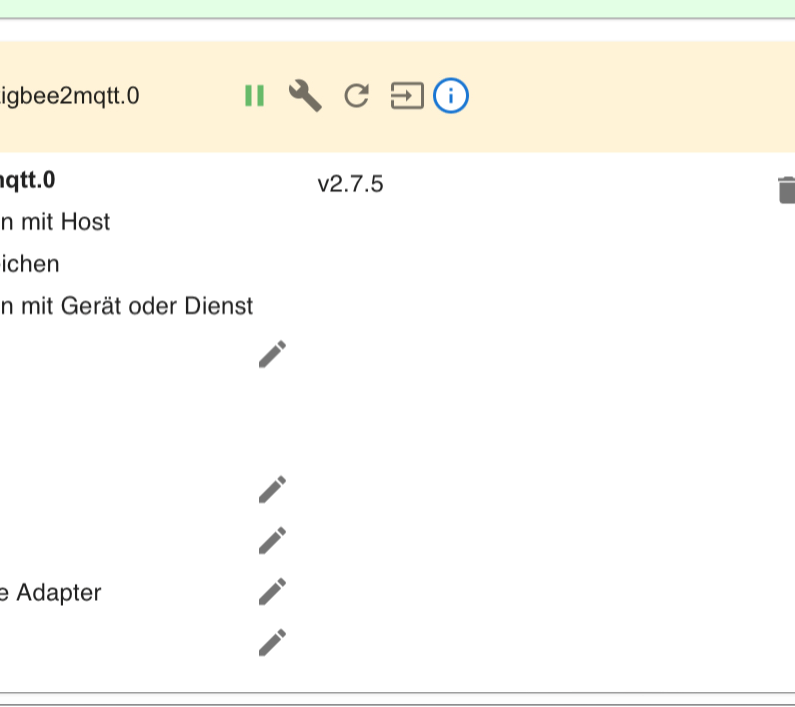
        c26279f0-40f1-459a-b10d-b8b7903f3e16-image.png
        Ich habe schon mehrere Stunden in Recherche verbracht bin aber nicht mehr weiter gekommen.
        Ein Auszug vom Log des ioBroker sieht so aus wenn ich den Adapter starte:
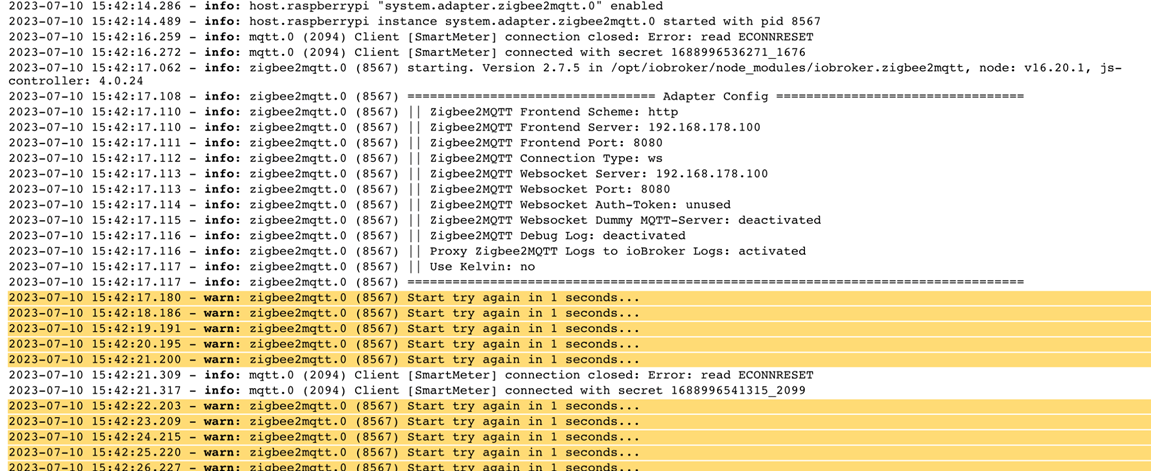
        806693cd-50ea-4ae9-b66a-739d762e2d7b-image.png
        Leider nicht sehr aussagekräftig.
        Hier noch Infos zu meinen System und Einstellungen:
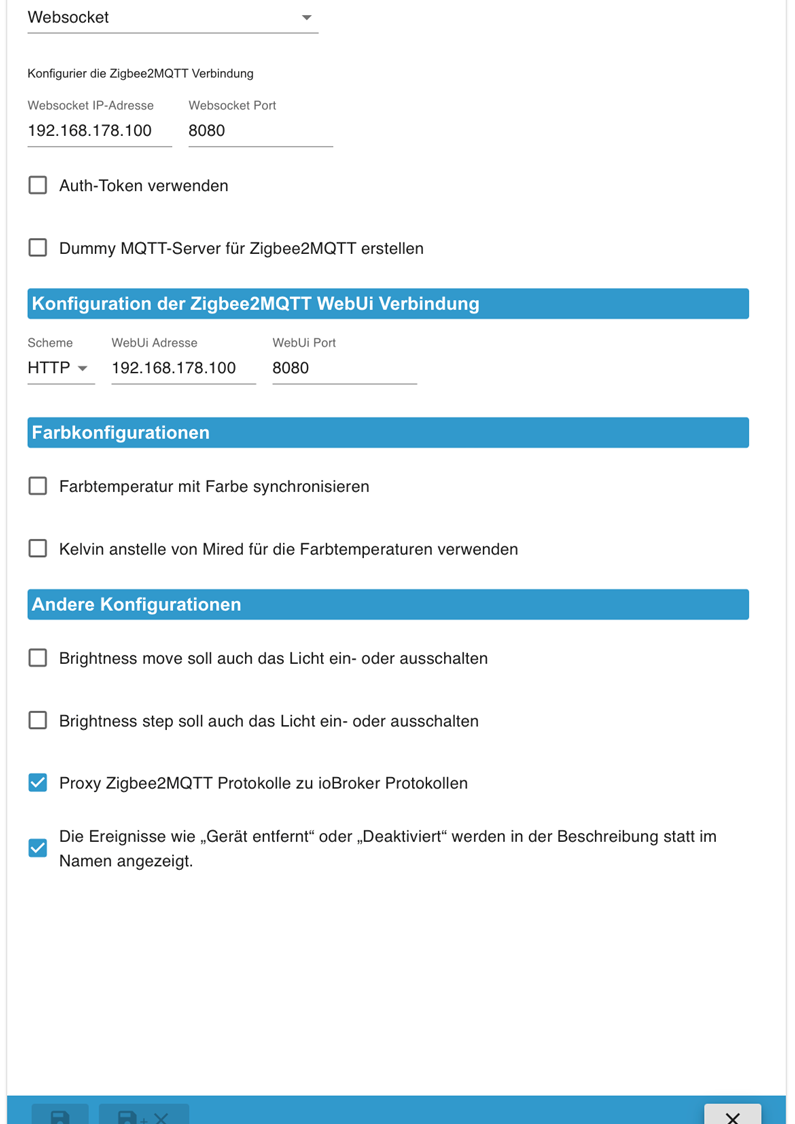
        9ceaab04-b21c-4bde-aeb4-2348b165c2a5-image.png

        8eec1a3a-bca3-49af-b162-b9173ee38a52-image.png

        Der zigbee2mqtt Server Server sollte am Raspberry ordnungsgemäß laufen:
        dceadce5-3106-4fb1-ae9e-3cd0b6e6601d-image.png
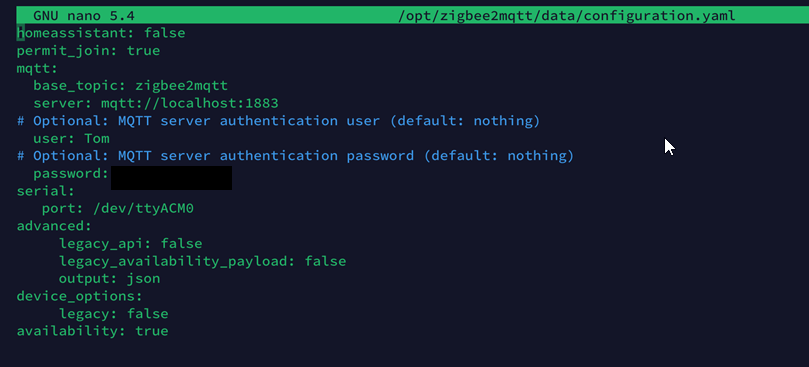
        Die Config Datei dazu:
        efdf3860-4e24-4498-a2d7-9738e46c2c60-image.png

        Danke schon mal!
        fg Thomas

        Thomas BraunT T 2 Antworten Letzte Antwort
        0
        • T TomComm27

          Hallo,

          Ich bekommen einfach den Adapter von zigbee2mqtt nicht auf komplett grün:
          c26279f0-40f1-459a-b10d-b8b7903f3e16-image.png
          Ich habe schon mehrere Stunden in Recherche verbracht bin aber nicht mehr weiter gekommen.
          Ein Auszug vom Log des ioBroker sieht so aus wenn ich den Adapter starte:
          806693cd-50ea-4ae9-b66a-739d762e2d7b-image.png
          Leider nicht sehr aussagekräftig.
          Hier noch Infos zu meinen System und Einstellungen:
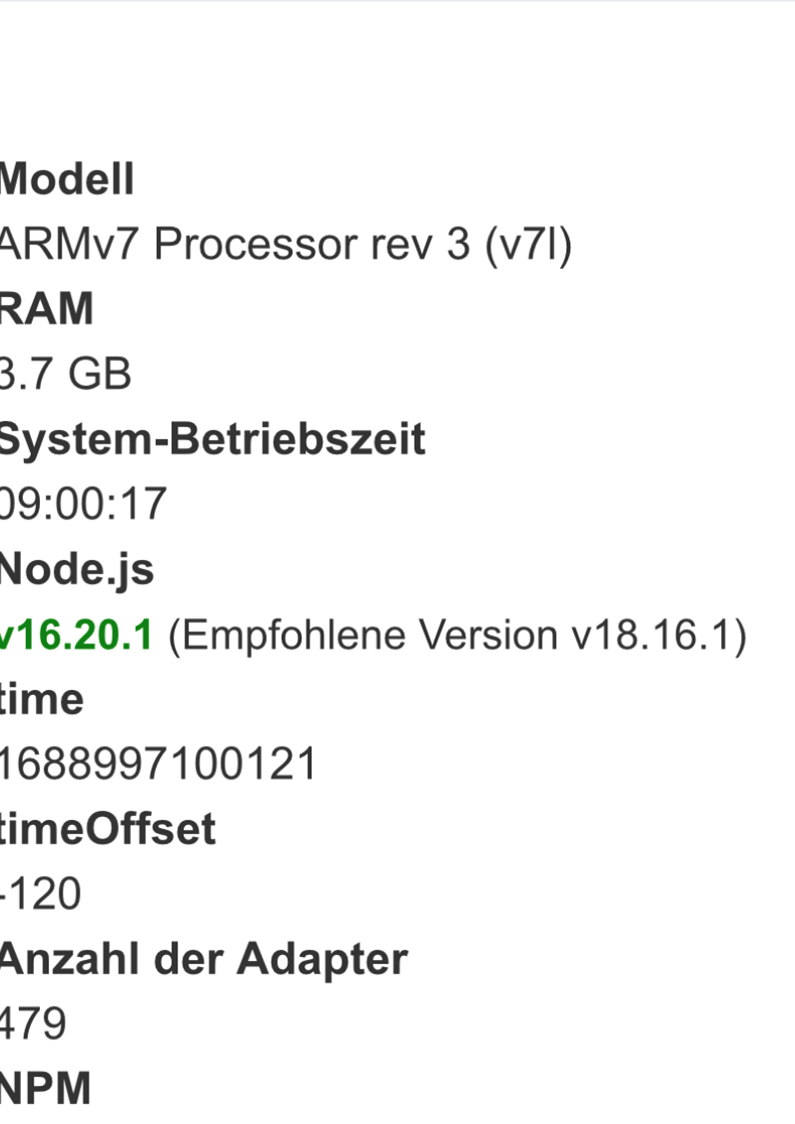
          9ceaab04-b21c-4bde-aeb4-2348b165c2a5-image.png

          8eec1a3a-bca3-49af-b162-b9173ee38a52-image.png

          Der zigbee2mqtt Server Server sollte am Raspberry ordnungsgemäß laufen:
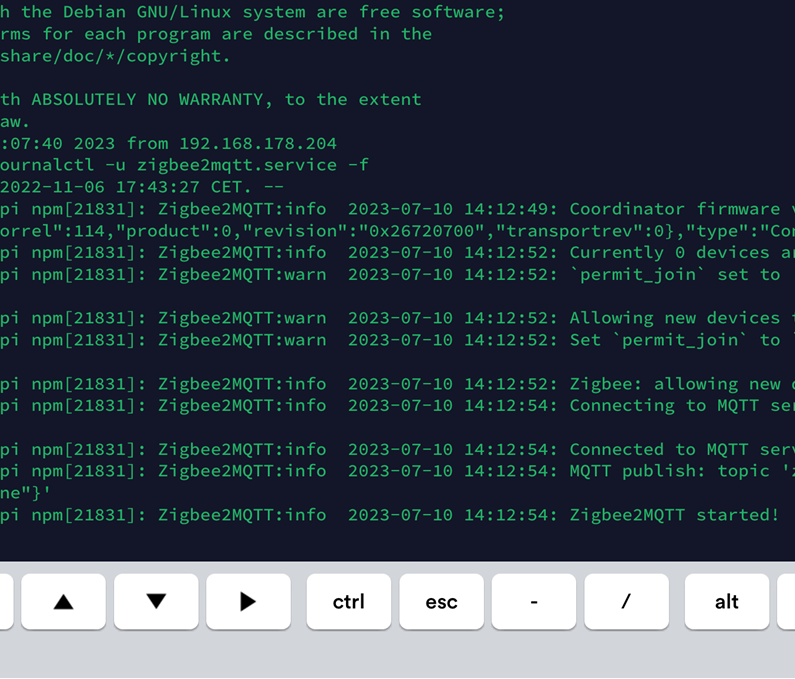
          dceadce5-3106-4fb1-ae9e-3cd0b6e6601d-image.png
          Die Config Datei dazu:
          efdf3860-4e24-4498-a2d7-9738e46c2c60-image.png

          Danke schon mal!
          fg Thomas

          Thomas BraunT Online
          Thomas BraunT Online
          Thomas Braun
          Most Active
          schrieb am zuletzt editiert von Thomas Braun
          #346

          @tomcomm27 sagte in Test Adapter zigbee2mqtt:

          Leider nicht sehr aussagekräftig.

          Sind Bilder von Text nie.
          Bitte Texte auch in Textform (in CodeTags eingebettet) hier reinkopieren.

          sudo apt update
          apt policy udev
          

          sagt?

          Linux-Werkzeugkasten:
          https://forum.iobroker.net/topic/42952/der-kleine-iobroker-linux-werkzeugkasten
          NodeJS Fixer Skript:
          https://forum.iobroker.net/topic/68035/iob-node-fix-skript
          iob_diag: curl -sLf -o diag.sh https://iobroker.net/diag.sh && bash diag.sh

          1 Antwort Letzte Antwort
          0
          • T TomComm27

            Hallo,

            Ich bekommen einfach den Adapter von zigbee2mqtt nicht auf komplett grün:
            c26279f0-40f1-459a-b10d-b8b7903f3e16-image.png
            Ich habe schon mehrere Stunden in Recherche verbracht bin aber nicht mehr weiter gekommen.
            Ein Auszug vom Log des ioBroker sieht so aus wenn ich den Adapter starte:
            806693cd-50ea-4ae9-b66a-739d762e2d7b-image.png
            Leider nicht sehr aussagekräftig.
            Hier noch Infos zu meinen System und Einstellungen:
            9ceaab04-b21c-4bde-aeb4-2348b165c2a5-image.png

            8eec1a3a-bca3-49af-b162-b9173ee38a52-image.png

            Der zigbee2mqtt Server Server sollte am Raspberry ordnungsgemäß laufen:
            dceadce5-3106-4fb1-ae9e-3cd0b6e6601d-image.png
            Die Config Datei dazu:
            efdf3860-4e24-4498-a2d7-9738e46c2c60-image.png

            Danke schon mal!
            fg Thomas

            T Nicht stören
            T Nicht stören
            ticaki
            schrieb am zuletzt editiert von ticaki
            #347

            @tomcomm27
            Auf deinen Bildern kann ich den Port nicht sehen
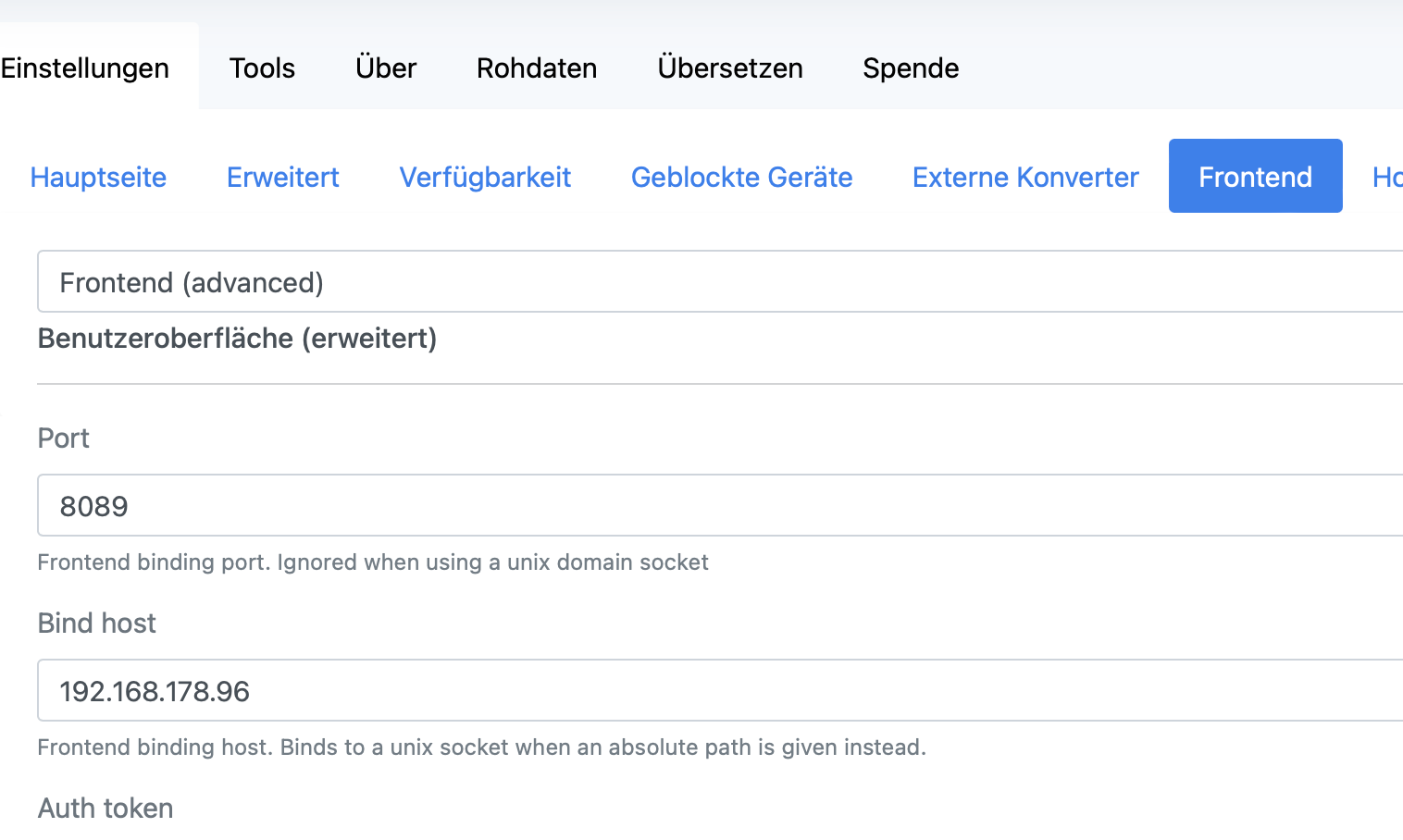
            Bildschirmfoto 2023-07-10 um 16.24.33.png

            und meine config datei ist viel größer.

            homeassistant: false
            permit_join: false
            mqtt:
              base_topic: zigbee2mqtt
              server: mqtt://192.168.178.96:1884
              user: Tim
              password: 
              client_id: zig
              keepalive: 60
              reject_unauthorized: true
              version: 4
              include_device_information: false
            serial:
              port: /dev/ttyACM0
              adapter: deconz
            frontend:
              port: 8089
              host: 192.168.178.96
            advanced:
              pan_id: 27759
              ext_pan_id:
               
              channel: 11
              network_key:
                
              last_seen: ISO_8601_local
              homeassistant_legacy_entity_attributes: false
              legacy_api: false
              legacy_availability_payload: false
              cache_state: false
              output: json
              log_level: warn
            device_options:
              legacy: false
            availability: true
            

            Weather-Warnings Espresense NSPanel-Lovelace-ui Tagesschau

            Spenden

            IdleBitI 1 Antwort Letzte Antwort
            0
            • T ticaki

              @tomcomm27
              Auf deinen Bildern kann ich den Port nicht sehen
              Bildschirmfoto 2023-07-10 um 16.24.33.png

              und meine config datei ist viel größer.

              homeassistant: false
              permit_join: false
              mqtt:
                base_topic: zigbee2mqtt
                server: mqtt://192.168.178.96:1884
                user: Tim
                password: 
                client_id: zig
                keepalive: 60
                reject_unauthorized: true
                version: 4
                include_device_information: false
              serial:
                port: /dev/ttyACM0
                adapter: deconz
              frontend:
                port: 8089
                host: 192.168.178.96
              advanced:
                pan_id: 27759
                ext_pan_id:
                 
                channel: 11
                network_key:
                  
                last_seen: ISO_8601_local
                homeassistant_legacy_entity_attributes: false
                legacy_api: false
                legacy_availability_payload: false
                cache_state: false
                output: json
                log_level: warn
              device_options:
                legacy: false
              availability: true
              
              IdleBitI Offline
              IdleBitI Offline
              IdleBit
              schrieb am zuletzt editiert von IdleBit
              #348

              hier stand Müll :)

              T 1 Antwort Letzte Antwort
              0
              • IdleBitI IdleBit

                hier stand Müll :)

                T Nicht stören
                T Nicht stören
                ticaki
                schrieb am zuletzt editiert von
                #349

                @idlebit
                ich bin nicht der mit dem Problem :)

                Weather-Warnings Espresense NSPanel-Lovelace-ui Tagesschau

                Spenden

                IdleBitI 1 Antwort Letzte Antwort
                0
                • T ticaki

                  @idlebit
                  ich bin nicht der mit dem Problem :)

                  IdleBitI Offline
                  IdleBitI Offline
                  IdleBit
                  schrieb am zuletzt editiert von
                  #350

                  @ticaki Ja sorry, auch eben gemerkt :D

                  1 Antwort Letzte Antwort
                  0
                  • IdleBitI Offline
                    IdleBitI Offline
                    IdleBit
                    schrieb am zuletzt editiert von
                    #351

                    @tomcomm27 sagte in Test Adapter zigbee2mqtt:

                    Leider nicht sehr aussagekräftig.

                    Was soll denn der Adpater ausgeben wenn er halt keine Verbindung zum Frontend aufbauen kann?!

                    Schon mal hier geschaut -> https://github.com/o0shojo0o/ioBroker.zigbee2mqtt/blob/main/docs/wiki.md

                    T 1 Antwort Letzte Antwort
                    0
                    • T Offline
                      T Offline
                      TomComm27
                      schrieb am zuletzt editiert von
                      #352

                      @Thomas-Braun & ticaki: Danke für den Hinweis mit dem Frontend. Das habe ich die ganze Zeit nicht verstanden.
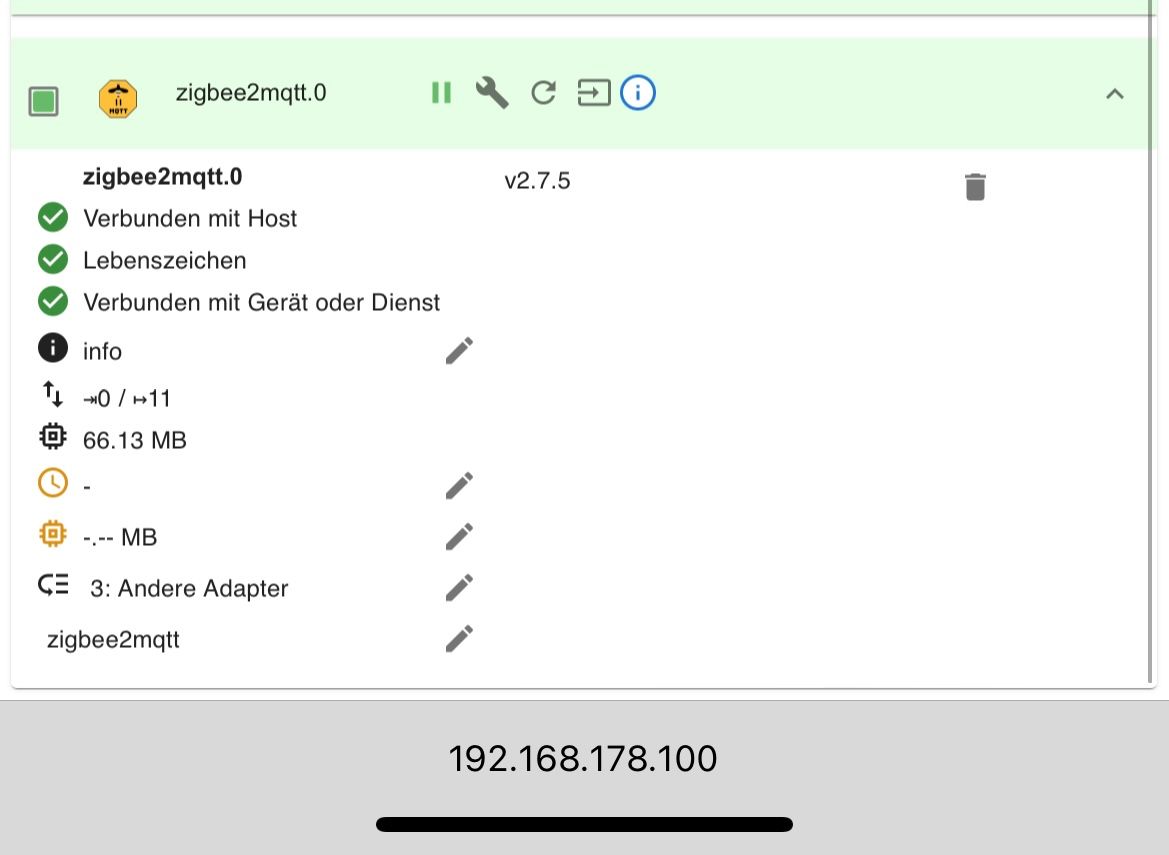
                      Das anzeigen im ioBroker des Frontend funktioniert jetzt!

                      Leider steht der Adapter noch immer auf gelb. Bei "Verbunden mit Gerät oder Dienst" hat er leider noch ein rotes X.
                      Will er sich hier mit dem Connbee II Stick verbinden oder mit dem Zigbee2mqtt Server den ich installiert habe?

                      So sieht jetzt meine Config aus:

                      homeassistant: false
                      permit_join: true
                      frontend:
                        port: 8089
                        host: 192.168.178.100
                      mqtt:
                        base_topic: zigbee2mqtt
                        server: mqtt://localhost:1883
                        user: Tom
                        password: Hier steht mein PW
                      serial:
                        port: /dev/ttyACM0
                      advanced:
                        legacy_api: false
                        legacy_availability_payload: false
                        homeassistant_legacy_entity_attributes: false
                        cache_state: false
                        output: json
                        log_level: warn
                      device_options:
                        legacy: false
                      availability: true
                       devices:
                        '0xdc8e95fffec3918d':
                           friendly_name: '0xdc8e95fffec3918d'


                      fg Thomas

                      Thomas BraunT 1 Antwort Letzte Antwort
                      0
                      • T TomComm27

                        @Thomas-Braun & ticaki: Danke für den Hinweis mit dem Frontend. Das habe ich die ganze Zeit nicht verstanden.
                        Das anzeigen im ioBroker des Frontend funktioniert jetzt!

                        Leider steht der Adapter noch immer auf gelb. Bei "Verbunden mit Gerät oder Dienst" hat er leider noch ein rotes X.
                        Will er sich hier mit dem Connbee II Stick verbinden oder mit dem Zigbee2mqtt Server den ich installiert habe?

                        So sieht jetzt meine Config aus:

                        homeassistant: false
                        permit_join: true
                        frontend:
                          port: 8089
                          host: 192.168.178.100
                        mqtt:
                          base_topic: zigbee2mqtt
                          server: mqtt://localhost:1883
                          user: Tom
                          password: Hier steht mein PW
                        serial:
                          port: /dev/ttyACM0
                        advanced:
                          legacy_api: false
                          legacy_availability_payload: false
                          homeassistant_legacy_entity_attributes: false
                          cache_state: false
                          output: json
                          log_level: warn
                        device_options:
                          legacy: false
                        availability: true
                         devices:
                          '0xdc8e95fffec3918d':
                             friendly_name: '0xdc8e95fffec3918d'


                        fg Thomas

                        Thomas BraunT Online
                        Thomas BraunT Online
                        Thomas Braun
                        Most Active
                        schrieb am zuletzt editiert von
                        #353

                        @tomcomm27

                        sudo apt update
                        apt policy udev
                        

                        sagt?
                        Ergänzend vielleicht auch noch die Ausgabe von

                        iob diag
                        

                        Linux-Werkzeugkasten:
                        https://forum.iobroker.net/topic/42952/der-kleine-iobroker-linux-werkzeugkasten
                        NodeJS Fixer Skript:
                        https://forum.iobroker.net/topic/68035/iob-node-fix-skript
                        iob_diag: curl -sLf -o diag.sh https://iobroker.net/diag.sh && bash diag.sh

                        T 1 Antwort Letzte Antwort
                        0
                        • Thomas BraunT Thomas Braun

                          @tomcomm27

                          sudo apt update
                          apt policy udev
                          

                          sagt?
                          Ergänzend vielleicht auch noch die Ausgabe von

                          iob diag
                          
                          T Offline
                          T Offline
                          TomComm27
                          schrieb am zuletzt editiert von
                          #354

                          @thomas-braun said in Test Adapter zigbee2mqtt:

                          sudo apt update                                                                                                                                                                            >apt policy udev
                          

                          sagt?

                          Hier das Ergebnis:

                          pi@raspberrypi:~ $ sudo apt update
                          Holen:1 http://raspbian.raspberrypi.org/raspbian bullseye InRelease [15,0 kB]
                          OK:2 http://archive.raspberrypi.org/debian bullseye InRelease  
                          OK:3 https://deb.nodesource.com/node_16.x bullseye InRelease   
                          OK:4 https://phoscon.de/apt/deconz bullseye InRelease          
                          Es wurden 15,0 kB in 2 s geholt (9.814 B/s). 
                          Paketlisten werden gelesen… Fertig
                          Abhängigkeitsbaum wird aufgebaut… Fertig
                          Statusinformationen werden eingelesen… Fertig
                          Aktualisierung für 188 Pakete verfügbar. Führen Sie »apt list --upgradable« aus, um sie anzuzeigen.
                          N: Datei »nodesource.list.save.1« in Verzeichnis »/etc/apt/sources.list.d/« wird ignoriert, da sie eine ungültige Dateinamen-Erweiterung hat.
                          N: Datei »nodesource.list.save.2« in Verzeichnis »/etc/apt/sources.list.d/« wird ignoriert, da sie eine ungültige Dateinamen-Erweiterung hat.
                          pi@raspberrypi:~ $ 


                          Ergänzend vielleicht auch noch die Ausgabe von

                          iob diag

                          pi@raspberrypi:~ $ iob diag
                          
                          *** ioBroker Diagnosis ***
                          
                          Please stretch the window of your terminal programm (puTTY) as wide as possible or switch to full screen
                          
                          The following checks may give hints to potential malconfigurations or errors, please post them in our forum:
                          
                          https://forum.iobroker.net
                          
                          Just copy and paste the Summary Page, including the ``` characters at start and end.
                          It helps us to help you!
                          
                          Press any key to continue
                          
                          ======== Start marking the full check here =========
                          
                          
                          Skript v.2023-04-16
                          
                          *** BASE SYSTEM ***
                          Model           : Raspberry Pi 4 Model B Rev 1.1
                          Architecture    : armv7l
                          Docker          : false
                          Virtualization  : none
                          Distributor ID: Raspbian
                          Description:    Raspbian GNU/Linux 11 (bullseye)
                          Release:        11
                          Codename:       bullseye
                          
                          PRETTY_NAME="Raspbian GNU/Linux 11 (bullseye)"
                          NAME="Raspbian GNU/Linux"
                          VERSION_ID="11"
                          VERSION="11 (bullseye)"
                          VERSION_CODENAME=bullseye
                          ID=raspbian
                          ID_LIKE=debian
                          HOME_URL="http://www.raspbian.org/"
                          SUPPORT_URL="http://www.raspbian.org/RaspbianForums"
                          BUG_REPORT_URL="http://www.raspbian.org/RaspbianBugs"
                          
                          Systemuptime and Load:
                           15:40:10 up  2:35,  2 users,  load average: 0.43, 0.43, 0.34
                          CPU threads: 4
                          
                          Raspberry only:
                          throttled=0x0
                          Other values than 0x0 hint to temperature/voltage problems
                          temp=48.7'C
                          volt=0.8500V
                          
                          *** Time and Time Zones ***
                                         Local time: Tue 2023-07-11 15:40:11 CEST
                                     Universal time: Tue 2023-07-11 13:40:11 UTC
                                           RTC time: n/a
                                          Time zone: Europe/Vienna (CEST, +0200)
                          System clock synchronized: yes
                                        NTP service: active
                                    RTC in local TZ: no
                          
                          *** User and Groups ***
                          pi
                          /home/pi
                          pi adm dialout cdrom sudo audio video plugdev games users input netdev lpadmin gpio i2c spi iobroker
                          
                          *** X-Server-Setup ***
                          X-Server:       false
                          Desktop:        
                          Terminal:       tty
                          Boot Target:    graphical.target
                          
                          *** MEMORY ***
                                         total        used        free      shared  buff/cache   available
                          Mem:            3.8G        1.2G        1.9G        0.0K        754M        2.8G
                          Swap:            99M          0B         99M
                          Total:          3.9G        1.2G        2.0G
                          
                                   3787 M total memory
                                   1159 M used memory
                                    293 M active memory
                                   1507 M inactive memory
                                   1873 M free memory
                                     98 M buffer memory
                                    656 M swap cache
                                     99 M total swap
                                      0 M used swap
                                     99 M free swap
                          
                          Raspberry only:
                          oom events: 0
                          lifetime oom required: 0 Mbytes
                          total time in oom handler: 0 ms
                          max time spent in oom handler: 0 ms
                          
                          *** FILESYSTEM ***
                          Filesystem     Type      Size  Used Avail Use% Mounted on
                          /dev/root      ext4       21G   11G  9.2G  53% /
                          devtmpfs       devtmpfs  1.7G     0  1.7G   0% /dev
                          tmpfs          tmpfs     1.9G     0  1.9G   0% /dev/shm
                          tmpfs          tmpfs     758M  796K  757M   1% /run
                          tmpfs          tmpfs     5.0M  4.0K  5.0M   1% /run/lock
                          /dev/mmcblk0p1 vfat      253M   50M  203M  20% /boot
                          tmpfs          tmpfs     379M   12K  379M   1% /run/user/1000
                          
                          Messages concerning ext4 filesystem in dmesg:
                          [Tue Jul 11 13:04:28 2023] Kernel command line: coherent_pool=1M 8250.nr_uarts=1 snd_bcm2835.enable_compat_alsa=0 snd_bcm2835.enable_hdmi=1  smsc95xx.macaddr=DC:A6:32:38:E7:FA vc_mem.mem_base=0x3ec00000 vc_mem.mem_size=0x40000000  console=tty1 root=PARTUUID=72b2f5e1-02 rootfstype=ext4 elevator=deadline fsck.repair=yes rootwait quiet splash plymouth.ignore-serial-consoles
                          [Tue Jul 11 13:04:29 2023] EXT4-fs (mmcblk0p2): mounted filesystem with ordered data mode. Opts: (null). Quota mode: none.
                          [Tue Jul 11 13:04:29 2023] VFS: Mounted root (ext4 filesystem) readonly on device 179:2.
                          [Tue Jul 11 13:04:32 2023] EXT4-fs (mmcblk0p2): re-mounted. Opts: (null). Quota mode: none.
                          
                          Show mounted filesystems (real ones only):
                          TARGET  SOURCE         FSTYPE OPTIONS
                          /       /dev/mmcblk0p2 ext4   rw,noatime
                          `-/boot /dev/mmcblk0p1 vfat   rw,relatime,fmask=0022,dmask=0022,codepage=437,iocharset=ascii,shortname=mixed,flush,errors=remount-ro
                          
                          Files in neuralgic directories:
                          
                          /var:
                          3.1G    /var/
                          1.5G    /var/log/journal/61e745e05ed04f88a890d35872146fc7
                          1.5G    /var/log/journal
                          1.5G    /var/log
                          1.4G    /var/cache/apt
                          
                          Archived and active journals take up 1.4G in the file system.
                          
                          /opt/iobroker/backups:
                          4.0K    /opt/iobroker/backups/
                          
                          /opt/iobroker/iobroker-data:
                          323M    /opt/iobroker/iobroker-data/
                          235M    /opt/iobroker/iobroker-data/files
                          65M     /opt/iobroker/iobroker-data/backup-objects
                          51M     /opt/iobroker/iobroker-data/files/javascript.admin
                          37M     /opt/iobroker/iobroker-data/files/material
                          
                          The five largest files in iobroker-data are:
                          27M     /opt/iobroker/iobroker-data/files/material/static/js/2.73100bd6.chunk.js.map
                          11M     /opt/iobroker/iobroker-data/objects.jsonl
                          9.1M    /opt/iobroker/iobroker-data/files/echarts.admin/static/js/2.bbf74d5f.chunk.js.map
                          8.9M    /opt/iobroker/iobroker-data/files/echarts/static/js/2.3d2d025f.chunk.js.map
                          8.9M    /opt/iobroker/iobroker-data/files/echarts.admin/chart/static/js/2.3d2d025f.chunk.js.map
                          
                          *** NodeJS-Installation ***
                          
                          /usr/bin/nodejs         v16.20.1
                          /usr/bin/node           v16.20.1
                          /usr/bin/npm            8.19.4
                          /usr/bin/npx            8.19.4
                          
                          
                          nodejs:
                            Installed: 16.20.1-deb-1nodesource1
                            Candidate: 16.20.1-deb-1nodesource1
                            Version table:
                           *** 16.20.1-deb-1nodesource1 500
                                  500 https://deb.nodesource.com/node_16.x bullseye/main armhf Packages
                                  100 /var/lib/dpkg/status
                               12.22.12~dfsg-1~deb11u4 500
                                  500 http://raspbian.raspberrypi.org/raspbian bullseye/main armhf Packages
                          
                          Temp directories causing npm8 problem: 0
                          No problems detected
                          
                          *** ioBroker-Installation ***
                          
                          ioBroker Status
                          iobroker is running on this host.
                          
                          
                          Objects type: jsonl
                          States  type: jsonl
                          
                          MULTIHOSTSERVICE/enabled: false
                          
                          Core adapters versions
                          js-controller:  4.0.24
                          admin:          6.3.5
                          javascript:     6.1.4
                          
                          Adapters from github:   1
                          
                          Adapter State
                          + system.adapter.admin.0                  : admin                 : raspberrypi                              -  enabled, port: 8081, bind: 0.0.0.0, run as: admin
                            system.adapter.alexa2.0                 : alexa2                : raspberrypi                              - disabled
                          + system.adapter.backitup.0               : backitup              : raspberrypi                              -  enabled
                          + system.adapter.ble.0                    : ble                   : raspberrypi                              -  enabled
                          + system.adapter.discovery.0              : discovery             : raspberrypi                              -  enabled
                          + system.adapter.echarts.0                : echarts               : raspberrypi                              -  enabled
                          + system.adapter.fahrplan.0               : fahrplan              : raspberrypi                              -  enabled
                            system.adapter.flot.0                   : flot                  : raspberrypi                              -  enabled
                            system.adapter.habpanel.0               : habpanel              : raspberrypi                              -  enabled
                          + system.adapter.ham.0                    : ham                   : raspberrypi                              -  enabled
                          + system.adapter.history.0                : history               : raspberrypi                              -  enabled
                            system.adapter.influxdb.0               : influxdb              : raspberrypi                              - disabled, port: 8086
                          + system.adapter.info.0                   : info                  : raspberrypi                              -  enabled
                          + system.adapter.javascript.0             : javascript            : raspberrypi                              -  enabled
                            system.adapter.material.0               : material              : raspberrypi                              -  enabled
                          + system.adapter.mqtt.0                   : mqtt                  : raspberrypi                              -  enabled, port: 1883, bind: 0.0.0.0
                          + system.adapter.net-tools.0              : net-tools             : raspberrypi                              -  enabled
                          + system.adapter.pushover.0               : pushover              : raspberrypi                              -  enabled
                            system.adapter.reolink.0                : reolink               : raspberrypi                              - disabled
                          + system.adapter.shelly.0                 : shelly                : raspberrypi                              -  enabled, port: 1882, bind: 0.0.0.0
                          + system.adapter.simple-api.0             : simple-api            : raspberrypi                              -  enabled, port: 8087, bind: 0.0.0.0, run as: admin
                            system.adapter.sql.0                    : sql                   : raspberrypi                              - disabled
                            system.adapter.vis-google-fonts.0       : vis-google-fonts      : raspberrypi                              -  enabled
                            system.adapter.vis-hqwidgets.0          : vis-hqwidgets         : raspberrypi                              -  enabled
                            system.adapter.vis-icontwo.0            : vis-icontwo           : raspberrypi                              -  enabled
                          + system.adapter.vis-inventwo.0           : vis-inventwo          : raspberrypi                              -  enabled
                            system.adapter.vis-jqui-mfd.0           : vis-jqui-mfd          : raspberrypi                              -  enabled
                            system.adapter.vis-justgage.0           : vis-justgage          : raspberrypi                              -  enabled
                            system.adapter.vis.0                    : vis                   : raspberrypi                              -  enabled
                          + system.adapter.web.0                    : web                   : raspberrypi                              -  enabled, port: 8082, bind: 0.0.0.0, run as: admin
                          + system.adapter.yahka.0                  : yahka                 : raspberrypi                              -  enabled
                            system.adapter.zigbee2mqtt.0            : zigbee2mqtt           : raspberrypi                              - disabled
                          
                          + instance is alive
                          
                          Enabled adapters with bindings
                          + system.adapter.admin.0                  : admin                 : raspberrypi                              -  enabled, port: 8081, bind: 0.0.0.0, run as: admin
                          + system.adapter.mqtt.0                   : mqtt                  : raspberrypi                              -  enabled, port: 1883, bind: 0.0.0.0
                          + system.adapter.shelly.0                 : shelly                : raspberrypi                              -  enabled, port: 1882, bind: 0.0.0.0
                          + system.adapter.simple-api.0             : simple-api            : raspberrypi                              -  enabled, port: 8087, bind: 0.0.0.0, run as: admin
                          + system.adapter.web.0                    : web                   : raspberrypi                              -  enabled, port: 8082, bind: 0.0.0.0, run as: admin
                          
                          ioBroker-Repositories
                          stable        : http://download.iobroker.net/sources-dist.json
                          beta          : http://download.iobroker.net/sources-dist-latest.json
                          
                          Active repo(s): stable
                          
                          Installed ioBroker-Instances
                          Used repository: stable
                          Adapter    "admin"        : 6.3.5    , installed 6.3.5
                          Adapter    "alexa2"       : 3.23.2   , installed 3.23.2
                          Adapter    "backitup"     : 2.6.23   , installed 2.6.19 [Updatable]
                          Adapter    "ble"          : 0.13.0   , installed 0.13.0
                          Adapter    "discovery"    : 3.1.0    , installed 3.1.0
                          Adapter    "echarts"      : 1.5.1    , installed 1.0.12 [Updatable]
                          Adapter    "ecovacs-deebot": 1.4.13  , installed 1.4.13
                          Adapter    "fahrplan"     : 1.2.3    , installed 1.2.3
                          Adapter    "flot"         : 1.12.0   , installed 1.11.0 [Updatable]
                          Adapter    "habpanel"     : 0.5.0    , installed 0.5.0
                          Adapter    "ham"          : 5.3.1    , installed 5.3.1
                          Adapter    "history"      : 2.2.4    , installed 2.2.4
                          Adapter    "influxdb"     : 3.2.0    , installed 3.2.0
                          Adapter    "info"         : 1.9.26   , installed 1.9.19 [Updatable]
                          Adapter    "javascript"   : 7.0.3    , installed 6.1.4  [Updatable]
                          Controller "js-controller": 4.0.24   , installed 4.0.24
                          Adapter    "material"     : 1.3.1    , installed 1.1.2  [Updatable]
                          Adapter    "mqtt"         : 4.1.1    , installed 4.0.7  [Updatable]
                          Adapter    "net-tools"    : 0.2.0    , installed 0.2.0
                          Adapter    "onvif"        : 1.0.5    , installed 0.4.4  [Updatable]
                          Adapter    "pushover"     : 3.0.3    , installed 3.0.3
                          Adapter    "rest-api"     : 1.1.0    , installed 1.0.4  [Updatable]
                          Adapter    "rickshaw"     : 1.0.0    , installed 1.0.0
                          Adapter    "shelly"       : 6.4.1    , installed 6.3.1  [Updatable]
                          Adapter    "simple-api"   : 2.7.2    , installed 2.7.2
                          Adapter    "socketio"     : 4.2.0    , installed 4.2.0
                          Adapter    "sql"          : 2.2.0    , installed 2.2.0
                          Adapter    "tr-064"       : 4.2.18   , installed 4.2.18
                          Adapter    "vis"          : 1.4.16   , installed 1.4.16
                          Adapter    "vis-google-fonts": 1.0.4 , installed 1.0.4
                          Adapter    "vis-hqwidgets": 1.4.0    , installed 1.3.0  [Updatable]
                          Adapter    "vis-icontwo"  : 0.96.0   , installed 0.93.0 [Updatable]
                          Adapter    "vis-inventwo" : 3.3.1    , installed 3.3.1
                          Adapter    "vis-jqui-mfd" : 1.0.12   , installed 1.0.12
                          Adapter    "vis-justgage" : 1.0.2    , installed 1.0.2
                          Adapter    "web"          : 4.3.0    , installed 4.3.0
                          Adapter    "ws"           : 1.3.0    , installed 1.3.0
                          Adapter    "yahka"        : 0.17.0   , installed 0.17.0
                          Adapter    "zigbee2mqtt"  : 2.7.5    , installed 2.7.5
                          
                          Objects and States
                          Please stand by - This may take a while
                          Objects:        6089
                          States:         5075
                          
                          *** OS-Repositories and Updates ***
                          Hit:1 http://raspbian.raspberrypi.org/raspbian bullseye InRelease
                          Hit:2 http://archive.raspberrypi.org/debian bullseye InRelease
                          Hit:3 https://deb.nodesource.com/node_16.x bullseye InRelease
                          Hit:4 https://phoscon.de/apt/deconz bullseye InRelease
                          Reading package lists...
                          Pending Updates: 187
                          
                          *** Listening Ports ***
                          Active Internet connections (only servers)
                          Proto Recv-Q Send-Q Local Address           Foreign Address         State       User       Inode      PID/Program name    
                          tcp        0      0 192.168.178.100:8089    0.0.0.0:*               LISTEN      1000       19507      1343/node           
                          tcp        0      0 127.0.0.1:9001          0.0.0.0:*               LISTEN      1001       12077      514/iobroker.js-con 
                          tcp        0      0 127.0.0.1:9000          0.0.0.0:*               LISTEN      1001       13291      514/iobroker.js-con 
                          tcp        0      0 0.0.0.0:22              0.0.0.0:*               LISTEN      0          14407      561/sshd: /usr/sbin 
                          tcp        0      0 0.0.0.0:1882            0.0.0.0:*               LISTEN      1001       15945      1028/io.shelly.0    
                          tcp        0      0 0.0.0.0:1883            0.0.0.0:*               LISTEN      1001       15015      907/io.mqtt.0       
                          tcp        0      0 0.0.0.0:1884            0.0.0.0:*               LISTEN      1001       15016      907/io.mqtt.0       
                          tcp        0      0 127.0.0.1:631           0.0.0.0:*               LISTEN      0          11932      512/cupsd           
                          tcp6       0      0 :::35869                :::*                    LISTEN      1001       18722      1390/io.yahka.0     
                          tcp6       0      0 :::22                   :::*                    LISTEN      0          14409      561/sshd: /usr/sbin 
                          tcp6       0      0 :::34559                :::*                    LISTEN      1001       19792      945/io.ham.0        
                          tcp6       0      0 :::43761                :::*                    LISTEN      1001       18720      1390/io.yahka.0     
                          tcp6       0      0 :::38131                :::*                    LISTEN      1001       18716      1390/io.yahka.0     
                          tcp6       0      0 ::1:631                 :::*                    LISTEN      0          11931      512/cupsd           
                          tcp6       0      0 :::3389                 :::*                    LISTEN      115        13117      577/xrdp            
                          tcp6       0      0 ::1:3350                :::*                    LISTEN      0          11891      536/xrdp-sesman     
                          tcp6       0      0 :::33189                :::*                    LISTEN      1001       18718      1390/io.yahka.0     
                          tcp6       0      0 :::8081                 :::*                    LISTEN      1001       16444      766/io.admin.0      
                          tcp6       0      0 :::8082                 :::*                    LISTEN      1001       19483      1350/io.web.0       
                          tcp6       0      0 :::8087                 :::*                    LISTEN      1001       19930      1872/io.simple-api. 
                          udp        0      0 0.0.0.0:68              0.0.0.0:*                           0          14655      449/dhcpcd          
                          udp        0      0 0.0.0.0:631             0.0.0.0:*                           0          14549      607/cups-browsed    
                          udp        0      0 0.0.0.0:5353            0.0.0.0:*                           1001       18723      945/io.ham.0        
                          udp        0      0 0.0.0.0:5353            0.0.0.0:*                           108        11099      370/avahi-daemon: r 
                          udp        0      0 0.0.0.0:37240           0.0.0.0:*                           108        11101      370/avahi-daemon: r 
                          udp6       0      0 :::45029                :::*                                108        11102      370/avahi-daemon: r 
                          udp6       0      0 :::5353                 :::*                                108        11100      370/avahi-daemon: r 
                          
                          *** Log File - Last 25 Lines ***
                          
                          2023-07-11 15:40:26.121  - info: mqtt.0 (907) Client [SmartMeter] connected with secret 1689082826120_2483
                          2023-07-11 15:40:31.114  - info: mqtt.0 (907) Client [SmartMeter] connection closed: Error: read ECONNRESET
                          2023-07-11 15:40:31.223  - info: mqtt.0 (907) Client [SmartMeter] connected with secret 1689082831223_268
                          2023-07-11 15:40:36.157  - info: mqtt.0 (907) Client [SmartMeter] connection closed: Error: read ECONNRESET
                          2023-07-11 15:40:36.164  - info: mqtt.0 (907) Client [SmartMeter] connected with secret 1689082836163_979
                          2023-07-11 15:40:41.106  - info: mqtt.0 (907) Client [SmartMeter] connection closed: Error: read ECONNRESET
                          2023-07-11 15:40:41.113  - info: mqtt.0 (907) Client [SmartMeter] connected with secret 1689082841111_2066
                          2023-07-11 15:40:46.107  - info: mqtt.0 (907) Client [SmartMeter] connection closed: Error: read ECONNRESET
                          2023-07-11 15:40:46.173  - info: mqtt.0 (907) Client [SmartMeter] connected with secret 1689082846172_751
                          2023-07-11 15:40:51.155  - info: mqtt.0 (907) Client [SmartMeter] connection closed: Error: read ECONNRESET
                          2023-07-11 15:40:51.163  - info: mqtt.0 (907) Client [SmartMeter] connected with secret 1689082851162_8420
                          2023-07-11 15:40:56.086  - info: mqtt.0 (907) Client [SmartMeter] connection closed: Error: read ECONNRESET
                          2023-07-11 15:40:56.100  - info: mqtt.0 (907) Client [SmartMeter] connected with secret 1689082856091_5553
                          2023-07-11 15:41:01.103  - info: mqtt.0 (907) Client [SmartMeter] connection closed: Error: read ECONNRESET
                          2023-07-11 15:41:01.116  - info: mqtt.0 (907) Client [SmartMeter] connected with secret 1689082861109_860
                          2023-07-11 15:41:06.142  - info: mqtt.0 (907) Client [SmartMeter] connection closed: Error: read ECONNRESET
                          2023-07-11 15:41:06.149  - info: mqtt.0 (907) Client [SmartMeter] connected with secret 1689082866148_2726
                          2023-07-11 15:41:11.126  - info: mqtt.0 (907) Client [SmartMeter] connection closed: Error: read ECONNRESET
                          2023-07-11 15:41:11.133  - info: mqtt.0 (907) Client [SmartMeter] connected with secret 1689082871132_9031
                          2023-07-11 15:41:16.092  - info: mqtt.0 (907) Client [SmartMeter] connection closed: Error: read ECONNRESET
                          2023-07-11 15:41:16.098  - info: mqtt.0 (907) Client [SmartMeter] connected with secret 1689082876097_1991
                          2023-07-11 15:41:21.168  - info: mqtt.0 (907) Client [SmartMeter] connection closed: Error: read ECONNRESET
                          2023-07-11 15:41:21.174  - info: mqtt.0 (907) Client [SmartMeter] connected with secret 1689082881173_7683
                          2023-07-11 15:41:26.109  - info: mqtt.0 (907) Client [SmartMeter] connection closed: Error: read ECONNRESET
                          2023-07-11 15:41:26.115  - info: mqtt.0 (907) Client [SmartMeter] connected with secret 1689082886114_3193
                          
                          
                          ============ Mark until here for C&P =============
                          
                          iob diag has finished.
                          Thomas BraunT 1 Antwort Letzte Antwort
                          0
                          • T TomComm27

                            @thomas-braun said in Test Adapter zigbee2mqtt:

                            sudo apt update                                                                                                                                                                            >apt policy udev
                            

                            sagt?

                            Hier das Ergebnis:

                            pi@raspberrypi:~ $ sudo apt update
                            Holen:1 http://raspbian.raspberrypi.org/raspbian bullseye InRelease [15,0 kB]
                            OK:2 http://archive.raspberrypi.org/debian bullseye InRelease  
                            OK:3 https://deb.nodesource.com/node_16.x bullseye InRelease   
                            OK:4 https://phoscon.de/apt/deconz bullseye InRelease          
                            Es wurden 15,0 kB in 2 s geholt (9.814 B/s). 
                            Paketlisten werden gelesen… Fertig
                            Abhängigkeitsbaum wird aufgebaut… Fertig
                            Statusinformationen werden eingelesen… Fertig
                            Aktualisierung für 188 Pakete verfügbar. Führen Sie »apt list --upgradable« aus, um sie anzuzeigen.
                            N: Datei »nodesource.list.save.1« in Verzeichnis »/etc/apt/sources.list.d/« wird ignoriert, da sie eine ungültige Dateinamen-Erweiterung hat.
                            N: Datei »nodesource.list.save.2« in Verzeichnis »/etc/apt/sources.list.d/« wird ignoriert, da sie eine ungültige Dateinamen-Erweiterung hat.
                            pi@raspberrypi:~ $ 


                            Ergänzend vielleicht auch noch die Ausgabe von

                            iob diag

                            pi@raspberrypi:~ $ iob diag
                            
                            *** ioBroker Diagnosis ***
                            
                            Please stretch the window of your terminal programm (puTTY) as wide as possible or switch to full screen
                            
                            The following checks may give hints to potential malconfigurations or errors, please post them in our forum:
                            
                            https://forum.iobroker.net
                            
                            Just copy and paste the Summary Page, including the ``` characters at start and end.
                            It helps us to help you!
                            
                            Press any key to continue
                            
                            ======== Start marking the full check here =========
                            
                            
                            Skript v.2023-04-16
                            
                            *** BASE SYSTEM ***
                            Model           : Raspberry Pi 4 Model B Rev 1.1
                            Architecture    : armv7l
                            Docker          : false
                            Virtualization  : none
                            Distributor ID: Raspbian
                            Description:    Raspbian GNU/Linux 11 (bullseye)
                            Release:        11
                            Codename:       bullseye
                            
                            PRETTY_NAME="Raspbian GNU/Linux 11 (bullseye)"
                            NAME="Raspbian GNU/Linux"
                            VERSION_ID="11"
                            VERSION="11 (bullseye)"
                            VERSION_CODENAME=bullseye
                            ID=raspbian
                            ID_LIKE=debian
                            HOME_URL="http://www.raspbian.org/"
                            SUPPORT_URL="http://www.raspbian.org/RaspbianForums"
                            BUG_REPORT_URL="http://www.raspbian.org/RaspbianBugs"
                            
                            Systemuptime and Load:
                             15:40:10 up  2:35,  2 users,  load average: 0.43, 0.43, 0.34
                            CPU threads: 4
                            
                            Raspberry only:
                            throttled=0x0
                            Other values than 0x0 hint to temperature/voltage problems
                            temp=48.7'C
                            volt=0.8500V
                            
                            *** Time and Time Zones ***
                                           Local time: Tue 2023-07-11 15:40:11 CEST
                                       Universal time: Tue 2023-07-11 13:40:11 UTC
                                             RTC time: n/a
                                            Time zone: Europe/Vienna (CEST, +0200)
                            System clock synchronized: yes
                                          NTP service: active
                                      RTC in local TZ: no
                            
                            *** User and Groups ***
                            pi
                            /home/pi
                            pi adm dialout cdrom sudo audio video plugdev games users input netdev lpadmin gpio i2c spi iobroker
                            
                            *** X-Server-Setup ***
                            X-Server:       false
                            Desktop:        
                            Terminal:       tty
                            Boot Target:    graphical.target
                            
                            *** MEMORY ***
                                           total        used        free      shared  buff/cache   available
                            Mem:            3.8G        1.2G        1.9G        0.0K        754M        2.8G
                            Swap:            99M          0B         99M
                            Total:          3.9G        1.2G        2.0G
                            
                                     3787 M total memory
                                     1159 M used memory
                                      293 M active memory
                                     1507 M inactive memory
                                     1873 M free memory
                                       98 M buffer memory
                                      656 M swap cache
                                       99 M total swap
                                        0 M used swap
                                       99 M free swap
                            
                            Raspberry only:
                            oom events: 0
                            lifetime oom required: 0 Mbytes
                            total time in oom handler: 0 ms
                            max time spent in oom handler: 0 ms
                            
                            *** FILESYSTEM ***
                            Filesystem     Type      Size  Used Avail Use% Mounted on
                            /dev/root      ext4       21G   11G  9.2G  53% /
                            devtmpfs       devtmpfs  1.7G     0  1.7G   0% /dev
                            tmpfs          tmpfs     1.9G     0  1.9G   0% /dev/shm
                            tmpfs          tmpfs     758M  796K  757M   1% /run
                            tmpfs          tmpfs     5.0M  4.0K  5.0M   1% /run/lock
                            /dev/mmcblk0p1 vfat      253M   50M  203M  20% /boot
                            tmpfs          tmpfs     379M   12K  379M   1% /run/user/1000
                            
                            Messages concerning ext4 filesystem in dmesg:
                            [Tue Jul 11 13:04:28 2023] Kernel command line: coherent_pool=1M 8250.nr_uarts=1 snd_bcm2835.enable_compat_alsa=0 snd_bcm2835.enable_hdmi=1  smsc95xx.macaddr=DC:A6:32:38:E7:FA vc_mem.mem_base=0x3ec00000 vc_mem.mem_size=0x40000000  console=tty1 root=PARTUUID=72b2f5e1-02 rootfstype=ext4 elevator=deadline fsck.repair=yes rootwait quiet splash plymouth.ignore-serial-consoles
                            [Tue Jul 11 13:04:29 2023] EXT4-fs (mmcblk0p2): mounted filesystem with ordered data mode. Opts: (null). Quota mode: none.
                            [Tue Jul 11 13:04:29 2023] VFS: Mounted root (ext4 filesystem) readonly on device 179:2.
                            [Tue Jul 11 13:04:32 2023] EXT4-fs (mmcblk0p2): re-mounted. Opts: (null). Quota mode: none.
                            
                            Show mounted filesystems (real ones only):
                            TARGET  SOURCE         FSTYPE OPTIONS
                            /       /dev/mmcblk0p2 ext4   rw,noatime
                            `-/boot /dev/mmcblk0p1 vfat   rw,relatime,fmask=0022,dmask=0022,codepage=437,iocharset=ascii,shortname=mixed,flush,errors=remount-ro
                            
                            Files in neuralgic directories:
                            
                            /var:
                            3.1G    /var/
                            1.5G    /var/log/journal/61e745e05ed04f88a890d35872146fc7
                            1.5G    /var/log/journal
                            1.5G    /var/log
                            1.4G    /var/cache/apt
                            
                            Archived and active journals take up 1.4G in the file system.
                            
                            /opt/iobroker/backups:
                            4.0K    /opt/iobroker/backups/
                            
                            /opt/iobroker/iobroker-data:
                            323M    /opt/iobroker/iobroker-data/
                            235M    /opt/iobroker/iobroker-data/files
                            65M     /opt/iobroker/iobroker-data/backup-objects
                            51M     /opt/iobroker/iobroker-data/files/javascript.admin
                            37M     /opt/iobroker/iobroker-data/files/material
                            
                            The five largest files in iobroker-data are:
                            27M     /opt/iobroker/iobroker-data/files/material/static/js/2.73100bd6.chunk.js.map
                            11M     /opt/iobroker/iobroker-data/objects.jsonl
                            9.1M    /opt/iobroker/iobroker-data/files/echarts.admin/static/js/2.bbf74d5f.chunk.js.map
                            8.9M    /opt/iobroker/iobroker-data/files/echarts/static/js/2.3d2d025f.chunk.js.map
                            8.9M    /opt/iobroker/iobroker-data/files/echarts.admin/chart/static/js/2.3d2d025f.chunk.js.map
                            
                            *** NodeJS-Installation ***
                            
                            /usr/bin/nodejs         v16.20.1
                            /usr/bin/node           v16.20.1
                            /usr/bin/npm            8.19.4
                            /usr/bin/npx            8.19.4
                            
                            
                            nodejs:
                              Installed: 16.20.1-deb-1nodesource1
                              Candidate: 16.20.1-deb-1nodesource1
                              Version table:
                             *** 16.20.1-deb-1nodesource1 500
                                    500 https://deb.nodesource.com/node_16.x bullseye/main armhf Packages
                                    100 /var/lib/dpkg/status
                                 12.22.12~dfsg-1~deb11u4 500
                                    500 http://raspbian.raspberrypi.org/raspbian bullseye/main armhf Packages
                            
                            Temp directories causing npm8 problem: 0
                            No problems detected
                            
                            *** ioBroker-Installation ***
                            
                            ioBroker Status
                            iobroker is running on this host.
                            
                            
                            Objects type: jsonl
                            States  type: jsonl
                            
                            MULTIHOSTSERVICE/enabled: false
                            
                            Core adapters versions
                            js-controller:  4.0.24
                            admin:          6.3.5
                            javascript:     6.1.4
                            
                            Adapters from github:   1
                            
                            Adapter State
                            + system.adapter.admin.0                  : admin                 : raspberrypi                              -  enabled, port: 8081, bind: 0.0.0.0, run as: admin
                              system.adapter.alexa2.0                 : alexa2                : raspberrypi                              - disabled
                            + system.adapter.backitup.0               : backitup              : raspberrypi                              -  enabled
                            + system.adapter.ble.0                    : ble                   : raspberrypi                              -  enabled
                            + system.adapter.discovery.0              : discovery             : raspberrypi                              -  enabled
                            + system.adapter.echarts.0                : echarts               : raspberrypi                              -  enabled
                            + system.adapter.fahrplan.0               : fahrplan              : raspberrypi                              -  enabled
                              system.adapter.flot.0                   : flot                  : raspberrypi                              -  enabled
                              system.adapter.habpanel.0               : habpanel              : raspberrypi                              -  enabled
                            + system.adapter.ham.0                    : ham                   : raspberrypi                              -  enabled
                            + system.adapter.history.0                : history               : raspberrypi                              -  enabled
                              system.adapter.influxdb.0               : influxdb              : raspberrypi                              - disabled, port: 8086
                            + system.adapter.info.0                   : info                  : raspberrypi                              -  enabled
                            + system.adapter.javascript.0             : javascript            : raspberrypi                              -  enabled
                              system.adapter.material.0               : material              : raspberrypi                              -  enabled
                            + system.adapter.mqtt.0                   : mqtt                  : raspberrypi                              -  enabled, port: 1883, bind: 0.0.0.0
                            + system.adapter.net-tools.0              : net-tools             : raspberrypi                              -  enabled
                            + system.adapter.pushover.0               : pushover              : raspberrypi                              -  enabled
                              system.adapter.reolink.0                : reolink               : raspberrypi                              - disabled
                            + system.adapter.shelly.0                 : shelly                : raspberrypi                              -  enabled, port: 1882, bind: 0.0.0.0
                            + system.adapter.simple-api.0             : simple-api            : raspberrypi                              -  enabled, port: 8087, bind: 0.0.0.0, run as: admin
                              system.adapter.sql.0                    : sql                   : raspberrypi                              - disabled
                              system.adapter.vis-google-fonts.0       : vis-google-fonts      : raspberrypi                              -  enabled
                              system.adapter.vis-hqwidgets.0          : vis-hqwidgets         : raspberrypi                              -  enabled
                              system.adapter.vis-icontwo.0            : vis-icontwo           : raspberrypi                              -  enabled
                            + system.adapter.vis-inventwo.0           : vis-inventwo          : raspberrypi                              -  enabled
                              system.adapter.vis-jqui-mfd.0           : vis-jqui-mfd          : raspberrypi                              -  enabled
                              system.adapter.vis-justgage.0           : vis-justgage          : raspberrypi                              -  enabled
                              system.adapter.vis.0                    : vis                   : raspberrypi                              -  enabled
                            + system.adapter.web.0                    : web                   : raspberrypi                              -  enabled, port: 8082, bind: 0.0.0.0, run as: admin
                            + system.adapter.yahka.0                  : yahka                 : raspberrypi                              -  enabled
                              system.adapter.zigbee2mqtt.0            : zigbee2mqtt           : raspberrypi                              - disabled
                            
                            + instance is alive
                            
                            Enabled adapters with bindings
                            + system.adapter.admin.0                  : admin                 : raspberrypi                              -  enabled, port: 8081, bind: 0.0.0.0, run as: admin
                            + system.adapter.mqtt.0                   : mqtt                  : raspberrypi                              -  enabled, port: 1883, bind: 0.0.0.0
                            + system.adapter.shelly.0                 : shelly                : raspberrypi                              -  enabled, port: 1882, bind: 0.0.0.0
                            + system.adapter.simple-api.0             : simple-api            : raspberrypi                              -  enabled, port: 8087, bind: 0.0.0.0, run as: admin
                            + system.adapter.web.0                    : web                   : raspberrypi                              -  enabled, port: 8082, bind: 0.0.0.0, run as: admin
                            
                            ioBroker-Repositories
                            stable        : http://download.iobroker.net/sources-dist.json
                            beta          : http://download.iobroker.net/sources-dist-latest.json
                            
                            Active repo(s): stable
                            
                            Installed ioBroker-Instances
                            Used repository: stable
                            Adapter    "admin"        : 6.3.5    , installed 6.3.5
                            Adapter    "alexa2"       : 3.23.2   , installed 3.23.2
                            Adapter    "backitup"     : 2.6.23   , installed 2.6.19 [Updatable]
                            Adapter    "ble"          : 0.13.0   , installed 0.13.0
                            Adapter    "discovery"    : 3.1.0    , installed 3.1.0
                            Adapter    "echarts"      : 1.5.1    , installed 1.0.12 [Updatable]
                            Adapter    "ecovacs-deebot": 1.4.13  , installed 1.4.13
                            Adapter    "fahrplan"     : 1.2.3    , installed 1.2.3
                            Adapter    "flot"         : 1.12.0   , installed 1.11.0 [Updatable]
                            Adapter    "habpanel"     : 0.5.0    , installed 0.5.0
                            Adapter    "ham"          : 5.3.1    , installed 5.3.1
                            Adapter    "history"      : 2.2.4    , installed 2.2.4
                            Adapter    "influxdb"     : 3.2.0    , installed 3.2.0
                            Adapter    "info"         : 1.9.26   , installed 1.9.19 [Updatable]
                            Adapter    "javascript"   : 7.0.3    , installed 6.1.4  [Updatable]
                            Controller "js-controller": 4.0.24   , installed 4.0.24
                            Adapter    "material"     : 1.3.1    , installed 1.1.2  [Updatable]
                            Adapter    "mqtt"         : 4.1.1    , installed 4.0.7  [Updatable]
                            Adapter    "net-tools"    : 0.2.0    , installed 0.2.0
                            Adapter    "onvif"        : 1.0.5    , installed 0.4.4  [Updatable]
                            Adapter    "pushover"     : 3.0.3    , installed 3.0.3
                            Adapter    "rest-api"     : 1.1.0    , installed 1.0.4  [Updatable]
                            Adapter    "rickshaw"     : 1.0.0    , installed 1.0.0
                            Adapter    "shelly"       : 6.4.1    , installed 6.3.1  [Updatable]
                            Adapter    "simple-api"   : 2.7.2    , installed 2.7.2
                            Adapter    "socketio"     : 4.2.0    , installed 4.2.0
                            Adapter    "sql"          : 2.2.0    , installed 2.2.0
                            Adapter    "tr-064"       : 4.2.18   , installed 4.2.18
                            Adapter    "vis"          : 1.4.16   , installed 1.4.16
                            Adapter    "vis-google-fonts": 1.0.4 , installed 1.0.4
                            Adapter    "vis-hqwidgets": 1.4.0    , installed 1.3.0  [Updatable]
                            Adapter    "vis-icontwo"  : 0.96.0   , installed 0.93.0 [Updatable]
                            Adapter    "vis-inventwo" : 3.3.1    , installed 3.3.1
                            Adapter    "vis-jqui-mfd" : 1.0.12   , installed 1.0.12
                            Adapter    "vis-justgage" : 1.0.2    , installed 1.0.2
                            Adapter    "web"          : 4.3.0    , installed 4.3.0
                            Adapter    "ws"           : 1.3.0    , installed 1.3.0
                            Adapter    "yahka"        : 0.17.0   , installed 0.17.0
                            Adapter    "zigbee2mqtt"  : 2.7.5    , installed 2.7.5
                            
                            Objects and States
                            Please stand by - This may take a while
                            Objects:        6089
                            States:         5075
                            
                            *** OS-Repositories and Updates ***
                            Hit:1 http://raspbian.raspberrypi.org/raspbian bullseye InRelease
                            Hit:2 http://archive.raspberrypi.org/debian bullseye InRelease
                            Hit:3 https://deb.nodesource.com/node_16.x bullseye InRelease
                            Hit:4 https://phoscon.de/apt/deconz bullseye InRelease
                            Reading package lists...
                            Pending Updates: 187
                            
                            *** Listening Ports ***
                            Active Internet connections (only servers)
                            Proto Recv-Q Send-Q Local Address           Foreign Address         State       User       Inode      PID/Program name    
                            tcp        0      0 192.168.178.100:8089    0.0.0.0:*               LISTEN      1000       19507      1343/node           
                            tcp        0      0 127.0.0.1:9001          0.0.0.0:*               LISTEN      1001       12077      514/iobroker.js-con 
                            tcp        0      0 127.0.0.1:9000          0.0.0.0:*               LISTEN      1001       13291      514/iobroker.js-con 
                            tcp        0      0 0.0.0.0:22              0.0.0.0:*               LISTEN      0          14407      561/sshd: /usr/sbin 
                            tcp        0      0 0.0.0.0:1882            0.0.0.0:*               LISTEN      1001       15945      1028/io.shelly.0    
                            tcp        0      0 0.0.0.0:1883            0.0.0.0:*               LISTEN      1001       15015      907/io.mqtt.0       
                            tcp        0      0 0.0.0.0:1884            0.0.0.0:*               LISTEN      1001       15016      907/io.mqtt.0       
                            tcp        0      0 127.0.0.1:631           0.0.0.0:*               LISTEN      0          11932      512/cupsd           
                            tcp6       0      0 :::35869                :::*                    LISTEN      1001       18722      1390/io.yahka.0     
                            tcp6       0      0 :::22                   :::*                    LISTEN      0          14409      561/sshd: /usr/sbin 
                            tcp6       0      0 :::34559                :::*                    LISTEN      1001       19792      945/io.ham.0        
                            tcp6       0      0 :::43761                :::*                    LISTEN      1001       18720      1390/io.yahka.0     
                            tcp6       0      0 :::38131                :::*                    LISTEN      1001       18716      1390/io.yahka.0     
                            tcp6       0      0 ::1:631                 :::*                    LISTEN      0          11931      512/cupsd           
                            tcp6       0      0 :::3389                 :::*                    LISTEN      115        13117      577/xrdp            
                            tcp6       0      0 ::1:3350                :::*                    LISTEN      0          11891      536/xrdp-sesman     
                            tcp6       0      0 :::33189                :::*                    LISTEN      1001       18718      1390/io.yahka.0     
                            tcp6       0      0 :::8081                 :::*                    LISTEN      1001       16444      766/io.admin.0      
                            tcp6       0      0 :::8082                 :::*                    LISTEN      1001       19483      1350/io.web.0       
                            tcp6       0      0 :::8087                 :::*                    LISTEN      1001       19930      1872/io.simple-api. 
                            udp        0      0 0.0.0.0:68              0.0.0.0:*                           0          14655      449/dhcpcd          
                            udp        0      0 0.0.0.0:631             0.0.0.0:*                           0          14549      607/cups-browsed    
                            udp        0      0 0.0.0.0:5353            0.0.0.0:*                           1001       18723      945/io.ham.0        
                            udp        0      0 0.0.0.0:5353            0.0.0.0:*                           108        11099      370/avahi-daemon: r 
                            udp        0      0 0.0.0.0:37240           0.0.0.0:*                           108        11101      370/avahi-daemon: r 
                            udp6       0      0 :::45029                :::*                                108        11102      370/avahi-daemon: r 
                            udp6       0      0 :::5353                 :::*                                108        11100      370/avahi-daemon: r 
                            
                            *** Log File - Last 25 Lines ***
                            
                            2023-07-11 15:40:26.121  - info: mqtt.0 (907) Client [SmartMeter] connected with secret 1689082826120_2483
                            2023-07-11 15:40:31.114  - info: mqtt.0 (907) Client [SmartMeter] connection closed: Error: read ECONNRESET
                            2023-07-11 15:40:31.223  - info: mqtt.0 (907) Client [SmartMeter] connected with secret 1689082831223_268
                            2023-07-11 15:40:36.157  - info: mqtt.0 (907) Client [SmartMeter] connection closed: Error: read ECONNRESET
                            2023-07-11 15:40:36.164  - info: mqtt.0 (907) Client [SmartMeter] connected with secret 1689082836163_979
                            2023-07-11 15:40:41.106  - info: mqtt.0 (907) Client [SmartMeter] connection closed: Error: read ECONNRESET
                            2023-07-11 15:40:41.113  - info: mqtt.0 (907) Client [SmartMeter] connected with secret 1689082841111_2066
                            2023-07-11 15:40:46.107  - info: mqtt.0 (907) Client [SmartMeter] connection closed: Error: read ECONNRESET
                            2023-07-11 15:40:46.173  - info: mqtt.0 (907) Client [SmartMeter] connected with secret 1689082846172_751
                            2023-07-11 15:40:51.155  - info: mqtt.0 (907) Client [SmartMeter] connection closed: Error: read ECONNRESET
                            2023-07-11 15:40:51.163  - info: mqtt.0 (907) Client [SmartMeter] connected with secret 1689082851162_8420
                            2023-07-11 15:40:56.086  - info: mqtt.0 (907) Client [SmartMeter] connection closed: Error: read ECONNRESET
                            2023-07-11 15:40:56.100  - info: mqtt.0 (907) Client [SmartMeter] connected with secret 1689082856091_5553
                            2023-07-11 15:41:01.103  - info: mqtt.0 (907) Client [SmartMeter] connection closed: Error: read ECONNRESET
                            2023-07-11 15:41:01.116  - info: mqtt.0 (907) Client [SmartMeter] connected with secret 1689082861109_860
                            2023-07-11 15:41:06.142  - info: mqtt.0 (907) Client [SmartMeter] connection closed: Error: read ECONNRESET
                            2023-07-11 15:41:06.149  - info: mqtt.0 (907) Client [SmartMeter] connected with secret 1689082866148_2726
                            2023-07-11 15:41:11.126  - info: mqtt.0 (907) Client [SmartMeter] connection closed: Error: read ECONNRESET
                            2023-07-11 15:41:11.133  - info: mqtt.0 (907) Client [SmartMeter] connected with secret 1689082871132_9031
                            2023-07-11 15:41:16.092  - info: mqtt.0 (907) Client [SmartMeter] connection closed: Error: read ECONNRESET
                            2023-07-11 15:41:16.098  - info: mqtt.0 (907) Client [SmartMeter] connected with secret 1689082876097_1991
                            2023-07-11 15:41:21.168  - info: mqtt.0 (907) Client [SmartMeter] connection closed: Error: read ECONNRESET
                            2023-07-11 15:41:21.174  - info: mqtt.0 (907) Client [SmartMeter] connected with secret 1689082881173_7683
                            2023-07-11 15:41:26.109  - info: mqtt.0 (907) Client [SmartMeter] connection closed: Error: read ECONNRESET
                            2023-07-11 15:41:26.115  - info: mqtt.0 (907) Client [SmartMeter] connected with secret 1689082886114_3193
                            
                            
                            ============ Mark until here for C&P =============
                            
                            iob diag has finished.
                            Thomas BraunT Online
                            Thomas BraunT Online
                            Thomas Braun
                            Most Active
                            schrieb am zuletzt editiert von Thomas Braun
                            #355

                            @tomcomm27 sagte in Test Adapter zigbee2mqtt:

                            Aktualisierung für 188 Pakete verfügbar.

                            Updaten. Pakeut 'udev' zuvor auf hold setzen.
                            Künftig regelmäßiger Updates fahren.
                            Sowohl für das Betriebssystem wie auch für den ioBroker.

                            nodesource.list.save.1 und nodesource.list.save.2
                            löschen, die sind überflüssig.

                            Linux-Werkzeugkasten:
                            https://forum.iobroker.net/topic/42952/der-kleine-iobroker-linux-werkzeugkasten
                            NodeJS Fixer Skript:
                            https://forum.iobroker.net/topic/68035/iob-node-fix-skript
                            iob_diag: curl -sLf -o diag.sh https://iobroker.net/diag.sh && bash diag.sh

                            1 Antwort Letzte Antwort
                            0
                            • T Offline
                              T Offline
                              TomComm27
                              schrieb am zuletzt editiert von
                              #356

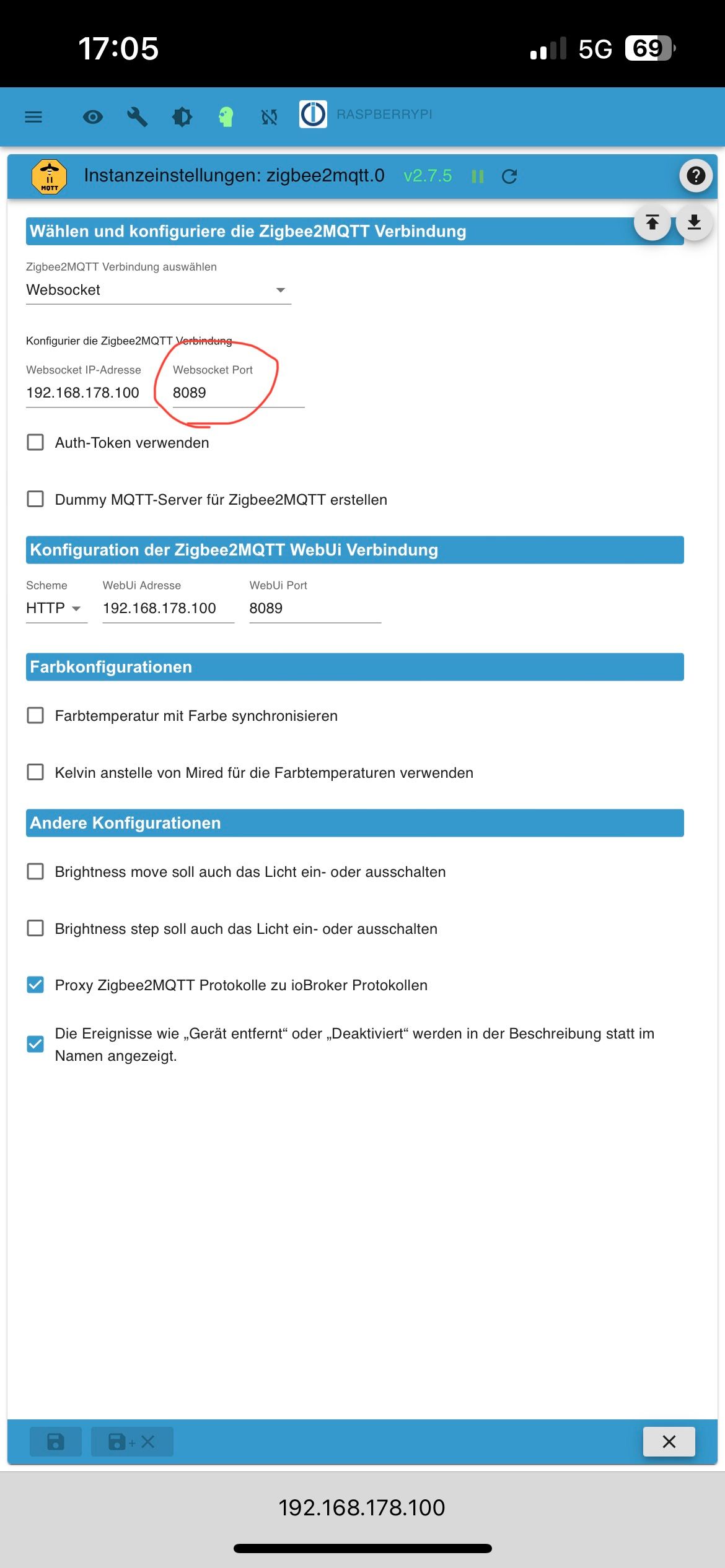
                              Geschaft! Ich hab den richtigen Port beim Adapter vergeben müssen!🙈

                              IMG_1278.jpeg IMG_1279.jpeg

                              Danke 😊

                              1 Antwort Letzte Antwort
                              0
                              • IdleBitI IdleBit

                                @tomcomm27 sagte in Test Adapter zigbee2mqtt:

                                Leider nicht sehr aussagekräftig.

                                Was soll denn der Adpater ausgeben wenn er halt keine Verbindung zum Frontend aufbauen kann?!

                                Schon mal hier geschaut -> https://github.com/o0shojo0o/ioBroker.zigbee2mqtt/blob/main/docs/wiki.md

                                T Offline
                                T Offline
                                Tschaeens
                                schrieb am zuletzt editiert von
                                #357

                                @idlebit
                                Ich habe eine Frage. Ich möchte gerne an ein Gerät einen payload senden. Ich habe zigbee2mqtt mit einem eigenen mqtt server auf einer proxmos lxc laufen. Die Daten kommen auch in iobroker rein. Leider weiß ich nicht wo ich genau den Payload eintrage, so dass ich diesen auch mit dem ioBroker an zigbee senden könnte. Vielleicht könntest du mir dabei helfen?
                                Schonmal besten Dank. Der Adapter läuft super.
                                Viele Grüße

                                IdleBitI arteckA 2 Antworten Letzte Antwort
                                0
                                • T Tschaeens

                                  @idlebit
                                  Ich habe eine Frage. Ich möchte gerne an ein Gerät einen payload senden. Ich habe zigbee2mqtt mit einem eigenen mqtt server auf einer proxmos lxc laufen. Die Daten kommen auch in iobroker rein. Leider weiß ich nicht wo ich genau den Payload eintrage, so dass ich diesen auch mit dem ioBroker an zigbee senden könnte. Vielleicht könntest du mir dabei helfen?
                                  Schonmal besten Dank. Der Adapter läuft super.
                                  Viele Grüße

                                  IdleBitI Offline
                                  IdleBitI Offline
                                  IdleBit
                                  schrieb am zuletzt editiert von
                                  #358

                                  @tschaeens Da kann ich dir leider nicht weithelfen, da der Adapter das nicht vorsieht.

                                  1 Antwort Letzte Antwort
                                  0
                                  • T Tschaeens

                                    @idlebit
                                    Ich habe eine Frage. Ich möchte gerne an ein Gerät einen payload senden. Ich habe zigbee2mqtt mit einem eigenen mqtt server auf einer proxmos lxc laufen. Die Daten kommen auch in iobroker rein. Leider weiß ich nicht wo ich genau den Payload eintrage, so dass ich diesen auch mit dem ioBroker an zigbee senden könnte. Vielleicht könntest du mir dabei helfen?
                                    Schonmal besten Dank. Der Adapter läuft super.
                                    Viele Grüße

                                    arteckA Offline
                                    arteckA Offline
                                    arteck
                                    Developer Most Active
                                    schrieb am zuletzt editiert von
                                    #359

                                    @tschaeens was willst du da senden ?? was der adapter nicht bietet ?

                                    zigbee hab ich, zwave auch, nuc's genauso und HA auch

                                    T 1 Antwort Letzte Antwort
                                    0
                                    • arteckA arteck

                                      @tschaeens was willst du da senden ?? was der adapter nicht bietet ?

                                      T Offline
                                      T Offline
                                      Tschaeens
                                      schrieb am zuletzt editiert von
                                      #360

                                      @arteck
                                      Ich würde gern einen payload an meine Feuermelder schicken, so dass der Alarm angeht, weil mit dem Button alarm an gehen die Teile nicht mehr. Ich habe SmZB-120 Feuermelder und da steht auf der zigbee seite, dass der Alarm auch mit einem payload funktioniert.

                                      This smoke alarm can be triggered manually by publishing to zigbee2mqtt/FRIENDLY_NAME/set with the payloads:
                                      
                                      To start :
                                      
                                      {"warning":{"duration":60,"level":"low","mode":"burglar","strobe":false,"strobe_duty_cycle":0}} Where:
                                      duration: the number of seconds the alarm will be on
                                      level: low, medium, high, very_high
                                      mode: stop, burglar
                                      strobe: not supported
                                      strobe_duty_cycle: not supported
                                      To stop:
                                      
                                      {"warning":{"duration":60,"level":"low","mode":"stop","strobe":false,"strobe_duty_cycle":0}}
                                      Triggering alarm, Simple
                                      Can be set by publishing to zigbee2mqtt/FRIENDLY_NAME/set with payload {"alarm": "START"} and {"alarm": "OFF"} Set max_duration from the Zigbee2MQTT UI or by publishing {"max_duration": NEW_VALUE} This alarm are preset to highest volume
                                      

                                      Ich weiß bloß nicht wo ich dies eintragen muss.
                                      Danke dir

                                      T 1 Antwort Letzte Antwort
                                      0
                                      • T Tschaeens

                                        @arteck
                                        Ich würde gern einen payload an meine Feuermelder schicken, so dass der Alarm angeht, weil mit dem Button alarm an gehen die Teile nicht mehr. Ich habe SmZB-120 Feuermelder und da steht auf der zigbee seite, dass der Alarm auch mit einem payload funktioniert.

                                        This smoke alarm can be triggered manually by publishing to zigbee2mqtt/FRIENDLY_NAME/set with the payloads:
                                        
                                        To start :
                                        
                                        {"warning":{"duration":60,"level":"low","mode":"burglar","strobe":false,"strobe_duty_cycle":0}} Where:
                                        duration: the number of seconds the alarm will be on
                                        level: low, medium, high, very_high
                                        mode: stop, burglar
                                        strobe: not supported
                                        strobe_duty_cycle: not supported
                                        To stop:
                                        
                                        {"warning":{"duration":60,"level":"low","mode":"stop","strobe":false,"strobe_duty_cycle":0}}
                                        Triggering alarm, Simple
                                        Can be set by publishing to zigbee2mqtt/FRIENDLY_NAME/set with payload {"alarm": "START"} and {"alarm": "OFF"} Set max_duration from the Zigbee2MQTT UI or by publishing {"max_duration": NEW_VALUE} This alarm are preset to highest volume
                                        

                                        Ich weiß bloß nicht wo ich dies eintragen muss.
                                        Danke dir

                                        T Nicht stören
                                        T Nicht stören
                                        ticaki
                                        schrieb am zuletzt editiert von ticaki
                                        #361

                                        @tschaeens sagte in Test Adapter zigbee2mqtt:

                                        SmZB-120

                                        MQTT Broker installieren(Server), diesen bei zigbee2mqtt(nicht im Adapter, sondern in der Ansicht die ich unten auch als Bild gepostet habe) unter MQTT eintragen, und in Objekte unter mqtt.0.zigbee2mqtt.FRIENDLY_NAME.set.

                                        Vielleicht geht es aber auch ohne Mqtt server. Schau mal ob hier nicht set steht:
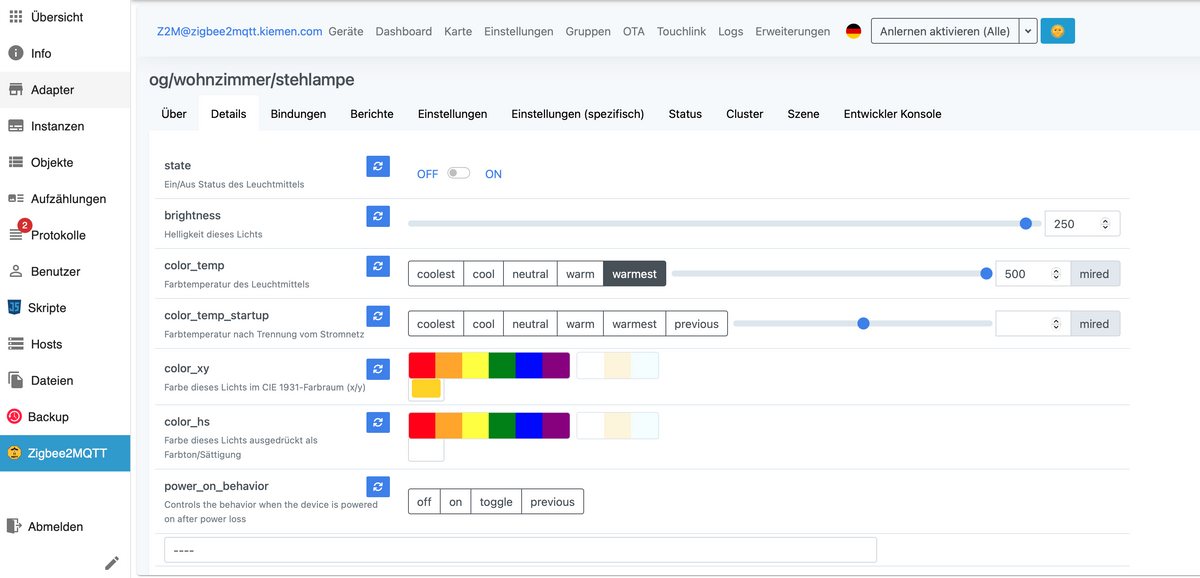
                                        Bildschirmfoto 2023-07-19 um 08.55.53.png

                                        an die anderen es geht um das:

                                        https://www.zigbee2mqtt.io/devices/SMSZB-120.html

                                        Weather-Warnings Espresense NSPanel-Lovelace-ui Tagesschau

                                        Spenden

                                        T 1 Antwort Letzte Antwort
                                        0
                                        • T ticaki

                                          @tschaeens sagte in Test Adapter zigbee2mqtt:

                                          SmZB-120

                                          MQTT Broker installieren(Server), diesen bei zigbee2mqtt(nicht im Adapter, sondern in der Ansicht die ich unten auch als Bild gepostet habe) unter MQTT eintragen, und in Objekte unter mqtt.0.zigbee2mqtt.FRIENDLY_NAME.set.

                                          Vielleicht geht es aber auch ohne Mqtt server. Schau mal ob hier nicht set steht:

                                          Bildschirmfoto 2023-07-19 um 08.55.53.png

                                          an die anderen es geht um das:

                                          https://www.zigbee2mqtt.io/devices/SMSZB-120.html

                                          T Offline
                                          T Offline
                                          Tschaeens
                                          schrieb am zuletzt editiert von
                                          #362

                                          @ticaki
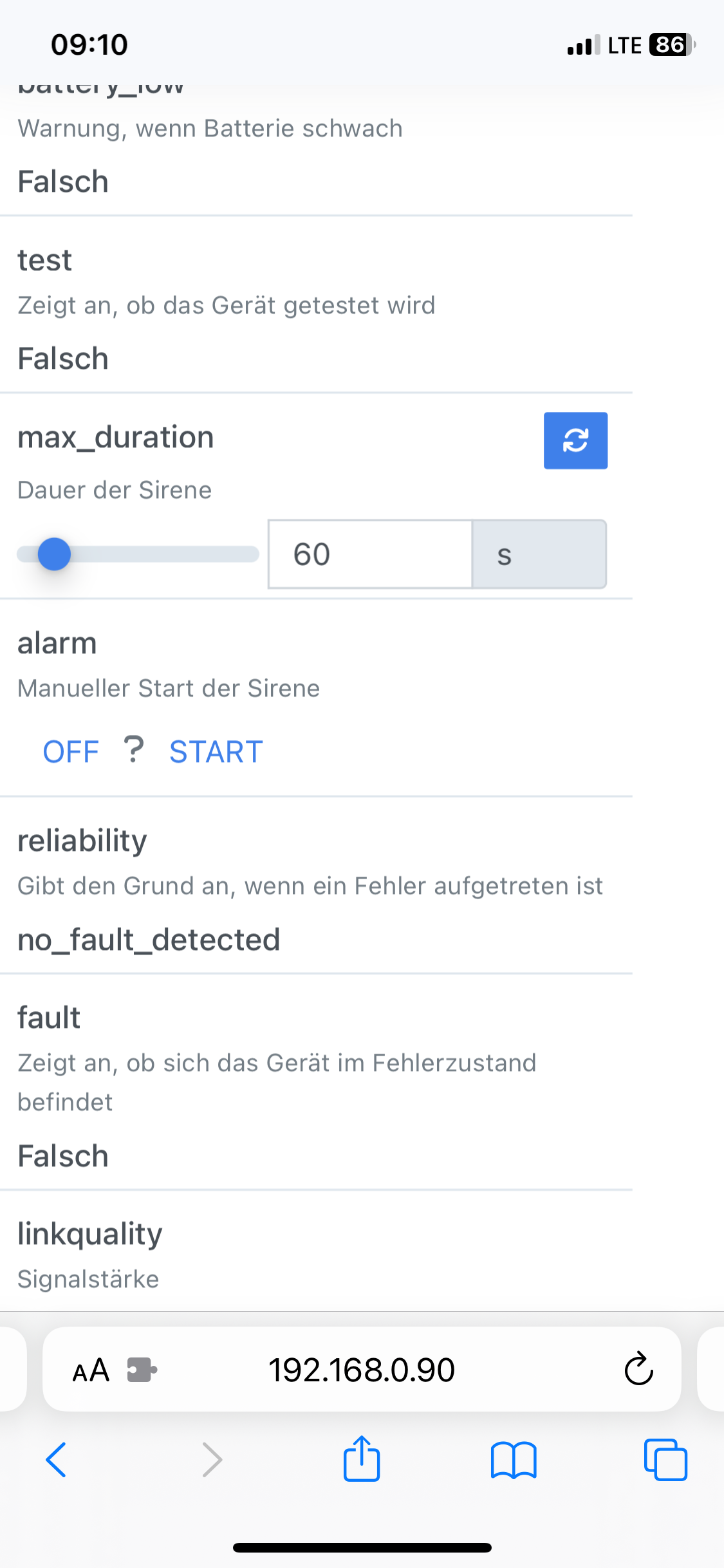
                                          Danke dir für die Hilfe. Ich habe bereits unter zigbee2mqtt einen mqtt server mit mqtt://localhost eingetragen. Hier steht zwar alarm aber der Rauchmelder reagiert hier nicht:
                                          IMG_4569.png

                                          Ein set steht hier nicht.

                                          Lg

                                          T 1 Antwort Letzte Antwort
                                          0
                                          Antworten
                                          • In einem neuen Thema antworten
                                          Anmelden zum Antworten
                                          • Älteste zuerst
                                          • Neuste zuerst
                                          • Meiste Stimmen


                                          Support us

                                          ioBroker
                                          Community Adapters
                                          Donate

                                          388

                                          Online

                                          32.4k

                                          Benutzer

                                          81.5k

                                          Themen

                                          1.3m

                                          Beiträge
                                          Community
                                          Impressum | Datenschutz-Bestimmungen | Nutzungsbedingungen | Einwilligungseinstellungen
                                          ioBroker Community 2014-2025
                                          logo
                                          • Anmelden

                                          • Du hast noch kein Konto? Registrieren

                                          • Anmelden oder registrieren, um zu suchen
                                          • Erster Beitrag
                                            Letzter Beitrag
                                          0
                                          • Home
                                          • Aktuell
                                          • Tags
                                          • Ungelesen 0
                                          • Kategorien
                                          • Unreplied
                                          • Beliebt
                                          • GitHub
                                          • Docu
                                          • Hilfe