




Vis keine Verbindung - GELÖST
-
Da sehe ich ganz unten als Fehler, wenn du das meinst.
widgets.min.js:1 vis-materialdesign: click audio file '/vis.0/materialdesign-widgets-click-sound.mp3' not exists! (anonymous) @ widgets.min.js:1 visUtils.js:455 Uncaught TypeError: Cannot read properties of undefined (reading 'data') at getUsedObjectIDs (visUtils.js:455:97) at Object.getUsedObjectIDs (vis.js:519:22) at vis.js:2055:34 at conn.js:585:25 DevTools failed to load source map: Could not load content for chrome-extension://dafgdjggglmmknipkhngniifhplpcldb/browser-polyfill.min.js.map: System error: net::ERR_BLOCKED_BY_CLIENT widgets.min.js:1 [waitForWidgets] stop waiting for vis widgets after 500 retries -
Also in einem anderen Browser habe ich es versucht, das gleiche Problem.
Es steht " Connecting to Server" Loading Value und der Balken bleibt bei den ersten 15% stecken.
Ja warum ich keinen Host sehe weiß ich selber nicht.
Kann man das ändern?Bridge verwende ich nicht, Netzwerk der "gleiche Host"
Debug vom Vis Adapter
vis.0 2023-06-06 14:31:58.320 info Terminated (NO_ERROR): Without reason vis.0 2023-06-06 14:31:57.460 info vis license is OK. vis.0 2023-06-06 14:31:57.089 info starting. Version 1.4.16 in /opt/iobroker/node_modules/iobroker.vis, node: v18.16.0, js-controller: 4.0.24@nwh sagte in Vis keine Verbindung:
Es steht " Connecting to Server" Loading Value und der Balken bleibt bei den ersten 15% stecken.
das .... ist schonmal was anders als deine Info am Anfang
Problem ist, dass plötzlich keine Verbindung zum Server aufgebaut werden kann.
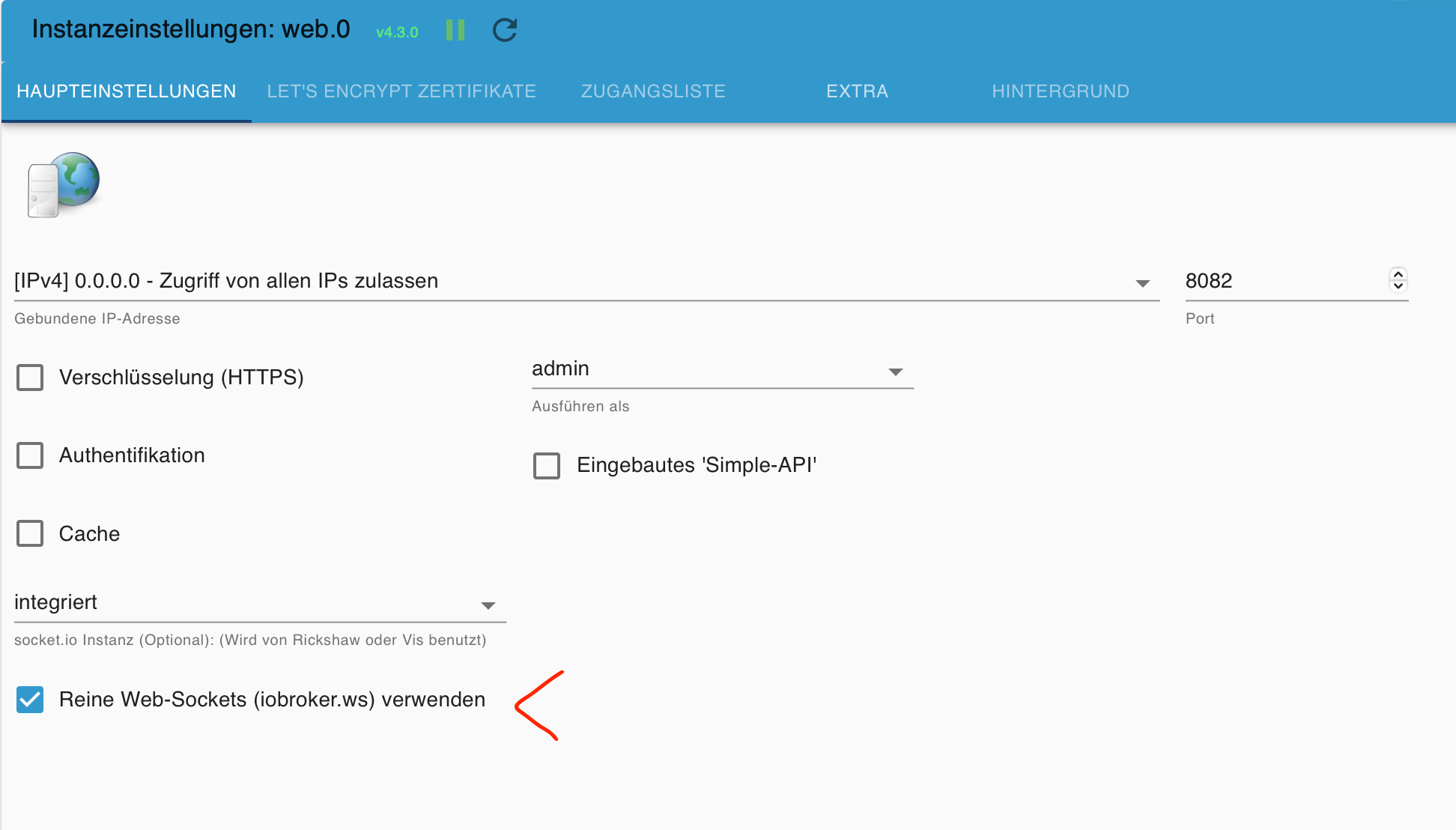
hast du hier den Haken gesetzt !?
Synology 918+ 16GB - ioBroker in Docker v9 , VISO auf Trekstor Primebook C13 13,3" , Hikvision Domkameras mit Surveillance Station .. CCU RaspberryMatic in Synology VM .. Zigbee CC2538+CC2592 .. Sonoff .. KNX .. Modbus ..
-
@nwh sagte in Vis keine Verbindung:
Es steht " Connecting to Server" Loading Value und der Balken bleibt bei den ersten 15% stecken.
das .... ist schonmal was anders als deine Info am Anfang
Problem ist, dass plötzlich keine Verbindung zum Server aufgebaut werden kann.
hast du hier den Haken gesetzt !?
-
@glasfaser
ich interpretiere das so als er keine Verbindung zum Server aufbauen kann. Dann war das falsch.Haken, ja habe ich. Sieht alles gleich aus wie bei dir.
Ist die Meldung :
Es steht " Connecting to Server" Loading Value und der Balken bleibt bei den ersten 15% stecken.
bei Runtime und bei Editor !?
Synology 918+ 16GB - ioBroker in Docker v9 , VISO auf Trekstor Primebook C13 13,3" , Hikvision Domkameras mit Surveillance Station .. CCU RaspberryMatic in Synology VM .. Zigbee CC2538+CC2592 .. Sonoff .. KNX .. Modbus ..
-
Ist die Meldung :
Es steht " Connecting to Server" Loading Value und der Balken bleibt bei den ersten 15% stecken.
bei Runtime und bei Editor !?
Bei Runtime steht nur der Balken unten nicht, sonst ganz gleich wir bei Edit!
-
Besser bekomme ich die Daten nicht aus dem Terminal des dockers

======== Start marking the full check here ========= Skript v.2023-04-16 *** BASE SYSTEM *** Architecture : x86_64 Docker : v8.0.1 Virtualization : Unknown (buanet/Synology?) Distributor ID: Debian Description: Debian GNU/Linux 11 (bullseye) Release: 11 Codename: bullseye PRETTY_NAME="Debian GNU/Linux 11 (bullseye)" NAME="Debian GNU/Linux" VERSION_ID="11" VERSION="11 (bullseye)" VERSION_CODENAME=bullseye ID=debian HOME_URL="https://www.debian.org/" SUPPORT_URL="https://www.debian.org/support" BUG_REPORT_URL="https://bugs.debian.org/" Systemuptime and Load: 12:59:58 up 44 min, 0 users, load average: 0.37, 0.44, 0.49 CPU threads: 4 *** Time and Time Zones *** Tue Jun 6 10:59:58 UTC 2023 Tue Jun 6 12:59:58 CEST 2023 CEST +0200 Etc/UTC *** User and Groups *** root /root root *** X-Server-Setup *** X-Server: false Desktop: Terminal: *** MEMORY *** total used free shared buff/cache available Mem: 19G 2.9G 13G 117M 3.7G 16G Swap: 14G 0B 14G Total: 34G 2.9G 27G 19974 M total memory 2920 M used memory 3600 M active memory 2024 M inactive memory 13307 M free memory 40 M buffer memory 3706 M swap cache 14035 M total swap 0 M used swap 14035 M free swap *** FILESYSTEM *** Filesystem Type Size Used Avail Use% Mounted on /dev/mapper/cachedev_1 btrfs 855G 28G 827G 4% / tmpfs tmpfs 64M 0 64M 0% /dev tmpfs tmpfs 9.8G 0 9.8G 0% /sys/fs/cgroup shm tmpfs 64M 0 64M 0% /dev/shm /dev/mapper/cachedev_1 btrfs 855G 28G 827G 4% /opt/iobroker /dev/mapper/cachedev_1 btrfs 855G 28G 827G 4% /etc/hosts tmpfs tmpfs 9.8G 0 9.8G 0% /proc/acpi tmpfs tmpfs 9.8G 0 9.8G 0% /proc/scsi tmpfs tmpfs 9.8G 0 9.8G 0% /sys/firmware Messages concerning ext4 filesystem in dmesg: sudo: unable to resolve host iobroker: Name or service not known [Tue Jun 6 12:15:51 2023] EXT4-fs (md0): couldn't mount as ext3 due to feature incompatibilities [Tue Jun 6 12:15:51 2023] EXT4-fs (md0): mounted filesystem with ordered data mode. Opts: (null) [Tue Jun 6 12:15:53 2023] EXT4-fs (md0): couldn't mount as ext3 due to feature incompatibilities [Tue Jun 6 12:15:53 2023] EXT4-fs (md0): mounted filesystem with ordered data mode. Opts: (null) [Tue Jun 6 12:15:58 2023] EXT4-fs (md0): couldn't mount as ext3 due to feature incompatibilities [Tue Jun 6 12:15:58 2023] EXT4-fs (md0): mounted filesystem with ordered data mode. Opts: (null) [Tue Jun 6 12:15:58 2023] EXT4-fs (md0): couldn't mount as ext3 due to feature incompatibilities [Tue Jun 6 12:15:58 2023] EXT4-fs (md0): mounted filesystem with ordered data mode. Opts: barrier=1 [Tue Jun 6 12:16:21 2023] EXT4-fs (loop0): mounted filesystem with ordered data mode. Opts: (null) Show mounted filesystems (real ones only): TARGET SOURCE PE OPTIONS / /dev/mapper/cachedev_1[/@syno/@docker/btrfs/subvolumes/37a9e20c38e52b7dd312ff3a9a1a7f3159097adee27dfbe331f67c8eb3bd365a] s rw,nodev,relatime,ssd,synoacl,space_cache=v2,auto_reclaim_space,metadata_ratio=50,syno_allocator,subvolid=1015,subvol=/@syno/@docker/btrfs/sub es/37a9e20c38e52b7dd312ff3a9a1a7f3159097adee27dfbe331f67c8eb3bd365a |-/opt/iobroker /dev/mapper/cachedev_1[/@syno/docker/Iobtoker2/iobroker_data] s rw,nodev,relatime,ssd,synoacl,space_cache=v2,auto_reclaim_space,metadata_ratio=50,syno_allocator,subvolid=263,subvol=/@syno/docker/Iobtoker2/i er_data |-/etc/resolv.conf /dev/mapper/cachedev_1[/@syno/@docker/containers/8a1df9a145f9137c72ddb4cf55be6ef3f17f301831be92c12724da12e3e00bcb/resolv.conf] s rw,nodev,relatime,ssd,synoacl,space_cache=v2,auto_reclaim_space,metadata_ratio=50,syno_allocator,subvolid=257,subvol=/@syno/@docker/containers f9a145f9137c72ddb4cf55be6ef3f17f301831be92c12724da12e3e00bcb/resolv.conf |-/etc/hostname /dev/mapper/cachedev_1[/@syno/@docker/containers/8a1df9a145f9137c72ddb4cf55be6ef3f17f301831be92c12724da12e3e00bcb/hostname] |-/etc/hostname /dev/mapper/cachedev_1[/@syno/@docker/containers/8a1df9a145f9137c72ddb4cf55be6ef3f17f301831be92c12724da12e3e00bcb/hostname] s rw,nodev,relatime,ssd,synoacl,space_cache=v2,auto_reclaim_space,metadata_ratio=50,syno_allocator,subvolid=257,subvol=/@syno/@docker/containers f9a145f9137c72ddb4cf55be6ef3f17f301831be92c12724da12e3e00bcb/hostname `-/etc/hosts /dev/mapper/cachedev_1[/@syno/@docker/containers/8a1df9a145f9137c72ddb4cf55be6ef3f17f301831be92c12724da12e3e00bcb/hosts] s rw,nodev,relatime,ssd,synoacl,space_cache=v2,auto_reclaim_space,metadata_ratio=50,syno_allocator,subvolid=257,subvol=/@syno/@docker/containers f9a145f9137c72ddb4cf55be6ef3f17f301831be92c12724da12e3e00bcb/hosts Files in neuralgic directories: /var: sudo: unable to resolve host iobroker: Name or service not known 33M /var/ 30M /var/lib 18M /var/lib/apt/lists 18M /var/lib/apt 13M /var/lib/dpkg /opt/iobroker/backups: 159M /opt/iobroker/backups/ /opt/iobroker/iobroker-data: 944M /opt/iobroker/iobroker-data/ 429M /opt/iobroker/iobroker-data/history 296M /opt/iobroker/iobroker-data/files 155M /opt/iobroker/iobroker-data/backup-objects 52M /opt/iobroker/iobroker-data/files/javascript.admin The five largest files in iobroker-data are: 26M /opt/iobroker/iobroker-data/objects.jsonl 19M /opt/iobroker/iobroker-data/files/iot.admin/static/js/main.904d455f.js.map 15M /opt/iobroker/iobroker-data/objects.json.migrated 15M /opt/iobroker/iobroker-data/objects.json.bak.migrated 9.1M /opt/iobroker/iobroker-data/files/echarts.admin/static/js/2.bbf74d5f.chunk.js.map *** NodeJS-Installation *** /usr/bin/nodejs v18.16.0 /usr/bin/node v18.16.0 /usr/bin/npm 9.5.1 /usr/bin/npx 9.5.1 nodejs: Installed: 18.16.0-deb-1nodesource1 Candidate: 18.16.0-deb-1nodesource1 Version table: *** 18.16.0-deb-1nodesource1 500 500 https://deb.nodesource.com/node_18.x bullseye/main amd64 Packages 100 /var/lib/dpkg/status 12.22.12~dfsg-1~deb11u4 500 500 http://deb.debian.org/debian-security bullseye-security/main amd64 Packages 12.22.12~dfsg-1~deb11u3 500 500 http://deb.debian.org/debian bullseye/main amd64 Packages Temp directories causing npm8 problem: 0 No problems detected *** ioBroker-Installation *** ioBroker Status iobroker is running on this host. Objects type: jsonl States type: jsonl MULTIHOSTSERVICE/enabled: false Core adapters versions js-controller: 4.0.24 admin: 6.3.5 javascript: 6.1.4 Adapters from github: 7 Adapter State + system.adapter.admin.0 : admin : iobroker - enabled, port: 8081, bind: 0.0.0. n as: admin system.adapter.alias-manager.0 : alias-manager : iobroker - enabled + system.adapter.backitup.0 : backitup : iobroker - enabled + system.adapter.bluesound.0 : bluesound : iobroker - enabled system.adapter.coronavirus-statistics.0 : coronavirus-statistics: iobroker - disabled system.adapter.daswetter.0 : daswetter : iobroker - enabled + system.adapter.denon.0 : denon : iobroker - enabled + system.adapter.discovery.0 : discovery : iobroker - enabled + system.adapter.echarts.0 : echarts : iobroker - enabled + system.adapter.enigma2.0 : enigma2 : iobroker - enabled system.adapter.flot.0 : flot : iobroker - enabled system.adapter.fuelpricemonitor.0 : fuelpricemonitor : iobroker - enabled + system.adapter.fullybrowser.0 : fullybrowser : iobroker - enabled + system.adapter.heos.0 : heos : iobroker - enabled + system.adapter.history.0 : history : iobroker - enabled + system.adapter.hm-rega.0 : hm-rega : iobroker - enabled + system.adapter.hm-rpc.0 : hm-rpc : iobroker - enabled, port: 42010 + system.adapter.hm-rpc.1 : hm-rpc : iobroker - enabled, port: 12010 + system.adapter.hoover.0 : hoover : iobroker - enabled + system.adapter.hue.0 : hue : iobroker - enabled, port: 443 system.adapter.icons-material-png.0 : icons-material-png : iobroker - disabled system.adapter.icons-mfd-png.0 : icons-mfd-png : iobroker - enabled system.adapter.icons-mfd-svg.0 : icons-mfd-svg : iobroker - enabled + system.adapter.influxdb.0 : influxdb : iobroker - enabled, port: 8086 + system.adapter.info.0 : info : iobroker - enabled system.adapter.iot.0 : iot : iobroker - disabled + system.adapter.javascript.0 : javascript : iobroker - enabled + system.adapter.lgtv.0 : lgtv : iobroker - enabled + system.adapter.mielecloudservice.0 : mielecloudservice : iobroker - enabled + system.adapter.mihome-vacuum.0 : mihome-vacuum : iobroker - enabled, port: 54321 + system.adapter.modbus.0 : modbus : iobroker - enabled + system.adapter.mqtt.1 : mqtt : iobroker - enabled, port: 1883, bind: 0.0.0. system.adapter.mqtt.2 : mqtt : iobroker - disabled, port: 1885, bind: 0.0.0. system.adapter.node-red.0 : node-red : iobroker - disabled, port: 1880, bind: 192.16 .100 + system.adapter.pushover.0 : pushover : iobroker - enabled + system.adapter.pvforecast.0 : pvforecast : iobroker - enabled MULTIHOSTSERVICE/enabled: false Core adapters versions js-controller: 4.0.24 admin: 6.3.5 javascript: 6.1.4 Adapters from github: 7 Adapter State + system.adapter.admin.0 : admin : iobroker - enabled, port: 8081, bind: 0.0.0. n as: admin system.adapter.alias-manager.0 : alias-manager : iobroker - enabled + system.adapter.backitup.0 : backitup : iobroker - enabled + system.adapter.bluesound.0 : bluesound : iobroker - enabled system.adapter.coronavirus-statistics.0 : coronavirus-statistics: iobroker - disabled system.adapter.daswetter.0 : daswetter : iobroker - enabled + system.adapter.denon.0 : denon : iobroker - enabled + system.adapter.discovery.0 : discovery : iobroker - enabled + system.adapter.echarts.0 : echarts : iobroker - enabled + system.adapter.enigma2.0 : enigma2 : iobroker - enabled system.adapter.flot.0 : flot : iobroker - enabled system.adapter.fuelpricemonitor.0 : fuelpricemonitor : iobroker - enabled + system.adapter.fullybrowser.0 : fullybrowser : iobroker - enabled + system.adapter.heos.0 : heos : iobroker - enabled + system.adapter.history.0 : history : iobroker - enabled + system.adapter.hm-rega.0 : hm-rega : iobroker - enabled + system.adapter.hm-rpc.0 : hm-rpc : iobroker - enabled, port: 42010 + system.adapter.hm-rpc.1 : hm-rpc : iobroker - enabled, port: 12010 + system.adapter.hoover.0 : hoover : iobroker - enabled + system.adapter.hue.0 : hue : iobroker - enabled, port: 443 system.adapter.icons-material-png.0 : icons-material-png : iobroker - disabled system.adapter.icons-mfd-png.0 : icons-mfd-png : iobroker - enabled system.adapter.icons-mfd-png.0 : icons-mfd-png : iobroker - enabled system.adapter.icons-mfd-svg.0 : icons-mfd-svg : iobroker - enabled + system.adapter.influxdb.0 : influxdb : iobroker - enabled, port: 8086 + system.adapter.info.0 : info : iobroker - enabled system.adapter.iot.0 : iot : iobroker - disabled + system.adapter.javascript.0 : javascript : iobroker - enabled + system.adapter.lgtv.0 : lgtv : iobroker - enabled + system.adapter.mielecloudservice.0 : mielecloudservice : iobroker - enabled + system.adapter.mihome-vacuum.0 : mihome-vacuum : iobroker - enabled, port: 54321 + system.adapter.modbus.0 : modbus : iobroker - enabled + system.adapter.mqtt.1 : mqtt : iobroker - enabled, port: 1883, bind: 0.0.0. system.adapter.mqtt.2 : mqtt : iobroker - disabled, port: 1885, bind: 0.0.0. system.adapter.node-red.0 : node-red : iobroker - disabled, port: 1880, bind: 192.16 .100 + system.adapter.pushover.0 : pushover : iobroker - enabled + system.adapter.pvforecast.0 : pvforecast : iobroker - enabled system.adapter.rtspStream.0 : rtspStream : iobroker - disabled, port: 8084 system.adapter.seko.0 : seko : iobroker - disabled system.adapter.shelly.0 : shelly : iobroker - disabled, port: 1882, bind: 0.0.0. + system.adapter.simple-api.0 : simple-api : iobroker - enabled, port: 8087, bind: 192.16 .100, run as: admin + system.adapter.sonoff.0 : sonoff : iobroker - enabled, port: 1884, bind: 0.0.0. system.adapter.tuya.0 : tuya : iobroker - disabled system.adapter.vis-bars.0 : vis-bars : iobroker - enabled system.adapter.vis-colorpicker.0 : vis-colorpicker : iobroker - disabled system.adapter.vis-hqwidgets.0 : vis-hqwidgets : iobroker - disabled system.adapter.vis-icontwo.0 : vis-icontwo : iobroker - disabled + system.adapter.vis-inventwo.0 : vis-inventwo : iobroker - enabled system.adapter.vis-jqui-mfd.0 : vis-jqui-mfd : iobroker - disabled system.adapter.vis-material-webfont.0 : vis-material-webfont : iobroker - disabled system.adapter.vis-material.0 : vis-material : iobroker - disabled system.adapter.vis-materialdesign.0 : vis-materialdesign : iobroker - disabled system.adapter.vis-players.0 : vis-players : iobroker - disabled system.adapter.vis-timeandweather.0 : vis-timeandweather : iobroker - disabled system.adapter.vis-weather.0 : vis-weather : iobroker - disabled system.adapter.vis.0 : vis : iobroker - enabled system.adapter.weatherunderground.0 : weatherunderground : iobroker - enabled + system.adapter.web.0 : web : iobroker - enabled, port: 8082, bind: 0.0.0. n as: admin system.adapter.web.1 : web : iobroker - disabled, port: 8082, bind: 0.0.0. n as: admin + system.adapter.zigbee.0 : zigbee : iobroker - enabled, port: /dev/ttyACM0 + instance is alive Enabled adapters with bindings + system.adapter.admin.0 : admin : iobroker - enabled, port: 8081, bind: 0.0.0. n as: admin + system.adapter.hm-rpc.0 : hm-rpc : iobroker - enabled, port: 42010 + system.adapter.hm-rpc.1 : hm-rpc : iobroker - enabled, port: 12010 + system.adapter.hue.0 : hue : iobroker - enabled, port: 443 Enabled adapters with bindings + system.adapter.admin.0 : admin : iobroker - enabled, port: 8081, bind: 0.0.0. n as: admin + system.adapter.hm-rpc.0 : hm-rpc : iobroker - enabled, port: 42010 + system.adapter.hm-rpc.1 : hm-rpc : iobroker - enabled, port: 12010 + system.adapter.hue.0 : hue : iobroker - enabled, port: 443 + system.adapter.influxdb.0 : influxdb : iobroker - enabled, port: 8086 + system.adapter.mihome-vacuum.0 : mihome-vacuum : iobroker - enabled, port: 54321 + system.adapter.mqtt.1 : mqtt : iobroker - enabled, port: 1883, bind: 0.0.0. + system.adapter.simple-api.0 : simple-api : iobroker - enabled, port: 8087, bind: 192.16 .100, run as: admin + system.adapter.sonoff.0 : sonoff : iobroker - enabled, port: 1884, bind: 0.0.0. + system.adapter.web.0 : web : iobroker - enabled, port: 8082, bind: 0.0.0. n as: admin + system.adapter.zigbee.0 : zigbee : iobroker - enabled, port: /dev/ttyACM0 ioBroker-Repositories Stable (default): http://download.iobroker.net/sources-dist.json Beta (latest) : http://download.iobroker.net/sources-dist-latest.json Active repo(s): Stable (default) Installed ioBroker-Instances Used repository: Stable (default) Adapter "admin" : 6.3.5 , installed 6.3.5 Adapter "alias-manager": 1.2.4 , installed 1.2.4 Adapter "backitup" : 2.6.19 , installed 2.6.19 Adapter "coronavirus-statistics": 0.8.7, installed 0.8.7 Adapter "daswetter" : 3.1.8 , installed 3.1.8 Adapter "denon" : 1.15.0 , installed 1.15.0 Adapter "discovery" : 3.1.0 , installed 3.1.0 Adapter "echarts" : 1.0.12 , installed 1.0.12 Adapter "flot" : 1.11.0 , installed 1.11.0 Adapter "fuelpricemonitor": 0.3.4 , installed 0.3.4 Adapter "fullybrowser" : 2.1.2 , installed 2.1.2 Adapter "heos" : 1.10.0 , installed 1.12.1 Adapter "history" : 2.2.4 , installed 2.2.4 Adapter "hm-rega" : 3.0.46 , installed 3.0.46 Adapter "hm-rpc" : 1.15.16 , installed 1.15.16 Adapter "hoover" : 0.0.7 , installed 0.0.7 Adapter "hue" : 3.7.1 , installed 3.7.1 Adapter "icons-material-png": 0.1.0, installed 0.1.0 Adapter "icons-mfd-png": 1.1.0 , installed 1.1.0 Adapter "icons-mfd-svg": 1.1.0 , installed 1.1.0 Adapter "influxdb" : 3.2.0 , installed 3.2.0 Adapter "info" : 1.9.26 , installed 1.9.26 Adapter "iot" : 1.14.2 , installed 1.14.2 Adapter "javascript" : 6.1.4 , installed 6.1.4 Controller "js-controller": 4.0.24 , installed 4.0.24 Adapter "lgtv" : 1.1.10 , installed 1.1.10 Adapter "mielecloudservice": 6.5.4, installed 6.5.4 Adapter "mielecloudservice": 6.5.4, installed 6.5.4 Adapter "mihome-vacuum": 3.9.5 , installed 3.9.5 Adapter "modbus" : 5.0.11 , installed 5.0.11 Adapter "mqtt" : 4.0.7 , installed 4.0.7 Adapter "node-red" : 4.0.0 , installed 4.0.0 Adapter "pushover" : 3.0.3 , installed 3.0.3 Adapter "pvforecast" : 2.7.1 , installed 2.3.0 [Updatable] Adapter "seko" : 0.0.1 , installed 0.0.1 Adapter "shelly" : 6.3.1 , installed 6.4.1 Adapter "simple-api" : 2.7.2 , installed 2.7.2 Adapter "socketio" : 4.2.0 , installed 4.2.0 Adapter "sonoff" : 2.5.1 , installed 2.5.1 Adapter "tuya" : 3.13.1 , installed 3.13.1 Adapter "vis" : 1.4.16 , installed 1.4.16 Adapter "vis-bars" : 0.1.4 , installed 0.1.4 Adapter "vis-colorpicker": 1.2.0 , installed 1.2.0 Adapter "vis-hqwidgets": 1.3.0 , installed 1.3.0 Adapter "vis-icontwo" : 0.93.0 , installed 0.93.0 Adapter "vis-inventwo" : 3.3.1 , installed 3.3.1 Adapter "vis-jqui-mfd" : 1.0.12 , installed 1.0.12 Adapter "vis-players" : 0.1.6 , installed 0.1.6 Adapter "vis-timeandweather": 1.2.2, installed 1.2.2 Adapter "vis-weather" : 2.5.6 , installed 2.5.6 Adapter "weatherunderground": 3.4.2, installed 3.4.2 Adapter "web" : 4.3.0 , installed 4.3.0 Adapter "ws" : 1.3.0 , installed 1.3.0 Adapter "zigbee" : 1.8.10 , installed 1.8.10 Objects and States Please stand by - This may take a while Objects: 18684 States: 16517 *** OS-Repositories and Updates *** sudo: unable to resolve host iobroker: Name or service not known sudo: unable to resolve host iobroker: Name or service not known Hit:1 http://deb.debian.org/debian bullseye InRelease Hit:2 http://deb.debian.org/debian-security bullseye-security InRelease Hit:3 http://deb.debian.org/debian bullseye-updates InRelease Hit:4 https://deb.nodesource.com/node_18.x bullseye InRelease Reading package lists... Pending Updates: 3 *** Listening Ports *** sudo: unable to resolve host iobroker: Name or service not known Active Internet connections (only servers) Proto Recv-Q Send-Q Local Address Foreign Address State User Inode PID/Program name tcp 0 0 0.0.0.0:139 0.0.0.0:* LISTEN 0 173358 - tcp 0 0 127.0.0.1:2380 0.0.0.0:* LISTEN 0 100164 - tcp 0 0 0.0.0.0:5357 0.0.0.0:* LISTEN 0 170604 - tcp 0 0 0.0.0.0:4045 0.0.0.0:* LISTEN 0 53381 - tcp 0 0 0.0.0.0:662 0.0.0.0:* LISTEN 0 38450 - tcp 0 0 0.0.0.0:22 0.0.0.0:* LISTEN 0 34495 - tcp 0 0 192.168.100.100:8087 0.0.0.0:* LISTEN 1000 197708 1090/io.simple-api. tcp 0 0 0.0.0.0:7000 0.0.0.0:* LISTEN 0 93311 - tcp 0 0 127.0.0.1:5432 0.0.0.0:* LISTEN 55 74019 - tcp 0 0 0.0.0.0:42010 0.0.0.0:* LISTEN 1000 176849 313/io.hm-rpc.0 tcp 0 0 0.0.0.0:1883 0.0.0.0:* LISTEN 1000 187409 444/io.mqtt.1 tcp 0 0 0.0.0.0:443 0.0.0.0:* LISTEN 0 48983 - tcp 0 0 0.0.0.0:1884 0.0.0.0:* LISTEN 1000 188561 486/io.sonoff.0 tcp 0 0 127.0.0.1:30300 0.0.0.0:* LISTEN 0 130064 - tcp 0 0 192.168.100.100:3260 0.0.0.0:* LISTEN 0 58383 - tcp 0 0 127.0.0.1:4700 0.0.0.0:* LISTEN 0 51010 - tcp 0 0 0.0.0.0:892 0.0.0.0:* LISTEN 0 39430 - tcp 0 0 0.0.0.0:445 0.0.0.0:* LISTEN 0 173357 - tcp 0 0 127.0.0.1:16509 0.0.0.0:* LISTEN 0 120621 - tcp 0 0 127.0.0.1:512 0.0.0.0:* LISTEN 0 109073 - tcp 0 0 0.0.0.0:2049 0.0.0.0:* LISTEN 0 53358 - tcp 0 0 127.0.0.1:161 0.0.0.0:* LISTEN 0 47473 - tcp 0 0 0.0.0.0:6690 0.0.0.0:* LISTEN 0 139749 - tcp 0 0 0.0.0.0:3493 0.0.0.0:* LISTEN 0 37663 - tcp 0 0 0.0.0.0:8999 0.0.0.0:* LISTEN 0 74685 - tcp 0 0 0.0.0.0:9000 0.0.0.0:* LISTEN 1000 173563 150/iobroker.js-con tcp 0 0 0.0.0.0:5000 0.0.0.0:* LISTEN 0 48977 - tcp 0 0 0.0.0.0:9001 0.0.0.0:* LISTEN 1000 170639 150/iobroker.js udp 0 0 127.0.0.1:1-con tcp 0 0 0.0.0.0:5001 0.0.0.0:* LISTEN 0 48979 - tcp 0 0 192.168.100.100:12010 0.0.0.0:* LISTEN 1000 181431 328/io.hm-rpc.1 tcp6 0 0 :::139 :::* LISTEN 0 173356 - tcp6 0 0 :::5357 :::* LISTEN 0 170605 - tcp6 0 0 :::4045 :::* LISTEN 0 53383 - tcp6 0 0 :::111 :::* LISTEN 0 23278 - tcp6 0 0 :::80 :::* LISTEN 0 48982 - tcp6 0 0 :::8081 :::* LISTEN 1000 174990 191/io.admin.0 tcp6 0 0 :::8082 :::* LISTEN 1000 561182 3103/io.web.0 tcp6 0 0 :::662 :::* LISTEN 0 38454 - tcp6 0 0 :::22 :::* LISTEN 0 34499 - tcp6 0 0 :::3000 :::* LISTEN 472 114997 - tcp6 0 0 :::7000 :::* LISTEN 0 93312 - tcp6 0 0 :::443 :::* LISTEN 0 48984 - tcp6 0 0 fe80::21b:21ff:fec:3260 :::* LISTEN 0 58384 - tcp6 0 0 :::892 :::* LISTEN 0 39434 - tcp6 0 0 :::445 :::* LISTEN 0 173355 - tcp6 0 0 :::3261 :::* LISTEN 0 57539 - tcp6 0 0 :::5566 :::* LISTEN 0 77053 - tcp6 0 0 :::3263 :::* LISTEN 0 57538 - tcp6 0 0 :::3264 :::* LISTEN 0 57540 - tcp6 0 0 :::3265 :::* LISTEN 0 59606 - tcp6 0 0 :::2049 :::* LISTEN 0 53369 - tcp6 0 0 :::6690 :::* LISTEN 0 139750 - tcp6 0 0 :::548 :::* LISTEN 0 52468 - tcp6 0 0 :::5000 :::* LISTEN 0 48978 - tcp6 0 0 :::111 :::* LISTEN 0 23278 - tcp6 0 0 :::80 :::* LISTEN 0 48982 - tcp6 0 0 :::8081 :::* LISTEN 1000 174990 191/io.admin.0 tcp6 0 0 :::8082 :::* LISTEN 1000 561182 3103/io.web.0 tcp6 0 0 :::662 :::* LISTEN 0 38454 - tcp6 0 0 :::22 :::* LISTEN 0 34499 - tcp6 0 0 :::3000 :::* LISTEN 472 114997 - tcp6 0 0 :::7000 :::* LISTEN 0 93312 - tcp6 0 0 :::443 :::* LISTEN 0 48984 - tcp6 0 0 fe80::21b:21ff:fec:3260 :::* LISTEN 0 58384 - tcp6 0 0 :::892 :::* LISTEN 0 39434 - tcp6 0 0 :::445 :::* LISTEN 0 173355 - tcp6 0 0 :::3261 :::* LISTEN 0 57539 - tcp6 0 0 :::5566 :::* LISTEN 0 77053 - tcp6 0 0 :::3263 :::* LISTEN 0 57538 - tcp6 0 0 :::3264 :::* LISTEN 0 57540 - tcp6 0 0 :::3265 :::* LISTEN 0 59606 - tcp6 0 0 :::2049 :::* LISTEN 0 53369 - tcp6 0 0 :::6690 :::* LISTEN 0 139750 - tcp6 0 0 :::548 :::* LISTEN 0 52468 - tcp6 0 0 :::5000 :::* LISTEN 0 48978 - tcp6 0 0 :::5001 :::* LISTEN 0 48980 - udp 0 0 0.0.0.0:68 0.0.0.0:* 0 35228 - udp 0 0 0.0.0.0:68 0.0.0.0:* 0 33953 - udp 0 0 0.0.0.0:68 0.0.0.0:* 0 31483 - udp 0 0 0.0.0.0:111 0.0.0.0:* 0 23272 - udp 0 0 172.17.0.1:123 0.0.0.0:* 87 124178 - udp 0 0 192.168.100.100:123 0.0.0.0:* 0 34324 - 23 0.0.0.0:* 0 34322 - udp 0 0 0.0.0.0:123 0.0.0.0:* 0 34318 - udp 0 0 192.168.100.255:137 0.0.0.0:* 0 171403 - udp 0 0 192.168.100.100:137 0.0.0.0:* 0 171402 - udp 0 0 0.0.0.0:137 0.0.0.0:* 0 171349 - udp 0 0 192.168.100.255:138 0.0.0.0:* 0 171405 - udp 0 0 192.168.100.100:138 0.0.0.0:* 0 171404 - udp 0 0 0.0.0.0:138 0.0.0.0:* 0 171350 - udp 0 0 127.0.0.1:161 0.0.0.0:* 0 47472 - udp 0 0 0.0.0.0:514 0.0.0.0:* 0 95302 - udp 0 0 0.0.0.0:662 0.0.0.0:* 0 38448 - udp 0 0 127.0.0.1:815 0.0.0.0:* 0 38444 - udp 0 0 0.0.0.0:892 0.0.0.0:* 0 39425 - udp 0 0 0.0.0.0:1900 0.0.0.0:* 0 139678 - udp 0 0 0.0.0.0:2049 0.0.0.0:* 0 53368 - udp 0 0 0.0.0.0:3702 0.0.0.0:* 99 170497 - udp 0 0 0.0.0.0:4045 0.0.0.0:* 0 53380 - udp 0 0 0.0.0.0:53421 0.0.0.0:* 1000 183594 370/io.mihome-vacuu udp 0 0 0.0.0.0:54145 0.0.0.0:* 0 23274 - udp 0 0 0.0.0.0:5353 0.0.0.0:* 0 124960 - udp 0 0 0.0.0.0:39761 0.0.0.0:* 1000 193922 590/io.heos.0 udp 0 0 0.0.0.0:40699 0.0.0.0:* 1000 193921 590/io.heos.0 udp 0 0 0.0.0.0:42402 0.0.0.0:* 0 124962 - udp 0 0 0.0.0.0:53421 0.0.0.0:* 1000 183594 370/io.mihome-vacuu udp 0 0 0.0.0.0:54145 0.0.0.0:* 0 23274 - udp 0 0 0.0.0.0:5353 0.0.0.0:* 0 124960 - udp 0 0 0.0.0.0:39761 0.0.0.0:* 1000 193922 590/io.heos.0 udp 0 0 0.0.0.0:40699 0.0.0.0:* 1000 193921 590/io.heos.0 udp 0 0 0.0.0.0:42402 0.0.0.0:* 0 124962 - udp 0 0 0.0.0.0:9997 0.0.0.0:* 0 35539 - udp 0 0 0.0.0.0:9998 0.0.0.0:* 0 35538 - udp 0 0 0.0.0.0:9999 0.0.0.0:* 0 35537 - udp 0 0 0.0.0.0:44403 0.0.0.0:* 0 175316 - udp6 0 0 :::47569 :::* 0 124963 - udp6 0 0 :::65461 :::* 0 23277 - udp6 0 0 :::111 :::* 0 23276 - udp6 0 0 fe80::400c:46ff:fe1:123 :::* 87 124184 - udp6 0 0 fe80::42:caff:fe04::123 :::* 87 124182 - udp6 0 0 fe80::21b:21ff:fec1:123 :::* 87 41561 - udp6 0 0 ::1:123 :::* 0 34326 - udp6 0 0 :::123 :::* 0 34315 - udp6 0 0 :::662 :::* 0 38452 - udp6 0 0 :::892 :::* 0 39432 - udp6 0 0 :::2049 :::* 0 53370 - udp6 0 0 :::3702 :::* 99 170499 - udp6 0 0 :::4045 :::* 0 53382 - udp6 0 0 :::5353 :::* 0 124961 - *** Log File - Last 25 Lines *** 4mdebug: mihome-vac2023-06-06 13:00:43.335 - info: bluesound.0 (1272) state bluesound.0.info.image changed: (ack = true) Copy text starting here: ======================= SUMMARY ======================= v.2023-04-16 Operatingsystem: Debian GNU/Linux 11 (bullseye) Kernel: 4.4.180+ Installation: Docker Timezone: Etc/UTC User-ID: 0 X-Server: false Pending OS-Updates: 3 Pending iob updates: 1 Nodejs-Installation: /usr/bin/nodejs v18.16.0 /usr/bin/node v18.16.0 /usr/bin/npm 9.5.1 /usr/bin/npx 9.5.1 Nodejs-Installation: /usr/bin/nodejs v18.16.0 /usr/bin/node v18.16.0 /usr/bin/npm 9.5.1 /usr/bin/npx 9.5.1 Recommended versions are nodejs 18.x.y and npm 9.x.y Your nodejs installation is correct MEMORY: total used free shared buff/cache available Mem: 19G 2.9G 13G 117M 3.9G 16G Swap: 14G 0B 14G Total: 34G 2.9G 27G Active iob-Instances: 31 Active repo(s): Stable (default) ioBroker Core: js-controller 4.0.24 admin 6.3.5 ioBroker Status: iobroker is running on this host. Objects type: jsonl States type: jsonl Status admin and web instance: + system.adapter.admin.0 : admin : iobroker - enabled, port: 8081, bind: 0.0.0. system.adapter.vis-material-webfont.0 : vis-material-webfont : iobroker - disabled + system.adapter.web.0 : web : iobroker - enabled, port: 8082, bind: 0.0.0. system.adapter.web.1 : web : iobroker - disabled, port: 8082, bind: 0.0.0. Objects: 18684 States: 16517 Size of iob-Database: 18M /opt/iobroker/iobroker-data/objects.jsonl 15M /opt/iobroker/iobroker-data/objects.json.migrated 15M /opt/iobroker/iobroker-data/objects.json.bak.migrated 4.9M /opt/iobroker/iobroker-data/states.jsonl 2.7M /opt/iobroker/iobroker-data/states.json.migrated 2.7M /opt/iobroker/iobroker-data/states.json.bak.migrated root@iobroker:/opt/iobroker#@nwh sagte in Vis keine Verbindung:
Adapter "ws" : 1.3.0 , installed 1.3.0
Installiere mal bitte diesen Adapter ... Instanz
Synology 918+ 16GB - ioBroker in Docker v9 , VISO auf Trekstor Primebook C13 13,3" , Hikvision Domkameras mit Surveillance Station .. CCU RaspberryMatic in Synology VM .. Zigbee CC2538+CC2592 .. Sonoff .. KNX .. Modbus ..
-
@nwh sagte in Vis keine Verbindung:
Adapter "ws" : 1.3.0 , installed 1.3.0
Installiere mal bitte diesen Adapter ... Instanz
-
@glasfaser
Erledigt.
und jetzt?bei ip:8084 kommt "Not Implemented"
Vis und Web Adapter neu starten .
Hast du nur ein Projekt Main oder wie öffnest du den Runtime / Editor
Synology 918+ 16GB - ioBroker in Docker v9 , VISO auf Trekstor Primebook C13 13,3" , Hikvision Domkameras mit Surveillance Station .. CCU RaspberryMatic in Synology VM .. Zigbee CC2538+CC2592 .. Sonoff .. KNX .. Modbus ..
-
Vis und Web Adapter neu starten .
Hast du nur ein Projekt Main oder wie öffnest du den Runtime / Editor
@glasfaser sagte in Vis keine Verbindung:
Vis und Web Adapter neu starten .
erledigt.
Ich starte mit ....index.html
geht aber leider noch nicht.
-
@glasfaser sagte in Vis keine Verbindung:
Vis und Web Adapter neu starten .
erledigt.
Ich starte mit ....index.html
geht aber leider noch nicht.
@nwh sagte in Vis keine Verbindung:
Ich starte mit ....index.html
bitte das ganze davon was im Browser steht , bei Editor / Runtime
Synology 918+ 16GB - ioBroker in Docker v9 , VISO auf Trekstor Primebook C13 13,3" , Hikvision Domkameras mit Surveillance Station .. CCU RaspberryMatic in Synology VM .. Zigbee CC2538+CC2592 .. Sonoff .. KNX .. Modbus ..
-
@nwh sagte in Vis keine Verbindung:
Ich starte mit ....index.html
bitte das ganze davon was im Browser steht , bei Editor / Runtime
-
Vis und Web Adapter neu starten .
Hast du nur ein Projekt Main oder wie öffnest du den Runtime / Editor
@glasfaser sagte in Vis keine Verbindung:
Hast du nur ein Projekt MainWas war hiermit .. noch ein Projekt vorhanden !?
Synology 918+ 16GB - ioBroker in Docker v9 , VISO auf Trekstor Primebook C13 13,3" , Hikvision Domkameras mit Surveillance Station .. CCU RaspberryMatic in Synology VM .. Zigbee CC2538+CC2592 .. Sonoff .. KNX .. Modbus ..
-
@glasfaser sagte in Vis keine Verbindung:
Hast du nur ein Projekt MainWas war hiermit .. noch ein Projekt vorhanden !?
-
die punkte meinten die ip das davor.
ich meine nicht die Punkte
@glasfaser sagte in Vis keine Verbindung:
@glasfaser sagte in Vis keine Verbindung:
Hast du nur ein Projekt MainWas war hiermit .. noch ein Projekt vorhanden !?
Ob du noch ein weiteres Projekt angelegt hast, außer das Main Projekt , das war die Frage .
Synology 918+ 16GB - ioBroker in Docker v9 , VISO auf Trekstor Primebook C13 13,3" , Hikvision Domkameras mit Surveillance Station .. CCU RaspberryMatic in Synology VM .. Zigbee CC2538+CC2592 .. Sonoff .. KNX .. Modbus ..
-
ich meine nicht die Punkte
@glasfaser sagte in Vis keine Verbindung:
@glasfaser sagte in Vis keine Verbindung:
Hast du nur ein Projekt MainWas war hiermit .. noch ein Projekt vorhanden !?
Ob du noch ein weiteres Projekt angelegt hast, außer das Main Projekt , das war die Frage .
-
Nein.
und Main heißt es auch nicht.@nwh sagte in Vis keine Verbindung:
und Main heißt es auch nicht.
main ist ein Standardprojekt und kann nicht nicht existieren :)
Lehrling seit 1975 !!!
Beitrag geholfen ? dann gerne ein upvote rechts unten im Beitrag klicken ;)
https://forum.iobroker.net/topic/51555/hinweise-f%C3%BCr-gute-forenbeitr%C3%A4ge -
@nwh sagte in Vis keine Verbindung:
und Main heißt es auch nicht.
main ist ein Standardprojekt und kann nicht nicht existieren :)
-
Ihr habt natürlich Recht, ich habe mich vertan
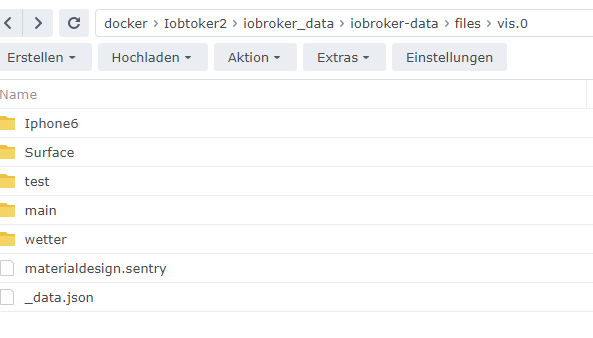
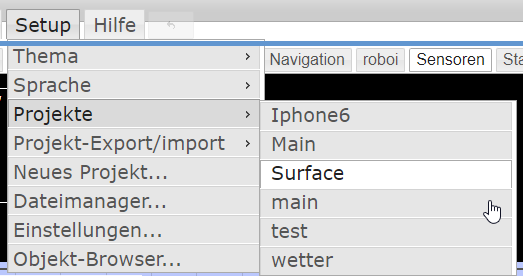
Diese Projekte gibt es.
Verwende eigentlich nur eines davon. -
@nwh sagte in Vis keine Verbindung:
@nwh sagte in Vis keine Verbindung:
@djmarc75 @GlasfaserIhr habt natürlich Recht, ich habe mich vertan
Diese Projekte gibt es.
Verwende eigentlich nur eines davon.so
http://192.168.100.100:8082/vis/index.html?Iphone6
http://192.168.100.100:8082/vis/index.html?Surface
usw.
Synology 918+ 16GB - ioBroker in Docker v9 , VISO auf Trekstor Primebook C13 13,3" , Hikvision Domkameras mit Surveillance Station .. CCU RaspberryMatic in Synology VM .. Zigbee CC2538+CC2592 .. Sonoff .. KNX .. Modbus ..
-
@nwh sagte in Vis keine Verbindung:
@nwh sagte in Vis keine Verbindung:
@djmarc75 @GlasfaserIhr habt natürlich Recht, ich habe mich vertan
Diese Projekte gibt es.
Verwende eigentlich nur eines davon.so
http://192.168.100.100:8082/vis/index.html?Iphone6
http://192.168.100.100:8082/vis/index.html?Surface
usw.




Hey! Du scheinst an dieser Unterhaltung interessiert zu sein, hast aber noch kein Konto.
Hast du es satt, bei jedem Besuch durch die gleichen Beiträge zu scrollen? Wenn du dich für ein Konto anmeldest, kommst du immer genau dorthin zurück, wo du zuvor warst, und kannst dich über neue Antworten benachrichtigen lassen (entweder per E-Mail oder Push-Benachrichtigung). Du kannst auch Lesezeichen speichern und Beiträge positiv bewerten, um anderen Community-Mitgliedern deine Wertschätzung zu zeigen.
Mit deinem Input könnte dieser Beitrag noch besser werden 💗
Registrieren AnmeldenSupport us
497
Online33.0k
Benutzer83.3k
Themen1.3m
Beiträge