




Test Adapter Philips-TV v0.2.x
-
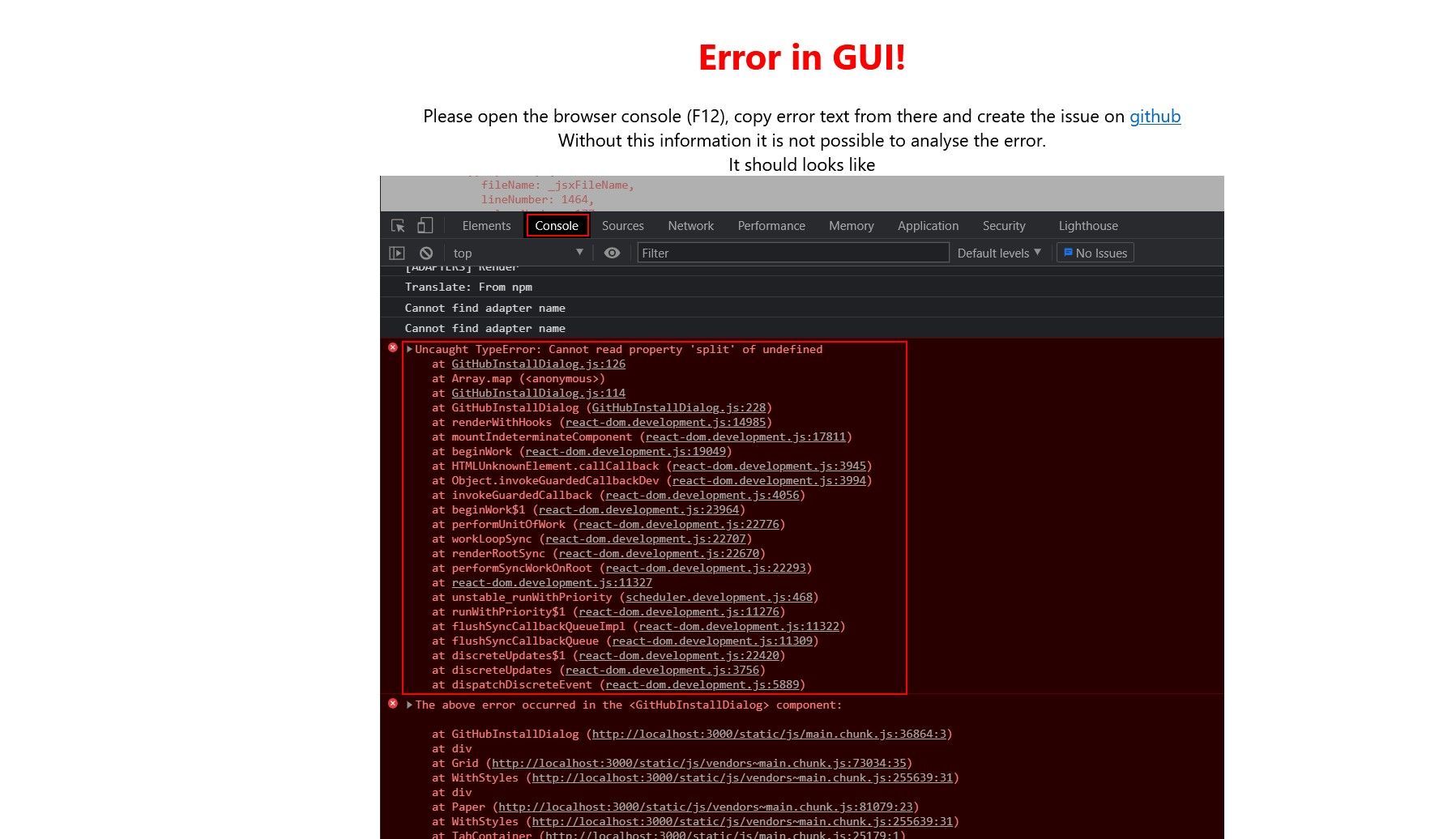
@foxriver76 Soweit komme ich ja schon garnicht mehr das war tatsächlich bei den ersten versuchen alle per lan. Aber seid gestern Nachmittag bekomme ich nur noch das hier sobald ich den Pairing Pin bestätige dann aktualisiere ich die webseite vom iobroker der startet auch neu und habe keine weiteren fehler im log vom iobroker
-
@teletapi dann mal F12 Browser Konsole öffnen und schauen was da für ein Error steht und hier posten.
@foxriver76 Danke für deine Hilfe mach ich aber morgen vormittag, für heute muss gut sein
-
@teletapi dann mal F12 Browser Konsole öffnen und schauen was da für ein Error steht und hier posten.
@foxriver76
So jetzt mal den Fehler aus der Konsole, das ist jetzt Lan die IP mit der .136 am ende
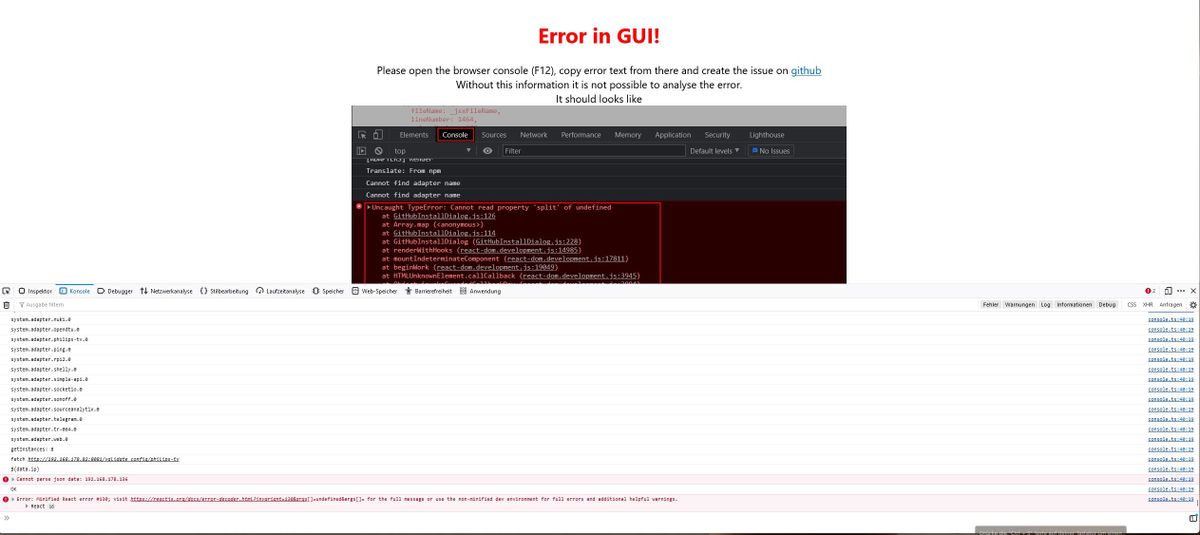
Cannot parse json data: 192.168.178.136 console.ts:40:19

OK console.ts:40:19

Error: Minified React error #130; visit https://reactjs.org/docs/error-decoder.html?invariant=130&args[]=undefined&args[]= for the full message or use the non-minified dev environment for full errors and additional helpful warnings
Und noch ein IOB Diag
```Skript v.2023-10-10 *** BASE SYSTEM *** Static hostname: iobroker Icon name: computer Operating System: Debian GNU/Linux 11 (bullseye) Kernel: Linux 6.1.21-v8+ Architecture: arm64 Model : Raspberry Pi 4 Model B Rev 1.5 Docker : false Virtualization : none Kernel : aarch64 Userland : arm64 Systemuptime and Load: 11:02:46 up 41 min, 1 user, load average: 0.79, 0.77, 0.90 CPU threads: 4 *** RASPBERRY THROTTLING *** Current issues: No throttling issues detected. Previously detected issues: No throttling issues detected. *** Time and Time Zones *** Local time: Sun 2023-12-24 11:02:46 CET Universal time: Sun 2023-12-24 10:02:46 UTC RTC time: n/a Time zone: Europe/Berlin (CET, +0100) System clock synchronized: yes NTP service: active RTC in local TZ: no *** User and Groups *** pi /home/pi pi adm dialout cdrom sudo audio video plugdev games users input render netdev lpadmin gpio i2c spi iobroker *** X-Server-Setup *** X-Server: false Desktop: Terminal: tty Boot Target: multi-user.target *** MEMORY *** total used free shared buff/cache available Mem: 7.8G 2.4G 3.8G 1.0M 1.6G 5.3G Swap: 99M 0B 99M Total: 7.9G 2.4G 3.9G 7811 M total memory 2368 M used memory 3396 M active memory 412 M inactive memory 3826 M free memory 130 M buffer memory 1486 M swap cache 99 M total swap 0 M used swap 99 M free swap Raspberry only: oom events: 0 lifetime oom required: 0 Mbytes total time in oom handler: 0 ms max time spent in oom handler: 0 ms *** FAILED SERVICES *** UNIT LOAD ACTIVE SUB DESCRIPTION 0 loaded units listed. *** FILESYSTEM *** Filesystem Type Size Used Avail Use% Mounted on /dev/root ext4 59G 12G 45G 21% / devtmpfs devtmpfs 3.6G 0 3.6G 0% /dev tmpfs tmpfs 3.9G 0 3.9G 0% /dev/shm tmpfs tmpfs 1.6G 1.2M 1.6G 1% /run tmpfs tmpfs 5.0M 4.0K 5.0M 1% /run/lock /dev/sda1 vfat 255M 31M 225M 13% /boot tmpfs tmpfs 782M 16K 782M 1% /run/user/1000 Messages concerning ext4 filesystem in dmesg: [Sun Dec 24 10:20:56 2023] Kernel command line: coherent_pool=1M 8250.nr_uarts=1 snd_bcm2835.enable_headphones=0 snd_bcm2835.enable_headphones=1 snd_bcm2835.enable_hdmi=1 snd_bcm2835.enable_hdmi=0 smsc95xx.macaddr=D8:3A:DD:13:A5:D1 vc_mem.mem_base=0x3eb00000 vc_mem.mem_size=0x3ff00000 console=tty1 root=PARTUUID=2c0392e1-02 rootfstype=ext4 fsck.repair=yes rootwait quiet splash plymouth.ignore-serial-consoles [Sun Dec 24 10:20:58 2023] EXT4-fs (sda2): mounted filesystem with ordered data mode. Quota mode: none. [Sun Dec 24 10:20:58 2023] VFS: Mounted root (ext4 filesystem) readonly on device 8:2. [Sun Dec 24 10:20:59 2023] EXT4-fs (sda2): re-mounted. Quota mode: none. Show mounted filesystems \(real ones only\): TARGET SOURCE FSTYPE OPTIONS / /dev/sda2 ext4 rw,noatime `-/boot /dev/sda1 vfat rw,relatime,fmask=0022,dmask=0022,codepage=437,iocharset=ascii,shortname=mixed,errors=remount-ro Files in neuralgic directories: /var: 1.9G /var/ 1.1G /var/log/journal/a9f1eae0dc5a48ddbf0e2a62c2227673 1.1G /var/log/journal 1.1G /var/log 631M /var/lib Archived and active journals take up 1.0G in the file system. /opt/iobroker/backups: 1.5G /opt/iobroker/backups/ /opt/iobroker/iobroker-data: 366M /opt/iobroker/iobroker-data/ 183M /opt/iobroker/iobroker-data/files 76M /opt/iobroker/iobroker-data/backup-objects 71M /opt/iobroker/iobroker-data/node-red/node_modules 71M /opt/iobroker/iobroker-data/node-red The five largest files in iobroker-data are: 33M /opt/iobroker/iobroker-data/files/iot.admin/static/js/main.1797d034.js.map 24M /opt/iobroker/iobroker-data/objects.jsonl 22M /opt/iobroker/iobroker-data/files/web.admin/static/js/main.c05ba1d3.js.map 8.8M /opt/iobroker/iobroker-data/states.jsonl 8.5M /opt/iobroker/iobroker-data/files/iot.admin/static/js/main.1797d034.js USB-Devices by-id: USB-Sticks - Avoid direct links to /dev/* in your adapter setups, please always prefer the links 'by-id': find: '/dev/serial/by-id/': No such file or directory *** NodeJS-Installation *** /usr/bin/nodejs v18.19.0 /usr/bin/node v18.19.0 /usr/bin/npm 10.2.3 /usr/bin/npx 10.2.3 /usr/bin/corepack 0.22.0 nodejs: Installed: 18.19.0-1nodesource1 Candidate: 18.19.0-1nodesource1 Version table: *** 18.19.0-1nodesource1 1001 500 https://deb.nodesource.com/node_18.x nodistro/main arm64 Packages 100 /var/lib/dpkg/status 18.18.2-1nodesource1 1001 500 https://deb.nodesource.com/node_18.x nodistro/main arm64 Packages 18.18.1-1nodesource1 1001 500 https://deb.nodesource.com/node_18.x nodistro/main arm64 Packages 18.18.0-1nodesource1 1001 500 https://deb.nodesource.com/node_18.x nodistro/main arm64 Packages 18.17.1-1nodesource1 1001 500 https://deb.nodesource.com/node_18.x nodistro/main arm64 Packages 18.17.0-1nodesource1 1001 500 https://deb.nodesource.com/node_18.x nodistro/main arm64 Packages 18.16.1-1nodesource1 1001 500 https://deb.nodesource.com/node_18.x nodistro/main arm64 Packages 18.16.0-1nodesource1 1001 500 https://deb.nodesource.com/node_18.x nodistro/main arm64 Packages 18.15.0-1nodesource1 1001 500 https://deb.nodesource.com/node_18.x nodistro/main arm64 Packages 18.14.2-1nodesource1 1001 500 https://deb.nodesource.com/node_18.x nodistro/main arm64 Packages 18.14.1-1nodesource1 1001 500 https://deb.nodesource.com/node_18.x nodistro/main arm64 Packages 18.14.0-1nodesource1 1001 500 https://deb.nodesource.com/node_18.x nodistro/main arm64 Packages 18.13.0-1nodesource1 1001 500 https://deb.nodesource.com/node_18.x nodistro/main arm64 Packages 18.12.0-1nodesource1 1001 500 https://deb.nodesource.com/node_18.x nodistro/main arm64 Packages 18.11.0-1nodesource1 1001 500 https://deb.nodesource.com/node_18.x nodistro/main arm64 Packages 18.10.0-1nodesource1 1001 500 https://deb.nodesource.com/node_18.x nodistro/main arm64 Packages 18.9.1-1nodesource1 1001 500 https://deb.nodesource.com/node_18.x nodistro/main arm64 Packages 18.9.0-1nodesource1 1001 500 https://deb.nodesource.com/node_18.x nodistro/main arm64 Packages 18.8.0-1nodesource1 1001 500 https://deb.nodesource.com/node_18.x nodistro/main arm64 Packages 18.7.0-1nodesource1 1001 500 https://deb.nodesource.com/node_18.x nodistro/main arm64 Packages 18.6.0-1nodesource1 1001 500 https://deb.nodesource.com/node_18.x nodistro/main arm64 Packages 18.5.0-1nodesource1 1001 500 https://deb.nodesource.com/node_18.x nodistro/main arm64 Packages 18.4.0-1nodesource1 1001 500 https://deb.nodesource.com/node_18.x nodistro/main arm64 Packages 18.3.0-1nodesource1 1001 500 https://deb.nodesource.com/node_18.x nodistro/main arm64 Packages 18.2.0-1nodesource1 1001 500 https://deb.nodesource.com/node_18.x nodistro/main arm64 Packages 18.1.0-1nodesource1 1001 500 https://deb.nodesource.com/node_18.x nodistro/main arm64 Packages 18.0.0-1nodesource1 1001 500 https://deb.nodesource.com/node_18.x nodistro/main arm64 Packages 12.22.12~dfsg-1~deb11u4 500 500 http://deb.debian.org/debian bullseye/main arm64 Packages 500 http://security.debian.org/debian-security bullseye-security/main arm64 Packages Temp directories causing npm8 problem: 0 No problems detected Errors in npm tree: *** ioBroker-Installation *** ioBroker Status iobroker is running on this host. Objects type: jsonl States type: jsonl Core adapters versions js-controller: 5.0.17 admin: 6.13.5 javascript: 7.5.1 Adapters from github: 2 Adapter State + system.adapter.admin.0 : admin : iobroker - enabled, port: 8081, bind: 0.0.0.0, run as: admin + system.adapter.alexa2.0 : alexa2 : iobroker - enabled system.adapter.alias-manager.0 : alias-manager : iobroker - disabled + system.adapter.backitup.0 : backitup : iobroker - enabled + system.adapter.cloud.0 : cloud : iobroker - enabled + system.adapter.discovery.0 : discovery : iobroker - enabled + system.adapter.energiefluss-erweitert.0 : energiefluss-erweitert: iobroker - enabled + system.adapter.fritzdect.0 : fritzdect : iobroker - enabled + system.adapter.hm-rega.0 : hm-rega : iobroker - enabled + system.adapter.hm-rpc.0 : hm-rpc : iobroker - enabled, port: 18701 + system.adapter.hm-rpc.1 : hm-rpc : iobroker - enabled, port: 12001 + system.adapter.hm-rpc.2 : hm-rpc : iobroker - enabled, port: 12010 + system.adapter.hm-rpc.3 : hm-rpc : iobroker - enabled, port: 0 + system.adapter.hue.0 : hue : iobroker - enabled, port: 443 system.adapter.ical.0 : ical : iobroker - enabled + system.adapter.influxdb.0 : influxdb : iobroker - enabled, port: 8086 + system.adapter.info.0 : info : iobroker - enabled + system.adapter.iot.0 : iot : iobroker - enabled + system.adapter.jarvis.0 : jarvis : iobroker - enabled + system.adapter.javascript.0 : javascript : iobroker - enabled + system.adapter.mqtt.0 : mqtt : iobroker - enabled, port: 1883, bind: 0.0.0.0 + system.adapter.net-tools.0 : net-tools : iobroker - enabled + system.adapter.node-red.0 : node-red : iobroker - enabled, port: 1880, bind: 0.0.0.0 + system.adapter.nuki.0 : nuki : iobroker - enabled + system.adapter.opendtu.0 : opendtu : iobroker - enabled + system.adapter.philips-tv.0 : philips-tv : iobroker - enabled + system.adapter.ping.0 : ping : iobroker - enabled + system.adapter.rpi2.0 : rpi2 : iobroker - enabled + system.adapter.shelly.0 : shelly : iobroker - enabled, port: 1882, bind: 0.0.0.0 + system.adapter.simple-api.0 : simple-api : iobroker - enabled, port: 8087, bind: 192.168.178.82, run as: admin + system.adapter.socketio.0 : socketio : iobroker - enabled, port: 8084, bind: 0.0.0.0, run as: admin + system.adapter.sonoff.0 : sonoff : iobroker - enabled, port: 1886, bind: 0.0.0.0 + system.adapter.sourceanalytix.0 : sourceanalytix : iobroker - enabled + system.adapter.telegram.0 : telegram : iobroker - enabled, port: 8443, bind: 0.0.0.0 + system.adapter.tr-064.0 : tr-064 : iobroker - enabled + system.adapter.web.0 : web : iobroker - enabled, port: 8082, bind: 0.0.0.0, run as: admin + instance is alive Enabled adapters with bindings + system.adapter.admin.0 : admin : iobroker - enabled, port: 8081, bind: 0.0.0.0, run as: admin + system.adapter.hm-rpc.0 : hm-rpc : iobroker - enabled, port: 18701 + system.adapter.hm-rpc.1 : hm-rpc : iobroker - enabled, port: 12001 + system.adapter.hm-rpc.2 : hm-rpc : iobroker - enabled, port: 12010 + system.adapter.hm-rpc.3 : hm-rpc : iobroker - enabled, port: 0 + system.adapter.hue.0 : hue : iobroker - enabled, port: 443 + system.adapter.influxdb.0 : influxdb : iobroker - enabled, port: 8086 + system.adapter.mqtt.0 : mqtt : iobroker - enabled, port: 1883, bind: 0.0.0.0 + system.adapter.node-red.0 : node-red : iobroker - enabled, port: 1880, bind: 0.0.0.0 + system.adapter.shelly.0 : shelly : iobroker - enabled, port: 1882, bind: 0.0.0.0 + system.adapter.simple-api.0 : simple-api : iobroker - enabled, port: 8087, bind: 192.168.178.82, run as: admin + system.adapter.socketio.0 : socketio : iobroker - enabled, port: 8084, bind: 0.0.0.0, run as: admin + system.adapter.sonoff.0 : sonoff : iobroker - enabled, port: 1886, bind: 0.0.0.0 + system.adapter.telegram.0 : telegram : iobroker - enabled, port: 8443, bind: 0.0.0.0 + system.adapter.web.0 : web : iobroker - enabled, port: 8082, bind: 0.0.0.0, run as: admin ioBroker-Repositories stable : http://download.iobroker.net/sources-dist.json beta : http://download.iobroker.net/sources-dist-latest.json Active repo(s): beta Installed ioBroker-Instances Used repository: beta Adapter "admin" : 6.13.5 , installed 6.13.5 Adapter "alexa2" : 3.26.3 , installed 3.26.3 Adapter "alias-manager": 1.2.6 , installed 1.2.6 Adapter "backitup" : 2.9.8 , installed 2.9.8 Adapter "cloud" : 4.4.1 , installed 4.4.1 Adapter "discovery" : 4.2.0 , installed 4.2.0 Adapter "fritzdect" : 2.5.9 , installed 2.5.9 Adapter "hm-rega" : 4.0.0 , installed 4.0.0 Adapter "hm-rpc" : 1.15.19 , installed 1.15.19 Adapter "hue" : 3.10.1 , installed 3.10.1 Adapter "ical" : 1.13.5 , installed 1.13.5 Adapter "influxdb" : 3.2.0 , installed 3.2.0 Adapter "info" : 2.0.0 , installed 2.0.0 Adapter "iopooleco" : 0.5.1 , installed 0.5.1 Adapter "iot" : 2.0.11 , installed 2.0.11 Adapter "jarvis" : 3.1.8 , installed 3.1.9-beta.3 Adapter "javascript" : 7.5.1 , installed 7.5.1 Controller "js-controller": 5.0.17 , installed 5.0.17 Adapter "mqtt" : 5.1.0 , installed 5.1.0 Adapter "net-tools" : 0.2.0 , installed 0.2.0 Adapter "node-red" : 5.0.2 , installed 5.0.2 Adapter "nuki" : 1.6.0 , installed 1.6.0 Adapter "opendtu" : 1.0.1 , installed 1.0.1 Adapter "philips-tv" : 0.5.3 , installed 0.5.3 Adapter "ping" : 1.6.2 , installed 1.6.2 Adapter "rpi2" : 1.3.2 , installed 1.3.2 Adapter "shelly" : 6.7.0 , installed 6.7.0 Adapter "simple-api" : 2.7.2 , installed 2.7.2 Adapter "socketio" : 6.6.0 , installed 6.6.0 Adapter "sonoff" : 3.0.3 , installed 3.0.3 Adapter "sourceanalytix": 0.4.14 , installed 0.4.14 Adapter "telegram" : 3.0.1 , installed 3.0.1 Adapter "tr-064" : 4.2.18 , installed 4.2.18 Adapter "web" : 6.2.3 , installed 6.2.3 Adapter "ws" : 2.5.10 , installed 2.5.10 Objects and States Please stand by - This may take a while Objects: 9657 States: 9725 *** OS-Repositories and Updates *** Hit:1 http://security.debian.org/debian-security bullseye-security InRelease Hit:2 http://deb.debian.org/debian bullseye InRelease Hit:3 http://deb.debian.org/debian bullseye-updates InRelease Hit:4 http://archive.raspberrypi.org/debian bullseye InRelease Hit:5 https://repos.influxdata.com/debian stable InRelease Hit:6 https://apt.grafana.com stable InRelease Hit:7 https://deb.nodesource.com/node_18.x nodistro InRelease Reading package lists... Pending Updates: 0 *** Listening Ports *** Active Internet connections (only servers) Proto Recv-Q Send-Q Local Address Foreign Address State User Inode PID/Program name tcp 0 0 192.168.178.82:12001 0.0.0.0:* LISTEN 1001 16204 1300/io.hm-rpc.1 tcp 0 0 192.168.178.82:12010 0.0.0.0:* LISTEN 1001 16953 1317/io.hm-rpc.2 tcp 0 0 192.168.178.82:8087 0.0.0.0:* LISTEN 1001 24647 2135/io.simple-api. tcp 0 0 0.0.0.0:1886 0.0.0.0:* LISTEN 1001 18345 1486/io.sonoff.0 tcp 0 0 0.0.0.0:1880 0.0.0.0:* LISTEN 1001 16919 1212/node-red tcp 0 0 0.0.0.0:1883 0.0.0.0:* LISTEN 116 1999 559/mosquitto tcp 0 0 0.0.0.0:1882 0.0.0.0:* LISTEN 1001 17227 1511/io.shelly.0 tcp 0 0 0.0.0.0:22 0.0.0.0:* LISTEN 0 30562 3094/sshd: /usr/sbi tcp 0 0 0.0.0.0:8400 0.0.0.0:* LISTEN 1001 21874 1876/io.jarvis.0 tcp 0 0 192.168.178.82:18701 0.0.0.0:* LISTEN 1001 14136 1278/io.hm-rpc.0 tcp 0 0 192.168.178.82:2001 0.0.0.0:* LISTEN 1001 17963 1375/io.hm-rpc.3 tcp 0 0 127.0.0.1:9001 0.0.0.0:* LISTEN 1001 15623 656/iobroker.js-con tcp 0 0 127.0.0.1:9000 0.0.0.0:* LISTEN 1001 15141 656/iobroker.js-con tcp 0 0 127.0.0.1:631 0.0.0.0:* LISTEN 0 13693 541/cupsd tcp 0 0 192.168.178.82:9092 0.0.0.0:* LISTEN 1001 22276 1910/io.nuki.0 tcp6 0 0 :::1883 :::* LISTEN 116 2000 559/mosquitto tcp6 0 0 :::22 :::* LISTEN 0 30564 3094/sshd: /usr/sbi tcp6 0 0 :::8084 :::* LISTEN 1001 23340 2184/io.socketio.0 tcp6 0 0 :::8086 :::* LISTEN 999 15452 549/influxd tcp6 0 0 :::8081 :::* LISTEN 1001 13912 849/io.admin.0 tcp6 0 0 :::8082 :::* LISTEN 1001 20044 1638/io.web.0 tcp6 0 0 ::1:631 :::* LISTEN 0 13692 541/cupsd tcp6 0 0 :::3000 :::* LISTEN 117 15499 655/grafana udp 0 0 0.0.0.0:48065 0.0.0.0:* 108 14876 400/avahi-daemon: r udp 0 0 0.0.0.0:68 0.0.0.0:* 0 15056 464/dhcpcd udp 0 0 0.0.0.0:631 0.0.0.0:* 0 2012 614/cups-browsed udp 0 0 0.0.0.0:5353 0.0.0.0:* 108 14874 400/avahi-daemon: r udp6 0 0 :::36425 :::* 108 14877 400/avahi-daemon: r udp6 0 0 :::546 :::* 0 15086 464/dhcpcd udp6 0 0 :::5353 :::* 108 14875 400/avahi-daemon: r *** Log File - Last 25 Lines *** 2023-12-24 10:59:56.141 - debug: philips-tv.0 (9316) Objects client ready ... initialize now 2023-12-24 10:59:56.144 - debug: philips-tv.0 (9316) Objects create System PubSub Client 2023-12-24 10:59:56.145 - debug: philips-tv.0 (9316) Objects create User PubSub Client 2023-12-24 10:59:56.228 - debug: philips-tv.0 (9316) Objects client initialize lua scripts 2023-12-24 10:59:56.237 - debug: philips-tv.0 (9316) Objects connected to redis: 127.0.0.1:9001 2023-12-24 10:59:56.241 - silly: philips-tv.0 (9316) redis psubscribe cfg.o.system.user.* 2023-12-24 10:59:56.291 - silly: philips-tv.0 (9316) redis psubscribe cfg.o.enum.* 2023-12-24 10:59:56.294 - silly: philips-tv.0 (9316) objectDB connected 2023-12-24 10:59:56.298 - debug: philips-tv.0 (9316) Redis States: Use Redis connection: 127.0.0.1:9000 2023-12-24 10:59:56.329 - debug: philips-tv.0 (9316) States create System PubSub Client 2023-12-24 10:59:56.331 - debug: philips-tv.0 (9316) States create User PubSub Client 2023-12-24 10:59:56.428 - debug: philips-tv.0 (9316) States connected to redis: 127.0.0.1:9000 2023-12-24 10:59:56.429 - silly: philips-tv.0 (9316) statesDB connected 2023-12-24 10:59:57.343 - info: philips-tv.0 (9316) starting. Version 0.5.3 in /opt/iobroker/node_modules/iobroker.philips-tv, node: v18.19.0, js-controller: 5.0.17 2023-12-24 10:59:57.379 - info: philips-tv.0 (9316) Starting with ip "192.168.178.136" (API v6 - Android) 2023-12-24 10:59:57.387 - warn: philips-tv.0 (9316) Please authenticate via the adapter configuration page 2023-12-24 10:59:57.416 - silly: philips-tv.0 (9316) States system redis pmessage system.adapter.philips-tv.0.logLevel/system.adapter.philips-tv.0.logLevel:{"val":"silly","ack":true,"ts":1703411997391,"q":0,"from":"system.adapter.philips-tv.0","lc":1703411997391} 2023-12-24 11:00:00.163 - info: host.iobroker instance system.adapter.ical.0 started with pid 9335 2023-12-24 11:00:03.622 - info: ical.0 (9335) starting. Version 1.13.5 in /opt/iobroker/node_modules/iobroker.ical, node: v18.19.0, js-controller: 5.0.17 2023-12-24 11:00:09.909 - info: ical.0 (9335) Terminated (NO_ERROR): Without reason 2023-12-24 11:00:10.444 - info: host.iobroker instance system.adapter.ical.0 terminated with code 0 (NO_ERROR) ============ Mark until here for C&P ============= iob diag has finished. Press any key for a summary -
@foxriver76
So jetzt mal den Fehler aus der Konsole, das ist jetzt Lan die IP mit der .136 am ende
Cannot parse json data: 192.168.178.136 console.ts:40:19

OK console.ts:40:19

Error: Minified React error #130; visit https://reactjs.org/docs/error-decoder.html?invariant=130&args[]=undefined&args[]= for the full message or use the non-minified dev environment for full errors and additional helpful warnings
Und noch ein IOB Diag
```Skript v.2023-10-10 *** BASE SYSTEM *** Static hostname: iobroker Icon name: computer Operating System: Debian GNU/Linux 11 (bullseye) Kernel: Linux 6.1.21-v8+ Architecture: arm64 Model : Raspberry Pi 4 Model B Rev 1.5 Docker : false Virtualization : none Kernel : aarch64 Userland : arm64 Systemuptime and Load: 11:02:46 up 41 min, 1 user, load average: 0.79, 0.77, 0.90 CPU threads: 4 *** RASPBERRY THROTTLING *** Current issues: No throttling issues detected. Previously detected issues: No throttling issues detected. *** Time and Time Zones *** Local time: Sun 2023-12-24 11:02:46 CET Universal time: Sun 2023-12-24 10:02:46 UTC RTC time: n/a Time zone: Europe/Berlin (CET, +0100) System clock synchronized: yes NTP service: active RTC in local TZ: no *** User and Groups *** pi /home/pi pi adm dialout cdrom sudo audio video plugdev games users input render netdev lpadmin gpio i2c spi iobroker *** X-Server-Setup *** X-Server: false Desktop: Terminal: tty Boot Target: multi-user.target *** MEMORY *** total used free shared buff/cache available Mem: 7.8G 2.4G 3.8G 1.0M 1.6G 5.3G Swap: 99M 0B 99M Total: 7.9G 2.4G 3.9G 7811 M total memory 2368 M used memory 3396 M active memory 412 M inactive memory 3826 M free memory 130 M buffer memory 1486 M swap cache 99 M total swap 0 M used swap 99 M free swap Raspberry only: oom events: 0 lifetime oom required: 0 Mbytes total time in oom handler: 0 ms max time spent in oom handler: 0 ms *** FAILED SERVICES *** UNIT LOAD ACTIVE SUB DESCRIPTION 0 loaded units listed. *** FILESYSTEM *** Filesystem Type Size Used Avail Use% Mounted on /dev/root ext4 59G 12G 45G 21% / devtmpfs devtmpfs 3.6G 0 3.6G 0% /dev tmpfs tmpfs 3.9G 0 3.9G 0% /dev/shm tmpfs tmpfs 1.6G 1.2M 1.6G 1% /run tmpfs tmpfs 5.0M 4.0K 5.0M 1% /run/lock /dev/sda1 vfat 255M 31M 225M 13% /boot tmpfs tmpfs 782M 16K 782M 1% /run/user/1000 Messages concerning ext4 filesystem in dmesg: [Sun Dec 24 10:20:56 2023] Kernel command line: coherent_pool=1M 8250.nr_uarts=1 snd_bcm2835.enable_headphones=0 snd_bcm2835.enable_headphones=1 snd_bcm2835.enable_hdmi=1 snd_bcm2835.enable_hdmi=0 smsc95xx.macaddr=D8:3A:DD:13:A5:D1 vc_mem.mem_base=0x3eb00000 vc_mem.mem_size=0x3ff00000 console=tty1 root=PARTUUID=2c0392e1-02 rootfstype=ext4 fsck.repair=yes rootwait quiet splash plymouth.ignore-serial-consoles [Sun Dec 24 10:20:58 2023] EXT4-fs (sda2): mounted filesystem with ordered data mode. Quota mode: none. [Sun Dec 24 10:20:58 2023] VFS: Mounted root (ext4 filesystem) readonly on device 8:2. [Sun Dec 24 10:20:59 2023] EXT4-fs (sda2): re-mounted. Quota mode: none. Show mounted filesystems \(real ones only\): TARGET SOURCE FSTYPE OPTIONS / /dev/sda2 ext4 rw,noatime `-/boot /dev/sda1 vfat rw,relatime,fmask=0022,dmask=0022,codepage=437,iocharset=ascii,shortname=mixed,errors=remount-ro Files in neuralgic directories: /var: 1.9G /var/ 1.1G /var/log/journal/a9f1eae0dc5a48ddbf0e2a62c2227673 1.1G /var/log/journal 1.1G /var/log 631M /var/lib Archived and active journals take up 1.0G in the file system. /opt/iobroker/backups: 1.5G /opt/iobroker/backups/ /opt/iobroker/iobroker-data: 366M /opt/iobroker/iobroker-data/ 183M /opt/iobroker/iobroker-data/files 76M /opt/iobroker/iobroker-data/backup-objects 71M /opt/iobroker/iobroker-data/node-red/node_modules 71M /opt/iobroker/iobroker-data/node-red The five largest files in iobroker-data are: 33M /opt/iobroker/iobroker-data/files/iot.admin/static/js/main.1797d034.js.map 24M /opt/iobroker/iobroker-data/objects.jsonl 22M /opt/iobroker/iobroker-data/files/web.admin/static/js/main.c05ba1d3.js.map 8.8M /opt/iobroker/iobroker-data/states.jsonl 8.5M /opt/iobroker/iobroker-data/files/iot.admin/static/js/main.1797d034.js USB-Devices by-id: USB-Sticks - Avoid direct links to /dev/* in your adapter setups, please always prefer the links 'by-id': find: '/dev/serial/by-id/': No such file or directory *** NodeJS-Installation *** /usr/bin/nodejs v18.19.0 /usr/bin/node v18.19.0 /usr/bin/npm 10.2.3 /usr/bin/npx 10.2.3 /usr/bin/corepack 0.22.0 nodejs: Installed: 18.19.0-1nodesource1 Candidate: 18.19.0-1nodesource1 Version table: *** 18.19.0-1nodesource1 1001 500 https://deb.nodesource.com/node_18.x nodistro/main arm64 Packages 100 /var/lib/dpkg/status 18.18.2-1nodesource1 1001 500 https://deb.nodesource.com/node_18.x nodistro/main arm64 Packages 18.18.1-1nodesource1 1001 500 https://deb.nodesource.com/node_18.x nodistro/main arm64 Packages 18.18.0-1nodesource1 1001 500 https://deb.nodesource.com/node_18.x nodistro/main arm64 Packages 18.17.1-1nodesource1 1001 500 https://deb.nodesource.com/node_18.x nodistro/main arm64 Packages 18.17.0-1nodesource1 1001 500 https://deb.nodesource.com/node_18.x nodistro/main arm64 Packages 18.16.1-1nodesource1 1001 500 https://deb.nodesource.com/node_18.x nodistro/main arm64 Packages 18.16.0-1nodesource1 1001 500 https://deb.nodesource.com/node_18.x nodistro/main arm64 Packages 18.15.0-1nodesource1 1001 500 https://deb.nodesource.com/node_18.x nodistro/main arm64 Packages 18.14.2-1nodesource1 1001 500 https://deb.nodesource.com/node_18.x nodistro/main arm64 Packages 18.14.1-1nodesource1 1001 500 https://deb.nodesource.com/node_18.x nodistro/main arm64 Packages 18.14.0-1nodesource1 1001 500 https://deb.nodesource.com/node_18.x nodistro/main arm64 Packages 18.13.0-1nodesource1 1001 500 https://deb.nodesource.com/node_18.x nodistro/main arm64 Packages 18.12.0-1nodesource1 1001 500 https://deb.nodesource.com/node_18.x nodistro/main arm64 Packages 18.11.0-1nodesource1 1001 500 https://deb.nodesource.com/node_18.x nodistro/main arm64 Packages 18.10.0-1nodesource1 1001 500 https://deb.nodesource.com/node_18.x nodistro/main arm64 Packages 18.9.1-1nodesource1 1001 500 https://deb.nodesource.com/node_18.x nodistro/main arm64 Packages 18.9.0-1nodesource1 1001 500 https://deb.nodesource.com/node_18.x nodistro/main arm64 Packages 18.8.0-1nodesource1 1001 500 https://deb.nodesource.com/node_18.x nodistro/main arm64 Packages 18.7.0-1nodesource1 1001 500 https://deb.nodesource.com/node_18.x nodistro/main arm64 Packages 18.6.0-1nodesource1 1001 500 https://deb.nodesource.com/node_18.x nodistro/main arm64 Packages 18.5.0-1nodesource1 1001 500 https://deb.nodesource.com/node_18.x nodistro/main arm64 Packages 18.4.0-1nodesource1 1001 500 https://deb.nodesource.com/node_18.x nodistro/main arm64 Packages 18.3.0-1nodesource1 1001 500 https://deb.nodesource.com/node_18.x nodistro/main arm64 Packages 18.2.0-1nodesource1 1001 500 https://deb.nodesource.com/node_18.x nodistro/main arm64 Packages 18.1.0-1nodesource1 1001 500 https://deb.nodesource.com/node_18.x nodistro/main arm64 Packages 18.0.0-1nodesource1 1001 500 https://deb.nodesource.com/node_18.x nodistro/main arm64 Packages 12.22.12~dfsg-1~deb11u4 500 500 http://deb.debian.org/debian bullseye/main arm64 Packages 500 http://security.debian.org/debian-security bullseye-security/main arm64 Packages Temp directories causing npm8 problem: 0 No problems detected Errors in npm tree: *** ioBroker-Installation *** ioBroker Status iobroker is running on this host. Objects type: jsonl States type: jsonl Core adapters versions js-controller: 5.0.17 admin: 6.13.5 javascript: 7.5.1 Adapters from github: 2 Adapter State + system.adapter.admin.0 : admin : iobroker - enabled, port: 8081, bind: 0.0.0.0, run as: admin + system.adapter.alexa2.0 : alexa2 : iobroker - enabled system.adapter.alias-manager.0 : alias-manager : iobroker - disabled + system.adapter.backitup.0 : backitup : iobroker - enabled + system.adapter.cloud.0 : cloud : iobroker - enabled + system.adapter.discovery.0 : discovery : iobroker - enabled + system.adapter.energiefluss-erweitert.0 : energiefluss-erweitert: iobroker - enabled + system.adapter.fritzdect.0 : fritzdect : iobroker - enabled + system.adapter.hm-rega.0 : hm-rega : iobroker - enabled + system.adapter.hm-rpc.0 : hm-rpc : iobroker - enabled, port: 18701 + system.adapter.hm-rpc.1 : hm-rpc : iobroker - enabled, port: 12001 + system.adapter.hm-rpc.2 : hm-rpc : iobroker - enabled, port: 12010 + system.adapter.hm-rpc.3 : hm-rpc : iobroker - enabled, port: 0 + system.adapter.hue.0 : hue : iobroker - enabled, port: 443 system.adapter.ical.0 : ical : iobroker - enabled + system.adapter.influxdb.0 : influxdb : iobroker - enabled, port: 8086 + system.adapter.info.0 : info : iobroker - enabled + system.adapter.iot.0 : iot : iobroker - enabled + system.adapter.jarvis.0 : jarvis : iobroker - enabled + system.adapter.javascript.0 : javascript : iobroker - enabled + system.adapter.mqtt.0 : mqtt : iobroker - enabled, port: 1883, bind: 0.0.0.0 + system.adapter.net-tools.0 : net-tools : iobroker - enabled + system.adapter.node-red.0 : node-red : iobroker - enabled, port: 1880, bind: 0.0.0.0 + system.adapter.nuki.0 : nuki : iobroker - enabled + system.adapter.opendtu.0 : opendtu : iobroker - enabled + system.adapter.philips-tv.0 : philips-tv : iobroker - enabled + system.adapter.ping.0 : ping : iobroker - enabled + system.adapter.rpi2.0 : rpi2 : iobroker - enabled + system.adapter.shelly.0 : shelly : iobroker - enabled, port: 1882, bind: 0.0.0.0 + system.adapter.simple-api.0 : simple-api : iobroker - enabled, port: 8087, bind: 192.168.178.82, run as: admin + system.adapter.socketio.0 : socketio : iobroker - enabled, port: 8084, bind: 0.0.0.0, run as: admin + system.adapter.sonoff.0 : sonoff : iobroker - enabled, port: 1886, bind: 0.0.0.0 + system.adapter.sourceanalytix.0 : sourceanalytix : iobroker - enabled + system.adapter.telegram.0 : telegram : iobroker - enabled, port: 8443, bind: 0.0.0.0 + system.adapter.tr-064.0 : tr-064 : iobroker - enabled + system.adapter.web.0 : web : iobroker - enabled, port: 8082, bind: 0.0.0.0, run as: admin + instance is alive Enabled adapters with bindings + system.adapter.admin.0 : admin : iobroker - enabled, port: 8081, bind: 0.0.0.0, run as: admin + system.adapter.hm-rpc.0 : hm-rpc : iobroker - enabled, port: 18701 + system.adapter.hm-rpc.1 : hm-rpc : iobroker - enabled, port: 12001 + system.adapter.hm-rpc.2 : hm-rpc : iobroker - enabled, port: 12010 + system.adapter.hm-rpc.3 : hm-rpc : iobroker - enabled, port: 0 + system.adapter.hue.0 : hue : iobroker - enabled, port: 443 + system.adapter.influxdb.0 : influxdb : iobroker - enabled, port: 8086 + system.adapter.mqtt.0 : mqtt : iobroker - enabled, port: 1883, bind: 0.0.0.0 + system.adapter.node-red.0 : node-red : iobroker - enabled, port: 1880, bind: 0.0.0.0 + system.adapter.shelly.0 : shelly : iobroker - enabled, port: 1882, bind: 0.0.0.0 + system.adapter.simple-api.0 : simple-api : iobroker - enabled, port: 8087, bind: 192.168.178.82, run as: admin + system.adapter.socketio.0 : socketio : iobroker - enabled, port: 8084, bind: 0.0.0.0, run as: admin + system.adapter.sonoff.0 : sonoff : iobroker - enabled, port: 1886, bind: 0.0.0.0 + system.adapter.telegram.0 : telegram : iobroker - enabled, port: 8443, bind: 0.0.0.0 + system.adapter.web.0 : web : iobroker - enabled, port: 8082, bind: 0.0.0.0, run as: admin ioBroker-Repositories stable : http://download.iobroker.net/sources-dist.json beta : http://download.iobroker.net/sources-dist-latest.json Active repo(s): beta Installed ioBroker-Instances Used repository: beta Adapter "admin" : 6.13.5 , installed 6.13.5 Adapter "alexa2" : 3.26.3 , installed 3.26.3 Adapter "alias-manager": 1.2.6 , installed 1.2.6 Adapter "backitup" : 2.9.8 , installed 2.9.8 Adapter "cloud" : 4.4.1 , installed 4.4.1 Adapter "discovery" : 4.2.0 , installed 4.2.0 Adapter "fritzdect" : 2.5.9 , installed 2.5.9 Adapter "hm-rega" : 4.0.0 , installed 4.0.0 Adapter "hm-rpc" : 1.15.19 , installed 1.15.19 Adapter "hue" : 3.10.1 , installed 3.10.1 Adapter "ical" : 1.13.5 , installed 1.13.5 Adapter "influxdb" : 3.2.0 , installed 3.2.0 Adapter "info" : 2.0.0 , installed 2.0.0 Adapter "iopooleco" : 0.5.1 , installed 0.5.1 Adapter "iot" : 2.0.11 , installed 2.0.11 Adapter "jarvis" : 3.1.8 , installed 3.1.9-beta.3 Adapter "javascript" : 7.5.1 , installed 7.5.1 Controller "js-controller": 5.0.17 , installed 5.0.17 Adapter "mqtt" : 5.1.0 , installed 5.1.0 Adapter "net-tools" : 0.2.0 , installed 0.2.0 Adapter "node-red" : 5.0.2 , installed 5.0.2 Adapter "nuki" : 1.6.0 , installed 1.6.0 Adapter "opendtu" : 1.0.1 , installed 1.0.1 Adapter "philips-tv" : 0.5.3 , installed 0.5.3 Adapter "ping" : 1.6.2 , installed 1.6.2 Adapter "rpi2" : 1.3.2 , installed 1.3.2 Adapter "shelly" : 6.7.0 , installed 6.7.0 Adapter "simple-api" : 2.7.2 , installed 2.7.2 Adapter "socketio" : 6.6.0 , installed 6.6.0 Adapter "sonoff" : 3.0.3 , installed 3.0.3 Adapter "sourceanalytix": 0.4.14 , installed 0.4.14 Adapter "telegram" : 3.0.1 , installed 3.0.1 Adapter "tr-064" : 4.2.18 , installed 4.2.18 Adapter "web" : 6.2.3 , installed 6.2.3 Adapter "ws" : 2.5.10 , installed 2.5.10 Objects and States Please stand by - This may take a while Objects: 9657 States: 9725 *** OS-Repositories and Updates *** Hit:1 http://security.debian.org/debian-security bullseye-security InRelease Hit:2 http://deb.debian.org/debian bullseye InRelease Hit:3 http://deb.debian.org/debian bullseye-updates InRelease Hit:4 http://archive.raspberrypi.org/debian bullseye InRelease Hit:5 https://repos.influxdata.com/debian stable InRelease Hit:6 https://apt.grafana.com stable InRelease Hit:7 https://deb.nodesource.com/node_18.x nodistro InRelease Reading package lists... Pending Updates: 0 *** Listening Ports *** Active Internet connections (only servers) Proto Recv-Q Send-Q Local Address Foreign Address State User Inode PID/Program name tcp 0 0 192.168.178.82:12001 0.0.0.0:* LISTEN 1001 16204 1300/io.hm-rpc.1 tcp 0 0 192.168.178.82:12010 0.0.0.0:* LISTEN 1001 16953 1317/io.hm-rpc.2 tcp 0 0 192.168.178.82:8087 0.0.0.0:* LISTEN 1001 24647 2135/io.simple-api. tcp 0 0 0.0.0.0:1886 0.0.0.0:* LISTEN 1001 18345 1486/io.sonoff.0 tcp 0 0 0.0.0.0:1880 0.0.0.0:* LISTEN 1001 16919 1212/node-red tcp 0 0 0.0.0.0:1883 0.0.0.0:* LISTEN 116 1999 559/mosquitto tcp 0 0 0.0.0.0:1882 0.0.0.0:* LISTEN 1001 17227 1511/io.shelly.0 tcp 0 0 0.0.0.0:22 0.0.0.0:* LISTEN 0 30562 3094/sshd: /usr/sbi tcp 0 0 0.0.0.0:8400 0.0.0.0:* LISTEN 1001 21874 1876/io.jarvis.0 tcp 0 0 192.168.178.82:18701 0.0.0.0:* LISTEN 1001 14136 1278/io.hm-rpc.0 tcp 0 0 192.168.178.82:2001 0.0.0.0:* LISTEN 1001 17963 1375/io.hm-rpc.3 tcp 0 0 127.0.0.1:9001 0.0.0.0:* LISTEN 1001 15623 656/iobroker.js-con tcp 0 0 127.0.0.1:9000 0.0.0.0:* LISTEN 1001 15141 656/iobroker.js-con tcp 0 0 127.0.0.1:631 0.0.0.0:* LISTEN 0 13693 541/cupsd tcp 0 0 192.168.178.82:9092 0.0.0.0:* LISTEN 1001 22276 1910/io.nuki.0 tcp6 0 0 :::1883 :::* LISTEN 116 2000 559/mosquitto tcp6 0 0 :::22 :::* LISTEN 0 30564 3094/sshd: /usr/sbi tcp6 0 0 :::8084 :::* LISTEN 1001 23340 2184/io.socketio.0 tcp6 0 0 :::8086 :::* LISTEN 999 15452 549/influxd tcp6 0 0 :::8081 :::* LISTEN 1001 13912 849/io.admin.0 tcp6 0 0 :::8082 :::* LISTEN 1001 20044 1638/io.web.0 tcp6 0 0 ::1:631 :::* LISTEN 0 13692 541/cupsd tcp6 0 0 :::3000 :::* LISTEN 117 15499 655/grafana udp 0 0 0.0.0.0:48065 0.0.0.0:* 108 14876 400/avahi-daemon: r udp 0 0 0.0.0.0:68 0.0.0.0:* 0 15056 464/dhcpcd udp 0 0 0.0.0.0:631 0.0.0.0:* 0 2012 614/cups-browsed udp 0 0 0.0.0.0:5353 0.0.0.0:* 108 14874 400/avahi-daemon: r udp6 0 0 :::36425 :::* 108 14877 400/avahi-daemon: r udp6 0 0 :::546 :::* 0 15086 464/dhcpcd udp6 0 0 :::5353 :::* 108 14875 400/avahi-daemon: r *** Log File - Last 25 Lines *** 2023-12-24 10:59:56.141 - debug: philips-tv.0 (9316) Objects client ready ... initialize now 2023-12-24 10:59:56.144 - debug: philips-tv.0 (9316) Objects create System PubSub Client 2023-12-24 10:59:56.145 - debug: philips-tv.0 (9316) Objects create User PubSub Client 2023-12-24 10:59:56.228 - debug: philips-tv.0 (9316) Objects client initialize lua scripts 2023-12-24 10:59:56.237 - debug: philips-tv.0 (9316) Objects connected to redis: 127.0.0.1:9001 2023-12-24 10:59:56.241 - silly: philips-tv.0 (9316) redis psubscribe cfg.o.system.user.* 2023-12-24 10:59:56.291 - silly: philips-tv.0 (9316) redis psubscribe cfg.o.enum.* 2023-12-24 10:59:56.294 - silly: philips-tv.0 (9316) objectDB connected 2023-12-24 10:59:56.298 - debug: philips-tv.0 (9316) Redis States: Use Redis connection: 127.0.0.1:9000 2023-12-24 10:59:56.329 - debug: philips-tv.0 (9316) States create System PubSub Client 2023-12-24 10:59:56.331 - debug: philips-tv.0 (9316) States create User PubSub Client 2023-12-24 10:59:56.428 - debug: philips-tv.0 (9316) States connected to redis: 127.0.0.1:9000 2023-12-24 10:59:56.429 - silly: philips-tv.0 (9316) statesDB connected 2023-12-24 10:59:57.343 - info: philips-tv.0 (9316) starting. Version 0.5.3 in /opt/iobroker/node_modules/iobroker.philips-tv, node: v18.19.0, js-controller: 5.0.17 2023-12-24 10:59:57.379 - info: philips-tv.0 (9316) Starting with ip "192.168.178.136" (API v6 - Android) 2023-12-24 10:59:57.387 - warn: philips-tv.0 (9316) Please authenticate via the adapter configuration page 2023-12-24 10:59:57.416 - silly: philips-tv.0 (9316) States system redis pmessage system.adapter.philips-tv.0.logLevel/system.adapter.philips-tv.0.logLevel:{"val":"silly","ack":true,"ts":1703411997391,"q":0,"from":"system.adapter.philips-tv.0","lc":1703411997391} 2023-12-24 11:00:00.163 - info: host.iobroker instance system.adapter.ical.0 started with pid 9335 2023-12-24 11:00:03.622 - info: ical.0 (9335) starting. Version 1.13.5 in /opt/iobroker/node_modules/iobroker.ical, node: v18.19.0, js-controller: 5.0.17 2023-12-24 11:00:09.909 - info: ical.0 (9335) Terminated (NO_ERROR): Without reason 2023-12-24 11:00:10.444 - info: host.iobroker instance system.adapter.ical.0 terminated with code 0 (NO_ERROR) ============ Mark until here for C&P ============= iob diag has finished. Press any key for a summary -
@teletapi Du must in der Instanzen Ansicht erst den Adapter aktivieren und dann in den Instanz EInstellungen die Pin eingeben.
@lucky_esa Das versteh ich jetzt nicht, ohne das der Adapter aktiv ist ist doch der Button zum Pairen garnicht aktiv.
Wenn ich auf Pairing starten gehe, kommt am Fernsehn der Pin den geb ich ein und gehe auf Pin bestätigen, im gleichen Moment stürzt der Adapter ab
Aber das spielt auch keine Rolle der Adapter stürzt immer ab,egal ob ich einen Pin eingebe oder nicht sobald ich auf Pin bestätigen drücke wars das.
-
@foxriver76
So jetzt mal den Fehler aus der Konsole, das ist jetzt Lan die IP mit der .136 am ende
Cannot parse json data: 192.168.178.136 console.ts:40:19

OK console.ts:40:19

Error: Minified React error #130; visit https://reactjs.org/docs/error-decoder.html?invariant=130&args[]=undefined&args[]= for the full message or use the non-minified dev environment for full errors and additional helpful warnings
Und noch ein IOB Diag
```Skript v.2023-10-10 *** BASE SYSTEM *** Static hostname: iobroker Icon name: computer Operating System: Debian GNU/Linux 11 (bullseye) Kernel: Linux 6.1.21-v8+ Architecture: arm64 Model : Raspberry Pi 4 Model B Rev 1.5 Docker : false Virtualization : none Kernel : aarch64 Userland : arm64 Systemuptime and Load: 11:02:46 up 41 min, 1 user, load average: 0.79, 0.77, 0.90 CPU threads: 4 *** RASPBERRY THROTTLING *** Current issues: No throttling issues detected. Previously detected issues: No throttling issues detected. *** Time and Time Zones *** Local time: Sun 2023-12-24 11:02:46 CET Universal time: Sun 2023-12-24 10:02:46 UTC RTC time: n/a Time zone: Europe/Berlin (CET, +0100) System clock synchronized: yes NTP service: active RTC in local TZ: no *** User and Groups *** pi /home/pi pi adm dialout cdrom sudo audio video plugdev games users input render netdev lpadmin gpio i2c spi iobroker *** X-Server-Setup *** X-Server: false Desktop: Terminal: tty Boot Target: multi-user.target *** MEMORY *** total used free shared buff/cache available Mem: 7.8G 2.4G 3.8G 1.0M 1.6G 5.3G Swap: 99M 0B 99M Total: 7.9G 2.4G 3.9G 7811 M total memory 2368 M used memory 3396 M active memory 412 M inactive memory 3826 M free memory 130 M buffer memory 1486 M swap cache 99 M total swap 0 M used swap 99 M free swap Raspberry only: oom events: 0 lifetime oom required: 0 Mbytes total time in oom handler: 0 ms max time spent in oom handler: 0 ms *** FAILED SERVICES *** UNIT LOAD ACTIVE SUB DESCRIPTION 0 loaded units listed. *** FILESYSTEM *** Filesystem Type Size Used Avail Use% Mounted on /dev/root ext4 59G 12G 45G 21% / devtmpfs devtmpfs 3.6G 0 3.6G 0% /dev tmpfs tmpfs 3.9G 0 3.9G 0% /dev/shm tmpfs tmpfs 1.6G 1.2M 1.6G 1% /run tmpfs tmpfs 5.0M 4.0K 5.0M 1% /run/lock /dev/sda1 vfat 255M 31M 225M 13% /boot tmpfs tmpfs 782M 16K 782M 1% /run/user/1000 Messages concerning ext4 filesystem in dmesg: [Sun Dec 24 10:20:56 2023] Kernel command line: coherent_pool=1M 8250.nr_uarts=1 snd_bcm2835.enable_headphones=0 snd_bcm2835.enable_headphones=1 snd_bcm2835.enable_hdmi=1 snd_bcm2835.enable_hdmi=0 smsc95xx.macaddr=D8:3A:DD:13:A5:D1 vc_mem.mem_base=0x3eb00000 vc_mem.mem_size=0x3ff00000 console=tty1 root=PARTUUID=2c0392e1-02 rootfstype=ext4 fsck.repair=yes rootwait quiet splash plymouth.ignore-serial-consoles [Sun Dec 24 10:20:58 2023] EXT4-fs (sda2): mounted filesystem with ordered data mode. Quota mode: none. [Sun Dec 24 10:20:58 2023] VFS: Mounted root (ext4 filesystem) readonly on device 8:2. [Sun Dec 24 10:20:59 2023] EXT4-fs (sda2): re-mounted. Quota mode: none. Show mounted filesystems \(real ones only\): TARGET SOURCE FSTYPE OPTIONS / /dev/sda2 ext4 rw,noatime `-/boot /dev/sda1 vfat rw,relatime,fmask=0022,dmask=0022,codepage=437,iocharset=ascii,shortname=mixed,errors=remount-ro Files in neuralgic directories: /var: 1.9G /var/ 1.1G /var/log/journal/a9f1eae0dc5a48ddbf0e2a62c2227673 1.1G /var/log/journal 1.1G /var/log 631M /var/lib Archived and active journals take up 1.0G in the file system. /opt/iobroker/backups: 1.5G /opt/iobroker/backups/ /opt/iobroker/iobroker-data: 366M /opt/iobroker/iobroker-data/ 183M /opt/iobroker/iobroker-data/files 76M /opt/iobroker/iobroker-data/backup-objects 71M /opt/iobroker/iobroker-data/node-red/node_modules 71M /opt/iobroker/iobroker-data/node-red The five largest files in iobroker-data are: 33M /opt/iobroker/iobroker-data/files/iot.admin/static/js/main.1797d034.js.map 24M /opt/iobroker/iobroker-data/objects.jsonl 22M /opt/iobroker/iobroker-data/files/web.admin/static/js/main.c05ba1d3.js.map 8.8M /opt/iobroker/iobroker-data/states.jsonl 8.5M /opt/iobroker/iobroker-data/files/iot.admin/static/js/main.1797d034.js USB-Devices by-id: USB-Sticks - Avoid direct links to /dev/* in your adapter setups, please always prefer the links 'by-id': find: '/dev/serial/by-id/': No such file or directory *** NodeJS-Installation *** /usr/bin/nodejs v18.19.0 /usr/bin/node v18.19.0 /usr/bin/npm 10.2.3 /usr/bin/npx 10.2.3 /usr/bin/corepack 0.22.0 nodejs: Installed: 18.19.0-1nodesource1 Candidate: 18.19.0-1nodesource1 Version table: *** 18.19.0-1nodesource1 1001 500 https://deb.nodesource.com/node_18.x nodistro/main arm64 Packages 100 /var/lib/dpkg/status 18.18.2-1nodesource1 1001 500 https://deb.nodesource.com/node_18.x nodistro/main arm64 Packages 18.18.1-1nodesource1 1001 500 https://deb.nodesource.com/node_18.x nodistro/main arm64 Packages 18.18.0-1nodesource1 1001 500 https://deb.nodesource.com/node_18.x nodistro/main arm64 Packages 18.17.1-1nodesource1 1001 500 https://deb.nodesource.com/node_18.x nodistro/main arm64 Packages 18.17.0-1nodesource1 1001 500 https://deb.nodesource.com/node_18.x nodistro/main arm64 Packages 18.16.1-1nodesource1 1001 500 https://deb.nodesource.com/node_18.x nodistro/main arm64 Packages 18.16.0-1nodesource1 1001 500 https://deb.nodesource.com/node_18.x nodistro/main arm64 Packages 18.15.0-1nodesource1 1001 500 https://deb.nodesource.com/node_18.x nodistro/main arm64 Packages 18.14.2-1nodesource1 1001 500 https://deb.nodesource.com/node_18.x nodistro/main arm64 Packages 18.14.1-1nodesource1 1001 500 https://deb.nodesource.com/node_18.x nodistro/main arm64 Packages 18.14.0-1nodesource1 1001 500 https://deb.nodesource.com/node_18.x nodistro/main arm64 Packages 18.13.0-1nodesource1 1001 500 https://deb.nodesource.com/node_18.x nodistro/main arm64 Packages 18.12.0-1nodesource1 1001 500 https://deb.nodesource.com/node_18.x nodistro/main arm64 Packages 18.11.0-1nodesource1 1001 500 https://deb.nodesource.com/node_18.x nodistro/main arm64 Packages 18.10.0-1nodesource1 1001 500 https://deb.nodesource.com/node_18.x nodistro/main arm64 Packages 18.9.1-1nodesource1 1001 500 https://deb.nodesource.com/node_18.x nodistro/main arm64 Packages 18.9.0-1nodesource1 1001 500 https://deb.nodesource.com/node_18.x nodistro/main arm64 Packages 18.8.0-1nodesource1 1001 500 https://deb.nodesource.com/node_18.x nodistro/main arm64 Packages 18.7.0-1nodesource1 1001 500 https://deb.nodesource.com/node_18.x nodistro/main arm64 Packages 18.6.0-1nodesource1 1001 500 https://deb.nodesource.com/node_18.x nodistro/main arm64 Packages 18.5.0-1nodesource1 1001 500 https://deb.nodesource.com/node_18.x nodistro/main arm64 Packages 18.4.0-1nodesource1 1001 500 https://deb.nodesource.com/node_18.x nodistro/main arm64 Packages 18.3.0-1nodesource1 1001 500 https://deb.nodesource.com/node_18.x nodistro/main arm64 Packages 18.2.0-1nodesource1 1001 500 https://deb.nodesource.com/node_18.x nodistro/main arm64 Packages 18.1.0-1nodesource1 1001 500 https://deb.nodesource.com/node_18.x nodistro/main arm64 Packages 18.0.0-1nodesource1 1001 500 https://deb.nodesource.com/node_18.x nodistro/main arm64 Packages 12.22.12~dfsg-1~deb11u4 500 500 http://deb.debian.org/debian bullseye/main arm64 Packages 500 http://security.debian.org/debian-security bullseye-security/main arm64 Packages Temp directories causing npm8 problem: 0 No problems detected Errors in npm tree: *** ioBroker-Installation *** ioBroker Status iobroker is running on this host. Objects type: jsonl States type: jsonl Core adapters versions js-controller: 5.0.17 admin: 6.13.5 javascript: 7.5.1 Adapters from github: 2 Adapter State + system.adapter.admin.0 : admin : iobroker - enabled, port: 8081, bind: 0.0.0.0, run as: admin + system.adapter.alexa2.0 : alexa2 : iobroker - enabled system.adapter.alias-manager.0 : alias-manager : iobroker - disabled + system.adapter.backitup.0 : backitup : iobroker - enabled + system.adapter.cloud.0 : cloud : iobroker - enabled + system.adapter.discovery.0 : discovery : iobroker - enabled + system.adapter.energiefluss-erweitert.0 : energiefluss-erweitert: iobroker - enabled + system.adapter.fritzdect.0 : fritzdect : iobroker - enabled + system.adapter.hm-rega.0 : hm-rega : iobroker - enabled + system.adapter.hm-rpc.0 : hm-rpc : iobroker - enabled, port: 18701 + system.adapter.hm-rpc.1 : hm-rpc : iobroker - enabled, port: 12001 + system.adapter.hm-rpc.2 : hm-rpc : iobroker - enabled, port: 12010 + system.adapter.hm-rpc.3 : hm-rpc : iobroker - enabled, port: 0 + system.adapter.hue.0 : hue : iobroker - enabled, port: 443 system.adapter.ical.0 : ical : iobroker - enabled + system.adapter.influxdb.0 : influxdb : iobroker - enabled, port: 8086 + system.adapter.info.0 : info : iobroker - enabled + system.adapter.iot.0 : iot : iobroker - enabled + system.adapter.jarvis.0 : jarvis : iobroker - enabled + system.adapter.javascript.0 : javascript : iobroker - enabled + system.adapter.mqtt.0 : mqtt : iobroker - enabled, port: 1883, bind: 0.0.0.0 + system.adapter.net-tools.0 : net-tools : iobroker - enabled + system.adapter.node-red.0 : node-red : iobroker - enabled, port: 1880, bind: 0.0.0.0 + system.adapter.nuki.0 : nuki : iobroker - enabled + system.adapter.opendtu.0 : opendtu : iobroker - enabled + system.adapter.philips-tv.0 : philips-tv : iobroker - enabled + system.adapter.ping.0 : ping : iobroker - enabled + system.adapter.rpi2.0 : rpi2 : iobroker - enabled + system.adapter.shelly.0 : shelly : iobroker - enabled, port: 1882, bind: 0.0.0.0 + system.adapter.simple-api.0 : simple-api : iobroker - enabled, port: 8087, bind: 192.168.178.82, run as: admin + system.adapter.socketio.0 : socketio : iobroker - enabled, port: 8084, bind: 0.0.0.0, run as: admin + system.adapter.sonoff.0 : sonoff : iobroker - enabled, port: 1886, bind: 0.0.0.0 + system.adapter.sourceanalytix.0 : sourceanalytix : iobroker - enabled + system.adapter.telegram.0 : telegram : iobroker - enabled, port: 8443, bind: 0.0.0.0 + system.adapter.tr-064.0 : tr-064 : iobroker - enabled + system.adapter.web.0 : web : iobroker - enabled, port: 8082, bind: 0.0.0.0, run as: admin + instance is alive Enabled adapters with bindings + system.adapter.admin.0 : admin : iobroker - enabled, port: 8081, bind: 0.0.0.0, run as: admin + system.adapter.hm-rpc.0 : hm-rpc : iobroker - enabled, port: 18701 + system.adapter.hm-rpc.1 : hm-rpc : iobroker - enabled, port: 12001 + system.adapter.hm-rpc.2 : hm-rpc : iobroker - enabled, port: 12010 + system.adapter.hm-rpc.3 : hm-rpc : iobroker - enabled, port: 0 + system.adapter.hue.0 : hue : iobroker - enabled, port: 443 + system.adapter.influxdb.0 : influxdb : iobroker - enabled, port: 8086 + system.adapter.mqtt.0 : mqtt : iobroker - enabled, port: 1883, bind: 0.0.0.0 + system.adapter.node-red.0 : node-red : iobroker - enabled, port: 1880, bind: 0.0.0.0 + system.adapter.shelly.0 : shelly : iobroker - enabled, port: 1882, bind: 0.0.0.0 + system.adapter.simple-api.0 : simple-api : iobroker - enabled, port: 8087, bind: 192.168.178.82, run as: admin + system.adapter.socketio.0 : socketio : iobroker - enabled, port: 8084, bind: 0.0.0.0, run as: admin + system.adapter.sonoff.0 : sonoff : iobroker - enabled, port: 1886, bind: 0.0.0.0 + system.adapter.telegram.0 : telegram : iobroker - enabled, port: 8443, bind: 0.0.0.0 + system.adapter.web.0 : web : iobroker - enabled, port: 8082, bind: 0.0.0.0, run as: admin ioBroker-Repositories stable : http://download.iobroker.net/sources-dist.json beta : http://download.iobroker.net/sources-dist-latest.json Active repo(s): beta Installed ioBroker-Instances Used repository: beta Adapter "admin" : 6.13.5 , installed 6.13.5 Adapter "alexa2" : 3.26.3 , installed 3.26.3 Adapter "alias-manager": 1.2.6 , installed 1.2.6 Adapter "backitup" : 2.9.8 , installed 2.9.8 Adapter "cloud" : 4.4.1 , installed 4.4.1 Adapter "discovery" : 4.2.0 , installed 4.2.0 Adapter "fritzdect" : 2.5.9 , installed 2.5.9 Adapter "hm-rega" : 4.0.0 , installed 4.0.0 Adapter "hm-rpc" : 1.15.19 , installed 1.15.19 Adapter "hue" : 3.10.1 , installed 3.10.1 Adapter "ical" : 1.13.5 , installed 1.13.5 Adapter "influxdb" : 3.2.0 , installed 3.2.0 Adapter "info" : 2.0.0 , installed 2.0.0 Adapter "iopooleco" : 0.5.1 , installed 0.5.1 Adapter "iot" : 2.0.11 , installed 2.0.11 Adapter "jarvis" : 3.1.8 , installed 3.1.9-beta.3 Adapter "javascript" : 7.5.1 , installed 7.5.1 Controller "js-controller": 5.0.17 , installed 5.0.17 Adapter "mqtt" : 5.1.0 , installed 5.1.0 Adapter "net-tools" : 0.2.0 , installed 0.2.0 Adapter "node-red" : 5.0.2 , installed 5.0.2 Adapter "nuki" : 1.6.0 , installed 1.6.0 Adapter "opendtu" : 1.0.1 , installed 1.0.1 Adapter "philips-tv" : 0.5.3 , installed 0.5.3 Adapter "ping" : 1.6.2 , installed 1.6.2 Adapter "rpi2" : 1.3.2 , installed 1.3.2 Adapter "shelly" : 6.7.0 , installed 6.7.0 Adapter "simple-api" : 2.7.2 , installed 2.7.2 Adapter "socketio" : 6.6.0 , installed 6.6.0 Adapter "sonoff" : 3.0.3 , installed 3.0.3 Adapter "sourceanalytix": 0.4.14 , installed 0.4.14 Adapter "telegram" : 3.0.1 , installed 3.0.1 Adapter "tr-064" : 4.2.18 , installed 4.2.18 Adapter "web" : 6.2.3 , installed 6.2.3 Adapter "ws" : 2.5.10 , installed 2.5.10 Objects and States Please stand by - This may take a while Objects: 9657 States: 9725 *** OS-Repositories and Updates *** Hit:1 http://security.debian.org/debian-security bullseye-security InRelease Hit:2 http://deb.debian.org/debian bullseye InRelease Hit:3 http://deb.debian.org/debian bullseye-updates InRelease Hit:4 http://archive.raspberrypi.org/debian bullseye InRelease Hit:5 https://repos.influxdata.com/debian stable InRelease Hit:6 https://apt.grafana.com stable InRelease Hit:7 https://deb.nodesource.com/node_18.x nodistro InRelease Reading package lists... Pending Updates: 0 *** Listening Ports *** Active Internet connections (only servers) Proto Recv-Q Send-Q Local Address Foreign Address State User Inode PID/Program name tcp 0 0 192.168.178.82:12001 0.0.0.0:* LISTEN 1001 16204 1300/io.hm-rpc.1 tcp 0 0 192.168.178.82:12010 0.0.0.0:* LISTEN 1001 16953 1317/io.hm-rpc.2 tcp 0 0 192.168.178.82:8087 0.0.0.0:* LISTEN 1001 24647 2135/io.simple-api. tcp 0 0 0.0.0.0:1886 0.0.0.0:* LISTEN 1001 18345 1486/io.sonoff.0 tcp 0 0 0.0.0.0:1880 0.0.0.0:* LISTEN 1001 16919 1212/node-red tcp 0 0 0.0.0.0:1883 0.0.0.0:* LISTEN 116 1999 559/mosquitto tcp 0 0 0.0.0.0:1882 0.0.0.0:* LISTEN 1001 17227 1511/io.shelly.0 tcp 0 0 0.0.0.0:22 0.0.0.0:* LISTEN 0 30562 3094/sshd: /usr/sbi tcp 0 0 0.0.0.0:8400 0.0.0.0:* LISTEN 1001 21874 1876/io.jarvis.0 tcp 0 0 192.168.178.82:18701 0.0.0.0:* LISTEN 1001 14136 1278/io.hm-rpc.0 tcp 0 0 192.168.178.82:2001 0.0.0.0:* LISTEN 1001 17963 1375/io.hm-rpc.3 tcp 0 0 127.0.0.1:9001 0.0.0.0:* LISTEN 1001 15623 656/iobroker.js-con tcp 0 0 127.0.0.1:9000 0.0.0.0:* LISTEN 1001 15141 656/iobroker.js-con tcp 0 0 127.0.0.1:631 0.0.0.0:* LISTEN 0 13693 541/cupsd tcp 0 0 192.168.178.82:9092 0.0.0.0:* LISTEN 1001 22276 1910/io.nuki.0 tcp6 0 0 :::1883 :::* LISTEN 116 2000 559/mosquitto tcp6 0 0 :::22 :::* LISTEN 0 30564 3094/sshd: /usr/sbi tcp6 0 0 :::8084 :::* LISTEN 1001 23340 2184/io.socketio.0 tcp6 0 0 :::8086 :::* LISTEN 999 15452 549/influxd tcp6 0 0 :::8081 :::* LISTEN 1001 13912 849/io.admin.0 tcp6 0 0 :::8082 :::* LISTEN 1001 20044 1638/io.web.0 tcp6 0 0 ::1:631 :::* LISTEN 0 13692 541/cupsd tcp6 0 0 :::3000 :::* LISTEN 117 15499 655/grafana udp 0 0 0.0.0.0:48065 0.0.0.0:* 108 14876 400/avahi-daemon: r udp 0 0 0.0.0.0:68 0.0.0.0:* 0 15056 464/dhcpcd udp 0 0 0.0.0.0:631 0.0.0.0:* 0 2012 614/cups-browsed udp 0 0 0.0.0.0:5353 0.0.0.0:* 108 14874 400/avahi-daemon: r udp6 0 0 :::36425 :::* 108 14877 400/avahi-daemon: r udp6 0 0 :::546 :::* 0 15086 464/dhcpcd udp6 0 0 :::5353 :::* 108 14875 400/avahi-daemon: r *** Log File - Last 25 Lines *** 2023-12-24 10:59:56.141 - debug: philips-tv.0 (9316) Objects client ready ... initialize now 2023-12-24 10:59:56.144 - debug: philips-tv.0 (9316) Objects create System PubSub Client 2023-12-24 10:59:56.145 - debug: philips-tv.0 (9316) Objects create User PubSub Client 2023-12-24 10:59:56.228 - debug: philips-tv.0 (9316) Objects client initialize lua scripts 2023-12-24 10:59:56.237 - debug: philips-tv.0 (9316) Objects connected to redis: 127.0.0.1:9001 2023-12-24 10:59:56.241 - silly: philips-tv.0 (9316) redis psubscribe cfg.o.system.user.* 2023-12-24 10:59:56.291 - silly: philips-tv.0 (9316) redis psubscribe cfg.o.enum.* 2023-12-24 10:59:56.294 - silly: philips-tv.0 (9316) objectDB connected 2023-12-24 10:59:56.298 - debug: philips-tv.0 (9316) Redis States: Use Redis connection: 127.0.0.1:9000 2023-12-24 10:59:56.329 - debug: philips-tv.0 (9316) States create System PubSub Client 2023-12-24 10:59:56.331 - debug: philips-tv.0 (9316) States create User PubSub Client 2023-12-24 10:59:56.428 - debug: philips-tv.0 (9316) States connected to redis: 127.0.0.1:9000 2023-12-24 10:59:56.429 - silly: philips-tv.0 (9316) statesDB connected 2023-12-24 10:59:57.343 - info: philips-tv.0 (9316) starting. Version 0.5.3 in /opt/iobroker/node_modules/iobroker.philips-tv, node: v18.19.0, js-controller: 5.0.17 2023-12-24 10:59:57.379 - info: philips-tv.0 (9316) Starting with ip "192.168.178.136" (API v6 - Android) 2023-12-24 10:59:57.387 - warn: philips-tv.0 (9316) Please authenticate via the adapter configuration page 2023-12-24 10:59:57.416 - silly: philips-tv.0 (9316) States system redis pmessage system.adapter.philips-tv.0.logLevel/system.adapter.philips-tv.0.logLevel:{"val":"silly","ack":true,"ts":1703411997391,"q":0,"from":"system.adapter.philips-tv.0","lc":1703411997391} 2023-12-24 11:00:00.163 - info: host.iobroker instance system.adapter.ical.0 started with pid 9335 2023-12-24 11:00:03.622 - info: ical.0 (9335) starting. Version 1.13.5 in /opt/iobroker/node_modules/iobroker.ical, node: v18.19.0, js-controller: 5.0.17 2023-12-24 11:00:09.909 - info: ical.0 (9335) Terminated (NO_ERROR): Without reason 2023-12-24 11:00:10.444 - info: host.iobroker instance system.adapter.ical.0 terminated with code 0 (NO_ERROR) ============ Mark until here for C&P ============= iob diag has finished. Press any key for a summary -
@teletapi probier mal bitte während die Konsole offen ist den Error zu provozieren, evtl. wird die Meldung dann etwas aufschlussreicher.
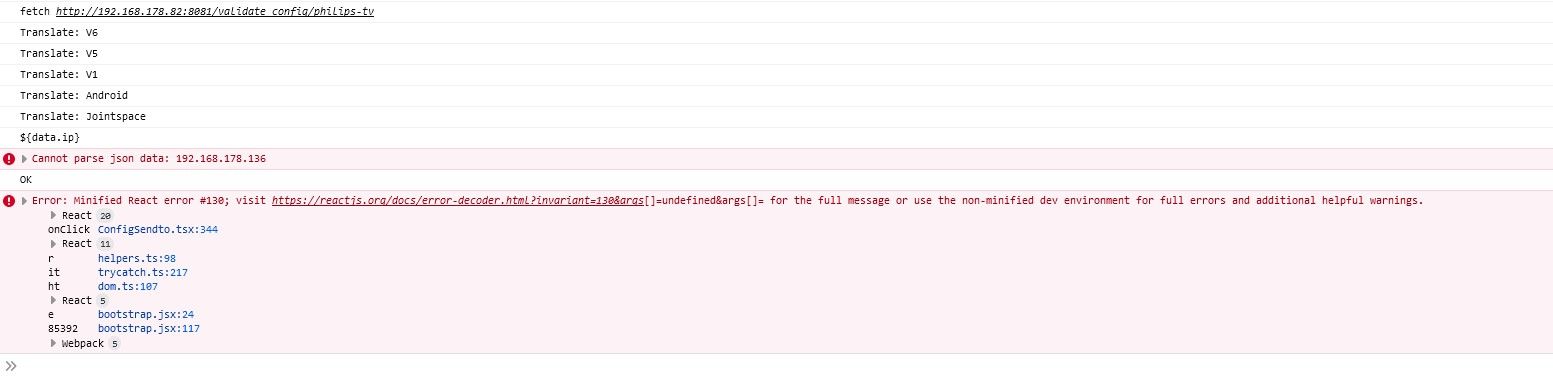
Cannot parse json data: 192.168.178.136 console.ts:40:19 ot console.ts:40 _onClick ConfigSendto.tsx:221 onClick ConfigSendto.tsx:346 React 11 r helpers.ts:98 OK console.ts:40:19 Error: Minified React error #130; visit https://reactjs.org/docs/error-decoder.html?invariant=130&args[]=undefined&args[]= for the full message or use the non-minified dev environment for full errors and additional helpful warnings. React 20 onClick ConfigSendto.tsx:344 React 11 r helpers.ts:98 console.ts:40:19 ot console.ts:40 React 15 onClick ConfigSendto.tsx:344 React 11 r helpers.ts:98 -
Cannot parse json data: 192.168.178.136 console.ts:40:19 ot console.ts:40 _onClick ConfigSendto.tsx:221 onClick ConfigSendto.tsx:346 React 11 r helpers.ts:98 OK console.ts:40:19 Error: Minified React error #130; visit https://reactjs.org/docs/error-decoder.html?invariant=130&args[]=undefined&args[]= for the full message or use the non-minified dev environment for full errors and additional helpful warnings. React 20 onClick ConfigSendto.tsx:344 React 11 r helpers.ts:98 console.ts:40:19 ot console.ts:40 React 15 onClick ConfigSendto.tsx:344 React 11 r helpers.ts:98So der Adapter ist endlich grün
Der Fehler bzw. die Lösung....
Ein einfaches " iob upload all" brachte das in OrdnungDanke für eure Mühe, hätte ich eigentlich auch schon früher drauf kommen können.
Skript v.2023-10-10 *** BASE SYSTEM *** Static hostname: iobroker Icon name: computer Operating System: Debian GNU/Linux 11 (bullseye) Kernel: Linux 6.1.21-v8+ Architecture: arm64 Model : Raspberry Pi 4 Model B Rev 1.5 Docker : false Virtualization : none Kernel : aarch64 Userland : arm64 Systemuptime and Load: 01:33:11 up 15:12, 1 user, load average: 1.32, 0.86, 0.90 CPU threads: 4 *** RASPBERRY THROTTLING *** Current issues: No throttling issues detected. Previously detected issues: No throttling issues detected. *** Time and Time Zones *** Local time: Mon 2023-12-25 01:33:11 CET Universal time: Mon 2023-12-25 00:33:11 UTC RTC time: n/a Time zone: Europe/Berlin (CET, +0100) System clock synchronized: yes NTP service: active RTC in local TZ: no *** User and Groups *** pi /home/pi pi adm dialout cdrom sudo audio video plugdev games users input render netdev lpadmin gpio i2c spi iobroker *** X-Server-Setup *** X-Server: false Desktop: Terminal: tty Boot Target: multi-user.target *** MEMORY *** total used free shared buff/cache available Mem: 7.8G 3.0G 1.1G 1.0M 3.7G 4.7G Swap: 99M 0B 99M Total: 7.9G 3.0G 1.2G 7811 M total memory 3022 M used memory 5054 M active memory 1437 M inactive memory 1067 M free memory 184 M buffer memory 3536 M swap cache 99 M total swap 0 M used swap 99 M free swap Raspberry only: oom events: 0 lifetime oom required: 0 Mbytes total time in oom handler: 0 ms max time spent in oom handler: 0 ms *** FAILED SERVICES *** UNIT LOAD ACTIVE SUB DESCRIPTION 0 loaded units listed. *** FILESYSTEM *** Filesystem Type Size Used Avail Use% Mounted on /dev/root ext4 59G 12G 45G 21% / devtmpfs devtmpfs 3.6G 0 3.6G 0% /dev tmpfs tmpfs 3.9G 0 3.9G 0% /dev/shm tmpfs tmpfs 1.6G 1.2M 1.6G 1% /run tmpfs tmpfs 5.0M 4.0K 5.0M 1% /run/lock /dev/sda1 vfat 255M 31M 225M 13% /boot tmpfs tmpfs 782M 16K 782M 1% /run/user/1000 Messages concerning ext4 filesystem in dmesg: [Sun Dec 24 10:20:56 2023] Kernel command line: coherent_pool=1M 8250.nr_uarts=1 snd_bcm2835.enable_headphones=0 snd_bcm2835.enable_headphones=1 snd_bcm2835.enable_hdmi=1 snd_bcm2835.enable_hdmi=0 smsc95xx.macaddr=D8:3A:DD:13:A5:D1 vc_mem.mem_base=0x3eb00000 vc_mem.mem_size=0x3ff00000 console=tty1 root=PARTUUID=2c0392e1-02 rootfstype=ext4 fsck.repair=yes rootwait quiet splash plymouth.ignore-serial-consoles [Sun Dec 24 10:20:58 2023] EXT4-fs (sda2): mounted filesystem with ordered data mode. Quota mode: none. [Sun Dec 24 10:20:58 2023] VFS: Mounted root (ext4 filesystem) readonly on device 8:2. [Sun Dec 24 10:20:59 2023] EXT4-fs (sda2): re-mounted. Quota mode: none. Show mounted filesystems \(real ones only\): TARGET SOURCE FSTYPE OPTIONS / /dev/sda2 ext4 rw,noatime `-/boot /dev/sda1 vfat rw,relatime,fmask=0022,dmask=0022,codepage=437,iocharset=ascii,shortname=mixed,errors=remount-ro Files in neuralgic directories: /var: 1.9G /var/ 1.1G /var/log/journal/a9f1eae0dc5a48ddbf0e2a62c2227673 1.1G /var/log/journal 1.1G /var/log 629M /var/lib Archived and active journals take up 1.0G in the file system. /opt/iobroker/backups: 1.5G /opt/iobroker/backups/ /opt/iobroker/iobroker-data: 352M /opt/iobroker/iobroker-data/ 183M /opt/iobroker/iobroker-data/files 76M /opt/iobroker/iobroker-data/backup-objects 71M /opt/iobroker/iobroker-data/node-red/node_modules 71M /opt/iobroker/iobroker-data/node-red The five largest files in iobroker-data are: 33M /opt/iobroker/iobroker-data/files/iot.admin/static/js/main.1797d034.js.map 22M /opt/iobroker/iobroker-data/files/web.admin/static/js/main.c05ba1d3.js.map 14M /opt/iobroker/iobroker-data/objects.jsonl 8.5M /opt/iobroker/iobroker-data/files/iot.admin/static/js/main.1797d034.js 8.3M /opt/iobroker/iobroker-data/files/web.admin/static/js/main.c05ba1d3.js USB-Devices by-id: USB-Sticks - Avoid direct links to /dev/* in your adapter setups, please always prefer the links 'by-id': find: '/dev/serial/by-id/': No such file or directory *** NodeJS-Installation *** /usr/bin/nodejs v18.19.0 /usr/bin/node v18.19.0 /usr/bin/npm 10.2.3 /usr/bin/npx 10.2.3 /usr/bin/corepack 0.22.0 nodejs: Installed: 18.19.0-1nodesource1 Candidate: 18.19.0-1nodesource1 Version table: *** 18.19.0-1nodesource1 1001 500 https://deb.nodesource.com/node_18.x nodistro/main arm64 Packages 100 /var/lib/dpkg/status 18.18.2-1nodesource1 1001 500 https://deb.nodesource.com/node_18.x nodistro/main arm64 Packages 18.18.1-1nodesource1 1001 500 https://deb.nodesource.com/node_18.x nodistro/main arm64 Packages 18.18.0-1nodesource1 1001 500 https://deb.nodesource.com/node_18.x nodistro/main arm64 Packages 18.17.1-1nodesource1 1001 500 https://deb.nodesource.com/node_18.x nodistro/main arm64 Packages 18.17.0-1nodesource1 1001 500 https://deb.nodesource.com/node_18.x nodistro/main arm64 Packages 18.16.1-1nodesource1 1001 500 https://deb.nodesource.com/node_18.x nodistro/main arm64 Packages 18.16.0-1nodesource1 1001 500 https://deb.nodesource.com/node_18.x nodistro/main arm64 Packages 18.15.0-1nodesource1 1001 500 https://deb.nodesource.com/node_18.x nodistro/main arm64 Packages 18.14.2-1nodesource1 1001 500 https://deb.nodesource.com/node_18.x nodistro/main arm64 Packages 18.14.1-1nodesource1 1001 500 https://deb.nodesource.com/node_18.x nodistro/main arm64 Packages 18.14.0-1nodesource1 1001 500 https://deb.nodesource.com/node_18.x nodistro/main arm64 Packages 18.13.0-1nodesource1 1001 500 https://deb.nodesource.com/node_18.x nodistro/main arm64 Packages 18.12.0-1nodesource1 1001 500 https://deb.nodesource.com/node_18.x nodistro/main arm64 Packages 18.11.0-1nodesource1 1001 500 https://deb.nodesource.com/node_18.x nodistro/main arm64 Packages 18.10.0-1nodesource1 1001 500 https://deb.nodesource.com/node_18.x nodistro/main arm64 Packages 18.9.1-1nodesource1 1001 500 https://deb.nodesource.com/node_18.x nodistro/main arm64 Packages 18.9.0-1nodesource1 1001 500 https://deb.nodesource.com/node_18.x nodistro/main arm64 Packages 18.8.0-1nodesource1 1001 500 https://deb.nodesource.com/node_18.x nodistro/main arm64 Packages 18.7.0-1nodesource1 1001 500 https://deb.nodesource.com/node_18.x nodistro/main arm64 Packages 18.6.0-1nodesource1 1001 500 https://deb.nodesource.com/node_18.x nodistro/main arm64 Packages 18.5.0-1nodesource1 1001 500 https://deb.nodesource.com/node_18.x nodistro/main arm64 Packages 18.4.0-1nodesource1 1001 500 https://deb.nodesource.com/node_18.x nodistro/main arm64 Packages 18.3.0-1nodesource1 1001 500 https://deb.nodesource.com/node_18.x nodistro/main arm64 Packages 18.2.0-1nodesource1 1001 500 https://deb.nodesource.com/node_18.x nodistro/main arm64 Packages 18.1.0-1nodesource1 1001 500 https://deb.nodesource.com/node_18.x nodistro/main arm64 Packages 18.0.0-1nodesource1 1001 500 https://deb.nodesource.com/node_18.x nodistro/main arm64 Packages 12.22.12~dfsg-1~deb11u4 500 500 http://deb.debian.org/debian bullseye/main arm64 Packages 500 http://security.debian.org/debian-security bullseye-security/main arm64 Packages Temp directories causing npm8 problem: 0 No problems detected Errors in npm tree: *** ioBroker-Installation *** ioBroker Status iobroker is running on this host. Objects type: jsonl States type: jsonl Core adapters versions js-controller: 5.0.17 admin: 6.13.9 javascript: 7.5.1 Adapters from github: 2 Adapter State + system.adapter.admin.0 : admin : iobroker - enabled, port: 8081, bind: 0.0.0.0, run as: admin + system.adapter.alexa2.0 : alexa2 : iobroker - enabled system.adapter.alias-manager.0 : alias-manager : iobroker - disabled + system.adapter.backitup.0 : backitup : iobroker - enabled + system.adapter.cloud.0 : cloud : iobroker - enabled + system.adapter.discovery.0 : discovery : iobroker - enabled + system.adapter.energiefluss-erweitert.0 : energiefluss-erweitert: iobroker - enabled + system.adapter.fritzdect.0 : fritzdect : iobroker - enabled + system.adapter.hm-rega.0 : hm-rega : iobroker - enabled + system.adapter.hm-rpc.0 : hm-rpc : iobroker - enabled, port: 18701 + system.adapter.hm-rpc.1 : hm-rpc : iobroker - enabled, port: 12001 + system.adapter.hm-rpc.2 : hm-rpc : iobroker - enabled, port: 12010 + system.adapter.hm-rpc.3 : hm-rpc : iobroker - enabled, port: 0 + system.adapter.hue.0 : hue : iobroker - enabled, port: 443 system.adapter.ical.0 : ical : iobroker - enabled + system.adapter.influxdb.0 : influxdb : iobroker - enabled, port: 8086 + system.adapter.info.0 : info : iobroker - enabled + system.adapter.iot.0 : iot : iobroker - enabled + system.adapter.jarvis.0 : jarvis : iobroker - enabled + system.adapter.javascript.0 : javascript : iobroker - enabled + system.adapter.mqtt.0 : mqtt : iobroker - enabled, port: 1883, bind: 0.0.0.0 + system.adapter.net-tools.0 : net-tools : iobroker - enabled + system.adapter.node-red.0 : node-red : iobroker - enabled, port: 1880, bind: 0.0.0.0 + system.adapter.nuki.0 : nuki : iobroker - enabled + system.adapter.opendtu.0 : opendtu : iobroker - enabled + system.adapter.philips-tv.0 : philips-tv : iobroker - enabled + system.adapter.ping.0 : ping : iobroker - enabled + system.adapter.rpi2.0 : rpi2 : iobroker - enabled + system.adapter.shelly.0 : shelly : iobroker - enabled, port: 1882, bind: 0.0.0.0 + system.adapter.simple-api.0 : simple-api : iobroker - enabled, port: 8087, bind: 192.168.178.82, run as: admin + system.adapter.socketio.0 : socketio : iobroker - enabled, port: 8084, bind: 0.0.0.0, run as: admin + system.adapter.sonoff.0 : sonoff : iobroker - enabled, port: 1886, bind: 0.0.0.0 + system.adapter.sourceanalytix.0 : sourceanalytix : iobroker - enabled + system.adapter.telegram.0 : telegram : iobroker - enabled, port: 8443, bind: 0.0.0.0 + system.adapter.tr-064.0 : tr-064 : iobroker - enabled + system.adapter.web.0 : web : iobroker - enabled, port: 8082, bind: 0.0.0.0, run as: admin + instance is alive Enabled adapters with bindings + system.adapter.admin.0 : admin : iobroker - enabled, port: 8081, bind: 0.0.0.0, run as: admin + system.adapter.hm-rpc.0 : hm-rpc : iobroker - enabled, port: 18701 + system.adapter.hm-rpc.1 : hm-rpc : iobroker - enabled, port: 12001 + system.adapter.hm-rpc.2 : hm-rpc : iobroker - enabled, port: 12010 + system.adapter.hm-rpc.3 : hm-rpc : iobroker - enabled, port: 0 + system.adapter.hue.0 : hue : iobroker - enabled, port: 443 + system.adapter.influxdb.0 : influxdb : iobroker - enabled, port: 8086 + system.adapter.mqtt.0 : mqtt : iobroker - enabled, port: 1883, bind: 0.0.0.0 + system.adapter.node-red.0 : node-red : iobroker - enabled, port: 1880, bind: 0.0.0.0 + system.adapter.shelly.0 : shelly : iobroker - enabled, port: 1882, bind: 0.0.0.0 + system.adapter.simple-api.0 : simple-api : iobroker - enabled, port: 8087, bind: 192.168.178.82, run as: admin + system.adapter.socketio.0 : socketio : iobroker - enabled, port: 8084, bind: 0.0.0.0, run as: admin + system.adapter.sonoff.0 : sonoff : iobroker - enabled, port: 1886, bind: 0.0.0.0 + system.adapter.telegram.0 : telegram : iobroker - enabled, port: 8443, bind: 0.0.0.0 + system.adapter.web.0 : web : iobroker - enabled, port: 8082, bind: 0.0.0.0, run as: admin ioBroker-Repositories stable : http://download.iobroker.net/sources-dist.json beta : http://download.iobroker.net/sources-dist-latest.json Active repo(s): beta Installed ioBroker-Instances Used repository: beta Adapter "admin" : 6.13.9 , installed 6.13.9 Adapter "alexa2" : 3.26.3 , installed 3.26.3 Adapter "alias-manager": 1.2.6 , installed 1.2.6 Adapter "backitup" : 2.9.8 , installed 2.9.8 Adapter "cloud" : 4.4.1 , installed 4.4.1 Adapter "discovery" : 4.2.0 , installed 4.2.0 Adapter "fritzdect" : 2.5.9 , installed 2.5.9 Adapter "hm-rega" : 4.0.0 , installed 4.0.0 Adapter "hm-rpc" : 1.15.19 , installed 1.15.19 Adapter "hue" : 3.10.1 , installed 3.10.1 Adapter "ical" : 1.13.5 , installed 1.13.5 Adapter "influxdb" : 3.2.0 , installed 3.2.0 Adapter "info" : 2.0.0 , installed 2.0.0 Adapter "iopooleco" : 0.5.1 , installed 0.5.1 Adapter "iot" : 2.0.11 , installed 2.0.11 Adapter "jarvis" : 3.1.8 , installed 3.1.9-beta.3 Adapter "javascript" : 7.5.1 , installed 7.5.1 Controller "js-controller": 5.0.17 , installed 5.0.17 Adapter "mqtt" : 5.1.0 , installed 5.1.0 Adapter "net-tools" : 0.2.0 , installed 0.2.0 Adapter "node-red" : 5.0.2 , installed 5.0.2 Adapter "nuki" : 1.6.0 , installed 1.6.0 Adapter "opendtu" : 1.0.1 , installed 1.0.1 Adapter "philips-tv" : 0.5.3 , installed 0.5.3 Adapter "ping" : 1.6.2 , installed 1.6.2 Adapter "rpi2" : 1.3.2 , installed 1.3.2 Adapter "shelly" : 6.7.0 , installed 6.7.0 Adapter "simple-api" : 2.7.2 , installed 2.7.2 Adapter "socketio" : 6.6.0 , installed 6.6.0 Adapter "sonoff" : 3.0.3 , installed 3.0.3 Adapter "sourceanalytix": 0.4.14 , installed 0.4.14 Adapter "telegram" : 3.0.1 , installed 3.0.1 Adapter "tr-064" : 4.2.18 , installed 4.2.18 Adapter "web" : 6.2.3 , installed 6.2.3 Adapter "ws" : 2.5.10 , installed 2.5.10 Objects and States Please stand by - This may take a while Objects: 9665 States: 9732 *** OS-Repositories and Updates *** Hit:1 http://deb.debian.org/debian bullseye InRelease Hit:2 http://deb.debian.org/debian bullseye-updates InRelease Hit:3 http://security.debian.org/debian-security bullseye-security InRelease Hit:4 http://archive.raspberrypi.org/debian bullseye InRelease Hit:5 https://repos.influxdata.com/debian stable InRelease Hit:6 https://apt.grafana.com stable InRelease Hit:7 https://deb.nodesource.com/node_18.x nodistro InRelease Reading package lists... Pending Updates: 0 *** Listening Ports *** Active Internet connections (only servers) Proto Recv-Q Send-Q Local Address Foreign Address State User Inode PID/Program name tcp 0 0 192.168.178.82:12001 0.0.0.0:* LISTEN 1001 16204 1300/io.hm-rpc.1 tcp 0 0 192.168.178.82:12010 0.0.0.0:* LISTEN 1001 16953 1317/io.hm-rpc.2 tcp 0 0 192.168.178.82:8087 0.0.0.0:* LISTEN 1001 2425281 140650/io.simple-ap tcp 0 0 0.0.0.0:1886 0.0.0.0:* LISTEN 1001 18345 1486/io.sonoff.0 tcp 0 0 0.0.0.0:1880 0.0.0.0:* LISTEN 1001 16919 1212/node-red tcp 0 0 0.0.0.0:1883 0.0.0.0:* LISTEN 116 1999 559/mosquitto tcp 0 0 0.0.0.0:1882 0.0.0.0:* LISTEN 1001 17227 1511/io.shelly.0 tcp 0 0 0.0.0.0:22 0.0.0.0:* LISTEN 0 30562 3094/sshd: /usr/sbi tcp 0 0 0.0.0.0:8400 0.0.0.0:* LISTEN 1001 21874 1876/io.jarvis.0 tcp 0 0 192.168.178.82:18701 0.0.0.0:* LISTEN 1001 14136 1278/io.hm-rpc.0 tcp 0 0 192.168.178.82:2001 0.0.0.0:* LISTEN 1001 17963 1375/io.hm-rpc.3 tcp 0 0 127.0.0.1:9001 0.0.0.0:* LISTEN 1001 15623 656/iobroker.js-con tcp 0 0 127.0.0.1:9000 0.0.0.0:* LISTEN 1001 15141 656/iobroker.js-con tcp 0 0 127.0.0.1:631 0.0.0.0:* LISTEN 0 2228473 128643/cupsd tcp 0 0 192.168.178.82:9092 0.0.0.0:* LISTEN 1001 22276 1910/io.nuki.0 tcp6 0 0 :::1883 :::* LISTEN 116 2000 559/mosquitto tcp6 0 0 :::22 :::* LISTEN 0 30564 3094/sshd: /usr/sbi tcp6 0 0 :::8084 :::* LISTEN 1001 2421701 140580/io.socketio. tcp6 0 0 :::8086 :::* LISTEN 999 15452 549/influxd tcp6 0 0 :::8081 :::* LISTEN 1001 2351329 136052/io.admin.0 tcp6 0 0 :::8082 :::* LISTEN 1001 2426005 140522/io.web.0 tcp6 0 0 ::1:631 :::* LISTEN 0 2228472 128643/cupsd tcp6 0 0 :::3000 :::* LISTEN 117 15499 655/grafana udp 0 0 0.0.0.0:48065 0.0.0.0:* 108 14876 400/avahi-daemon: r udp 0 0 0.0.0.0:68 0.0.0.0:* 0 15056 464/dhcpcd udp 0 0 0.0.0.0:631 0.0.0.0:* 0 2226608 128646/cups-browsed udp 0 0 0.0.0.0:5353 0.0.0.0:* 108 14874 400/avahi-daemon: r udp6 0 0 :::36425 :::* 108 14877 400/avahi-daemon: r udp6 0 0 :::546 :::* 0 15086 464/dhcpcd udp6 0 0 :::5353 :::* 108 14875 400/avahi-daemon: r *** Log File - Last 25 Lines *** 2023-12-25 01:22:52.333 - info: philips-tv.0 (141369) Got terminate signal TERMINATE_YOURSELF 2023-12-25 01:22:52.451 - info: host.iobroker stopInstance system.adapter.philips-tv.0 send kill signal 2023-12-25 01:22:52.518 - info: philips-tv.0 (141369) terminating 2023-12-25 01:22:52.520 - info: philips-tv.0 (141369) Terminated (ADAPTER_REQUESTED_TERMINATION): Without reason 2023-12-25 01:22:52.839 - info: philips-tv.0 (141369) terminating 2023-12-25 01:22:53.150 - info: host.iobroker instance system.adapter.philips-tv.0 terminated with code 11 (ADAPTER_REQUESTED_TERMINATION) 2023-12-25 01:22:55.591 - info: host.iobroker instance system.adapter.philips-tv.0 started with pid 141384 2023-12-25 01:22:58.922 - info: philips-tv.0 (141384) starting. Version 0.5.3 in /opt/iobroker/node_modules/iobroker.philips-tv, node: v18.19.0, js-controller: 5.0.17 2023-12-25 01:22:58.948 - info: philips-tv.0 (141384) Starting with ip "192.168.178.136" (API v6 - Android) 2023-12-25 01:23:01.146 - info: admin.0 (136052) <== Disconnect system.user.admin from ::ffff:192.168.178.23 admin 2023-12-25 01:23:02.120 - info: admin.0 (136052) ==> Connected system.user.admin from ::ffff:192.168.178.23 2023-12-25 01:26:35.217 - info: admin.0 (136052) <== Disconnect system.user.admin from ::ffff:192.168.178.23 admin 2023-12-25 01:26:40.999 - info: admin.0 (136052) ==> Connected system.user.admin from ::ffff:192.168.178.23 2023-12-25 01:27:24.211 - info: admin.0 (136052) <== Disconnect system.user.admin from ::ffff:192.168.178.23 admin 2023-12-25 01:30:00.200 - info: host.iobroker instance system.adapter.ical.0 started with pid 142393 2023-12-25 01:30:03.335 - info: ical.0 (142393) starting. Version 1.13.5 in /opt/iobroker/node_modules/iobroker.ical, node: v18.19.0, js-controller: 5.0.17 2023-12-25 01:30:09.489 - info: ical.0 (142393) Terminated (NO_ERROR): Without reason 2023-12-25 01:30:10.076 - info: host.iobroker instance system.adapter.ical.0 terminated with code 0 (NO_ERROR) 2023-12-25 01:32:39.084 - info: admin.0 (136052) ==> Connected system.user.admin from ::ffff:192.168.178.63 2023-12-25 01:33:57.940 - info: web.0 (140522) ==> Connected system.user.admin from ::ffff:192.168.178.63 2023-12-25 01:34:21.433 - info: web.0 (140522) <== Disconnect system.user.admin from ::ffff:192.168.178.63 ============ Mark until here for C&P ============= -
hey, erst mal danke, dass dieser adapter zur verfügung gestellt wird.
ich habe gestern etwas damit rumgespielt und es scheint alles einwandfrei zu funktionieren.ich muss sagen, so toll ich meinen Philips - 65OLED807-12 finde so wahr ist es aber auch, dass das OS der letzte rotz ist. es ist tatsächlich so negativ wie alle im netz behaupten.
hinzu kommt auch noch, dass der alexa skill alles andere als nützlich ist. wenig bis keine funktionen und was die zuverlässigkeit angeht, da kann man auch lotto spielen.hinzu kommt noch, dass es auch wirklich keine einzige funktionierende android app gibt, welche man als virtuelle tastatur hätte nutzen können.
umso erfreulicher, dass ich mit dem adapter hier beides mir jetzt selbst mit VIS und IoT Adapter zusammenbasteln kann.
und jetzt zu meiner eigentlichen frage.. hat jemand zufälligerweise einen bereits fertigen VIS, den er bereit ist zu teilen? 😊🙏🏾
-
hey, erst mal danke, dass dieser adapter zur verfügung gestellt wird.
ich habe gestern etwas damit rumgespielt und es scheint alles einwandfrei zu funktionieren.ich muss sagen, so toll ich meinen Philips - 65OLED807-12 finde so wahr ist es aber auch, dass das OS der letzte rotz ist. es ist tatsächlich so negativ wie alle im netz behaupten.
hinzu kommt auch noch, dass der alexa skill alles andere als nützlich ist. wenig bis keine funktionen und was die zuverlässigkeit angeht, da kann man auch lotto spielen.hinzu kommt noch, dass es auch wirklich keine einzige funktionierende android app gibt, welche man als virtuelle tastatur hätte nutzen können.
umso erfreulicher, dass ich mit dem adapter hier beides mir jetzt selbst mit VIS und IoT Adapter zusammenbasteln kann.
und jetzt zu meiner eigentlichen frage.. hat jemand zufälligerweise einen bereits fertigen VIS, den er bereit ist zu teilen? 😊🙏🏾
@ltsalvatore Schau mal hier nach. Die sind zwar für LG aber das kann man ja ändern.
Gruß//Lucky
-
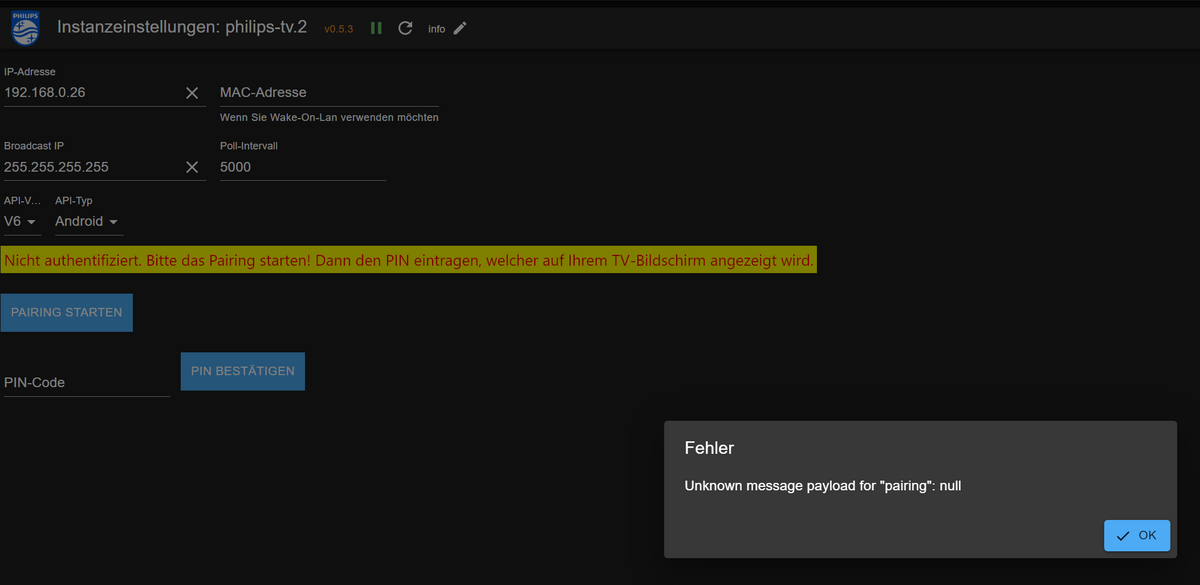
Ich erhalte folgenden Fehler beim Versuch das TV (55PUS8808) zu pairen. Ich hatte das TV vor einigen Monaten (8-10) bereits mal gepaired, aber dann den Adapter zwischenzeitlich nochmal gelöscht und soeben wieder neu installiert. Nun erscheint nur folgende Fehlermeldung, auch bei den Protokollen kommt keine Meldung eines Fehlers, selbst bei Logstufe "Alles/Silly". Mir scheint es so, als dass überhaupt nichts an das TV gesendet wird und daher auch kein Pairing-Code angezeigt wird. Oder muss ich irgendwo im TV zuerst das alte Pairing löschen? Wenn ja, wo? Ich habe in den TV-Einstellungen bestimmt über eine Stunde jedes Untermenü durchsucht und finde nichts.
-
Ich erhalte folgenden Fehler beim Versuch das TV (55PUS8808) zu pairen. Ich hatte das TV vor einigen Monaten (8-10) bereits mal gepaired, aber dann den Adapter zwischenzeitlich nochmal gelöscht und soeben wieder neu installiert. Nun erscheint nur folgende Fehlermeldung, auch bei den Protokollen kommt keine Meldung eines Fehlers, selbst bei Logstufe "Alles/Silly". Mir scheint es so, als dass überhaupt nichts an das TV gesendet wird und daher auch kein Pairing-Code angezeigt wird. Oder muss ich irgendwo im TV zuerst das alte Pairing löschen? Wenn ja, wo? Ich habe in den TV-Einstellungen bestimmt über eine Stunde jedes Untermenü durchsucht und finde nichts.
Hast du zufällig auch vor ein paar Tagen ein Update am TV gemacht? Bei mir kamen die Fehlermeldungen just in dem Moment, wo der TV nach dem Update neu gestartet ist.
Habe auch schon ne ganze Menge probiert, das letzte, was ich jetzt noch machen könnte, wäre ein Downgrade am TV.Das Pairen (des TV) an sich scheint zu funktionieren, eine App hat sich angemeldet und es wurde ein Code am TV angezeigt.
Enrico
-
Hast du zufällig auch vor ein paar Tagen ein Update am TV gemacht? Bei mir kamen die Fehlermeldungen just in dem Moment, wo der TV nach dem Update neu gestartet ist.
Habe auch schon ne ganze Menge probiert, das letzte, was ich jetzt noch machen könnte, wäre ein Downgrade am TV.Das Pairen (des TV) an sich scheint zu funktionieren, eine App hat sich angemeldet und es wurde ein Code am TV angezeigt.
Enrico
Also den TV habe ich mal auf die vorherige Version zurückgesetzt, es hat nichts gebracht.
Habe auch noch einmal alle Adapterversionen ab 0.3.0 versucht, auch ohne Erfolg. Heute Abend werde ich nochmal versuchen, die Adapterversionen jeweils mit einer kompletten Neuinstallation zu installieren.
Was mir mal immer wieder aufgefallen ist. Meist kam die Fehlermeldung sofort und manchmal, vielleicht nach einer Installation oder einem Adapterneustart (das kann ich noch nicht genau sagen), dauert es einige Sekunden, bis die Fehlermeldung kommt. Leider gibt es im log keine brauchbaren Infos.
Enrico
-
Also den TV habe ich mal auf die vorherige Version zurückgesetzt, es hat nichts gebracht.
Habe auch noch einmal alle Adapterversionen ab 0.3.0 versucht, auch ohne Erfolg. Heute Abend werde ich nochmal versuchen, die Adapterversionen jeweils mit einer kompletten Neuinstallation zu installieren.
Was mir mal immer wieder aufgefallen ist. Meist kam die Fehlermeldung sofort und manchmal, vielleicht nach einer Installation oder einem Adapterneustart (das kann ich noch nicht genau sagen), dauert es einige Sekunden, bis die Fehlermeldung kommt. Leider gibt es im log keine brauchbaren Infos.
Enrico
Ich habe das selbe Problem mit meinem TV. Beim Pairing kommt die Fehlermeldung "Unknown message payload for "Pairing": null". Ich habe das Modell 65OLED854 mit dem seit kurzem verfügbaren Android TV 11. Ich habe es mit der Version 0.5.3 und mit der 0.5.2 probiert.
Dimi
-
Ich habe das selbe Problem mit meinem TV. Beim Pairing kommt die Fehlermeldung "Unknown message payload for "Pairing": null". Ich habe das Modell 65OLED854 mit dem seit kurzem verfügbaren Android TV 11. Ich habe es mit der Version 0.5.3 und mit der 0.5.2 probiert.
Dimi
Hallo zusammen,
ich habe einen 65OLED935/12 Philips TV mit der aktuellsten Software und Android 11, welcher via LAN verbunden ist.Ohne MAC Adresse für WOL wird der Adapter grün und funktioniert einwandfrei.
Ich möchte den Adapter aber nur nutzen um das Ambilght einschalten zu können und dazu benötige ich WOL. Sobald ich die MAC (welche in den Netzwerkeinstellungen vom TV steht / Ethernet MAC Adresse) eintrage wird der Adapter nicht mehr grün.
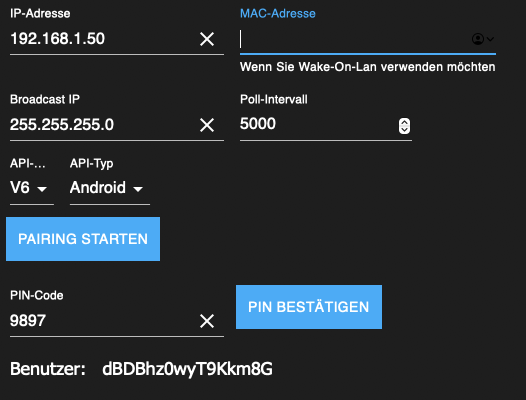
Anbei der Log:
2024-07-02 20:30:15.001 - debug: philips-tv.0 (12498) Redis Objects: Use Redis connection: 127.0.0.1:9001
2024-07-02 20:30:15.122 - debug: philips-tv.0 (12498) Objects client ready ... initialize now
2024-07-02 20:30:15.159 - debug: philips-tv.0 (12498) Objects create System PubSub Client
2024-07-02 20:30:15.162 - debug: philips-tv.0 (12498) Objects create User PubSub Client
2024-07-02 20:30:15.337 - debug: philips-tv.0 (12498) Objects client initialize lua scripts
2024-07-02 20:30:15.351 - debug: philips-tv.0 (12498) Objects connected to redis: 127.0.0.1:9001
2024-07-02 20:30:15.457 - debug: philips-tv.0 (12498) Redis States: Use Redis connection: 127.0.0.1:9000
2024-07-02 20:30:15.512 - debug: philips-tv.0 (12498) States create System PubSub Client
2024-07-02 20:30:15.514 - debug: philips-tv.0 (12498) States create User PubSub Client
2024-07-02 20:30:15.618 - debug: philips-tv.0 (12498) States connected to redis: 127.0.0.1:9000
2024-07-02 20:30:16.290 - info: philips-tv.0 (12498) starting. Version 0.5.3 in /opt/iobroker/node_modules/iobroker.philips-tv, node: v18.20.2, js-controller: 5.0.19
2024-07-02 20:30:16.324 - info: philips-tv.0 (12498) Starting with ip "192.168.1.50" (API v6 - Android)
2024-07-02 20:30:16.331 - error: philips-tv.0 (12498) Cannot create API client Provided MAC is not an MAC Address!Der Log sagt ja dass die MAC keine MAC Adresse ist.
Habe die MAC Adresse auch nochmal in meiner Unifi Dream Machine Pro geprüft, Sie stimmt...Hat jemand eine Idee und kann mir helfen?
Vielen Dank im Voraus!
Grüße
Adri -
Hallo zusammen,
ich habe einen 65OLED935/12 Philips TV mit der aktuellsten Software und Android 11, welcher via LAN verbunden ist.Ohne MAC Adresse für WOL wird der Adapter grün und funktioniert einwandfrei.
Ich möchte den Adapter aber nur nutzen um das Ambilght einschalten zu können und dazu benötige ich WOL. Sobald ich die MAC (welche in den Netzwerkeinstellungen vom TV steht / Ethernet MAC Adresse) eintrage wird der Adapter nicht mehr grün.
Anbei der Log:
2024-07-02 20:30:15.001 - debug: philips-tv.0 (12498) Redis Objects: Use Redis connection: 127.0.0.1:9001
2024-07-02 20:30:15.122 - debug: philips-tv.0 (12498) Objects client ready ... initialize now
2024-07-02 20:30:15.159 - debug: philips-tv.0 (12498) Objects create System PubSub Client
2024-07-02 20:30:15.162 - debug: philips-tv.0 (12498) Objects create User PubSub Client
2024-07-02 20:30:15.337 - debug: philips-tv.0 (12498) Objects client initialize lua scripts
2024-07-02 20:30:15.351 - debug: philips-tv.0 (12498) Objects connected to redis: 127.0.0.1:9001
2024-07-02 20:30:15.457 - debug: philips-tv.0 (12498) Redis States: Use Redis connection: 127.0.0.1:9000
2024-07-02 20:30:15.512 - debug: philips-tv.0 (12498) States create System PubSub Client
2024-07-02 20:30:15.514 - debug: philips-tv.0 (12498) States create User PubSub Client
2024-07-02 20:30:15.618 - debug: philips-tv.0 (12498) States connected to redis: 127.0.0.1:9000
2024-07-02 20:30:16.290 - info: philips-tv.0 (12498) starting. Version 0.5.3 in /opt/iobroker/node_modules/iobroker.philips-tv, node: v18.20.2, js-controller: 5.0.19
2024-07-02 20:30:16.324 - info: philips-tv.0 (12498) Starting with ip "192.168.1.50" (API v6 - Android)
2024-07-02 20:30:16.331 - error: philips-tv.0 (12498) Cannot create API client Provided MAC is not an MAC Address!Der Log sagt ja dass die MAC keine MAC Adresse ist.
Habe die MAC Adresse auch nochmal in meiner Unifi Dream Machine Pro geprüft, Sie stimmt...Hat jemand eine Idee und kann mir helfen?
Vielen Dank im Voraus!
Grüße
Adri -
@adri525 sagte in Test Adapter Philips-TV v0.2.x:
die MAC Adresse
zeig mal die MAC welche Du im Adapter einträgst bitte.
-
@djmarc75
Nein, es ist kein Leerzeichen o.ä. drin.
Habe die MAC händisch eingetragen und nicht kopiert...@adri525 sagte in Test Adapter Philips-TV v0.2.x:
@djmarc75
Nein, es ist kein Leerzeichen o.ä. drin.
Habe die MAC händisch eingetragen und nicht kopiert...bei mir hab ich alles mit großbuchstaben drin.. wäre ein versuch wert.



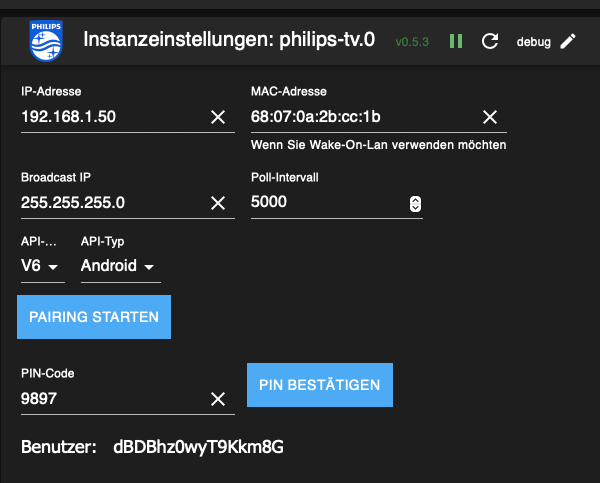
Hey! Du scheinst an dieser Unterhaltung interessiert zu sein, hast aber noch kein Konto.
Hast du es satt, bei jedem Besuch durch die gleichen Beiträge zu scrollen? Wenn du dich für ein Konto anmeldest, kommst du immer genau dorthin zurück, wo du zuvor warst, und kannst dich über neue Antworten benachrichtigen lassen (entweder per E-Mail oder Push-Benachrichtigung). Du kannst auch Lesezeichen speichern und Beiträge positiv bewerten, um anderen Community-Mitgliedern deine Wertschätzung zu zeigen.
Mit deinem Input könnte dieser Beitrag noch besser werden 💗
Registrieren AnmeldenSupport us
439
Online33.0k
Benutzer83.6k
Themen1.3m
Beiträge