




Textvariablen mit & - wie trennen?
-
Hallo
Ich bekomme von meiner Ecowitt Wetterstation die Werte per MQTT zugeschickt. Dies ist ein Text, wo die einzelnen Variablen durch $ getrennt sind.
PASSKEY=xxx&stationtype=GW2000A_V3.2.2&runtime=86732&heap=82460&dateutc=2025-04-19%2018%3A57%3A39&tempinf=69.08&humidityin=43&baromrelin=29.740&baromabsin=29.740&tempf=46.40&humidity=76&vpd=0.076&winddir=304&windspeedmph=3.80&windgustmph=7.38&maxdailygust=13.65&solarradiation=0.16&uv=0&rrain_piezo=0.000&erain_piezo=0.000&hrain_piezo=0.000&drain_piezo=0.000&wrain_piezo=0.409&mrain_piezo=0.409&yrain_piezo=0.409&srain_piezo=0&ws90cap_volt=5.2&ws90_ver=133&wh90batt=3.26&freq=868M&model=GW2000A&interval=60Mit welchem Befehl kann ich hier einzelne Werte auslesen (z.B. "tempf")?
Gruß Hendrik
-
Hallo
Ich bekomme von meiner Ecowitt Wetterstation die Werte per MQTT zugeschickt. Dies ist ein Text, wo die einzelnen Variablen durch $ getrennt sind.
PASSKEY=xxx&stationtype=GW2000A_V3.2.2&runtime=86732&heap=82460&dateutc=2025-04-19%2018%3A57%3A39&tempinf=69.08&humidityin=43&baromrelin=29.740&baromabsin=29.740&tempf=46.40&humidity=76&vpd=0.076&winddir=304&windspeedmph=3.80&windgustmph=7.38&maxdailygust=13.65&solarradiation=0.16&uv=0&rrain_piezo=0.000&erain_piezo=0.000&hrain_piezo=0.000&drain_piezo=0.000&wrain_piezo=0.409&mrain_piezo=0.409&yrain_piezo=0.409&srain_piezo=0&ws90cap_volt=5.2&ws90_ver=133&wh90batt=3.26&freq=868M&model=GW2000A&interval=60Mit welchem Befehl kann ich hier einzelne Werte auslesen (z.B. "tempf")?
Gruß Hendrik
@hendrik87 ganz grob als Denkanstoß
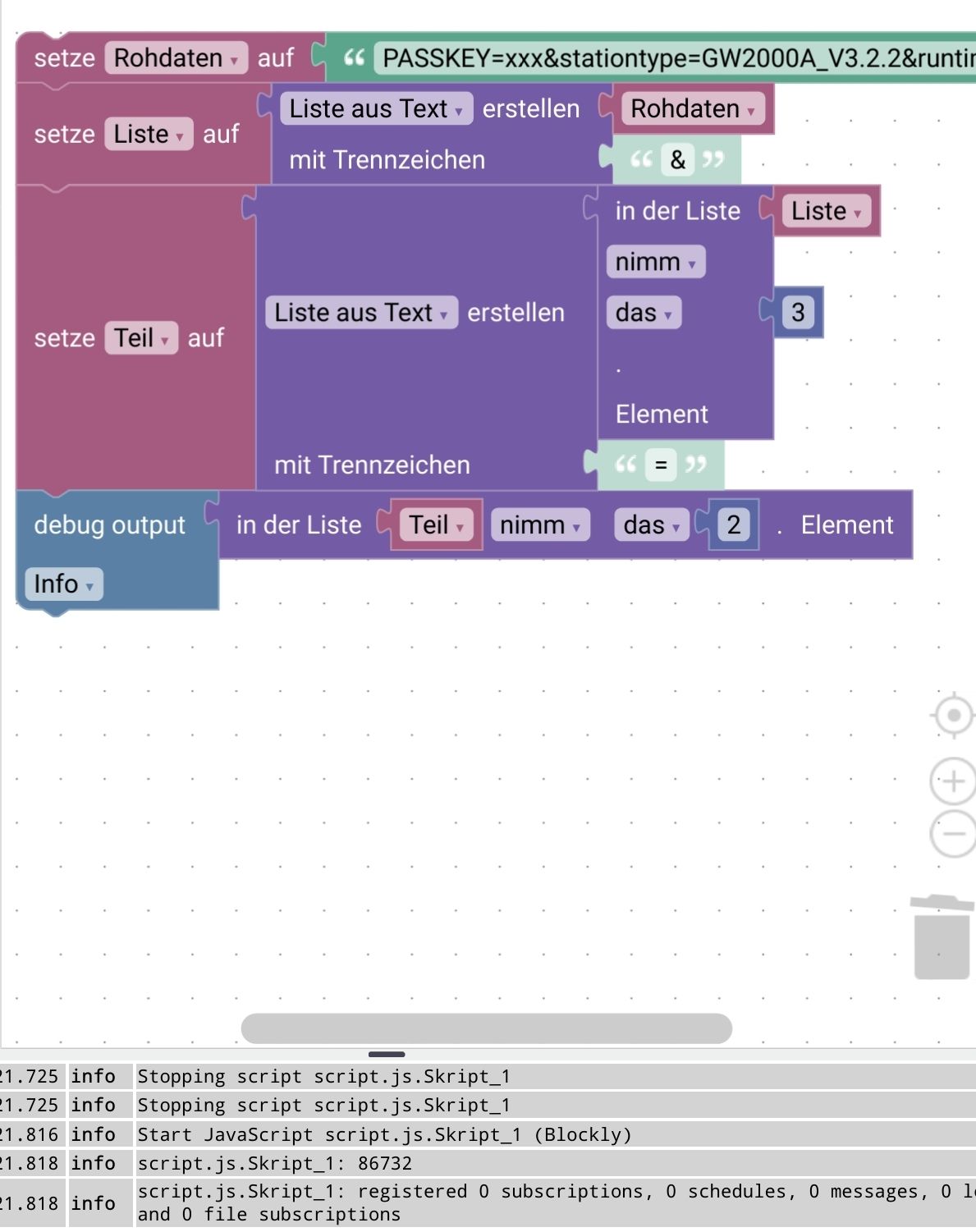
-
Hallo
Ich bekomme von meiner Ecowitt Wetterstation die Werte per MQTT zugeschickt. Dies ist ein Text, wo die einzelnen Variablen durch $ getrennt sind.
PASSKEY=xxx&stationtype=GW2000A_V3.2.2&runtime=86732&heap=82460&dateutc=2025-04-19%2018%3A57%3A39&tempinf=69.08&humidityin=43&baromrelin=29.740&baromabsin=29.740&tempf=46.40&humidity=76&vpd=0.076&winddir=304&windspeedmph=3.80&windgustmph=7.38&maxdailygust=13.65&solarradiation=0.16&uv=0&rrain_piezo=0.000&erain_piezo=0.000&hrain_piezo=0.000&drain_piezo=0.000&wrain_piezo=0.409&mrain_piezo=0.409&yrain_piezo=0.409&srain_piezo=0&ws90cap_volt=5.2&ws90_ver=133&wh90batt=3.26&freq=868M&model=GW2000A&interval=60Mit welchem Befehl kann ich hier einzelne Werte auslesen (z.B. "tempf")?
Gruß Hendrik
Die Werte könntest du z.B. so in entsprechende Datenpunkte schreibrn
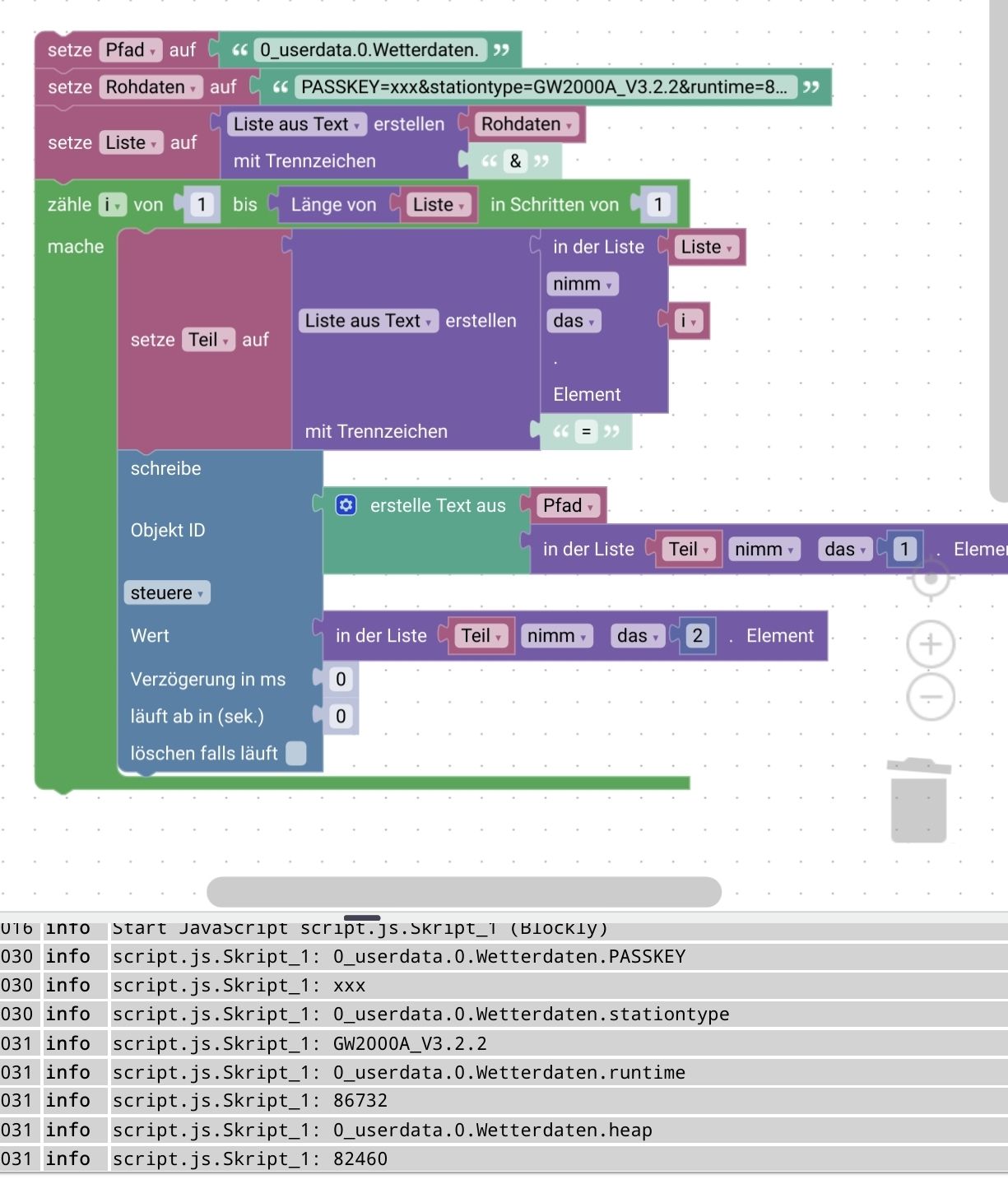
Datenpunkte müssten angelegt werden und Dem Skript muss ein Trigger hinzugefügt werden. z.B.Änderung des Datenpunktes mit den Rohdaten -
Die Werte könntest du z.B. so in entsprechende Datenpunkte schreibrn
Datenpunkte müssten angelegt werden und Dem Skript muss ein Trigger hinzugefügt werden. z.B.Änderung des Datenpunktes mit den RohdatenBlockly macht mich mittlerweile ganz kirre :-) Alternative:
const txtorg = "PASSKEY=xxx&stationtype=GW2000A_V3.2.2&runtime=86732&heap=82460&dateutc=2025-04-19%2018%3A57%3A39&tempinf=69.08&humidityin=43&baromrelin=29.740&baromabsin=29.740&tempf=46.40&humidity=76&vpd=0.076&winddir=304&windspeedmph=3.80&windgustmph=7.38&maxdailygust=13.65&solarradiation=0.16&uv=0&rrain_piezo=0.000&erain_piezo=0.000&hrain_piezo=0.000&drain_piezo=0.000&wrain_piezo=0.409&mrain_piezo=0.409&yrain_piezo=0.409&srain_piezo=0&ws90cap_volt=5.2&ws90_ver=133&wh90batt=3.26&freq=868M&model=GW2000A&interval=60";
const txt = decodeURIComponent(txtorg);
const json = '{"' + txt.replaceAll('&', '","').replaceAll('=', '":"') + '"}';
const obj = JSON.parse(json);
log(obj.tempf);
log(obj.dateutc);
log(obj.humidity);
iobroker läuft unter Docker auf Windows (WSL2)
-
Blockly macht mich mittlerweile ganz kirre :-) Alternative:
const txtorg = "PASSKEY=xxx&stationtype=GW2000A_V3.2.2&runtime=86732&heap=82460&dateutc=2025-04-19%2018%3A57%3A39&tempinf=69.08&humidityin=43&baromrelin=29.740&baromabsin=29.740&tempf=46.40&humidity=76&vpd=0.076&winddir=304&windspeedmph=3.80&windgustmph=7.38&maxdailygust=13.65&solarradiation=0.16&uv=0&rrain_piezo=0.000&erain_piezo=0.000&hrain_piezo=0.000&drain_piezo=0.000&wrain_piezo=0.409&mrain_piezo=0.409&yrain_piezo=0.409&srain_piezo=0&ws90cap_volt=5.2&ws90_ver=133&wh90batt=3.26&freq=868M&model=GW2000A&interval=60"; const txt = decodeURIComponent(txtorg); const json = '{"' + txt.replaceAll('&', '","').replaceAll('=', '":"') + '"}'; const obj = JSON.parse(json); log(obj.tempf); log(obj.dateutc); log(obj.humidity);@fastfoot sagte in Textvariablen mit & - wie trennen?:
Blockly macht mich mittlerweile ganz kirre
SORRY!
Hab die Unterkategorie nicht gesehen :-( -
Blockly macht mich mittlerweile ganz kirre :-) Alternative:
const txtorg = "PASSKEY=xxx&stationtype=GW2000A_V3.2.2&runtime=86732&heap=82460&dateutc=2025-04-19%2018%3A57%3A39&tempinf=69.08&humidityin=43&baromrelin=29.740&baromabsin=29.740&tempf=46.40&humidity=76&vpd=0.076&winddir=304&windspeedmph=3.80&windgustmph=7.38&maxdailygust=13.65&solarradiation=0.16&uv=0&rrain_piezo=0.000&erain_piezo=0.000&hrain_piezo=0.000&drain_piezo=0.000&wrain_piezo=0.409&mrain_piezo=0.409&yrain_piezo=0.409&srain_piezo=0&ws90cap_volt=5.2&ws90_ver=133&wh90batt=3.26&freq=868M&model=GW2000A&interval=60"; const txt = decodeURIComponent(txtorg); const json = '{"' + txt.replaceAll('&', '","').replaceAll('=', '":"') + '"}'; const obj = JSON.parse(json); log(obj.tempf); log(obj.dateutc); log(obj.humidity); -
@fastfoot sagte in Textvariablen mit & - wie trennen?:
Blockly macht mich mittlerweile ganz kirre
SORRY!
Hab die Unterkategorie nicht gesehen :-( -
@homoran Och, ich seh das nicht so eng, Deine Lösung ist sicher für die Blockly-Fan Gemeinde interessant. Meine ersten Gehversuche mit Javascript waren hier im Forum, mit Blockly :-)
@fastfoot ich hatte beim letzten Versuch anscheinend genau das versucht, was du da als js hast.
bekam aber dauernd ' und " gemischt heraus, so dass ich kein valides json hinbekommen hatte.
jetzt hatte uch es über Listen versucht.
Hat mir aber keine Ruhe gelassen, mit Trick klappte s auch mit JSON Erstellung via Blockly.ich bin so frei
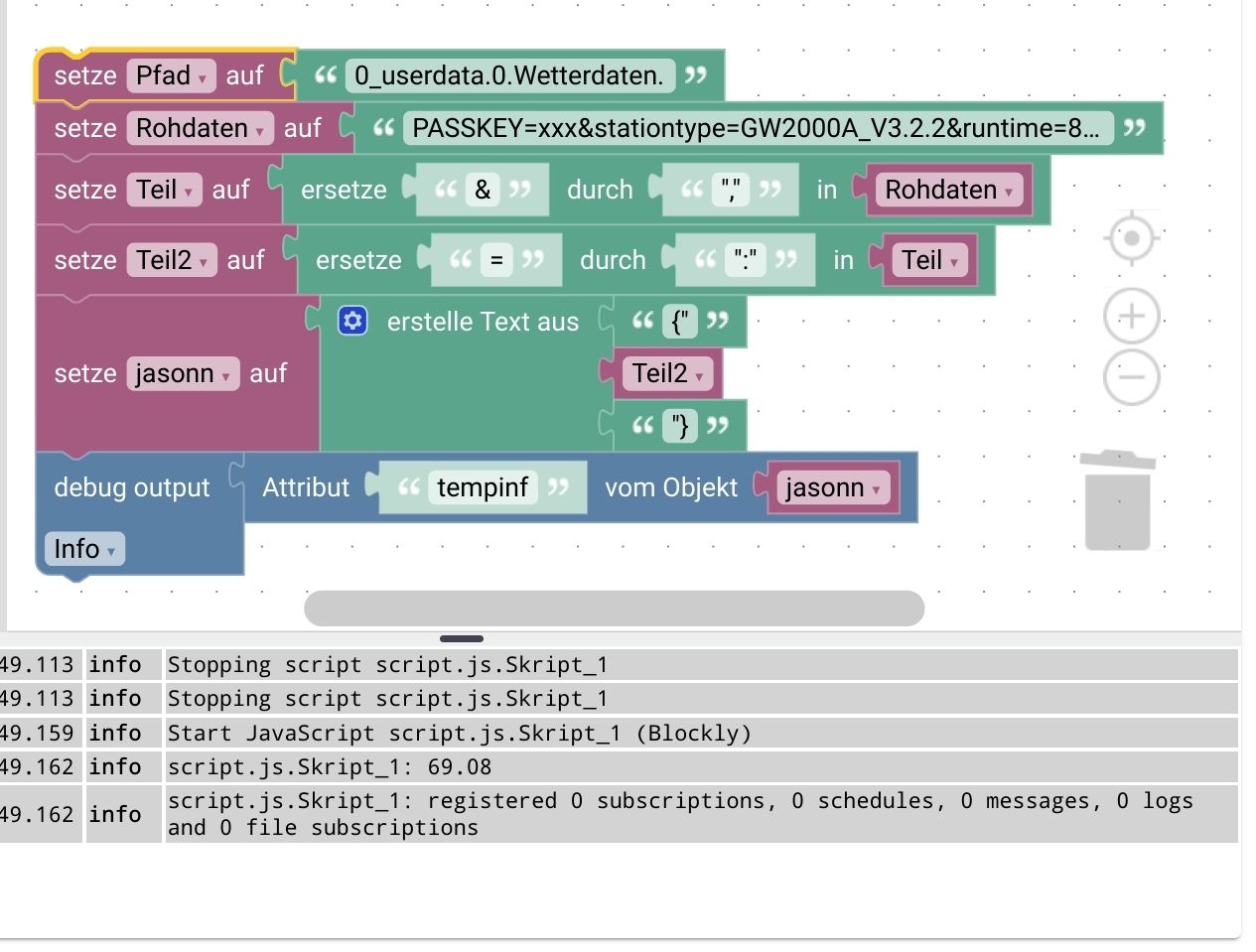
Ich musste in zwei Schritten ersetzen -
Blockly macht mich mittlerweile ganz kirre :-) Alternative:
const txtorg = "PASSKEY=xxx&stationtype=GW2000A_V3.2.2&runtime=86732&heap=82460&dateutc=2025-04-19%2018%3A57%3A39&tempinf=69.08&humidityin=43&baromrelin=29.740&baromabsin=29.740&tempf=46.40&humidity=76&vpd=0.076&winddir=304&windspeedmph=3.80&windgustmph=7.38&maxdailygust=13.65&solarradiation=0.16&uv=0&rrain_piezo=0.000&erain_piezo=0.000&hrain_piezo=0.000&drain_piezo=0.000&wrain_piezo=0.409&mrain_piezo=0.409&yrain_piezo=0.409&srain_piezo=0&ws90cap_volt=5.2&ws90_ver=133&wh90batt=3.26&freq=868M&model=GW2000A&interval=60"; const txt = decodeURIComponent(txtorg); const json = '{"' + txt.replaceAll('&', '","').replaceAll('=', '":"') + '"}'; const obj = JSON.parse(json); log(obj.tempf); log(obj.dateutc); log(obj.humidity);@fastfoot sagte in Textvariablen mit & - wie trennen?:
Blockly macht mich mittlerweile ganz kirre :-) Alternative:
const txtorg = "PASSKEY=xxx&stationtype=GW2000A_V3.2.2&runtime=86732&heap=82460&dateutc=2025-04-19%2018%3A57%3A39&tempinf=69.08&humidityin=43&baromrelin=29.740&baromabsin=29.740&tempf=46.40&humidity=76&vpd=0.076&winddir=304&windspeedmph=3.80&windgustmph=7.38&maxdailygust=13.65&solarradiation=0.16&uv=0&rrain_piezo=0.000&erain_piezo=0.000&hrain_piezo=0.000&drain_piezo=0.000&wrain_piezo=0.409&mrain_piezo=0.409&yrain_piezo=0.409&srain_piezo=0&ws90cap_volt=5.2&ws90_ver=133&wh90batt=3.26&freq=868M&model=GW2000A&interval=60";const txt = decodeURIComponent(txtorg);
const json = '{"' + txt.replaceAll('&', '","').replaceAll('=', '":"') + '"}';
const obj = JSON.parse(json);
log(obj.tempf);
log(obj.dateutc);
log(obj.humidity);Gute Idee :)
Da sollte ein try catch drum sein. Zur Sicherheit und das hier in Zeile 2:
// EDIT - wegen Forumsdarstellungfehlern es wird nur 1 \ dargestellt in manchen Fällen
// const txt = decodeURIComponent(txtorg).replaceAll(/[^
// da müssen jetzt 2 \ eingefügt werden und dann nachfolgendes angehangen
// ]"/g, '\\"');

const txt = decodeURIComponent(txtorg).replaceAll(/[^\\]"/g, '\\"');
Wenn da ein " im Text steht gibt es sonst nen Fehler.
-
@fastfoot sagte in Textvariablen mit & - wie trennen?:
Blockly macht mich mittlerweile ganz kirre :-) Alternative:
const txtorg = "PASSKEY=xxx&stationtype=GW2000A_V3.2.2&runtime=86732&heap=82460&dateutc=2025-04-19%2018%3A57%3A39&tempinf=69.08&humidityin=43&baromrelin=29.740&baromabsin=29.740&tempf=46.40&humidity=76&vpd=0.076&winddir=304&windspeedmph=3.80&windgustmph=7.38&maxdailygust=13.65&solarradiation=0.16&uv=0&rrain_piezo=0.000&erain_piezo=0.000&hrain_piezo=0.000&drain_piezo=0.000&wrain_piezo=0.409&mrain_piezo=0.409&yrain_piezo=0.409&srain_piezo=0&ws90cap_volt=5.2&ws90_ver=133&wh90batt=3.26&freq=868M&model=GW2000A&interval=60";const txt = decodeURIComponent(txtorg);
const json = '{"' + txt.replaceAll('&', '","').replaceAll('=', '":"') + '"}';
const obj = JSON.parse(json);
log(obj.tempf);
log(obj.dateutc);
log(obj.humidity);Gute Idee :)
Da sollte ein try catch drum sein. Zur Sicherheit und das hier in Zeile 2:
// EDIT - wegen Forumsdarstellungfehlern es wird nur 1 \ dargestellt in manchen Fällen
// const txt = decodeURIComponent(txtorg).replaceAll(/[^
// da müssen jetzt 2 \ eingefügt werden und dann nachfolgendes angehangen
// ]"/g, '\\"');

const txt = decodeURIComponent(txtorg).replaceAll(/[^\\]"/g, '\\"');
Wenn da ein " im Text steht gibt es sonst nen Fehler.
-
@ticaki sagte in Textvariablen mit & - wie trennen?:
Da sollte...
vor Allem solltest Du deine Ratschläge testen, bevor du die veröffentlichst :-)
@fastfoot
Verstehe ich nichtconst txtorg = 'PASSKEY=xxx&stationtype=GW2000A_V3.2.2&runtime=86732&heap=82460&dateutc=2025-04-19%2018%3A57%3A39&tempinf=69.08&humidityin=43&baromrelin=29.740&baromabsin=29.740&tempf=46.40&humidity=76&vpd=0.076&winddir=304&windspeedmph=3.80&windgustmph=7.38&maxdailygust=13.65&solarradiation=0.16&uv=0&rrain_piezo=0.000&erain_piezo=0.000&hrain_piezo=0.000&drain_piezo=0.000&wrain_piezo=0.409&mrain_piezo=0.409&yrain_piezo=0.409&srain_piezo=0&ws90cap_volt=5.2&ws90_ver=133&wh90batt=3.26&freq=868M&model=GW2000A&interval=60'; const txt = decodeURIComponent(txtorg).replaceAll(/[^\\]"/g, '\\"'); try { const json = '{"' + txt.replaceAll('&', '","').replaceAll('=', '":"') + '"}'; const obj = JSON.parse(json); log(obj.tempf); log(obj.dateutc); log(obj.humidity); } catch (e) { log(e) }so sieht das in meinen Skript aus - oben hab ich kein
"ein"und ein\"eingefügt. -
@fastfoot
Verstehe ich nichtconst txtorg = 'PASSKEY=xxx&stationtype=GW2000A_V3.2.2&runtime=86732&heap=82460&dateutc=2025-04-19%2018%3A57%3A39&tempinf=69.08&humidityin=43&baromrelin=29.740&baromabsin=29.740&tempf=46.40&humidity=76&vpd=0.076&winddir=304&windspeedmph=3.80&windgustmph=7.38&maxdailygust=13.65&solarradiation=0.16&uv=0&rrain_piezo=0.000&erain_piezo=0.000&hrain_piezo=0.000&drain_piezo=0.000&wrain_piezo=0.409&mrain_piezo=0.409&yrain_piezo=0.409&srain_piezo=0&ws90cap_volt=5.2&ws90_ver=133&wh90batt=3.26&freq=868M&model=GW2000A&interval=60'; const txt = decodeURIComponent(txtorg).replaceAll(/[^\\]"/g, '\\"'); try { const json = '{"' + txt.replaceAll('&', '","').replaceAll('=', '":"') + '"}'; const obj = JSON.parse(json); log(obj.tempf); log(obj.dateutc); log(obj.humidity); } catch (e) { log(e) }so sieht das in meinen Skript aus - oben hab ich kein
"ein"und ein\"eingefügt. -
@fastfoot
Da stehe ich jetzt auf dem Schlauch - der Code geht bei mir in typescript und javascript.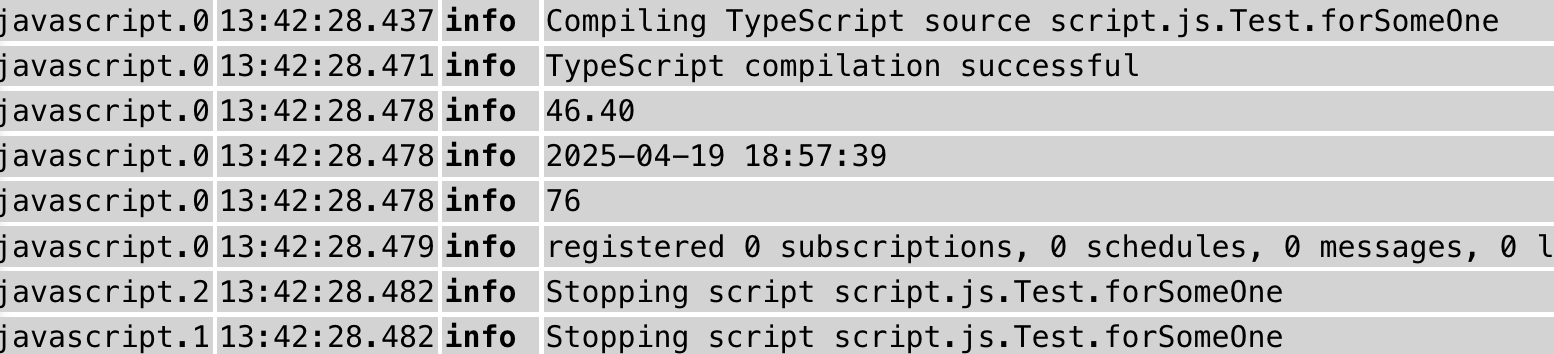
JS Adapter v8.9.1 / nodejs 20.x.x
-
Warum alles selbst zerlegen?
URLSearchParamsist genau dafür gedacht.const url = require('node:url'); const urlParams = 'PASSKEY=xxx&stationtype=GW2000A_V3.2.2&runtime=86732&heap=82460&dateutc=2025-04-19%2018%3A57%3A39&tempinf=69.08&humidityin=43&baromrelin=29.740&baromabsin=29.740&tempf=46.40&humidity=76&vpd=0.076&winddir=304&windspeedmph=3.80&windgustmph=7.38&maxdailygust=13.65&solarradiation=0.16&uv=0&rrain_piezo=0.000&erain_piezo=0.000&hrain_piezo=0.000&drain_piezo=0.000&wrain_piezo=0.409&mrain_piezo=0.409&yrain_piezo=0.409&srain_piezo=0&ws90cap_volt=5.2&ws90_ver=133&wh90batt=3.26&freq=868M&model=GW2000A&interval=60'; const params = new url.URLSearchParams(urlParams); const obj = {}; for (const key of params.keys()) { obj[key] = params.get(key); } console.log(JSON.stringify(obj));@hendrik87 sagte in Textvariablen mit & - wie trennen?:
Mit welchem Befehl kann ich hier einzelne Werte auslesen (z.B. "tempf")?
Das ist dann sogar noch einfacher:
const url = require('node:url'); const urlParams = 'PASSKEY=xxx&stationtype=GW2000A_V3.2.2&runtime=86732&heap=82460&dateutc=2025-04-19%2018%3A57%3A39&tempinf=69.08&humidityin=43&baromrelin=29.740&baromabsin=29.740&tempf=46.40&humidity=76&vpd=0.076&winddir=304&windspeedmph=3.80&windgustmph=7.38&maxdailygust=13.65&solarradiation=0.16&uv=0&rrain_piezo=0.000&erain_piezo=0.000&hrain_piezo=0.000&drain_piezo=0.000&wrain_piezo=0.409&mrain_piezo=0.409&yrain_piezo=0.409&srain_piezo=0&ws90cap_volt=5.2&ws90_ver=133&wh90batt=3.26&freq=868M&model=GW2000A&interval=60'; const params = new url.URLSearchParams(urlParams); const tempf = params.get('tempf'); console.log(tempf); -
Mein Beispiel oben um einen Kommentar ergänzt, der die richtige Schreibweise erklärt, ohne die nachfolgende Diskussion aus dem Kontext zu reissen.
-
Hallo
Ich bekomme von meiner Ecowitt Wetterstation die Werte per MQTT zugeschickt. Dies ist ein Text, wo die einzelnen Variablen durch $ getrennt sind.
PASSKEY=xxx&stationtype=GW2000A_V3.2.2&runtime=86732&heap=82460&dateutc=2025-04-19%2018%3A57%3A39&tempinf=69.08&humidityin=43&baromrelin=29.740&baromabsin=29.740&tempf=46.40&humidity=76&vpd=0.076&winddir=304&windspeedmph=3.80&windgustmph=7.38&maxdailygust=13.65&solarradiation=0.16&uv=0&rrain_piezo=0.000&erain_piezo=0.000&hrain_piezo=0.000&drain_piezo=0.000&wrain_piezo=0.409&mrain_piezo=0.409&yrain_piezo=0.409&srain_piezo=0&ws90cap_volt=5.2&ws90_ver=133&wh90batt=3.26&freq=868M&model=GW2000A&interval=60Mit welchem Befehl kann ich hier einzelne Werte auslesen (z.B. "tempf")?
Gruß Hendrik
@hendrik87 sagte in Textvariablen mit & - wie trennen?:
PASSKEY=xxx&stationtype=GW2000A_V3.2.2&runtime=86732&heap=82460&dateutc=2025-04-19%2018%3A57%3A39&tempinf=69.08&humidityin=43&baromrelin=29.740&baromabsin=29.740&tempf=46.40&humidity=76&vpd=0.076&winddir=304&windspeedmph=3.80&windgustmph=7.38&maxdailygust=13.65&solarradiation=0.16&uv=0&rrain_piezo=0.000&erain_piezo=0.000&hrain_piezo=0.000&drain_piezo=0.000&wrain_piezo=0.409&mrain_piezo=0.409&yrain_piezo=0.409&srain_piezo=0&ws90cap_volt=5.2&ws90_ver=133&wh90batt=3.26&freq=868M&model=GW2000A&interval=60
Ich würde so was natürlich mit JSONATA in ein Objekt überführen, dann kann einzelne Werte ganz bequem selektieren:
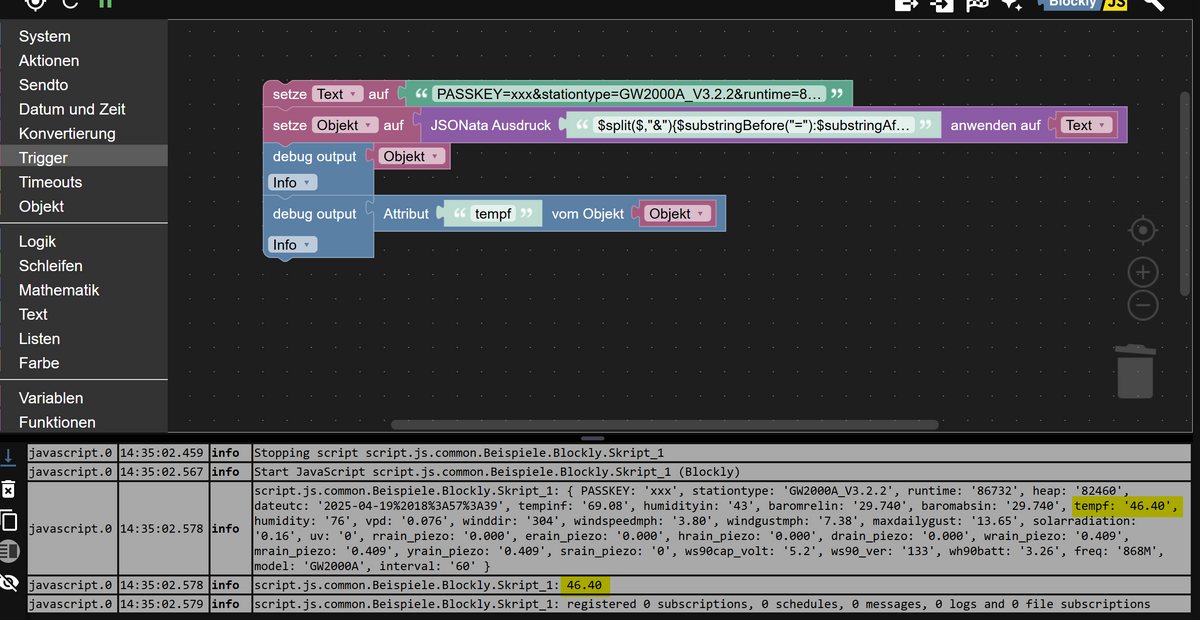
Hier der JSONATA Ausdruck
$split($,"&"){$substringBefore("="):$substringAfter("=")}EDIT: Geht sogar noch einfacher - nochmals korrigiert.
https://try.jsonata.org/sn8GeyHWc
oder auf den Code von @fastfoot angewandt:
const txtorg = "PASSKEY=xxx&stationtype=GW2000A_V3.2.2&runtime=86732&heap=82460&dateutc=2025-04-19%2018%3A57%3A39&tempinf=69.08&humidityin=43&baromrelin=29.740&baromabsin=29.740&tempf=46.40&humidity=76&vpd=0.076&winddir=304&windspeedmph=3.80&windgustmph=7.38&maxdailygust=13.65&solarradiation=0.16&uv=0&rrain_piezo=0.000&erain_piezo=0.000&hrain_piezo=0.000&drain_piezo=0.000&wrain_piezo=0.409&mrain_piezo=0.409&yrain_piezo=0.409&srain_piezo=0&ws90cap_volt=5.2&ws90_ver=133&wh90batt=3.26&freq=868M&model=GW2000A&interval=60";
const obj = (await jsonataExpression(txtorg, '$split($,"&"){$substringBefore("="):$substringAfter("=")}'));
log(obj.tempf);
log(obj.dateutc);
log(obj.humidity);
Jeder Flow bzw. jedes Script, das ich hier poste implementiert jeder auf eigene Gefahr. Flows und Scripts können Fehler aufweisen und weder der Seitenbetreiber noch ich persönlich können hierfür haftbar gemacht werden. Das gleiche gilt für Empfehlungen aller Art.
-
@hendrik87 sagte in Textvariablen mit & - wie trennen?:
PASSKEY=xxx&stationtype=GW2000A_V3.2.2&runtime=86732&heap=82460&dateutc=2025-04-19%2018%3A57%3A39&tempinf=69.08&humidityin=43&baromrelin=29.740&baromabsin=29.740&tempf=46.40&humidity=76&vpd=0.076&winddir=304&windspeedmph=3.80&windgustmph=7.38&maxdailygust=13.65&solarradiation=0.16&uv=0&rrain_piezo=0.000&erain_piezo=0.000&hrain_piezo=0.000&drain_piezo=0.000&wrain_piezo=0.409&mrain_piezo=0.409&yrain_piezo=0.409&srain_piezo=0&ws90cap_volt=5.2&ws90_ver=133&wh90batt=3.26&freq=868M&model=GW2000A&interval=60
Ich würde so was natürlich mit JSONATA in ein Objekt überführen, dann kann einzelne Werte ganz bequem selektieren:
Hier der JSONATA Ausdruck
$split($,"&"){$substringBefore("="):$substringAfter("=")}EDIT: Geht sogar noch einfacher - nochmals korrigiert.
https://try.jsonata.org/sn8GeyHWc
oder auf den Code von @fastfoot angewandt:
const txtorg = "PASSKEY=xxx&stationtype=GW2000A_V3.2.2&runtime=86732&heap=82460&dateutc=2025-04-19%2018%3A57%3A39&tempinf=69.08&humidityin=43&baromrelin=29.740&baromabsin=29.740&tempf=46.40&humidity=76&vpd=0.076&winddir=304&windspeedmph=3.80&windgustmph=7.38&maxdailygust=13.65&solarradiation=0.16&uv=0&rrain_piezo=0.000&erain_piezo=0.000&hrain_piezo=0.000&drain_piezo=0.000&wrain_piezo=0.409&mrain_piezo=0.409&yrain_piezo=0.409&srain_piezo=0&ws90cap_volt=5.2&ws90_ver=133&wh90batt=3.26&freq=868M&model=GW2000A&interval=60"; const obj = (await jsonataExpression(txtorg, '$split($,"&"){$substringBefore("="):$substringAfter("=")}')); log(obj.tempf); log(obj.dateutc); log(obj.humidity);Geht es in diesem Thread darum, wie man es möglichst kompliziert löst? Dann entschuldigt meinen simplen Ansatz :)
🧑🎓 Autor des beliebten ioBroker-Master-Kurses
🎥 Tutorials rund um das Thema DIY-Smart-Home: https://haus-automatisierung.com/
📚 Meine Dokumentation -
Geht es in diesem Thread darum, wie man es möglichst kompliziert löst? Dann entschuldigt meinen simplen Ansatz :)
@haus-automatisierung sagte in Textvariablen mit & - wie trennen?:
Geht es in diesem Thread darum, wie man es möglichst kompliziert löst? Dann entschuldigt meinen simplen Ansatz :)
Nein - aber man muss halt wieder eine Bibliothek installieren, während JSONATA halt schon an Board ist.
-
@haus-automatisierung sagte in Textvariablen mit & - wie trennen?:
Geht es in diesem Thread darum, wie man es möglichst kompliziert löst? Dann entschuldigt meinen simplen Ansatz :)
Nein - aber man muss halt wieder eine Bibliothek installieren, während JSONATA halt schon an Board ist.
Alles was mit
node:anfängt ist in nodejs integriert. -
@ticaki sagte in Textvariablen mit & - wie trennen?:
Alles was mit
node:anfängt ist in nodejs integriert.Ok - wusste ich nicht
- aber mein Code ist auch nicht länger. Aber egal - könnt ja meine Lösung wieder löschen.


Hey! Du scheinst an dieser Unterhaltung interessiert zu sein, hast aber noch kein Konto.
Hast du es satt, bei jedem Besuch durch die gleichen Beiträge zu scrollen? Wenn du dich für ein Konto anmeldest, kommst du immer genau dorthin zurück, wo du zuvor warst, und kannst dich über neue Antworten benachrichtigen lassen (entweder per E-Mail oder Push-Benachrichtigung). Du kannst auch Lesezeichen speichern und Beiträge positiv bewerten, um anderen Community-Mitgliedern deine Wertschätzung zu zeigen.
Mit deinem Input könnte dieser Beitrag noch besser werden 💗
Registrieren AnmeldenSupport us
333
Online33.0k
Benutzende83.7k
Themen1.3m
Beiträge