
NEWS




Betatest NSPanel-lovelace-ui v0.7.x
-
@ticaki
Vielen Dank für die Mühen. Richtig testen kann ich derzeit noch nicht, wegen fehlender Werte größer 999 W.Was mir aber noch als praktische Erweiterung eingefallen ist, wäre ein umdrehen der Animationsrichtung bei Wechsel des Vorzeichens. Dann könnte beispielsweise nur ein Batterie-Icon verwendet werden, welches Entladung wie auch Beladung anzeigt; oder für den Netzbezug und Einspeisung.
-
@tt-tom
Jetzt wurde gerade der Herd angeschmissen und die Werte stiegen 😊
Die Funktionalität der Umrechnung funktioniert bei mir. Sehr gut 👍EDIT
Bei mir geht der Screensaver beim Betrachten der pagePower nicht mehr an. Auch wenn die Option deaktiviert ist. -
@tt-tom
Jetzt wurde gerade der Herd angeschmissen und die Werte stiegen 😊
Die Funktionalität der Umrechnung funktioniert bei mir. Sehr gut 👍EDIT
Bei mir geht der Screensaver beim Betrachten der pagePower nicht mehr an. Auch wenn die Option deaktiviert ist.@muuulle sagte in Betatest NSPanel-lovelace-ui v0.6.x:
Bei mir geht der Screensaver beim Betrachten der pagePower nicht mehr an. Auch wenn die Option deaktiviert ist.
Aktuelle TFT?
@Armilar ist da noch das alte drin?
-
@muuulle sagte in Betatest NSPanel-lovelace-ui v0.6.x:
Bei mir geht der Screensaver beim Betrachten der pagePower nicht mehr an. Auch wenn die Option deaktiviert ist.
Aktuelle TFT?
@Armilar ist da noch das alte drin?
TFT v5.0.2 ist für alle neu
-
Es könnte auch sein das es bei einem sendType zurück gesetzt wird - das kommt aktuell bei jedem 16ten update - minimale updatetime bei Page Power ist 2 Sekunden - also timeout länger als 30 Sekunden könnte den Screensaver verhindern. Kann das jemand bestätigen?Ein Fehler - wird behoben.
-
Es könnte auch sein das es bei einem sendType zurück gesetzt wird - das kommt aktuell bei jedem 16ten update - minimale updatetime bei Page Power ist 2 Sekunden - also timeout länger als 30 Sekunden könnte den Screensaver verhindern. Kann das jemand bestätigen?Ein Fehler - wird behoben.
Bei mir lässt sich der Adapter nicht installieren.
$ iobroker url iobroker.nspanel-lovelace-ui@latest --host ioBroker --debug install iobroker.nspanel-lovelace-ui@latest NPM version: 10.8.2Installing iobroker.nspanel-lovelace-ui@latest... (System call) > @stoprocent/bleno@0.11.4 install > node-gyp-build gyp info it worked if it ends with ok gyp info using node-gyp@7.1.2gyp info using node@20.19.5 | linux | x64 gyp info find Python using Python version 3.9.2 found at "/usr/bin/python3" gyp ERR! UNCAUGHT EXCEPTION gyp ERR! stack TypeError: Cannot assign to read only property 'cflags' of object '#<Object>'gyp ERR! stack at createConfigFile (/opt/iobroker/node_modules/node-gyp/lib/configure.js:117:21)gyp ERR! stack at /opt/iobroker/node_modules/node-gyp/lib/configure.js:84:9gyp ERR! stack at FSReqCallback.oncomplete (node:fs:188:23)gyp ERR! System Linux 5.10.0-36-amd64gyp ERR! command "/usr/bin/node" "/opt/iobroker/node_modules/node-gyp/bin/node-gyp.js" "rebuild"gyp ERR! cwd /opt/iobroker/node_modules/@stoprocent/blenogyp ERR! node -v v20.19.5gyp ERR! node-gyp -v v7.1.2gyp ERR! Node-gyp failed to build your package.gyp ERR! Try to update npm and/or node-gyp and if it does not help file an issue with the package author. > @stoprocent/noble@2.3.6 install> node-gyp-build gyp info it worked if it ends with ok gyp info using node-gyp@7.1.2gyp info using node@20.19.5 | linux | x64 gyp info find Python using Python version 3.9.2 found at "/usr/bin/python3" gyp ERR! stack TypeError: Cannot assign to read only property 'cflags' of object '#<Object>'gyp ERR! stack at createConfigFile (/opt/iobroker/node_modules/node-gyp/lib/configure.js:117:21)gyp ERR! stack at /opt/iobroker/node_modules/node-gyp/lib/configure.js:84:9gyp ERR! stack at FSReqCallback.oncomplete (node:fs:188:23)gyp ERR! System Linux 5.10.0-36-amd64 gyp ERR! command "/usr/bin/node" "/opt/iobroker/node_modules/node-gyp/bin/node-gyp.js" "rebuild"gyp ERR! cwd /opt/iobroker/node_modules/@stoprocent/noblegyp ERR! node -v v20.19.5gyp ERR! node-gyp -v v7.1.2gyp ERR! Node-gyp failed to build your package.gyp ERR! Try to update npm and/or node-gyp and if it does not help file an issue with the package author. > classic-level@3.0.0 install> node-gyp-build gyp info it worked if it ends with ok gyp info using node-gyp@7.1.2 gyp info using node@20.19.5 | linux | x64 gyp info find Python using Python version 3.9.2 found at "/usr/bin/python3" gyp ERR! UNCAUGHT EXCEPTION gyp ERR! Node-gyp failed to build your package.gyp ERR! Try to update npm and/or node-gyp and if it does not help file an issue with the package author. npm error code 7 npm error path /opt/iobroker/node_modules/iobroker.nspanel-lovelace-ui/node_modules/classic-level npm error command failed npm error command sh -c node-gyp-build npm error A complete log of this run can be found in: /home/iobroker/.npm/_logs/2025-10-23T12_28_05_016Z-debug-0.log gyp info it worked if it ends with okgyp info using node-gyp@7.1.2gyp info using node@20.19.5 | linux | x64gyp info find Python using Python version 3.9.2 found at "/usr/bin/python3"gyp ERR! UNCAUGHT EXCEPTION gyp ERR! stack TypeError: Cannot assign to read only property 'cflags' of object '#<Object>'gyp ERR! stack at createConfigFile (/opt/iobroker/node_modules/node-gyp/lib/configure.js:117:21)gyp ERR! stack at /opt/iobroker/node_modules/node-gyp/lib/configure.js:84:9gyp ERR! stack at FSReqCallback.oncomplete (node:fs:188:23)gyp ERR! System Linux 5.10.0-36-amd64gyp ERR! command "/usr/bin/node" "/opt/iobroker/node_modules/node-gyp/bin/node-gyp.js" "rebuild"gyp ERR! cwd /opt/iobroker/node_modules/@stoprocent/blenogyp ERR! node -v v20.19.5gyp ERR! node-gyp -v v7.1.2gyp ERR! Node-gyp failed to build your package.gyp ERR! Try to update npm and/or node-gyp and if it does not help file an issue with the package author.gyp info it worked if it ends with okgyp info using node-gyp@7.1.2gyp info using node@20.19.5 | linux | x64gyp info find Python using Python version 3.9.2 found at "/usr/bin/python3"gyp ERR! UNCAUGHT EXCEPTION gyp ERR! stack TypeError: Cannot assign to read only property 'cflags' of object '#<Object>'gyp ERR! stack at createConfigFile (/opt/iobroker/node_modules/node-gyp/lib/configure.js:117:21)gyp ERR! stack at /opt/iobroker/node_modules/node-gyp/lib/configure.js:84:9gyp ERR! stack at FSReqCallback.oncomplete (node:fs:188:23)gyp ERR! System Linux 5.10.0-36-amd64gyp ERR! command "/usr/bin/node" "/opt/iobroker/node_modules/node-gyp/bin/node-gyp.js" "rebuild"gyp ERR! cwd /opt/iobroker/node_modules/@stoprocent/noblegyp ERR! node -v v20.19.5gyp ERR! node-gyp -v v7.1.2gyp ERR! Node-gyp failed to build your package.gyp ERR! Try to update npm and/or node-gyp and if it does not help file an issue with the package author.gyp info it worked if it ends with okgyp info using node-gyp@7.1.2gyp info using node@20.19.5 | linux | x64gyp info find Python using Python version 3.9.2 found at "/usr/bin/python3"gyp ERR! UNCAUGHT EXCEPTION gyp ERR! stack TypeError: Cannot assign to read only property 'cflags' of object '#<Object>'gyp ERR! stack at createConfigFile (/opt/iobroker/node_modules/node-gyp/lib/configure.js:117:21)gyp ERR! stack at /opt/iobroker/node_modules/node-gyp/lib/configure.js:84:9gyp ERR! stack at FSReqCallback.oncomplete (node:fs:188:23)gyp ERR! System Linux 5.10.0-36-amd64gyp ERR! command "/usr/bin/node" "/opt/iobroker/node_modules/.bin/node-gyp" "rebuild"gyp ERR! cwd /opt/iobroker/node_modules/iobroker.nspanel-lovelace-ui/node_modules/classic-levelgyp ERR! node -v v20.19.5gyp ERR! node-gyp -v v7.1.2gyp ERR! Node-gyp failed to build your package.gyp ERR! Try to update npm and/or node-gyp and if it does not help file an issue with the package author.npm error code 7npm error path /opt/iobroker/node_modules/iobroker.nspanel-lovelace-ui/node_modules/classic-levelnpm error command failednpm error command sh -c node-gyp-buildnpm error A complete log of this run can be found in: /home/iobroker/.npm/_logs/2025-10-23T12_28_05_016Z-debug-0.log host.ioBroker Cannot install iobroker.nspanel-lovelace-ui@latest: 7 ERROR: Process exited with code 25 -
Bei mir lässt sich der Adapter nicht installieren.
$ iobroker url iobroker.nspanel-lovelace-ui@latest --host ioBroker --debug install iobroker.nspanel-lovelace-ui@latest NPM version: 10.8.2Installing iobroker.nspanel-lovelace-ui@latest... (System call) > @stoprocent/bleno@0.11.4 install > node-gyp-build gyp info it worked if it ends with ok gyp info using node-gyp@7.1.2gyp info using node@20.19.5 | linux | x64 gyp info find Python using Python version 3.9.2 found at "/usr/bin/python3" gyp ERR! UNCAUGHT EXCEPTION gyp ERR! stack TypeError: Cannot assign to read only property 'cflags' of object '#<Object>'gyp ERR! stack at createConfigFile (/opt/iobroker/node_modules/node-gyp/lib/configure.js:117:21)gyp ERR! stack at /opt/iobroker/node_modules/node-gyp/lib/configure.js:84:9gyp ERR! stack at FSReqCallback.oncomplete (node:fs:188:23)gyp ERR! System Linux 5.10.0-36-amd64gyp ERR! command "/usr/bin/node" "/opt/iobroker/node_modules/node-gyp/bin/node-gyp.js" "rebuild"gyp ERR! cwd /opt/iobroker/node_modules/@stoprocent/blenogyp ERR! node -v v20.19.5gyp ERR! node-gyp -v v7.1.2gyp ERR! Node-gyp failed to build your package.gyp ERR! Try to update npm and/or node-gyp and if it does not help file an issue with the package author. > @stoprocent/noble@2.3.6 install> node-gyp-build gyp info it worked if it ends with ok gyp info using node-gyp@7.1.2gyp info using node@20.19.5 | linux | x64 gyp info find Python using Python version 3.9.2 found at "/usr/bin/python3" gyp ERR! stack TypeError: Cannot assign to read only property 'cflags' of object '#<Object>'gyp ERR! stack at createConfigFile (/opt/iobroker/node_modules/node-gyp/lib/configure.js:117:21)gyp ERR! stack at /opt/iobroker/node_modules/node-gyp/lib/configure.js:84:9gyp ERR! stack at FSReqCallback.oncomplete (node:fs:188:23)gyp ERR! System Linux 5.10.0-36-amd64 gyp ERR! command "/usr/bin/node" "/opt/iobroker/node_modules/node-gyp/bin/node-gyp.js" "rebuild"gyp ERR! cwd /opt/iobroker/node_modules/@stoprocent/noblegyp ERR! node -v v20.19.5gyp ERR! node-gyp -v v7.1.2gyp ERR! Node-gyp failed to build your package.gyp ERR! Try to update npm and/or node-gyp and if it does not help file an issue with the package author. > classic-level@3.0.0 install> node-gyp-build gyp info it worked if it ends with ok gyp info using node-gyp@7.1.2 gyp info using node@20.19.5 | linux | x64 gyp info find Python using Python version 3.9.2 found at "/usr/bin/python3" gyp ERR! UNCAUGHT EXCEPTION gyp ERR! Node-gyp failed to build your package.gyp ERR! Try to update npm and/or node-gyp and if it does not help file an issue with the package author. npm error code 7 npm error path /opt/iobroker/node_modules/iobroker.nspanel-lovelace-ui/node_modules/classic-level npm error command failed npm error command sh -c node-gyp-build npm error A complete log of this run can be found in: /home/iobroker/.npm/_logs/2025-10-23T12_28_05_016Z-debug-0.log gyp info it worked if it ends with okgyp info using node-gyp@7.1.2gyp info using node@20.19.5 | linux | x64gyp info find Python using Python version 3.9.2 found at "/usr/bin/python3"gyp ERR! UNCAUGHT EXCEPTION gyp ERR! stack TypeError: Cannot assign to read only property 'cflags' of object '#<Object>'gyp ERR! stack at createConfigFile (/opt/iobroker/node_modules/node-gyp/lib/configure.js:117:21)gyp ERR! stack at /opt/iobroker/node_modules/node-gyp/lib/configure.js:84:9gyp ERR! stack at FSReqCallback.oncomplete (node:fs:188:23)gyp ERR! System Linux 5.10.0-36-amd64gyp ERR! command "/usr/bin/node" "/opt/iobroker/node_modules/node-gyp/bin/node-gyp.js" "rebuild"gyp ERR! cwd /opt/iobroker/node_modules/@stoprocent/blenogyp ERR! node -v v20.19.5gyp ERR! node-gyp -v v7.1.2gyp ERR! Node-gyp failed to build your package.gyp ERR! Try to update npm and/or node-gyp and if it does not help file an issue with the package author.gyp info it worked if it ends with okgyp info using node-gyp@7.1.2gyp info using node@20.19.5 | linux | x64gyp info find Python using Python version 3.9.2 found at "/usr/bin/python3"gyp ERR! UNCAUGHT EXCEPTION gyp ERR! stack TypeError: Cannot assign to read only property 'cflags' of object '#<Object>'gyp ERR! stack at createConfigFile (/opt/iobroker/node_modules/node-gyp/lib/configure.js:117:21)gyp ERR! stack at /opt/iobroker/node_modules/node-gyp/lib/configure.js:84:9gyp ERR! stack at FSReqCallback.oncomplete (node:fs:188:23)gyp ERR! System Linux 5.10.0-36-amd64gyp ERR! command "/usr/bin/node" "/opt/iobroker/node_modules/node-gyp/bin/node-gyp.js" "rebuild"gyp ERR! cwd /opt/iobroker/node_modules/@stoprocent/noblegyp ERR! node -v v20.19.5gyp ERR! node-gyp -v v7.1.2gyp ERR! Node-gyp failed to build your package.gyp ERR! Try to update npm and/or node-gyp and if it does not help file an issue with the package author.gyp info it worked if it ends with okgyp info using node-gyp@7.1.2gyp info using node@20.19.5 | linux | x64gyp info find Python using Python version 3.9.2 found at "/usr/bin/python3"gyp ERR! UNCAUGHT EXCEPTION gyp ERR! stack TypeError: Cannot assign to read only property 'cflags' of object '#<Object>'gyp ERR! stack at createConfigFile (/opt/iobroker/node_modules/node-gyp/lib/configure.js:117:21)gyp ERR! stack at /opt/iobroker/node_modules/node-gyp/lib/configure.js:84:9gyp ERR! stack at FSReqCallback.oncomplete (node:fs:188:23)gyp ERR! System Linux 5.10.0-36-amd64gyp ERR! command "/usr/bin/node" "/opt/iobroker/node_modules/.bin/node-gyp" "rebuild"gyp ERR! cwd /opt/iobroker/node_modules/iobroker.nspanel-lovelace-ui/node_modules/classic-levelgyp ERR! node -v v20.19.5gyp ERR! node-gyp -v v7.1.2gyp ERR! Node-gyp failed to build your package.gyp ERR! Try to update npm and/or node-gyp and if it does not help file an issue with the package author.npm error code 7npm error path /opt/iobroker/node_modules/iobroker.nspanel-lovelace-ui/node_modules/classic-levelnpm error command failednpm error command sh -c node-gyp-buildnpm error A complete log of this run can be found in: /home/iobroker/.npm/_logs/2025-10-23T12_28_05_016Z-debug-0.log host.ioBroker Cannot install iobroker.nspanel-lovelace-ui@latest: 7 ERROR: Process exited with code 25@chris_71 Nutzt du auch homekit-controller oder ble Adapter? Wenn ja kann der fehler da her kommen
Beitrag hat geholfen? Votet rechts unten im Beitrag :-) https://paypal.me/Apollon77 / https://github.com/sponsors/Apollon77
- Debug-Log für Instanz einschalten? Admin -> Instanzen -> Expertenmodus -> Instanz aufklappen - Loglevel ändern
- Logfiles auf Platte /opt/iobroker/log/… nutzen, Admin schneidet Zeilen ab
-
Ich kenne mich ja absolut nicht damit aus - hatte einen ähnliche (ich weiß es echt nicht) gyp fehler und mit viel chatGPT falsch aussagen hat dann am Ende
sudo apt update
sudo apt install python3 python3-dev python3-pip build-essential
sudo pip3 install --upgrade setuptools
Beim homekit-controller funktioniert. Aber wirklich keine Ahnung ob das der gleiche Fehler war!
-
@chris_71 Nutzt du auch homekit-controller oder ble Adapter? Wenn ja kann der fehler da her kommen
-
Den BLE Adapter hatte ich mal installiert - ist aber schon länger wieder deinstalliert worden
-
Hier die Ausgabe von iob diag:
========== Start marking the full check here =========== ```bash Script v.2025-08-09 *** BASE SYSTEM *** Operating System: Debian GNU/Linux 11 (bullseye) Static hostname: ioBroker Icon name: computer-vm Chassis: vm Virtualization: kvm Kernel: Linux 5.10.0-36-amd64 Architecture: x86-64 OS is similar to: model name : Common KVM processor Docker : false Virtualization : kvm Kernel : x86_64 Userland : 64 bit Systemuptime and Load: 15:43:49 up 3:17, 1 user, load average: 3.69, 3.21, 2.86 CPU threads: 8 *** LIFE CYCLE STATUS *** Debian Release codenamed 'bullseye' reached its END OF LIFE and needs to be updated to the latest stable release 'trixie' NOW! *** TIME AND TIMEZONES *** Local time: Thu 2025-10-23 15:43:49 CEST Universal time: Thu 2025-10-23 13:43:49 UTC RTC time: Thu 2025-10-23 13:43:50 Time zone: Europe/Berlin (CEST, +0200) System clock synchronized: yes NTP service: active RTC in local TZ: no *** Users and Groups *** User that called 'iob diag': root HOME=/xxxx GROUPS=xxxx User that is running 'js-controller': iobroker HOME=/home/iobroker GROUPS=iobroker tty dialout audio video plugdev redis bluetooth A default user should be created! This user will be enabled to temporarily switch to root via 'sudo'! A root login is not required in most Linux Distributions. Run 'iobroker fix' or use the system tools to create a user. *** DISPLAY-SERVER SETUP *** Display-Server: false Unit display-manager.service could not be found. Display-Manager: Desktop: Session: tty System is booting into 'graphical.target'. Usually a server is running in 'multi-user.target'. Please set BootTarget to 'multi-user.target' or r un 'iobroker fix' *** MEMORY *** total used free shared buff/cache available Mem: 13G 5.9G 6.1G 0.0K 2.0G 7.8G Swap: 2.0G 0B 2.0G Total: 16G 5.9G 8.2G Active iob-Instances: 63 13980 M total memory 5897 M used memory 885 M active memory 6401 M inactive memory 6124 M free memory 201 M buffer memory 1756 M swap cache 2046 M total swap 0 M used swap 2046 M free swap *** top - Table Of Processes *** top - 15:43:50 up 3:17, 1 user, load average: 3.55, 3.19, 2.85 Tasks: 172 total, 3 running, 169 sleeping, 0 stopped, 0 zombie %Cpu(s): 45.6 us, 7.4 sy, 0.0 ni, 44.1 id, 0.0 wa, 0.0 hi, 2.9 si, 0.0 st MiB Mem : 13980.9 total, 6124.7 free, 5897.0 used, 1959.2 buff/cache MiB Swap: 2047.0 total, 2047.0 free, 0.0 used. 7760.9 avail Mem *** FAILED SERVICES *** UNIT LOAD ACTIVE SUB DESCRIPTION 0 loaded units listed. *** DMESG CRITICAL ERRORS *** No critical errors detected *** FILESYSTEM *** Filesystem Type Size Used Avail Use% Mounted on udev devtmpfs 6.9G 0 6.9G 0% /dev tmpfs tmpfs 1.4G 536K 1.4G 1% /run /dev/sda1 ext4 20G 13G 5.8G 69% / tmpfs tmpfs 6.9G 0 6.9G 0% /dev/shm tmpfs tmpfs 5.0M 0 5.0M 0% /run/lock tmpfs tmpfs 1.4G 0 1.4G 0% /run/user/0 Messages concerning ext4 filesystem in dmesg: [Thu Oct 23 12:26:13 2025] EXT4-fs (sda1): mounted filesystem with ordered data mode. Opts: (null) [Thu Oct 23 12:26:13 2025] EXT4-fs (sda1): re-mounted. Opts: errors=remount-ro Show mounted filesystems: TARGET SOURCE FSTYPE OPTIONS / /dev/sda1 ext4 rw,relatime,errors=remount-ro Files in neuralgic directories: /var: 2.5G /var/ 2.0G /var/log 1.9G /var/log/journal/3f2bf63e5c904f84996f00cc7f0fc49b 1.9G /var/log/journal 510M /var/lib Archived and active journals take up 1.8G in the file system. /opt/iobroker/backups: 2.4G /opt/iobroker/backups/ /opt/iobroker/iobroker-data: 463M /opt/iobroker/iobroker-data/ 331M /opt/iobroker/iobroker-data/files 52M /opt/iobroker/iobroker-data/files/javascript.admin 45M /opt/iobroker/iobroker-data/files/devices.admin/static 45M /opt/iobroker/iobroker-data/files/devices.admin The five largest files in iobroker-data are: 50M /opt/iobroker/iobroker-data/objects.jsonl 35M /opt/iobroker/iobroker-data/files/devices.admin/static/js/main.24f2bb56.js.map 33M /opt/iobroker/iobroker-data/files/iot.admin/static/js/main.1797d034.js.map 28M /opt/iobroker/iobroker-data/objects.json.migrated 28M /opt/iobroker/iobroker-data/objects.json.bak.migrated USB-Devices by-id: USB-Sticks - Avoid direct links to /dev/tty* in your adapter setups, please always prefer the links 'by-id': No Devices found 'by-id' *** ZigBee Settings *** HINT: Your zigbee.0 COM-Port is NOT matching 'by-id'. Please check your setting: tcp HINT: Your zigbee.1 COM-Port is NOT matching 'by-id'. Please check your setting: tcp HINT: Your zigbee.2 COM-Port is NOT matching 'by-id'. Please check your setting: tcp Zigbee Network Settings on your coordinator/in nvbackup are: zigbee.X Extended Pan ID: *** MASKED *** Pan ID: *** MASKED *** Channel: *** MASKED *** Network Key: *** MASKED *** To unmask the settings run 'iob diag --unmask' *** NodeJS-Installation *** /usr/bin/nodejs v20.19.5 /usr/bin/node v20.19.5 /usr/bin/npm 10.8.2 /usr/bin/npx 10.8.2 /usr/bin/corepack 0.33.0 nodejs: Installed: 20.19.5-1nodesource1 Candidate: 20.19.5-1nodesource1 Version table: *** 20.19.5-1nodesource1 1001 500 https://deb.nodesource.com/node_20.x nodistro/main amd64 Packages 100 /var/lib/dpkg/status 20.19.4-1nodesource1 1001 500 https://deb.nodesource.com/node_20.x nodistro/main amd64 Packages 20.19.3-1nodesource1 1001 500 https://deb.nodesource.com/node_20.x nodistro/main amd64 Packages 20.19.2-1nodesource1 1001 500 https://deb.nodesource.com/node_20.x nodistro/main amd64 Packages 20.19.1-1nodesource1 1001 500 https://deb.nodesource.com/node_20.x nodistro/main amd64 Packages 20.19.0-1nodesource1 1001 500 https://deb.nodesource.com/node_20.x nodistro/main amd64 Packages 20.18.3-1nodesource1 1001 500 https://deb.nodesource.com/node_20.x nodistro/main amd64 Packages 20.18.2-1nodesource1 1001 500 https://deb.nodesource.com/node_20.x nodistro/main amd64 Packages 20.18.1-1nodesource1 1001 500 https://deb.nodesource.com/node_20.x nodistro/main amd64 Packages 20.18.0-1nodesource1 1001 500 https://deb.nodesource.com/node_20.x nodistro/main amd64 Packages 20.17.0-1nodesource1 1001 500 https://deb.nodesource.com/node_20.x nodistro/main amd64 Packages 20.16.0-1nodesource1 1001 500 https://deb.nodesource.com/node_20.x nodistro/main amd64 Packages 20.15.1-1nodesource1 1001 500 https://deb.nodesource.com/node_20.x nodistro/main amd64 Packages 20.15.0-1nodesource1 1001 500 https://deb.nodesource.com/node_20.x nodistro/main amd64 Packages 20.14.0-1nodesource1 1001 500 https://deb.nodesource.com/node_20.x nodistro/main amd64 Packages 20.13.1-1nodesource1 1001 500 https://deb.nodesource.com/node_20.x nodistro/main amd64 Packages 20.13.0-1nodesource1 1001 500 https://deb.nodesource.com/node_20.x nodistro/main amd64 Packages 20.12.2-1nodesource1 1001 500 https://deb.nodesource.com/node_20.x nodistro/main amd64 Packages 20.12.1-1nodesource1 1001 500 https://deb.nodesource.com/node_20.x nodistro/main amd64 Packages 20.12.0-1nodesource1 1001 500 https://deb.nodesource.com/node_20.x nodistro/main amd64 Packages 20.11.1-1nodesource1 1001 500 https://deb.nodesource.com/node_20.x nodistro/main amd64 Packages 20.11.0-1nodesource1 1001 500 https://deb.nodesource.com/node_20.x nodistro/main amd64 Packages 20.10.0-1nodesource1 1001 500 https://deb.nodesource.com/node_20.x nodistro/main amd64 Packages 20.9.0-1nodesource1 1001 500 https://deb.nodesource.com/node_20.x nodistro/main amd64 Packages 20.8.1-1nodesource1 1001 500 https://deb.nodesource.com/node_20.x nodistro/main amd64 Packages 20.8.0-1nodesource1 1001 500 https://deb.nodesource.com/node_20.x nodistro/main amd64 Packages 20.7.0-1nodesource1 1001 500 https://deb.nodesource.com/node_20.x nodistro/main amd64 Packages 20.6.1-1nodesource1 1001 500 https://deb.nodesource.com/node_20.x nodistro/main amd64 Packages 20.6.0-1nodesource1 1001 500 https://deb.nodesource.com/node_20.x nodistro/main amd64 Packages 20.5.1-1nodesource1 1001 500 https://deb.nodesource.com/node_20.x nodistro/main amd64 Packages 20.5.0-1nodesource1 1001 500 https://deb.nodesource.com/node_20.x nodistro/main amd64 Packages 20.4.0-1nodesource1 1001 500 https://deb.nodesource.com/node_20.x nodistro/main amd64 Packages 20.3.1-1nodesource1 1001 500 https://deb.nodesource.com/node_20.x nodistro/main amd64 Packages 20.3.0-1nodesource1 1001 500 https://deb.nodesource.com/node_20.x nodistro/main amd64 Packages 20.2.0-1nodesource1 1001 500 https://deb.nodesource.com/node_20.x nodistro/main amd64 Packages 20.1.0-1nodesource1 1001 500 https://deb.nodesource.com/node_20.x nodistro/main amd64 Packages 20.0.0-1nodesource1 1001 500 https://deb.nodesource.com/node_20.x nodistro/main amd64 Packages 12.22.12~dfsg-1~deb11u7 500 500 http://security.debian.org/debian-security bullseye-security/main amd64 Packages 12.22.12~dfsg-1~deb11u4 500 500 http://deb.debian.org/debian bullseye/main amd64 Packages Temp directories causing deletion problem: 0 No problems detected Errors in npm tree: 0 No problems detected Checking for nodejs vulnerability: █████ ██ ██ ██████ ██████ ██████ ██████ ██ ██ ██ ██ ██ ██ ██ ██ ██ ██ ██ ██ ██ ██ ███████ ██ ██ ██ ███ ██ ██ ██ ██ ██ ██ ██ ██ ██ ██ ██ ██ ██ ██ ██ ██ ██ ██ ██ ██ ██ ██ ██ ███████ ███████ ██████ ██████ ██████ ██████ ██ *** ioBroker-Installation *** ioBroker Status iobroker is running on this host. At least one iobroker host is running. Objects type: redis States type: redis Hosts: ioBroker ioBroker (version: 7.0.7, hostname: ioBroker , alive, uptime: 6782) Core adapters versions js-controller: 7.0.7 admin: 7.7.2 javascript: 8.9.2 nodejs modules from github: 2 +-- iobroker.homepilot20@0.0.72 (git+ssh://git@github.com/homecineplexx/ioBroker.homepilot20.git#3706cca661f6ac97f7b2d0a77043b9a79eb2847f) +-- iobroker.renault@0.0.22 (git+ssh://git@github.com/TA2k/ioBroker.renault.git#2f50d0fc1fe0ca6ffac426d01434fd357657723a) Adapter State + system.adapter.admin.0 : admin : ioBroker - enabled, port: 8081, bind: 0.0.0 .0, run as: admin + system.adapter.alexa2.0 : alexa2 : ioBroker - enabled + system.adapter.awtrix-light.0 : awtrix-light : ioBroker - enabled + system.adapter.awtrix-light.1 : awtrix-light : ioBroker - enabled + system.adapter.awtrix-light.2 : awtrix-light : ioBroker - enabled + system.adapter.backitup.0 : backitup : ioBroker - enabled system.adapter.cloud.0 : cloud : ioBroker - disabled + system.adapter.countdown.0 : countdown : ioBroker - enabled + system.adapter.device-watcher.0 : device-watcher : ioBroker - enabled system.adapter.devices.0 : devices : ioBroker - enabled system.adapter.discovery.0 : discovery : ioBroker - disabled system.adapter.drops-weather.0 : drops-weather : ioBroker - disabled system.adapter.dwd.0 : dwd : ioBroker - enabled system.adapter.email.0 : email : ioBroker - disabled + system.adapter.energiefluss.0 : energiefluss : ioBroker - enabled + system.adapter.energiefluss.1 : energiefluss : ioBroker - enabled + system.adapter.energiefluss.2 : energiefluss : ioBroker - enabled + system.adapter.espresense.0 : espresense : ioBroker - enabled system.adapter.flot.0 : flot : ioBroker - disabled system.adapter.fritzdect.0 : fritzdect : ioBroker - disabled system.adapter.heizoel24-mex.0 : heizoel24-mex : ioBroker - enabled + system.adapter.history.0 : history : ioBroker - enabled + system.adapter.hm-rega.0 : hm-rega : ioBroker - enabled + system.adapter.hm-rpc.0 : hm-rpc : ioBroker - enabled, port: xxxx system.adapter.homeconnect.0 : homeconnect : ioBroker - disabled + system.adapter.homepilot20.0 : homepilot20 : ioBroker - enabled + system.adapter.hue.0 : hue : ioBroker - enabled, port: xxx system.adapter.hue.1 : hue : ioBroker - disabled, port: xxx + system.adapter.hue.2 : hue : ioBroker - enabled, port: xxx + system.adapter.ical.0 : ical : ioBroker - enabled system.adapter.icons-fatcow-hosting.0 : icons-fatcow-hosting : ioBroker - disabled system.adapter.icons-material-png.0 : icons-material-png : ioBroker - disabled system.adapter.icons-material-svg.0 : icons-material-svg : ioBroker - disabled system.adapter.icons-mfd-png.0 : icons-mfd-png : ioBroker - disabled system.adapter.icons-mfd-svg.0 : icons-mfd-svg : ioBroker - disabled + system.adapter.influxdb.0 : influxdb : ioBroker - enabled, port: xxxx + system.adapter.info.0 : info : ioBroker - enabled + system.adapter.innogy-smarthome.0 : innogy-smarthome : ioBroker - enabled + system.adapter.iot.0 : iot : ioBroker - enabled + system.adapter.javascript.0 : javascript : ioBroker - enabled + system.adapter.logparser.0 : logparser : ioBroker - enabled system.adapter.lovelace.0 : lovelace : ioBroker - disabled, port: xxxx, bind: 0.0.0.0 , run as: admin system.adapter.matter.0 : matter : ioBroker - disabled + system.adapter.mihome-vacuum.0 : mihome-vacuum : ioBroker - enabled, port: 54321 + system.adapter.mihome-vacuum.1 : mihome-vacuum : ioBroker - enabled, port: 54321 + system.adapter.mihome-vacuum.2 : mihome-vacuum : ioBroker - enabled, port: 54321 + system.adapter.mihome-vacuum.3 : mihome-vacuum : ioBroker - enabled, port: 54321 + system.adapter.mqtt.0 : mqtt : ioBroker - enabled, port: xxxx, bind: 0.0.0.0 + system.adapter.mqtt.1 : mqtt : ioBroker - enabled, port: xxxx, bind: 0.0.0.0 system.adapter.nina.0 : nina : ioBroker - disabled + system.adapter.node-red.0 : node-red : ioBroker - enabled, port: xxxx, bind: 0.0.0.0 + system.adapter.octoprint.0 : octoprint : ioBroker - disabled + system.adapter.octoprint.1 : octoprint : ioBroker - enabled system.adapter.openweathermap.0 : openweathermap : ioBroker - enabled + system.adapter.owntracks.0 : owntracks : ioBroker - enabled, port: xxxx, bind: 0.0.0.0 system.adapter.places.0 : places : ioBroker - disabled + system.adapter.pushover.0 : pushover : ioBroker - enabled + system.adapter.pushover.1 : pushover : ioBroker - enabled + system.adapter.pushover.2 : pushover : ioBroker - enabled + system.adapter.pushover.3 : pushover : ioBroker - enabled + system.adapter.pushover.4 : pushover : ioBroker - enabled + system.adapter.pushover.5 : pushover : ioBroker - enabled + system.adapter.pushover.6 : pushover : ioBroker - enabled + system.adapter.pushover.7 : pushover : ioBroker - enabled + system.adapter.pushover.8 : pushover : ioBroker - enabled + system.adapter.pvforecast.0 : pvforecast : ioBroker - enabled + system.adapter.radar2.0 : radar2 : ioBroker - enabled + system.adapter.renault.0 : renault : ioBroker - enabled + system.adapter.robonect.0 : robonect : ioBroker - enabled system.adapter.robonect.1 : robonect : ioBroker - disabled + system.adapter.s7.0 : s7 : ioBroker - enabled + system.adapter.s7.1 : s7 : ioBroker - enabled + system.adapter.samsung_tizen.0 : samsung_tizen : ioBroker - disabled, port: xxxx + system.adapter.shelly.0 : shelly : ioBroker - enabled, port: xxxx, bind: 0.0.0.0 + system.adapter.shelly.1 : shelly : ioBroker - enabled, port: xxxx, bind: 0.0.0.0 + system.adapter.smartgarden.0 : smartgarden : ioBroker - enabled + system.adapter.solax.0 : solax : ioBroker - enabled + system.adapter.sonoff.0 : sonoff : ioBroker - enabled, port: xxxx, bind: 0.0.0.0 + system.adapter.sun2000.0 : sun2000 : ioBroker - enabled, port: xxxx + system.adapter.telegram.0 : telegram : ioBroker - enabled, port: xxxx, bind: 0.0.0.0 + system.adapter.trashschedule.0 : trashschedule : ioBroker - enabled system.adapter.tuya.0 : tuya : ioBroker - disabled system.adapter.vis-hqwidgets.0 : vis : ioBroker - disabled + system.adapter.vis-inventwo.0 : vis-inventwo : ioBroker - enabled system.adapter.vis-jqui-mfd.0 : vis : ioBroker - disabled system.adapter.vis-map.0 : vis-map : ioBroker - enabled system.adapter.vis-materialdesign.0 : vis : ioBroker - disabled system.adapter.vis-metro.0 : vis : ioBroker - disabled system.adapter.vis.0 : vis : ioBroker - enabled + system.adapter.weather-warnings.0 : weather-warnings : ioBroker - enabled + system.adapter.web.0 : web : ioBroker - enabled, port: 8082, bind: 0.0.0 .0, run as: admin + system.adapter.wled.0 : wled : ioBroker - enabled + system.adapter.zigbee.0 : zigbee : ioBroker - enabled, port: tcp://x.x.x.x + system.adapter.zigbee.1 : zigbee : ioBroker - enabled, port: tcp://x.x.x.x system.adapter.zigbee.2 : zigbee : ioBroker - disabled, port: tcp://x.x.x.x + instance is alive Enabled adapters with bindings + system.adapter.admin.0 : admin : ioBroker - enabled, port: 8081, bind: 0.0.0.0 , run as: admin + system.adapter.hm-rpc.0 : hm-rpc : ioBroker - enabled, port: xxx + system.adapter.hue.0 : hue : ioBroker - enabled, port: xxx + system.adapter.hue.2 : hue : ioBroker - enabled, port: xxx + system.adapter.influxdb.0 : influxdb : ioBroker - enabled, port: xxxx + system.adapter.mihome-vacuum.0 : mihome-vacuum : ioBroker - enabled, port: 54321 + system.adapter.mihome-vacuum.1 : mihome-vacuum : ioBroker - enabled, port: 54321 + system.adapter.mihome-vacuum.2 : mihome-vacuum : ioBroker - enabled, port: 54321 + system.adapter.mihome-vacuum.3 : mihome-vacuum : ioBroker - enabled, port: 54321 + system.adapter.mqtt.0 : mqtt : ioBroker - enabled, port: xxxx, bind: 0.0.0.0 + system.adapter.mqtt.1 : mqtt : ioBroker - enabled, port: xxxx, bind: 0.0.0.0 + system.adapter.node-red.0 : node-red : ioBroker - enabled, port: xxxx, bind: 0.0.0.0 + system.adapter.owntracks.0 : owntracks : ioBroker - enabled, port: xxxx, bind: 0.0.0.0 + system.adapter.shelly.0 : shelly : ioBroker - enabled, port: xxxx, bind: 0.0.0.0 + system.adapter.shelly.1 : shelly : ioBroker - enabled, port: xxxx, bind: 0.0.0.0 + system.adapter.sonoff.0 : sonoff : ioBroker - enabled, port: xxxx, bind: 0.0.0.0 + system.adapter.sun2000.0 : sun2000 : ioBroker - enabled, port: xxx + system.adapter.telegram.0 : telegram : ioBroker - enabled, port: xxxx, bind: 0.0.0.0 + system.adapter.web.0 : web : ioBroker - enabled, port: xxxx, bind: 0.0.0.0 .0, run as: admin + system.adapter.zigbee.0 : zigbee : ioBroker - enabled, port: tcp://x.x.x.x + system.adapter.zigbee.1 : zigbee : ioBroker - enabled, port: tcp://x.x.x.x ioBroker-Repositories ┌─────────┬───────────┬─────────────────────────────────────────────────────────────────────────────────────────────┬──────────────┐ │ (index) │ name │ url │ auto upgrade │ ├─────────┼───────────┼─────────────────────────────────────────────────────────────────────────────────────────────┼──────────────┤ │ 0 │ 'sources' │ 'conf/sources-dist.json' │ false │ │ 1 │ 'online' │ 'https://raw.githubusercontent.com/ioBroker/ioBroker.repositories/master/sources-dist.json' │ false │ │ 2 │ 'stable' │ 'http://download.iobroker.net/sources-dist.json' │ false │ │ 3 │ 'beta' │ 'http://download.iobroker.net/sources-dist-latest.json' │ false │ └─────────┴───────────┴─────────────────────────────────────────────────────────────────────────────────────────────┴──────────────┘ Active repo(s): stable Upgrade policy: none Installed ioBroker-Adapters Used repository: stable Adapter "admin" : 7.7.2 , installed 7.7.2 Adapter "alexa2" : 3.27.3 , installed 3.27.3 Adapter "awtrix-light" : 2.0.0 , installed 2.0.0 Adapter "backitup" : 3.3.5 , installed 3.3.5 Adapter "cloud" : 5.0.1 , installed 5.0.1 Adapter "countdown" : 3.0.0 , installed 3.0.0 Adapter "device-reminder": 3.1.2 , installed 3.1.2 Adapter "device-watcher": 2.13.1 , installed 2.13.1 Adapter "devices" : 1.2.8 , installed 1.2.8 Adapter "discovery" : 5.0.0 , installed 5.0.0 Adapter "drops-weather": 1.2.7 , installed 1.2.7 Adapter "dwd" : 2.8.5 , installed 2.8.5 Adapter "email" : 2.0.4 , installed 2.0.4 Adapter "energiefluss" : 3.6.2 , installed 3.6.2 Adapter "espresense" : 0.6.3 , installed 0.6.3 Adapter "flot" : 1.12.0 , installed 1.12.0 Adapter "fritzdect" : 2.6.2 , installed 2.6.2 Adapter "heizoel24-mex": 1.5.0 , installed 1.5.0 Adapter "history" : 3.0.1 , installed 3.0.1 Adapter "hm-rega" : 5.1.0 , installed 5.1.0 Adapter "hm-rpc" : 2.0.2 , installed 2.0.2 Adapter "homeconnect" : 1.4.3 , installed 1.5.1 Adapter "hue" : 3.16.2 , installed 3.16.2 Adapter "ical" : 1.17.0 , installed 1.17.0 Adapter "icons-fatcow-hosting": 0.1.0, installed 0.1.0 Adapter "icons-material-png": 0.1.0, installed 0.1.0 Adapter "icons-material-svg": 0.1.0, installed 0.1.0 Adapter "icons-mfd-png": 1.2.1 , installed 1.2.1 Adapter "icons-mfd-svg": 1.2.0 , installed 1.2.0 Adapter "influxdb" : 4.0.2 , installed 4.0.2 Adapter "innogy-smarthome": 1.2.6 , installed 1.2.6 Adapter "iot" : 3.3.0 , installed 3.3.0 Adapter "javascript" : 8.9.2 , installed 8.9.2 Controller "js-controller": 7.0.7 , installed 7.0.7 Adapter "logparser" : 2.4.0 , installed 2.4.0 Adapter "lovelace" : 5.0.1 , installed 5.0.1 Adapter "matter" : 0.5.5 , installed 0.5.5 Adapter "mihome-vacuum": 5.2.0 , installed 5.3.0 Adapter "mqtt" : 6.1.4 , installed 6.1.4 Adapter "nina" : 0.0.25 , installed 0.0.25 Adapter "node-red" : 5.2.1 , installed 5.2.1 Adapter "octoprint" : 5.1.0 , installed 5.1.0 Adapter "openweathermap": 1.1.2 , installed 1.1.2 Adapter "owntracks" : 1.1.0 , installed 1.1.0 Adapter "places" : 1.3.0 , installed 1.3.0 Adapter "pushover" : 4.1.0 , installed 4.1.0 Adapter "pvforecast" : 5.0.0 , installed 5.0.0 Adapter "radar2" : 2.4.0 , installed 2.4.0 Adapter "robonect" : 1.4.2 , installed 1.4.2 Adapter "s7" : 1.5.0 , installed 1.5.0 Adapter "samsung_tizen": 1.1.0 , installed 1.1.0 Adapter "shelly" : 10.2.0 , installed 10.2.0 Adapter "simple-api" : 2.8.0 , installed 2.8.0 Adapter "smartgarden" : 2.0.1 , installed 2.0.1 Adapter "socketio" : 6.7.1 , installed 6.7.1 Adapter "solax" : 0.9.20 , installed 0.9.20 Adapter "sonoff" : 3.2.1 , installed 3.2.1 Adapter "sun2000" : 2.1.0 , installed 2.3.1 Adapter "telegram" : 4.1.0 , installed 4.1.0 Adapter "trashschedule": 3.3.0 , installed 3.3.0 Adapter "tuya" : 3.16.0 , installed 3.16.0 Adapter "vis" : 1.5.6 , installed 1.5.6 Adapter "vis-hqwidgets": 1.5.1 , installed 1.5.1 Adapter "vis-inventwo" : 3.3.5 , installed 3.3.5 Adapter "vis-jqui-mfd" : 1.1.1 , installed 1.1.1 Adapter "vis-map" : 1.1.2 , installed 1.1.2 Adapter "vis-materialdesign": 0.5.9, installed 0.5.9 Adapter "vis-metro" : 1.2.0 , installed 1.2.0 Adapter "vis-timeandweather": 1.2.2, installed 1.2.2 Adapter "vis-weather" : 2.5.12 , installed 2.5.12 Adapter "weather-warnings": 0.8.0 , installed 0.8.0 Adapter "web" : 7.0.8 , installed 7.0.8 Adapter "wled" : 0.7.2 , installed 0.7.3 Adapter "ws" : 2.6.2 , installed 2.6.2 Adapter "zigbee" : 3.1.5 , installed 3.1.5 Objects and States Please stand by - This may take a while Objects: 38678 States: 30075 *** OS-Repositories and Updates *** Hit:1 http://deb.debian.org/debian bullseye InRelease Hit:2 http://deb.debian.org/debian bullseye-updates InRelease Hit:3 http://security.debian.org/debian-security bullseye-security InRelease Hit:4 https://deb.nodesource.com/node_20.x nodistro InRelease Reading package lists... Pending Updates: 0 *** Log File - Last 25 Lines *** 2025-10-23 15:41:41.069 - info: host.ioBroker iobroker gyp info using node-gyp@7.1.2gyp info using node@20.19.5 | linux | x64 2025-10-23 15:41:41.286 - info: host.ioBroker iobroker gyp info find Python using Python version 3.9.2 found at "/usr/bin/python3" 2025-10-23 15:41:41.611 - info: host.ioBroker iobroker gyp ERR! UNCAUGHT EXCEPTION 2025-10-23 15:41:41.612 - info: host.ioBroker iobroker gyp ERR! stack TypeError: Cannot assign to read only property 'cflags' of object '#<Object>'gyp ERR! stack at createConfigFile (/opt/iobroker/node_modules/node-gyp/lib/configure.js:117:21)gyp ERR! stack at /opt/iobroker/node_modules/node-gyp/lib/configure.js:84:9gyp ERR! stack at FSReqCallback.oncomplete (node:fs:188:23) 2025-10-23 15:41:41.613 - info: host.ioBroker iobroker gyp ERR! System Linux 5.10.0-36-amd64gyp ERR! command "/usr/bin/node" "/opt/iobroker/node_modules/.bin/node-gyp" "rebuild"gyp ERR! cwd /opt/iobroker/node_modules/usocketgyp ERR! node -v v20.19.5gyp ERR! node-gyp -v v7.1.2gyp ERR! Node-gyp failed to build your package.gyp ERR! Try to update npm and/or node-gyp and if it does not help file an issue with the package author. 2025-10-23 15:41:41.633 - info: host.ioBroker iobroker > classic-level@3.0.0 install> node-gyp-build 2025-10-23 15:41:41.775 - info: openweathermap.0 (18438) starting. Version 1.1.2 in /opt/iobroker/node_modules/iobroker.openweathermap, node: v20.19.5, js-controller: 7.0.7 2025-10-23 15:41:42.092 - info: host.ioBroker iobroker gyp info it worked if it ends with ok 2025-10-23 15:41:42.094 - info: host.ioBroker iobroker gyp info using node-gyp@7.1.2 2025-10-23 15:41:42.095 - info: host.ioBroker iobroker gyp info using node@20.19.5 | linux | x64 2025-10-23 15:41:42.254 - info: host.ioBroker iobroker gyp info find Python using Python version 3.9.2 found at "/usr/bin/python3" 2025-10-23 15:41:42.647 - info: host.ioBroker iobroker gyp ERR! UNCAUGHT EXCEPTION 2025-10-23 15:41:42.649 - info: host.ioBroker iobroker gyp ERR! stack TypeError: Cannot assign to read only property 'cflags' of object '#<Object>'gyp ERR! stack at createConfigFile (/opt/iobroker/node_modules/node-gyp/lib/configure.js:117:21)gyp ERR! stack at /opt/iobroker/node_modules/node-gyp/lib/configure.js:84:9 2025-10-23 15:41:42.650 - info: host.ioBroker iobroker gyp ERR! stack at FSReqCallback.oncomplete (node:fs:188:23)gyp ERR! System Linux 5.10.0-36-amd64gyp ERR! command "/usr/bin/node" "/opt/iobroker/node_modules/.bin/node-gyp" "rebuild" 2025-10-23 15:41:42.651 - info: host.ioBroker iobroker gyp ERR! cwd /opt/iobroker/node_modules/iobroker.nspanel-lovelace-ui/node_modules/classic-levelgyp ERR! node -v v20.19.5gyp ERR! node-gyp -v v7.1.2gyp ERR! Node-gyp failed to build your package.gyp ERR! Try to update npm and/or node-gyp and if it does not help file an issue with the package author. 2025-10-23 15:41:43.158 - info: host.ioBroker iobroker npm error code 7npm error path /opt/iobroker/node_modules/iobroker.nspanel-lovelace-ui/node_modules/classic-levelnpm error command failednpm error command sh -c node-gyp-build 2025-10-23 15:41:43.166 - info: host.ioBroker iobroker npm error A complete log of this run can be found in: /home/iobroker/.npm/_logs/2025-10-23T13_41_29_823Z-debug-0.log 2025-10-23 15:41:43.214 - error: host.ioBroker iobroker npm warn deprecated npmlog@4.1.2: This package is no longer supported.npm warn deprecated are-we-there-yet@1.1.7: This package is no longer supported.npm warn deprecated gauge@2.7.4: This package is no longer supported.gyp info it worked if it ends with okgyp info using node-gyp@7.1.2gyp info using node@20.19.5 | linux | x64gyp info find Python using Python version 3.9.2 found at "/usr/bin/python3"gyp ERR! UNCAUGHT EXCEPTION gyp ERR! stack TypeError: Cannot assign to read only property 'cflags' of object '#<Object>'gyp ERR! stack at createConfigFile (/opt/iobroker/node_modules/node-gyp/lib/configure.js:117:21)gyp ERR! stack at /opt/iobroker/node_modules/node-gyp/lib/configure.js:84:9gyp ERR! stack at FSReqCallback.oncomplete (node:fs:188:23)gyp ERR! System Linux 5.10.0-36-amd64gyp ERR! command "/usr/bin/node" "/opt/iobroker/node_modules/.bin/node-gyp" "rebuild"gyp ERR! cwd /opt/iobroker/node_modules/raw-socketgyp ERR! node -v v20.19.5gyp ERR! node-gyp -v v7.1.2gyp ERR! Node-gyp failed to build your package.gyp ERR! Try to update npm and/or node-gyp and if it does not help file an issue with the package author.gyp info it worked if it ends with okgyp info using node-gyp@7.1.2gyp info using node@20.19.5 | linux | x64gyp info find Python using Python version 3.9.2 found at "/usr/bin/python3"gyp ERR! UNCAUGHT EXCEPTION gyp ERR! stack TypeError: Cannot assign to read only property 'cflags' of object '#<Object>'gyp ERR! stack at createConfigFile (/opt/iobroker/node_modules/node-gyp/lib/configure.js:117:21)gyp ERR! stack at /opt/iobroker/node_modules/node-gyp/lib/configure.js:84:9gyp ERR! stack at FSReqCallback.oncomplete (node:fs:188:23)gyp ERR! System Linux 5.10.0-36-amd64gyp ERR! command "/usr/bin/node" "/opt/iobroker/node_modules/.bin/node-gyp" "rebuild"gyp ERR! cwd /opt/iobroker/node_modules/usocketgyp ERR! node -v v20.19.5gyp ERR! node-gyp -v v7.1.2gyp ERR! Node-gyp failed to build your package.gyp ERR! Try to update npm and/or node-gyp and if it does not help file an issue with the package author.gyp info it worked if it ends with okgyp info using node-gyp@7.1.2gyp info using node@20.19.5 | linux | x64gyp info find Python using Python version 3.9.2 found at "/usr/bin/python3"gyp ERR! UNCAUGHT EXCEPTION gyp ERR! stack TypeError: Cannot assign to read only property 'cflags' of object '#<Object>'gyp ERR! stack at createConfigFile (/opt/iobroker/node_modules/node-gyp/lib/configure.js:117:21)gyp ERR! stack at /opt/iobroker/node_modules/node-gyp/lib/configure.js:84:9gyp ERR! stack at FSReqCallback.oncomplete (node:fs:188:23)gyp ERR! System Linux 5.10.0-36-amd64gyp ERR! command "/usr/bin/node" "/opt/iobroker/node_modules/.bin/node-gyp" "rebuild"gyp ERR! cwd /opt/iobroker/node_modules/iobroker.nspanel-lovelace-ui/node_modules/classic-levelgyp ERR! node -v v20.19.5gyp ERR! node-gyp -v v7.1.2gyp ERR! Node-gyp failed to build your package.gyp ERR! Try to update npm and/or node-gyp and if it does not help file an issue with the package author.npm error code 7npm error path /opt/iobroker/node_modules/iobroker.nspanel-lovelace-ui/node_modules/classic-levelnpm error command failednpm error command sh -c node-gyp-buildnpm error A complete log of this run can be found in: /home/iobroker/.npm/_logs/2025-10-23T13_41_29_823Z-debug-0.log 2025-10-23 15:41:43.216 - error: host.ioBroker iobroker host.ioBroker Cannot install iobroker.nspanel-lovelace-ui@latest: 7 2025-10-23 15:41:44.240 - info: host.ioBroker iobroker exit 25 2025-10-23 15:42:09.382 - info: owntracks.0 (9177) Client [S24Chris] closed 2025-10-23 15:42:15.150 - info: openweathermap.0 (18438) Terminated (NO_ERROR): Without reason 2025-10-23 15:42:15.675 - info: host.ioBroker instance system.adapter.openweathermap.0 having pid 18438 terminated with code 0 (NO_ERROR) 2025-10-23 15:42:39.582 - info: owntracks.0 (9177) Client [S24Chris] connected 2025-10-23 15:44:05.014 - info: javascript.0 (10111) script.js.E-Auto.Dacia_Spring.GPS_Test_Openstreetmap: null============ Mark until here for C&P =============
iob diag has finished.
-
Hier die Ausgabe von iob diag:
========== Start marking the full check here =========== ```bash Script v.2025-08-09 *** BASE SYSTEM *** Operating System: Debian GNU/Linux 11 (bullseye) Static hostname: ioBroker Icon name: computer-vm Chassis: vm Virtualization: kvm Kernel: Linux 5.10.0-36-amd64 Architecture: x86-64 OS is similar to: model name : Common KVM processor Docker : false Virtualization : kvm Kernel : x86_64 Userland : 64 bit Systemuptime and Load: 15:43:49 up 3:17, 1 user, load average: 3.69, 3.21, 2.86 CPU threads: 8 *** LIFE CYCLE STATUS *** Debian Release codenamed 'bullseye' reached its END OF LIFE and needs to be updated to the latest stable release 'trixie' NOW! *** TIME AND TIMEZONES *** Local time: Thu 2025-10-23 15:43:49 CEST Universal time: Thu 2025-10-23 13:43:49 UTC RTC time: Thu 2025-10-23 13:43:50 Time zone: Europe/Berlin (CEST, +0200) System clock synchronized: yes NTP service: active RTC in local TZ: no *** Users and Groups *** User that called 'iob diag': root HOME=/xxxx GROUPS=xxxx User that is running 'js-controller': iobroker HOME=/home/iobroker GROUPS=iobroker tty dialout audio video plugdev redis bluetooth A default user should be created! This user will be enabled to temporarily switch to root via 'sudo'! A root login is not required in most Linux Distributions. Run 'iobroker fix' or use the system tools to create a user. *** DISPLAY-SERVER SETUP *** Display-Server: false Unit display-manager.service could not be found. Display-Manager: Desktop: Session: tty System is booting into 'graphical.target'. Usually a server is running in 'multi-user.target'. Please set BootTarget to 'multi-user.target' or r un 'iobroker fix' *** MEMORY *** total used free shared buff/cache available Mem: 13G 5.9G 6.1G 0.0K 2.0G 7.8G Swap: 2.0G 0B 2.0G Total: 16G 5.9G 8.2G Active iob-Instances: 63 13980 M total memory 5897 M used memory 885 M active memory 6401 M inactive memory 6124 M free memory 201 M buffer memory 1756 M swap cache 2046 M total swap 0 M used swap 2046 M free swap *** top - Table Of Processes *** top - 15:43:50 up 3:17, 1 user, load average: 3.55, 3.19, 2.85 Tasks: 172 total, 3 running, 169 sleeping, 0 stopped, 0 zombie %Cpu(s): 45.6 us, 7.4 sy, 0.0 ni, 44.1 id, 0.0 wa, 0.0 hi, 2.9 si, 0.0 st MiB Mem : 13980.9 total, 6124.7 free, 5897.0 used, 1959.2 buff/cache MiB Swap: 2047.0 total, 2047.0 free, 0.0 used. 7760.9 avail Mem *** FAILED SERVICES *** UNIT LOAD ACTIVE SUB DESCRIPTION 0 loaded units listed. *** DMESG CRITICAL ERRORS *** No critical errors detected *** FILESYSTEM *** Filesystem Type Size Used Avail Use% Mounted on udev devtmpfs 6.9G 0 6.9G 0% /dev tmpfs tmpfs 1.4G 536K 1.4G 1% /run /dev/sda1 ext4 20G 13G 5.8G 69% / tmpfs tmpfs 6.9G 0 6.9G 0% /dev/shm tmpfs tmpfs 5.0M 0 5.0M 0% /run/lock tmpfs tmpfs 1.4G 0 1.4G 0% /run/user/0 Messages concerning ext4 filesystem in dmesg: [Thu Oct 23 12:26:13 2025] EXT4-fs (sda1): mounted filesystem with ordered data mode. Opts: (null) [Thu Oct 23 12:26:13 2025] EXT4-fs (sda1): re-mounted. Opts: errors=remount-ro Show mounted filesystems: TARGET SOURCE FSTYPE OPTIONS / /dev/sda1 ext4 rw,relatime,errors=remount-ro Files in neuralgic directories: /var: 2.5G /var/ 2.0G /var/log 1.9G /var/log/journal/3f2bf63e5c904f84996f00cc7f0fc49b 1.9G /var/log/journal 510M /var/lib Archived and active journals take up 1.8G in the file system. /opt/iobroker/backups: 2.4G /opt/iobroker/backups/ /opt/iobroker/iobroker-data: 463M /opt/iobroker/iobroker-data/ 331M /opt/iobroker/iobroker-data/files 52M /opt/iobroker/iobroker-data/files/javascript.admin 45M /opt/iobroker/iobroker-data/files/devices.admin/static 45M /opt/iobroker/iobroker-data/files/devices.admin The five largest files in iobroker-data are: 50M /opt/iobroker/iobroker-data/objects.jsonl 35M /opt/iobroker/iobroker-data/files/devices.admin/static/js/main.24f2bb56.js.map 33M /opt/iobroker/iobroker-data/files/iot.admin/static/js/main.1797d034.js.map 28M /opt/iobroker/iobroker-data/objects.json.migrated 28M /opt/iobroker/iobroker-data/objects.json.bak.migrated USB-Devices by-id: USB-Sticks - Avoid direct links to /dev/tty* in your adapter setups, please always prefer the links 'by-id': No Devices found 'by-id' *** ZigBee Settings *** HINT: Your zigbee.0 COM-Port is NOT matching 'by-id'. Please check your setting: tcp HINT: Your zigbee.1 COM-Port is NOT matching 'by-id'. Please check your setting: tcp HINT: Your zigbee.2 COM-Port is NOT matching 'by-id'. Please check your setting: tcp Zigbee Network Settings on your coordinator/in nvbackup are: zigbee.X Extended Pan ID: *** MASKED *** Pan ID: *** MASKED *** Channel: *** MASKED *** Network Key: *** MASKED *** To unmask the settings run 'iob diag --unmask' *** NodeJS-Installation *** /usr/bin/nodejs v20.19.5 /usr/bin/node v20.19.5 /usr/bin/npm 10.8.2 /usr/bin/npx 10.8.2 /usr/bin/corepack 0.33.0 nodejs: Installed: 20.19.5-1nodesource1 Candidate: 20.19.5-1nodesource1 Version table: *** 20.19.5-1nodesource1 1001 500 https://deb.nodesource.com/node_20.x nodistro/main amd64 Packages 100 /var/lib/dpkg/status 20.19.4-1nodesource1 1001 500 https://deb.nodesource.com/node_20.x nodistro/main amd64 Packages 20.19.3-1nodesource1 1001 500 https://deb.nodesource.com/node_20.x nodistro/main amd64 Packages 20.19.2-1nodesource1 1001 500 https://deb.nodesource.com/node_20.x nodistro/main amd64 Packages 20.19.1-1nodesource1 1001 500 https://deb.nodesource.com/node_20.x nodistro/main amd64 Packages 20.19.0-1nodesource1 1001 500 https://deb.nodesource.com/node_20.x nodistro/main amd64 Packages 20.18.3-1nodesource1 1001 500 https://deb.nodesource.com/node_20.x nodistro/main amd64 Packages 20.18.2-1nodesource1 1001 500 https://deb.nodesource.com/node_20.x nodistro/main amd64 Packages 20.18.1-1nodesource1 1001 500 https://deb.nodesource.com/node_20.x nodistro/main amd64 Packages 20.18.0-1nodesource1 1001 500 https://deb.nodesource.com/node_20.x nodistro/main amd64 Packages 20.17.0-1nodesource1 1001 500 https://deb.nodesource.com/node_20.x nodistro/main amd64 Packages 20.16.0-1nodesource1 1001 500 https://deb.nodesource.com/node_20.x nodistro/main amd64 Packages 20.15.1-1nodesource1 1001 500 https://deb.nodesource.com/node_20.x nodistro/main amd64 Packages 20.15.0-1nodesource1 1001 500 https://deb.nodesource.com/node_20.x nodistro/main amd64 Packages 20.14.0-1nodesource1 1001 500 https://deb.nodesource.com/node_20.x nodistro/main amd64 Packages 20.13.1-1nodesource1 1001 500 https://deb.nodesource.com/node_20.x nodistro/main amd64 Packages 20.13.0-1nodesource1 1001 500 https://deb.nodesource.com/node_20.x nodistro/main amd64 Packages 20.12.2-1nodesource1 1001 500 https://deb.nodesource.com/node_20.x nodistro/main amd64 Packages 20.12.1-1nodesource1 1001 500 https://deb.nodesource.com/node_20.x nodistro/main amd64 Packages 20.12.0-1nodesource1 1001 500 https://deb.nodesource.com/node_20.x nodistro/main amd64 Packages 20.11.1-1nodesource1 1001 500 https://deb.nodesource.com/node_20.x nodistro/main amd64 Packages 20.11.0-1nodesource1 1001 500 https://deb.nodesource.com/node_20.x nodistro/main amd64 Packages 20.10.0-1nodesource1 1001 500 https://deb.nodesource.com/node_20.x nodistro/main amd64 Packages 20.9.0-1nodesource1 1001 500 https://deb.nodesource.com/node_20.x nodistro/main amd64 Packages 20.8.1-1nodesource1 1001 500 https://deb.nodesource.com/node_20.x nodistro/main amd64 Packages 20.8.0-1nodesource1 1001 500 https://deb.nodesource.com/node_20.x nodistro/main amd64 Packages 20.7.0-1nodesource1 1001 500 https://deb.nodesource.com/node_20.x nodistro/main amd64 Packages 20.6.1-1nodesource1 1001 500 https://deb.nodesource.com/node_20.x nodistro/main amd64 Packages 20.6.0-1nodesource1 1001 500 https://deb.nodesource.com/node_20.x nodistro/main amd64 Packages 20.5.1-1nodesource1 1001 500 https://deb.nodesource.com/node_20.x nodistro/main amd64 Packages 20.5.0-1nodesource1 1001 500 https://deb.nodesource.com/node_20.x nodistro/main amd64 Packages 20.4.0-1nodesource1 1001 500 https://deb.nodesource.com/node_20.x nodistro/main amd64 Packages 20.3.1-1nodesource1 1001 500 https://deb.nodesource.com/node_20.x nodistro/main amd64 Packages 20.3.0-1nodesource1 1001 500 https://deb.nodesource.com/node_20.x nodistro/main amd64 Packages 20.2.0-1nodesource1 1001 500 https://deb.nodesource.com/node_20.x nodistro/main amd64 Packages 20.1.0-1nodesource1 1001 500 https://deb.nodesource.com/node_20.x nodistro/main amd64 Packages 20.0.0-1nodesource1 1001 500 https://deb.nodesource.com/node_20.x nodistro/main amd64 Packages 12.22.12~dfsg-1~deb11u7 500 500 http://security.debian.org/debian-security bullseye-security/main amd64 Packages 12.22.12~dfsg-1~deb11u4 500 500 http://deb.debian.org/debian bullseye/main amd64 Packages Temp directories causing deletion problem: 0 No problems detected Errors in npm tree: 0 No problems detected Checking for nodejs vulnerability: █████ ██ ██ ██████ ██████ ██████ ██████ ██ ██ ██ ██ ██ ██ ██ ██ ██ ██ ██ ██ ██ ██ ███████ ██ ██ ██ ███ ██ ██ ██ ██ ██ ██ ██ ██ ██ ██ ██ ██ ██ ██ ██ ██ ██ ██ ██ ██ ██ ██ ██ ███████ ███████ ██████ ██████ ██████ ██████ ██ *** ioBroker-Installation *** ioBroker Status iobroker is running on this host. At least one iobroker host is running. Objects type: redis States type: redis Hosts: ioBroker ioBroker (version: 7.0.7, hostname: ioBroker , alive, uptime: 6782) Core adapters versions js-controller: 7.0.7 admin: 7.7.2 javascript: 8.9.2 nodejs modules from github: 2 +-- iobroker.homepilot20@0.0.72 (git+ssh://git@github.com/homecineplexx/ioBroker.homepilot20.git#3706cca661f6ac97f7b2d0a77043b9a79eb2847f) +-- iobroker.renault@0.0.22 (git+ssh://git@github.com/TA2k/ioBroker.renault.git#2f50d0fc1fe0ca6ffac426d01434fd357657723a) Adapter State + system.adapter.admin.0 : admin : ioBroker - enabled, port: 8081, bind: 0.0.0 .0, run as: admin + system.adapter.alexa2.0 : alexa2 : ioBroker - enabled + system.adapter.awtrix-light.0 : awtrix-light : ioBroker - enabled + system.adapter.awtrix-light.1 : awtrix-light : ioBroker - enabled + system.adapter.awtrix-light.2 : awtrix-light : ioBroker - enabled + system.adapter.backitup.0 : backitup : ioBroker - enabled system.adapter.cloud.0 : cloud : ioBroker - disabled + system.adapter.countdown.0 : countdown : ioBroker - enabled + system.adapter.device-watcher.0 : device-watcher : ioBroker - enabled system.adapter.devices.0 : devices : ioBroker - enabled system.adapter.discovery.0 : discovery : ioBroker - disabled system.adapter.drops-weather.0 : drops-weather : ioBroker - disabled system.adapter.dwd.0 : dwd : ioBroker - enabled system.adapter.email.0 : email : ioBroker - disabled + system.adapter.energiefluss.0 : energiefluss : ioBroker - enabled + system.adapter.energiefluss.1 : energiefluss : ioBroker - enabled + system.adapter.energiefluss.2 : energiefluss : ioBroker - enabled + system.adapter.espresense.0 : espresense : ioBroker - enabled system.adapter.flot.0 : flot : ioBroker - disabled system.adapter.fritzdect.0 : fritzdect : ioBroker - disabled system.adapter.heizoel24-mex.0 : heizoel24-mex : ioBroker - enabled + system.adapter.history.0 : history : ioBroker - enabled + system.adapter.hm-rega.0 : hm-rega : ioBroker - enabled + system.adapter.hm-rpc.0 : hm-rpc : ioBroker - enabled, port: xxxx system.adapter.homeconnect.0 : homeconnect : ioBroker - disabled + system.adapter.homepilot20.0 : homepilot20 : ioBroker - enabled + system.adapter.hue.0 : hue : ioBroker - enabled, port: xxx system.adapter.hue.1 : hue : ioBroker - disabled, port: xxx + system.adapter.hue.2 : hue : ioBroker - enabled, port: xxx + system.adapter.ical.0 : ical : ioBroker - enabled system.adapter.icons-fatcow-hosting.0 : icons-fatcow-hosting : ioBroker - disabled system.adapter.icons-material-png.0 : icons-material-png : ioBroker - disabled system.adapter.icons-material-svg.0 : icons-material-svg : ioBroker - disabled system.adapter.icons-mfd-png.0 : icons-mfd-png : ioBroker - disabled system.adapter.icons-mfd-svg.0 : icons-mfd-svg : ioBroker - disabled + system.adapter.influxdb.0 : influxdb : ioBroker - enabled, port: xxxx + system.adapter.info.0 : info : ioBroker - enabled + system.adapter.innogy-smarthome.0 : innogy-smarthome : ioBroker - enabled + system.adapter.iot.0 : iot : ioBroker - enabled + system.adapter.javascript.0 : javascript : ioBroker - enabled + system.adapter.logparser.0 : logparser : ioBroker - enabled system.adapter.lovelace.0 : lovelace : ioBroker - disabled, port: xxxx, bind: 0.0.0.0 , run as: admin system.adapter.matter.0 : matter : ioBroker - disabled + system.adapter.mihome-vacuum.0 : mihome-vacuum : ioBroker - enabled, port: 54321 + system.adapter.mihome-vacuum.1 : mihome-vacuum : ioBroker - enabled, port: 54321 + system.adapter.mihome-vacuum.2 : mihome-vacuum : ioBroker - enabled, port: 54321 + system.adapter.mihome-vacuum.3 : mihome-vacuum : ioBroker - enabled, port: 54321 + system.adapter.mqtt.0 : mqtt : ioBroker - enabled, port: xxxx, bind: 0.0.0.0 + system.adapter.mqtt.1 : mqtt : ioBroker - enabled, port: xxxx, bind: 0.0.0.0 system.adapter.nina.0 : nina : ioBroker - disabled + system.adapter.node-red.0 : node-red : ioBroker - enabled, port: xxxx, bind: 0.0.0.0 + system.adapter.octoprint.0 : octoprint : ioBroker - disabled + system.adapter.octoprint.1 : octoprint : ioBroker - enabled system.adapter.openweathermap.0 : openweathermap : ioBroker - enabled + system.adapter.owntracks.0 : owntracks : ioBroker - enabled, port: xxxx, bind: 0.0.0.0 system.adapter.places.0 : places : ioBroker - disabled + system.adapter.pushover.0 : pushover : ioBroker - enabled + system.adapter.pushover.1 : pushover : ioBroker - enabled + system.adapter.pushover.2 : pushover : ioBroker - enabled + system.adapter.pushover.3 : pushover : ioBroker - enabled + system.adapter.pushover.4 : pushover : ioBroker - enabled + system.adapter.pushover.5 : pushover : ioBroker - enabled + system.adapter.pushover.6 : pushover : ioBroker - enabled + system.adapter.pushover.7 : pushover : ioBroker - enabled + system.adapter.pushover.8 : pushover : ioBroker - enabled + system.adapter.pvforecast.0 : pvforecast : ioBroker - enabled + system.adapter.radar2.0 : radar2 : ioBroker - enabled + system.adapter.renault.0 : renault : ioBroker - enabled + system.adapter.robonect.0 : robonect : ioBroker - enabled system.adapter.robonect.1 : robonect : ioBroker - disabled + system.adapter.s7.0 : s7 : ioBroker - enabled + system.adapter.s7.1 : s7 : ioBroker - enabled + system.adapter.samsung_tizen.0 : samsung_tizen : ioBroker - disabled, port: xxxx + system.adapter.shelly.0 : shelly : ioBroker - enabled, port: xxxx, bind: 0.0.0.0 + system.adapter.shelly.1 : shelly : ioBroker - enabled, port: xxxx, bind: 0.0.0.0 + system.adapter.smartgarden.0 : smartgarden : ioBroker - enabled + system.adapter.solax.0 : solax : ioBroker - enabled + system.adapter.sonoff.0 : sonoff : ioBroker - enabled, port: xxxx, bind: 0.0.0.0 + system.adapter.sun2000.0 : sun2000 : ioBroker - enabled, port: xxxx + system.adapter.telegram.0 : telegram : ioBroker - enabled, port: xxxx, bind: 0.0.0.0 + system.adapter.trashschedule.0 : trashschedule : ioBroker - enabled system.adapter.tuya.0 : tuya : ioBroker - disabled system.adapter.vis-hqwidgets.0 : vis : ioBroker - disabled + system.adapter.vis-inventwo.0 : vis-inventwo : ioBroker - enabled system.adapter.vis-jqui-mfd.0 : vis : ioBroker - disabled system.adapter.vis-map.0 : vis-map : ioBroker - enabled system.adapter.vis-materialdesign.0 : vis : ioBroker - disabled system.adapter.vis-metro.0 : vis : ioBroker - disabled system.adapter.vis.0 : vis : ioBroker - enabled + system.adapter.weather-warnings.0 : weather-warnings : ioBroker - enabled + system.adapter.web.0 : web : ioBroker - enabled, port: 8082, bind: 0.0.0 .0, run as: admin + system.adapter.wled.0 : wled : ioBroker - enabled + system.adapter.zigbee.0 : zigbee : ioBroker - enabled, port: tcp://x.x.x.x + system.adapter.zigbee.1 : zigbee : ioBroker - enabled, port: tcp://x.x.x.x system.adapter.zigbee.2 : zigbee : ioBroker - disabled, port: tcp://x.x.x.x + instance is alive Enabled adapters with bindings + system.adapter.admin.0 : admin : ioBroker - enabled, port: 8081, bind: 0.0.0.0 , run as: admin + system.adapter.hm-rpc.0 : hm-rpc : ioBroker - enabled, port: xxx + system.adapter.hue.0 : hue : ioBroker - enabled, port: xxx + system.adapter.hue.2 : hue : ioBroker - enabled, port: xxx + system.adapter.influxdb.0 : influxdb : ioBroker - enabled, port: xxxx + system.adapter.mihome-vacuum.0 : mihome-vacuum : ioBroker - enabled, port: 54321 + system.adapter.mihome-vacuum.1 : mihome-vacuum : ioBroker - enabled, port: 54321 + system.adapter.mihome-vacuum.2 : mihome-vacuum : ioBroker - enabled, port: 54321 + system.adapter.mihome-vacuum.3 : mihome-vacuum : ioBroker - enabled, port: 54321 + system.adapter.mqtt.0 : mqtt : ioBroker - enabled, port: xxxx, bind: 0.0.0.0 + system.adapter.mqtt.1 : mqtt : ioBroker - enabled, port: xxxx, bind: 0.0.0.0 + system.adapter.node-red.0 : node-red : ioBroker - enabled, port: xxxx, bind: 0.0.0.0 + system.adapter.owntracks.0 : owntracks : ioBroker - enabled, port: xxxx, bind: 0.0.0.0 + system.adapter.shelly.0 : shelly : ioBroker - enabled, port: xxxx, bind: 0.0.0.0 + system.adapter.shelly.1 : shelly : ioBroker - enabled, port: xxxx, bind: 0.0.0.0 + system.adapter.sonoff.0 : sonoff : ioBroker - enabled, port: xxxx, bind: 0.0.0.0 + system.adapter.sun2000.0 : sun2000 : ioBroker - enabled, port: xxx + system.adapter.telegram.0 : telegram : ioBroker - enabled, port: xxxx, bind: 0.0.0.0 + system.adapter.web.0 : web : ioBroker - enabled, port: xxxx, bind: 0.0.0.0 .0, run as: admin + system.adapter.zigbee.0 : zigbee : ioBroker - enabled, port: tcp://x.x.x.x + system.adapter.zigbee.1 : zigbee : ioBroker - enabled, port: tcp://x.x.x.x ioBroker-Repositories ┌─────────┬───────────┬─────────────────────────────────────────────────────────────────────────────────────────────┬──────────────┐ │ (index) │ name │ url │ auto upgrade │ ├─────────┼───────────┼─────────────────────────────────────────────────────────────────────────────────────────────┼──────────────┤ │ 0 │ 'sources' │ 'conf/sources-dist.json' │ false │ │ 1 │ 'online' │ 'https://raw.githubusercontent.com/ioBroker/ioBroker.repositories/master/sources-dist.json' │ false │ │ 2 │ 'stable' │ 'http://download.iobroker.net/sources-dist.json' │ false │ │ 3 │ 'beta' │ 'http://download.iobroker.net/sources-dist-latest.json' │ false │ └─────────┴───────────┴─────────────────────────────────────────────────────────────────────────────────────────────┴──────────────┘ Active repo(s): stable Upgrade policy: none Installed ioBroker-Adapters Used repository: stable Adapter "admin" : 7.7.2 , installed 7.7.2 Adapter "alexa2" : 3.27.3 , installed 3.27.3 Adapter "awtrix-light" : 2.0.0 , installed 2.0.0 Adapter "backitup" : 3.3.5 , installed 3.3.5 Adapter "cloud" : 5.0.1 , installed 5.0.1 Adapter "countdown" : 3.0.0 , installed 3.0.0 Adapter "device-reminder": 3.1.2 , installed 3.1.2 Adapter "device-watcher": 2.13.1 , installed 2.13.1 Adapter "devices" : 1.2.8 , installed 1.2.8 Adapter "discovery" : 5.0.0 , installed 5.0.0 Adapter "drops-weather": 1.2.7 , installed 1.2.7 Adapter "dwd" : 2.8.5 , installed 2.8.5 Adapter "email" : 2.0.4 , installed 2.0.4 Adapter "energiefluss" : 3.6.2 , installed 3.6.2 Adapter "espresense" : 0.6.3 , installed 0.6.3 Adapter "flot" : 1.12.0 , installed 1.12.0 Adapter "fritzdect" : 2.6.2 , installed 2.6.2 Adapter "heizoel24-mex": 1.5.0 , installed 1.5.0 Adapter "history" : 3.0.1 , installed 3.0.1 Adapter "hm-rega" : 5.1.0 , installed 5.1.0 Adapter "hm-rpc" : 2.0.2 , installed 2.0.2 Adapter "homeconnect" : 1.4.3 , installed 1.5.1 Adapter "hue" : 3.16.2 , installed 3.16.2 Adapter "ical" : 1.17.0 , installed 1.17.0 Adapter "icons-fatcow-hosting": 0.1.0, installed 0.1.0 Adapter "icons-material-png": 0.1.0, installed 0.1.0 Adapter "icons-material-svg": 0.1.0, installed 0.1.0 Adapter "icons-mfd-png": 1.2.1 , installed 1.2.1 Adapter "icons-mfd-svg": 1.2.0 , installed 1.2.0 Adapter "influxdb" : 4.0.2 , installed 4.0.2 Adapter "innogy-smarthome": 1.2.6 , installed 1.2.6 Adapter "iot" : 3.3.0 , installed 3.3.0 Adapter "javascript" : 8.9.2 , installed 8.9.2 Controller "js-controller": 7.0.7 , installed 7.0.7 Adapter "logparser" : 2.4.0 , installed 2.4.0 Adapter "lovelace" : 5.0.1 , installed 5.0.1 Adapter "matter" : 0.5.5 , installed 0.5.5 Adapter "mihome-vacuum": 5.2.0 , installed 5.3.0 Adapter "mqtt" : 6.1.4 , installed 6.1.4 Adapter "nina" : 0.0.25 , installed 0.0.25 Adapter "node-red" : 5.2.1 , installed 5.2.1 Adapter "octoprint" : 5.1.0 , installed 5.1.0 Adapter "openweathermap": 1.1.2 , installed 1.1.2 Adapter "owntracks" : 1.1.0 , installed 1.1.0 Adapter "places" : 1.3.0 , installed 1.3.0 Adapter "pushover" : 4.1.0 , installed 4.1.0 Adapter "pvforecast" : 5.0.0 , installed 5.0.0 Adapter "radar2" : 2.4.0 , installed 2.4.0 Adapter "robonect" : 1.4.2 , installed 1.4.2 Adapter "s7" : 1.5.0 , installed 1.5.0 Adapter "samsung_tizen": 1.1.0 , installed 1.1.0 Adapter "shelly" : 10.2.0 , installed 10.2.0 Adapter "simple-api" : 2.8.0 , installed 2.8.0 Adapter "smartgarden" : 2.0.1 , installed 2.0.1 Adapter "socketio" : 6.7.1 , installed 6.7.1 Adapter "solax" : 0.9.20 , installed 0.9.20 Adapter "sonoff" : 3.2.1 , installed 3.2.1 Adapter "sun2000" : 2.1.0 , installed 2.3.1 Adapter "telegram" : 4.1.0 , installed 4.1.0 Adapter "trashschedule": 3.3.0 , installed 3.3.0 Adapter "tuya" : 3.16.0 , installed 3.16.0 Adapter "vis" : 1.5.6 , installed 1.5.6 Adapter "vis-hqwidgets": 1.5.1 , installed 1.5.1 Adapter "vis-inventwo" : 3.3.5 , installed 3.3.5 Adapter "vis-jqui-mfd" : 1.1.1 , installed 1.1.1 Adapter "vis-map" : 1.1.2 , installed 1.1.2 Adapter "vis-materialdesign": 0.5.9, installed 0.5.9 Adapter "vis-metro" : 1.2.0 , installed 1.2.0 Adapter "vis-timeandweather": 1.2.2, installed 1.2.2 Adapter "vis-weather" : 2.5.12 , installed 2.5.12 Adapter "weather-warnings": 0.8.0 , installed 0.8.0 Adapter "web" : 7.0.8 , installed 7.0.8 Adapter "wled" : 0.7.2 , installed 0.7.3 Adapter "ws" : 2.6.2 , installed 2.6.2 Adapter "zigbee" : 3.1.5 , installed 3.1.5 Objects and States Please stand by - This may take a while Objects: 38678 States: 30075 *** OS-Repositories and Updates *** Hit:1 http://deb.debian.org/debian bullseye InRelease Hit:2 http://deb.debian.org/debian bullseye-updates InRelease Hit:3 http://security.debian.org/debian-security bullseye-security InRelease Hit:4 https://deb.nodesource.com/node_20.x nodistro InRelease Reading package lists... Pending Updates: 0 *** Log File - Last 25 Lines *** 2025-10-23 15:41:41.069 - info: host.ioBroker iobroker gyp info using node-gyp@7.1.2gyp info using node@20.19.5 | linux | x64 2025-10-23 15:41:41.286 - info: host.ioBroker iobroker gyp info find Python using Python version 3.9.2 found at "/usr/bin/python3" 2025-10-23 15:41:41.611 - info: host.ioBroker iobroker gyp ERR! UNCAUGHT EXCEPTION 2025-10-23 15:41:41.612 - info: host.ioBroker iobroker gyp ERR! stack TypeError: Cannot assign to read only property 'cflags' of object '#<Object>'gyp ERR! stack at createConfigFile (/opt/iobroker/node_modules/node-gyp/lib/configure.js:117:21)gyp ERR! stack at /opt/iobroker/node_modules/node-gyp/lib/configure.js:84:9gyp ERR! stack at FSReqCallback.oncomplete (node:fs:188:23) 2025-10-23 15:41:41.613 - info: host.ioBroker iobroker gyp ERR! System Linux 5.10.0-36-amd64gyp ERR! command "/usr/bin/node" "/opt/iobroker/node_modules/.bin/node-gyp" "rebuild"gyp ERR! cwd /opt/iobroker/node_modules/usocketgyp ERR! node -v v20.19.5gyp ERR! node-gyp -v v7.1.2gyp ERR! Node-gyp failed to build your package.gyp ERR! Try to update npm and/or node-gyp and if it does not help file an issue with the package author. 2025-10-23 15:41:41.633 - info: host.ioBroker iobroker > classic-level@3.0.0 install> node-gyp-build 2025-10-23 15:41:41.775 - info: openweathermap.0 (18438) starting. Version 1.1.2 in /opt/iobroker/node_modules/iobroker.openweathermap, node: v20.19.5, js-controller: 7.0.7 2025-10-23 15:41:42.092 - info: host.ioBroker iobroker gyp info it worked if it ends with ok 2025-10-23 15:41:42.094 - info: host.ioBroker iobroker gyp info using node-gyp@7.1.2 2025-10-23 15:41:42.095 - info: host.ioBroker iobroker gyp info using node@20.19.5 | linux | x64 2025-10-23 15:41:42.254 - info: host.ioBroker iobroker gyp info find Python using Python version 3.9.2 found at "/usr/bin/python3" 2025-10-23 15:41:42.647 - info: host.ioBroker iobroker gyp ERR! UNCAUGHT EXCEPTION 2025-10-23 15:41:42.649 - info: host.ioBroker iobroker gyp ERR! stack TypeError: Cannot assign to read only property 'cflags' of object '#<Object>'gyp ERR! stack at createConfigFile (/opt/iobroker/node_modules/node-gyp/lib/configure.js:117:21)gyp ERR! stack at /opt/iobroker/node_modules/node-gyp/lib/configure.js:84:9 2025-10-23 15:41:42.650 - info: host.ioBroker iobroker gyp ERR! stack at FSReqCallback.oncomplete (node:fs:188:23)gyp ERR! System Linux 5.10.0-36-amd64gyp ERR! command "/usr/bin/node" "/opt/iobroker/node_modules/.bin/node-gyp" "rebuild" 2025-10-23 15:41:42.651 - info: host.ioBroker iobroker gyp ERR! cwd /opt/iobroker/node_modules/iobroker.nspanel-lovelace-ui/node_modules/classic-levelgyp ERR! node -v v20.19.5gyp ERR! node-gyp -v v7.1.2gyp ERR! Node-gyp failed to build your package.gyp ERR! Try to update npm and/or node-gyp and if it does not help file an issue with the package author. 2025-10-23 15:41:43.158 - info: host.ioBroker iobroker npm error code 7npm error path /opt/iobroker/node_modules/iobroker.nspanel-lovelace-ui/node_modules/classic-levelnpm error command failednpm error command sh -c node-gyp-build 2025-10-23 15:41:43.166 - info: host.ioBroker iobroker npm error A complete log of this run can be found in: /home/iobroker/.npm/_logs/2025-10-23T13_41_29_823Z-debug-0.log 2025-10-23 15:41:43.214 - error: host.ioBroker iobroker npm warn deprecated npmlog@4.1.2: This package is no longer supported.npm warn deprecated are-we-there-yet@1.1.7: This package is no longer supported.npm warn deprecated gauge@2.7.4: This package is no longer supported.gyp info it worked if it ends with okgyp info using node-gyp@7.1.2gyp info using node@20.19.5 | linux | x64gyp info find Python using Python version 3.9.2 found at "/usr/bin/python3"gyp ERR! UNCAUGHT EXCEPTION gyp ERR! stack TypeError: Cannot assign to read only property 'cflags' of object '#<Object>'gyp ERR! stack at createConfigFile (/opt/iobroker/node_modules/node-gyp/lib/configure.js:117:21)gyp ERR! stack at /opt/iobroker/node_modules/node-gyp/lib/configure.js:84:9gyp ERR! stack at FSReqCallback.oncomplete (node:fs:188:23)gyp ERR! System Linux 5.10.0-36-amd64gyp ERR! command "/usr/bin/node" "/opt/iobroker/node_modules/.bin/node-gyp" "rebuild"gyp ERR! cwd /opt/iobroker/node_modules/raw-socketgyp ERR! node -v v20.19.5gyp ERR! node-gyp -v v7.1.2gyp ERR! Node-gyp failed to build your package.gyp ERR! Try to update npm and/or node-gyp and if it does not help file an issue with the package author.gyp info it worked if it ends with okgyp info using node-gyp@7.1.2gyp info using node@20.19.5 | linux | x64gyp info find Python using Python version 3.9.2 found at "/usr/bin/python3"gyp ERR! UNCAUGHT EXCEPTION gyp ERR! stack TypeError: Cannot assign to read only property 'cflags' of object '#<Object>'gyp ERR! stack at createConfigFile (/opt/iobroker/node_modules/node-gyp/lib/configure.js:117:21)gyp ERR! stack at /opt/iobroker/node_modules/node-gyp/lib/configure.js:84:9gyp ERR! stack at FSReqCallback.oncomplete (node:fs:188:23)gyp ERR! System Linux 5.10.0-36-amd64gyp ERR! command "/usr/bin/node" "/opt/iobroker/node_modules/.bin/node-gyp" "rebuild"gyp ERR! cwd /opt/iobroker/node_modules/usocketgyp ERR! node -v v20.19.5gyp ERR! node-gyp -v v7.1.2gyp ERR! Node-gyp failed to build your package.gyp ERR! Try to update npm and/or node-gyp and if it does not help file an issue with the package author.gyp info it worked if it ends with okgyp info using node-gyp@7.1.2gyp info using node@20.19.5 | linux | x64gyp info find Python using Python version 3.9.2 found at "/usr/bin/python3"gyp ERR! UNCAUGHT EXCEPTION gyp ERR! stack TypeError: Cannot assign to read only property 'cflags' of object '#<Object>'gyp ERR! stack at createConfigFile (/opt/iobroker/node_modules/node-gyp/lib/configure.js:117:21)gyp ERR! stack at /opt/iobroker/node_modules/node-gyp/lib/configure.js:84:9gyp ERR! stack at FSReqCallback.oncomplete (node:fs:188:23)gyp ERR! System Linux 5.10.0-36-amd64gyp ERR! command "/usr/bin/node" "/opt/iobroker/node_modules/.bin/node-gyp" "rebuild"gyp ERR! cwd /opt/iobroker/node_modules/iobroker.nspanel-lovelace-ui/node_modules/classic-levelgyp ERR! node -v v20.19.5gyp ERR! node-gyp -v v7.1.2gyp ERR! Node-gyp failed to build your package.gyp ERR! Try to update npm and/or node-gyp and if it does not help file an issue with the package author.npm error code 7npm error path /opt/iobroker/node_modules/iobroker.nspanel-lovelace-ui/node_modules/classic-levelnpm error command failednpm error command sh -c node-gyp-buildnpm error A complete log of this run can be found in: /home/iobroker/.npm/_logs/2025-10-23T13_41_29_823Z-debug-0.log 2025-10-23 15:41:43.216 - error: host.ioBroker iobroker host.ioBroker Cannot install iobroker.nspanel-lovelace-ui@latest: 7 2025-10-23 15:41:44.240 - info: host.ioBroker iobroker exit 25 2025-10-23 15:42:09.382 - info: owntracks.0 (9177) Client [S24Chris] closed 2025-10-23 15:42:15.150 - info: openweathermap.0 (18438) Terminated (NO_ERROR): Without reason 2025-10-23 15:42:15.675 - info: host.ioBroker instance system.adapter.openweathermap.0 having pid 18438 terminated with code 0 (NO_ERROR) 2025-10-23 15:42:39.582 - info: owntracks.0 (9177) Client [S24Chris] connected 2025-10-23 15:44:05.014 - info: javascript.0 (10111) script.js.E-Auto.Dacia_Spring.GPS_Test_Openstreetmap: null============ Mark until here for C&P =============
iob diag has finished.
@chris_71
Bring das auf Debian 13
Log dich NIE als root ein.
Setz das BootTarget auf 'multi-user'.
Verwende nodejs@22
Veränder die Ausgabe nicht.
Räum die ioBroker-Repositories auf.Cannot install iobroker.nspanel-lovelace-ui@latest
Vermutlich wegen zu alter python-Version.
-
@chris_71
Bring das auf Debian 13
Log dich NIE als root ein.
Setz das BootTarget auf 'multi-user'.
Verwende nodejs@22
Veränder die Ausgabe nicht.
Räum die ioBroker-Repositories auf.Cannot install iobroker.nspanel-lovelace-ui@latest
Vermutlich wegen zu alter python-Version.
Nach der Deinstallation von 2 alten NPM Modulen (vom Radar2 Adapter V1.x) konnte der Adapter ohne Fehlermeldung installiert werden.
-
Nach der Deinstallation von 2 alten NPM Modulen (vom Radar2 Adapter V1.x) konnte der Adapter ohne Fehlermeldung installiert werden.
Der Rest der Analyse bleibt aber dennoch gültig.
-
Da ist ein Fehler drin, der verhindert das man neue Panels anlernt - sry wird behoben.
-
0.6.8 (2025-10-24)
- (ticaki) Error during conversion to fetch prevented adding of panels. Fixed.
-
Nach der Deinstallation von 2 alten NPM Modulen (vom Radar2 Adapter V1.x) konnte der Adapter ohne Fehlermeldung installiert werden.
@chris_71 sagte in Betatest NSPanel-lovelace-ui v0.6.x:
Nach der Deinstallation von 2 alten NPM Modulen (vom Radar2 Adapter V1.x) konnte der Adapter ohne Fehlermeldung installiert werden.
Tu dir aber selbst n gefallen, und mach n Backup, setz das System am besten gleich mit dem aktuellen Trixie neu auf, damit du wieder uptodate bist. So schleppst du dir nur den Murks mit rum.. wird ja nicht besser und irgendwann geht dann gar nix mehr..
-
Ich bekomme mein panel einfach nicht zum laufen. Ich hab schon mehrmals alles raus gelöscht (Objecte, Scripte, In der instanz) und neu angelegt. (v0.6.8)
Beim Neustart der Instanz bekomme ich aktuell diese Meldungen:
nspanel-lovelace-ui.0
2025-10-24 21:13:35.627	info	[NSPanel_Badezimmer] Setting panel to offline until first message!

mqtt.0
2025-10-24 21:13:35.626	info	Client [iobroker_a350717b-2ee5-45f8-8f61-d6db59dcf564] subscribes on "SmartHome/NSPanel_Badezimmer/stat/#" with regex /^mqtt\.0\.SmartHome\.NSPanel_Badezimmer\.stat\..*/

mqtt.0
2025-10-24 21:13:35.625	info	Client [iobroker_a350717b-2ee5-45f8-8f61-d6db59dcf564] subscribes on "SmartHome/NSPanel_Badezimmer/stat/#" with regex /^SmartHome\.NSPanel_Badezimmer\.stat\..*/

mqtt.0
2025-10-24 21:13:35.618	info	Client [iobroker_a350717b-2ee5-45f8-8f61-d6db59dcf564] subscribes on "SmartHome/NSPanel_Badezimmer/tele/#" with regex /^mqtt\.0\.SmartHome\.NSPanel_Badezimmer\.tele\..*/

mqtt.0
2025-10-24 21:13:35.617	info	Client [iobroker_a350717b-2ee5-45f8-8f61-d6db59dcf564] subscribes on "SmartHome/NSPanel_Badezimmer/tele/#" with regex /^SmartHome\.NSPanel_Badezimmer\.tele\..*/

mqtt.0
2025-10-24 21:13:35.613	info	Client [iobroker_a350717b-2ee5-45f8-8f61-d6db59dcf564] subscribes on "mqtt.0.SmartHome.NSPanel_Badezimmer.stat.RESULT"

mqtt.0
2025-10-24 21:13:09.829	info	Client [NSPanel_Badezimmer] publishOnSubscribe send all known states

mqtt.0
2025-10-24 21:13:09.629	info	Client [NSPanel_Badezimmer] subscribes on "SmartHome/NSPanel_Badezimmer/cmnd/#" with regex /^mqtt\.0\.SmartHome\.NSPanel_Badezimmer\.cmnd\..*/

mqtt.0
2025-10-24 21:13:09.628	info	Client [NSPanel_Badezimmer] subscribes on "SmartHome/NSPanel_Badezimmer/cmnd/#" with regex /^SmartHome\.NSPanel_Badezimmer\.cmnd\..*/

mqtt.0
2025-10-24 21:13:09.578	info	Client [NSPanel_Badezimmer] connected with secret 1761333189577_4195

mqtt.0
2025-10-24 21:13:04.494	info	Client [NSPanel_Badezimmer] connection closed: closed

mqtt.0
2025-10-24 21:13:03.531	info	Client [iobroker_a350717b-2ee5-45f8-8f61-d6db59dcf564] connected with secret 1761333183530_4548

nspanel-lovelace-ui.0
2025-10-24 21:13:02.095	info	Detailed configuration checks are suppressed here. Full validation output is only shown when the configuration script is sent to the adapter.

nspanel-lovelace-ui.0
2025-10-24 21:13:02.094	info	Found 1 script configs for topics: SmartHome/NSPanel_Badezimmer

nspanel-lovelace-ui.0
2025-10-24 21:13:02.094	info	Configured panels: name#topic -> [NSPanel_Badezimmer#SmartHome/NSPanel_Badezimmer]

nspanel-lovelace-ui.0
2025-10-24 21:13:02.022	info	starting. Version 0.6.8 (non-npm: ticaki/ioBroker.nspanel-lovelace-ui) in /opt/iobroker/node_modules/iobroker.nspanel-lovelace-ui, node: v20.19.2, js-controller: 7.0.6
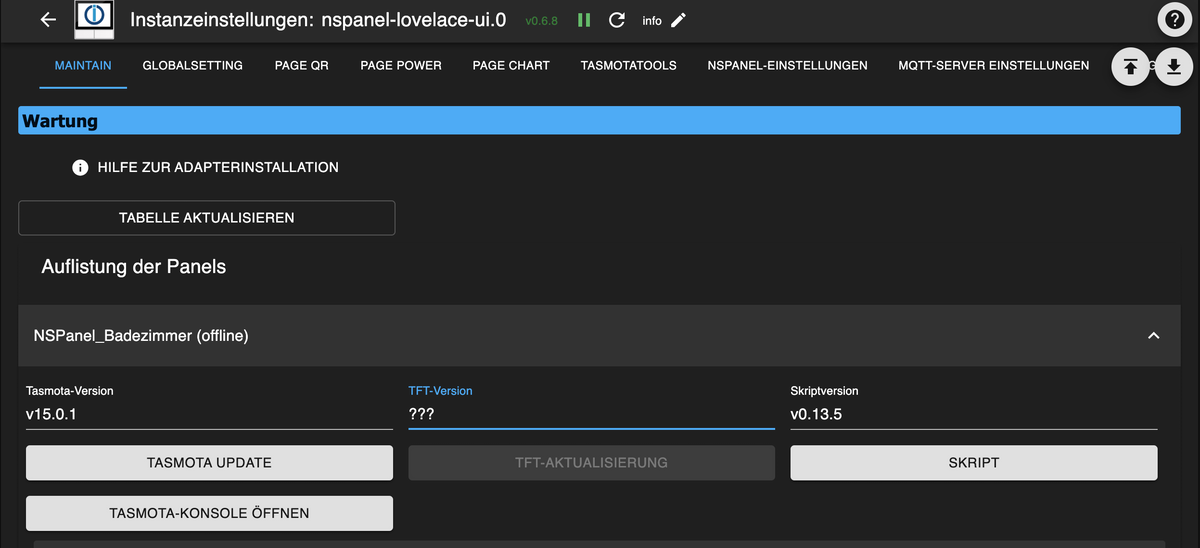
In der Instanz wird wird das panel als offline angezeigt:
-
Ich bekomme mein panel einfach nicht zum laufen. Ich hab schon mehrmals alles raus gelöscht (Objecte, Scripte, In der instanz) und neu angelegt. (v0.6.8)
Beim Neustart der Instanz bekomme ich aktuell diese Meldungen:
nspanel-lovelace-ui.0
2025-10-24 21:13:35.627	info	[NSPanel_Badezimmer] Setting panel to offline until first message!

mqtt.0
2025-10-24 21:13:35.626	info	Client [iobroker_a350717b-2ee5-45f8-8f61-d6db59dcf564] subscribes on "SmartHome/NSPanel_Badezimmer/stat/#" with regex /^mqtt\.0\.SmartHome\.NSPanel_Badezimmer\.stat\..*/

mqtt.0
2025-10-24 21:13:35.625	info	Client [iobroker_a350717b-2ee5-45f8-8f61-d6db59dcf564] subscribes on "SmartHome/NSPanel_Badezimmer/stat/#" with regex /^SmartHome\.NSPanel_Badezimmer\.stat\..*/

mqtt.0
2025-10-24 21:13:35.618	info	Client [iobroker_a350717b-2ee5-45f8-8f61-d6db59dcf564] subscribes on "SmartHome/NSPanel_Badezimmer/tele/#" with regex /^mqtt\.0\.SmartHome\.NSPanel_Badezimmer\.tele\..*/

mqtt.0
2025-10-24 21:13:35.617	info	Client [iobroker_a350717b-2ee5-45f8-8f61-d6db59dcf564] subscribes on "SmartHome/NSPanel_Badezimmer/tele/#" with regex /^SmartHome\.NSPanel_Badezimmer\.tele\..*/

mqtt.0
2025-10-24 21:13:35.613	info	Client [iobroker_a350717b-2ee5-45f8-8f61-d6db59dcf564] subscribes on "mqtt.0.SmartHome.NSPanel_Badezimmer.stat.RESULT"

mqtt.0
2025-10-24 21:13:09.829	info	Client [NSPanel_Badezimmer] publishOnSubscribe send all known states

mqtt.0
2025-10-24 21:13:09.629	info	Client [NSPanel_Badezimmer] subscribes on "SmartHome/NSPanel_Badezimmer/cmnd/#" with regex /^mqtt\.0\.SmartHome\.NSPanel_Badezimmer\.cmnd\..*/

mqtt.0
2025-10-24 21:13:09.628	info	Client [NSPanel_Badezimmer] subscribes on "SmartHome/NSPanel_Badezimmer/cmnd/#" with regex /^SmartHome\.NSPanel_Badezimmer\.cmnd\..*/

mqtt.0
2025-10-24 21:13:09.578	info	Client [NSPanel_Badezimmer] connected with secret 1761333189577_4195

mqtt.0
2025-10-24 21:13:04.494	info	Client [NSPanel_Badezimmer] connection closed: closed

mqtt.0
2025-10-24 21:13:03.531	info	Client [iobroker_a350717b-2ee5-45f8-8f61-d6db59dcf564] connected with secret 1761333183530_4548

nspanel-lovelace-ui.0
2025-10-24 21:13:02.095	info	Detailed configuration checks are suppressed here. Full validation output is only shown when the configuration script is sent to the adapter.

nspanel-lovelace-ui.0
2025-10-24 21:13:02.094	info	Found 1 script configs for topics: SmartHome/NSPanel_Badezimmer

nspanel-lovelace-ui.0
2025-10-24 21:13:02.094	info	Configured panels: name#topic -> [NSPanel_Badezimmer#SmartHome/NSPanel_Badezimmer]

nspanel-lovelace-ui.0
2025-10-24 21:13:02.022	info	starting. Version 0.6.8 (non-npm: ticaki/ioBroker.nspanel-lovelace-ui) in /opt/iobroker/node_modules/iobroker.nspanel-lovelace-ui, node: v20.19.2, js-controller: 7.0.6
In der Instanz wird wird das panel als offline angezeigt:
-
@max_yeah
Drück einmal eine Taste auf dem Panel. Das hilf bei mir in der selben Situation 😀




Support us
887
Online32.4k
Users81.5k
Topics1.3m
Posts