




ESP Home ohne Home Assistant möglich? [gelöst]
-
Hallo Zusammen,
ich habe versucht die Antwort auf Google, hier und auf Youtube zu finden, allerdings ohne für mich klare Antwort. Vielleicht kann es ja jemand hier beantworten.Ich habe zuhause mittlerweile so gut wie alles im Iobroker automatisiert. Als "letzter" Punkt spiele ich aktuell am automatisierten schalten von Lichtern und teste hier alles möglichen Aktoren aus. BWM, MMWave Sensoren wie den Aqara FP2 habe ich auch. Kameras kommen nicht in Frage. Als nächstes möchte ich einen Präsenzmelder testen, welcher auf ESP Home Basis arbeitet.
Wenn ich jetzt lese, wie das am besten eingebunden werden kann, liest man fast nur über Homeassistant.
Ist das wirklich so? Gibts hier keine Möglichkeit wie bei Tasmota, dass man alle notwendigen daten per MQTT mit dem Broker austauscht? Es gibt ja einen ESPHome Adapter über Git. Reicht der aus?
Ich bin mit IOBroker mehr als Happy, und möchte jetzt nicht zum probieren HA installieren...
Für diejenigen, die wissen möchte um welchen Sensor es geht -> https://www.athom.tech/blank-1/human-presence-sensor -
Hallo Zusammen,
ich habe versucht die Antwort auf Google, hier und auf Youtube zu finden, allerdings ohne für mich klare Antwort. Vielleicht kann es ja jemand hier beantworten.Ich habe zuhause mittlerweile so gut wie alles im Iobroker automatisiert. Als "letzter" Punkt spiele ich aktuell am automatisierten schalten von Lichtern und teste hier alles möglichen Aktoren aus. BWM, MMWave Sensoren wie den Aqara FP2 habe ich auch. Kameras kommen nicht in Frage. Als nächstes möchte ich einen Präsenzmelder testen, welcher auf ESP Home Basis arbeitet.
Wenn ich jetzt lese, wie das am besten eingebunden werden kann, liest man fast nur über Homeassistant.
Ist das wirklich so? Gibts hier keine Möglichkeit wie bei Tasmota, dass man alle notwendigen daten per MQTT mit dem Broker austauscht? Es gibt ja einen ESPHome Adapter über Git. Reicht der aus?
Ich bin mit IOBroker mehr als Happy, und möchte jetzt nicht zum probieren HA installieren...
Für diejenigen, die wissen möchte um welchen Sensor es geht -> https://www.athom.tech/blank-1/human-presence-sensor@denis-claß sagte in ESP Home ohne Home Assistant möglich?:
Es gibt ja einen ESPHome Adapter über Git. Reicht der aus?
🧑🎓 Autor des beliebten ioBroker-Master-Kurses
🎥 Tutorials rund um das Thema DIY-Smart-Home: https://haus-automatisierung.com/
📚 Meine Dokumentation -
@denis-claß sagte in ESP Home ohne Home Assistant möglich?:
Es gibt ja einen ESPHome Adapter über Git. Reicht der aus?
@haus-automatisierung
danke. ich bin dabei das ganze zu testen. Mein iobroker läuft unter proxmox in einer VM. Alles up to date.
Das Dashboard direkt über den iobroker bekomme ich nicht zum laufen, wegen folgenden Fehler, vielleicht hat dazu jemand eine idee:Fatal error starting ESPHomeDashboard | Error: Command failed with exit code 1: /home/iobroker/.cache/autopy/venv/esphome/bin/python3 -m pip install esphome==2024.12.1 pillow==10.0.1ERROR: Cannot install esphome==2024.12.1 and pillow==10.0.1 because these package versions have conflicting dependencies.ERROR: ResolutionImpossible: for help visit https://pip.pypa.io/en/latest/topics/dependency-resolution/#dealing-with-dependency-conflicts[notice] A new release of pip is available: 24.0 -> 24.3.1[notice] To update, run: /home/iobroker/.cache/autopy/venv/esphome/bin/python3 -m pip install --upgrade pipCollecting esphome==2024.12.1 Using cached esphome-2024.12.1-py3-none-any.whl.metadata (3.5 kB)Collecting pillow==10.0.1 Using cached Pillow-10.0.1-cp311-cp311-manylinux_2_28_x86_64.whl.metadata (9.5 kB)Collecting cryptography==43.0.0 (from esphome==2024.12.1) Using cached cryptography-43.0.0-cp39-abi3-manylinux_2_28_x86_64.whl.metadata (5.4 kB)Collecting voluptuous==0.14.2 (from esphome==2024.12.1) Using cached voluptuous-0.14.2-py3-none-any.whl.metadata (20 kB)Collecting PyYAML==6.0.2 (from esphome==2024.12.1) Using cached PyYAML-6.0.2-cp311-cp311-manylinux_2_17_x86_64.manylinux2014_x86_64.whl.metadata (2.1 kB)Collecting paho-mqtt==1.6.1 (from esphome==2024.12.1) Using cached paho-mqtt-1.6.1.tar.gz (99 kB) Installing build dependencies: started Installing build dependencies: finished with status 'done' Getting requirements to build wheel: started Getting requirements to build wheel: finished with status 'done' Preparing metadata (pyproject.toml): started Preparing metadata (pyproject.toml): finished with status 'done'Collecting colorama==0.4.6 (from esphome==2024.12.1) Using cached colorama-0.4.6-py2.py3-none-any.whl.metadata (17 kB)Collecting icmplib==3.0.4 (from esphome==2024.12.1) Using cached icmplib-3.0.4-py3-none-any.whl.metadata (19 kB)Collecting tornado==6.4 (from esphome==2024.12.1) Using cached tornado-6.4-cp38-abi3-manylinux_2_5_x86_64.manylinux1_x86_64.manylinux_2_17_x86_64.manylinux2014_x86_64.whl.metadata (2.5 kB)Collecting tzlocal==5.2 (from esphome==2024.12.1) Using cached tzlocal-5.2-py3-none-any.whl.metadata (7.8 kB)Collecting tzdata>=2021.1 (from esphome==2024.12.1) Using cached tzdata-2024.2-py2.py3-none-any.whl.metadata (1.4 kB)Collecting pyserial==3.5 (from esphome==2024.12.1) Using cached pyserial-3.5-py2.py3-none-any.whl.metadata (1.6 kB)Collecting platformio==6.1.16 (from esphome==2024.12.1) Using cached platformio-6.1.16.tar.gz (239 kB) Installing build dependencies: started Installing build dependencies: finished with status 'done' Getting requirements to build wheel: started Getting requirements to build wheel: finished with status 'done' Preparing metadata (pyproject.toml): started Preparing metadata (pyproject.toml): finished with status 'done'Collecting esptool==4.7.0 (from esphome==2024.12.1) Using cached esptool-4.7.0.tar.gz (285 kB) Installing build dependencies: started Installing build dependencies: finished with status 'done' Getting requirements to build wheel: started Getting requirements to build wheel: finished with status 'done' Preparing metadata (pyproject.toml): started Preparing metadata (pyproject.toml): finished with status 'done'Collecting click==8.1.7 (from esphome==2024.12.1) Using cached click-8.1.7-py3-none-any.whl.metadata (3.0 kB)Collecting esphome-dashboard==20241217.1 (from esphome==2024.12.1) Using cached esphome_dashboard-20241217.1-py3-none-any.whl.metadata (1.0 kB)Collecting aioesphomeapi==24.6.2 (from esphome==2024.12.1) Using cached aioesphomeapi-24.6.2-cp311-cp311-manylinux_2_17_x86_64.manylinux2014_x86_64.whl.metadata (4.9 kB)Collecting zeroconf==0.132.2 (from esphome==2024.12.1) Using cached zeroconf-0.132.2-cp311-cp311-manylinux_2_17_x86_64.manylinux2014_x86_64.whl.metadata (6.0 kB)Collecting puremagic==1.27 (from esphome==2024.12.1) Using cached puremagic-1.27-py3-none-any.whl.metadata (5.8 kB)Collecting ruamel.yaml==0.18.6 (from esphome==2024.12.1) Using cached ruamel.yaml-0.18.6-py3-none-any.whl.metadata (23 kB)Collecting glyphsets==1.0.0 (from esphome==2024.12.1) Using cached glyphsets-1.0.0-py3-none-any.whl.metadata (12 kB)INFO: pip is looking at multiple versions of esphome to determine which version is compatible with other requirements. This could take a while.The conflict is caused by: The user requested pillow==10.0.1 esphome 2024.12.1 depends on pillow==10.4.0To fix this you could try to:1. loosen the range of package versions you've specified2. remove package versions to allow pip attempt to solve the dependency conflict | Error: Command failed with exit code 1: /home/iobroker/.cache/autopy/venv/esphome/bin/python3 -m pip install esphome==2024.12.1 pillow==10.0.1ERROR: Cannot install esphome==2024.12.1 and pillow==10.0.1 because these package versions have conflicting dependencies.ERROR: ResolutionImpossible: for help visit https://pip.pypa.io/en/latest/topics/dependency-resolution/#dealing-with-dependency-conflicts[notice] A new release of pip is available: 24.0 -> 24.3.1[notice] To update, run: /home/iobroker/.cache/autopy/venv/esphome/bin/python3 -m pip install --upgrade pipCollecting esphome==2024.12.1 Using cached esphome-2024.12.1-py3-none-any.whl.metadata (3.5 kB)Collecting pillow==10.0.1 Using cached Pillow-10.0.1-cp311-cp311-manylinux_2_28_x86_64.whl.metadata (9.5 kB)Collecting cryptography==43.0.0 (from esphome==2024.12.1) Using cached cryptography-43.0.0-cp39-abi3-manylinux_2_28_x86_64.whl.metadata (5.4 kB)Collecting voluptuous==0.14.2 (from esphome==2024.12.1) Using cached voluptuous-0.14.2-py3-none-any.whl.metadata (20 kB)Collecting PyYAML==6.0.2 (from esphome==2024.12.1) Using cached PyYAML-6.0.2-cp311-cp311-manylinux_2_17_x86_64.manylinux2014_x86_64.whl.metadata (2.1 kB)Collecting paho-mqtt==1.6.1 (from esphome==2024.12.1) Using cached paho-mqtt-1.6.1.tar.gz (99 kB) Installing build dependencies: started Installing build dependencies: finished with status 'done' Getting requirements to build wheel: started Getting requirements to build wheel: finished with status 'done' Preparing metadata (pyproject.toml): started Preparing metadata (pyproject.toml): finished with status 'done'Collecting colorama==0.4.6 (from esphome==2024.12.1) Using cached colorama-0.4.6-py2.py3-none-any.whl.metadata (17 kB)Collecting icmplib==3.0.4 (from esphome==2024.12.1) Using cached icmplib-3.0.4-py3-none-any.whl.metadata (19 kB)Collecting tornado==6.4 (from esphome==2024.12.1) Using cached tornado-6.4-cp38-abi3-manylinux_2_5_x86_64.manylinux1_x86_64.manylinux_2_17_x86_64.manylinux2014_x86_64.whl.metadata (2.5 kB)Collecting tzlocal==5.2 (from esphome==2024.12.1) Using cached tzlocal-5.2-py3-none-any.whl.metadata (7.8 kB)Collecting tzdata>=2021.1 (from esphome==2024.12.1) Using cached tzdata-2024.2-py2.py3-none-any.whl.metadata (1.4 kB)Collecting pyserial==3.5 (from esphome==2024.12.1) Using cached pyserial-3.5-py2.py3-none-any.whl.metadata (1.6 kB)Collecting platformio==6.1.16 (from esphome==2024.12.1) Using cached platformio-6.1.16.tar.gz (239 kB) Installing build dependencies: started Installing build dependencies: finished with status 'done' Getting requirements to build wheel: started Getting requirements to build wheel: finished with status 'done' Preparing metadata (pyproject.toml): started Preparing metadata (pyproject.toml): finished with status 'done'Collecting esptool==4.7.0 (from esphome==2024.12.1) Using cached esptool-4.7.0.tar.gz (285 kB) Installing build dependencies: started Installing build dependencies: finished with status 'done' Getting requirements to build wheel: started Getting requirements to build wheel: finished with status 'done' Preparing metadata (pyproject.toml): started Preparing metadata (pyproject.toml): finished with status 'done'Collecting click==8.1.7 (from esphome==2024.12.1) Using cached click-8.1.7-py3-none-any.whl.metadata (3.0 kB)Collecting esphome-dashboard==20241217.1 (from esphome==2024.12.1) Using cached esphome_dashboard-20241217.1-py3-none-any.whl.metadata (1.0 kB)Collecting aioesphomeapi==24.6.2 (from esphome==2024.12.1) Using cached aioesphomeapi-24.6.2-cp311-cp311-manylinux_2_17_x86_64.manylinux2014_x86_64.whl.metadata (4.9 kB)Collecting zeroconf==0.132.2 (from esphome==2024.12.1) Using cached zeroconf-0.132.2-cp311-cp311-manylinux_2_17_x86_64.manylinux2014_x86_64.whl.metadata (6.0 kB)Collecting puremagic==1.27 (from esphome==2024.12.1) Using cached puremagic-1.27-py3-none-any.whl.metadata (5.8 kB)Collecting ruamel.yaml==0.18.6 (from esphome==2024.12.1) Using cached ruamel.yaml-0.18.6-py3-none-any.whl.metadata (23 kB)Collecting glyphsets==1.0.0 (from esphome==2024.12.1) Using cached glyphsets-1.0.0-py3-none-any.whl.metadata (12 kB)INFO: pip is looking at multiple versions of esphome to determine which version is compatible with other requirements. This could take a while.The conflict is caused by: The user requested pillow==10.0.1 esphome 2024.12.1 depends on pillow==10.4.0To fix this you could try to:1. loosen the range of package versions you've specified2. remove package versions to allow pip attempt to solve the dependency conflict at makeError (file:///opt/iobroker/node_modules/autopy/node_modules/execa/lib/error.js:60:11) at handlePromise (file:///opt/iobroker/node_modules/autopy/node_modules/execa/index.js:124:26) at processTicksAndRejections (node:internal/process/task_queues:95:5) at $df9eabe9bda49ea8$export$e522f41234ab669a (file:///opt/iobroker/node_modules/autopy/src/index.ts:257:13) at Esphome.espHomeDashboard (/Users/nl69zh/Developer/community/opensource/ioBroker.esphome/main.js:180:7) at Esphome.onReady (/opt/iobroker/node_modules/iobroker.esphome/main.js:66:4) -
@haus-automatisierung
danke. ich bin dabei das ganze zu testen. Mein iobroker läuft unter proxmox in einer VM. Alles up to date.
Das Dashboard direkt über den iobroker bekomme ich nicht zum laufen, wegen folgenden Fehler, vielleicht hat dazu jemand eine idee:Fatal error starting ESPHomeDashboard | Error: Command failed with exit code 1: /home/iobroker/.cache/autopy/venv/esphome/bin/python3 -m pip install esphome==2024.12.1 pillow==10.0.1ERROR: Cannot install esphome==2024.12.1 and pillow==10.0.1 because these package versions have conflicting dependencies.ERROR: ResolutionImpossible: for help visit https://pip.pypa.io/en/latest/topics/dependency-resolution/#dealing-with-dependency-conflicts[notice] A new release of pip is available: 24.0 -> 24.3.1[notice] To update, run: /home/iobroker/.cache/autopy/venv/esphome/bin/python3 -m pip install --upgrade pipCollecting esphome==2024.12.1 Using cached esphome-2024.12.1-py3-none-any.whl.metadata (3.5 kB)Collecting pillow==10.0.1 Using cached Pillow-10.0.1-cp311-cp311-manylinux_2_28_x86_64.whl.metadata (9.5 kB)Collecting cryptography==43.0.0 (from esphome==2024.12.1) Using cached cryptography-43.0.0-cp39-abi3-manylinux_2_28_x86_64.whl.metadata (5.4 kB)Collecting voluptuous==0.14.2 (from esphome==2024.12.1) Using cached voluptuous-0.14.2-py3-none-any.whl.metadata (20 kB)Collecting PyYAML==6.0.2 (from esphome==2024.12.1) Using cached PyYAML-6.0.2-cp311-cp311-manylinux_2_17_x86_64.manylinux2014_x86_64.whl.metadata (2.1 kB)Collecting paho-mqtt==1.6.1 (from esphome==2024.12.1) Using cached paho-mqtt-1.6.1.tar.gz (99 kB) Installing build dependencies: started Installing build dependencies: finished with status 'done' Getting requirements to build wheel: started Getting requirements to build wheel: finished with status 'done' Preparing metadata (pyproject.toml): started Preparing metadata (pyproject.toml): finished with status 'done'Collecting colorama==0.4.6 (from esphome==2024.12.1) Using cached colorama-0.4.6-py2.py3-none-any.whl.metadata (17 kB)Collecting icmplib==3.0.4 (from esphome==2024.12.1) Using cached icmplib-3.0.4-py3-none-any.whl.metadata (19 kB)Collecting tornado==6.4 (from esphome==2024.12.1) Using cached tornado-6.4-cp38-abi3-manylinux_2_5_x86_64.manylinux1_x86_64.manylinux_2_17_x86_64.manylinux2014_x86_64.whl.metadata (2.5 kB)Collecting tzlocal==5.2 (from esphome==2024.12.1) Using cached tzlocal-5.2-py3-none-any.whl.metadata (7.8 kB)Collecting tzdata>=2021.1 (from esphome==2024.12.1) Using cached tzdata-2024.2-py2.py3-none-any.whl.metadata (1.4 kB)Collecting pyserial==3.5 (from esphome==2024.12.1) Using cached pyserial-3.5-py2.py3-none-any.whl.metadata (1.6 kB)Collecting platformio==6.1.16 (from esphome==2024.12.1) Using cached platformio-6.1.16.tar.gz (239 kB) Installing build dependencies: started Installing build dependencies: finished with status 'done' Getting requirements to build wheel: started Getting requirements to build wheel: finished with status 'done' Preparing metadata (pyproject.toml): started Preparing metadata (pyproject.toml): finished with status 'done'Collecting esptool==4.7.0 (from esphome==2024.12.1) Using cached esptool-4.7.0.tar.gz (285 kB) Installing build dependencies: started Installing build dependencies: finished with status 'done' Getting requirements to build wheel: started Getting requirements to build wheel: finished with status 'done' Preparing metadata (pyproject.toml): started Preparing metadata (pyproject.toml): finished with status 'done'Collecting click==8.1.7 (from esphome==2024.12.1) Using cached click-8.1.7-py3-none-any.whl.metadata (3.0 kB)Collecting esphome-dashboard==20241217.1 (from esphome==2024.12.1) Using cached esphome_dashboard-20241217.1-py3-none-any.whl.metadata (1.0 kB)Collecting aioesphomeapi==24.6.2 (from esphome==2024.12.1) Using cached aioesphomeapi-24.6.2-cp311-cp311-manylinux_2_17_x86_64.manylinux2014_x86_64.whl.metadata (4.9 kB)Collecting zeroconf==0.132.2 (from esphome==2024.12.1) Using cached zeroconf-0.132.2-cp311-cp311-manylinux_2_17_x86_64.manylinux2014_x86_64.whl.metadata (6.0 kB)Collecting puremagic==1.27 (from esphome==2024.12.1) Using cached puremagic-1.27-py3-none-any.whl.metadata (5.8 kB)Collecting ruamel.yaml==0.18.6 (from esphome==2024.12.1) Using cached ruamel.yaml-0.18.6-py3-none-any.whl.metadata (23 kB)Collecting glyphsets==1.0.0 (from esphome==2024.12.1) Using cached glyphsets-1.0.0-py3-none-any.whl.metadata (12 kB)INFO: pip is looking at multiple versions of esphome to determine which version is compatible with other requirements. This could take a while.The conflict is caused by: The user requested pillow==10.0.1 esphome 2024.12.1 depends on pillow==10.4.0To fix this you could try to:1. loosen the range of package versions you've specified2. remove package versions to allow pip attempt to solve the dependency conflict | Error: Command failed with exit code 1: /home/iobroker/.cache/autopy/venv/esphome/bin/python3 -m pip install esphome==2024.12.1 pillow==10.0.1ERROR: Cannot install esphome==2024.12.1 and pillow==10.0.1 because these package versions have conflicting dependencies.ERROR: ResolutionImpossible: for help visit https://pip.pypa.io/en/latest/topics/dependency-resolution/#dealing-with-dependency-conflicts[notice] A new release of pip is available: 24.0 -> 24.3.1[notice] To update, run: /home/iobroker/.cache/autopy/venv/esphome/bin/python3 -m pip install --upgrade pipCollecting esphome==2024.12.1 Using cached esphome-2024.12.1-py3-none-any.whl.metadata (3.5 kB)Collecting pillow==10.0.1 Using cached Pillow-10.0.1-cp311-cp311-manylinux_2_28_x86_64.whl.metadata (9.5 kB)Collecting cryptography==43.0.0 (from esphome==2024.12.1) Using cached cryptography-43.0.0-cp39-abi3-manylinux_2_28_x86_64.whl.metadata (5.4 kB)Collecting voluptuous==0.14.2 (from esphome==2024.12.1) Using cached voluptuous-0.14.2-py3-none-any.whl.metadata (20 kB)Collecting PyYAML==6.0.2 (from esphome==2024.12.1) Using cached PyYAML-6.0.2-cp311-cp311-manylinux_2_17_x86_64.manylinux2014_x86_64.whl.metadata (2.1 kB)Collecting paho-mqtt==1.6.1 (from esphome==2024.12.1) Using cached paho-mqtt-1.6.1.tar.gz (99 kB) Installing build dependencies: started Installing build dependencies: finished with status 'done' Getting requirements to build wheel: started Getting requirements to build wheel: finished with status 'done' Preparing metadata (pyproject.toml): started Preparing metadata (pyproject.toml): finished with status 'done'Collecting colorama==0.4.6 (from esphome==2024.12.1) Using cached colorama-0.4.6-py2.py3-none-any.whl.metadata (17 kB)Collecting icmplib==3.0.4 (from esphome==2024.12.1) Using cached icmplib-3.0.4-py3-none-any.whl.metadata (19 kB)Collecting tornado==6.4 (from esphome==2024.12.1) Using cached tornado-6.4-cp38-abi3-manylinux_2_5_x86_64.manylinux1_x86_64.manylinux_2_17_x86_64.manylinux2014_x86_64.whl.metadata (2.5 kB)Collecting tzlocal==5.2 (from esphome==2024.12.1) Using cached tzlocal-5.2-py3-none-any.whl.metadata (7.8 kB)Collecting tzdata>=2021.1 (from esphome==2024.12.1) Using cached tzdata-2024.2-py2.py3-none-any.whl.metadata (1.4 kB)Collecting pyserial==3.5 (from esphome==2024.12.1) Using cached pyserial-3.5-py2.py3-none-any.whl.metadata (1.6 kB)Collecting platformio==6.1.16 (from esphome==2024.12.1) Using cached platformio-6.1.16.tar.gz (239 kB) Installing build dependencies: started Installing build dependencies: finished with status 'done' Getting requirements to build wheel: started Getting requirements to build wheel: finished with status 'done' Preparing metadata (pyproject.toml): started Preparing metadata (pyproject.toml): finished with status 'done'Collecting esptool==4.7.0 (from esphome==2024.12.1) Using cached esptool-4.7.0.tar.gz (285 kB) Installing build dependencies: started Installing build dependencies: finished with status 'done' Getting requirements to build wheel: started Getting requirements to build wheel: finished with status 'done' Preparing metadata (pyproject.toml): started Preparing metadata (pyproject.toml): finished with status 'done'Collecting click==8.1.7 (from esphome==2024.12.1) Using cached click-8.1.7-py3-none-any.whl.metadata (3.0 kB)Collecting esphome-dashboard==20241217.1 (from esphome==2024.12.1) Using cached esphome_dashboard-20241217.1-py3-none-any.whl.metadata (1.0 kB)Collecting aioesphomeapi==24.6.2 (from esphome==2024.12.1) Using cached aioesphomeapi-24.6.2-cp311-cp311-manylinux_2_17_x86_64.manylinux2014_x86_64.whl.metadata (4.9 kB)Collecting zeroconf==0.132.2 (from esphome==2024.12.1) Using cached zeroconf-0.132.2-cp311-cp311-manylinux_2_17_x86_64.manylinux2014_x86_64.whl.metadata (6.0 kB)Collecting puremagic==1.27 (from esphome==2024.12.1) Using cached puremagic-1.27-py3-none-any.whl.metadata (5.8 kB)Collecting ruamel.yaml==0.18.6 (from esphome==2024.12.1) Using cached ruamel.yaml-0.18.6-py3-none-any.whl.metadata (23 kB)Collecting glyphsets==1.0.0 (from esphome==2024.12.1) Using cached glyphsets-1.0.0-py3-none-any.whl.metadata (12 kB)INFO: pip is looking at multiple versions of esphome to determine which version is compatible with other requirements. This could take a while.The conflict is caused by: The user requested pillow==10.0.1 esphome 2024.12.1 depends on pillow==10.4.0To fix this you could try to:1. loosen the range of package versions you've specified2. remove package versions to allow pip attempt to solve the dependency conflict at makeError (file:///opt/iobroker/node_modules/autopy/node_modules/execa/lib/error.js:60:11) at handlePromise (file:///opt/iobroker/node_modules/autopy/node_modules/execa/index.js:124:26) at processTicksAndRejections (node:internal/process/task_queues:95:5) at $df9eabe9bda49ea8$export$e522f41234ab669a (file:///opt/iobroker/node_modules/autopy/src/index.ts:257:13) at Esphome.espHomeDashboard (/Users/nl69zh/Developer/community/opensource/ioBroker.esphome/main.js:180:7) at Esphome.onReady (/opt/iobroker/node_modules/iobroker.esphome/main.js:66:4)du hast den Adapter hoffentlich nicht direkt von Github gezogen? Der ist auch in der normalen Adapterübersicht.
-
du hast den Adapter hoffentlich nicht direkt von Github gezogen? Der ist auch in der normalen Adapterübersicht.
@ticaki
doch, leider etwas übereilt von git.ich hau den runter und versuch mal über das beta repository von admin zu installieren
-
@ticaki
doch, leider etwas übereilt von git.ich hau den runter und versuch mal über das beta repository von admin zu installieren
Das hilft aber auch nicht :) Ich war auch zu schnell du mußt das hier einstellen, jede spätere Version hat bei mir einen ähnlichen Fehler.
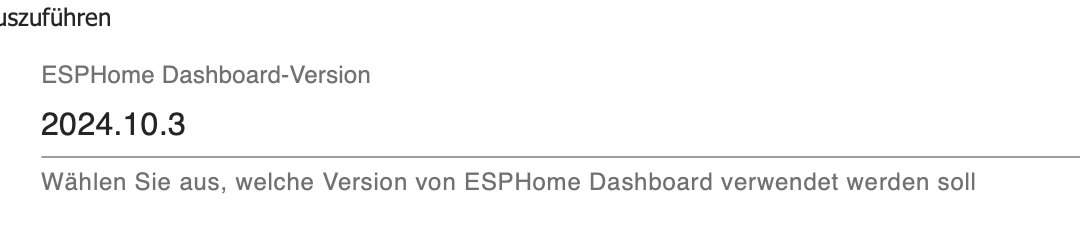
EDIT:
Ist in der Adapterkonfiguration zu finden -
Das hilft aber auch nicht :) Ich war auch zu schnell du mußt das hier einstellen, jede spätere Version hat bei mir einen ähnlichen Fehler.
EDIT:
Ist in der Adapterkonfiguration zu finden@ticaki
die reine installation über admin hat schonmal geklappt und ich komme auf das Dashboard! DANKE DIR!
Jetzt kann ich schonmal weiter machen.


Hey! Du scheinst an dieser Unterhaltung interessiert zu sein, hast aber noch kein Konto.
Hast du es satt, bei jedem Besuch durch die gleichen Beiträge zu scrollen? Wenn du dich für ein Konto anmeldest, kommst du immer genau dorthin zurück, wo du zuvor warst, und kannst dich über neue Antworten benachrichtigen lassen (entweder per E-Mail oder Push-Benachrichtigung). Du kannst auch Lesezeichen speichern und Beiträge positiv bewerten, um anderen Community-Mitgliedern deine Wertschätzung zu zeigen.
Mit deinem Input könnte dieser Beitrag noch besser werden 💗
Registrieren Anmelden322
Online33.0k
Benutzende83.7k
Themen1.3m
Beiträge