Skip to content
  • Home
  • Recent
  • Tags
  • 0 Unread 0
  • Categories
  • Unreplied
  • Popular
  • GitHub
  • Docu
  • Hilfe
Skins
  • Light
  • Brite
  • Cerulean
  • Cosmo
  • Flatly
  • Journal
  • Litera
  • Lumen
  • Lux
  • Materia
  • Minty
  • Morph
  • Pulse
  • Sandstone
  • Simplex
  • Sketchy
  • Spacelab
  • United
  • Yeti
  • Zephyr
  • Dark
  • Cyborg
  • Darkly
  • Quartz
  • Slate
  • Solar
  • Superhero
  • Vapor

  • Default (No Skin)
  • No Skin
Collapse
ioBroker Logo

Community Forum

donate donate
  1. ioBroker Community Home
  2. Deutsch
  3. ioBroker Allgemein
  4. Neue Features

NEWS

  • Jahresrückblick 2025 – unser neuer Blogbeitrag ist online! ✨
    BluefoxB
    Bluefox
    17
    1
    3.4k

  • Neuer Blogbeitrag: Monatsrückblick - Dezember 2025 🎄
    BluefoxB
    Bluefox
    13
    1
    1.1k

  • Weihnachtsangebot 2025! 🎄
    BluefoxB
    Bluefox
    25
    1
    2.5k

Neue Features

Scheduled Pinned Locked Moved ioBroker Allgemein
70 Posts 7 Posters 14.9k Views
  • Oldest to Newest
  • Newest to Oldest
  • Most Votes
Reply
  • Reply as topic
Log in to reply
This topic has been deleted. Only users with topic management privileges can see it.
  • HomoranH Do not disturb
    HomoranH Do not disturb
    Homoran
    Global Moderator Administrators
    wrote on last edited by
    #16

    Hallo Bluefox,

    kannst du evtl in deinem Updatescript für den js-controller noch die Zeile:

    root@cubox-i:/opt/iobroker# chmod +x iobroker
    

    einbauen (sinngemäß).

    Achso, die Links für DWD und CCU sind in den Instanzen wieder verschwunden.

    Danke

    Rainer

    kein Support per PN! - Fragen im Forum stellen - es gibt fast nichts, was nicht auch für andere interessant ist.

    Benutzt das Voting rechts unten im Beitrag wenn er euch geholfen hat.

    der Installationsfixer: curl -fsL https://iobroker.net/fix.sh | bash -

    1 Reply Last reply
    0
    • HomoranH Do not disturb
      HomoranH Do not disturb
      Homoran
      Global Moderator Administrators
      wrote on last edited by
      #17

      @Bluefox:

      kann man irgendwie die Liste aus der CCU.IO (auf Dateiebene) kopieren?

      Leider nicht. Aber du kannst abschauen in futon wie die Struktur aussieht und einfach da patchen.

      system.adapter.ping.0 => native.devices `

      Also muss man im Prinzip diesen Block kopieren
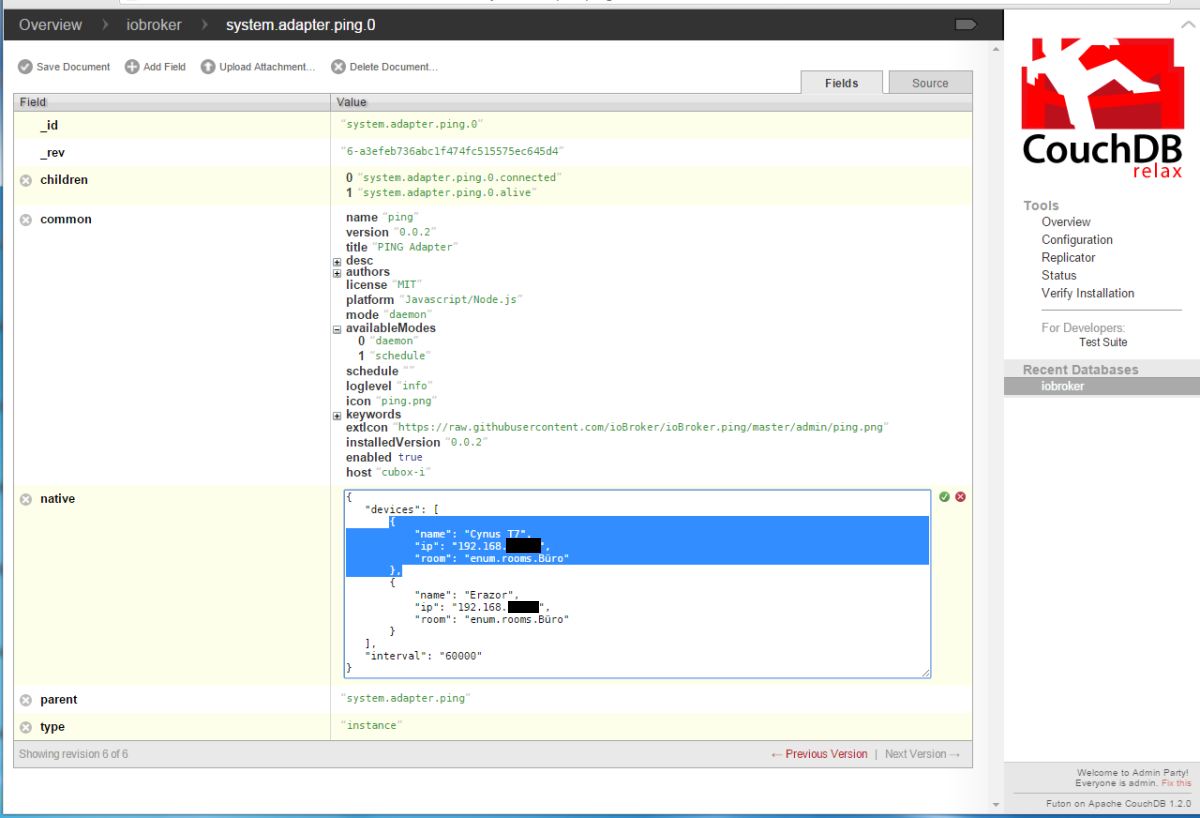
      144_iobroker_futon_ping.jpg
      mehrfach wieder einfügen und anpassen.

      Ob das so viel schneller geht, als über iobroker.admin????

      Danke nochmals

      Rainer

      kein Support per PN! - Fragen im Forum stellen - es gibt fast nichts, was nicht auch für andere interessant ist.

      Benutzt das Voting rechts unten im Beitrag wenn er euch geholfen hat.

      der Installationsfixer: curl -fsL https://iobroker.net/fix.sh | bash -

      1 Reply Last reply
      0
      • BluefoxB Offline
        BluefoxB Offline
        Bluefox
        wrote on last edited by
        #18

        Es gibt jetzt neue Feature: Log in admin. (Konnte auch ohne Problem jetzt in beliebige Reihenfolge upgedatet werden)

        1 Reply Last reply
        0
        • BluefoxB Offline
          BluefoxB Offline
          Bluefox
          wrote on last edited by
          #19

          48_chart.png
          Es gibt jetzt ersten Versuch um Charts zu bauen. Auswahl-Dialog fehlt noch.

          1 Reply Last reply
          0
          • BluefoxB Offline
            BluefoxB Offline
            Bluefox
            wrote on last edited by
            #20

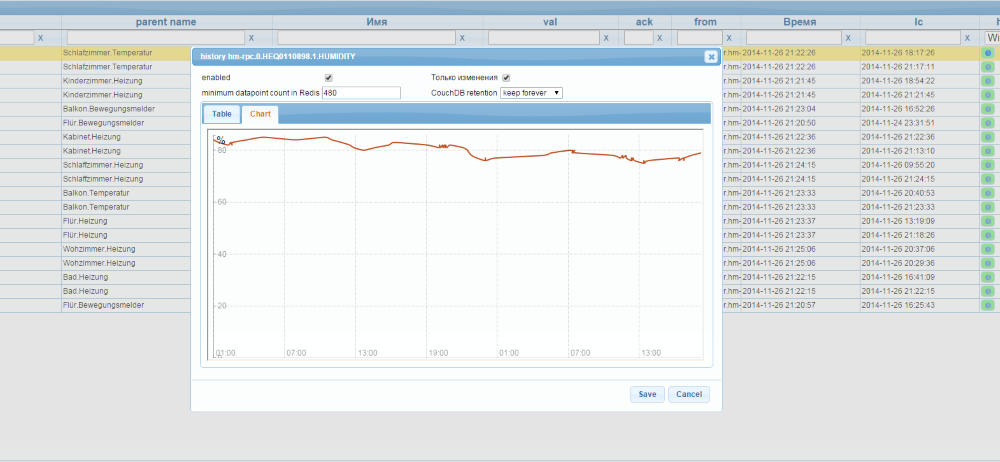
            Charts gibt es jetzt auch in admin:
            48_chart.png

            1 Reply Last reply
            0
            • HomoranH Do not disturb
              HomoranH Do not disturb
              Homoran
              Global Moderator Administrators
              wrote on last edited by
              #21

              @Bluefox:

              filename="Chart.png" index="1">~~
              Es gibt jetzt ersten Versuch um Charts zu bauen. Auswahl-Dialog fehlt noch. `

              Hallo Bluefox,

              da bei dir in der Adresszeile odroid…rickshaw.. steht, habe ich gerade mal den rickshaw-Adapter installiert

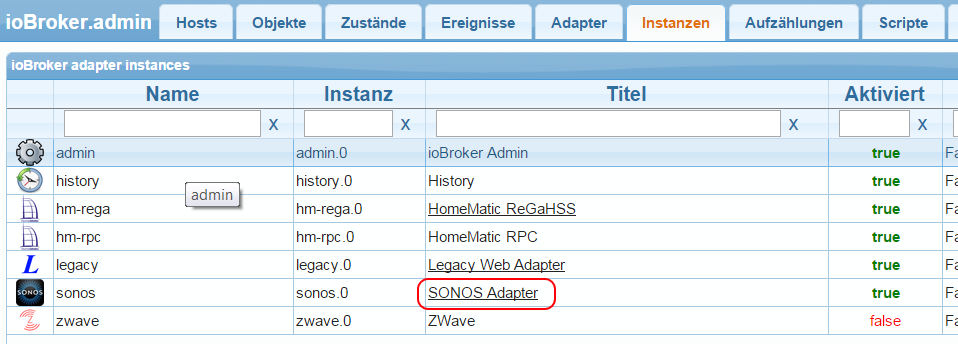
              Leider stehen im Konfig-Menü die Daten für den Sonos-Adapter :(
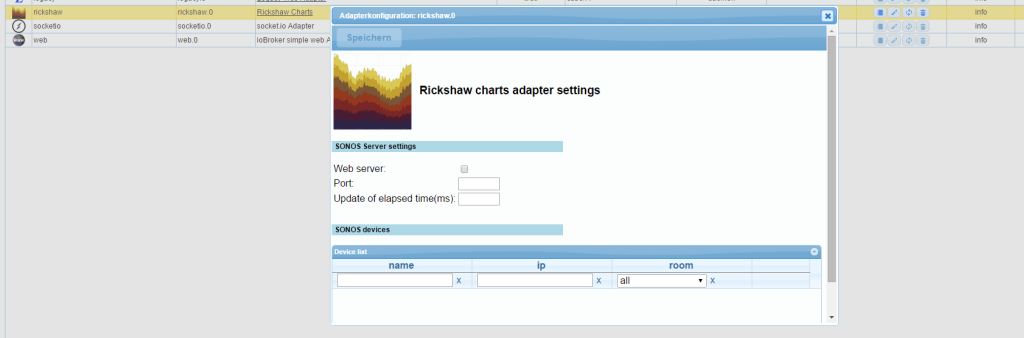
              144_iobroker_rickshaw.jpg
              und die socketio und web-Adapter wurden mit installiert - muss das so sein?

              Gruß

              Rainer

              kein Support per PN! - Fragen im Forum stellen - es gibt fast nichts, was nicht auch für andere interessant ist.

              Benutzt das Voting rechts unten im Beitrag wenn er euch geholfen hat.

              der Installationsfixer: curl -fsL https://iobroker.net/fix.sh | bash -

              1 Reply Last reply
              0
              • BluefoxB Offline
                BluefoxB Offline
                Bluefox
                wrote on last edited by
                #22

                @Homoran:

                @Bluefox:

                filename="Chart.png" index="1">~~
                Es gibt jetzt ersten Versuch um Charts zu bauen. Auswahl-Dialog fehlt noch. `

                Hallo Bluefox,

                da bei dir in der Adresszeile odroid…rickshaw.. steht, habe ich gerade mal den rickshaw-Adapter installiert

                Leider stehen im Konfig-Menü die Daten für den Sonos-Adapter :(
                filename="ioBroker_rickshaw.jpg" index="0">~~
                und die socketio und web-Adapter wurden mit installiert - muss das so sein?

                Gruß

                Rainer `
                Rickshaw, hat momentan gar keine Einstellungen. Des wegen die Konfiguration ist nicht relevant. (Muss ich löschen)

                Auszug aus readme.md:

                How to use
                
                install "socketio"-adapter and create one instance
                install "web"-adapter and create one instance.
                Select in settings of "web"-adapter the instance of installed "socket.io"-instance.
                install "rickshaw"-adapter and call
                Go to http://ip:8082/rickshaw/edit.html
                

                Natürlich socketio und web-adapter müssen auch aktiviert sein.

                1 Reply Last reply
                0
                • HomoranH Do not disturb
                  HomoranH Do not disturb
                  Homoran
                  Global Moderator Administrators
                  wrote on last edited by
                  #23

                  Hallo Bluefox,

                  rickshaw läuft bei mir noch nicht.

                  liegt es evtl. an den Ports?

                  du hast bei dir :8090

                  bei rickshaw kann ich nichts einstellen - der socket.io Adapter hat :8084 und der web Adapter :8082

                  Aufruf über den Link unter instances geht auf die :8082

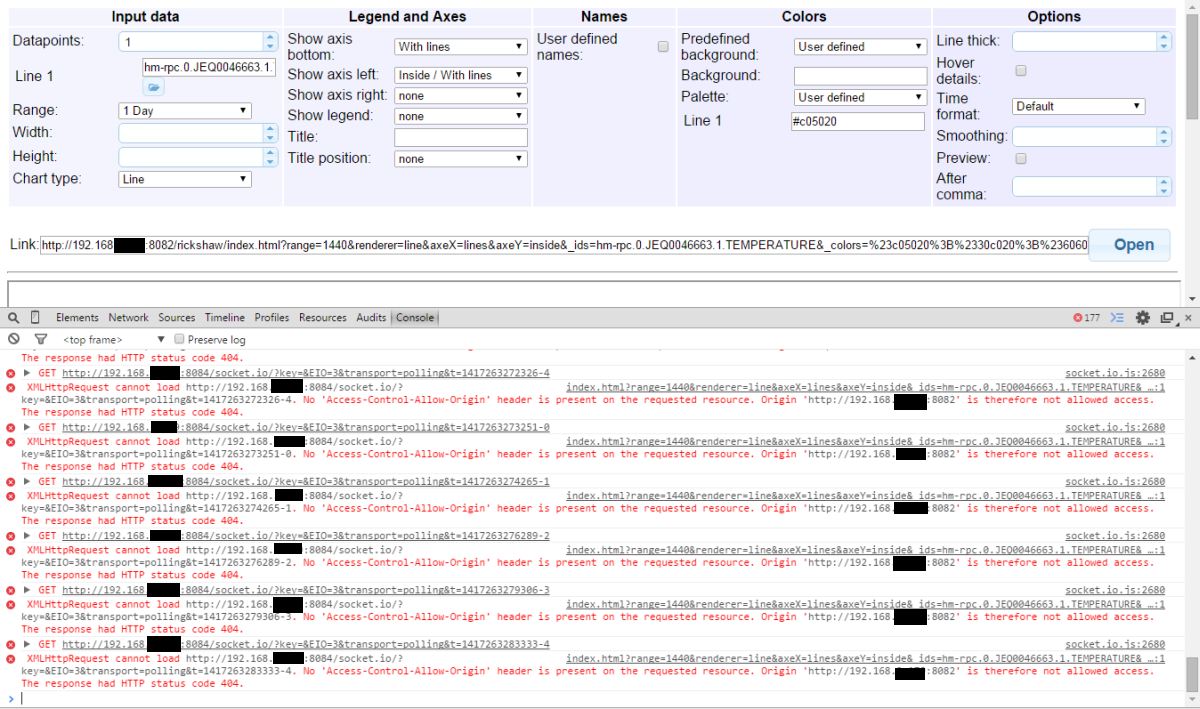
                  Die Console zeigt folgende Fehler:
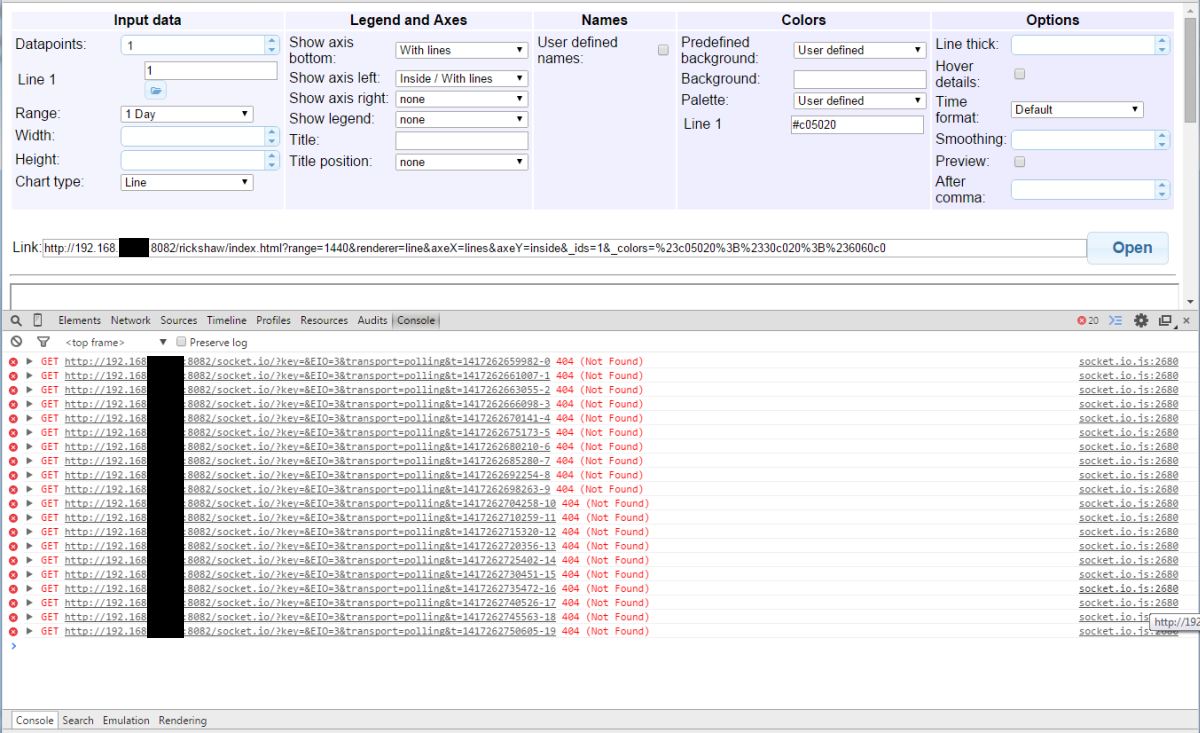
                  144_rickshaw_console_error.jpg

                  und:
                  144_rickshaw_console_error_2.jpg

                  Gruß

                  Rainer

                  kein Support per PN! - Fragen im Forum stellen - es gibt fast nichts, was nicht auch für andere interessant ist.

                  Benutzt das Voting rechts unten im Beitrag wenn er euch geholfen hat.

                  der Installationsfixer: curl -fsL https://iobroker.net/fix.sh | bash -

                  1 Reply Last reply
                  0
                  • BluefoxB Offline
                    BluefoxB Offline
                    Bluefox
                    wrote on last edited by
                    #24

                    @Homoran:

                    Hallo Bluefox,

                    rickshaw läuft bei mir noch nicht.

                    liegt es evtl. an den Ports?

                    du hast bei dir :8090

                    bei rickshaw kann ich nichts einstellen - der socket.io Adapter hat :8084 und der web Adapter :8082

                    Aufruf über den Link unter instances geht auf die :8082

                    Die Console zeigt folgende Fehler:
                    filename="Rickshaw_console_error.jpg" index="1">~~

                    und:
                    filename="Rickshaw_console_error_2.jpg" index="0">~~

                    Gruß

                    Rainer `
                    Es sieht so aus als ob socket.io bei dir nicht läuft. (Nicht enabled)

                    1 Reply Last reply
                    0
                    • HomoranH Do not disturb
                      HomoranH Do not disturb
                      Homoran
                      Global Moderator Administrators
                      wrote on last edited by
                      #25

                      @Bluefox:

                      Es sieht so aus als ob socket.io bei dir nicht läuft. (Nicht enabled) `
                      Eigentlich ist es aktiviert:
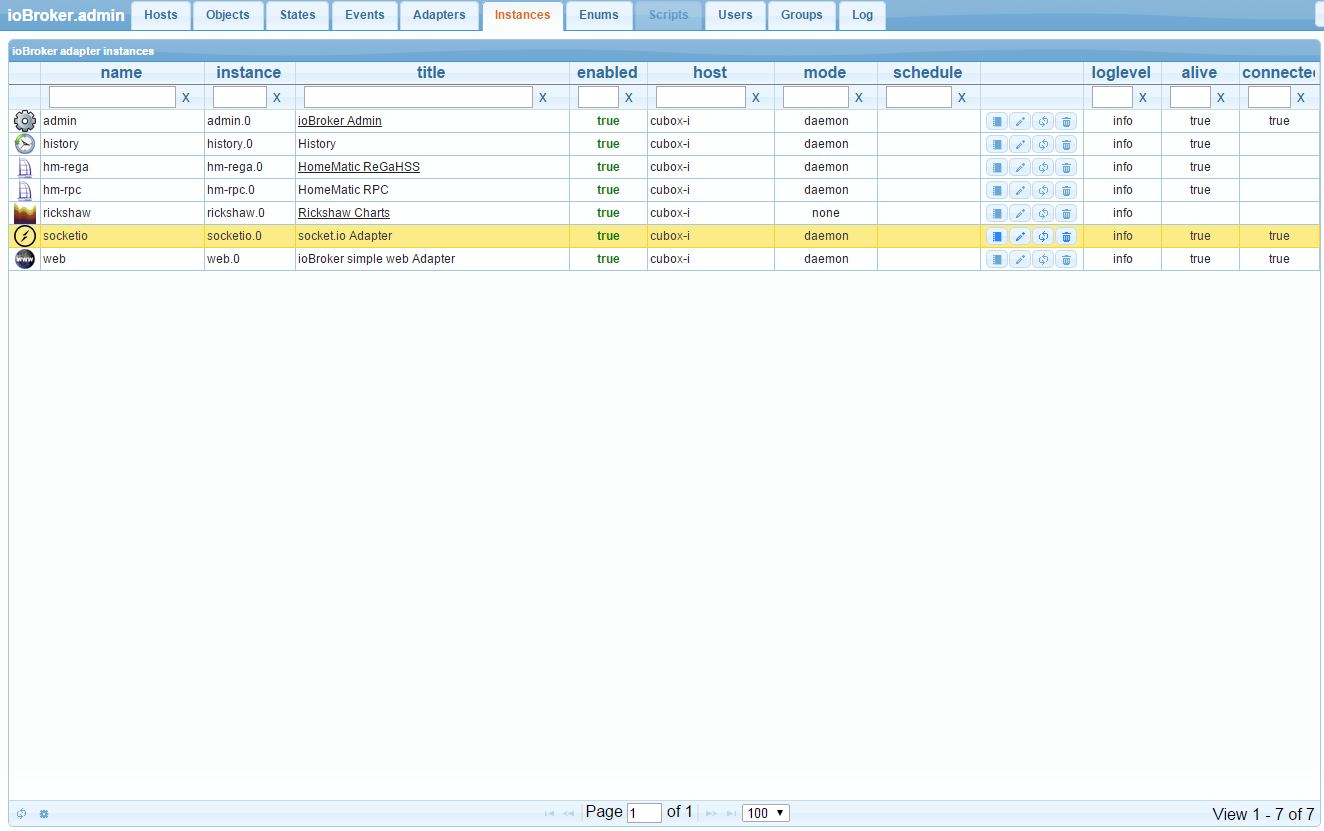
                      144_rickshaw_socketio.jpg

                      Aber trotz neuer Installation hagelt es diverse Fehlermeldungen, da würde es mich nicht wundern, wenn es woanders im Argen liegt.

                      u.a.:

                      root@cubox-i:/opt/iobroker# ./iobroker stop
                      
                      /opt/iobroker/node_modules/daemonize2/lib/daemonize.js:46
                              throw new Error("Can't find daemon main module: '" + main + "'");
                                    ^
                      Error: Can't find daemon main module: '/opt/iobroker/lib/controller.js'
                          at new Daemon (/opt/iobroker/node_modules/daemonize2/lib/daemonize.js:46:15)
                          at Object.exports.setup (/opt/iobroker/node_modules/daemonize2/lib/daemonize.js:32:12)
                          at Object. <anonymous>(/opt/iobroker/lib/setup.js:59:44)
                          at Module._compile (module.js:456:26)
                          at Object.Module._extensions..js (module.js:474:10)
                          at Module.load (module.js:356:32)
                          at Function.Module._load (module.js:312:12)
                          at Module.require (module.js:364:17)
                          at require (module.js:380:17)
                          at Object. <anonymous>(/opt/iobroker/iobroker:2:1)</anonymous></anonymous> 
                      

                      EDIT:

                      Habe gerade js.controller auf 0.1.6 upgedated, jetzt kommen folgende Meldungen:

                      2014-11-29 20:57:14.078  - info: hm-rega.0 State 0 true
                      2014-11-29 20:57:25.320  - info: controller instance system.adapter.socketio.0 started with pid 7129
                      2014-11-29 20:57:27.405  - info: controller instance system.adapter.web.0 started with pid 7131
                      2014-11-29 20:57:28.598  - error: controller instance system.adapter.socketio.0 terminated with code 7
                      2014-11-29 20:57:28.598  - info: Restart adapter system.adapter.socketio.0 because enabled
                      2014-11-29 20:57:30.496  - error: controller instance system.adapter.web.0 terminated with code 7
                      2014-11-29 20:57:30.496  - info: Restart adapter system.adapter.web.0 because enabled
                      2014-11-29 20:57:39.404  - info: controller instance system.adapter.admin.0 started with pid 7141
                      2014-11-29 20:57:42.992  - error: controller instance system.adapter.admin.0 terminated with code 7
                      2014-11-29 20:57:42.993  - info: Restart adapter system.adapter.admin.0 because enabled


                      Gruß

                      Rainer

                      kein Support per PN! - Fragen im Forum stellen - es gibt fast nichts, was nicht auch für andere interessant ist.

                      Benutzt das Voting rechts unten im Beitrag wenn er euch geholfen hat.

                      der Installationsfixer: curl -fsL https://iobroker.net/fix.sh | bash -

                      1 Reply Last reply
                      0
                      • BluefoxB Offline
                        BluefoxB Offline
                        Bluefox
                        wrote on last edited by
                        #26

                        @Homoran:

                        @Bluefox:

                        Es sieht so aus als ob socket.io bei dir nicht läuft. (Nicht enabled) `
                        Eigentlich ist es aktiviert:
                        filename="Rickshaw_socketio.jpg" index="0">~~

                        Aber trotz neuer Installation hagelt es diverse Fehlermeldungen, da würde es mich nicht wundern, wenn es woanders im Argen liegt.

                        u.a.:

                        root@cubox-i:/opt/iobroker# ./iobroker stop
                        
                        /opt/iobroker/node_modules/daemonize2/lib/daemonize.js:46
                                throw new Error("Can't find daemon main module: '" + main + "'");
                                      ^
                        Error: Can't find daemon main module: '/opt/iobroker/lib/controller.js'
                            at new Daemon (/opt/iobroker/node_modules/daemonize2/lib/daemonize.js:46:15)
                            at Object.exports.setup (/opt/iobroker/node_modules/daemonize2/lib/daemonize.js:32:12)
                            at Object. <anonymous>(/opt/iobroker/lib/setup.js:59:44)
                            at Module._compile (module.js:456:26)
                            at Object.Module._extensions..js (module.js:474:10)
                            at Module.load (module.js:356:32)
                            at Function.Module._load (module.js:312:12)
                            at Module.require (module.js:364:17)
                            at require (module.js:380:17)
                            at Object. <anonymous>(/opt/iobroker/iobroker:2:1)</anonymous></anonymous> 
                        

                        EDIT:

                        Habe gerade js.controller auf 0.1.6 upgedated, jetzt kommen folgende Meldungen:

                        2014-11-29 20:57:14.078  - info: hm-rega.0 State 0 true
                        2014-11-29 20:57:25.320  - info: controller instance system.adapter.socketio.0 started with pid 7129
                        2014-11-29 20:57:27.405  - info: controller instance system.adapter.web.0 started with pid 7131
                        2014-11-29 20:57:28.598  - error: controller instance system.adapter.socketio.0 terminated with code 7
                        2014-11-29 20:57:28.598  - info: Restart adapter system.adapter.socketio.0 because enabled
                        2014-11-29 20:57:30.496  - error: controller instance system.adapter.web.0 terminated with code 7
                        2014-11-29 20:57:30.496  - info: Restart adapter system.adapter.web.0 because enabled
                        2014-11-29 20:57:39.404  - info: controller instance system.adapter.admin.0 started with pid 7141
                        2014-11-29 20:57:42.992  - error: controller instance system.adapter.admin.0 terminated with code 7
                        2014-11-29 20:57:42.993  - info: Restart adapter system.adapter.admin.0 because enabled


                        Gruß

                        Rainer `
                        Starte bitte das System komplett neu. (Reboot)

                        1 Reply Last reply
                        0
                        • HomoranH Do not disturb
                          HomoranH Do not disturb
                          Homoran
                          Global Moderator Administrators
                          wrote on last edited by
                          #27

                          Das geht nicht, dann gibts den couchdb error :'(

                          Habe eben nochmal cubox und banane komplett neu aufgesetzt. Das gleiche Ergebnis. Dann wieder reboot -> couchdb error.

                           2014-11-29 22:02:51.703  - [31merror[39m: uncaught exception: Redis connection to 127.0.0.1:6379 failed - connect ECONNREFUSED
                          2014-11-29 22:02:51.710  - [31merror[39m: Error: Redis connection to 127.0.0.1:6379 failed - connect ECONNREFUSED
                              at RedisClient.on_error (/opt/iobroker/node_modules/redis/index.js:185:24)
                              at Socket. <anonymous>(/opt/iobroker/node_modules/redis/index.js:95:14)
                              at Socket.EventEmitter.emit (events.js:95:17)
                              at net.js:441:14
                              at process._tickCallback (node.js:415:13)
                          2014-11-29 22:06:55.575  - [32minfo[39m: ioBroker.js-controller version 0.1.6 js-controller starting
                          2014-11-29 22:06:55.583  - [32minfo[39m: Copyright (c) 2014 hobbyquaker, bluefox
                          2014-11-29 22:06:55.584  - [32minfo[39m: controller hostname: cubox-i
                          2014-11-29 22:06:55.584  - [32minfo[39m: controller ip addresses: 192.168.xxx.yyy fe80::d263:b4ff:fe00:1e53
                          2014-11-29 22:06:57.572  - [31merror[39m: couchdbError: {gen_server,call,
                              [couch_server,
                               {open,<<"iobroker">>,
                                   [{user_ctx,
                                        {user_ctx,null,
                                            [<<"_admin">>],
                                            <<"{couch_httpd_auth, default_authentication_handler}">>}}]},
                               infinity]}</anonymous> 
                          

                          Werde morgen nochmal neu aufbauen.

                          Gruß

                          Rainer

                          Gesendet von meinem LIFETAB_E10320 mit Tapatalk
                          356_iobroker_guide.xlsx
                          356_iobroker_s7_adapter_v0.1_e.docx

                          kein Support per PN! - Fragen im Forum stellen - es gibt fast nichts, was nicht auch für andere interessant ist.

                          Benutzt das Voting rechts unten im Beitrag wenn er euch geholfen hat.

                          der Installationsfixer: curl -fsL https://iobroker.net/fix.sh | bash -

                          1 Reply Last reply
                          0
                          • HomoranH Do not disturb
                            HomoranH Do not disturb
                            Homoran
                            Global Moderator Administrators
                            wrote on last edited by
                            #28

                            Dank der Hilfe von Bernhard laufen jetzt wieder zwei Installationen.

                            Auf beiden, hier dem Cubietruck kommt es nach wie vor zu dem folgenden Fehler:
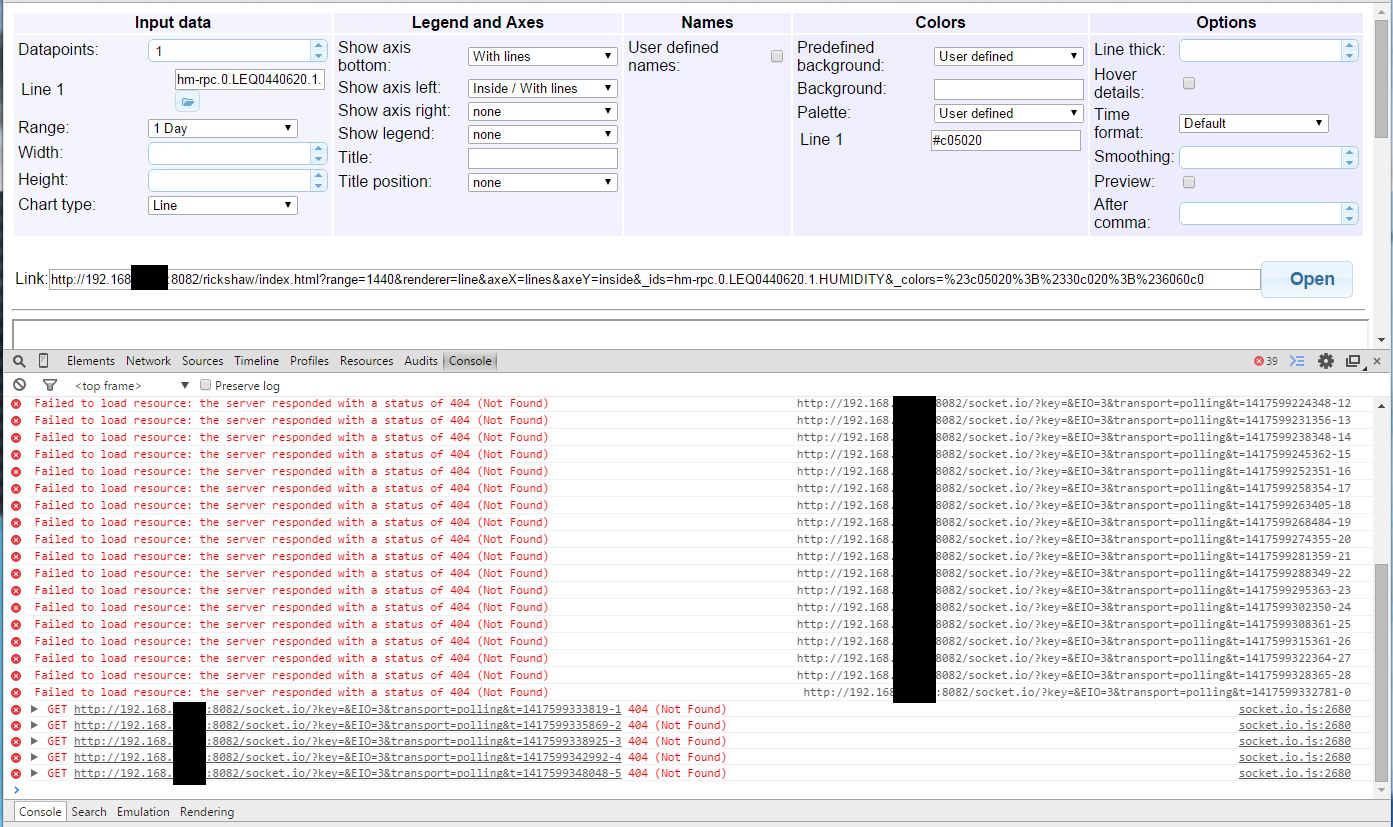
                            144_rickshaw_console_error_3.jpg

                            web und socket.io sind installiert und enabled.

                            Cubie ist auch schon rebooted.

                            Was mir nur aufgefallen war:

                            bei hm-rpc muss ich die "echte" Ip-Adresse angeben (192.168….) mit 0.0.0.0 oder 127.0.0.1 sammelt der Adapter keine Daten.

                            Also habe ich überall, wo ich es konnte die 192.168.... für den jeweiligen Adapter eingestellt.

                            Gruß

                            Rainer

                            kein Support per PN! - Fragen im Forum stellen - es gibt fast nichts, was nicht auch für andere interessant ist.

                            Benutzt das Voting rechts unten im Beitrag wenn er euch geholfen hat.

                            der Installationsfixer: curl -fsL https://iobroker.net/fix.sh | bash -

                            1 Reply Last reply
                            0
                            • BluefoxB Offline
                              BluefoxB Offline
                              Bluefox
                              wrote on last edited by
                              #29

                              @Homoran:

                              Dank der Hilfe von Bernhard laufen jetzt wieder zwei Installationen.

                              Auf beiden, hier dem Cubietruck kommt es nach wie vor zu dem folgenden Fehler:
                              filename="Rickshaw_console_error_3.jpg" index="0">~~

                              web und socket.io sind installiert und enabled.

                              Cubie ist auch schon rebooted.

                              Was mir nur aufgefallen war:

                              bei hm-rpc muss ich die "echte" Ip-Adresse angeben (192.168….) mit 0.0.0.0 oder 127.0.0.1 sammelt der Adapter keine Daten.

                              Also habe ich überall, wo ich es konnte die 192.168.... für den jeweiligen Adapter eingestellt.

                              Gruß

                              Rainer `
                              Hast du in "web"-Adapter Einstellungen einen Socket-Instanz ausgewählt?

                              1 Reply Last reply
                              0
                              • HomoranH Do not disturb
                                HomoranH Do not disturb
                                Homoran
                                Global Moderator Administrators
                                wrote on last edited by
                                #30

                                @Bluefox:

                                Hast du in "web"-Adapter Einstellungen einen Socket-Instanz ausgewählt? `
                                Ich habe es mit und ohne versucht (steht ja "optional")

                                Jetzt nach neuinstallation kommt ein anderer Fehler:

                                ! Failed to load resource: the server responded with a status of 404 (Not Found)
                                ! index.html:1 XMLHttpRequest cannot load http://192.168.xxx.yyy:8084/socket.io/? … 84290917-0. No 'Access-Control-Allow-Origin' header is present on the requested resource. Origin 'http://192.168.xxx.yyy:8082' is therefore not allowed access. The response had HTTP status code 404.
                                ! http://192.168.xxx.yyy:8084/socket.io/? ... 84291926-1 Failed to load resource: the server responded with a status of 404 (Not Found)
                                ! index.html:1 XMLHttpRequest cannot load http://192.168.xxx.yyy:8084/socket.io/? ... 84291926-1. No 'Access-Control-Allow-Origin' header is present on the requested resource. Origin 'http://192.168.xxx.yyy:8082' is therefore not allowed access. The response had HTTP status code 404.
                                ! http://192.168.xxx.yyy:8084/socket.io/? ... 84293935-2 Failed to load resource: the server responded with a status of 404 (Not Found)
                                ! index.html:1 XMLHttpRequest cannot load http://192.168.xxx.yyy:8084/socket.io/? ... 84293935-2. No 'Access-Control-Allow-Origin' header is present on the requested resource. Origin 'http://192.168.xxx.yyy:8082' is therefore not allowed access. The response had HTTP status code 404.
                                ! socket.io.js:2680 GET http://192.168.xxx.yyy:8084/socket.io/? ... 84296944-3
                                ! index.html?range=1440&renderer=line&axeX=lines&axeY=inside&_ids=hm-rpc.0.JEQ0064523.1&_colors=%23c0…:1 XMLHttpRequest cannot load http://192.168.2xxx.yyy:8084/socket.io/ ... 84296944-3. No 'Access-Control-Allow-Origin' header is present on the requested resource. Origin 'http://192.168.xxx.yyy:8082' is therefore not allowed access. The response had HTTP status code 404.
                                ! socket.io.js:2680 GET http://192.168.xxx.yyy:8084/socket.io/? ... 84300955-4
                                ! index.html?range=1440&renderer=line&axeX=lines&axeY=inside&_ids=hm-rpc.0.JEQ0064523.1&_colors=%23c0…:1 XMLHttpRequest cannot load http://192.168.xxx.yyy:8084/socket.io/? ... 84300955-4. No 'Access-Control-Allow-Origin' header is present on the requested resource. Origin 'http://192.168.xxx.yyy:8082' is therefore not allowed access. The response had HTTP status code 404.

                                Haltet durch, auch wenn es hart wird, bitte!

                                Edit: nach Adapter rickshaw neu laden kommen folgende Warnung und Errormeldungen:

                                ! 2014-12-05 14:13:16.102 - info: controller object change system.adapter.rickshaw.0
                                ! 2014-12-05 14:13:16.104 - warn: controller startInstance cannot find start file for adapter "rickshaw". Try to install it…1 attempt
                                ! 2014-12-05 14:13:16.105 - info: iobroker install rickshaw
                                ! 2014-12-05 14:13:17.266 - info: iobroker adapter "rickshaw" yet installed. Use "upgrade" to install newer version.
                                ! 2014-12-05 14:13:17.289 - info: iobroker exit 0
                                ! 2014-12-05 14:13:17.291 - warn: controller startInstance cannot find start file for adapter "rickshaw". Try to install it...2 attempt
                                ! 2014-12-05 14:13:17.291 - info: iobroker install rickshaw
                                ! 2014-12-05 14:13:18.434 - info: iobroker adapter "rickshaw" yet installed. Use "upgrade" to install newer version.
                                ! 2014-12-05 14:13:18.447 - info: iobroker exit 0
                                ! 2014-12-05 14:13:18.450 - warn: controller startInstance cannot find start file for adapter "rickshaw". Try to install it...3 attempt
                                ! 2014-12-05 14:13:18.450 - info: iobroker install rickshaw
                                ! 2014-12-05 14:13:19.616 - info: iobroker adapter "rickshaw" yet installed. Use "upgrade" to install newer version.
                                ! 2014-12-05 14:13:19.631 - info: iobroker exit 0

                                Gruß

                                Rainer

                                kein Support per PN! - Fragen im Forum stellen - es gibt fast nichts, was nicht auch für andere interessant ist.

                                Benutzt das Voting rechts unten im Beitrag wenn er euch geholfen hat.

                                der Installationsfixer: curl -fsL https://iobroker.net/fix.sh | bash -

                                1 Reply Last reply
                                0
                                • BluefoxB Offline
                                  BluefoxB Offline
                                  Bluefox
                                  wrote on last edited by
                                  #31

                                  @Homoran:

                                  Jetzt nach neuinstallation kommt ein anderer Fehler:

                                  Failed to load resource: the server responded with a status of 404 (Not Found)
                                  index.html:1 XMLHttpRequest cannot load http://192.168.xxx.yyy:8084/socket.io/?key=&EIO=3&transport=polling&t=1417784290917-0\. No 'Access-Control-Allow-Origin' header is present on the requested resource. Origin 'http://192.168.xxx.yyy:8082' is therefore not allowed access. The response had HTTP status code 404.
                                  
                                  ```` `  
                                  

                                  Was für einen Browser. Firefox?

                                  Kommt bei dir was, wenn du

                                  http://192.168.xxx.yyy:8084/socket.io/
                                  

                                  aufrufst?
                                  ` > Edit: nach Adapter rickshaw neu laden kommen folgende Warnung und Errormeldungen:

                                  2014-12-05 14:13:18.450  - warn: controller startInstance cannot find start file for adapter "rickshaw". Try to install it...3 attempt
                                  
                                  ```` `  
                                  

                                  Das hier ist nicht schlimm. Werde ausblenden.

                                  1 Reply Last reply
                                  0
                                  • HomoranH Do not disturb
                                    HomoranH Do not disturb
                                    Homoran
                                    Global Moderator Administrators
                                    wrote on last edited by
                                    #32

                                    @Bluefox:

                                    Kommt bei dir was, wenn du

                                    Code:

                                    http://192.168.xxx.yyy:8084/socket.io/

                                    aufrufst? `

                                    Auf der Website nichts, aber in der Fehlerconsole:

                                     Failed to load resource: the server responded with a status of 404 (Not Found)
                                    

                                    Gruß

                                    Rainer

                                    kein Support per PN! - Fragen im Forum stellen - es gibt fast nichts, was nicht auch für andere interessant ist.

                                    Benutzt das Voting rechts unten im Beitrag wenn er euch geholfen hat.

                                    der Installationsfixer: curl -fsL https://iobroker.net/fix.sh | bash -

                                    1 Reply Last reply
                                    0
                                    • H Offline
                                      H Offline
                                      Heinzelmaennchen
                                      wrote on last edited by
                                      #33

                                      Den Fehler kann ich so auch bei mir bestätigen.

                                      Rickshaw hat 0.0.4

                                      Gruß

                                      Bernhard

                                      Gruß

                                      Bernhard

                                      –------------------------------------------

                                      263 Kanäle in 91 Geräten

                                      3x Sonos Play:1, 1x Sonos:Amp, 1x Sonos Playbar

                                      4x Hue E27, 21xHue GU10, 1x Lightify RGB Stripe, 1x Lightify E27 TW

                                      -------------...

                                      1 Reply Last reply
                                      0
                                      • BluefoxB Offline
                                        BluefoxB Offline
                                        Bluefox
                                        wrote on last edited by
                                        #34
                                        • bei der Installation werden jetzt "socket.io" und "web" automatisch aktiviert und "socketio.0" ist als Standard-Socket bei "web" eingetragen. Damit soll nach "rickshaw"-Installation die Grafiken sofort gehen (man muss natürlich noch "history" für die gewünschte States aktivieren.

                                        • Bei "history" Einstellung kann man jetzt mehrere Zustände auf ein Schlag editieren. Es gibt ein Knopf bei der Objekten-Lasche, ganz rechts/oben da wo die Filter Zeile ist. Alle Zustände die momentan gefiltert sind werden behandelt. Deswegen mit Vorsicht genießen, nämlich man kann leicht mit einem Klick alle History Einstellungen ändern.

                                        Dabei ist die folgende Vorgehensweise: im Filter eintragen, was man steuern will (z.b. ID: "temperature") und dann für alle Zustände, die "Temperature" in ID haben die History mit einem Schlag aktivieren.

                                        • Es geht jetzt Multihost -Betrieb. D.h. mann kann ioBroker über mehrere Hosts verstreuen. Z.B. Zentral-System auf Banana/Cubie laufen lassen und dabei auf Raspi - Temperatur Messung über OWFS (momentan über node-red) laufen lassen.

                                        Man richtet erstmal zwei Systeme ein (ganz normal installieren). Danach beim zweiten System das Kommando ausführen: "node iobroker setup custom"

                                        Type of objects DB [file, couch, redis], default [file]: EINFACH ENTER DRÜCKEN
                                        Host of objects DB(file), default[127.0.0.1]: HIER IP ADRESSE ODER DNS NAME VOM ERSTEN SYSTEM EINGEBEN (z.B. "cubie" oder "192.168.1.100")
                                        Port of objects DB(file), default[9001]: EINFACH ENTER DRÜCKEN
                                        Type of states DB [file, redis], default [file]:EINFACH ENTER DRÜCKEN
                                        Host of states DB (file), default[cubie]:EINFACH ENTER DRÜCKEN
                                        Port of states DB (file), default[9000]:EINFACH ENTER DRÜCKEN


                                        Nach dem Neustart vom zweiten System sollte man auf "cubie:8081" Zwei hosts sehen.

                                        Danach auf Adapter-Lasche gehen, oben im "select" zweiten Host auswählen und gewünschte Adapter hinzufügen. Man kann auch danach auf Instanzen-Lasche den Host zuweisen, wo Adapter ausgeführt werden soll.

                                        1 Reply Last reply
                                        0
                                        • HomoranH Do not disturb
                                          HomoranH Do not disturb
                                          Homoran
                                          Global Moderator Administrators
                                          wrote on last edited by
                                          #35

                                          Wahnsinn!!

                                          Der erste teil funktioniert schon was länger.

                                          Beim Aktivieren von rickshaw wurden socket und web mit angelegt und konfiguriert.

                                          Nur noch bei history (jetzt unter objects statt States!) die Datenpunkte aktivieren und gut ist.

                                          Den Rest seh ich mir heute abend an

                                          Gruß

                                          Rainer

                                          Gesendet von meinem Cynus T7 mit Tapatalk

                                          kein Support per PN! - Fragen im Forum stellen - es gibt fast nichts, was nicht auch für andere interessant ist.

                                          Benutzt das Voting rechts unten im Beitrag wenn er euch geholfen hat.

                                          der Installationsfixer: curl -fsL https://iobroker.net/fix.sh | bash -

                                          1 Reply Last reply
                                          0
                                          Reply
                                          • Reply as topic
                                          Log in to reply
                                          • Oldest to Newest
                                          • Newest to Oldest
                                          • Most Votes


                                          Support us

                                          ioBroker
                                          Community Adapters
                                          Donate
                                          FAQ Cloud / IOT
                                          HowTo: Node.js-Update
                                          HowTo: Backup/Restore
                                          Downloads
                                          BLOG

                                          631

                                          Online

                                          32.7k

                                          Users

                                          82.4k

                                          Topics

                                          1.3m

                                          Posts
                                          Community
                                          Impressum | Datenschutz-Bestimmungen | Nutzungsbedingungen | Einwilligungseinstellungen
                                          ioBroker Community 2014-2025
                                          logo
                                          • Login

                                          • Don't have an account? Register

                                          • Login or register to search.
                                          • First post
                                            Last post
                                          0
                                          • Home
                                          • Recent
                                          • Tags
                                          • Unread 0
                                          • Categories
                                          • Unreplied
                                          • Popular
                                          • GitHub
                                          • Docu
                                          • Hilfe