

Skip to content
  • Home
  • Recent
  • Tags
  • 0 Unread 0
  • Categories
  • Unreplied
  • Popular
  • GitHub
  • Docu
  • Hilfe
Skins
  • Light
  • Brite
  • Cerulean
  • Cosmo
  • Flatly
  • Journal
  • Litera
  • Lumen
  • Lux
  • Materia
  • Minty
  • Morph
  • Pulse
  • Sandstone
  • Simplex
  • Sketchy
  • Spacelab
  • United
  • Yeti
  • Zephyr
  • Dark
  • Cyborg
  • Darkly
  • Quartz
  • Slate
  • Solar
  • Superhero
  • Vapor

  • Default (No Skin)
  • No Skin
Collapse
ioBroker Logo

Community Forum

donate donate
  1. ioBroker Community Home
  2. Deutsch
  3. ioBroker Allgemein
  4. iobroker neu installation... befehl geht nicht

NEWS

  • Monatsrückblick Januar/Februar 2026 ist online!
    BluefoxB
    Bluefox
    17
    1
    398

  • Jahresrückblick 2025 – unser neuer Blogbeitrag ist online! ✨
    BluefoxB
    Bluefox
    17
    1
    4.9k

  • Neuer Blogbeitrag: Monatsrückblick - Dezember 2025 🎄
    BluefoxB
    Bluefox
    13
    1
    1.3k

iobroker neu installation... befehl geht nicht

Scheduled Pinned Locked Moved ioBroker Allgemein
68 Posts 3 Posters 6.5k Views 2 Watching
  • Oldest to Newest
  • Newest to Oldest
  • Most Votes
Reply
  • Reply as topic
Log in to reply
This topic has been deleted. Only users with topic management privileges can see it.
  • K klaris

    @thomas-braun ich erstelle eine text Datei in /etc/systemd/timesyncd.conf
    mit den text "[Time]
    NTP=192.168.178.1 192.168.8.1
    FallbackNTP=0.de.pool.ntp.org 1.de.pool.ntp.org 2.de.pool.ntp.org 3.de.pool.ntp.org
    verstehe ich das richtig ?

    Thomas BraunT Online
    Thomas BraunT Online
    Thomas Braun
    Most Active
    wrote on last edited by
    #21

    @klaris

    Meine timesyncd.conf schaut so aus:

    echad@chet:~ $ cat /etc/systemd/timesyncd.conf
    #  This file is part of systemd.
    #
    #  systemd is free software; you can redistribute it and/or modify it under the
    #  terms of the GNU Lesser General Public License as published by the Free
    #  Software Foundation; either version 2.1 of the License, or (at your option)
    #  any later version.
    #
    # Entries in this file show the compile time defaults. Local configuration
    # should be created by either modifying this file, or by creating "drop-ins" in
    # the timesyncd.conf.d/ subdirectory. The latter is generally recommended.
    # Defaults can be restored by simply deleting this file and all drop-ins.
    #
    # See timesyncd.conf(5) for details.
    
    [Time]
    NTP=fritz.box 0.de.pool.ntp.org 1.de.pool.ntp.org 2.de.pool.ntp.org
    FallbackNTP=0.arch.pool.ntp.org 1.arch.pool.ntp.org 2.arch.pool.ntp.org 3.arch.pool.ntp.org
    #FallbackNTP=0.debian.pool.ntp.org 1.debian.pool.ntp.org 2.debian.pool.ntp.org 3.debian.pool.ntp.org
    #RootDistanceMaxSec=5
    #PollIntervalMinSec=32
    #PollIntervalMaxSec=2048
    #ConnectionRetrySec=30
    #SaveIntervalSec=60
    echad@chet:~ $ 


    Linux-Werkzeugkasten:
    https://forum.iobroker.net/topic/42952/der-kleine-iobroker-linux-werkzeugkasten
    NodeJS Fixer Skript:
    https://forum.iobroker.net/topic/68035/iob-node-fix-skript
    iob_diag: curl -sLf -o diag.sh https://iobroker.net/diag.sh && bash diag.sh

    1 Reply Last reply
    0
    • K Offline
      K Offline
      klaris
      wrote on last edited by
      #22

      mein timesyncd

      #  This file is part of systemd.
      #
      #  systemd is free software; you can redistribute it and/or modify it under the
      #  terms of the GNU Lesser General Public License as published by the Free
      #  Software Foundation; either version 2.1 of the License, or (at your option)
      #  any later version.
      #
      # Entries in this file show the compile time defaults. Local configuration
      # should be created by either modifying this file, or by creating "drop-ins" in
      # the timesyncd.conf.d/ subdirectory. The latter is generally recommended.
      # Defaults can be restored by simply deleting this file and all drop-ins.
      #
      # See timesyncd.conf(5) for details.
      
      [Time]
      #NTP=
      #FallbackNTP=0.debian.pool.ntp.org 1.debian.pool.ntp.org 2.debian.pool.ntp.org 3.debian.pool.ntp.org
      #RootDistanceMaxSec=5
      #PollIntervalMinSec=32
      #PollIntervalMaxSec=2048
      #ConnectionRetrySec=30
      #SaveIntervalSec=60
      
      
      Thomas BraunT 1 Reply Last reply
      0
      • K klaris

        mein timesyncd

        #  This file is part of systemd.
        #
        #  systemd is free software; you can redistribute it and/or modify it under the
        #  terms of the GNU Lesser General Public License as published by the Free
        #  Software Foundation; either version 2.1 of the License, or (at your option)
        #  any later version.
        #
        # Entries in this file show the compile time defaults. Local configuration
        # should be created by either modifying this file, or by creating "drop-ins" in
        # the timesyncd.conf.d/ subdirectory. The latter is generally recommended.
        # Defaults can be restored by simply deleting this file and all drop-ins.
        #
        # See timesyncd.conf(5) for details.
        
        [Time]
        #NTP=
        #FallbackNTP=0.debian.pool.ntp.org 1.debian.pool.ntp.org 2.debian.pool.ntp.org 3.debian.pool.ntp.org
        #RootDistanceMaxSec=5
        #PollIntervalMinSec=32
        #PollIntervalMaxSec=2048
        #ConnectionRetrySec=30
        #SaveIntervalSec=60
        
        
        Thomas BraunT Online
        Thomas BraunT Online
        Thomas Braun
        Most Active
        wrote on last edited by
        #23

        @klaris
        Da ist ja nix aktiv. Und deswegen wird da auch nix abgeglichen.

        Linux-Werkzeugkasten:
        https://forum.iobroker.net/topic/42952/der-kleine-iobroker-linux-werkzeugkasten
        NodeJS Fixer Skript:
        https://forum.iobroker.net/topic/68035/iob-node-fix-skript
        iob_diag: curl -sLf -o diag.sh https://iobroker.net/diag.sh && bash diag.sh

        K 1 Reply Last reply
        0
        • Thomas BraunT Thomas Braun

          @klaris
          Da ist ja nix aktiv. Und deswegen wird da auch nix abgeglichen.

          K Offline
          K Offline
          klaris
          wrote on last edited by
          #24

          @thomas-braun habe leider kein zugriffsrecht diese datei zu löschen bzw zu ändern

          Thomas BraunT 1 Reply Last reply
          0
          • Thomas BraunT Thomas Braun

            @klaris sagte in iobroker neu installation... befehl geht nicht:

            NTP=192.168.178.1 192.168.8.1

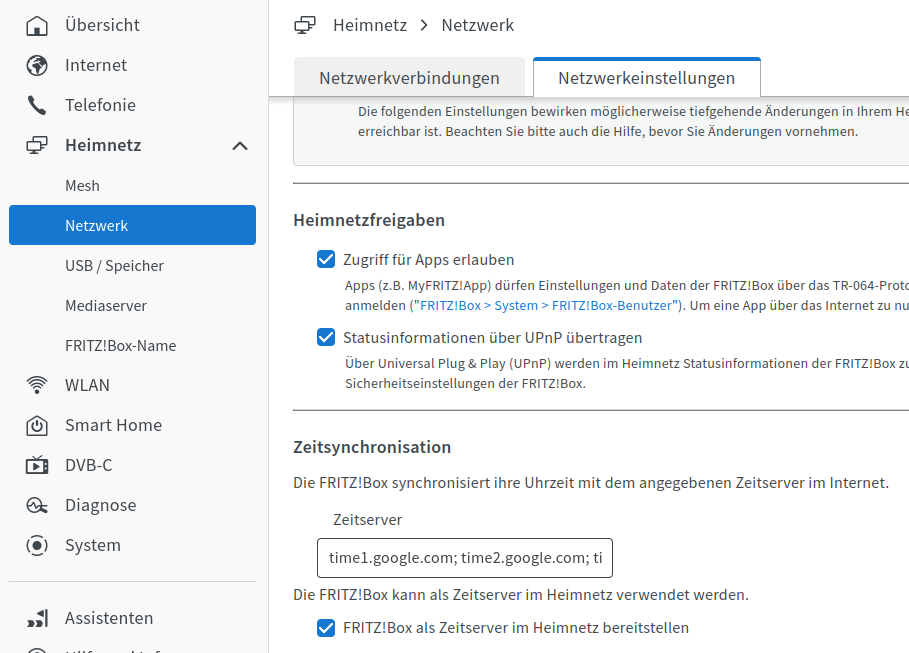
            Setzt natürlich voraus, das dort ein ntp-Server läuft. Bei der Fritzbox muss das u. U. noch aktiviert werden.
            f0672135-d37b-4ddd-a59f-9bce54cc9bc9-grafik.png

            K Offline
            K Offline
            klaris
            wrote on last edited by
            #25

            @thomas-braun :+1:

            1 Reply Last reply
            0
            • K klaris

              @thomas-braun habe leider kein zugriffsrecht diese datei zu löschen bzw zu ändern

              Thomas BraunT Online
              Thomas BraunT Online
              Thomas Braun
              Most Active
              wrote on last edited by
              #26

              @klaris

              Natürlich nicht. Die darf nur mit root-Rechten angepackt werden...
              Basics...

              sudo nano /etc/systemd/timesyncd.conf
              

              Speichern mit Strg-O, nano verlassen mit Strg-X.

              Linux-Werkzeugkasten:
              https://forum.iobroker.net/topic/42952/der-kleine-iobroker-linux-werkzeugkasten
              NodeJS Fixer Skript:
              https://forum.iobroker.net/topic/68035/iob-node-fix-skript
              iob_diag: curl -sLf -o diag.sh https://iobroker.net/diag.sh && bash diag.sh

              K 1 Reply Last reply
              0
              • Thomas BraunT Thomas Braun

                @klaris

                Natürlich nicht. Die darf nur mit root-Rechten angepackt werden...
                Basics...

                sudo nano /etc/systemd/timesyncd.conf
                

                Speichern mit Strg-O, nano verlassen mit Strg-X.

                K Offline
                K Offline
                klaris
                wrote on last edited by
                #27

                @thomas-braun wieder was neus zum lernen ..kannte das programm noch nicht ....

                Thomas BraunT 1 Reply Last reply
                0
                • K klaris

                  @thomas-braun wieder was neus zum lernen ..kannte das programm noch nicht ....

                  Thomas BraunT Online
                  Thomas BraunT Online
                  Thomas Braun
                  Most Active
                  wrote on last edited by
                  #28

                  @klaris sagte in iobroker neu installation... befehl geht nicht:

                  ..kannte das programm noch nicht ....

                  Wie editierst du denn sonst Dateien?

                  Linux-Werkzeugkasten:
                  https://forum.iobroker.net/topic/42952/der-kleine-iobroker-linux-werkzeugkasten
                  NodeJS Fixer Skript:
                  https://forum.iobroker.net/topic/68035/iob-node-fix-skript
                  iob_diag: curl -sLf -o diag.sh https://iobroker.net/diag.sh && bash diag.sh

                  1 Reply Last reply
                  0
                  • K klaris

                    @thomas-braun das ist mir zu kompliziert ...mit den 2 raspberry pi 3 gibt es keine probleme gleicher router ...

                    HomoranH Do not disturb
                    HomoranH Do not disturb
                    Homoran
                    Global Moderator Administrators
                    wrote on last edited by
                    #29

                    @klaris ich hab auch beim 5er keine Probleme und nichts besonders konfiguriert

                    kein Support per PN! - Fragen im Forum stellen -
                    Benutzt das Voting rechts unten im Beitrag wenn er euch geholfen hat.
                    Das Forum freut sich über eine Spende. Benutzt dazu den Spendenbutton im Header. Danke!
                    der Installationsfixer: curl -fsL https://iobroker.net/fix.sh | bash -

                    Thomas BraunT 1 Reply Last reply
                    0
                    • HomoranH Homoran

                      @klaris ich hab auch beim 5er keine Probleme und nichts besonders konfiguriert

                      Thomas BraunT Online
                      Thomas BraunT Online
                      Thomas Braun
                      Most Active
                      wrote on last edited by
                      #30

                      @homoran sagte in iobroker neu installation... befehl geht nicht:

                      @klaris ich hab auch beim 5er keine Probleme und nichts besonders konfiguriert

                      In der Regel ist da auch nix zu konfigurieren. Keine Ahnung warum das hier offenbar nicht funktioniert.

                      Linux-Werkzeugkasten:
                      https://forum.iobroker.net/topic/42952/der-kleine-iobroker-linux-werkzeugkasten
                      NodeJS Fixer Skript:
                      https://forum.iobroker.net/topic/68035/iob-node-fix-skript
                      iob_diag: curl -sLf -o diag.sh https://iobroker.net/diag.sh && bash diag.sh

                      HomoranH 1 Reply Last reply
                      0
                      • Thomas BraunT Thomas Braun

                        @homoran sagte in iobroker neu installation... befehl geht nicht:

                        @klaris ich hab auch beim 5er keine Probleme und nichts besonders konfiguriert

                        In der Regel ist da auch nix zu konfigurieren. Keine Ahnung warum das hier offenbar nicht funktioniert.

                        HomoranH Do not disturb
                        HomoranH Do not disturb
                        Homoran
                        Global Moderator Administrators
                        wrote on last edited by
                        #31

                        @thomas-braun

                        pi@ioBrokerpi5:~ $ timedatectl
                                       Local time: Sat 2024-08-31 21:25:06 CEST
                                   Universal time: Sat 2024-08-31 19:25:06 UTC
                                         RTC time: Sat 2024-08-31 19:25:06
                                        Time zone: Europe/Berlin (CEST, +0200)
                        System clock synchronized: yes
                                      NTP service: active
                                  RTC in local TZ: no
                        

                        kein Support per PN! - Fragen im Forum stellen -
                        Benutzt das Voting rechts unten im Beitrag wenn er euch geholfen hat.
                        Das Forum freut sich über eine Spende. Benutzt dazu den Spendenbutton im Header. Danke!
                        der Installationsfixer: curl -fsL https://iobroker.net/fix.sh | bash -

                        Thomas BraunT 1 Reply Last reply
                        0
                        • HomoranH Homoran

                          @thomas-braun

                          pi@ioBrokerpi5:~ $ timedatectl
                                         Local time: Sat 2024-08-31 21:25:06 CEST
                                     Universal time: Sat 2024-08-31 19:25:06 UTC
                                           RTC time: Sat 2024-08-31 19:25:06
                                          Time zone: Europe/Berlin (CEST, +0200)
                          System clock synchronized: yes
                                        NTP service: active
                                    RTC in local TZ: no
                          
                          Thomas BraunT Online
                          Thomas BraunT Online
                          Thomas Braun
                          Most Active
                          wrote on last edited by
                          #32

                          @homoran
                          So sollte es aussehen.

                          Linux-Werkzeugkasten:
                          https://forum.iobroker.net/topic/42952/der-kleine-iobroker-linux-werkzeugkasten
                          NodeJS Fixer Skript:
                          https://forum.iobroker.net/topic/68035/iob-node-fix-skript
                          iob_diag: curl -sLf -o diag.sh https://iobroker.net/diag.sh && bash diag.sh

                          HomoranH 1 Reply Last reply
                          0
                          • Thomas BraunT Thomas Braun

                            @homoran
                            So sollte es aussehen.

                            HomoranH Do not disturb
                            HomoranH Do not disturb
                            Homoran
                            Global Moderator Administrators
                            wrote on last edited by
                            #33

                            @thomas-braun
                            mach gerade ein update

                            Get:7 http://deb.debian.org/debian bookworm/main arm64 systemd-timesyncd arm64 252.30-1~deb12u2 [61.7 kB]
                            

                            nicht dass da ein Wurm drin ist

                            kein Support per PN! - Fragen im Forum stellen -
                            Benutzt das Voting rechts unten im Beitrag wenn er euch geholfen hat.
                            Das Forum freut sich über eine Spende. Benutzt dazu den Spendenbutton im Header. Danke!
                            der Installationsfixer: curl -fsL https://iobroker.net/fix.sh | bash -

                            Thomas BraunT 1 Reply Last reply
                            0
                            • HomoranH Homoran

                              @thomas-braun
                              mach gerade ein update

                              Get:7 http://deb.debian.org/debian bookworm/main arm64 systemd-timesyncd arm64 252.30-1~deb12u2 [61.7 kB]
                              

                              nicht dass da ein Wurm drin ist

                              Thomas BraunT Online
                              Thomas BraunT Online
                              Thomas Braun
                              Most Active
                              wrote on last edited by
                              #34

                              @homoran sagte in iobroker neu installation... befehl geht nicht:

                              systemd-timesyncd

                              https://bugs.debian.org/cgi-bin/bugreport.cgi?bug=1080056

                              Das ist aber für eine andere Version gemeldet.

                              Linux-Werkzeugkasten:
                              https://forum.iobroker.net/topic/42952/der-kleine-iobroker-linux-werkzeugkasten
                              NodeJS Fixer Skript:
                              https://forum.iobroker.net/topic/68035/iob-node-fix-skript
                              iob_diag: curl -sLf -o diag.sh https://iobroker.net/diag.sh && bash diag.sh

                              HomoranH 1 Reply Last reply
                              0
                              • Thomas BraunT Thomas Braun

                                @homoran sagte in iobroker neu installation... befehl geht nicht:

                                systemd-timesyncd

                                https://bugs.debian.org/cgi-bin/bugreport.cgi?bug=1080056

                                Das ist aber für eine andere Version gemeldet.

                                HomoranH Do not disturb
                                HomoranH Do not disturb
                                Homoran
                                Global Moderator Administrators
                                wrote on last edited by
                                #35

                                @thomas-braun nach dem update hat sich nix geändert

                                pi@ioBrokerpi5:~ $
                                pi@ioBrokerpi5:~ $ timedatectl
                                               Local time: Sat 2024-08-31 21:31:34 CEST
                                           Universal time: Sat 2024-08-31 19:31:34 UTC
                                                 RTC time: Sat 2024-08-31 19:31:34
                                                Time zone: Europe/Berlin (CEST, +0200)
                                System clock synchronized: yes
                                              NTP service: active
                                          RTC in local TZ: no
                                

                                kein Support per PN! - Fragen im Forum stellen -
                                Benutzt das Voting rechts unten im Beitrag wenn er euch geholfen hat.
                                Das Forum freut sich über eine Spende. Benutzt dazu den Spendenbutton im Header. Danke!
                                der Installationsfixer: curl -fsL https://iobroker.net/fix.sh | bash -

                                1 Reply Last reply
                                0
                                • K Offline
                                  K Offline
                                  klaris
                                  wrote on last edited by
                                  #36

                                  meinst das ist ein fehlerhafter raspberry pi 5 ? soll ich den zurück senden ?

                                  HomoranH Thomas BraunT 2 Replies Last reply
                                  0
                                  • K klaris

                                    meinst das ist ein fehlerhafter raspberry pi 5 ? soll ich den zurück senden ?

                                    HomoranH Do not disturb
                                    HomoranH Do not disturb
                                    Homoran
                                    Global Moderator Administrators
                                    wrote on last edited by Homoran
                                    #37

                                    @klaris sagte in iobroker neu installation... befehl geht nicht:

                                    meinst das ist ein fehlerhafter raspberry pi 5

                                    was kommt bei sudo apt update und sudo apt upgrade?

                                    was hattest du denn da virhin umkonfiguriert?

                                    kein Support per PN! - Fragen im Forum stellen -
                                    Benutzt das Voting rechts unten im Beitrag wenn er euch geholfen hat.
                                    Das Forum freut sich über eine Spende. Benutzt dazu den Spendenbutton im Header. Danke!
                                    der Installationsfixer: curl -fsL https://iobroker.net/fix.sh | bash -

                                    K 1 Reply Last reply
                                    0
                                    • K klaris

                                      meinst das ist ein fehlerhafter raspberry pi 5 ? soll ich den zurück senden ?

                                      Thomas BraunT Online
                                      Thomas BraunT Online
                                      Thomas Braun
                                      Most Active
                                      wrote on last edited by Thomas Braun
                                      #38

                                      @klaris sagte in iobroker neu installation... befehl geht nicht:

                                      meinst das ist ein fehlerhafter raspberry pi 5 ? soll ich den zurück senden ?

                                      Haste die Datei jetzt angepasst? Und den Service mal neugestartet (oder gleich die ganze Kiste)?

                                      sudo systemctl restart systemd-timesyncd.service
                                      

                                      Linux-Werkzeugkasten:
                                      https://forum.iobroker.net/topic/42952/der-kleine-iobroker-linux-werkzeugkasten
                                      NodeJS Fixer Skript:
                                      https://forum.iobroker.net/topic/68035/iob-node-fix-skript
                                      iob_diag: curl -sLf -o diag.sh https://iobroker.net/diag.sh && bash diag.sh

                                      K 1 Reply Last reply
                                      0
                                      • Thomas BraunT Thomas Braun

                                        @klaris sagte in iobroker neu installation... befehl geht nicht:

                                        meinst das ist ein fehlerhafter raspberry pi 5 ? soll ich den zurück senden ?

                                        Haste die Datei jetzt angepasst? Und den Service mal neugestartet (oder gleich die ganze Kiste)?

                                        sudo systemctl restart systemd-timesyncd.service
                                        
                                        K Offline
                                        K Offline
                                        klaris
                                        wrote on last edited by
                                        #39

                                        @thomas-braun ich lerne erst mal mit den nano editor zu arbeiten ...

                                        1 Reply Last reply
                                        0
                                        • HomoranH Homoran

                                          @klaris sagte in iobroker neu installation... befehl geht nicht:

                                          meinst das ist ein fehlerhafter raspberry pi 5

                                          was kommt bei sudo apt update und sudo apt upgrade?

                                          was hattest du denn da virhin umkonfiguriert?

                                          K Offline
                                          K Offline
                                          klaris
                                          wrote on last edited by
                                          #40

                                          @homoran said in iobroker neu installation... befehl geht nicht:

                                          sudo apt upgrade

                                          pi@raspberrydi:~ $ sudo apt update
                                          Get:1 http://deb.debian.org/debian bookworm InRelease [151 kB]
                                          Get:2 http://deb.debian.org/debian-security bookworm-security InRelease [48.0 kB                                                                                                                                                                                                                                             ]
                                          Get:3 http://deb.debian.org/debian bookworm-updates InRelease [55.4 kB]
                                          Get:4 http://archive.raspberrypi.com/debian bookworm InRelease [39.0 kB]
                                          Reading package lists... Done
                                          E: Release file for http://deb.debian.org/debian/dists/bookworm/InRelease is not                                                                                                                                                                                                                                              valid yet (invalid for another 58d 8h 32min 8s). Updates for this repository wi                                                                                                                                                                                                                                             ll not be applied.
                                          E: Release file for http://deb.debian.org/debian-security/dists/bookworm-securit                                                                                                                                                                                                                                             y/InRelease is not valid yet (invalid for another 58d 16h 43min 27s). Updates fo                                                                                                                                                                                                                                             r this repository will not be applied.
                                          E: Release file for http://deb.debian.org/debian/dists/bookworm-updates/InReleas                                                                                                                                                                                                                                             e is not valid yet (invalid for another 58d 13h 30min 28s). Updates for this rep                                                                                                                                                                                                                                             ository will not be applied.
                                          E: Release file for http://archive.raspberrypi.com/debian/dists/bookworm/InRelea                                                                                                                                                                                                                                             se is not valid yet (invalid for another 55d 10h 36min 47s). Updates for this re                                                                                                                                                                                                                                             pository will not be applied.
                                          pi@raspberrydi:~ $ sudo apt upgrade
                                          Reading package lists... Done
                                          Building dependency tree... Done
                                          Reading state information... Done
                                          Calculating upgrade... Done
                                          0 upgraded, 0 newly installed, 0 to remove and 0 not upgraded.
                                          pi@raspberrydi:~ $


                                          HomoranH Thomas BraunT 2 Replies Last reply
                                          0
                                          Reply
                                          • Reply as topic
                                          Log in to reply
                                          • Oldest to Newest
                                          • Newest to Oldest
                                          • Most Votes


                                          Support us

                                          ioBroker
                                          Community Adapters
                                          Donate
                                          FAQ Cloud / IOT
                                          HowTo: Node.js-Update
                                          HowTo: Backup/Restore
                                          Downloads
                                          BLOG

                                          390

                                          Online

                                          32.7k

                                          Users

                                          82.5k

                                          Topics

                                          1.3m

                                          Posts
                                          Community
                                          Impressum | Datenschutz-Bestimmungen | Nutzungsbedingungen | Einwilligungseinstellungen
                                          ioBroker Community 2014-2025
                                          logo
                                          • Login

                                          • Don't have an account? Register

                                          • Login or register to search.
                                          • First post
                                            Last post
                                          0
                                          • Home
                                          • Recent
                                          • Tags
                                          • Unread 0
                                          • Categories
                                          • Unreplied
                                          • Popular
                                          • GitHub
                                          • Docu
                                          • Hilfe