



Skip to content
  • Home
  • Aktuell
  • Tags
  • 0 Ungelesen 0
  • Kategorien
  • Unreplied
  • Beliebt
  • GitHub
  • Docu
  • Hilfe
Skins
  • Light
  • Brite
  • Cerulean
  • Cosmo
  • Flatly
  • Journal
  • Litera
  • Lumen
  • Lux
  • Materia
  • Minty
  • Morph
  • Pulse
  • Sandstone
  • Simplex
  • Sketchy
  • Spacelab
  • United
  • Yeti
  • Zephyr
  • Dark
  • Cyborg
  • Darkly
  • Quartz
  • Slate
  • Solar
  • Superhero
  • Vapor

  • Standard: (Kein Skin)
  • Kein Skin
Einklappen
ioBroker Logo

Community Forum

donate donate
  1. ioBroker Community Home
  2. Deutsch
  3. ioBroker Allgemein
  4. iobroker neu installation... befehl geht nicht

NEWS

  • Jahresrückblick 2025 – unser neuer Blogbeitrag ist online! ✨
    BluefoxB
    Bluefox
    17
    1
    3.8k

  • Neuer Blogbeitrag: Monatsrückblick - Dezember 2025 🎄
    BluefoxB
    Bluefox
    13
    1
    1.2k

  • Weihnachtsangebot 2025! 🎄
    BluefoxB
    Bluefox
    25
    1
    2.5k

iobroker neu installation... befehl geht nicht

Geplant Angeheftet Gesperrt Verschoben ioBroker Allgemein
68 Beiträge 3 Kommentatoren 6.5k Aufrufe 2 Watching
  • Älteste zuerst
  • Neuste zuerst
  • Meiste Stimmen
Antworten
  • In einem neuen Thema antworten
Anmelden zum Antworten
Dieses Thema wurde gelöscht. Nur Nutzer mit entsprechenden Rechten können es sehen.
  • K klaris

    @thomas-braun die frage ist warum ist das beim raspberry 5 so ,und wie gehe ich vor schritt anleitung vieleicht
    ..ich bin kein experte auf dem gebiet..
    ps .gerade neu instaliert und uhrzeit ist wieder auf 4 juli 2:17: das ist mir echt neu !! das machte der raspberry pi 3 nicht ..

    Thomas BraunT Online
    Thomas BraunT Online
    Thomas Braun
    Most Active
    schrieb am zuletzt editiert von
    #17

    @klaris sagte in iobroker neu installation... befehl geht nicht:

    und wie gehe ich vor schritt anleitung vieleicht

    Steht doch im Ubuntu-Wiki drin.

    Linux-Werkzeugkasten:
    https://forum.iobroker.net/topic/42952/der-kleine-iobroker-linux-werkzeugkasten
    NodeJS Fixer Skript:
    https://forum.iobroker.net/topic/68035/iob-node-fix-skript
    iob_diag: curl -sLf -o diag.sh https://iobroker.net/diag.sh && bash diag.sh

    K 1 Antwort Letzte Antwort
    0
    • Thomas BraunT Thomas Braun

      @klaris sagte in iobroker neu installation... befehl geht nicht:

      und wie gehe ich vor schritt anleitung vieleicht

      Steht doch im Ubuntu-Wiki drin.

      K Offline
      K Offline
      klaris
      schrieb am zuletzt editiert von klaris
      #18

      @thomas-braun ich erstelle eine text Datei in /etc/systemd/timesyncd.conf
      mit den text "[Time]
      NTP=192.168.178.1 192.168.8.1
      FallbackNTP=0.de.pool.ntp.org 1.de.pool.ntp.org 2.de.pool.ntp.org 3.de.pool.ntp.org
      verstehe ich das richtig ?

      Thomas BraunT 3 Antworten Letzte Antwort
      0
      • K klaris

        @thomas-braun ich erstelle eine text Datei in /etc/systemd/timesyncd.conf
        mit den text "[Time]
        NTP=192.168.178.1 192.168.8.1
        FallbackNTP=0.de.pool.ntp.org 1.de.pool.ntp.org 2.de.pool.ntp.org 3.de.pool.ntp.org
        verstehe ich das richtig ?

        Thomas BraunT Online
        Thomas BraunT Online
        Thomas Braun
        Most Active
        schrieb am zuletzt editiert von
        #19

        @klaris

        In der /etc/systemd/timesyncd.conf sollte schon was drin stehen, du musst die Einträge also nur anpassen.
        MIt dem bevorzugten Editor, am einfachsten wohl mit nano.

        Linux-Werkzeugkasten:
        https://forum.iobroker.net/topic/42952/der-kleine-iobroker-linux-werkzeugkasten
        NodeJS Fixer Skript:
        https://forum.iobroker.net/topic/68035/iob-node-fix-skript
        iob_diag: curl -sLf -o diag.sh https://iobroker.net/diag.sh && bash diag.sh

        1 Antwort Letzte Antwort
        0
        • K klaris

          @thomas-braun ich erstelle eine text Datei in /etc/systemd/timesyncd.conf
          mit den text "[Time]
          NTP=192.168.178.1 192.168.8.1
          FallbackNTP=0.de.pool.ntp.org 1.de.pool.ntp.org 2.de.pool.ntp.org 3.de.pool.ntp.org
          verstehe ich das richtig ?

          Thomas BraunT Online
          Thomas BraunT Online
          Thomas Braun
          Most Active
          schrieb am zuletzt editiert von Thomas Braun
          #20

          @klaris sagte in iobroker neu installation... befehl geht nicht:

          NTP=192.168.178.1 192.168.8.1

          Setzt natürlich voraus, das dort ein ntp-Server läuft. Bei der Fritzbox muss das u. U. noch aktiviert werden.
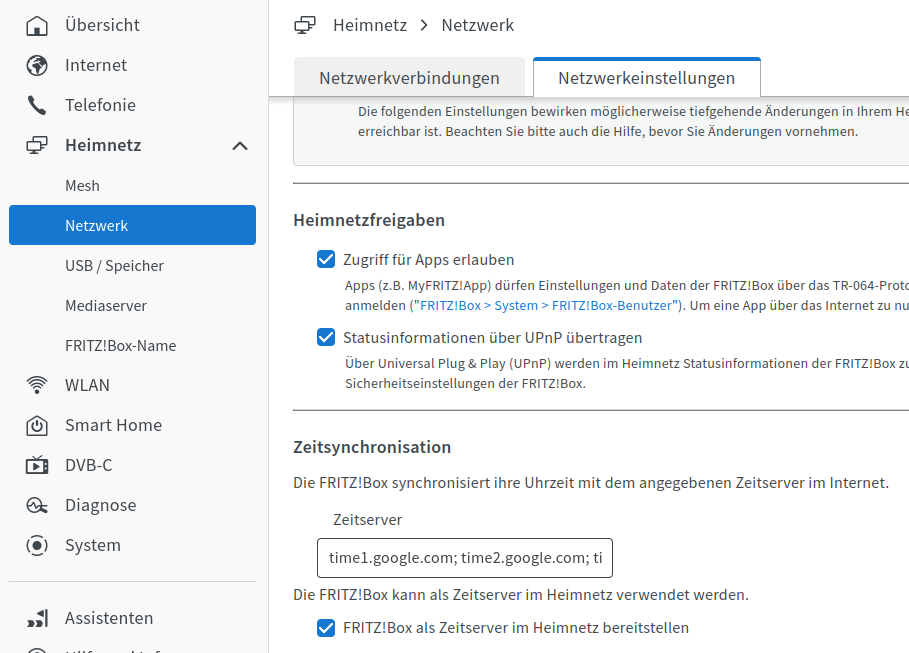
          f0672135-d37b-4ddd-a59f-9bce54cc9bc9-grafik.png

          Linux-Werkzeugkasten:
          https://forum.iobroker.net/topic/42952/der-kleine-iobroker-linux-werkzeugkasten
          NodeJS Fixer Skript:
          https://forum.iobroker.net/topic/68035/iob-node-fix-skript
          iob_diag: curl -sLf -o diag.sh https://iobroker.net/diag.sh && bash diag.sh

          K 1 Antwort Letzte Antwort
          1
          • K klaris

            @thomas-braun ich erstelle eine text Datei in /etc/systemd/timesyncd.conf
            mit den text "[Time]
            NTP=192.168.178.1 192.168.8.1
            FallbackNTP=0.de.pool.ntp.org 1.de.pool.ntp.org 2.de.pool.ntp.org 3.de.pool.ntp.org
            verstehe ich das richtig ?

            Thomas BraunT Online
            Thomas BraunT Online
            Thomas Braun
            Most Active
            schrieb am zuletzt editiert von
            #21

            @klaris

            Meine timesyncd.conf schaut so aus:

            echad@chet:~ $ cat /etc/systemd/timesyncd.conf
            #  This file is part of systemd.
            #
            #  systemd is free software; you can redistribute it and/or modify it under the
            #  terms of the GNU Lesser General Public License as published by the Free
            #  Software Foundation; either version 2.1 of the License, or (at your option)
            #  any later version.
            #
            # Entries in this file show the compile time defaults. Local configuration
            # should be created by either modifying this file, or by creating "drop-ins" in
            # the timesyncd.conf.d/ subdirectory. The latter is generally recommended.
            # Defaults can be restored by simply deleting this file and all drop-ins.
            #
            # See timesyncd.conf(5) for details.
            
            [Time]
            NTP=fritz.box 0.de.pool.ntp.org 1.de.pool.ntp.org 2.de.pool.ntp.org
            FallbackNTP=0.arch.pool.ntp.org 1.arch.pool.ntp.org 2.arch.pool.ntp.org 3.arch.pool.ntp.org
            #FallbackNTP=0.debian.pool.ntp.org 1.debian.pool.ntp.org 2.debian.pool.ntp.org 3.debian.pool.ntp.org
            #RootDistanceMaxSec=5
            #PollIntervalMinSec=32
            #PollIntervalMaxSec=2048
            #ConnectionRetrySec=30
            #SaveIntervalSec=60
            echad@chet:~ $ 


            Linux-Werkzeugkasten:
            https://forum.iobroker.net/topic/42952/der-kleine-iobroker-linux-werkzeugkasten
            NodeJS Fixer Skript:
            https://forum.iobroker.net/topic/68035/iob-node-fix-skript
            iob_diag: curl -sLf -o diag.sh https://iobroker.net/diag.sh && bash diag.sh

            1 Antwort Letzte Antwort
            0
            • K Offline
              K Offline
              klaris
              schrieb am zuletzt editiert von
              #22

              mein timesyncd

              #  This file is part of systemd.
              #
              #  systemd is free software; you can redistribute it and/or modify it under the
              #  terms of the GNU Lesser General Public License as published by the Free
              #  Software Foundation; either version 2.1 of the License, or (at your option)
              #  any later version.
              #
              # Entries in this file show the compile time defaults. Local configuration
              # should be created by either modifying this file, or by creating "drop-ins" in
              # the timesyncd.conf.d/ subdirectory. The latter is generally recommended.
              # Defaults can be restored by simply deleting this file and all drop-ins.
              #
              # See timesyncd.conf(5) for details.
              
              [Time]
              #NTP=
              #FallbackNTP=0.debian.pool.ntp.org 1.debian.pool.ntp.org 2.debian.pool.ntp.org 3.debian.pool.ntp.org
              #RootDistanceMaxSec=5
              #PollIntervalMinSec=32
              #PollIntervalMaxSec=2048
              #ConnectionRetrySec=30
              #SaveIntervalSec=60
              
              
              Thomas BraunT 1 Antwort Letzte Antwort
              0
              • K klaris

                mein timesyncd

                #  This file is part of systemd.
                #
                #  systemd is free software; you can redistribute it and/or modify it under the
                #  terms of the GNU Lesser General Public License as published by the Free
                #  Software Foundation; either version 2.1 of the License, or (at your option)
                #  any later version.
                #
                # Entries in this file show the compile time defaults. Local configuration
                # should be created by either modifying this file, or by creating "drop-ins" in
                # the timesyncd.conf.d/ subdirectory. The latter is generally recommended.
                # Defaults can be restored by simply deleting this file and all drop-ins.
                #
                # See timesyncd.conf(5) for details.
                
                [Time]
                #NTP=
                #FallbackNTP=0.debian.pool.ntp.org 1.debian.pool.ntp.org 2.debian.pool.ntp.org 3.debian.pool.ntp.org
                #RootDistanceMaxSec=5
                #PollIntervalMinSec=32
                #PollIntervalMaxSec=2048
                #ConnectionRetrySec=30
                #SaveIntervalSec=60
                
                
                Thomas BraunT Online
                Thomas BraunT Online
                Thomas Braun
                Most Active
                schrieb am zuletzt editiert von
                #23

                @klaris
                Da ist ja nix aktiv. Und deswegen wird da auch nix abgeglichen.

                Linux-Werkzeugkasten:
                https://forum.iobroker.net/topic/42952/der-kleine-iobroker-linux-werkzeugkasten
                NodeJS Fixer Skript:
                https://forum.iobroker.net/topic/68035/iob-node-fix-skript
                iob_diag: curl -sLf -o diag.sh https://iobroker.net/diag.sh && bash diag.sh

                K 1 Antwort Letzte Antwort
                0
                • Thomas BraunT Thomas Braun

                  @klaris
                  Da ist ja nix aktiv. Und deswegen wird da auch nix abgeglichen.

                  K Offline
                  K Offline
                  klaris
                  schrieb am zuletzt editiert von
                  #24

                  @thomas-braun habe leider kein zugriffsrecht diese datei zu löschen bzw zu ändern

                  Thomas BraunT 1 Antwort Letzte Antwort
                  0
                  • Thomas BraunT Thomas Braun

                    @klaris sagte in iobroker neu installation... befehl geht nicht:

                    NTP=192.168.178.1 192.168.8.1

                    Setzt natürlich voraus, das dort ein ntp-Server läuft. Bei der Fritzbox muss das u. U. noch aktiviert werden.

                    f0672135-d37b-4ddd-a59f-9bce54cc9bc9-grafik.png

                    K Offline
                    K Offline
                    klaris
                    schrieb am zuletzt editiert von
                    #25

                    @thomas-braun :+1:

                    1 Antwort Letzte Antwort
                    0
                    • K klaris

                      @thomas-braun habe leider kein zugriffsrecht diese datei zu löschen bzw zu ändern

                      Thomas BraunT Online
                      Thomas BraunT Online
                      Thomas Braun
                      Most Active
                      schrieb am zuletzt editiert von
                      #26

                      @klaris

                      Natürlich nicht. Die darf nur mit root-Rechten angepackt werden...
                      Basics...

                      sudo nano /etc/systemd/timesyncd.conf
                      

                      Speichern mit Strg-O, nano verlassen mit Strg-X.

                      Linux-Werkzeugkasten:
                      https://forum.iobroker.net/topic/42952/der-kleine-iobroker-linux-werkzeugkasten
                      NodeJS Fixer Skript:
                      https://forum.iobroker.net/topic/68035/iob-node-fix-skript
                      iob_diag: curl -sLf -o diag.sh https://iobroker.net/diag.sh && bash diag.sh

                      K 1 Antwort Letzte Antwort
                      0
                      • Thomas BraunT Thomas Braun

                        @klaris

                        Natürlich nicht. Die darf nur mit root-Rechten angepackt werden...
                        Basics...

                        sudo nano /etc/systemd/timesyncd.conf
                        

                        Speichern mit Strg-O, nano verlassen mit Strg-X.

                        K Offline
                        K Offline
                        klaris
                        schrieb am zuletzt editiert von
                        #27

                        @thomas-braun wieder was neus zum lernen ..kannte das programm noch nicht ....

                        Thomas BraunT 1 Antwort Letzte Antwort
                        0
                        • K klaris

                          @thomas-braun wieder was neus zum lernen ..kannte das programm noch nicht ....

                          Thomas BraunT Online
                          Thomas BraunT Online
                          Thomas Braun
                          Most Active
                          schrieb am zuletzt editiert von
                          #28

                          @klaris sagte in iobroker neu installation... befehl geht nicht:

                          ..kannte das programm noch nicht ....

                          Wie editierst du denn sonst Dateien?

                          Linux-Werkzeugkasten:
                          https://forum.iobroker.net/topic/42952/der-kleine-iobroker-linux-werkzeugkasten
                          NodeJS Fixer Skript:
                          https://forum.iobroker.net/topic/68035/iob-node-fix-skript
                          iob_diag: curl -sLf -o diag.sh https://iobroker.net/diag.sh && bash diag.sh

                          1 Antwort Letzte Antwort
                          0
                          • K klaris

                            @thomas-braun das ist mir zu kompliziert ...mit den 2 raspberry pi 3 gibt es keine probleme gleicher router ...

                            HomoranH Nicht stören
                            HomoranH Nicht stören
                            Homoran
                            Global Moderator Administrators
                            schrieb am zuletzt editiert von
                            #29

                            @klaris ich hab auch beim 5er keine Probleme und nichts besonders konfiguriert

                            kein Support per PN! - Fragen im Forum stellen - es gibt fast nichts, was nicht auch für andere interessant ist.

                            Benutzt das Voting rechts unten im Beitrag wenn er euch geholfen hat.

                            der Installationsfixer: curl -fsL https://iobroker.net/fix.sh | bash -

                            Thomas BraunT 1 Antwort Letzte Antwort
                            0
                            • HomoranH Homoran

                              @klaris ich hab auch beim 5er keine Probleme und nichts besonders konfiguriert

                              Thomas BraunT Online
                              Thomas BraunT Online
                              Thomas Braun
                              Most Active
                              schrieb am zuletzt editiert von
                              #30

                              @homoran sagte in iobroker neu installation... befehl geht nicht:

                              @klaris ich hab auch beim 5er keine Probleme und nichts besonders konfiguriert

                              In der Regel ist da auch nix zu konfigurieren. Keine Ahnung warum das hier offenbar nicht funktioniert.

                              Linux-Werkzeugkasten:
                              https://forum.iobroker.net/topic/42952/der-kleine-iobroker-linux-werkzeugkasten
                              NodeJS Fixer Skript:
                              https://forum.iobroker.net/topic/68035/iob-node-fix-skript
                              iob_diag: curl -sLf -o diag.sh https://iobroker.net/diag.sh && bash diag.sh

                              HomoranH 1 Antwort Letzte Antwort
                              0
                              • Thomas BraunT Thomas Braun

                                @homoran sagte in iobroker neu installation... befehl geht nicht:

                                @klaris ich hab auch beim 5er keine Probleme und nichts besonders konfiguriert

                                In der Regel ist da auch nix zu konfigurieren. Keine Ahnung warum das hier offenbar nicht funktioniert.

                                HomoranH Nicht stören
                                HomoranH Nicht stören
                                Homoran
                                Global Moderator Administrators
                                schrieb am zuletzt editiert von
                                #31

                                @thomas-braun

                                pi@ioBrokerpi5:~ $ timedatectl
                                               Local time: Sat 2024-08-31 21:25:06 CEST
                                           Universal time: Sat 2024-08-31 19:25:06 UTC
                                                 RTC time: Sat 2024-08-31 19:25:06
                                                Time zone: Europe/Berlin (CEST, +0200)
                                System clock synchronized: yes
                                              NTP service: active
                                          RTC in local TZ: no
                                

                                kein Support per PN! - Fragen im Forum stellen - es gibt fast nichts, was nicht auch für andere interessant ist.

                                Benutzt das Voting rechts unten im Beitrag wenn er euch geholfen hat.

                                der Installationsfixer: curl -fsL https://iobroker.net/fix.sh | bash -

                                Thomas BraunT 1 Antwort Letzte Antwort
                                0
                                • HomoranH Homoran

                                  @thomas-braun

                                  pi@ioBrokerpi5:~ $ timedatectl
                                                 Local time: Sat 2024-08-31 21:25:06 CEST
                                             Universal time: Sat 2024-08-31 19:25:06 UTC
                                                   RTC time: Sat 2024-08-31 19:25:06
                                                  Time zone: Europe/Berlin (CEST, +0200)
                                  System clock synchronized: yes
                                                NTP service: active
                                            RTC in local TZ: no
                                  
                                  Thomas BraunT Online
                                  Thomas BraunT Online
                                  Thomas Braun
                                  Most Active
                                  schrieb am zuletzt editiert von
                                  #32

                                  @homoran
                                  So sollte es aussehen.

                                  Linux-Werkzeugkasten:
                                  https://forum.iobroker.net/topic/42952/der-kleine-iobroker-linux-werkzeugkasten
                                  NodeJS Fixer Skript:
                                  https://forum.iobroker.net/topic/68035/iob-node-fix-skript
                                  iob_diag: curl -sLf -o diag.sh https://iobroker.net/diag.sh && bash diag.sh

                                  HomoranH 1 Antwort Letzte Antwort
                                  0
                                  • Thomas BraunT Thomas Braun

                                    @homoran
                                    So sollte es aussehen.

                                    HomoranH Nicht stören
                                    HomoranH Nicht stören
                                    Homoran
                                    Global Moderator Administrators
                                    schrieb am zuletzt editiert von
                                    #33

                                    @thomas-braun
                                    mach gerade ein update

                                    Get:7 http://deb.debian.org/debian bookworm/main arm64 systemd-timesyncd arm64 252.30-1~deb12u2 [61.7 kB]
                                    

                                    nicht dass da ein Wurm drin ist

                                    kein Support per PN! - Fragen im Forum stellen - es gibt fast nichts, was nicht auch für andere interessant ist.

                                    Benutzt das Voting rechts unten im Beitrag wenn er euch geholfen hat.

                                    der Installationsfixer: curl -fsL https://iobroker.net/fix.sh | bash -

                                    Thomas BraunT 1 Antwort Letzte Antwort
                                    0
                                    • HomoranH Homoran

                                      @thomas-braun
                                      mach gerade ein update

                                      Get:7 http://deb.debian.org/debian bookworm/main arm64 systemd-timesyncd arm64 252.30-1~deb12u2 [61.7 kB]
                                      

                                      nicht dass da ein Wurm drin ist

                                      Thomas BraunT Online
                                      Thomas BraunT Online
                                      Thomas Braun
                                      Most Active
                                      schrieb am zuletzt editiert von
                                      #34

                                      @homoran sagte in iobroker neu installation... befehl geht nicht:

                                      systemd-timesyncd

                                      https://bugs.debian.org/cgi-bin/bugreport.cgi?bug=1080056

                                      Das ist aber für eine andere Version gemeldet.

                                      Linux-Werkzeugkasten:
                                      https://forum.iobroker.net/topic/42952/der-kleine-iobroker-linux-werkzeugkasten
                                      NodeJS Fixer Skript:
                                      https://forum.iobroker.net/topic/68035/iob-node-fix-skript
                                      iob_diag: curl -sLf -o diag.sh https://iobroker.net/diag.sh && bash diag.sh

                                      HomoranH 1 Antwort Letzte Antwort
                                      0
                                      • Thomas BraunT Thomas Braun

                                        @homoran sagte in iobroker neu installation... befehl geht nicht:

                                        systemd-timesyncd

                                        https://bugs.debian.org/cgi-bin/bugreport.cgi?bug=1080056

                                        Das ist aber für eine andere Version gemeldet.

                                        HomoranH Nicht stören
                                        HomoranH Nicht stören
                                        Homoran
                                        Global Moderator Administrators
                                        schrieb am zuletzt editiert von
                                        #35

                                        @thomas-braun nach dem update hat sich nix geändert

                                        pi@ioBrokerpi5:~ $
                                        pi@ioBrokerpi5:~ $ timedatectl
                                                       Local time: Sat 2024-08-31 21:31:34 CEST
                                                   Universal time: Sat 2024-08-31 19:31:34 UTC
                                                         RTC time: Sat 2024-08-31 19:31:34
                                                        Time zone: Europe/Berlin (CEST, +0200)
                                        System clock synchronized: yes
                                                      NTP service: active
                                                  RTC in local TZ: no
                                        

                                        kein Support per PN! - Fragen im Forum stellen - es gibt fast nichts, was nicht auch für andere interessant ist.

                                        Benutzt das Voting rechts unten im Beitrag wenn er euch geholfen hat.

                                        der Installationsfixer: curl -fsL https://iobroker.net/fix.sh | bash -

                                        1 Antwort Letzte Antwort
                                        0
                                        • K Offline
                                          K Offline
                                          klaris
                                          schrieb am zuletzt editiert von
                                          #36

                                          meinst das ist ein fehlerhafter raspberry pi 5 ? soll ich den zurück senden ?

                                          HomoranH Thomas BraunT 2 Antworten Letzte Antwort
                                          0
                                          Antworten
                                          • In einem neuen Thema antworten
                                          Anmelden zum Antworten
                                          • Älteste zuerst
                                          • Neuste zuerst
                                          • Meiste Stimmen


                                          Support us

                                          ioBroker
                                          Community Adapters
                                          Donate
                                          FAQ Cloud / IOT
                                          HowTo: Node.js-Update
                                          HowTo: Backup/Restore
                                          Downloads
                                          BLOG

                                          509

                                          Online

                                          32.7k

                                          Benutzer

                                          82.4k

                                          Themen

                                          1.3m

                                          Beiträge
                                          Community
                                          Impressum | Datenschutz-Bestimmungen | Nutzungsbedingungen | Einwilligungseinstellungen
                                          ioBroker Community 2014-2025
                                          logo
                                          • Anmelden

                                          • Du hast noch kein Konto? Registrieren

                                          • Anmelden oder registrieren, um zu suchen
                                          • Erster Beitrag
                                            Letzter Beitrag
                                          0
                                          • Home
                                          • Aktuell
                                          • Tags
                                          • Ungelesen 0
                                          • Kategorien
                                          • Unreplied
                                          • Beliebt
                                          • GitHub
                                          • Docu
                                          • Hilfe