




NPM verschwunden ,Keine Änderungen in der Konsole möglich
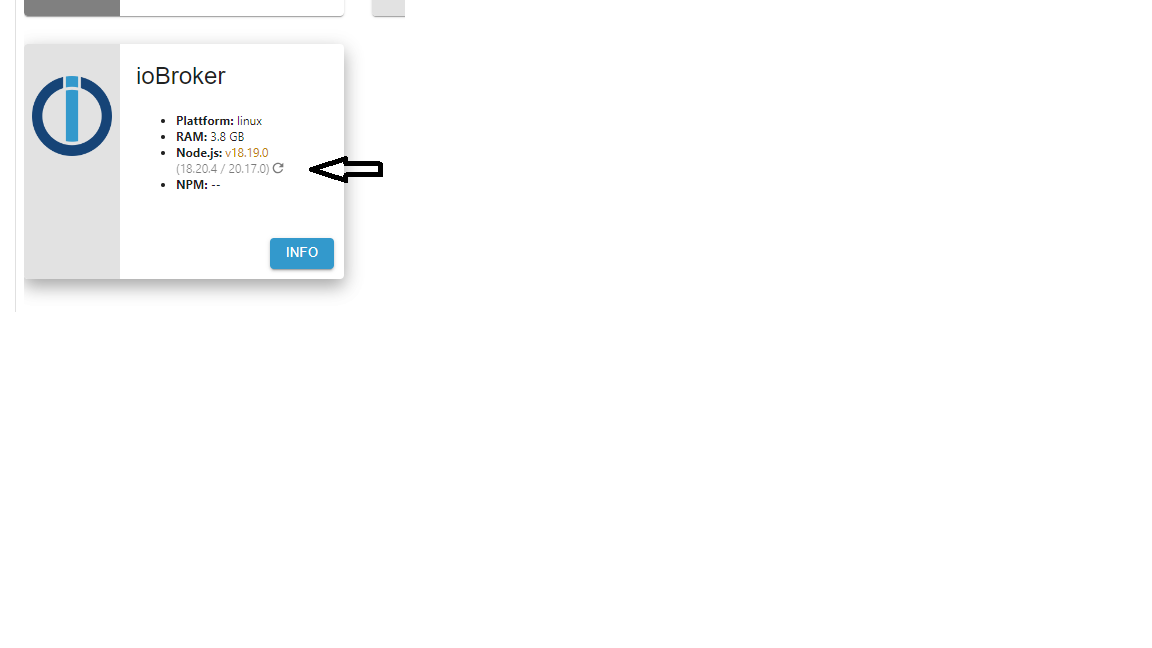
-
@thomas-braun
Hab mich wieder als burgsteff angemeldet
Danke schon mal.iob nodejs-update -
iob nodejs-updateYour nodejs- Installation seems to be faulty. Shall we try to fix it?
Mit y beantworten oder?
-
Your nodejs- Installation seems to be faulty. Shall we try to fix it?
Mit y beantworten oder?
@burgsteff sagte in NPM verschwunden ,Keine Änderungen in der Konsole möglich:
Your nodejs- Installation seems to be faulty. Shall we try to fix it?
bitte alles zeigen!
-
Your nodejs- Installation seems to be faulty. Shall we try to fix it?
Mit y beantworten oder?
@burgsteff sagte in NPM verschwunden ,Keine Änderungen in der Konsole möglich:
Mit y beantworten oder?
Ja, das soll ja berichtigt werden.
-
@burgsteff sagte in NPM verschwunden ,Keine Änderungen in der Konsole möglich:
Mit y beantworten oder?
Ja, das soll ja berichtigt werden.
ioBroker nodejs fixer 2024-05-23 Recommended nodejs-version is: 20.17.0 Checking your installation now. Please be patient! Your current setup is: /usr/bin/nodejs v18.19.0 /usr/bin/node v18.19.0 /home/iobroker/.nodejs-update.sh: line 146: npm: command not found /home/iobroker/.nodejs-update.sh: line 147: npx: command not found /home/iobroker/.nodejs-update.sh: line 168: npm: command not found /home/iobroker/.nodejs-update.sh: line 169: npx: command not found *** nodejs is NOT correctly installed *** We found these nodejs versions available for installation: nodejs: Installed: 18.19.0+dfsg-6~deb12u2 Candidate: 18.19.0+dfsg-6~deb12u2 Version table: *** 18.19.0+dfsg-6~deb12u2 500 500 http://deb.debian.org/debian bookworm/main amd64 Packages 100 /var/lib/dpkg/status 18.19.0+dfsg-6~deb12u1 500 500 http://security.debian.org/debian-security bookworm-security/main amd64 Packages 18.17.1-deb-1nodesource1 500 500 https://deb.nodesource.com/node_18.x bookworm/main amd64 Packages Your nodejs-Installation seems to be faulty. Shall we try to fix it? Press <y> to continue or any other key to quit Fixing your nodejs setup *** Deleting *** rm: cannot remove '': No such file or directory *** Deleting *** rm: cannot remove '': No such file or directory Wrong paths have been fixed. Run 'iob diag' or 'iob nodejs-update' again to check if your installation is fine now You are running nodejs v18.19.0. Do you want to install recommended version 20.17.0? Press <y> to continue or any other key to quit Trying to fix your installation now. Please be patient. Virtualization: kvm Waiting for ioBroker to shut down - Give me a minute... ############################################################ *** These repos are active on your system: Hit:1 http://deb.debian.org/debian bookworm InRelease Hit:2 http://deb.debian.org/debian bookworm-updates InRelease Hit:3 http://security.debian.org/debian-security bookworm-security InRelease Reading package lists... Done *** Installing ca-certificates, curl and gnupg, just in case they are missing. *** Creating new /etc/apt/sources.list.d/nodesource.list and pinning source deb [signed-by=/etc/apt/keyrings/nodesource.gpg] https://deb.nodesource.com/node_20.x nodistro main Package: nodejs Pin: origin deb.nodesource.com Pin-Priority: 1001 *** These repos are active after the adjustments: Hit:1 http://security.debian.org/debian-security bookworm-security InRelease Hit:2 http://deb.debian.org/debian bookworm InRelease Hit:3 http://deb.debian.org/debian bookworm-updates InRelease Get:4 https://deb.nodesource.com/node_20.x nodistro InRelease [12.1 kB] Get:5 https://deb.nodesource.com/node_20.x nodistro/main amd64 Packages [8942 B] Fetched 21.1 kB in 1s (29.9 kB/s) Reading package lists... Done Installing nodejs now! E: Broken packages Installing nodejs now! E: Broken packages *** You need to manually restart your container/virtual machine now! *** We tried our best to fix your nodejs. Please run 'iob diag' again to verify. -
ioBroker nodejs fixer 2024-05-23 Recommended nodejs-version is: 20.17.0 Checking your installation now. Please be patient! Your current setup is: /usr/bin/nodejs v18.19.0 /usr/bin/node v18.19.0 /home/iobroker/.nodejs-update.sh: line 146: npm: command not found /home/iobroker/.nodejs-update.sh: line 147: npx: command not found /home/iobroker/.nodejs-update.sh: line 168: npm: command not found /home/iobroker/.nodejs-update.sh: line 169: npx: command not found *** nodejs is NOT correctly installed *** We found these nodejs versions available for installation: nodejs: Installed: 18.19.0+dfsg-6~deb12u2 Candidate: 18.19.0+dfsg-6~deb12u2 Version table: *** 18.19.0+dfsg-6~deb12u2 500 500 http://deb.debian.org/debian bookworm/main amd64 Packages 100 /var/lib/dpkg/status 18.19.0+dfsg-6~deb12u1 500 500 http://security.debian.org/debian-security bookworm-security/main amd64 Packages 18.17.1-deb-1nodesource1 500 500 https://deb.nodesource.com/node_18.x bookworm/main amd64 Packages Your nodejs-Installation seems to be faulty. Shall we try to fix it? Press <y> to continue or any other key to quit Fixing your nodejs setup *** Deleting *** rm: cannot remove '': No such file or directory *** Deleting *** rm: cannot remove '': No such file or directory Wrong paths have been fixed. Run 'iob diag' or 'iob nodejs-update' again to check if your installation is fine now You are running nodejs v18.19.0. Do you want to install recommended version 20.17.0? Press <y> to continue or any other key to quit Trying to fix your installation now. Please be patient. Virtualization: kvm Waiting for ioBroker to shut down - Give me a minute... ############################################################ *** These repos are active on your system: Hit:1 http://deb.debian.org/debian bookworm InRelease Hit:2 http://deb.debian.org/debian bookworm-updates InRelease Hit:3 http://security.debian.org/debian-security bookworm-security InRelease Reading package lists... Done *** Installing ca-certificates, curl and gnupg, just in case they are missing. *** Creating new /etc/apt/sources.list.d/nodesource.list and pinning source deb [signed-by=/etc/apt/keyrings/nodesource.gpg] https://deb.nodesource.com/node_20.x nodistro main Package: nodejs Pin: origin deb.nodesource.com Pin-Priority: 1001 *** These repos are active after the adjustments: Hit:1 http://security.debian.org/debian-security bookworm-security InRelease Hit:2 http://deb.debian.org/debian bookworm InRelease Hit:3 http://deb.debian.org/debian bookworm-updates InRelease Get:4 https://deb.nodesource.com/node_20.x nodistro InRelease [12.1 kB] Get:5 https://deb.nodesource.com/node_20.x nodistro/main amd64 Packages [8942 B] Fetched 21.1 kB in 1s (29.9 kB/s) Reading package lists... Done Installing nodejs now! E: Broken packages Installing nodejs now! E: Broken packages *** You need to manually restart your container/virtual machine now! *** We tried our best to fix your nodejs. Please run 'iob diag' again to verify.Ah, die Version ist nicht aktuell genug.
Versuch es mal mit der Beta:
curl https://raw.githubusercontent.com/Grothesk242/iob_diag/main/iob_node_update.sh > iob_node_update chmod 744 iob_node_update ./iob_node_update -
Ah, die Version ist nicht aktuell genug.
Versuch es mal mit der Beta:
curl https://raw.githubusercontent.com/Grothesk242/iob_diag/main/iob_node_update.sh > iob_node_update chmod 744 iob_node_update ./iob_node_updateioBroker nodejs maintenance 2024-08-08 Recommended nodejs-version is: 20.17.0 Checking your installation now. Please be patient! Your current setup is: /usr/bin/nodejs v18.19.0 /usr/bin/node v18.19.0 ./iob_node_update: line 157: npm: command not found ./iob_node_update: line 158: npx: command not found ./iob_node_update: line 179: npm: command not found ./iob_node_update: line 180: npx: command not found *** nodejs is NOT correctly installed *** We found these nodejs versions available for installation: nodejs: Installed: 18.19.0+dfsg-6~deb12u2 Candidate: 20.17.0-1nodesource1 Version table: 20.17.0-1nodesource1 1001 500 https://deb.nodesource.com/node_20.x nodistro/main amd64 Packages 20.16.0-1nodesource1 1001 500 https://deb.nodesource.com/node_20.x nodistro/main amd64 Packages 20.15.1-1nodesource1 1001 500 https://deb.nodesource.com/node_20.x nodistro/main amd64 Packages 20.15.0-1nodesource1 1001 500 https://deb.nodesource.com/node_20.x nodistro/main amd64 Packages 20.14.0-1nodesource1 1001 500 https://deb.nodesource.com/node_20.x nodistro/main amd64 Packages 20.13.1-1nodesource1 1001 500 https://deb.nodesource.com/node_20.x nodistro/main amd64 Packages 20.13.0-1nodesource1 1001 500 https://deb.nodesource.com/node_20.x nodistro/main amd64 Packages 20.12.2-1nodesource1 1001 500 https://deb.nodesource.com/node_20.x nodistro/main amd64 Packages 20.12.1-1nodesource1 1001 500 https://deb.nodesource.com/node_20.x nodistro/main amd64 Packages 20.12.0-1nodesource1 1001 500 https://deb.nodesource.com/node_20.x nodistro/main amd64 Packages 20.11.1-1nodesource1 1001 500 https://deb.nodesource.com/node_20.x nodistro/main amd64 Packages 20.11.0-1nodesource1 1001 500 https://deb.nodesource.com/node_20.x nodistro/main amd64 Packages 20.10.0-1nodesource1 1001 500 https://deb.nodesource.com/node_20.x nodistro/main amd64 Packages 20.9.0-1nodesource1 1001 500 https://deb.nodesource.com/node_20.x nodistro/main amd64 Packages 20.8.1-1nodesource1 1001 500 https://deb.nodesource.com/node_20.x nodistro/main amd64 Packages 20.8.0-1nodesource1 1001 500 https://deb.nodesource.com/node_20.x nodistro/main amd64 Packages 20.7.0-1nodesource1 1001 500 https://deb.nodesource.com/node_20.x nodistro/main amd64 Packages 20.6.1-1nodesource1 1001 500 https://deb.nodesource.com/node_20.x nodistro/main amd64 Packages 20.6.0-1nodesource1 1001 500 https://deb.nodesource.com/node_20.x nodistro/main amd64 Packages 20.5.1-1nodesource1 1001 500 https://deb.nodesource.com/node_20.x nodistro/main amd64 Packages 20.5.0-1nodesource1 1001 500 https://deb.nodesource.com/node_20.x nodistro/main amd64 Packages 20.4.0-1nodesource1 1001 500 https://deb.nodesource.com/node_20.x nodistro/main amd64 Packages 20.3.1-1nodesource1 1001 500 https://deb.nodesource.com/node_20.x nodistro/main amd64 Packages 20.3.0-1nodesource1 1001 500 https://deb.nodesource.com/node_20.x nodistro/main amd64 Packages 20.2.0-1nodesource1 1001 500 https://deb.nodesource.com/node_20.x nodistro/main amd64 Packages 20.1.0-1nodesource1 1001 500 https://deb.nodesource.com/node_20.x nodistro/main amd64 Packages 20.0.0-1nodesource1 1001 500 https://deb.nodesource.com/node_20.x nodistro/main amd64 Packages *** 18.19.0+dfsg-6~deb12u2 500 500 http://deb.debian.org/debian bookworm/main amd64 Packages 100 /var/lib/dpkg/status 18.19.0+dfsg-6~deb12u1 500 500 http://security.debian.org/debian-security bookworm-security/main amd64 Packages Your nodejs-Installation seems to be faulty. Shall we try to fix it? Press <y> to continue or any other key to quit Fixing your nodejs setup *** Deleting *** rm: cannot remove '': No such file or directory *** Deleting *** rm: cannot remove '': No such file or directory Wrong paths have been fixed. Run 'iob diag' or 'iob nodejs-update' again to check if your installation is fine now You are running nodejs v18.19.0. Do you want to install recommended version 20.17.0? Press <y> to continue or any other key to quit Trying to fix your installation now. Please be patient. Virtualization: kvm Waiting for ioBroker to shut down - Give me a minute... ############################################################ Removing dfsg-nodejs (Reading database ... 45351 files and directories currently installed.) Removing nodejs-doc (18.19.0+dfsg-6~deb12u2) ... Removing nodejs (18.19.0+dfsg-6~deb12u2) ... Removing libnode108:amd64 (18.19.0+dfsg-6~deb12u2) ... Removing node-acorn (8.8.1+ds+~cs25.17.7-2) ... Removing node-undici (5.15.0+dfsg1+~cs20.10.9.3-1+deb12u4) ... Removing node-busboy (1.6.0+~cs2.6.0-2) ... Removing node-cjs-module-lexer (1.2.2+dfsg-5) ... Removing node-xtend (4.0.2-3) ... Processing triggers for libc-bin (2.36-9+deb12u7) ... *** These repos are active on your system: Hit:1 http://security.debian.org/debian-security bookworm-security InRelease Hit:2 http://deb.debian.org/debian bookworm InRelease Hit:3 http://deb.debian.org/debian bookworm-updates InRelease Reading package lists... Done *** Installing ca-certificates, curl and gnupg, just in case they are missing. *** Creating new /etc/apt/sources.list.d/nodesource.list and pinning source deb [signed-by=/etc/apt/keyrings/nodesource.gpg] https://deb.nodesource.com/node_20.x nodistro main Package: nodejs Pin: origin deb.nodesource.com Pin-Priority: 1001 *** These repos are active after the adjustments: Hit:1 http://deb.debian.org/debian bookworm InRelease Hit:2 http://deb.debian.org/debian bookworm-updates InRelease Hit:3 http://security.debian.org/debian-security bookworm-security InRelease Get:4 https://deb.nodesource.com/node_20.x nodistro InRelease [12.1 kB] Get:5 https://deb.nodesource.com/node_20.x nodistro/main amd64 Packages [8942 B] Fetched 21.1 kB in 1s (30.2 kB/s) Reading package lists... Done Installing nodejs now! (Reading database ... 44612 files and directories currently installed.) Preparing to unpack .../libaom3_3.6.0-1+deb12u1_amd64.deb ... Unpacking libaom3:amd64 (3.6.0-1+deb12u1) over (3.6.0-1) ... Selecting previously unselected package nodejs. Preparing to unpack .../nodejs_20.17.0-1nodesource1_amd64.deb ... Unpacking nodejs (20.17.0-1nodesource1) ... Setting up libaom3:amd64 (3.6.0-1+deb12u1) ... Setting up nodejs (20.17.0-1nodesource1) ... Processing triggers for libc-bin (2.36-9+deb12u7) ... Installing nodejs now! *** You need to manually restart your container/virtual machine now! *** We tried our best to fix your nodejs. Please run 'iob diag' again to verify. burgsteff@ioBroker:~$ -
ioBroker nodejs maintenance 2024-08-08 Recommended nodejs-version is: 20.17.0 Checking your installation now. Please be patient! Your current setup is: /usr/bin/nodejs v18.19.0 /usr/bin/node v18.19.0 ./iob_node_update: line 157: npm: command not found ./iob_node_update: line 158: npx: command not found ./iob_node_update: line 179: npm: command not found ./iob_node_update: line 180: npx: command not found *** nodejs is NOT correctly installed *** We found these nodejs versions available for installation: nodejs: Installed: 18.19.0+dfsg-6~deb12u2 Candidate: 20.17.0-1nodesource1 Version table: 20.17.0-1nodesource1 1001 500 https://deb.nodesource.com/node_20.x nodistro/main amd64 Packages 20.16.0-1nodesource1 1001 500 https://deb.nodesource.com/node_20.x nodistro/main amd64 Packages 20.15.1-1nodesource1 1001 500 https://deb.nodesource.com/node_20.x nodistro/main amd64 Packages 20.15.0-1nodesource1 1001 500 https://deb.nodesource.com/node_20.x nodistro/main amd64 Packages 20.14.0-1nodesource1 1001 500 https://deb.nodesource.com/node_20.x nodistro/main amd64 Packages 20.13.1-1nodesource1 1001 500 https://deb.nodesource.com/node_20.x nodistro/main amd64 Packages 20.13.0-1nodesource1 1001 500 https://deb.nodesource.com/node_20.x nodistro/main amd64 Packages 20.12.2-1nodesource1 1001 500 https://deb.nodesource.com/node_20.x nodistro/main amd64 Packages 20.12.1-1nodesource1 1001 500 https://deb.nodesource.com/node_20.x nodistro/main amd64 Packages 20.12.0-1nodesource1 1001 500 https://deb.nodesource.com/node_20.x nodistro/main amd64 Packages 20.11.1-1nodesource1 1001 500 https://deb.nodesource.com/node_20.x nodistro/main amd64 Packages 20.11.0-1nodesource1 1001 500 https://deb.nodesource.com/node_20.x nodistro/main amd64 Packages 20.10.0-1nodesource1 1001 500 https://deb.nodesource.com/node_20.x nodistro/main amd64 Packages 20.9.0-1nodesource1 1001 500 https://deb.nodesource.com/node_20.x nodistro/main amd64 Packages 20.8.1-1nodesource1 1001 500 https://deb.nodesource.com/node_20.x nodistro/main amd64 Packages 20.8.0-1nodesource1 1001 500 https://deb.nodesource.com/node_20.x nodistro/main amd64 Packages 20.7.0-1nodesource1 1001 500 https://deb.nodesource.com/node_20.x nodistro/main amd64 Packages 20.6.1-1nodesource1 1001 500 https://deb.nodesource.com/node_20.x nodistro/main amd64 Packages 20.6.0-1nodesource1 1001 500 https://deb.nodesource.com/node_20.x nodistro/main amd64 Packages 20.5.1-1nodesource1 1001 500 https://deb.nodesource.com/node_20.x nodistro/main amd64 Packages 20.5.0-1nodesource1 1001 500 https://deb.nodesource.com/node_20.x nodistro/main amd64 Packages 20.4.0-1nodesource1 1001 500 https://deb.nodesource.com/node_20.x nodistro/main amd64 Packages 20.3.1-1nodesource1 1001 500 https://deb.nodesource.com/node_20.x nodistro/main amd64 Packages 20.3.0-1nodesource1 1001 500 https://deb.nodesource.com/node_20.x nodistro/main amd64 Packages 20.2.0-1nodesource1 1001 500 https://deb.nodesource.com/node_20.x nodistro/main amd64 Packages 20.1.0-1nodesource1 1001 500 https://deb.nodesource.com/node_20.x nodistro/main amd64 Packages 20.0.0-1nodesource1 1001 500 https://deb.nodesource.com/node_20.x nodistro/main amd64 Packages *** 18.19.0+dfsg-6~deb12u2 500 500 http://deb.debian.org/debian bookworm/main amd64 Packages 100 /var/lib/dpkg/status 18.19.0+dfsg-6~deb12u1 500 500 http://security.debian.org/debian-security bookworm-security/main amd64 Packages Your nodejs-Installation seems to be faulty. Shall we try to fix it? Press <y> to continue or any other key to quit Fixing your nodejs setup *** Deleting *** rm: cannot remove '': No such file or directory *** Deleting *** rm: cannot remove '': No such file or directory Wrong paths have been fixed. Run 'iob diag' or 'iob nodejs-update' again to check if your installation is fine now You are running nodejs v18.19.0. Do you want to install recommended version 20.17.0? Press <y> to continue or any other key to quit Trying to fix your installation now. Please be patient. Virtualization: kvm Waiting for ioBroker to shut down - Give me a minute... ############################################################ Removing dfsg-nodejs (Reading database ... 45351 files and directories currently installed.) Removing nodejs-doc (18.19.0+dfsg-6~deb12u2) ... Removing nodejs (18.19.0+dfsg-6~deb12u2) ... Removing libnode108:amd64 (18.19.0+dfsg-6~deb12u2) ... Removing node-acorn (8.8.1+ds+~cs25.17.7-2) ... Removing node-undici (5.15.0+dfsg1+~cs20.10.9.3-1+deb12u4) ... Removing node-busboy (1.6.0+~cs2.6.0-2) ... Removing node-cjs-module-lexer (1.2.2+dfsg-5) ... Removing node-xtend (4.0.2-3) ... Processing triggers for libc-bin (2.36-9+deb12u7) ... *** These repos are active on your system: Hit:1 http://security.debian.org/debian-security bookworm-security InRelease Hit:2 http://deb.debian.org/debian bookworm InRelease Hit:3 http://deb.debian.org/debian bookworm-updates InRelease Reading package lists... Done *** Installing ca-certificates, curl and gnupg, just in case they are missing. *** Creating new /etc/apt/sources.list.d/nodesource.list and pinning source deb [signed-by=/etc/apt/keyrings/nodesource.gpg] https://deb.nodesource.com/node_20.x nodistro main Package: nodejs Pin: origin deb.nodesource.com Pin-Priority: 1001 *** These repos are active after the adjustments: Hit:1 http://deb.debian.org/debian bookworm InRelease Hit:2 http://deb.debian.org/debian bookworm-updates InRelease Hit:3 http://security.debian.org/debian-security bookworm-security InRelease Get:4 https://deb.nodesource.com/node_20.x nodistro InRelease [12.1 kB] Get:5 https://deb.nodesource.com/node_20.x nodistro/main amd64 Packages [8942 B] Fetched 21.1 kB in 1s (30.2 kB/s) Reading package lists... Done Installing nodejs now! (Reading database ... 44612 files and directories currently installed.) Preparing to unpack .../libaom3_3.6.0-1+deb12u1_amd64.deb ... Unpacking libaom3:amd64 (3.6.0-1+deb12u1) over (3.6.0-1) ... Selecting previously unselected package nodejs. Preparing to unpack .../nodejs_20.17.0-1nodesource1_amd64.deb ... Unpacking nodejs (20.17.0-1nodesource1) ... Setting up libaom3:amd64 (3.6.0-1+deb12u1) ... Setting up nodejs (20.17.0-1nodesource1) ... Processing triggers for libc-bin (2.36-9+deb12u7) ... Installing nodejs now! *** You need to manually restart your container/virtual machine now! *** We tried our best to fix your nodejs. Please run 'iob diag' again to verify. burgsteff@ioBroker:~$@burgsteff sagte in NPM verschwunden ,Keine Änderungen in der Konsole möglich:
We tried our best to fix your nodejs. Please run 'iob diag' again to verify.
Mach das mal.
-
ioBroker nodejs maintenance 2024-08-08 Recommended nodejs-version is: 20.17.0 Checking your installation now. Please be patient! Your current setup is: /usr/bin/nodejs v18.19.0 /usr/bin/node v18.19.0 ./iob_node_update: line 157: npm: command not found ./iob_node_update: line 158: npx: command not found ./iob_node_update: line 179: npm: command not found ./iob_node_update: line 180: npx: command not found *** nodejs is NOT correctly installed *** We found these nodejs versions available for installation: nodejs: Installed: 18.19.0+dfsg-6~deb12u2 Candidate: 20.17.0-1nodesource1 Version table: 20.17.0-1nodesource1 1001 500 https://deb.nodesource.com/node_20.x nodistro/main amd64 Packages 20.16.0-1nodesource1 1001 500 https://deb.nodesource.com/node_20.x nodistro/main amd64 Packages 20.15.1-1nodesource1 1001 500 https://deb.nodesource.com/node_20.x nodistro/main amd64 Packages 20.15.0-1nodesource1 1001 500 https://deb.nodesource.com/node_20.x nodistro/main amd64 Packages 20.14.0-1nodesource1 1001 500 https://deb.nodesource.com/node_20.x nodistro/main amd64 Packages 20.13.1-1nodesource1 1001 500 https://deb.nodesource.com/node_20.x nodistro/main amd64 Packages 20.13.0-1nodesource1 1001 500 https://deb.nodesource.com/node_20.x nodistro/main amd64 Packages 20.12.2-1nodesource1 1001 500 https://deb.nodesource.com/node_20.x nodistro/main amd64 Packages 20.12.1-1nodesource1 1001 500 https://deb.nodesource.com/node_20.x nodistro/main amd64 Packages 20.12.0-1nodesource1 1001 500 https://deb.nodesource.com/node_20.x nodistro/main amd64 Packages 20.11.1-1nodesource1 1001 500 https://deb.nodesource.com/node_20.x nodistro/main amd64 Packages 20.11.0-1nodesource1 1001 500 https://deb.nodesource.com/node_20.x nodistro/main amd64 Packages 20.10.0-1nodesource1 1001 500 https://deb.nodesource.com/node_20.x nodistro/main amd64 Packages 20.9.0-1nodesource1 1001 500 https://deb.nodesource.com/node_20.x nodistro/main amd64 Packages 20.8.1-1nodesource1 1001 500 https://deb.nodesource.com/node_20.x nodistro/main amd64 Packages 20.8.0-1nodesource1 1001 500 https://deb.nodesource.com/node_20.x nodistro/main amd64 Packages 20.7.0-1nodesource1 1001 500 https://deb.nodesource.com/node_20.x nodistro/main amd64 Packages 20.6.1-1nodesource1 1001 500 https://deb.nodesource.com/node_20.x nodistro/main amd64 Packages 20.6.0-1nodesource1 1001 500 https://deb.nodesource.com/node_20.x nodistro/main amd64 Packages 20.5.1-1nodesource1 1001 500 https://deb.nodesource.com/node_20.x nodistro/main amd64 Packages 20.5.0-1nodesource1 1001 500 https://deb.nodesource.com/node_20.x nodistro/main amd64 Packages 20.4.0-1nodesource1 1001 500 https://deb.nodesource.com/node_20.x nodistro/main amd64 Packages 20.3.1-1nodesource1 1001 500 https://deb.nodesource.com/node_20.x nodistro/main amd64 Packages 20.3.0-1nodesource1 1001 500 https://deb.nodesource.com/node_20.x nodistro/main amd64 Packages 20.2.0-1nodesource1 1001 500 https://deb.nodesource.com/node_20.x nodistro/main amd64 Packages 20.1.0-1nodesource1 1001 500 https://deb.nodesource.com/node_20.x nodistro/main amd64 Packages 20.0.0-1nodesource1 1001 500 https://deb.nodesource.com/node_20.x nodistro/main amd64 Packages *** 18.19.0+dfsg-6~deb12u2 500 500 http://deb.debian.org/debian bookworm/main amd64 Packages 100 /var/lib/dpkg/status 18.19.0+dfsg-6~deb12u1 500 500 http://security.debian.org/debian-security bookworm-security/main amd64 Packages Your nodejs-Installation seems to be faulty. Shall we try to fix it? Press <y> to continue or any other key to quit Fixing your nodejs setup *** Deleting *** rm: cannot remove '': No such file or directory *** Deleting *** rm: cannot remove '': No such file or directory Wrong paths have been fixed. Run 'iob diag' or 'iob nodejs-update' again to check if your installation is fine now You are running nodejs v18.19.0. Do you want to install recommended version 20.17.0? Press <y> to continue or any other key to quit Trying to fix your installation now. Please be patient. Virtualization: kvm Waiting for ioBroker to shut down - Give me a minute... ############################################################ Removing dfsg-nodejs (Reading database ... 45351 files and directories currently installed.) Removing nodejs-doc (18.19.0+dfsg-6~deb12u2) ... Removing nodejs (18.19.0+dfsg-6~deb12u2) ... Removing libnode108:amd64 (18.19.0+dfsg-6~deb12u2) ... Removing node-acorn (8.8.1+ds+~cs25.17.7-2) ... Removing node-undici (5.15.0+dfsg1+~cs20.10.9.3-1+deb12u4) ... Removing node-busboy (1.6.0+~cs2.6.0-2) ... Removing node-cjs-module-lexer (1.2.2+dfsg-5) ... Removing node-xtend (4.0.2-3) ... Processing triggers for libc-bin (2.36-9+deb12u7) ... *** These repos are active on your system: Hit:1 http://security.debian.org/debian-security bookworm-security InRelease Hit:2 http://deb.debian.org/debian bookworm InRelease Hit:3 http://deb.debian.org/debian bookworm-updates InRelease Reading package lists... Done *** Installing ca-certificates, curl and gnupg, just in case they are missing. *** Creating new /etc/apt/sources.list.d/nodesource.list and pinning source deb [signed-by=/etc/apt/keyrings/nodesource.gpg] https://deb.nodesource.com/node_20.x nodistro main Package: nodejs Pin: origin deb.nodesource.com Pin-Priority: 1001 *** These repos are active after the adjustments: Hit:1 http://deb.debian.org/debian bookworm InRelease Hit:2 http://deb.debian.org/debian bookworm-updates InRelease Hit:3 http://security.debian.org/debian-security bookworm-security InRelease Get:4 https://deb.nodesource.com/node_20.x nodistro InRelease [12.1 kB] Get:5 https://deb.nodesource.com/node_20.x nodistro/main amd64 Packages [8942 B] Fetched 21.1 kB in 1s (30.2 kB/s) Reading package lists... Done Installing nodejs now! (Reading database ... 44612 files and directories currently installed.) Preparing to unpack .../libaom3_3.6.0-1+deb12u1_amd64.deb ... Unpacking libaom3:amd64 (3.6.0-1+deb12u1) over (3.6.0-1) ... Selecting previously unselected package nodejs. Preparing to unpack .../nodejs_20.17.0-1nodesource1_amd64.deb ... Unpacking nodejs (20.17.0-1nodesource1) ... Setting up libaom3:amd64 (3.6.0-1+deb12u1) ... Setting up nodejs (20.17.0-1nodesource1) ... Processing triggers for libc-bin (2.36-9+deb12u7) ... Installing nodejs now! *** You need to manually restart your container/virtual machine now! *** We tried our best to fix your nodejs. Please run 'iob diag' again to verify. burgsteff@ioBroker:~$aber vorher
@burgsteff sagte in NPM verschwunden ,Keine Änderungen in der Konsole möglich:
You need to manually restart your container/virtual machine now!
-
@burgsteff sagte in NPM verschwunden ,Keine Änderungen in der Konsole möglich:
We tried our best to fix your nodejs. Please run 'iob diag' again to verify.
Mach das mal.
Skript v.2024-05-22 *** BASE SYSTEM *** Static hostname: ioBroker Icon name: computer-vm Chassis: vm 🖴 Virtualization: kvm Operating System: Debian GNU/Linux 12 (bookworm) Kernel: Linux 6.1.0-23-amd64 Architecture: x86-64 Hardware Vendor: QEMU Hardware Model: Standard PC _i440FX + PIIX, 1996_ Firmware Version: rel-1.16.3-0-ga6ed6b701f0a-prebuilt.qemu.org model name : QEMU Virtual CPU version 2.5+ Docker : false Virtualization : kvm Kernel : x86_64 Userland : 64 bit Systemuptime and Load: 19:45:28 up 1 min, 2 users, load average: 0.48, 0.16, 0.06 CPU threads: 4 *** Time and Time Zones *** Local time: Sun 2024-08-25 19:45:28 CEST Universal time: Sun 2024-08-25 17:45:28 UTC RTC time: Sun 2024-08-25 17:45:28 Time zone: Europe/Berlin (CEST, +0200) System clock synchronized: no NTP service: n/a RTC in local TZ: no *** Users and Groups *** User that called 'iob diag': burgsteff HOME=/home/burgsteff GROUPS=burgsteff adm dialout cdrom floppy sudo audio dip video plugdev users input netdev iobroker User that is running 'js-controller': iobroker HOME=/home/iobroker GROUPS=iobroker tty dialout audio video plugdev *** Display-Server-Setup *** Display-Server: false Desktop: Terminal: tty Boot Target: multi-user.target *** MEMORY *** total used free shared buff/cache available Mem: 4.1G 1.2G 2.7G 516K 384M 2.9G Swap: 1.0G 0B 1.0G Total: 5.1G 1.2G 3.7G Active iob-Instances: 12 3914 M total memory 1181 M used memory 124 M active memory 1027 M inactive memory 2583 M free memory 36 M buffer memory 331 M swap cache 974 M total swap 0 M used swap 974 M free swap *** top - Table Of Processes *** top - 19:45:28 up 1 min, 2 users, load average: 0.48, 0.16, 0.06 Tasks: 123 total, 1 running, 122 sleeping, 0 stopped, 0 zombie %Cpu(s): 33.3 us, 0.0 sy, 0.0 ni, 66.7 id, 0.0 wa, 0.0 hi, 0.0 si, 0.0 st MiB Mem : 3914.7 total, 2583.4 free, 1181.6 used, 367.3 buff/cache MiB Swap: 975.0 total, 975.0 free, 0.0 used. 2733.2 avail Mem *** FAILED SERVICES *** UNIT LOAD ACTIVE SUB DESCRIPTION 0 loaded units listed. *** FILESYSTEM *** Filesystem Type Size Used Avail Use% Mounted on udev devtmpfs 1.9G 0 1.9G 0% /dev tmpfs tmpfs 392M 512K 391M 1% /run /dev/sda1 ext4 31G 6.5G 23G 23% / tmpfs tmpfs 2.0G 0 2.0G 0% /dev/shm tmpfs tmpfs 5.0M 0 5.0M 0% /run/lock tmpfs tmpfs 392M 0 392M 0% /run/user/1000 Messages concerning ext4 filesystem in dmesg: [Sun Aug 25 19:44:27 2024] EXT4-fs (sda1): mounted filesystem with ordered data mode. Quota mode: none. [Sun Aug 25 19:44:27 2024] EXT4-fs (sda1): re-mounted. Quota mode: none. Show mounted filesystems: TARGET SOURCE FSTYPE OPTIONS / /dev/sda1 ext4 rw,relatime,errors=remount-ro |-/sys sysfs sysfs rw,nosuid,nodev,noexec,relatime | |-/sys/kernel/security securityfs securityfs rw,nosuid,nodev,noexec,relatime | |-/sys/fs/cgroup cgroup2 cgroup2 rw,nosuid,nodev,noexec,relatime,nsdelegate,memory_recursiveprot | |-/sys/fs/pstore pstore pstore rw,nosuid,nodev,noexec,relatime | |-/sys/fs/bpf bpf bpf rw,nosuid,nodev,noexec,relatime,mode=700 | |-/sys/kernel/debug debugfs debugfs rw,nosuid,nodev,noexec,relatime | |-/sys/kernel/tracing tracefs tracefs rw,nosuid,nodev,noexec,relatime | |-/sys/kernel/config configfs configfs rw,nosuid,nodev,noexec,relatime | `-/sys/fs/fuse/connections fusectl fusectl rw,nosuid,nodev,noexec,relatime |-/proc proc proc rw,nosuid,nodev,noexec,relatime | `-/proc/sys/fs/binfmt_misc systemd-1 autofs rw,relatime,fd=30,pgrp=1,timeout=0,minproto=5,maxproto=5,direct,pipe_ino=14461 | `-/proc/sys/fs/binfmt_misc binfmt_misc binfmt_misc rw,nosuid,nodev,noexec,relatime |-/dev udev devtmpfs rw,nosuid,relatime,size=1981136k,nr_inodes=495284,mode=755,inode64 | |-/dev/pts devpts devpts rw,nosuid,noexec,relatime,gid=5,mode=620,ptmxmode=000 | |-/dev/shm tmpfs tmpfs rw,nosuid,nodev,inode64 | |-/dev/hugepages hugetlbfs hugetlbfs rw,relatime,pagesize=2M | `-/dev/mqueue mqueue mqueue rw,nosuid,nodev,noexec,relatime `-/run tmpfs tmpfs rw,nosuid,nodev,noexec,relatime,size=400872k,mode=755,inode64 |-/run/lock tmpfs tmpfs rw,nosuid,nodev,noexec,relatime,size=5120k,inode64 |-/run/credentials/systemd-sysctl.service ramfs ramfs ro,nosuid,nodev,noexec,relatime,mode=700 |-/run/credentials/systemd-tmpfiles-setup-dev.service ramfs ramfs ro,nosuid,nodev,noexec,relatime,mode=700 |-/run/credentials/systemd-sysusers.service ramfs ramfs ro,nosuid,nodev,noexec,relatime,mode=700 |-/run/rpc_pipefs sunrpc rpc_pipefs rw,relatime |-/run/user/1000 tmpfs tmpfs rw,nosuid,nodev,relatime,size=400868k,nr_inodes=100217,mode=700,uid=1000,gid=1000,inode64 `-/run/credentials/systemd-tmpfiles-setup.service ramfs ramfs ro,nosuid,nodev,noexec,relatime,mode=700 Files in neuralgic directories: /var: 745M /var/ 348M /var/cache 343M /var/cache/apt 267M /var/cache/apt/archives 240M /var/log Archived and active journals take up 224.3M in the file system. /opt/iobroker/backups: 35M /opt/iobroker/backups/ /opt/iobroker/iobroker-data: 837M /opt/iobroker/iobroker-data/ 748M /opt/iobroker/iobroker-data/files 441M /opt/iobroker/iobroker-data/files/javascript.admin 409M /opt/iobroker/iobroker-data/files/javascript.admin/static 408M /opt/iobroker/iobroker-data/files/javascript.admin/static/js The five largest files in iobroker-data are: 27M /opt/iobroker/iobroker-data/files/backitup.admin/static/js/main.ce422ec2.js.map 25M /opt/iobroker/iobroker-data/objects.jsonl 24M /opt/iobroker/iobroker-data/files/web.admin/static/js/main.135279a0.js.map 22M /opt/iobroker/iobroker-data/files/modbus.admin/static/js/main.18496c94.js.map 9.0M /opt/iobroker/iobroker-data/files/modbus.admin/static/js/main.18496c94.js USB-Devices by-id: USB-Sticks - Avoid direct links to /dev/tty* in your adapter setups, please always prefer the links 'by-id': No Devices found 'by-id' *** NodeJS-Installation *** /usr/bin/nodejs v20.17.0 /usr/bin/node v20.17.0 /usr/bin/npm 10.8.2 /usr/bin/npx 10.8.2 /usr/bin/corepack 0.29.3 nodejs: Installed: 20.17.0-1nodesource1 Candidate: 20.17.0-1nodesource1 Version table: *** 20.17.0-1nodesource1 1001 500 https://deb.nodesource.com/node_20.x nodistro/main amd64 Packages 100 /var/lib/dpkg/status 20.16.0-1nodesource1 1001 500 https://deb.nodesource.com/node_20.x nodistro/main amd64 Packages 20.15.1-1nodesource1 1001 500 https://deb.nodesource.com/node_20.x nodistro/main amd64 Packages 20.15.0-1nodesource1 1001 500 https://deb.nodesource.com/node_20.x nodistro/main amd64 Packages 20.14.0-1nodesource1 1001 500 https://deb.nodesource.com/node_20.x nodistro/main amd64 Packages 20.13.1-1nodesource1 1001 500 https://deb.nodesource.com/node_20.x nodistro/main amd64 Packages 20.13.0-1nodesource1 1001 500 https://deb.nodesource.com/node_20.x nodistro/main amd64 Packages 20.12.2-1nodesource1 1001 500 https://deb.nodesource.com/node_20.x nodistro/main amd64 Packages 20.12.1-1nodesource1 1001 500 https://deb.nodesource.com/node_20.x nodistro/main amd64 Packages 20.12.0-1nodesource1 1001 500 https://deb.nodesource.com/node_20.x nodistro/main amd64 Packages 20.11.1-1nodesource1 1001 500 https://deb.nodesource.com/node_20.x nodistro/main amd64 Packages 20.11.0-1nodesource1 1001 500 https://deb.nodesource.com/node_20.x nodistro/main amd64 Packages 20.10.0-1nodesource1 1001 500 https://deb.nodesource.com/node_20.x nodistro/main amd64 Packages 20.9.0-1nodesource1 1001 500 https://deb.nodesource.com/node_20.x nodistro/main amd64 Packages 20.8.1-1nodesource1 1001 500 https://deb.nodesource.com/node_20.x nodistro/main amd64 Packages 20.8.0-1nodesource1 1001 500 https://deb.nodesource.com/node_20.x nodistro/main amd64 Packages 20.7.0-1nodesource1 1001 500 https://deb.nodesource.com/node_20.x nodistro/main amd64 Packages 20.6.1-1nodesource1 1001 500 https://deb.nodesource.com/node_20.x nodistro/main amd64 Packages 20.6.0-1nodesource1 1001 500 https://deb.nodesource.com/node_20.x nodistro/main amd64 Packages 20.5.1-1nodesource1 1001 500 https://deb.nodesource.com/node_20.x nodistro/main amd64 Packages 20.5.0-1nodesource1 1001 500 https://deb.nodesource.com/node_20.x nodistro/main amd64 Packages 20.4.0-1nodesource1 1001 500 https://deb.nodesource.com/node_20.x nodistro/main amd64 Packages 20.3.1-1nodesource1 1001 500 https://deb.nodesource.com/node_20.x nodistro/main amd64 Packages 20.3.0-1nodesource1 1001 500 https://deb.nodesource.com/node_20.x nodistro/main amd64 Packages 20.2.0-1nodesource1 1001 500 https://deb.nodesource.com/node_20.x nodistro/main amd64 Packages 20.1.0-1nodesource1 1001 500 https://deb.nodesource.com/node_20.x nodistro/main amd64 Packages 20.0.0-1nodesource1 1001 500 https://deb.nodesource.com/node_20.x nodistro/main amd64 Packages 18.19.0+dfsg-6~deb12u2 500 500 http://deb.debian.org/debian bookworm/main amd64 Packages 18.19.0+dfsg-6~deb12u1 500 500 http://security.debian.org/debian-security bookworm-security/main amd64 Packages Temp directories causing npm8 problem: 0 No problems detected Errors in npm tree: *** ioBroker-Installation *** ioBroker Status iobroker is running on this host. Objects type: jsonl States type: jsonl Core adapters versions js-controller: 6.0.9 admin: 7.0.22 javascript: 8.7.6 nodejs modules from github: 2 +-- iobroker.tibber@0.3.1-beta (git+ssh://git@github.com/Magnus8513/ioBroker.tibber.git#283b14b7fbea6bb07eb37364dfba42eb2ca71786) +-- iobroker.tibberconnect@0.0.10 (git+ssh://git@github.com/Codibris/ioBroker.tibberconnect.git#3d3cb4129718fbaf00fcdc00b23d1a68e35d2c83) Adapter State + system.adapter.admin.0 : admin : ioBroker - enabled, port: 8081, bind: 0.0.0.0, run as: admin system.adapter.backitup.0 : backitup : ioBroker - disabled system.adapter.flot.0 : flot : ioBroker - enabled system.adapter.history.0 : history : ioBroker - disabled + system.adapter.hm-rega.0 : hm-rega : ioBroker - enabled + system.adapter.hm-rpc.0 : hm-rpc : ioBroker - enabled, port: 0 + system.adapter.hm-rpc.1 : hm-rpc : ioBroker - enabled, port: 0 + system.adapter.hm-rpc.2 : hm-rpc : ioBroker - enabled, port: 0 system.adapter.icons-mfd-png.0 : icons-mfd-png : ioBroker - disabled system.adapter.icons-open-icon-library-png.0: icons-open-icon-library-png: ioBroker - disabled + system.adapter.javascript.0 : javascript : ioBroker - enabled + system.adapter.modbus.0 : modbus : ioBroker - enabled system.adapter.modbus.1 : modbus : ioBroker - disabled + system.adapter.mqtt.0 : mqtt : ioBroker - enabled, port: 1883, bind: 0.0.0.0 system.adapter.semp.0 : semp : ioBroker - enabled + system.adapter.tibber.0 : tibber : ioBroker - enabled system.adapter.tibberconnect.0 : tibberconnect : ioBroker - enabled system.adapter.vis-hqwidgets.0 : vis-hqwidgets : ioBroker - disabled system.adapter.vis-icontwo.0 : vis-icontwo : ioBroker - disabled + system.adapter.vis-inventwo.0 : vis-inventwo : ioBroker - enabled system.adapter.vis-jqui-mfd.0 : vis-jqui-mfd : ioBroker - disabled system.adapter.vis-justgage.0 : vis-justgage : ioBroker - disabled system.adapter.vis-metro.0 : vis-metro : ioBroker - disabled system.adapter.vis-plumb.0 : vis-plumb : ioBroker - disabled system.adapter.vis-rgraph.0 : vis-rgraph : ioBroker - disabled system.adapter.vis-timeandweather.0 : vis-timeandweather : ioBroker - disabled system.adapter.vis-weather.0 : vis-weather : ioBroker - disabled + system.adapter.vis.0 : vis : ioBroker - enabled system.adapter.web.0 : web : ioBroker - enabled, port: 8082, bind: 0.0.0.0, run as: admin + instance is alive Enabled adapters with bindings + system.adapter.admin.0 : admin : ioBroker - enabled, port: 8081, bind: 0.0.0.0, run as: admin + system.adapter.hm-rpc.0 : hm-rpc : ioBroker - enabled, port: 0 + system.adapter.hm-rpc.1 : hm-rpc : ioBroker - enabled, port: 0 + system.adapter.hm-rpc.2 : hm-rpc : ioBroker - enabled, port: 0 + system.adapter.mqtt.0 : mqtt : ioBroker - enabled, port: 1883, bind: 0.0.0.0 system.adapter.web.0 : web : ioBroker - enabled, port: 8082, bind: 0.0.0.0, run as: admin ioBroker-Repositories ┌─────────┬────────────────────┬─────────────────────────────────────────────────────────┬──────────────┐ │ (index) │ name │ url │ auto upgrade │ ├─────────┼────────────────────┼─────────────────────────────────────────────────────────┼──────────────┤ │ 0 │ 'Stable (default)' │ 'http://download.iobroker.net/sources-dist.json' │ false │ │ 1 │ 'Beta (latest)' │ 'http://download.iobroker.net/sources-dist-latest.json' │ false │ └─────────┴────────────────────┴─────────────────────────────────────────────────────────┴──────────────┘ Active repo(s): Stable (default) Upgrade policy: none Installed ioBroker-Instances Used repository: Stable (default) Adapter "admin" : 7.0.23 , installed 7.0.22 [Updatable] Adapter "backitup" : 3.0.19 , installed 3.0.16 [Updatable] Adapter "flot" : 1.12.0 , installed 1.12.0 Adapter "history" : 3.0.1 , installed 3.0.1 Adapter "hm-rega" : 5.0.0 , installed 4.0.0 [Updatable] Adapter "hm-rpc" : 1.17.0 , installed 1.17.0 Adapter "icons-mfd-png": 1.2.1 , installed 1.2.1 Adapter "icons-open-icon-library-png": 0.1.2, installed 0.1.2 Adapter "javascript" : 8.7.6 , installed 8.7.6 Controller "js-controller": 6.0.9 , installed 6.0.9 Adapter "modbus" : 6.2.3 , installed 6.2.3 Adapter "mqtt" : 5.2.0 , installed 5.2.0 Adapter "node-red" : 5.2.1 , installed 5.2.1 Adapter "semp" : 1.4.5 , installed 1.4.5 Adapter "simple-api" : 2.8.0 , installed 2.8.0 Adapter "socketio" : 6.7.1 , installed 6.7.1 Adapter "vis" : 1.5.6 , installed 1.5.6 Adapter "vis-hqwidgets": 1.5.1 , installed 1.5.1 Adapter "vis-icontwo" : 1.5.0 , installed 1.5.0 Adapter "vis-inventwo" : 3.3.4 , installed 3.3.4 Adapter "vis-jqui-mfd" : 1.1.1 , installed 1.1.1 Adapter "vis-justgage" : 2.1.7 , installed 2.1.7 Adapter "vis-materialdesign": 0.5.9, installed 0.5.9 Adapter "vis-metro" : 1.2.0 , installed 1.2.0 Adapter "vis-plumb" : 1.0.2 , installed 1.0.2 Adapter "vis-rgraph" : 0.0.2 , installed 0.0.2 Adapter "vis-timeandweather": 1.2.2, installed 1.2.2 Adapter "vis-weather" : 2.5.9 , installed 2.5.9 Adapter "web" : 6.2.5 , installed 6.2.5 Adapter "ws" : 2.6.2 , installed 2.6.2 Objects and States Please stand by - This may take a while Objects: 6488 States: 5380 *** OS-Repositories and Updates *** Hit:1 http://deb.debian.org/debian bookworm InRelease Hit:2 http://deb.debian.org/debian bookworm-updates InRelease Hit:3 http://security.debian.org/debian-security bookworm-security InRelease Hit:4 https://deb.nodesource.com/node_20.x nodistro InRelease Reading package lists... Pending Updates: 0 *** Listening Ports *** Active Internet connections (only servers) Proto Recv-Q Send-Q Local Address Foreign Address State User Inode PID/Program name tcp 0 0 192.168.1.217:2010 0.0.0.0:* LISTEN 1001 15000 655/io.hm-rpc.1 tcp 0 0 192.168.1.217:2001 0.0.0.0:* LISTEN 1001 1768 640/io.hm-rpc.0 tcp 0 0 192.168.1.217:9292 0.0.0.0:* LISTEN 1001 1783 670/io.hm-rpc.2 tcp 0 0 127.0.0.1:9000 0.0.0.0:* LISTEN 1001 14816 501/iobroker.js-con tcp 0 0 127.0.0.1:9001 0.0.0.0:* LISTEN 1001 14811 501/iobroker.js-con tcp 0 0 0.0.0.0:111 0.0.0.0:* LISTEN 0 13729 1/init tcp 0 0 0.0.0.0:22 0.0.0.0:* LISTEN 0 14797 515/sshd: /usr/sbin tcp6 0 0 :::8081 :::* LISTEN 1001 17224 544/io.admin.0 tcp6 0 0 :::8082 :::* LISTEN 1001 16008 841/io.web.0 tcp6 0 0 :::9765 :::* LISTEN 1001 17623 872/io.semp.0 tcp6 0 0 :::111 :::* LISTEN 0 934 1/init tcp6 0 0 :::22 :::* LISTEN 0 14799 515/sshd: /usr/sbin udp 0 0 0.0.0.0:1900 0.0.0.0:* 1001 17625 872/io.semp.0 udp 0 0 0.0.0.0:68 0.0.0.0:* 0 14757 417/dhclient udp 0 0 0.0.0.0:111 0.0.0.0:* 0 1311 1/init udp6 0 0 :::111 :::* 0 1312 1/init *** Log File - Last 25 Lines *** 2024-08-25 19:44:58.750 - info: mqtt.0 (685) Try to connect to mqtt://192.168.1.216:1883 with clientId=ioBroker.mqtt.0 2024-08-25 19:44:58.811 - info: mqtt.0 (685) Connected to 192.168.1.216 2024-08-25 19:44:58.812 - info: mqtt.0 (685) Subscribe on "#" 2024-08-25 19:45:01.141 - info: host.ioBroker instance system.adapter.modbus.0 in version "6.2.3" started with pid 703 2024-08-25 19:45:02.310 - info: modbus.0 (703) starting. Version 6.2.3 in /opt/iobroker/node_modules/iobroker.modbus, node: v20.17.0, js-controller: 6.0.9 2024-08-25 19:45:02.813 - info: modbus.0 (703) Connected to slave 192.168.1.236 2024-08-25 19:45:04.449 - info: hm-rpc.2 (670) Connected 2024-08-25 19:45:05.149 - info: host.ioBroker instance system.adapter.tibber.0 in version "0.3.1-beta" (non-npm: Magnus8513/ioBroker.tibber#283b14b7fbea6bb07eb37364dfba42eb2ca71786) started with pid 718 2024-08-25 19:45:06.519 - info: tibber.0 (718) starting. Version 0.3.1-beta (non-npm: Magnus8513/ioBroker.tibber#283b14b7fbea6bb07eb37364dfba42eb2ca71786) in /opt/iobroker/node_modules/iobroker.tibber, node: v20.17.0, js-controller: 6.0.9 2024-08-25 19:45:06.894 - info: tibber.0 (718) Tibber refresh success 2024-08-25 19:45:09.217 - info: host.ioBroker instance system.adapter.vis-inventwo.0 in version "3.3.4" started with pid 772 2024-08-25 19:45:10.533 - info: vis-inventwo.0 (772) starting. Version 3.3.4 in /opt/iobroker/node_modules/iobroker.vis-inventwo, node: v20.17.0, js-controller: 6.0.9 2024-08-25 19:45:14.459 - info: vis.0 (801) starting. Version 1.5.6 in /opt/iobroker/node_modules/iobroker.vis, node: v20.17.0, js-controller: 6.0.9 2024-08-25 19:45:15.948 - info: vis.0 (801) Terminated (NO_ERROR): Without reason 2024-08-25 19:45:16.563 - info: host.ioBroker instance system.adapter.vis.0 terminated while should be started once 2024-08-25 19:45:17.198 - info: host.ioBroker instance system.adapter.web.0 in version "6.2.5" started with pid 841 2024-08-25 19:45:18.951 - info: web.0 (841) starting. Version 6.2.5 in /opt/iobroker/node_modules/iobroker.web, node: v20.17.0, js-controller: 6.0.9 2024-08-25 19:45:19.078 - info: web.0 (841) socket.io server listening on port 8082 2024-08-25 19:45:19.084 - info: web.0 (841) http server listening on port 8082 2024-08-25 19:45:21.172 - info: host.ioBroker instance system.adapter.tibberconnect.0 in version "0.0.10" (non-npm: Codibris/ioBroker.tibberconnect#3d3cb4129718fbaf00fcdc00b23d1a68e35d2c83) started with pid 857 2024-08-25 19:45:25.193 - info: host.ioBroker instance system.adapter.semp.0 in version "1.4.5" started with pid 872 2024-08-25 19:45:26.860 - info: semp.0 (872) starting. Version 1.4.5 in /opt/iobroker/node_modules/iobroker.semp, node: v20.17.0, js-controller: 6.0.9 2024-08-25 19:45:26.898 - error: semp.0 (872) Lambda wrong device SerialNr 2024-08-25 19:45:26.900 - info: semp.0 (872) device created F-12287760-000000000001-00 Lambda 2024-08-25 19:45:29.921 - info: semp.0 (872) adapter discovered by SHM@Homoran Habe ich davor neu gestartet, danke für den Hinweis.
-
Skript v.2024-05-22 *** BASE SYSTEM *** Static hostname: ioBroker Icon name: computer-vm Chassis: vm 🖴 Virtualization: kvm Operating System: Debian GNU/Linux 12 (bookworm) Kernel: Linux 6.1.0-23-amd64 Architecture: x86-64 Hardware Vendor: QEMU Hardware Model: Standard PC _i440FX + PIIX, 1996_ Firmware Version: rel-1.16.3-0-ga6ed6b701f0a-prebuilt.qemu.org model name : QEMU Virtual CPU version 2.5+ Docker : false Virtualization : kvm Kernel : x86_64 Userland : 64 bit Systemuptime and Load: 19:45:28 up 1 min, 2 users, load average: 0.48, 0.16, 0.06 CPU threads: 4 *** Time and Time Zones *** Local time: Sun 2024-08-25 19:45:28 CEST Universal time: Sun 2024-08-25 17:45:28 UTC RTC time: Sun 2024-08-25 17:45:28 Time zone: Europe/Berlin (CEST, +0200) System clock synchronized: no NTP service: n/a RTC in local TZ: no *** Users and Groups *** User that called 'iob diag': burgsteff HOME=/home/burgsteff GROUPS=burgsteff adm dialout cdrom floppy sudo audio dip video plugdev users input netdev iobroker User that is running 'js-controller': iobroker HOME=/home/iobroker GROUPS=iobroker tty dialout audio video plugdev *** Display-Server-Setup *** Display-Server: false Desktop: Terminal: tty Boot Target: multi-user.target *** MEMORY *** total used free shared buff/cache available Mem: 4.1G 1.2G 2.7G 516K 384M 2.9G Swap: 1.0G 0B 1.0G Total: 5.1G 1.2G 3.7G Active iob-Instances: 12 3914 M total memory 1181 M used memory 124 M active memory 1027 M inactive memory 2583 M free memory 36 M buffer memory 331 M swap cache 974 M total swap 0 M used swap 974 M free swap *** top - Table Of Processes *** top - 19:45:28 up 1 min, 2 users, load average: 0.48, 0.16, 0.06 Tasks: 123 total, 1 running, 122 sleeping, 0 stopped, 0 zombie %Cpu(s): 33.3 us, 0.0 sy, 0.0 ni, 66.7 id, 0.0 wa, 0.0 hi, 0.0 si, 0.0 st MiB Mem : 3914.7 total, 2583.4 free, 1181.6 used, 367.3 buff/cache MiB Swap: 975.0 total, 975.0 free, 0.0 used. 2733.2 avail Mem *** FAILED SERVICES *** UNIT LOAD ACTIVE SUB DESCRIPTION 0 loaded units listed. *** FILESYSTEM *** Filesystem Type Size Used Avail Use% Mounted on udev devtmpfs 1.9G 0 1.9G 0% /dev tmpfs tmpfs 392M 512K 391M 1% /run /dev/sda1 ext4 31G 6.5G 23G 23% / tmpfs tmpfs 2.0G 0 2.0G 0% /dev/shm tmpfs tmpfs 5.0M 0 5.0M 0% /run/lock tmpfs tmpfs 392M 0 392M 0% /run/user/1000 Messages concerning ext4 filesystem in dmesg: [Sun Aug 25 19:44:27 2024] EXT4-fs (sda1): mounted filesystem with ordered data mode. Quota mode: none. [Sun Aug 25 19:44:27 2024] EXT4-fs (sda1): re-mounted. Quota mode: none. Show mounted filesystems: TARGET SOURCE FSTYPE OPTIONS / /dev/sda1 ext4 rw,relatime,errors=remount-ro |-/sys sysfs sysfs rw,nosuid,nodev,noexec,relatime | |-/sys/kernel/security securityfs securityfs rw,nosuid,nodev,noexec,relatime | |-/sys/fs/cgroup cgroup2 cgroup2 rw,nosuid,nodev,noexec,relatime,nsdelegate,memory_recursiveprot | |-/sys/fs/pstore pstore pstore rw,nosuid,nodev,noexec,relatime | |-/sys/fs/bpf bpf bpf rw,nosuid,nodev,noexec,relatime,mode=700 | |-/sys/kernel/debug debugfs debugfs rw,nosuid,nodev,noexec,relatime | |-/sys/kernel/tracing tracefs tracefs rw,nosuid,nodev,noexec,relatime | |-/sys/kernel/config configfs configfs rw,nosuid,nodev,noexec,relatime | `-/sys/fs/fuse/connections fusectl fusectl rw,nosuid,nodev,noexec,relatime |-/proc proc proc rw,nosuid,nodev,noexec,relatime | `-/proc/sys/fs/binfmt_misc systemd-1 autofs rw,relatime,fd=30,pgrp=1,timeout=0,minproto=5,maxproto=5,direct,pipe_ino=14461 | `-/proc/sys/fs/binfmt_misc binfmt_misc binfmt_misc rw,nosuid,nodev,noexec,relatime |-/dev udev devtmpfs rw,nosuid,relatime,size=1981136k,nr_inodes=495284,mode=755,inode64 | |-/dev/pts devpts devpts rw,nosuid,noexec,relatime,gid=5,mode=620,ptmxmode=000 | |-/dev/shm tmpfs tmpfs rw,nosuid,nodev,inode64 | |-/dev/hugepages hugetlbfs hugetlbfs rw,relatime,pagesize=2M | `-/dev/mqueue mqueue mqueue rw,nosuid,nodev,noexec,relatime `-/run tmpfs tmpfs rw,nosuid,nodev,noexec,relatime,size=400872k,mode=755,inode64 |-/run/lock tmpfs tmpfs rw,nosuid,nodev,noexec,relatime,size=5120k,inode64 |-/run/credentials/systemd-sysctl.service ramfs ramfs ro,nosuid,nodev,noexec,relatime,mode=700 |-/run/credentials/systemd-tmpfiles-setup-dev.service ramfs ramfs ro,nosuid,nodev,noexec,relatime,mode=700 |-/run/credentials/systemd-sysusers.service ramfs ramfs ro,nosuid,nodev,noexec,relatime,mode=700 |-/run/rpc_pipefs sunrpc rpc_pipefs rw,relatime |-/run/user/1000 tmpfs tmpfs rw,nosuid,nodev,relatime,size=400868k,nr_inodes=100217,mode=700,uid=1000,gid=1000,inode64 `-/run/credentials/systemd-tmpfiles-setup.service ramfs ramfs ro,nosuid,nodev,noexec,relatime,mode=700 Files in neuralgic directories: /var: 745M /var/ 348M /var/cache 343M /var/cache/apt 267M /var/cache/apt/archives 240M /var/log Archived and active journals take up 224.3M in the file system. /opt/iobroker/backups: 35M /opt/iobroker/backups/ /opt/iobroker/iobroker-data: 837M /opt/iobroker/iobroker-data/ 748M /opt/iobroker/iobroker-data/files 441M /opt/iobroker/iobroker-data/files/javascript.admin 409M /opt/iobroker/iobroker-data/files/javascript.admin/static 408M /opt/iobroker/iobroker-data/files/javascript.admin/static/js The five largest files in iobroker-data are: 27M /opt/iobroker/iobroker-data/files/backitup.admin/static/js/main.ce422ec2.js.map 25M /opt/iobroker/iobroker-data/objects.jsonl 24M /opt/iobroker/iobroker-data/files/web.admin/static/js/main.135279a0.js.map 22M /opt/iobroker/iobroker-data/files/modbus.admin/static/js/main.18496c94.js.map 9.0M /opt/iobroker/iobroker-data/files/modbus.admin/static/js/main.18496c94.js USB-Devices by-id: USB-Sticks - Avoid direct links to /dev/tty* in your adapter setups, please always prefer the links 'by-id': No Devices found 'by-id' *** NodeJS-Installation *** /usr/bin/nodejs v20.17.0 /usr/bin/node v20.17.0 /usr/bin/npm 10.8.2 /usr/bin/npx 10.8.2 /usr/bin/corepack 0.29.3 nodejs: Installed: 20.17.0-1nodesource1 Candidate: 20.17.0-1nodesource1 Version table: *** 20.17.0-1nodesource1 1001 500 https://deb.nodesource.com/node_20.x nodistro/main amd64 Packages 100 /var/lib/dpkg/status 20.16.0-1nodesource1 1001 500 https://deb.nodesource.com/node_20.x nodistro/main amd64 Packages 20.15.1-1nodesource1 1001 500 https://deb.nodesource.com/node_20.x nodistro/main amd64 Packages 20.15.0-1nodesource1 1001 500 https://deb.nodesource.com/node_20.x nodistro/main amd64 Packages 20.14.0-1nodesource1 1001 500 https://deb.nodesource.com/node_20.x nodistro/main amd64 Packages 20.13.1-1nodesource1 1001 500 https://deb.nodesource.com/node_20.x nodistro/main amd64 Packages 20.13.0-1nodesource1 1001 500 https://deb.nodesource.com/node_20.x nodistro/main amd64 Packages 20.12.2-1nodesource1 1001 500 https://deb.nodesource.com/node_20.x nodistro/main amd64 Packages 20.12.1-1nodesource1 1001 500 https://deb.nodesource.com/node_20.x nodistro/main amd64 Packages 20.12.0-1nodesource1 1001 500 https://deb.nodesource.com/node_20.x nodistro/main amd64 Packages 20.11.1-1nodesource1 1001 500 https://deb.nodesource.com/node_20.x nodistro/main amd64 Packages 20.11.0-1nodesource1 1001 500 https://deb.nodesource.com/node_20.x nodistro/main amd64 Packages 20.10.0-1nodesource1 1001 500 https://deb.nodesource.com/node_20.x nodistro/main amd64 Packages 20.9.0-1nodesource1 1001 500 https://deb.nodesource.com/node_20.x nodistro/main amd64 Packages 20.8.1-1nodesource1 1001 500 https://deb.nodesource.com/node_20.x nodistro/main amd64 Packages 20.8.0-1nodesource1 1001 500 https://deb.nodesource.com/node_20.x nodistro/main amd64 Packages 20.7.0-1nodesource1 1001 500 https://deb.nodesource.com/node_20.x nodistro/main amd64 Packages 20.6.1-1nodesource1 1001 500 https://deb.nodesource.com/node_20.x nodistro/main amd64 Packages 20.6.0-1nodesource1 1001 500 https://deb.nodesource.com/node_20.x nodistro/main amd64 Packages 20.5.1-1nodesource1 1001 500 https://deb.nodesource.com/node_20.x nodistro/main amd64 Packages 20.5.0-1nodesource1 1001 500 https://deb.nodesource.com/node_20.x nodistro/main amd64 Packages 20.4.0-1nodesource1 1001 500 https://deb.nodesource.com/node_20.x nodistro/main amd64 Packages 20.3.1-1nodesource1 1001 500 https://deb.nodesource.com/node_20.x nodistro/main amd64 Packages 20.3.0-1nodesource1 1001 500 https://deb.nodesource.com/node_20.x nodistro/main amd64 Packages 20.2.0-1nodesource1 1001 500 https://deb.nodesource.com/node_20.x nodistro/main amd64 Packages 20.1.0-1nodesource1 1001 500 https://deb.nodesource.com/node_20.x nodistro/main amd64 Packages 20.0.0-1nodesource1 1001 500 https://deb.nodesource.com/node_20.x nodistro/main amd64 Packages 18.19.0+dfsg-6~deb12u2 500 500 http://deb.debian.org/debian bookworm/main amd64 Packages 18.19.0+dfsg-6~deb12u1 500 500 http://security.debian.org/debian-security bookworm-security/main amd64 Packages Temp directories causing npm8 problem: 0 No problems detected Errors in npm tree: *** ioBroker-Installation *** ioBroker Status iobroker is running on this host. Objects type: jsonl States type: jsonl Core adapters versions js-controller: 6.0.9 admin: 7.0.22 javascript: 8.7.6 nodejs modules from github: 2 +-- iobroker.tibber@0.3.1-beta (git+ssh://git@github.com/Magnus8513/ioBroker.tibber.git#283b14b7fbea6bb07eb37364dfba42eb2ca71786) +-- iobroker.tibberconnect@0.0.10 (git+ssh://git@github.com/Codibris/ioBroker.tibberconnect.git#3d3cb4129718fbaf00fcdc00b23d1a68e35d2c83) Adapter State + system.adapter.admin.0 : admin : ioBroker - enabled, port: 8081, bind: 0.0.0.0, run as: admin system.adapter.backitup.0 : backitup : ioBroker - disabled system.adapter.flot.0 : flot : ioBroker - enabled system.adapter.history.0 : history : ioBroker - disabled + system.adapter.hm-rega.0 : hm-rega : ioBroker - enabled + system.adapter.hm-rpc.0 : hm-rpc : ioBroker - enabled, port: 0 + system.adapter.hm-rpc.1 : hm-rpc : ioBroker - enabled, port: 0 + system.adapter.hm-rpc.2 : hm-rpc : ioBroker - enabled, port: 0 system.adapter.icons-mfd-png.0 : icons-mfd-png : ioBroker - disabled system.adapter.icons-open-icon-library-png.0: icons-open-icon-library-png: ioBroker - disabled + system.adapter.javascript.0 : javascript : ioBroker - enabled + system.adapter.modbus.0 : modbus : ioBroker - enabled system.adapter.modbus.1 : modbus : ioBroker - disabled + system.adapter.mqtt.0 : mqtt : ioBroker - enabled, port: 1883, bind: 0.0.0.0 system.adapter.semp.0 : semp : ioBroker - enabled + system.adapter.tibber.0 : tibber : ioBroker - enabled system.adapter.tibberconnect.0 : tibberconnect : ioBroker - enabled system.adapter.vis-hqwidgets.0 : vis-hqwidgets : ioBroker - disabled system.adapter.vis-icontwo.0 : vis-icontwo : ioBroker - disabled + system.adapter.vis-inventwo.0 : vis-inventwo : ioBroker - enabled system.adapter.vis-jqui-mfd.0 : vis-jqui-mfd : ioBroker - disabled system.adapter.vis-justgage.0 : vis-justgage : ioBroker - disabled system.adapter.vis-metro.0 : vis-metro : ioBroker - disabled system.adapter.vis-plumb.0 : vis-plumb : ioBroker - disabled system.adapter.vis-rgraph.0 : vis-rgraph : ioBroker - disabled system.adapter.vis-timeandweather.0 : vis-timeandweather : ioBroker - disabled system.adapter.vis-weather.0 : vis-weather : ioBroker - disabled + system.adapter.vis.0 : vis : ioBroker - enabled system.adapter.web.0 : web : ioBroker - enabled, port: 8082, bind: 0.0.0.0, run as: admin + instance is alive Enabled adapters with bindings + system.adapter.admin.0 : admin : ioBroker - enabled, port: 8081, bind: 0.0.0.0, run as: admin + system.adapter.hm-rpc.0 : hm-rpc : ioBroker - enabled, port: 0 + system.adapter.hm-rpc.1 : hm-rpc : ioBroker - enabled, port: 0 + system.adapter.hm-rpc.2 : hm-rpc : ioBroker - enabled, port: 0 + system.adapter.mqtt.0 : mqtt : ioBroker - enabled, port: 1883, bind: 0.0.0.0 system.adapter.web.0 : web : ioBroker - enabled, port: 8082, bind: 0.0.0.0, run as: admin ioBroker-Repositories ┌─────────┬────────────────────┬─────────────────────────────────────────────────────────┬──────────────┐ │ (index) │ name │ url │ auto upgrade │ ├─────────┼────────────────────┼─────────────────────────────────────────────────────────┼──────────────┤ │ 0 │ 'Stable (default)' │ 'http://download.iobroker.net/sources-dist.json' │ false │ │ 1 │ 'Beta (latest)' │ 'http://download.iobroker.net/sources-dist-latest.json' │ false │ └─────────┴────────────────────┴─────────────────────────────────────────────────────────┴──────────────┘ Active repo(s): Stable (default) Upgrade policy: none Installed ioBroker-Instances Used repository: Stable (default) Adapter "admin" : 7.0.23 , installed 7.0.22 [Updatable] Adapter "backitup" : 3.0.19 , installed 3.0.16 [Updatable] Adapter "flot" : 1.12.0 , installed 1.12.0 Adapter "history" : 3.0.1 , installed 3.0.1 Adapter "hm-rega" : 5.0.0 , installed 4.0.0 [Updatable] Adapter "hm-rpc" : 1.17.0 , installed 1.17.0 Adapter "icons-mfd-png": 1.2.1 , installed 1.2.1 Adapter "icons-open-icon-library-png": 0.1.2, installed 0.1.2 Adapter "javascript" : 8.7.6 , installed 8.7.6 Controller "js-controller": 6.0.9 , installed 6.0.9 Adapter "modbus" : 6.2.3 , installed 6.2.3 Adapter "mqtt" : 5.2.0 , installed 5.2.0 Adapter "node-red" : 5.2.1 , installed 5.2.1 Adapter "semp" : 1.4.5 , installed 1.4.5 Adapter "simple-api" : 2.8.0 , installed 2.8.0 Adapter "socketio" : 6.7.1 , installed 6.7.1 Adapter "vis" : 1.5.6 , installed 1.5.6 Adapter "vis-hqwidgets": 1.5.1 , installed 1.5.1 Adapter "vis-icontwo" : 1.5.0 , installed 1.5.0 Adapter "vis-inventwo" : 3.3.4 , installed 3.3.4 Adapter "vis-jqui-mfd" : 1.1.1 , installed 1.1.1 Adapter "vis-justgage" : 2.1.7 , installed 2.1.7 Adapter "vis-materialdesign": 0.5.9, installed 0.5.9 Adapter "vis-metro" : 1.2.0 , installed 1.2.0 Adapter "vis-plumb" : 1.0.2 , installed 1.0.2 Adapter "vis-rgraph" : 0.0.2 , installed 0.0.2 Adapter "vis-timeandweather": 1.2.2, installed 1.2.2 Adapter "vis-weather" : 2.5.9 , installed 2.5.9 Adapter "web" : 6.2.5 , installed 6.2.5 Adapter "ws" : 2.6.2 , installed 2.6.2 Objects and States Please stand by - This may take a while Objects: 6488 States: 5380 *** OS-Repositories and Updates *** Hit:1 http://deb.debian.org/debian bookworm InRelease Hit:2 http://deb.debian.org/debian bookworm-updates InRelease Hit:3 http://security.debian.org/debian-security bookworm-security InRelease Hit:4 https://deb.nodesource.com/node_20.x nodistro InRelease Reading package lists... Pending Updates: 0 *** Listening Ports *** Active Internet connections (only servers) Proto Recv-Q Send-Q Local Address Foreign Address State User Inode PID/Program name tcp 0 0 192.168.1.217:2010 0.0.0.0:* LISTEN 1001 15000 655/io.hm-rpc.1 tcp 0 0 192.168.1.217:2001 0.0.0.0:* LISTEN 1001 1768 640/io.hm-rpc.0 tcp 0 0 192.168.1.217:9292 0.0.0.0:* LISTEN 1001 1783 670/io.hm-rpc.2 tcp 0 0 127.0.0.1:9000 0.0.0.0:* LISTEN 1001 14816 501/iobroker.js-con tcp 0 0 127.0.0.1:9001 0.0.0.0:* LISTEN 1001 14811 501/iobroker.js-con tcp 0 0 0.0.0.0:111 0.0.0.0:* LISTEN 0 13729 1/init tcp 0 0 0.0.0.0:22 0.0.0.0:* LISTEN 0 14797 515/sshd: /usr/sbin tcp6 0 0 :::8081 :::* LISTEN 1001 17224 544/io.admin.0 tcp6 0 0 :::8082 :::* LISTEN 1001 16008 841/io.web.0 tcp6 0 0 :::9765 :::* LISTEN 1001 17623 872/io.semp.0 tcp6 0 0 :::111 :::* LISTEN 0 934 1/init tcp6 0 0 :::22 :::* LISTEN 0 14799 515/sshd: /usr/sbin udp 0 0 0.0.0.0:1900 0.0.0.0:* 1001 17625 872/io.semp.0 udp 0 0 0.0.0.0:68 0.0.0.0:* 0 14757 417/dhclient udp 0 0 0.0.0.0:111 0.0.0.0:* 0 1311 1/init udp6 0 0 :::111 :::* 0 1312 1/init *** Log File - Last 25 Lines *** 2024-08-25 19:44:58.750 - info: mqtt.0 (685) Try to connect to mqtt://192.168.1.216:1883 with clientId=ioBroker.mqtt.0 2024-08-25 19:44:58.811 - info: mqtt.0 (685) Connected to 192.168.1.216 2024-08-25 19:44:58.812 - info: mqtt.0 (685) Subscribe on "#" 2024-08-25 19:45:01.141 - info: host.ioBroker instance system.adapter.modbus.0 in version "6.2.3" started with pid 703 2024-08-25 19:45:02.310 - info: modbus.0 (703) starting. Version 6.2.3 in /opt/iobroker/node_modules/iobroker.modbus, node: v20.17.0, js-controller: 6.0.9 2024-08-25 19:45:02.813 - info: modbus.0 (703) Connected to slave 192.168.1.236 2024-08-25 19:45:04.449 - info: hm-rpc.2 (670) Connected 2024-08-25 19:45:05.149 - info: host.ioBroker instance system.adapter.tibber.0 in version "0.3.1-beta" (non-npm: Magnus8513/ioBroker.tibber#283b14b7fbea6bb07eb37364dfba42eb2ca71786) started with pid 718 2024-08-25 19:45:06.519 - info: tibber.0 (718) starting. Version 0.3.1-beta (non-npm: Magnus8513/ioBroker.tibber#283b14b7fbea6bb07eb37364dfba42eb2ca71786) in /opt/iobroker/node_modules/iobroker.tibber, node: v20.17.0, js-controller: 6.0.9 2024-08-25 19:45:06.894 - info: tibber.0 (718) Tibber refresh success 2024-08-25 19:45:09.217 - info: host.ioBroker instance system.adapter.vis-inventwo.0 in version "3.3.4" started with pid 772 2024-08-25 19:45:10.533 - info: vis-inventwo.0 (772) starting. Version 3.3.4 in /opt/iobroker/node_modules/iobroker.vis-inventwo, node: v20.17.0, js-controller: 6.0.9 2024-08-25 19:45:14.459 - info: vis.0 (801) starting. Version 1.5.6 in /opt/iobroker/node_modules/iobroker.vis, node: v20.17.0, js-controller: 6.0.9 2024-08-25 19:45:15.948 - info: vis.0 (801) Terminated (NO_ERROR): Without reason 2024-08-25 19:45:16.563 - info: host.ioBroker instance system.adapter.vis.0 terminated while should be started once 2024-08-25 19:45:17.198 - info: host.ioBroker instance system.adapter.web.0 in version "6.2.5" started with pid 841 2024-08-25 19:45:18.951 - info: web.0 (841) starting. Version 6.2.5 in /opt/iobroker/node_modules/iobroker.web, node: v20.17.0, js-controller: 6.0.9 2024-08-25 19:45:19.078 - info: web.0 (841) socket.io server listening on port 8082 2024-08-25 19:45:19.084 - info: web.0 (841) http server listening on port 8082 2024-08-25 19:45:21.172 - info: host.ioBroker instance system.adapter.tibberconnect.0 in version "0.0.10" (non-npm: Codibris/ioBroker.tibberconnect#3d3cb4129718fbaf00fcdc00b23d1a68e35d2c83) started with pid 857 2024-08-25 19:45:25.193 - info: host.ioBroker instance system.adapter.semp.0 in version "1.4.5" started with pid 872 2024-08-25 19:45:26.860 - info: semp.0 (872) starting. Version 1.4.5 in /opt/iobroker/node_modules/iobroker.semp, node: v20.17.0, js-controller: 6.0.9 2024-08-25 19:45:26.898 - error: semp.0 (872) Lambda wrong device SerialNr 2024-08-25 19:45:26.900 - info: semp.0 (872) device created F-12287760-000000000001-00 Lambda 2024-08-25 19:45:29.921 - info: semp.0 (872) adapter discovered by SHM@Homoran Habe ich davor neu gestartet, danke für den Hinweis.
@burgsteff sagte in NPM verschwunden ,Keine Änderungen in der Konsole möglich:
usr/bin/npm 10.8.2
da isses ja!
dann müsstest du jetzt die fehlenden Updates machen können.
-
-
burgsteff@ioBroker:~$ cat /etc/profile # /etc/profile: system-wide .profile file for the Bourne shell (sh(1)) # and Bourne compatible shells (bash(1), ksh(1), ash(1), ...). if [ "$(id -u)" -eq 0 ]; then PATH="/usr/local/sbin:/usr/local/bin:/usr/sbin:/usr/bin:/sbin:/bin" else PATH="/usr/local/bin:/usr/bin:/bin:/usr/local/games:/usr/games" fi export PATH if [ "${PS1-}" ]; then if [ "${BASH-}" ] && [ "$BASH" != "/bin/sh" ]; then # The file bash.bashrc already sets the default PS1. # PS1='\h:\w\$ ' if [ -f /etc/bash.bashrc ]; then . /etc/bash.bashrc fi else if [ "$(id -u)" -eq 0 ]; then PS1='# ' else PS1='$ ' fi fi fi if [ -d /etc/profile.d ]; then for i in /etc/profile.d/*.sh; do if [ -r $i ]; then . $i fi done unset i fi burgsteff@ioBroker:~$ -
burgsteff@ioBroker:~$ cat /etc/profile # /etc/profile: system-wide .profile file for the Bourne shell (sh(1)) # and Bourne compatible shells (bash(1), ksh(1), ash(1), ...). if [ "$(id -u)" -eq 0 ]; then PATH="/usr/local/sbin:/usr/local/bin:/usr/sbin:/usr/bin:/sbin:/bin" else PATH="/usr/local/bin:/usr/bin:/bin:/usr/local/games:/usr/games" fi export PATH if [ "${PS1-}" ]; then if [ "${BASH-}" ] && [ "$BASH" != "/bin/sh" ]; then # The file bash.bashrc already sets the default PS1. # PS1='\h:\w\$ ' if [ -f /etc/bash.bashrc ]; then . /etc/bash.bashrc fi else if [ "$(id -u)" -eq 0 ]; then PS1='# ' else PS1='$ ' fi fi fi if [ -d /etc/profile.d ]; then for i in /etc/profile.d/*.sh; do if [ -r $i ]; then . $i fi done unset i fi burgsteff@ioBroker:~$Das passt eigentlich. Lass es so.
-
Das passt eigentlich. Lass es so.
@thomas-braun
Dann ist ja gut, perfekt.
Wirklich echt vielen Dank für die schnelle, kompetente und freundliche Hilfe. -
burgsteff@ioBroker:~$ cat /etc/profile # /etc/profile: system-wide .profile file for the Bourne shell (sh(1)) # and Bourne compatible shells (bash(1), ksh(1), ash(1), ...). if [ "$(id -u)" -eq 0 ]; then PATH="/usr/local/sbin:/usr/local/bin:/usr/sbin:/usr/bin:/sbin:/bin" else PATH="/usr/local/bin:/usr/bin:/bin:/usr/local/games:/usr/games" fi export PATH if [ "${PS1-}" ]; then if [ "${BASH-}" ] && [ "$BASH" != "/bin/sh" ]; then # The file bash.bashrc already sets the default PS1. # PS1='\h:\w\$ ' if [ -f /etc/bash.bashrc ]; then . /etc/bash.bashrc fi else if [ "$(id -u)" -eq 0 ]; then PS1='# ' else PS1='$ ' fi fi fi if [ -d /etc/profile.d ]; then for i in /etc/profile.d/*.sh; do if [ -r $i ]; then . $i fi done unset i fi burgsteff@ioBroker:~$Trag mal in der Zeile 8 das ein:
PATH="/usr/local/sbin:/usr/local/bin:/usr/sbin:/usr/bin:/sbin:/bin:/usr/local/games:/usr/games" -
Trag mal in der Zeile 8 das ein:
PATH="/usr/local/sbin:/usr/local/bin:/usr/sbin:/usr/bin:/sbin:/bin:/usr/local/games:/usr/games" -
@thomas-braun
wie bzw. wo in Zeile 8?sudo nano /etc/profileUnd dann statt
PATH="/usr/local/bin:/usr/bin:/bin:/usr/local/games:/usr/games"da
PATH="/usr/local/sbin:/usr/local/bin:/usr/sbin:/usr/bin:/sbin:/bin:/usr/local/games:/usr/games"eintragen.
MitSTRG-OundSTRG-Xspeichern und den Editor verlassen. -
sudo nano /etc/profileUnd dann statt
PATH="/usr/local/bin:/usr/bin:/bin:/usr/local/games:/usr/games"da
PATH="/usr/local/sbin:/usr/local/bin:/usr/sbin:/usr/bin:/sbin:/bin:/usr/local/games:/usr/games"eintragen.
MitSTRG-OundSTRG-Xspeichern und den Editor verlassen.


Hey! Du scheinst an dieser Unterhaltung interessiert zu sein, hast aber noch kein Konto.
Hast du es satt, bei jedem Besuch durch die gleichen Beiträge zu scrollen? Wenn du dich für ein Konto anmeldest, kommst du immer genau dorthin zurück, wo du zuvor warst, und kannst dich über neue Antworten benachrichtigen lassen (entweder per E-Mail oder Push-Benachrichtigung). Du kannst auch Lesezeichen speichern und Beiträge positiv bewerten, um anderen Community-Mitgliedern deine Wertschätzung zu zeigen.
Mit deinem Input könnte dieser Beitrag noch besser werden 💗
Registrieren Anmelden460
Online33.0k
Benutzende83.7k
Themen1.3m
Beiträge