
NEWS




Test Adapter Daikin-Cloud 0.4.0
-
@kredar
 Wird angezeigt. Leider nur so, dass man damit nicht so viel anfangen kann. Armilar hat anscheinend herausgefunden wie man die Daten so aufbereitet, das es nutzbar wird aber rückt nicht richtig mit seinen erkenntnissen raus. Müssen wohl noch ein wenig warten bis auch das zur verfügung steht. Bin mir sicher, das Apollon das auch noch hinbekommt.
An dieser Stelle noch mal vielen Dank an Apollon für den tollen Adapter.Ist so 'ne Zeitsache aktuell ;-)
Also es gibt zwei Skripte, die wir mit Bereitstellung der RAW-Daten zusammengestrickt haben. Nach den Posts hier wären aber beide anscheinend nicht vollständig.
Das erste wäre ein Blockly, dass bei meiner Altherma wunderbar funktioniert. Es verarbeitet allerdings keine "cooling"-Energy-Daten, sondern nur "heating" und müsste diesbezgl. auf "cooling", sofern genutzt erweitert werden.
Also wenn ihr das zunächst schon nutzen wollt, dann nur die Onnecta-UUID im Script austauschen und Skript einschalten. Danach habet ihr einen Ordner in 0_userdata mit den Energiedaten.

Das zweite Skript ist hier: (von Volker88)
https://gist.github.com/Volker88/59a14f8d614db33f163452fb56469e01
Ist aus meiner Sicht eher für Klimaanlagen geeignet, da es nicht in die einzelnen Komponenten einer Wärmepumpe, z.B. climateControlMainZone, domesticHotWaterTank, etc. aufteilt, berücksichtigt allerdings "cooling"
Eigentlich müssten die Logiken zusammengefasst werden, um es allgemeingültig für den Adapter zu haben... :blush:
-
Ist so 'ne Zeitsache aktuell ;-)
Also es gibt zwei Skripte, die wir mit Bereitstellung der RAW-Daten zusammengestrickt haben. Nach den Posts hier wären aber beide anscheinend nicht vollständig.
Das erste wäre ein Blockly, dass bei meiner Altherma wunderbar funktioniert. Es verarbeitet allerdings keine "cooling"-Energy-Daten, sondern nur "heating" und müsste diesbezgl. auf "cooling", sofern genutzt erweitert werden.
Also wenn ihr das zunächst schon nutzen wollt, dann nur die Onnecta-UUID im Script austauschen und Skript einschalten. Danach habet ihr einen Ordner in 0_userdata mit den Energiedaten.
Das zweite Skript ist hier: (von Volker88)
https://gist.github.com/Volker88/59a14f8d614db33f163452fb56469e01
Ist aus meiner Sicht eher für Klimaanlagen geeignet, da es nicht in die einzelnen Komponenten einer Wärmepumpe, z.B. climateControlMainZone, domesticHotWaterTank, etc. aufteilt, berücksichtigt allerdings "cooling"
Eigentlich müssten die Logiken zusammengefasst werden, um es allgemeingültig für den Adapter zu haben... :blush:
@armilar
Erstmal vielen Dank für die Einstellung der Skripte. Mal sehen ob Appollon das irgendwie verwerten kann und was allgemeines daraus zaubert. Ansonsten werde ich ( leider kein Crack was Spripte angeht ) mich daran versuchen und schauen ob ich da was für mich hinbekomme. -
@armilar
Erstmal vielen Dank für die Einstellung der Skripte. Mal sehen ob Appollon das irgendwie verwerten kann und was allgemeines daraus zaubert. Ansonsten werde ich ( leider kein Crack was Spripte angeht ) mich daran versuchen und schauen ob ich da was für mich hinbekomme.bei den Daten von @Kredar dürfte das Blockly mit dem Tausch der UUID bereits funktionieren. Die "cooling" Daten stehen eh soweit ich das sehe auf "0"
Bei deinem DP-Auszug fehlen die Infos um das beurteilen zu können...
Würde das heutzutage aber eh etwas eleganter lösen... Wenn ein wenig mehr Zeit, dann sehe ich mir das nochmal an...
-
bei den Daten von @Kredar dürfte das Blockly mit dem Tausch der UUID bereits funktionieren. Die "cooling" Daten stehen eh soweit ich das sehe auf "0"
Bei deinem DP-Auszug fehlen die Infos um das beurteilen zu können...
Würde das heutzutage aber eh etwas eleganter lösen... Wenn ein wenig mehr Zeit, dann sehe ich mir das nochmal an...
-
Ist so 'ne Zeitsache aktuell ;-)
Also es gibt zwei Skripte, die wir mit Bereitstellung der RAW-Daten zusammengestrickt haben. Nach den Posts hier wären aber beide anscheinend nicht vollständig.
Das erste wäre ein Blockly, dass bei meiner Altherma wunderbar funktioniert. Es verarbeitet allerdings keine "cooling"-Energy-Daten, sondern nur "heating" und müsste diesbezgl. auf "cooling", sofern genutzt erweitert werden.
Also wenn ihr das zunächst schon nutzen wollt, dann nur die Onnecta-UUID im Script austauschen und Skript einschalten. Danach habet ihr einen Ordner in 0_userdata mit den Energiedaten.
Das zweite Skript ist hier: (von Volker88)
https://gist.github.com/Volker88/59a14f8d614db33f163452fb56469e01
Ist aus meiner Sicht eher für Klimaanlagen geeignet, da es nicht in die einzelnen Komponenten einer Wärmepumpe, z.B. climateControlMainZone, domesticHotWaterTank, etc. aufteilt, berücksichtigt allerdings "cooling"
Eigentlich müssten die Logiken zusammengefasst werden, um es allgemeingültig für den Adapter zu haben... :blush:
Danke für das Blocky. Habe es gleich mal getestet aber es legt bei mir unter 0_userdata keine Datenbank an wie bei dir auf dem ersten Screenshot.
Habe meine UUID eingetragen bei dem Blocky unter Oneta_UUID (die lange Zeichenkette beim Cloud-Adapter ohne daikin-cloud.0. davor.
Wenn ich das Blocky startet kommt keine Fehlermeldung aber auch kein Eintrag bei 0_Userdata.
Muss ich da noch mehr anpassen auf meine Wärmepumpe? Bei den Javascript-Einträgen (die vier Lila Zeilen ganz oben) habe ich nichts geändert.
Edit: Jetzt sind die Zeilen da, dauerte bei mir 20min. :) Danke mal schauen was da so kommt ;). Und es kommen Daten wie bei deinem Screenshot :D. Vielen Dank für das Blocky das langt mir, Kühlen tue ich eh mit der Wärmepumpe nicht dafür habe ich die Klimaaanlage (auch von Daikin ;) ).
mfg
-
Hallo zusammen,
habe mal ein wenig Zeit gefunden, um das Skript auf alle Device-Typen und Adapterinstanzen anzupassen.
TypeScript anlegen. Inhalt reinwerfen. Sollte nichts angepasst werden müssen. Skript starten...
Die Daten für jedes Daikin-Device in der Onnecta-App (Klima, Wärmepumpe, heating, cooling, Total, etc.) werden unter 0_userdata.0.daikin-cloud.... angelegt.
@apollon77 - evtl. kann man das in den Adapter schreddern...
/* TypeScript (TS) @Armilar * * This Script will read the consumption Data from Daikin-Cloud adapter and transform the raw data into individual data points similar to how it's shown in the Daikin Onecta App. * It will also sum up the historic consumption from the current and previous year and update the total consumption meter going forward. * * The data is created in the following path analogous to the daikin cloud data * 0_userdata.0.daikin-cloud.0... * * Createtd: 14.11.2024 */ // Log-Mode const logMode: any = 'info'; // 'info' or 'debug' // Path in 0_userdata const mainPath: string = '0_userdata.0.'; // Onnecta hours (if d-raw) const hourly: Array<string> = ["00:00 - 02:00", "02:00 - 04:00", "04:00 - 06:00", "06:00 - 08:00", "08:00 - 10:00", "10:00 - 12:00", "12:00 - 14:00", "14:00 - 16:00", "16:00 - 18:00", "18:00 - 20:00", "20:00 - 22:00", "22:00 - 24:00"]; // Onnecta weekdays (if w-raw) const daily: Array<string> = ["01_Monday", "02_Tuesday", "03_Wednesday", "04_Thursday", "05_Friday", "06_Saturday", "07_Sunday"]; // Onnecta months (if m-raw) const monthly: Array<string> = ["01_Januray", "02_February", "03_March", "04_April", "05_May", "06_June", "07_July", "08_August", "09_September", "10_October", "11_November", "12_December"]; let devices: string[] = getDeviceNames("daikin-cloud."); function setOrCreateState(id: string, value: any, forceCreation: boolean = true, common: Partial<iobJS.StateCommon> = {}, callback?: iobJS.SetStateCallback): void { if (!existsState(id)) { createState(id, value, forceCreation, common, callback); } else { setState(id, value, true); } } // Get Daikin Device Names function getDeviceNames(vAdapterInstance: string): string[] { let devices = []; $(vAdapterInstance + '*raw').each(function (id) { if (devices.indexOf(id) == -1) { devices.push(id); } }); return devices; } async function writeConsumtionData(path: string, rawType: string, rawData: number[]): Promise<void> { log(rawType + ' - ' + rawData, logMode); let total: number = 0; switch (rawType) { case "d-raw": for (let j = 0; j < 12; j++) { let dpName = "Yesterday." + hourly[j]; setOrCreateState(mainPath + path + dpName, rawData[j], true, {type: 'number', name: hourly[j], role: 'value.power', unit: 'kWh'}); log(mainPath + path + dpName + ': ' + rawData[j], logMode); total = total + rawData[j]; } setOrCreateState(mainPath + path + 'Total.Yesterday', total, true, {type: 'number', name: 'Yesterday', role: 'value.power',unit: 'kWh'}); total = 0; for (let j = 12; j < 24; j++) { let dpName = "Today." + hourly[j-12]; setOrCreateState(mainPath + path + dpName, rawData[j], true, {type: 'number', name: hourly[j-12], role: 'value.power', unit: 'kWh'}); log(mainPath + path + dpName + ': ' + rawData[j], logMode); total = total + rawData[j]; } setOrCreateState(mainPath + path + 'Total.Today', total, true, {type: 'number', name: 'Today', role: 'value.power',unit: 'kWh'}); break; case "w-raw": for (let j = 0; j < 7; j++) { let dpName = "LastWeek." + daily[j]; setOrCreateState(mainPath + path + dpName, rawData[j], true, {type: 'number', name: daily[j], role: 'value.power', unit: 'kWh'}); log(mainPath + path + dpName + ': ' + rawData[j], logMode); total = total + rawData[j]; } setOrCreateState(mainPath + path + 'Total.LastWeek', total, true, {type: 'number', name: 'LastWeek', role: 'value.power',unit: 'kWh'}); total = 0; for (let j = 7; j < 14; j++) { let dpName = "ThisWeek." + daily[j-7]; setOrCreateState(mainPath + path + dpName, rawData[j], true, {type: 'number', name: daily[j-7], role: 'value.power', unit: 'kWh'}); log(mainPath + path + dpName + ': ' + rawData[j], logMode); total = total + rawData[j]; } setOrCreateState(mainPath + path + 'Total.ThisWeek', total, true, {type: 'number', name: 'ThisWeek', role: 'value.power',unit: 'kWh'}); break; case "m-raw": for (let j = 0; j < 12; j++) { let dpName = "LastYear." + monthly[j]; setOrCreateState(mainPath + path + dpName, rawData[j], true, {type: 'number', name: monthly[j], role: 'value.power', unit: 'kWh'}); log(mainPath + path + dpName + ': ' + rawData[j], logMode); total = total + rawData[j]; } setOrCreateState(mainPath + path + 'Total.LastYear', total, true, {type: 'number', name: 'LastYear', role: 'value.power',unit: 'kWh'}); total = 0; for (let j = 12; j < 24; j++) { let dpName = "ThisYear." + monthly[j-12]; setOrCreateState(mainPath + path + dpName, rawData[j], true, {type: 'number', name: monthly[j-12], role: 'value.power', unit: 'kWh'}); log(mainPath + path + dpName + ': ' + rawData[j], logMode); total = total + rawData[j]; } setOrCreateState(mainPath + path + 'Total.ThisYear', total, true, {type: 'number', name: 'ThisYear', role: 'value.power',unit: 'kWh'}); break; } } async function readConsumtionData(): Promise<void> { for (let i = 0; i < devices.length; i++) { //get d-raw; w-raw; m-raw let dev: any = devices[i].split('.'); let state = getState(devices[i]).val; state = state.slice(1,-1); state = state.replaceAll('null', '0'); await writeConsumtionData(devices[i].slice(0,-5), dev[dev.length -1], Array.from(state.split(','), Number)); } } readConsumtionData(); on({ id: [].concat(Array.prototype.slice.apply($('daikin-cloud.*.lastUpdateReceived'))), change: 'any' }, async (obj) => { await readConsumtionData(); }); -
Hallo zusammen,
habe mal ein wenig Zeit gefunden, um das Skript auf alle Device-Typen und Adapterinstanzen anzupassen.
TypeScript anlegen. Inhalt reinwerfen. Sollte nichts angepasst werden müssen. Skript starten...
Die Daten für jedes Daikin-Device in der Onnecta-App (Klima, Wärmepumpe, heating, cooling, Total, etc.) werden unter 0_userdata.0.daikin-cloud.... angelegt.
@apollon77 - evtl. kann man das in den Adapter schreddern...
/* TypeScript (TS) @Armilar * * This Script will read the consumption Data from Daikin-Cloud adapter and transform the raw data into individual data points similar to how it's shown in the Daikin Onecta App. * It will also sum up the historic consumption from the current and previous year and update the total consumption meter going forward. * * The data is created in the following path analogous to the daikin cloud data * 0_userdata.0.daikin-cloud.0... * * Createtd: 14.11.2024 */ // Log-Mode const logMode: any = 'info'; // 'info' or 'debug' // Path in 0_userdata const mainPath: string = '0_userdata.0.'; // Onnecta hours (if d-raw) const hourly: Array<string> = ["00:00 - 02:00", "02:00 - 04:00", "04:00 - 06:00", "06:00 - 08:00", "08:00 - 10:00", "10:00 - 12:00", "12:00 - 14:00", "14:00 - 16:00", "16:00 - 18:00", "18:00 - 20:00", "20:00 - 22:00", "22:00 - 24:00"]; // Onnecta weekdays (if w-raw) const daily: Array<string> = ["01_Monday", "02_Tuesday", "03_Wednesday", "04_Thursday", "05_Friday", "06_Saturday", "07_Sunday"]; // Onnecta months (if m-raw) const monthly: Array<string> = ["01_Januray", "02_February", "03_March", "04_April", "05_May", "06_June", "07_July", "08_August", "09_September", "10_October", "11_November", "12_December"]; let devices: string[] = getDeviceNames("daikin-cloud."); function setOrCreateState(id: string, value: any, forceCreation: boolean = true, common: Partial<iobJS.StateCommon> = {}, callback?: iobJS.SetStateCallback): void { if (!existsState(id)) { createState(id, value, forceCreation, common, callback); } else { setState(id, value, true); } } // Get Daikin Device Names function getDeviceNames(vAdapterInstance: string): string[] { let devices = []; $(vAdapterInstance + '*raw').each(function (id) { if (devices.indexOf(id) == -1) { devices.push(id); } }); return devices; } async function writeConsumtionData(path: string, rawType: string, rawData: number[]): Promise<void> { log(rawType + ' - ' + rawData, logMode); let total: number = 0; switch (rawType) { case "d-raw": for (let j = 0; j < 12; j++) { let dpName = "Yesterday." + hourly[j]; setOrCreateState(mainPath + path + dpName, rawData[j], true, {type: 'number', name: hourly[j], role: 'value.power', unit: 'kWh'}); log(mainPath + path + dpName + ': ' + rawData[j], logMode); total = total + rawData[j]; } setOrCreateState(mainPath + path + 'Total.Yesterday', total, true, {type: 'number', name: 'Yesterday', role: 'value.power',unit: 'kWh'}); total = 0; for (let j = 12; j < 24; j++) { let dpName = "Today." + hourly[j-12]; setOrCreateState(mainPath + path + dpName, rawData[j], true, {type: 'number', name: hourly[j-12], role: 'value.power', unit: 'kWh'}); log(mainPath + path + dpName + ': ' + rawData[j], logMode); total = total + rawData[j]; } setOrCreateState(mainPath + path + 'Total.Today', total, true, {type: 'number', name: 'Today', role: 'value.power',unit: 'kWh'}); break; case "w-raw": for (let j = 0; j < 7; j++) { let dpName = "LastWeek." + daily[j]; setOrCreateState(mainPath + path + dpName, rawData[j], true, {type: 'number', name: daily[j], role: 'value.power', unit: 'kWh'}); log(mainPath + path + dpName + ': ' + rawData[j], logMode); total = total + rawData[j]; } setOrCreateState(mainPath + path + 'Total.LastWeek', total, true, {type: 'number', name: 'LastWeek', role: 'value.power',unit: 'kWh'}); total = 0; for (let j = 7; j < 14; j++) { let dpName = "ThisWeek." + daily[j-7]; setOrCreateState(mainPath + path + dpName, rawData[j], true, {type: 'number', name: daily[j-7], role: 'value.power', unit: 'kWh'}); log(mainPath + path + dpName + ': ' + rawData[j], logMode); total = total + rawData[j]; } setOrCreateState(mainPath + path + 'Total.ThisWeek', total, true, {type: 'number', name: 'ThisWeek', role: 'value.power',unit: 'kWh'}); break; case "m-raw": for (let j = 0; j < 12; j++) { let dpName = "LastYear." + monthly[j]; setOrCreateState(mainPath + path + dpName, rawData[j], true, {type: 'number', name: monthly[j], role: 'value.power', unit: 'kWh'}); log(mainPath + path + dpName + ': ' + rawData[j], logMode); total = total + rawData[j]; } setOrCreateState(mainPath + path + 'Total.LastYear', total, true, {type: 'number', name: 'LastYear', role: 'value.power',unit: 'kWh'}); total = 0; for (let j = 12; j < 24; j++) { let dpName = "ThisYear." + monthly[j-12]; setOrCreateState(mainPath + path + dpName, rawData[j], true, {type: 'number', name: monthly[j-12], role: 'value.power', unit: 'kWh'}); log(mainPath + path + dpName + ': ' + rawData[j], logMode); total = total + rawData[j]; } setOrCreateState(mainPath + path + 'Total.ThisYear', total, true, {type: 'number', name: 'ThisYear', role: 'value.power',unit: 'kWh'}); break; } } async function readConsumtionData(): Promise<void> { for (let i = 0; i < devices.length; i++) { //get d-raw; w-raw; m-raw let dev: any = devices[i].split('.'); let state = getState(devices[i]).val; state = state.slice(1,-1); state = state.replaceAll('null', '0'); await writeConsumtionData(devices[i].slice(0,-5), dev[dev.length -1], Array.from(state.split(','), Number)); } } readConsumtionData(); on({ id: [].concat(Array.prototype.slice.apply($('daikin-cloud.*.lastUpdateReceived'))), change: 'any' }, async (obj) => { await readConsumtionData(); });@armilar sagte in Test Adapter Daikin-Cloud 0.4.0:
/* TypeScript (TS) @Armilar
*- This Script will read the consumption Data from Daikin-Cloud adapter and transform the raw data into individual data points similar to how it's shown in the Daikin Onecta App.
- It will also sum up the historic consumption from the current and previous year and update the total consumption meter going forward.
- The data is created in the following path analogous to the daikin cloud data
- 0_userdata.0.daikin-cloud.0...
- Createtd: 14.11.2024
*/
// Log-Mode
const logMode: any = 'info'; // 'info' or 'debug'
// Path in 0_userdata
const mainPath: string = '0_userdata.0.';
// Onnecta hours (if d-raw)
const hourly: Array<string> = ["00:00 - 02:00", "02:00 - 04:00", "04:00 - 06:00", "06:00 - 08:00", "08:00 - 10:00", "10:00 - 12:00", "12:00 - 14:00", "14:00 - 16:00", "16:00 - 18:00", "18:00 - 20:00", "20:00 - 22:00", "22:00 - 24:00"];
// Onnecta weekdays (if w-raw)
const daily: Array<string> = ["01_Monday", "02_Tuesday", "03_Wednesday", "04_Thursday", "05_Friday", "06_Saturday", "07_Sunday"];
// Onnecta months (if m-raw)
const monthly: Array<string> = ["01_Januray", "02_February", "03_March", "04_April", "05_May", "06_June", "07_July", "08_August", "09_September", "10_October", "11_November", "12_December"];let devices: string[] = getDeviceNames("daikin-cloud.");
function setOrCreateState(id: string, value: any, forceCreation: boolean = true, common: Partial<iobJS.StateCommon> = {}, callback?: iobJS.SetStateCallback): void {
if (!existsState(id)) {
createState(id, value, forceCreation, common, callback);
} else {
setState(id, value, true);
}
}// Get Daikin Device Names
function getDeviceNames(vAdapterInstance: string): string[] {
let devices = [];
$(vAdapterInstance + '*raw').each(function (id) {
if (devices.indexOf(id) == -1) {
devices.push(id);
}
});
return devices;
}async function writeConsumtionData(path: string, rawType: string, rawData: number[]): Promise<void> {
log(rawType + ' - ' + rawData, logMode);
let total: number = 0;
switch (rawType) {
case "d-raw":
for (let j = 0; j < 12; j++) {
let dpName = "Yesterday." + hourly[j];
setOrCreateState(mainPath + path + dpName, rawData[j], true, {type: 'number', name: hourly[j], role: 'value.power', unit: 'kWh'});
log(mainPath + path + dpName + ': ' + rawData[j], logMode);
total = total + rawData[j];
}
setOrCreateState(mainPath + path + 'Total.Yesterday', total, true, {type: 'number', name: 'Yesterday', role: 'value.power',unit: 'kWh'});
total = 0;
for (let j = 12; j < 24; j++) {
let dpName = "Today." + hourly[j-12];
setOrCreateState(mainPath + path + dpName, rawData[j], true, {type: 'number', name: hourly[j-12], role: 'value.power', unit: 'kWh'});
log(mainPath + path + dpName + ': ' + rawData[j], logMode);
total = total + rawData[j];
}
setOrCreateState(mainPath + path + 'Total.Today', total, true, {type: 'number', name: 'Today', role: 'value.power',unit: 'kWh'});
break;
case "w-raw":
for (let j = 0; j < 7; j++) {
let dpName = "LastWeek." + daily[j];
setOrCreateState(mainPath + path + dpName, rawData[j], true, {type: 'number', name: daily[j], role: 'value.power', unit: 'kWh'});
log(mainPath + path + dpName + ': ' + rawData[j], logMode);
total = total + rawData[j];
}
setOrCreateState(mainPath + path + 'Total.LastWeek', total, true, {type: 'number', name: 'LastWeek', role: 'value.power',unit: 'kWh'});
total = 0;
for (let j = 7; j < 14; j++) {
let dpName = "ThisWeek." + daily[j-7];
setOrCreateState(mainPath + path + dpName, rawData[j], true, {type: 'number', name: daily[j-7], role: 'value.power', unit: 'kWh'});
log(mainPath + path + dpName + ': ' + rawData[j], logMode);
total = total + rawData[j];
}
setOrCreateState(mainPath + path + 'Total.ThisWeek', total, true, {type: 'number', name: 'ThisWeek', role: 'value.power',unit: 'kWh'});
break;
case "m-raw":
for (let j = 0; j < 12; j++) {
let dpName = "LastYear." + monthly[j];
setOrCreateState(mainPath + path + dpName, rawData[j], true, {type: 'number', name: monthly[j], role: 'value.power', unit: 'kWh'});
log(mainPath + path + dpName + ': ' + rawData[j], logMode);
total = total + rawData[j];
}
setOrCreateState(mainPath + path + 'Total.LastYear', total, true, {type: 'number', name: 'LastYear', role: 'value.power',unit: 'kWh'});
total = 0;
for (let j = 12; j < 24; j++) {
let dpName = "ThisYear." + monthly[j-12];
setOrCreateState(mainPath + path + dpName, rawData[j], true, {type: 'number', name: monthly[j-12], role: 'value.power', unit: 'kWh'});
log(mainPath + path + dpName + ': ' + rawData[j], logMode);
total = total + rawData[j];
}
setOrCreateState(mainPath + path + 'Total.ThisYear', total, true, {type: 'number', name: 'ThisYear', role: 'value.power',unit: 'kWh'});
break;
}
}async function readConsumtionData(): Promise<void> {
for (let i = 0; i < devices.length; i++) {
//get d-raw; w-raw; m-raw
let dev: any = devices[i].split('.');
let state = getState(devices[i]).val;
state = state.slice(1,-1);
state = state.replaceAll('null', '0');
await writeConsumtionData(devices[i].slice(0,-5), dev[dev.length -1], Array.from(state.split(','), Number));
}
}
readConsumtionData();on({ id: [].concat(Array.prototype.slice.apply($('daikin-cloud.*.lastUpdateReceived'))), change: 'any' }, async (obj) => {
await readConsumtionData();
});Super da ist ja auch meine Klimaanlage von Daikin drinnen :) Läuft 1a. Danke für das überarbeite Script. Merci
-
Hallo zusammen,
habe mal ein wenig Zeit gefunden, um das Skript auf alle Device-Typen und Adapterinstanzen anzupassen.
TypeScript anlegen. Inhalt reinwerfen. Sollte nichts angepasst werden müssen. Skript starten...
Die Daten für jedes Daikin-Device in der Onnecta-App (Klima, Wärmepumpe, heating, cooling, Total, etc.) werden unter 0_userdata.0.daikin-cloud.... angelegt.
@apollon77 - evtl. kann man das in den Adapter schreddern...
/* TypeScript (TS) @Armilar * * This Script will read the consumption Data from Daikin-Cloud adapter and transform the raw data into individual data points similar to how it's shown in the Daikin Onecta App. * It will also sum up the historic consumption from the current and previous year and update the total consumption meter going forward. * * The data is created in the following path analogous to the daikin cloud data * 0_userdata.0.daikin-cloud.0... * * Createtd: 14.11.2024 */ // Log-Mode const logMode: any = 'info'; // 'info' or 'debug' // Path in 0_userdata const mainPath: string = '0_userdata.0.'; // Onnecta hours (if d-raw) const hourly: Array<string> = ["00:00 - 02:00", "02:00 - 04:00", "04:00 - 06:00", "06:00 - 08:00", "08:00 - 10:00", "10:00 - 12:00", "12:00 - 14:00", "14:00 - 16:00", "16:00 - 18:00", "18:00 - 20:00", "20:00 - 22:00", "22:00 - 24:00"]; // Onnecta weekdays (if w-raw) const daily: Array<string> = ["01_Monday", "02_Tuesday", "03_Wednesday", "04_Thursday", "05_Friday", "06_Saturday", "07_Sunday"]; // Onnecta months (if m-raw) const monthly: Array<string> = ["01_Januray", "02_February", "03_March", "04_April", "05_May", "06_June", "07_July", "08_August", "09_September", "10_October", "11_November", "12_December"]; let devices: string[] = getDeviceNames("daikin-cloud."); function setOrCreateState(id: string, value: any, forceCreation: boolean = true, common: Partial<iobJS.StateCommon> = {}, callback?: iobJS.SetStateCallback): void { if (!existsState(id)) { createState(id, value, forceCreation, common, callback); } else { setState(id, value, true); } } // Get Daikin Device Names function getDeviceNames(vAdapterInstance: string): string[] { let devices = []; $(vAdapterInstance + '*raw').each(function (id) { if (devices.indexOf(id) == -1) { devices.push(id); } }); return devices; } async function writeConsumtionData(path: string, rawType: string, rawData: number[]): Promise<void> { log(rawType + ' - ' + rawData, logMode); let total: number = 0; switch (rawType) { case "d-raw": for (let j = 0; j < 12; j++) { let dpName = "Yesterday." + hourly[j]; setOrCreateState(mainPath + path + dpName, rawData[j], true, {type: 'number', name: hourly[j], role: 'value.power', unit: 'kWh'}); log(mainPath + path + dpName + ': ' + rawData[j], logMode); total = total + rawData[j]; } setOrCreateState(mainPath + path + 'Total.Yesterday', total, true, {type: 'number', name: 'Yesterday', role: 'value.power',unit: 'kWh'}); total = 0; for (let j = 12; j < 24; j++) { let dpName = "Today." + hourly[j-12]; setOrCreateState(mainPath + path + dpName, rawData[j], true, {type: 'number', name: hourly[j-12], role: 'value.power', unit: 'kWh'}); log(mainPath + path + dpName + ': ' + rawData[j], logMode); total = total + rawData[j]; } setOrCreateState(mainPath + path + 'Total.Today', total, true, {type: 'number', name: 'Today', role: 'value.power',unit: 'kWh'}); break; case "w-raw": for (let j = 0; j < 7; j++) { let dpName = "LastWeek." + daily[j]; setOrCreateState(mainPath + path + dpName, rawData[j], true, {type: 'number', name: daily[j], role: 'value.power', unit: 'kWh'}); log(mainPath + path + dpName + ': ' + rawData[j], logMode); total = total + rawData[j]; } setOrCreateState(mainPath + path + 'Total.LastWeek', total, true, {type: 'number', name: 'LastWeek', role: 'value.power',unit: 'kWh'}); total = 0; for (let j = 7; j < 14; j++) { let dpName = "ThisWeek." + daily[j-7]; setOrCreateState(mainPath + path + dpName, rawData[j], true, {type: 'number', name: daily[j-7], role: 'value.power', unit: 'kWh'}); log(mainPath + path + dpName + ': ' + rawData[j], logMode); total = total + rawData[j]; } setOrCreateState(mainPath + path + 'Total.ThisWeek', total, true, {type: 'number', name: 'ThisWeek', role: 'value.power',unit: 'kWh'}); break; case "m-raw": for (let j = 0; j < 12; j++) { let dpName = "LastYear." + monthly[j]; setOrCreateState(mainPath + path + dpName, rawData[j], true, {type: 'number', name: monthly[j], role: 'value.power', unit: 'kWh'}); log(mainPath + path + dpName + ': ' + rawData[j], logMode); total = total + rawData[j]; } setOrCreateState(mainPath + path + 'Total.LastYear', total, true, {type: 'number', name: 'LastYear', role: 'value.power',unit: 'kWh'}); total = 0; for (let j = 12; j < 24; j++) { let dpName = "ThisYear." + monthly[j-12]; setOrCreateState(mainPath + path + dpName, rawData[j], true, {type: 'number', name: monthly[j-12], role: 'value.power', unit: 'kWh'}); log(mainPath + path + dpName + ': ' + rawData[j], logMode); total = total + rawData[j]; } setOrCreateState(mainPath + path + 'Total.ThisYear', total, true, {type: 'number', name: 'ThisYear', role: 'value.power',unit: 'kWh'}); break; } } async function readConsumtionData(): Promise<void> { for (let i = 0; i < devices.length; i++) { //get d-raw; w-raw; m-raw let dev: any = devices[i].split('.'); let state = getState(devices[i]).val; state = state.slice(1,-1); state = state.replaceAll('null', '0'); await writeConsumtionData(devices[i].slice(0,-5), dev[dev.length -1], Array.from(state.split(','), Number)); } } readConsumtionData(); on({ id: [].concat(Array.prototype.slice.apply($('daikin-cloud.*.lastUpdateReceived'))), change: 'any' }, async (obj) => { await readConsumtionData(); }); -
@armilar sagte in Test Adapter Daikin-Cloud 0.4.0:
/* TypeScript (TS) @Armilar
*- This Script will read the consumption Data from Daikin-Cloud adapter and transform the raw data into individual data points similar to how it's shown in the Daikin Onecta App.
- It will also sum up the historic consumption from the current and previous year and update the total consumption meter going forward.
- The data is created in the following path analogous to the daikin cloud data
- 0_userdata.0.daikin-cloud.0...
- Createtd: 14.11.2024
*/
// Log-Mode
const logMode: any = 'info'; // 'info' or 'debug'
// Path in 0_userdata
const mainPath: string = '0_userdata.0.';
// Onnecta hours (if d-raw)
const hourly: Array<string> = ["00:00 - 02:00", "02:00 - 04:00", "04:00 - 06:00", "06:00 - 08:00", "08:00 - 10:00", "10:00 - 12:00", "12:00 - 14:00", "14:00 - 16:00", "16:00 - 18:00", "18:00 - 20:00", "20:00 - 22:00", "22:00 - 24:00"];
// Onnecta weekdays (if w-raw)
const daily: Array<string> = ["01_Monday", "02_Tuesday", "03_Wednesday", "04_Thursday", "05_Friday", "06_Saturday", "07_Sunday"];
// Onnecta months (if m-raw)
const monthly: Array<string> = ["01_Januray", "02_February", "03_March", "04_April", "05_May", "06_June", "07_July", "08_August", "09_September", "10_October", "11_November", "12_December"];let devices: string[] = getDeviceNames("daikin-cloud.");
function setOrCreateState(id: string, value: any, forceCreation: boolean = true, common: Partial<iobJS.StateCommon> = {}, callback?: iobJS.SetStateCallback): void {
if (!existsState(id)) {
createState(id, value, forceCreation, common, callback);
} else {
setState(id, value, true);
}
}// Get Daikin Device Names
function getDeviceNames(vAdapterInstance: string): string[] {
let devices = [];
$(vAdapterInstance + '*raw').each(function (id) {
if (devices.indexOf(id) == -1) {
devices.push(id);
}
});
return devices;
}async function writeConsumtionData(path: string, rawType: string, rawData: number[]): Promise<void> {
log(rawType + ' - ' + rawData, logMode);
let total: number = 0;
switch (rawType) {
case "d-raw":
for (let j = 0; j < 12; j++) {
let dpName = "Yesterday." + hourly[j];
setOrCreateState(mainPath + path + dpName, rawData[j], true, {type: 'number', name: hourly[j], role: 'value.power', unit: 'kWh'});
log(mainPath + path + dpName + ': ' + rawData[j], logMode);
total = total + rawData[j];
}
setOrCreateState(mainPath + path + 'Total.Yesterday', total, true, {type: 'number', name: 'Yesterday', role: 'value.power',unit: 'kWh'});
total = 0;
for (let j = 12; j < 24; j++) {
let dpName = "Today." + hourly[j-12];
setOrCreateState(mainPath + path + dpName, rawData[j], true, {type: 'number', name: hourly[j-12], role: 'value.power', unit: 'kWh'});
log(mainPath + path + dpName + ': ' + rawData[j], logMode);
total = total + rawData[j];
}
setOrCreateState(mainPath + path + 'Total.Today', total, true, {type: 'number', name: 'Today', role: 'value.power',unit: 'kWh'});
break;
case "w-raw":
for (let j = 0; j < 7; j++) {
let dpName = "LastWeek." + daily[j];
setOrCreateState(mainPath + path + dpName, rawData[j], true, {type: 'number', name: daily[j], role: 'value.power', unit: 'kWh'});
log(mainPath + path + dpName + ': ' + rawData[j], logMode);
total = total + rawData[j];
}
setOrCreateState(mainPath + path + 'Total.LastWeek', total, true, {type: 'number', name: 'LastWeek', role: 'value.power',unit: 'kWh'});
total = 0;
for (let j = 7; j < 14; j++) {
let dpName = "ThisWeek." + daily[j-7];
setOrCreateState(mainPath + path + dpName, rawData[j], true, {type: 'number', name: daily[j-7], role: 'value.power', unit: 'kWh'});
log(mainPath + path + dpName + ': ' + rawData[j], logMode);
total = total + rawData[j];
}
setOrCreateState(mainPath + path + 'Total.ThisWeek', total, true, {type: 'number', name: 'ThisWeek', role: 'value.power',unit: 'kWh'});
break;
case "m-raw":
for (let j = 0; j < 12; j++) {
let dpName = "LastYear." + monthly[j];
setOrCreateState(mainPath + path + dpName, rawData[j], true, {type: 'number', name: monthly[j], role: 'value.power', unit: 'kWh'});
log(mainPath + path + dpName + ': ' + rawData[j], logMode);
total = total + rawData[j];
}
setOrCreateState(mainPath + path + 'Total.LastYear', total, true, {type: 'number', name: 'LastYear', role: 'value.power',unit: 'kWh'});
total = 0;
for (let j = 12; j < 24; j++) {
let dpName = "ThisYear." + monthly[j-12];
setOrCreateState(mainPath + path + dpName, rawData[j], true, {type: 'number', name: monthly[j-12], role: 'value.power', unit: 'kWh'});
log(mainPath + path + dpName + ': ' + rawData[j], logMode);
total = total + rawData[j];
}
setOrCreateState(mainPath + path + 'Total.ThisYear', total, true, {type: 'number', name: 'ThisYear', role: 'value.power',unit: 'kWh'});
break;
}
}async function readConsumtionData(): Promise<void> {
for (let i = 0; i < devices.length; i++) {
//get d-raw; w-raw; m-raw
let dev: any = devices[i].split('.');
let state = getState(devices[i]).val;
state = state.slice(1,-1);
state = state.replaceAll('null', '0');
await writeConsumtionData(devices[i].slice(0,-5), dev[dev.length -1], Array.from(state.split(','), Number));
}
}
readConsumtionData();on({ id: [].concat(Array.prototype.slice.apply($('daikin-cloud.*.lastUpdateReceived'))), change: 'any' }, async (obj) => {
await readConsumtionData();
});Super da ist ja auch meine Klimaanlage von Daikin drinnen :) Läuft 1a. Danke für das überarbeite Script. Merci
@kredar
Problem gelöst!!! Ich bin auch ein kleines dummerchen. Habe die ganze Zeit versucht unter Javaskript das Ding ans laufen zu bringen. Kann ja auch nicht klappen denn es steht doch deutlich geschrieben "TypeScript (TS)" anlegen. Das richtige Skript angelegt und alles reingeschmissen. Siehe da, es funzt.
Vielen Dank an @kredar -
@kredar
Problem gelöst!!! Ich bin auch ein kleines dummerchen. Habe die ganze Zeit versucht unter Javaskript das Ding ans laufen zu bringen. Kann ja auch nicht klappen denn es steht doch deutlich geschrieben "TypeScript (TS)" anlegen. Das richtige Skript angelegt und alles reingeschmissen. Siehe da, es funzt.
Vielen Dank an @kredar -
Aktuelle Test Version 0.4.0 Veröffentlichungsdatum 04.07.2024 Github Link https://github.com/Apollon77/ioBroker.daikin-cloud Sooo, siehe https://github.com/Apollon77/ioBroker.daikin-cloud/issues/215#issuecomment-2208891591
Erste Testversion auf GitHub.
- Install von GitHub https://github.com/Apollon77/ioBroker.daikin-cloud
- Erster Start sollte eine Fehlemeldung zeigen das man sich einloggen soll
- Admin UI aufrufen, ABER eine Admin-Instanz mit aktiviertem HTTPS!! Und nicht per localhost/127.0.0.1 aufrufen!
- Anleitung im Admin Ui befolgen
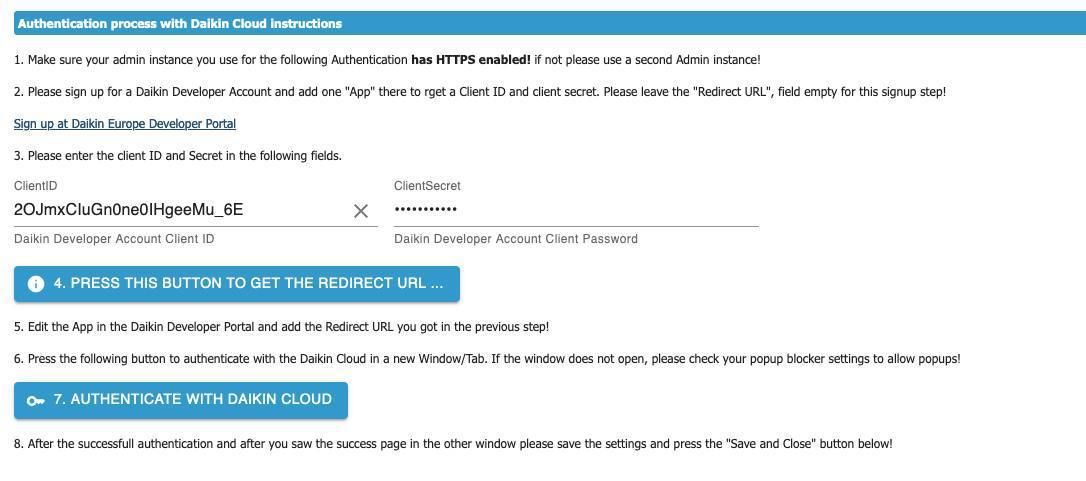
Danach bitte testen.
ACHTUNG: Die neue API hat eine Limitierung auf 200 Anfragen pro Tag! Daher ist das Standard Abfrageinterval 15 Minuten und man kann einen Slow Polling interval (zb Nachts) per State aktivieren.
Bitte Feedback geben
Dokumentation, Texte und Übersetzung ist noch "WIP"
@apollon77 Die Verbindung zur Cloud hat nun einige Zeit gut funktioniert.
Heute Morgen hatte ich einen "Error on update (1): expected 200 OK, got: 500 Internal Server Error" Fehler.
Danach ging gar nichts mehr.
Die Daikin Status Seite meldet keinen Fehler.
Also habe ich die App gelöscht und neu angelegt.
Ohne Erfolg.
Nach dem Zugriff bestätigen bekomme ich die Fehlermeldung "Error on OAuth process: OPError: invalid_grant (invalid authorization code)"Hat noch wer aktuell Probleme damit?
Jetzt meldet auch die Daikin Status Seite meldet Fehler!
Geht jetzt wieder!
Die Cloud ist halt einfach nicht sehr stabil! -
@apollon77 Die Verbindung zur Cloud hat nun einige Zeit gut funktioniert.
Heute Morgen hatte ich einen "Error on update (1): expected 200 OK, got: 500 Internal Server Error" Fehler.
Danach ging gar nichts mehr.
Die Daikin Status Seite meldet keinen Fehler.
Also habe ich die App gelöscht und neu angelegt.
Ohne Erfolg.
Nach dem Zugriff bestätigen bekomme ich die Fehlermeldung "Error on OAuth process: OPError: invalid_grant (invalid authorization code)"Hat noch wer aktuell Probleme damit?
Jetzt meldet auch die Daikin Status Seite meldet Fehler!
Geht jetzt wieder!
Die Cloud ist halt einfach nicht sehr stabil! -
-
Es gibt in der App ein Update für die Benutzerschnittstelle. Hat das schon jemand gemacht? Kommt der Adapter danach damit klar?
Aktuell läuft es sehr gut mit dem Adapter, deswegen frage ich mal.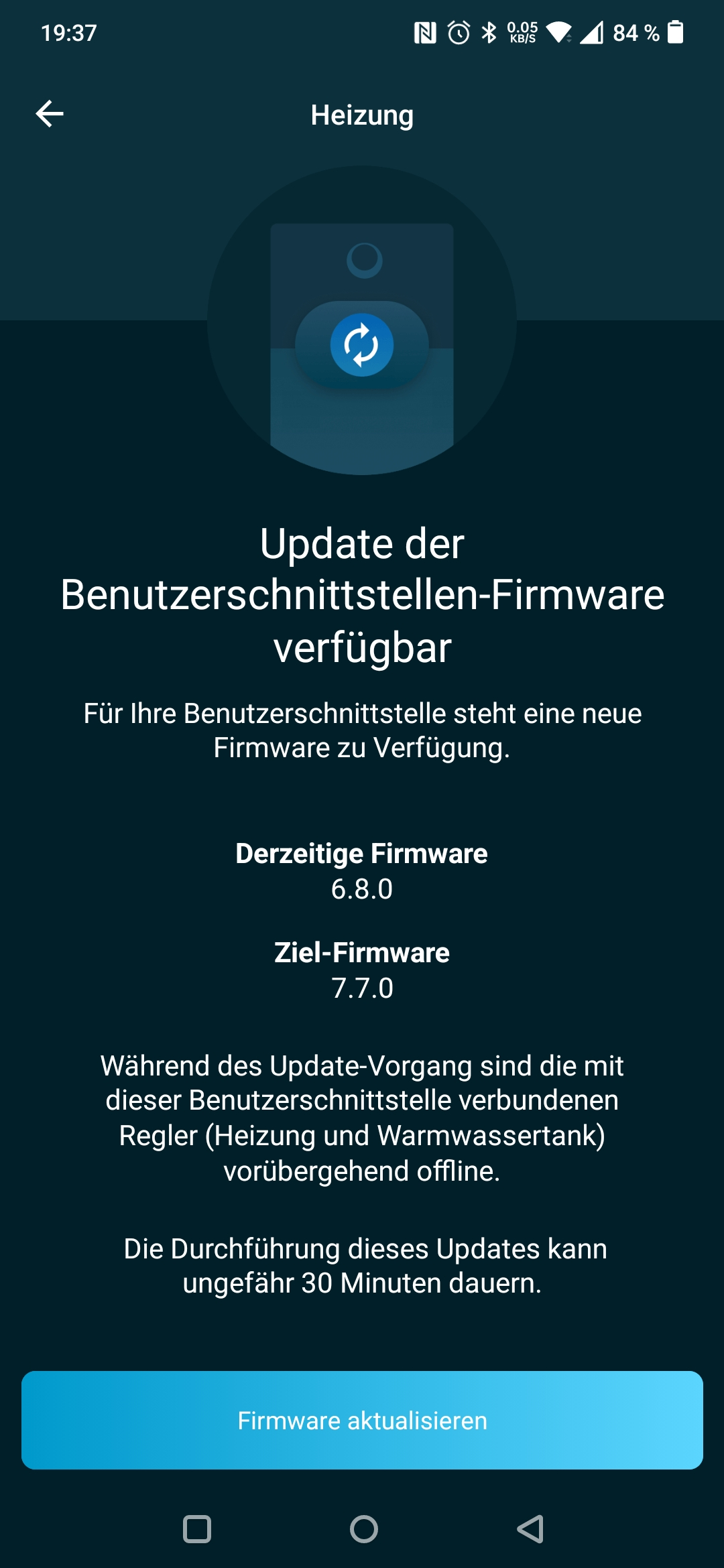
-
Es gibt in der App ein Update für die Benutzerschnittstelle. Hat das schon jemand gemacht? Kommt der Adapter danach damit klar?
Aktuell läuft es sehr gut mit dem Adapter, deswegen frage ich mal. -
@hofmann-iobrf ist hier noch jemand?
ja, der Adapter reicht nur die Daten durch... Du kannst das Update machen
-
ja, der Adapter reicht nur die Daten durch... Du kannst das Update machen
-
@armilar Ja, hat geklappt. Funktioniert alles. Nur die Energiedaten kommen jetzt noch unregelmäßiger. Tlw. 2h später.
@hofmann-iobrf Das wäre eine Frage an Daikin, da kann der Adapter leider nichts tun.
-
Hi,
ich habe ein neues Innengerät bekommen, hab bis jetzt immer den anderen Adapter (lokale Kommunikation) verwendet, das geht beim neuen Innengerät nicht mehr. Habe nun den Cloud Adapter Version 0.4.11 installiert.
Connect usw. funktioniert, Devices werden offline angezeigt aber das dürfte normal sein wie ich hier gelesen habe.
Ich kann aber kein Gerät ein oder ausschalten, woran kann das liegen? Das wäre ja "onOffMode" oder? Habe auch ein paar Minuten gewartet, es tut sich nichts.
Kann mir jemand helfen! Danke! -
Hi,
ich habe ein neues Innengerät bekommen, hab bis jetzt immer den anderen Adapter (lokale Kommunikation) verwendet, das geht beim neuen Innengerät nicht mehr. Habe nun den Cloud Adapter Version 0.4.11 installiert.
Connect usw. funktioniert, Devices werden offline angezeigt aber das dürfte normal sein wie ich hier gelesen habe.
Ich kann aber kein Gerät ein oder ausschalten, woran kann das liegen? Das wäre ja "onOffMode" oder? Habe auch ein paar Minuten gewartet, es tut sich nichts.
Kann mir jemand helfen! Danke!@mhuber Hallo, ja "onOffMode" ist der richtige Schalter, aber da muss man normalerweise nicht warten. Bei mir ist die Verzögerung ganz gleich wie bei der normalen Fernbedienung direkt oder ca. 1 Sekunde.
Das Gerät wird allerdings auch nicht offline angezeigt:

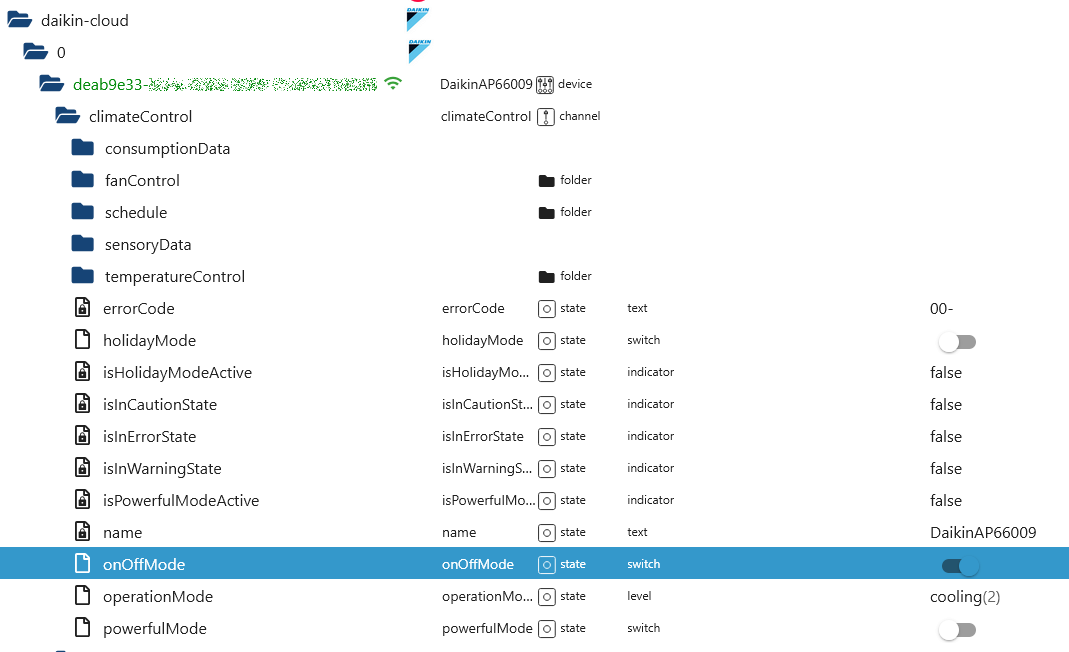
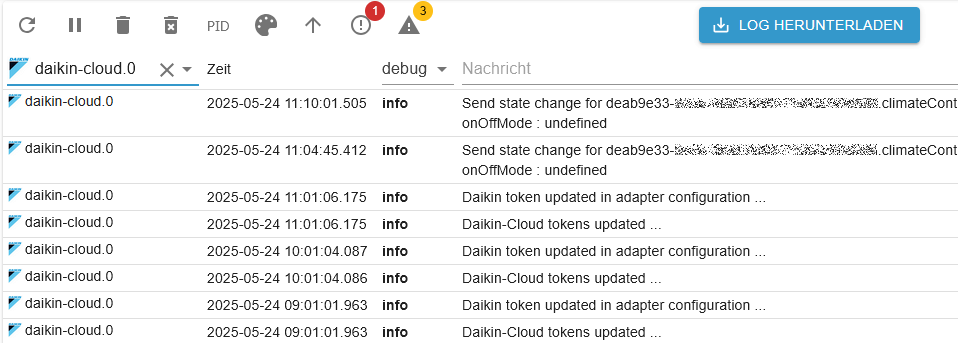
Vielleicht findest Du eine Fehlermelung im Log?



Support us
359
Online32.5k
Users81.6k
Topics1.3m
Posts