




kann keine Instanzen, Szenen, Skript, Host, Info aufrufen
-
Hallo Gemeinde,
ich stehe vor einem Problem. Ich kann seit gestern keine Instanzen, Szenen, Skript, Host, Info aufrufen da kommt nur der Balken oben oder der Kringel und das war es.
Beim Login kommt unten rechts eine Einblendung mit "Cannot get notifications: Cannot read properties of undefined (reading 'includes')" oder "Cannot find news instance: Cannot read properties of undefined (reading 'includes')"Ich hatte den Adapter energiefluss-erweitert installiert und danach ist mir dies aufgefallen. Ich kann nicht mit 100% sagen ob es der Adapter war ich vermute nicht den ein Backup der VM auf eine Sicherung vor der Installation hat auch nichts gebracht, es war schon die älteste die ich hatte.
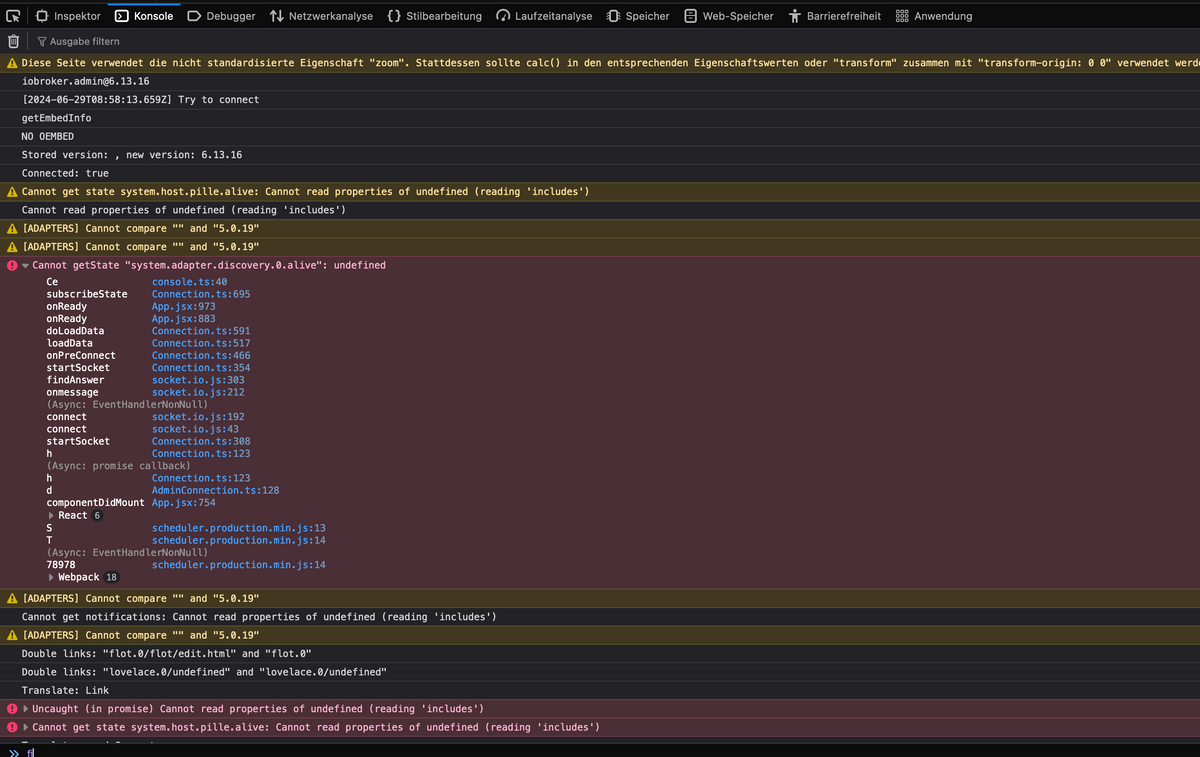
Mir ist auch aufgefallen wenn ich mich einlogge kommt ganz kurz ein Konsolenfenster in dem was mit rot angezeigt wird aber es ist zu kurz um etwas zu erkennen.
Ich weis sich nicht wir ich da an der Konsole mir die Fehler anzeigen lassen kann.
-
Hallo Gemeinde,
ich stehe vor einem Problem. Ich kann seit gestern keine Instanzen, Szenen, Skript, Host, Info aufrufen da kommt nur der Balken oben oder der Kringel und das war es.
Beim Login kommt unten rechts eine Einblendung mit "Cannot get notifications: Cannot read properties of undefined (reading 'includes')" oder "Cannot find news instance: Cannot read properties of undefined (reading 'includes')"Ich hatte den Adapter energiefluss-erweitert installiert und danach ist mir dies aufgefallen. Ich kann nicht mit 100% sagen ob es der Adapter war ich vermute nicht den ein Backup der VM auf eine Sicherung vor der Installation hat auch nichts gebracht, es war schon die älteste die ich hatte.
Mir ist auch aufgefallen wenn ich mich einlogge kommt ganz kurz ein Konsolenfenster in dem was mit rot angezeigt wird aber es ist zu kurz um etwas zu erkennen.
Ich weis sich nicht wir ich da an der Konsole mir die Fehler anzeigen lassen kann.
Zeig mal was da insgesamt Phase ist.
Am besten die Langfassung voniob diagbekannt geben.
-
@thomas-braun
meinst du das?======================= SUMMARY ======================= v.2024-05-22 Static hostname: pille Icon name: computer-container Chassis: container Virtualization: lxc Operating System: Debian GNU/Linux 11 (bullseye) Kernel: Linux 6.8.8-1-pve Architecture: x86-64 Installation: lxc Kernel: x86_64 Userland: 64 bit Timezone: Europe/Berlin (CEST, +0200) User-ID: 1000 Display-Server: false Boot Target: graphical.target Pending OS-Updates: 5 Pending iob updates: 2 Nodejs-Installation: /usr/bin/nodejs v18.20.3 /usr/bin/node v18.20.3 /usr/bin/npm 10.7.0 /usr/bin/npx 10.7.0 /usr/bin/corepack 0.28.0 Recommended versions are nodejs 18.20.3 and npm 10.7.0 Your nodejs installation is correct MEMORY: total used free shared buff/cache available Mem: 4.1G 3.3G 209M 8.0M 630M 856M Swap: 0B 0B 0B Total: 4.1G 3.3G 209M Active iob-Instances: 37 Active repo(s): stable ioBroker Core: js-controller 5.0.19 admin 6.13.16 ioBroker Status: iobroker is running on this host. Objects type: jsonl States type: jsonl Status admin and web instance: + system.adapter.admin.0 : admin : pille - enabled, port: 9081, bind: 0.0.0.0 (SSL), run as: admin + system.adapter.web.0 : web : pille - enabled, port: 8082, bind: 0.0.0.0, run as: immanuel Objects: 29437 States: 27887 Size of iob-Database: 41M /opt/iobroker/iobroker-data/objects.jsonl 36M /opt/iobroker/iobroker-data/states.jsonl =================== END OF SUMMARY ==================== -
@thomas-braun
meinst du das?======================= SUMMARY ======================= v.2024-05-22 Static hostname: pille Icon name: computer-container Chassis: container Virtualization: lxc Operating System: Debian GNU/Linux 11 (bullseye) Kernel: Linux 6.8.8-1-pve Architecture: x86-64 Installation: lxc Kernel: x86_64 Userland: 64 bit Timezone: Europe/Berlin (CEST, +0200) User-ID: 1000 Display-Server: false Boot Target: graphical.target Pending OS-Updates: 5 Pending iob updates: 2 Nodejs-Installation: /usr/bin/nodejs v18.20.3 /usr/bin/node v18.20.3 /usr/bin/npm 10.7.0 /usr/bin/npx 10.7.0 /usr/bin/corepack 0.28.0 Recommended versions are nodejs 18.20.3 and npm 10.7.0 Your nodejs installation is correct MEMORY: total used free shared buff/cache available Mem: 4.1G 3.3G 209M 8.0M 630M 856M Swap: 0B 0B 0B Total: 4.1G 3.3G 209M Active iob-Instances: 37 Active repo(s): stable ioBroker Core: js-controller 5.0.19 admin 6.13.16 ioBroker Status: iobroker is running on this host. Objects type: jsonl States type: jsonl Status admin and web instance: + system.adapter.admin.0 : admin : pille - enabled, port: 9081, bind: 0.0.0.0 (SSL), run as: admin + system.adapter.web.0 : web : pille - enabled, port: 8082, bind: 0.0.0.0, run as: immanuel Objects: 29437 States: 27887 Size of iob-Database: 41M /opt/iobroker/iobroker-data/objects.jsonl 36M /opt/iobroker/iobroker-data/states.jsonl =================== END OF SUMMARY ====================@foto2004 sagte in kann keine Instanzen, Szenen, Skript, Host, Info aufrufen:
meinst du das?
eher das was vorher da stand: die Langfassung. Das ist nur die Summary
-
@thomas-braun
meinst du das?======================= SUMMARY ======================= v.2024-05-22 Static hostname: pille Icon name: computer-container Chassis: container Virtualization: lxc Operating System: Debian GNU/Linux 11 (bullseye) Kernel: Linux 6.8.8-1-pve Architecture: x86-64 Installation: lxc Kernel: x86_64 Userland: 64 bit Timezone: Europe/Berlin (CEST, +0200) User-ID: 1000 Display-Server: false Boot Target: graphical.target Pending OS-Updates: 5 Pending iob updates: 2 Nodejs-Installation: /usr/bin/nodejs v18.20.3 /usr/bin/node v18.20.3 /usr/bin/npm 10.7.0 /usr/bin/npx 10.7.0 /usr/bin/corepack 0.28.0 Recommended versions are nodejs 18.20.3 and npm 10.7.0 Your nodejs installation is correct MEMORY: total used free shared buff/cache available Mem: 4.1G 3.3G 209M 8.0M 630M 856M Swap: 0B 0B 0B Total: 4.1G 3.3G 209M Active iob-Instances: 37 Active repo(s): stable ioBroker Core: js-controller 5.0.19 admin 6.13.16 ioBroker Status: iobroker is running on this host. Objects type: jsonl States type: jsonl Status admin and web instance: + system.adapter.admin.0 : admin : pille - enabled, port: 9081, bind: 0.0.0.0 (SSL), run as: admin + system.adapter.web.0 : web : pille - enabled, port: 8082, bind: 0.0.0.0, run as: immanuel Objects: 29437 States: 27887 Size of iob-Database: 41M /opt/iobroker/iobroker-data/objects.jsonl 36M /opt/iobroker/iobroker-data/states.jsonl =================== END OF SUMMARY ==================== -
@foto2004 sagte in kann keine Instanzen, Szenen, Skript, Host, Info aufrufen:
meinst du das?
eher das was vorher da stand: die Langfassung. Das ist nur die Summary
-
das was vorher stand OK muss ich in eine Datei umleiten weil das eine ganze Menge ist die das Terminal nachher nicht hergibt.
Einen kleinen Moment bitte@foto2004 sagte in kann keine Instanzen, Szenen, Skript, Host, Info aufrufen:
muss ich in eine Datei umleiten
du darfst nur nicht den any Key pressen
-
@foto2004 sagte in kann keine Instanzen, Szenen, Skript, Host, Info aufrufen:
muss ich in eine Datei umleiten
du darfst nur nicht den any Key pressen
@homoran
OKSkript v.2024-05-22 *** BASE SYSTEM *** Static hostname: pille Icon name: computer-container Chassis: container Virtualization: lxc Operating System: Debian GNU/Linux 11 (bullseye) Kernel: Linux 6.8.8-1-pve Architecture: x86-64 model name : Intel(R) Xeon(R) CPU E31240 @ 3.30GHz Docker : false Virtualization : lxc Kernel : x86_64 Userland : 64 bit Systemuptime and Load: 08:44:17 up 1:49, 1 user, load average: 0.76, 1.02, 1.05 CPU threads: 3 *** Time and Time Zones *** Local time: Sat 2024-06-29 08:44:17 CEST Universal time: Sat 2024-06-29 06:44:17 UTC RTC time: n/a Time zone: Europe/Berlin (CEST, +0200) System clock synchronized: yes NTP service: inactive RTC in local TZ: no *** Users and Groups *** User that called 'iob diag': immanuel HOME=/home/immanuel GROUPS=immanuel sudo iobroker User that is running 'js-controller': iobroker HOME=/home/iobroker GROUPS=iobroker tty dialout audio video *** Display-Server-Setup *** Display-Server: false Desktop: Terminal: tty Boot Target: graphical.target *** MEMORY *** total used free shared buff/cache available Mem: 4.1G 3.3G 187M 8.0M 596M 790M Swap: 0B 0B 0B Total: 4.1G 3.3G 187M Active iob-Instances: 38 4098 M total memory 3313 M used memory 3438 M active memory 223 M inactive memory 187 M free memory 0 M buffer memory 596 M swap cache 0 M total swap 0 M used swap 0 M free swap *** top - Table Of Processes *** top - 08:44:17 up 1:49, 1 user, load average: 0.76, 1.02, 1.05 Tasks: 86 total, 2 running, 84 sleeping, 0 stopped, 0 zombie %Cpu(s): 46.8 us, 8.5 sy, 0.0 ni, 44.7 id, 0.0 wa, 0.0 hi, 0.0 si, 0.0 st MiB Mem : 4098.0 total, 188.4 free, 3313.1 used, 596.5 buff/cache MiB Swap: 0.0 total, 0.0 free, 0.0 used. 790.8 avail Mem *** FAILED SERVICES *** UNIT LOAD ACTIVE SUB DESCRIPTION * proc-fs-nfsd.mount loaded failed failed NFSD configuration filesystem * run-rpc_pipefs.mount loaded failed failed RPC Pipe File System * sys-kernel-config.mount loaded failed failed Kernel Configuration File System * pmcd.service loaded failed failed LSB: Control pmcd (the collection daemon for PCP) * pmie.service loaded failed failed LSB: Control pmie (performance inference engine for PCP) * pmlogger.service loaded failed failed LSB: Control pmlogger (the performance metrics logger for PCP) * pmproxy.service loaded failed failed LSB: Control pmproxy (the pmcd proxy daemon for PCP) * ufw.service loaded failed failed Uncomplicated firewall * systemd-journald-audit.socket loaded failed failed Journal Audit Socket LOAD = Reflects whether the unit definition was properly loaded. ACTIVE = The high-level unit activation state, i.e. generalization of SUB. SUB = The low-level unit activation state, values depend on unit type. 9 loaded units listed. *** FILESYSTEM *** Filesystem Type Size Used Avail Use% Mounted on /dev/mapper/pve-vm--104--disk--1 ext4 49G 13G 34G 27% / none tmpfs 492K 4.0K 488K 1% /dev udev devtmpfs 16G 0 16G 0% /dev/tty tmpfs tmpfs 16G 3.1M 16G 1% /dev/shm tmpfs tmpfs 6.3G 156K 6.3G 1% /run tmpfs tmpfs 5.0M 0 5.0M 0% /run/lock tmpfs tmpfs 3.2G 0 3.2G 0% /run/user/1000 Messages concerning ext4 filesystem in dmesg: dmesg: read kernel buffer failed: Operation not permitted Show mounted filesystems: TARGET SOURCE FSTYPE OPTIONS / /dev/mapper/pve-vm--104--disk--1 ext4 rw,relatime,stripe=16 |-/run tmpfs tmpfs rw,nosuid,nodev,size=6568608k,nr_inodes=819200,mode=755,uid=100000,gid=100000,inode64 | |-/run/lock tmpfs tmpfs rw,nosuid,nodev,noexec,relatime,size=5120k,uid=100000,gid=100000,inode64 | `-/run/user/1000 tmpfs tmpfs rw,nosuid,nodev,relatime,size=3284300k,nr_inodes=821075,mode=700,uid=101000,gid=101000,inode64 |-/dev none tmpfs rw,relatime,size=492k,mode=755,uid=100000,gid=100000,inode64 | |-/dev/shm tmpfs tmpfs rw,nosuid,nodev,uid=100000,gid=100000,inode64 | |-/dev/mqueue mqueue mqueue rw,nosuid,nodev,noexec,relatime | |-/dev/.lxc/proc proc proc rw,relatime | |-/dev/.lxc/sys sys sysfs rw,relatime | |-/dev/full udev[/full] devtmpfs rw,nosuid,relatime,size=16387608k,nr_inodes=4096902,mode=755,inode64 | |-/dev/null udev[/null] devtmpfs rw,nosuid,relatime,size=16387608k,nr_inodes=4096902,mode=755,inode64 | |-/dev/random udev[/random] devtmpfs rw,nosuid,relatime,size=16387608k,nr_inodes=4096902,mode=755,inode64 | |-/dev/tty udev[/tty] devtmpfs rw,nosuid,relatime,size=16387608k,nr_inodes=4096902,mode=755,inode64 | |-/dev/urandom udev[/urandom] devtmpfs rw,nosuid,relatime,size=16387608k,nr_inodes=4096902,mode=755,inode64 | |-/dev/zero udev[/zero] devtmpfs rw,nosuid,relatime,size=16387608k,nr_inodes=4096902,mode=755,inode64 | |-/dev/pts devpts devpts rw,nosuid,noexec,relatime,gid=100005,mode=620,ptmxmode=666,max=1026 | |-/dev/ptmx devpts[/ptmx] devpts rw,nosuid,noexec,relatime,gid=100005,mode=620,ptmxmode=666,max=1026 | |-/dev/console devpts[/0] devpts rw,nosuid,noexec,relatime,gid=100005,mode=620,ptmxmode=666,max=1026 | |-/dev/tty1 devpts[/1] devpts rw,nosuid,noexec,relatime,gid=100005,mode=620,ptmxmode=666,max=1026 | `-/dev/tty2 devpts[/2] devpts rw,nosuid,noexec,relatime,gid=100005,mode=620,ptmxmode=666,max=1026 |-/proc proc proc rw,nosuid,nodev,noexec,relatime | |-/proc/sys proc[/sys] proc ro,relatime | | |-/proc/sys/net proc[/sys/net] proc rw,nosuid,nodev,noexec,relatime | | `-/proc/sys/kernel/random/boot_id none[/.lxc-boot-id] tmpfs ro,nosuid,nodev,noexec,relatime,size=492k,mode=755,uid=100000,gid=100000,inode64 | |-/proc/sysrq-trigger proc[/sysrq-trigger] proc ro,relatime | |-/proc/cpuinfo lxcfs[/proc/cpuinfo] fuse.lxcfs rw,nosuid,nodev,relatime,user_id=0,group_id=0,allow_other | |-/proc/diskstats lxcfs[/proc/diskstats] fuse.lxcfs rw,nosuid,nodev,relatime,user_id=0,group_id=0,allow_other | |-/proc/loadavg lxcfs[/proc/loadavg] fuse.lxcfs rw,nosuid,nodev,relatime,user_id=0,group_id=0,allow_other | |-/proc/meminfo lxcfs[/proc/meminfo] fuse.lxcfs rw,nosuid,nodev,relatime,user_id=0,group_id=0,allow_other | |-/proc/slabinfo lxcfs[/proc/slabinfo] fuse.lxcfs rw,nosuid,nodev,relatime,user_id=0,group_id=0,allow_other | |-/proc/stat lxcfs[/proc/stat] fuse.lxcfs rw,nosuid,nodev,relatime,user_id=0,group_id=0,allow_other | |-/proc/swaps lxcfs[/proc/swaps] fuse.lxcfs rw,nosuid,nodev,relatime,user_id=0,group_id=0,allow_other | `-/proc/uptime lxcfs[/proc/uptime] fuse.lxcfs rw,nosuid,nodev,relatime,user_id=0,group_id=0,allow_other `-/sys sysfs sysfs ro,nosuid,nodev,noexec,relatime |-/sys/fs/fuse/connections fusectl fusectl rw,nosuid,nodev,noexec,relatime |-/sys/devices/virtual/net sysfs[/devices/virtual/net] sysfs rw,nosuid,nodev,noexec,relatime |-/sys/fs/cgroup none cgroup2 rw,nosuid,nodev,noexec,relatime `-/sys/devices/system/cpu lxcfs[/sys/devices/system/cpu] fuse.lxcfs rw,nosuid,nodev,relatime,user_id=0,group_id=0,allow_other Files in neuralgic directories: /var: 3.1G /var/ 2.3G /var/log 2.0G /var/log/journal/ee9bb29d93e54377b4cc06e74aed3dbf 2.0G /var/log/journal 603M /var/cache Hint: You are currently not seeing messages from other users and the system. Users in groups 'adm', 'systemd-journal' can see all messages. Pass -q to turn off this notice. Archived and active journals take up 90.7M in the file system. /opt/iobroker/backups: 110M /opt/iobroker/backups/ /opt/iobroker/iobroker-data: 1.4G /opt/iobroker/iobroker-data/ 704M /opt/iobroker/iobroker-data/history 413M /opt/iobroker/iobroker-data/files 138M /opt/iobroker/iobroker-data/files/javascript.admin 118M /opt/iobroker/iobroker-data/files/javascript.admin/static The five largest files in iobroker-data are: 40M /opt/iobroker/iobroker-data/states.jsonl 35M /opt/iobroker/iobroker-data/files/devices.admin/static/js/main.24f2bb56.js.map 27M /opt/iobroker/iobroker-data/files/tankerkoenig.admin/build/index.js.map 26M /opt/iobroker/iobroker-data/files/scenes.admin/static/js/main.8947f24d.js.map 24M /opt/iobroker/iobroker-data/files/web.admin/static/js/main.135279a0.js.map USB-Devices by-id: USB-Sticks - Avoid direct links to /dev/tty* in your adapter setups, please always prefer the links 'by-id': No Devices found 'by-id' *** NodeJS-Installation *** /usr/bin/nodejs v18.20.3 /usr/bin/node v18.20.3 /usr/bin/npm 10.7.0 /usr/bin/npx 10.7.0 /usr/bin/corepack 0.28.0 nodejs: Installed: 18.20.3-1nodesource1 Candidate: 18.20.3-1nodesource1 Version table: *** 18.20.3-1nodesource1 1001 500 https://deb.nodesource.com/node_18.x nodistro/main amd64 Packages 100 /var/lib/dpkg/status 18.20.2-1nodesource1 1001 500 https://deb.nodesource.com/node_18.x nodistro/main amd64 Packages 18.20.1-1nodesource1 1001 500 https://deb.nodesource.com/node_18.x nodistro/main amd64 Packages 18.20.0-1nodesource1 1001 500 https://deb.nodesource.com/node_18.x nodistro/main amd64 Packages 18.19.1-1nodesource1 1001 500 https://deb.nodesource.com/node_18.x nodistro/main amd64 Packages 18.19.0-1nodesource1 1001 500 https://deb.nodesource.com/node_18.x nodistro/main amd64 Packages 18.18.2-1nodesource1 1001 500 https://deb.nodesource.com/node_18.x nodistro/main amd64 Packages 18.18.1-1nodesource1 1001 500 https://deb.nodesource.com/node_18.x nodistro/main amd64 Packages 18.18.0-1nodesource1 1001 500 https://deb.nodesource.com/node_18.x nodistro/main amd64 Packages 18.17.1-1nodesource1 1001 500 https://deb.nodesource.com/node_18.x nodistro/main amd64 Packages 18.17.0-1nodesource1 1001 500 https://deb.nodesource.com/node_18.x nodistro/main amd64 Packages 18.16.1-1nodesource1 1001 500 https://deb.nodesource.com/node_18.x nodistro/main amd64 Packages 18.16.0-1nodesource1 1001 500 https://deb.nodesource.com/node_18.x nodistro/main amd64 Packages 18.15.0-1nodesource1 1001 500 https://deb.nodesource.com/node_18.x nodistro/main amd64 Packages 18.14.2-1nodesource1 1001 500 https://deb.nodesource.com/node_18.x nodistro/main amd64 Packages 18.14.1-1nodesource1 1001 500 https://deb.nodesource.com/node_18.x nodistro/main amd64 Packages 18.14.0-1nodesource1 1001 500 https://deb.nodesource.com/node_18.x nodistro/main amd64 Packages 18.13.0-1nodesource1 1001 500 https://deb.nodesource.com/node_18.x nodistro/main amd64 Packages 18.12.0-1nodesource1 1001 500 https://deb.nodesource.com/node_18.x nodistro/main amd64 Packages 18.11.0-1nodesource1 1001 500 https://deb.nodesource.com/node_18.x nodistro/main amd64 Packages 18.10.0-1nodesource1 1001 500 https://deb.nodesource.com/node_18.x nodistro/main amd64 Packages 18.9.1-1nodesource1 1001 500 https://deb.nodesource.com/node_18.x nodistro/main amd64 Packages 18.9.0-1nodesource1 1001 500 https://deb.nodesource.com/node_18.x nodistro/main amd64 Packages 18.8.0-1nodesource1 1001 500 https://deb.nodesource.com/node_18.x nodistro/main amd64 Packages 18.7.0-1nodesource1 1001 500 https://deb.nodesource.com/node_18.x nodistro/main amd64 Packages 18.6.0-1nodesource1 1001 500 https://deb.nodesource.com/node_18.x nodistro/main amd64 Packages 18.5.0-1nodesource1 1001 500 https://deb.nodesource.com/node_18.x nodistro/main amd64 Packages 18.4.0-1nodesource1 1001 500 https://deb.nodesource.com/node_18.x nodistro/main amd64 Packages 18.3.0-1nodesource1 1001 500 https://deb.nodesource.com/node_18.x nodistro/main amd64 Packages 18.2.0-1nodesource1 1001 500 https://deb.nodesource.com/node_18.x nodistro/main amd64 Packages 18.1.0-1nodesource1 1001 500 https://deb.nodesource.com/node_18.x nodistro/main amd64 Packages 18.0.0-1nodesource1 1001 500 https://deb.nodesource.com/node_18.x nodistro/main amd64 Packages 12.22.12~dfsg-1~deb11u4 500 500 http://ftp.debian.org/debian bullseye/main amd64 Packages 500 http://security.debian.org bullseye-security/main amd64 Packages Temp directories causing npm8 problem: 0 No problems detected Errors in npm tree: *** ioBroker-Installation *** ioBroker Status iobroker is running on this host. Objects type: jsonl States type: jsonl Core adapters versions js-controller: 5.0.19 admin: 6.13.16 javascript: 8.3.1 nodejs modules from github: 1 +-- iobroker.omada@0.0.1 (git+ssh://git@github.com/TA2k/ioBroker.omada.git#5d3eb7060ba75407dbb96ef9c8c2951efe8c0eb2) Adapter State + system.adapter.admin.0 : admin : pille - enabled, port: 9081, bind: 0.0.0.0 (SSL), run as: admin system.adapter.artnet.0 : artnet : pille - disabled, port: 6454 + system.adapter.backitup.0 : backitup : pille - enabled system.adapter.cloud.0 : cloud : pille - disabled system.adapter.device-reminder.0 : device-reminder : pille - disabled system.adapter.devices.0 : devices : pille - disabled system.adapter.discovery.0 : discovery : pille - disabled system.adapter.dwd.0 : dwd : pille - enabled system.adapter.flot.0 : flot : pille - disabled system.adapter.fuelpricemonitor.0 : fuelpricemonitor : pille - enabled + system.adapter.history.0 : history : pille - enabled + system.adapter.hm-rega.0 : hm-rega : pille - enabled + system.adapter.hm-rpc.0 : hm-rpc : pille - enabled, port: 0 + system.adapter.hm-rpc.1 : hm-rpc : pille - enabled, port: 0 + system.adapter.hm-rpc.2 : hm-rpc : pille - enabled, port: 0 + system.adapter.hm-rpc.3 : hm-rpc : pille - enabled, port: 18701 + system.adapter.hm-rpc.4 : hm-rpc : pille - enabled, port: 12001 + system.adapter.hm-rpc.5 : hm-rpc : pille - enabled, port: 12010 system.adapter.homeconnect.0 : homeconnect : pille - disabled system.adapter.icons-fatcow-hosting.0 : icons-fatcow-hosting : pille - disabled system.adapter.icons-icons8.0 : icons-icons8 : pille - disabled + system.adapter.influxdb.0 : influxdb : pille - enabled, port: 8086 + system.adapter.info.0 : info : pille - enabled + system.adapter.javascript.0 : javascript : pille - enabled + system.adapter.linux-control.0 : linux-control : pille - enabled + system.adapter.lovelace.0 : lovelace : pille - enabled, port: 8091, bind: 0.0.0.0, run as: admin + system.adapter.moma.0 : moma : pille - enabled + system.adapter.mqtt-client.0 : mqtt-client : pille - enabled, port: 1883 + system.adapter.mqtt.0 : mqtt : pille - enabled, port: 1883, bind: 0.0.0.0 + system.adapter.net-tools.0 : net-tools : pille - enabled + system.adapter.node-red.0 : node-red : pille - enabled, port: 1880, bind: 0.0.0.0 + system.adapter.node-red.1 : node-red : pille - enabled, port: 1881, bind: 0.0.0.0 system.adapter.octoprint.0 : octoprint : pille - disabled + system.adapter.omada.0 : omada : pille - enabled, port: 8043 + system.adapter.parser.0 : parser : pille - enabled + system.adapter.pi-hole.0 : pi-hole : pille - enabled system.adapter.ping.0 : ping : pille - disabled + system.adapter.proxmox.0 : proxmox : pille - enabled, port: 8006 system.adapter.proxy.0 : proxy : pille - disabled + system.adapter.roomba.0 : roomba : pille - enabled system.adapter.rpi2.0 : rpi2 : pille - disabled + system.adapter.scenes.0 : scenes : pille - enabled system.adapter.schoolfree.0 : schoolfree : pille - enabled + system.adapter.simple-api.0 : simple-api : pille - enabled, port: 8087, bind: 0.0.0.0, run as: admin + system.adapter.sql.0 : sql : pille - enabled + system.adapter.statistics.0 : statistics : pille - enabled system.adapter.systeminfo.0 : systeminfo : pille - disabled + system.adapter.tankerkoenig.0 : tankerkoenig : pille - enabled + system.adapter.telegram.0 : telegram : pille - enabled, port: 8443, bind: 0.0.0.0 + system.adapter.telegram.1 : telegram : pille - enabled, port: 8443, bind: 0.0.0.0 + system.adapter.text2command.0 : text2command : pille - enabled system.adapter.vis-bars.0 : vis-bars : pille - disabled system.adapter.vis-fancyswitch.0 : vis-fancyswitch : pille - disabled system.adapter.vis-history.0 : vis-history : pille - disabled system.adapter.vis-hqwidgets.0 : vis-hqwidgets : pille - disabled system.adapter.vis-jqui-mfd.0 : vis-jqui-mfd : pille - disabled system.adapter.vis-justgage.0 : vis-justgage : pille - disabled system.adapter.vis-lcars.0 : vis-lcars : pille - enabled system.adapter.vis-metro.0 : vis-metro : pille - disabled system.adapter.vis-plumb.0 : vis-plumb : pille - disabled system.adapter.vis-timeandweather.0 : vis-timeandweather : pille - disabled system.adapter.vis-weather.0 : vis-weather : pille - disabled system.adapter.vis.0 : vis : pille - disabled + system.adapter.web.0 : web : pille - enabled, port: 8082, bind: 0.0.0.0, run as: immanuel system.adapter.windows-control.0 : windows-control : pille - disabled + system.adapter.wireguard.0 : wireguard : pille - enabled + system.adapter.wled.0 : wled : pille - enabled system.adapter.youtube.0 : youtube : pille - disabled + instance is alive Enabled adapters with bindings + system.adapter.admin.0 : admin : pille - enabled, port: 9081, bind: 0.0.0.0 (SSL), run as: admin + system.adapter.hm-rpc.0 : hm-rpc : pille - enabled, port: 0 + system.adapter.hm-rpc.1 : hm-rpc : pille - enabled, port: 0 + system.adapter.hm-rpc.2 : hm-rpc : pille - enabled, port: 0 + system.adapter.hm-rpc.3 : hm-rpc : pille - enabled, port: 18701 + system.adapter.hm-rpc.4 : hm-rpc : pille - enabled, port: 12001 + system.adapter.hm-rpc.5 : hm-rpc : pille - enabled, port: 12010 + system.adapter.influxdb.0 : influxdb : pille - enabled, port: 8086 + system.adapter.lovelace.0 : lovelace : pille - enabled, port: 8091, bind: 0.0.0.0, run as: admin + system.adapter.mqtt-client.0 : mqtt-client : pille - enabled, port: 1883 + system.adapter.mqtt.0 : mqtt : pille - enabled, port: 1883, bind: 0.0.0.0 + system.adapter.node-red.0 : node-red : pille - enabled, port: 1880, bind: 0.0.0.0 + system.adapter.node-red.1 : node-red : pille - enabled, port: 1881, bind: 0.0.0.0 + system.adapter.omada.0 : omada : pille - enabled, port: 8043 + system.adapter.proxmox.0 : proxmox : pille - enabled, port: 8006 + system.adapter.simple-api.0 : simple-api : pille - enabled, port: 8087, bind: 0.0.0.0, run as: admin + system.adapter.telegram.0 : telegram : pille - enabled, port: 8443, bind: 0.0.0.0 + system.adapter.telegram.1 : telegram : pille - enabled, port: 8443, bind: 0.0.0.0 + system.adapter.web.0 : web : pille - enabled, port: 8082, bind: 0.0.0.0, run as: immanuel ioBroker-Repositories stable : http://download.iobroker.net/sources-dist.json beta : http://download.iobroker.net/sources-dist-latest.json Active repo(s): stable Installed ioBroker-Instances Used repository: stable Adapter "admin" : 6.17.14 , installed 6.13.16 [Updatable] Adapter "artnet" : 1.2.2 , installed 1.2.2 Adapter "backitup" : 2.11.0 , installed 2.11.0 Adapter "cloud" : 5.0.1 , installed 5.0.1 Adapter "device-reminder": 3.1.2 , installed 3.1.2 Adapter "devices" : 1.1.5 , installed 1.1.5 Adapter "discovery" : 4.5.0 , installed 4.5.0 Adapter "dwd" : 2.8.5 , installed 2.8.5 Adapter "flot" : 1.12.0 , installed 1.12.0 Adapter "fuelpricemonitor": 0.4.0 , installed 0.4.0 Adapter "history" : 3.0.1 , installed 3.0.1 Adapter "hm-rega" : 4.0.0 , installed 4.0.0 Adapter "hm-rpc" : 1.17.0 , installed 1.17.0 Adapter "homeconnect" : 1.4.0 , installed 1.4.0 Adapter "icons-fatcow-hosting": 0.1.0, installed 0.1.0 Adapter "icons-icons8" : 0.0.1 , installed 0.0.1 Adapter "influxdb" : 4.0.2 , installed 4.0.2 Adapter "javascript" : 8.3.1 , installed 8.3.1 Controller "js-controller": 5.0.19 , installed 5.0.19 Adapter "linux-control": 1.1.5 , installed 1.1.5 Adapter "lovelace" : 4.1.10 , installed 4.1.10 Adapter "moma" : 1.2.9 , installed 1.2.9 Adapter "mqtt" : 5.2.0 , installed 5.2.0 Adapter "mqtt-client" : 1.8.0 , installed 1.8.0 Adapter "net-tools" : 1.0.11 , installed 0.2.0 [Updatable] Adapter "node-red" : 5.2.1 , installed 5.2.1 Adapter "octoprint" : 5.1.0 , installed 5.1.0 Adapter "parser" : 2.1.0 , installed 2.1.0 Adapter "pi-hole" : 1.3.6 , installed 1.3.6 Adapter "ping" : 1.6.2 , installed 1.6.2 Adapter "proxmox" : 2.3.0 , installed 2.3.0 Adapter "proxy" : 1.3.2 , installed 1.3.2 Adapter "roomba" : 1.3.0 , installed 1.3.0 Adapter "rpi2" : 1.3.2 , installed 1.3.2 Adapter "scenes" : 3.0.4 , installed 3.0.4 Adapter "schoolfree" : 1.1.4 , installed 1.1.4 Adapter "simple-api" : 2.8.0 , installed 2.8.0 Adapter "socketio" : 6.7.0 , installed 6.7.0 Adapter "sql" : 2.2.0 , installed 2.2.0 Adapter "statistics" : 2.4.0 , installed 2.4.0 Adapter "systeminfo" : 1.2.0 , installed 1.2.0 Adapter "tankerkoenig" : 3.4.0 , installed 3.4.0 Adapter "telegram" : 3.3.2 , installed 3.3.2 Adapter "text2command" : 3.0.3 , installed 3.0.3 Adapter "vis" : 1.5.6 , installed 1.5.6 Adapter "vis-bars" : 0.1.4 , installed 0.1.4 Adapter "vis-fancyswitch": 1.1.0 , installed 1.1.0 Adapter "vis-history" : 1.0.0 , installed 1.0.0 Adapter "vis-hqwidgets": 1.5.1 , installed 1.5.1 Adapter "vis-jqui-mfd" : 1.1.1 , installed 1.1.1 Adapter "vis-justgage" : 2.1.7 , installed 2.1.7 Adapter "vis-lcars" : 1.1.1 , installed 1.1.1 Adapter "vis-metro" : 1.2.0 , installed 1.2.0 Adapter "vis-plumb" : 1.0.2 , installed 1.0.2 Adapter "vis-timeandweather": 1.2.2, installed 1.2.2 Adapter "vis-weather" : 2.5.9 , installed 2.5.9 Adapter "web" : 6.2.5 , installed 6.2.5 Adapter "windows-control": 0.1.5 , installed 0.1.5 Adapter "wireguard" : 1.6.4 , installed 1.6.4 Adapter "wled" : 0.7.2 , installed 0.7.2 Adapter "ws" : 2.6.1 , installed 2.6.1 Adapter "youtube" : 5.0.0 , installed 5.0.0 Objects and States Please stand by - This may take a while Objects: 29437 States: 27880 *** OS-Repositories and Updates *** Hit:1 http://security.debian.org bullseye-security InRelease Hit:2 https://deb.nodesource.com/node_18.x nodistro InRelease Hit:3 http://ftp.debian.org/debian bullseye InRelease Hit:4 http://ftp.debian.org/debian bullseye-updates InRelease Reading package lists... Pending Updates: 5 *** Listening Ports *** Active Internet connections (only servers) Proto Recv-Q Send-Q Local Address Foreign Address State User Inode PID/Program name tcp 0 0 192.168.2.165:12010 0.0.0.0:* LISTEN 1001 44904082 2264/io.hm-rpc.5 tcp 0 0 192.168.2.165:12001 0.0.0.0:* LISTEN 1001 44904032 2234/io.hm-rpc.4 tcp 0 0 192.168.2.165:8701 0.0.0.0:* LISTEN 1001 44904677 2178/io.hm-rpc.2 tcp 0 0 127.0.0.1:9001 0.0.0.0:* LISTEN 1001 44743405 201/iobroker.js-con tcp 0 0 127.0.0.1:9000 0.0.0.0:* LISTEN 1001 44745271 201/iobroker.js-con tcp 0 0 0.0.0.0:5355 0.0.0.0:* LISTEN 104 44745001 161/systemd-resolve tcp 0 0 0.0.0.0:1884 0.0.0.0:* LISTEN 1001 44904354 2332/io.mqtt.0 tcp 0 0 0.0.0.0:1883 0.0.0.0:* LISTEN 1001 44904353 2332/io.mqtt.0 tcp 0 0 0.0.0.0:1880 0.0.0.0:* LISTEN 1001 44895876 1951/node-red tcp 0 0 0.0.0.0:1881 0.0.0.0:* LISTEN 1001 44895944 1992/node-red tcp 0 0 0.0.0.0:53 0.0.0.0:* LISTEN 998 44746915 309/pihole-FTL tcp 0 0 0.0.0.0:80 0.0.0.0:* LISTEN 0 44743239 323/lighttpd tcp 0 0 0.0.0.0:111 0.0.0.0:* LISTEN 0 44736508 1/init tcp 0 0 127.0.0.1:25 0.0.0.0:* LISTEN 0 44746790 507/master tcp 0 0 192.168.2.165:2010 0.0.0.0:* LISTEN 1001 44904574 2148/io.hm-rpc.1 tcp 0 0 192.168.2.165:2001 0.0.0.0:* LISTEN 1001 44903710 2122/io.hm-rpc.0 tcp 0 0 127.0.0.1:8088 0.0.0.0:* LISTEN 112 44737390 200/influxd tcp 0 0 127.0.0.1:4711 0.0.0.0:* LISTEN 998 44746921 309/pihole-FTL tcp6 0 0 :::8086 :::* LISTEN 112 44743404 200/influxd tcp6 0 0 :::8087 :::* LISTEN 1001 44926308 3727/io.simple-api. tcp6 0 0 :::8082 :::* LISTEN 1001 44931105 4413/io.web.0 tcp6 0 0 :::8091 :::* LISTEN 1001 44930694 4852/io.lovelace.0 tcp6 0 0 ::1:4711 :::* LISTEN 998 44746922 309/pihole-FTL tcp6 0 0 :::5355 :::* LISTEN 104 44745004 161/systemd-resolve tcp6 0 0 ::1:25 :::* LISTEN 0 44746791 507/master tcp6 0 0 :::22 :::* LISTEN 0 44743009 1/init tcp6 0 0 :::53 :::* LISTEN 998 44746917 309/pihole-FTL tcp6 0 0 :::80 :::* LISTEN 0 44743240 323/lighttpd tcp6 0 0 :::111 :::* LISTEN 0 44736510 1/init tcp6 0 0 :::9081 :::* LISTEN 1001 44857155 1806/io.admin.0 udp 0 0 0.0.0.0:5353 0.0.0.0:* 1001 46477892 471512/io.wled.0 udp 0 0 0.0.0.0:5355 0.0.0.0:* 104 44745000 161/systemd-resolve udp 0 0 0.0.0.0:53 0.0.0.0:* 998 44746914 309/pihole-FTL udp 0 0 0.0.0.0:67 0.0.0.0:* 998 44746911 309/pihole-FTL udp 0 0 0.0.0.0:111 0.0.0.0:* 0 44736509 1/init udp6 0 0 :::5355 :::* 104 44745003 161/systemd-resolve udp6 0 0 :::53 :::* 998 44746916 309/pihole-FTL udp6 0 0 :::111 :::* 0 44736511 1/init *** Log File - Last 25 Lines *** 2024-06-29 08:44:29.708 - debug: statistics.0 (3744) [STATE CHANGE] stateChange => 27.56 2024-06-29 08:44:29.712 - debug: statistics.0 (3744) [STATE CHANGE] ======================= mqtt.0.Heizung.Steuerung1.tempWarmwasser ======================= 2024-06-29 08:44:29.712 - debug: statistics.0 (3744) [STATE CHANGE] stateChange => 50.88 2024-06-29 08:44:29.712 - debug: statistics.0 (3744) [STATE CHANGE] ======================= mqtt.0.Heizung.Steuerung1.relayVorlauf ======================= 2024-06-29 08:44:29.713 - debug: statistics.0 (3744) [STATE CHANGE] stateChange => 0 2024-06-29 08:44:29.714 - debug: statistics.0 (3744) [STATE CHANGE] ======================= mqtt.0.Heizung.Steuerung1.relayWarmwasser ======================= 2024-06-29 08:44:29.714 - debug: statistics.0 (3744) [STATE CHANGE] stateChange => 0 2024-06-29 08:44:29.736 - debug: statistics.0 (3744) [STATE CHANGE] ======================= mqtt.0.Heizung.Steuerung1.relayWP ======================= 2024-06-29 08:44:29.736 - debug: statistics.0 (3744) [STATE CHANGE] stateChange => 0 2024-06-29 08:44:33.047 - info: mqtt.0 (2332) Client [Wetter1] connection closed: timeout 2024-06-29 08:44:33.241 - info: mqtt.0 (2332) Client [Wetter1] connected with secret 1719643473241_3786 2024-06-29 08:44:33.294 - info: mqtt.0 (2332) Client [Wetter1] subscribes on "mqtt.0.ESPtest.led1" 2024-06-29 08:44:33.494 - info: mqtt.0 (2332) Client [Wetter1] publishOnSubscribe 2024-06-29 08:44:38.026 - debug: statistics.0 (3744) [STATE CHANGE] ======================= mqtt.0.Heizung.Steuerung1.switch1 ======================= 2024-06-29 08:44:38.026 - debug: statistics.0 (3744) [STATE CHANGE] stateChange => 0 2024-06-29 08:44:38.048 - debug: statistics.0 (3744) [STATE CHANGE] ======================= mqtt.0.Heizung.Steuerung1.tempVorlauf ======================= 2024-06-29 08:44:38.049 - debug: statistics.0 (3744) [STATE CHANGE] stateChange => 27.56 2024-06-29 08:44:38.050 - debug: statistics.0 (3744) [STATE CHANGE] ======================= mqtt.0.Heizung.Steuerung1.tempWarmwasser ======================= 2024-06-29 08:44:38.050 - debug: statistics.0 (3744) [STATE CHANGE] stateChange => 50.88 2024-06-29 08:44:38.050 - debug: statistics.0 (3744) [STATE CHANGE] ======================= mqtt.0.Heizung.Steuerung1.relayVorlauf ======================= 2024-06-29 08:44:38.050 - debug: statistics.0 (3744) [STATE CHANGE] stateChange => 0 2024-06-29 08:44:38.053 - debug: statistics.0 (3744) [STATE CHANGE] ======================= mqtt.0.Heizung.Steuerung1.relayWarmwasser ======================= 2024-06-29 08:44:38.053 - debug: statistics.0 (3744) [STATE CHANGE] stateChange => 0 2024-06-29 08:44:38.054 - debug: statistics.0 (3744) [STATE CHANGE] ======================= mqtt.0.Heizung.Steuerung1.relayWP ======================= 2024-06-29 08:44:38.054 - debug: statistics.0 (3744) [STATE CHANGE] stateChange => 0 -
@homoran
OKSkript v.2024-05-22 *** BASE SYSTEM *** Static hostname: pille Icon name: computer-container Chassis: container Virtualization: lxc Operating System: Debian GNU/Linux 11 (bullseye) Kernel: Linux 6.8.8-1-pve Architecture: x86-64 model name : Intel(R) Xeon(R) CPU E31240 @ 3.30GHz Docker : false Virtualization : lxc Kernel : x86_64 Userland : 64 bit Systemuptime and Load: 08:44:17 up 1:49, 1 user, load average: 0.76, 1.02, 1.05 CPU threads: 3 *** Time and Time Zones *** Local time: Sat 2024-06-29 08:44:17 CEST Universal time: Sat 2024-06-29 06:44:17 UTC RTC time: n/a Time zone: Europe/Berlin (CEST, +0200) System clock synchronized: yes NTP service: inactive RTC in local TZ: no *** Users and Groups *** User that called 'iob diag': immanuel HOME=/home/immanuel GROUPS=immanuel sudo iobroker User that is running 'js-controller': iobroker HOME=/home/iobroker GROUPS=iobroker tty dialout audio video *** Display-Server-Setup *** Display-Server: false Desktop: Terminal: tty Boot Target: graphical.target *** MEMORY *** total used free shared buff/cache available Mem: 4.1G 3.3G 187M 8.0M 596M 790M Swap: 0B 0B 0B Total: 4.1G 3.3G 187M Active iob-Instances: 38 4098 M total memory 3313 M used memory 3438 M active memory 223 M inactive memory 187 M free memory 0 M buffer memory 596 M swap cache 0 M total swap 0 M used swap 0 M free swap *** top - Table Of Processes *** top - 08:44:17 up 1:49, 1 user, load average: 0.76, 1.02, 1.05 Tasks: 86 total, 2 running, 84 sleeping, 0 stopped, 0 zombie %Cpu(s): 46.8 us, 8.5 sy, 0.0 ni, 44.7 id, 0.0 wa, 0.0 hi, 0.0 si, 0.0 st MiB Mem : 4098.0 total, 188.4 free, 3313.1 used, 596.5 buff/cache MiB Swap: 0.0 total, 0.0 free, 0.0 used. 790.8 avail Mem *** FAILED SERVICES *** UNIT LOAD ACTIVE SUB DESCRIPTION * proc-fs-nfsd.mount loaded failed failed NFSD configuration filesystem * run-rpc_pipefs.mount loaded failed failed RPC Pipe File System * sys-kernel-config.mount loaded failed failed Kernel Configuration File System * pmcd.service loaded failed failed LSB: Control pmcd (the collection daemon for PCP) * pmie.service loaded failed failed LSB: Control pmie (performance inference engine for PCP) * pmlogger.service loaded failed failed LSB: Control pmlogger (the performance metrics logger for PCP) * pmproxy.service loaded failed failed LSB: Control pmproxy (the pmcd proxy daemon for PCP) * ufw.service loaded failed failed Uncomplicated firewall * systemd-journald-audit.socket loaded failed failed Journal Audit Socket LOAD = Reflects whether the unit definition was properly loaded. ACTIVE = The high-level unit activation state, i.e. generalization of SUB. SUB = The low-level unit activation state, values depend on unit type. 9 loaded units listed. *** FILESYSTEM *** Filesystem Type Size Used Avail Use% Mounted on /dev/mapper/pve-vm--104--disk--1 ext4 49G 13G 34G 27% / none tmpfs 492K 4.0K 488K 1% /dev udev devtmpfs 16G 0 16G 0% /dev/tty tmpfs tmpfs 16G 3.1M 16G 1% /dev/shm tmpfs tmpfs 6.3G 156K 6.3G 1% /run tmpfs tmpfs 5.0M 0 5.0M 0% /run/lock tmpfs tmpfs 3.2G 0 3.2G 0% /run/user/1000 Messages concerning ext4 filesystem in dmesg: dmesg: read kernel buffer failed: Operation not permitted Show mounted filesystems: TARGET SOURCE FSTYPE OPTIONS / /dev/mapper/pve-vm--104--disk--1 ext4 rw,relatime,stripe=16 |-/run tmpfs tmpfs rw,nosuid,nodev,size=6568608k,nr_inodes=819200,mode=755,uid=100000,gid=100000,inode64 | |-/run/lock tmpfs tmpfs rw,nosuid,nodev,noexec,relatime,size=5120k,uid=100000,gid=100000,inode64 | `-/run/user/1000 tmpfs tmpfs rw,nosuid,nodev,relatime,size=3284300k,nr_inodes=821075,mode=700,uid=101000,gid=101000,inode64 |-/dev none tmpfs rw,relatime,size=492k,mode=755,uid=100000,gid=100000,inode64 | |-/dev/shm tmpfs tmpfs rw,nosuid,nodev,uid=100000,gid=100000,inode64 | |-/dev/mqueue mqueue mqueue rw,nosuid,nodev,noexec,relatime | |-/dev/.lxc/proc proc proc rw,relatime | |-/dev/.lxc/sys sys sysfs rw,relatime | |-/dev/full udev[/full] devtmpfs rw,nosuid,relatime,size=16387608k,nr_inodes=4096902,mode=755,inode64 | |-/dev/null udev[/null] devtmpfs rw,nosuid,relatime,size=16387608k,nr_inodes=4096902,mode=755,inode64 | |-/dev/random udev[/random] devtmpfs rw,nosuid,relatime,size=16387608k,nr_inodes=4096902,mode=755,inode64 | |-/dev/tty udev[/tty] devtmpfs rw,nosuid,relatime,size=16387608k,nr_inodes=4096902,mode=755,inode64 | |-/dev/urandom udev[/urandom] devtmpfs rw,nosuid,relatime,size=16387608k,nr_inodes=4096902,mode=755,inode64 | |-/dev/zero udev[/zero] devtmpfs rw,nosuid,relatime,size=16387608k,nr_inodes=4096902,mode=755,inode64 | |-/dev/pts devpts devpts rw,nosuid,noexec,relatime,gid=100005,mode=620,ptmxmode=666,max=1026 | |-/dev/ptmx devpts[/ptmx] devpts rw,nosuid,noexec,relatime,gid=100005,mode=620,ptmxmode=666,max=1026 | |-/dev/console devpts[/0] devpts rw,nosuid,noexec,relatime,gid=100005,mode=620,ptmxmode=666,max=1026 | |-/dev/tty1 devpts[/1] devpts rw,nosuid,noexec,relatime,gid=100005,mode=620,ptmxmode=666,max=1026 | `-/dev/tty2 devpts[/2] devpts rw,nosuid,noexec,relatime,gid=100005,mode=620,ptmxmode=666,max=1026 |-/proc proc proc rw,nosuid,nodev,noexec,relatime | |-/proc/sys proc[/sys] proc ro,relatime | | |-/proc/sys/net proc[/sys/net] proc rw,nosuid,nodev,noexec,relatime | | `-/proc/sys/kernel/random/boot_id none[/.lxc-boot-id] tmpfs ro,nosuid,nodev,noexec,relatime,size=492k,mode=755,uid=100000,gid=100000,inode64 | |-/proc/sysrq-trigger proc[/sysrq-trigger] proc ro,relatime | |-/proc/cpuinfo lxcfs[/proc/cpuinfo] fuse.lxcfs rw,nosuid,nodev,relatime,user_id=0,group_id=0,allow_other | |-/proc/diskstats lxcfs[/proc/diskstats] fuse.lxcfs rw,nosuid,nodev,relatime,user_id=0,group_id=0,allow_other | |-/proc/loadavg lxcfs[/proc/loadavg] fuse.lxcfs rw,nosuid,nodev,relatime,user_id=0,group_id=0,allow_other | |-/proc/meminfo lxcfs[/proc/meminfo] fuse.lxcfs rw,nosuid,nodev,relatime,user_id=0,group_id=0,allow_other | |-/proc/slabinfo lxcfs[/proc/slabinfo] fuse.lxcfs rw,nosuid,nodev,relatime,user_id=0,group_id=0,allow_other | |-/proc/stat lxcfs[/proc/stat] fuse.lxcfs rw,nosuid,nodev,relatime,user_id=0,group_id=0,allow_other | |-/proc/swaps lxcfs[/proc/swaps] fuse.lxcfs rw,nosuid,nodev,relatime,user_id=0,group_id=0,allow_other | `-/proc/uptime lxcfs[/proc/uptime] fuse.lxcfs rw,nosuid,nodev,relatime,user_id=0,group_id=0,allow_other `-/sys sysfs sysfs ro,nosuid,nodev,noexec,relatime |-/sys/fs/fuse/connections fusectl fusectl rw,nosuid,nodev,noexec,relatime |-/sys/devices/virtual/net sysfs[/devices/virtual/net] sysfs rw,nosuid,nodev,noexec,relatime |-/sys/fs/cgroup none cgroup2 rw,nosuid,nodev,noexec,relatime `-/sys/devices/system/cpu lxcfs[/sys/devices/system/cpu] fuse.lxcfs rw,nosuid,nodev,relatime,user_id=0,group_id=0,allow_other Files in neuralgic directories: /var: 3.1G /var/ 2.3G /var/log 2.0G /var/log/journal/ee9bb29d93e54377b4cc06e74aed3dbf 2.0G /var/log/journal 603M /var/cache Hint: You are currently not seeing messages from other users and the system. Users in groups 'adm', 'systemd-journal' can see all messages. Pass -q to turn off this notice. Archived and active journals take up 90.7M in the file system. /opt/iobroker/backups: 110M /opt/iobroker/backups/ /opt/iobroker/iobroker-data: 1.4G /opt/iobroker/iobroker-data/ 704M /opt/iobroker/iobroker-data/history 413M /opt/iobroker/iobroker-data/files 138M /opt/iobroker/iobroker-data/files/javascript.admin 118M /opt/iobroker/iobroker-data/files/javascript.admin/static The five largest files in iobroker-data are: 40M /opt/iobroker/iobroker-data/states.jsonl 35M /opt/iobroker/iobroker-data/files/devices.admin/static/js/main.24f2bb56.js.map 27M /opt/iobroker/iobroker-data/files/tankerkoenig.admin/build/index.js.map 26M /opt/iobroker/iobroker-data/files/scenes.admin/static/js/main.8947f24d.js.map 24M /opt/iobroker/iobroker-data/files/web.admin/static/js/main.135279a0.js.map USB-Devices by-id: USB-Sticks - Avoid direct links to /dev/tty* in your adapter setups, please always prefer the links 'by-id': No Devices found 'by-id' *** NodeJS-Installation *** /usr/bin/nodejs v18.20.3 /usr/bin/node v18.20.3 /usr/bin/npm 10.7.0 /usr/bin/npx 10.7.0 /usr/bin/corepack 0.28.0 nodejs: Installed: 18.20.3-1nodesource1 Candidate: 18.20.3-1nodesource1 Version table: *** 18.20.3-1nodesource1 1001 500 https://deb.nodesource.com/node_18.x nodistro/main amd64 Packages 100 /var/lib/dpkg/status 18.20.2-1nodesource1 1001 500 https://deb.nodesource.com/node_18.x nodistro/main amd64 Packages 18.20.1-1nodesource1 1001 500 https://deb.nodesource.com/node_18.x nodistro/main amd64 Packages 18.20.0-1nodesource1 1001 500 https://deb.nodesource.com/node_18.x nodistro/main amd64 Packages 18.19.1-1nodesource1 1001 500 https://deb.nodesource.com/node_18.x nodistro/main amd64 Packages 18.19.0-1nodesource1 1001 500 https://deb.nodesource.com/node_18.x nodistro/main amd64 Packages 18.18.2-1nodesource1 1001 500 https://deb.nodesource.com/node_18.x nodistro/main amd64 Packages 18.18.1-1nodesource1 1001 500 https://deb.nodesource.com/node_18.x nodistro/main amd64 Packages 18.18.0-1nodesource1 1001 500 https://deb.nodesource.com/node_18.x nodistro/main amd64 Packages 18.17.1-1nodesource1 1001 500 https://deb.nodesource.com/node_18.x nodistro/main amd64 Packages 18.17.0-1nodesource1 1001 500 https://deb.nodesource.com/node_18.x nodistro/main amd64 Packages 18.16.1-1nodesource1 1001 500 https://deb.nodesource.com/node_18.x nodistro/main amd64 Packages 18.16.0-1nodesource1 1001 500 https://deb.nodesource.com/node_18.x nodistro/main amd64 Packages 18.15.0-1nodesource1 1001 500 https://deb.nodesource.com/node_18.x nodistro/main amd64 Packages 18.14.2-1nodesource1 1001 500 https://deb.nodesource.com/node_18.x nodistro/main amd64 Packages 18.14.1-1nodesource1 1001 500 https://deb.nodesource.com/node_18.x nodistro/main amd64 Packages 18.14.0-1nodesource1 1001 500 https://deb.nodesource.com/node_18.x nodistro/main amd64 Packages 18.13.0-1nodesource1 1001 500 https://deb.nodesource.com/node_18.x nodistro/main amd64 Packages 18.12.0-1nodesource1 1001 500 https://deb.nodesource.com/node_18.x nodistro/main amd64 Packages 18.11.0-1nodesource1 1001 500 https://deb.nodesource.com/node_18.x nodistro/main amd64 Packages 18.10.0-1nodesource1 1001 500 https://deb.nodesource.com/node_18.x nodistro/main amd64 Packages 18.9.1-1nodesource1 1001 500 https://deb.nodesource.com/node_18.x nodistro/main amd64 Packages 18.9.0-1nodesource1 1001 500 https://deb.nodesource.com/node_18.x nodistro/main amd64 Packages 18.8.0-1nodesource1 1001 500 https://deb.nodesource.com/node_18.x nodistro/main amd64 Packages 18.7.0-1nodesource1 1001 500 https://deb.nodesource.com/node_18.x nodistro/main amd64 Packages 18.6.0-1nodesource1 1001 500 https://deb.nodesource.com/node_18.x nodistro/main amd64 Packages 18.5.0-1nodesource1 1001 500 https://deb.nodesource.com/node_18.x nodistro/main amd64 Packages 18.4.0-1nodesource1 1001 500 https://deb.nodesource.com/node_18.x nodistro/main amd64 Packages 18.3.0-1nodesource1 1001 500 https://deb.nodesource.com/node_18.x nodistro/main amd64 Packages 18.2.0-1nodesource1 1001 500 https://deb.nodesource.com/node_18.x nodistro/main amd64 Packages 18.1.0-1nodesource1 1001 500 https://deb.nodesource.com/node_18.x nodistro/main amd64 Packages 18.0.0-1nodesource1 1001 500 https://deb.nodesource.com/node_18.x nodistro/main amd64 Packages 12.22.12~dfsg-1~deb11u4 500 500 http://ftp.debian.org/debian bullseye/main amd64 Packages 500 http://security.debian.org bullseye-security/main amd64 Packages Temp directories causing npm8 problem: 0 No problems detected Errors in npm tree: *** ioBroker-Installation *** ioBroker Status iobroker is running on this host. Objects type: jsonl States type: jsonl Core adapters versions js-controller: 5.0.19 admin: 6.13.16 javascript: 8.3.1 nodejs modules from github: 1 +-- iobroker.omada@0.0.1 (git+ssh://git@github.com/TA2k/ioBroker.omada.git#5d3eb7060ba75407dbb96ef9c8c2951efe8c0eb2) Adapter State + system.adapter.admin.0 : admin : pille - enabled, port: 9081, bind: 0.0.0.0 (SSL), run as: admin system.adapter.artnet.0 : artnet : pille - disabled, port: 6454 + system.adapter.backitup.0 : backitup : pille - enabled system.adapter.cloud.0 : cloud : pille - disabled system.adapter.device-reminder.0 : device-reminder : pille - disabled system.adapter.devices.0 : devices : pille - disabled system.adapter.discovery.0 : discovery : pille - disabled system.adapter.dwd.0 : dwd : pille - enabled system.adapter.flot.0 : flot : pille - disabled system.adapter.fuelpricemonitor.0 : fuelpricemonitor : pille - enabled + system.adapter.history.0 : history : pille - enabled + system.adapter.hm-rega.0 : hm-rega : pille - enabled + system.adapter.hm-rpc.0 : hm-rpc : pille - enabled, port: 0 + system.adapter.hm-rpc.1 : hm-rpc : pille - enabled, port: 0 + system.adapter.hm-rpc.2 : hm-rpc : pille - enabled, port: 0 + system.adapter.hm-rpc.3 : hm-rpc : pille - enabled, port: 18701 + system.adapter.hm-rpc.4 : hm-rpc : pille - enabled, port: 12001 + system.adapter.hm-rpc.5 : hm-rpc : pille - enabled, port: 12010 system.adapter.homeconnect.0 : homeconnect : pille - disabled system.adapter.icons-fatcow-hosting.0 : icons-fatcow-hosting : pille - disabled system.adapter.icons-icons8.0 : icons-icons8 : pille - disabled + system.adapter.influxdb.0 : influxdb : pille - enabled, port: 8086 + system.adapter.info.0 : info : pille - enabled + system.adapter.javascript.0 : javascript : pille - enabled + system.adapter.linux-control.0 : linux-control : pille - enabled + system.adapter.lovelace.0 : lovelace : pille - enabled, port: 8091, bind: 0.0.0.0, run as: admin + system.adapter.moma.0 : moma : pille - enabled + system.adapter.mqtt-client.0 : mqtt-client : pille - enabled, port: 1883 + system.adapter.mqtt.0 : mqtt : pille - enabled, port: 1883, bind: 0.0.0.0 + system.adapter.net-tools.0 : net-tools : pille - enabled + system.adapter.node-red.0 : node-red : pille - enabled, port: 1880, bind: 0.0.0.0 + system.adapter.node-red.1 : node-red : pille - enabled, port: 1881, bind: 0.0.0.0 system.adapter.octoprint.0 : octoprint : pille - disabled + system.adapter.omada.0 : omada : pille - enabled, port: 8043 + system.adapter.parser.0 : parser : pille - enabled + system.adapter.pi-hole.0 : pi-hole : pille - enabled system.adapter.ping.0 : ping : pille - disabled + system.adapter.proxmox.0 : proxmox : pille - enabled, port: 8006 system.adapter.proxy.0 : proxy : pille - disabled + system.adapter.roomba.0 : roomba : pille - enabled system.adapter.rpi2.0 : rpi2 : pille - disabled + system.adapter.scenes.0 : scenes : pille - enabled system.adapter.schoolfree.0 : schoolfree : pille - enabled + system.adapter.simple-api.0 : simple-api : pille - enabled, port: 8087, bind: 0.0.0.0, run as: admin + system.adapter.sql.0 : sql : pille - enabled + system.adapter.statistics.0 : statistics : pille - enabled system.adapter.systeminfo.0 : systeminfo : pille - disabled + system.adapter.tankerkoenig.0 : tankerkoenig : pille - enabled + system.adapter.telegram.0 : telegram : pille - enabled, port: 8443, bind: 0.0.0.0 + system.adapter.telegram.1 : telegram : pille - enabled, port: 8443, bind: 0.0.0.0 + system.adapter.text2command.0 : text2command : pille - enabled system.adapter.vis-bars.0 : vis-bars : pille - disabled system.adapter.vis-fancyswitch.0 : vis-fancyswitch : pille - disabled system.adapter.vis-history.0 : vis-history : pille - disabled system.adapter.vis-hqwidgets.0 : vis-hqwidgets : pille - disabled system.adapter.vis-jqui-mfd.0 : vis-jqui-mfd : pille - disabled system.adapter.vis-justgage.0 : vis-justgage : pille - disabled system.adapter.vis-lcars.0 : vis-lcars : pille - enabled system.adapter.vis-metro.0 : vis-metro : pille - disabled system.adapter.vis-plumb.0 : vis-plumb : pille - disabled system.adapter.vis-timeandweather.0 : vis-timeandweather : pille - disabled system.adapter.vis-weather.0 : vis-weather : pille - disabled system.adapter.vis.0 : vis : pille - disabled + system.adapter.web.0 : web : pille - enabled, port: 8082, bind: 0.0.0.0, run as: immanuel system.adapter.windows-control.0 : windows-control : pille - disabled + system.adapter.wireguard.0 : wireguard : pille - enabled + system.adapter.wled.0 : wled : pille - enabled system.adapter.youtube.0 : youtube : pille - disabled + instance is alive Enabled adapters with bindings + system.adapter.admin.0 : admin : pille - enabled, port: 9081, bind: 0.0.0.0 (SSL), run as: admin + system.adapter.hm-rpc.0 : hm-rpc : pille - enabled, port: 0 + system.adapter.hm-rpc.1 : hm-rpc : pille - enabled, port: 0 + system.adapter.hm-rpc.2 : hm-rpc : pille - enabled, port: 0 + system.adapter.hm-rpc.3 : hm-rpc : pille - enabled, port: 18701 + system.adapter.hm-rpc.4 : hm-rpc : pille - enabled, port: 12001 + system.adapter.hm-rpc.5 : hm-rpc : pille - enabled, port: 12010 + system.adapter.influxdb.0 : influxdb : pille - enabled, port: 8086 + system.adapter.lovelace.0 : lovelace : pille - enabled, port: 8091, bind: 0.0.0.0, run as: admin + system.adapter.mqtt-client.0 : mqtt-client : pille - enabled, port: 1883 + system.adapter.mqtt.0 : mqtt : pille - enabled, port: 1883, bind: 0.0.0.0 + system.adapter.node-red.0 : node-red : pille - enabled, port: 1880, bind: 0.0.0.0 + system.adapter.node-red.1 : node-red : pille - enabled, port: 1881, bind: 0.0.0.0 + system.adapter.omada.0 : omada : pille - enabled, port: 8043 + system.adapter.proxmox.0 : proxmox : pille - enabled, port: 8006 + system.adapter.simple-api.0 : simple-api : pille - enabled, port: 8087, bind: 0.0.0.0, run as: admin + system.adapter.telegram.0 : telegram : pille - enabled, port: 8443, bind: 0.0.0.0 + system.adapter.telegram.1 : telegram : pille - enabled, port: 8443, bind: 0.0.0.0 + system.adapter.web.0 : web : pille - enabled, port: 8082, bind: 0.0.0.0, run as: immanuel ioBroker-Repositories stable : http://download.iobroker.net/sources-dist.json beta : http://download.iobroker.net/sources-dist-latest.json Active repo(s): stable Installed ioBroker-Instances Used repository: stable Adapter "admin" : 6.17.14 , installed 6.13.16 [Updatable] Adapter "artnet" : 1.2.2 , installed 1.2.2 Adapter "backitup" : 2.11.0 , installed 2.11.0 Adapter "cloud" : 5.0.1 , installed 5.0.1 Adapter "device-reminder": 3.1.2 , installed 3.1.2 Adapter "devices" : 1.1.5 , installed 1.1.5 Adapter "discovery" : 4.5.0 , installed 4.5.0 Adapter "dwd" : 2.8.5 , installed 2.8.5 Adapter "flot" : 1.12.0 , installed 1.12.0 Adapter "fuelpricemonitor": 0.4.0 , installed 0.4.0 Adapter "history" : 3.0.1 , installed 3.0.1 Adapter "hm-rega" : 4.0.0 , installed 4.0.0 Adapter "hm-rpc" : 1.17.0 , installed 1.17.0 Adapter "homeconnect" : 1.4.0 , installed 1.4.0 Adapter "icons-fatcow-hosting": 0.1.0, installed 0.1.0 Adapter "icons-icons8" : 0.0.1 , installed 0.0.1 Adapter "influxdb" : 4.0.2 , installed 4.0.2 Adapter "javascript" : 8.3.1 , installed 8.3.1 Controller "js-controller": 5.0.19 , installed 5.0.19 Adapter "linux-control": 1.1.5 , installed 1.1.5 Adapter "lovelace" : 4.1.10 , installed 4.1.10 Adapter "moma" : 1.2.9 , installed 1.2.9 Adapter "mqtt" : 5.2.0 , installed 5.2.0 Adapter "mqtt-client" : 1.8.0 , installed 1.8.0 Adapter "net-tools" : 1.0.11 , installed 0.2.0 [Updatable] Adapter "node-red" : 5.2.1 , installed 5.2.1 Adapter "octoprint" : 5.1.0 , installed 5.1.0 Adapter "parser" : 2.1.0 , installed 2.1.0 Adapter "pi-hole" : 1.3.6 , installed 1.3.6 Adapter "ping" : 1.6.2 , installed 1.6.2 Adapter "proxmox" : 2.3.0 , installed 2.3.0 Adapter "proxy" : 1.3.2 , installed 1.3.2 Adapter "roomba" : 1.3.0 , installed 1.3.0 Adapter "rpi2" : 1.3.2 , installed 1.3.2 Adapter "scenes" : 3.0.4 , installed 3.0.4 Adapter "schoolfree" : 1.1.4 , installed 1.1.4 Adapter "simple-api" : 2.8.0 , installed 2.8.0 Adapter "socketio" : 6.7.0 , installed 6.7.0 Adapter "sql" : 2.2.0 , installed 2.2.0 Adapter "statistics" : 2.4.0 , installed 2.4.0 Adapter "systeminfo" : 1.2.0 , installed 1.2.0 Adapter "tankerkoenig" : 3.4.0 , installed 3.4.0 Adapter "telegram" : 3.3.2 , installed 3.3.2 Adapter "text2command" : 3.0.3 , installed 3.0.3 Adapter "vis" : 1.5.6 , installed 1.5.6 Adapter "vis-bars" : 0.1.4 , installed 0.1.4 Adapter "vis-fancyswitch": 1.1.0 , installed 1.1.0 Adapter "vis-history" : 1.0.0 , installed 1.0.0 Adapter "vis-hqwidgets": 1.5.1 , installed 1.5.1 Adapter "vis-jqui-mfd" : 1.1.1 , installed 1.1.1 Adapter "vis-justgage" : 2.1.7 , installed 2.1.7 Adapter "vis-lcars" : 1.1.1 , installed 1.1.1 Adapter "vis-metro" : 1.2.0 , installed 1.2.0 Adapter "vis-plumb" : 1.0.2 , installed 1.0.2 Adapter "vis-timeandweather": 1.2.2, installed 1.2.2 Adapter "vis-weather" : 2.5.9 , installed 2.5.9 Adapter "web" : 6.2.5 , installed 6.2.5 Adapter "windows-control": 0.1.5 , installed 0.1.5 Adapter "wireguard" : 1.6.4 , installed 1.6.4 Adapter "wled" : 0.7.2 , installed 0.7.2 Adapter "ws" : 2.6.1 , installed 2.6.1 Adapter "youtube" : 5.0.0 , installed 5.0.0 Objects and States Please stand by - This may take a while Objects: 29437 States: 27880 *** OS-Repositories and Updates *** Hit:1 http://security.debian.org bullseye-security InRelease Hit:2 https://deb.nodesource.com/node_18.x nodistro InRelease Hit:3 http://ftp.debian.org/debian bullseye InRelease Hit:4 http://ftp.debian.org/debian bullseye-updates InRelease Reading package lists... Pending Updates: 5 *** Listening Ports *** Active Internet connections (only servers) Proto Recv-Q Send-Q Local Address Foreign Address State User Inode PID/Program name tcp 0 0 192.168.2.165:12010 0.0.0.0:* LISTEN 1001 44904082 2264/io.hm-rpc.5 tcp 0 0 192.168.2.165:12001 0.0.0.0:* LISTEN 1001 44904032 2234/io.hm-rpc.4 tcp 0 0 192.168.2.165:8701 0.0.0.0:* LISTEN 1001 44904677 2178/io.hm-rpc.2 tcp 0 0 127.0.0.1:9001 0.0.0.0:* LISTEN 1001 44743405 201/iobroker.js-con tcp 0 0 127.0.0.1:9000 0.0.0.0:* LISTEN 1001 44745271 201/iobroker.js-con tcp 0 0 0.0.0.0:5355 0.0.0.0:* LISTEN 104 44745001 161/systemd-resolve tcp 0 0 0.0.0.0:1884 0.0.0.0:* LISTEN 1001 44904354 2332/io.mqtt.0 tcp 0 0 0.0.0.0:1883 0.0.0.0:* LISTEN 1001 44904353 2332/io.mqtt.0 tcp 0 0 0.0.0.0:1880 0.0.0.0:* LISTEN 1001 44895876 1951/node-red tcp 0 0 0.0.0.0:1881 0.0.0.0:* LISTEN 1001 44895944 1992/node-red tcp 0 0 0.0.0.0:53 0.0.0.0:* LISTEN 998 44746915 309/pihole-FTL tcp 0 0 0.0.0.0:80 0.0.0.0:* LISTEN 0 44743239 323/lighttpd tcp 0 0 0.0.0.0:111 0.0.0.0:* LISTEN 0 44736508 1/init tcp 0 0 127.0.0.1:25 0.0.0.0:* LISTEN 0 44746790 507/master tcp 0 0 192.168.2.165:2010 0.0.0.0:* LISTEN 1001 44904574 2148/io.hm-rpc.1 tcp 0 0 192.168.2.165:2001 0.0.0.0:* LISTEN 1001 44903710 2122/io.hm-rpc.0 tcp 0 0 127.0.0.1:8088 0.0.0.0:* LISTEN 112 44737390 200/influxd tcp 0 0 127.0.0.1:4711 0.0.0.0:* LISTEN 998 44746921 309/pihole-FTL tcp6 0 0 :::8086 :::* LISTEN 112 44743404 200/influxd tcp6 0 0 :::8087 :::* LISTEN 1001 44926308 3727/io.simple-api. tcp6 0 0 :::8082 :::* LISTEN 1001 44931105 4413/io.web.0 tcp6 0 0 :::8091 :::* LISTEN 1001 44930694 4852/io.lovelace.0 tcp6 0 0 ::1:4711 :::* LISTEN 998 44746922 309/pihole-FTL tcp6 0 0 :::5355 :::* LISTEN 104 44745004 161/systemd-resolve tcp6 0 0 ::1:25 :::* LISTEN 0 44746791 507/master tcp6 0 0 :::22 :::* LISTEN 0 44743009 1/init tcp6 0 0 :::53 :::* LISTEN 998 44746917 309/pihole-FTL tcp6 0 0 :::80 :::* LISTEN 0 44743240 323/lighttpd tcp6 0 0 :::111 :::* LISTEN 0 44736510 1/init tcp6 0 0 :::9081 :::* LISTEN 1001 44857155 1806/io.admin.0 udp 0 0 0.0.0.0:5353 0.0.0.0:* 1001 46477892 471512/io.wled.0 udp 0 0 0.0.0.0:5355 0.0.0.0:* 104 44745000 161/systemd-resolve udp 0 0 0.0.0.0:53 0.0.0.0:* 998 44746914 309/pihole-FTL udp 0 0 0.0.0.0:67 0.0.0.0:* 998 44746911 309/pihole-FTL udp 0 0 0.0.0.0:111 0.0.0.0:* 0 44736509 1/init udp6 0 0 :::5355 :::* 104 44745003 161/systemd-resolve udp6 0 0 :::53 :::* 998 44746916 309/pihole-FTL udp6 0 0 :::111 :::* 0 44736511 1/init *** Log File - Last 25 Lines *** 2024-06-29 08:44:29.708 - debug: statistics.0 (3744) [STATE CHANGE] stateChange => 27.56 2024-06-29 08:44:29.712 - debug: statistics.0 (3744) [STATE CHANGE] ======================= mqtt.0.Heizung.Steuerung1.tempWarmwasser ======================= 2024-06-29 08:44:29.712 - debug: statistics.0 (3744) [STATE CHANGE] stateChange => 50.88 2024-06-29 08:44:29.712 - debug: statistics.0 (3744) [STATE CHANGE] ======================= mqtt.0.Heizung.Steuerung1.relayVorlauf ======================= 2024-06-29 08:44:29.713 - debug: statistics.0 (3744) [STATE CHANGE] stateChange => 0 2024-06-29 08:44:29.714 - debug: statistics.0 (3744) [STATE CHANGE] ======================= mqtt.0.Heizung.Steuerung1.relayWarmwasser ======================= 2024-06-29 08:44:29.714 - debug: statistics.0 (3744) [STATE CHANGE] stateChange => 0 2024-06-29 08:44:29.736 - debug: statistics.0 (3744) [STATE CHANGE] ======================= mqtt.0.Heizung.Steuerung1.relayWP ======================= 2024-06-29 08:44:29.736 - debug: statistics.0 (3744) [STATE CHANGE] stateChange => 0 2024-06-29 08:44:33.047 - info: mqtt.0 (2332) Client [Wetter1] connection closed: timeout 2024-06-29 08:44:33.241 - info: mqtt.0 (2332) Client [Wetter1] connected with secret 1719643473241_3786 2024-06-29 08:44:33.294 - info: mqtt.0 (2332) Client [Wetter1] subscribes on "mqtt.0.ESPtest.led1" 2024-06-29 08:44:33.494 - info: mqtt.0 (2332) Client [Wetter1] publishOnSubscribe 2024-06-29 08:44:38.026 - debug: statistics.0 (3744) [STATE CHANGE] ======================= mqtt.0.Heizung.Steuerung1.switch1 ======================= 2024-06-29 08:44:38.026 - debug: statistics.0 (3744) [STATE CHANGE] stateChange => 0 2024-06-29 08:44:38.048 - debug: statistics.0 (3744) [STATE CHANGE] ======================= mqtt.0.Heizung.Steuerung1.tempVorlauf ======================= 2024-06-29 08:44:38.049 - debug: statistics.0 (3744) [STATE CHANGE] stateChange => 27.56 2024-06-29 08:44:38.050 - debug: statistics.0 (3744) [STATE CHANGE] ======================= mqtt.0.Heizung.Steuerung1.tempWarmwasser ======================= 2024-06-29 08:44:38.050 - debug: statistics.0 (3744) [STATE CHANGE] stateChange => 50.88 2024-06-29 08:44:38.050 - debug: statistics.0 (3744) [STATE CHANGE] ======================= mqtt.0.Heizung.Steuerung1.relayVorlauf ======================= 2024-06-29 08:44:38.050 - debug: statistics.0 (3744) [STATE CHANGE] stateChange => 0 2024-06-29 08:44:38.053 - debug: statistics.0 (3744) [STATE CHANGE] ======================= mqtt.0.Heizung.Steuerung1.relayWarmwasser ======================= 2024-06-29 08:44:38.053 - debug: statistics.0 (3744) [STATE CHANGE] stateChange => 0 2024-06-29 08:44:38.054 - debug: statistics.0 (3744) [STATE CHANGE] ======================= mqtt.0.Heizung.Steuerung1.relayWP ======================= 2024-06-29 08:44:38.054 - debug: statistics.0 (3744) [STATE CHANGE] stateChange => 0@foto2004 Ich sehe da nichts wozu ich etwas sagen könnte.
lediglich deine 4GB RAM gehen auch bald zur Neige, und die Logstufe von statistics.0 solltest du niedriger stellen, sonst müllt das das Log zu.
Vielleicht kann @Thomas-Braun sehen warum Herr Kant nichts darf, aber das ist möglicherweise auch nur in den User Einstellungen zu sehen.
-
@foto2004 Ich sehe da nichts wozu ich etwas sagen könnte.
lediglich deine 4GB RAM gehen auch bald zur Neige, und die Logstufe von statistics.0 solltest du niedriger stellen, sonst müllt das das Log zu.
Vielleicht kann @Thomas-Braun sehen warum Herr Kant nichts darf, aber das ist möglicherweise auch nur in den User Einstellungen zu sehen.
-
ok danke für die Info ich werde es beherzigen. Habe ich übersehen die Logstufe wieder runter zu schrauben.
Ich sehe da nur
port: 9081für den admin.
Adressierst du den auch? -
das was vorher stand OK muss ich in eine Datei umleiten weil das eine ganze Menge ist die das Terminal nachher nicht hergibt.
Einen kleinen Moment bitte@foto2004 sagte in kann keine Instanzen, Szenen, Skript, Host, Info aufrufen:
das was vorher stand OK muss ich in eine Datei umleiten weil das eine ganze Menge ist die das Terminal nachher nicht hergibt.
Dann verwende ein anderes Terminal...
So viel Text ist das nicht.Ein log wird übrigens ganz ohne Umleitung unter /home/iobroker/iob_diag.log abgelegt.
-
Ich sehe da nur
port: 9081für den admin.
Adressierst du den auch? -
wie meinst du das?
Manche Terminals haben einen größeren Puffer als andere.
Die Ausgabe voniob diagpasst aber in der Regel hinein.
Wenn nicht gerade im Log des ioBroker eine sehr lange Fehlermeldung auftaucht jedenfalls. -
Manche Terminals haben einen größeren Puffer als andere.
Die Ausgabe voniob diagpasst aber in der Regel hinein.
Wenn nicht gerade im Log des ioBroker eine sehr lange Fehlermeldung auftaucht jedenfalls.ich habe die Ausgabe eh schon gepostet.
-
Ich sehe da nur
port: 9081für den admin.
Adressierst du den auch?@thomas-braun said in kann keine Instanzen, Szenen, Skript, Host, Info aufrufen:
Ich sehe da nur
port: 9081für den admin.
Adressierst du den auch?Wie meinst du "Adressierst den auch?"
-
@thomas-braun said in kann keine Instanzen, Szenen, Skript, Host, Info aufrufen:
Ich sehe da nur
port: 9081für den admin.
Adressierst du den auch?Wie meinst du "Adressierst den auch?"
Ob du den admin über diesen Port auch aufrufst.
Standard ist ja eigentlich
ip.des.io.broker:8081 -
Ob du den admin über diesen Port auch aufrufst.
Standard ist ja eigentlich
ip.des.io.broker:8081@thomas-braun said in kann keine Instanzen, Szenen, Skript, Host, Info aufrufen:
Ob du den admin über diesen Port auch aufrufst.
Standard ist ja eigentlich
ip.des.io.broker:8081ja ich rufe ihn über diesen Port 9081 auf
-
@thomas-braun said in kann keine Instanzen, Szenen, Skript, Host, Info aufrufen:
Ob du den admin über diesen Port auch aufrufst.
Standard ist ja eigentlich
ip.des.io.broker:8081ja ich rufe ihn über diesen Port 9081 auf

Hey! Du scheinst an dieser Unterhaltung interessiert zu sein, hast aber noch kein Konto.
Hast du es satt, bei jedem Besuch durch die gleichen Beiträge zu scrollen? Wenn du dich für ein Konto anmeldest, kommst du immer genau dorthin zurück, wo du zuvor warst, und kannst dich über neue Antworten benachrichtigen lassen (entweder per E-Mail oder Push-Benachrichtigung). Du kannst auch Lesezeichen speichern und Beiträge positiv bewerten, um anderen Community-Mitgliedern deine Wertschätzung zu zeigen.
Mit deinem Input könnte dieser Beitrag noch besser werden 💗
Registrieren Anmelden341
Online33.0k
Benutzende83.7k
Themen1.3m
Beiträge