



Skip to content
  • Home
  • Recent
  • Tags
  • 0 Unread 0
  • Categories
  • Unreplied
  • Popular
  • GitHub
  • Docu
  • Hilfe
Skins
  • Light
  • Brite
  • Cerulean
  • Cosmo
  • Flatly
  • Journal
  • Litera
  • Lumen
  • Lux
  • Materia
  • Minty
  • Morph
  • Pulse
  • Sandstone
  • Simplex
  • Sketchy
  • Spacelab
  • United
  • Yeti
  • Zephyr
  • Dark
  • Cyborg
  • Darkly
  • Quartz
  • Slate
  • Solar
  • Superhero
  • Vapor

  • Default (No Skin)
  • No Skin
Collapse
ioBroker Logo

Community Forum

donate donate
  1. ioBroker Community Home
  2. Deutsch
  3. Tester
  4. [Aufruf] BLE Adapter testen (v0.6.0)

NEWS

  • Monatsrückblick Januar/Februar 2026 ist online!
    BluefoxB
    Bluefox
    16
    1
    342

  • Jahresrückblick 2025 – unser neuer Blogbeitrag ist online! ✨
    BluefoxB
    Bluefox
    17
    1
    4.8k

  • Neuer Blogbeitrag: Monatsrückblick - Dezember 2025 🎄
    BluefoxB
    Bluefox
    13
    1
    1.3k

[Aufruf] BLE Adapter testen (v0.6.0)

Scheduled Pinned Locked Moved Tester
370 Posts 59 Posters 99.1k Views 11 Watching
  • Oldest to Newest
  • Newest to Oldest
  • Most Votes
Reply
  • Reply as topic
Log in to reply
This topic has been deleted. Only users with topic management privileges can see it.
  • Deanna4711D Offline
    Deanna4711D Offline
    Deanna4711
    wrote on last edited by
    #228

    @AlCalzone:

    Status "unknown" ist nicht "unauthorized". Welche Ausgabe bringt folgender Befehl?

    sudo hciconfig hci0 version
    ```` `  
    
    sudo hciconfig hci0 version
    hci0:	Type: Primary  Bus: UART
    	BD Address: 43:45:C5:00:1F:AC  ACL MTU: 1021:8  SCO MTU: 64:1
    	HCI Version:  (0x9)  Revision: 0x26
    	LMP Version:  (0x9)  Subversion: 0x6606
    	Manufacturer: Broadcom Corporation (15)


    So, ich konnte das Problem jetzt mit vielen Foren und viel lesen eingrenzen/beheben. Das Problem ist die (mangelhafte?) Integration des BT Supports in die Linux Distributionen Armbian und Debian für den RockPi/RockPro64. Ich war mit dem Fehler nicht alleine.

    Ein

    root@rockpi4b:/usr/local/bin# ./start_bt.sh
    

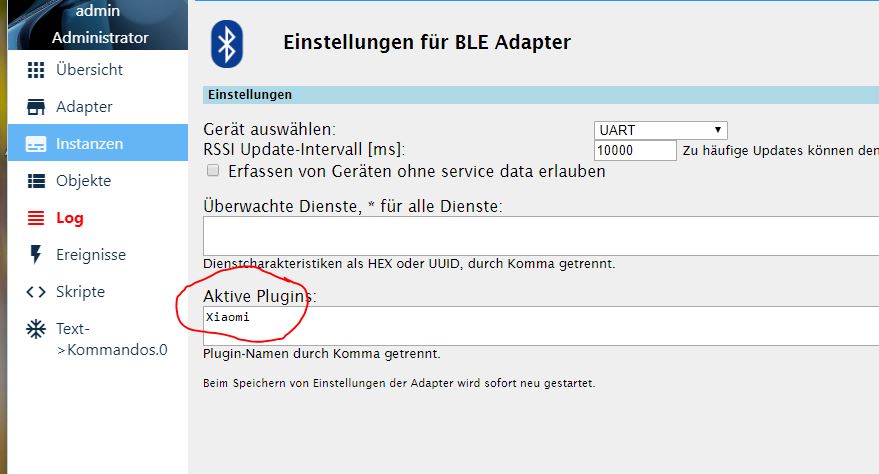
    und dann ein manueller Suchdurchlauf nach BT-Geräten auf der GUI von Armbian hat sofort zum "grünen" Ble.0 Adapter geführt. Aber ohne diesen manuellen Suchdurchlauf wird der Adapter nicht grün. Auf der GUI findet er die Xiaomi Sensoren, jedoch nicht im Adapter. Adresse der Sensoren ist im Adapter angegeben :?:
    10527_unbenannt.jpg
    Aber wie kann ich das jetzt in die Startroutine einbauen? Ich kann das ja nicht nach jedem Neustart ausführen. Sorry für die dumme Frage, aber ich bin ein echter Linux Dummie…. :?

    1 Reply Last reply
    0
    • AlCalzoneA Offline
      AlCalzoneA Offline
      AlCalzone
      Developer
      wrote on last edited by
      #229

      @Deanna4711:

      Adresse der Sensoren ist im Adapter angegeben :?: `
      Das ist unnötig, da kein Adressfilter o.ä. drin ist. Du musst bei Plugins "xiaomi" eingeben.

      @Deanna4711:

      Aber wie kann ich das jetzt in die Startroutine einbauen? Ich kann das ja nicht nach jedem Neustart ausführen. Sorry für die dumme Frage, aber ich bin ein echter Linux Dummie…. :? `
      Ich kenne mich da auch nicht so sehr aus. Vielleicht so?

      https://wiki.ubuntuusers.de/rc.local/

      Oder per Cron?

      https://wiki.ubuntuusers.de/Cron/

      Warum `sudo` böse ist: https://forum.iobroker.net/post/17109

      1 Reply Last reply
      0
      • F Offline
        F Offline
        fromfuture
        wrote on last edited by
        #230

        Moin,

        heute kam mein xiaomi Thermo- und Hygrometer an und ich konnte ihn auch integrieren.

        Aber irgendwie werden die Werte nicht korrekt angezeigt.

        Siehe Screenshot.

        Oder muss noch was in den Einstellungen für BLE Adapter eingetragen werden ?

        ![](</s><URL url=)<link_text text="https://uploads.tapatalk-cdn.com/201812 ... 89be76.jpg">https://uploads.tapatalk-cdn.com/20181218/6898b0fedb32b57625dc31abbf89be76.jpg</link_text>" />

        1 Reply Last reply
        0
        • Deanna4711D Offline
          Deanna4711D Offline
          Deanna4711
          wrote on last edited by
          #231

          @fromfuture:

          Oder muss noch was in den Einstellungen für BLE Adapter eingetragen werden ? `
          Hast Du Xiaomi eingetragen?

          ![](</s><ATTACHMENT 10527_unbenannt.jpg )[attachment=0]Unbenannt.JPG[/attachment]" />

          1 Reply Last reply
          0
          • F Offline
            F Offline
            fromfuture
            wrote on last edited by
            #232

            Genau daran lag es.

            Jetzt funktioniert es.

            Danke [emoji106][emoji4]

            Gesendet von meinem BKL-L04 mit Tapatalk

            1 Reply Last reply
            0
            • Deanna4711D Offline
              Deanna4711D Offline
              Deanna4711
              wrote on last edited by
              #233

              @fromfuture:

              Genau daran lag es.

              Jetzt funktioniert es.

              Danke [emoji106][emoji4] `
              Schön, dass ich auch mal helfen konnte… :D

              Ich verzweifel etwas, ich muss es irgendwie schaffen, das````
              sudo hcitool lescan

              
              Manuell über die Konsole geht es, aber automatisch per Cronjob oder Eintrag in die rc.local kriege ich es nicht hin.
              1 Reply Last reply
              0
              • F Offline
                F Offline
                fromfuture
                wrote on last edited by
                #234

                Da kann ich leider nicht helfen.

                Kann man eigentlich mehrere xiaomi einbinden?

                Und wenn gibt es da eine Grenze?

                Gesendet von meinem BKL-L04 mit Tapatalk

                1 Reply Last reply
                0
                • A Offline
                  A Offline
                  Arnulf
                  wrote on last edited by
                  #235

                  ich bringe noch einmal die alte Frage wieder auf:

                  Gibt es Aussichten, den Batterie-Level der Pflanzensensoren zu bekommen?

                  Habe ich eine (vielleicht auch schon bekannte) Diskusion darüber erhalten:

                  https://www.open-homeautomation.com/de/ … nt-sensor/

                  Da ich aber zu wenig Know-How habe, kam ich damit wenig weiter.

                  Habe zwar das GATTTOOL gefunden und auch nutzen können. Allerdings nicht viele Ergebnisse erhalten.

                  Und. So lange BLE auf dem ioBroker läuft, funktioniert dasGATTTOOL nicht parallel

                  1 Reply Last reply
                  0
                  • AlCalzoneA Offline
                    AlCalzoneA Offline
                    AlCalzone
                    Developer
                    wrote on last edited by
                    #236

                    @Arnulf:

                    Gibt es Aussichten, den Batterie-Level der Pflanzensensoren zu bekommen? `

                    Das setzt eine aktive Verbindung voraus, die aktuell nicht im Adapter enthalten ist. Mit dem Sensor habe ich allerdings ein Gerät zum Testen, was ich bisher nicht auf dem Schirm hatte. Zugegeben, meine Priorität liegt momentan bei anderen Baustellen, aber vielleicht klappts über die Feiertage.

                    Warum `sudo` böse ist: https://forum.iobroker.net/post/17109

                    1 Reply Last reply
                    0
                    • R Offline
                      R Offline
                      reini
                      wrote on last edited by
                      #237

                      wenn du das mit dem Batterie-Level hinbekommen würdest wäre das natürlich top und somit bei mir bestens im Garten einsetzbar 8-)

                      1 Reply Last reply
                      0
                      • AlCalzoneA Offline
                        AlCalzoneA Offline
                        AlCalzone
                        Developer
                        wrote on last edited by
                        #238

                        @lobomau:

                        Ich würde gerne nur meine bekannten Geräte einfangen und keine neuen mehr speichern. Kann man das einstellen? `

                        Ich habe soeben 0.6.0 auf npm veröffentlicht (sollte dann morgen im latest sein).

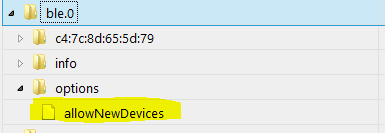
                        Da gibts jetzt eine Option, keine neuen Geräte mehr aufzunehmen.
                        1097_unbenannt.png
                        Die Option deaktivieren und alle Devices aus Objekte löschen, die nicht bekannt sind.

                        –-

                        Außerdem an Board: NodeJS-10-Unterstützung. Ich konnte es allerdings noch nicht selbst testen. Wer also schon auf NodeJS 10 ist, darf gerne testen.

                        Warum `sudo` böse ist: https://forum.iobroker.net/post/17109

                        1 Reply Last reply
                        0
                        • S Offline
                          S Offline
                          Siegfried
                          Forum Testing
                          wrote on last edited by
                          #239

                          Habe auf die v0.6.0 geupdatet trotzdem scheint bei mir scheint die Möglichkeit nicht auf

                          1 Reply Last reply
                          0
                          • AlCalzoneA Offline
                            AlCalzoneA Offline
                            AlCalzone
                            Developer
                            wrote on last edited by
                            #240

                            Wie hast du geupdated?

                            Warum `sudo` böse ist: https://forum.iobroker.net/post/17109

                            1 Reply Last reply
                            0
                            • S Offline
                              S Offline
                              Siegfried
                              Forum Testing
                              wrote on last edited by
                              #241

                              erst über git …dann habe ich versucht zu deinstallieren und neu zu installieren ...

                              aber immer hat sich nichts geändert

                              1 Reply Last reply
                              0
                              • S Offline
                                S Offline
                                Siegfried
                                Forum Testing
                                wrote on last edited by
                                #242

                                nochmal aus git probiert …

                                Nun hab ich den fehler: unhandled promise rejection: Error: Cannot find module '@abandonware/bluetooth-hci-socket'

                                1 Reply Last reply
                                0
                                • AlCalzoneA Offline
                                  AlCalzoneA Offline
                                  AlCalzone
                                  Developer
                                  wrote on last edited by
                                  #243

                                  @Siegfried:

                                  erst über git `
                                  Da ist das Problem. Bei Installation von git wird kein Upload ausgeführt.

                                  Sofern nicht explizit dazu aufgefordert, bitte immer normal über die Adapter-Liste installieren.

                                  @Siegfried:

                                  Cannot find module '@abandonware/bluetooth-hci-socket' `
                                  Was steht im Installer-Log? Da muss irgendein Fehler aufgetreten sein.

                                  Warum `sudo` böse ist: https://forum.iobroker.net/post/17109

                                  1 Reply Last reply
                                  0
                                  • S Offline
                                    S Offline
                                    Siegfried
                                    Forum Testing
                                    wrote on last edited by
                                    #244

                                    da steht:

                                    ! ````
                                    $ ./iobroker url "https://github.com/AlCalzone/ioBroker.ble"
                                    install https://github.com/AlCalzone/ioBroker.ble/tarball/master
                                    npm install https://github.com/AlCalzone/ioBroker.ble/tarball/master --production --save --prefix "/opt/iobroker" (System call)
                                    npm

                                    ERR!

                                    path
                                    /root/.npm/_logs
                                    npm

                                    ERR!

                                    code
                                    EACCES
                                    npm
                                    ERR! errno -13npm
                                    ERR! syscall scandirnpm

                                    ERR!
                                    Error: EACCES: permission denied, scandir '/root/.npm/_logs'
                                    npm
                                    ERR! { Error: EACCES: permission denied, scandir '/root/.npm/_logs'npm
                                    ERR! stack: 'Error: EACCES: permission denied, scandir '/root/.npm/_logs'',npm ERR! errno: -13,

                                    ! npm ERR! code: 'EACCES',npm
                                    ERR! syscall: 'scandir',npm ERR!
                                    path: '/root/.npm/_logs' }npm ERR!
                                    npm ERR! The operation was rejected by your operating system.
                                    ! npm ERR! It is likely you do not have the permissions to access this file as the current usernpm
                                    ERR! npm ERR! If you believe this might be a permissions issue, please double-check the
                                    ! npm ERR! permissions of the file and its containing directories, or try runningnpm ERR! the command again as root/Administrator (though this is not recommended).
                                    ! glob error { Error: EACCES: permission denied, scandir '/root/.npm/_logs' stack: 'Error: EACCES: permission denied, scandir '/root/.npm/_logs'',
                                    errno: -13,
                                    code: 'EACCES',
                                    syscall: 'scandir',
                                    path: '/root/.npm/_logs' }
                                    ! npm

                                    ERR!

                                    path
                                    /root/.npm/_cacache/index-v5/f6/d3/856f4e146dc3e8cb995652c4d6a1e16806d6bca7e87878fd9046e55ea74f
                                    npm

                                    ERR!

                                    code
                                    EACCESnpm
                                    ERR! errno
                                    -13npm ERR! syscall
                                    opennpm

                                    ERR! Error: EACCES: permission denied, open '/root/.npm/_cacache/index-v5/f6/d3/856f4e146dc3e8cb995652c4d6a1e16806d6bca7e87878fd9046e55ea74f'npm ERR! { Error: EACCES: permission denied, open '/root/.npm/_cacache/index-v5/f6/d3/856f4e146dc3e8cb995652c4d6a1e16806d6bca7e87878fd9046e55ea74f'

                                    ! npm ERR! cause: npm
                                    ERR! { Error: EACCES: permission denied, open '/root/.npm/_cacache/index-v5/f6/d3/856f4e146dc3e8cb995652c4d6a1e16806d6bca7e87878fd9046e55ea74f'npm ERR! errno: -13,
                                    npm ERR! code: 'EACCES',
                                    npm ERR! syscall: 'open',
                                    npm ERR! path: '/root/.npm/_cacache/index-v5/f6/d3/856f4e146dc3e8cb995652c4d6a1e16806d6bca7e87878fd9046e55ea74f' },
                                    npm ERR! isOperational: true,
                                    npm ERR! stack: 'Error: EACCES: permission denied, open '/root/.npm/_cacache/index-v5/f6/d3/856f4e146dc3e8cb995652c4d6a1e16806d6bca7e87878fd9046e55ea74f'',
                                    npm ERR! errno: -13,
                                    npm ERR! code: 'EACCES',
                                    npm ERR! syscall: 'open',
                                    npm ERR! path: '/root/.npm/_cacache/index-v5/f6/d3/856f4e146dc3e8cb995652c4d6a1e16806d6bca7e87878fd9046e55ea74f' }
                                    npm ERR!
                                    npm ERR! The operation was rejected by your operating system.
                                    ! npm ERR! It is likely you do not have the permissions to access this file as the current usernpm ERR!
                                    npm ERR! If you believe this might be a permissions issue, please double-check the
                                    npm ERR!
                                    permissions of the file and its containing directories, or try runningnpm ERR! the command again as root/Administrator (though this is not recommended).
                                    ! npm

                                    WARN
                                    react-beautiful-dnd@9.0.2 requires a peer of react@^16.3.1 but none is installed. You must install peer dependencies yourself.
                                    npm

                                    WARN
                                    react-motion@0.5.2 requires a peer of react@^0.14.9 || ^15.3.0 || ^16.0.0 but none is installed. You must install peer dependencies yourself.
                                    npm

                                    WARN
                                    react-redux@5.0.7 requires a peer of react@^0.14.0 || ^15.0.0-0 || ^16.0.0-0 but none is installed. You must install peer dependencies yourself.
                                    npm
                                    WARN react-beautiful-dnd@9.0.2 requires a peer of react@^16.3.1 but none is installed. You must install peer dependencies yourself.
                                    npm WARN react-motion@0.5.2 requires a peer of react@^0.14.9 || ^15.3.0 || ^16.0.0 but none is installed. You must install peer dependencies yourself.
                                    npm WARN react-redux@5.0.7 requires a peer of react@^0.14.0 || ^15.0.0-0 || ^16.0.0-0 but none is installed. You must install peer dependencies yourself.npm
                                    WARN optional SKIPPING OPTIONAL DEPENDENCY: xpc-connection@0.1.4 (node_modules/xpc-connection):npm
                                    WARN notsup SKIPPING OPTIONAL DEPENDENCY: Unsupported platform for xpc-connection@0.1.4: wanted {"os":"darwin","arch":"any"} (current: {"os":"linux","arch":"x64"})npm

                                    WARN optional SKIPPING OPTIONAL DEPENDENCY: @abandonware/bluetooth-hci-socket@0.5.3-1 (node_modules/@abandonware/bluetooth-hci-socket):npm
                                    WARN optional
                                    SKIPPING OPTIONAL DEPENDENCY: @abandonware/bluetooth-hci-socket@0.5.3-1 preinstall: npm install node-pre-gyp
                                    npm
                                    WARN optional SKIPPING OPTIONAL DEPENDENCY: Exit status 243

                                    ! process exited with code 0

                                    
                                    ****EDIT: Code in Code und Spoiler-Tags ; Homoran(Admin)****
                                    1 Reply Last reply
                                    0
                                    • AlCalzoneA Offline
                                      AlCalzoneA Offline
                                      AlCalzone
                                      Developer
                                      wrote on last edited by
                                      #245

                                      Dachte ich es mir doch. Du hast mal mit sudo installiert.

                                      => Lesen und befolgen: viewtopic.php?f=8&t=19209

                                      => Nochmal den Adapter über die Admin-UI installieren.

                                      Warum `sudo` böse ist: https://forum.iobroker.net/post/17109

                                      1 Reply Last reply
                                      0
                                      • S Offline
                                        S Offline
                                        Siegfried
                                        Forum Testing
                                        wrote on last edited by
                                        #246

                                        hm bekomme es irgendwie nicht hin.

                                        entweder ich bekomme den fehler oder es läuft wieder die alte version.

                                        Habe auch den Befehl.````
                                        sudo chown -R $(whoami) ~/.npm

                                        
                                        Reicht das? Oder sollte ich das in Klammern mit was ersetzten.
                                        1 Reply Last reply
                                        0
                                        • S Offline
                                          S Offline
                                          Siegfried
                                          Forum Testing
                                          wrote on last edited by
                                          #247

                                          jetzt läuft es …hab nun mit einem anderen Adapter probleme :-(

                                          1 Reply Last reply
                                          0
                                          Reply
                                          • Reply as topic
                                          Log in to reply
                                          • Oldest to Newest
                                          • Newest to Oldest
                                          • Most Votes


                                          Support us

                                          ioBroker
                                          Community Adapters
                                          Donate

                                          640

                                          Online

                                          32.7k

                                          Users

                                          82.5k

                                          Topics

                                          1.3m

                                          Posts
                                          Community
                                          Impressum | Datenschutz-Bestimmungen | Nutzungsbedingungen | Einwilligungseinstellungen
                                          ioBroker Community 2014-2025
                                          logo
                                          • Login

                                          • Don't have an account? Register

                                          • Login or register to search.
                                          • First post
                                            Last post
                                          0
                                          • Home
                                          • Recent
                                          • Tags
                                          • Unread 0
                                          • Categories
                                          • Unreplied
                                          • Popular
                                          • GitHub
                                          • Docu
                                          • Hilfe
