



Skip to content
  • Home
  • Recent
  • Tags
  • 0 Unread 0
  • Categories
  • Unreplied
  • Popular
  • GitHub
  • Docu
  • Hilfe
Skins
  • Light
  • Brite
  • Cerulean
  • Cosmo
  • Flatly
  • Journal
  • Litera
  • Lumen
  • Lux
  • Materia
  • Minty
  • Morph
  • Pulse
  • Sandstone
  • Simplex
  • Sketchy
  • Spacelab
  • United
  • Yeti
  • Zephyr
  • Dark
  • Cyborg
  • Darkly
  • Quartz
  • Slate
  • Solar
  • Superhero
  • Vapor

  • Default (No Skin)
  • No Skin
Collapse
ioBroker Logo

Community Forum

donate donate
  1. ioBroker Community Home
  2. Deutsch
  3. ioBroker Allgemein
  4. [Gelöst] Keine Netzwerkverbindung zum iobroker mehr möglich

NEWS

  • Monatsrückblick Januar/Februar 2026 ist online!
    BluefoxB
    Bluefox
    17
    1
    634

  • Jahresrückblick 2025 – unser neuer Blogbeitrag ist online! ✨
    BluefoxB
    Bluefox
    17
    1
    5.6k

  • Neuer Blogbeitrag: Monatsrückblick - Dezember 2025 🎄
    BluefoxB
    Bluefox
    13
    1
    1.5k

[Gelöst] Keine Netzwerkverbindung zum iobroker mehr möglich

Scheduled Pinned Locked Moved ioBroker Allgemein
120 Posts 8 Posters 13.9k Views 6 Watching
  • Oldest to Newest
  • Newest to Oldest
  • Most Votes
Reply
  • Reply as topic
Log in to reply
This topic has been deleted. Only users with topic management privileges can see it.
  • A Airframe75

    @martinp Hallo Martin,
    zu 1.) wie kann ich das überprüfen? Einfach die Karte in den anderen Rechner stecken und schauen ob ich auf die Karte zugreifen kann? Geht das dann auch wenn ich nur Windows Rechner habe?

    zu 2.) Ich habe mir über Powershell alle verfügbaren IP Adressen anzeigen lassen, nur die Adresse im oberen Bild hatte den Hostnamen iobroker (das war auch die alte IP Adresse)

    MartinPM Online
    MartinPM Online
    MartinP
    wrote on last edited by
    #7

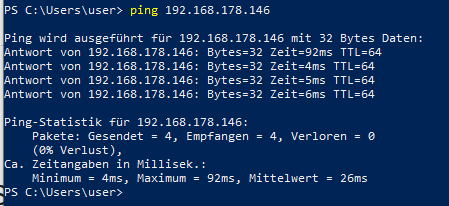
    @airframe75 ist die Adresse pingbar?

    Intel(R) Celeron(R) CPU N3000 @ 1.04GHz 8G RAM 480G SSD
    Virtualization : unprivileged lxc container (debian 13) on Proxmox 9.1.5)
    Linux pve 6.17.9-1-pve
    6 GByte RAM für den Container
    Fritzbox 6591 FW 8.20 (Vodafone Leih-Box)
    Remote-Access über Wireguard der Fritzbox

    A 2 Replies Last reply
    0
    • MartinPM MartinP

      @airframe75 ist die Adresse pingbar?

      A Offline
      A Offline
      Airframe75
      wrote on last edited by
      #8

      @martinp Ich habe mal einen Ping ausprobiert und das ist das Ergebnis
      01ba4e46-a0db-44cf-a1b4-a4a5bf0c9fb3-image.png

      1 Reply Last reply
      0
      • MartinPM MartinP

        @airframe75 ist die Adresse pingbar?

        A Offline
        A Offline
        Airframe75
        wrote on last edited by
        #9

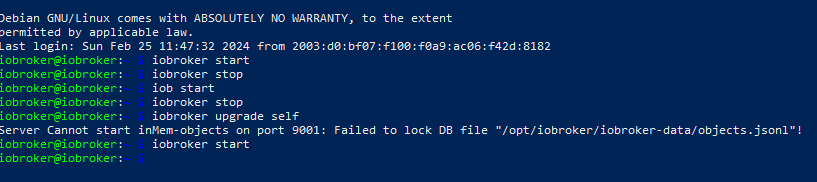
        @martinp Ich habe mich per Poweshell verbunden und versucht ein upgrade durchzuführen, aber leider ohne erfolg.
        d5ecaf65-851d-40ac-b8bc-29c826df5938-image.png

        Thomas BraunT 1 Reply Last reply
        0
        • A Airframe75

          @martinp Ich habe mich per Poweshell verbunden und versucht ein upgrade durchzuführen, aber leider ohne erfolg.

          d5ecaf65-851d-40ac-b8bc-29c826df5938-image.png

          Thomas BraunT Online
          Thomas BraunT Online
          Thomas Braun
          Most Active
          wrote on last edited by
          #10

          @airframe75

          Zeig mal die Ausgabe von

          iob diag
          

          aber nicht als Bildchen, sondern als Text.

          Linux-Werkzeugkasten:
          https://forum.iobroker.net/topic/42952/der-kleine-iobroker-linux-werkzeugkasten
          NodeJS Fixer Skript:
          https://forum.iobroker.net/topic/68035/iob-node-fix-skript
          iob_diag: curl -sLf -o diag.sh https://iobroker.net/diag.sh && bash diag.sh

          A 1 Reply Last reply
          0
          • Thomas BraunT Thomas Braun

            @airframe75

            Zeig mal die Ausgabe von

            iob diag
            

            aber nicht als Bildchen, sondern als Text.

            A Offline
            A Offline
            Airframe75
            wrote on last edited by
            #11

            @thomas-braun
            Da passiert gar nichts. Da springt der cursor nur in die nächste Zeile

            Thomas BraunT 1 Reply Last reply
            0
            • A Airframe75

              @thomas-braun
              Da passiert gar nichts. Da springt der cursor nur in die nächste Zeile

              Thomas BraunT Online
              Thomas BraunT Online
              Thomas Braun
              Most Active
              wrote on last edited by
              #12

              @airframe75

              sudo systemctl stop iobroker
              iob stop
              iob fix
              iob diag
              

              Linux-Werkzeugkasten:
              https://forum.iobroker.net/topic/42952/der-kleine-iobroker-linux-werkzeugkasten
              NodeJS Fixer Skript:
              https://forum.iobroker.net/topic/68035/iob-node-fix-skript
              iob_diag: curl -sLf -o diag.sh https://iobroker.net/diag.sh && bash diag.sh

              A 2 Replies Last reply
              0
              • Thomas BraunT Thomas Braun

                @airframe75

                sudo systemctl stop iobroker
                iob stop
                iob fix
                iob diag
                
                A Offline
                A Offline
                Airframe75
                wrote on last edited by Homoran
                #13

                @thomas-braun
                iob dia ging noch immer nicht, aber iob fix ging

                iobroker@iobroker:~ $ sudo systemctl stop iobroker
                iobroker@iobroker:~ $ iob stop
                iobroker@iobroker:~ $ iob fix
                library: loaded
                Library version=2024-01-04
                
                ==========================================================================
                
                    Welcome to the ioBroker installation fixer!
                    Script version: 2024-01-04
                
                    You might need to enter your password a couple of times.
                
                ==========================================================================
                
                
                ==========================================================================
                    Installing prerequisites (1/5)
                ==========================================================================
                
                Get:1 http://archive.raspberrypi.org/debian bullseye InRelease [23.6 kB]
                Err:1 http://archive.raspberrypi.org/debian bullseye InRelease
                  Error writing to file - write (28: No space left on device) [IP: 2a00:1098:80:56::3:1 80]
                Get:2 http://security.debian.org/debian-security bullseye-security InRelease [48.4 kB]
                Err:2 http://security.debian.org/debian-security bullseye-security InRelease
                  Error writing to file - write (28: No space left on device) [IP: 2a04:4e42:8d::644 80]
                Get:3 http://deb.debian.org/debian bullseye InRelease [116 kB]
                Err:3 http://deb.debian.org/debian bullseye InRelease
                  Error writing to file - write (28: No space left on device) [IP: 2a04:4e42:8d::644 80]
                Get:4 http://deb.debian.org/debian bullseye-updates InRelease [44.1 kB]
                Err:4 http://deb.debian.org/debian bullseye-updates InRelease
                  Error writing to file - write (28: No space left on device) [IP: 2a04:4e42:8d::644 80]
                Hit:5 https://deb.nodesource.com/node_18.x bullseye InRelease
                Get:6 https://repos.influxdata.com/debian bullseye InRelease [7,049 B]
                Err:6 https://repos.influxdata.com/debian bullseye InRelease
                  Error writing to file - write (28: No space left on device) [IP: 2600:9000:2057:5a00:11:fe8d:7d40:93a1 443]
                Err:5 https://deb.nodesource.com/node_18.x bullseye InRelease
                  Splitting up /var/lib/apt/lists/deb.nodesource.com_node%5f18.x_dists_bullseye_InRelease into data and signature failed
                Reading package lists... Error!
                W: An error occurred during the signature verification. The repository is not updated and the previous index files will be used. GPG error: https://deb.nodesource.com/node_18.x bullseye InRelease: Splitting up /var/lib/apt/lists/deb.nodesource.com_node%5f18.x_dists_bullseye_InRelease into data and signature failed
                W: Failed to fetch http://deb.debian.org/debian/dists/bullseye/InRelease  Error writing to file - write (28: No space left on device) [IP: 2a04:4e42:8d::644 80]
                W: Failed to fetch http://security.debian.org/debian-security/dists/bullseye-security/InRelease  Error writing to file - write (28: No space left on device) [IP: 2a04:4e42:8d::644 80]
                W: Failed to fetch http://deb.debian.org/debian/dists/bullseye-updates/InRelease  Error writing to file - write (28: No space left on device) [IP: 2a04:4e42:8d::644 80]
                W: Failed to fetch https://repos.influxdata.com/debian/dists/bullseye/InRelease  Error writing to file - write (28: No space left on device) [IP: 2600:9000:2057:5a00:11:fe8d:7d40:93a1 443]
                W: Failed to fetch https://deb.nodesource.com/node_18.x/dists/bullseye/InRelease  Splitting up /var/lib/apt/lists/deb.nodesource.com_node%5f18.x_dists_bullseye_InRelease into data and signature failed
                W: Failed to fetch http://archive.raspberrypi.org/debian/dists/bullseye/InRelease  Error writing to file - write (28: No space left on device) [IP: 2a00:1098:80:56::3:1 80]
                W: Some index files failed to download. They have been ignored, or old ones used instead.
                E: Write error - write (28: No space left on device)
                E: IO Error saving source cache
                E: The package lists or status file could not be parsed or opened.
                
                ==========================================================================
                    Checking ioBroker user and directory permissions (2/5)
                ==========================================================================
                
                [sudo] password for iobroker:
                Fixing directory permissions...
                usermod: /etc/passwd.3522: No space left on device
                usermod: cannot lock /etc/passwd; try again later.
                
                ==========================================================================
                    Check and cleanup npm temporary directories (3/5)
                ==========================================================================
                
                Done.
                
                ==========================================================================
                    Database maintenance (4/5)
                ==========================================================================
                
                Checking for uncompressed JSONL databases... This might take a while!
                
                npm ERR! code ENOSPC
                npm ERR! syscall write
                npm ERR! errno -28
                npm ERR! nospc ENOSPC: no space left on device, write
                npm ERR! nospc There appears to be insufficient space on your system to finish.
                npm ERR! nospc Clear up some disk space and try again.
                
                npm ERR! A complete log of this run can be found in: /home/iobroker/.npm/_logs/2024-02-25T11_08_30_818Z-debug-0.log
                main: line 14: [: -lt: unary operator expected
                npm ERR! code ENOSPC
                npm ERR! syscall write
                npm ERR! errno -28
                npm ERR! nospc ENOSPC: no space left on device, write
                npm ERR! nospc There appears to be insufficient space on your system to finish.
                npm ERR! nospc Clear up some disk space and try again.
                
                npm ERR! A complete log of this run can be found in: /home/iobroker/.npm/_logs/2024-02-25T11_08_31_650Z-debug-0.log
                
                ==========================================================================
                    Checking autostart (5/5)
                ==========================================================================
                
                Enabling autostart...
                Failed to enable unit: Unit file /lib/systemd/system/iobroker.service is masked.
                Autostart enabled!
                
                ==========================================================================
                
                    Your installation was fixed successfully
                    Run iobroker start to start ioBroker again!
                
                ==========================================================================
                
                iobroker@iobroker:~ $ iob diag
                iobroker@iobroker:~ $
                
                Thomas BraunT 1 Reply Last reply
                0
                • A Airframe75

                  @thomas-braun
                  iob dia ging noch immer nicht, aber iob fix ging

                  iobroker@iobroker:~ $ sudo systemctl stop iobroker
                  iobroker@iobroker:~ $ iob stop
                  iobroker@iobroker:~ $ iob fix
                  library: loaded
                  Library version=2024-01-04
                  
                  ==========================================================================
                  
                      Welcome to the ioBroker installation fixer!
                      Script version: 2024-01-04
                  
                      You might need to enter your password a couple of times.
                  
                  ==========================================================================
                  
                  
                  ==========================================================================
                      Installing prerequisites (1/5)
                  ==========================================================================
                  
                  Get:1 http://archive.raspberrypi.org/debian bullseye InRelease [23.6 kB]
                  Err:1 http://archive.raspberrypi.org/debian bullseye InRelease
                    Error writing to file - write (28: No space left on device) [IP: 2a00:1098:80:56::3:1 80]
                  Get:2 http://security.debian.org/debian-security bullseye-security InRelease [48.4 kB]
                  Err:2 http://security.debian.org/debian-security bullseye-security InRelease
                    Error writing to file - write (28: No space left on device) [IP: 2a04:4e42:8d::644 80]
                  Get:3 http://deb.debian.org/debian bullseye InRelease [116 kB]
                  Err:3 http://deb.debian.org/debian bullseye InRelease
                    Error writing to file - write (28: No space left on device) [IP: 2a04:4e42:8d::644 80]
                  Get:4 http://deb.debian.org/debian bullseye-updates InRelease [44.1 kB]
                  Err:4 http://deb.debian.org/debian bullseye-updates InRelease
                    Error writing to file - write (28: No space left on device) [IP: 2a04:4e42:8d::644 80]
                  Hit:5 https://deb.nodesource.com/node_18.x bullseye InRelease
                  Get:6 https://repos.influxdata.com/debian bullseye InRelease [7,049 B]
                  Err:6 https://repos.influxdata.com/debian bullseye InRelease
                    Error writing to file - write (28: No space left on device) [IP: 2600:9000:2057:5a00:11:fe8d:7d40:93a1 443]
                  Err:5 https://deb.nodesource.com/node_18.x bullseye InRelease
                    Splitting up /var/lib/apt/lists/deb.nodesource.com_node%5f18.x_dists_bullseye_InRelease into data and signature failed
                  Reading package lists... Error!
                  W: An error occurred during the signature verification. The repository is not updated and the previous index files will be used. GPG error: https://deb.nodesource.com/node_18.x bullseye InRelease: Splitting up /var/lib/apt/lists/deb.nodesource.com_node%5f18.x_dists_bullseye_InRelease into data and signature failed
                  W: Failed to fetch http://deb.debian.org/debian/dists/bullseye/InRelease  Error writing to file - write (28: No space left on device) [IP: 2a04:4e42:8d::644 80]
                  W: Failed to fetch http://security.debian.org/debian-security/dists/bullseye-security/InRelease  Error writing to file - write (28: No space left on device) [IP: 2a04:4e42:8d::644 80]
                  W: Failed to fetch http://deb.debian.org/debian/dists/bullseye-updates/InRelease  Error writing to file - write (28: No space left on device) [IP: 2a04:4e42:8d::644 80]
                  W: Failed to fetch https://repos.influxdata.com/debian/dists/bullseye/InRelease  Error writing to file - write (28: No space left on device) [IP: 2600:9000:2057:5a00:11:fe8d:7d40:93a1 443]
                  W: Failed to fetch https://deb.nodesource.com/node_18.x/dists/bullseye/InRelease  Splitting up /var/lib/apt/lists/deb.nodesource.com_node%5f18.x_dists_bullseye_InRelease into data and signature failed
                  W: Failed to fetch http://archive.raspberrypi.org/debian/dists/bullseye/InRelease  Error writing to file - write (28: No space left on device) [IP: 2a00:1098:80:56::3:1 80]
                  W: Some index files failed to download. They have been ignored, or old ones used instead.
                  E: Write error - write (28: No space left on device)
                  E: IO Error saving source cache
                  E: The package lists or status file could not be parsed or opened.
                  
                  ==========================================================================
                      Checking ioBroker user and directory permissions (2/5)
                  ==========================================================================
                  
                  [sudo] password for iobroker:
                  Fixing directory permissions...
                  usermod: /etc/passwd.3522: No space left on device
                  usermod: cannot lock /etc/passwd; try again later.
                  
                  ==========================================================================
                      Check and cleanup npm temporary directories (3/5)
                  ==========================================================================
                  
                  Done.
                  
                  ==========================================================================
                      Database maintenance (4/5)
                  ==========================================================================
                  
                  Checking for uncompressed JSONL databases... This might take a while!
                  
                  npm ERR! code ENOSPC
                  npm ERR! syscall write
                  npm ERR! errno -28
                  npm ERR! nospc ENOSPC: no space left on device, write
                  npm ERR! nospc There appears to be insufficient space on your system to finish.
                  npm ERR! nospc Clear up some disk space and try again.
                  
                  npm ERR! A complete log of this run can be found in: /home/iobroker/.npm/_logs/2024-02-25T11_08_30_818Z-debug-0.log
                  main: line 14: [: -lt: unary operator expected
                  npm ERR! code ENOSPC
                  npm ERR! syscall write
                  npm ERR! errno -28
                  npm ERR! nospc ENOSPC: no space left on device, write
                  npm ERR! nospc There appears to be insufficient space on your system to finish.
                  npm ERR! nospc Clear up some disk space and try again.
                  
                  npm ERR! A complete log of this run can be found in: /home/iobroker/.npm/_logs/2024-02-25T11_08_31_650Z-debug-0.log
                  
                  ==========================================================================
                      Checking autostart (5/5)
                  ==========================================================================
                  
                  Enabling autostart...
                  Failed to enable unit: Unit file /lib/systemd/system/iobroker.service is masked.
                  Autostart enabled!
                  
                  ==========================================================================
                  
                      Your installation was fixed successfully
                      Run iobroker start to start ioBroker again!
                  
                  ==========================================================================
                  
                  iobroker@iobroker:~ $ iob diag
                  iobroker@iobroker:~ $
                  
                  Thomas BraunT Online
                  Thomas BraunT Online
                  Thomas Braun
                  Most Active
                  wrote on last edited by
                  #14

                  @airframe75 sagte in Keine Netzwerkverbindung zum iobroker mehr möglich:

                  No space left on device

                  Der Datenträger ist rappelvoll.

                  Schau per

                  sudo ncdu / 
                  

                  wo die dicken Hunde liegen.

                  Linux-Werkzeugkasten:
                  https://forum.iobroker.net/topic/42952/der-kleine-iobroker-linux-werkzeugkasten
                  NodeJS Fixer Skript:
                  https://forum.iobroker.net/topic/68035/iob-node-fix-skript
                  iob_diag: curl -sLf -o diag.sh https://iobroker.net/diag.sh && bash diag.sh

                  A 1 Reply Last reply
                  0
                  • Thomas BraunT Thomas Braun

                    @airframe75

                    sudo systemctl stop iobroker
                    iob stop
                    iob fix
                    iob diag
                    
                    A Offline
                    A Offline
                    Airframe75
                    wrote on last edited by
                    #15

                    @thomas-braun
                    Na, da steht "no space left on device". Das wird wohl das Problem sein.

                    Ich habe Daten gelogged, kann ich die über die Shell löschen? Damit sollte es ja eventuell wieder gehen.

                    1 Reply Last reply
                    0
                    • Thomas BraunT Thomas Braun

                      @airframe75 sagte in Keine Netzwerkverbindung zum iobroker mehr möglich:

                      No space left on device

                      Der Datenträger ist rappelvoll.

                      Schau per

                      sudo ncdu / 
                      

                      wo die dicken Hunde liegen.

                      A Offline
                      A Offline
                      Airframe75
                      wrote on last edited by Homoran
                      #16

                      @thomas-braun

                      cdu 1.15.1 ~ Use the arrow keys to navigate, press ? for help                                                          --- / ------------------------------------------------------------------------------------------------------------------   25.4 GiB [##########] /var                                                                                               1.6 GiB [          ] /usr
                          1.3 GiB [          ] /opt
                        750.3 MiB [          ] /home
                         75.5 MiB [          ] /run
                         30.6 MiB [          ] /boot
                          3.8 MiB [          ] /etc
                         28.0 KiB [          ] /tmp
                         20.0 KiB [          ] /root
                      e  16.0 KiB [          ] /lost+found
                      e   4.0 KiB [          ] /srv
                      e   4.0 KiB [          ] /mnt
                      e   4.0 KiB [          ] /media
                          0.0   B [          ] /sys
                      .   0.0   B [          ] /proc
                          0.0   B [          ] /dev
                      @   0.0   B [          ]  sbin
                      @   0.0   B [          ]  lib
                      @   0.0   B [          ]  bin
                      
                      Thomas BraunT 1 Reply Last reply
                      0
                      • A Airframe75

                        @thomas-braun

                        cdu 1.15.1 ~ Use the arrow keys to navigate, press ? for help                                                          --- / ------------------------------------------------------------------------------------------------------------------   25.4 GiB [##########] /var                                                                                               1.6 GiB [          ] /usr
                            1.3 GiB [          ] /opt
                          750.3 MiB [          ] /home
                           75.5 MiB [          ] /run
                           30.6 MiB [          ] /boot
                            3.8 MiB [          ] /etc
                           28.0 KiB [          ] /tmp
                           20.0 KiB [          ] /root
                        e  16.0 KiB [          ] /lost+found
                        e   4.0 KiB [          ] /srv
                        e   4.0 KiB [          ] /mnt
                        e   4.0 KiB [          ] /media
                            0.0   B [          ] /sys
                        .   0.0   B [          ] /proc
                            0.0   B [          ] /dev
                        @   0.0   B [          ]  sbin
                        @   0.0   B [          ]  lib
                        @   0.0   B [          ]  bin
                        
                        Thomas BraunT Online
                        Thomas BraunT Online
                        Thomas Braun
                        Most Active
                        wrote on last edited by
                        #17

                        @airframe75

                        Weiter durchhangeln. Das dürfte aber in /var eines der logs sein.

                        Linux-Werkzeugkasten:
                        https://forum.iobroker.net/topic/42952/der-kleine-iobroker-linux-werkzeugkasten
                        NodeJS Fixer Skript:
                        https://forum.iobroker.net/topic/68035/iob-node-fix-skript
                        iob_diag: curl -sLf -o diag.sh https://iobroker.net/diag.sh && bash diag.sh

                        A 2 Replies Last reply
                        0
                        • Thomas BraunT Thomas Braun

                          @airframe75

                          Weiter durchhangeln. Das dürfte aber in /var eines der logs sein.

                          A Offline
                          A Offline
                          Airframe75
                          wrote on last edited by
                          #18

                          @thomas-braun
                          Wie weiter durchhangeln? Was soll ich machen. Ich habe keine Ahnung von Linux. Ich habe das Tutorial von Matthias Kleine besucht und alles nachgemacht.

                          Thomas BraunT 1 Reply Last reply
                          0
                          • A Airframe75

                            @thomas-braun
                            Wie weiter durchhangeln? Was soll ich machen. Ich habe keine Ahnung von Linux. Ich habe das Tutorial von Matthias Kleine besucht und alles nachgemacht.

                            Thomas BraunT Online
                            Thomas BraunT Online
                            Thomas Braun
                            Most Active
                            wrote on last edited by
                            #19

                            @airframe75

                            Mit 'Linux' hat das nix zu tun...

                            Use the arrow keys to navigate

                            Linux-Werkzeugkasten:
                            https://forum.iobroker.net/topic/42952/der-kleine-iobroker-linux-werkzeugkasten
                            NodeJS Fixer Skript:
                            https://forum.iobroker.net/topic/68035/iob-node-fix-skript
                            iob_diag: curl -sLf -o diag.sh https://iobroker.net/diag.sh && bash diag.sh

                            1 Reply Last reply
                            0
                            • Thomas BraunT Thomas Braun

                              @airframe75

                              Weiter durchhangeln. Das dürfte aber in /var eines der logs sein.

                              A Offline
                              A Offline
                              Airframe75
                              wrote on last edited by
                              #20

                              @thomas-braun
                              So habe mit ">" weitergeklickt und 22,6 GB influx db Daten gefunden

                              --- /var/lib/influxdb/engine ------------------------------------------------------------------------------------------- /..
                              22.6 GiB [##########] /data 35.9 MiB [ ] /wal
                              e 4.0 KiB [ ] /replicationq

                              Kann ich das gewissenlos löschen und wenn ja wie?

                              Thomas BraunT 1 Reply Last reply
                              0
                              • A Airframe75

                                @thomas-braun
                                So habe mit ">" weitergeklickt und 22,6 GB influx db Daten gefunden

                                --- /var/lib/influxdb/engine ------------------------------------------------------------------------------------------- /..
                                22.6 GiB [##########] /data 35.9 MiB [ ] /wal
                                e 4.0 KiB [ ] /replicationq

                                Kann ich das gewissenlos löschen und wenn ja wie?

                                Thomas BraunT Online
                                Thomas BraunT Online
                                Thomas Braun
                                Most Active
                                wrote on last edited by
                                #21

                                @airframe75 sagte in Keine Netzwerkverbindung zum iobroker mehr möglich:

                                Kann ich das gewissenlos löschen und wenn ja wie?

                                Nein, da sollte die Datenbank ordentlich gezähmt werden.
                                Nie einfach irgendwas löschen.

                                Ich hab aber keinen Plan von influx. Vielleicht @Marc-Berg

                                Linux-Werkzeugkasten:
                                https://forum.iobroker.net/topic/42952/der-kleine-iobroker-linux-werkzeugkasten
                                NodeJS Fixer Skript:
                                https://forum.iobroker.net/topic/68035/iob-node-fix-skript
                                iob_diag: curl -sLf -o diag.sh https://iobroker.net/diag.sh && bash diag.sh

                                A 2 Replies Last reply
                                0
                                • Thomas BraunT Thomas Braun

                                  @airframe75 sagte in Keine Netzwerkverbindung zum iobroker mehr möglich:

                                  Kann ich das gewissenlos löschen und wenn ja wie?

                                  Nein, da sollte die Datenbank ordentlich gezähmt werden.
                                  Nie einfach irgendwas löschen.

                                  Ich hab aber keinen Plan von influx. Vielleicht @Marc-Berg

                                  A Offline
                                  A Offline
                                  Airframe75
                                  wrote on last edited by
                                  #22

                                  @thomas-braun
                                  Vielen Dank für die Indentifizierung des Problems.

                                  Sollte ich Marc Berg einzeln anschreiben oder ist das durch das Taggen automatisch passiert?

                                  1 Reply Last reply
                                  0
                                  • W Online
                                    W Online
                                    Wildbill
                                    wrote on last edited by
                                    #23

                                    @airframe75 Durch das Taggen bekommt er einen Hinweis, wenn er sich im Forum einloggt. Alternativ auch eine E-Mail, dass er erwähnt wurde, wenn er es so eingestellt hat.

                                    Gruss, Jürgen

                                    1 Reply Last reply
                                    0
                                    • Thomas BraunT Thomas Braun

                                      @airframe75 sagte in Keine Netzwerkverbindung zum iobroker mehr möglich:

                                      Kann ich das gewissenlos löschen und wenn ja wie?

                                      Nein, da sollte die Datenbank ordentlich gezähmt werden.
                                      Nie einfach irgendwas löschen.

                                      Ich hab aber keinen Plan von influx. Vielleicht @Marc-Berg

                                      A Offline
                                      A Offline
                                      Airframe75
                                      wrote on last edited by
                                      #24

                                      @thomas-braun
                                      Ich habe das Problem mit dem fehlenden Speiecherplatz mit Marc gelöst und InfluxDB2 komplett deistalliert. Aber ich habe noch immer keinen Zugriff auf den ioBroker. Es ist immer noch die gleiche Fehlermeldung?

                                      Ich habe auch nochmal iob dia ausprobiert, aber keine Reaktion / Feedback vom System

                                      wendy2702W 1 Reply Last reply
                                      0
                                      • A Airframe75

                                        @thomas-braun
                                        Ich habe das Problem mit dem fehlenden Speiecherplatz mit Marc gelöst und InfluxDB2 komplett deistalliert. Aber ich habe noch immer keinen Zugriff auf den ioBroker. Es ist immer noch die gleiche Fehlermeldung?

                                        Ich habe auch nochmal iob dia ausprobiert, aber keine Reaktion / Feedback vom System

                                        wendy2702W Online
                                        wendy2702W Online
                                        wendy2702
                                        wrote on last edited by
                                        #25

                                        @airframe75 hast du diese Schritte ausgeführt

                                        https://forum.iobroker.net/post/1132900

                                        Bitte keine Fragen per PN, die gehören ins Forum!

                                        Benutzt das Voting rechts unten im Beitrag wenn er euch geholfen hat.

                                        A 1 Reply Last reply
                                        0
                                        • wendy2702W wendy2702

                                          @airframe75 hast du diese Schritte ausgeführt

                                          https://forum.iobroker.net/post/1132900

                                          A Offline
                                          A Offline
                                          Airframe75
                                          wrote on last edited by Airframe75
                                          #26

                                          @wendy2702 @thomas-braun

                                          Ja, diese drei habe ich durchgeführt, aber nichts wird mir angezeigt

                                          iobroker@iobroker:~ $ sudo systemctl stop iobroker
                                          iobroker@iobroker:~ $ iob stop
                                          iobroker@iobroker:~ $ iob fix
                                          iobroker@iobroker:~ $ iob diag
                                          iobroker@iobroker:~ $
                                          

                                          Am Ende habe ich auch noch ein Reboot durchgeführt, aber erreichen kann ich den ioBroker immer noch nicht.

                                          Thomas BraunT 1 Reply Last reply
                                          0
                                          Reply
                                          • Reply as topic
                                          Log in to reply
                                          • Oldest to Newest
                                          • Newest to Oldest
                                          • Most Votes


                                          Support us

                                          ioBroker
                                          Community Adapters
                                          Donate
                                          FAQ Cloud / IOT
                                          HowTo: Node.js-Update
                                          HowTo: Backup/Restore
                                          Downloads
                                          BLOG

                                          795

                                          Online

                                          32.7k

                                          Users

                                          82.6k

                                          Topics

                                          1.3m

                                          Posts
                                          Community
                                          Impressum | Datenschutz-Bestimmungen | Nutzungsbedingungen | Einwilligungseinstellungen
                                          ioBroker Community 2014-2025
                                          logo
                                          • Login

                                          • Don't have an account? Register

                                          • Login or register to search.
                                          • First post
                                            Last post
                                          0
                                          • Home
                                          • Recent
                                          • Tags
                                          • Unread 0
                                          • Categories
                                          • Unreplied
                                          • Popular
                                          • GitHub
                                          • Docu
                                          • Hilfe
