Skip to content
  • Home
  • Recent
  • Tags
  • 0 Unread 0
  • Categories
  • Unreplied
  • Popular
  • GitHub
  • Docu
  • Hilfe
Skins
  • Light
  • Brite
  • Cerulean
  • Cosmo
  • Flatly
  • Journal
  • Litera
  • Lumen
  • Lux
  • Materia
  • Minty
  • Morph
  • Pulse
  • Sandstone
  • Simplex
  • Sketchy
  • Spacelab
  • United
  • Yeti
  • Zephyr
  • Dark
  • Cyborg
  • Darkly
  • Quartz
  • Slate
  • Solar
  • Superhero
  • Vapor

  • Default (No Skin)
  • No Skin
Collapse
ioBroker Logo

Community Forum

donate donate
  1. ioBroker Community Home
  2. Deutsch
  3. ioBroker Allgemein
  4. Hosts update 5.0.19 Problem

NEWS

  • Jahresrückblick 2025 – unser neuer Blogbeitrag ist online! ✨
    BluefoxB
    Bluefox
    17
    1
    4.2k

  • Neuer Blogbeitrag: Monatsrückblick - Dezember 2025 🎄
    BluefoxB
    Bluefox
    13
    1
    1.2k

  • Weihnachtsangebot 2025! 🎄
    BluefoxB
    Bluefox
    25
    1
    2.6k

Hosts update 5.0.19 Problem

Scheduled Pinned Locked Moved ioBroker Allgemein
58 Posts 6 Posters 4.8k Views 5 Watching
  • Oldest to Newest
  • Newest to Oldest
  • Most Votes
Reply
  • Reply as topic
Log in to reply
This topic has been deleted. Only users with topic management privileges can see it.
  • KrisiunK Krisiun

    @thomas-braun
    Ich habe das leerzeichen weggenommen aber leider das gleiche Problem

    Thomas BraunT Online
    Thomas BraunT Online
    Thomas Braun
    Most Active
    wrote on last edited by
    #33

    @krisiun

    Und du hampelst da weiter als root herum? Dann bin ich nämlich eh raus.
    Lies dir an, wie man user anlegt und mit denen agiert.

    Linux-Werkzeugkasten:
    https://forum.iobroker.net/topic/42952/der-kleine-iobroker-linux-werkzeugkasten
    NodeJS Fixer Skript:
    https://forum.iobroker.net/topic/68035/iob-node-fix-skript
    iob_diag: curl -sLf -o diag.sh https://iobroker.net/diag.sh && bash diag.sh

    KrisiunK 1 Reply Last reply
    0
    • HomoranH Homoran

      @thomas-braun sagte in Hosts update 5.0.19 Problem:

      @krisiun sagte in Hosts update 5.0.19 Problem:

      Wenn ich versuche einen Backup zu machen kommt das

      Leerzeichen in Verzeichnisnamen sind auch 'verboten'. Führen nämlich zu dem Verhalten da bei dir.

      ich fürchte das ist kein Dateiname, sonder der falsch angegebene Share

      KrisiunK Offline
      KrisiunK Offline
      Krisiun
      wrote on last edited by
      #34

      @homoran
      Ich habe da alles so angegeben wie auch bei meiner funktionierende Backup aktion

      1 Reply Last reply
      0
      • Thomas BraunT Thomas Braun

        @krisiun

        Und du hampelst da weiter als root herum? Dann bin ich nämlich eh raus.
        Lies dir an, wie man user anlegt und mit denen agiert.

        KrisiunK Offline
        KrisiunK Offline
        Krisiun
        wrote on last edited by
        #35

        @thomas-braun
        Das haben wir doch bei meinem letzten Problem schon behoben. Keine Ahnung warum sich da was geändert hat.
        Wie mache ich das schnell wieder in Ordnung? Bitte

        Thomas BraunT 1 Reply Last reply
        0
        • KrisiunK Krisiun

          @thomas-braun
          Das haben wir doch bei meinem letzten Problem schon behoben. Keine Ahnung warum sich da was geändert hat.
          Wie mache ich das schnell wieder in Ordnung? Bitte

          Thomas BraunT Online
          Thomas BraunT Online
          Thomas Braun
          Most Active
          wrote on last edited by
          #36

          @krisiun sagte in Hosts update 5.0.19 Problem:

          Wie mache ich das schnell wieder in Ordnung? Bitte

          Was?

          Linux-Werkzeugkasten:
          https://forum.iobroker.net/topic/42952/der-kleine-iobroker-linux-werkzeugkasten
          NodeJS Fixer Skript:
          https://forum.iobroker.net/topic/68035/iob-node-fix-skript
          iob_diag: curl -sLf -o diag.sh https://iobroker.net/diag.sh && bash diag.sh

          KrisiunK 1 Reply Last reply
          0
          • Thomas BraunT Thomas Braun

            @krisiun sagte in Hosts update 5.0.19 Problem:

            Wie mache ich das schnell wieder in Ordnung? Bitte

            Was?

            KrisiunK Offline
            KrisiunK Offline
            Krisiun
            wrote on last edited by
            #37

            @thomas-braun
            Wie man schnell der root los werden kann

            Thomas BraunT 1 Reply Last reply
            0
            • KrisiunK Krisiun

              @thomas-braun
              Wie man schnell der root los werden kann

              Thomas BraunT Online
              Thomas BraunT Online
              Thomas Braun
              Most Active
              wrote on last edited by
              #38

              @krisiun

              Ich werde dir jetzt nicht das Wiki vorlesen...
              Link haste, setzt dich hin und lies.

              Linux-Werkzeugkasten:
              https://forum.iobroker.net/topic/42952/der-kleine-iobroker-linux-werkzeugkasten
              NodeJS Fixer Skript:
              https://forum.iobroker.net/topic/68035/iob-node-fix-skript
              iob_diag: curl -sLf -o diag.sh https://iobroker.net/diag.sh && bash diag.sh

              KrisiunK 2 Replies Last reply
              1
              • Thomas BraunT Thomas Braun

                @krisiun

                Ich werde dir jetzt nicht das Wiki vorlesen...
                Link haste, setzt dich hin und lies.

                KrisiunK Offline
                KrisiunK Offline
                Krisiun
                wrote on last edited by
                #39

                @thomas-braun
                OK. Hast du recht.
                Viele Dank

                1 Reply Last reply
                0
                • Thomas BraunT Thomas Braun

                  @krisiun

                  Ich werde dir jetzt nicht das Wiki vorlesen...
                  Link haste, setzt dich hin und lies.

                  KrisiunK Offline
                  KrisiunK Offline
                  Krisiun
                  wrote on last edited by
                  #40

                  @thomas-braun sagte in Hosts update 5.0.19 Problem:

                  @krisiun

                  Ich werde dir jetzt nicht das Wiki vorlesen...
                  Link haste, setzt dich hin und lies.

                  Hi ich bin jetzt den root los aber backup geht trotzdem nicht.
                  Immer der gleiche Fehler.

                  [ERROR] [mount] - [undefined Error: Command failed: sudo mount -t cifs -o username=Krisiun,password=****,noserverino,cache=loose,rw,uid=iobroker,gid=iobroker,file_mode=0777,dir_mode=0777 //192.168.178.2/homes/iobroker-ubuntu-backup /opt/iobroker/backups
                  mount error: cifs filesystem not supported by the system
                  mount error(19): No such device
                  Refer to the mount.cifs(8) manual page (e.g. man mount.cifs) and kernel log messages (dmesg)
                  
                  [DEBUG] [mount] - Error: Command failed: sudo mount -t cifs -o username=Krisiun,password=****,noserverino,cache=loose,rw,uid=iobroker,gid=iobroker,file_mode=0777,dir_mode=0777 //192.168.178.2/homes/iobroker-ubuntu-backup /opt/iobroker/backups
                  mount error: cifs filesystem not supported by the system
                  mount error(19): No such device
                  Refer to the mount.cifs(8) manual page (e.g. man mount.cifs) and kernel log messages (dmesg)
                  
                  Thomas BraunT GlasfaserG 2 Replies Last reply
                  0
                  • KrisiunK Krisiun

                    @thomas-braun sagte in Hosts update 5.0.19 Problem:

                    @krisiun

                    Ich werde dir jetzt nicht das Wiki vorlesen...
                    Link haste, setzt dich hin und lies.

                    Hi ich bin jetzt den root los aber backup geht trotzdem nicht.
                    Immer der gleiche Fehler.

                    [ERROR] [mount] - [undefined Error: Command failed: sudo mount -t cifs -o username=Krisiun,password=****,noserverino,cache=loose,rw,uid=iobroker,gid=iobroker,file_mode=0777,dir_mode=0777 //192.168.178.2/homes/iobroker-ubuntu-backup /opt/iobroker/backups
                    mount error: cifs filesystem not supported by the system
                    mount error(19): No such device
                    Refer to the mount.cifs(8) manual page (e.g. man mount.cifs) and kernel log messages (dmesg)
                    
                    [DEBUG] [mount] - Error: Command failed: sudo mount -t cifs -o username=Krisiun,password=****,noserverino,cache=loose,rw,uid=iobroker,gid=iobroker,file_mode=0777,dir_mode=0777 //192.168.178.2/homes/iobroker-ubuntu-backup /opt/iobroker/backups
                    mount error: cifs filesystem not supported by the system
                    mount error(19): No such device
                    Refer to the mount.cifs(8) manual page (e.g. man mount.cifs) and kernel log messages (dmesg)
                    
                    Thomas BraunT Online
                    Thomas BraunT Online
                    Thomas Braun
                    Most Active
                    wrote on last edited by
                    #41

                    @krisiun

                    Du hast da wohl was falsch eingestellt. Zeig mal die Einstellungen aus dem Backitup-Adapter.

                    Linux-Werkzeugkasten:
                    https://forum.iobroker.net/topic/42952/der-kleine-iobroker-linux-werkzeugkasten
                    NodeJS Fixer Skript:
                    https://forum.iobroker.net/topic/68035/iob-node-fix-skript
                    iob_diag: curl -sLf -o diag.sh https://iobroker.net/diag.sh && bash diag.sh

                    KrisiunK 1 Reply Last reply
                    0
                    • KrisiunK Krisiun

                      @thomas-braun sagte in Hosts update 5.0.19 Problem:

                      @krisiun

                      Ich werde dir jetzt nicht das Wiki vorlesen...
                      Link haste, setzt dich hin und lies.

                      Hi ich bin jetzt den root los aber backup geht trotzdem nicht.
                      Immer der gleiche Fehler.

                      [ERROR] [mount] - [undefined Error: Command failed: sudo mount -t cifs -o username=Krisiun,password=****,noserverino,cache=loose,rw,uid=iobroker,gid=iobroker,file_mode=0777,dir_mode=0777 //192.168.178.2/homes/iobroker-ubuntu-backup /opt/iobroker/backups
                      mount error: cifs filesystem not supported by the system
                      mount error(19): No such device
                      Refer to the mount.cifs(8) manual page (e.g. man mount.cifs) and kernel log messages (dmesg)
                      
                      [DEBUG] [mount] - Error: Command failed: sudo mount -t cifs -o username=Krisiun,password=****,noserverino,cache=loose,rw,uid=iobroker,gid=iobroker,file_mode=0777,dir_mode=0777 //192.168.178.2/homes/iobroker-ubuntu-backup /opt/iobroker/backups
                      mount error: cifs filesystem not supported by the system
                      mount error(19): No such device
                      Refer to the mount.cifs(8) manual page (e.g. man mount.cifs) and kernel log messages (dmesg)
                      
                      GlasfaserG Offline
                      GlasfaserG Offline
                      Glasfaser
                      wrote on last edited by
                      #42

                      @krisiun sagte in Hosts update 5.0.19 Problem:

                      Hi ich bin jetzt den root los aber backup geht trotzdem nicht.

                      OK .. dann
                      zeige doch mal dann wie ganz oben schon gefragt

                      iob diag
                      

                      Synology 918+ 16GB - ioBroker in Docker v9 , VISO auf Trekstor Primebook C13 13,3" , Hikvision Domkameras mit Surveillance Station .. CCU RaspberryMatic in Synology VM .. Zigbee CC2538+CC2592 .. Sonoff .. KNX .. Modbus ..

                      1 Reply Last reply
                      0
                      • KrisiunK Krisiun

                        @thomas-braun
                        Wenn ich versuche einen Backup zu machen kommt das

                        Started iobroker ...
                        [DEBUG] [mount] - cifs-mount command: "sudo mount -t cifs -o username=Krisiun,password=****,rw,uid=iobroker,gid=iobroker,file_mode=0777,dir_mode=0777,vers=3.0 //192.168.178.128/Synology 215j-6TB/IOBroker-Backup /opt/iobroker/backups"
                        [DEBUG] [mount] - first mount attempt with smb option failed. try next mount attempt without smb option ...
                        [DEBUG] [mount] - cifs-mount command: "sudo mount -t cifs -o username=Krisiun,password=****,rw,uid=iobroker,gid=iobroker,file_mode=0777,dir_mode=0777 //192.168.178.128/Synology 215j-6TB/IOBroker-Backup /opt/iobroker/backups"
                        [ERROR] [mount] - [undefined Error: Command failed: sudo mount -t cifs -o username=Krisiun,password=****,rw,uid=iobroker,gid=iobroker,file_mode=0777,dir_mode=0777 //192.168.178.128/Synology 215j-6TB/IOBroker-Backup /opt/iobroker/backups
                        mount: bad usage
                        Try 'mount --help' for more information.
                        
                        [DEBUG] [mount] - Error: Command failed: sudo mount -t cifs -o username=Krisiun,password=****,rw,uid=iobroker,gid=iobroker,file_mode=0777,dir_mode=0777 //192.168.178.128/Synology 215j-6TB/IOBroker-Backup /opt/iobroker/backups
                        mount: bad usage
                        Try 'mount --help' for more information.
                        
                        [DEBUG] [iobroker] - host.Marek2 5739 states saved
                        
                        [DEBUG] [iobroker] - host.Marek2 6619 objects saved
                        
                        [DEBUG] [iobroker] - Backup created: /opt/iobroker/backups/iobroker_2024_02_20-20_38_58_backupiobroker.tar.gz
                        
                        [DEBUG] [iobroker] - This backup can only be restored with js-controller version up from 4.1
                        
                        [DEBUG] [iobroker] - done
                        [DEBUG] [javascripts] - Created javascript_tmp directory: "/opt/iobroker/backups/tmpScripts"
                        [DEBUG] [javascripts] - found Script: Finde_Kato
                        [DEBUG] [javascripts] - found Script: Saugereinstellungen
                        [DEBUG] [javascripts] - found Script: Saugersteuerung_mit_Alexa
                        [DEBUG] [javascripts] - found Script: Waschmaschiene
                        [DEBUG] [javascripts] - found Script: Staubsauger
                        [DEBUG] [javascripts] - found Script: VU+Uno_4K_SE
                        [DEBUG] [javascripts] - found Script: Fenseher
                        [DEBUG] [javascripts] - found Script: TV_Box
                        [DEBUG] [javascripts] - found Script: Lampe
                        [DEBUG] [javascripts] - found Script: Skript_1_Saugersteuerung_mit_Alexa
                        [DEBUG] [javascripts] - found Script: Skript_2_Saugereinstellungen
                        [DEBUG] [javascripts] - found Script: Waschmaschine
                        [DEBUG] [javascripts] - found Script: Fensterkontakt_Balkon
                        [DEBUG] [javascripts] - found Script: Fensterkontakt_Schlafzimmer
                        [DEBUG] [javascripts] - found Script: Fensterkontakt_Badezimmer
                        [DEBUG] [javascripts] - found Script: Fensterkontakt_Kleineszimmer
                        [DEBUG] [javascripts] - found Script: Fensterstatus1
                        [DEBUG] [javascripts] - found Script: Abfrage_Fensterstatus
                        [DEBUG] [javascripts] - found Script: Fenster_Alias
                        [DEBUG] [javascripts] - found Script: Fensterscript_für_faule_leute_die_nicht_lernen_wollen
                        [DEBUG] [javascripts] - found Script: Festnetz
                        [DEBUG] [javascripts] - found Script: Fensterkontakt_Küche
                        [DEBUG] [javascripts] - found Script: Fernseher
                        [DEBUG] [javascripts] - found Script: TV_Box
                        [DEBUG] [javascripts] - found Script: Saugroboter
                        [DEBUG] [javascripts] - found Script: Waschmaschine
                        [DEBUG] [javascripts] - found Script: Waschmaschine_Alexa
                        [DEBUG] [javascripts] - found Script: TV_BOX_NEU_
                        [DEBUG] [javascripts] - found Script: VU+Fernseher
                        [DEBUG] [javascripts] - found Script: VU+Test_Neu
                        [DEBUG] [javascripts] - found Script: Abwesenheit_Marek
                        [DEBUG] [javascripts] - found Script: Abwesenheit_Johanna
                        [DEBUG] [javascripts] - found Script: Adapter_Updates_2
                        [DEBUG] [javascripts] - found Script: Geofency
                        [DEBUG] [javascripts] - found Script: Geofency_Marek
                        [DEBUG] [javascripts] - found Script: Geofency_Johanna
                        [DEBUG] [javascripts] - found Script: Fenster_Schlafzimmer-Telegram
                        [DEBUG] [javascripts] - found Script: Fenster_Küche-Telegram
                        [DEBUG] [javascripts] - found Script: Fenster_Kleineszimmer-Telegram
                        [DEBUG] [javascripts] - found Script: Fenster_Bad-Telegram
                        [DEBUG] [javascripts] - found Script: Fenster_Baklon-Telegram
                        [DEBUG] [javascripts] - found Script: FernseherNeu
                        [DEBUG] [javascripts] - found Script: arminTest
                        [DEBUG] [javascripts] - found Script: Spritpreis
                        [DEBUG] [javascripts] - found Script: AlleTankstellenPreiseDiesel
                        [DEBUG] [javascripts] - found Script: AlleTankstellenPreiseBenzin
                        [DEBUG] [javascripts] - found Script: Benzin
                        [DEBUG] [javascripts] - found Script: Diesel
                        [DEBUG] [javascripts] - found Script: Briefkasten
                        [DEBUG] [javascripts] - found Script: Festnetztelefon
                        [DEBUG] [javascripts] - found Script: Johanna_Abwesenheit
                        [DEBUG] [javascripts] - found Script: Mareks_Abwesenheit
                        [DEBUG] [javascripts] - found Script: Stumm_Schaltung
                        [DEBUG] [javascripts] - found Script: TV_Stummschallten
                        [DEBUG] [javascripts] - found Script: Tel_TV_Stumm
                        [DEBUG] [javascripts] - found Script: Batterie_Status
                        [DEBUG] [javascripts] - found Script: Batteriestatus_Abfrage
                        [DEBUG] [javascripts] - found Script: Schlafzimmertemperatur
                        [DEBUG] [javascripts] - found Script: Benzinpreis
                        [DEBUG] [javascripts] - found Script: Dieselpreis
                        [DEBUG] [javascripts] - Try deleting the Javascript tmp directory: "/opt/iobroker/backups/tmpScripts"
                        [DEBUG] [javascripts] - Javascript tmp directory "/opt/iobroker/backups/tmpScripts" successfully deleted
                        [DEBUG] [javascripts] - Backup created: /opt/iobroker/backups/javascripts_2024_02_20-20_39_06_backupiobroker.tar.gz
                        [DEBUG] [javascripts] - done
                        [DEBUG] [cifs] - used copy path: /Synology 215j-6TB/IOBroker-Backup
                        [DEBUG] [cifs] - done
                        [ERROR] [clean] - Backup files not deleted from /opt/iobroker/backups because some errors.
                        [DEBUG] [clean] - done
                        [DEBUG] [telegram] - done
                        [DEBUG] [historyHTML] - new history html values created
                        [DEBUG] [historyHTML] - done
                        [DEBUG] [historyJSON] - new history json values created
                        [DEBUG] [historyJSON] - done
                        
                        GlasfaserG Offline
                        GlasfaserG Offline
                        Glasfaser
                        wrote on last edited by Glasfaser
                        #43

                        @krisiun sagte in Hosts update 5.0.19 Problem:

                        Erst das Synology :

                        [ERROR] [mount] - [undefined Error: Command failed: sudo mount -t cifs -o username=Krisiun,password=****,rw,uid=iobroker,gid=iobroker,file_mode=0777,dir_mode=0777 //192.168.178.128/Synology 215j-6TB/IOBroker-Backup /opt/iobroker/backups

                        und jetzt das auf Laufwerk ... :

                        @krisiun sagte in Hosts update 5.0.19 Problem:

                        [DEBUG] [mount] - Error: Command failed: sudo mount -t cifs -o username=Krisiun,password=****,noserverino,cache=loose,rw,uid=iobroker,gid=iobroker,file_mode=0777,dir_mode=0777 //192.168.178.2/homes/iobroker-ubuntu-backup /opt/iobroker/backups

                        Was machst du ... !?
                        so kann man dir nicht helfen , wenn du etwas änders ohne etwas dazu zu schreiben

                        Synology 918+ 16GB - ioBroker in Docker v9 , VISO auf Trekstor Primebook C13 13,3" , Hikvision Domkameras mit Surveillance Station .. CCU RaspberryMatic in Synology VM .. Zigbee CC2538+CC2592 .. Sonoff .. KNX .. Modbus ..

                        KrisiunK 1 Reply Last reply
                        0
                        • GlasfaserG Glasfaser

                          @krisiun sagte in Hosts update 5.0.19 Problem:

                          Erst das Synology :

                          [ERROR] [mount] - [undefined Error: Command failed: sudo mount -t cifs -o username=Krisiun,password=****,rw,uid=iobroker,gid=iobroker,file_mode=0777,dir_mode=0777 //192.168.178.128/Synology 215j-6TB/IOBroker-Backup /opt/iobroker/backups

                          und jetzt das auf Laufwerk ... :

                          @krisiun sagte in Hosts update 5.0.19 Problem:

                          [DEBUG] [mount] - Error: Command failed: sudo mount -t cifs -o username=Krisiun,password=****,noserverino,cache=loose,rw,uid=iobroker,gid=iobroker,file_mode=0777,dir_mode=0777 //192.168.178.2/homes/iobroker-ubuntu-backup /opt/iobroker/backups

                          Was machst du ... !?
                          so kann man dir nicht helfen , wenn du etwas änders ohne etwas dazu zu schreiben

                          KrisiunK Offline
                          KrisiunK Offline
                          Krisiun
                          wrote on last edited by
                          #44

                          @glasfaser
                          Dann sag mir bitte was ich falsch mache?

                          GlasfaserG 1 Reply Last reply
                          0
                          • KrisiunK Krisiun

                            @glasfaser
                            Dann sag mir bitte was ich falsch mache?

                            GlasfaserG Offline
                            GlasfaserG Offline
                            Glasfaser
                            wrote on last edited by
                            #45

                            @krisiun sagte in Hosts update 5.0.19 Problem:

                            Dann sag mir bitte was ich falsch mache?

                            ? das habe ich doch oben alles dazu geschrieben !

                            Synology 918+ 16GB - ioBroker in Docker v9 , VISO auf Trekstor Primebook C13 13,3" , Hikvision Domkameras mit Surveillance Station .. CCU RaspberryMatic in Synology VM .. Zigbee CC2538+CC2592 .. Sonoff .. KNX .. Modbus ..

                            KrisiunK 1 Reply Last reply
                            0
                            • Thomas BraunT Thomas Braun

                              @krisiun

                              Du hast da wohl was falsch eingestellt. Zeig mal die Einstellungen aus dem Backitup-Adapter.

                              KrisiunK Offline
                              KrisiunK Offline
                              Krisiun
                              wrote on last edited by
                              #46

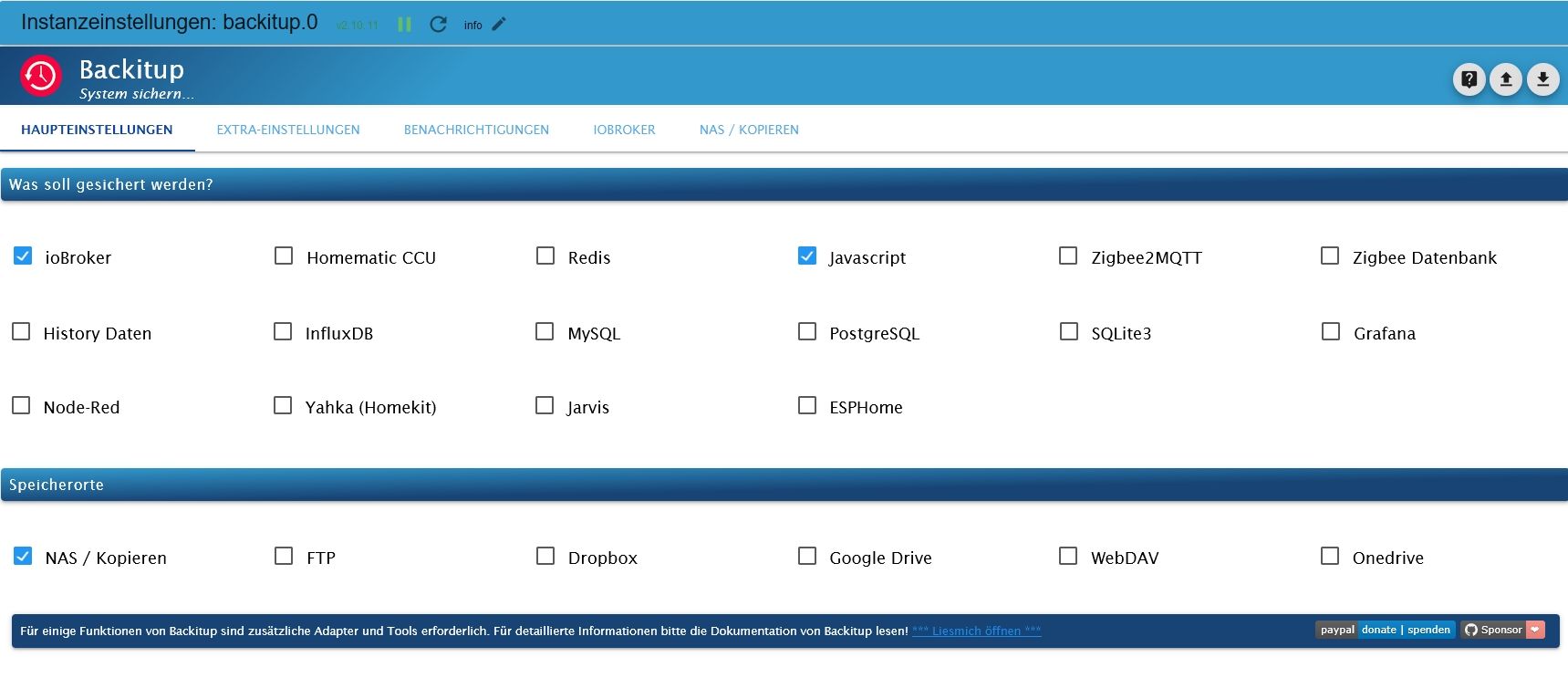
                              @thomas-braun
                              Backupit1.jpg

                              Thomas BraunT 1 Reply Last reply
                              0
                              • KrisiunK Krisiun

                                @thomas-braun
                                Backupit1.jpg

                                Thomas BraunT Online
                                Thomas BraunT Online
                                Thomas Braun
                                Most Active
                                wrote on last edited by
                                #47

                                @krisiun

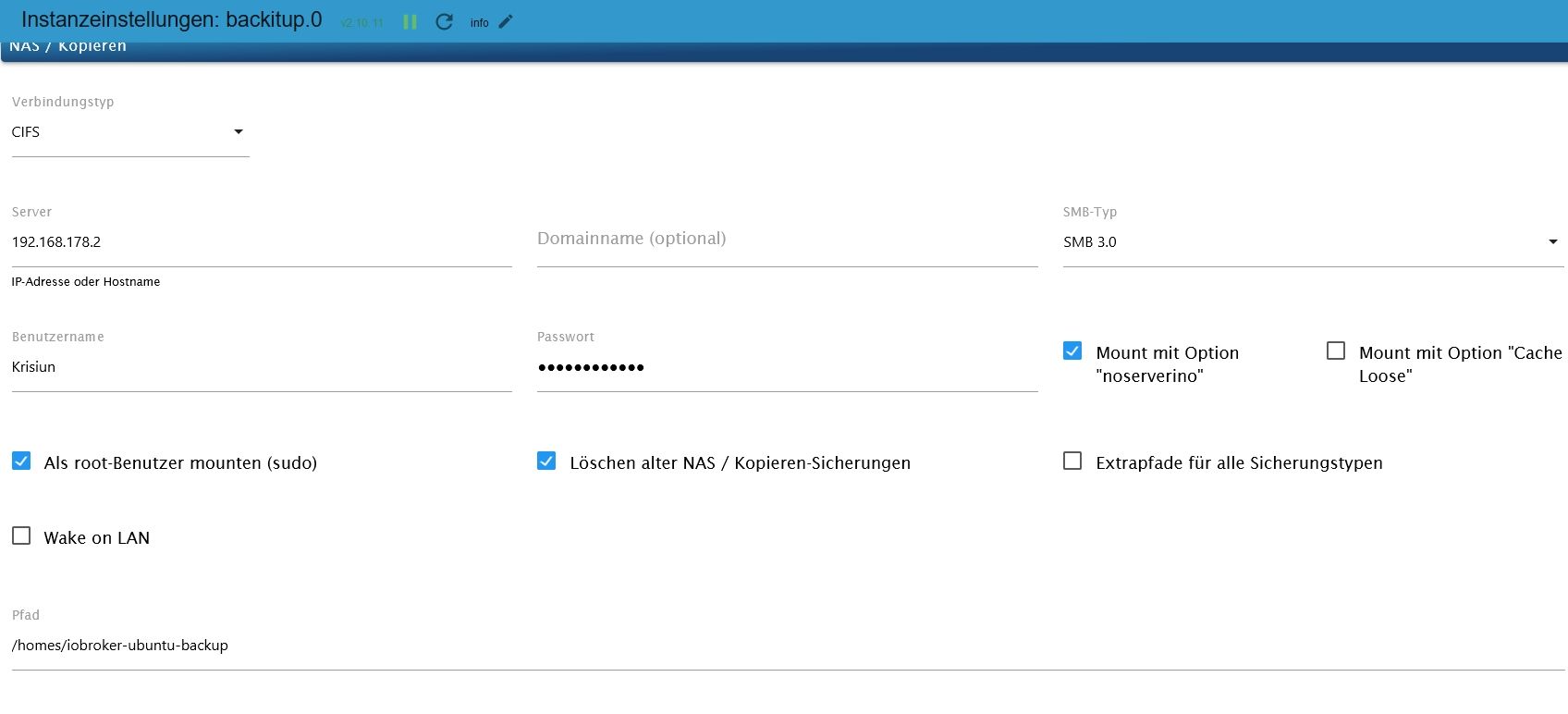
                                Die zum NAS natürlich.

                                Linux-Werkzeugkasten:
                                https://forum.iobroker.net/topic/42952/der-kleine-iobroker-linux-werkzeugkasten
                                NodeJS Fixer Skript:
                                https://forum.iobroker.net/topic/68035/iob-node-fix-skript
                                iob_diag: curl -sLf -o diag.sh https://iobroker.net/diag.sh && bash diag.sh

                                KrisiunK 1 Reply Last reply
                                0
                                • GlasfaserG Glasfaser

                                  @krisiun sagte in Hosts update 5.0.19 Problem:

                                  Dann sag mir bitte was ich falsch mache?

                                  ? das habe ich doch oben alles dazu geschrieben !

                                  KrisiunK Offline
                                  KrisiunK Offline
                                  Krisiun
                                  wrote on last edited by
                                  #48

                                  @glasfaser
                                  Ja das verstehe ich auch nicht. Ich habe den Pfad doch geändert

                                  1 Reply Last reply
                                  0
                                  • Thomas BraunT Thomas Braun

                                    @krisiun

                                    Die zum NAS natürlich.

                                    KrisiunK Offline
                                    KrisiunK Offline
                                    Krisiun
                                    wrote on last edited by
                                    #49

                                    @thomas-braun
                                    Backupit1.jpg

                                    Thomas BraunT 1 Reply Last reply
                                    0
                                    • KrisiunK Krisiun

                                      @thomas-braun
                                      Backupit1.jpg

                                      Thomas BraunT Online
                                      Thomas BraunT Online
                                      Thomas Braun
                                      Most Active
                                      wrote on last edited by
                                      #50

                                      @krisiun

                                      cifs-utils sind installiert? Auf dem host läuft ein smb-Server?

                                      Linux-Werkzeugkasten:
                                      https://forum.iobroker.net/topic/42952/der-kleine-iobroker-linux-werkzeugkasten
                                      NodeJS Fixer Skript:
                                      https://forum.iobroker.net/topic/68035/iob-node-fix-skript
                                      iob_diag: curl -sLf -o diag.sh https://iobroker.net/diag.sh && bash diag.sh

                                      KrisiunK 1 Reply Last reply
                                      0
                                      • Thomas BraunT Thomas Braun

                                        @krisiun

                                        cifs-utils sind installiert? Auf dem host läuft ein smb-Server?

                                        KrisiunK Offline
                                        KrisiunK Offline
                                        Krisiun
                                        wrote on last edited by
                                        #51

                                        @thomas-braun
                                        ja beides

                                        GlasfaserG ubeckerU 2 Replies Last reply
                                        0
                                        • KrisiunK Krisiun

                                          @thomas-braun
                                          ja beides

                                          GlasfaserG Offline
                                          GlasfaserG Offline
                                          Glasfaser
                                          wrote on last edited by
                                          #52

                                          @krisiun

                                          stelle mal alles um auf die Synology .. teste es erneut .

                                          wenn es nicht geht , post hier die Nas Einstellung

                                          Synology 918+ 16GB - ioBroker in Docker v9 , VISO auf Trekstor Primebook C13 13,3" , Hikvision Domkameras mit Surveillance Station .. CCU RaspberryMatic in Synology VM .. Zigbee CC2538+CC2592 .. Sonoff .. KNX .. Modbus ..

                                          KrisiunK 1 Reply Last reply
                                          0
                                          Reply
                                          • Reply as topic
                                          Log in to reply
                                          • Oldest to Newest
                                          • Newest to Oldest
                                          • Most Votes


                                          Support us

                                          ioBroker
                                          Community Adapters
                                          Donate
                                          FAQ Cloud / IOT
                                          HowTo: Node.js-Update
                                          HowTo: Backup/Restore
                                          Downloads
                                          BLOG

                                          412

                                          Online

                                          32.7k

                                          Users

                                          82.4k

                                          Topics

                                          1.3m

                                          Posts
                                          Community
                                          Impressum | Datenschutz-Bestimmungen | Nutzungsbedingungen | Einwilligungseinstellungen
                                          ioBroker Community 2014-2025
                                          logo
                                          • Login

                                          • Don't have an account? Register

                                          • Login or register to search.
                                          • First post
                                            Last post
                                          0
                                          • Home
                                          • Recent
                                          • Tags
                                          • Unread 0
                                          • Categories
                                          • Unreplied
                                          • Popular
                                          • GitHub
                                          • Docu
                                          • Hilfe