Skip to content
  • Home
  • Recent
  • Tags
  • 0 Unread 0
  • Categories
  • Unreplied
  • Popular
  • GitHub
  • Docu
  • Hilfe
Skins
  • Light
  • Brite
  • Cerulean
  • Cosmo
  • Flatly
  • Journal
  • Litera
  • Lumen
  • Lux
  • Materia
  • Minty
  • Morph
  • Pulse
  • Sandstone
  • Simplex
  • Sketchy
  • Spacelab
  • United
  • Yeti
  • Zephyr
  • Dark
  • Cyborg
  • Darkly
  • Quartz
  • Slate
  • Solar
  • Superhero
  • Vapor

  • Default (No Skin)
  • No Skin
Collapse
ioBroker Logo

Community Forum

donate donate
  1. ioBroker Community Home
  2. Deutsch
  3. Error/Bug
  4. Repository-Verzeichnisse werden nicht gespeichert

NEWS

  • Jahresrückblick 2025 – unser neuer Blogbeitrag ist online! ✨
    BluefoxB
    Bluefox
    17
    1
    3.4k

  • Neuer Blogbeitrag: Monatsrückblick - Dezember 2025 🎄
    BluefoxB
    Bluefox
    13
    1
    1.1k

  • Weihnachtsangebot 2025! 🎄
    BluefoxB
    Bluefox
    25
    1
    2.4k

Repository-Verzeichnisse werden nicht gespeichert

Scheduled Pinned Locked Moved Error/Bug
64 Posts 4 Posters 6.1k Views 3 Watching
  • Oldest to Newest
  • Newest to Oldest
  • Most Votes
Reply
  • Reply as topic
Log in to reply
This topic has been deleted. Only users with topic management privileges can see it.
  • Thomas BraunT Thomas Braun

    @zaphod sagte in Repository-Verzeichnisse werden nicht gespeichert:

    Solche Prozesse habe ich nicht bei mir.

    iobroker  110803  110348  0 20:23 ?        00:00:00 /usr/bin/node /opt/iobroker/node_modules/iobroker.harmony/harmony.js 0 info
    iobroker  110837  110348  3 20:23 ?        00:00:01 /usr/bin/node /opt/iobroker/node_modules/iobroker.info/main.js 0 info
    iobroker  110926  110348  6 20:23 ?        00:00:01 /usr/bin/node /opt/iobroker/node_modules/iobroker.socketio/main.js 0 info
    iobroker  110979  110348  2 20:23 ?        00:00:00 /usr/bin/node /opt/iobroker/node_modules/iobroker.iot/main.js 0 info
    iobroker  110980  110348  2 20:23 ?        00:00:00 /usr/bin/node /opt/iobroker/node_modules/iobroker.web/main.js 0 info
    iobroker  110981  110348  1 20:23 ?        00:00:00 /usr/bin/node /opt/iobroker/node_modules/iobroker.lovelace/main.js 0 info
    
    ZaphodZ Offline
    ZaphodZ Offline
    Zaphod
    wrote on last edited by
    #11

    @thomas-braun

    Das sind die Prozesse für einige meiner Adapter - die waren schon immer da (denke ich).
    Ich hab' das ps-Kommando nur aufgesetzt, um zu sehen, ob der iobroker schon vollständig da ist, bevor ich mir die repo Liste anzeige.

    ...

    Thomas BraunT 1 Reply Last reply
    0
    • Thomas BraunT Thomas Braun

      @zaphod sagte in Repository-Verzeichnisse werden nicht gespeichert:

      Solche Prozesse habe ich nicht bei mir.

      iobroker  110803  110348  0 20:23 ?        00:00:00 /usr/bin/node /opt/iobroker/node_modules/iobroker.harmony/harmony.js 0 info
      iobroker  110837  110348  3 20:23 ?        00:00:01 /usr/bin/node /opt/iobroker/node_modules/iobroker.info/main.js 0 info
      iobroker  110926  110348  6 20:23 ?        00:00:01 /usr/bin/node /opt/iobroker/node_modules/iobroker.socketio/main.js 0 info
      iobroker  110979  110348  2 20:23 ?        00:00:00 /usr/bin/node /opt/iobroker/node_modules/iobroker.iot/main.js 0 info
      iobroker  110980  110348  2 20:23 ?        00:00:00 /usr/bin/node /opt/iobroker/node_modules/iobroker.web/main.js 0 info
      iobroker  110981  110348  1 20:23 ?        00:00:00 /usr/bin/node /opt/iobroker/node_modules/iobroker.lovelace/main.js 0 info
      
      HomoranH Do not disturb
      HomoranH Do not disturb
      Homoran
      Global Moderator Administrators
      wrote on last edited by
      #12

      @thomas-braun sagte in Repository-Verzeichnisse werden nicht gespeichert:

      Solche Prozesse habe ich nicht bei mir.

      dito!
      gerade geprüft.

      können das startende Instanzen sein?

      kein Support per PN! - Fragen im Forum stellen - es gibt fast nichts, was nicht auch für andere interessant ist.

      Benutzt das Voting rechts unten im Beitrag wenn er euch geholfen hat.

      der Installationsfixer: curl -fsL https://iobroker.net/fix.sh | bash -

      ZaphodZ 1 Reply Last reply
      0
      • Thomas BraunT Thomas Braun

        @zaphod

        iob list adapters
        iob list instances 
        iob repo list
        

        sagt?
        Und

        iob update
        

        führt zu?

        ZaphodZ Offline
        ZaphodZ Offline
        Zaphod
        wrote on last edited by
        #13

        @thomas-braun

        pi@raspberrypi:/opt/iobroker $ iob list adapters
        system.adapter.admin                   : admin          - v6.3.5
        system.adapter.alexa2                  : alexa2         - v3.23.2
        system.adapter.alias-manager           : alias-manager  - v1.2.6
        system.adapter.backitup                : backitup       - v2.6.19
        system.adapter.deconz                  : deconz         - v1.3.21
        system.adapter.devices                 : devices        - v1.1.2
        system.adapter.discovery               : discovery      - v3.1.0
        system.adapter.flot                    : flot           - v1.12.0
        system.adapter.harmony                 : harmony        - v1.2.2
        system.adapter.history                 : history        - v2.2.4
        system.adapter.hm-rega                 : hm-rega        - v3.0.46
        system.adapter.hm-rpc                  : hm-rpc         - v1.15.16
        system.adapter.info                    : info           - v1.9.26
        system.adapter.iot                     : iot            - v1.14.3
        system.adapter.javascript              : javascript     - v6.1.4
        system.adapter.lovelace                : lovelace       - v3.0.1
        system.adapter.netatmo                 : netatmo        - v3.1.0
        system.adapter.openweathermap          : openweathermap - v0.1.0
        system.adapter.pushover                : pushover       - v3.0.3
        system.adapter.simple-api              : simple-api     - v2.7.2
        system.adapter.socketio                : socketio       - v6.3.3
        system.adapter.terminal                : terminal       - v1.0.0
        system.adapter.tr-064                  : tr-064         - v4.2.18
        system.adapter.web                     : web            - v5.4.3
        system.adapter.ws                      : ws             - v2.3.5
        system.adapter.yahka                   : yahka          - v0.17.0
        pi@raspberrypi:/opt/iobroker $ iob list instances 
        + system.adapter.admin.0                  : admin                 : raspberrypi                              -  enabled, port: 8081, bind: 0.0.0.0, run as: admin
        + system.adapter.alexa2.0                 : alexa2                : raspberrypi                              -  enabled
          system.adapter.alias-manager.0          : alias-manager         : raspberrypi                              - disabled
        + system.adapter.backitup.0               : backitup              : raspberrypi                              -  enabled
        + system.adapter.deconz.0                 : deconz                : raspberrypi                              -  enabled, port: 80
          system.adapter.devices.0                : devices               : raspberrypi                              - disabled
        + system.adapter.discovery.0              : discovery             : raspberrypi                              -  enabled
          system.adapter.flot.0                   : flot                  : raspberrypi                              - disabled
        + system.adapter.harmony.0                : harmony               : raspberrypi                              -  enabled
        + system.adapter.history.0                : history               : raspberrypi                              -  enabled
        + system.adapter.hm-rega.0                : hm-rega               : raspberrypi                              -  enabled
        + system.adapter.hm-rpc.0                 : hm-rpc                : raspberrypi                              -  enabled, port: 0
        + system.adapter.hm-rpc.1                 : hm-rpc                : raspberrypi                              -  enabled, port: 0
        + system.adapter.info.0                   : info                  : raspberrypi                              -  enabled
        + system.adapter.iot.0                    : iot                   : raspberrypi                              -  enabled
        + system.adapter.javascript.0             : javascript            : raspberrypi                              -  enabled
        + system.adapter.lovelace.0               : lovelace              : raspberrypi                              -  enabled, port: 8091, bind: 0.0.0.0, run as: admin
        + system.adapter.netatmo.0                : netatmo               : raspberrypi                              -  enabled
        + system.adapter.pushover.0               : pushover              : raspberrypi                              -  enabled
        + system.adapter.socketio.0               : socketio              : raspberrypi                              -  enabled, port: 8084, bind: 0.0.0.0, run as: admin
        + system.adapter.terminal.0               : terminal              : raspberrypi                              -  enabled, port: 8088, bind: 0.0.0.0, run as: admin
        + system.adapter.tr-064.0                 : tr-064                : raspberrypi                              -  enabled
        + system.adapter.web.0                    : web                   : raspberrypi                              -  enabled, port: 8082, bind: 0.0.0.0, run as: admin
        + system.adapter.yahka.0                  : yahka                 : raspberrypi                              -  enabled
        
        + instance is alive
        pi@raspberrypi:/opt/iobroker $ iob repo list
        List is empty
        pi@raspberrypi:/opt/iobroker $ iob update
        Error: no repositories found in the "system.config
        
        1 Reply Last reply
        0
        • HomoranH Homoran

          @thomas-braun sagte in Repository-Verzeichnisse werden nicht gespeichert:

          Solche Prozesse habe ich nicht bei mir.

          dito!
          gerade geprüft.

          können das startende Instanzen sein?

          ZaphodZ Offline
          ZaphodZ Offline
          Zaphod
          wrote on last edited by
          #14

          @homoran

          yepp - ich war vielleicht etwas schnell

          1 Reply Last reply
          0
          • ZaphodZ Zaphod

            @thomas-braun

            Das sind die Prozesse für einige meiner Adapter - die waren schon immer da (denke ich).
            Ich hab' das ps-Kommando nur aufgesetzt, um zu sehen, ob der iobroker schon vollständig da ist, bevor ich mir die repo Liste anzeige.

            ...

            Thomas BraunT Online
            Thomas BraunT Online
            Thomas Braun
            Most Active
            wrote on last edited by
            #15

            @zaphod sagte in Repository-Verzeichnisse werden nicht gespeichert:

            Das sind die Prozesse für einige meiner Adapter

            Und ich habe die nicht in dieser Form. Das schaut für mich aus als wenn da irgendwas doppelt läuft.
            Starte die Kiste mal komplett per reboot durch.

            Linux-Werkzeugkasten:
            https://forum.iobroker.net/topic/42952/der-kleine-iobroker-linux-werkzeugkasten
            NodeJS Fixer Skript:
            https://forum.iobroker.net/topic/68035/iob-node-fix-skript
            iob_diag: curl -sLf -o diag.sh https://iobroker.net/diag.sh && bash diag.sh

            ZaphodZ HomoranH 3 Replies Last reply
            0
            • Thomas BraunT Thomas Braun

              @zaphod sagte in Repository-Verzeichnisse werden nicht gespeichert:

              Das sind die Prozesse für einige meiner Adapter

              Und ich habe die nicht in dieser Form. Das schaut für mich aus als wenn da irgendwas doppelt läuft.
              Starte die Kiste mal komplett per reboot durch.

              ZaphodZ Offline
              ZaphodZ Offline
              Zaphod
              wrote on last edited by Zaphod
              #16

              @thomas-braun

              schon (gefühlt) tausendmal gemacht .. aber jetzt nochmal :)

              pi@raspberrypi:/opt/iobroker $ sudo reboot
              Connection to 192.168.178.77 closed by remote host.
              Connection to 192.168.178.77 closed.
              peter@PaMac ~ % 
              

              Jetzt warte ich erstmal bis alle Lichter ausgegangen sind .. und alle Prozesse wirklich laufen.

              1 Reply Last reply
              0
              • Thomas BraunT Thomas Braun

                @zaphod sagte in Repository-Verzeichnisse werden nicht gespeichert:

                Das sind die Prozesse für einige meiner Adapter

                Und ich habe die nicht in dieser Form. Das schaut für mich aus als wenn da irgendwas doppelt läuft.
                Starte die Kiste mal komplett per reboot durch.

                ZaphodZ Offline
                ZaphodZ Offline
                Zaphod
                wrote on last edited by
                #17

                @thomas-braun

                pi@raspberrypi:~ $ ps -edaf | grep iobroker
                iobroker     578       1 35 20:36 ?        00:00:42 iobroker.js-controller
                iobroker     647     578  7 20:36 ?        00:00:08 io.admin.0
                iobroker     730     578 10 20:36 ?        00:00:11 io.history.0
                iobroker     746     578 45 20:36 ?        00:00:48 io.javascript.0
                iobroker     810     578  3 20:36 ?        00:00:03 io.pushover.0
                iobroker     866     578 11 20:36 ?        00:00:11 io.hm-rega.0
                iobroker     873     578  5 20:36 ?        00:00:05 io.hm-rpc.0
                iobroker     929     578  6 20:36 ?        00:00:05 io.hm-rpc.1
                iobroker     976     578  9 20:36 ?        00:00:08 io.tr-064.0
                iobroker     993     578  6 20:36 ?        00:00:05 io.netatmo.0
                iobroker    1045     578 22 20:36 ?        00:00:17 io.alexa2.0
                iobroker    1064     578  6 20:37 ?        00:00:04 io.backitup.0
                iobroker    1084     578 11 20:37 ?        00:00:08 io.deconz.0
                iobroker    1131     578  4 20:37 ?        00:00:02 io.discovery.0
                iobroker    1146     578  5 20:37 ?        00:00:03 io.harmony.0
                iobroker    1227     578 16 20:37 ?        00:00:10 io.info.0
                iobroker    1246     578 11 20:37 ?        00:00:06 io.iot.0
                iobroker    1314     578 19 20:37 ?        00:00:09 io.lovelace.0
                iobroker    1483     578  8 20:37 ?        00:00:03 io.socketio.0
                iobroker    1736     578 10 20:37 ?        00:00:04 io.web.0
                iobroker    1880     578 10 20:37 ?        00:00:04 io.yahka.0
                iobroker    2132     578 11 20:37 ?        00:00:03 io.terminal.0
                pi          3248    1721  0 20:38 pts/0    00:00:00 grep --color=auto iobroker
                pi@raspberrypi:~ $ iob repo list
                List is empty
                

                :(

                Thomas BraunT 1 Reply Last reply
                0
                • ZaphodZ Zaphod

                  @thomas-braun

                  pi@raspberrypi:~ $ ps -edaf | grep iobroker
                  iobroker     578       1 35 20:36 ?        00:00:42 iobroker.js-controller
                  iobroker     647     578  7 20:36 ?        00:00:08 io.admin.0
                  iobroker     730     578 10 20:36 ?        00:00:11 io.history.0
                  iobroker     746     578 45 20:36 ?        00:00:48 io.javascript.0
                  iobroker     810     578  3 20:36 ?        00:00:03 io.pushover.0
                  iobroker     866     578 11 20:36 ?        00:00:11 io.hm-rega.0
                  iobroker     873     578  5 20:36 ?        00:00:05 io.hm-rpc.0
                  iobroker     929     578  6 20:36 ?        00:00:05 io.hm-rpc.1
                  iobroker     976     578  9 20:36 ?        00:00:08 io.tr-064.0
                  iobroker     993     578  6 20:36 ?        00:00:05 io.netatmo.0
                  iobroker    1045     578 22 20:36 ?        00:00:17 io.alexa2.0
                  iobroker    1064     578  6 20:37 ?        00:00:04 io.backitup.0
                  iobroker    1084     578 11 20:37 ?        00:00:08 io.deconz.0
                  iobroker    1131     578  4 20:37 ?        00:00:02 io.discovery.0
                  iobroker    1146     578  5 20:37 ?        00:00:03 io.harmony.0
                  iobroker    1227     578 16 20:37 ?        00:00:10 io.info.0
                  iobroker    1246     578 11 20:37 ?        00:00:06 io.iot.0
                  iobroker    1314     578 19 20:37 ?        00:00:09 io.lovelace.0
                  iobroker    1483     578  8 20:37 ?        00:00:03 io.socketio.0
                  iobroker    1736     578 10 20:37 ?        00:00:04 io.web.0
                  iobroker    1880     578 10 20:37 ?        00:00:04 io.yahka.0
                  iobroker    2132     578 11 20:37 ?        00:00:03 io.terminal.0
                  pi          3248    1721  0 20:38 pts/0    00:00:00 grep --color=auto iobroker
                  pi@raspberrypi:~ $ iob repo list
                  List is empty
                  

                  :(

                  Thomas BraunT Online
                  Thomas BraunT Online
                  Thomas Braun
                  Most Active
                  wrote on last edited by
                  #18

                  @zaphod

                  Zumindest sind die komischen

                  /usr/bin/node /opt/iobroker/node_modules/-Prozesse weg.

                  iob version
                  

                  sagt?

                  Linux-Werkzeugkasten:
                  https://forum.iobroker.net/topic/42952/der-kleine-iobroker-linux-werkzeugkasten
                  NodeJS Fixer Skript:
                  https://forum.iobroker.net/topic/68035/iob-node-fix-skript
                  iob_diag: curl -sLf -o diag.sh https://iobroker.net/diag.sh && bash diag.sh

                  ZaphodZ 1 Reply Last reply
                  0
                  • Thomas BraunT Thomas Braun

                    @zaphod sagte in Repository-Verzeichnisse werden nicht gespeichert:

                    Das sind die Prozesse für einige meiner Adapter

                    Und ich habe die nicht in dieser Form. Das schaut für mich aus als wenn da irgendwas doppelt läuft.
                    Starte die Kiste mal komplett per reboot durch.

                    HomoranH Do not disturb
                    HomoranH Do not disturb
                    Homoran
                    Global Moderator Administrators
                    wrote on last edited by
                    #19

                    @thomas-braun sagte in Repository-Verzeichnisse werden nicht gespeichert:

                    Das schaut für mich aus als wenn da irgendwas doppelt läuft.

                    das wäre neine zweite Frage gewesen, dann stand nämoich beim wechselseitigrn stop und start der Instanz auch nur "node" bei top, und nicht der Instanzenname.

                    ich weiß im moment gar nicht wer und ob top oder htop soeieso nur "node" anzeigt

                    kein Support per PN! - Fragen im Forum stellen - es gibt fast nichts, was nicht auch für andere interessant ist.

                    Benutzt das Voting rechts unten im Beitrag wenn er euch geholfen hat.

                    der Installationsfixer: curl -fsL https://iobroker.net/fix.sh | bash -

                    1 Reply Last reply
                    0
                    • Thomas BraunT Thomas Braun

                      @zaphod

                      Zumindest sind die komischen

                      /usr/bin/node /opt/iobroker/node_modules/-Prozesse weg.

                      iob version
                      

                      sagt?

                      ZaphodZ Offline
                      ZaphodZ Offline
                      Zaphod
                      wrote on last edited by
                      #20

                      @thomas-braun

                      pi@raspberrypi:~ $ iob version
                      4.0.24
                      
                      Thomas BraunT 1 Reply Last reply
                      0
                      • ZaphodZ Zaphod

                        @thomas-braun

                        pi@raspberrypi:~ $ iob version
                        4.0.24
                        
                        Thomas BraunT Online
                        Thomas BraunT Online
                        Thomas Braun
                        Most Active
                        wrote on last edited by Thomas Braun
                        #21

                        @zaphod
                        Das sollte eigentlich ein 5er js-controller sein...

                        cd /opt/iobroker
                        iob update
                        iob stop
                        iob setup first
                        iob update
                        sudo -H -u iobroker npm install iobroker.js-controller
                        

                        Linux-Werkzeugkasten:
                        https://forum.iobroker.net/topic/42952/der-kleine-iobroker-linux-werkzeugkasten
                        NodeJS Fixer Skript:
                        https://forum.iobroker.net/topic/68035/iob-node-fix-skript
                        iob_diag: curl -sLf -o diag.sh https://iobroker.net/diag.sh && bash diag.sh

                        ZaphodZ 1 Reply Last reply
                        0
                        • Thomas BraunT Thomas Braun

                          @zaphod
                          Das sollte eigentlich ein 5er js-controller sein...

                          cd /opt/iobroker
                          iob update
                          iob stop
                          iob setup first
                          iob update
                          sudo -H -u iobroker npm install iobroker.js-controller
                          
                          ZaphodZ Offline
                          ZaphodZ Offline
                          Zaphod
                          wrote on last edited by
                          #22

                          @thomas-braun said in Repository-Verzeichnisse werden nicht gespeichert:

                          sudo -H -u iobroker npm install iobroker.js-controller

                          pi@raspberrypi:~ $ cd /opt/iobroker
                          pi@raspberrypi:/opt/iobroker $ iob update
                          Error: no repositories found in the "system.config
                          pi@raspberrypi:/opt/iobroker $ iob stop
                          pi@raspberrypi:/opt/iobroker $ iob setup first
                          Successfully migrated 9601 objects to Redis Sets
                          Existing earlier generated certificate is invalid (too old, validity longer then 345 days or keylength too short). Generating new Certificate!
                          object system.certificates updated
                          object _design/system updated
                          {
                            ...
                          }
                          Update certificate defaultPrivate
                          The object "system.certificates" was updated successfully.
                          Update certificate defaultPublic
                          The object "system.certificates" was updated successfully.
                          pi@raspberrypi:/opt/iobroker $ iob update
                          Error: no repositories found in the "system.config
                          pi@raspberrypi:/opt/iobroker $ sudo -H -u iobroker npm install iobroker.js-controller
                          
                          removed 91 packages in 12s
                          
                          108 packages are looking for funding
                            run `npm fund` for details
                          pi@raspberrypi:/opt/iobroker $ iob repo list
                          List is empty


                          "iob update" tut nie.

                          Merkwürdig:
                          "iob setup first" hat wohl Probleme mit den Zertifikaten "too old, validity longer then 345 days or keylength too short"
                          ... obwohl ich vorhin ja schon mal erfolgreich "iob setup first" ausgeführt habe (?)

                          Thomas BraunT 1 Reply Last reply
                          0
                          • ZaphodZ Zaphod

                            @thomas-braun said in Repository-Verzeichnisse werden nicht gespeichert:

                            sudo -H -u iobroker npm install iobroker.js-controller

                            pi@raspberrypi:~ $ cd /opt/iobroker
                            pi@raspberrypi:/opt/iobroker $ iob update
                            Error: no repositories found in the "system.config
                            pi@raspberrypi:/opt/iobroker $ iob stop
                            pi@raspberrypi:/opt/iobroker $ iob setup first
                            Successfully migrated 9601 objects to Redis Sets
                            Existing earlier generated certificate is invalid (too old, validity longer then 345 days or keylength too short). Generating new Certificate!
                            object system.certificates updated
                            object _design/system updated
                            {
                              ...
                            }
                            Update certificate defaultPrivate
                            The object "system.certificates" was updated successfully.
                            Update certificate defaultPublic
                            The object "system.certificates" was updated successfully.
                            pi@raspberrypi:/opt/iobroker $ iob update
                            Error: no repositories found in the "system.config
                            pi@raspberrypi:/opt/iobroker $ sudo -H -u iobroker npm install iobroker.js-controller
                            
                            removed 91 packages in 12s
                            
                            108 packages are looking for funding
                              run `npm fund` for details
                            pi@raspberrypi:/opt/iobroker $ iob repo list
                            List is empty


                            "iob update" tut nie.

                            Merkwürdig:
                            "iob setup first" hat wohl Probleme mit den Zertifikaten "too old, validity longer then 345 days or keylength too short"
                            ... obwohl ich vorhin ja schon mal erfolgreich "iob setup first" ausgeführt habe (?)

                            Thomas BraunT Online
                            Thomas BraunT Online
                            Thomas Braun
                            Most Active
                            wrote on last edited by
                            #23

                            @zaphod

                            Könnte damit zusammenhängen, das dein js-controller halt steinalt ist. Der hat vermutlich die alten, ausgelaufenen Zertifikate dabei. Wenn man sein System regelmäßig aktuell hält sind auch die Zerts aktuell.
                            Keine Ahnung wie man da jetzt dran vorbei kommt.

                            Linux-Werkzeugkasten:
                            https://forum.iobroker.net/topic/42952/der-kleine-iobroker-linux-werkzeugkasten
                            NodeJS Fixer Skript:
                            https://forum.iobroker.net/topic/68035/iob-node-fix-skript
                            iob_diag: curl -sLf -o diag.sh https://iobroker.net/diag.sh && bash diag.sh

                            ZaphodZ 1 Reply Last reply
                            0
                            • Thomas BraunT Thomas Braun

                              @zaphod

                              Könnte damit zusammenhängen, das dein js-controller halt steinalt ist. Der hat vermutlich die alten, ausgelaufenen Zertifikate dabei. Wenn man sein System regelmäßig aktuell hält sind auch die Zerts aktuell.
                              Keine Ahnung wie man da jetzt dran vorbei kommt.

                              ZaphodZ Offline
                              ZaphodZ Offline
                              Zaphod
                              wrote on last edited by
                              #24

                              @thomas-braun

                              ich hab' immer brav geupdated - bis mir keine Updates mehr angezeigt wurden .. wegen der fehlenden Repos :(
                              O.k. ist mir dann nicht aufgefallen - lief ja (uind läuft eigentlich auch immer noch ... halt ohne updates<)

                              ... habe auch immer brav backups gemacht - scheue mich aber alles neu aufzusetzen und die dann wohl alten Backups einzuspielen ...

                              ... Ideen?

                              Thomas BraunT 2 Replies Last reply
                              0
                              • ZaphodZ Zaphod

                                @thomas-braun

                                ich hab' immer brav geupdated - bis mir keine Updates mehr angezeigt wurden .. wegen der fehlenden Repos :(
                                O.k. ist mir dann nicht aufgefallen - lief ja (uind läuft eigentlich auch immer noch ... halt ohne updates<)

                                ... habe auch immer brav backups gemacht - scheue mich aber alles neu aufzusetzen und die dann wohl alten Backups einzuspielen ...

                                ... Ideen?

                                Thomas BraunT Online
                                Thomas BraunT Online
                                Thomas Braun
                                Most Active
                                wrote on last edited by
                                #25

                                @zaphod

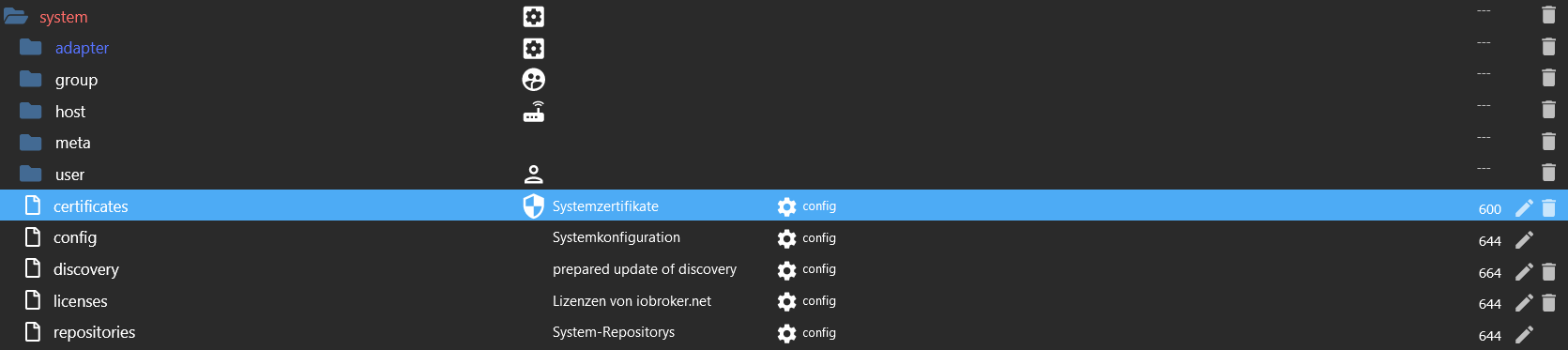
                                Wie schauen denn die objects an der Stelle aus?

                                e2cd9e74-b169-4e8c-a73f-f2a7e65a1b53-image.png

                                Linux-Werkzeugkasten:
                                https://forum.iobroker.net/topic/42952/der-kleine-iobroker-linux-werkzeugkasten
                                NodeJS Fixer Skript:
                                https://forum.iobroker.net/topic/68035/iob-node-fix-skript
                                iob_diag: curl -sLf -o diag.sh https://iobroker.net/diag.sh && bash diag.sh

                                ZaphodZ 1 Reply Last reply
                                0
                                • ZaphodZ Zaphod

                                  @thomas-braun

                                  ich hab' immer brav geupdated - bis mir keine Updates mehr angezeigt wurden .. wegen der fehlenden Repos :(
                                  O.k. ist mir dann nicht aufgefallen - lief ja (uind läuft eigentlich auch immer noch ... halt ohne updates<)

                                  ... habe auch immer brav backups gemacht - scheue mich aber alles neu aufzusetzen und die dann wohl alten Backups einzuspielen ...

                                  ... Ideen?

                                  Thomas BraunT Online
                                  Thomas BraunT Online
                                  Thomas Braun
                                  Most Active
                                  wrote on last edited by
                                  #26

                                  @zaphod
                                  Und wenn man ganz frech so herangeht:

                                  iob repo add stable http://download.iobroker.net/sources-dist.json
                                  

                                  Linux-Werkzeugkasten:
                                  https://forum.iobroker.net/topic/42952/der-kleine-iobroker-linux-werkzeugkasten
                                  NodeJS Fixer Skript:
                                  https://forum.iobroker.net/topic/68035/iob-node-fix-skript
                                  iob_diag: curl -sLf -o diag.sh https://iobroker.net/diag.sh && bash diag.sh

                                  ZaphodZ 1 Reply Last reply
                                  0
                                  • Thomas BraunT Thomas Braun

                                    @zaphod

                                    Wie schauen denn die objects an der Stelle aus?

                                    e2cd9e74-b169-4e8c-a73f-f2a7e65a1b53-image.png

                                    ZaphodZ Offline
                                    ZaphodZ Offline
                                    Zaphod
                                    wrote on last edited by
                                    #27

                                    @thomas-braun

                                    jetzt wird's wahrscheinlich peinlich für mich.
                                    Irgendwie hab' ich kein objekt "system":
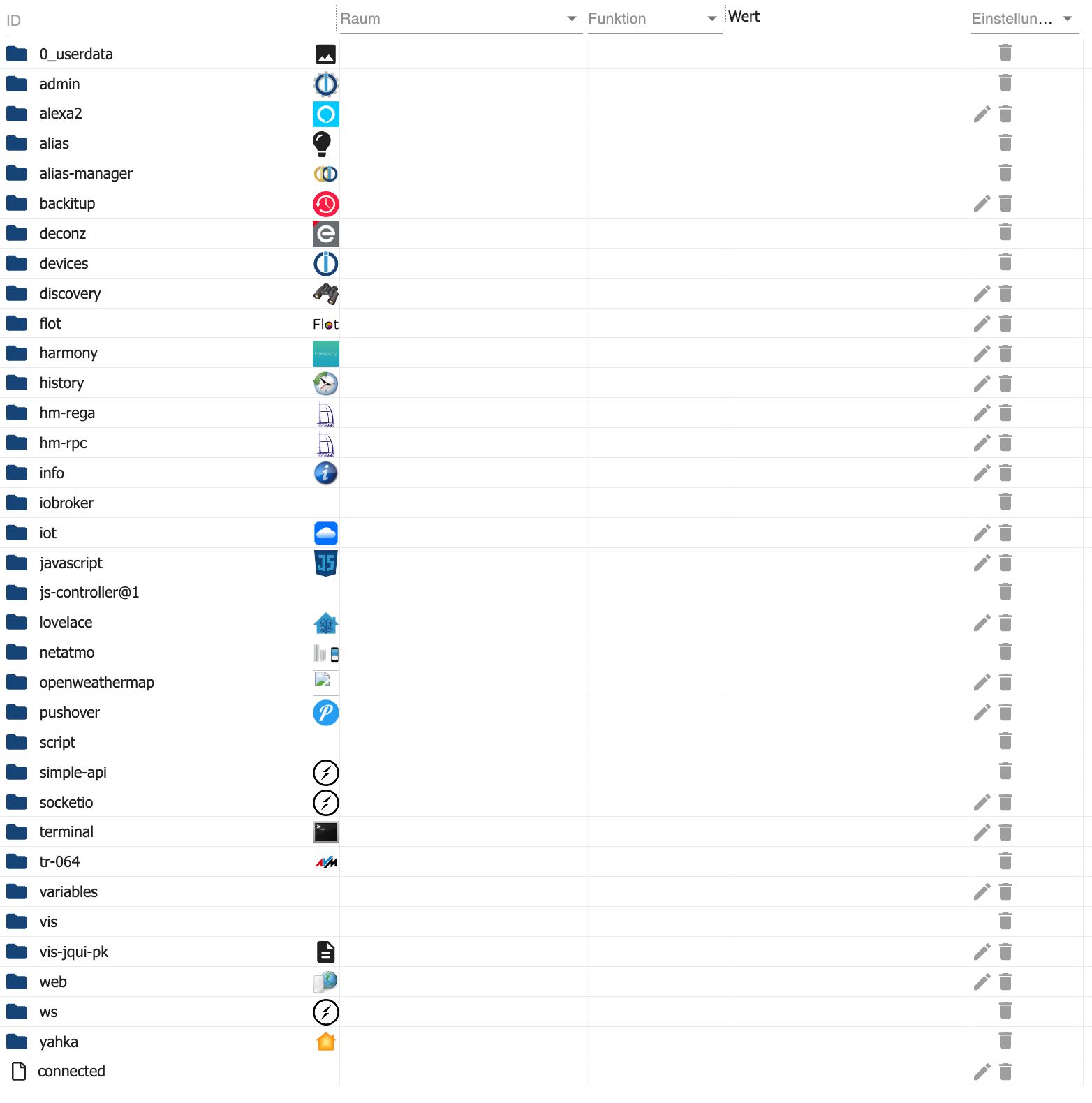
                                    Objects.jpg

                                    Thomas BraunT 1 Reply Last reply
                                    0
                                    • ZaphodZ Zaphod

                                      @thomas-braun

                                      jetzt wird's wahrscheinlich peinlich für mich.
                                      Irgendwie hab' ich kein objekt "system":

                                      Objects.jpg

                                      Thomas BraunT Online
                                      Thomas BraunT Online
                                      Thomas Braun
                                      Most Active
                                      wrote on last edited by
                                      #28

                                      @zaphod sagte in Repository-Verzeichnisse werden nicht gespeichert:

                                      Irgendwie hab' ich kein objekt "system":

                                      Nur im Expertenmodus sichtbar.

                                      Linux-Werkzeugkasten:
                                      https://forum.iobroker.net/topic/42952/der-kleine-iobroker-linux-werkzeugkasten
                                      NodeJS Fixer Skript:
                                      https://forum.iobroker.net/topic/68035/iob-node-fix-skript
                                      iob_diag: curl -sLf -o diag.sh https://iobroker.net/diag.sh && bash diag.sh

                                      ZaphodZ 2 Replies Last reply
                                      0
                                      • Thomas BraunT Thomas Braun

                                        @zaphod
                                        Und wenn man ganz frech so herangeht:

                                        iob repo add stable http://download.iobroker.net/sources-dist.json
                                        
                                        ZaphodZ Offline
                                        ZaphodZ Offline
                                        Zaphod
                                        wrote on last edited by
                                        #29

                                        @thomas-braun

                                        pi@raspberrypi:/opt/iobroker $ iob repo add stable http://download.iobroker.net/sources-dist.json
                                        Cannot add repository location: Cannot read properties of undefined (reading 'stable')
                                        
                                        Thomas BraunT 1 Reply Last reply
                                        0
                                        • Thomas BraunT Thomas Braun

                                          @zaphod sagte in Repository-Verzeichnisse werden nicht gespeichert:

                                          Irgendwie hab' ich kein objekt "system":

                                          Nur im Expertenmodus sichtbar.

                                          ZaphodZ Offline
                                          ZaphodZ Offline
                                          Zaphod
                                          wrote on last edited by
                                          #30

                                          @thomas-braun

                                          :)

                                          {
                                            "_id": "system.certificates",
                                            "type": "config",
                                            "common": {
                                              "name": "System certificates",
                                              "icon": "data:image/svg+xml;base64,PHN2ZyB4bWxucz0iaHR0cDovL3d3dy53My5vcmcvMjAwMC9zdmciIGhlaWdodD0iMjRweCIgdmlld0JveD0iMCAwIDI0IDI0IiB3aWR0aD0iMjRweCI+DQogICAgPHBhdGggZmlsbD0iY3VycmVudENvbG9yIiBkPSJNMTIgMUwzIDV2NmMwIDUuNTUgMy44NCAxMC43NCA5IDEyIDUuMTYtMS4yNiA5LTYuNDUgOS0xMlY1bC05LTR6bTAgMTAuOTloN2MtLjUzIDQuMTItMy4yOCA3Ljc5LTcgOC45NFYxMkg1VjYuM2w3LTMuMTF2OC44eiIvPg0KPC9zdmc+"
                                            },
                                            "native": {
                                              "certificates": {
                                                "defaultPrivate": "...",
                                                "defaultPublic": "..."
                                              },
                                              "letsEncrypt": {
                                                "path": "letsencrypt",
                                                "email": "",
                                                "domains": ""
                                              }
                                            },
                                            "acl": {
                                              "owner": "system.user.admin",
                                              "ownerGroup": "system.group.administrator",
                                              "object": 1536
                                            },
                                            "from": "system.adapter.admin.0",
                                            "user": "system.user.admin",
                                            "ts": 1707075689897
                                          }
                                          
                                          1 Reply Last reply
                                          0
                                          Reply
                                          • Reply as topic
                                          Log in to reply
                                          • Oldest to Newest
                                          • Newest to Oldest
                                          • Most Votes


                                          Support us

                                          ioBroker
                                          Community Adapters
                                          Donate

                                          653

                                          Online

                                          32.7k

                                          Users

                                          82.4k

                                          Topics

                                          1.3m

                                          Posts
                                          Community
                                          Impressum | Datenschutz-Bestimmungen | Nutzungsbedingungen | Einwilligungseinstellungen
                                          ioBroker Community 2014-2025
                                          logo
                                          • Login

                                          • Don't have an account? Register

                                          • Login or register to search.
                                          • First post
                                            Last post
                                          0
                                          • Home
                                          • Recent
                                          • Tags
                                          • Unread 0
                                          • Categories
                                          • Unreplied
                                          • Popular
                                          • GitHub
                                          • Docu
                                          • Hilfe