



Skip to content
  • Home
  • Recent
  • Tags
  • 0 Unread 0
  • Categories
  • Unreplied
  • Popular
  • GitHub
  • Docu
  • Hilfe
Skins
  • Light
  • Brite
  • Cerulean
  • Cosmo
  • Flatly
  • Journal
  • Litera
  • Lumen
  • Lux
  • Materia
  • Minty
  • Morph
  • Pulse
  • Sandstone
  • Simplex
  • Sketchy
  • Spacelab
  • United
  • Yeti
  • Zephyr
  • Dark
  • Cyborg
  • Darkly
  • Quartz
  • Slate
  • Solar
  • Superhero
  • Vapor

  • Default (No Skin)
  • No Skin
Collapse
ioBroker Logo

Community Forum

donate donate
  1. ioBroker Community Home
  2. Deutsch
  3. Skripten / Logik
  4. Blockly Schreibrechte Debian

NEWS

  • Weihnachtsangebot 2025! 🎄
    BluefoxB
    Bluefox
    12
    1
    331

  • UPDATE 31.10.: Amazon Alexa - ioBroker Skill läuft aus ?
    apollon77A
    apollon77
    48
    3
    8.9k

  • Monatsrückblick – September 2025
    BluefoxB
    Bluefox
    14
    1
    2.3k

Blockly Schreibrechte Debian

Scheduled Pinned Locked Moved Skripten / Logik
33 Posts 4 Posters 2.5k Views 3 Watching
  • Oldest to Newest
  • Newest to Oldest
  • Most Votes
Reply
  • Reply as topic
Log in to reply
This topic has been deleted. Only users with topic management privileges can see it.
  • Thomas BraunT Online
    Thomas BraunT Online
    Thomas Braun
    Most Active
    wrote on last edited by Thomas Braun
    #17

    @aleks-83 sagte in Blockly Schreibrechte Debian:

    /opt/iobroker/iobroker-data/files/vis.0.
    Vermutlich weil dieser Ordner root gehört!?

    Unterhalb von /opt/iobroker gehört gar nichts dem root, das gehört alles iobroker:iobroker

    iob fix
    

    ausführen, wenn das bei dir anders sein sollte.

    €dit: Und ich meine, der vis kann man nur via eingebautem Dateimanager etwas unterjubeln. Ist aber nur vom hörensagen, hab selber keine vis im Einsatz.

    Linux-Werkzeugkasten:
    https://forum.iobroker.net/topic/42952/der-kleine-iobroker-linux-werkzeugkasten
    NodeJS Fixer Skript:
    https://forum.iobroker.net/topic/68035/iob-node-fix-skript
    iob_diag: curl -sLf -o diag.sh https://iobroker.net/diag.sh && bash diag.sh

    1 Reply Last reply
    0
    • A Offline
      A Offline
      aleks-83
      wrote on last edited by aleks-83
      #18

      Habe den fix ausgeführt.
      cp funktioniert jetzt ! Danke !

      Jetzt erhalte ich im log alle 30s diese Fehlermeldungen:

      2024-01-08 15:10:55.558 - error: host.Debian Caught by controller[0]: /bin/sh: 1: npm: not found
      2024-01-08 15:10:55.558 - error: host.Debian Caught by controller[1]: /opt/iobroker/node_modules/iobroker.info/main.js:89
      2024-01-08 15:10:55.558 - error: host.Debian Caught by controller[1]: adapter.log.error("Could not check npm version: " + e);
      2024-01-08 15:10:55.558 - error: host.Debian Caught by controller[1]: ^
      2024-01-08 15:10:55.559 - error: host.Debian Caught by controller[1]: TypeError: Cannot read properties of undefined (reading 'log')
      2024-01-08 15:10:55.559 - error: host.Debian Caught by controller[1]: at getSystemVersions (/opt/iobroker/node_modules/iobroker.info/main.js:89:11)
      2024-01-08 15:10:55.559 - error: host.Debian Caught by controller[1]: at Object. (/opt/iobroker/node_modules/iobroker.info/main.js:58:18)
      2024-01-08 15:10:55.559 - error: host.Debian Caught by controller[1]: at Module._compile (node:internal/modules/cjs/loader:1356:14)
      2024-01-08 15:10:55.559 - error: host.Debian Caught by controller[1]: at Module._extensions..js (node:internal/modules/cjs/loader:1414:10)
      2024-01-08 15:10:55.559 - error: host.Debian Caught by controller[1]: at Module.load (node:internal/modules/cjs/loader:1197:32)
      2024-01-08 15:10:55.559 - error: host.Debian Caught by controller[1]: at Module._load (node:internal/modules/cjs/loader:1013:12)
      2024-01-08 15:10:55.559 - error: host.Debian Caught by controller[1]: at Function.executeUserEntryPoint [as runMain] (node:internal/modules/run_main:128:12)
      2024-01-08 15:10:55.559 - error: host.Debian Caught by controller[1]: at node:internal/main/run_main_module:28:49
      2024-01-08 15:10:55.559 - error: host.Debian Caught by controller[1]: Node.js v18.19.0
      2024-01-08 15:10:55.559 - error: host.Debian instance system.adapter.info.0 terminated with code 1 (JS_CONTROLLER_STOPPED)
      

      = Dell Optiplex Micro - 10GB RAM - 200GB SSD - Debian VM =
      = Node.js v20.18.3 = NPM 10.2.3 = JS Controller 7.0.6 =

      Ubiquiti UAP-AC-LR - UAP-AC-Lite - Synology DS716+II - Fritz!Box 7490
      Glasfaser 400

      Thomas BraunT 1 Reply Last reply
      0
      • A aleks-83

        Habe den fix ausgeführt.
        cp funktioniert jetzt ! Danke !

        Jetzt erhalte ich im log alle 30s diese Fehlermeldungen:

        2024-01-08 15:10:55.558 - error: host.Debian Caught by controller[0]: /bin/sh: 1: npm: not found
        2024-01-08 15:10:55.558 - error: host.Debian Caught by controller[1]: /opt/iobroker/node_modules/iobroker.info/main.js:89
        2024-01-08 15:10:55.558 - error: host.Debian Caught by controller[1]: adapter.log.error("Could not check npm version: " + e);
        2024-01-08 15:10:55.558 - error: host.Debian Caught by controller[1]: ^
        2024-01-08 15:10:55.559 - error: host.Debian Caught by controller[1]: TypeError: Cannot read properties of undefined (reading 'log')
        2024-01-08 15:10:55.559 - error: host.Debian Caught by controller[1]: at getSystemVersions (/opt/iobroker/node_modules/iobroker.info/main.js:89:11)
        2024-01-08 15:10:55.559 - error: host.Debian Caught by controller[1]: at Object. (/opt/iobroker/node_modules/iobroker.info/main.js:58:18)
        2024-01-08 15:10:55.559 - error: host.Debian Caught by controller[1]: at Module._compile (node:internal/modules/cjs/loader:1356:14)
        2024-01-08 15:10:55.559 - error: host.Debian Caught by controller[1]: at Module._extensions..js (node:internal/modules/cjs/loader:1414:10)
        2024-01-08 15:10:55.559 - error: host.Debian Caught by controller[1]: at Module.load (node:internal/modules/cjs/loader:1197:32)
        2024-01-08 15:10:55.559 - error: host.Debian Caught by controller[1]: at Module._load (node:internal/modules/cjs/loader:1013:12)
        2024-01-08 15:10:55.559 - error: host.Debian Caught by controller[1]: at Function.executeUserEntryPoint [as runMain] (node:internal/modules/run_main:128:12)
        2024-01-08 15:10:55.559 - error: host.Debian Caught by controller[1]: at node:internal/main/run_main_module:28:49
        2024-01-08 15:10:55.559 - error: host.Debian Caught by controller[1]: Node.js v18.19.0
        2024-01-08 15:10:55.559 - error: host.Debian instance system.adapter.info.0 terminated with code 1 (JS_CONTROLLER_STOPPED)
        
        Thomas BraunT Online
        Thomas BraunT Online
        Thomas Braun
        Most Active
        wrote on last edited by
        #19

        @aleks-83

        https://forum.iobroker.net/topic/71478/plötzliche-probleme-durch-nodejs-dfsg-version-npm-fehlt

        Linux-Werkzeugkasten:
        https://forum.iobroker.net/topic/42952/der-kleine-iobroker-linux-werkzeugkasten
        NodeJS Fixer Skript:
        https://forum.iobroker.net/topic/68035/iob-node-fix-skript
        iob_diag: curl -sLf -o diag.sh https://iobroker.net/diag.sh && bash diag.sh

        A 1 Reply Last reply
        1
        • Thomas BraunT Thomas Braun

          @aleks-83

          https://forum.iobroker.net/topic/71478/plötzliche-probleme-durch-nodejs-dfsg-version-npm-fehlt

          A Offline
          A Offline
          aleks-83
          wrote on last edited by aleks-83
          #20

          @thomas-braun
          Ich hab einfach kein Glück :-X
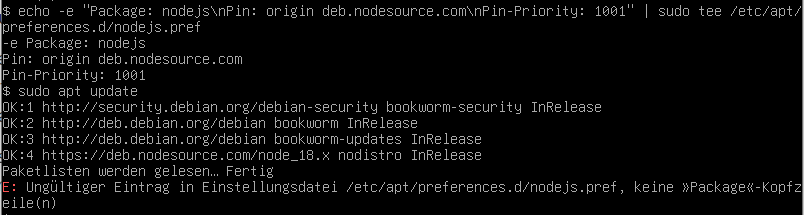
          61e69cb9-201a-407d-9b3b-3e717b81fa59-image.png

          = Dell Optiplex Micro - 10GB RAM - 200GB SSD - Debian VM =
          = Node.js v20.18.3 = NPM 10.2.3 = JS Controller 7.0.6 =

          Ubiquiti UAP-AC-LR - UAP-AC-Lite - Synology DS716+II - Fritz!Box 7490
          Glasfaser 400

          Thomas BraunT 1 Reply Last reply
          0
          • A aleks-83

            @thomas-braun
            Ich hab einfach kein Glück :-X

            61e69cb9-201a-407d-9b3b-3e717b81fa59-image.png

            Thomas BraunT Online
            Thomas BraunT Online
            Thomas Braun
            Most Active
            wrote on last edited by
            #21

            @aleks-83

            Bitte keine Bilder von Texten. Und was ist das bitte für ein Terminal? Das sieht 'kaputt' aus.

            Linux-Werkzeugkasten:
            https://forum.iobroker.net/topic/42952/der-kleine-iobroker-linux-werkzeugkasten
            NodeJS Fixer Skript:
            https://forum.iobroker.net/topic/68035/iob-node-fix-skript
            iob_diag: curl -sLf -o diag.sh https://iobroker.net/diag.sh && bash diag.sh

            1 Reply Last reply
            0
            • A Offline
              A Offline
              aleks-83
              wrote on last edited by
              #22

              Wie bereits erwähnt, funktioniert das Copy & Paste noch nicht in meiner Debian VM obwohl ich die Guest Additions installiert habe. Daran arbeite ich als nächstes.

              Die Konsole ist die direkte Eingabe in der Debian VM. Das ist headless und hat keine GUI.

              = Dell Optiplex Micro - 10GB RAM - 200GB SSD - Debian VM =
              = Node.js v20.18.3 = NPM 10.2.3 = JS Controller 7.0.6 =

              Ubiquiti UAP-AC-LR - UAP-AC-Lite - Synology DS716+II - Fritz!Box 7490
              Glasfaser 400

              Thomas BraunT 1 Reply Last reply
              0
              • A aleks-83

                Wie bereits erwähnt, funktioniert das Copy & Paste noch nicht in meiner Debian VM obwohl ich die Guest Additions installiert habe. Daran arbeite ich als nächstes.

                Die Konsole ist die direkte Eingabe in der Debian VM. Das ist headless und hat keine GUI.

                Thomas BraunT Online
                Thomas BraunT Online
                Thomas Braun
                Most Active
                wrote on last edited by
                #23

                @aleks-83

                Ich würde ja mit einem Terminal via ssh auf die Kiste gehen.

                Linux-Werkzeugkasten:
                https://forum.iobroker.net/topic/42952/der-kleine-iobroker-linux-werkzeugkasten
                NodeJS Fixer Skript:
                https://forum.iobroker.net/topic/68035/iob-node-fix-skript
                iob_diag: curl -sLf -o diag.sh https://iobroker.net/diag.sh && bash diag.sh

                1 Reply Last reply
                0
                • A Offline
                  A Offline
                  aleks-83
                  wrote on last edited by
                  #24

                  Würde ich auch gerne aber das funktioniert ebenfalls nicht.
                  Beim login über putty kommt "Access denied"

                  = Dell Optiplex Micro - 10GB RAM - 200GB SSD - Debian VM =
                  = Node.js v20.18.3 = NPM 10.2.3 = JS Controller 7.0.6 =

                  Ubiquiti UAP-AC-LR - UAP-AC-Lite - Synology DS716+II - Fritz!Box 7490
                  Glasfaser 400

                  Thomas BraunT 1 Reply Last reply
                  0
                  • A aleks-83

                    Würde ich auch gerne aber das funktioniert ebenfalls nicht.
                    Beim login über putty kommt "Access denied"

                    Thomas BraunT Online
                    Thomas BraunT Online
                    Thomas Braun
                    Most Active
                    wrote on last edited by
                    #25

                    @aleks-83 sagte in Blockly Schreibrechte Debian:

                    Beim login über putty kommt "Access denied"

                    Wie versuchst du das? Als root evtl.?

                    Linux-Werkzeugkasten:
                    https://forum.iobroker.net/topic/42952/der-kleine-iobroker-linux-werkzeugkasten
                    NodeJS Fixer Skript:
                    https://forum.iobroker.net/topic/68035/iob-node-fix-skript
                    iob_diag: curl -sLf -o diag.sh https://iobroker.net/diag.sh && bash diag.sh

                    1 Reply Last reply
                    0
                    • A Offline
                      A Offline
                      aleks-83
                      wrote on last edited by aleks-83
                      #26

                      Nein mit meinem neuen User.
                      Aber jetzt geht ssh …

                      Allerdings geht der fix für die npm nicht.

                      Last login: Mon Jan  8 21:50:54 2024 from 10.0.0.60
                      $ echo -e "Package: nodejs\nPin: origin deb.nodesource.com\nPin-Priority: 1001" | sudo tee /etc/apt/preferences.d/nodejs.pref
                      [sudo] Passwort für alex: 
                      -e Package: nodejs
                      Pin: origin deb.nodesource.com
                      Pin-Priority: 1001
                      $ sudo apt update
                      OK:1 http://security.debian.org/debian-security bookworm-security InRelease
                      OK:2 http://deb.debian.org/debian bookworm InRelease
                      Holen:3 http://deb.debian.org/debian bookworm-updates InRelease [52,1 kB]
                      OK:4 https://deb.nodesource.com/node_18.x nodistro InRelease
                      Es wurden 52,1 kB in 1 s geholt (42,1 kB/s).
                      Paketlisten werden gelesen… Fertig
                      E: Ungültiger Eintrag in Einstellungsdatei /etc/apt/preferences.d/nodejs.pref, keine »Package«-Kopfzeile(n)
                      $
                      

                      = Dell Optiplex Micro - 10GB RAM - 200GB SSD - Debian VM =
                      = Node.js v20.18.3 = NPM 10.2.3 = JS Controller 7.0.6 =

                      Ubiquiti UAP-AC-LR - UAP-AC-Lite - Synology DS716+II - Fritz!Box 7490
                      Glasfaser 400

                      Thomas BraunT 2 Replies Last reply
                      0
                      • A aleks-83

                        Nein mit meinem neuen User.
                        Aber jetzt geht ssh …

                        Allerdings geht der fix für die npm nicht.

                        Last login: Mon Jan  8 21:50:54 2024 from 10.0.0.60
                        $ echo -e "Package: nodejs\nPin: origin deb.nodesource.com\nPin-Priority: 1001" | sudo tee /etc/apt/preferences.d/nodejs.pref
                        [sudo] Passwort für alex: 
                        -e Package: nodejs
                        Pin: origin deb.nodesource.com
                        Pin-Priority: 1001
                        $ sudo apt update
                        OK:1 http://security.debian.org/debian-security bookworm-security InRelease
                        OK:2 http://deb.debian.org/debian bookworm InRelease
                        Holen:3 http://deb.debian.org/debian bookworm-updates InRelease [52,1 kB]
                        OK:4 https://deb.nodesource.com/node_18.x nodistro InRelease
                        Es wurden 52,1 kB in 1 s geholt (42,1 kB/s).
                        Paketlisten werden gelesen… Fertig
                        E: Ungültiger Eintrag in Einstellungsdatei /etc/apt/preferences.d/nodejs.pref, keine »Package«-Kopfzeile(n)
                        $
                        
                        Thomas BraunT Online
                        Thomas BraunT Online
                        Thomas Braun
                        Most Active
                        wrote on last edited by
                        #27

                        @aleks-83 sagte in Blockly Schreibrechte Debian:

                        sudo  rm /etc/apt/preferences.d/nodejs.pref
                        echo -e "Package: nodejs\nPin: origin deb.nodesource.com\nPin-Priority: 1001" | sudo tee /etc/apt/preferences.d/nodejs.pref
                        sudo apt update
                        sudo apt install nodejs=18.19.0-1nodesource1
                        

                        Linux-Werkzeugkasten:
                        https://forum.iobroker.net/topic/42952/der-kleine-iobroker-linux-werkzeugkasten
                        NodeJS Fixer Skript:
                        https://forum.iobroker.net/topic/68035/iob-node-fix-skript
                        iob_diag: curl -sLf -o diag.sh https://iobroker.net/diag.sh && bash diag.sh

                        1 Reply Last reply
                        0
                        • A aleks-83

                          Nein mit meinem neuen User.
                          Aber jetzt geht ssh …

                          Allerdings geht der fix für die npm nicht.

                          Last login: Mon Jan  8 21:50:54 2024 from 10.0.0.60
                          $ echo -e "Package: nodejs\nPin: origin deb.nodesource.com\nPin-Priority: 1001" | sudo tee /etc/apt/preferences.d/nodejs.pref
                          [sudo] Passwort für alex: 
                          -e Package: nodejs
                          Pin: origin deb.nodesource.com
                          Pin-Priority: 1001
                          $ sudo apt update
                          OK:1 http://security.debian.org/debian-security bookworm-security InRelease
                          OK:2 http://deb.debian.org/debian bookworm InRelease
                          Holen:3 http://deb.debian.org/debian bookworm-updates InRelease [52,1 kB]
                          OK:4 https://deb.nodesource.com/node_18.x nodistro InRelease
                          Es wurden 52,1 kB in 1 s geholt (42,1 kB/s).
                          Paketlisten werden gelesen… Fertig
                          E: Ungültiger Eintrag in Einstellungsdatei /etc/apt/preferences.d/nodejs.pref, keine »Package«-Kopfzeile(n)
                          $
                          
                          Thomas BraunT Online
                          Thomas BraunT Online
                          Thomas Braun
                          Most Active
                          wrote on last edited by
                          #28

                          @aleks-83

                          Falls deine shell mit echo -e nix anfangen kann...
                          Trag mit einem Editor das in die nodejs.pref rein:

                          Package: nodejs
                          Pin: origin deb.nodesource.com
                          Pin-Priority: 1001
                          

                          Linux-Werkzeugkasten:
                          https://forum.iobroker.net/topic/42952/der-kleine-iobroker-linux-werkzeugkasten
                          NodeJS Fixer Skript:
                          https://forum.iobroker.net/topic/68035/iob-node-fix-skript
                          iob_diag: curl -sLf -o diag.sh https://iobroker.net/diag.sh && bash diag.sh

                          1 Reply Last reply
                          0
                          • A Offline
                            A Offline
                            aleks-83
                            wrote on last edited by
                            #29

                            Moin. Das Echo funktioniert, aber beim apt Update kommt die gleiche Fehlermeldung

                            = Dell Optiplex Micro - 10GB RAM - 200GB SSD - Debian VM =
                            = Node.js v20.18.3 = NPM 10.2.3 = JS Controller 7.0.6 =

                            Ubiquiti UAP-AC-LR - UAP-AC-Lite - Synology DS716+II - Fritz!Box 7490
                            Glasfaser 400

                            Thomas BraunT 1 Reply Last reply
                            0
                            • A aleks-83

                              Moin. Das Echo funktioniert, aber beim apt Update kommt die gleiche Fehlermeldung

                              Thomas BraunT Online
                              Thomas BraunT Online
                              Thomas Braun
                              Most Active
                              wrote on last edited by
                              #30

                              @aleks-83

                              Zeig mal den Inhalt der Datei 1:1.

                              Linux-Werkzeugkasten:
                              https://forum.iobroker.net/topic/42952/der-kleine-iobroker-linux-werkzeugkasten
                              NodeJS Fixer Skript:
                              https://forum.iobroker.net/topic/68035/iob-node-fix-skript
                              iob_diag: curl -sLf -o diag.sh https://iobroker.net/diag.sh && bash diag.sh

                              A 1 Reply Last reply
                              0
                              • Thomas BraunT Thomas Braun

                                @aleks-83

                                Zeig mal den Inhalt der Datei 1:1.

                                A Offline
                                A Offline
                                aleks-83
                                wrote on last edited by
                                #31

                                @thomas-braun

                                -e Package: nodejs
                                Pin: origin deb.nodesource.com
                                Pin-Priority: 1001
                                

                                d93bccce-ea51-4f8b-92d4-92499692c498-image.png

                                = Dell Optiplex Micro - 10GB RAM - 200GB SSD - Debian VM =
                                = Node.js v20.18.3 = NPM 10.2.3 = JS Controller 7.0.6 =

                                Ubiquiti UAP-AC-LR - UAP-AC-Lite - Synology DS716+II - Fritz!Box 7490
                                Glasfaser 400

                                Thomas BraunT 1 Reply Last reply
                                0
                                • A aleks-83

                                  @thomas-braun

                                  -e Package: nodejs
                                  Pin: origin deb.nodesource.com
                                  Pin-Priority: 1001
                                  

                                  d93bccce-ea51-4f8b-92d4-92499692c498-image.png

                                  Thomas BraunT Online
                                  Thomas BraunT Online
                                  Thomas Braun
                                  Most Active
                                  wrote on last edited by
                                  #32

                                  @aleks-83

                                  Das -e ist bei dir zu viel.

                                  Linux-Werkzeugkasten:
                                  https://forum.iobroker.net/topic/42952/der-kleine-iobroker-linux-werkzeugkasten
                                  NodeJS Fixer Skript:
                                  https://forum.iobroker.net/topic/68035/iob-node-fix-skript
                                  iob_diag: curl -sLf -o diag.sh https://iobroker.net/diag.sh && bash diag.sh

                                  1 Reply Last reply
                                  1
                                  • A Offline
                                    A Offline
                                    aleks-83
                                    wrote on last edited by
                                    #33

                                    @thomas-braun Läuft! Danke

                                    = Dell Optiplex Micro - 10GB RAM - 200GB SSD - Debian VM =
                                    = Node.js v20.18.3 = NPM 10.2.3 = JS Controller 7.0.6 =

                                    Ubiquiti UAP-AC-LR - UAP-AC-Lite - Synology DS716+II - Fritz!Box 7490
                                    Glasfaser 400

                                    1 Reply Last reply
                                    0
                                    Reply
                                    • Reply as topic
                                    Log in to reply
                                    • Oldest to Newest
                                    • Newest to Oldest
                                    • Most Votes


                                    Support us

                                    ioBroker
                                    Community Adapters
                                    Donate

                                    401

                                    Online

                                    32.5k

                                    Users

                                    81.6k

                                    Topics

                                    1.3m

                                    Posts
                                    Community
                                    Impressum | Datenschutz-Bestimmungen | Nutzungsbedingungen | Einwilligungseinstellungen
                                    ioBroker Community 2014-2025
                                    logo
                                    • Login

                                    • Don't have an account? Register

                                    • Login or register to search.
                                    • First post
                                      Last post
                                    0
                                    • Home
                                    • Recent
                                    • Tags
                                    • Unread 0
                                    • Categories
                                    • Unreplied
                                    • Popular
                                    • GitHub
                                    • Docu
                                    • Hilfe