




Proxmox: Fehlermeldung bei backup - vzdump ?
-
@crunchip said in Proxmox: Fehlermeldung bei backup - vzdump ?:
@goetschhofer mag sein das dann dein iobroker zwar wieder läuft, ändert aber an der Tatsache nichts, da du die oben erwähnten Hinweise zum veraltete System nach wie vor ausführen musst.
hat das denn nicht funktioniert mit den json.gz wie oben geschrieben?
Konnte soeben den iobroker aufrufen, bin dann links unten auf host gegangen, da ich eine rote Info hatte u. dann war er wieder weg ?
Neuerlich aufrufen funktioniert nicht.
@goetschhofer sagte in Proxmox: Fehlermeldung bei backup - vzdump ?:
Konnte soeben den iobroker aufrufen, bin dann links unten auf host gegangen, da ich eine rote Info hatte u. dann war er wieder weg
wenn du wie oben genannt, nodejs upgedatet hast, dauert dies eine Weile, da alle Adapter erst neu "gebaut" werden müssen
ruf mal das log auf
iob logs --lines 500 --watch -
@goetschhofer wie ist dann nun der Stand der Dinge?
iob diagzeigt was?@crunchip said in Proxmox: Fehlermeldung bei backup - vzdump ?:
@goetschhofer wie ist dann nun der Stand der Dinge?
iob diagzeigt was?Kann es sein dass dies zu lang ist, da ich rechts unten immer eine rote Sprechblase mit einem schwarzen Auge bekomme ?
*** iob diag is starting up, please wait ***
The state system.host.IOBROKER.versions.nodeNewestNext was not found!
The state system.host.IOBROKER.versions.npmNewestNext was not found!
Temp directories causing npm8 problem: 0 No problems detected Errors in npm tree: npm ERR! code ELSPROBLEMS npm ERR! invalid: tough-cookie@2.5.0 /opt/iobroker/node_modules/tough-cookie npm ERR! A complete log of this run can be found in: /home/karl/.npm/_logs/2023-12-29T13_14_11_484Z-debug-0.log *** ioBroker-Installation ***======== Start marking the full check here =========
Skript v.2023-10-10 *** BASE SYSTEM *** Static hostname: IOBROKER Icon name: computer-vm Chassis: vm Virtualization: kvm Operating System: Debian GNU/Linux 10 (buster) Kernel: Linux 4.19.0-18-amd64 Architecture: x86-64 model name : Common KVM processor Docker : false Virtualization : kvm Kernel : x86_64 Userland : amd64 Systemuptime and Load: 13:45:03 up 4 min, 1 user, load average: 0.86, 0.46, 0.19 CPU threads: 6 *** Time and Time Zones *** Local time: Fri 2023-12-29 13:45:03 CET Universal time: Fri 2023-12-29 12:45:03 UTC RTC time: Fri 2023-12-29 12:45:04 Time zone: Europe/Vienna (CET, +0100) System clock synchronized: yes NTP service: active RTC in local TZ: no *** User and Groups *** karl /home/karl karl cdrom floppy sudo audio dip video plugdev netdev iobroker *** X-Server-Setup *** X-Server: false Desktop: Terminal: tty Boot Target: graphical.target *** MEMORY *** total used free shared buff/cache available Mem: 5.5G 1.4G 3.5G 7.0M 588M 3.9G Swap: 974M 0B 974M Total: 6.4G 1.4G 4.5G 5458 M total memory 1360 M used memory 1510 M active memory 260 M inactive memory 3509 M free memory 79 M buffer memory 508 M swap cache 974 M total swap 0 M used swap 974 M free swap *** FAILED SERVICES *** 0 loaded units listed. Pass --all to see loaded but inactive units, too. To show all installed unit files use 'systemctl list-unit-files'. *** FILESYSTEM *** Filesystem Type Size Used Avail Use% Mounted on udev devtmpfs 2.7G 0 2.7G 0% /dev tmpfs tmpfs 546M 7.3M 539M 2% /run /dev/sda1 ext4 19G 4.4G 14G 25% / tmpfs tmpfs 2.7G 0 2.7G 0% /dev/shm tmpfs tmpfs 5.0M 0 5.0M 0% /run/lock tmpfs tmpfs 2.7G 0 2.7G 0% /sys/fs/cgroup tmpfs tmpfs 546M 0 546M 0% /run/user/1000 Messages concerning ext4 filesystem in dmesg: [Fri Dec 29 13:40:10 2023] EXT4-fs (sda1): mounted filesystem with ordered data mode. Opts: (null) [Fri Dec 29 13:40:10 2023] EXT4-fs (sda1): re-mounted. Opts: errors=remount-ro Show mounted filesystems \(real ones only\): TARGET SOURCE FSTYPE OPTIONS / /dev/sda1 ext4 rw,relatime,errors=remount-ro `-/sys/fs/bpf bpf bpf rw,nosuid,nodev,noexec,relatime,mode=700 Files in neuralgic directories: /var: 612M /var/ 410M /var/cache 403M /var/cache/apt 342M /var/cache/apt/archives 183M /var/lib Hint: You are currently not seeing messages from other users and the system. Users in the 'systemd-journal' group can see all messages. Pass -q to turn off this notice. No journal files were opened due to insufficient permissions. /opt/iobroker/backups: 4.0K /opt/iobroker/backups/ /opt/iobroker/iobroker-data: 316M /opt/iobroker/iobroker-data/ 230M /opt/iobroker/iobroker-data/files 53M /opt/iobroker/iobroker-data/backup-objects 42M /opt/iobroker/iobroker-data/files/modbus.admin/static/js 42M /opt/iobroker/iobroker-data/files/modbus.admin/static The five largest files in iobroker-data are: 16M /opt/iobroker/iobroker-data/objects.json.bak 16M /opt/iobroker/iobroker-data/objects.json 11M /opt/iobroker/iobroker-data/files/echarts/static/js/2.0a6dd638.chunk.js. map 11M /opt/iobroker/iobroker-data/files/echarts.admin/chart/static/js/2.0a6dd6 38.chunk.js.map 9.3M /opt/iobroker/iobroker-data/files/javascript.admin/static/js/2.b6edad9e. chunk.js.map USB-Devices by-id: USB-Sticks - Avoid direct links to /dev/* in your adapter setups, please always prefer the links 'by-id': find: '/dev/serial/by-id/': No such file or directory *** NodeJS-Installation *** /usr/bin/nodejs v18.19.0 /usr/bin/node v18.19.0 /usr/bin/npm 10.2.3 /usr/bin/npx 10.2.3 /usr/bin/corepack 0.22.0 nodejs: Installed: 18.19.0-1nodesource1 Candidate: 18.19.0-1nodesource1 Version table: *** 18.19.0-1nodesource1 1001 500 https://deb.nodesource.com/node_18.x nodistro/main amd64 Packages 100 /var/lib/dpkg/status 18.18.2-1nodesource1 1001 500 https://deb.nodesource.com/node_18.x nodistro/main amd64 Packages 18.18.1-1nodesource1 1001 500 https://deb.nodesource.com/node_18.x nodistro/main amd64 Packages 18.18.0-1nodesource1 1001 500 https://deb.nodesource.com/node_18.x nodistro/main amd64 Packages 18.17.1-1nodesource1 1001 500 https://deb.nodesource.com/node_18.x nodistro/main amd64 Packages 18.17.0-1nodesource1 1001 500 https://deb.nodesource.com/node_18.x nodistro/main amd64 Packages 18.16.1-1nodesource1 1001 500 https://deb.nodesource.com/node_18.x nodistro/main amd64 Packages 18.16.0-1nodesource1 1001 500 https://deb.nodesource.com/node_18.x nodistro/main amd64 Packages 18.15.0-1nodesource1 1001 500 https://deb.nodesource.com/node_18.x nodistro/main amd64 Packages 18.14.2-1nodesource1 1001 500 https://deb.nodesource.com/node_18.x nodistro/main amd64 Packages 18.14.1-1nodesource1 1001 500 https://deb.nodesource.com/node_18.x nodistro/main amd64 Packages 18.14.0-1nodesource1 1001 500 https://deb.nodesource.com/node_18.x nodistro/main amd64 Packages 18.13.0-1nodesource1 1001 500 https://deb.nodesource.com/node_18.x nodistro/main amd64 Packages 18.12.0-1nodesource1 1001 500 https://deb.nodesource.com/node_18.x nodistro/main amd64 Packages 18.11.0-1nodesource1 1001 500 https://deb.nodesource.com/node_18.x nodistro/main amd64 Packages 18.10.0-1nodesource1 1001 500 https://deb.nodesource.com/node_18.x nodistro/main amd64 Packages 18.9.1-1nodesource1 1001 500 https://deb.nodesource.com/node_18.x nodistro/main amd64 Packages 18.9.0-1nodesource1 1001 500 https://deb.nodesource.com/node_18.x nodistro/main amd64 Packages 18.8.0-1nodesource1 1001 500 https://deb.nodesource.com/node_18.x nodistro/main amd64 Packages 18.7.0-1nodesource1 1001 500 https://deb.nodesource.com/node_18.x nodistro/main amd64 Packages 18.6.0-1nodesource1 1001 500 https://deb.nodesource.com/node_18.x nodistro/main amd64 Packages 18.5.0-1nodesource1 1001 500 https://deb.nodesource.com/node_18.x nodistro/main amd64 Packages 18.4.0-1nodesource1 1001 500 https://deb.nodesource.com/node_18.x nodistro/main amd64 Packages 18.3.0-1nodesource1 1001 500 https://deb.nodesource.com/node_18.x nodistro/main amd64 Packages 18.2.0-1nodesource1 1001 500 https://deb.nodesource.com/node_18.x nodistro/main amd64 Packages 18.1.0-1nodesource1 1001 500 https://deb.nodesource.com/node_18.x nodistro/main amd64 Packages 18.0.0-1nodesource1 1001 500 https://deb.nodesource.com/node_18.x nodistro/main amd64 Packages 10.24.0~dfsg-1~deb10u3 500 500 http://security.debian.org/debian-security buster/updates/main amd64 Packages 10.24.0~dfsg-1~deb10u1 500 500 http://deb.debian.org/debian buster/main amd64 Packages Temp directories causing npm8 problem: 0 No problems detected Errors in npm tree: npm ERR! code ELSPROBLEMS npm ERR! invalid: tough-cookie@2.5.0 /opt/iobroker/node_modules/tough-cookie npm ERR! A complete log of this run can be found in: /home/karl/.npm/_logs/2023-12-29T12_45_05_793Z-debug-0.log *** ioBroker-Installation *** ioBroker Status iobroker is running on this host. Objects type: file States type: file Core adapters versions js-controller: 3.2.16 admin: 5.1.23 javascript: 5.1.3 Adapters from github: 14 Adapter State + system.adapter.admin.0 : admin : IOBROKER - enabled, port: 8081, bind: 0.0.0.0, run as: admin system.adapter.awattar.0 : awattar : IOBROKER - enabled system.adapter.backitup.0 : backitup : IOBROKER - disabled system.adapter.discovery.0 : discovery : IOBROKER - disabled + system.adapter.email.0 : email : IOBROKER - enabled system.adapter.fhem.0 : fhem : IOBROKER - disabled, port: 7072 + system.adapter.fronius.0 : fronius : IOBROKER - enabled system.adapter.icons-icons8.0 : icons-icons8 : IOBROKER - disabled + system.adapter.influxdb.0 : influxdb : IOBROKER - enabled, port: 8086 + system.adapter.info.0 : info : IOBROKER - enabled + system.adapter.javascript.0 : javascript : IOBROKER - enabled + system.adapter.javascript.1 : javascript : IOBROKER - enabled system.adapter.mbus.0 : mbus : IOBROKER - disabled, port: 3493 + system.adapter.modbus.0 : modbus : IOBROKER - enabled system.adapter.modbus.1 : modbus : IOBROKER - enabled + system.adapter.modbus.2 : modbus : IOBROKER - enabled system.adapter.modbus.3 : modbus : IOBROKER - disabled + system.adapter.mqtt.0 : mqtt : IOBROKER - enabled, port: 1883, bind: 0.0.0.0 system.adapter.mqtt.1 : mqtt : IOBROKER - disabled, port: 1884, bind: 0.0.0.0 system.adapter.node-red.0 : node-red : IOBROKER - disabled, port: 1880, bind: 0.0.0.0 system.adapter.parser.0 : parser : IOBROKER - disabled system.adapter.parser.1 : parser : IOBROKER - disabled system.adapter.parser.2 : parser : IOBROKER - disabled + system.adapter.proxmox.0 : proxmox : IOBROKER - enabled, port: 8006 + system.adapter.shelly.0 : shelly : IOBROKER - enabled, port: 1882, bind: 0.0.0.0 + system.adapter.socketio.0 : socketio : IOBROKER - enabled, port: 8084, bind: 0.0.0.0, run as: admin + system.adapter.sonoff.0 : sonoff : IOBROKER - enabled, port: 1885, bind: 0.0.0.0 + system.adapter.sourceanalytix.0 : sourceanalytix : IOBROKER - enabled system.adapter.vis-bars.0 : vis-bars : IOBROKER - disabled system.adapter.vis-materialdesign.0 : vis-materialdesign : IOBROKER - disabled system.adapter.vis.0 : vis : IOBROKER - enabled + system.adapter.web.0 : web : IOBROKER - enabled, port: 8082, bind: 0.0.0.0, run as: admin + instance is alive Enabled adapters with bindings + system.adapter.admin.0 : admin : IOBROKER - enabled, port: 8081, bind: 0.0.0.0, run as: admin + system.adapter.influxdb.0 : influxdb : IOBROKER - enabled, port: 8086 + system.adapter.mqtt.0 : mqtt : IOBROKER - enabled, port: 1883, bind: 0.0.0.0 + system.adapter.proxmox.0 : proxmox : IOBROKER - enabled, port: 8006 + system.adapter.shelly.0 : shelly : IOBROKER - enabled, port: 1882, bind: 0.0.0.0 + system.adapter.socketio.0 : socketio : IOBROKER - enabled, port: 8084, bind: 0.0.0.0, run as: admin + system.adapter.sonoff.0 : sonoff : IOBROKER - enabled, port: 1885, bind: 0.0.0.0 + system.adapter.web.0 : web : IOBROKER - enabled, port: 8082, bind: 0.0.0.0, run as: admin ioBroker-Repositories Stable (default): http://download.iobroker.net/sources-dist.json Beta (latest): http://download.iobroker.net/sources-dist-latest.json live : http://iobroker.live/repo/sources-dist-latest.json Active repo: Stable (default) Installed ioBroker-Instances Used repository: Stable (default) hash unchanged, use cached sources update done Adapter "admin" : 6.12.0 , installed 5.1.23 [Updateable] Adapter "awattar" : 1.0.6 , installed 1.0.6 Adapter "b-control-em" : 0.3.1 , installed 0.2.1 [Updateable] Adapter "backitup" : 2.9.8 , installed 2.1.17 [Updateable] Adapter "canbus" : 1.3.1 , installed 1.3.1 Adapter "chromecast" : 3.0.3 , installed 2.3.1 [Updateable] Adapter "cloud" : 4.4.1 , installed 4.1.0 [Updateable] Adapter "daswetter" : 3.1.11 , installed 3.0.7 [Updateable] Adapter "discovery" : 4.2.0 , installed 2.6.2 [Updateable] Adapter "dwd" : 2.8.5 , installed 2.7.5 [Updateable] Adapter "echarts" : 1.5.4 , installed 0.4.13 [Updateable] Adapter "email" : 1.2.1 , installed 1.0.10 [Updateable] Adapter "fhem" : 2.0.5 , installed 1.6.0 [Updateable] Adapter "flot" : 1.12.0 , installed 1.10.6 [Updateable] Adapter "followthesun" : 0.5.0 , installed 0.3.4 [Updateable] Adapter "fritzdect" : 2.5.9 , installed 2.1.15 [Updateable] Adapter "fronius" : 2.0.2 , installed 1.1.6 [Updateable] Adapter "habpanel" : 0.5.0 , installed 0.4.3 [Updateable] Adapter "homekit-controller": 0.5.8 , installed 0.3.3 [Updateable] Adapter "hs100" : 2.2.0 , installed 2.0.3 [Updateable] Adapter "icons-icons8" : 0.0.1 , installed 0.0.1 Adapter "influxdb" : 3.2.0 , installed 1.9.5 [Updateable] Adapter "info" : 2.0.0 , installed 1.9.8 [Updateable] Adapter "iot" : 2.0.11 , installed 1.8.22 [Updateable] Adapter "iqontrol" : 2.3.0 , installed 1.6.4 [Updateable] Adapter "javascript" : 7.1.6 , installed 5.1.3 [Updateable] Controller "js-controller" : 5.0.17 , installed 3.2.16 [Updateable] Adapter "logparser" : 2.2.0 , installed 1.1.0 [Updateable] Adapter "mbus" : 2.6.1 , installed 2.4.0 [Updateable] Adapter "modbus" : 6.0.1 , installed 3.4.14 [Updateable] Adapter "mqtt" : 5.1.0 , installed 2.4.0 [Updateable] Adapter "mqtt-client" : 1.7.0 , installed 1.4.0 [Updateable] Adapter "node-red" : 4.0.3 , installed 2.4.0 [Updateable] Adapter "openweathermap": 0.4.5 , installed 0.1.0 [Updateable] Adapter "parser" : 2.0.7 , installed 1.0.7 [Updateable] Adapter "ping" : 1.6.2 , installed 1.4.12 [Updateable] Adapter "proxmox" : 2.2.2 , installed 1.3.3 [Updateable] Adapter "shelly" : 6.6.1 , installed 4.0.7 [Updateable] Adapter "simple-api" : 2.7.2 , installed 2.6.1 [Updateable] Adapter "smart-eq" : 0.0.4 , installed 0.0.2 [Updateable] Adapter "smartmeter" : 3.4.0 , installed 3.2.1 [Updateable] Adapter "socketio" : 6.6.0 , installed 3.1.4 [Updateable] Adapter "sonoff" : 3.0.3 , installed 2.5.1 [Updateable] Adapter "virtualpowermeter": 1.4.6 , installed 1.4.2 [Updateable] Adapter "vis" : 1.5.4 , installed 1.4.3 [Updateable] Adapter "vis-bars" : 0.1.4 , installed 0.1.4 Adapter "vis-history" : 1.0.0 , installed 1.0.0 Adapter "vis-materialdesign": 0.5.9 , installed 0.5.1-beta [Updateable] Adapter "web" : 6.1.10 , installed 3.4.7 [Updateable] Objects and States Please stand by - This may take a while Objects: 1187 States: 2809 *** OS-Repositories and Updates *** W: An error occurred during the signature verification. The repository is not updated and the previous index files will be used. GPG error: https://repos.influxdata.com/debian buster InRelease: The following signatures couldn't be verified because the public key is not available: NO_PUBKEY D8FF8E1F7DF8B07E W: Failed to fetch https://repos.influxdata.com/debian/dists/buster/InRelease The following signatures couldn't be verified because the public key is not available: NO_PUBKEY D8FF8E1F7DF8B07E W: Some index files failed to download. They have been ignored, or old ones used instead. Hit:1 http://security.debian.org/debian-security buster/updates InRelease Hit:2 http://deb.debian.org/debian buster InRelease Hit:3 http://deb.debian.org/debian buster-updates InRelease Get:4 https://repos.influxdata.com/debian buster InRelease [7047 B] Hit:5 https://deb.nodesource.com/node_18.x nodistro InRelease Err:4 https://repos.influxdata.com/debian buster InRelease The following signatures couldn't be verified because the public key is not available: NO_PUBKEY D8FF8E1F7DF8B07E Fetched 7047 B in 1s (13.6 kB/s) Reading package lists... W: An error occurred during the signature verification. The repository is not updated and the previous index files will be used. GPG error: https://repos.influxdata.com/debian buster InRelease: The following signatures couldn't be verified because the public key is not available: NO_PUBKEY D8FF8E1F7DF8B07E W: Failed to fetch https://repos.influxdata.com/debian/dists/buster/InRelease The following signatures couldn't be verified because the public key is not available: NO_PUBKEY D8FF8E1F7DF8B07E W: Some index files failed to download. They have been ignored, or old ones used instead. Pending Updates: 0 *** Listening Ports *** Active Internet connections (only servers) Proto Recv-Q Send-Q Local Address Foreign Address State User Inode PID/Program name tcp 0 0 0.0.0.0:111 0.0.0.0:* LISTEN 0 626 1/init tcp 0 0 0.0.0.0:22 0.0.0.0:* LISTEN 0 13262 400/sshd tcp 0 0 127.0.0.1:8088 0.0.0.0:* LISTEN 998 14476 374/influxd tcp 0 0 0.0.0.0:1883 0.0.0.0:* LISTEN 1001 17559 1130/io.mqtt.0 tcp 0 0 0.0.0.0:1885 0.0.0.0:* LISTEN 1001 17366 1300/io.sonoff.0 tcp 0 0 127.0.0.1:9000 0.0.0.0:* LISTEN 1001 15421 425/iobroker.js-con tcp 0 0 127.0.0.1:9001 0.0.0.0:* LISTEN 1001 13983 425/iobroker.js-con tcp6 0 0 :::111 :::* LISTEN 0 634 1/init tcp6 0 0 :::8081 :::* LISTEN 1001 15552 537/io.admin.0 tcp6 0 0 :::8082 :::* LISTEN 1001 16377 1253/io.web.0 tcp6 0 0 :::8084 :::* LISTEN 1001 16294 1182/io.socketio.0 tcp6 0 0 :::8086 :::* LISTEN 998 14483 374/influxd tcp6 0 0 :::22 :::* LISTEN 0 13264 400/sshd udp 0 0 0.0.0.0:68 0.0.0.0:* 0 12821 309/dhclient udp 0 0 0.0.0.0:111 0.0.0.0:* 0 629 1/init udp 0 0 0.0.0.0:5683 0.0.0.0:* 1001 17586 1156/io.shelly.0 udp6 0 0 :::111 :::* 0 639 1/init *** Log File - Last 25 Lines *** 2023-12-29 13:45:38.484 - silly: modbus.2 (1238) States user redis pmessage modbus.2.*/modbus.2.holdingRegisters.1.40085_AC-Phase_Voltage-L1-V:{"val":233.51,"ack":true,"ts":1703853938467,"q":0,"from":"system.adapter.modbus.2","user":"system.user.admin","lc":1703853938467} 2023-12-29 13:45:38.484 - silly: modbus.2 (1238) States user redis pmessage modbus.2.*/modbus.2.holdingRegisters.1.40087_AC-Phase_Voltage-L2-V:{"val":231.14,"ack":true,"ts":1703853938467,"q":0,"from":"system.adapter.modbus.2","user":"system.user.admin","lc":1703853938467} 2023-12-29 13:45:38.484 - silly: modbus.2 (1238) States user redis pmessage modbus.2.*/modbus.2.holdingRegisters.1.40089_AC-Phase_Voltage-L3-V:{"val":230.23,"ack":true,"ts":1703853938467,"q":0,"from":"system.adapter.modbus.2","user":"system.user.admin","lc":1703853938467} 2023-12-29 13:45:38.484 - silly: modbus.2 (1238) States user redis pmessage modbus.2.*/modbus.2.holdingRegisters.1.40091_AC-Power-W:{"val":247.93,"ack":true,"ts":1703853938467,"q":0,"from":"system.adapter.modbus.2","user":"system.user.admin","lc":1703853938467} 2023-12-29 13:45:38.484 - silly: modbus.2 (1238) States user redis pmessage modbus.2.*/modbus.2.holdingRegisters.1.40095_AC-Apparent_Power-VA:{"val":248.05,"ack":true,"ts":1703853938467,"q":0,"from":"system.adapter.modbus.2","user":"system.user.admin","lc":1703853938467} 2023-12-29 13:45:38.484 - silly: modbus.2 (1238) States user redis pmessage modbus.2.*/modbus.2.holdingRegisters.1.40097_AC-Reactive_Power-VAr:{"val":-0.46,"ack":true,"ts":1703853938467,"q":0,"from":"system.adapter.modbus.2","user":"system.user.admin","lc":1703853938467} 2023-12-29 13:45:38.484 - silly: modbus.2 (1238) States user redis pmessage modbus.2.*/modbus.2.holdingRegisters.1.40099_AC-Power_Faktor:{"val":99.95,"ack":true,"ts":1703853938467,"q":0,"from":"system.adapter.modbus.2","user":"system.user.admin","lc":1703853938467} 2023-12-29 13:45:38.485 - silly: modbus.2 (1238) States user redis pmessage modbus.2.*/modbus.2.holdingRegisters.1.40107_DC-Power-W:{"val":267.72,"ack":true,"ts":1703853938467,"q":0,"from":"system.adapter.modbus.2","user":"system.user.admin","lc":1703853938467} 2023-12-29 13:45:38.485 - debug: modbus.2 (1238) [DevID_1/holdingRegs] Poll address 40265 DONE 2023-12-29 13:45:38.485 - debug: modbus.2 (1238) [DevID_1/holdingRegs/40265] Scale factor value stored from this address = -5 2023-12-29 13:45:38.485 - debug: modbus.2 (1238) [DevID_1/holdingRegs/40266] Scale factor value stored from this address = -2 2023-12-29 13:45:38.485 - debug: modbus.2 (1238) [DevID_1/holdingRegs/40267] Scale factor value stored from this address = -2 2023-12-29 13:45:38.485 - debug: modbus.2 (1238) [DevID_1/holdingRegs/40268] Scale factor value stored from this address = -2 2023-12-29 13:45:38.489 - debug: modbus.2 (1238) [DevID_1/holdingRegs] Poll address 40282 - 5 registers 2023-12-29 13:45:38.493 - debug: modbus.2 (1238) [DevID_1/holdingRegs] Poll address 40282 DONE 2023-12-29 13:45:38.494 - debug: modbus.2 (1238) [DevID_1/holdingRegs/40282] Input Value = 40866 2023-12-29 13:45:38.494 - debug: modbus.2 (1238) [DevID_1/holdingRegs/40282] Formula = x * Math.pow(10, sf['40265']) 2023-12-29 13:45:38.494 - debug: modbus.2 (1238) [DevID_1/holdingRegs/40282] Calculation result = 0.40865999999999997, type = number 2023-12-29 13:45:38.494 - debug: modbus.2 (1238) [DevID_1/holdingRegs/40283] Input Value = 65513 2023-12-29 13:45:38.494 - debug: modbus.2 (1238) [DevID_1/holdingRegs/40283] Formula = x * Math.pow(10, sf['40266']) 2023-12-29 13:45:38.494 - debug: modbus.2 (1238) [DevID_1/holdingRegs/40283] Calculation result = 655.13, type = number 2023-12-29 13:45:38.494 - debug: modbus.2 (1238) [DevID_1/holdingRegs/40285] Input Value = 983880858 2023-12-29 13:45:38.494 - debug: modbus.2 (1238) [DevID_1/holdingRegs/40285] Formula = x * Math.pow(10, sf['40268']) 2023-12-29 13:45:38.494 - debug: modbus.2 (1238) [DevID_1/holdingRegs/40285] Calculation result = 9838808.58, type = number 2023-12-29 13:45:38.539 - silly: modbus.2 (1238) States user redis pmessage modbus.2.*/modbus.2.holdingRegisters.1.40283_DC-Voltage-V:{"val":655.13,"ack":true,"ts":1703853938539,"q":0,"from":"system.adapter.modbus.2","user":"system.user.admin","lc":1703853938539}============ Mark until here for C&P =============
iob diag has finished.
Press any key for a summary
karl@IOBROKER:~$
-
@crunchip said in Proxmox: Fehlermeldung bei backup - vzdump ?:
@goetschhofer wie ist dann nun der Stand der Dinge?
iob diagzeigt was?Kann es sein dass dies zu lang ist, da ich rechts unten immer eine rote Sprechblase mit einem schwarzen Auge bekomme ?
*** iob diag is starting up, please wait ***
The state system.host.IOBROKER.versions.nodeNewestNext was not found!
The state system.host.IOBROKER.versions.npmNewestNext was not found!
Temp directories causing npm8 problem: 0 No problems detected Errors in npm tree: npm ERR! code ELSPROBLEMS npm ERR! invalid: tough-cookie@2.5.0 /opt/iobroker/node_modules/tough-cookie npm ERR! A complete log of this run can be found in: /home/karl/.npm/_logs/2023-12-29T13_14_11_484Z-debug-0.log *** ioBroker-Installation ***======== Start marking the full check here =========
Skript v.2023-10-10 *** BASE SYSTEM *** Static hostname: IOBROKER Icon name: computer-vm Chassis: vm Virtualization: kvm Operating System: Debian GNU/Linux 10 (buster) Kernel: Linux 4.19.0-18-amd64 Architecture: x86-64 model name : Common KVM processor Docker : false Virtualization : kvm Kernel : x86_64 Userland : amd64 Systemuptime and Load: 13:45:03 up 4 min, 1 user, load average: 0.86, 0.46, 0.19 CPU threads: 6 *** Time and Time Zones *** Local time: Fri 2023-12-29 13:45:03 CET Universal time: Fri 2023-12-29 12:45:03 UTC RTC time: Fri 2023-12-29 12:45:04 Time zone: Europe/Vienna (CET, +0100) System clock synchronized: yes NTP service: active RTC in local TZ: no *** User and Groups *** karl /home/karl karl cdrom floppy sudo audio dip video plugdev netdev iobroker *** X-Server-Setup *** X-Server: false Desktop: Terminal: tty Boot Target: graphical.target *** MEMORY *** total used free shared buff/cache available Mem: 5.5G 1.4G 3.5G 7.0M 588M 3.9G Swap: 974M 0B 974M Total: 6.4G 1.4G 4.5G 5458 M total memory 1360 M used memory 1510 M active memory 260 M inactive memory 3509 M free memory 79 M buffer memory 508 M swap cache 974 M total swap 0 M used swap 974 M free swap *** FAILED SERVICES *** 0 loaded units listed. Pass --all to see loaded but inactive units, too. To show all installed unit files use 'systemctl list-unit-files'. *** FILESYSTEM *** Filesystem Type Size Used Avail Use% Mounted on udev devtmpfs 2.7G 0 2.7G 0% /dev tmpfs tmpfs 546M 7.3M 539M 2% /run /dev/sda1 ext4 19G 4.4G 14G 25% / tmpfs tmpfs 2.7G 0 2.7G 0% /dev/shm tmpfs tmpfs 5.0M 0 5.0M 0% /run/lock tmpfs tmpfs 2.7G 0 2.7G 0% /sys/fs/cgroup tmpfs tmpfs 546M 0 546M 0% /run/user/1000 Messages concerning ext4 filesystem in dmesg: [Fri Dec 29 13:40:10 2023] EXT4-fs (sda1): mounted filesystem with ordered data mode. Opts: (null) [Fri Dec 29 13:40:10 2023] EXT4-fs (sda1): re-mounted. Opts: errors=remount-ro Show mounted filesystems \(real ones only\): TARGET SOURCE FSTYPE OPTIONS / /dev/sda1 ext4 rw,relatime,errors=remount-ro `-/sys/fs/bpf bpf bpf rw,nosuid,nodev,noexec,relatime,mode=700 Files in neuralgic directories: /var: 612M /var/ 410M /var/cache 403M /var/cache/apt 342M /var/cache/apt/archives 183M /var/lib Hint: You are currently not seeing messages from other users and the system. Users in the 'systemd-journal' group can see all messages. Pass -q to turn off this notice. No journal files were opened due to insufficient permissions. /opt/iobroker/backups: 4.0K /opt/iobroker/backups/ /opt/iobroker/iobroker-data: 316M /opt/iobroker/iobroker-data/ 230M /opt/iobroker/iobroker-data/files 53M /opt/iobroker/iobroker-data/backup-objects 42M /opt/iobroker/iobroker-data/files/modbus.admin/static/js 42M /opt/iobroker/iobroker-data/files/modbus.admin/static The five largest files in iobroker-data are: 16M /opt/iobroker/iobroker-data/objects.json.bak 16M /opt/iobroker/iobroker-data/objects.json 11M /opt/iobroker/iobroker-data/files/echarts/static/js/2.0a6dd638.chunk.js. map 11M /opt/iobroker/iobroker-data/files/echarts.admin/chart/static/js/2.0a6dd6 38.chunk.js.map 9.3M /opt/iobroker/iobroker-data/files/javascript.admin/static/js/2.b6edad9e. chunk.js.map USB-Devices by-id: USB-Sticks - Avoid direct links to /dev/* in your adapter setups, please always prefer the links 'by-id': find: '/dev/serial/by-id/': No such file or directory *** NodeJS-Installation *** /usr/bin/nodejs v18.19.0 /usr/bin/node v18.19.0 /usr/bin/npm 10.2.3 /usr/bin/npx 10.2.3 /usr/bin/corepack 0.22.0 nodejs: Installed: 18.19.0-1nodesource1 Candidate: 18.19.0-1nodesource1 Version table: *** 18.19.0-1nodesource1 1001 500 https://deb.nodesource.com/node_18.x nodistro/main amd64 Packages 100 /var/lib/dpkg/status 18.18.2-1nodesource1 1001 500 https://deb.nodesource.com/node_18.x nodistro/main amd64 Packages 18.18.1-1nodesource1 1001 500 https://deb.nodesource.com/node_18.x nodistro/main amd64 Packages 18.18.0-1nodesource1 1001 500 https://deb.nodesource.com/node_18.x nodistro/main amd64 Packages 18.17.1-1nodesource1 1001 500 https://deb.nodesource.com/node_18.x nodistro/main amd64 Packages 18.17.0-1nodesource1 1001 500 https://deb.nodesource.com/node_18.x nodistro/main amd64 Packages 18.16.1-1nodesource1 1001 500 https://deb.nodesource.com/node_18.x nodistro/main amd64 Packages 18.16.0-1nodesource1 1001 500 https://deb.nodesource.com/node_18.x nodistro/main amd64 Packages 18.15.0-1nodesource1 1001 500 https://deb.nodesource.com/node_18.x nodistro/main amd64 Packages 18.14.2-1nodesource1 1001 500 https://deb.nodesource.com/node_18.x nodistro/main amd64 Packages 18.14.1-1nodesource1 1001 500 https://deb.nodesource.com/node_18.x nodistro/main amd64 Packages 18.14.0-1nodesource1 1001 500 https://deb.nodesource.com/node_18.x nodistro/main amd64 Packages 18.13.0-1nodesource1 1001 500 https://deb.nodesource.com/node_18.x nodistro/main amd64 Packages 18.12.0-1nodesource1 1001 500 https://deb.nodesource.com/node_18.x nodistro/main amd64 Packages 18.11.0-1nodesource1 1001 500 https://deb.nodesource.com/node_18.x nodistro/main amd64 Packages 18.10.0-1nodesource1 1001 500 https://deb.nodesource.com/node_18.x nodistro/main amd64 Packages 18.9.1-1nodesource1 1001 500 https://deb.nodesource.com/node_18.x nodistro/main amd64 Packages 18.9.0-1nodesource1 1001 500 https://deb.nodesource.com/node_18.x nodistro/main amd64 Packages 18.8.0-1nodesource1 1001 500 https://deb.nodesource.com/node_18.x nodistro/main amd64 Packages 18.7.0-1nodesource1 1001 500 https://deb.nodesource.com/node_18.x nodistro/main amd64 Packages 18.6.0-1nodesource1 1001 500 https://deb.nodesource.com/node_18.x nodistro/main amd64 Packages 18.5.0-1nodesource1 1001 500 https://deb.nodesource.com/node_18.x nodistro/main amd64 Packages 18.4.0-1nodesource1 1001 500 https://deb.nodesource.com/node_18.x nodistro/main amd64 Packages 18.3.0-1nodesource1 1001 500 https://deb.nodesource.com/node_18.x nodistro/main amd64 Packages 18.2.0-1nodesource1 1001 500 https://deb.nodesource.com/node_18.x nodistro/main amd64 Packages 18.1.0-1nodesource1 1001 500 https://deb.nodesource.com/node_18.x nodistro/main amd64 Packages 18.0.0-1nodesource1 1001 500 https://deb.nodesource.com/node_18.x nodistro/main amd64 Packages 10.24.0~dfsg-1~deb10u3 500 500 http://security.debian.org/debian-security buster/updates/main amd64 Packages 10.24.0~dfsg-1~deb10u1 500 500 http://deb.debian.org/debian buster/main amd64 Packages Temp directories causing npm8 problem: 0 No problems detected Errors in npm tree: npm ERR! code ELSPROBLEMS npm ERR! invalid: tough-cookie@2.5.0 /opt/iobroker/node_modules/tough-cookie npm ERR! A complete log of this run can be found in: /home/karl/.npm/_logs/2023-12-29T12_45_05_793Z-debug-0.log *** ioBroker-Installation *** ioBroker Status iobroker is running on this host. Objects type: file States type: file Core adapters versions js-controller: 3.2.16 admin: 5.1.23 javascript: 5.1.3 Adapters from github: 14 Adapter State + system.adapter.admin.0 : admin : IOBROKER - enabled, port: 8081, bind: 0.0.0.0, run as: admin system.adapter.awattar.0 : awattar : IOBROKER - enabled system.adapter.backitup.0 : backitup : IOBROKER - disabled system.adapter.discovery.0 : discovery : IOBROKER - disabled + system.adapter.email.0 : email : IOBROKER - enabled system.adapter.fhem.0 : fhem : IOBROKER - disabled, port: 7072 + system.adapter.fronius.0 : fronius : IOBROKER - enabled system.adapter.icons-icons8.0 : icons-icons8 : IOBROKER - disabled + system.adapter.influxdb.0 : influxdb : IOBROKER - enabled, port: 8086 + system.adapter.info.0 : info : IOBROKER - enabled + system.adapter.javascript.0 : javascript : IOBROKER - enabled + system.adapter.javascript.1 : javascript : IOBROKER - enabled system.adapter.mbus.0 : mbus : IOBROKER - disabled, port: 3493 + system.adapter.modbus.0 : modbus : IOBROKER - enabled system.adapter.modbus.1 : modbus : IOBROKER - enabled + system.adapter.modbus.2 : modbus : IOBROKER - enabled system.adapter.modbus.3 : modbus : IOBROKER - disabled + system.adapter.mqtt.0 : mqtt : IOBROKER - enabled, port: 1883, bind: 0.0.0.0 system.adapter.mqtt.1 : mqtt : IOBROKER - disabled, port: 1884, bind: 0.0.0.0 system.adapter.node-red.0 : node-red : IOBROKER - disabled, port: 1880, bind: 0.0.0.0 system.adapter.parser.0 : parser : IOBROKER - disabled system.adapter.parser.1 : parser : IOBROKER - disabled system.adapter.parser.2 : parser : IOBROKER - disabled + system.adapter.proxmox.0 : proxmox : IOBROKER - enabled, port: 8006 + system.adapter.shelly.0 : shelly : IOBROKER - enabled, port: 1882, bind: 0.0.0.0 + system.adapter.socketio.0 : socketio : IOBROKER - enabled, port: 8084, bind: 0.0.0.0, run as: admin + system.adapter.sonoff.0 : sonoff : IOBROKER - enabled, port: 1885, bind: 0.0.0.0 + system.adapter.sourceanalytix.0 : sourceanalytix : IOBROKER - enabled system.adapter.vis-bars.0 : vis-bars : IOBROKER - disabled system.adapter.vis-materialdesign.0 : vis-materialdesign : IOBROKER - disabled system.adapter.vis.0 : vis : IOBROKER - enabled + system.adapter.web.0 : web : IOBROKER - enabled, port: 8082, bind: 0.0.0.0, run as: admin + instance is alive Enabled adapters with bindings + system.adapter.admin.0 : admin : IOBROKER - enabled, port: 8081, bind: 0.0.0.0, run as: admin + system.adapter.influxdb.0 : influxdb : IOBROKER - enabled, port: 8086 + system.adapter.mqtt.0 : mqtt : IOBROKER - enabled, port: 1883, bind: 0.0.0.0 + system.adapter.proxmox.0 : proxmox : IOBROKER - enabled, port: 8006 + system.adapter.shelly.0 : shelly : IOBROKER - enabled, port: 1882, bind: 0.0.0.0 + system.adapter.socketio.0 : socketio : IOBROKER - enabled, port: 8084, bind: 0.0.0.0, run as: admin + system.adapter.sonoff.0 : sonoff : IOBROKER - enabled, port: 1885, bind: 0.0.0.0 + system.adapter.web.0 : web : IOBROKER - enabled, port: 8082, bind: 0.0.0.0, run as: admin ioBroker-Repositories Stable (default): http://download.iobroker.net/sources-dist.json Beta (latest): http://download.iobroker.net/sources-dist-latest.json live : http://iobroker.live/repo/sources-dist-latest.json Active repo: Stable (default) Installed ioBroker-Instances Used repository: Stable (default) hash unchanged, use cached sources update done Adapter "admin" : 6.12.0 , installed 5.1.23 [Updateable] Adapter "awattar" : 1.0.6 , installed 1.0.6 Adapter "b-control-em" : 0.3.1 , installed 0.2.1 [Updateable] Adapter "backitup" : 2.9.8 , installed 2.1.17 [Updateable] Adapter "canbus" : 1.3.1 , installed 1.3.1 Adapter "chromecast" : 3.0.3 , installed 2.3.1 [Updateable] Adapter "cloud" : 4.4.1 , installed 4.1.0 [Updateable] Adapter "daswetter" : 3.1.11 , installed 3.0.7 [Updateable] Adapter "discovery" : 4.2.0 , installed 2.6.2 [Updateable] Adapter "dwd" : 2.8.5 , installed 2.7.5 [Updateable] Adapter "echarts" : 1.5.4 , installed 0.4.13 [Updateable] Adapter "email" : 1.2.1 , installed 1.0.10 [Updateable] Adapter "fhem" : 2.0.5 , installed 1.6.0 [Updateable] Adapter "flot" : 1.12.0 , installed 1.10.6 [Updateable] Adapter "followthesun" : 0.5.0 , installed 0.3.4 [Updateable] Adapter "fritzdect" : 2.5.9 , installed 2.1.15 [Updateable] Adapter "fronius" : 2.0.2 , installed 1.1.6 [Updateable] Adapter "habpanel" : 0.5.0 , installed 0.4.3 [Updateable] Adapter "homekit-controller": 0.5.8 , installed 0.3.3 [Updateable] Adapter "hs100" : 2.2.0 , installed 2.0.3 [Updateable] Adapter "icons-icons8" : 0.0.1 , installed 0.0.1 Adapter "influxdb" : 3.2.0 , installed 1.9.5 [Updateable] Adapter "info" : 2.0.0 , installed 1.9.8 [Updateable] Adapter "iot" : 2.0.11 , installed 1.8.22 [Updateable] Adapter "iqontrol" : 2.3.0 , installed 1.6.4 [Updateable] Adapter "javascript" : 7.1.6 , installed 5.1.3 [Updateable] Controller "js-controller" : 5.0.17 , installed 3.2.16 [Updateable] Adapter "logparser" : 2.2.0 , installed 1.1.0 [Updateable] Adapter "mbus" : 2.6.1 , installed 2.4.0 [Updateable] Adapter "modbus" : 6.0.1 , installed 3.4.14 [Updateable] Adapter "mqtt" : 5.1.0 , installed 2.4.0 [Updateable] Adapter "mqtt-client" : 1.7.0 , installed 1.4.0 [Updateable] Adapter "node-red" : 4.0.3 , installed 2.4.0 [Updateable] Adapter "openweathermap": 0.4.5 , installed 0.1.0 [Updateable] Adapter "parser" : 2.0.7 , installed 1.0.7 [Updateable] Adapter "ping" : 1.6.2 , installed 1.4.12 [Updateable] Adapter "proxmox" : 2.2.2 , installed 1.3.3 [Updateable] Adapter "shelly" : 6.6.1 , installed 4.0.7 [Updateable] Adapter "simple-api" : 2.7.2 , installed 2.6.1 [Updateable] Adapter "smart-eq" : 0.0.4 , installed 0.0.2 [Updateable] Adapter "smartmeter" : 3.4.0 , installed 3.2.1 [Updateable] Adapter "socketio" : 6.6.0 , installed 3.1.4 [Updateable] Adapter "sonoff" : 3.0.3 , installed 2.5.1 [Updateable] Adapter "virtualpowermeter": 1.4.6 , installed 1.4.2 [Updateable] Adapter "vis" : 1.5.4 , installed 1.4.3 [Updateable] Adapter "vis-bars" : 0.1.4 , installed 0.1.4 Adapter "vis-history" : 1.0.0 , installed 1.0.0 Adapter "vis-materialdesign": 0.5.9 , installed 0.5.1-beta [Updateable] Adapter "web" : 6.1.10 , installed 3.4.7 [Updateable] Objects and States Please stand by - This may take a while Objects: 1187 States: 2809 *** OS-Repositories and Updates *** W: An error occurred during the signature verification. The repository is not updated and the previous index files will be used. GPG error: https://repos.influxdata.com/debian buster InRelease: The following signatures couldn't be verified because the public key is not available: NO_PUBKEY D8FF8E1F7DF8B07E W: Failed to fetch https://repos.influxdata.com/debian/dists/buster/InRelease The following signatures couldn't be verified because the public key is not available: NO_PUBKEY D8FF8E1F7DF8B07E W: Some index files failed to download. They have been ignored, or old ones used instead. Hit:1 http://security.debian.org/debian-security buster/updates InRelease Hit:2 http://deb.debian.org/debian buster InRelease Hit:3 http://deb.debian.org/debian buster-updates InRelease Get:4 https://repos.influxdata.com/debian buster InRelease [7047 B] Hit:5 https://deb.nodesource.com/node_18.x nodistro InRelease Err:4 https://repos.influxdata.com/debian buster InRelease The following signatures couldn't be verified because the public key is not available: NO_PUBKEY D8FF8E1F7DF8B07E Fetched 7047 B in 1s (13.6 kB/s) Reading package lists... W: An error occurred during the signature verification. The repository is not updated and the previous index files will be used. GPG error: https://repos.influxdata.com/debian buster InRelease: The following signatures couldn't be verified because the public key is not available: NO_PUBKEY D8FF8E1F7DF8B07E W: Failed to fetch https://repos.influxdata.com/debian/dists/buster/InRelease The following signatures couldn't be verified because the public key is not available: NO_PUBKEY D8FF8E1F7DF8B07E W: Some index files failed to download. They have been ignored, or old ones used instead. Pending Updates: 0 *** Listening Ports *** Active Internet connections (only servers) Proto Recv-Q Send-Q Local Address Foreign Address State User Inode PID/Program name tcp 0 0 0.0.0.0:111 0.0.0.0:* LISTEN 0 626 1/init tcp 0 0 0.0.0.0:22 0.0.0.0:* LISTEN 0 13262 400/sshd tcp 0 0 127.0.0.1:8088 0.0.0.0:* LISTEN 998 14476 374/influxd tcp 0 0 0.0.0.0:1883 0.0.0.0:* LISTEN 1001 17559 1130/io.mqtt.0 tcp 0 0 0.0.0.0:1885 0.0.0.0:* LISTEN 1001 17366 1300/io.sonoff.0 tcp 0 0 127.0.0.1:9000 0.0.0.0:* LISTEN 1001 15421 425/iobroker.js-con tcp 0 0 127.0.0.1:9001 0.0.0.0:* LISTEN 1001 13983 425/iobroker.js-con tcp6 0 0 :::111 :::* LISTEN 0 634 1/init tcp6 0 0 :::8081 :::* LISTEN 1001 15552 537/io.admin.0 tcp6 0 0 :::8082 :::* LISTEN 1001 16377 1253/io.web.0 tcp6 0 0 :::8084 :::* LISTEN 1001 16294 1182/io.socketio.0 tcp6 0 0 :::8086 :::* LISTEN 998 14483 374/influxd tcp6 0 0 :::22 :::* LISTEN 0 13264 400/sshd udp 0 0 0.0.0.0:68 0.0.0.0:* 0 12821 309/dhclient udp 0 0 0.0.0.0:111 0.0.0.0:* 0 629 1/init udp 0 0 0.0.0.0:5683 0.0.0.0:* 1001 17586 1156/io.shelly.0 udp6 0 0 :::111 :::* 0 639 1/init *** Log File - Last 25 Lines *** 2023-12-29 13:45:38.484 - silly: modbus.2 (1238) States user redis pmessage modbus.2.*/modbus.2.holdingRegisters.1.40085_AC-Phase_Voltage-L1-V:{"val":233.51,"ack":true,"ts":1703853938467,"q":0,"from":"system.adapter.modbus.2","user":"system.user.admin","lc":1703853938467} 2023-12-29 13:45:38.484 - silly: modbus.2 (1238) States user redis pmessage modbus.2.*/modbus.2.holdingRegisters.1.40087_AC-Phase_Voltage-L2-V:{"val":231.14,"ack":true,"ts":1703853938467,"q":0,"from":"system.adapter.modbus.2","user":"system.user.admin","lc":1703853938467} 2023-12-29 13:45:38.484 - silly: modbus.2 (1238) States user redis pmessage modbus.2.*/modbus.2.holdingRegisters.1.40089_AC-Phase_Voltage-L3-V:{"val":230.23,"ack":true,"ts":1703853938467,"q":0,"from":"system.adapter.modbus.2","user":"system.user.admin","lc":1703853938467} 2023-12-29 13:45:38.484 - silly: modbus.2 (1238) States user redis pmessage modbus.2.*/modbus.2.holdingRegisters.1.40091_AC-Power-W:{"val":247.93,"ack":true,"ts":1703853938467,"q":0,"from":"system.adapter.modbus.2","user":"system.user.admin","lc":1703853938467} 2023-12-29 13:45:38.484 - silly: modbus.2 (1238) States user redis pmessage modbus.2.*/modbus.2.holdingRegisters.1.40095_AC-Apparent_Power-VA:{"val":248.05,"ack":true,"ts":1703853938467,"q":0,"from":"system.adapter.modbus.2","user":"system.user.admin","lc":1703853938467} 2023-12-29 13:45:38.484 - silly: modbus.2 (1238) States user redis pmessage modbus.2.*/modbus.2.holdingRegisters.1.40097_AC-Reactive_Power-VAr:{"val":-0.46,"ack":true,"ts":1703853938467,"q":0,"from":"system.adapter.modbus.2","user":"system.user.admin","lc":1703853938467} 2023-12-29 13:45:38.484 - silly: modbus.2 (1238) States user redis pmessage modbus.2.*/modbus.2.holdingRegisters.1.40099_AC-Power_Faktor:{"val":99.95,"ack":true,"ts":1703853938467,"q":0,"from":"system.adapter.modbus.2","user":"system.user.admin","lc":1703853938467} 2023-12-29 13:45:38.485 - silly: modbus.2 (1238) States user redis pmessage modbus.2.*/modbus.2.holdingRegisters.1.40107_DC-Power-W:{"val":267.72,"ack":true,"ts":1703853938467,"q":0,"from":"system.adapter.modbus.2","user":"system.user.admin","lc":1703853938467} 2023-12-29 13:45:38.485 - debug: modbus.2 (1238) [DevID_1/holdingRegs] Poll address 40265 DONE 2023-12-29 13:45:38.485 - debug: modbus.2 (1238) [DevID_1/holdingRegs/40265] Scale factor value stored from this address = -5 2023-12-29 13:45:38.485 - debug: modbus.2 (1238) [DevID_1/holdingRegs/40266] Scale factor value stored from this address = -2 2023-12-29 13:45:38.485 - debug: modbus.2 (1238) [DevID_1/holdingRegs/40267] Scale factor value stored from this address = -2 2023-12-29 13:45:38.485 - debug: modbus.2 (1238) [DevID_1/holdingRegs/40268] Scale factor value stored from this address = -2 2023-12-29 13:45:38.489 - debug: modbus.2 (1238) [DevID_1/holdingRegs] Poll address 40282 - 5 registers 2023-12-29 13:45:38.493 - debug: modbus.2 (1238) [DevID_1/holdingRegs] Poll address 40282 DONE 2023-12-29 13:45:38.494 - debug: modbus.2 (1238) [DevID_1/holdingRegs/40282] Input Value = 40866 2023-12-29 13:45:38.494 - debug: modbus.2 (1238) [DevID_1/holdingRegs/40282] Formula = x * Math.pow(10, sf['40265']) 2023-12-29 13:45:38.494 - debug: modbus.2 (1238) [DevID_1/holdingRegs/40282] Calculation result = 0.40865999999999997, type = number 2023-12-29 13:45:38.494 - debug: modbus.2 (1238) [DevID_1/holdingRegs/40283] Input Value = 65513 2023-12-29 13:45:38.494 - debug: modbus.2 (1238) [DevID_1/holdingRegs/40283] Formula = x * Math.pow(10, sf['40266']) 2023-12-29 13:45:38.494 - debug: modbus.2 (1238) [DevID_1/holdingRegs/40283] Calculation result = 655.13, type = number 2023-12-29 13:45:38.494 - debug: modbus.2 (1238) [DevID_1/holdingRegs/40285] Input Value = 983880858 2023-12-29 13:45:38.494 - debug: modbus.2 (1238) [DevID_1/holdingRegs/40285] Formula = x * Math.pow(10, sf['40268']) 2023-12-29 13:45:38.494 - debug: modbus.2 (1238) [DevID_1/holdingRegs/40285] Calculation result = 9838808.58, type = number 2023-12-29 13:45:38.539 - silly: modbus.2 (1238) States user redis pmessage modbus.2.*/modbus.2.holdingRegisters.1.40283_DC-Voltage-V:{"val":655.13,"ack":true,"ts":1703853938539,"q":0,"from":"system.adapter.modbus.2","user":"system.user.admin","lc":1703853938539}============ Mark until here for C&P =============
iob diag has finished.
Press any key for a summary
karl@IOBROKER:~$
Die Baustelle 'influx':
sudo rm /etc/apt/sources.list.d/infl* wget -q https://repos.influxdata.com/influxdata-archive_compat.key echo '393e8779c89ac8d958f81f942f9ad7fb82a25e133faddaf92e15b16e6ac9ce4c influxdata-archive_compat.key' | sha256sum -c && cat influxdata-archive_compat.key | gpg --dearmor | sudo tee /usr/share/keyrings/influxdata-archive_compat.gpg > /dev/null echo 'deb [signed-by=/usr/share/keyrings/influxdata-archive_compat.gpg] https://repos.influxdata.com/debian stable main' | sudo tee /etc/apt/sources.list.d/influxdata.list rm influxdata-archive_compat.key sudo apt update -
Die Baustelle 'influx':
sudo rm /etc/apt/sources.list.d/infl* wget -q https://repos.influxdata.com/influxdata-archive_compat.key echo '393e8779c89ac8d958f81f942f9ad7fb82a25e133faddaf92e15b16e6ac9ce4c influxdata-archive_compat.key' | sha256sum -c && cat influxdata-archive_compat.key | gpg --dearmor | sudo tee /usr/share/keyrings/influxdata-archive_compat.gpg > /dev/null echo 'deb [signed-by=/usr/share/keyrings/influxdata-archive_compat.gpg] https://repos.influxdata.com/debian stable main' | sudo tee /etc/apt/sources.list.d/influxdata.list rm influxdata-archive_compat.key sudo apt update@thomas-braun said in Proxmox: Fehlermeldung bei backup - vzdump ?:
Die Baustelle 'influx':
sudo rm /etc/apt/sources.list.d/infl*
wget -q https://repos.influxdata.com/influxdata-archive_compat.key
echo '393e8779c89ac8d958f81f942f9ad7fb82a25e133faddaf92e15b16e6ac9ce4c influxdata-archive_compat.key' | sha256sum -c && cat influxdata-archive_compat.key | gpg --dearmor | sudo tee /usr/share/keyrings/influxdata-archive_compat.gpg > /dev/null
echo 'deb [signed-by=/usr/share/keyrings/influxdata-archive_compat.gpg] https://repos.influxdata.com/debian stable main' | sudo tee /etc/apt/sources.list.d/influxdata.list
rm influxdata-archive_compat.key
sudo apt update
iobroker läuft jetzt wieder.
Kann ich dies so einfach reinkopieren ?
Danke
-
@thomas-braun said in Proxmox: Fehlermeldung bei backup - vzdump ?:
Die Baustelle 'influx':
sudo rm /etc/apt/sources.list.d/infl*
wget -q https://repos.influxdata.com/influxdata-archive_compat.key
echo '393e8779c89ac8d958f81f942f9ad7fb82a25e133faddaf92e15b16e6ac9ce4c influxdata-archive_compat.key' | sha256sum -c && cat influxdata-archive_compat.key | gpg --dearmor | sudo tee /usr/share/keyrings/influxdata-archive_compat.gpg > /dev/null
echo 'deb [signed-by=/usr/share/keyrings/influxdata-archive_compat.gpg] https://repos.influxdata.com/debian stable main' | sudo tee /etc/apt/sources.list.d/influxdata.list
rm influxdata-archive_compat.key
sudo apt update
iobroker läuft jetzt wieder.
Kann ich dies so einfach reinkopieren ?
Danke
Ja.
-
@thomas-braun said in Proxmox: Fehlermeldung bei backup - vzdump ?:
Ja.
Habe dies durchgeführt, muss ich hier noch etwas machen ?
Es gibt 2 zusätzliche Versionen. Bitte verwenden Sie die Option »-a«, um sie anzuzeigen.Danke
login as: karl karl@192.168.1.176's password: Linux IOBROKER 4.19.0-18-amd64 #1 SMP Debian 4.19.208-1 (2021-09-29) x86_64 The programs included with the Debian GNU/Linux system are free software; the exact distribution terms for each program are described in the individual files in /usr/share/doc/*/copyright. Debian GNU/Linux comes with ABSOLUTELY NO WARRANTY, to the extent permitted by applicable law. Last login: Fri Dec 29 14:51:17 2023 from 192.168.1.3 karl@IOBROKER:~$ sudo rm /etc/apt/sources.list.d/infl* [sudo] Passwort für karl: karl@IOBROKER:~$ wget -q https://repos.influxdata.com/influxdata-archive_compat. key karl@IOBROKER:~$ echo '393e8779c89ac8d958f81f942f9ad7fb82a25e133faddaf92e15b16e6 ac9ce4c influxdata-archive_compat.key' | sha256sum -c && cat influxdata-archive_ compat.key | gpg --dearmor | sudo tee /usr/share/keyrings/influxdata-archive_com pat.gpg > /dev/null influxdata-archive_compat.key: OK karl@IOBROKER:~$ echo 'deb [signed-by=/usr/share/keyrings/influxdata-archive_com pat.gpg] https://repos.influxdata.com/debian stable main' | sudo tee /etc/apt/so urces.list.d/influxdata.list deb [signed-by=/usr/share/keyrings/influxdata-archive_compat.gpg] https://repos. influxdata.com/debian stable main karl@IOBROKER:~$ rm influxdata-archive_compat.key karl@IOBROKER:~$ sudo apt update OK:1 http://security.debian.org/debian-security buster/updates InRelease OK:2 http://deb.debian.org/debian buster InRelease OK:3 http://deb.debian.org/debian buster-updates InRelease OK:4 https://deb.nodesource.com/node_18.x nodistro InRelease Holen:5 https://repos.influxdata.com/debian stable InRelease [6.901 B] Holen:6 https://repos.influxdata.com/debian stable/main amd64 Packages [8.164 B] Es wurden 15,1 kB in 1 s geholt (12,3 kB/s). Paketlisten werden gelesen... Fertig Abhängigkeitsbaum wird aufgebaut. Statusinformationen werden eingelesen.... Fertig Aktualisierung für 1 Paket verfügbar. Führen Sie »apt list --upgradable« aus, um es anzuzeigen. karl@IOBROKER:~$ ^C karl@IOBROKER:~$ apt list --upgradable Auflistung... Fertig linux-image-amd64/oldoldstable 4.19+105+deb10u20 amd64 [aktualisierbar von: 4.19+105+deb10u13] N: Es gibt 2 zusätzliche Versionen. Bitte verwenden Sie die Option »-a«, um sie anzuzeigen. karl@IOBROKER:~$ -
@thomas-braun said in Proxmox: Fehlermeldung bei backup - vzdump ?:
Ja.
Habe dies durchgeführt, muss ich hier noch etwas machen ?
Es gibt 2 zusätzliche Versionen. Bitte verwenden Sie die Option »-a«, um sie anzuzeigen.Danke
login as: karl karl@192.168.1.176's password: Linux IOBROKER 4.19.0-18-amd64 #1 SMP Debian 4.19.208-1 (2021-09-29) x86_64 The programs included with the Debian GNU/Linux system are free software; the exact distribution terms for each program are described in the individual files in /usr/share/doc/*/copyright. Debian GNU/Linux comes with ABSOLUTELY NO WARRANTY, to the extent permitted by applicable law. Last login: Fri Dec 29 14:51:17 2023 from 192.168.1.3 karl@IOBROKER:~$ sudo rm /etc/apt/sources.list.d/infl* [sudo] Passwort für karl: karl@IOBROKER:~$ wget -q https://repos.influxdata.com/influxdata-archive_compat. key karl@IOBROKER:~$ echo '393e8779c89ac8d958f81f942f9ad7fb82a25e133faddaf92e15b16e6 ac9ce4c influxdata-archive_compat.key' | sha256sum -c && cat influxdata-archive_ compat.key | gpg --dearmor | sudo tee /usr/share/keyrings/influxdata-archive_com pat.gpg > /dev/null influxdata-archive_compat.key: OK karl@IOBROKER:~$ echo 'deb [signed-by=/usr/share/keyrings/influxdata-archive_com pat.gpg] https://repos.influxdata.com/debian stable main' | sudo tee /etc/apt/so urces.list.d/influxdata.list deb [signed-by=/usr/share/keyrings/influxdata-archive_compat.gpg] https://repos. influxdata.com/debian stable main karl@IOBROKER:~$ rm influxdata-archive_compat.key karl@IOBROKER:~$ sudo apt update OK:1 http://security.debian.org/debian-security buster/updates InRelease OK:2 http://deb.debian.org/debian buster InRelease OK:3 http://deb.debian.org/debian buster-updates InRelease OK:4 https://deb.nodesource.com/node_18.x nodistro InRelease Holen:5 https://repos.influxdata.com/debian stable InRelease [6.901 B] Holen:6 https://repos.influxdata.com/debian stable/main amd64 Packages [8.164 B] Es wurden 15,1 kB in 1 s geholt (12,3 kB/s). Paketlisten werden gelesen... Fertig Abhängigkeitsbaum wird aufgebaut. Statusinformationen werden eingelesen.... Fertig Aktualisierung für 1 Paket verfügbar. Führen Sie »apt list --upgradable« aus, um es anzuzeigen. karl@IOBROKER:~$ ^C karl@IOBROKER:~$ apt list --upgradable Auflistung... Fertig linux-image-amd64/oldoldstable 4.19+105+deb10u20 amd64 [aktualisierbar von: 4.19+105+deb10u13] N: Es gibt 2 zusätzliche Versionen. Bitte verwenden Sie die Option »-a«, um sie anzuzeigen. karl@IOBROKER:~$@goetschhofer sagte in Proxmox: Fehlermeldung bei backup - vzdump ?:
Habe dies durchgeführt, muss ich hier noch etwas machen ?
Bei einer VM:
sudo apt update
sudo apt full-upgrade
sudo reboot
Bei einem LXC sollte das eigentlich nicht gemeldet werden.
-
@goetschhofer sagte in Proxmox: Fehlermeldung bei backup - vzdump ?:
Habe dies durchgeführt, muss ich hier noch etwas machen ?
Bei einer VM:
sudo apt update
sudo apt full-upgrade
sudo reboot
Bei einem LXC sollte das eigentlich nicht gemeldet werden.
@thomas-braun said in Proxmox: Fehlermeldung bei backup - vzdump ?:
sudo apt full-upgrade
Iobroker ist bei mir eine VM.
-
@goetschhofer sagte in Proxmox: Fehlermeldung bei backup - vzdump ?:
Habe dies durchgeführt, muss ich hier noch etwas machen ?
Bei einer VM:
sudo apt update
sudo apt full-upgrade
sudo reboot
Bei einem LXC sollte das eigentlich nicht gemeldet werden.
@thomas-braun said in Proxmox: Fehlermeldung bei backup - vzdump ?:
@goetschhofer sagte in Proxmox: Fehlermeldung bei backup - vzdump ?:
Habe dies durchgeführt, muss ich hier noch etwas machen ?
Bei einer VM:
sudo apt update
sudo apt full-upgrade
sudo reboot
Bei einem LXC sollte das eigentlich nicht gemeldet werden.
Habe vorhin bei supt apt full-upgrade beim 1. Versuch offenbar zu früh abgebrochen, jetzt bekomme ich beim 2. Versuch eine Fehlermeldung, dass die händisch zum Ausführen ist ?
Danke
Der dpkg-Prozess wurde unterbrochen; Sie müssen manuell »sudo dpkg --configur e -a« ausführen, um das Problem zu behebenlogin as: karl karl@192.168.1.176's password: Linux IOBROKER 4.19.0-18-amd64 #1 SMP Debian 4.19.208-1 (2021-09-29) x86_64 The programs included with the Debian GNU/Linux system are free software; the exact distribution terms for each program are described in the individual files in /usr/share/doc/*/copyright. Debian GNU/Linux comes with ABSOLUTELY NO WARRANTY, to the extent permitted by applicable law. Last login: Fri Dec 29 15:00:48 2023 from 192.168.1.3 karl@IOBROKER:~$ sudo apt update [sudo] Passwort für karl: OK:1 http://security.debian.org/debian-security buster/updates InRelease OK:2 http://deb.debian.org/debian buster InRelease OK:3 http://deb.debian.org/debian buster-updates InRelease OK:4 https://repos.influxdata.com/debian stable InRelease OK:5 https://deb.nodesource.com/node_18.x nodistro InRelease Paketlisten werden gelesen... Fertig Abhängigkeitsbaum wird aufgebaut. Statusinformationen werden eingelesen.... Fertig Alle Pakete sind aktuell. karl@IOBROKER:~$ sudo apt full-upgrade E: Der dpkg-Prozess wurde unterbrochen; Sie müssen manuell »sudo dpkg --configur e -a« ausführen, um das Problem zu beheben. karl@IOBROKER:~$ ^C karl@IOBROKER:~$ -
@thomas-braun said in Proxmox: Fehlermeldung bei backup - vzdump ?:
@goetschhofer sagte in Proxmox: Fehlermeldung bei backup - vzdump ?:
Habe dies durchgeführt, muss ich hier noch etwas machen ?
Bei einer VM:
sudo apt update
sudo apt full-upgrade
sudo reboot
Bei einem LXC sollte das eigentlich nicht gemeldet werden.
Habe vorhin bei supt apt full-upgrade beim 1. Versuch offenbar zu früh abgebrochen, jetzt bekomme ich beim 2. Versuch eine Fehlermeldung, dass die händisch zum Ausführen ist ?
Danke
Der dpkg-Prozess wurde unterbrochen; Sie müssen manuell »sudo dpkg --configur e -a« ausführen, um das Problem zu behebenlogin as: karl karl@192.168.1.176's password: Linux IOBROKER 4.19.0-18-amd64 #1 SMP Debian 4.19.208-1 (2021-09-29) x86_64 The programs included with the Debian GNU/Linux system are free software; the exact distribution terms for each program are described in the individual files in /usr/share/doc/*/copyright. Debian GNU/Linux comes with ABSOLUTELY NO WARRANTY, to the extent permitted by applicable law. Last login: Fri Dec 29 15:00:48 2023 from 192.168.1.3 karl@IOBROKER:~$ sudo apt update [sudo] Passwort für karl: OK:1 http://security.debian.org/debian-security buster/updates InRelease OK:2 http://deb.debian.org/debian buster InRelease OK:3 http://deb.debian.org/debian buster-updates InRelease OK:4 https://repos.influxdata.com/debian stable InRelease OK:5 https://deb.nodesource.com/node_18.x nodistro InRelease Paketlisten werden gelesen... Fertig Abhängigkeitsbaum wird aufgebaut. Statusinformationen werden eingelesen.... Fertig Alle Pakete sind aktuell. karl@IOBROKER:~$ sudo apt full-upgrade E: Der dpkg-Prozess wurde unterbrochen; Sie müssen manuell »sudo dpkg --configur e -a« ausführen, um das Problem zu beheben. karl@IOBROKER:~$ ^C karl@IOBROKER:~$@karl-götschhofer
Warum macht man sowas? Du greifst auch nicht in eine rotierende Maschine, oder?Versuch es mit dem genannten Befehl...
-
@karl-götschhofer
Warum macht man sowas? Du greifst auch nicht in eine rotierende Maschine, oder?Versuch es mit dem genannten Befehl...
@thomas-braun said in Proxmox: Fehlermeldung bei backup - vzdump ?:
@karl-götschhofer
Warum macht man sowas? Du greifst auch nicht in eine rotierende Maschine, oder?Versuch es mit dem genannten Befehl...
Sorry, blöd gelaufen, ich könnte mir in den A... beißen.
Ich konnte schon wunderbar auf die WebUI vom iobroker zugreifen, nun ist dies leider auch nicht mehr möglich.
Habe wieder gefixt, hat aber auch nichts geholfen.
Über Putty kann ich zugreifen u. in proxmox läuft auch der iobroker.Du meinst sicherlich ?
sudo dpkg --configure -a -
@thomas-braun said in Proxmox: Fehlermeldung bei backup - vzdump ?:
@karl-götschhofer
Warum macht man sowas? Du greifst auch nicht in eine rotierende Maschine, oder?Versuch es mit dem genannten Befehl...
Sorry, blöd gelaufen, ich könnte mir in den A... beißen.
Ich konnte schon wunderbar auf die WebUI vom iobroker zugreifen, nun ist dies leider auch nicht mehr möglich.
Habe wieder gefixt, hat aber auch nichts geholfen.
Über Putty kann ich zugreifen u. in proxmox läuft auch der iobroker.Du meinst sicherlich ?
sudo dpkg --configure -aDas sudo apt update u. sudo full-upgrade läuft meines Erachtens durch.
Beim sudo reboot bekomme ich eine Meldung.
login as: karl karl@192.168.1.176's password: Linux IOBROKER 4.19.0-25-amd64 #1 SMP Debian 4.19.289-2 (2023-08-08) x86_64 The programs included with the Debian GNU/Linux system are free software; the exact distribution terms for each program are described in the individual files in /usr/share/doc/*/copyright. Debian GNU/Linux comes with ABSOLUTELY NO WARRANTY, to the extent permitted by applicable law. Last login: Fri Dec 29 16:13:01 2023 from 192.168.1.3 karl@IOBROKER:~$ sudo apt update [sudo] Passwort für karl: OK:1 http://security.debian.org/debian-security buster/updates InRelease OK:2 http://deb.debian.org/debian buster InRelease OK:3 http://deb.debian.org/debian buster-updates InRelease OK:4 https://repos.influxdata.com/debian stable InRelease OK:5 https://deb.nodesource.com/node_18.x nodistro InRelease Paketlisten werden gelesen... Fertig Abhängigkeitsbaum wird aufgebaut. Statusinformationen werden eingelesen.... Fertig Alle Pakete sind aktuell. karl@IOBROKER:~$ sudo apt full-upgrade Paketlisten werden gelesen... Fertig Abhängigkeitsbaum wird aufgebaut. Statusinformationen werden eingelesen.... Fertig Paketaktualisierung (Upgrade) wird berechnet... Fertig Das folgende Paket wurde automatisch installiert und wird nicht mehr benötigt: linux-image-4.19.0-17-amd64 Verwenden Sie »sudo apt autoremove«, um es zu entfernen. 0 aktualisiert, 0 neu installiert, 0 zu entfernen und 0 nicht aktualisiert. karl@IOBROKER:~$ -
Das sudo apt update u. sudo full-upgrade läuft meines Erachtens durch.
Beim sudo reboot bekomme ich eine Meldung.
login as: karl karl@192.168.1.176's password: Linux IOBROKER 4.19.0-25-amd64 #1 SMP Debian 4.19.289-2 (2023-08-08) x86_64 The programs included with the Debian GNU/Linux system are free software; the exact distribution terms for each program are described in the individual files in /usr/share/doc/*/copyright. Debian GNU/Linux comes with ABSOLUTELY NO WARRANTY, to the extent permitted by applicable law. Last login: Fri Dec 29 16:13:01 2023 from 192.168.1.3 karl@IOBROKER:~$ sudo apt update [sudo] Passwort für karl: OK:1 http://security.debian.org/debian-security buster/updates InRelease OK:2 http://deb.debian.org/debian buster InRelease OK:3 http://deb.debian.org/debian buster-updates InRelease OK:4 https://repos.influxdata.com/debian stable InRelease OK:5 https://deb.nodesource.com/node_18.x nodistro InRelease Paketlisten werden gelesen... Fertig Abhängigkeitsbaum wird aufgebaut. Statusinformationen werden eingelesen.... Fertig Alle Pakete sind aktuell. karl@IOBROKER:~$ sudo apt full-upgrade Paketlisten werden gelesen... Fertig Abhängigkeitsbaum wird aufgebaut. Statusinformationen werden eingelesen.... Fertig Paketaktualisierung (Upgrade) wird berechnet... Fertig Das folgende Paket wurde automatisch installiert und wird nicht mehr benötigt: linux-image-4.19.0-17-amd64 Verwenden Sie »sudo apt autoremove«, um es zu entfernen. 0 aktualisiert, 0 neu installiert, 0 zu entfernen und 0 nicht aktualisiert. karl@IOBROKER:~$sudo apt autoremove -
sudo apt autoremove@thomas-braun said in Proxmox: Fehlermeldung bei backup - vzdump ?:
sudo apt autoremove
Habe ich jetzt durchgeführt, aber Zugriff über WEBUI leider nicht möglich.
Danke
Please stretch the window of your terminal programm (puTTY) as wide as possible                                                                                                                                                              or switch to full screen

The following checks may give hints to potential malconfigurations or errors, pl                                                                                                                                                             ease post them in our forum:

https://forum.iobroker.net

Just copy and paste the Summary Page, including the ``` characters at start and                                                                                                                                                              end.
It helps us to help you!

Press any key to continue

karl@IOBROKER:~$ sudo apt autoremove
Paketlisten werden gelesen... Fertig
Abhängigkeitsbaum wird aufgebaut.
Statusinformationen werden eingelesen.... Fertig
Die folgenden Pakete werden ENTFERNT:
  linux-image-4.19.0-17-amd64
0 aktualisiert, 0 neu installiert, 1 zu entfernen und 0 nicht aktualisiert.
Nach dieser Operation werden 270 MB Plattenplatz freigegeben.
Möchten Sie fortfahren? [J/n] J
(Lese Datenbank ... 55383 Dateien und Verzeichnisse sind derzeit installiert.)
Entfernen von linux-image-4.19.0-17-amd64 (4.19.194-3) ...
/etc/kernel/postrm.d/initramfs-tools:
update-initramfs: Deleting /boot/initrd.img-4.19.0-17-amd64
/etc/kernel/postrm.d/zz-update-grub:
Generating grub configuration file ...
Found linux image: /boot/vmlinuz-4.19.0-25-amd64
Found initrd image: /boot/initrd.img-4.19.0-25-amd64
Found linux image: /boot/vmlinuz-4.19.0-18-amd64
Found initrd image: /boot/initrd.img-4.19.0-18-amd64
Warning: os-prober will be executed to detect other bootable partitions.
Its output will be used to detect bootable binaries on them and create new boot                                                                                                                                                              entries.
done
karl@IOBROKER:~$
Soll ich dies jetzt neu durchführen ?
sudo apt update sudo apt full-upgrade sudo reboot -
@thomas-braun said in Proxmox: Fehlermeldung bei backup - vzdump ?:
sudo apt autoremove
Habe ich jetzt durchgeführt, aber Zugriff über WEBUI leider nicht möglich.
Danke
Please stretch the window of your terminal programm (puTTY) as wide as possible                                                                                                                                                              or switch to full screen

The following checks may give hints to potential malconfigurations or errors, pl                                                                                                                                                             ease post them in our forum:

https://forum.iobroker.net

Just copy and paste the Summary Page, including the ``` characters at start and                                                                                                                                                              end.
It helps us to help you!

Press any key to continue

karl@IOBROKER:~$ sudo apt autoremove
Paketlisten werden gelesen... Fertig
Abhängigkeitsbaum wird aufgebaut.
Statusinformationen werden eingelesen.... Fertig
Die folgenden Pakete werden ENTFERNT:
  linux-image-4.19.0-17-amd64
0 aktualisiert, 0 neu installiert, 1 zu entfernen und 0 nicht aktualisiert.
Nach dieser Operation werden 270 MB Plattenplatz freigegeben.
Möchten Sie fortfahren? [J/n] J
(Lese Datenbank ... 55383 Dateien und Verzeichnisse sind derzeit installiert.)
Entfernen von linux-image-4.19.0-17-amd64 (4.19.194-3) ...
/etc/kernel/postrm.d/initramfs-tools:
update-initramfs: Deleting /boot/initrd.img-4.19.0-17-amd64
/etc/kernel/postrm.d/zz-update-grub:
Generating grub configuration file ...
Found linux image: /boot/vmlinuz-4.19.0-25-amd64
Found initrd image: /boot/initrd.img-4.19.0-25-amd64
Found linux image: /boot/vmlinuz-4.19.0-18-amd64
Found initrd image: /boot/initrd.img-4.19.0-18-amd64
Warning: os-prober will be executed to detect other bootable partitions.
Its output will be used to detect bootable binaries on them and create new boot                                                                                                                                                              entries.
done
karl@IOBROKER:~$
Soll ich dies jetzt neu durchführen ?
sudo apt update sudo apt full-upgrade sudo reboot@goetschhofer sagte in Proxmox: Fehlermeldung bei backup - vzdump ?:
Habe ich jetzt durchgeführt, aber Zugriff über WEBUI leider nicht möglich.
Das hat mit dem Kernel aber nix zu tun.
iob diagsagt?
-
@goetschhofer sagte in Proxmox: Fehlermeldung bei backup - vzdump ?:
Habe ich jetzt durchgeführt, aber Zugriff über WEBUI leider nicht möglich.
Das hat mit dem Kernel aber nix zu tun.
iob diagsagt?
@thomas-braun said in Proxmox: Fehlermeldung bei backup - vzdump ?:
@goetschhofer sagte in Proxmox: Fehlermeldung bei backup - vzdump ?:
Habe ich jetzt durchgeführt, aber Zugriff über WEBUI leider nicht möglich.
Das hat mit dem Kernel aber nix zu tun.
iob diagsagt?
Anfangs kann ich folgendes lesen, welches aber wieder in der Anzeige verschwindet.
*** iob diag is starting up, please wait ***
The state system.host.IOBROKER.versions.nodeNewestNext was not found!
The state system.host.IOBROKER.versions.npmNewestNext was not found!
The state system.host.IOBROKER.versions.nodeCurrent was not found!
iob diag:
======== Start marking the full check here =========
Skript v.2023-10-10 *** BASE SYSTEM *** Static hostname: IOBROKER Icon name: computer-vm Chassis: vm Virtualization: kvm Operating System: Debian GNU/Linux 10 (buster) Kernel: Linux 4.19.0-25-amd64 Architecture: x86-64 model name : Common KVM processor Docker : false Virtualization : kvm Kernel : x86_64 Userland : amd64 Systemuptime and Load: 17:13:49 up 55 min, 1 user, load average: 0.07, 0.02, 0.00 CPU threads: 6 *** Time and Time Zones *** Local time: Fri 2023-12-29 17:13:49 CET Universal time: Fri 2023-12-29 16:13:49 UTC RTC time: Fri 2023-12-29 16:13:50 Time zone: Europe/Vienna (CET, +0100) System clock synchronized: yes NTP service: active RTC in local TZ: no *** User and Groups *** karl /home/karl karl cdrom floppy sudo audio dip video plugdev netdev iobroker *** X-Server-Setup *** X-Server: false Desktop: Terminal: tty Boot Target: graphical.target *** MEMORY *** total used free shared buff/cache available Mem: 5.5G 269M 4.9G 14M 307M 5.0G Swap: 974M 0B 974M Total: 6.4G 269M 5.9G 5458 M total memory 269 M used memory 287 M active memory 184 M inactive memory 4882 M free memory 6 M buffer memory 300 M swap cache 974 M total swap 0 M used swap 974 M free swap *** FAILED SERVICES *** 0 loaded units listed. Pass --all to see loaded but inactive units, too. To show all installed unit files use 'systemctl list-unit-files'. *** FILESYSTEM *** Filesystem Type Size Used Avail Use% Mounted on udev devtmpfs 2.7G 0 2.7G 0% /dev tmpfs tmpfs 546M 15M 532M 3% /run /dev/sda1 ext4 19G 4.4G 14G 25% / tmpfs tmpfs 2.7G 0 2.7G 0% /dev/shm tmpfs tmpfs 5.0M 0 5.0M 0% /run/lock tmpfs tmpfs 2.7G 0 2.7G 0% /sys/fs/cgroup tmpfs tmpfs 546M 0 546M 0% /run/user/1000 Messages concerning ext4 filesystem in dmesg: [Fri Dec 29 16:18:25 2023] EXT4-fs (sda1): mounted filesystem with ordered data mode. Opts: (null) [Fri Dec 29 16:18:25 2023] EXT4-fs (sda1): re-mounted. Opts: errors=remount-ro Show mounted filesystems \(real ones only\): TARGET SOURCE FSTYPE OPTIONS / /dev/sda1 ext4 rw,relatime,errors=remount-ro `-/sys/fs/bpf bpf bpf rw,nosuid,nodev,noexec,relatime,mode=700 Files in neuralgic directories: /var: 673M /var/ 457M /var/cache 451M /var/cache/apt 388M /var/cache/apt/archives 194M /var/lib Hint: You are currently not seeing messages from other users and the system. Users in the 'systemd-journal' group can see all messages. Pass -q to turn off this notice. No journal files were opened due to insufficient permissions. /opt/iobroker/backups: 4.0K /opt/iobroker/backups/ /opt/iobroker/iobroker-data: 280M /opt/iobroker/iobroker-data/ 230M /opt/iobroker/iobroker-data/files 49M /opt/iobroker/iobroker-data/backup-objects 42M /opt/iobroker/iobroker-data/files/modbus.admin/static/js 42M /opt/iobroker/iobroker-data/files/modbus.admin/static The five largest files in iobroker-data are: 11M /opt/iobroker/iobroker-data/files/echarts/static/js/2.0a6dd638.chunk.js. map 11M /opt/iobroker/iobroker-data/files/echarts.admin/chart/static/js/2.0a6dd6 38.chunk.js.map 9.3M /opt/iobroker/iobroker-data/files/javascript.admin/static/js/2.b6edad9e. chunk.js.map 6.8M /opt/iobroker/iobroker-data/files/echarts.admin/static/js/2.0aad1268.chu nk.js.map 6.2M /opt/iobroker/iobroker-data/files/modbus.admin/static/js/2.261c158c.chun k.js.map USB-Devices by-id: USB-Sticks - Avoid direct links to /dev/* in your adapter setups, please always prefer the links 'by-id': find: '/dev/serial/by-id/': No such file or directory *** NodeJS-Installation *** /usr/bin/nodejs v18.19.0 /usr/bin/node v18.19.0 /usr/bin/npm 10.2.3 /usr/bin/npx 10.2.3 /usr/bin/corepack 0.22.0 nodejs: Installed: 18.19.0-1nodesource1 Candidate: 18.19.0-1nodesource1 Version table: *** 18.19.0-1nodesource1 1001 500 https://deb.nodesource.com/node_18.x nodistro/main amd64 Packages 100 /var/lib/dpkg/status 18.18.2-1nodesource1 1001 500 https://deb.nodesource.com/node_18.x nodistro/main amd64 Packages 18.18.1-1nodesource1 1001 500 https://deb.nodesource.com/node_18.x nodistro/main amd64 Packages 18.18.0-1nodesource1 1001 500 https://deb.nodesource.com/node_18.x nodistro/main amd64 Packages 18.17.1-1nodesource1 1001 500 https://deb.nodesource.com/node_18.x nodistro/main amd64 Packages 18.17.0-1nodesource1 1001 500 https://deb.nodesource.com/node_18.x nodistro/main amd64 Packages 18.16.1-1nodesource1 1001 500 https://deb.nodesource.com/node_18.x nodistro/main amd64 Packages 18.16.0-1nodesource1 1001 500 https://deb.nodesource.com/node_18.x nodistro/main amd64 Packages 18.15.0-1nodesource1 1001 500 https://deb.nodesource.com/node_18.x nodistro/main amd64 Packages 18.14.2-1nodesource1 1001 500 https://deb.nodesource.com/node_18.x nodistro/main amd64 Packages 18.14.1-1nodesource1 1001 500 https://deb.nodesource.com/node_18.x nodistro/main amd64 Packages 18.14.0-1nodesource1 1001 500 https://deb.nodesource.com/node_18.x nodistro/main amd64 Packages 18.13.0-1nodesource1 1001 500 https://deb.nodesource.com/node_18.x nodistro/main amd64 Packages 18.12.0-1nodesource1 1001 500 https://deb.nodesource.com/node_18.x nodistro/main amd64 Packages 18.11.0-1nodesource1 1001 500 https://deb.nodesource.com/node_18.x nodistro/main amd64 Packages 18.10.0-1nodesource1 1001 500 https://deb.nodesource.com/node_18.x nodistro/main amd64 Packages 18.9.1-1nodesource1 1001 500 https://deb.nodesource.com/node_18.x nodistro/main amd64 Packages 18.9.0-1nodesource1 1001 500 https://deb.nodesource.com/node_18.x nodistro/main amd64 Packages 18.8.0-1nodesource1 1001 500 https://deb.nodesource.com/node_18.x nodistro/main amd64 Packages 18.7.0-1nodesource1 1001 500 https://deb.nodesource.com/node_18.x nodistro/main amd64 Packages 18.6.0-1nodesource1 1001 500 https://deb.nodesource.com/node_18.x nodistro/main amd64 Packages 18.5.0-1nodesource1 1001 500 https://deb.nodesource.com/node_18.x nodistro/main amd64 Packages 18.4.0-1nodesource1 1001 500 https://deb.nodesource.com/node_18.x nodistro/main amd64 Packages 18.3.0-1nodesource1 1001 500 https://deb.nodesource.com/node_18.x nodistro/main amd64 Packages 18.2.0-1nodesource1 1001 500 https://deb.nodesource.com/node_18.x nodistro/main amd64 Packages 18.1.0-1nodesource1 1001 500 https://deb.nodesource.com/node_18.x nodistro/main amd64 Packages 18.0.0-1nodesource1 1001 500 https://deb.nodesource.com/node_18.x nodistro/main amd64 Packages 10.24.0~dfsg-1~deb10u3 500 500 http://security.debian.org/debian-security buster/updates/main amd64 Packages 10.24.0~dfsg-1~deb10u1 500 500 http://deb.debian.org/debian buster/main amd64 Packages Temp directories causing npm8 problem: 0 No problems detected **Errors in npm tree:** npm ERR! code ELSPROBLEMS npm ERR! invalid: tough-cookie@2.5.0 /opt/iobroker/node_modules/tough-cookie npm ERR! A complete log of this run can be found in: /home/karl/.npm/_logs/2023-12-29T16_13_52_837Z-debug-0.log *** ioBroker-Installation *** ioBroker Status Cannot read system.config: null (OK when migrating or restoring) Cannot find view "system" for search "host" iobroker is running on this host. Objects type: file States type: file Core adapters versions js-controller: 3.2.16 admin: 5.1.23 javascript: 5.1.3 Adapters from github: 14 Adapter State Cannot read system.config: null (OK when migrating or restoring) Cannot find view "system" for search "host" + instance is alive Enabled adapters with bindings ioBroker-Repositories Cannot read system.config: null (OK when migrating or restoring) Cannot find view "system" for search "host" Cannot get list: undefined Installed ioBroker-Instances Cannot read system.config: null (OK when migrating or restoring) Cannot find view "system" for search "host" Error: Object "system.config" not found -
@thomas-braun said in Proxmox: Fehlermeldung bei backup - vzdump ?:
@goetschhofer sagte in Proxmox: Fehlermeldung bei backup - vzdump ?:
Habe ich jetzt durchgeführt, aber Zugriff über WEBUI leider nicht möglich.
Das hat mit dem Kernel aber nix zu tun.
iob diagsagt?
Anfangs kann ich folgendes lesen, welches aber wieder in der Anzeige verschwindet.
*** iob diag is starting up, please wait ***
The state system.host.IOBROKER.versions.nodeNewestNext was not found!
The state system.host.IOBROKER.versions.npmNewestNext was not found!
The state system.host.IOBROKER.versions.nodeCurrent was not found!
iob diag:
======== Start marking the full check here =========
Skript v.2023-10-10 *** BASE SYSTEM *** Static hostname: IOBROKER Icon name: computer-vm Chassis: vm Virtualization: kvm Operating System: Debian GNU/Linux 10 (buster) Kernel: Linux 4.19.0-25-amd64 Architecture: x86-64 model name : Common KVM processor Docker : false Virtualization : kvm Kernel : x86_64 Userland : amd64 Systemuptime and Load: 17:13:49 up 55 min, 1 user, load average: 0.07, 0.02, 0.00 CPU threads: 6 *** Time and Time Zones *** Local time: Fri 2023-12-29 17:13:49 CET Universal time: Fri 2023-12-29 16:13:49 UTC RTC time: Fri 2023-12-29 16:13:50 Time zone: Europe/Vienna (CET, +0100) System clock synchronized: yes NTP service: active RTC in local TZ: no *** User and Groups *** karl /home/karl karl cdrom floppy sudo audio dip video plugdev netdev iobroker *** X-Server-Setup *** X-Server: false Desktop: Terminal: tty Boot Target: graphical.target *** MEMORY *** total used free shared buff/cache available Mem: 5.5G 269M 4.9G 14M 307M 5.0G Swap: 974M 0B 974M Total: 6.4G 269M 5.9G 5458 M total memory 269 M used memory 287 M active memory 184 M inactive memory 4882 M free memory 6 M buffer memory 300 M swap cache 974 M total swap 0 M used swap 974 M free swap *** FAILED SERVICES *** 0 loaded units listed. Pass --all to see loaded but inactive units, too. To show all installed unit files use 'systemctl list-unit-files'. *** FILESYSTEM *** Filesystem Type Size Used Avail Use% Mounted on udev devtmpfs 2.7G 0 2.7G 0% /dev tmpfs tmpfs 546M 15M 532M 3% /run /dev/sda1 ext4 19G 4.4G 14G 25% / tmpfs tmpfs 2.7G 0 2.7G 0% /dev/shm tmpfs tmpfs 5.0M 0 5.0M 0% /run/lock tmpfs tmpfs 2.7G 0 2.7G 0% /sys/fs/cgroup tmpfs tmpfs 546M 0 546M 0% /run/user/1000 Messages concerning ext4 filesystem in dmesg: [Fri Dec 29 16:18:25 2023] EXT4-fs (sda1): mounted filesystem with ordered data mode. Opts: (null) [Fri Dec 29 16:18:25 2023] EXT4-fs (sda1): re-mounted. Opts: errors=remount-ro Show mounted filesystems \(real ones only\): TARGET SOURCE FSTYPE OPTIONS / /dev/sda1 ext4 rw,relatime,errors=remount-ro `-/sys/fs/bpf bpf bpf rw,nosuid,nodev,noexec,relatime,mode=700 Files in neuralgic directories: /var: 673M /var/ 457M /var/cache 451M /var/cache/apt 388M /var/cache/apt/archives 194M /var/lib Hint: You are currently not seeing messages from other users and the system. Users in the 'systemd-journal' group can see all messages. Pass -q to turn off this notice. No journal files were opened due to insufficient permissions. /opt/iobroker/backups: 4.0K /opt/iobroker/backups/ /opt/iobroker/iobroker-data: 280M /opt/iobroker/iobroker-data/ 230M /opt/iobroker/iobroker-data/files 49M /opt/iobroker/iobroker-data/backup-objects 42M /opt/iobroker/iobroker-data/files/modbus.admin/static/js 42M /opt/iobroker/iobroker-data/files/modbus.admin/static The five largest files in iobroker-data are: 11M /opt/iobroker/iobroker-data/files/echarts/static/js/2.0a6dd638.chunk.js. map 11M /opt/iobroker/iobroker-data/files/echarts.admin/chart/static/js/2.0a6dd6 38.chunk.js.map 9.3M /opt/iobroker/iobroker-data/files/javascript.admin/static/js/2.b6edad9e. chunk.js.map 6.8M /opt/iobroker/iobroker-data/files/echarts.admin/static/js/2.0aad1268.chu nk.js.map 6.2M /opt/iobroker/iobroker-data/files/modbus.admin/static/js/2.261c158c.chun k.js.map USB-Devices by-id: USB-Sticks - Avoid direct links to /dev/* in your adapter setups, please always prefer the links 'by-id': find: '/dev/serial/by-id/': No such file or directory *** NodeJS-Installation *** /usr/bin/nodejs v18.19.0 /usr/bin/node v18.19.0 /usr/bin/npm 10.2.3 /usr/bin/npx 10.2.3 /usr/bin/corepack 0.22.0 nodejs: Installed: 18.19.0-1nodesource1 Candidate: 18.19.0-1nodesource1 Version table: *** 18.19.0-1nodesource1 1001 500 https://deb.nodesource.com/node_18.x nodistro/main amd64 Packages 100 /var/lib/dpkg/status 18.18.2-1nodesource1 1001 500 https://deb.nodesource.com/node_18.x nodistro/main amd64 Packages 18.18.1-1nodesource1 1001 500 https://deb.nodesource.com/node_18.x nodistro/main amd64 Packages 18.18.0-1nodesource1 1001 500 https://deb.nodesource.com/node_18.x nodistro/main amd64 Packages 18.17.1-1nodesource1 1001 500 https://deb.nodesource.com/node_18.x nodistro/main amd64 Packages 18.17.0-1nodesource1 1001 500 https://deb.nodesource.com/node_18.x nodistro/main amd64 Packages 18.16.1-1nodesource1 1001 500 https://deb.nodesource.com/node_18.x nodistro/main amd64 Packages 18.16.0-1nodesource1 1001 500 https://deb.nodesource.com/node_18.x nodistro/main amd64 Packages 18.15.0-1nodesource1 1001 500 https://deb.nodesource.com/node_18.x nodistro/main amd64 Packages 18.14.2-1nodesource1 1001 500 https://deb.nodesource.com/node_18.x nodistro/main amd64 Packages 18.14.1-1nodesource1 1001 500 https://deb.nodesource.com/node_18.x nodistro/main amd64 Packages 18.14.0-1nodesource1 1001 500 https://deb.nodesource.com/node_18.x nodistro/main amd64 Packages 18.13.0-1nodesource1 1001 500 https://deb.nodesource.com/node_18.x nodistro/main amd64 Packages 18.12.0-1nodesource1 1001 500 https://deb.nodesource.com/node_18.x nodistro/main amd64 Packages 18.11.0-1nodesource1 1001 500 https://deb.nodesource.com/node_18.x nodistro/main amd64 Packages 18.10.0-1nodesource1 1001 500 https://deb.nodesource.com/node_18.x nodistro/main amd64 Packages 18.9.1-1nodesource1 1001 500 https://deb.nodesource.com/node_18.x nodistro/main amd64 Packages 18.9.0-1nodesource1 1001 500 https://deb.nodesource.com/node_18.x nodistro/main amd64 Packages 18.8.0-1nodesource1 1001 500 https://deb.nodesource.com/node_18.x nodistro/main amd64 Packages 18.7.0-1nodesource1 1001 500 https://deb.nodesource.com/node_18.x nodistro/main amd64 Packages 18.6.0-1nodesource1 1001 500 https://deb.nodesource.com/node_18.x nodistro/main amd64 Packages 18.5.0-1nodesource1 1001 500 https://deb.nodesource.com/node_18.x nodistro/main amd64 Packages 18.4.0-1nodesource1 1001 500 https://deb.nodesource.com/node_18.x nodistro/main amd64 Packages 18.3.0-1nodesource1 1001 500 https://deb.nodesource.com/node_18.x nodistro/main amd64 Packages 18.2.0-1nodesource1 1001 500 https://deb.nodesource.com/node_18.x nodistro/main amd64 Packages 18.1.0-1nodesource1 1001 500 https://deb.nodesource.com/node_18.x nodistro/main amd64 Packages 18.0.0-1nodesource1 1001 500 https://deb.nodesource.com/node_18.x nodistro/main amd64 Packages 10.24.0~dfsg-1~deb10u3 500 500 http://security.debian.org/debian-security buster/updates/main amd64 Packages 10.24.0~dfsg-1~deb10u1 500 500 http://deb.debian.org/debian buster/main amd64 Packages Temp directories causing npm8 problem: 0 No problems detected **Errors in npm tree:** npm ERR! code ELSPROBLEMS npm ERR! invalid: tough-cookie@2.5.0 /opt/iobroker/node_modules/tough-cookie npm ERR! A complete log of this run can be found in: /home/karl/.npm/_logs/2023-12-29T16_13_52_837Z-debug-0.log *** ioBroker-Installation *** ioBroker Status Cannot read system.config: null (OK when migrating or restoring) Cannot find view "system" for search "host" iobroker is running on this host. Objects type: file States type: file Core adapters versions js-controller: 3.2.16 admin: 5.1.23 javascript: 5.1.3 Adapters from github: 14 Adapter State Cannot read system.config: null (OK when migrating or restoring) Cannot find view "system" for search "host" + instance is alive Enabled adapters with bindings ioBroker-Repositories Cannot read system.config: null (OK when migrating or restoring) Cannot find view "system" for search "host" Cannot get list: undefined Installed ioBroker-Instances Cannot read system.config: null (OK when migrating or restoring) Cannot find view "system" for search "host" Error: Object "system.config" not foundWieso packst du die logs nicht einfach mal in die code tags .

Das ist doch kein Hexenwerk, und alle können die Informationen super gut lesen.
-
Wieso packst du die logs nicht einfach mal in die code tags .
Das ist doch kein Hexenwerk, und alle können die Informationen super gut lesen.
@meister-mopper said in Proxmox: Fehlermeldung bei backup - vzdump ?:
Wieso packst du die logs nicht einfach mal in die code tags .
Das ist doch kein Hexenwerk, und alle können die Informationen super gut lesen.
Habe ich sicher gemacht, aber offenbar dürfte der Umfang zu groß sein ?
Bei den anderen beiden im Beitrag hat es auch funktioniert, ich habe mich selbst gewundert, dass dies nicht möglich ist.Habe dies mindestens 5 x probiert, kannst mir glauben, habe es jetzt nochmals probiert.
-
@meister-mopper said in Proxmox: Fehlermeldung bei backup - vzdump ?:
Wieso packst du die logs nicht einfach mal in die code tags .
Das ist doch kein Hexenwerk, und alle können die Informationen super gut lesen.
Habe ich sicher gemacht, aber offenbar dürfte der Umfang zu groß sein ?
Bei den anderen beiden im Beitrag hat es auch funktioniert, ich habe mich selbst gewundert, dass dies nicht möglich ist.Habe dies mindestens 5 x probiert, kannst mir glauben, habe es jetzt nochmals probiert.
@goetschhofer sagte in Proxmox: Fehlermeldung bei backup - vzdump ?:
5 x probiert, kannst mir glauben.
In dem Fall könntest du mal versuchen, öfter den cache deines Browsers zu löschen. Welcher ist es?
-
@goetschhofer sagte in Proxmox: Fehlermeldung bei backup - vzdump ?:
5 x probiert, kannst mir glauben.
In dem Fall könntest du mal versuchen, öfter den cache deines Browsers zu löschen. Welcher ist es?
Ja, vielen Dank für den Hinweis

Strg+Shift+Entf Tastenkombination war die Lösung, jetzt funktioniert es.



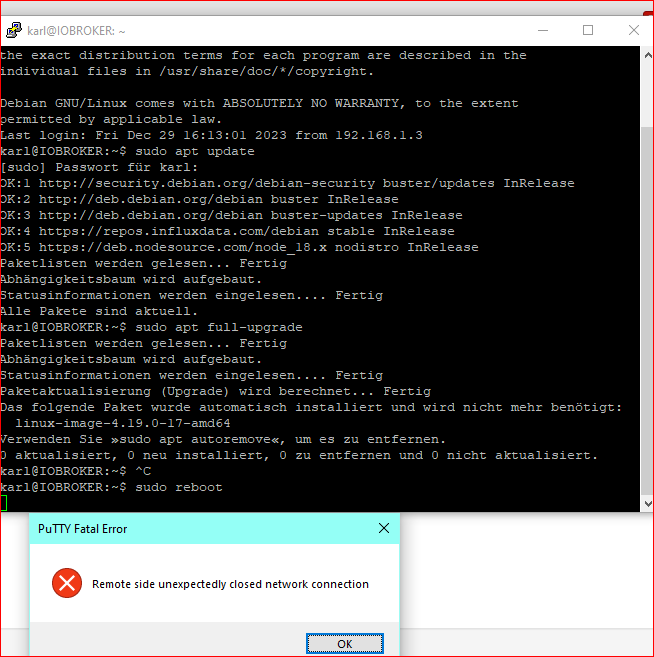

Hey! Du scheinst an dieser Unterhaltung interessiert zu sein, hast aber noch kein Konto.
Hast du es satt, bei jedem Besuch durch die gleichen Beiträge zu scrollen? Wenn du dich für ein Konto anmeldest, kommst du immer genau dorthin zurück, wo du zuvor warst, und kannst dich über neue Antworten benachrichtigen lassen (entweder per E-Mail oder Push-Benachrichtigung). Du kannst auch Lesezeichen speichern und Beiträge positiv bewerten, um anderen Community-Mitgliedern deine Wertschätzung zu zeigen.
Mit deinem Input könnte dieser Beitrag noch besser werden 💗
Registrieren AnmeldenSupport us
466
Online33.0k
Benutzer83.3k
Themen1.3m
Beiträge