
NEWS




Raspberry Pi OS Lite 'Bookworm' ist da.
-
@mickym sagte in Raspberry Pi OS Lite 'Bookworm' ist da.:
der Port frei ist ohne das ich an der FritzBox was geändert habe.
Vorab: wenn du zensiert, dann besser richtig, Hostname/IP-Adresse sind noch zu sehen. :-)
Wenn ich das richtig sehe, hast du einen IPv6 only Anschluss, richtig?
Kannst Du mal prüfen, ob die IP-Adresse in der Fritzbox (unter Freigaben), die Namensauflösung mit "abcd:ef......myfritz.net", sowie die 200x:... IPv6-Adresse auf deinem Raspi übereinstimmen?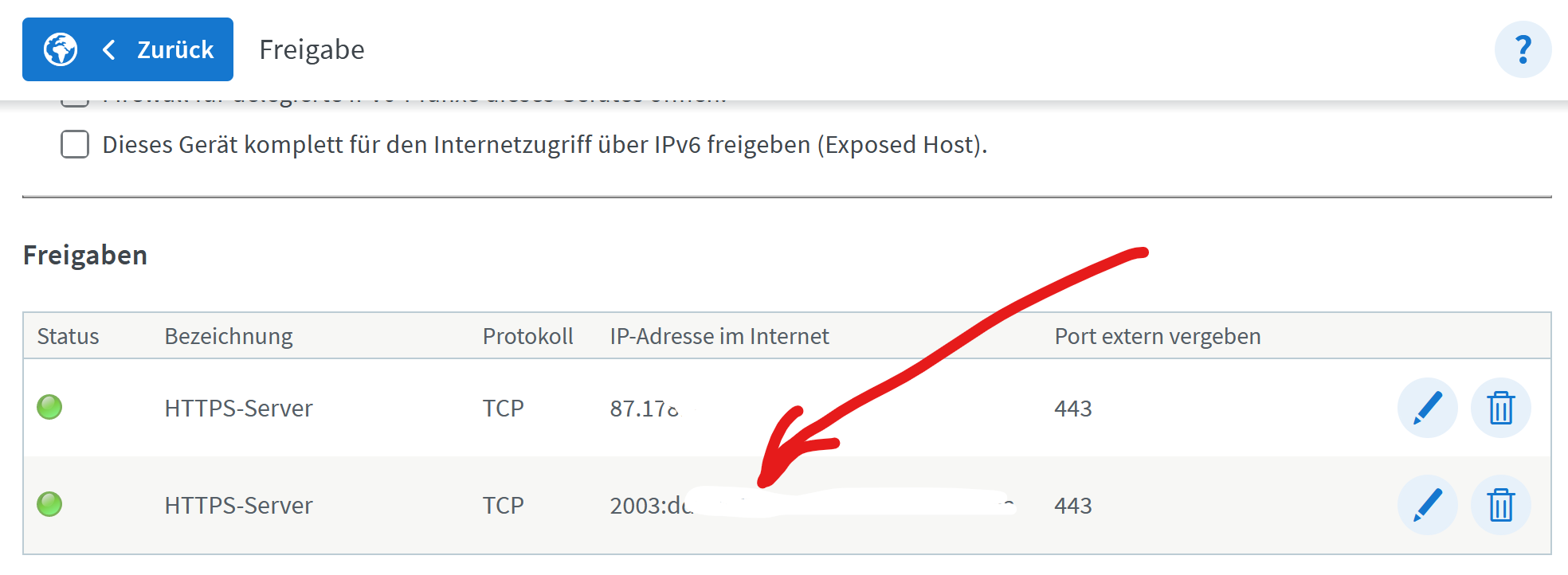
@marc-berg Ja das passt - habe ich alles schon geprüft - aber danke dass Du mich darauf aufmerksam gemacht hast, wegen dem Schwärzen.

Wie gesagt an der FritzBox liegt es definitiv nicht - das hat auch super funktioniert bis vor dem Update und das seit Jahren. Ja und ich habe auch eins DS-Lite anschluss und habe es mit IPv6 und einem Port Mapper über IPv4 gemacht.Das hat irgendwas mit der Umstellung auf diesen Network Manager zu tun. Ich werde ihn mal deinstallieren - mal schauen, was dann passiert.
Jeder Flow bzw. jedes Script, das ich hier poste implementiert jeder auf eigene Gefahr. Flows und Scripts können Fehler aufweisen und weder der Seitenbetreiber noch ich persönlich können hierfür haftbar gemacht werden. Das gleiche gilt für Empfehlungen aller Art.
-
@marc-berg Ja das passt - habe ich alles schon geprüft - aber danke dass Du mich darauf aufmerksam gemacht hast, wegen dem Schwärzen.
Wie gesagt an der FritzBox liegt es definitiv nicht - das hat auch super funktioniert bis vor dem Update und das seit Jahren. Ja und ich habe auch eins DS-Lite anschluss und habe es mit IPv6 und einem Port Mapper über IPv4 gemacht.Das hat irgendwas mit der Umstellung auf diesen Network Manager zu tun. Ich werde ihn mal deinstallieren - mal schauen, was dann passiert.
Ich werde wahnsinning - ja dieser blöde Netzwerk Manager war das Problem
So wenn man den in Zukunft nutzen soll - darf ich jetzt wohl suchen, wie man dieses Teil wieder konfiguriert - das kann doch nicht ... sein. Ich hasse so was.
Das macht mich ehrlich wahnsinnig - dass sowas bei diesen Updates gemacht wird. Ich darf eh meine ganzen selbst erstellten Zertifikate neu machen - weil wohl die Verschlüsselung zu schwach ist. Sicherheit in Ehren - aber man muss ja erstmal lernen.
Jeder Flow bzw. jedes Script, das ich hier poste implementiert jeder auf eigene Gefahr. Flows und Scripts können Fehler aufweisen und weder der Seitenbetreiber noch ich persönlich können hierfür haftbar gemacht werden. Das gleiche gilt für Empfehlungen aller Art.
-
Ich werde wahnsinning - ja dieser blöde Netzwerk Manager war das Problem
So wenn man den in Zukunft nutzen soll - darf ich jetzt wohl suchen, wie man dieses Teil wieder konfiguriert - das kann doch nicht ... sein. Ich hasse so was.
Das macht mich ehrlich wahnsinnig - dass sowas bei diesen Updates gemacht wird. Ich darf eh meine ganzen selbst erstellten Zertifikate neu machen - weil wohl die Verschlüsselung zu schwach ist. Sicherheit in Ehren - aber man muss ja erstmal lernen.
@mickym das weisseln musst du noch lernen!
:grin:EDIT:
Ich hab den link Absichtlich zerstört! -
Ich werde wahnsinning - ja dieser blöde Netzwerk Manager war das Problem
So wenn man den in Zukunft nutzen soll - darf ich jetzt wohl suchen, wie man dieses Teil wieder konfiguriert - das kann doch nicht ... sein. Ich hasse so was.
Das macht mich ehrlich wahnsinnig - dass sowas bei diesen Updates gemacht wird. Ich darf eh meine ganzen selbst erstellten Zertifikate neu machen - weil wohl die Verschlüsselung zu schwach ist. Sicherheit in Ehren - aber man muss ja erstmal lernen.
@mickym sagte in Raspberry Pi OS Lite 'Bookworm' ist da.:
ja dieser blöde Netzwerk Manager war das Problem
Ich könnte mir vorstellen, dass die "Privacy Extensions" des Network Manager zugeschlagen haben, die sind aber im default deaktiviert.. Ist aber reine Spekulation.
/etc/systemd/networkd.conf.d/ipv6-privacy-extensions.conf
-
@mickym das weisseln musst du noch lernen!
:grin:EDIT:
Ich hab den link Absichtlich zerstört!@homoran sagte in Raspberry Pi OS Lite 'Bookworm' ist da.:
@mickym das weisseln musst du noch lernen!
:grin:Ich hoffe ich habe nun alles überstrichen. Oder ist noch was übrig???
Jeder Flow bzw. jedes Script, das ich hier poste implementiert jeder auf eigene Gefahr. Flows und Scripts können Fehler aufweisen und weder der Seitenbetreiber noch ich persönlich können hierfür haftbar gemacht werden. Das gleiche gilt für Empfehlungen aller Art.
-
@homoran sagte in Raspberry Pi OS Lite 'Bookworm' ist da.:
@mickym das weisseln musst du noch lernen!
:grin:Ich hoffe ich habe nun alles überstrichen. Oder ist noch was übrig???
@mickym sagte in Raspberry Pi OS Lite 'Bookworm' ist da.:
ist noch was übrig
deswegen zum 2.mal zerstört
kein Support per PN! - Fragen im Forum stellen - es gibt fast nichts, was nicht auch für andere interessant ist.
Benutzt das Voting rechts unten im Beitrag wenn er euch geholfen hat.
der Installationsfixer: curl -fsL https://iobroker.net/fix.sh | bash -
-
@mickym sagte in Raspberry Pi OS Lite 'Bookworm' ist da.:
ist noch was übrig
deswegen zum 2.mal zerstört
-
@reutli
Richtig. Slave ist ein Raspi 3b. Die SD-Karte habe ich gesichert und zur Seite gelegt. Ich habe eine neue SD mit den PI-OS 64 Bit bespielt und dort iobroker installiert. Dann alle Adapter wie @Homoran beschrieben entfernt.IP und Name der Maschine sind gleichgeblieben.
Das Update beim Master verlief über den normalen Update Prozess. Hier hat sich ja nichts geändert.
Backup paranoid:
iobroker backup
iobroker backitup (täglich ins SAN)
Proxmox Backup auf eine andere NFS Freigabe
Snapshot auf dem Proxmox.Ich habe davon nichts benötigt!
Der nächste Step ist die Migration der VM ioBroker Master in einen Proxmox LXC Container. Dazu lese ich mich gerade ein um die USB Adapter in den LXC durchreichen zu können.
So jetzt hänge ich bei der Slave Geschichte.
Was habe ich gemacht:- neue SD Karte mit bookworm Image erstellt
- gleicher Hostname und IP
- iobroker auf Slave installiert
pi@iobroker2:~ $ curl -sLf https://iobroker.net/install.sh | bash - library: loaded Library version=2023-10-13 ========================================================================== Welcome to the ioBroker installer! Installer version: 2023-10-13 You might need to enter your password a couple of times. ========================================================================== ========================================================================== Installing prerequisites (1/4) ========================================================================== Hit:1 http://deb.debian.org/debian bookworm InRelease Get:2 http://deb.debian.org/debian-security bookworm-security InRelease [48.0 kB] Get:3 http://archive.raspberrypi.com/debian bookworm InRelease [23.6 kB] Get:4 http://deb.debian.org/debian bookworm-updates InRelease [52.1 kB] Get:5 http://deb.debian.org/debian-security bookworm-security/main arm64 Packages [77.0 kB] Get:6 http://deb.debian.org/debian-security bookworm-security/main armhf Packages [74.5 kB] Get:7 http://deb.debian.org/debian-security bookworm-security/main Translation-en [46.0 kB] Get:8 http://archive.raspberrypi.com/debian bookworm/main arm64 Packages [337 kB] Get:9 http://archive.raspberrypi.com/debian bookworm/main armhf Packages [345 kB] Fetched 1,003 kB in 3s (386 kB/s) Reading package lists... Done N: Repository 'http://archive.raspberrypi.com/debian bookworm InRelease' changed its 'Suite' value from 'testing' to 'stable' ========================================================================== Node.js not found. Installing... ========================================================================== Hit:1 http://archive.raspberrypi.com/debian bookworm InRelease Hit:2 http://deb.debian.org/debian bookworm InRelease Hit:3 http://deb.debian.org/debian-security bookworm-security InRelease Hit:4 http://deb.debian.org/debian bookworm-updates InRelease Reading package lists... Done Reading package lists... Done Building dependency tree... Done Reading state information... Done ca-certificates is already the newest version (20230311). gnupg is already the newest version (2.2.40-1.1). gnupg set to manually installed. The following packages will be upgraded: curl libcurl3-gnutls libcurl4 3 upgraded, 0 newly installed, 0 to remove and 11 not upgraded. Need to get 1,035 kB of archives. After this operation, 0 B of additional disk space will be used. Get:1 http://deb.debian.org/debian-security bookworm-security/main arm64 curl arm64 7.88.1-10+deb12u4 [308 kB] Get:2 http://deb.debian.org/debian-security bookworm-security/main arm64 libcurl4 arm64 7.88.1-10+deb12u4 [366 kB] Get:3 http://deb.debian.org/debian-security bookworm-security/main arm64 libcurl3-gnutls arm64 7.88.1-10+deb12u4 [361 kB] Fetched 1,035 kB in 0s (3,235 kB/s) apt-listchanges: Reading changelogs... (Reading database ... 55058 files and directories currently installed.) Preparing to unpack .../curl_7.88.1-10+deb12u4_arm64.deb ... Unpacking curl (7.88.1-10+deb12u4) over (7.88.1-10+deb12u3) ... Preparing to unpack .../libcurl4_7.88.1-10+deb12u4_arm64.deb ... Unpacking libcurl4:arm64 (7.88.1-10+deb12u4) over (7.88.1-10+deb12u3) ... Preparing to unpack .../libcurl3-gnutls_7.88.1-10+deb12u4_arm64.deb ... Unpacking libcurl3-gnutls:arm64 (7.88.1-10+deb12u4) over (7.88.1-10+deb12u3) ... Setting up libcurl3-gnutls:arm64 (7.88.1-10+deb12u4) ... Setting up libcurl4:arm64 (7.88.1-10+deb12u4) ... Setting up curl (7.88.1-10+deb12u4) ... Processing triggers for man-db (2.11.2-2) ... Processing triggers for libc-bin (2.36-9+rpt2+deb12u3) ... deb [signed-by=/etc/apt/keyrings/nodesource.gpg] https://deb.nodesource.com/node_18.x nodistro main Processing triggers for man-db (2.11.2-2) ...ource1_arm64.deb ...led.) Installed nodejs Node.js Installed successfully! Changing npm registry to https://registry.npmjs.org Processing triggers for man-db (2.11.2-2) ...arm64.deb ... installed.) Installed acl Setting up libavahi-compat-libdnssd-dev:arm64 (0.8-10) ...-10_arm64.deb ... Installed libavahi-compat-libdnssd-dev Processing triggers for man-db (2.11.2-2) ...1) ...1_arm64.deb ...ed.) Installed libudev-dev Processing triggers for libc-bin (2.36-9+rpt2+deb12u3) .....m64.deb ...pt2) ... Installed libpam0g-dev Processing triggers for man-db (2.11.2-2) ...m64.deb ......installed.) Installed git Extracting templates from packages: 100% Setting up libcairo2-dev:arm64 (1.16.0-7+rpt1) ....u3) ...t1) .........rm64.deb ... Installed libcairo2-dev Processing triggers for libc-bin (2.36-9+rpt2+deb12u3) ...m64.deb ... .... Installed libpango1.0-dev Setting up libjpeg-dev:arm64 (1:2.1.5-2) ...5-2) ...4.deb ....deb ...) Installed libjpeg-dev Processing triggers for libc-bin (2.36-9+rpt2+deb12u3) ... installed.) Installed libgif-dev Processing triggers for libgdk-pixbuf-2.0-0:arm64 (2.42.10+dfsg-1+b1) .......... Installed librsvg2-dev Processing triggers for libc-bin (2.36-9+rpt2+deb12u3) .....nstalled.) Installed cmake ========================================================================== Creating ioBroker user and directory (2/4) ========================================================================== User iobroker created Created /etc/sudoers.d/iobroker Directory /opt/iobroker created ========================================================================== Installing ioBroker (3/4) ========================================================================== ========================================================================== Finalizing installation (4/4) ========================================================================== Enabling autostart... Created symlink /etc/systemd/system/multi-user.target.wants/iobroker.service → /lib/systemd/system/iobroker.service. Autostart enabled! Fixing directory permissions... ========================================================================== ioBroker was installed successfully Open http://192.168.200.42:8081 in a browser and start configuring! ========================================================================== You need to re-login before doing anything else on the console!- Update gemacht
pi@iobroker2:~ $ sudo apt update Hit:1 http://archive.raspberrypi.com/debian bookworm InRelease Hit:2 http://deb.debian.org/debian bookworm InRelease Hit:3 http://deb.debian.org/debian-security bookworm-security InRelease Hit:4 http://deb.debian.org/debian bookworm-updates InRelease Hit:5 https://deb.nodesource.com/node_18.x nodistro InRelease Reading package lists... Done Building dependency tree... Done Reading state information... Done 6 packages can be upgraded. Run 'apt list --upgradable' to see them. pi@iobroker2:~ $ sudo apt full-upgrade Reading package lists... Done Building dependency tree... Done Reading state information... Done Calculating upgrade... Done The following packages will be upgraded: libssl3 libwbclient0 openssl raspberrypi-net-mods raspi-config raspi-utils 6 upgraded, 0 newly installed, 0 to remove and 0 not upgraded. Need to get 3,342 kB of archives. After this operation, 57.3 kB of additional disk space will be used. Do you want to continue? [Y/n] Y Get:1 http://archive.raspberrypi.com/debian bookworm/main arm64 libssl3 arm64 3.0.11-1~deb12u1+rpt1 [1,808 kB] Get:2 http://deb.debian.org/debian-security bookworm-security/main arm64 libwbclient0 arm64 2:4.17.12+dfsg-0+deb12u1 [52.8 kB] Get:3 http://archive.raspberrypi.com/debian bookworm/main arm64 openssl arm64 3.0.11-1~deb12u1+rpt1 [1,384 kB] Get:4 http://archive.raspberrypi.com/debian bookworm/main arm64 raspi-config all 20231013 [29.4 kB] Get:5 http://archive.raspberrypi.com/debian bookworm/main arm64 raspberrypi-net-mods all 1.4.0 [2,160 B] Get:6 http://archive.raspberrypi.com/debian bookworm/main arm64 raspi-utils arm64 20231013-1 [65.8 kB] Fetched 3,342 kB in 1s (4,305 kB/s) Reading changelogs... Done (Reading database ... 68262 files and directories currently installed.) Preparing to unpack .../0-libssl3_3.0.11-1~deb12u1+rpt1_arm64.deb ... Unpacking libssl3:arm64 (3.0.11-1~deb12u1+rpt1) over (3.0.11-1~deb12u1) ... Preparing to unpack .../1-libwbclient0_2%3a4.17.12+dfsg-0+deb12u1_arm64.deb ... Unpacking libwbclient0:arm64 (2:4.17.12+dfsg-0+deb12u1) over (2:4.17.11+dfsg-0+deb12u1) ... Preparing to unpack .../2-openssl_3.0.11-1~deb12u1+rpt1_arm64.deb ... Unpacking openssl (3.0.11-1~deb12u1+rpt1) over (3.0.11-1~deb12u1) ... Preparing to unpack .../3-raspi-config_20231013_all.deb ... Unpacking raspi-config (20231013) over (20231009) ... Preparing to unpack .../4-raspberrypi-net-mods_1.4.0_all.deb ... Unpacking raspberrypi-net-mods (1.4.0) over (1.3.4) ... Preparing to unpack .../5-raspi-utils_20231013-1_arm64.deb ... Unpacking raspi-utils (20231013-1) over (20230922+1-1~rc1) ... Setting up libssl3:arm64 (3.0.11-1~deb12u1+rpt1) ... Setting up raspi-utils (20231013-1) ... Setting up libwbclient0:arm64 (2:4.17.12+dfsg-0+deb12u1) ... Setting up openssl (3.0.11-1~deb12u1+rpt1) ... Setting up raspi-config (20231013) ... Setting up raspberrypi-net-mods (1.4.0) ... Processing triggers for man-db (2.11.2-2) ... Processing triggers for libc-bin (2.36-9+rpt2+deb12u3) ... pi@iobroker2:~ $ sudo reboot Broadcast message from root@iobroker2 on pts/1 (Sun 2023-10-15 17:47:04 CEST): The system will reboot now!- alle Adapter gelöscht - Ergebnis:
pi@iobroker2:~ $ iob list adapters pi@iobroker2:~ $ iob list adapters- Multihost Connect versucht - keine Reaktion auch nach langer Zeit:
pi@iobroker2:~ $ iobroker multihost connect- dann config versucht - keine Reaktion
iob setup custom Current configuration: - Objects database: - Type: jsonl - Host/Unix Socket: 127.0.0.1 - Port: 9001 - States database: - Type: jsonl - Host/Unix Socket: 127.0.0.1 - Port: 9000 - Data Directory: ../../iobroker-data/ Type of objects DB [(j)sonl, (f)ile, (r)edis, ...], default [jsonl]: Host / Unix Socket of objects DB(jsonl), default[127.0.0.1]: 192.168.200.5 Port of objects DB(jsonl), default[9001]: Type of states DB [(j)sonl, (f)file, (r)edis, ...], default [jsonl]: Host / Unix Socket of states DB (jsonl), default[192.168.200.5]: Port of states DB (jsonl), default[9000]: Host name of this machine [iobroker2]: updating conf/iobroker.json pi@iobroker2:~ $ iobroker multihost connect- reboot und nochmals versucht (hier steht die Maschine nun ohne weitere Reaktion):
pi@iobroker2:~ $ sudo reboot

Broadcast message from root@iobroker2 on pts/1 (Sun 2023-10-15 18:12:16 CEST):

The system will reboot now!

pi@iobroker2:~ $ Connection to 192.168.200.42 closed by remote host.
Connection to 192.168.200.42 closed.
micha@iMac-Micha ~ % ssh pi@192.168.200.42
pi@192.168.200.42's password:
Linux iobroker2 6.1.0-rpi4-rpi-v8 #1 SMP PREEMPT Debian 1:6.1.54-1+rpt2 (2023-10-05) aarch64

The programs included with the Debian GNU/Linux system are free software;
the exact distribution terms for each program are described in the
individual files in /usr/share/doc/*/copyright.

Debian GNU/Linux comes with ABSOLUTELY NO WARRANTY, to the extent
permitted by applicable law.
Last login: Sun Oct 15 17:50:25 2023 from 192.168.200.167
pi@iobroker2:~ $ iobroker multihost connect
Zusätzlich auf dem Master:
admin@macmini-iobroker:~$ iob multihost enable
Multihost discovery server activated on this host. If iobroker is currently not running please start befeore trying to discover this host.
Important: Multihost discovery works with UDP packets. Make sure they are routed correctly in your network. If you use Docker you also need to configure this correctly.
Multihost discovery will be automatically deactivated after 15 minutes. If you want to activate it permanently use the --persist flag
Discovery authentication activated.
Enter secret phrase for connection:
Repeat secret phrase for connection:
Please check the binding of the configured jsonl server to allow remote connections.
Please restart ioBroker for the changes to take effect: "iobroker restart"


Multihost discovery server: enabled
Discovery authentication:   enabled
Persistent activation:      disabled
Objects:                    jsonl on 0.0.0.0
States:                     jsonl on 0.0.0.0


sudo reboot
^C
admin@macmini-iobroker:~$ sudo reboot
[sudo] Passwort für admin:
Connection to 192.168.200.5 closed by remote host.
Connection to 192.168.200.5 closed.
micha@iMac-Micha ~ % ssh admin@192.168.200.5
admin@192.168.200.5's password:
Linux macmini-iobroker 5.10.0-26-amd64 #1 SMP Debian 5.10.197-1 (2023-09-29) x86_64

The programs included with the Debian GNU/Linux system are free software;
the exact distribution terms for each program are described in the
individual files in /usr/share/doc/*/copyright.

Debian GNU/Linux comes with ABSOLUTELY NO WARRANTY, to the extent
permitted by applicable law.
Last login: Sun Oct 15 18:09:41 2023 from 192.168.200.167
admin@macmini-iobroker:~$ iob status
iobroker is running on this host.


Objects type: jsonl
States  type: jsonl
admin@macmini-iobroker:~$ iob multihost status
Please check the binding of the configured jsonl server to allow remote connections.
No configuration change needed.


Multihost discovery server: enabled
Discovery authentication:   enabled
Persistent activation:      disabled
Objects:                    jsonl on 0.0.0.0
States:                     jsonl on 0.0.0.0
admin@macmini-iobroker:~$
Jetzt habe ich keine Idee mehr, wie ich den Slave reinbekomme...
BITTE BEACHTET DOCH DAS: https://forum.iobroker.net/topic/51555/hinweise-für-gute-forenbeiträge
iobroker in Debian-VM auf Proxmox Server (Ryzen 7 / 32GB / 1TB NVMe SSD) als Master - mehrere Raspberry Pis (3+4) als Slaves. InfluxDB V2 und Grafana auf LXC.*Wer freundlich ist, dem wird freundlich geholfen *
-
@mickym sagte in Raspberry Pi OS Lite 'Bookworm' ist da.:
ja dieser blöde Netzwerk Manager war das Problem
Ich könnte mir vorstellen, dass die "Privacy Extensions" des Network Manager zugeschlagen haben, die sind aber im default deaktiviert.. Ist aber reine Spekulation.
/etc/systemd/networkd.conf.d/ipv6-privacy-extensions.conf
@marc-berg Na ja ich weiß jedenfalls wo ich suchen muss - aber da werden wohl wieder einige drüber stolpern. Ich bekomm da echt die Krise.
Hier ist die Lösung: https://forum.iobroker.net/topic/69165/raspberry-networkmanager-keine-ipv6-verbindung-von-extern
-
So jetzt hänge ich bei der Slave Geschichte.
Was habe ich gemacht:- neue SD Karte mit bookworm Image erstellt
- gleicher Hostname und IP
- iobroker auf Slave installiert
pi@iobroker2:~ $ curl -sLf https://iobroker.net/install.sh | bash - library: loaded Library version=2023-10-13 ========================================================================== Welcome to the ioBroker installer! Installer version: 2023-10-13 You might need to enter your password a couple of times. ========================================================================== ========================================================================== Installing prerequisites (1/4) ========================================================================== Hit:1 http://deb.debian.org/debian bookworm InRelease Get:2 http://deb.debian.org/debian-security bookworm-security InRelease [48.0 kB] Get:3 http://archive.raspberrypi.com/debian bookworm InRelease [23.6 kB] Get:4 http://deb.debian.org/debian bookworm-updates InRelease [52.1 kB] Get:5 http://deb.debian.org/debian-security bookworm-security/main arm64 Packages [77.0 kB] Get:6 http://deb.debian.org/debian-security bookworm-security/main armhf Packages [74.5 kB] Get:7 http://deb.debian.org/debian-security bookworm-security/main Translation-en [46.0 kB] Get:8 http://archive.raspberrypi.com/debian bookworm/main arm64 Packages [337 kB] Get:9 http://archive.raspberrypi.com/debian bookworm/main armhf Packages [345 kB] Fetched 1,003 kB in 3s (386 kB/s) Reading package lists... Done N: Repository 'http://archive.raspberrypi.com/debian bookworm InRelease' changed its 'Suite' value from 'testing' to 'stable' ========================================================================== Node.js not found. Installing... ========================================================================== Hit:1 http://archive.raspberrypi.com/debian bookworm InRelease Hit:2 http://deb.debian.org/debian bookworm InRelease Hit:3 http://deb.debian.org/debian-security bookworm-security InRelease Hit:4 http://deb.debian.org/debian bookworm-updates InRelease Reading package lists... Done Reading package lists... Done Building dependency tree... Done Reading state information... Done ca-certificates is already the newest version (20230311). gnupg is already the newest version (2.2.40-1.1). gnupg set to manually installed. The following packages will be upgraded: curl libcurl3-gnutls libcurl4 3 upgraded, 0 newly installed, 0 to remove and 11 not upgraded. Need to get 1,035 kB of archives. After this operation, 0 B of additional disk space will be used. Get:1 http://deb.debian.org/debian-security bookworm-security/main arm64 curl arm64 7.88.1-10+deb12u4 [308 kB] Get:2 http://deb.debian.org/debian-security bookworm-security/main arm64 libcurl4 arm64 7.88.1-10+deb12u4 [366 kB] Get:3 http://deb.debian.org/debian-security bookworm-security/main arm64 libcurl3-gnutls arm64 7.88.1-10+deb12u4 [361 kB] Fetched 1,035 kB in 0s (3,235 kB/s) apt-listchanges: Reading changelogs... (Reading database ... 55058 files and directories currently installed.) Preparing to unpack .../curl_7.88.1-10+deb12u4_arm64.deb ... Unpacking curl (7.88.1-10+deb12u4) over (7.88.1-10+deb12u3) ... Preparing to unpack .../libcurl4_7.88.1-10+deb12u4_arm64.deb ... Unpacking libcurl4:arm64 (7.88.1-10+deb12u4) over (7.88.1-10+deb12u3) ... Preparing to unpack .../libcurl3-gnutls_7.88.1-10+deb12u4_arm64.deb ... Unpacking libcurl3-gnutls:arm64 (7.88.1-10+deb12u4) over (7.88.1-10+deb12u3) ... Setting up libcurl3-gnutls:arm64 (7.88.1-10+deb12u4) ... Setting up libcurl4:arm64 (7.88.1-10+deb12u4) ... Setting up curl (7.88.1-10+deb12u4) ... Processing triggers for man-db (2.11.2-2) ... Processing triggers for libc-bin (2.36-9+rpt2+deb12u3) ... deb [signed-by=/etc/apt/keyrings/nodesource.gpg] https://deb.nodesource.com/node_18.x nodistro main Processing triggers for man-db (2.11.2-2) ...ource1_arm64.deb ...led.) Installed nodejs Node.js Installed successfully! Changing npm registry to https://registry.npmjs.org Processing triggers for man-db (2.11.2-2) ...arm64.deb ... installed.) Installed acl Setting up libavahi-compat-libdnssd-dev:arm64 (0.8-10) ...-10_arm64.deb ... Installed libavahi-compat-libdnssd-dev Processing triggers for man-db (2.11.2-2) ...1) ...1_arm64.deb ...ed.) Installed libudev-dev Processing triggers for libc-bin (2.36-9+rpt2+deb12u3) .....m64.deb ...pt2) ... Installed libpam0g-dev Processing triggers for man-db (2.11.2-2) ...m64.deb ......installed.) Installed git Extracting templates from packages: 100% Setting up libcairo2-dev:arm64 (1.16.0-7+rpt1) ....u3) ...t1) .........rm64.deb ... Installed libcairo2-dev Processing triggers for libc-bin (2.36-9+rpt2+deb12u3) ...m64.deb ... .... Installed libpango1.0-dev Setting up libjpeg-dev:arm64 (1:2.1.5-2) ...5-2) ...4.deb ....deb ...) Installed libjpeg-dev Processing triggers for libc-bin (2.36-9+rpt2+deb12u3) ... installed.) Installed libgif-dev Processing triggers for libgdk-pixbuf-2.0-0:arm64 (2.42.10+dfsg-1+b1) .......... Installed librsvg2-dev Processing triggers for libc-bin (2.36-9+rpt2+deb12u3) .....nstalled.) Installed cmake ========================================================================== Creating ioBroker user and directory (2/4) ========================================================================== User iobroker created Created /etc/sudoers.d/iobroker Directory /opt/iobroker created ========================================================================== Installing ioBroker (3/4) ========================================================================== ========================================================================== Finalizing installation (4/4) ========================================================================== Enabling autostart... Created symlink /etc/systemd/system/multi-user.target.wants/iobroker.service → /lib/systemd/system/iobroker.service. Autostart enabled! Fixing directory permissions... ========================================================================== ioBroker was installed successfully Open http://192.168.200.42:8081 in a browser and start configuring! ========================================================================== You need to re-login before doing anything else on the console!- Update gemacht
pi@iobroker2:~ $ sudo apt update Hit:1 http://archive.raspberrypi.com/debian bookworm InRelease Hit:2 http://deb.debian.org/debian bookworm InRelease Hit:3 http://deb.debian.org/debian-security bookworm-security InRelease Hit:4 http://deb.debian.org/debian bookworm-updates InRelease Hit:5 https://deb.nodesource.com/node_18.x nodistro InRelease Reading package lists... Done Building dependency tree... Done Reading state information... Done 6 packages can be upgraded. Run 'apt list --upgradable' to see them. pi@iobroker2:~ $ sudo apt full-upgrade Reading package lists... Done Building dependency tree... Done Reading state information... Done Calculating upgrade... Done The following packages will be upgraded: libssl3 libwbclient0 openssl raspberrypi-net-mods raspi-config raspi-utils 6 upgraded, 0 newly installed, 0 to remove and 0 not upgraded. Need to get 3,342 kB of archives. After this operation, 57.3 kB of additional disk space will be used. Do you want to continue? [Y/n] Y Get:1 http://archive.raspberrypi.com/debian bookworm/main arm64 libssl3 arm64 3.0.11-1~deb12u1+rpt1 [1,808 kB] Get:2 http://deb.debian.org/debian-security bookworm-security/main arm64 libwbclient0 arm64 2:4.17.12+dfsg-0+deb12u1 [52.8 kB] Get:3 http://archive.raspberrypi.com/debian bookworm/main arm64 openssl arm64 3.0.11-1~deb12u1+rpt1 [1,384 kB] Get:4 http://archive.raspberrypi.com/debian bookworm/main arm64 raspi-config all 20231013 [29.4 kB] Get:5 http://archive.raspberrypi.com/debian bookworm/main arm64 raspberrypi-net-mods all 1.4.0 [2,160 B] Get:6 http://archive.raspberrypi.com/debian bookworm/main arm64 raspi-utils arm64 20231013-1 [65.8 kB] Fetched 3,342 kB in 1s (4,305 kB/s) Reading changelogs... Done (Reading database ... 68262 files and directories currently installed.) Preparing to unpack .../0-libssl3_3.0.11-1~deb12u1+rpt1_arm64.deb ... Unpacking libssl3:arm64 (3.0.11-1~deb12u1+rpt1) over (3.0.11-1~deb12u1) ... Preparing to unpack .../1-libwbclient0_2%3a4.17.12+dfsg-0+deb12u1_arm64.deb ... Unpacking libwbclient0:arm64 (2:4.17.12+dfsg-0+deb12u1) over (2:4.17.11+dfsg-0+deb12u1) ... Preparing to unpack .../2-openssl_3.0.11-1~deb12u1+rpt1_arm64.deb ... Unpacking openssl (3.0.11-1~deb12u1+rpt1) over (3.0.11-1~deb12u1) ... Preparing to unpack .../3-raspi-config_20231013_all.deb ... Unpacking raspi-config (20231013) over (20231009) ... Preparing to unpack .../4-raspberrypi-net-mods_1.4.0_all.deb ... Unpacking raspberrypi-net-mods (1.4.0) over (1.3.4) ... Preparing to unpack .../5-raspi-utils_20231013-1_arm64.deb ... Unpacking raspi-utils (20231013-1) over (20230922+1-1~rc1) ... Setting up libssl3:arm64 (3.0.11-1~deb12u1+rpt1) ... Setting up raspi-utils (20231013-1) ... Setting up libwbclient0:arm64 (2:4.17.12+dfsg-0+deb12u1) ... Setting up openssl (3.0.11-1~deb12u1+rpt1) ... Setting up raspi-config (20231013) ... Setting up raspberrypi-net-mods (1.4.0) ... Processing triggers for man-db (2.11.2-2) ... Processing triggers for libc-bin (2.36-9+rpt2+deb12u3) ... pi@iobroker2:~ $ sudo reboot Broadcast message from root@iobroker2 on pts/1 (Sun 2023-10-15 17:47:04 CEST): The system will reboot now!- alle Adapter gelöscht - Ergebnis:
pi@iobroker2:~ $ iob list adapters pi@iobroker2:~ $ iob list adapters- Multihost Connect versucht - keine Reaktion auch nach langer Zeit:
pi@iobroker2:~ $ iobroker multihost connect- dann config versucht - keine Reaktion
iob setup custom Current configuration: - Objects database: - Type: jsonl - Host/Unix Socket: 127.0.0.1 - Port: 9001 - States database: - Type: jsonl - Host/Unix Socket: 127.0.0.1 - Port: 9000 - Data Directory: ../../iobroker-data/ Type of objects DB [(j)sonl, (f)ile, (r)edis, ...], default [jsonl]: Host / Unix Socket of objects DB(jsonl), default[127.0.0.1]: 192.168.200.5 Port of objects DB(jsonl), default[9001]: Type of states DB [(j)sonl, (f)file, (r)edis, ...], default [jsonl]: Host / Unix Socket of states DB (jsonl), default[192.168.200.5]: Port of states DB (jsonl), default[9000]: Host name of this machine [iobroker2]: updating conf/iobroker.json pi@iobroker2:~ $ iobroker multihost connect- reboot und nochmals versucht (hier steht die Maschine nun ohne weitere Reaktion):
pi@iobroker2:~ $ sudo reboot

Broadcast message from root@iobroker2 on pts/1 (Sun 2023-10-15 18:12:16 CEST):

The system will reboot now!

pi@iobroker2:~ $ Connection to 192.168.200.42 closed by remote host.
Connection to 192.168.200.42 closed.
micha@iMac-Micha ~ % ssh pi@192.168.200.42
pi@192.168.200.42's password:
Linux iobroker2 6.1.0-rpi4-rpi-v8 #1 SMP PREEMPT Debian 1:6.1.54-1+rpt2 (2023-10-05) aarch64

The programs included with the Debian GNU/Linux system are free software;
the exact distribution terms for each program are described in the
individual files in /usr/share/doc/*/copyright.

Debian GNU/Linux comes with ABSOLUTELY NO WARRANTY, to the extent
permitted by applicable law.
Last login: Sun Oct 15 17:50:25 2023 from 192.168.200.167
pi@iobroker2:~ $ iobroker multihost connect
Zusätzlich auf dem Master:
admin@macmini-iobroker:~$ iob multihost enable
Multihost discovery server activated on this host. If iobroker is currently not running please start befeore trying to discover this host.
Important: Multihost discovery works with UDP packets. Make sure they are routed correctly in your network. If you use Docker you also need to configure this correctly.
Multihost discovery will be automatically deactivated after 15 minutes. If you want to activate it permanently use the --persist flag
Discovery authentication activated.
Enter secret phrase for connection:
Repeat secret phrase for connection:
Please check the binding of the configured jsonl server to allow remote connections.
Please restart ioBroker for the changes to take effect: "iobroker restart"


Multihost discovery server: enabled
Discovery authentication:   enabled
Persistent activation:      disabled
Objects:                    jsonl on 0.0.0.0
States:                     jsonl on 0.0.0.0


sudo reboot
^C
admin@macmini-iobroker:~$ sudo reboot
[sudo] Passwort für admin:
Connection to 192.168.200.5 closed by remote host.
Connection to 192.168.200.5 closed.
micha@iMac-Micha ~ % ssh admin@192.168.200.5
admin@192.168.200.5's password:
Linux macmini-iobroker 5.10.0-26-amd64 #1 SMP Debian 5.10.197-1 (2023-09-29) x86_64

The programs included with the Debian GNU/Linux system are free software;
the exact distribution terms for each program are described in the
individual files in /usr/share/doc/*/copyright.

Debian GNU/Linux comes with ABSOLUTELY NO WARRANTY, to the extent
permitted by applicable law.
Last login: Sun Oct 15 18:09:41 2023 from 192.168.200.167
admin@macmini-iobroker:~$ iob status
iobroker is running on this host.


Objects type: jsonl
States  type: jsonl
admin@macmini-iobroker:~$ iob multihost status
Please check the binding of the configured jsonl server to allow remote connections.
No configuration change needed.


Multihost discovery server: enabled
Discovery authentication:   enabled
Persistent activation:      disabled
Objects:                    jsonl on 0.0.0.0
States:                     jsonl on 0.0.0.0
admin@macmini-iobroker:~$
Jetzt habe ich keine Idee mehr, wie ich den Slave reinbekomme...
@reutli sagte in Raspberry Pi OS Lite 'Bookworm' ist da.:
Jetzt habe ich keine Idee mehr, wie ich den Slave reinbekomme...
welche Node-Version? mit 18.18.0 gabs Probleme
-
@reutli sagte in Raspberry Pi OS Lite 'Bookworm' ist da.:
Jetzt habe ich keine Idee mehr, wie ich den Slave reinbekomme...
welche Node-Version? mit 18.18.0 gabs Probleme
BITTE BEACHTET DOCH DAS: https://forum.iobroker.net/topic/51555/hinweise-für-gute-forenbeiträge
iobroker in Debian-VM auf Proxmox Server (Ryzen 7 / 32GB / 1TB NVMe SSD) als Master - mehrere Raspberry Pis (3+4) als Slaves. InfluxDB V2 und Grafana auf LXC.*Wer freundlich ist, dem wird freundlich geholfen *
-
@reutli sagte in Raspberry Pi OS Lite 'Bookworm' ist da.:
auf demSlave:
pi@iobroker2:~ $ node -v v18.18.2und auf dem Master?
-
@reutli
Ich habe es nun für mich gelöst. Das Problem war der io.js-controller. Ich habe ihn auf dem Master auf 5.0.11 und den Slave auf 4.0.24 downgegraded und dann konnte ich den Slave mit dem Master verbinden. Danach war es Easy.
Auf dem Slave habe ich nur 3 Adapter laufen: BLE, SmartMeter und W-MBUS.
Die Einstellungen und die USB-Verbindungen wurden auf dem Slave sauber erkannt. Bluetooth läuft unter Bookworm out of the Box. Keinerlei Verrenkungen mehr mit hciconfig etc.Zu Zigbee kann ich dir keinen Bericht geben, das läuft bei mir auf dem Master (auch Debian 12 Bookworm). Hier ohne Probleme. Der Master wurde aber nur upgedated und nicht neu erstellt.
@reutli
Hast du auch die js-controller downgegraded? Das hat bei mir geholfen.@martybr sagte in Raspberry Pi OS Lite 'Bookworm' ist da.:
@reutli
Ich habe es nun für mich gelöst. Das Problem war der io.js-controller. Ich habe ihn auf dem Master auf 5.0.11 und den Slave auf 4.0.24 downgegraded und dann konnte ich den Slave mit dem Master verbinden. Danach war es Easy.
Auf dem Slave habe ich nur 3 Adapter laufen: BLE, SmartMeter und W-MBUS.
Die Einstellungen und die USB-Verbindungen wurden auf dem Slave sauber erkannt. Bluetooth läuft unter Bookworm out of the Box. Keinerlei Verrenkungen mehr mit hciconfig etc.Zu Zigbee kann ich dir keinen Bericht geben, das läuft bei mir auf dem Master (auch Debian 12 Bookworm). Hier ohne Probleme. Der Master wurde aber nur upgedated und nicht neu erstellt.
Gruß
Martin
Intel NUCs mit Proxmox / Iobroker als VM unter Debian
Raspeberry mit USB Leseköpfen für Smartmeter
Homematic und Homematic IP -
@reutli sagte in Raspberry Pi OS Lite 'Bookworm' ist da.:
auf demSlave:
pi@iobroker2:~ $ node -v v18.18.2und auf dem Master?
-
@reutli
Hast du auch die js-controller downgegraded? Das hat bei mir geholfen.@martybr sagte in Raspberry Pi OS Lite 'Bookworm' ist da.:
@reutli
Ich habe es nun für mich gelöst. Das Problem war der io.js-controller. Ich habe ihn auf dem Master auf 5.0.11 und den Slave auf 4.0.24 downgegraded und dann konnte ich den Slave mit dem Master verbinden. Danach war es Easy.
Auf dem Slave habe ich nur 3 Adapter laufen: BLE, SmartMeter und W-MBUS.
Die Einstellungen und die USB-Verbindungen wurden auf dem Slave sauber erkannt. Bluetooth läuft unter Bookworm out of the Box. Keinerlei Verrenkungen mehr mit hciconfig etc.Zu Zigbee kann ich dir keinen Bericht geben, das läuft bei mir auf dem Master (auch Debian 12 Bookworm). Hier ohne Probleme. Der Master wurde aber nur upgedated und nicht neu erstellt.
@martybr sagte in Raspberry Pi OS Lite 'Bookworm' ist da.:
@martybr sagte in Raspberry Pi OS Lite 'Bookworm' ist da.:
@reutli
Ich habe es nun für mich gelöst. Das Problem war der io.js-controller. Ich habe ihn auf dem Master auf 5.0.11 und den Slave auf 4.0.24 downgegradedwenn notwendig... wie?
Will ich auf'm master ungern machen (da rennt 'ne Menge)...@Homoran reicht der Node-Update?
BITTE BEACHTET DOCH DAS: https://forum.iobroker.net/topic/51555/hinweise-für-gute-forenbeiträge
iobroker in Debian-VM auf Proxmox Server (Ryzen 7 / 32GB / 1TB NVMe SSD) als Master - mehrere Raspberry Pis (3+4) als Slaves. InfluxDB V2 und Grafana auf LXC.*Wer freundlich ist, dem wird freundlich geholfen *
-
@martybr sagte in Raspberry Pi OS Lite 'Bookworm' ist da.:
@martybr sagte in Raspberry Pi OS Lite 'Bookworm' ist da.:
@reutli
Ich habe es nun für mich gelöst. Das Problem war der io.js-controller. Ich habe ihn auf dem Master auf 5.0.11 und den Slave auf 4.0.24 downgegradedwenn notwendig... wie?
Will ich auf'm master ungern machen (da rennt 'ne Menge)...@Homoran reicht der Node-Update?
@reutli ich hab das nicht mehr zu Ende verfolgt.
Ich kann es daher nicht versprechen -
@homoran
Habe auf'm Master nun 18.18.2 leider bleibt das Problem:ioBroker nodejs fixer 2023-10-09 Recommended nodejs-version is: 18.18.2 Checking your installation now. Please be patient! Your current setup is: /usr/bin/nodejs v18.18.2 /usr/bin/node v18.18.2 /usr/bin/npm 9.8.1 /usr/bin/npx 9.8.1 /usr/bin/corepack 0.19.0 We found these nodejs versions available for installation: nodejs: Installed: 18.18.2-1nodesource1 Candidate: 18.18.2-1nodesource1 Version table: *** 18.18.2-1nodesource1 1001 500 https://deb.nodesource.com/node_18.x nodistro/main amd64 Packages 100 /var/lib/dpkg/status 18.18.1-1nodesource1 1001 500 https://deb.nodesource.com/node_18.x nodistro/main amd64 Packages 18.18.0-1nodesource1 1001 500 https://deb.nodesource.com/node_18.x nodistro/main amd64 Packages 18.17.1-1nodesource1 1001 500 https://deb.nodesource.com/node_18.x nodistro/main amd64 Packages 18.17.0-1nodesource1 1001 500 https://deb.nodesource.com/node_18.x nodistro/main amd64 Packages 18.16.1-1nodesource1 1001 500 https://deb.nodesource.com/node_18.x nodistro/main amd64 Packages 18.16.0-1nodesource1 1001 500 https://deb.nodesource.com/node_18.x nodistro/main amd64 Packages 18.15.0-1nodesource1 1001 500 https://deb.nodesource.com/node_18.x nodistro/main amd64 Packages 18.14.2-1nodesource1 1001 500 https://deb.nodesource.com/node_18.x nodistro/main amd64 Packages 18.14.1-1nodesource1 1001 500 https://deb.nodesource.com/node_18.x nodistro/main amd64 Packages 18.14.0-1nodesource1 1001 500 https://deb.nodesource.com/node_18.x nodistro/main amd64 Packages 18.13.0-1nodesource1 1001 500 https://deb.nodesource.com/node_18.x nodistro/main amd64 Packages 18.12.0-1nodesource1 1001 500 https://deb.nodesource.com/node_18.x nodistro/main amd64 Packages 18.11.0-1nodesource1 1001 500 https://deb.nodesource.com/node_18.x nodistro/main amd64 Packages 18.10.0-1nodesource1 1001 500 https://deb.nodesource.com/node_18.x nodistro/main amd64 Packages 18.9.1-1nodesource1 1001 500 https://deb.nodesource.com/node_18.x nodistro/main amd64 Packages 18.9.0-1nodesource1 1001 500 https://deb.nodesource.com/node_18.x nodistro/main amd64 Packages 18.8.0-1nodesource1 1001 500 https://deb.nodesource.com/node_18.x nodistro/main amd64 Packages 18.7.0-1nodesource1 1001 500 https://deb.nodesource.com/node_18.x nodistro/main amd64 Packages 18.6.0-1nodesource1 1001 500 https://deb.nodesource.com/node_18.x nodistro/main amd64 Packages 18.5.0-1nodesource1 1001 500 https://deb.nodesource.com/node_18.x nodistro/main amd64 Packages 18.4.0-1nodesource1 1001 500 https://deb.nodesource.com/node_18.x nodistro/main amd64 Packages 18.3.0-1nodesource1 1001 500 https://deb.nodesource.com/node_18.x nodistro/main amd64 Packages 18.2.0-1nodesource1 1001 500 https://deb.nodesource.com/node_18.x nodistro/main amd64 Packages 18.1.0-1nodesource1 1001 500 https://deb.nodesource.com/node_18.x nodistro/main amd64 Packages 18.0.0-1nodesource1 1001 500 https://deb.nodesource.com/node_18.x nodistro/main amd64 Packages 12.22.12~dfsg-1~deb11u4 500 500 http://deb.debian.org/debian bullseye/main amd64 Packages 500 http://security.debian.org/debian-security bullseye-security/main amd64 Packages Nothing to do - Your installation is using the correct paths. Nothing to do - Your version is the recommended one. ***You can now keep your whole system up-to-date using the usual 'sudo apt update && sudo apt full-upgrade' commands. *** *** DO NOT USE node version managers like 'nvm', 'n' and others in parallel. They will break your current installation! *** *** DO NOT use 'nodejs-update' as part of a regular update process! *** admin@macmini-iobroker:~$ iob multihost status No configuration change needed. Multihost discovery server: disabled Discovery authentication: enabled Persistent activation: disabled Objects: jsonl on 0.0.0.0 States: jsonl on 0.0.0.0 admin@macmini-iobroker:~$ iob multihost enable Multihost discovery server activated on this host. If iobroker is currently not running please start befeore trying to discover this host. Important: Multihost discovery works with UDP packets. Make sure they are routed correctly in your network. If you use Docker you also need to configure this correctly. Multihost discovery will be automatically deactivated after 15 minutes. If you want to activate it permanently use the --persist flag Discovery authentication activated. Enter secret phrase for connection: Repeat secret phrase for connection: Please check the binding of the configured jsonl server to allow remote connections. Please restart ioBroker for the changes to take effect: "iobroker restart" Multihost discovery server: enabled Discovery authentication: enabled Persistent activation: disabled Objects: jsonl on 0.0.0.0 States: jsonl on 0.0.0.0 ^C admin@macmini-iobroker:~$ iobroker restart admin@macmini-iobroker:~$ iob multihost status Please check the binding of the configured jsonl server to allow remote connections. No configuration change needed. Multihost discovery server: enabled Discovery authentication: enabled Persistent activation: disabled Objects: jsonl on 0.0.0.0 States: jsonl on 0.0.0.0 admin@macmini-iobroker:~$Auf dem Slave bleibt es beim alten:
pi@iobroker2:~ $ iobroker multihost connect--> Kiste hängt
-
@reutli
Hast du auch die js-controller downgegraded? Das hat bei mir geholfen.@martybr sagte in Raspberry Pi OS Lite 'Bookworm' ist da.:
@reutli
Ich habe es nun für mich gelöst. Das Problem war der io.js-controller. Ich habe ihn auf dem Master auf 5.0.11 und den Slave auf 4.0.24 downgegraded und dann konnte ich den Slave mit dem Master verbinden. Danach war es Easy.
Auf dem Slave habe ich nur 3 Adapter laufen: BLE, SmartMeter und W-MBUS.
Die Einstellungen und die USB-Verbindungen wurden auf dem Slave sauber erkannt. Bluetooth läuft unter Bookworm out of the Box. Keinerlei Verrenkungen mehr mit hciconfig etc.Zu Zigbee kann ich dir keinen Bericht geben, das läuft bei mir auf dem Master (auch Debian 12 Bookworm). Hier ohne Probleme. Der Master wurde aber nur upgedated und nicht neu erstellt.
@reutli
mist!
dann bleibt wohl nur es so zu versuchen@martybr sagte in Raspberry Pi OS Lite 'Bookworm' ist da.:
@reutli
Hast du auch die js-controller downgegraded? Das hat bei mir geholfen -
@reutli
mist!
dann bleibt wohl nur es so zu versuchen@martybr sagte in Raspberry Pi OS Lite 'Bookworm' ist da.:
@reutli
Hast du auch die js-controller downgegraded? Das hat bei mir geholfenähhh, und wie sieht es mit einem 'how to' aus und 'root cause analysis'?
Bevor ich da ran gehe, wüsste ich schon, warum js-contoller und vor allem Konsequenzen... habe einen Master (mit viel drauf) und zwei Salzes am rennen als Prod-System- da möchte ich nur berechenbares Risiko eingehen.BITTE BEACHTET DOCH DAS: https://forum.iobroker.net/topic/51555/hinweise-für-gute-forenbeiträge
iobroker in Debian-VM auf Proxmox Server (Ryzen 7 / 32GB / 1TB NVMe SSD) als Master - mehrere Raspberry Pis (3+4) als Slaves. InfluxDB V2 und Grafana auf LXC.*Wer freundlich ist, dem wird freundlich geholfen *
-
ähhh, und wie sieht es mit einem 'how to' aus und 'root cause analysis'?
Bevor ich da ran gehe, wüsste ich schon, warum js-contoller und vor allem Konsequenzen... habe einen Master (mit viel drauf) und zwei Salzes am rennen als Prod-System- da möchte ich nur berechenbares Risiko eingehen.@reutli sagte in Raspberry Pi OS Lite 'Bookworm' ist da.:
root cause analysis
ich denke das wird gerade gemacht. ich hab das wohlt durcheinander gebracht mit der node version.
sieh dir den Thread dazu mal an
müsste der von @MartyBr gewesen sein



Support us
714
Online32.6k
Users82.2k
Topics1.3m
Posts