




RPC1 Keine Datenpunkte sichtbar / Fehlermeldung
-
Systemdata Bitte Ausfüllen Hardwaresystem: NUC12i7 Proxmox LXC - Container für iobroker Arbeitsspeicher: 6GB Festplattenart: SD-Karte/SSD/HDD Betriebssystem: Debian Node-Version: 10.x.x Nodejs-Version: 18.17.0 NPM-Version: 9.6.7 Installationsart: Skript Image genutzt: Nein Hallo,
bei noch jungfreulicher iobroker Installation auf neuem System bekomme ich unter den Objekten im rpc1 (homematic ip) keine Objekte/Datenpunkte angezeigt:

rpc0 und 2 (cuxD) liefern alle Werte wie gewohnt.
Folgender Fehler steht im Protokoll:
hm-rpc.1
	2023-07-28 15:34:19.474	error	Ping error [iobroker:hm-rpc.1:34b738d0d80b5ca36a61b277eeae0011]: Unexpected endLine: 0Column: 0Char:
Konfiguration der Instanz:
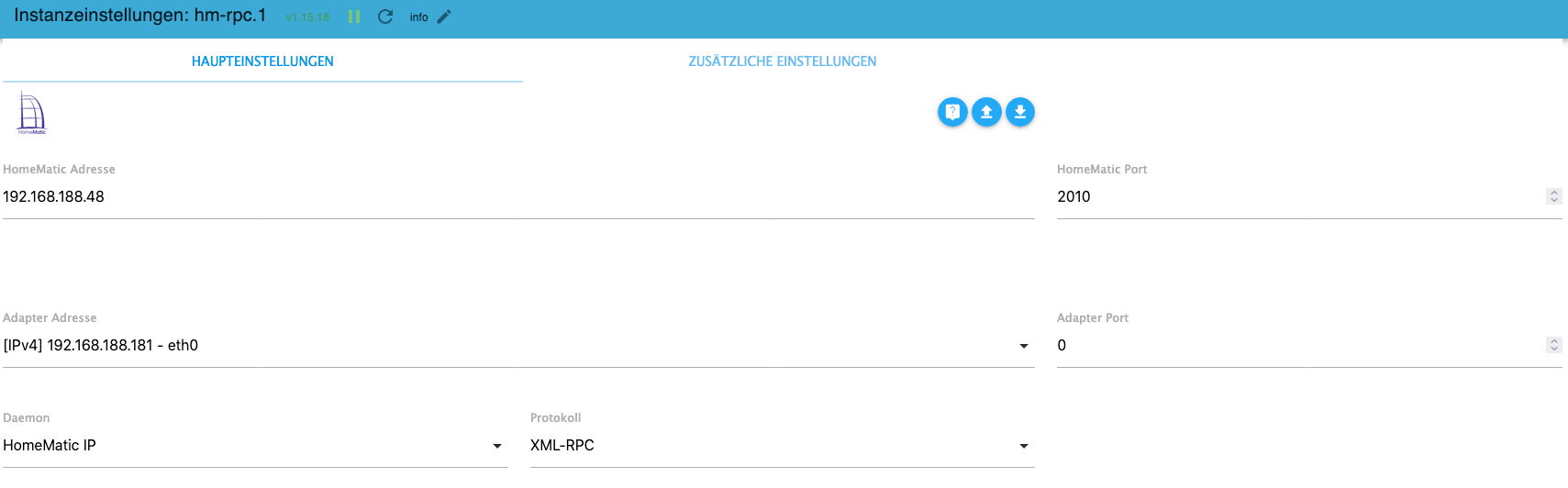
Port und IP-Adresse sind in der Raspberrymatic freigegeben:

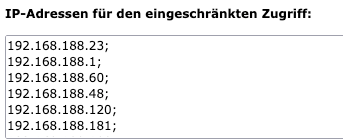
Auf meinem Produktivsystem (192.168.188.120) läuft alles reibungslos.
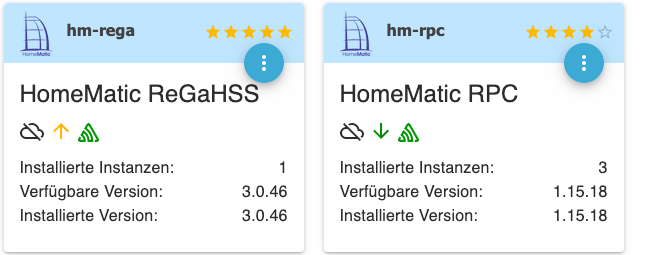
Adapter sind auf dem letzten Stand:
VG
Jörg
-
Systemdata Bitte Ausfüllen Hardwaresystem: NUC12i7 Proxmox LXC - Container für iobroker Arbeitsspeicher: 6GB Festplattenart: SD-Karte/SSD/HDD Betriebssystem: Debian Node-Version: 10.x.x Nodejs-Version: 18.17.0 NPM-Version: 9.6.7 Installationsart: Skript Image genutzt: Nein Hallo,
bei noch jungfreulicher iobroker Installation auf neuem System bekomme ich unter den Objekten im rpc1 (homematic ip) keine Objekte/Datenpunkte angezeigt:
rpc0 und 2 (cuxD) liefern alle Werte wie gewohnt.
Folgender Fehler steht im Protokoll:
hm-rpc.1
	2023-07-28 15:34:19.474	error	Ping error [iobroker:hm-rpc.1:34b738d0d80b5ca36a61b277eeae0011]: Unexpected endLine: 0Column: 0Char:
Konfiguration der Instanz:
Port und IP-Adresse sind in der Raspberrymatic freigegeben:
Auf meinem Produktivsystem (192.168.188.120) läuft alles reibungslos.
Adapter sind auf dem letzten Stand:
VG
Jörg
@nousefor82 sagte in RPC1 Keine Datenpunkte sichtbar / Fehlermeldung:
Container
welche callback Adresse hast du eingetragen?
muss bei einem Container die Ports weitergereicht werden?
wenn ja, ist das passiert?
was steht im debug-log? -
hallo @Homoran
-
welche callback Adresse hast du eingetragen?
die des iobrokers: 192.168.188.181 -
muss bei einem Container die Ports weitergereicht werden?
hab die firewall komplett deaktiviert --> kein Unterschied -
wenn ja, ist das passiert?
-
was steht im debug-log?
2023-07-28 17:19:40.984 - info: host.iobroker stopInstance system.adapter.hm-rpc.1 (force=false, process=true)
2023-07-28 17:19:40.985 - info: hm-rpc.1 (8804) Got terminate signal TERMINATE_YOURSELF
2023-07-28 17:19:40.985 - info: hm-rpc.1 (8804) xmlrpc -> 192.168.188.48:2010/ init ["http://192.168.188.181:2010",""]
2023-07-28 17:19:40.997 - info: hm-rpc.1 (8804) Disconnected
2023-07-28 17:19:40.997 - info: hm-rpc.1 (8804) terminating
2023-07-28 17:19:40.998 - debug: hm-rpc.1 (8804) Plugin sentry destroyed
2023-07-28 17:19:40.998 - info: hm-rpc.1 (8804) Terminated (ADAPTER_REQUESTED_TERMINATION): Without reason
2023-07-28 17:19:41.026 - info: host.iobroker stopInstance system.adapter.hm-rpc.1 send kill signal
2023-07-28 17:19:41.507 - info: host.iobroker instance system.adapter.hm-rpc.1 terminated with code 11 (ADAPTER_REQUESTED_TERMINATION)
2023-07-28 17:19:44.539 - info: host.iobroker instance system.adapter.hm-rpc.1 started with pid 8819
2023-07-28 17:19:44.712 - debug: hm-rpc.1 (8819) Redis Objects: Use Redis connection: 127.0.0.1:9001
2023-07-28 17:19:44.719 - debug: hm-rpc.1 (8819) Objects client ready ... initialize now
2023-07-28 17:19:44.720 - debug: hm-rpc.1 (8819) Objects create System PubSub Client
2023-07-28 17:19:44.720 - debug: hm-rpc.1 (8819) Objects create User PubSub Client
2023-07-28 17:19:44.725 - debug: hm-rpc.1 (8819) Objects client initialize lua scripts
2023-07-28 17:19:44.726 - debug: hm-rpc.1 (8819) Objects connected to redis: 127.0.0.1:9001
2023-07-28 17:19:44.730 - debug: hm-rpc.1 (8819) Redis States: Use Redis connection: 127.0.0.1:9000
2023-07-28 17:19:44.732 - debug: hm-rpc.1 (8819) States create System PubSub Client
2023-07-28 17:19:44.732 - debug: hm-rpc.1 (8819) States create User PubSub Client
2023-07-28 17:19:44.778 - debug: hm-rpc.1 (8819) States connected to redis: 127.0.0.1:9000
2023-07-28 17:19:44.786 - debug: hm-rpc.1 (8819) Plugin sentry Initialize Plugin (enabled=true)
2023-07-28 17:19:44.825 - info: hm-rpc.1 (8819) starting. Version 1.15.18 in /opt/iobroker/node_modules/iobroker.hm-rpc, node: v18.17.0, js-controller: 4.0.24
2023-07-28 17:19:44.847 - info: hm-rpc.1 (8819) xmlrpc server is trying to listen on 192.168.188.181:2010
2023-07-28 17:19:44.847 - info: hm-rpc.1 (8819) xmlrpc client is trying to connect to 192.168.188.48:2010/ with ["http://192.168.188.181:2010","iobroker:hm-rpc.1:db745c7845c2066fdf831267bbe00f72"]
2023-07-28 17:19:44.847 - debug: hm-rpc.1 (8819) Connect...
2023-07-28 17:19:44.848 - debug: hm-rpc.1 (8819) xmlrpc -> 192.168.188.48:2010/ init ["http://192.168.188.181:2010","iobroker:hm-rpc.1:db745c7845c2066fdf831267bbe00f72"]
2023-07-28 17:19:44.850 - debug: hm-rpc.1 (8819) start connecting interval
2023-07-28 17:19:44.870 - info: hm-rpc.1 (8819) Connected
2023-07-28 17:19:44.870 - debug: hm-rpc.1 (8819) clear connecting interval
2023-07-28 17:19:44.870 - debug: hm-rpc.1 (8819) start ping interval
2023-07-28 17:19:44.873 - info: hm-rpc.1 (8819) xmlrpc <- listDevices ["iobroker:hm-rpc.1:db745c7845c2066fdf831267bbe00f72"]
2023-07-28 17:19:44.874 - debug: hm-rpc.1 (8819) No suitable Lua script, fallback to keys!: function(doc) {
if (doc._id.match(/^hm-rpc\.[0-9]+\.\*?[A-Za-z0-9_-]+(\.[0-9]+)?$/)) {
emit(doc._id, {ADDRESS:(doc.native?doc.native.ADDRESS:''),VERSION:(doc.native?doc.native.VERSION:'')});
}
}
2023-07-28 17:19:44.883 - info: hm-rpc.1 (8819) xmlrpc -> 0 devices
2023-07-28 17:19:45.152 - info: hm-rpc.1 (8819) xmlrpc <- newDevices 261
2023-07-28 17:19:45.153 - debug: hm-rpc.1 (8819) No suitable Lua script, fallback to keys!: function(doc) {
if (doc._id.match(/^hm-rpc\.[0-9]+\.\*?[A-Za-z0-9_-]+(\.[0-9]+)?$/)) {
emit(doc._id, {ADDRESS:(doc.native?doc.native.ADDRESS:''),VERSION:(doc.native?doc.native.VERSION:'')});
}
}
2023-07-28 17:19:45.161 - info: hm-rpc.1 (8819) new HMIP devices/channels after filter: 0
2023-07-28 17:19:51.985 - debug: hm-rpc.1 (8819) xml multicall : iobroker:hm-rpc.1:34b738d0d80b5ca36a61b277eeae0011,0003D3C99F137B:0,CONFIG_PENDING,false
2023-07-28 17:19:51.985 - debug: hm-rpc.1 (8819) xmlrpc <- event ["iobroker:hm-rpc.1:34b738d0d80b5ca36a61b277eeae0011","0003D3C99F137B:0","CONFIG_PENDING",false]
2023-07-28 17:19:51.985 - debug: hm-rpc.1 (8819) xmlrpc <- event: iobroker:hm-rpc.1:34b738d0d80b5ca36a61b277eeae0011.0003D3C99F137B.0.CONFIG_PENDING:false discarded, no matching device
2023-07-28 17:19:51.985 - debug: hm-rpc.1 (8819) xml multicall : iobroker:hm-rpc.1:34b738d0d80b5ca36a61b277eeae0011,0003D3C99F137B:0,UNREACH,false
2023-07-28 17:19:51.985 - debug: hm-rpc.1 (8819) xmlrpc <- event ["iobroker:hm-rpc.1:34b738d0d80b5ca36a61b277eeae0011","0003D3C99F137B:0","UNREACH",false]
2023-07-28 17:19:51.985 - debug: hm-rpc.1 (8819) xmlrpc <- event: iobroker:hm-rpc.1:34b738d0d80b5ca36a61b277eeae0011.0003D3C99F137B.0.UNREACH:false discarded, no matching device
2023-07-28 17:19:51.985 - debug: hm-rpc.1 (8819) xml multicall : iobroker:hm-rpc.1:34b738d0d80b5ca36a61b277eeae0011,0003D3C99F137B:0,IP_ADDRESS,192.168.188.27
2023-07-28 17:19:51.985 - debug: hm-rpc.1 (8819) xmlrpc <- event ["iobroker:hm-rpc.1:34b738d0d80b5ca36a61b277eeae0011","0003D3C99F137B:0","IP_ADDRESS","192.168.188.27"]
2023-07-28 17:19:51.985 - debug: hm-rpc.1 (8819) xmlrpc <- event: iobroker:hm-rpc.1:34b738d0d80b5ca36a61b277eeae0011.0003D3C99F137B.0.IP_ADDRESS:192.168.188.27 discarded, no matching device
2023-07-28 17:19:51.988 - debug: hm-rpc.1 (8819) xml multicall : iobroker:hm-rpc.1:ef66a9d77cd30fb73a1cc316c5b76165,0003D3C99F137B:0,CONFIG_PENDING,false
2023-07-28 17:19:51.988 - debug: hm-rpc.1 (8819) xmlrpc <- event ["iobroker:hm-rpc.1:ef66a9d77cd30fb73a1cc316c5b76165","0003D3C99F137B:0","CONFIG_PENDING",false]
2023-07-28 17:19:51.988 - debug: hm-rpc.1 (8819) xmlrpc <- event: iobroker:hm-rpc.1:ef66a9d77cd30fb73a1cc316c5b76165.0003D3C99F137B.0.CONFIG_PENDING:false discarded, no matching device
2023-07-28 17:19:51.988 - debug: hm-rpc.1 (8819) xml multicall : iobroker:hm-rpc.1:ef66a9d77cd30fb73a1cc316c5b76165,0003D3C99F137B:0,UNREACH,false
VG
Jörg
-
-
hallo @Homoran
-
welche callback Adresse hast du eingetragen?
die des iobrokers: 192.168.188.181 -
muss bei einem Container die Ports weitergereicht werden?
hab die firewall komplett deaktiviert --> kein Unterschied -
wenn ja, ist das passiert?
-
was steht im debug-log?
2023-07-28 17:19:40.984 - info: host.iobroker stopInstance system.adapter.hm-rpc.1 (force=false, process=true)
2023-07-28 17:19:40.985 - info: hm-rpc.1 (8804) Got terminate signal TERMINATE_YOURSELF
2023-07-28 17:19:40.985 - info: hm-rpc.1 (8804) xmlrpc -> 192.168.188.48:2010/ init ["http://192.168.188.181:2010",""]
2023-07-28 17:19:40.997 - info: hm-rpc.1 (8804) Disconnected
2023-07-28 17:19:40.997 - info: hm-rpc.1 (8804) terminating
2023-07-28 17:19:40.998 - debug: hm-rpc.1 (8804) Plugin sentry destroyed
2023-07-28 17:19:40.998 - info: hm-rpc.1 (8804) Terminated (ADAPTER_REQUESTED_TERMINATION): Without reason
2023-07-28 17:19:41.026 - info: host.iobroker stopInstance system.adapter.hm-rpc.1 send kill signal
2023-07-28 17:19:41.507 - info: host.iobroker instance system.adapter.hm-rpc.1 terminated with code 11 (ADAPTER_REQUESTED_TERMINATION)
2023-07-28 17:19:44.539 - info: host.iobroker instance system.adapter.hm-rpc.1 started with pid 8819
2023-07-28 17:19:44.712 - debug: hm-rpc.1 (8819) Redis Objects: Use Redis connection: 127.0.0.1:9001
2023-07-28 17:19:44.719 - debug: hm-rpc.1 (8819) Objects client ready ... initialize now
2023-07-28 17:19:44.720 - debug: hm-rpc.1 (8819) Objects create System PubSub Client
2023-07-28 17:19:44.720 - debug: hm-rpc.1 (8819) Objects create User PubSub Client
2023-07-28 17:19:44.725 - debug: hm-rpc.1 (8819) Objects client initialize lua scripts
2023-07-28 17:19:44.726 - debug: hm-rpc.1 (8819) Objects connected to redis: 127.0.0.1:9001
2023-07-28 17:19:44.730 - debug: hm-rpc.1 (8819) Redis States: Use Redis connection: 127.0.0.1:9000
2023-07-28 17:19:44.732 - debug: hm-rpc.1 (8819) States create System PubSub Client
2023-07-28 17:19:44.732 - debug: hm-rpc.1 (8819) States create User PubSub Client
2023-07-28 17:19:44.778 - debug: hm-rpc.1 (8819) States connected to redis: 127.0.0.1:9000
2023-07-28 17:19:44.786 - debug: hm-rpc.1 (8819) Plugin sentry Initialize Plugin (enabled=true)
2023-07-28 17:19:44.825 - info: hm-rpc.1 (8819) starting. Version 1.15.18 in /opt/iobroker/node_modules/iobroker.hm-rpc, node: v18.17.0, js-controller: 4.0.24
2023-07-28 17:19:44.847 - info: hm-rpc.1 (8819) xmlrpc server is trying to listen on 192.168.188.181:2010
2023-07-28 17:19:44.847 - info: hm-rpc.1 (8819) xmlrpc client is trying to connect to 192.168.188.48:2010/ with ["http://192.168.188.181:2010","iobroker:hm-rpc.1:db745c7845c2066fdf831267bbe00f72"]
2023-07-28 17:19:44.847 - debug: hm-rpc.1 (8819) Connect...
2023-07-28 17:19:44.848 - debug: hm-rpc.1 (8819) xmlrpc -> 192.168.188.48:2010/ init ["http://192.168.188.181:2010","iobroker:hm-rpc.1:db745c7845c2066fdf831267bbe00f72"]
2023-07-28 17:19:44.850 - debug: hm-rpc.1 (8819) start connecting interval
2023-07-28 17:19:44.870 - info: hm-rpc.1 (8819) Connected
2023-07-28 17:19:44.870 - debug: hm-rpc.1 (8819) clear connecting interval
2023-07-28 17:19:44.870 - debug: hm-rpc.1 (8819) start ping interval
2023-07-28 17:19:44.873 - info: hm-rpc.1 (8819) xmlrpc <- listDevices ["iobroker:hm-rpc.1:db745c7845c2066fdf831267bbe00f72"]
2023-07-28 17:19:44.874 - debug: hm-rpc.1 (8819) No suitable Lua script, fallback to keys!: function(doc) {
if (doc._id.match(/^hm-rpc\.[0-9]+\.\*?[A-Za-z0-9_-]+(\.[0-9]+)?$/)) {
emit(doc._id, {ADDRESS:(doc.native?doc.native.ADDRESS:''),VERSION:(doc.native?doc.native.VERSION:'')});
}
}
2023-07-28 17:19:44.883 - info: hm-rpc.1 (8819) xmlrpc -> 0 devices
2023-07-28 17:19:45.152 - info: hm-rpc.1 (8819) xmlrpc <- newDevices 261
2023-07-28 17:19:45.153 - debug: hm-rpc.1 (8819) No suitable Lua script, fallback to keys!: function(doc) {
if (doc._id.match(/^hm-rpc\.[0-9]+\.\*?[A-Za-z0-9_-]+(\.[0-9]+)?$/)) {
emit(doc._id, {ADDRESS:(doc.native?doc.native.ADDRESS:''),VERSION:(doc.native?doc.native.VERSION:'')});
}
}
2023-07-28 17:19:45.161 - info: hm-rpc.1 (8819) new HMIP devices/channels after filter: 0
2023-07-28 17:19:51.985 - debug: hm-rpc.1 (8819) xml multicall : iobroker:hm-rpc.1:34b738d0d80b5ca36a61b277eeae0011,0003D3C99F137B:0,CONFIG_PENDING,false
2023-07-28 17:19:51.985 - debug: hm-rpc.1 (8819) xmlrpc <- event ["iobroker:hm-rpc.1:34b738d0d80b5ca36a61b277eeae0011","0003D3C99F137B:0","CONFIG_PENDING",false]
2023-07-28 17:19:51.985 - debug: hm-rpc.1 (8819) xmlrpc <- event: iobroker:hm-rpc.1:34b738d0d80b5ca36a61b277eeae0011.0003D3C99F137B.0.CONFIG_PENDING:false discarded, no matching device
2023-07-28 17:19:51.985 - debug: hm-rpc.1 (8819) xml multicall : iobroker:hm-rpc.1:34b738d0d80b5ca36a61b277eeae0011,0003D3C99F137B:0,UNREACH,false
2023-07-28 17:19:51.985 - debug: hm-rpc.1 (8819) xmlrpc <- event ["iobroker:hm-rpc.1:34b738d0d80b5ca36a61b277eeae0011","0003D3C99F137B:0","UNREACH",false]
2023-07-28 17:19:51.985 - debug: hm-rpc.1 (8819) xmlrpc <- event: iobroker:hm-rpc.1:34b738d0d80b5ca36a61b277eeae0011.0003D3C99F137B.0.UNREACH:false discarded, no matching device
2023-07-28 17:19:51.985 - debug: hm-rpc.1 (8819) xml multicall : iobroker:hm-rpc.1:34b738d0d80b5ca36a61b277eeae0011,0003D3C99F137B:0,IP_ADDRESS,192.168.188.27
2023-07-28 17:19:51.985 - debug: hm-rpc.1 (8819) xmlrpc <- event ["iobroker:hm-rpc.1:34b738d0d80b5ca36a61b277eeae0011","0003D3C99F137B:0","IP_ADDRESS","192.168.188.27"]
2023-07-28 17:19:51.985 - debug: hm-rpc.1 (8819) xmlrpc <- event: iobroker:hm-rpc.1:34b738d0d80b5ca36a61b277eeae0011.0003D3C99F137B.0.IP_ADDRESS:192.168.188.27 discarded, no matching device
2023-07-28 17:19:51.988 - debug: hm-rpc.1 (8819) xml multicall : iobroker:hm-rpc.1:ef66a9d77cd30fb73a1cc316c5b76165,0003D3C99F137B:0,CONFIG_PENDING,false
2023-07-28 17:19:51.988 - debug: hm-rpc.1 (8819) xmlrpc <- event ["iobroker:hm-rpc.1:ef66a9d77cd30fb73a1cc316c5b76165","0003D3C99F137B:0","CONFIG_PENDING",false]
2023-07-28 17:19:51.988 - debug: hm-rpc.1 (8819) xmlrpc <- event: iobroker:hm-rpc.1:ef66a9d77cd30fb73a1cc316c5b76165.0003D3C99F137B.0.CONFIG_PENDING:false discarded, no matching device
2023-07-28 17:19:51.988 - debug: hm-rpc.1 (8819) xml multicall : iobroker:hm-rpc.1:ef66a9d77cd30fb73a1cc316c5b76165,0003D3C99F137B:0,UNREACH,false
VG
Jörg
@nousefor82 sagte in RPC1 Keine Datenpunkte sichtbar / Fehlermeldung:
hab die firewall komplett deaktiviert --> kein Unterschied
das ist eine Antwort auf eine nicht gestellte Frage!
im iob container natürlich
schalt mal sentry aus
-
-
sentry ist aus: (passt das so?)

Nach wie vor keine Datenpunkte. rpc0 ind 2 alles wie gehabt.
Ich wüsste nicht, dass man da extra einen Port weiterleiten muss im Container.
VG
@nousefor82 sagte in RPC1 Keine Datenpunkte sichtbar / Fehlermeldung:
Ich wüsste nicht, dass man da extra einen Port weiterleiten muss im Container.
ich kenne mich mit diesen Blechdosen nicht aus.
ist vielleicht nur bei Docker-containern so -
@nousefor82 sagte in RPC1 Keine Datenpunkte sichtbar / Fehlermeldung:
Ich wüsste nicht, dass man da extra einen Port weiterleiten muss im Container.
ich kenne mich mit diesen Blechdosen nicht aus.
ist vielleicht nur bei Docker-containern soBin grad dran eine VM zu erstellen; mal sehen ob da der Fehler auch auftritt ;-)
-
@nousefor82 sagte in RPC1 Keine Datenpunkte sichtbar / Fehlermeldung:
Ich wüsste nicht, dass man da extra einen Port weiterleiten muss im Container.
ich kenne mich mit diesen Blechdosen nicht aus.
ist vielleicht nur bei Docker-containern so -
Servus,
gleiches Fehlerbild bei iobroker auf VM:
Keine Datenpunkte unter rpc1:

Bin langsam ratlos.
@nousefor82 sagte in RPC1 Keine Datenpunkte sichtbar / Fehlermeldung:
Bin langsam ratlos.
Da simmer schon zwei!
das ist hmip?
bitte nochmal die Konfig zeigen -
hallo @Homoran
-
welche callback Adresse hast du eingetragen?
die des iobrokers: 192.168.188.181 -
muss bei einem Container die Ports weitergereicht werden?
hab die firewall komplett deaktiviert --> kein Unterschied -
wenn ja, ist das passiert?
-
was steht im debug-log?
2023-07-28 17:19:40.984 - info: host.iobroker stopInstance system.adapter.hm-rpc.1 (force=false, process=true)
2023-07-28 17:19:40.985 - info: hm-rpc.1 (8804) Got terminate signal TERMINATE_YOURSELF
2023-07-28 17:19:40.985 - info: hm-rpc.1 (8804) xmlrpc -> 192.168.188.48:2010/ init ["http://192.168.188.181:2010",""]
2023-07-28 17:19:40.997 - info: hm-rpc.1 (8804) Disconnected
2023-07-28 17:19:40.997 - info: hm-rpc.1 (8804) terminating
2023-07-28 17:19:40.998 - debug: hm-rpc.1 (8804) Plugin sentry destroyed
2023-07-28 17:19:40.998 - info: hm-rpc.1 (8804) Terminated (ADAPTER_REQUESTED_TERMINATION): Without reason
2023-07-28 17:19:41.026 - info: host.iobroker stopInstance system.adapter.hm-rpc.1 send kill signal
2023-07-28 17:19:41.507 - info: host.iobroker instance system.adapter.hm-rpc.1 terminated with code 11 (ADAPTER_REQUESTED_TERMINATION)
2023-07-28 17:19:44.539 - info: host.iobroker instance system.adapter.hm-rpc.1 started with pid 8819
2023-07-28 17:19:44.712 - debug: hm-rpc.1 (8819) Redis Objects: Use Redis connection: 127.0.0.1:9001
2023-07-28 17:19:44.719 - debug: hm-rpc.1 (8819) Objects client ready ... initialize now
2023-07-28 17:19:44.720 - debug: hm-rpc.1 (8819) Objects create System PubSub Client
2023-07-28 17:19:44.720 - debug: hm-rpc.1 (8819) Objects create User PubSub Client
2023-07-28 17:19:44.725 - debug: hm-rpc.1 (8819) Objects client initialize lua scripts
2023-07-28 17:19:44.726 - debug: hm-rpc.1 (8819) Objects connected to redis: 127.0.0.1:9001
2023-07-28 17:19:44.730 - debug: hm-rpc.1 (8819) Redis States: Use Redis connection: 127.0.0.1:9000
2023-07-28 17:19:44.732 - debug: hm-rpc.1 (8819) States create System PubSub Client
2023-07-28 17:19:44.732 - debug: hm-rpc.1 (8819) States create User PubSub Client
2023-07-28 17:19:44.778 - debug: hm-rpc.1 (8819) States connected to redis: 127.0.0.1:9000
2023-07-28 17:19:44.786 - debug: hm-rpc.1 (8819) Plugin sentry Initialize Plugin (enabled=true)
2023-07-28 17:19:44.825 - info: hm-rpc.1 (8819) starting. Version 1.15.18 in /opt/iobroker/node_modules/iobroker.hm-rpc, node: v18.17.0, js-controller: 4.0.24
2023-07-28 17:19:44.847 - info: hm-rpc.1 (8819) xmlrpc server is trying to listen on 192.168.188.181:2010
2023-07-28 17:19:44.847 - info: hm-rpc.1 (8819) xmlrpc client is trying to connect to 192.168.188.48:2010/ with ["http://192.168.188.181:2010","iobroker:hm-rpc.1:db745c7845c2066fdf831267bbe00f72"]
2023-07-28 17:19:44.847 - debug: hm-rpc.1 (8819) Connect...
2023-07-28 17:19:44.848 - debug: hm-rpc.1 (8819) xmlrpc -> 192.168.188.48:2010/ init ["http://192.168.188.181:2010","iobroker:hm-rpc.1:db745c7845c2066fdf831267bbe00f72"]
2023-07-28 17:19:44.850 - debug: hm-rpc.1 (8819) start connecting interval
2023-07-28 17:19:44.870 - info: hm-rpc.1 (8819) Connected
2023-07-28 17:19:44.870 - debug: hm-rpc.1 (8819) clear connecting interval
2023-07-28 17:19:44.870 - debug: hm-rpc.1 (8819) start ping interval
2023-07-28 17:19:44.873 - info: hm-rpc.1 (8819) xmlrpc <- listDevices ["iobroker:hm-rpc.1:db745c7845c2066fdf831267bbe00f72"]
2023-07-28 17:19:44.874 - debug: hm-rpc.1 (8819) No suitable Lua script, fallback to keys!: function(doc) {
if (doc._id.match(/^hm-rpc\.[0-9]+\.\*?[A-Za-z0-9_-]+(\.[0-9]+)?$/)) {
emit(doc._id, {ADDRESS:(doc.native?doc.native.ADDRESS:''),VERSION:(doc.native?doc.native.VERSION:'')});
}
}
2023-07-28 17:19:44.883 - info: hm-rpc.1 (8819) xmlrpc -> 0 devices
2023-07-28 17:19:45.152 - info: hm-rpc.1 (8819) xmlrpc <- newDevices 261
2023-07-28 17:19:45.153 - debug: hm-rpc.1 (8819) No suitable Lua script, fallback to keys!: function(doc) {
if (doc._id.match(/^hm-rpc\.[0-9]+\.\*?[A-Za-z0-9_-]+(\.[0-9]+)?$/)) {
emit(doc._id, {ADDRESS:(doc.native?doc.native.ADDRESS:''),VERSION:(doc.native?doc.native.VERSION:'')});
}
}
2023-07-28 17:19:45.161 - info: hm-rpc.1 (8819) new HMIP devices/channels after filter: 0
2023-07-28 17:19:51.985 - debug: hm-rpc.1 (8819) xml multicall : iobroker:hm-rpc.1:34b738d0d80b5ca36a61b277eeae0011,0003D3C99F137B:0,CONFIG_PENDING,false
2023-07-28 17:19:51.985 - debug: hm-rpc.1 (8819) xmlrpc <- event ["iobroker:hm-rpc.1:34b738d0d80b5ca36a61b277eeae0011","0003D3C99F137B:0","CONFIG_PENDING",false]
2023-07-28 17:19:51.985 - debug: hm-rpc.1 (8819) xmlrpc <- event: iobroker:hm-rpc.1:34b738d0d80b5ca36a61b277eeae0011.0003D3C99F137B.0.CONFIG_PENDING:false discarded, no matching device
2023-07-28 17:19:51.985 - debug: hm-rpc.1 (8819) xml multicall : iobroker:hm-rpc.1:34b738d0d80b5ca36a61b277eeae0011,0003D3C99F137B:0,UNREACH,false
2023-07-28 17:19:51.985 - debug: hm-rpc.1 (8819) xmlrpc <- event ["iobroker:hm-rpc.1:34b738d0d80b5ca36a61b277eeae0011","0003D3C99F137B:0","UNREACH",false]
2023-07-28 17:19:51.985 - debug: hm-rpc.1 (8819) xmlrpc <- event: iobroker:hm-rpc.1:34b738d0d80b5ca36a61b277eeae0011.0003D3C99F137B.0.UNREACH:false discarded, no matching device
2023-07-28 17:19:51.985 - debug: hm-rpc.1 (8819) xml multicall : iobroker:hm-rpc.1:34b738d0d80b5ca36a61b277eeae0011,0003D3C99F137B:0,IP_ADDRESS,192.168.188.27
2023-07-28 17:19:51.985 - debug: hm-rpc.1 (8819) xmlrpc <- event ["iobroker:hm-rpc.1:34b738d0d80b5ca36a61b277eeae0011","0003D3C99F137B:0","IP_ADDRESS","192.168.188.27"]
2023-07-28 17:19:51.985 - debug: hm-rpc.1 (8819) xmlrpc <- event: iobroker:hm-rpc.1:34b738d0d80b5ca36a61b277eeae0011.0003D3C99F137B.0.IP_ADDRESS:192.168.188.27 discarded, no matching device
2023-07-28 17:19:51.988 - debug: hm-rpc.1 (8819) xml multicall : iobroker:hm-rpc.1:ef66a9d77cd30fb73a1cc316c5b76165,0003D3C99F137B:0,CONFIG_PENDING,false
2023-07-28 17:19:51.988 - debug: hm-rpc.1 (8819) xmlrpc <- event ["iobroker:hm-rpc.1:ef66a9d77cd30fb73a1cc316c5b76165","0003D3C99F137B:0","CONFIG_PENDING",false]
2023-07-28 17:19:51.988 - debug: hm-rpc.1 (8819) xmlrpc <- event: iobroker:hm-rpc.1:ef66a9d77cd30fb73a1cc316c5b76165.0003D3C99F137B.0.CONFIG_PENDING:false discarded, no matching device
2023-07-28 17:19:51.988 - debug: hm-rpc.1 (8819) xml multicall : iobroker:hm-rpc.1:ef66a9d77cd30fb73a1cc316c5b76165,0003D3C99F137B:0,UNREACH,false
VG
Jörg
@nousefor82 sagte in RPC1 Keine Datenpunkte sichtbar / Fehlermeldung:
2023-07-28 17:19:44.847 - info: hm-rpc.1 (8819) xmlrpc client is trying to connect to 192.168.188.48:2010/ with ["http://192.168.188.181:2010","iobroker:hm-rpc.1:db745c7845c2066fdf831267bbe00f72"]
ist das IPv6?
-
-
@nousefor82 sagte in RPC1 Keine Datenpunkte sichtbar / Fehlermeldung:
2023-07-28 17:19:44.847 - info: hm-rpc.1 (8819) xmlrpc client is trying to connect to 192.168.188.48:2010/ with ["http://192.168.188.181:2010","iobroker:hm-rpc.1:db745c7845c2066fdf831267bbe00f72"]
ist das IPv6?
@homoran :-)
Ja genau, rpc1 sind hier die HMIP-Geräte auf der CCU.
hm-rpc.1
	2023-07-29 16:40:35.690	error	Cannot call init: [http://192.168.188.183:2010, ""] Unexpected endLine: 0Column: 0Char:
hm-rpc.1
	2023-07-29 16:40:05.675	error	Init not possible, going to stop: Unexpected endLine: 0Column: 0Char:
hm-rpc.1
	2023-07-29 16:39:35.664	error	Ping error [iobrokervm:hm-rpc.1:f2c5482f2897fc4cafed20fa0bacfed9]: Unexpected endLine: 0Column: 0Char:
hm-rpc.1
	2023-07-29 16:38:04.031	error	Ping error [iobrokervm:hm-rpc.1:f2c5482f2897fc4cafed20fa0bacfed9]: Unexpected endLine: 0Column: 0Char: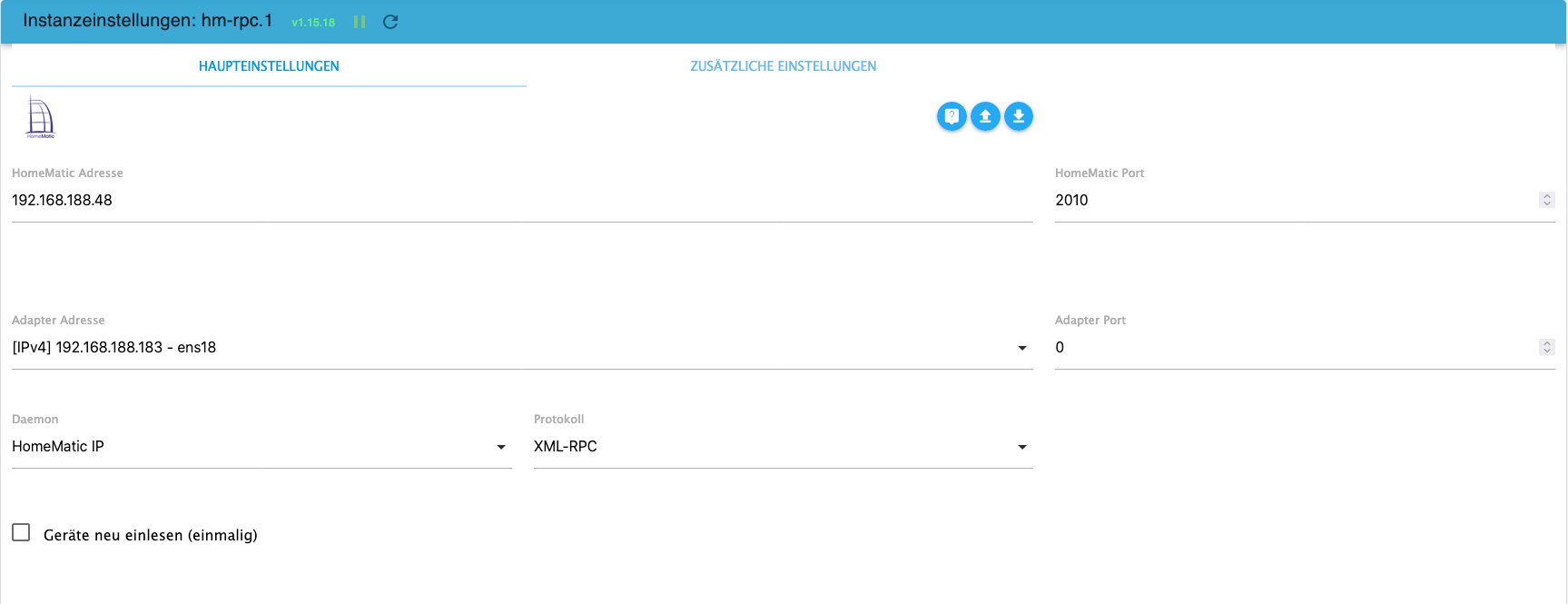
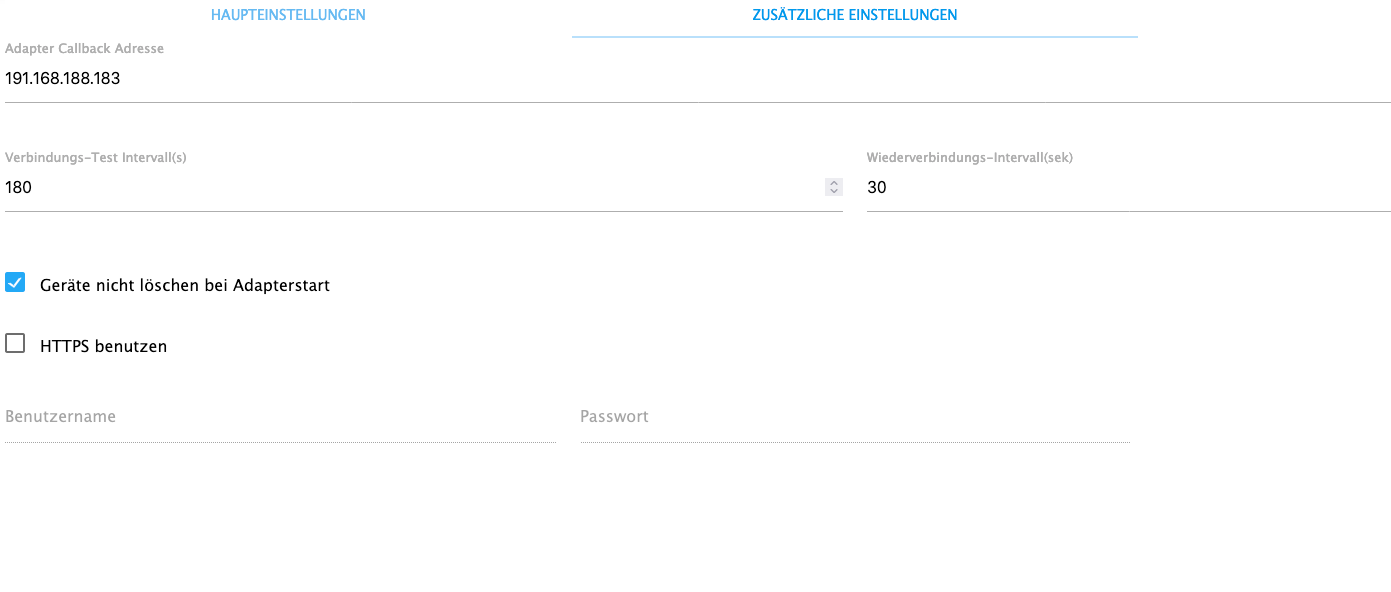
-
@homoran :-)
Ja genau, rpc1 sind hier die HMIP-Geräte auf der CCU.
hm-rpc.1 2023-07-29 16:40:35.690 error Cannot call init: [http://192.168.188.183:2010, ""] Unexpected endLine: 0Column: 0Char: hm-rpc.1 2023-07-29 16:40:05.675 error Init not possible, going to stop: Unexpected endLine: 0Column: 0Char: hm-rpc.1 2023-07-29 16:39:35.664 error Ping error [iobrokervm:hm-rpc.1:f2c5482f2897fc4cafed20fa0bacfed9]: Unexpected endLine: 0Column: 0Char: hm-rpc.1 2023-07-29 16:38:04.031 error Ping error [iobrokervm:hm-rpc.1:f2c5482f2897fc4cafed20fa0bacfed9]: Unexpected endLine: 0Column: 0Char:@nousefor82 sagte in RPC1 Keine Datenpunkte sichtbar / Fehlermeldung:
Unexpected endLine
das sieht nach dem Sentry-Bug aus
-
@nousefor82 sagte in RPC1 Keine Datenpunkte sichtbar / Fehlermeldung:
2023-07-28 17:19:44.847 - info: hm-rpc.1 (8819) xmlrpc client is trying to connect to 192.168.188.48:2010/ with ["http://192.168.188.181:2010","iobroker:hm-rpc.1:db745c7845c2066fdf831267bbe00f72"]
ist das IPv6?
@homoran sagte in RPC1 Keine Datenpunkte sichtbar / Fehlermeldung:
@nousefor82 sagte in RPC1 Keine Datenpunkte sichtbar / Fehlermeldung:
2023-07-28 17:19:44.847 - info: hm-rpc.1 (8819) xmlrpc client is trying to connect to 192.168.188.48:2010/ with ["http://192.168.188.181:2010","iobroker:hm-rpc.1:db745c7845c2066fdf831267bbe00f72"]
ist das IPv6?
Gute Frage; habe kein IPv6-Netzwerk aktiv
-
@nousefor82 sagte in RPC1 Keine Datenpunkte sichtbar / Fehlermeldung:
Unexpected endLine
das sieht nach dem Sentry-Bug aus
-
Sentry ist für rpc1 deaktiviert:
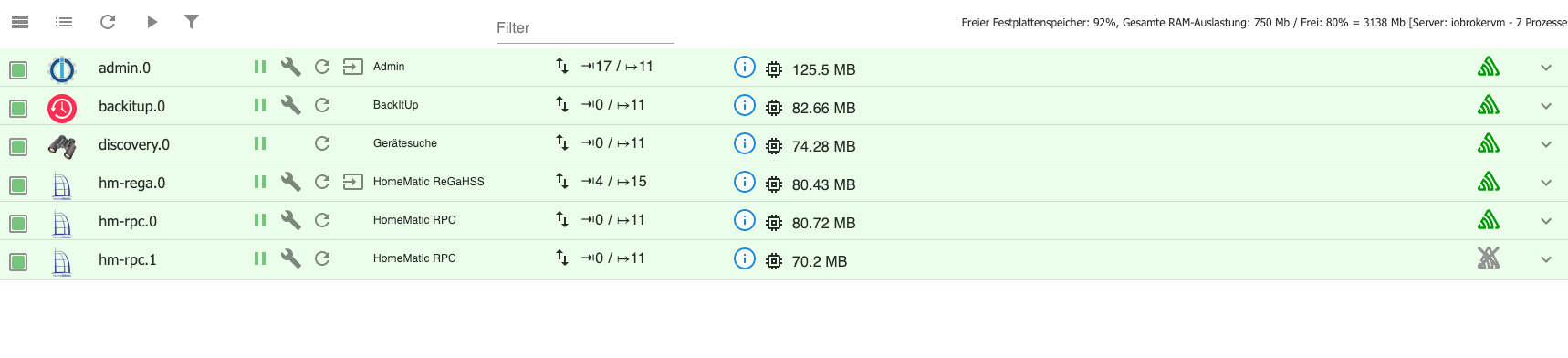
@nousefor82 sagte in RPC1 Keine Datenpunkte sichtbar / Fehlermeldung:
Sentry ist für rpc1 deaktiviert:
Bei Allen HM deaktivieren
-
@nousefor82 sagte in RPC1 Keine Datenpunkte sichtbar / Fehlermeldung:
Sentry ist für rpc1 deaktiviert:
Bei Allen HM deaktivieren
Servus Sigi,
erldeigt. Leider keine Änderung.
Das sagt das Protokoll:
hm-rpc.1
	2023-07-29 17:37:54.514	debug	xmlrpc <- event: hm-rpc.1.0003D3C99F137B.0.IP_ADDRESS:192.168.188.27 discarded, no matching device
hm-rpc.1
	2023-07-29 17:37:54.514	debug	xmlrpc <- event ["iobroker:hm-rpc.1:dd6c26cad561a448e58bb60c0bd85228","0003D3C99F137B:0","IP_ADDRESS","192.168.188.27"]
hm-rpc.1
	2023-07-29 17:37:54.514	debug	xml multicall <event>: iobroker:hm-rpc.1:dd6c26cad561a448e58bb60c0bd85228,0003D3C99F137B:0,IP_ADDRESS,192.168.188.27
hm-rpc.1
	2023-07-29 17:37:54.514	debug	xmlrpc <- event: hm-rpc.1.0003D3C99F137B.0.UNREACH:false discarded, no matching device
hm-rpc.1
	2023-07-29 17:37:54.514	debug	xmlrpc <- event ["iobroker:hm-rpc.1:dd6c26cad561a448e58bb60c0bd85228","0003D3C99F137B:0","UNREACH",false]
hm-rpc.1
	2023-07-29 17:37:54.514	debug	xml multicall <event>: iobroker:hm-rpc.1:dd6c26cad561a448e58bb60c0bd85228,0003D3C99F137B:0,UNREACH,false
hm-rpc.1
	2023-07-29 17:37:54.514	debug	xmlrpc <- event: hm-rpc.1.0003D3C99F137B.0.CONFIG_PENDING:false discarded, no matching device
hm-rpc.1
	2023-07-29 17:37:54.514	debug	xmlrpc <- event ["iobroker:hm-rpc.1:dd6c26cad561a448e58bb60c0bd85228","0003D3C99F137B:0","CONFIG_PENDING",false]
hm-rpc.1
	2023-07-29 17:37:54.514	debug	xml multicall <event>: iobroker:hm-rpc.1:dd6c26cad561a448e58bb60c0bd85228,0003D3C99F137B:0,CONFIG_PENDING,false
hm-rpc.1
	2023-07-29 17:37:53.914	debug	xmlrpc <- event: hm-rpc.1.CENTRAL.0.PONG:iobroker:hm-rpc.1:dd6c26cad561a448e58bb60c0bd85228 discarded, no matching device
hm-rpc.1
	2023-07-29 17:37:53.914	debug	xmlrpc <- event ["iobroker:hm-rpc.1:dd6c26cad561a448e58bb60c0bd85228","CENTRAL:0","PONG","iobroker:hm-rpc.1:dd6c26cad561a448e58bb60c0bd85228"]
hm-rpc.1
	2023-07-29 17:37:53.899	debug	PING ok
hm-rpc.1
	2023-07-29 17:37:53.883	debug	Send PING...
hm-rpc.1
	2023-07-29 17:37:53.883	debug	[KEEPALIVE] Check if connection is alive
hm-rpc.1
	2023-07-29 17:37:50.354	debug	xmlrpc <- event: hm-rpc.1.0003D3C99F137B.0.IP_ADDRESS:192.168.188.27 discarded, no matching device
hm-rpc.1
	2023-07-29 17:37:50.353	debug	xmlrpc <- event ["iobroker:hm-rpc.1:dd6c26cad561a448e58bb60c0bd85228","0003D3C99F137B:0","IP_ADDRESS","192.168.188.27"]
hm-rpc.1
	2023-07-29 17:37:50.353	debug	xml multicall <event>: iobroker:hm-rpc.1:dd6c26cad561a448e58bb60c0bd85228,0003D3C99F137B:0,IP_ADDRESS,192.168.188.27
hm-rpc.1
	2023-07-29 17:37:50.353	debug	xmlrpc <- event: hm-rpc.1.0003D3C99F137B.0.UNREACH:false discarded, no matching device
hm-rpc.1
	2023-07-29 17:37:50.353	debug	xmlrpc <- event ["iobroker:hm-rpc.1:dd6c26cad561a448e58bb60c0bd85228","0003D3C99F137B:0","UNREACH",false]
hm-rpc.1
	2023-07-29 17:37:50.353	debug	xml multicall <event>: iobroker:hm-rpc.1:dd6c26cad561a448e58bb60c0bd85228,0003D3C99F137B:0,UNREACH,false
hm-rpc.1
	2023-07-29 17:37:50.353	debug	xmlrpc <- event: hm-rpc.1.0003D3C99F137B.0.CONFIG_PENDING:false discarded, no matching device
hm-rpc.1
	2023-07-29 17:37:50.353	debug	xmlrpc <- event ["iobroker:hm-rpc.1:dd6c26cad561a448e58bb60c0bd85228","0003D3C99F137B:0","CONFIG_PENDING",false]
hm-rpc.1
	2023-07-29 17:37:50.353	debug	xml multicall <event>: iobroker:hm-rpc.1:dd6c26cad561a448e58bb60c0bd85228,0003D3C99F137B:0,CONFIG_PENDING,false
hm-rpc.1
	2023-07-29 17:37:37.841	debug	xmlrpc <- event: hm-rpc.1.CENTRAL.0.PONG:DESKTOP-2JN8QCP(SmartHome):hm-rpc.1:7b6f96b42868af78a541ce0c33625918 discarded, no matching device
hm-rpc.1
	2023-07-29 17:37:37.841	debug	xmlrpc <- event ["iobroker:hm-rpc.1:dd6c26cad561a448e58bb60c0bd85228","CENTRAL:0","PONG","DESKTOP-2JN8QCP(SmartHome):hm-rpc.1:7b6f96b42868af78a541ce0c33625918"]
hm-rpc.1
	2023-07-29 17:37:28.310	debug	xmlrpc <- event: hm-rpc.1.0003D3C99F137B.0.IP_ADDRESS:192.168.188.27 discarded, no matching device
hm-rpc.1
	2023-07-29 17:37:28.310	debug	xmlrpc <- event ["iobroker:hm-rpc.1:dd6c26cad561a448e58bb60c0bd85228","0003D3C99F137B:0","IP_ADDRESS","192.168.188.27"]
hm-rpc.1
	2023-07-29 17:37:28.309	debug	xml multicall <event>: iobroker:hm-rpc.1:dd6c26cad561a448e58bb60c0bd85228,0003D3C99F137B:0,IP_ADDRESS,192.168.188.27
hm-rpc.1
	2023-07-29 17:37:28.309	debug	xmlrpc <- event: hm-rpc.1.0003D3C99F137B.0.UNREACH:false discarded, no matching device
Hmm...das ist mein Produktiv-System: (Win10: 192.168.188.120)
[DESKTOP-2JN8QCP(SmartHome)]] -
Servus Sigi,
erldeigt. Leider keine Änderung.
Das sagt das Protokoll:
hm-rpc.1
	2023-07-29 17:37:54.514	debug	xmlrpc <- event: hm-rpc.1.0003D3C99F137B.0.IP_ADDRESS:192.168.188.27 discarded, no matching device
hm-rpc.1
	2023-07-29 17:37:54.514	debug	xmlrpc <- event ["iobroker:hm-rpc.1:dd6c26cad561a448e58bb60c0bd85228","0003D3C99F137B:0","IP_ADDRESS","192.168.188.27"]
hm-rpc.1
	2023-07-29 17:37:54.514	debug	xml multicall <event>: iobroker:hm-rpc.1:dd6c26cad561a448e58bb60c0bd85228,0003D3C99F137B:0,IP_ADDRESS,192.168.188.27
hm-rpc.1
	2023-07-29 17:37:54.514	debug	xmlrpc <- event: hm-rpc.1.0003D3C99F137B.0.UNREACH:false discarded, no matching device
hm-rpc.1
	2023-07-29 17:37:54.514	debug	xmlrpc <- event ["iobroker:hm-rpc.1:dd6c26cad561a448e58bb60c0bd85228","0003D3C99F137B:0","UNREACH",false]
hm-rpc.1
	2023-07-29 17:37:54.514	debug	xml multicall <event>: iobroker:hm-rpc.1:dd6c26cad561a448e58bb60c0bd85228,0003D3C99F137B:0,UNREACH,false
hm-rpc.1
	2023-07-29 17:37:54.514	debug	xmlrpc <- event: hm-rpc.1.0003D3C99F137B.0.CONFIG_PENDING:false discarded, no matching device
hm-rpc.1
	2023-07-29 17:37:54.514	debug	xmlrpc <- event ["iobroker:hm-rpc.1:dd6c26cad561a448e58bb60c0bd85228","0003D3C99F137B:0","CONFIG_PENDING",false]
hm-rpc.1
	2023-07-29 17:37:54.514	debug	xml multicall <event>: iobroker:hm-rpc.1:dd6c26cad561a448e58bb60c0bd85228,0003D3C99F137B:0,CONFIG_PENDING,false
hm-rpc.1
	2023-07-29 17:37:53.914	debug	xmlrpc <- event: hm-rpc.1.CENTRAL.0.PONG:iobroker:hm-rpc.1:dd6c26cad561a448e58bb60c0bd85228 discarded, no matching device
hm-rpc.1
	2023-07-29 17:37:53.914	debug	xmlrpc <- event ["iobroker:hm-rpc.1:dd6c26cad561a448e58bb60c0bd85228","CENTRAL:0","PONG","iobroker:hm-rpc.1:dd6c26cad561a448e58bb60c0bd85228"]
hm-rpc.1
	2023-07-29 17:37:53.899	debug	PING ok
hm-rpc.1
	2023-07-29 17:37:53.883	debug	Send PING...
hm-rpc.1
	2023-07-29 17:37:53.883	debug	[KEEPALIVE] Check if connection is alive
hm-rpc.1
	2023-07-29 17:37:50.354	debug	xmlrpc <- event: hm-rpc.1.0003D3C99F137B.0.IP_ADDRESS:192.168.188.27 discarded, no matching device
hm-rpc.1
	2023-07-29 17:37:50.353	debug	xmlrpc <- event ["iobroker:hm-rpc.1:dd6c26cad561a448e58bb60c0bd85228","0003D3C99F137B:0","IP_ADDRESS","192.168.188.27"]
hm-rpc.1
	2023-07-29 17:37:50.353	debug	xml multicall <event>: iobroker:hm-rpc.1:dd6c26cad561a448e58bb60c0bd85228,0003D3C99F137B:0,IP_ADDRESS,192.168.188.27
hm-rpc.1
	2023-07-29 17:37:50.353	debug	xmlrpc <- event: hm-rpc.1.0003D3C99F137B.0.UNREACH:false discarded, no matching device
hm-rpc.1
	2023-07-29 17:37:50.353	debug	xmlrpc <- event ["iobroker:hm-rpc.1:dd6c26cad561a448e58bb60c0bd85228","0003D3C99F137B:0","UNREACH",false]
hm-rpc.1
	2023-07-29 17:37:50.353	debug	xml multicall <event>: iobroker:hm-rpc.1:dd6c26cad561a448e58bb60c0bd85228,0003D3C99F137B:0,UNREACH,false
hm-rpc.1
	2023-07-29 17:37:50.353	debug	xmlrpc <- event: hm-rpc.1.0003D3C99F137B.0.CONFIG_PENDING:false discarded, no matching device
hm-rpc.1
	2023-07-29 17:37:50.353	debug	xmlrpc <- event ["iobroker:hm-rpc.1:dd6c26cad561a448e58bb60c0bd85228","0003D3C99F137B:0","CONFIG_PENDING",false]
hm-rpc.1
	2023-07-29 17:37:50.353	debug	xml multicall <event>: iobroker:hm-rpc.1:dd6c26cad561a448e58bb60c0bd85228,0003D3C99F137B:0,CONFIG_PENDING,false
hm-rpc.1
	2023-07-29 17:37:37.841	debug	xmlrpc <- event: hm-rpc.1.CENTRAL.0.PONG:DESKTOP-2JN8QCP(SmartHome):hm-rpc.1:7b6f96b42868af78a541ce0c33625918 discarded, no matching device
hm-rpc.1
	2023-07-29 17:37:37.841	debug	xmlrpc <- event ["iobroker:hm-rpc.1:dd6c26cad561a448e58bb60c0bd85228","CENTRAL:0","PONG","DESKTOP-2JN8QCP(SmartHome):hm-rpc.1:7b6f96b42868af78a541ce0c33625918"]
hm-rpc.1
	2023-07-29 17:37:28.310	debug	xmlrpc <- event: hm-rpc.1.0003D3C99F137B.0.IP_ADDRESS:192.168.188.27 discarded, no matching device
hm-rpc.1
	2023-07-29 17:37:28.310	debug	xmlrpc <- event ["iobroker:hm-rpc.1:dd6c26cad561a448e58bb60c0bd85228","0003D3C99F137B:0","IP_ADDRESS","192.168.188.27"]
hm-rpc.1
	2023-07-29 17:37:28.309	debug	xml multicall <event>: iobroker:hm-rpc.1:dd6c26cad561a448e58bb60c0bd85228,0003D3C99F137B:0,IP_ADDRESS,192.168.188.27
hm-rpc.1
	2023-07-29 17:37:28.309	debug	xmlrpc <- event: hm-rpc.1.0003D3C99F137B.0.UNREACH:false discarded, no matching device
Hmm...das ist mein Produktiv-System: (Win10: 192.168.188.120)
[DESKTOP-2JN8QCP(SmartHome)]]@nousefor82 sagte in RPC1 Keine Datenpunkte sichtbar / Fehlermeldung:
192.168.188.27
ich habe nicht alles hier gelesen , aber warum ändert sich immer die IP bei dir !?
-
@nousefor82 sagte in RPC1 Keine Datenpunkte sichtbar / Fehlermeldung:
192.168.188.27
ich habe nicht alles hier gelesen , aber warum ändert sich immer die IP bei dir !?
Servus,
ich dachte zuerste es liegt evtl. an der LXC-Umgebung: 192.168.188.181.
Daraufhin habe ich eine VM angelegt und ioBroker dort installiert: 192.168.188.183.
Bei beiden kommt der Fehler mit den fehlenden states.
Bei meiner Produktiv - Umgebung (Win10) mit 192.168.188.120 kommt der Fehler nicht.
VG
EDIT: Die 192.168.188.27 ist ein DLAN-Adapter; da hängt die CCU seit 4 Jahren dran... hmmm
-
Servus,
ich dachte zuerste es liegt evtl. an der LXC-Umgebung: 192.168.188.181.
Daraufhin habe ich eine VM angelegt und ioBroker dort installiert: 192.168.188.183.
Bei beiden kommt der Fehler mit den fehlenden states.
Bei meiner Produktiv - Umgebung (Win10) mit 192.168.188.120 kommt der Fehler nicht.
VG
EDIT: Die 192.168.188.27 ist ein DLAN-Adapter; da hängt die CCU seit 4 Jahren dran... hmmm
das habe ich auch so quer gelesen , erst Container dann VM .....
Aber was ist das für eine IP , da sie ja abgefragt wird !?
-
das habe ich auch so quer gelesen , erst Container dann VM .....
Aber was ist das für eine IP , da sie ja abgefragt wird !?
Die 192.168.188.27 ist ein DLAN-Adapter; da hängt die CCU seit 4 Jahren dran... hmmm



Support us
690
Online32.7k
Users82.5k
Topics1.3m
Posts