




BackItUp - InfluxDB2 - Grafana
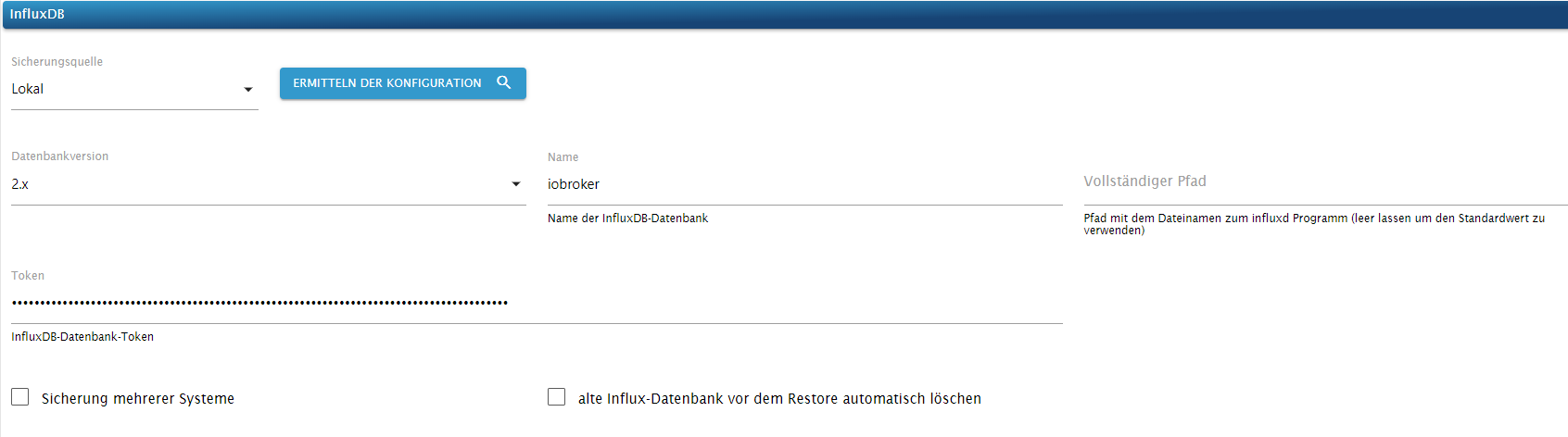
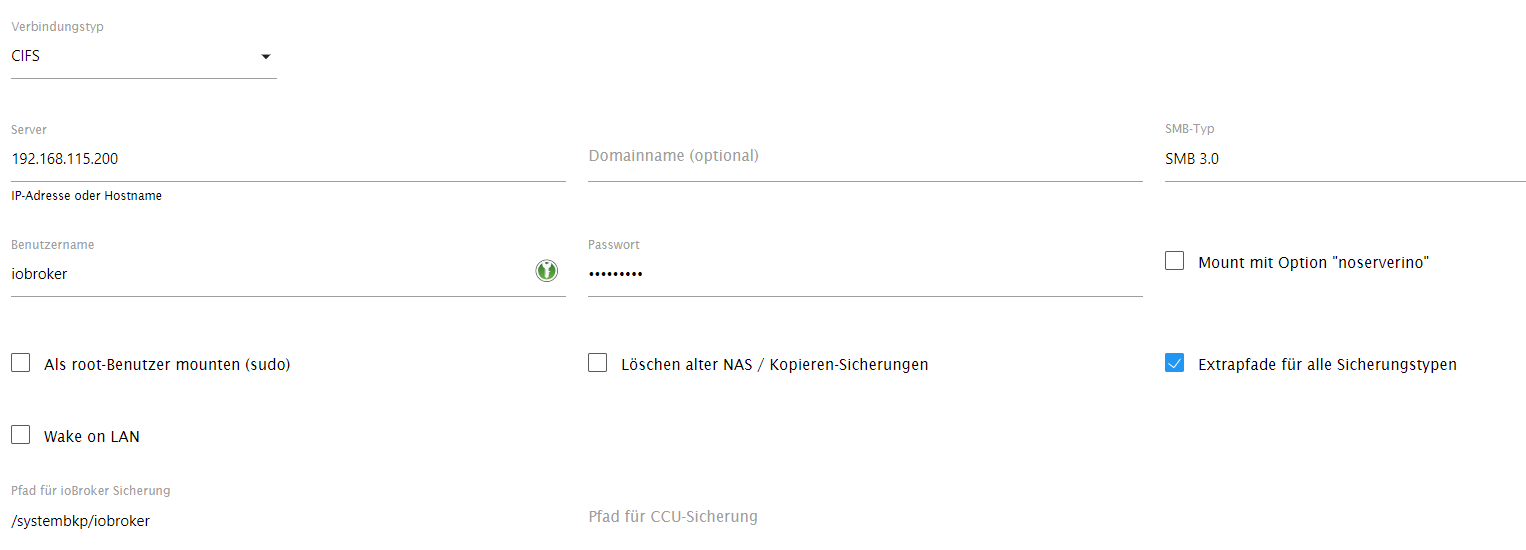
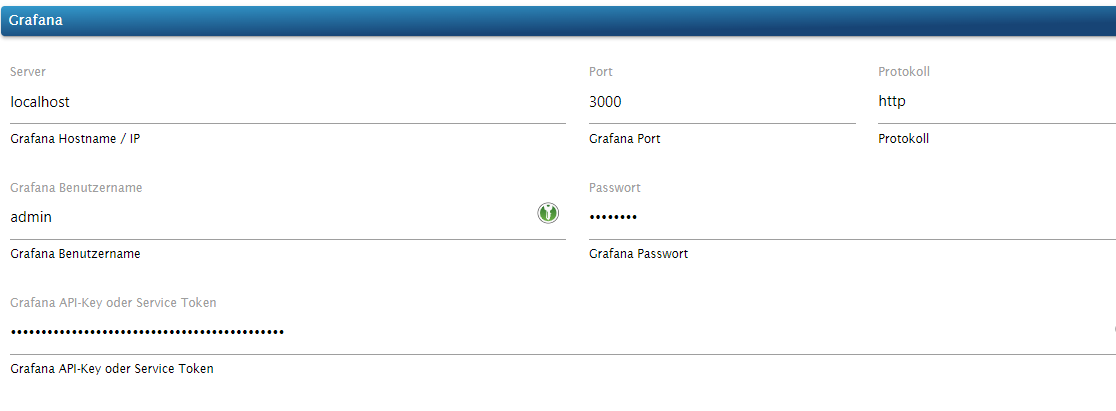
-
@dp20eic
da gehts schon wieder los.
1:1 von influx kopiert. - warum kann ich die Datei nicht entpacken?
Die Datei liegt jetzt im homeverzeichnis von Superuser
Sorry ich alt :thinking_face:superuser@debian:~$ wget https://dl.influxdata.com/influxdb/releases/influxdb2-client-2.7.3-linux-amd64.tar.gz --2023-06-06 11:47:57-- https://dl.influxdata.com/influxdb/releases/influxdb2-client-2.7.3-linux-amd64.tar.gz Auflösen des Hostnamens dl.influxdata.com (dl.influxdata.com)… 13.224.189.83, 13.224.189.2, 13.224.189.72, ... Verbindungsaufbau zu dl.influxdata.com (dl.influxdata.com)|13.224.189.83|:443 … verbunden. HTTP-Anforderung gesendet, auf Antwort wird gewartet … 200 OK Länge: 11454321 (11M) [application/x-tar] Wird in »influxdb2-client-2.7.3-linux-amd64.tar.gz« gespeichert. influxdb2-client-2.7.3-linux-amd64.t 100%[====================================================================>] 10,92M 47,9MB/s in 0,2s 2023-06-06 11:47:58 (47,9 MB/s) - »influxdb2-client-2.7.3-linux-amd64.tar.gz« gespeichert [11454321/11454321] superuser@debian:~$ tar xvzf path/to/influxdb2-client-2.7.3-linux-amd64.tar.gz tar (child): path/to/influxdb2-client-2.7.3-linux-amd64.tar.gz: Funktion open fehlgeschlagen: Datei oder Verzeichnis nicht gefunden tar (child): Error is not recoverable: exiting now tar: Child returned status 2 tar: Error is not recoverable: exiting now superuser@debian:~$Auf die Ausgaben zu
cat /etc/apt/sources.list
cat /etc/apt/sources.list.d/*
warte ich immer noch, da könnte man vielleicht sehen warum apt kaputt ist und wo es da klemmt.
-
Auf die Ausgaben zu
cat /etc/apt/sources.list
cat /etc/apt/sources.list.d/*
warte ich immer noch, da könnte man vielleicht sehen warum apt kaputt ist und wo es da klemmt.
@thomas-braun
so meine Lieben ;)
Ich bin doch schon wieder auf einem frischen System.
(habe verschiedene abgespeicherte Images die ich via Acronis komlett widerherstellen kann)
Also ganz frisches Debian 11 - minimal ohne Desktop - also alles per Console.
Alles strikt nach Docu abgearbeitet.
So wie es z.B. hier steht: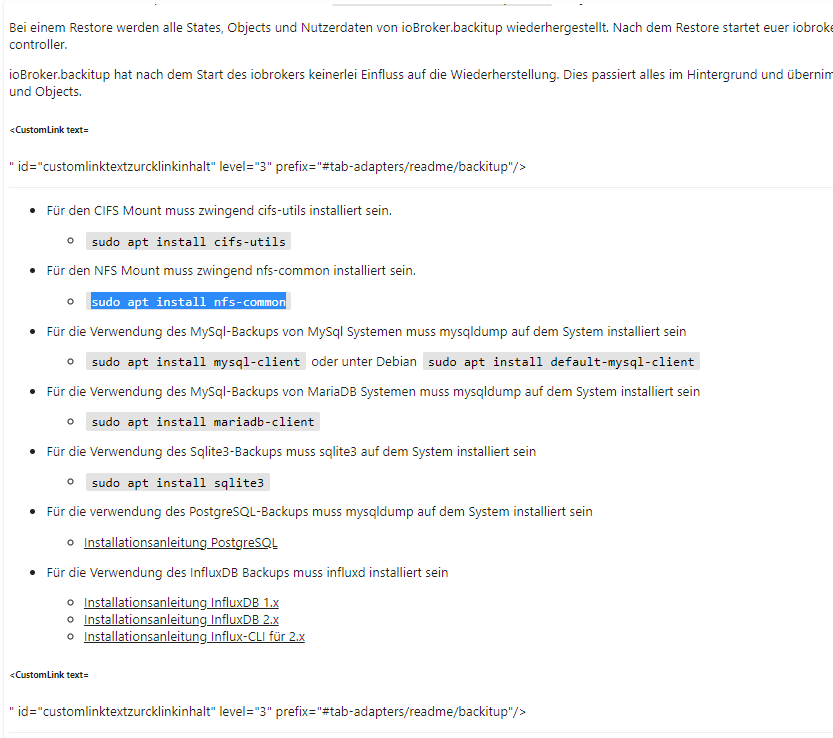
Sorry ich bin ein alter Copy-Paste Arbeiter und muß mir das "Zeugs" zusammensuchen.
Habt Mitleid ...Auf die Ausgaben zu:
Linux debian 5.10.0-23-amd64 #1 SMP Debian 5.10.179-1 (2023-05-12) x86_64

The programs included with the Debian GNU/Linux system are free software;
the exact distribution terms for each program are described in the
individual files in /usr/share/doc/*/copyright.

Debian GNU/Linux comes with ABSOLUTELY NO WARRANTY, to the extent
permitted by applicable law.
Last login: Tue Jun  6 11:46:10 2023 from 192.168.115.175
superuser@debian:~$ cat /etc/apt/sources.list
# deb cdrom:[Debian GNU/Linux 11.7.0 _Bullseye_ - Unofficial amd64 NETINST with                                                                      firmware 20230429-11:49]/ bullseye contrib main non-free

#deb cdrom:[Debian GNU/Linux 11.7.0 _Bullseye_ - Unofficial amd64 NETINST with f                                                                     irmware 20230429-11:49]/ bullseye contrib main non-free

deb http://deb.debian.org/debian/ bullseye main non-free contrib
deb-src http://deb.debian.org/debian/ bullseye main non-free contrib

deb http://security.debian.org/debian-security bullseye-security main contrib no                                                                     n-free
deb-src http://security.debian.org/debian-security bullseye-security main contri                                                                     b non-free

# bullseye-updates, to get updates before a point release is made;
# see https://www.debian.org/doc/manuals/debian-reference/ch02.en.html#_updates_                                                                     and_backports
deb http://deb.debian.org/debian/ bullseye-updates main contrib non-free
deb-src http://deb.debian.org/debian/ bullseye-updates main contrib non-free

# This system was installed using small removable media
# (e.g. netinst, live or single CD). The matching "deb cdrom"
# entries were disabled at the end of the installation process.
# For information about how to configure apt package sources,
# see the sources.list(5) manual.
superuser@debian:~$ cat /etc/apt/sources.list.d/* deb [signed-by=/usr/share/keyrings/nodesource.gpg] https://deb.nodesource.com/node_18.x bullseye main deb-src [signed-by=/usr/share/keyrings/nodesource.gpg] https://deb.nodesource.com/node_18.x bullseye main -
@thomas-braun
so meine Lieben ;)
Ich bin doch schon wieder auf einem frischen System.
(habe verschiedene abgespeicherte Images die ich via Acronis komlett widerherstellen kann)
Also ganz frisches Debian 11 - minimal ohne Desktop - also alles per Console.
Alles strikt nach Docu abgearbeitet.
So wie es z.B. hier steht:Sorry ich bin ein alter Copy-Paste Arbeiter und muß mir das "Zeugs" zusammensuchen.
Habt Mitleid ...Auf die Ausgaben zu:
Linux debian 5.10.0-23-amd64 #1 SMP Debian 5.10.179-1 (2023-05-12) x86_64

The programs included with the Debian GNU/Linux system are free software;
the exact distribution terms for each program are described in the
individual files in /usr/share/doc/*/copyright.

Debian GNU/Linux comes with ABSOLUTELY NO WARRANTY, to the extent
permitted by applicable law.
Last login: Tue Jun  6 11:46:10 2023 from 192.168.115.175
superuser@debian:~$ cat /etc/apt/sources.list
# deb cdrom:[Debian GNU/Linux 11.7.0 _Bullseye_ - Unofficial amd64 NETINST with                                                                      firmware 20230429-11:49]/ bullseye contrib main non-free

#deb cdrom:[Debian GNU/Linux 11.7.0 _Bullseye_ - Unofficial amd64 NETINST with f                                                                     irmware 20230429-11:49]/ bullseye contrib main non-free

deb http://deb.debian.org/debian/ bullseye main non-free contrib
deb-src http://deb.debian.org/debian/ bullseye main non-free contrib

deb http://security.debian.org/debian-security bullseye-security main contrib no                                                                     n-free
deb-src http://security.debian.org/debian-security bullseye-security main contri                                                                     b non-free

# bullseye-updates, to get updates before a point release is made;
# see https://www.debian.org/doc/manuals/debian-reference/ch02.en.html#_updates_                                                                     and_backports
deb http://deb.debian.org/debian/ bullseye-updates main contrib non-free
deb-src http://deb.debian.org/debian/ bullseye-updates main contrib non-free

# This system was installed using small removable media
# (e.g. netinst, live or single CD). The matching "deb cdrom"
# entries were disabled at the end of the installation process.
# For information about how to configure apt package sources,
# see the sources.list(5) manual.
superuser@debian:~$ cat /etc/apt/sources.list.d/* deb [signed-by=/usr/share/keyrings/nodesource.gpg] https://deb.nodesource.com/node_18.x bullseye main deb-src [signed-by=/usr/share/keyrings/nodesource.gpg] https://deb.nodesource.com/node_18.x bullseye mainAlso doch wieder am Paketmanager vorbei?
Die Anleitung von influx ist für ein reines Debian falsch/sehr ungünstig.sudo apt update apt policy influxdb*sagt?
-
@thomas-braun
so meine Lieben ;)
Ich bin doch schon wieder auf einem frischen System.
(habe verschiedene abgespeicherte Images die ich via Acronis komlett widerherstellen kann)
Also ganz frisches Debian 11 - minimal ohne Desktop - also alles per Console.
Alles strikt nach Docu abgearbeitet.
So wie es z.B. hier steht:Sorry ich bin ein alter Copy-Paste Arbeiter und muß mir das "Zeugs" zusammensuchen.
Habt Mitleid ...Auf die Ausgaben zu:
Linux debian 5.10.0-23-amd64 #1 SMP Debian 5.10.179-1 (2023-05-12) x86_64

The programs included with the Debian GNU/Linux system are free software;
the exact distribution terms for each program are described in the
individual files in /usr/share/doc/*/copyright.

Debian GNU/Linux comes with ABSOLUTELY NO WARRANTY, to the extent
permitted by applicable law.
Last login: Tue Jun  6 11:46:10 2023 from 192.168.115.175
superuser@debian:~$ cat /etc/apt/sources.list
# deb cdrom:[Debian GNU/Linux 11.7.0 _Bullseye_ - Unofficial amd64 NETINST with                                                                      firmware 20230429-11:49]/ bullseye contrib main non-free

#deb cdrom:[Debian GNU/Linux 11.7.0 _Bullseye_ - Unofficial amd64 NETINST with f                                                                     irmware 20230429-11:49]/ bullseye contrib main non-free

deb http://deb.debian.org/debian/ bullseye main non-free contrib
deb-src http://deb.debian.org/debian/ bullseye main non-free contrib

deb http://security.debian.org/debian-security bullseye-security main contrib no                                                                     n-free
deb-src http://security.debian.org/debian-security bullseye-security main contri                                                                     b non-free

# bullseye-updates, to get updates before a point release is made;
# see https://www.debian.org/doc/manuals/debian-reference/ch02.en.html#_updates_                                                                     and_backports
deb http://deb.debian.org/debian/ bullseye-updates main contrib non-free
deb-src http://deb.debian.org/debian/ bullseye-updates main contrib non-free

# This system was installed using small removable media
# (e.g. netinst, live or single CD). The matching "deb cdrom"
# entries were disabled at the end of the installation process.
# For information about how to configure apt package sources,
# see the sources.list(5) manual.
superuser@debian:~$ cat /etc/apt/sources.list.d/* deb [signed-by=/usr/share/keyrings/nodesource.gpg] https://deb.nodesource.com/node_18.x bullseye main deb-src [signed-by=/usr/share/keyrings/nodesource.gpg] https://deb.nodesource.com/node_18.x bullseye main@friedhofsblond sagte in BackItUp - InfluxDB2 - Grafana:
influxdb2
influxdb-cliMoin,
wie @Thomas-Braun schon schrieb ist das nicht korrekt. Wenn Du es richtig installieren möchtest, musst Du dir leider die alte Doku aus
influxDB V.2.0nehmen.
https://docs.influxdata.com/influxdb/v2.0/install/?t=LinuxDann verstehe ich nicht, was Du alles aus dem Bildchen, das Du gepostet hast, gemacht hast, etwas auch den anderen Kram installiert wie
mariadb-clientusw.?VG
Bernd -
@friedhofsblond sagte in BackItUp - InfluxDB2 - Grafana:
influxdb2
influxdb-cliMoin,
wie @Thomas-Braun schon schrieb ist das nicht korrekt. Wenn Du es richtig installieren möchtest, musst Du dir leider die alte Doku aus
influxDB V.2.0nehmen.
https://docs.influxdata.com/influxdb/v2.0/install/?t=LinuxDann verstehe ich nicht, was Du alles aus dem Bildchen, das Du gepostet hast, gemacht hast, etwas auch den anderen Kram installiert wie
mariadb-clientusw.?VG
Bernd@dp20eic sagte in BackItUp - InfluxDB2 - Grafana:
Wenn Du es richtig installieren möchtest, musst Du dir leider die alte Doku aus influxDB V.2.0 nehmen.
https://docs.influxdata.com/influxdb/v2.0/install/?t=LinuxUnter diesem Link ist aber auch nicht die Installation per Paketmanager beschrieben, oder?
-
@friedhofsblond sagte in BackItUp - InfluxDB2 - Grafana:
influxdb2
influxdb-cliMoin,
wie @Thomas-Braun schon schrieb ist das nicht korrekt. Wenn Du es richtig installieren möchtest, musst Du dir leider die alte Doku aus
influxDB V.2.0nehmen.
https://docs.influxdata.com/influxdb/v2.0/install/?t=LinuxDann verstehe ich nicht, was Du alles aus dem Bildchen, das Du gepostet hast, gemacht hast, etwas auch den anderen Kram installiert wie
mariadb-clientusw.?VG
Bernd@dp20eic
das war oben noch von der alten Installation.
Da hatte ich OMV6 noch zusätzlich mit drauf.
ab hier ists neu:
https://forum.iobroker.net/topic/65972/backitup-influxdb2-grafana/20?_=1686063421690OK dann nochmal zurück auf "0" - ich melde mich :neutral_face:
-
@dp20eic
das war oben noch von der alten Installation.
Da hatte ich OMV6 noch zusätzlich mit drauf.
ab hier ists neu:
https://forum.iobroker.net/topic/65972/backitup-influxdb2-grafana/20?_=1686063421690OK dann nochmal zurück auf "0" - ich melde mich :neutral_face:
Die Repos zu Grafana wie auch Influx finden sich Copy&Paste fertig hier:
https://forum.iobroker.net/topic/59231/phantastische-repositories-und-wo-sie-zu-finden-sind
-
@dp20eic sagte in BackItUp - InfluxDB2 - Grafana:
Wenn Du es richtig installieren möchtest, musst Du dir leider die alte Doku aus influxDB V.2.0 nehmen.
https://docs.influxdata.com/influxdb/v2.0/install/?t=LinuxUnter diesem Link ist aber auch nicht die Installation per Paketmanager beschrieben, oder?
@marc-berg sagte in BackItUp - InfluxDB2 - Grafana:
@dp20eic sagte in BackItUp - InfluxDB2 - Grafana:
Wenn Du es richtig installieren möchtest, musst Du dir leider die alte Doku aus influxDB V.2.0 nehmen.
https://docs.influxdata.com/influxdb/v2.0/install/?t=LinuxUnter diesem Link ist aber auch nicht die Installation per Paketmanager beschrieben, oder?
Moin,
yup, mein Fehler, dachte, dass das noch die alte Beschreibung ist.
VG
Bernd -
Die Repos zu Grafana wie auch Influx finden sich Copy&Paste fertig hier:
https://forum.iobroker.net/topic/59231/phantastische-repositories-und-wo-sie-zu-finden-sind
@thomas-braun
also mit diesenLinks funktioniert auch nicht alles:wget -q -O /usr/share/keyrings/grafana.key https://apt.grafana.com/gpg.key /usr/share/keyrings/grafana.key: Keine Berechtigungdann bei Influxdb2 werden ja nur die links zu den Repositories hinzugefügt.
Wie gehts dann weiter mit der Install?? -
@thomas-braun
also mit diesenLinks funktioniert auch nicht alles:wget -q -O /usr/share/keyrings/grafana.key https://apt.grafana.com/gpg.key /usr/share/keyrings/grafana.key: Keine Berechtigungdann bei Influxdb2 werden ja nur die links zu den Repositories hinzugefügt.
Wie gehts dann weiter mit der Install??@friedhofsblond sagte in BackItUp - InfluxDB2 - Grafana:
@thomas-braun
also mit diesenLinks funktioniert auch nicht alles:wget -q -O /usr/share/keyrings/grafana.key https://apt.grafana.com/gpg.key /usr/share/keyrings/grafana.key: Keine Berechtigungdann bei Influxdb2 werden ja nur die links zu den Repositories hinzugefügt.
Wie gehts dann weiter mit der Install??Moin,
Da ist etwas beim Kopieren/einfügen kaputt gegangen
1) sudo apt-get install -y apt-transport-https
2) sudo apt-get install -y software-properties-common wget
3) wget -q -O /usr/share/keyrings/grafana.key https://apt.grafana.com/gpg.key
4) echo "deb [signed-by=/usr/share/keyrings/grafana.key] https://apt.grafana.com stable main" | sudo tee /etc/apt/sources.list.d/grafana.list
Das sind jeweils einzelne Kommandos, also erst 1, dann 2 usw.
VG
Bernd -
@thomas-braun
also mit diesenLinks funktioniert auch nicht alles:wget -q -O /usr/share/keyrings/grafana.key https://apt.grafana.com/gpg.key /usr/share/keyrings/grafana.key: Keine Berechtigungdann bei Influxdb2 werden ja nur die links zu den Repositories hinzugefügt.
Wie gehts dann weiter mit der Install??@friedhofsblond sagte in BackItUp - InfluxDB2 - Grafana:
Wie gehts dann weiter mit der Install??
Dann wie üblich bei deinem Betriebssystem.
sudo apt update
sudo apt install GEWÜNSCHTES_PAKET
Vermutlich also
influxdb2influxdb2-clientundgrafana -
@friedhofsblond sagte in BackItUp - InfluxDB2 - Grafana:
@thomas-braun
also mit diesenLinks funktioniert auch nicht alles:wget -q -O /usr/share/keyrings/grafana.key https://apt.grafana.com/gpg.key /usr/share/keyrings/grafana.key: Keine Berechtigungdann bei Influxdb2 werden ja nur die links zu den Repositories hinzugefügt.
Wie gehts dann weiter mit der Install??Moin,
Da ist etwas beim Kopieren/einfügen kaputt gegangen
1) sudo apt-get install -y apt-transport-https
2) sudo apt-get install -y software-properties-common wget
3) wget -q -O /usr/share/keyrings/grafana.key https://apt.grafana.com/gpg.key
4) echo "deb [signed-by=/usr/share/keyrings/grafana.key] https://apt.grafana.com stable main" | sudo tee /etc/apt/sources.list.d/grafana.list
Das sind jeweils einzelne Kommandos, also erst 1, dann 2 usw.
VG
Bernd@dp20eic
Ich hab gerade gesehen, da fehlt ein sudo in Zeile 3.
Muss alsosudo wget -q -O /usr/share/keyrings/grafana.key https://apt.grafana.com/gpg.keylauten.
-
hier ist es via apt beschrieben
https://docs.influxdata.com/influxdb/v2.2/install/?t=Linux -
hier ist es via apt beschrieben
https://docs.influxdata.com/influxdb/v2.2/install/?t=Linux@crunchip sagte in BackItUp - InfluxDB2 - Grafana:
hier ist es via apt beschrieben
https://docs.influxdata.com/influxdb/v2.2/install/?t=LinuxMoin,
ah, genau das war der Link, den ich oben eigentlich meinte, also V2.2 nicht 2.0 :)
VG
Bernd -
@crunchip sagte in BackItUp - InfluxDB2 - Grafana:
hier ist es via apt beschrieben
https://docs.influxdata.com/influxdb/v2.2/install/?t=LinuxMoin,
ah, genau das war der Link, den ich oben eigentlich meinte, also V2.2 nicht 2.0 :)
VG
Bernd@dp20eic
Jo, so langsam wirds - werde dann wohl morgen die nächsten blöden Fragen stellen.
Danke für die Geduld - :clap: -
@friedhofsblond
moin, so nach der Install des IOB habe ich erstmal ein image gezogen und Influxdb2 und Grafana installiert.
Ohne erstmal daten in die DB laufen zu lassen und an Grafana was zu basteln, will ich erstmal ein Backup anlegen können. Dann habe ich eine saubere Basis und kann weiter machen.Influxdb2-CLI ist wohl jetzt im Influxdb2 paket enthalten und muß/kann nicht mehr zusätzlich installiert werden, so wie ich das deute: :face_with_rolling_eyes:
superuser@debian:~$ sudo apt install influxdb2-client
Paketlisten werden gelesen… Fertig
Abhängigkeitsbaum wird aufgebaut… Fertig
Statusinformationen werden eingelesen… Fertig
Die folgenden NEUEN Pakete werden installiert:
  influxdb2-client
0 aktualisiert, 1 neu installiert, 0 zu entfernen und 0 nicht aktualisiert.
Es müssen noch 0 B von 11,3 MB an Archiven heruntergeladen werden.
Nach dieser Operation werden 25,0 MB Plattenplatz zusätzlich benutzt.
(Lese Datenbank ... 51827 Dateien und Verzeichnisse sind derzeit installiert.)
Vorbereitung zum Entpacken von .../influxdb2-client_2.7.1-1_amd64.deb ...
Entpacken von influxdb2-client (2.7.1-1) ...
dpkg: Fehler beim Bearbeiten des Archivs /var/cache/apt/archives/influxdb2-client_2.7.1-1_amd64.deb (--unpack):
 Versuch, »/usr/bin/influx« zu überschreiben, welches auch in Paket influxdb2-cli 2.7.3-1 ist
dpkg-deb: Fehler: »einfügen«-Unterprozess wurde durch Signal (Datenübergabe unterbrochen (broken pipe)) getötet
Fehler traten auf beim Bearbeiten von:
 /var/cache/apt/archives/influxdb2-client_2.7.1-1_amd64.deb
E: Sub-process /usr/bin/dpkg returned an error code (1)
Beide Installationen laufen nach Systemstart und sind über die Web-Gui erreichbar.
Eh ich bei Erstellung User/Datenbank/Visu fehler mache.
Das mit "CREATE USER "admin" WITH PASSWORD 'iobroker' WITH ALL PRIVILEGES" usw.
Muß ich ja bei V2 nicht mehr machen. (oder?)So Erstanmeldung bei Influx (was schreibe ich bei Bucket rein - das wird der Name der Datenbank - oder ?

Bei Grafana - einen sa anlegen (mit welchen privilegien)
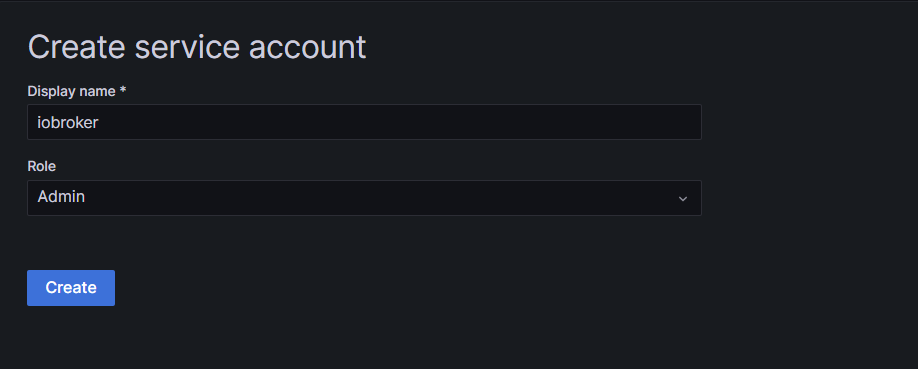
Grüße
-
@friedhofsblond
moin, so nach der Install des IOB habe ich erstmal ein image gezogen und Influxdb2 und Grafana installiert.
Ohne erstmal daten in die DB laufen zu lassen und an Grafana was zu basteln, will ich erstmal ein Backup anlegen können. Dann habe ich eine saubere Basis und kann weiter machen.Influxdb2-CLI ist wohl jetzt im Influxdb2 paket enthalten und muß/kann nicht mehr zusätzlich installiert werden, so wie ich das deute: :face_with_rolling_eyes:
superuser@debian:~$ sudo apt install influxdb2-client
Paketlisten werden gelesen… Fertig
Abhängigkeitsbaum wird aufgebaut… Fertig
Statusinformationen werden eingelesen… Fertig
Die folgenden NEUEN Pakete werden installiert:
  influxdb2-client
0 aktualisiert, 1 neu installiert, 0 zu entfernen und 0 nicht aktualisiert.
Es müssen noch 0 B von 11,3 MB an Archiven heruntergeladen werden.
Nach dieser Operation werden 25,0 MB Plattenplatz zusätzlich benutzt.
(Lese Datenbank ... 51827 Dateien und Verzeichnisse sind derzeit installiert.)
Vorbereitung zum Entpacken von .../influxdb2-client_2.7.1-1_amd64.deb ...
Entpacken von influxdb2-client (2.7.1-1) ...
dpkg: Fehler beim Bearbeiten des Archivs /var/cache/apt/archives/influxdb2-client_2.7.1-1_amd64.deb (--unpack):
 Versuch, »/usr/bin/influx« zu überschreiben, welches auch in Paket influxdb2-cli 2.7.3-1 ist
dpkg-deb: Fehler: »einfügen«-Unterprozess wurde durch Signal (Datenübergabe unterbrochen (broken pipe)) getötet
Fehler traten auf beim Bearbeiten von:
 /var/cache/apt/archives/influxdb2-client_2.7.1-1_amd64.deb
E: Sub-process /usr/bin/dpkg returned an error code (1)
Beide Installationen laufen nach Systemstart und sind über die Web-Gui erreichbar.
Eh ich bei Erstellung User/Datenbank/Visu fehler mache.
Das mit "CREATE USER "admin" WITH PASSWORD 'iobroker' WITH ALL PRIVILEGES" usw.
Muß ich ja bei V2 nicht mehr machen. (oder?)So Erstanmeldung bei Influx (was schreibe ich bei Bucket rein - das wird der Name der Datenbank - oder ?
Bei Grafana - einen sa anlegen (mit welchen privilegien)
Grüße
@friedhofsblond sagte in BackItUp - InfluxDB2 - Grafana:
Influxdb2-CLI ist wohl jetzt im Influxdb2 paket enthalten und muß/kann nicht mehr zusätzlich installiert werden, so wie ich das deute:
Fast.
influxdb2-clientundinfluxdb2-clibeißen sich da. Ich hab aber noch nicht herausgefunden, wozu die beiden Versionen dienen. Vermutlich istinfluxdb2-clidas Paket, in dem die Entwicklung stattfindet undinfluxdb2-clientist die Version die zum Hauptrelease voninfluxdb2gehört. Würde ich jedenfalls so aus den Versionsnummern interpretieren. -
@friedhofsblond sagte in BackItUp - InfluxDB2 - Grafana:
Influxdb2-CLI ist wohl jetzt im Influxdb2 paket enthalten und muß/kann nicht mehr zusätzlich installiert werden, so wie ich das deute:
Fast.
influxdb2-clientundinfluxdb2-clibeißen sich da. Ich hab aber noch nicht herausgefunden, wozu die beiden Versionen dienen. Vermutlich istinfluxdb2-clidas Paket, in dem die Entwicklung stattfindet undinfluxdb2-clientist die Version die zum Hauptrelease voninfluxdb2gehört. Würde ich jedenfalls so aus den Versionsnummern interpretieren. -
@thomas-braun
also den cli installieren ?@friedhofsblond sagte in BackItUp - InfluxDB2 - Grafana:
also den cli installieren ?
Den hast du schon installiert.
Ich würde den influxdb2-client stattdessen nehmen.sudo apt update sudo apt remove influxdb2-cli sudo apt install influxdb2-client apt policy influxdb2* -
@friedhofsblond sagte in BackItUp - InfluxDB2 - Grafana:
also den cli installieren ?
Den hast du schon installiert.
Ich würde den influxdb2-client stattdessen nehmen.sudo apt update sudo apt remove influxdb2-cli sudo apt install influxdb2-client apt policy influxdb2*superuser@debian:~$ sudo apt update [sudo] Passwort für superuser: OK:1 http://deb.debian.org/debian bullseye InRelease Holen:2 http://deb.debian.org/debian bullseye-updates InRelease [44,1 kB] OK:3 http://security.debian.org/debian-security bullseye-security InRelease OK:4 https://repos.influxdata.com/debian stable InRelease OK:5 https://deb.nodesource.com/node_18.x bullseye InRelease OK:6 https://apt.grafana.com stable InRelease Es wurden 44,1 kB in 1 s geholt (54,0 kB/s). Paketlisten werden gelesen… Fertig Abhängigkeitsbaum wird aufgebaut… Fertig Statusinformationen werden eingelesen… Fertig Alle Pakete sind aktuell. superuser@debian:~$ sudo apt remove influxdb2-cli Paketlisten werden gelesen… Fertig Abhängigkeitsbaum wird aufgebaut… Fertig Statusinformationen werden eingelesen… Fertig Die folgenden Pakete werden ENTFERNT: influxdb2-cli 0 aktualisiert, 0 neu installiert, 1 zu entfernen und 0 nicht aktualisiert. Nach dieser Operation werden 25,2 MB Plattenplatz freigegeben. Möchten Sie fortfahren? [J/n] j (Lese Datenbank ... 60118 Dateien und Verzeichnisse sind derzeit installiert.) Entfernen von influxdb2-cli (2.7.3-1) ... superuser@debian:~$ sudo apt install influxdb2-client Paketlisten werden gelesen… Fertig Abhängigkeitsbaum wird aufgebaut… Fertig Statusinformationen werden eingelesen… Fertig Die folgenden NEUEN Pakete werden installiert: influxdb2-client 0 aktualisiert, 1 neu installiert, 0 zu entfernen und 0 nicht aktualisiert. Es müssen noch 0 B von 11,3 MB an Archiven heruntergeladen werden. Nach dieser Operation werden 25,0 MB Plattenplatz zusätzlich benutzt. (Lese Datenbank ... 60115 Dateien und Verzeichnisse sind derzeit installiert.) Vorbereitung zum Entpacken von .../influxdb2-client_2.7.1-1_amd64.deb ... Entpacken von influxdb2-client (2.7.1-1) ... influxdb2-client (2.7.1-1) wird eingerichtet ... superuser@debian:~$ apt policy influxdb2* influxdb2-cli: Installiert: (keine) Installationskandidat: 2.7.3-1 Versionstabelle: 2.7.3-1 500 500 https://repos.influxdata.com/debian stable/main amd64 Packages 2.7.1-2 500 500 https://repos.influxdata.com/debian stable/main amd64 Packages 2.6.1 500 500 https://repos.influxdata.com/debian stable/main amd64 Packages 2.6.0 500 500 https://repos.influxdata.com/debian stable/main amd64 Packages 2.5.0 500 500 https://repos.influxdata.com/debian stable/main amd64 Packages 2.4.0 500 500 https://repos.influxdata.com/debian stable/main amd64 Packages 2.3.0 500 500 https://repos.influxdata.com/debian stable/main amd64 Packages influxdb2-client: Installiert: 2.7.1-1 Installationskandidat: 2.7.1-1 Versionstabelle: *** 2.7.1-1 500 500 https://repos.influxdata.com/debian stable/main amd64 Packages 100 /var/lib/dpkg/status influxdb2: Installiert: 2.7.1-1 Installationskandidat: 2.7.1-1 Versionstabelle: *** 2.7.1-1 500 500 https://repos.influxdata.com/debian stable/main amd64 Packages 100 /var/lib/dpkg/status 2.7.0-1 500 500 https://repos.influxdata.com/debian stable/main amd64 Packages 2.6.1-1 500 500 https://repos.influxdata.com/debian stable/main amd64 Packages 2.6.0-1 500 500 https://repos.influxdata.com/debian stable/main amd64 Packages 2.5.1-1 500 500 https://repos.influxdata.com/debian stable/main amd64 Packages 2.4.0-1 500 500 https://repos.influxdata.com/debian stable/main amd64 Packages 2.3.0-1 500 500 https://repos.influxdata.com/debian stable/main amd64 Packages 2.2.0 500 500 https://repos.influxdata.com/debian stable/main amd64 Packages superuser@debian:~$OK hat geklappt
Obwohl es manchmal von cli und manchmal von client die Rede ist.
Hier geht es um cli:
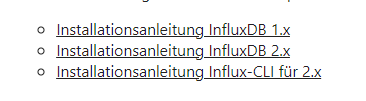
und der Link geht auf CLIIch denke fast der Client muß raus der CLI rein ?




581
Online32.7k
Users82.5k
Topics1.3m
Posts