




[gelöst] Widget für RTSP Stream
-
@wendy2702 sagte in [gelöst] Widget für RTSP Stream:
@wal mit Google Beschleuniger ?
ja, siehe hier.
-
Hallo Patrick, ich habe Frigate schon seit ner Weile im Einsatz und es läuft mit der Personen und Objekterkennung einfach genial. Die Unterscheidung zwischen Katze, Hund und Vogel funktioniert zwar nicht zu 100% (was aber auch an meinen Einstellungen liegen kann) aber es kommt ja mehr auf die Erkennung von Personen an und das läuft einfach.
Ist aber auf jeden Fall anzuraten einen Google Coral TPU zu verwenden. der Gewaltig die Rechenlast vom Prozessor reduziert, weil dieser dann die Berechnungen durchführt.Frigate gibt es seit diesen Jahr in der Version 0.12.0 und hat jetzt die Integration von go2rtc
Damit und den iframe-Widget ist es nun möglich das Livebild inkl. Ton in der VIS anzuzeigen!@sidm sagte in [gelöst] Widget für RTSP Stream:
Frigate gibt es seit diesen Jahr in der Version 0.12.0 und hat jetzt die Integration von go2rtc
Damit und den iframe-Widget ist es nun möglich das Livebild inkl. Ton in der VIS anzuzeigen!Hast du dazu mal ein Beispiel Config? Aktuell teste ich mit einer Reolink E1 Zoom und probiere jetzt schon mehrere Tage das go2rtc so aufzubereiten dass es die VIS anzeigen kann. Irgendwo ist da noch ein Knoten bei mir im Hirn.
Der Coral USB ist schon im Warenkorb.
Grüße
Patrick -
Hallo Patrick, bei der Umstellung auf go2rtc musste ich auch erst ein wenig probieren.
Wenn ich dir ein Rat geben kann, versuche andere Kameras als Reolink zu nutzen. Versuche welche von Dahua, Hikvision, and Amcrest zu nehmen, wie es der Entwickler vorschlägt.Ich habe 3 Reolinks (hatte ich vor Frigate NVR) und eine davon ( RLC-510A ) hat bei den aufnahmen immer mal Aussetzer (Ton läuft noch Bild friert aber ein, oder auch mal komplett Schwarzes Bild).
Meine Konfig sieht so aus:
mqtt:
  # Optional: Enable mqtt server (default: false)
  enabled: True
  # Required: host name
  host: 192.168.188.40
  # Optional: port (default: shown below)
  port: 1886
  # Optional: topic prefix (default: frigate)
  # NOTE: must be unique if you are running multiple instances
  topic_prefix: frigate
  # Optional: client id (default: frigate)
  # NOTE: must be unique if you are running multiple instances
  client_id: frigate
  # Optional: interval in seconds for publishing stats (default: 60)
  stats_interval: 5


detectors: # <---- add detectors
  coral:
    type: edgetpu
    device: usb


ffmpeg:
  hwaccel_args: preset-vaapi
  output_args:
    # Optional: output args for detect streams (default: shown below)
    detect: -f rawvideo -pix_fmt yuv420p
    # Optional: output args for record streams (default: shown below)
    record: -f segment -segment_time 10 -segment_format mp4 -reset_timestamps 1 -strftime 1 -c copy
    # Optional: output args for rtmp streams (default: shown below)


go2rtc:
  streams:
    Hof:
      - http://192.168.188.38/flv?port=1935&app=bcs&stream=channel0_main.bcs&user=**********&password=**********
      - "ffmpeg:Hof#audio=opus" # <- copy of the stream which transcodes audio to the missing codec (usually will be opus)
    Hof_Sub:
      - http://192.168.188.38/flv?port=1935&app=bcs&stream=channel0_ext.bcs&user=**********&password=**********
    Werkstatt:
      - http://192.168.188.23/flv?port=1935&app=bcs&stream=channel0_main.bcs&user=**********&password=**********
      - "ffmpeg:Werkstatt#audio=opus" # <- copy of the stream which transcodes audio to the missing codec (usually will be opus)
    Werkstatt_Sub:
      - http://192.168.188.23/flv?port=1935&app=bcs&stream=channel0_ext.bcs&user=**********&password=**********
    Flur:
      - http://192.168.188.36/flv?port=1935&app=bcs&stream=channel0_main.bcs&user=**********&password=**********
      - "ffmpeg:Flur#audio=opus" # <- copy of the stream which transcodes audio to the missing codec (usually will be opus)
    Flur_Sub:
      - http://192.168.188.36/flv?port=1935&app=bcs&stream=channel0_ext.bcs&user=**********&password=**********
  webrtc:
    candidates:
      - 192.168.188.40:8555
      - stun:8555


cameras:
  Hof: # <------ Name the camera
    ffmpeg:
      output_args:
        record: preset-record-generic-audio-copy
      inputs:
        - path: rtsp://127.0.0.1:8554/Hof?video=copy&audio=aac # <--- the name here must match the name of the camera in restream
          input_args: preset-rtsp-restream
          roles:
            - record
        - path: rtsp://127.0.0.1:8554/Hof_Sub?video=copy # <----- The stream you want to use for detection
          input_args: preset-rtsp-restream
          roles:
            - detect
    detect:
      enabled: True # <---- disable detection until you have a working camera feed
      width: 2560 # <---- update for your camera's resolution
      height: 1920 # <---- update for your camera's resolution
    record: # <----- Enable recording
      enabled: True
    snapshots: # <----- Enable snapshots
      enabled: True
    motion:
      mask:
        - 2024,238,1528,171,1330,189,1124,214,1081,342,751,336,748,379,379,385,0,407,0,192,0,0,837,0,2560,0,2560,157,2560,360
        - 1194,1920,1041,1783,0,1791,0,1920
    zones:
      Bewegung Hofeinfahrt:
        coordinates: 747,396,0,437,0,566,117,548,122,743,412,699,715,671,718,515,743,512
      Bewegung Innenhof:
        coordinates: 0,1920,0,580,112,551,122,749,746,682,737,346,1086,336,1086,221,1544,163,1704,176,2130,253,2560,362,2560,1920
      Bewegung Doppelgarage:
        coordinates: 2378,1892,2180,1822,2102,1718,2226,1316,2390,1018,2560,1082,2560,1552


  Werkstatt:
    ffmpeg:
      output_args:
        record: preset-record-generic-audio-copy
      inputs:
        - path: rtsp://127.0.0.1:8554/Werkstatt?video=copy&audio=aac # <--- the name here must match the name of the camera in restream
          input_args: preset-rtsp-restream
          roles:
            - record
        - path: rtsp://127.0.0.1:8554/Werkstatt_Sub?video=copy # <----- The stream you want to use for detection
          input_args: preset-rtsp-restream
          roles:
            - detect
    detect:
      enabled: True # <---- disable detection until you have a working camera feed
      width: 2560 # <---- update for your camera's resolution
      height: 1920 # <---- update for your camera's resolution
    record: # <----- Enable recording
      enabled: True
    snapshots: # <----- Enable snapshots
      enabled: True
    motion:
      mask:
        - 1828,42,1827,133,730,123,730,39
    zones:
      Bewegung Werkstatt:
        coordinates: 0,1920,0,0,2560,0,2560,1920


  Flur:
    ffmpeg:
      output_args:
        record: preset-record-generic-audio-copy
      inputs:
        - path: rtsp://127.0.0.1:8554/Flur?video=copy&audio=aac # <--- the name here must match the name of the camera in restream
          input_args: preset-rtsp-restream
          roles:
            - record
        - path: rtsp://127.0.0.1:8554/Flur_Sub?video=copy # <----- The stream you want to use for detection
          input_args: preset-rtsp-restream
          roles:
            - detect
    detect:
      enabled: True # <---- disable detection until you have a working camera feed
      width: 2560 # <---- update for your camera's resolution
      height: 1920 # <---- update for your camera's resolution
    record: # <----- Enable recording
      enabled: True
    snapshots: # <----- Enable snapshots
      enabled: True
    motion:
      mask:
        - 1828,133,1823,25,715,34,716,139
    zones:
      Bewegung Flur:
        coordinates: 0,1920,0,0,2560,0,2560,1920


# Optional: Object configuration
# NOTE: Can be overridden at the camera level
objects:
  # Optional: list of objects to track from labelmap.txt (default: shown below)
  track:
    - person
    - car
    - cat
    - dog
    - bird
  # Optional: mask to prevent all object types from being detected in certain areas (default: no mask)
  # Checks based on the bottom center of the bounding box of the object.
  # NOTE: This mask is COMBINED with the object type specific mask below
  mask: 0,0,1000,0,1000,200,0,200
  # Optional: filters to reduce false positives for specific object types
  filters:
    person:
      # Optional: minimum width*height of the bounding box for the detected object (default: 0)
      min_area: 0
      # Optional: maximum width*height of the bounding box for the detected object (default: 24000000)
      max_area: 24000000
      # Optional: minimum score for the object to initiate tracking (default: shown below)
      min_score: 0.5
      # Optional: minimum decimal percentage for tracked object's computed score to be considered a true positive (default: shown below)
      threshold: 0.7
      # Optional: mask to prevent this object type from being detected in certain areas (default: no mask)
      # Checks based on the bottom center of the bounding box of the object
      mask: 0,0,1000,0,1000,200,0,200


# Optional: in-feed timestamp style configuration
# NOTE: Can be overridden at the camera level
timestamp_style:
  # Optional: Position of the timestamp (default: shown below)
  #           "tl" (top left), "tr" (top right), "bl" (bottom left), "br" (bottom right)
  position: "tl"
  # Optional: Format specifier conform to the Python package "datetime" (default: shown below)
  #           Additional Examples:
  #             german: "%d.%m.%Y %H:%M:%S"
  format: "%d/%m/%Y %H:%M:%S"
  # Optional: Color of font
  color:
    # All Required when color is specified (default: shown below)
    red: 255
    green: 255
    blue: 255
  # Optional: Line thickness of font (default: shown below)
  thickness: 2
  # Optional: Effect of lettering (default: shown below)
  #           None (No effect),
  #           "solid" (solid background in inverse color of font)
  #           "shadow" (shadow for font)
  effect: solid


# Optional: birdseye configuration
# NOTE: Can (enabled, mode) be overridden at the camera level
birdseye:
  # Optional: Enable birdseye view (default: True)
  enabled: True
  # Optional: Restream birdseye via RTSP (default: False)
  # NOTE: Enabling this will set birdseye to run 24/7 which may increase CPU usage somewhat.
  restream: False
  # Optional: Width of the output resolution (default: 1280)
  width: 2560
  # Optional: Height of the output resolution (default: 720)
  height: 1920
  # Optional: Encoding quality of the mpeg1 feed (default: 8)
  # 1 is the highest quality, and 31 is the lowest. Lower quality feeds utilize less CPU resources.
  quality: 8
  # Optional: Mode of the view. Available options are: objects, motion, and continuous
  #   objects - cameras are included if they have had a tracked object within the last 30 seconds
  #   motion - cameras are included if motion was detected in the last 30 seconds
  #   continuous - all cameras are included always
  mode: motion


# Optional: Record configuration
# NOTE: Can be overridden at the camera level
record:
  # Optional: Enable recording (default: False)
  # WARNING: If recording is disabled in the config, turning it on via
  #          the UI or MQTT later will have no effect.
  enabled: True
  # Optional: Number of minutes to wait between cleanup runs (default: 60)
  # This can be used to reduce the frequency of deleting recording segments from disk if you want to minimize i/o
  expire_interval: 60
  # Optional: Retention settings for recording
  retain:
    # Optional: Number of days to retain recordings regardless of events (default: 0)
    # NOTE: This should be set to 0 and retention should be defined in events section below
    #       if you only want to retain recordings of events.
    days: 0
    # Optional: Mode for retention. Available options are: all, motion, and active_objects
    #   all - save all recording segments regardless of activity
    #   motion - save all recordings segments with any detected motion
    #   active_objects - save all recording segments with active/moving objects
    # NOTE: this mode only applies when the days setting above is greater than 0
    mode: all
  # Optional: Event recording settings
  events:
    # Optional: Number of seconds before the event to include (default: 5)
    pre_capture: 15
    # Optional: Number of seconds after the event to include (default: 5)
    post_capture: 15
    # Optional: Objects to save recordings for. (default: all tracked objects)
    objects:
      - person
      - car
      - dog
      - cat
      - bird

    # Optional: Restrict recordings to objects that entered any of the listed zones (default: no required zones)
    required_zones: []
    # Optional: Retention settings for recordings of events
    retain:
      # Required: Default retention days (default: 10)
      default: 10
      # Optional: Mode for retention. (default: motion)
      #   all - save all recording segments for events regardless of activity
      #   motion - save all recordings segments for events with any detected motion
      #   active_objects - save all recording segments for event with active/moving objects
      #
      # NOTE: If the retain mode for the camera is more restrictive than the mode configured
      #       here, the segments will already be gone by the time this mode is applied.
      #       For example, if the camera retain mode is "motion", the segments without motion are
      #       never stored, so setting the mode to "all" here won't bring them back.
      mode: motion
      # Optional: Per object retention days
      objects:
        person: 15
        car:    15
        dog:    15
        cat:    15


# Optional: Configuration for the jpg snapshots written to the clips directory for each event
# NOTE: Can be overridden at the camera level
snapshots:
  # Optional: Enable writing jpg snapshot to /media/frigate/clips (default: False)
  enabled: True
  # Optional: save a clean PNG copy of the snapshot image (default: True)
  clean_copy: True
  # Optional: print a timestamp on the snapshots (default: False)
  timestamp: False
  # Optional: draw bounding box on the snapshots (default: False)
  bounding_box: True
  # Optional: crop the snapshot (default: False)
  crop: False
  # Optional: height to resize the snapshot to (default: original size)
  height: 0
  # Optional: Restrict snapshots to objects that entered any of the listed zones (default: no required zones)
  required_zones: []
  # Optional: Camera override for retention settings (default: global values)
  retain:
    # Required: Default retention days (default: 10)
    default: 10
    # Optional: Per object retention days
    objects:
      person: 15
      car:    15
      dog:    15
      cat:    15


# Optional
ui:
  # Optional: Set the default live mode for cameras in the UI (default: mse)
  live_mode: mse
  # Optional: Set a timezone to use in the UI (default: use browser local time)
   #timezone: America/Denver
  # Optional: Use an experimental recordings / camera view UI (default: false)
  use_experimental: False
  # Optional: Set the time format used.
  # Options are browser, 12hour, or 24hour (default: browser)
  time_format: browser
  # Optional: Set the date style for a specified length.
  # Options are: full, long, medium, short
  # Examples:
  #    short: 2/11/23
  #    medium: Feb 11, 2023
  #    full: Saturday, February 11, 2023
  # (default: short).
  date_style: short
  # Optional: Set the time style for a specified length.
  # Options are: full, long, medium, short
  # Examples:
  #    short: 8:14 PM
  #    medium: 8:15:22 PM
  #    full: 8:15:22 PM Mountain Standard Time
  # (default: medium).
  time_style: medium
  # Optional: Ability to manually override the date / time styling to use strftime format
  # https://www.gnu.org/software/libc/manual/html_node/Formatting-Calendar-Time.html
  # possible values are shown above (default: not set)
  #strftime_fmt: "%Y/%m/%d %H:%M"
Dank der Integration von go2rtc kann man jetzt auch auf dem iPhone problemlos sich den Live Stream anzeigen lassen ohne eine weiter App nutzen zu müssen.
In der VIS dann einfach ein iFrame-Widget einsetzten und als Quelle folgendes eingeben:
http://192.168.188.40:5002/live/webrtc/webrtc.html?src=FlurDie IP und Port entspricht dabei den von Frigate.
-
@sidm sagte in [gelöst] Widget für RTSP Stream:
Ist aber auf jeden Fall anzuraten einen Google Coral TPU zu verwenden.
Ich denke bis 2 Kamerastreams geht es auch ohne, vorausgesetzt man installiert frigate nicht gerade auf einem Raspi.
Auf einem Intel i5-6300 komme ich ohne Coral TPU und der Vino Erkennung mit 2 Streams auf ca. 3-5% CPU-Last ohne Transcoding. Mit Corel Dual TPU auf 1-3%.Ich hatte zu beginn auch keine Google Coralle und hab aber bei 2 Streams eine Auslastung von ca 30-35% im Hinterkopf. (Xeon E-2176G)
Mittlerweile wird ja auch wie du schon angesprochen hast, OpenVino unterstützt also CPU und GPU von Intel.
Auch gibt es regelmäßige Updates von Frigate.
Man kann ja erstmal schauen, ob es für eine etwas ist und falls ja, was die Auslastung des Systems macht.Der Stick ist ja dann schnell nachgeordert.
-
Hallo Patrick, bei der Umstellung auf go2rtc musste ich auch erst ein wenig probieren.
Wenn ich dir ein Rat geben kann, versuche andere Kameras als Reolink zu nutzen. Versuche welche von Dahua, Hikvision, and Amcrest zu nehmen, wie es der Entwickler vorschlägt.Ich habe 3 Reolinks (hatte ich vor Frigate NVR) und eine davon ( RLC-510A ) hat bei den aufnahmen immer mal Aussetzer (Ton läuft noch Bild friert aber ein, oder auch mal komplett Schwarzes Bild).
Meine Konfig sieht so aus:
mqtt:
  # Optional: Enable mqtt server (default: false)
  enabled: True
  # Required: host name
  host: 192.168.188.40
  # Optional: port (default: shown below)
  port: 1886
  # Optional: topic prefix (default: frigate)
  # NOTE: must be unique if you are running multiple instances
  topic_prefix: frigate
  # Optional: client id (default: frigate)
  # NOTE: must be unique if you are running multiple instances
  client_id: frigate
  # Optional: interval in seconds for publishing stats (default: 60)
  stats_interval: 5


detectors: # <---- add detectors
  coral:
    type: edgetpu
    device: usb


ffmpeg:
  hwaccel_args: preset-vaapi
  output_args:
    # Optional: output args for detect streams (default: shown below)
    detect: -f rawvideo -pix_fmt yuv420p
    # Optional: output args for record streams (default: shown below)
    record: -f segment -segment_time 10 -segment_format mp4 -reset_timestamps 1 -strftime 1 -c copy
    # Optional: output args for rtmp streams (default: shown below)


go2rtc:
  streams:
    Hof:
      - http://192.168.188.38/flv?port=1935&app=bcs&stream=channel0_main.bcs&user=**********&password=**********
      - "ffmpeg:Hof#audio=opus" # <- copy of the stream which transcodes audio to the missing codec (usually will be opus)
    Hof_Sub:
      - http://192.168.188.38/flv?port=1935&app=bcs&stream=channel0_ext.bcs&user=**********&password=**********
    Werkstatt:
      - http://192.168.188.23/flv?port=1935&app=bcs&stream=channel0_main.bcs&user=**********&password=**********
      - "ffmpeg:Werkstatt#audio=opus" # <- copy of the stream which transcodes audio to the missing codec (usually will be opus)
    Werkstatt_Sub:
      - http://192.168.188.23/flv?port=1935&app=bcs&stream=channel0_ext.bcs&user=**********&password=**********
    Flur:
      - http://192.168.188.36/flv?port=1935&app=bcs&stream=channel0_main.bcs&user=**********&password=**********
      - "ffmpeg:Flur#audio=opus" # <- copy of the stream which transcodes audio to the missing codec (usually will be opus)
    Flur_Sub:
      - http://192.168.188.36/flv?port=1935&app=bcs&stream=channel0_ext.bcs&user=**********&password=**********
  webrtc:
    candidates:
      - 192.168.188.40:8555
      - stun:8555


cameras:
  Hof: # <------ Name the camera
    ffmpeg:
      output_args:
        record: preset-record-generic-audio-copy
      inputs:
        - path: rtsp://127.0.0.1:8554/Hof?video=copy&audio=aac # <--- the name here must match the name of the camera in restream
          input_args: preset-rtsp-restream
          roles:
            - record
        - path: rtsp://127.0.0.1:8554/Hof_Sub?video=copy # <----- The stream you want to use for detection
          input_args: preset-rtsp-restream
          roles:
            - detect
    detect:
      enabled: True # <---- disable detection until you have a working camera feed
      width: 2560 # <---- update for your camera's resolution
      height: 1920 # <---- update for your camera's resolution
    record: # <----- Enable recording
      enabled: True
    snapshots: # <----- Enable snapshots
      enabled: True
    motion:
      mask:
        - 2024,238,1528,171,1330,189,1124,214,1081,342,751,336,748,379,379,385,0,407,0,192,0,0,837,0,2560,0,2560,157,2560,360
        - 1194,1920,1041,1783,0,1791,0,1920
    zones:
      Bewegung Hofeinfahrt:
        coordinates: 747,396,0,437,0,566,117,548,122,743,412,699,715,671,718,515,743,512
      Bewegung Innenhof:
        coordinates: 0,1920,0,580,112,551,122,749,746,682,737,346,1086,336,1086,221,1544,163,1704,176,2130,253,2560,362,2560,1920
      Bewegung Doppelgarage:
        coordinates: 2378,1892,2180,1822,2102,1718,2226,1316,2390,1018,2560,1082,2560,1552


  Werkstatt:
    ffmpeg:
      output_args:
        record: preset-record-generic-audio-copy
      inputs:
        - path: rtsp://127.0.0.1:8554/Werkstatt?video=copy&audio=aac # <--- the name here must match the name of the camera in restream
          input_args: preset-rtsp-restream
          roles:
            - record
        - path: rtsp://127.0.0.1:8554/Werkstatt_Sub?video=copy # <----- The stream you want to use for detection
          input_args: preset-rtsp-restream
          roles:
            - detect
    detect:
      enabled: True # <---- disable detection until you have a working camera feed
      width: 2560 # <---- update for your camera's resolution
      height: 1920 # <---- update for your camera's resolution
    record: # <----- Enable recording
      enabled: True
    snapshots: # <----- Enable snapshots
      enabled: True
    motion:
      mask:
        - 1828,42,1827,133,730,123,730,39
    zones:
      Bewegung Werkstatt:
        coordinates: 0,1920,0,0,2560,0,2560,1920


  Flur:
    ffmpeg:
      output_args:
        record: preset-record-generic-audio-copy
      inputs:
        - path: rtsp://127.0.0.1:8554/Flur?video=copy&audio=aac # <--- the name here must match the name of the camera in restream
          input_args: preset-rtsp-restream
          roles:
            - record
        - path: rtsp://127.0.0.1:8554/Flur_Sub?video=copy # <----- The stream you want to use for detection
          input_args: preset-rtsp-restream
          roles:
            - detect
    detect:
      enabled: True # <---- disable detection until you have a working camera feed
      width: 2560 # <---- update for your camera's resolution
      height: 1920 # <---- update for your camera's resolution
    record: # <----- Enable recording
      enabled: True
    snapshots: # <----- Enable snapshots
      enabled: True
    motion:
      mask:
        - 1828,133,1823,25,715,34,716,139
    zones:
      Bewegung Flur:
        coordinates: 0,1920,0,0,2560,0,2560,1920


# Optional: Object configuration
# NOTE: Can be overridden at the camera level
objects:
  # Optional: list of objects to track from labelmap.txt (default: shown below)
  track:
    - person
    - car
    - cat
    - dog
    - bird
  # Optional: mask to prevent all object types from being detected in certain areas (default: no mask)
  # Checks based on the bottom center of the bounding box of the object.
  # NOTE: This mask is COMBINED with the object type specific mask below
  mask: 0,0,1000,0,1000,200,0,200
  # Optional: filters to reduce false positives for specific object types
  filters:
    person:
      # Optional: minimum width*height of the bounding box for the detected object (default: 0)
      min_area: 0
      # Optional: maximum width*height of the bounding box for the detected object (default: 24000000)
      max_area: 24000000
      # Optional: minimum score for the object to initiate tracking (default: shown below)
      min_score: 0.5
      # Optional: minimum decimal percentage for tracked object's computed score to be considered a true positive (default: shown below)
      threshold: 0.7
      # Optional: mask to prevent this object type from being detected in certain areas (default: no mask)
      # Checks based on the bottom center of the bounding box of the object
      mask: 0,0,1000,0,1000,200,0,200


# Optional: in-feed timestamp style configuration
# NOTE: Can be overridden at the camera level
timestamp_style:
  # Optional: Position of the timestamp (default: shown below)
  #           "tl" (top left), "tr" (top right), "bl" (bottom left), "br" (bottom right)
  position: "tl"
  # Optional: Format specifier conform to the Python package "datetime" (default: shown below)
  #           Additional Examples:
  #             german: "%d.%m.%Y %H:%M:%S"
  format: "%d/%m/%Y %H:%M:%S"
  # Optional: Color of font
  color:
    # All Required when color is specified (default: shown below)
    red: 255
    green: 255
    blue: 255
  # Optional: Line thickness of font (default: shown below)
  thickness: 2
  # Optional: Effect of lettering (default: shown below)
  #           None (No effect),
  #           "solid" (solid background in inverse color of font)
  #           "shadow" (shadow for font)
  effect: solid


# Optional: birdseye configuration
# NOTE: Can (enabled, mode) be overridden at the camera level
birdseye:
  # Optional: Enable birdseye view (default: True)
  enabled: True
  # Optional: Restream birdseye via RTSP (default: False)
  # NOTE: Enabling this will set birdseye to run 24/7 which may increase CPU usage somewhat.
  restream: False
  # Optional: Width of the output resolution (default: 1280)
  width: 2560
  # Optional: Height of the output resolution (default: 720)
  height: 1920
  # Optional: Encoding quality of the mpeg1 feed (default: 8)
  # 1 is the highest quality, and 31 is the lowest. Lower quality feeds utilize less CPU resources.
  quality: 8
  # Optional: Mode of the view. Available options are: objects, motion, and continuous
  #   objects - cameras are included if they have had a tracked object within the last 30 seconds
  #   motion - cameras are included if motion was detected in the last 30 seconds
  #   continuous - all cameras are included always
  mode: motion


# Optional: Record configuration
# NOTE: Can be overridden at the camera level
record:
  # Optional: Enable recording (default: False)
  # WARNING: If recording is disabled in the config, turning it on via
  #          the UI or MQTT later will have no effect.
  enabled: True
  # Optional: Number of minutes to wait between cleanup runs (default: 60)
  # This can be used to reduce the frequency of deleting recording segments from disk if you want to minimize i/o
  expire_interval: 60
  # Optional: Retention settings for recording
  retain:
    # Optional: Number of days to retain recordings regardless of events (default: 0)
    # NOTE: This should be set to 0 and retention should be defined in events section below
    #       if you only want to retain recordings of events.
    days: 0
    # Optional: Mode for retention. Available options are: all, motion, and active_objects
    #   all - save all recording segments regardless of activity
    #   motion - save all recordings segments with any detected motion
    #   active_objects - save all recording segments with active/moving objects
    # NOTE: this mode only applies when the days setting above is greater than 0
    mode: all
  # Optional: Event recording settings
  events:
    # Optional: Number of seconds before the event to include (default: 5)
    pre_capture: 15
    # Optional: Number of seconds after the event to include (default: 5)
    post_capture: 15
    # Optional: Objects to save recordings for. (default: all tracked objects)
    objects:
      - person
      - car
      - dog
      - cat
      - bird

    # Optional: Restrict recordings to objects that entered any of the listed zones (default: no required zones)
    required_zones: []
    # Optional: Retention settings for recordings of events
    retain:
      # Required: Default retention days (default: 10)
      default: 10
      # Optional: Mode for retention. (default: motion)
      #   all - save all recording segments for events regardless of activity
      #   motion - save all recordings segments for events with any detected motion
      #   active_objects - save all recording segments for event with active/moving objects
      #
      # NOTE: If the retain mode for the camera is more restrictive than the mode configured
      #       here, the segments will already be gone by the time this mode is applied.
      #       For example, if the camera retain mode is "motion", the segments without motion are
      #       never stored, so setting the mode to "all" here won't bring them back.
      mode: motion
      # Optional: Per object retention days
      objects:
        person: 15
        car:    15
        dog:    15
        cat:    15


# Optional: Configuration for the jpg snapshots written to the clips directory for each event
# NOTE: Can be overridden at the camera level
snapshots:
  # Optional: Enable writing jpg snapshot to /media/frigate/clips (default: False)
  enabled: True
  # Optional: save a clean PNG copy of the snapshot image (default: True)
  clean_copy: True
  # Optional: print a timestamp on the snapshots (default: False)
  timestamp: False
  # Optional: draw bounding box on the snapshots (default: False)
  bounding_box: True
  # Optional: crop the snapshot (default: False)
  crop: False
  # Optional: height to resize the snapshot to (default: original size)
  height: 0
  # Optional: Restrict snapshots to objects that entered any of the listed zones (default: no required zones)
  required_zones: []
  # Optional: Camera override for retention settings (default: global values)
  retain:
    # Required: Default retention days (default: 10)
    default: 10
    # Optional: Per object retention days
    objects:
      person: 15
      car:    15
      dog:    15
      cat:    15


# Optional
ui:
  # Optional: Set the default live mode for cameras in the UI (default: mse)
  live_mode: mse
  # Optional: Set a timezone to use in the UI (default: use browser local time)
   #timezone: America/Denver
  # Optional: Use an experimental recordings / camera view UI (default: false)
  use_experimental: False
  # Optional: Set the time format used.
  # Options are browser, 12hour, or 24hour (default: browser)
  time_format: browser
  # Optional: Set the date style for a specified length.
  # Options are: full, long, medium, short
  # Examples:
  #    short: 2/11/23
  #    medium: Feb 11, 2023
  #    full: Saturday, February 11, 2023
  # (default: short).
  date_style: short
  # Optional: Set the time style for a specified length.
  # Options are: full, long, medium, short
  # Examples:
  #    short: 8:14 PM
  #    medium: 8:15:22 PM
  #    full: 8:15:22 PM Mountain Standard Time
  # (default: medium).
  time_style: medium
  # Optional: Ability to manually override the date / time styling to use strftime format
  # https://www.gnu.org/software/libc/manual/html_node/Formatting-Calendar-Time.html
  # possible values are shown above (default: not set)
  #strftime_fmt: "%Y/%m/%d %H:%M"
Dank der Integration von go2rtc kann man jetzt auch auf dem iPhone problemlos sich den Live Stream anzeigen lassen ohne eine weiter App nutzen zu müssen.
In der VIS dann einfach ein iFrame-Widget einsetzten und als Quelle folgendes eingeben:
http://192.168.188.40:5002/live/webrtc/webrtc.html?src=FlurDie IP und Port entspricht dabei den von Frigate.
@sidm Vielen Dank. Die Config werde ich gleich mal testen.
Ja das mit der Reolink habe ich auch gelesen. Die steht aktuell eh nur im Kinderzimmer und ist nicht wirklich wichtig. Die war eher zu testen und spielen Gedacht.
Da ich aktuell ein Gerüst ums Haus stehen habe war eben jetzt die Überlegung gleich 2-3 Kameras anzubringen. Dass der Entwickler Dahua oder Hikvision vorschlägt habe ich schon gesehen und auch schon angeschaut. Sind interessante Produkte. Nur hatte ich noch keine Zeit mich damit auseinander zu setzen ob evtl. PTZ geht.Grüße
Patrick -
@sidm sagte in [gelöst] Widget für RTSP Stream:
Frigate gibt es seit diesen Jahr in der Version 0.12.0 und hat jetzt die Integration von go2rtc
Damit und den iframe-Widget ist es nun möglich das Livebild inkl. Ton in der VIS anzuzeigen!Hast du dazu mal ein Beispiel Config? Aktuell teste ich mit einer Reolink E1 Zoom und probiere jetzt schon mehrere Tage das go2rtc so aufzubereiten dass es die VIS anzeigen kann. Irgendwo ist da noch ein Knoten bei mir im Hirn.
Der Coral USB ist schon im Warenkorb.
Grüße
Patrick@paeppi ,
hier meine minimale, du must nur unter go2rtc deine rtsp-Url eintragen:detectors: ov: type: openvino device: AUTO model: path: /openvino-model/ssdlite_mobilenet_v2.xml model: width: 300 height: 300 input_tensor: nhwc input_pixel_format: bgr labelmap_path: /openvino-model/coco_91cl_bkgr.txt mqtt: host: 192.168.122.20 user: user password: 012345678 port: 1234 go2rtc: streams: rtsp_cam: - rtsp://admin:12345678@192.168.122.100:554/h264Preview_01_main - "ffmpeg:rtsp_cam#audio=opus" cameras: rtsp_cam: ffmpeg: inputs: - path: rtsp://127.0.0.1:8554/rtsp_cam input_args: preset-rtsp-restream roles: - recorddiese Ports müssen in der docker yml freigeschaltet werden:
    ports:
      - "5000:5000"
      - "1935:1935" # RTMP feeds
      - "1984:1984"
      - "8555:8555/tcp" # WebRTC over tcp
      - "8555:8555/udp" # WebRTC over udp
danach kannst du unter http://ip:1984 das aufrufen:
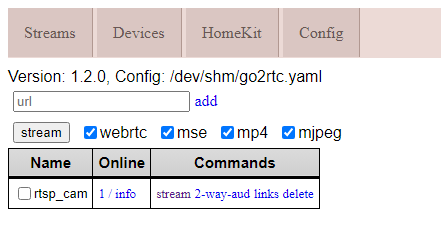
und die htmlstreams unter links für die Vis testen -
@paeppi ,
hier meine minimale, du must nur unter go2rtc deine rtsp-Url eintragen:detectors: ov: type: openvino device: AUTO model: path: /openvino-model/ssdlite_mobilenet_v2.xml model: width: 300 height: 300 input_tensor: nhwc input_pixel_format: bgr labelmap_path: /openvino-model/coco_91cl_bkgr.txt mqtt: host: 192.168.122.20 user: user password: 012345678 port: 1234 go2rtc: streams: rtsp_cam: - rtsp://admin:12345678@192.168.122.100:554/h264Preview_01_main - "ffmpeg:rtsp_cam#audio=opus" cameras: rtsp_cam: ffmpeg: inputs: - path: rtsp://127.0.0.1:8554/rtsp_cam input_args: preset-rtsp-restream roles: - recorddiese Ports müssen in der docker yml freigeschaltet werden:
    ports:
      - "5000:5000"
      - "1935:1935" # RTMP feeds
      - "1984:1984"
      - "8555:8555/tcp" # WebRTC over tcp
      - "8555:8555/udp" # WebRTC over udp
danach kannst du unter http://ip:1984 das aufrufen:
und die htmlstreams unter links für die Vis testen -
Du hast doch auch ne Coralle. Hast du mal beides getestet? Also die Google Coralle und OpenVino in der Config,yml? Sollte doch gehen? Ob es etwas bringt :man-shrugging:
@sidm ,
das kann ich erst richtig bei mehr als 2 Kameras testen, die ich i.M. nicht habe.
Mit Vino habe ich auch nur 10ms Inference Speed, mit der Coral Dual TPU 6,56ms und die CPU Last ist fast gleich.
Wenn es der Gelbeutel zu lässt und ich die richtige Kamera gefunden habe, werde ich das Haus ausstatten. ;-)
Die Reolink 810A die ich refurbished gekauft habe ist schon super, ich liebäugele aber mit der 812A Nachtfarbversion.
Die Probleme die manche mit Reolinkkameras unter frigate haben, kann ich auch nicht bestätigen.Edit: Gleichzeitig geht nicht.
-
@sidm ,
das kann ich erst richtig bei mehr als 2 Kameras testen, die ich i.M. nicht habe.
Mit Vino habe ich auch nur 10ms Inference Speed, mit der Coral Dual TPU 6,56ms und die CPU Last ist fast gleich.
Wenn es der Gelbeutel zu lässt und ich die richtige Kamera gefunden habe, werde ich das Haus ausstatten. ;-)
Die Reolink 810A die ich refurbished gekauft habe ist schon super, ich liebäugele aber mit der 812A Nachtfarbversion.
Die Probleme die manche mit Reolinkkameras unter frigate haben, kann ich auch nicht bestätigen.Edit: Gleichzeitig geht nicht.
Danke für die Info sehr interessant, muss ich bei Gelegenheit auch mal ausprobieren. Vino unterstützung gibt es ja erst mit Version 0.12.0
Ich wünschte meine Erfahrung mit Reolink wäre auch auch besser, das Bild was meine machen ist schon gut, nur die Aussetzer zwischen drinnen sind halt extrem nervig.Ich habe ja oben meine Config gespeichert, sieht deine auch so aus, also was den Kamerastream bestrifft?
Nutzt du den RTSP Stream oder den HTTP stream. RTMP gibt es ja auch noch,Am Anfang hab ich den RTSP genutzt, war aber auch nicht besser als HTTP. Ob ich den RTMP genutzt habe, weiß ich gar nicht mehr :man-facepalming:
-
Danke für die Info sehr interessant, muss ich bei Gelegenheit auch mal ausprobieren. Vino unterstützung gibt es ja erst mit Version 0.12.0
Ich wünschte meine Erfahrung mit Reolink wäre auch auch besser, das Bild was meine machen ist schon gut, nur die Aussetzer zwischen drinnen sind halt extrem nervig.Ich habe ja oben meine Config gespeichert, sieht deine auch so aus, also was den Kamerastream bestrifft?
Nutzt du den RTSP Stream oder den HTTP stream. RTMP gibt es ja auch noch,Am Anfang hab ich den RTSP genutzt, war aber auch nicht besser als HTTP. Ob ich den RTMP genutzt habe, weiß ich gar nicht mehr :man-facepalming:
-
Hallo Patrick, bei der Umstellung auf go2rtc musste ich auch erst ein wenig probieren.
Wenn ich dir ein Rat geben kann, versuche andere Kameras als Reolink zu nutzen. Versuche welche von Dahua, Hikvision, and Amcrest zu nehmen, wie es der Entwickler vorschlägt.Ich habe 3 Reolinks (hatte ich vor Frigate NVR) und eine davon ( RLC-510A ) hat bei den aufnahmen immer mal Aussetzer (Ton läuft noch Bild friert aber ein, oder auch mal komplett Schwarzes Bild).
Meine Konfig sieht so aus:
mqtt:
  # Optional: Enable mqtt server (default: false)
  enabled: True
  # Required: host name
  host: 192.168.188.40
  # Optional: port (default: shown below)
  port: 1886
  # Optional: topic prefix (default: frigate)
  # NOTE: must be unique if you are running multiple instances
  topic_prefix: frigate
  # Optional: client id (default: frigate)
  # NOTE: must be unique if you are running multiple instances
  client_id: frigate
  # Optional: interval in seconds for publishing stats (default: 60)
  stats_interval: 5


detectors: # <---- add detectors
  coral:
    type: edgetpu
    device: usb


ffmpeg:
  hwaccel_args: preset-vaapi
  output_args:
    # Optional: output args for detect streams (default: shown below)
    detect: -f rawvideo -pix_fmt yuv420p
    # Optional: output args for record streams (default: shown below)
    record: -f segment -segment_time 10 -segment_format mp4 -reset_timestamps 1 -strftime 1 -c copy
    # Optional: output args for rtmp streams (default: shown below)


go2rtc:
  streams:
    Hof:
      - http://192.168.188.38/flv?port=1935&app=bcs&stream=channel0_main.bcs&user=**********&password=**********
      - "ffmpeg:Hof#audio=opus" # <- copy of the stream which transcodes audio to the missing codec (usually will be opus)
    Hof_Sub:
      - http://192.168.188.38/flv?port=1935&app=bcs&stream=channel0_ext.bcs&user=**********&password=**********
    Werkstatt:
      - http://192.168.188.23/flv?port=1935&app=bcs&stream=channel0_main.bcs&user=**********&password=**********
      - "ffmpeg:Werkstatt#audio=opus" # <- copy of the stream which transcodes audio to the missing codec (usually will be opus)
    Werkstatt_Sub:
      - http://192.168.188.23/flv?port=1935&app=bcs&stream=channel0_ext.bcs&user=**********&password=**********
    Flur:
      - http://192.168.188.36/flv?port=1935&app=bcs&stream=channel0_main.bcs&user=**********&password=**********
      - "ffmpeg:Flur#audio=opus" # <- copy of the stream which transcodes audio to the missing codec (usually will be opus)
    Flur_Sub:
      - http://192.168.188.36/flv?port=1935&app=bcs&stream=channel0_ext.bcs&user=**********&password=**********
  webrtc:
    candidates:
      - 192.168.188.40:8555
      - stun:8555


cameras:
  Hof: # <------ Name the camera
    ffmpeg:
      output_args:
        record: preset-record-generic-audio-copy
      inputs:
        - path: rtsp://127.0.0.1:8554/Hof?video=copy&audio=aac # <--- the name here must match the name of the camera in restream
          input_args: preset-rtsp-restream
          roles:
            - record
        - path: rtsp://127.0.0.1:8554/Hof_Sub?video=copy # <----- The stream you want to use for detection
          input_args: preset-rtsp-restream
          roles:
            - detect
    detect:
      enabled: True # <---- disable detection until you have a working camera feed
      width: 2560 # <---- update for your camera's resolution
      height: 1920 # <---- update for your camera's resolution
    record: # <----- Enable recording
      enabled: True
    snapshots: # <----- Enable snapshots
      enabled: True
    motion:
      mask:
        - 2024,238,1528,171,1330,189,1124,214,1081,342,751,336,748,379,379,385,0,407,0,192,0,0,837,0,2560,0,2560,157,2560,360
        - 1194,1920,1041,1783,0,1791,0,1920
    zones:
      Bewegung Hofeinfahrt:
        coordinates: 747,396,0,437,0,566,117,548,122,743,412,699,715,671,718,515,743,512
      Bewegung Innenhof:
        coordinates: 0,1920,0,580,112,551,122,749,746,682,737,346,1086,336,1086,221,1544,163,1704,176,2130,253,2560,362,2560,1920
      Bewegung Doppelgarage:
        coordinates: 2378,1892,2180,1822,2102,1718,2226,1316,2390,1018,2560,1082,2560,1552


  Werkstatt:
    ffmpeg:
      output_args:
        record: preset-record-generic-audio-copy
      inputs:
        - path: rtsp://127.0.0.1:8554/Werkstatt?video=copy&audio=aac # <--- the name here must match the name of the camera in restream
          input_args: preset-rtsp-restream
          roles:
            - record
        - path: rtsp://127.0.0.1:8554/Werkstatt_Sub?video=copy # <----- The stream you want to use for detection
          input_args: preset-rtsp-restream
          roles:
            - detect
    detect:
      enabled: True # <---- disable detection until you have a working camera feed
      width: 2560 # <---- update for your camera's resolution
      height: 1920 # <---- update for your camera's resolution
    record: # <----- Enable recording
      enabled: True
    snapshots: # <----- Enable snapshots
      enabled: True
    motion:
      mask:
        - 1828,42,1827,133,730,123,730,39
    zones:
      Bewegung Werkstatt:
        coordinates: 0,1920,0,0,2560,0,2560,1920


  Flur:
    ffmpeg:
      output_args:
        record: preset-record-generic-audio-copy
      inputs:
        - path: rtsp://127.0.0.1:8554/Flur?video=copy&audio=aac # <--- the name here must match the name of the camera in restream
          input_args: preset-rtsp-restream
          roles:
            - record
        - path: rtsp://127.0.0.1:8554/Flur_Sub?video=copy # <----- The stream you want to use for detection
          input_args: preset-rtsp-restream
          roles:
            - detect
    detect:
      enabled: True # <---- disable detection until you have a working camera feed
      width: 2560 # <---- update for your camera's resolution
      height: 1920 # <---- update for your camera's resolution
    record: # <----- Enable recording
      enabled: True
    snapshots: # <----- Enable snapshots
      enabled: True
    motion:
      mask:
        - 1828,133,1823,25,715,34,716,139
    zones:
      Bewegung Flur:
        coordinates: 0,1920,0,0,2560,0,2560,1920


# Optional: Object configuration
# NOTE: Can be overridden at the camera level
objects:
  # Optional: list of objects to track from labelmap.txt (default: shown below)
  track:
    - person
    - car
    - cat
    - dog
    - bird
  # Optional: mask to prevent all object types from being detected in certain areas (default: no mask)
  # Checks based on the bottom center of the bounding box of the object.
  # NOTE: This mask is COMBINED with the object type specific mask below
  mask: 0,0,1000,0,1000,200,0,200
  # Optional: filters to reduce false positives for specific object types
  filters:
    person:
      # Optional: minimum width*height of the bounding box for the detected object (default: 0)
      min_area: 0
      # Optional: maximum width*height of the bounding box for the detected object (default: 24000000)
      max_area: 24000000
      # Optional: minimum score for the object to initiate tracking (default: shown below)
      min_score: 0.5
      # Optional: minimum decimal percentage for tracked object's computed score to be considered a true positive (default: shown below)
      threshold: 0.7
      # Optional: mask to prevent this object type from being detected in certain areas (default: no mask)
      # Checks based on the bottom center of the bounding box of the object
      mask: 0,0,1000,0,1000,200,0,200


# Optional: in-feed timestamp style configuration
# NOTE: Can be overridden at the camera level
timestamp_style:
  # Optional: Position of the timestamp (default: shown below)
  #           "tl" (top left), "tr" (top right), "bl" (bottom left), "br" (bottom right)
  position: "tl"
  # Optional: Format specifier conform to the Python package "datetime" (default: shown below)
  #           Additional Examples:
  #             german: "%d.%m.%Y %H:%M:%S"
  format: "%d/%m/%Y %H:%M:%S"
  # Optional: Color of font
  color:
    # All Required when color is specified (default: shown below)
    red: 255
    green: 255
    blue: 255
  # Optional: Line thickness of font (default: shown below)
  thickness: 2
  # Optional: Effect of lettering (default: shown below)
  #           None (No effect),
  #           "solid" (solid background in inverse color of font)
  #           "shadow" (shadow for font)
  effect: solid


# Optional: birdseye configuration
# NOTE: Can (enabled, mode) be overridden at the camera level
birdseye:
  # Optional: Enable birdseye view (default: True)
  enabled: True
  # Optional: Restream birdseye via RTSP (default: False)
  # NOTE: Enabling this will set birdseye to run 24/7 which may increase CPU usage somewhat.
  restream: False
  # Optional: Width of the output resolution (default: 1280)
  width: 2560
  # Optional: Height of the output resolution (default: 720)
  height: 1920
  # Optional: Encoding quality of the mpeg1 feed (default: 8)
  # 1 is the highest quality, and 31 is the lowest. Lower quality feeds utilize less CPU resources.
  quality: 8
  # Optional: Mode of the view. Available options are: objects, motion, and continuous
  #   objects - cameras are included if they have had a tracked object within the last 30 seconds
  #   motion - cameras are included if motion was detected in the last 30 seconds
  #   continuous - all cameras are included always
  mode: motion


# Optional: Record configuration
# NOTE: Can be overridden at the camera level
record:
  # Optional: Enable recording (default: False)
  # WARNING: If recording is disabled in the config, turning it on via
  #          the UI or MQTT later will have no effect.
  enabled: True
  # Optional: Number of minutes to wait between cleanup runs (default: 60)
  # This can be used to reduce the frequency of deleting recording segments from disk if you want to minimize i/o
  expire_interval: 60
  # Optional: Retention settings for recording
  retain:
    # Optional: Number of days to retain recordings regardless of events (default: 0)
    # NOTE: This should be set to 0 and retention should be defined in events section below
    #       if you only want to retain recordings of events.
    days: 0
    # Optional: Mode for retention. Available options are: all, motion, and active_objects
    #   all - save all recording segments regardless of activity
    #   motion - save all recordings segments with any detected motion
    #   active_objects - save all recording segments with active/moving objects
    # NOTE: this mode only applies when the days setting above is greater than 0
    mode: all
  # Optional: Event recording settings
  events:
    # Optional: Number of seconds before the event to include (default: 5)
    pre_capture: 15
    # Optional: Number of seconds after the event to include (default: 5)
    post_capture: 15
    # Optional: Objects to save recordings for. (default: all tracked objects)
    objects:
      - person
      - car
      - dog
      - cat
      - bird

    # Optional: Restrict recordings to objects that entered any of the listed zones (default: no required zones)
    required_zones: []
    # Optional: Retention settings for recordings of events
    retain:
      # Required: Default retention days (default: 10)
      default: 10
      # Optional: Mode for retention. (default: motion)
      #   all - save all recording segments for events regardless of activity
      #   motion - save all recordings segments for events with any detected motion
      #   active_objects - save all recording segments for event with active/moving objects
      #
      # NOTE: If the retain mode for the camera is more restrictive than the mode configured
      #       here, the segments will already be gone by the time this mode is applied.
      #       For example, if the camera retain mode is "motion", the segments without motion are
      #       never stored, so setting the mode to "all" here won't bring them back.
      mode: motion
      # Optional: Per object retention days
      objects:
        person: 15
        car:    15
        dog:    15
        cat:    15


# Optional: Configuration for the jpg snapshots written to the clips directory for each event
# NOTE: Can be overridden at the camera level
snapshots:
  # Optional: Enable writing jpg snapshot to /media/frigate/clips (default: False)
  enabled: True
  # Optional: save a clean PNG copy of the snapshot image (default: True)
  clean_copy: True
  # Optional: print a timestamp on the snapshots (default: False)
  timestamp: False
  # Optional: draw bounding box on the snapshots (default: False)
  bounding_box: True
  # Optional: crop the snapshot (default: False)
  crop: False
  # Optional: height to resize the snapshot to (default: original size)
  height: 0
  # Optional: Restrict snapshots to objects that entered any of the listed zones (default: no required zones)
  required_zones: []
  # Optional: Camera override for retention settings (default: global values)
  retain:
    # Required: Default retention days (default: 10)
    default: 10
    # Optional: Per object retention days
    objects:
      person: 15
      car:    15
      dog:    15
      cat:    15


# Optional
ui:
  # Optional: Set the default live mode for cameras in the UI (default: mse)
  live_mode: mse
  # Optional: Set a timezone to use in the UI (default: use browser local time)
   #timezone: America/Denver
  # Optional: Use an experimental recordings / camera view UI (default: false)
  use_experimental: False
  # Optional: Set the time format used.
  # Options are browser, 12hour, or 24hour (default: browser)
  time_format: browser
  # Optional: Set the date style for a specified length.
  # Options are: full, long, medium, short
  # Examples:
  #    short: 2/11/23
  #    medium: Feb 11, 2023
  #    full: Saturday, February 11, 2023
  # (default: short).
  date_style: short
  # Optional: Set the time style for a specified length.
  # Options are: full, long, medium, short
  # Examples:
  #    short: 8:14 PM
  #    medium: 8:15:22 PM
  #    full: 8:15:22 PM Mountain Standard Time
  # (default: medium).
  time_style: medium
  # Optional: Ability to manually override the date / time styling to use strftime format
  # https://www.gnu.org/software/libc/manual/html_node/Formatting-Calendar-Time.html
  # possible values are shown above (default: not set)
  #strftime_fmt: "%Y/%m/%d %H:%M"
Dank der Integration von go2rtc kann man jetzt auch auf dem iPhone problemlos sich den Live Stream anzeigen lassen ohne eine weiter App nutzen zu müssen.
In der VIS dann einfach ein iFrame-Widget einsetzten und als Quelle folgendes eingeben:
http://192.168.188.40:5002/live/webrtc/webrtc.html?src=FlurDie IP und Port entspricht dabei den von Frigate.
@sidm
Servus,
ich habe deine config mal ausprobiert.
Die Streams gehen im Iobroker und auf allen Geräten (PC IPhone …) aber nicht auf einem android 13 Tablet.
Ich habe keine Ahnung warum das so ist?????
Grüße Heiko


Hey! Du scheinst an dieser Unterhaltung interessiert zu sein, hast aber noch kein Konto.
Hast du es satt, bei jedem Besuch durch die gleichen Beiträge zu scrollen? Wenn du dich für ein Konto anmeldest, kommst du immer genau dorthin zurück, wo du zuvor warst, und kannst dich über neue Antworten benachrichtigen lassen (entweder per E-Mail oder Push-Benachrichtigung). Du kannst auch Lesezeichen speichern und Beiträge positiv bewerten, um anderen Community-Mitgliedern deine Wertschätzung zu zeigen.
Mit deinem Input könnte dieser Beitrag noch besser werden 💗
Registrieren AnmeldenSupport us
364
Online33.0k
Benutzende83.7k
Themen1.3m
Beiträge