




Migration Pi4 > Synology Docker
-
@homoran nach dem restore mit Backitup startet der Container durch. Dann sehe ich im Protokoll folgendes:
-------------------------------------- ----- Step 1 of 5: Preparing container ----- -------------------------------------------------------------------------------- This is not the first run of this container. Skipping first run preparation. -------------------------------------------------------------------------------- ----- Step 2 of 5: Detecting ioBroker installation ----- -------------------------------------------------------------------------------- Existing installation of ioBroker detected in "/opt/iobroker". -------------------------------------------------------------------------------- ----- Step 3 of 5: Checking ioBroker installation ----- -------------------------------------------------------------------------------- (Re)setting permissions (This might take a while! Please be patient!)... Done. Fixing "sudo-bug" by replacing sudo with gosu... Done. Checking Database connection... Failed. Please check your configuration and try again. For more information see ioBroker Docker Image Docs (https://docs.buanet.de/iobroker-docker-image/docs). This Script will exit now. -
@basti81 sagte in Migration Pi4 > Synology Docker:
Dann sehe ich im Protokoll folgendes:
Der Anfang fehlt .
Zeige mal eine DEBUG Ausgabe :
Eintrag in Environment Variables ( ENV )
DEBUG: trueund dann das Log hier posten
@glasfaser ah ok, anbei das Log:
-------------------------------------------------- ----- Step 1 of 5: Preparing container ----- -------------------------------------------------------------------------------- This is not the first run of this container. Skipping first run preparation. -------------------------------------------------------------------------------- ----- Step 2 of 5: Detecting ioBroker installation ----- -------------------------------------------------------------------------------- Existing installation of ioBroker detected in "/opt/iobroker". -------------------------------------------------------------------------------- ----- Step 3 of 5: Checking ioBroker installation ----- -------------------------------------------------------------------------------- (Re)setting permissions (This might take a while! Please be patient!)... Done. Fixing "sudo-bug" by replacing sudo with gosu... Done. [DEBUG] Checking multihost settings... [DEBUG] No multihost settings detected. [DEBUG] Done. [DEBUG] Checking custom objects db settings... [DEBUG] No custom objects db settings detected. [DEBUG] Done. [DEBUG] Checking custom states db settings... [DEBUG] No custom states db settings detected. [DEBUG] Done. Checking Database connection... Failed. [DEBUG] Error message: [DEBUG] No connection to states 0.0.0.0:6379[redis] Please check your configuration and try again. For more information see ioBroker Docker Image Docs (https://docs.buanet.de/iobroker-docker-image/docs). [DEBUG] Debug mode prevents the container from exiting on errors. [DEBUG] This enables you to investigate or fix your issue on the command line. [DEBUG] If you want to stop or restart your container you have to do it manually. [DEBUG] IoBroker is not running! -
@glasfaser ah ok, anbei das Log:
-------------------------------------------------- ----- Step 1 of 5: Preparing container ----- -------------------------------------------------------------------------------- This is not the first run of this container. Skipping first run preparation. -------------------------------------------------------------------------------- ----- Step 2 of 5: Detecting ioBroker installation ----- -------------------------------------------------------------------------------- Existing installation of ioBroker detected in "/opt/iobroker". -------------------------------------------------------------------------------- ----- Step 3 of 5: Checking ioBroker installation ----- -------------------------------------------------------------------------------- (Re)setting permissions (This might take a while! Please be patient!)... Done. Fixing "sudo-bug" by replacing sudo with gosu... Done. [DEBUG] Checking multihost settings... [DEBUG] No multihost settings detected. [DEBUG] Done. [DEBUG] Checking custom objects db settings... [DEBUG] No custom objects db settings detected. [DEBUG] Done. [DEBUG] Checking custom states db settings... [DEBUG] No custom states db settings detected. [DEBUG] Done. Checking Database connection... Failed. [DEBUG] Error message: [DEBUG] No connection to states 0.0.0.0:6379[redis] Please check your configuration and try again. For more information see ioBroker Docker Image Docs (https://docs.buanet.de/iobroker-docker-image/docs). [DEBUG] Debug mode prevents the container from exiting on errors. [DEBUG] This enables you to investigate or fix your issue on the command line. [DEBUG] If you want to stop or restart your container you have to do it manually. [DEBUG] IoBroker is not running! -
@basti81 sagte in Migration Pi4 > Synology Docker:
[DEBUG] No connection to states 0.0.0.0:6379[redis]
Redis:
Hast du das so auf der Pi !?
@glasfaser auf dem Pi:
pi@iobrokerpi:~ $ sudo redis-server -v
Redis server v=5.0.14 sha=00000000:0 malloc=libc bits=32 build=ddd3b1f304a7d4d5
In dem Container:
root@iobrokerpi:/opt/iobroker# redis-server -v bash: redis-server: command not found -
@glasfaser auf dem Pi:
pi@iobrokerpi:~ $ sudo redis-server -v
Redis server v=5.0.14 sha=00000000:0 malloc=libc bits=32 build=ddd3b1f304a7d4d5
In dem Container:
root@iobrokerpi:/opt/iobroker# redis-server -v bash: redis-server: command not found -
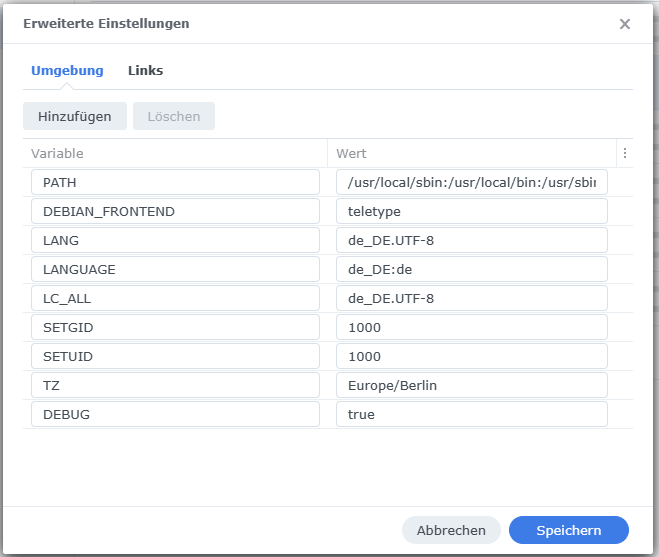
@glasfaser den Container habe ich über die GUI aktiviert und das gibt es nur diese ENV:
@basti81 sagte in Migration Pi4 > Synology Docker:
das gibt es nur diese ENV:
Ja das ist der Standart ,
extras siehe hier unter :
Configuration via environment variables
-
@basti81 sagte in Migration Pi4 > Synology Docker:
das gibt es nur diese ENV:
Ja das ist der Standart ,
extras siehe hier unter :
Configuration via environment variables
@glasfaser wir kommen der Sache näher :-)
-------------------------------------------------
-----             Step 3 of 5: Checking ioBroker installation              -----
--------------------------------------------------------------------------------

(Re)setting permissions (This might take a while! Please be patient!)... Done.

Fixing "sudo-bug" by replacing sudo with gosu... Done.

[DEBUG] Checking multihost settings...
[DEBUG] No multihost settings detected.
[DEBUG] Done.

Configuring custom objects db...
IOB_OBJECTSDB_TYPE is available and value meets detected ioBroker installation.
IOB_OBJECTSDB_HOST is available and value meets detected ioBroker installation.
IOB_OBJECTSDB_PORT is available and value meets detected ioBroker installation.
Done.

Configuring custom states db...
IOB_STATESDB_TYPE is available and value meets detected ioBroker installation.
IOB_STATESDB_HOST is available and value meets detected ioBroker installation.
IOB_STATESDB_PORT is available but value is different from detected ioBroker installation.
Setting port of states db to "9000"... Done.
Done.

Checking Database connection... Failed.
[DEBUG] Error message:
[DEBUG] No connection to objects 127.0.0.1:9001[redis]
Please check your configuration and try again.
For more information see ioBroker Docker Image Docs (https://docs.buanet.de/iobroker-docker-image/docs).

[DEBUG] Debug mode prevents the container from exiting on errors.
[DEBUG] This enables you to investigate or fix your issue on the command line.
[DEBUG] If you want to stop or restart your container you have to do it manually.
[DEBUG] IoBroker is not running!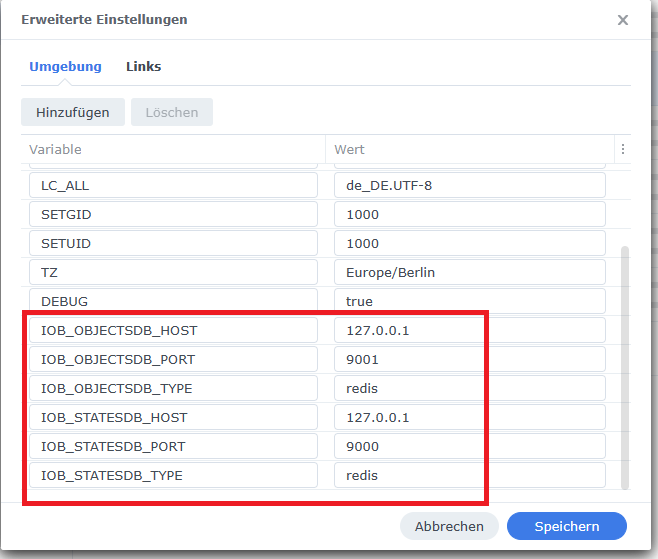
-
@glasfaser wir kommen der Sache näher :-)
------------------------------------------------- ----- Step 3 of 5: Checking ioBroker installation ----- -------------------------------------------------------------------------------- (Re)setting permissions (This might take a while! Please be patient!)... Done. Fixing "sudo-bug" by replacing sudo with gosu... Done. [DEBUG] Checking multihost settings... [DEBUG] No multihost settings detected. [DEBUG] Done. Configuring custom objects db... IOB_OBJECTSDB_TYPE is available and value meets detected ioBroker installation. IOB_OBJECTSDB_HOST is available and value meets detected ioBroker installation. IOB_OBJECTSDB_PORT is available and value meets detected ioBroker installation. Done. Configuring custom states db... IOB_STATESDB_TYPE is available and value meets detected ioBroker installation. IOB_STATESDB_HOST is available and value meets detected ioBroker installation. IOB_STATESDB_PORT is available but value is different from detected ioBroker installation. Setting port of states db to "9000"... Done. Done. Checking Database connection... Failed. [DEBUG] Error message: [DEBUG] No connection to objects 127.0.0.1:9001[redis] Please check your configuration and try again. For more information see ioBroker Docker Image Docs (https://docs.buanet.de/iobroker-docker-image/docs). [DEBUG] Debug mode prevents the container from exiting on errors. [DEBUG] This enables you to investigate or fix your issue on the command line. [DEBUG] If you want to stop or restart your container you have to do it manually. [DEBUG] IoBroker is not running!@basti81 sagte in Migration Pi4 > Synology Docker:
No connection to objects 127.0.0.1:9001[redis]
Warum 9001
@basti81 sagte in Migration Pi4 > Synology Docker:
[DEBUG] No connection to states 0.0.0.0:6379[redis] -
@glasfaser wir kommen der Sache näher :-)
------------------------------------------------- ----- Step 3 of 5: Checking ioBroker installation ----- -------------------------------------------------------------------------------- (Re)setting permissions (This might take a while! Please be patient!)... Done. Fixing "sudo-bug" by replacing sudo with gosu... Done. [DEBUG] Checking multihost settings... [DEBUG] No multihost settings detected. [DEBUG] Done. Configuring custom objects db... IOB_OBJECTSDB_TYPE is available and value meets detected ioBroker installation. IOB_OBJECTSDB_HOST is available and value meets detected ioBroker installation. IOB_OBJECTSDB_PORT is available and value meets detected ioBroker installation. Done. Configuring custom states db... IOB_STATESDB_TYPE is available and value meets detected ioBroker installation. IOB_STATESDB_HOST is available and value meets detected ioBroker installation. IOB_STATESDB_PORT is available but value is different from detected ioBroker installation. Setting port of states db to "9000"... Done. Done. Checking Database connection... Failed. [DEBUG] Error message: [DEBUG] No connection to objects 127.0.0.1:9001[redis] Please check your configuration and try again. For more information see ioBroker Docker Image Docs (https://docs.buanet.de/iobroker-docker-image/docs). [DEBUG] Debug mode prevents the container from exiting on errors. [DEBUG] This enables you to investigate or fix your issue on the command line. [DEBUG] If you want to stop or restart your container you have to do it manually. [DEBUG] IoBroker is not running! -
@basti81 sagte in Migration Pi4 > Synology Docker:
No connection to objects 127.0.0.1:9001[redis]
Warum 9001
@basti81 sagte in Migration Pi4 > Synology Docker:
[DEBUG] No connection to states 0.0.0.0:6379[redis]@glasfaser hab jetzt den 6379 versucht und ich bekomme den gleichen Fehler:
-----------------------------------------------
-----             Step 3 of 5: Checking ioBroker installation              -----
--------------------------------------------------------------------------------

(Re)setting permissions (This might take a while! Please be patient!)... Done.

Fixing "sudo-bug" by replacing sudo with gosu... Done.

[DEBUG] Checking multihost settings...
[DEBUG] No multihost settings detected.
[DEBUG] Done.

Configuring custom objects db...
IOB_OBJECTSDB_TYPE is available and value meets detected ioBroker installation.
IOB_OBJECTSDB_HOST is available and value meets detected ioBroker installation.
IOB_OBJECTSDB_PORT is available but value is different from detected ioBroker installation.
Setting port of objects db to "6379"... Done.
Done.

Configuring custom states db...
IOB_STATESDB_TYPE is available and value meets detected ioBroker installation.
IOB_STATESDB_HOST is available and value meets detected ioBroker installation.
IOB_STATESDB_PORT is available but value is different from detected ioBroker installation.
Setting port of states db to "6379"... Done.
Done.

Checking Database connection... Failed.
[DEBUG] Error message:
[DEBUG] No connection to objects 127.0.0.1:6379[redis]
Please check your configuration and try again.
For more information see ioBroker Docker Image Docs (https://docs.buanet.de/iobroker-docker-image/docs).

[DEBUG] Debug mode prevents the container from exiting on errors.
[DEBUG] This enables you to investigate or fix your issue on the command line.
[DEBUG] If you want to stop or restart your container you have to do it manually.
[DEBUG] IoBroker is not running!
Soll ich mal:
apt-get install redis-sentinelim Container ausführen? Mich wundert das hier im Container:
root@iobrokerpi:/opt/iobroker# redis-server -v bash: redis-server: command not found -
@glasfaser hab jetzt den 6379 versucht und ich bekomme den gleichen Fehler:
-----------------------------------------------
-----             Step 3 of 5: Checking ioBroker installation              -----
--------------------------------------------------------------------------------

(Re)setting permissions (This might take a while! Please be patient!)... Done.

Fixing "sudo-bug" by replacing sudo with gosu... Done.

[DEBUG] Checking multihost settings...
[DEBUG] No multihost settings detected.
[DEBUG] Done.

Configuring custom objects db...
IOB_OBJECTSDB_TYPE is available and value meets detected ioBroker installation.
IOB_OBJECTSDB_HOST is available and value meets detected ioBroker installation.
IOB_OBJECTSDB_PORT is available but value is different from detected ioBroker installation.
Setting port of objects db to "6379"... Done.
Done.

Configuring custom states db...
IOB_STATESDB_TYPE is available and value meets detected ioBroker installation.
IOB_STATESDB_HOST is available and value meets detected ioBroker installation.
IOB_STATESDB_PORT is available but value is different from detected ioBroker installation.
Setting port of states db to "6379"... Done.
Done.

Checking Database connection... Failed.
[DEBUG] Error message:
[DEBUG] No connection to objects 127.0.0.1:6379[redis]
Please check your configuration and try again.
For more information see ioBroker Docker Image Docs (https://docs.buanet.de/iobroker-docker-image/docs).

[DEBUG] Debug mode prevents the container from exiting on errors.
[DEBUG] This enables you to investigate or fix your issue on the command line.
[DEBUG] If you want to stop or restart your container you have to do it manually.
[DEBUG] IoBroker is not running!
Soll ich mal:
apt-get install redis-sentinelim Container ausführen? Mich wundert das hier im Container:
root@iobrokerpi:/opt/iobroker# redis-server -v bash: redis-server: command not found -
@basti81 sagte in Migration Pi4 > Synology Docker:
im Container ausführen?
kannst du machen ... aber beim nächsten Image wechsel ist er weg !
siehe meinen Link , da ist redis seperat als Container !
@glasfaser danke dir. Habe die Container sauber neu aufgesetzt wie hier erläutert:
https://smarthome.buanet.de/2020/12/iobroker-docker-container-mit-redis-db-verbinden/Alles läuft nun wie es soll und der Restore hat geklappt da die redis Verbindung von Anfang an funktionierte. Bridged Network war hier der Schlüssel. Mit Host network hat es nicht geklappt.
Danke dir!!!

Hey! Du scheinst an dieser Unterhaltung interessiert zu sein, hast aber noch kein Konto.
Hast du es satt, bei jedem Besuch durch die gleichen Beiträge zu scrollen? Wenn du dich für ein Konto anmeldest, kommst du immer genau dorthin zurück, wo du zuvor warst, und kannst dich über neue Antworten benachrichtigen lassen (entweder per E-Mail oder Push-Benachrichtigung). Du kannst auch Lesezeichen speichern und Beiträge positiv bewerten, um anderen Community-Mitgliedern deine Wertschätzung zu zeigen.
Mit deinem Input könnte dieser Beitrag noch besser werden 💗
Registrieren Anmelden234
Online33.0k
Benutzende83.7k
Themen1.3m
Beiträge