
Skip to content
  • Home
  • Recent
  • Tags
  • 0 Unread 0
  • Categories
  • Unreplied
  • Popular
  • GitHub
  • Docu
  • Hilfe
Skins
  • Light
  • Brite
  • Cerulean
  • Cosmo
  • Flatly
  • Journal
  • Litera
  • Lumen
  • Lux
  • Materia
  • Minty
  • Morph
  • Pulse
  • Sandstone
  • Simplex
  • Sketchy
  • Spacelab
  • United
  • Yeti
  • Zephyr
  • Dark
  • Cyborg
  • Darkly
  • Quartz
  • Slate
  • Solar
  • Superhero
  • Vapor

  • Default (No Skin)
  • No Skin
Collapse
ioBroker Logo

Community Forum

donate donate
  1. ioBroker Community Home
  2. Deutsch
  3. Off Topic
  4. Proxmox
  5. Proxmox LXC mit Frigate

NEWS

  • Monatsrückblick Januar/Februar 2026 ist online!
    BluefoxB
    Bluefox
    16
    1
    267

  • Jahresrückblick 2025 – unser neuer Blogbeitrag ist online! ✨
    BluefoxB
    Bluefox
    17
    1
    4.6k

  • Neuer Blogbeitrag: Monatsrückblick - Dezember 2025 🎄
    BluefoxB
    Bluefox
    13
    1
    1.3k

Proxmox LXC mit Frigate

Scheduled Pinned Locked Moved Proxmox
176 Posts 16 Posters 53.3k Views 21 Watching
  • Oldest to Newest
  • Newest to Oldest
  • Most Votes
Reply
  • Reply as topic
Log in to reply
This topic has been deleted. Only users with topic management privileges can see it.
  • R Radi

    @Wal Da steht letztenendes dasselbe wie im Portainerlogfile drin. Ursächlich scheint wohl dies zu sein:

    2023-05-07 14:44:51.033075103  *************************************************************
    2023-05-07 14:44:51.033078419  *************************************************************
    2023-05-07 14:44:51.033079955  ***    Your config file is not valid!                     ***
    2023-05-07 14:44:51.033081414  ***    Please check the docs at                           ***
    2023-05-07 14:44:51.033082613  ***    https://docs.frigate.video/configuration/index     ***
    2023-05-07 14:44:51.033083997  *************************************************************
    2023-05-07 14:44:51.033085013  *************************************************************
    2023-05-07 14:44:51.033092726  ***    Config Validation Errors                           ***
    2023-05-07 14:44:51.033093828  *************************************************************
    2023-05-07 14:44:51.033094705  [Errno 21] Is a directory: '/config/config.yml'
    2023-05-07 14:44:51.033656750  Traceback (most recent call last):
    2023-05-07 14:44:51.033658821    File "/opt/frigate/frigate/app.py", line 351, in start
    2023-05-07 14:44:51.033659876      self.init_config()
    2023-05-07 14:44:51.033660984    File "/opt/frigate/frigate/app.py", line 80, in init_config
    2023-05-07 14:44:51.033661995      user_config = FrigateConfig.parse_file(config_file)
    2023-05-07 14:44:51.033662995    File "/opt/frigate/frigate/config.py", line 1064, in parse_file
    2023-05-07 14:44:51.033663850      with open(config_file) as f:
    2023-05-07 14:44:51.033664794  IsADirectoryError: [Errno 21] Is a directory: '/config/config.yml'
    2023-05-07 14:44:51.033665538  
    2023-05-07 14:44:51.033666509  *************************************************************
    2023-05-07 14:44:51.033667457  ***    End Config Validation Errors                       ***
    2023-05-07 14:44:51.033668354  **********************************************************
    

    Nur weiß ich nicht, wie man diesen "IsADirectoryError" korrigiert. Findet Frigate in dem angegebenen Pfad nichts? Oder hat dies eine andere Ursache? Den Screenshot aus dem Filezilla habe ich ja schon weiter oben gepostet. Mit meinem bescheidenen oder nicht vorhandenen Wissen würde ich annehmen, dass der Pfad zur config.yaml so passt.

    WalW Online
    WalW Online
    Wal
    Developer
    wrote on last edited by
    #42

    @radi ,
    wie erstellst du die config.yml ? mit nano ?

    Gruß
    Walter

    DoorIO-Adapter
    wioBrowser-Adapter und wioBrowser

    1 Reply Last reply
    0
    • R Radi

      @Wal Da steht letztenendes dasselbe wie im Portainerlogfile drin. Ursächlich scheint wohl dies zu sein:

      2023-05-07 14:44:51.033075103  *************************************************************
      2023-05-07 14:44:51.033078419  *************************************************************
      2023-05-07 14:44:51.033079955  ***    Your config file is not valid!                     ***
      2023-05-07 14:44:51.033081414  ***    Please check the docs at                           ***
      2023-05-07 14:44:51.033082613  ***    https://docs.frigate.video/configuration/index     ***
      2023-05-07 14:44:51.033083997  *************************************************************
      2023-05-07 14:44:51.033085013  *************************************************************
      2023-05-07 14:44:51.033092726  ***    Config Validation Errors                           ***
      2023-05-07 14:44:51.033093828  *************************************************************
      2023-05-07 14:44:51.033094705  [Errno 21] Is a directory: '/config/config.yml'
      2023-05-07 14:44:51.033656750  Traceback (most recent call last):
      2023-05-07 14:44:51.033658821    File "/opt/frigate/frigate/app.py", line 351, in start
      2023-05-07 14:44:51.033659876      self.init_config()
      2023-05-07 14:44:51.033660984    File "/opt/frigate/frigate/app.py", line 80, in init_config
      2023-05-07 14:44:51.033661995      user_config = FrigateConfig.parse_file(config_file)
      2023-05-07 14:44:51.033662995    File "/opt/frigate/frigate/config.py", line 1064, in parse_file
      2023-05-07 14:44:51.033663850      with open(config_file) as f:
      2023-05-07 14:44:51.033664794  IsADirectoryError: [Errno 21] Is a directory: '/config/config.yml'
      2023-05-07 14:44:51.033665538  
      2023-05-07 14:44:51.033666509  *************************************************************
      2023-05-07 14:44:51.033667457  ***    End Config Validation Errors                       ***
      2023-05-07 14:44:51.033668354  **********************************************************
      

      Nur weiß ich nicht, wie man diesen "IsADirectoryError" korrigiert. Findet Frigate in dem angegebenen Pfad nichts? Oder hat dies eine andere Ursache? Den Screenshot aus dem Filezilla habe ich ja schon weiter oben gepostet. Mit meinem bescheidenen oder nicht vorhandenen Wissen würde ich annehmen, dass der Pfad zur config.yaml so passt.

      WalW Online
      WalW Online
      Wal
      Developer
      wrote on last edited by Wal
      #43

      @radi ,
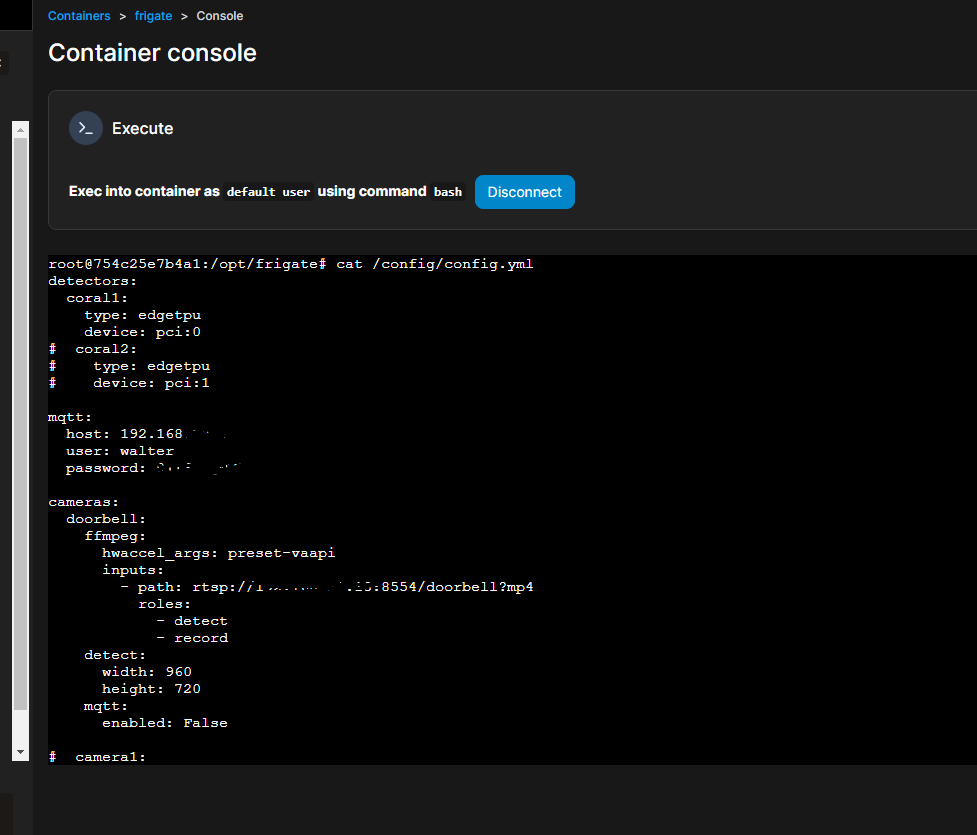
      mach mal im Container diesen Befehl:

      cat /config/config.yml
      

      Screenshot 2023-05-07 152312.png

      Gruß
      Walter

      DoorIO-Adapter
      wioBrowser-Adapter und wioBrowser

      R 1 Reply Last reply
      0
      • WalW Wal

        @radi ,
        mach mal im Container diesen Befehl:

        cat /config/config.yml
        

        Screenshot 2023-05-07 152312.png

        R Offline
        R Offline
        Radi
        wrote on last edited by Radi
        #44

        @wal sagte in Proxmox LXC mit Frigate:

        cat /config/config.yml

        Hallo Walter,

        das ganze verwirrt mich jetzt etwas. Die Ausgabe ist:

        cat: /config/config.yml: No such file or directory


        will ich das Verzeichnis erzeugen, kommt das:

        mkdir config
        mkdir: cannot create directory 'config': File exists
        

        Will ich mit nano eine neue config erzeugen kommt:

          GNU nano 6.4                        /config/config.yml                                 


                                 [ Directory '/config' does not exist ]
        ^G Help       ^O Write Out  ^W Where Is   ^K Cut        ^T Execute    ^C Location
        ^X Exit       ^R Read File  ^\ Replace    ^U Paste      ^J Justify    ^/ Go To Line
        

        Wechsel ich dann zu Fuß in das Verzeichnis config und gebe dann deinen cat-Befehl angepasst ein kommt das:

        ~/config# cat config.yml
        detectors:
        
          cpu1:
        
            type: cpu


        mqtt:
        
          host: 192.168.69.159
        
          user: user
        
          password: xxx
         
        
        cameras:
        
          back:
        
            ffmpeg:
        
              hwaccel_args: preset-vaapi
        
              inputs:
        
                - path: rtsp:/XXX:xxx@192.168.69.162:554/h264Preview_01_sub
        
                  roles:
        
                    - detect
        
                - path: rtsp://XXX.xxx@192.168.69.162:554/h264Preview_01_main
        
                  roles:
        
                    - record
        
            detect:
        
              width: 640
        
              height: 360
        
            mqtt:
        
              enabled: False


           objects:
        
              track:
        
                - person
        
                - car
        
                - truck
        
                - bicycle
        
                - motorcycle
        
                - dog
        
                - cat
        
        snapshots:
        
          enabled: True
        
          timestamp: False
        
          bounding_box: False
        
          crop: False
        
          height: 175
        
          required_zones: []
        
          retain:
        
            default: 10
        
            objects:
        
                  person: 15


        record:
        
          enabled: True
        
          retain:
        
            days: 7
        
            mode: motion
        
          events:
        
            retain:
        
              default: 14
        
              mode: active_objects
        
              objects:
        
                person: 14
        
                dog: 2
        
                car: 7
        
        WalW holzapfelaugeH 2 Replies Last reply
        0
        • R Radi

          @wal sagte in Proxmox LXC mit Frigate:

          cat /config/config.yml

          Hallo Walter,

          das ganze verwirrt mich jetzt etwas. Die Ausgabe ist:

          cat: /config/config.yml: No such file or directory


          will ich das Verzeichnis erzeugen, kommt das:

          mkdir config
          mkdir: cannot create directory 'config': File exists
          

          Will ich mit nano eine neue config erzeugen kommt:

            GNU nano 6.4                        /config/config.yml                                 


                                   [ Directory '/config' does not exist ]
          ^G Help       ^O Write Out  ^W Where Is   ^K Cut        ^T Execute    ^C Location
          ^X Exit       ^R Read File  ^\ Replace    ^U Paste      ^J Justify    ^/ Go To Line
          

          Wechsel ich dann zu Fuß in das Verzeichnis config und gebe dann deinen cat-Befehl angepasst ein kommt das:

          ~/config# cat config.yml
          detectors:
          
            cpu1:
          
              type: cpu


          mqtt:
          
            host: 192.168.69.159
          
            user: user
          
            password: xxx
           
          
          cameras:
          
            back:
          
              ffmpeg:
          
                hwaccel_args: preset-vaapi
          
                inputs:
          
                  - path: rtsp:/XXX:xxx@192.168.69.162:554/h264Preview_01_sub
          
                    roles:
          
                      - detect
          
                  - path: rtsp://XXX.xxx@192.168.69.162:554/h264Preview_01_main
          
                    roles:
          
                      - record
          
              detect:
          
                width: 640
          
                height: 360
          
              mqtt:
          
                enabled: False


             objects:
          
                track:
          
                  - person
          
                  - car
          
                  - truck
          
                  - bicycle
          
                  - motorcycle
          
                  - dog
          
                  - cat
          
          snapshots:
          
            enabled: True
          
            timestamp: False
          
            bounding_box: False
          
            crop: False
          
            height: 175
          
            required_zones: []
          
            retain:
          
              default: 10
          
              objects:
          
                    person: 15


          record:
          
            enabled: True
          
            retain:
          
              days: 7
          
              mode: motion
          
            events:
          
              retain:
          
                default: 14
          
                mode: active_objects
          
                objects:
          
                  person: 14
          
                  dog: 2
          
                  car: 7
          
          WalW Online
          WalW Online
          Wal
          Developer
          wrote on last edited by Wal
          #45

          @radi ,
          du musst da aufpassen.
          Im Docker-Container muss man diese Datei nicht erzeugen, die zeigt nur auf die Datei im LXC.

                - /home/frigate/frigate/config.yml:/config/config.yml
          

          also die Datei im LXC "/home/frigate/frigate/config.yml" wird im Docker auf "/config/config.yml" gemappt.
          das geht automatisch. Du musst nur die Datei wie hier im LXC "/home/frigate/frigate/config.yml" oder wie in deiner Docker-Config angegeben erzeugen.

          edit: oder mappst du die Datei in der Docker-Config gar nicht auf "/config/config.yml"
          editedit: der Docker Container ist fertig eingerichtet, da muss nichts verändert werden.

          Gruß
          Walter

          DoorIO-Adapter
          wioBrowser-Adapter und wioBrowser

          1 Reply Last reply
          0
          • WalW Wal

            Nachdem ich mir eine CORAL M.2 ACCELERATOR MIT DUAL EDGE TPU und ein Dual Edge TPU Adapter bestellt habe, wurde Frigate auf Proxmox installiert.

            Skript von TTeck
            Proxmox-Console Ubuntu Lunar installieren:

            bash -c "$(wget -qLO - https://github.com/tteck/Proxmox/raw/main/ct/ubuntu.sh)"
            
            • Use Default Settings? -> Advanced
            • Choose Distribution: -> ubuntu
            • Choose Version -> 23.04 Lunar
            • Choose Type -> 1 Unprivileged
            • Set Disk Size in GB -> 4GB, wenn Videos lokal abgelegt werden sollen erhöhen.
            • Allocate CPU Cores -> min. 2, je mehr Kameras desto mehr Cores
            • Allocate Ram in MiB -> min. 2048, je mehr Kameras desto mehr Speicher
            • Set a Static IPv4 -> besser ist es
            • Disable IPv6? -> besser ist es
            • Enable Root SSH Access? -> nein

            FrigateLXC als root:

            adduser frigate
            adduser frigate sudo
            exit
            

            FrigateLXC als User frigate:

            sudo apt-get install ca-certificates curl gnupg
            sudo install -m 0755 -d /etc/apt/keyrings
            curl -fsSL https://download.docker.com/linux/ubuntu/gpg | sudo gpg --dearmor -o /etc/apt/keyrings/docker.gpg
            sudo chmod a+r /etc/apt/keyrings/docker.gpg 
            echo "deb [arch="$(dpkg --print-architecture)" signed-by=/etc/apt/keyrings/docker.gpg] https://download.docker.com/linux/ubuntu "$(. /etc/os-release && echo "$VERSION_CODENAME")" stable" | sudo tee /etc/apt/sources.list.d/docker.list > /dev/null
            sudo apt update
            sudo apt install docker-ce docker-ce-cli containerd.io docker-compose-plugin
            sudo adduser frigate docker
            exit
            

            FrigateLXC als User frigate neu anmelden:

            docker run -d -p 9000:9000 --name portainer --restart always -v /var/run/docker.sock:/var/run/docker.sock -v portainer_data:/data portainer/portainer-ce
            sudo systemctl status docker
            sudo /lib/systemd/systemd-sysv-install enable docker
            mkdir frigate
            cd frigate
            nano docker-compose.yml
            

            docker-compose.yml:

            version: "3.9"
            services:
              frigate:
                container_name: frigate
                privileged: true # this may not be necessary for all setups
                restart: unless-stopped
                image: ghcr.io/blakeblackshear/frigate:stable
                shm_size: "64mb" # update for your cameras based on calculation above
                cap_add:
                  - CAP_PERFMON
                devices:
                  - /dev/apex_0:/dev/apex_0
                  - /dev/apex_1:/dev/apex_1
                  - /dev/dri/renderD128 # for intel hwaccel, needs to be updated for your hardware
                volumes:
                  - /etc/localtime:/etc/localtime:ro
                  - /home/frigate/frigate/config.yml:/config/config.yml
                  - /media/frigate:/media/frigate
                  - type: tmpfs # Optional: 1GB of memory, reduces SSD/SD Card wear
                    target: /tmp/cache
                    tmpfs:
                      size: 1000000000
                ports:
                  - "5000:5000"
                  - "1935:1935" # RTMP feeds
            

            Achtung ab Frigate 13 muss der komplette Frigate-Pfad angegeben werden nicht die config.yml:

            - /home/frigate/frigate:/config
            
            nano config.yml
            

            die minimale config.yml:

            mqtt:
              enabled: False
            
            cameras:
              back:
                ffmpeg:
                  inputs:
                    - path: rtsp://User:PW@192.168.69.162:554/h264Preview_01_main
                      roles:
                        - detect
            
                detect:
                  enabled: False
                  width: 640
                  height: 480
            

            docker starten:

            docker compose up -d
            exit
            
            http://deineIP:5000
            

            Screenshot 2023-04-14 162742.png

            E Offline
            E Offline
            exitus
            wrote on last edited by exitus
            #46

            danke euch allen
            mit viel grübeln habe ich frigate am laufen aber nur minimal.
            habe ein camera eingebunden mit minimal config rest mache ich weiter wenn mein tpu da ist.

            1 Reply Last reply
            1
            • E Offline
              E Offline
              exitus
              wrote on last edited by exitus
              #47

              ich habe kamera eingebunden habe aber ein greenscreen nur
              woran kann es liegen???
              erledigt

              1 Reply Last reply
              0
              • E Offline
                E Offline
                exitus
                wrote on last edited by exitus
                #48

                Hallo was ist an diesem config falsch

                detectors:
                  cpu1:
                    type: cpu
                database:
                    path: /db/frigate.db
                mqtt:
                  host: 172.16.0.10
                  port: 1689
                  user: admin
                  password: passwort
                cameras:
                  Parkplatz:
                    ffmpeg:
                      output_args:
                        record: -f segment -segment_time 10 -segment_format mp4 -reset_timestamps 1 -st>
                        rtmp: -c:v copy -c:a aac -f flv
                
                      inputs:
                	  - path: rtsp://admin:passwort@172.16.0.147:554/Streaming/Channels/102/?trans>
                          roles:
                            - detect
                            - path: rtsp://admin:passwort1@172.16.0.147:554/Streaming/Channels/101?tr>
                          roles:
                            - record
                    rtmp:
                      enabled: False
                detect:
                      width: 640
                      height: 480
                
                objects:
                      track:
                        - person
                        - car
                        - dog
                
                snapshots:
                      enabled: true
                	  timestamp: true
                      bounding_box: true
                      retain:
                        default: 2
                
                record:
                      enabled: true
                      retain:
                        days: 10
                

                was sind das für errors

                [2023-05-10 06:39:21] ffmpeg.Parkplatz.detect        ERROR   : Error initializing output stream 0:0 -- 
                [2023-05-10 06:39:21] ffmpeg.Parkplatz.detect        ERROR   : 
                [2023-05-10 06:39:24] frigate.video                  ERROR   : Parkplatz: Unable to read frames from ffmpeg process.
                [2023-05-10 06:39:24] frigate.video                  ERROR   : Parkplatz: ffmpeg process is not running. exiting capture thread...
                [2023-05-10 06:39:31] watchdog.Parkplatz             ERROR   : Ffmpeg process crashed unexpectedly for Parkplatz.
                [2023-05-10 06:39:31] watchdog.Parkplatz             ERROR   : The following ffmpeg logs include the last 100 lines prior to exit.
                [2023-05-10 06:39:31] ffmpeg.Parkplatz.detect        ERROR   : [hevc_mp4toannexb @ 0x5613b818fec0] Codec 'h264' (27) is not supported by the bitstream filter 'hevc_mp4toannexb'. Supported codecs are: hevc (173) 
                [2023-05-10 06:39:31] ffmpeg.Parkplatz.detect        ERROR   : Error initializing bitstream filter: hevc_mp4toannexb
                [2023-05-10 06:39:31] ffmpeg.Parkplatz.detect        ERROR   : Error initializing output stream 0:0 -- 
                [2023-05-10 06:39:31] ffmpeg.Parkplatz.detect        ERROR   : 
                [2023-05-10 06:39:35] frigate.video                  ERROR   : Parkplatz: Unable to read frames from ffmpeg process.
                [2023-05-10 06:39:35] frigate.video                  ERROR   : Parkplatz: ffmpeg process is not running. exiting capture thread...
                [2023-05-10 06:39:41] watchdog.Parkplatz             ERROR   : Ffmpeg process crashed unexpectedly for Parkplatz.
                [2023-05-10 06:39:41] watchdog.Parkplatz             ERROR   : The following ffmpeg logs include the last 100 lines prior to exit.
                [2023-05-10 06:39:41] ffmpeg.Parkplatz.detect        ERROR   : [hevc_mp4toannexb @ 0x565490d5b080] Codec 'h264' (27) is not supported by the bitstream filter 'hevc_mp4toannexb'. Supported codecs are: hevc (173) 
                [2023-05-10 06:39:41] ffmpeg.Parkplatz.detect        ERROR   : Error initializing bitstream filter: hevc_mp4toannexb
                [2023-05-10 06:39:41] ffmpeg.Parkplatz.detect        ERROR   : Error initializing output stream 0:0 -- 
                [2023-05-10 06:39:41] ffmpeg.Parkplatz.detect        ERROR   : 
                [2023-05-10 06:39:45] frigate.video                  ERROR   : Parkplatz: Unable to read frames from ffmpeg process.
                [2023-05-10 06:39:45] frigate.video                  ERROR   : Parkplatz: ffmpeg process is not running. exiting capture thread...
                [2023-05-10 06:39:46] ws4py                          INFO    : Terminating websocket [Local => 127.0.0.1:5002 | Remote => 127.0.0.1:51710]
                [2023-05-10 06:39:51] watchdog.Parkplatz             ERROR   : Ffmpeg process crashed unexpectedly for Parkplatz.
                [2023-05-10 06:39:51] watchdog.Parkplatz             ERROR   : The following ffmpeg logs include the last 100 lines prior to exit.
                [2023-05-10 06:39:51] ffmpeg.Parkplatz.detect        ERROR   : [hevc_mp4toannexb @ 0x55d19e0b4f40] Codec 'h264' (27) is not supported by the bitstream filter 'hevc_mp4toannexb'. Supported codecs are: hevc (173) 
                [2023-05-10 06:39:51] ffmpeg.Parkplatz.detect        ERROR   : Error initializing bitstream filter: hevc_mp4toannexb
                [2023-05-10 06:39:51] ffmpeg.Parkplatz.detect        ERROR   : Error initializing output stream 0:0 -- 
                [2023-05-10 06:39:51] ffmpeg.Parkplatz.detect        ERROR   : 
                [2023-05-10 06:39:55] frigate.video                  ERROR   : Parkplatz: Unable to read frames from ffmpeg process.
                [2023-05-10 06:39:55] frigate.video                  ERROR   : Parkplatz: ffmpeg process is not running. exiting capture thread...
                [2023-05-10 06:40:01] watchdog.Parkplatz             ERROR   : Ffmpeg process crashed unexpectedly for Parkplatz.
                [2023-05-10 06:40:01] watchdog.Parkplatz             ERROR   : The following ffmpeg logs include the last 100 lines prior to exit.
                [2023-05-10 06:40:01] ffmpeg.Parkplatz.detect        ERROR   : [hevc_mp4toannexb @ 0x55c154580500] Codec 'h264' (27) is not supported by the bitstream filter 'hevc_mp4toannexb'. Supported codecs are: hevc (173) 
                [2023-05-10 06:40:01] ffmpeg.Parkplatz.detect        ERROR   : Error initializing bitstream filter: hevc_mp4toannexb
                [2023-05-10 06:40:01] ffmpeg.Parkplatz.detect        ERROR   : Error initializing output stream 0:0 -- 
                [2023-05-10 06:40:01] ffmpeg.Parkplatz.detect        ERROR   : 
                [2023-05-10 06:40:04] frigate.video                  ERROR   : Parkplatz: Unable to read frames from ffmpeg process.
                [2023-05-10 06:40:04] frigate.video                  ERROR   : Parkplatz: ffmpeg process is not running. exiting capture thread...
                [2023-05-10 06:40:11] watchdog.Parkplatz             ERROR   : Ffmpeg process crashed unexpectedly for Parkplatz.
                [2023-05-10 06:40:11] watchdog.Parkplatz             ERROR   : The following ffmpeg logs include the last 100 lines prior to exit.
                [2023-05-10 06:40:11] ffmpeg.Parkplatz.detect        ERROR   : [hevc_mp4toannexb @ 0x561611bada80] Codec 'h264' (27) is not supported by the bitstream filter 'hevc_mp4toannexb'. Supported codecs are: hevc (173) 
                [2023-05-10 06:40:11] ffmpeg.Parkplatz.detect        ERROR   : Error initializing bitstream filter: hevc_mp4toannexb
                [2023-05-10 06:40:11] ffmpeg.Parkplatz.detect        ERROR   : Error initializing output stream 0:0 -- 
                [2023-05-10 06:40:11] ffmpeg.Parkplatz.detect        ERROR   : 
                [2023-05-10 06:40:14] frigate.video                  ERROR   : Parkplatz: Unable to read frames from ffmpeg process.
                [2023-05-10 06:40:14] frigate.video                  ERROR   : Parkplatz: ffmpeg process is not running. exiting capture thread...
                [2023-05-10 06:40:21] watchdog.Parkplatz             ERROR   : Ffmpeg process crashed unexpectedly for Parkplatz.
                [2023-05-10 06:40:21] watchdog.Parkplatz             ERROR   : The following ffmpeg logs include the last 100 lines prior to exit.
                [2023-05-10 06:40:21] ffmpeg.Parkplatz.detect        ERROR   : [hevc_mp4toannexb @ 0x55cdb7c11380] Codec 'h264' (27) is not supported by the bitstream filter 'hevc_mp4toannexb'. Supported codecs are: hevc (173) 
                [2023-05-10 06:40:21] ffmpeg.Parkplatz.detect        ERROR   : Error initializing bitstream filter: hevc_mp4toannexb
                [2023-05-10 06:40:21] ffmpeg.Parkplatz.detect        ERROR   : Error initializing output stream 0:0 -- 
                [2023-05-10 06:40:21] ffmpeg.Parkplatz.detect        ERROR   : 
                [2023-05-10 06:40:25] frigate.video                  ERROR   : Parkplatz: Unable to read frames from ffmpeg process.
                [2023-05-10 06:40:25] frigate.video                  ERROR   : Parkplatz: ffmpeg process is not running. exiting capture thread...
                [2023-05-10 06:40:31] watchdog.Parkplatz             ERROR   : Ffmpeg process crashed unexpectedly for Parkplatz.
                [2023-05-10 06:40:31] watchdog.Parkplatz             ERROR   : The following ffmpeg logs include the last 100 lines prior to exit.
                [2023-05-10 06:40:31] ffmpeg.Parkplatz.detect        ERROR   : [hevc_mp4toannexb @ 0x555cad1cc4c0] Codec 'h264' (27) is not supported by the bitstream filter 'hevc_mp4toannexb'. Supported codecs are: hevc (173) 
                [2023-05-10 06:40:31] ffmpeg.Parkplatz.detect        ERROR   : Error initializing bitstream filter: hevc_mp4toannexb
                [2023-05-10 06:40:31] ffmpeg.Parkplatz.detect        ERROR   : Error initializing output stream 0:0 -- 
                [2023-05-10 06:40:31] ffmpeg.Parkplatz.detect        ERROR   : 
                [2023-05-10 06:40:35] frigate.video                  ERROR   : Parkplatz: Unable to read frames from ffmpeg process.
                [2023-05-10 06:40:35] frigate.video                  ERROR   : Parkplatz: ffmpeg process is not running. exiting capture thread...
                [2023-05-10 06:40:41] watchdog.Parkplatz             ERROR   : Ffmpeg process crashed unexpectedly for Parkplatz.
                [2023-05-10 06:40:41] watchdog.Parkplatz             ERROR   : The following ffmpeg logs include the last 100 lines prior to exit.
                [2023-05-10 06:40:41] ffmpeg.Parkplatz.detect        ERROR   : [hevc_mp4toannexb @ 0x55c7da0535c0] Codec 'h264' (27) is not supported by the bitstream filter 'hevc_mp4toannexb'. Supported codecs are: hevc (173) 
                [2023-05-10 06:40:41] ffmpeg.Parkplatz.detect        ERROR   : Error initializing bitstream filter: hevc_mp4toannexb
                [2023-05-10 06:40:41] ffmpeg.Parkplatz.detect        ERROR   : Error initializing output stream 0:0 -- 
                [2023-05-10 06:40:41] ffmpeg.Parkplatz.detect        ERROR   : 
                [cont-finish.d] executing container finish scripts...
                [cont-finish.d] done.
                [s6-finish] waiting for services.
                [s6-finish] sending all processes the TERM signal.
                [s6-finish] sending all processes the KILL signal and exiting.
                [s6-init] making user provided files available at /var/run/s6/etc...exited 0.
                [s6-init] ensuring user provided files have correct perms...exited 0.
                [fix-attrs.d] applying ownership & permissions fixes...
                [fix-attrs.d] done.
                [cont-init.d] executing container initialization scripts...
                [cont-init.d] done.
                [services.d] starting services
                [services.d] done.
                [2023-05-10 06:40:49] frigate.app                    INFO    : Starting Frigate (0.11.1-2eada21)
                Starting migrations
                [2023-05-10 06:40:49] peewee_migrate                 INFO    : Starting migrations
                There is nothing to migrate
                [2023-05-10 06:40:49] peewee_migrate                 INFO    : There is nothing to migrate
                [2023-05-10 06:40:49] detector.cpu1                  INFO    : Starting detection process: 216
                [2023-05-10 06:40:49] frigate.app                    INFO    : Output process started: 218
                [2023-05-10 06:40:49] frigate.edgetpu                WARNING : CPU detectors are not recommended and should only be used for testing or for trial purposes.
                [2023-05-10 06:40:49] ws4py                          INFO    : Using epoll
                [2023-05-10 06:40:49] frigate.app                    INFO    : Camera processor started for Parkplatz: 222
                [2023-05-10 06:40:49] frigate.app                    INFO    : Capture process started for Parkplatz: 224
                [2023-05-10 06:40:49] ws4py                          INFO    : Using epoll
                [2023-05-10 06:40:53] frigate.video                  ERROR   : Parkplatz: Unable to read frames from ffmpeg process.
                [2023-05-10 06:40:53] frigate.video                  ERROR   : Parkplatz: ffmpeg process is not running. exiting capture thread...
                [2023-05-10 06:41:09] watchdog.Parkplatz             ERROR   : Ffmpeg process crashed unexpectedly for Parkplatz.
                [2023-05-10 06:41:09] watchdog.Parkplatz             ERROR   : The following ffmpeg logs include the last 100 lines prior to exit.
                [2023-05-10 06:41:09] ffmpeg.Parkplatz.detect        ERROR   : [hevc_mp4toannexb @ 0x5621d50b8800] Codec 'h264' (27) is not supported by the bitstream filter 'hevc_mp4toannexb'. Supported codecs are: hevc (173) 
                [2023-05-10 06:41:09] ffmpeg.Parkplatz.detect        ERROR   : Error initializing bitstream filter: hevc_mp4toannexb
                [2023-05-10 06:41:09] ffmpeg.Parkplatz.detect        ERROR   : Error initializing output stream 0:0 -- 
                [2023-05-10 06:41:09] ffmpeg.Parkplatz.detect        ERROR   : 
                

                snapshot bewegung wird erkannt aber ich habe keine aufnahmen oder clips

                WalW 1 Reply Last reply
                0
                • E exitus

                  Hallo was ist an diesem config falsch

                  detectors:
                    cpu1:
                      type: cpu
                  database:
                      path: /db/frigate.db
                  mqtt:
                    host: 172.16.0.10
                    port: 1689
                    user: admin
                    password: passwort
                  cameras:
                    Parkplatz:
                      ffmpeg:
                        output_args:
                          record: -f segment -segment_time 10 -segment_format mp4 -reset_timestamps 1 -st>
                          rtmp: -c:v copy -c:a aac -f flv
                  
                        inputs:
                  	  - path: rtsp://admin:passwort@172.16.0.147:554/Streaming/Channels/102/?trans>
                            roles:
                              - detect
                              - path: rtsp://admin:passwort1@172.16.0.147:554/Streaming/Channels/101?tr>
                            roles:
                              - record
                      rtmp:
                        enabled: False
                  detect:
                        width: 640
                        height: 480
                  
                  objects:
                        track:
                          - person
                          - car
                          - dog
                  
                  snapshots:
                        enabled: true
                  	  timestamp: true
                        bounding_box: true
                        retain:
                          default: 2
                  
                  record:
                        enabled: true
                        retain:
                          days: 10
                  

                  was sind das für errors

                  [2023-05-10 06:39:21] ffmpeg.Parkplatz.detect        ERROR   : Error initializing output stream 0:0 -- 
                  [2023-05-10 06:39:21] ffmpeg.Parkplatz.detect        ERROR   : 
                  [2023-05-10 06:39:24] frigate.video                  ERROR   : Parkplatz: Unable to read frames from ffmpeg process.
                  [2023-05-10 06:39:24] frigate.video                  ERROR   : Parkplatz: ffmpeg process is not running. exiting capture thread...
                  [2023-05-10 06:39:31] watchdog.Parkplatz             ERROR   : Ffmpeg process crashed unexpectedly for Parkplatz.
                  [2023-05-10 06:39:31] watchdog.Parkplatz             ERROR   : The following ffmpeg logs include the last 100 lines prior to exit.
                  [2023-05-10 06:39:31] ffmpeg.Parkplatz.detect        ERROR   : [hevc_mp4toannexb @ 0x5613b818fec0] Codec 'h264' (27) is not supported by the bitstream filter 'hevc_mp4toannexb'. Supported codecs are: hevc (173) 
                  [2023-05-10 06:39:31] ffmpeg.Parkplatz.detect        ERROR   : Error initializing bitstream filter: hevc_mp4toannexb
                  [2023-05-10 06:39:31] ffmpeg.Parkplatz.detect        ERROR   : Error initializing output stream 0:0 -- 
                  [2023-05-10 06:39:31] ffmpeg.Parkplatz.detect        ERROR   : 
                  [2023-05-10 06:39:35] frigate.video                  ERROR   : Parkplatz: Unable to read frames from ffmpeg process.
                  [2023-05-10 06:39:35] frigate.video                  ERROR   : Parkplatz: ffmpeg process is not running. exiting capture thread...
                  [2023-05-10 06:39:41] watchdog.Parkplatz             ERROR   : Ffmpeg process crashed unexpectedly for Parkplatz.
                  [2023-05-10 06:39:41] watchdog.Parkplatz             ERROR   : The following ffmpeg logs include the last 100 lines prior to exit.
                  [2023-05-10 06:39:41] ffmpeg.Parkplatz.detect        ERROR   : [hevc_mp4toannexb @ 0x565490d5b080] Codec 'h264' (27) is not supported by the bitstream filter 'hevc_mp4toannexb'. Supported codecs are: hevc (173) 
                  [2023-05-10 06:39:41] ffmpeg.Parkplatz.detect        ERROR   : Error initializing bitstream filter: hevc_mp4toannexb
                  [2023-05-10 06:39:41] ffmpeg.Parkplatz.detect        ERROR   : Error initializing output stream 0:0 -- 
                  [2023-05-10 06:39:41] ffmpeg.Parkplatz.detect        ERROR   : 
                  [2023-05-10 06:39:45] frigate.video                  ERROR   : Parkplatz: Unable to read frames from ffmpeg process.
                  [2023-05-10 06:39:45] frigate.video                  ERROR   : Parkplatz: ffmpeg process is not running. exiting capture thread...
                  [2023-05-10 06:39:46] ws4py                          INFO    : Terminating websocket [Local => 127.0.0.1:5002 | Remote => 127.0.0.1:51710]
                  [2023-05-10 06:39:51] watchdog.Parkplatz             ERROR   : Ffmpeg process crashed unexpectedly for Parkplatz.
                  [2023-05-10 06:39:51] watchdog.Parkplatz             ERROR   : The following ffmpeg logs include the last 100 lines prior to exit.
                  [2023-05-10 06:39:51] ffmpeg.Parkplatz.detect        ERROR   : [hevc_mp4toannexb @ 0x55d19e0b4f40] Codec 'h264' (27) is not supported by the bitstream filter 'hevc_mp4toannexb'. Supported codecs are: hevc (173) 
                  [2023-05-10 06:39:51] ffmpeg.Parkplatz.detect        ERROR   : Error initializing bitstream filter: hevc_mp4toannexb
                  [2023-05-10 06:39:51] ffmpeg.Parkplatz.detect        ERROR   : Error initializing output stream 0:0 -- 
                  [2023-05-10 06:39:51] ffmpeg.Parkplatz.detect        ERROR   : 
                  [2023-05-10 06:39:55] frigate.video                  ERROR   : Parkplatz: Unable to read frames from ffmpeg process.
                  [2023-05-10 06:39:55] frigate.video                  ERROR   : Parkplatz: ffmpeg process is not running. exiting capture thread...
                  [2023-05-10 06:40:01] watchdog.Parkplatz             ERROR   : Ffmpeg process crashed unexpectedly for Parkplatz.
                  [2023-05-10 06:40:01] watchdog.Parkplatz             ERROR   : The following ffmpeg logs include the last 100 lines prior to exit.
                  [2023-05-10 06:40:01] ffmpeg.Parkplatz.detect        ERROR   : [hevc_mp4toannexb @ 0x55c154580500] Codec 'h264' (27) is not supported by the bitstream filter 'hevc_mp4toannexb'. Supported codecs are: hevc (173) 
                  [2023-05-10 06:40:01] ffmpeg.Parkplatz.detect        ERROR   : Error initializing bitstream filter: hevc_mp4toannexb
                  [2023-05-10 06:40:01] ffmpeg.Parkplatz.detect        ERROR   : Error initializing output stream 0:0 -- 
                  [2023-05-10 06:40:01] ffmpeg.Parkplatz.detect        ERROR   : 
                  [2023-05-10 06:40:04] frigate.video                  ERROR   : Parkplatz: Unable to read frames from ffmpeg process.
                  [2023-05-10 06:40:04] frigate.video                  ERROR   : Parkplatz: ffmpeg process is not running. exiting capture thread...
                  [2023-05-10 06:40:11] watchdog.Parkplatz             ERROR   : Ffmpeg process crashed unexpectedly for Parkplatz.
                  [2023-05-10 06:40:11] watchdog.Parkplatz             ERROR   : The following ffmpeg logs include the last 100 lines prior to exit.
                  [2023-05-10 06:40:11] ffmpeg.Parkplatz.detect        ERROR   : [hevc_mp4toannexb @ 0x561611bada80] Codec 'h264' (27) is not supported by the bitstream filter 'hevc_mp4toannexb'. Supported codecs are: hevc (173) 
                  [2023-05-10 06:40:11] ffmpeg.Parkplatz.detect        ERROR   : Error initializing bitstream filter: hevc_mp4toannexb
                  [2023-05-10 06:40:11] ffmpeg.Parkplatz.detect        ERROR   : Error initializing output stream 0:0 -- 
                  [2023-05-10 06:40:11] ffmpeg.Parkplatz.detect        ERROR   : 
                  [2023-05-10 06:40:14] frigate.video                  ERROR   : Parkplatz: Unable to read frames from ffmpeg process.
                  [2023-05-10 06:40:14] frigate.video                  ERROR   : Parkplatz: ffmpeg process is not running. exiting capture thread...
                  [2023-05-10 06:40:21] watchdog.Parkplatz             ERROR   : Ffmpeg process crashed unexpectedly for Parkplatz.
                  [2023-05-10 06:40:21] watchdog.Parkplatz             ERROR   : The following ffmpeg logs include the last 100 lines prior to exit.
                  [2023-05-10 06:40:21] ffmpeg.Parkplatz.detect        ERROR   : [hevc_mp4toannexb @ 0x55cdb7c11380] Codec 'h264' (27) is not supported by the bitstream filter 'hevc_mp4toannexb'. Supported codecs are: hevc (173) 
                  [2023-05-10 06:40:21] ffmpeg.Parkplatz.detect        ERROR   : Error initializing bitstream filter: hevc_mp4toannexb
                  [2023-05-10 06:40:21] ffmpeg.Parkplatz.detect        ERROR   : Error initializing output stream 0:0 -- 
                  [2023-05-10 06:40:21] ffmpeg.Parkplatz.detect        ERROR   : 
                  [2023-05-10 06:40:25] frigate.video                  ERROR   : Parkplatz: Unable to read frames from ffmpeg process.
                  [2023-05-10 06:40:25] frigate.video                  ERROR   : Parkplatz: ffmpeg process is not running. exiting capture thread...
                  [2023-05-10 06:40:31] watchdog.Parkplatz             ERROR   : Ffmpeg process crashed unexpectedly for Parkplatz.
                  [2023-05-10 06:40:31] watchdog.Parkplatz             ERROR   : The following ffmpeg logs include the last 100 lines prior to exit.
                  [2023-05-10 06:40:31] ffmpeg.Parkplatz.detect        ERROR   : [hevc_mp4toannexb @ 0x555cad1cc4c0] Codec 'h264' (27) is not supported by the bitstream filter 'hevc_mp4toannexb'. Supported codecs are: hevc (173) 
                  [2023-05-10 06:40:31] ffmpeg.Parkplatz.detect        ERROR   : Error initializing bitstream filter: hevc_mp4toannexb
                  [2023-05-10 06:40:31] ffmpeg.Parkplatz.detect        ERROR   : Error initializing output stream 0:0 -- 
                  [2023-05-10 06:40:31] ffmpeg.Parkplatz.detect        ERROR   : 
                  [2023-05-10 06:40:35] frigate.video                  ERROR   : Parkplatz: Unable to read frames from ffmpeg process.
                  [2023-05-10 06:40:35] frigate.video                  ERROR   : Parkplatz: ffmpeg process is not running. exiting capture thread...
                  [2023-05-10 06:40:41] watchdog.Parkplatz             ERROR   : Ffmpeg process crashed unexpectedly for Parkplatz.
                  [2023-05-10 06:40:41] watchdog.Parkplatz             ERROR   : The following ffmpeg logs include the last 100 lines prior to exit.
                  [2023-05-10 06:40:41] ffmpeg.Parkplatz.detect        ERROR   : [hevc_mp4toannexb @ 0x55c7da0535c0] Codec 'h264' (27) is not supported by the bitstream filter 'hevc_mp4toannexb'. Supported codecs are: hevc (173) 
                  [2023-05-10 06:40:41] ffmpeg.Parkplatz.detect        ERROR   : Error initializing bitstream filter: hevc_mp4toannexb
                  [2023-05-10 06:40:41] ffmpeg.Parkplatz.detect        ERROR   : Error initializing output stream 0:0 -- 
                  [2023-05-10 06:40:41] ffmpeg.Parkplatz.detect        ERROR   : 
                  [cont-finish.d] executing container finish scripts...
                  [cont-finish.d] done.
                  [s6-finish] waiting for services.
                  [s6-finish] sending all processes the TERM signal.
                  [s6-finish] sending all processes the KILL signal and exiting.
                  [s6-init] making user provided files available at /var/run/s6/etc...exited 0.
                  [s6-init] ensuring user provided files have correct perms...exited 0.
                  [fix-attrs.d] applying ownership & permissions fixes...
                  [fix-attrs.d] done.
                  [cont-init.d] executing container initialization scripts...
                  [cont-init.d] done.
                  [services.d] starting services
                  [services.d] done.
                  [2023-05-10 06:40:49] frigate.app                    INFO    : Starting Frigate (0.11.1-2eada21)
                  Starting migrations
                  [2023-05-10 06:40:49] peewee_migrate                 INFO    : Starting migrations
                  There is nothing to migrate
                  [2023-05-10 06:40:49] peewee_migrate                 INFO    : There is nothing to migrate
                  [2023-05-10 06:40:49] detector.cpu1                  INFO    : Starting detection process: 216
                  [2023-05-10 06:40:49] frigate.app                    INFO    : Output process started: 218
                  [2023-05-10 06:40:49] frigate.edgetpu                WARNING : CPU detectors are not recommended and should only be used for testing or for trial purposes.
                  [2023-05-10 06:40:49] ws4py                          INFO    : Using epoll
                  [2023-05-10 06:40:49] frigate.app                    INFO    : Camera processor started for Parkplatz: 222
                  [2023-05-10 06:40:49] frigate.app                    INFO    : Capture process started for Parkplatz: 224
                  [2023-05-10 06:40:49] ws4py                          INFO    : Using epoll
                  [2023-05-10 06:40:53] frigate.video                  ERROR   : Parkplatz: Unable to read frames from ffmpeg process.
                  [2023-05-10 06:40:53] frigate.video                  ERROR   : Parkplatz: ffmpeg process is not running. exiting capture thread...
                  [2023-05-10 06:41:09] watchdog.Parkplatz             ERROR   : Ffmpeg process crashed unexpectedly for Parkplatz.
                  [2023-05-10 06:41:09] watchdog.Parkplatz             ERROR   : The following ffmpeg logs include the last 100 lines prior to exit.
                  [2023-05-10 06:41:09] ffmpeg.Parkplatz.detect        ERROR   : [hevc_mp4toannexb @ 0x5621d50b8800] Codec 'h264' (27) is not supported by the bitstream filter 'hevc_mp4toannexb'. Supported codecs are: hevc (173) 
                  [2023-05-10 06:41:09] ffmpeg.Parkplatz.detect        ERROR   : Error initializing bitstream filter: hevc_mp4toannexb
                  [2023-05-10 06:41:09] ffmpeg.Parkplatz.detect        ERROR   : Error initializing output stream 0:0 -- 
                  [2023-05-10 06:41:09] ffmpeg.Parkplatz.detect        ERROR   : 
                  

                  snapshot bewegung wird erkannt aber ich habe keine aufnahmen oder clips

                  WalW Online
                  WalW Online
                  Wal
                  Developer
                  wrote on last edited by
                  #49

                  @exitus sagte in Proxmox LXC mit Frigate:

                  output_args:
                  record: -f segment -segment_time 10 -segment_format mp4 -reset_timestamps 1 -st>
                  rtmp: -c:v copy -c:a aac -f flv

                  Was möchtest du damit erreichen ?
                  Wenn du was transcodieren möchtest nimmt man in frigate 0.12.0 go2rtc das ist mit dabei.

                  Gruß
                  Walter

                  DoorIO-Adapter
                  wioBrowser-Adapter und wioBrowser

                  E 1 Reply Last reply
                  0
                  • WalW Wal

                    @exitus sagte in Proxmox LXC mit Frigate:

                    output_args:
                    record: -f segment -segment_time 10 -segment_format mp4 -reset_timestamps 1 -st>
                    rtmp: -c:v copy -c:a aac -f flv

                    Was möchtest du damit erreichen ?
                    Wenn du was transcodieren möchtest nimmt man in frigate 0.12.0 go2rtc das ist mit dabei.

                    E Offline
                    E Offline
                    exitus
                    wrote on last edited by
                    #50

                    @wal eigentlich garnichts habe es irgendwo gefunden und eingefügt damit ich kein greenscreen habe.
                    haben annke nc400 möchte das es erkennt und aufnimmt.
                    Bei mir werden bilder gemach aber keine clips.
                    Mein kamera sendet h264

                    WalW 2 Replies Last reply
                    0
                    • E exitus

                      @wal eigentlich garnichts habe es irgendwo gefunden und eingefügt damit ich kein greenscreen habe.
                      haben annke nc400 möchte das es erkennt und aufnimmt.
                      Bei mir werden bilder gemach aber keine clips.
                      Mein kamera sendet h264

                      WalW Online
                      WalW Online
                      Wal
                      Developer
                      wrote on last edited by Wal
                      #51

                      @exitus ,
                      meine reolink auch und habe keinen Greenscreen.

                        camera1:
                          ffmpeg:
                            hwaccel_args: preset-vaapi
                            inputs:
                              - path: rtsp://admin:08154711@192.168.122.100:554/h264Preview_01_sub
                                roles:
                                  - detect
                              - path: rtsp://admin:08154711@192.168.122.122:554/h264Preview_01_main
                                roles:
                                  - record
                          detect:
                            width: 640
                            height: 360
                          mqtt:
                            enabled: False
                      

                      Greenscreen hatte ich mit einem Raspi4 mit aktivierter Hardwarebeschleunigung.

                      Gruß
                      Walter

                      DoorIO-Adapter
                      wioBrowser-Adapter und wioBrowser

                      1 Reply Last reply
                      0
                      • E exitus

                        @wal eigentlich garnichts habe es irgendwo gefunden und eingefügt damit ich kein greenscreen habe.
                        haben annke nc400 möchte das es erkennt und aufnimmt.
                        Bei mir werden bilder gemach aber keine clips.
                        Mein kamera sendet h264

                        WalW Online
                        WalW Online
                        Wal
                        Developer
                        wrote on last edited by Wal
                        #52

                        @exitus ,
                        lese gerade das die Kamera auch h265 kann.

                        Hier ist ein Video für das Einbinden einer nc400, zwar für Hass aber das geht auch über frigate. Etwa bei 8:30 min

                        Gruß
                        Walter

                        DoorIO-Adapter
                        wioBrowser-Adapter und wioBrowser

                        1 Reply Last reply
                        0
                        • E Offline
                          E Offline
                          exitus
                          wrote on last edited by
                          #53

                          wäre jemand nett und könnte mir helfen wie ich synology nas freigabe in meinem container wo frigate läuft mounten damit ich die aufnahmen auf dem nas habe.
                          wäre nett wenn jemand schritt für schritt erklärt.
                          gemout habe ich es bekommen aber wenn ich den frigate container starten möchte steht immer acces denied

                          WalW 1 Reply Last reply
                          0
                          • E exitus

                            wäre jemand nett und könnte mir helfen wie ich synology nas freigabe in meinem container wo frigate läuft mounten damit ich die aufnahmen auf dem nas habe.
                            wäre nett wenn jemand schritt für schritt erklärt.
                            gemout habe ich es bekommen aber wenn ich den frigate container starten möchte steht immer acces denied

                            WalW Online
                            WalW Online
                            Wal
                            Developer
                            wrote on last edited by
                            #54

                            @exitus ,
                            du machst das Laufwerk unter dem Proxmox Host verfügbar z.B. unter '/media/synology' so als wäre es ein normales Laufwerk.
                            Danach gibst du in der lxc.conf den Ordner für den Frigate LXC frei.

                            arch: amd64
                            cores: 4
                            features: keyctl=1,nesting=1
                            hostname: testfrigate
                            memory: 8192
                            mp0: /media/synology,mp=/media/frigate
                            ....
                            

                            danach ist der Ordner im LXC unter '/media/frigate' verfügbar und du kannst ihn im Docker hinzufügen.

                            ...
                                volumes:
                                  - /etc/localtime:/etc/localtime:ro
                                  - /home/frigate/config/config.yml:/config/config.yml
                                  - /media/frigate:/media/frigate
                              ...
                            

                            Gruß
                            Walter

                            DoorIO-Adapter
                            wioBrowser-Adapter und wioBrowser

                            E 1 Reply Last reply
                            0
                            • WalW Wal

                              @exitus ,
                              du machst das Laufwerk unter dem Proxmox Host verfügbar z.B. unter '/media/synology' so als wäre es ein normales Laufwerk.
                              Danach gibst du in der lxc.conf den Ordner für den Frigate LXC frei.

                              arch: amd64
                              cores: 4
                              features: keyctl=1,nesting=1
                              hostname: testfrigate
                              memory: 8192
                              mp0: /media/synology,mp=/media/frigate
                              ....
                              

                              danach ist der Ordner im LXC unter '/media/frigate' verfügbar und du kannst ihn im Docker hinzufügen.

                              ...
                                  volumes:
                                    - /etc/localtime:/etc/localtime:ro
                                    - /home/frigate/config/config.yml:/config/config.yml
                                    - /media/frigate:/media/frigate
                                ...
                              
                              E Offline
                              E Offline
                              exitus
                              wrote on last edited by
                              #55

                              @wal das habe ich gemacht, ich kann auch über die Konsole vom lxc kann ich die freigabe sehen aber habe kein schreib zugriff.
                              Ich habe über den Host in fstab die freigabe eingetragen , über den Host habe ich die schreib und leserechte von der nas aber über die lxc container vo docker und frigate läuft nicht

                              WalW 2 Replies Last reply
                              0
                              • E exitus

                                @wal das habe ich gemacht, ich kann auch über die Konsole vom lxc kann ich die freigabe sehen aber habe kein schreib zugriff.
                                Ich habe über den Host in fstab die freigabe eingetragen , über den Host habe ich die schreib und leserechte von der nas aber über die lxc container vo docker und frigate läuft nicht

                                WalW Online
                                WalW Online
                                Wal
                                Developer
                                wrote on last edited by
                                #56

                                @exitus,
                                ok da kann ich jetzt nicht helfen.
                                Ich mache es anders rum, habe eine USB Festplatte als LXC-Backup und Datenspeicher eingerichtet und gebe diese über einen Samba LXC im Netzwerk frei. Damit habe ich Zugriff auf alle Dateien die ich im Proxmox speichere.

                                Gruß
                                Walter

                                DoorIO-Adapter
                                wioBrowser-Adapter und wioBrowser

                                1 Reply Last reply
                                0
                                • E exitus

                                  @wal das habe ich gemacht, ich kann auch über die Konsole vom lxc kann ich die freigabe sehen aber habe kein schreib zugriff.
                                  Ich habe über den Host in fstab die freigabe eingetragen , über den Host habe ich die schreib und leserechte von der nas aber über die lxc container vo docker und frigate läuft nicht

                                  WalW Online
                                  WalW Online
                                  Wal
                                  Developer
                                  wrote on last edited by
                                  #57

                                  @exitus ,
                                  schau dir das mal an, könnte helfen.

                                  Gruß
                                  Walter

                                  DoorIO-Adapter
                                  wioBrowser-Adapter und wioBrowser

                                  E 1 Reply Last reply
                                  0
                                  • WalW Wal

                                    @exitus ,
                                    schau dir das mal an, könnte helfen.

                                    E Offline
                                    E Offline
                                    exitus
                                    wrote on last edited by
                                    #58

                                    @wal habe es geschafft jetz anderes problem habe 2 cameras beide machen screenshots dedection klappt bei einen habe ich clips bei den anderen nur bilder ohne clips wo kein clips sind ist die kamera mit der bezeichnung back
                                    ier mein config

                                    database: 
                                      path: /media/frigate/db/frigate.db
                                    detectors:
                                      cpu1:
                                        type: cpu
                                    ui:
                                      use_experimental: false
                                      live_mode: mse
                                    mqtt:
                                      host: 172.16.0.10
                                      port: 12345
                                      user: xxxxxxx
                                      password: exxxxx
                                    
                                    cameras:
                                      back1:
                                        ffmpeg:
                                          inputs:
                                            - path: rtsp://admin:xxxxx@172.16.0.177:554/channel=2
                                              roles:
                                                - detect
                                                - rtmp
                                            - path: rtsp://admin:xxxxxxx@172.16.0.177:554/channel=1
                                              roles:
                                                - record
                                      back:
                                        ffmpeg:
                                          inputs:
                                            - path: rtsp://admin:xxxxxxxx@172.16.0.147:554/Streaming/Channels/102?transportmode=unicast&profile=Profile_2
                                              roles:
                                                - detect
                                                - rtmp
                                            - path: rtsp://admin:xxxxxxxx@172.16.0.147:554
                                              roles:
                                                - record
                                    
                                    detect:
                                          width: 640
                                          height: 480
                                          fps: 5
                                    objects:
                                          track:
                                            - person
                                            - dog
                                            - bicycle
                                            - cat
                                          filters:
                                            person:
                                              min_score: 0.7
                                              threshold: 0.5
                                              min_area: 700
                                    snapshots:
                                          enabled: true
                                          timestamp: true
                                          bounding_box: true
                                          crop: True
                                          height: 500
                                          retain:
                                            default: 1
                                    
                                    record:
                                      enabled: True
                                      events:
                                        retain:
                                          default: 10
                                    
                                    birdseye:
                                      enabled: True
                                      mode: continuous
                                    
                                    WalW 1 Reply Last reply
                                    0
                                    • E exitus

                                      @wal habe es geschafft jetz anderes problem habe 2 cameras beide machen screenshots dedection klappt bei einen habe ich clips bei den anderen nur bilder ohne clips wo kein clips sind ist die kamera mit der bezeichnung back
                                      ier mein config

                                      database: 
                                        path: /media/frigate/db/frigate.db
                                      detectors:
                                        cpu1:
                                          type: cpu
                                      ui:
                                        use_experimental: false
                                        live_mode: mse
                                      mqtt:
                                        host: 172.16.0.10
                                        port: 12345
                                        user: xxxxxxx
                                        password: exxxxx
                                      
                                      cameras:
                                        back1:
                                          ffmpeg:
                                            inputs:
                                              - path: rtsp://admin:xxxxx@172.16.0.177:554/channel=2
                                                roles:
                                                  - detect
                                                  - rtmp
                                              - path: rtsp://admin:xxxxxxx@172.16.0.177:554/channel=1
                                                roles:
                                                  - record
                                        back:
                                          ffmpeg:
                                            inputs:
                                              - path: rtsp://admin:xxxxxxxx@172.16.0.147:554/Streaming/Channels/102?transportmode=unicast&profile=Profile_2
                                                roles:
                                                  - detect
                                                  - rtmp
                                              - path: rtsp://admin:xxxxxxxx@172.16.0.147:554
                                                roles:
                                                  - record
                                      
                                      detect:
                                            width: 640
                                            height: 480
                                            fps: 5
                                      objects:
                                            track:
                                              - person
                                              - dog
                                              - bicycle
                                              - cat
                                            filters:
                                              person:
                                                min_score: 0.7
                                                threshold: 0.5
                                                min_area: 700
                                      snapshots:
                                            enabled: true
                                            timestamp: true
                                            bounding_box: true
                                            crop: True
                                            height: 500
                                            retain:
                                              default: 1
                                      
                                      record:
                                        enabled: True
                                        events:
                                          retain:
                                            default: 10
                                      
                                      birdseye:
                                        enabled: True
                                        mode: continuous
                                      
                                      WalW Online
                                      WalW Online
                                      Wal
                                      Developer
                                      wrote on last edited by
                                      #59

                                      @exitus ,
                                      schau mal im Adapter ob das dort eingeschaltet ist.
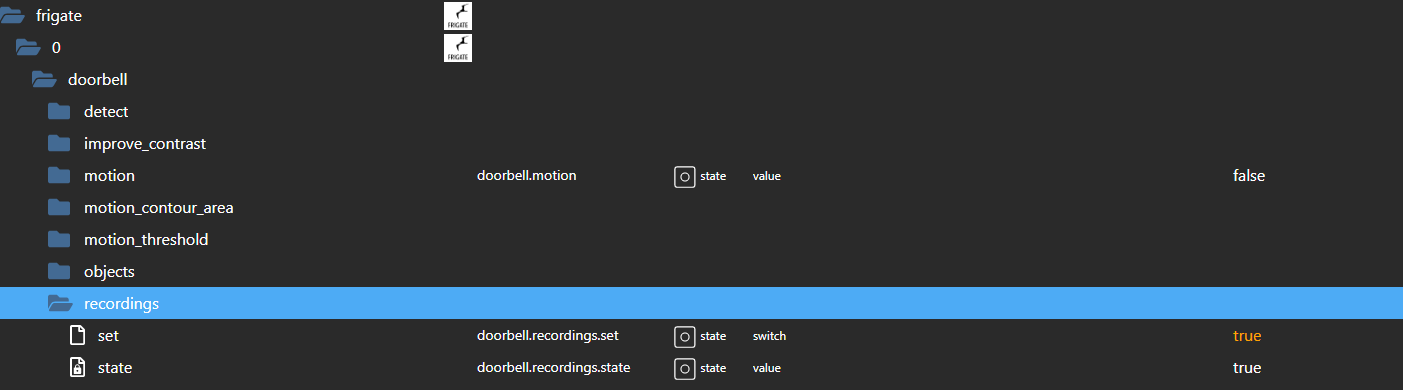
                                      Screenshot 2023-05-19 104650.png

                                      Gruß
                                      Walter

                                      DoorIO-Adapter
                                      wioBrowser-Adapter und wioBrowser

                                      E 1 Reply Last reply
                                      0
                                      • WalW Wal

                                        @exitus ,
                                        schau mal im Adapter ob das dort eingeschaltet ist.
                                        Screenshot 2023-05-19 104650.png

                                        E Offline
                                        E Offline
                                        exitus
                                        wrote on last edited by
                                        #60

                                        @wal bei mir steht OFF wo kann man es den einschalten im config ist ja true,
                                        warum ist der eine on und der andere off

                                        WalW 1 Reply Last reply
                                        0
                                        • E exitus

                                          @wal bei mir steht OFF wo kann man es den einschalten im config ist ja true,
                                          warum ist der eine on und der andere off

                                          WalW Online
                                          WalW Online
                                          Wal
                                          Developer
                                          wrote on last edited by
                                          #61

                                          @exitus ,
                                          state ist nur der Status und mit Set kann man an und ausschalten.
                                          Gruß
                                          Walter

                                          DoorIO-Adapter
                                          wioBrowser-Adapter und wioBrowser

                                          1 Reply Last reply
                                          0
                                          Reply
                                          • Reply as topic
                                          Log in to reply
                                          • Oldest to Newest
                                          • Newest to Oldest
                                          • Most Votes


                                          Support us

                                          ioBroker
                                          Community Adapters
                                          Donate

                                          531

                                          Online

                                          32.7k

                                          Users

                                          82.5k

                                          Topics

                                          1.3m

                                          Posts
                                          Community
                                          Impressum | Datenschutz-Bestimmungen | Nutzungsbedingungen | Einwilligungseinstellungen
                                          ioBroker Community 2014-2025
                                          logo
                                          • Login

                                          • Don't have an account? Register

                                          • Login or register to search.
                                          • First post
                                            Last post
                                          0
                                          • Home
                                          • Recent
                                          • Tags
                                          • Unread 0
                                          • Categories
                                          • Unreplied
                                          • Popular
                                          • GitHub
                                          • Docu
                                          • Hilfe