Skip to content
  • Home
  • Recent
  • Tags
  • 0 Unread 0
  • Categories
  • Unreplied
  • Popular
  • GitHub
  • Docu
  • Hilfe
Skins
  • Light
  • Brite
  • Cerulean
  • Cosmo
  • Flatly
  • Journal
  • Litera
  • Lumen
  • Lux
  • Materia
  • Minty
  • Morph
  • Pulse
  • Sandstone
  • Simplex
  • Sketchy
  • Spacelab
  • United
  • Yeti
  • Zephyr
  • Dark
  • Cyborg
  • Darkly
  • Quartz
  • Slate
  • Solar
  • Superhero
  • Vapor

  • Default (No Skin)
  • No Skin
Collapse
ioBroker Logo

Community Forum

donate donate
  1. ioBroker Community Home
  2. Deutsch
  3. Tester
  4. ioBroker App 2023 [Android & iOS] - jetzt erhältlich

NEWS

  • UPDATE 31.10.: Amazon Alexa - ioBroker Skill läuft aus ?
    apollon77A
    apollon77
    48
    3
    8.8k

  • Monatsrückblick – September 2025
    BluefoxB
    Bluefox
    13
    1
    2.2k

  • Neues Video "KI im Smart Home" - ioBroker plus n8n
    BluefoxB
    Bluefox
    16
    1
    3.3k

ioBroker App 2023 [Android & iOS] - jetzt erhältlich

Scheduled Pinned Locked Moved Tester
appiobroker visujarvislovelacematerialvis
938 Posts 103 Posters 290.8k Views 88 Watching
  • Oldest to Newest
  • Newest to Oldest
  • Most Votes
Reply
  • Reply as topic
Log in to reply
This topic has been deleted. Only users with topic management privileges can see it.
  • JB_SullivanJ JB_Sullivan

    Ich weiß nicht, ob es schonmal Thema war, aber wie kann ich meine VIS auf einem Tablett größer ziehen?
    Früher war das Problemlos mit 2-Fingern möglich, heute, keine Chance mehr, weil mit 2-Finger permanent der Aktualisierungsmodus ausgelöst wird - zumindest unter iOS.

    Ist das "Problem" bekannt? Gibt es ggf. einen Work a round dafür?

    bahnuhrB Online
    bahnuhrB Online
    bahnuhr
    Forum Testing Most Active
    wrote on last edited by
    #624

    @jb_sullivan
    Ich benutze die app auf dem Handy.
    Und größer ziehen geht weiterhin mit 2 Fingern.

    Tippen mit 2 Fingern löst Aktualisierung aus.

    Also bei mir, so wie es soll.


    Wenn ich helfen konnte, dann Daumen hoch (Pfeil nach oben)!
    Danke.
    gute Forenbeiträge: https://forum.iobroker.net/topic/51555/hinweise-f%C3%BCr-gute-forenbeitr%C3%A4ge
    ScreenToGif :https://www.screentogif.com/downloads.html

    JB_SullivanJ 1 Reply Last reply
    0
    • bahnuhrB bahnuhr

      @jb_sullivan
      Ich benutze die app auf dem Handy.
      Und größer ziehen geht weiterhin mit 2 Fingern.

      Tippen mit 2 Fingern löst Aktualisierung aus.

      Also bei mir, so wie es soll.

      JB_SullivanJ Offline
      JB_SullivanJ Offline
      JB_Sullivan
      wrote on last edited by JB_Sullivan
      #625

      @bahnuhr Bei einem Android Smartphone kann ich das bestätigen, bei einem iOS Tablett ( Mini 4) funktioniert es leider nicht (App Version unter iOS - 1.0.30)

      ioBroker auf Intel Core i3-5005U NUC und Windwos10 Pro

      bahnuhrB 1 Reply Last reply
      0
      • JB_SullivanJ JB_Sullivan

        @bahnuhr Bei einem Android Smartphone kann ich das bestätigen, bei einem iOS Tablett ( Mini 4) funktioniert es leider nicht (App Version unter iOS - 1.0.30)

        bahnuhrB Online
        bahnuhrB Online
        bahnuhr
        Forum Testing Most Active
        wrote on last edited by
        #626

        @jb_sullivan

        ios ?

        So'n kram nehm ich nicht.


        Wenn ich helfen konnte, dann Daumen hoch (Pfeil nach oben)!
        Danke.
        gute Forenbeiträge: https://forum.iobroker.net/topic/51555/hinweise-f%C3%BCr-gute-forenbeitr%C3%A4ge
        ScreenToGif :https://www.screentogif.com/downloads.html

        da_WoodyD 1 Reply Last reply
        1
        • bahnuhrB bahnuhr

          @jb_sullivan

          ios ?

          So'n kram nehm ich nicht.

          da_WoodyD Offline
          da_WoodyD Offline
          da_Woody
          wrote on last edited by
          #627

          @bahnuhr jau, aber deswegen gibts tropsdem leutz die das verwenden...
          ich auch nicht, aber leben und leben lassen... :)

          gruß vom Woody
          HAPPINESS is not a DESTINATION, it's a WAY of LIFE!

          bahnuhrB 1 Reply Last reply
          0
          • da_WoodyD da_Woody

            @bahnuhr jau, aber deswegen gibts tropsdem leutz die das verwenden...
            ich auch nicht, aber leben und leben lassen... :)

            bahnuhrB Online
            bahnuhrB Online
            bahnuhr
            Forum Testing Most Active
            wrote on last edited by
            #628

            @da_woody sagte in ioBroker App 2023 [Android & iOS] - jetzt erhältlich:

            @bahnuhr jau, aber deswegen gibts tropsdem leutz die das verwenden...
            ich auch nicht, aber leben und leben lassen... :)

            Na klar lass ich die leben.
            Warum auch nicht.

            Hab ja auch nichts anders behauptet oder kundgetan.


            Wenn ich helfen konnte, dann Daumen hoch (Pfeil nach oben)!
            Danke.
            gute Forenbeiträge: https://forum.iobroker.net/topic/51555/hinweise-f%C3%BCr-gute-forenbeitr%C3%A4ge
            ScreenToGif :https://www.screentogif.com/downloads.html

            da_WoodyD 1 Reply Last reply
            0
            • bahnuhrB Online
              bahnuhrB Online
              bahnuhr
              Forum Testing Most Active
              wrote on last edited by
              #629

              53046de2-b9b7-4309-8631-43735158e48f-image.png

              Aber wenn man dafür dann negativ bewertet wird.
              Nur weil man diesen ios kram nicht mag ist dies auch wieder bedenklich.
              Komische Leute gibts.


              Wenn ich helfen konnte, dann Daumen hoch (Pfeil nach oben)!
              Danke.
              gute Forenbeiträge: https://forum.iobroker.net/topic/51555/hinweise-f%C3%BCr-gute-forenbeitr%C3%A4ge
              ScreenToGif :https://www.screentogif.com/downloads.html

              MichaelScM 1 Reply Last reply
              0
              • bahnuhrB bahnuhr

                @da_woody sagte in ioBroker App 2023 [Android & iOS] - jetzt erhältlich:

                @bahnuhr jau, aber deswegen gibts tropsdem leutz die das verwenden...
                ich auch nicht, aber leben und leben lassen... :)

                Na klar lass ich die leben.
                Warum auch nicht.

                Hab ja auch nichts anders behauptet oder kundgetan.

                da_WoodyD Offline
                da_WoodyD Offline
                da_Woody
                wrote on last edited by
                #630

                @bahnuhr schon klar, aber ich lass dann meist die finger bei solchen topics... ;)
                offene wunden und so...

                gruß vom Woody
                HAPPINESS is not a DESTINATION, it's a WAY of LIFE!

                1 Reply Last reply
                0
                • bahnuhrB bahnuhr

                  53046de2-b9b7-4309-8631-43735158e48f-image.png

                  Aber wenn man dafür dann negativ bewertet wird.
                  Nur weil man diesen ios kram nicht mag ist dies auch wieder bedenklich.
                  Komische Leute gibts.

                  MichaelScM Offline
                  MichaelScM Offline
                  MichaelSc
                  wrote on last edited by
                  #631

                  @bahnuhr Ich sag zu Deinen Software- und Hardware-Präferenzen auch nicht "So'n kram" und "nehm ich nicht". Solche abfälligen Bemerkungen passen nicht zur Theorie von "leben und leben lassen".

                  iOBroker (and the other stuff) on a Proxmox Installation on an Intel NUC10.
                  IoT: Discarded Zigbee-System and all the hardware related to Zigbee; replaced with HomeMatic IP - very reliable.

                  1 Reply Last reply
                  0
                  • DJMarc75D Offline
                    DJMarc75D Offline
                    DJMarc75
                    wrote on last edited by
                    #632

                    @michaelsc sagte in ioBroker App 2023 [Android & iOS] - jetzt erhältlich:

                    "So'n kram" und "nehm ich nicht". Solche abfälligen Bemerkungen passen nicht zur Theorie von "leben und leben lassen".

                    naja, ich empfand das nicht als abwertend, zumal es nicht Dich betroffen hat.
                    Ich gleiche mal Deinen Downvote bei @bahnuhr aus und solche Diskussionen gehören jetzt auch nicht in diesen Beitrag ;)

                    So - weitermachen

                    Lehrling seit 1975 !!!
                    Beitrag geholfen ? dann gerne ein upvote rechts unten im Beitrag klicken ;)
                    https://forum.iobroker.net/topic/51555/hinweise-f%C3%BCr-gute-forenbeitr%C3%A4ge

                    1 Reply Last reply
                    3
                    • D Offline
                      D Offline
                      Dellishelly
                      wrote on last edited by
                      #633

                      Hallo zusammen,

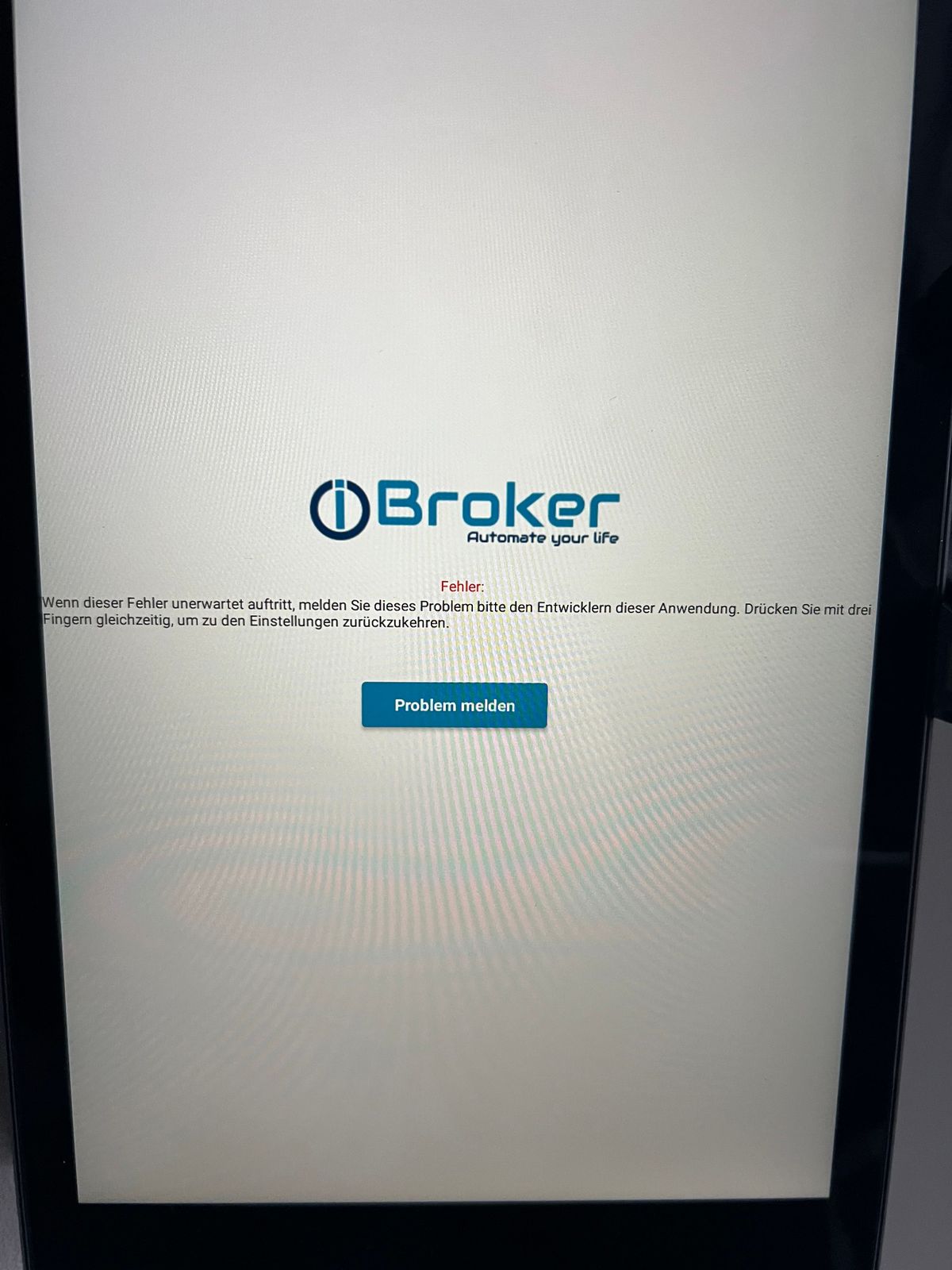
                      ich bekomme in regelmäßigen Abständen auf meinem Fire HD Tab diese Meldung.
                      Es läuft die Iobroker Visu über Playstore installiert.
                      Authentifizierung ist an.
                      Zugangsdaten sind korrekt und ich schätze so alle 36-48 Stunden erhalte ich diese Meldung.
                      Sobald ich mit 3 Finger tappe und wieder auf verlassen klicke wird die VIS wieder neu und korrekt geladen.

                      Hatte das schonmal wer ? Oder gibts hier ein bekanntes Issue @Thomas-Braun

                      Danke schonmal im Voraus.
                      Delli
                      IMG_1715.jpeg

                      Thomas BraunT akwakA 2 Replies Last reply
                      1
                      • D Dellishelly

                        Hallo zusammen,

                        ich bekomme in regelmäßigen Abständen auf meinem Fire HD Tab diese Meldung.
                        Es läuft die Iobroker Visu über Playstore installiert.
                        Authentifizierung ist an.
                        Zugangsdaten sind korrekt und ich schätze so alle 36-48 Stunden erhalte ich diese Meldung.
                        Sobald ich mit 3 Finger tappe und wieder auf verlassen klicke wird die VIS wieder neu und korrekt geladen.

                        Hatte das schonmal wer ? Oder gibts hier ein bekanntes Issue @Thomas-Braun

                        Danke schonmal im Voraus.
                        Delli

                        IMG_1715.jpeg

                        Thomas BraunT Online
                        Thomas BraunT Online
                        Thomas Braun
                        Most Active
                        wrote on last edited by
                        #634

                        @dellishelly

                        Zu vis musst du mich nix fragen. Das ist nicht mein Spielplatz.

                        Linux-Werkzeugkasten:
                        https://forum.iobroker.net/topic/42952/der-kleine-iobroker-linux-werkzeugkasten
                        NodeJS Fixer Skript:
                        https://forum.iobroker.net/topic/68035/iob-node-fix-skript
                        iob_diag: curl -sLf -o diag.sh https://iobroker.net/diag.sh && bash diag.sh

                        1 Reply Last reply
                        0
                        • GarganoG Offline
                          GarganoG Offline
                          Gargano
                          wrote on last edited by
                          #635

                          Seit dem Update wird ja wohl die Einstellung hell/dunkel [darkmode] vom System übernommen. Kann ich das umgehen oder abschalten ? Ich habe einige Widgets, die dann nicht mehr lesbar sind. (Android).

                          1 Reply Last reply
                          0
                          • XBiTX Online
                            XBiTX Online
                            XBiT
                            wrote on last edited by
                            #636

                            Hallo,

                            ich habe noch 3 alte iPad Air Gen1 an der Wand hängen mit iOS 12.5.7 gibt es eine Möglichkeit die App auch da zu nutzen?

                            1 Reply Last reply
                            0
                            • B Offline
                              B Offline
                              bastian-m
                              wrote on last edited by bastian-m
                              #637

                              @foxriver76
                              Wäre es möglich, eine Unterstützung für die ioBroker-HabPanel-Visualisierung hinzuzufügen?
                              Basis-URL ist ip:port/habpanel/index.html#/

                              Danke für die App, ich glaube damit würde ich bei meiner Frau den WAF für unser SmartHome nochmal steigern :-)

                              da_WoodyD 1 Reply Last reply
                              0
                              • foxriver76F foxriver76

                                Hallo zusammen,

                                ich wünsche euch einen schönen Start ins Wochenende.

                                Es gibt ab sofort eine neue App für iOS & Android, diese ist als eigenständige App auf beiden Plattformen unter ioBroker Visu im Store zu finden.

                                icon.png

                                Für die Android App haben wir schon einige Testiterationen hinter uns gebracht in https://forum.iobroker.net/topic/63026/iobroker-android-app-2023/202 - vielen lieben Dank an alle Tester. Die iOS App ist zwar inhaltlich zu großen Teilen identisch, allerdings kann es durchaus sein, dass sich im Detail das Verhalten unterscheidet. Hier bin ich auf euer Feedback angewiesen.

                                Überblick der Funktionen:

                                Settings

                                Local

                                • Host IP:PORT: Specify the local vis url + port e.g. 192.168.144.4:8082 (you can also add https:// prefix here)
                                • Username: Local username if specified login is performed
                                • Password: Password to corresponding username

                                External

                                • Type: Choose how you want to connect if outside of given WLAN SSIDs, if you choose url, you can provide same information as
                                  under Local
                                • Username: The ioBroker Pro username, often an E-Mail address, if given, the App connects to the Pro Cloud if not
                                  connected with a SSID listed under General
                                • Password: The corresponding password
                                • WLAN SSIDs: allows to set Wi-Fi SSID (comma-separated), if the current connected SSID is equal to one listed here, we use the local vis

                                General

                                • Application: choose between vis, material and other adapters, just changes the uri of the WebView
                                • Project: Value will be added behind url:port/vis/index.html# (only for vis)
                                • Instance ID: used to e.g. change vis views or detect active views on device via vis.0.control
                                  (it will be synchronized to vis.0 if at least one sync option is active)

                                Functionalities & Appearance

                                • Multi-Project Support: You can set up multiple projects (current limit is 2), these can be launched via Quick Actions.
                                  Starting the App without Quick Action will always launch the default project. When a specific project is launched,
                                  the app cannot change to another project until restarted. Long press on the app icon to launch a Quick Action.
                                • Allow Zoom: If false, Zoom is deactivated in the WebView
                                • Allow Scrolling: If false, Scrolling is deactivated in the WebView
                                • Send battery to vis.0: If true, battery level and state are sent to vis.0 via JS injection using servConn
                                • Keep display awake: If true, screen will never go to sleep on WebView
                                • Status Bar Active: If true, the status bar is shown
                                • Light Status Bar Text: If true, white color is used for status bar text
                                • Status bar color: Specify the color of the status bar as css color property
                                • Orientation: Force orientation of screen
                                • Zoom (Portrait): Initial Zoom for Portrait mode (0 - 5)
                                • Zoom (Landscape): Initial Zoom for Landscape mode (0 - 5)
                                • Reload on orientation change: should be activated if problems on orientation change occur
                                • Show Pro Logo: If true, a pro logo will be used in the upper right corner to indicate a pro connection
                                • Auto Zoom: Sets width=device-width to meta.content
                                • Force Fullscreen: Sets viewport-fit=cover to meta.content
                                • Location to vis.0: The Location object will be sent to vis
                                • Synchronize Brightness to vis.0: The brightness of the device will be set in vis.0 changing the state will change the brightness (only works with vis)
                                • Device name: Device name used for states in vis.0
                                • Show Navigation Bar (Android only) if true, the Navigation bar is permanently shown, else immersive
                                • Dim after seconds: Dim display after x seconds of inactivity (no tap) set 0 to disable
                                • Dim to level: Value in % to dim to if Dim after seconds triggers. On next tap, it is dimmed up to previous value
                                • Reload if app gets active: Forces a hard reload if app goes from background to foreground (default: true on iOS, false on Android)
                                • URL Postfix: this text will be appended to the URL, e.g. to specify a start view #customStartView
                                • Back to start page after X seconds: The app navigates back to the start page after X seconds of inactivity (0 to disable)
                                • Protect app start: The first app start will be protected by devices biometric authentication (affects all projects)
                                • Protect settings: Every call to settings will be protected by devices biometric authentication (affects all projects)

                                Known behaviors

                                • Settings can be opened via a triple tap (3 fingers touching the screen at the same time)
                                • Force reload via 2 finger double tap on screen on Android and Pull to refresh on iOS (on Android the Component is remounted)
                                • Status bar settings are also applied to the settings screen, but only after changing to runtime and back or reopening app
                                • Reconnection Handling for vis: It is known, that vis has problems reconnecting to the socket, thus the App detects
                                  socket disconnection of vis and if it is not reconnected after 30 seconds, it will reload the page
                                • If on page load an error occurs, a popup is shown where you can reload or go to settings
                                • If app goes from background to foreground, the NavBar on Android is ensured to be in the right state and for
                                  vis and material a socket reconnect is triggered, to avoid 10 seconds timeout screen (android detects background more than 1 second as being in background)
                                • If the "Keep screen awake" functionality is deactivated via vis, you should not change the view afterwards, else it is activated again
                                • Whenever the user is not in a Wi-Fi and using a VPN and has an external connection configured, he can decide if he wants to access local url or external

                                Wermutstropfen: Bzgl. der VPN Option, welche in der vorherigen iOS App besteht, ist aktuell aufgrund von technischen Limitationen keine Option geplant, insgeheim hoffe ich hier, dass Apple mal in die Pötte kommt und VPN Steuerung per Automation zulässt. Wer darauf angewiesen ist, ist für mobile Zwecke mit der aktuellen App evtl. besser beraten, ansonsten bietet sich von unterwegs natürlich der Pro Zugang an.

                                Issues und Feature Requests bitte hier anlegen.

                                Ich freue mich auf euer Feedback.

                                beste Grüße

                                fox

                                ? Offline
                                ? Offline
                                A Former User
                                wrote on last edited by
                                #638

                                @foxriver76

                                und wenn du schon dabei bist, hab ich ein Feature-Request um MinuVIS zu erweitern.. ?
                                Basis URL ist http://ip:port/minuvis/app/?url=http%3A%2F%2Fip%3Aport&file=ViewName.json&forceUpdate

                                :-)

                                In der iobroker-cloud geht der Zugang ja.. da muss nur mal ein Update von allem gemacht werden.. da ist Admin noch auf 4.4.1, und Minuvis auch alt..

                                1 Reply Last reply
                                0
                                • B bastian-m

                                  @foxriver76
                                  Wäre es möglich, eine Unterstützung für die ioBroker-HabPanel-Visualisierung hinzuzufügen?
                                  Basis-URL ist ip:port/habpanel/index.html#/

                                  Danke für die App, ich glaube damit würde ich bei meiner Frau den WAF für unser SmartHome nochmal steigern :-)

                                  da_WoodyD Offline
                                  da_WoodyD Offline
                                  da_Woody
                                  wrote on last edited by
                                  #639

                                  @bastian-m die devs lesen da sicherlich mit, ein request auf GitHub ist doch der bessere Weg...

                                  gruß vom Woody
                                  HAPPINESS is not a DESTINATION, it's a WAY of LIFE!

                                  B 1 Reply Last reply
                                  1
                                  • da_WoodyD da_Woody

                                    @bastian-m die devs lesen da sicherlich mit, ein request auf GitHub ist doch der bessere Weg...

                                    B Offline
                                    B Offline
                                    bastian-m
                                    wrote on last edited by
                                    #640

                                    @da_woody said in ioBroker App 2023 [Android & iOS] - jetzt erhältlich:

                                    @bastian-m die devs lesen da sicherlich mit, ein request auf GitHub ist doch der bessere Weg...

                                    Da hast du völlig Recht. Request bei GitHub ist eröffnet.

                                    Gruß,
                                    Bastian

                                    D 1 Reply Last reply
                                    1
                                    • B bastian-m

                                      @da_woody said in ioBroker App 2023 [Android & iOS] - jetzt erhältlich:

                                      @bastian-m die devs lesen da sicherlich mit, ein request auf GitHub ist doch der bessere Weg...

                                      Da hast du völlig Recht. Request bei GitHub ist eröffnet.

                                      Gruß,
                                      Bastian

                                      D Offline
                                      D Offline
                                      Digi-Bit
                                      wrote on last edited by
                                      #641

                                      Hallo,

                                      Wie macht ihr das den , das man den Screen vom Tablet einschaltet wenn

                                      Ihr bei einem bestimmten Trigger was angezeigt bekommt ?

                                      Mit dem Fully ging das ja einfach aber ich finde für diese APP einfach keine Lösung :(

                                      wie macht ihr das den ?

                                      mfg

                                      Digi-Bit

                                      Router: Ubiquiti UniFi Dream Machine Pro|Iobroker I.NUCi5/Debian, 6 x Switche, 3 x APs, 3 x Cam, 2 x Nas(Qnap 4 & 8 Bay's)
                                      7 x Echos, 76 x Tasmota, 58 x ZigBee, Homatic Ip, 2 x USV

                                      1 Reply Last reply
                                      0
                                      • K Offline
                                        K Offline
                                        Kernal
                                        wrote on last edited by
                                        #642

                                        Hallöchen ,

                                        Erstmal super APP :+1:

                                        Es ist ja bald Weihnachten und ich hab gedacht ich wünsche mir mal was::grin:

                                        Es wäre noch cool, wenn die App Clientzertifikate unterstützen würde auf iOS. Chrome und Safari machen das auch.
                                        Ich habe mein vis hinter einem Reverseproxy - welcher eine zeetifikatsauthentifizieeung versucht. Wenn der Client das Zertifikat installiert hat benötigt es keine Anmeldung mehr , was einem von extern Zeit erspart.

                                        LG Claudio

                                        apollon77A 1 Reply Last reply
                                        0
                                        • D Dellishelly

                                          Hallo zusammen,

                                          ich bekomme in regelmäßigen Abständen auf meinem Fire HD Tab diese Meldung.
                                          Es läuft die Iobroker Visu über Playstore installiert.
                                          Authentifizierung ist an.
                                          Zugangsdaten sind korrekt und ich schätze so alle 36-48 Stunden erhalte ich diese Meldung.
                                          Sobald ich mit 3 Finger tappe und wieder auf verlassen klicke wird die VIS wieder neu und korrekt geladen.

                                          Hatte das schonmal wer ? Oder gibts hier ein bekanntes Issue @Thomas-Braun

                                          Danke schonmal im Voraus.
                                          Delli

                                          IMG_1715.jpeg

                                          akwakA Offline
                                          akwakA Offline
                                          akwak
                                          wrote on last edited by akwak
                                          #643

                                          @dellishelly sagte in ioBroker App 2023 [Android & iOS] - jetzt erhältlich:

                                          Hallo zusammen,

                                          ich bekomme in regelmäßigen Abständen auf meinem Fire HD Tab diese Meldung.
                                          .....
                                          Hatte das schonmal wer ? Oder gibts hier ein bekanntes Issue @Thomas-Braun

                                          IMG_1715.jpeg

                                          Ich habe die Fehlermeldung auch auf meinem etwas älteren Tab A bekommen und habe dort bisher weiter Fully benutzt.
                                          Das Tablet verabschiedet sich aber gerade ind und ich hab ein Fire Tablett, auf dem ich die Meldung inzwischen auch schon mehrfach bekommen habe😔

                                          Alfred

                                          Eduard77E 1 Reply Last reply
                                          0
                                          Reply
                                          • Reply as topic
                                          Log in to reply
                                          • Oldest to Newest
                                          • Newest to Oldest
                                          • Most Votes


                                          Support us

                                          ioBroker
                                          Community Adapters
                                          Donate

                                          829

                                          Online

                                          32.4k

                                          Users

                                          81.5k

                                          Topics

                                          1.3m

                                          Posts
                                          Community
                                          Impressum | Datenschutz-Bestimmungen | Nutzungsbedingungen | Einwilligungseinstellungen
                                          ioBroker Community 2014-2025
                                          logo
                                          • Login

                                          • Don't have an account? Register

                                          • Login or register to search.
                                          • First post
                                            Last post
                                          0
                                          • Home
                                          • Recent
                                          • Tags
                                          • Unread 0
                                          • Categories
                                          • Unreplied
                                          • Popular
                                          • GitHub
                                          • Docu
                                          • Hilfe