
NEWS




-
@chris76e sagte in Proxmox / Influxdb V1 zu V2... wie?:
@dp20eic sagte in Proxmox / Influxdb V1 zu V2... wie?:
ich erstelle gerade eine Kopie meiner 1.8 influxDB Instanz. Dann kann ich das alles einmal durchgehen.
Danke, warte dann auf dich.
Habe zwar jetzt was hinbekommen, aber keine Ahnung ob es richtig ist.
Moin,
dann zeig doch mal was jetzt so angezeigt wird
# apt policy influxdb*

# systemctl status influxd.service
# systemctl status influxdb.service
Und wenn alles up and running
http://ip.influx.db:8086dann sollte das kommen
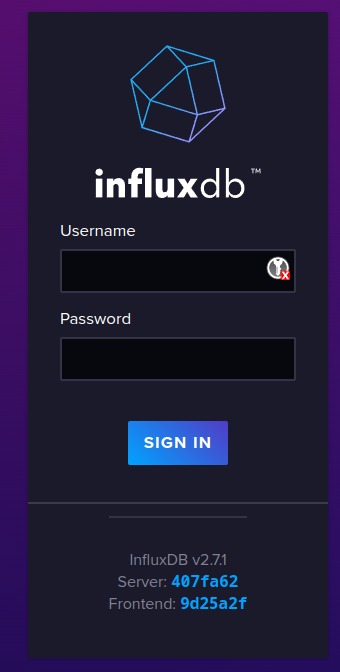
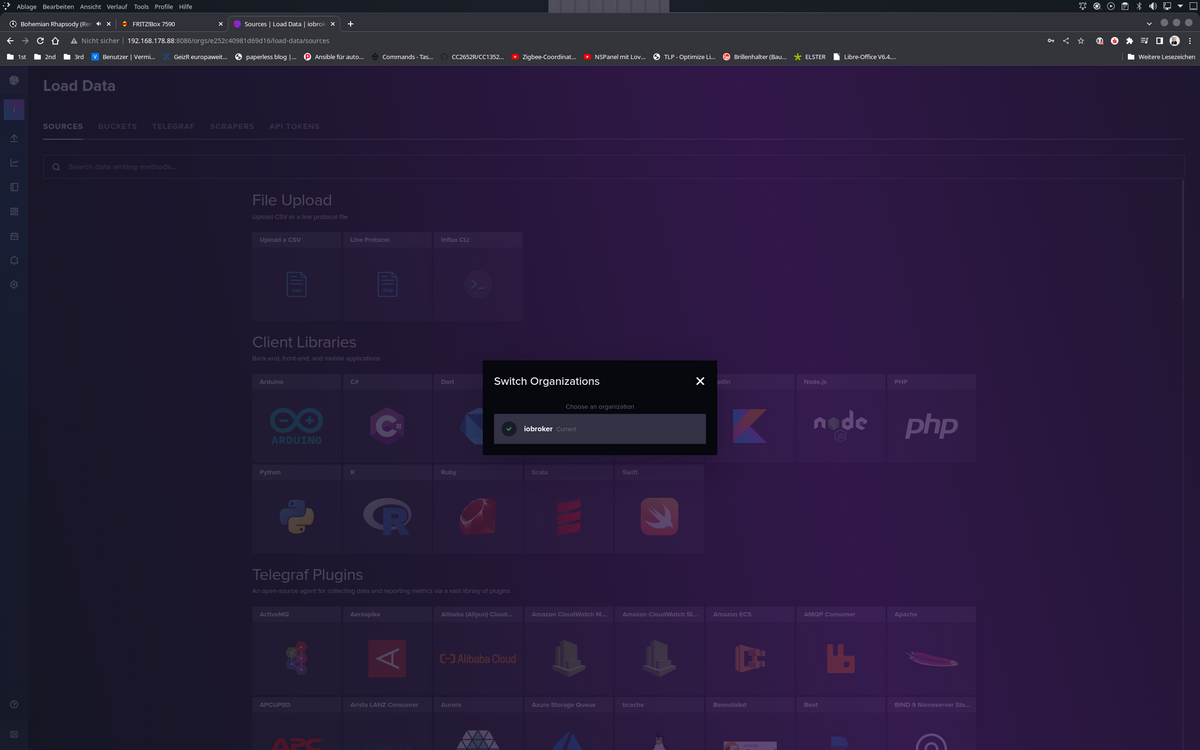
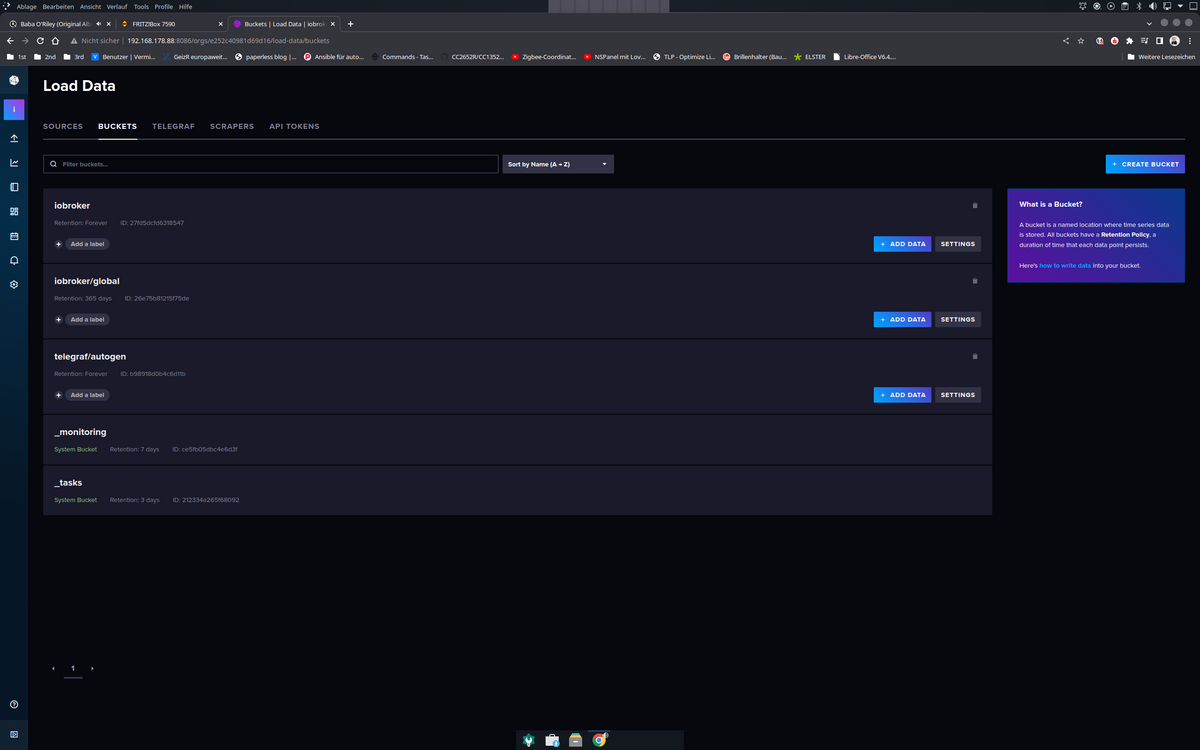
Das erste Bucket im letzten Bild ist das, welches ich bei der Migration angelegt habe, das zweite
iobroker/globalist das, welches aus der V1.8 migriert wurde. Das Telegraf Bucket ist eine DB die ich auch noch in der V 1.8 hatte.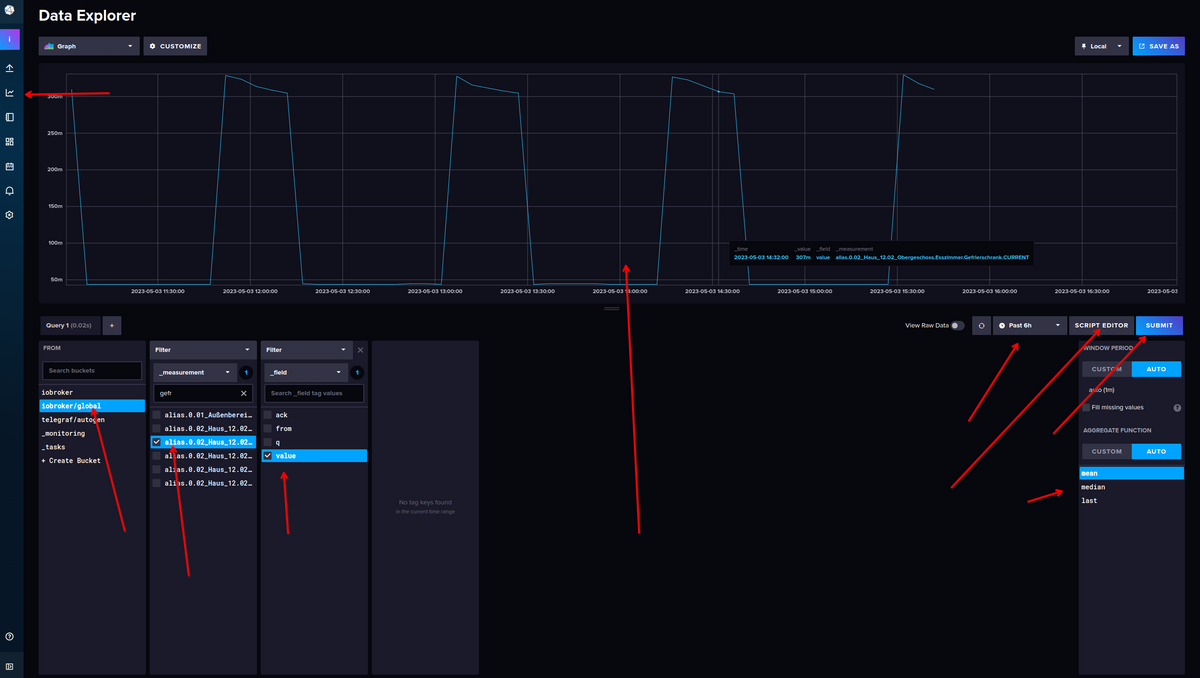
Dann ist das aber alles umgestellt auf die neue Abfragesprache FLUX, wenn Du weiter in
influxQLunter Grafana werkeln willst, muss man noch etwas umstellen, suche ich gleich mal.VG
Bernd@dp20eic
scheint zulaufen :blush:
Oder muss ich nochwas machen?
chris@influxdb3test:~$ apt policy influxdb*
influxdb2-cli:
  Installed: (none)
  Candidate: 2.7.3-1
  Version table:
     2.7.3-1 500
        500 https://repos.influxdata.com/debian stable/main amd64 Packages
     2.7.1-2 500
        500 https://repos.influxdata.com/debian stable/main amd64 Packages
     2.6.1 500
        500 https://repos.influxdata.com/debian stable/main amd64 Packages
     2.6.0 500
        500 https://repos.influxdata.com/debian stable/main amd64 Packages
     2.5.0 500
        500 https://repos.influxdata.com/debian stable/main amd64 Packages
     2.4.0 500
        500 https://repos.influxdata.com/debian stable/main amd64 Packages
     2.3.0 500
        500 https://repos.influxdata.com/debian stable/main amd64 Packages
influxdb-client:
  Installed: (none)
  Candidate: 1.6.7~rc0-1ubuntu0.22.04.2
  Version table:
     1.6.7~rc0-1ubuntu0.22.04.2 500
        500 http://archive.ubuntu.com/ubuntu jammy-updates/universe amd64 Packages
        500 http://archive.ubuntu.com/ubuntu jammy-security/universe amd64 Packages
     1.6.7~rc0-1 500
        500 http://archive.ubuntu.com/ubuntu jammy/universe amd64 Packages
influxdb-dev:
  Installed: (none)
  Candidate: (none)
  Version table:
influxdb2-client:
  Installed: (none)
  Candidate: 2.7.1-1
  Version table:
     2.7.1-1 500
        500 https://repos.influxdata.com/debian stable/main amd64 Packages
influxdb:
  Installed: (none)
  Candidate: 1.8.10-1
  Version table:
     1.8.10-1 500
        500 https://repos.influxdata.com/debian stable/main amd64 Packages
     1.6.7~rc0-1ubuntu0.22.04.2 500
        500 http://archive.ubuntu.com/ubuntu jammy-updates/universe amd64 Packages
        500 http://archive.ubuntu.com/ubuntu jammy-security/universe amd64 Packages
     1.6.7~rc0-1ubuntu0.22.04.1 -1
        100 /var/lib/dpkg/status
     1.6.7~rc0-1 500
        500 http://archive.ubuntu.com/ubuntu jammy/universe amd64 Packages
influxdb2:
  Installed: 2.7.1-1
  Candidate: 2.7.1-1
  Version table:
 *** 2.7.1-1 500
        500 https://repos.influxdata.com/debian stable/main amd64 Packages
        100 /var/lib/dpkg/status
     2.7.0-1 500
        500 https://repos.influxdata.com/debian stable/main amd64 Packages
     2.6.1-1 500
        500 https://repos.influxdata.com/debian stable/main amd64 Packages
     2.6.0-1 500
        500 https://repos.influxdata.com/debian stable/main amd64 Packages
     2.5.1-1 500
        500 https://repos.influxdata.com/debian stable/main amd64 Packages
     2.4.0-1 500
        500 https://repos.influxdata.com/debian stable/main amd64 Packages
     2.3.0-1 500
        500 https://repos.influxdata.com/debian stable/main amd64 Packages
     2.2.0 500
        500 https://repos.influxdata.com/debian stable/main amd64 Packages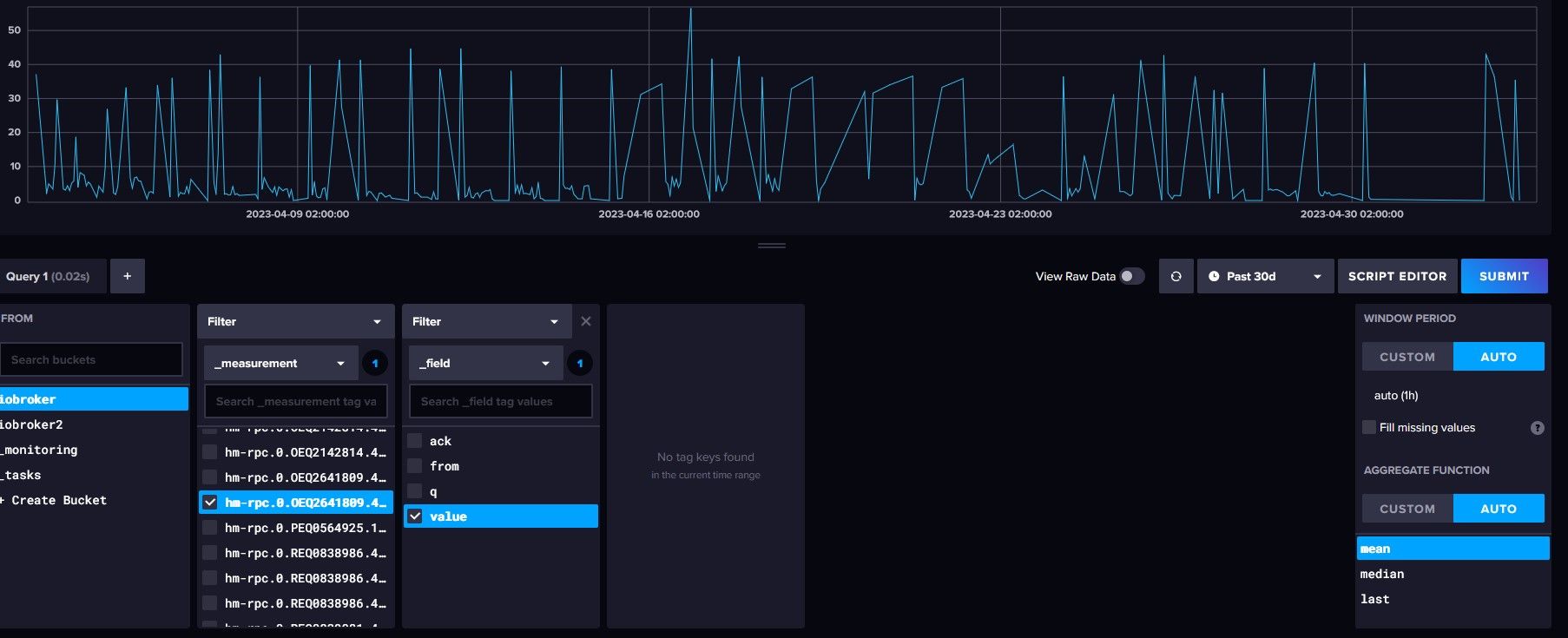
-
@dp20eic
scheint zulaufen :blush:
Oder muss ich nochwas machen?
chris@influxdb3test:~$ apt policy influxdb* influxdb2-cli: Installed: (none) Candidate: 2.7.3-1 Version table: 2.7.3-1 500 500 https://repos.influxdata.com/debian stable/main amd64 Packages 2.7.1-2 500 500 https://repos.influxdata.com/debian stable/main amd64 Packages 2.6.1 500 500 https://repos.influxdata.com/debian stable/main amd64 Packages 2.6.0 500 500 https://repos.influxdata.com/debian stable/main amd64 Packages 2.5.0 500 500 https://repos.influxdata.com/debian stable/main amd64 Packages 2.4.0 500 500 https://repos.influxdata.com/debian stable/main amd64 Packages 2.3.0 500 500 https://repos.influxdata.com/debian stable/main amd64 Packages influxdb-client: Installed: (none) Candidate: 1.6.7~rc0-1ubuntu0.22.04.2 Version table: 1.6.7~rc0-1ubuntu0.22.04.2 500 500 http://archive.ubuntu.com/ubuntu jammy-updates/universe amd64 Packages 500 http://archive.ubuntu.com/ubuntu jammy-security/universe amd64 Packages 1.6.7~rc0-1 500 500 http://archive.ubuntu.com/ubuntu jammy/universe amd64 Packages influxdb-dev: Installed: (none) Candidate: (none) Version table: influxdb2-client: Installed: (none) Candidate: 2.7.1-1 Version table: 2.7.1-1 500 500 https://repos.influxdata.com/debian stable/main amd64 Packages influxdb: Installed: (none) Candidate: 1.8.10-1 Version table: 1.8.10-1 500 500 https://repos.influxdata.com/debian stable/main amd64 Packages 1.6.7~rc0-1ubuntu0.22.04.2 500 500 http://archive.ubuntu.com/ubuntu jammy-updates/universe amd64 Packages 500 http://archive.ubuntu.com/ubuntu jammy-security/universe amd64 Packages 1.6.7~rc0-1ubuntu0.22.04.1 -1 100 /var/lib/dpkg/status 1.6.7~rc0-1 500 500 http://archive.ubuntu.com/ubuntu jammy/universe amd64 Packages influxdb2: Installed: 2.7.1-1 Candidate: 2.7.1-1 Version table: *** 2.7.1-1 500 500 https://repos.influxdata.com/debian stable/main amd64 Packages 100 /var/lib/dpkg/status 2.7.0-1 500 500 https://repos.influxdata.com/debian stable/main amd64 Packages 2.6.1-1 500 500 https://repos.influxdata.com/debian stable/main amd64 Packages 2.6.0-1 500 500 https://repos.influxdata.com/debian stable/main amd64 Packages 2.5.1-1 500 500 https://repos.influxdata.com/debian stable/main amd64 Packages 2.4.0-1 500 500 https://repos.influxdata.com/debian stable/main amd64 Packages 2.3.0-1 500 500 https://repos.influxdata.com/debian stable/main amd64 Packages 2.2.0 500 500 https://repos.influxdata.com/debian stable/main amd64 PackagesFür (unter anderem) Backups wird noch der
influxdb2-client
benötigt. -
@dp20eic
scheint zulaufen :blush:
Oder muss ich nochwas machen?
chris@influxdb3test:~$ apt policy influxdb* influxdb2-cli: Installed: (none) Candidate: 2.7.3-1 Version table: 2.7.3-1 500 500 https://repos.influxdata.com/debian stable/main amd64 Packages 2.7.1-2 500 500 https://repos.influxdata.com/debian stable/main amd64 Packages 2.6.1 500 500 https://repos.influxdata.com/debian stable/main amd64 Packages 2.6.0 500 500 https://repos.influxdata.com/debian stable/main amd64 Packages 2.5.0 500 500 https://repos.influxdata.com/debian stable/main amd64 Packages 2.4.0 500 500 https://repos.influxdata.com/debian stable/main amd64 Packages 2.3.0 500 500 https://repos.influxdata.com/debian stable/main amd64 Packages influxdb-client: Installed: (none) Candidate: 1.6.7~rc0-1ubuntu0.22.04.2 Version table: 1.6.7~rc0-1ubuntu0.22.04.2 500 500 http://archive.ubuntu.com/ubuntu jammy-updates/universe amd64 Packages 500 http://archive.ubuntu.com/ubuntu jammy-security/universe amd64 Packages 1.6.7~rc0-1 500 500 http://archive.ubuntu.com/ubuntu jammy/universe amd64 Packages influxdb-dev: Installed: (none) Candidate: (none) Version table: influxdb2-client: Installed: (none) Candidate: 2.7.1-1 Version table: 2.7.1-1 500 500 https://repos.influxdata.com/debian stable/main amd64 Packages influxdb: Installed: (none) Candidate: 1.8.10-1 Version table: 1.8.10-1 500 500 https://repos.influxdata.com/debian stable/main amd64 Packages 1.6.7~rc0-1ubuntu0.22.04.2 500 500 http://archive.ubuntu.com/ubuntu jammy-updates/universe amd64 Packages 500 http://archive.ubuntu.com/ubuntu jammy-security/universe amd64 Packages 1.6.7~rc0-1ubuntu0.22.04.1 -1 100 /var/lib/dpkg/status 1.6.7~rc0-1 500 500 http://archive.ubuntu.com/ubuntu jammy/universe amd64 Packages influxdb2: Installed: 2.7.1-1 Candidate: 2.7.1-1 Version table: *** 2.7.1-1 500 500 https://repos.influxdata.com/debian stable/main amd64 Packages 100 /var/lib/dpkg/status 2.7.0-1 500 500 https://repos.influxdata.com/debian stable/main amd64 Packages 2.6.1-1 500 500 https://repos.influxdata.com/debian stable/main amd64 Packages 2.6.0-1 500 500 https://repos.influxdata.com/debian stable/main amd64 Packages 2.5.1-1 500 500 https://repos.influxdata.com/debian stable/main amd64 Packages 2.4.0-1 500 500 https://repos.influxdata.com/debian stable/main amd64 Packages 2.3.0-1 500 500 https://repos.influxdata.com/debian stable/main amd64 Packages 2.2.0 500 500 https://repos.influxdata.com/debian stable/main amd64 Packages@chris76e sagte in Proxmox / Influxdb V1 zu V2... wie?:
Oder muss ich nochwas machen?
Moin,
na, wenn das jetzt Deine Daten im Bucket sind und nicht die vom Nachbarn, dann schaut das ja mal gut aus :)
Wenn Du Grafana nutzt, musst Du Dich entscheiden, ob Du vorhandene Panels/Dashboards auf die neue FLUX Abfragesprache umstellen möchtest oder ob Du da weiter mit influxQL Handtieren möchtest.
Ich bin komplett umgestiegen auf FLUX und kann Dir nicht sagen wie Du das Einstellen musst, vielleicht steht ja hier was https://docs.influxdata.com/influxdb/v2.7/upgrade/v1-to-v2/manual-upgrade/
Es gibt aber schon einige Posts hier im Forum, die das Thema behandeln.Und wie @Thomas-Braun sagte, wenn Du den
ioBroker - Backitup Adapternutzt, musst Du deninfluxdb2-cliauf demioBrokerinstallieren, ansonsten kannst Du keine Backups derinfluxDBmachen.@Thomas-Braun müsste das nicht
influxdb2-clisein?VG
Bernd -
@chris76e sagte in Proxmox / Influxdb V1 zu V2... wie?:
Oder muss ich nochwas machen?
Moin,
na, wenn das jetzt Deine Daten im Bucket sind und nicht die vom Nachbarn, dann schaut das ja mal gut aus :)
Wenn Du Grafana nutzt, musst Du Dich entscheiden, ob Du vorhandene Panels/Dashboards auf die neue FLUX Abfragesprache umstellen möchtest oder ob Du da weiter mit influxQL Handtieren möchtest.
Ich bin komplett umgestiegen auf FLUX und kann Dir nicht sagen wie Du das Einstellen musst, vielleicht steht ja hier was https://docs.influxdata.com/influxdb/v2.7/upgrade/v1-to-v2/manual-upgrade/
Es gibt aber schon einige Posts hier im Forum, die das Thema behandeln.Und wie @Thomas-Braun sagte, wenn Du den
ioBroker - Backitup Adapternutzt, musst Du deninfluxdb2-cliauf demioBrokerinstallieren, ansonsten kannst Du keine Backups derinfluxDBmachen.@Thomas-Braun müsste das nicht
influxdb2-clisein?VG
Bernd@dp20eic
Ich weiß es nicht genau. Ich hab jetzt die Versionsnummer genommen die zur Hauptversion passt.
Man müsste man in influxdb2-cli und influxdb2-client hineinschauen und checken was da drin ist -
Für (unter anderem) Backups wird noch der
influxdb2-client
benötigt.@thomas-braun sagte in Proxmox / Influxdb V1 zu V2... wie?:
influxdb2-client
Bin nach der offiziellen Anleitung gegangen
Download from the command line

# amd64
wget https://dl.influxdata.com/influxdb/releases/influxdb2-client-2.7.1-linux-amd64.tar.gz

# arm
wget https://dl.influxdata.com/influxdb/releases/influxdb2-client-2.7.1-linux-arm64.tar.gz

Unpackage the downloaded package.

Note: The following commands are examples. Adjust the filenames, paths, and utilities if necessary.

# amd64
tar xvzf path/to/influxdb2-client-2.7.1-linux-amd64.tar.gz

# arm
tar xvzf path/to/influxdb2-client-2.7.1-linux-arm64.tar.gz
Aber scheint nicht zufunktionieren
chris@influxdb3test:~$ wget https://dl.influxdata.com/influxdb/releases/influxdb2-client-2.7.1-linux-amd64.tar.gz
--2023-05-03 16:02:32--  https://dl.influxdata.com/influxdb/releases/influxdb2-client-2.7.1-linux-amd64.tar.gz
Resolving dl.influxdata.com (dl.influxdata.com)... 18.154.63.120, 18.154.63.100, 18.154.63.19, ...
Connecting to dl.influxdata.com (dl.influxdata.com)|18.154.63.120|:443... connected.
HTTP request sent, awaiting response... 200 OK
Length: 11265848 (11M) [application/x-tar]
Saving to: 'influxdb2-client-2.7.1-linux-amd64.tar.gz'

influxdb2-client-2.7.1-linux-amd64.tar. 100%[===============================================================================>]  10.74M  --.-KB/s    in 0.1s

2023-05-03 16:02:33 (82.0 MB/s) - 'influxdb2-client-2.7.1-linux-amd64.tar.gz' saved [11265848/11265848]

chris@influxdb3test:~$ tar xvzf ./influxdb2-client-2.7.1-linux-amd64.tar.gz
./
./LICENSE
./README.md
./influx
chris@influxdb3test:~$ apt policy influxdb* influxdb2-cli: Installed: (none) Candidate: 2.7.3-1 Version table: 2.7.3-1 500 500 https://repos.influxdata.com/debian stable/main amd64 Packages 2.7.1-2 500 500 https://repos.influxdata.com/debian stable/main amd64 Packages 2.6.1 500 500 https://repos.influxdata.com/debian stable/main amd64 Packages 2.6.0 500 500 https://repos.influxdata.com/debian stable/main amd64 Packages 2.5.0 500 500 https://repos.influxdata.com/debian stable/main amd64 Packages 2.4.0 500 500 https://repos.influxdata.com/debian stable/main amd64 Packages 2.3.0 500 500 https://repos.influxdata.com/debian stable/main amd64 Packages influxdb-client: Installed: (none) Candidate: 1.6.7~rc0-1ubuntu0.22.04.2 Version table: 1.6.7~rc0-1ubuntu0.22.04.2 500 500 http://archive.ubuntu.com/ubuntu jammy-updates/universe amd64 Packages 500 http://archive.ubuntu.com/ubuntu jammy-security/universe amd64 Packages 1.6.7~rc0-1 500 500 http://archive.ubuntu.com/ubuntu jammy/universe amd64 Packages influxdb-dev: Installed: (none) Candidate: (none) Version table: influxdb2-client: Installed: (none) Candidate: 2.7.1-1 Version table: 2.7.1-1 500 500 https://repos.influxdata.com/debian stable/main amd64 Packages influxdb: Installed: (none) Candidate: 1.8.10-1 Version table: 1.8.10-1 500 500 https://repos.influxdata.com/debian stable/main amd64 Packages 1.6.7~rc0-1ubuntu0.22.04.2 500 500 http://archive.ubuntu.com/ubuntu jammy-updates/universe amd64 Packages 500 http://archive.ubuntu.com/ubuntu jammy-security/universe amd64 Packages 1.6.7~rc0-1ubuntu0.22.04.1 -1 100 /var/lib/dpkg/status 1.6.7~rc0-1 500 500 http://archive.ubuntu.com/ubuntu jammy/universe amd64 Packages influxdb2: Installed: 2.7.1-1 Candidate: 2.7.1-1 Version table: *** 2.7.1-1 500 500 https://repos.influxdata.com/debian stable/main amd64 Packages 100 /var/lib/dpkg/status 2.7.0-1 500 500 https://repos.influxdata.com/debian stable/main amd64 Packages 2.6.1-1 500 500 https://repos.influxdata.com/debian stable/main amd64 Packages 2.6.0-1 500 500 https://repos.influxdata.com/debian stable/main amd64 Packages 2.5.1-1 500 500 https://repos.influxdata.com/debian stable/main amd64 Packages 2.4.0-1 500 500 https://repos.influxdata.com/debian stable/main amd64 Packages 2.3.0-1 500 500 https://repos.influxdata.com/debian stable/main amd64 Packages 2.2.0 500 500 https://repos.influxdata.com/debian stable/main amd64 Packages chris@influxdb3test:~$ -
@thomas-braun sagte in Proxmox / Influxdb V1 zu V2... wie?:
influxdb2-client
Bin nach der offiziellen Anleitung gegangen
Download from the command line

# amd64
wget https://dl.influxdata.com/influxdb/releases/influxdb2-client-2.7.1-linux-amd64.tar.gz

# arm
wget https://dl.influxdata.com/influxdb/releases/influxdb2-client-2.7.1-linux-arm64.tar.gz

Unpackage the downloaded package.

Note: The following commands are examples. Adjust the filenames, paths, and utilities if necessary.

# amd64
tar xvzf path/to/influxdb2-client-2.7.1-linux-amd64.tar.gz

# arm
tar xvzf path/to/influxdb2-client-2.7.1-linux-arm64.tar.gz
Aber scheint nicht zufunktionieren
chris@influxdb3test:~$ wget https://dl.influxdata.com/influxdb/releases/influxdb2-client-2.7.1-linux-amd64.tar.gz
--2023-05-03 16:02:32--  https://dl.influxdata.com/influxdb/releases/influxdb2-client-2.7.1-linux-amd64.tar.gz
Resolving dl.influxdata.com (dl.influxdata.com)... 18.154.63.120, 18.154.63.100, 18.154.63.19, ...
Connecting to dl.influxdata.com (dl.influxdata.com)|18.154.63.120|:443... connected.
HTTP request sent, awaiting response... 200 OK
Length: 11265848 (11M) [application/x-tar]
Saving to: 'influxdb2-client-2.7.1-linux-amd64.tar.gz'

influxdb2-client-2.7.1-linux-amd64.tar. 100%[===============================================================================>]  10.74M  --.-KB/s    in 0.1s

2023-05-03 16:02:33 (82.0 MB/s) - 'influxdb2-client-2.7.1-linux-amd64.tar.gz' saved [11265848/11265848]

chris@influxdb3test:~$ tar xvzf ./influxdb2-client-2.7.1-linux-amd64.tar.gz
./
./LICENSE
./README.md
./influx
chris@influxdb3test:~$ apt policy influxdb* influxdb2-cli: Installed: (none) Candidate: 2.7.3-1 Version table: 2.7.3-1 500 500 https://repos.influxdata.com/debian stable/main amd64 Packages 2.7.1-2 500 500 https://repos.influxdata.com/debian stable/main amd64 Packages 2.6.1 500 500 https://repos.influxdata.com/debian stable/main amd64 Packages 2.6.0 500 500 https://repos.influxdata.com/debian stable/main amd64 Packages 2.5.0 500 500 https://repos.influxdata.com/debian stable/main amd64 Packages 2.4.0 500 500 https://repos.influxdata.com/debian stable/main amd64 Packages 2.3.0 500 500 https://repos.influxdata.com/debian stable/main amd64 Packages influxdb-client: Installed: (none) Candidate: 1.6.7~rc0-1ubuntu0.22.04.2 Version table: 1.6.7~rc0-1ubuntu0.22.04.2 500 500 http://archive.ubuntu.com/ubuntu jammy-updates/universe amd64 Packages 500 http://archive.ubuntu.com/ubuntu jammy-security/universe amd64 Packages 1.6.7~rc0-1 500 500 http://archive.ubuntu.com/ubuntu jammy/universe amd64 Packages influxdb-dev: Installed: (none) Candidate: (none) Version table: influxdb2-client: Installed: (none) Candidate: 2.7.1-1 Version table: 2.7.1-1 500 500 https://repos.influxdata.com/debian stable/main amd64 Packages influxdb: Installed: (none) Candidate: 1.8.10-1 Version table: 1.8.10-1 500 500 https://repos.influxdata.com/debian stable/main amd64 Packages 1.6.7~rc0-1ubuntu0.22.04.2 500 500 http://archive.ubuntu.com/ubuntu jammy-updates/universe amd64 Packages 500 http://archive.ubuntu.com/ubuntu jammy-security/universe amd64 Packages 1.6.7~rc0-1ubuntu0.22.04.1 -1 100 /var/lib/dpkg/status 1.6.7~rc0-1 500 500 http://archive.ubuntu.com/ubuntu jammy/universe amd64 Packages influxdb2: Installed: 2.7.1-1 Candidate: 2.7.1-1 Version table: *** 2.7.1-1 500 500 https://repos.influxdata.com/debian stable/main amd64 Packages 100 /var/lib/dpkg/status 2.7.0-1 500 500 https://repos.influxdata.com/debian stable/main amd64 Packages 2.6.1-1 500 500 https://repos.influxdata.com/debian stable/main amd64 Packages 2.6.0-1 500 500 https://repos.influxdata.com/debian stable/main amd64 Packages 2.5.1-1 500 500 https://repos.influxdata.com/debian stable/main amd64 Packages 2.4.0-1 500 500 https://repos.influxdata.com/debian stable/main amd64 Packages 2.3.0-1 500 500 https://repos.influxdata.com/debian stable/main amd64 Packages 2.2.0 500 500 https://repos.influxdata.com/debian stable/main amd64 Packages chris@influxdb3test:~$@chris76e sagte in Proxmox / Influxdb V1 zu V2... wie?:
Moin,
was versuchst Du gerade?
Die erste Frage ist, nutzt Du den
ioBrober Backitup Adapter?
Wenn, ja, dann musst Du auf demioBrokerden Client installieren, damit derioBrokerdas Bucket, in welches Du schreibst, mit sichern kann, fehlt der Client, kann man nicht remote auf dieinfluxDBzugreifen.
Wenn allesioBroker u. influxDBauf demselben Server läuft, dann ist das nicht nötig.Sollte der
ioBrokerim eigenen Container laufen, dann musst Du da auch das korrekten Repository anlegen und dann mit# sudo apt install influxdb2-clientinstallieren
VG
Bernd -
@chris76e sagte in Proxmox / Influxdb V1 zu V2... wie?:
Moin,
was versuchst Du gerade?
Die erste Frage ist, nutzt Du den
ioBrober Backitup Adapter?
Wenn, ja, dann musst Du auf demioBrokerden Client installieren, damit derioBrokerdas Bucket, in welches Du schreibst, mit sichern kann, fehlt der Client, kann man nicht remote auf dieinfluxDBzugreifen.
Wenn allesioBroker u. influxDBauf demselben Server läuft, dann ist das nicht nötig.Sollte der
ioBrokerim eigenen Container laufen, dann musst Du da auch das korrekten Repository anlegen und dann mit# sudo apt install influxdb2-clientinstallieren
VG
Bernd -
@thomas-braun sagte in Proxmox / Influxdb V1 zu V2... wie?:
influxdb2-client
Bin nach der offiziellen Anleitung gegangen
Download from the command line

# amd64
wget https://dl.influxdata.com/influxdb/releases/influxdb2-client-2.7.1-linux-amd64.tar.gz

# arm
wget https://dl.influxdata.com/influxdb/releases/influxdb2-client-2.7.1-linux-arm64.tar.gz

Unpackage the downloaded package.

Note: The following commands are examples. Adjust the filenames, paths, and utilities if necessary.

# amd64
tar xvzf path/to/influxdb2-client-2.7.1-linux-amd64.tar.gz

# arm
tar xvzf path/to/influxdb2-client-2.7.1-linux-arm64.tar.gz
Aber scheint nicht zufunktionieren
chris@influxdb3test:~$ wget https://dl.influxdata.com/influxdb/releases/influxdb2-client-2.7.1-linux-amd64.tar.gz
--2023-05-03 16:02:32--  https://dl.influxdata.com/influxdb/releases/influxdb2-client-2.7.1-linux-amd64.tar.gz
Resolving dl.influxdata.com (dl.influxdata.com)... 18.154.63.120, 18.154.63.100, 18.154.63.19, ...
Connecting to dl.influxdata.com (dl.influxdata.com)|18.154.63.120|:443... connected.
HTTP request sent, awaiting response... 200 OK
Length: 11265848 (11M) [application/x-tar]
Saving to: 'influxdb2-client-2.7.1-linux-amd64.tar.gz'

influxdb2-client-2.7.1-linux-amd64.tar. 100%[===============================================================================>]  10.74M  --.-KB/s    in 0.1s

2023-05-03 16:02:33 (82.0 MB/s) - 'influxdb2-client-2.7.1-linux-amd64.tar.gz' saved [11265848/11265848]

chris@influxdb3test:~$ tar xvzf ./influxdb2-client-2.7.1-linux-amd64.tar.gz
./
./LICENSE
./README.md
./influx
chris@influxdb3test:~$ apt policy influxdb* influxdb2-cli: Installed: (none) Candidate: 2.7.3-1 Version table: 2.7.3-1 500 500 https://repos.influxdata.com/debian stable/main amd64 Packages 2.7.1-2 500 500 https://repos.influxdata.com/debian stable/main amd64 Packages 2.6.1 500 500 https://repos.influxdata.com/debian stable/main amd64 Packages 2.6.0 500 500 https://repos.influxdata.com/debian stable/main amd64 Packages 2.5.0 500 500 https://repos.influxdata.com/debian stable/main amd64 Packages 2.4.0 500 500 https://repos.influxdata.com/debian stable/main amd64 Packages 2.3.0 500 500 https://repos.influxdata.com/debian stable/main amd64 Packages influxdb-client: Installed: (none) Candidate: 1.6.7~rc0-1ubuntu0.22.04.2 Version table: 1.6.7~rc0-1ubuntu0.22.04.2 500 500 http://archive.ubuntu.com/ubuntu jammy-updates/universe amd64 Packages 500 http://archive.ubuntu.com/ubuntu jammy-security/universe amd64 Packages 1.6.7~rc0-1 500 500 http://archive.ubuntu.com/ubuntu jammy/universe amd64 Packages influxdb-dev: Installed: (none) Candidate: (none) Version table: influxdb2-client: Installed: (none) Candidate: 2.7.1-1 Version table: 2.7.1-1 500 500 https://repos.influxdata.com/debian stable/main amd64 Packages influxdb: Installed: (none) Candidate: 1.8.10-1 Version table: 1.8.10-1 500 500 https://repos.influxdata.com/debian stable/main amd64 Packages 1.6.7~rc0-1ubuntu0.22.04.2 500 500 http://archive.ubuntu.com/ubuntu jammy-updates/universe amd64 Packages 500 http://archive.ubuntu.com/ubuntu jammy-security/universe amd64 Packages 1.6.7~rc0-1ubuntu0.22.04.1 -1 100 /var/lib/dpkg/status 1.6.7~rc0-1 500 500 http://archive.ubuntu.com/ubuntu jammy/universe amd64 Packages influxdb2: Installed: 2.7.1-1 Candidate: 2.7.1-1 Version table: *** 2.7.1-1 500 500 https://repos.influxdata.com/debian stable/main amd64 Packages 100 /var/lib/dpkg/status 2.7.0-1 500 500 https://repos.influxdata.com/debian stable/main amd64 Packages 2.6.1-1 500 500 https://repos.influxdata.com/debian stable/main amd64 Packages 2.6.0-1 500 500 https://repos.influxdata.com/debian stable/main amd64 Packages 2.5.1-1 500 500 https://repos.influxdata.com/debian stable/main amd64 Packages 2.4.0-1 500 500 https://repos.influxdata.com/debian stable/main amd64 Packages 2.3.0-1 500 500 https://repos.influxdata.com/debian stable/main amd64 Packages 2.2.0 500 500 https://repos.influxdata.com/debian stable/main amd64 Packages chris@influxdb3test:~$Hatten wir nicht oben bereits gesagt, dass man keine tar.gz wildherunterlädt, sondern seinen PAKETTMANAGER benutzt? Dafür ist der nämlich da.
Lösch den Mist wieder.
-
Hatten wir nicht oben bereits gesagt, dass man keine tar.gz wildherunterlädt, sondern seinen PAKETTMANAGER benutzt? Dafür ist der nämlich da.
Lösch den Mist wieder.
was soll man denn machen wenn man nicht viel Ahnung von Linux hat? Das ist doch die offizielle Anleitung von influx. https://docs.influxdata.com/influxdb/v2.7/tools/influx-cli/?t=Linux
Du schreibst:
Für (unter anderem) Backups wird noch der
influxdb2-client
benötigt.dann habe ich nach influxdb2-client gesucht.....
-
was soll man denn machen wenn man nicht viel Ahnung von Linux hat? Das ist doch die offizielle Anleitung von influx. https://docs.influxdata.com/influxdb/v2.7/tools/influx-cli/?t=Linux
Du schreibst:
Für (unter anderem) Backups wird noch der
influxdb2-client
benötigt.dann habe ich nach influxdb2-client gesucht.....
@chris76e
So installiert man Software unter Debian:sudo apt install PAKETNAMEEntsprechende Quelle muss u.U. noch angelegt werden.
Andere Linux-Geschmacksrichtungen haben andere Paketmanager.
-
@chris76e
So installiert man Software unter Debian:sudo apt install PAKETNAMEEntsprechende Quelle muss u.U. noch angelegt werden.
Andere Linux-Geschmacksrichtungen haben andere Paketmanager.
So sieht es jetzt aus
chris@influxdb3test:~$ apt policy influxdb* influxdb2-cli: Installed: (none) Candidate: 2.7.3-1 Version table: 2.7.3-1 500 500 https://repos.influxdata.com/debian stable/main amd64 Packages 2.7.1-2 500 500 https://repos.influxdata.com/debian stable/main amd64 Packages 2.6.1 500 500 https://repos.influxdata.com/debian stable/main amd64 Packages 2.6.0 500 500 https://repos.influxdata.com/debian stable/main amd64 Packages 2.5.0 500 500 https://repos.influxdata.com/debian stable/main amd64 Packages 2.4.0 500 500 https://repos.influxdata.com/debian stable/main amd64 Packages 2.3.0 500 500 https://repos.influxdata.com/debian stable/main amd64 Packages influxdb-client: Installed: (none) Candidate: 1.6.7~rc0-1ubuntu0.22.04.2 Version table: 1.6.7~rc0-1ubuntu0.22.04.2 500 500 http://archive.ubuntu.com/ubuntu jammy-updates/universe amd64 Packages 500 http://archive.ubuntu.com/ubuntu jammy-security/universe amd64 Packages 1.6.7~rc0-1 500 500 http://archive.ubuntu.com/ubuntu jammy/universe amd64 Packages influxdb-dev: Installed: (none) Candidate: (none) Version table: influxdb2-client: Installed: 2.7.1-1 Candidate: 2.7.1-1 Version table: *** 2.7.1-1 500 500 https://repos.influxdata.com/debian stable/main amd64 Packages 100 /var/lib/dpkg/status influxdb: Installed: (none) Candidate: 1.8.10-1 Version table: 1.8.10-1 500 500 https://repos.influxdata.com/debian stable/main amd64 Packages 1.6.7~rc0-1ubuntu0.22.04.2 500 500 http://archive.ubuntu.com/ubuntu jammy-updates/universe amd64 Packages 500 http://archive.ubuntu.com/ubuntu jammy-security/universe amd64 Packages 1.6.7~rc0-1ubuntu0.22.04.1 -1 100 /var/lib/dpkg/status 1.6.7~rc0-1 500 500 http://archive.ubuntu.com/ubuntu jammy/universe amd64 Packages influxdb2: Installed: 2.7.1-1 Candidate: 2.7.1-1 Version table: *** 2.7.1-1 500 500 https://repos.influxdata.com/debian stable/main amd64 Packages 100 /var/lib/dpkg/status 2.7.0-1 500 500 https://repos.influxdata.com/debian stable/main amd64 Packages 2.6.1-1 500 500 https://repos.influxdata.com/debian stable/main amd64 Packages 2.6.0-1 500 500 https://repos.influxdata.com/debian stable/main amd64 Packages 2.5.1-1 500 500 https://repos.influxdata.com/debian stable/main amd64 Packages 2.4.0-1 500 500 https://repos.influxdata.com/debian stable/main amd64 Packages 2.3.0-1 500 500 https://repos.influxdata.com/debian stable/main amd64 Packages 2.2.0 500 500 https://repos.influxdata.com/debian stable/main amd64 Packages chris@influxdb3test:~$ -
@chris76e sagte in Proxmox / Influxdb V1 zu V2... wie?:
@dp20eic
InfluxDB läuft auf einem eigene LXC, Backups werden mit Proxmox gemacht
Moin,
dann bist Du erst einmal fertig, denn nur wenn Du den
ioBrokerAdapter nutzt, brauchst Du den Client auf dem
 ioBrokerServer.Solange Du die Backups mit Proxmox machst, ist das dann nicht nötig.
VG
BerndP.S.: und wie @Thomas-Braun schon sagte, lösche das, was Du da heruntergeladen hast.
-
@chris76e sagte in Proxmox / Influxdb V1 zu V2... wie?:
@dp20eic
InfluxDB läuft auf einem eigene LXC, Backups werden mit Proxmox gemacht
Moin,
dann bist Du erst einmal fertig, denn nur wenn Du den
ioBrokerAdapter nutzt, brauchst Du den Client auf dem ioBrokerServer.Solange Du die Backups mit Proxmox machst, ist das dann nicht nötig.
VG
BerndP.S.: und wie @Thomas-Braun schon sagte, lösche das, was Du da heruntergeladen hast.
-
@chris76e sagte in Proxmox / Influxdb V1 zu V2... wie?:
@dp20eic
InfluxDB läuft auf einem eigene LXC, Backups werden mit Proxmox gemacht
Moin,
dann bist Du erst einmal fertig, denn nur wenn Du den
ioBrokerAdapter nutzt, brauchst Du den Client auf dem ioBrokerServer.Solange Du die Backups mit Proxmox machst, ist das dann nicht nötig.
VG
BerndP.S.: und wie @Thomas-Braun schon sagte, lösche das, was Du da heruntergeladen hast.
@dp20eic
Wobei ich vermutlich bei den Backups zweigleisig fahren würde. Falls entsprechend ausreichend Speicherplatz vorhanden ist jedenfalls.
-
So sieht es jetzt aus
chris@influxdb3test:~$ apt policy influxdb* influxdb2-cli: Installed: (none) Candidate: 2.7.3-1 Version table: 2.7.3-1 500 500 https://repos.influxdata.com/debian stable/main amd64 Packages 2.7.1-2 500 500 https://repos.influxdata.com/debian stable/main amd64 Packages 2.6.1 500 500 https://repos.influxdata.com/debian stable/main amd64 Packages 2.6.0 500 500 https://repos.influxdata.com/debian stable/main amd64 Packages 2.5.0 500 500 https://repos.influxdata.com/debian stable/main amd64 Packages 2.4.0 500 500 https://repos.influxdata.com/debian stable/main amd64 Packages 2.3.0 500 500 https://repos.influxdata.com/debian stable/main amd64 Packages influxdb-client: Installed: (none) Candidate: 1.6.7~rc0-1ubuntu0.22.04.2 Version table: 1.6.7~rc0-1ubuntu0.22.04.2 500 500 http://archive.ubuntu.com/ubuntu jammy-updates/universe amd64 Packages 500 http://archive.ubuntu.com/ubuntu jammy-security/universe amd64 Packages 1.6.7~rc0-1 500 500 http://archive.ubuntu.com/ubuntu jammy/universe amd64 Packages influxdb-dev: Installed: (none) Candidate: (none) Version table: influxdb2-client: Installed: 2.7.1-1 Candidate: 2.7.1-1 Version table: *** 2.7.1-1 500 500 https://repos.influxdata.com/debian stable/main amd64 Packages 100 /var/lib/dpkg/status influxdb: Installed: (none) Candidate: 1.8.10-1 Version table: 1.8.10-1 500 500 https://repos.influxdata.com/debian stable/main amd64 Packages 1.6.7~rc0-1ubuntu0.22.04.2 500 500 http://archive.ubuntu.com/ubuntu jammy-updates/universe amd64 Packages 500 http://archive.ubuntu.com/ubuntu jammy-security/universe amd64 Packages 1.6.7~rc0-1ubuntu0.22.04.1 -1 100 /var/lib/dpkg/status 1.6.7~rc0-1 500 500 http://archive.ubuntu.com/ubuntu jammy/universe amd64 Packages influxdb2: Installed: 2.7.1-1 Candidate: 2.7.1-1 Version table: *** 2.7.1-1 500 500 https://repos.influxdata.com/debian stable/main amd64 Packages 100 /var/lib/dpkg/status 2.7.0-1 500 500 https://repos.influxdata.com/debian stable/main amd64 Packages 2.6.1-1 500 500 https://repos.influxdata.com/debian stable/main amd64 Packages 2.6.0-1 500 500 https://repos.influxdata.com/debian stable/main amd64 Packages 2.5.1-1 500 500 https://repos.influxdata.com/debian stable/main amd64 Packages 2.4.0-1 500 500 https://repos.influxdata.com/debian stable/main amd64 Packages 2.3.0-1 500 500 https://repos.influxdata.com/debian stable/main amd64 Packages 2.2.0 500 500 https://repos.influxdata.com/debian stable/main amd64 Packages chris@influxdb3test:~$@chris76e sagte in Proxmox / Influxdb V1 zu V2... wie?:
So sieht es jetzt aus
Moin,
das ist für den aktuellen Betrieb erst einmal ausreichend.
Du kannst bei der 2er-Version viel mittels der WEB-UI einstellen und administrieren, aber manches geht nur auf der Kommandozeile, dafür brauchst Du dann das
influxDB2-cli, das kann entweder auf deminfluxDBServer mit installiert sein oder auf irgendeinem anderen.
Mach aber erst mal weiter und wenn alles erst mal läuft eine Sicherung nicht vergessen :)VG
Bernd -
@dp20eic
Wobei ich vermutlich bei den Backups zweigleisig fahren würde. Falls entsprechend ausreichend Speicherplatz vorhanden ist jedenfalls.
@thomas-braun sagte in Proxmox / Influxdb V1 zu V2... wie?:
@dp20eic
Wobei ich vermutlich bei den Backups zweigleisig fahren würde. Falls entsprechend ausreichend Speicherplatz vorhanden ist jedenfalls.
Moin,
ja, ist mit Sicherheit ein wichtiger Hinweis, aber wieso schon wieder Rennen, wenn man erst einmal Laufen lernen sollte :)
VG
Bernd -
@chris76e sagte in Proxmox / Influxdb V1 zu V2... wie?:
So sieht es jetzt aus
Moin,
das ist für den aktuellen Betrieb erst einmal ausreichend.
Du kannst bei der 2er-Version viel mittels der WEB-UI einstellen und administrieren, aber manches geht nur auf der Kommandozeile, dafür brauchst Du dann das
influxDB2-cli, das kann entweder auf deminfluxDBServer mit installiert sein oder auf irgendeinem anderen.
Mach aber erst mal weiter und wenn alles erst mal läuft eine Sicherung nicht vergessen :)VG
Bernd -
@chris76e sagte in Proxmox / Influxdb V1 zu V2... wie?:
@dp20eic noch läuft es auf dem test lxc, daten werden jetzt mit flux übernommen
Moin,
sieht doch gut aus.
Dann viel Spaß beimioBrokern undinfluxen :)VG
Bernd -
Hallo,
ich habe unter proxmox versucht die influxdb von v1 auf v2 upgraden, leider ohne Erfolg...
Nun habe ich einen LXC mit influxdb V2.7 erstellt. Wie bekomme ich die alte DB möglichst einfach in den neuen LXC?
-
Hallo,
ich habe unter proxmox versucht die influxdb von v1 auf v2 upgraden, leider ohne Erfolg...
Nun habe ich einen LXC mit influxdb V2.7 erstellt. Wie bekomme ich die alte DB möglichst einfach in den neuen LXC?
@saeft_2003 gibt es einen speziellen Grund warum du auf die "alte" 2.7 umstellen willst? Den Aufwand mit Flux würde ich mir nicht mehr antun.


Support us
660
Online32.6k
Users82.2k
Topics1.3m
Posts