



Skip to content
  • Home
  • Recent
  • Tags
  • 0 Unread 0
  • Categories
  • Unreplied
  • Popular
  • GitHub
  • Docu
  • Hilfe
Skins
  • Light
  • Brite
  • Cerulean
  • Cosmo
  • Flatly
  • Journal
  • Litera
  • Lumen
  • Lux
  • Materia
  • Minty
  • Morph
  • Pulse
  • Sandstone
  • Simplex
  • Sketchy
  • Spacelab
  • United
  • Yeti
  • Zephyr
  • Dark
  • Cyborg
  • Darkly
  • Quartz
  • Slate
  • Solar
  • Superhero
  • Vapor

  • Default (No Skin)
  • No Skin
Collapse
ioBroker Logo

Community Forum

donate donate
  1. ioBroker Community Home
  2. Deutsch
  3. Einsteigerfragen
  4. IO Broker lässt sich nicht mehr aufrufen

NEWS

  • Monatsrückblick Januar/Februar 2026 ist online!
    BluefoxB
    Bluefox
    18
    1
    776

  • Jahresrückblick 2025 – unser neuer Blogbeitrag ist online! ✨
    BluefoxB
    Bluefox
    18
    1
    6.2k

  • Neuer Blogbeitrag: Monatsrückblick - Dezember 2025 🎄
    BluefoxB
    Bluefox
    13
    1
    1.5k

IO Broker lässt sich nicht mehr aufrufen

Scheduled Pinned Locked Moved Einsteigerfragen
18 Posts 4 Posters 790 Views 3 Watching
  • Oldest to Newest
  • Newest to Oldest
  • Most Votes
Reply
  • Reply as topic
Log in to reply
This topic has been deleted. Only users with topic management privileges can see it.
  • ralleR ralle

    @thomas-braun said in IO Broker lässt sich nicht mehr aufrufen:

    iobroker stop
    iob fix
    iob diag

    du bist aber schnell, vielen Dank !!
    Habs soweit ausgeführt, jedoch wie Starte ich Io Broker wieder, nun steht bei Status "not running on this Host"

    Thomas BraunT Online
    Thomas BraunT Online
    Thomas Braun
    Most Active
    wrote on last edited by
    #5

    @ralle

    Und die Ausgabe von

    iob diag
    

    sagt?

    Linux-Werkzeugkasten:
    https://forum.iobroker.net/topic/42952/der-kleine-iobroker-linux-werkzeugkasten
    NodeJS Fixer Skript:
    https://forum.iobroker.net/topic/68035/iob-node-fix-skript
    iob_diag: curl -sLf -o diag.sh https://iobroker.net/diag.sh && bash diag.sh

    1 Reply Last reply
    0
    • Thomas BraunT Thomas Braun

      @ralle

      iob list instances
      
      ralleR Offline
      ralleR Offline
      ralle
      wrote on last edited by
      #6

      @thomas-braun vielen Dank, hab ich gemacht, lässt sich aber immer noch nicht aufrufen....

      Thomas BraunT 1 Reply Last reply
      0
      • ralleR ralle

        @thomas-braun vielen Dank, hab ich gemacht, lässt sich aber immer noch nicht aufrufen....

        Thomas BraunT Online
        Thomas BraunT Online
        Thomas Braun
        Most Active
        wrote on last edited by
        #7

        @ralle

        Glaskugel kaputt.
        Ausgaben geheim?

        Linux-Werkzeugkasten:
        https://forum.iobroker.net/topic/42952/der-kleine-iobroker-linux-werkzeugkasten
        NodeJS Fixer Skript:
        https://forum.iobroker.net/topic/68035/iob-node-fix-skript
        iob_diag: curl -sLf -o diag.sh https://iobroker.net/diag.sh && bash diag.sh

        ralleR 1 Reply Last reply
        0
        • Thomas BraunT Thomas Braun

          @ralle

          Glaskugel kaputt.
          Ausgaben geheim?

          ralleR Offline
          ralleR Offline
          ralle
          wrote on last edited by
          #8

          @thomas-braun Sorry..... habs jetzt erst gesehen, soll ich den ganzen log posten? was ich jetzt gesehen habe steht dort auf jeden fall das er jetzt läuft......

          ======================= SUMMARY =======================
          v.2022-12-13

          Operatingsystem: Raspbian GNU/Linux 11 (bullseye)
          Installation: Native
          Timezone: Europe/Berlin
          User-ID: 1000
          X-Server: true

          Pending OS-Updates: 41

          Nodejs-Installation: /usr/bin/nodejs v16.18.1
          /usr/bin/node v16.18.1
          /usr/bin/npm 8.19.2

          ioBroker Core: js-controller 4.0.23
          admin 6.3.5

          ioBroker Status: iobroker is running on this host.

          Objects type: jsonl
          States type: jsonl

          Pending iob updates: 8

          Active repo(s): stable

          Objects: 7743
          States: 6510

          Size of iob-Database:

          14M /opt/iobroker/iobroker-data/objects.jsonl
          4.6M /opt/iobroker/iobroker-data/states.jsonl

          ====================== END OF SUMMARY ==================

          pi@raspberrypi:~ $ ^C
          pi@raspberrypi:~ $ ======================= SUMMARY =======================
                             ^C   v.2022-12-13
          pi@raspberrypi:~ $ ====================== END OF SUMMARY ==================
          ====================== END OF SUMMARY ==================
          ====================== END OF SUMMARY ==================
          Installation:           Native
          Timezone:               Europe/Berlin
          User-ID:                1000
          X-Server:               true
          
          Pending OS-Updates:     41
          
          Nodejs-Installation:    /usr/bin/nodejs         v16.18.1
                                  /usr/bin/node           v16.18.1
                                  /usr/bin/npm            8.19.2
          
          ioBroker Core:          js-controller           4.0.23
                                  admin                   6.3.5
          
          ioBroker Status:        iobroker is running on this host.
          
          
          Objects type: jsonl
          States  type: jsonl
          
          Pending iob updates:    8
          
          Active repo(s): stable
          
          Objects:                7743
          States:                 6510
          
          Size of iob-Database:
          
          14M     /opt/iobroker/iobroker-data/objects.jsonl
          4.6M    /opt/iobroker/iobroker-data/states.jsonl
          Thomas BraunT 1 Reply Last reply
          0
          • ralleR ralle

            @thomas-braun Sorry..... habs jetzt erst gesehen, soll ich den ganzen log posten? was ich jetzt gesehen habe steht dort auf jeden fall das er jetzt läuft......

            ======================= SUMMARY =======================
            v.2022-12-13

            Operatingsystem: Raspbian GNU/Linux 11 (bullseye)
            Installation: Native
            Timezone: Europe/Berlin
            User-ID: 1000
            X-Server: true

            Pending OS-Updates: 41

            Nodejs-Installation: /usr/bin/nodejs v16.18.1
            /usr/bin/node v16.18.1
            /usr/bin/npm 8.19.2

            ioBroker Core: js-controller 4.0.23
            admin 6.3.5

            ioBroker Status: iobroker is running on this host.

            Objects type: jsonl
            States type: jsonl

            Pending iob updates: 8

            Active repo(s): stable

            Objects: 7743
            States: 6510

            Size of iob-Database:

            14M /opt/iobroker/iobroker-data/objects.jsonl
            4.6M /opt/iobroker/iobroker-data/states.jsonl

            ====================== END OF SUMMARY ==================

            pi@raspberrypi:~ $ ^C
            pi@raspberrypi:~ $ ======================= SUMMARY =======================
                               ^C   v.2022-12-13
            pi@raspberrypi:~ $ ====================== END OF SUMMARY ==================
            ====================== END OF SUMMARY ==================
            ====================== END OF SUMMARY ==================
            Installation:           Native
            Timezone:               Europe/Berlin
            User-ID:                1000
            X-Server:               true
            
            Pending OS-Updates:     41
            
            Nodejs-Installation:    /usr/bin/nodejs         v16.18.1
                                    /usr/bin/node           v16.18.1
                                    /usr/bin/npm            8.19.2
            
            ioBroker Core:          js-controller           4.0.23
                                    admin                   6.3.5
            
            ioBroker Status:        iobroker is running on this host.
            
            
            Objects type: jsonl
            States  type: jsonl
            
            Pending iob updates:    8
            
            Active repo(s): stable
            
            Objects:                7743
            States:                 6510
            
            Size of iob-Database:
            
            14M     /opt/iobroker/iobroker-data/objects.jsonl
            4.6M    /opt/iobroker/iobroker-data/states.jsonl
            Thomas BraunT Online
            Thomas BraunT Online
            Thomas Braun
            Most Active
            wrote on last edited by
            #9

            @ralle

            Kiste aktualisieren und ohne Desktop betreiben!

            Linux-Werkzeugkasten:
            https://forum.iobroker.net/topic/42952/der-kleine-iobroker-linux-werkzeugkasten
            NodeJS Fixer Skript:
            https://forum.iobroker.net/topic/68035/iob-node-fix-skript
            iob_diag: curl -sLf -o diag.sh https://iobroker.net/diag.sh && bash diag.sh

            ralleR 1 Reply Last reply
            0
            • Thomas BraunT Thomas Braun

              @ralle

              Kiste aktualisieren und ohne Desktop betreiben!

              ralleR Offline
              ralleR Offline
              ralle
              wrote on last edited by
              #10

              @thomas-braun Wie aktualisiere Ich.... und Ohne Desktop betreiben ist wohl für einen unwissenden wie mich nicht möglich, leider :)

              Thomas BraunT 1 Reply Last reply
              0
              • ralleR ralle

                @thomas-braun Wie aktualisiere Ich.... und Ohne Desktop betreiben ist wohl für einen unwissenden wie mich nicht möglich, leider :)

                Thomas BraunT Online
                Thomas BraunT Online
                Thomas Braun
                Most Active
                wrote on last edited by
                #11

                @ralle

                Wozu brauchst du einen Desktop?
                Per Terminal auf die Kiste, iobroker hat ein Web-GUI. Warum also den ganzen Desktop-Kram mit schleppen?

                sudo apt update
                sudo apt full-upgrade 
                sudo reboot
                

                Wenn die Kiste wieder da ist:

                iob update
                iob upgrade all
                

                Btw: Haben wir jetzt hier für irgendwas ein Desktop-Programm benötigt?

                Linux-Werkzeugkasten:
                https://forum.iobroker.net/topic/42952/der-kleine-iobroker-linux-werkzeugkasten
                NodeJS Fixer Skript:
                https://forum.iobroker.net/topic/68035/iob-node-fix-skript
                iob_diag: curl -sLf -o diag.sh https://iobroker.net/diag.sh && bash diag.sh

                ralleR 1 Reply Last reply
                0
                • Thomas BraunT Thomas Braun

                  @ralle

                  Wozu brauchst du einen Desktop?
                  Per Terminal auf die Kiste, iobroker hat ein Web-GUI. Warum also den ganzen Desktop-Kram mit schleppen?

                  sudo apt update
                  sudo apt full-upgrade 
                  sudo reboot
                  

                  Wenn die Kiste wieder da ist:

                  iob update
                  iob upgrade all
                  

                  Btw: Haben wir jetzt hier für irgendwas ein Desktop-Programm benötigt?

                  ralleR Offline
                  ralleR Offline
                  ralle
                  wrote on last edited by
                  #12

                  @thomas-braun soweit alles gemacht, per browser noch immer keinen Zugriff auf die Oberfläche

                  Thomas BraunT 1 Reply Last reply
                  0
                  • ralleR ralle

                    @thomas-braun soweit alles gemacht, per browser noch immer keinen Zugriff auf die Oberfläche

                    Thomas BraunT Online
                    Thomas BraunT Online
                    Thomas Braun
                    Most Active
                    wrote on last edited by
                    #13

                    @ralle

                    Ausgaben sind gefragt...

                    iob list instances
                    

                    z.B.

                    Linux-Werkzeugkasten:
                    https://forum.iobroker.net/topic/42952/der-kleine-iobroker-linux-werkzeugkasten
                    NodeJS Fixer Skript:
                    https://forum.iobroker.net/topic/68035/iob-node-fix-skript
                    iob_diag: curl -sLf -o diag.sh https://iobroker.net/diag.sh && bash diag.sh

                    ralleR 1 Reply Last reply
                    0
                    • Thomas BraunT Thomas Braun

                      @ralle

                      Ausgaben sind gefragt...

                      iob list instances
                      

                      z.B.

                      ralleR Offline
                      ralleR Offline
                      ralle
                      wrote on last edited by Homoran
                      #14

                      @thomas-braun hier:

                        system.adapter.admin.0                  : admin                 : raspberrypi                                                                                                                                                                                           - disabled, port: 8081, bind: 0.0.0.0, run as: admi                                                                                                                                                             n
                      + system.adapter.alexa2.0                 : alexa2                : raspberrypi                                                                                                                                                                                           -  enabled
                      + system.adapter.backitup.0               : backitup              : raspberrypi                                                                                                                                                                                           -  enabled
                      + system.adapter.cloud.0                  : cloud                 : raspberrypi                                                                                                                                                                                           -  enabled
                      + system.adapter.discovery.0              : discovery             : raspberrypi                                                                                                                                                                                           -  enabled
                      + system.adapter.email.0                  : email                 : raspberrypi                                                                                                                                                                                           -  enabled
                      + system.adapter.fb-checkpresence.0       : fb-checkpresence      : raspberrypi                                                                                                                                                                                           -  enabled
                        system.adapter.flot.0                   : flot                  : raspberrypi                                                                                                                                                                                           -  enabled
                      + system.adapter.history.0                : history               : raspberrypi                                                                                                                                                                                           -  enabled
                        system.adapter.icons-fatcow-hosting.0   : icons-fatcow-hosting  : raspberrypi                                                                                                                                                                                           -  enabled
                        system.adapter.icons-material-svg.0     : icons-material-svg    : raspberrypi                                                                                                                                                                                           -  enabled
                        system.adapter.icons-open-icon-library-png.0: icons-open-icon-library-png: ras                                                                                                                                                             pberrypi                              -  enabled
                        system.adapter.icons-ultimate-png.0     : icons-ultimate-png    : raspberrypi                                                                                                                                                                                           -  enabled
                      + system.adapter.iot.0                    : iot                   : raspberrypi                                                                                                                                                                                           -  enabled
                      + system.adapter.net-tools.0              : net-tools             : raspberrypi                                                                                                                                                                                           -  enabled
                      + system.adapter.ping.0                   : ping                  : raspberrypi                                                                                                                                                                                           -  enabled
                      + system.adapter.shelly.0                 : shelly                : raspberrypi                                                                                                                                                                                           -  enabled, port: 1882, bind: 0.0.0.0
                        system.adapter.solarmanpv.0             : solarmanpv            : raspberrypi                                                                                                                                                                                           -  enabled
                      + system.adapter.sonoff.0                 : sonoff                : raspberrypi                                                                                                                                                                                           -  enabled, port: 1883, bind: 0.0.0.0
                      + system.adapter.tankerkoenig.0           : tankerkoenig          : raspberrypi                                                                                                                                                                                           -  enabled
                      + system.adapter.vaillant.0               : vaillant              : raspberrypi                                                                                                                                                                                           -  enabled
                        system.adapter.vis-bars.0               : vis-bars              : raspberrypi                                                                                                                                                                                           -  enabled
                        system.adapter.vis-fancyswitch.0        : vis-fancyswitch       : raspberrypi                                                                                                                                                                                           -  enabled
                        system.adapter.vis-hqwidgets.0          : vis-hqwidgets         : raspberrypi                                                                                                                                                                                           -  enabled
                        system.adapter.vis-icontwo.0            : vis-icontwo           : raspberrypi                                                                                                                                                                                           -  enabled
                        system.adapter.vis-justgage.0           : vis-justgage          : raspberrypi                                                                                                                                                                                           -  enabled
                        system.adapter.vis-metro.0              : vis-metro             : raspberrypi                                                                                                                                                                                           -  enabled
                        system.adapter.vis-rgraph.0             : vis-rgraph            : raspberrypi                                                                                                                                                                                           -  enabled
                        system.adapter.vis-timeandweather.0     : vis-timeandweather    : raspberrypi                                                                                                                                                                                           -  enabled
                        system.adapter.vis.0                    : vis                   : raspberrypi                                                                                                                                                                                           -  enabled
                      + system.adapter.web.0                    : web                   : raspberrypi                                                                                                                                                                                           -  enabled, port: 8082, bind: 0.0.0.0, run as: admi                                                                                                                                                             n
                      + system.adapter.ws.0                     : ws                    : raspberrypi                                                                                                                                                                                           -  enabled, port: 8084, bind: 0.0.0.0, run as: admi                                                                                                                                                             n
                      
                      + instance is alive
                      

                      MOD-EDIT: Code in code-tags gesetzt!

                      Thomas BraunT 1 Reply Last reply
                      0
                      • ralleR ralle

                        @thomas-braun hier:

                          system.adapter.admin.0                  : admin                 : raspberrypi                                                                                                                                                                                           - disabled, port: 8081, bind: 0.0.0.0, run as: admi                                                                                                                                                             n
                        + system.adapter.alexa2.0                 : alexa2                : raspberrypi                                                                                                                                                                                           -  enabled
                        + system.adapter.backitup.0               : backitup              : raspberrypi                                                                                                                                                                                           -  enabled
                        + system.adapter.cloud.0                  : cloud                 : raspberrypi                                                                                                                                                                                           -  enabled
                        + system.adapter.discovery.0              : discovery             : raspberrypi                                                                                                                                                                                           -  enabled
                        + system.adapter.email.0                  : email                 : raspberrypi                                                                                                                                                                                           -  enabled
                        + system.adapter.fb-checkpresence.0       : fb-checkpresence      : raspberrypi                                                                                                                                                                                           -  enabled
                          system.adapter.flot.0                   : flot                  : raspberrypi                                                                                                                                                                                           -  enabled
                        + system.adapter.history.0                : history               : raspberrypi                                                                                                                                                                                           -  enabled
                          system.adapter.icons-fatcow-hosting.0   : icons-fatcow-hosting  : raspberrypi                                                                                                                                                                                           -  enabled
                          system.adapter.icons-material-svg.0     : icons-material-svg    : raspberrypi                                                                                                                                                                                           -  enabled
                          system.adapter.icons-open-icon-library-png.0: icons-open-icon-library-png: ras                                                                                                                                                             pberrypi                              -  enabled
                          system.adapter.icons-ultimate-png.0     : icons-ultimate-png    : raspberrypi                                                                                                                                                                                           -  enabled
                        + system.adapter.iot.0                    : iot                   : raspberrypi                                                                                                                                                                                           -  enabled
                        + system.adapter.net-tools.0              : net-tools             : raspberrypi                                                                                                                                                                                           -  enabled
                        + system.adapter.ping.0                   : ping                  : raspberrypi                                                                                                                                                                                           -  enabled
                        + system.adapter.shelly.0                 : shelly                : raspberrypi                                                                                                                                                                                           -  enabled, port: 1882, bind: 0.0.0.0
                          system.adapter.solarmanpv.0             : solarmanpv            : raspberrypi                                                                                                                                                                                           -  enabled
                        + system.adapter.sonoff.0                 : sonoff                : raspberrypi                                                                                                                                                                                           -  enabled, port: 1883, bind: 0.0.0.0
                        + system.adapter.tankerkoenig.0           : tankerkoenig          : raspberrypi                                                                                                                                                                                           -  enabled
                        + system.adapter.vaillant.0               : vaillant              : raspberrypi                                                                                                                                                                                           -  enabled
                          system.adapter.vis-bars.0               : vis-bars              : raspberrypi                                                                                                                                                                                           -  enabled
                          system.adapter.vis-fancyswitch.0        : vis-fancyswitch       : raspberrypi                                                                                                                                                                                           -  enabled
                          system.adapter.vis-hqwidgets.0          : vis-hqwidgets         : raspberrypi                                                                                                                                                                                           -  enabled
                          system.adapter.vis-icontwo.0            : vis-icontwo           : raspberrypi                                                                                                                                                                                           -  enabled
                          system.adapter.vis-justgage.0           : vis-justgage          : raspberrypi                                                                                                                                                                                           -  enabled
                          system.adapter.vis-metro.0              : vis-metro             : raspberrypi                                                                                                                                                                                           -  enabled
                          system.adapter.vis-rgraph.0             : vis-rgraph            : raspberrypi                                                                                                                                                                                           -  enabled
                          system.adapter.vis-timeandweather.0     : vis-timeandweather    : raspberrypi                                                                                                                                                                                           -  enabled
                          system.adapter.vis.0                    : vis                   : raspberrypi                                                                                                                                                                                           -  enabled
                        + system.adapter.web.0                    : web                   : raspberrypi                                                                                                                                                                                           -  enabled, port: 8082, bind: 0.0.0.0, run as: admi                                                                                                                                                             n
                        + system.adapter.ws.0                     : ws                    : raspberrypi                                                                                                                                                                                           -  enabled, port: 8084, bind: 0.0.0.0, run as: admi                                                                                                                                                             n
                        
                        + instance is alive
                        

                        MOD-EDIT: Code in code-tags gesetzt!

                        Thomas BraunT Online
                        Thomas BraunT Online
                        Thomas Braun
                        Most Active
                        wrote on last edited by
                        #15

                        @ralle

                        Bitte in CodeTags setzen.

                        iobroker start admin
                        

                        Linux-Werkzeugkasten:
                        https://forum.iobroker.net/topic/42952/der-kleine-iobroker-linux-werkzeugkasten
                        NodeJS Fixer Skript:
                        https://forum.iobroker.net/topic/68035/iob-node-fix-skript
                        iob_diag: curl -sLf -o diag.sh https://iobroker.net/diag.sh && bash diag.sh

                        ralleR 1 Reply Last reply
                        0
                        • Thomas BraunT Thomas Braun

                          @ralle

                          Bitte in CodeTags setzen.

                          iobroker start admin
                          
                          ralleR Offline
                          ralleR Offline
                          ralle
                          wrote on last edited by
                          #16

                          @thomas-braun
                          vielen Dank für deine Mühe, es hat geklappt.... tausend dank!
                          Woran hast du das gesehen das dieser gestartet werden muss? und was sind CodeTags? Habe aus Putty das so raus kopiert, würde gerne fürs nächste mal wissen wie ich das richtig mache mit CodeTags

                          crunchipC HomoranH 2 Replies Last reply
                          0
                          • ralleR ralle

                            @thomas-braun
                            vielen Dank für deine Mühe, es hat geklappt.... tausend dank!
                            Woran hast du das gesehen das dieser gestartet werden muss? und was sind CodeTags? Habe aus Putty das so raus kopiert, würde gerne fürs nächste mal wissen wie ich das richtig mache mit CodeTags

                            crunchipC Away
                            crunchipC Away
                            crunchip
                            Forum Testing Most Active Developer
                            wrote on last edited by
                            #17

                            @ralle sagte in IO Broker lässt sich nicht mehr aufrufen:

                            Woran hast du das gesehen das dieser gestartet werden muss

                            @ralle sagte in IO Broker lässt sich nicht mehr aufrufen:

                            admin : raspberrypi - disabled

                            @ralle sagte in IO Broker lässt sich nicht mehr aufrufen:

                            was sind CodeTags
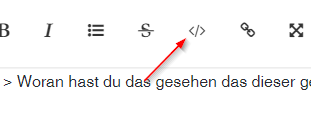
                            fe90b000-2301-49f2-8509-561b388edd69-image.png

                            siehe editor
                            https://forum.iobroker.net/help-german

                            umgestiegen von Proxmox auf Unraid

                            1 Reply Last reply
                            0
                            • ralleR ralle

                              @thomas-braun
                              vielen Dank für deine Mühe, es hat geklappt.... tausend dank!
                              Woran hast du das gesehen das dieser gestartet werden muss? und was sind CodeTags? Habe aus Putty das so raus kopiert, würde gerne fürs nächste mal wissen wie ich das richtig mache mit CodeTags

                              HomoranH Do not disturb
                              HomoranH Do not disturb
                              Homoran
                              Global Moderator Administrators
                              wrote on last edited by Homoran
                              #18

                              @ralle sagte in IO Broker lässt sich nicht mehr aufrufen:

                              Woran hast du das gesehen das dieser gestartet werden muss? und was sind CodeTags?

                              wenn du es in die code-tags gepackt hättest, hättest du es auch gesehen
                              hab das mal für dich gemacht.

                              Tipp: sieh dir mal die erste und die letzte Zeile an.

                              kein Support per PN! - Fragen im Forum stellen -
                              Benutzt das Voting rechts unten im Beitrag wenn er euch geholfen hat.
                              Das Forum freut sich über eine Spende. Benutzt dazu den Spendenbutton oben rechts. Danke!
                              der Installationsfixer: curl -fsL https://iobroker.net/fix.sh | bash -

                              1 Reply Last reply
                              0

                              Hello! It looks like you're interested in this conversation, but you don't have an account yet.

                              Getting fed up of having to scroll through the same posts each visit? When you register for an account, you'll always come back to exactly where you were before, and choose to be notified of new replies (either via email, or push notification). You'll also be able to save bookmarks and upvote posts to show your appreciation to other community members.

                              With your input, this post could be even better 💗

                              Register Login
                              Reply
                              • Reply as topic
                              Log in to reply
                              • Oldest to Newest
                              • Newest to Oldest
                              • Most Votes


                              Support us

                              ioBroker
                              Community Adapters
                              Donate

                              602

                              Online

                              32.8k

                              Users

                              82.7k

                              Topics

                              1.3m

                              Posts
                              Community
                              Impressum | Datenschutz-Bestimmungen | Nutzungsbedingungen | Einwilligungseinstellungen
                              ioBroker Community 2014-2025
                              logo
                              • Login

                              • Don't have an account? Register

                              • Login or register to search.
                              • First post
                                Last post
                              0
                              • Home
                              • Recent
                              • Tags
                              • Unread 0
                              • Categories
                              • Unreplied
                              • Popular
                              • GitHub
                              • Docu
                              • Hilfe

