Skip to content
  • Home
  • Recent
  • Tags
  • 0 Unread 0
  • Categories
  • Unreplied
  • Popular
  • GitHub
  • Docu
  • Hilfe
Skins
  • Light
  • Brite
  • Cerulean
  • Cosmo
  • Flatly
  • Journal
  • Litera
  • Lumen
  • Lux
  • Materia
  • Minty
  • Morph
  • Pulse
  • Sandstone
  • Simplex
  • Sketchy
  • Spacelab
  • United
  • Yeti
  • Zephyr
  • Dark
  • Cyborg
  • Darkly
  • Quartz
  • Slate
  • Solar
  • Superhero
  • Vapor

  • Default (No Skin)
  • No Skin
Collapse
ioBroker Logo

Community Forum

donate donate
  1. ioBroker Community Home
  2. Deutsch
  3. ioBroker Allgemein
  4. Iobroker tot nach Admin update 6.3.3 zu 6.3.4

NEWS

  • Jahresrückblick 2025 – unser neuer Blogbeitrag ist online! ✨
    BluefoxB
    Bluefox
    17
    1
    3.0k

  • Neuer Blogbeitrag: Monatsrückblick - Dezember 2025 🎄
    BluefoxB
    Bluefox
    13
    1
    1.1k

  • Weihnachtsangebot 2025! 🎄
    BluefoxB
    Bluefox
    25
    1
    2.4k

Iobroker tot nach Admin update 6.3.3 zu 6.3.4

Scheduled Pinned Locked Moved ioBroker Allgemein
30 Posts 6 Posters 2.9k Views 7 Watching
  • Oldest to Newest
  • Newest to Oldest
  • Most Votes
Reply
  • Reply as topic
Log in to reply
This topic has been deleted. Only users with topic management privileges can see it.
  • Z zgadgeter

    @thomas-braun ok, probiere den Post mal nachzu gehen...

    Thomas BraunT Online
    Thomas BraunT Online
    Thomas Braun
    Most Active
    wrote on last edited by
    #13

    @zgadgeter

    Jetzt kann ich kopieren:

    https://forum.iobroker.net/topic/57337/fehler-25-oder-217-bei-adapter-install-update-mit-npm8

    Linux-Werkzeugkasten:
    https://forum.iobroker.net/topic/42952/der-kleine-iobroker-linux-werkzeugkasten
    NodeJS Fixer Skript:
    https://forum.iobroker.net/topic/68035/iob-node-fix-skript
    iob_diag: curl -sLf -o diag.sh https://iobroker.net/diag.sh && bash diag.sh

    1 Reply Last reply
    0
    • ? A Former User

      @zgadgeter

      Du warst da root, das solltest Du nicht machen, Du must da einen User haben, der für den ioBroker zuständig ist.

      Und Du solltest dich im ioBroker Verzeichnis /opt/iobroker/ befinden, aber niemals als root arbeiten immer einen User nutzen und da wo es von Nöten ist, sudo nutzen, nur nicht für die Arbeiten am ioBroker da reichen die User Rechte mit dem Du den ioBroker eingerichtet hast.
      Das gild natürlich nur, wenn Du von Anfang an korrekt gearbeitet hast :)

      VG
      Bernd

      Z Offline
      Z Offline
      zgadgeter
      wrote on last edited by zgadgeter
      #14

      @dp20eic Ja, stimmt, ich vergess mich immer unter meinem Namen eizuloggen.
      Aber, ich habe den post verfolgt, alles so gemacht, in dem Verzeichnis (opt/iobroker/node_modules) den Befehl kopiert, hat aber nich dazu gefuehrt das Iob wieder funktioniert. Habe danach den container neu gestartet.
      Leider habe ich immer keine Zugriff auf Iob ueber Webseite.
      Shell funktioniert weiter.

      Komisch ist das admin 6.3.3 ist immer noch installiert

      Adapter    "admin"        : 6.3.5    , installed 6.3.3  [Updatable]
      
      1 Reply Last reply
      0
      • Z Offline
        Z Offline
        zgadgeter
        wrote on last edited by zgadgeter
        #15

        Ok, jetzt habe ich nochmals ein update gemacht, und der Admin ist auf 6.3.5, aber immer noch kein Zugriff auf die Seite.
        Javascript scheint noch kein update gemacht zu haben:

        Adapter    "javascript"   : 6.1.4    , installed 6.0.3  [Updatable]
        
        
        Thomas BraunT 1 Reply Last reply
        0
        • Z zgadgeter

          Ok, jetzt habe ich nochmals ein update gemacht, und der Admin ist auf 6.3.5, aber immer noch kein Zugriff auf die Seite.
          Javascript scheint noch kein update gemacht zu haben:

          Adapter    "javascript"   : 6.1.4    , installed 6.0.3  [Updatable]
          
          
          Thomas BraunT Online
          Thomas BraunT Online
          Thomas Braun
          Most Active
          wrote on last edited by
          #16

          @zgadgeter

          iobroker update
          iobroker upgrade javascript --debug
          

          sagt?

          Linux-Werkzeugkasten:
          https://forum.iobroker.net/topic/42952/der-kleine-iobroker-linux-werkzeugkasten
          NodeJS Fixer Skript:
          https://forum.iobroker.net/topic/68035/iob-node-fix-skript
          iob_diag: curl -sLf -o diag.sh https://iobroker.net/diag.sh && bash diag.sh

          Z 1 Reply Last reply
          0
          • Thomas BraunT Thomas Braun

            @zgadgeter

            iobroker update
            iobroker upgrade javascript --debug
            

            sagt?

            Z Offline
            Z Offline
            zgadgeter
            wrote on last edited by
            #17

            @thomas-braun said in Iobroker tot nach Admin update 6.3.3 zu 6.3.4:

            iobroker upgrade javascript --debug

            Habe javascript auch ein update gemacht, ist auf 6.1.4 jetzt.
            Neu gestartet, aber immer noch kein webseite.
            Uebrigens, Vis funktioniert einwandfrei...

            Thomas BraunT 1 Reply Last reply
            0
            • Z zgadgeter

              @thomas-braun said in Iobroker tot nach Admin update 6.3.3 zu 6.3.4:

              iobroker upgrade javascript --debug

              Habe javascript auch ein update gemacht, ist auf 6.1.4 jetzt.
              Neu gestartet, aber immer noch kein webseite.
              Uebrigens, Vis funktioniert einwandfrei...

              Thomas BraunT Online
              Thomas BraunT Online
              Thomas Braun
              Most Active
              wrote on last edited by
              #18

              @zgadgeter

              Zeigen.

              iobroker update
              iobroker list instances
              

              Linux-Werkzeugkasten:
              https://forum.iobroker.net/topic/42952/der-kleine-iobroker-linux-werkzeugkasten
              NodeJS Fixer Skript:
              https://forum.iobroker.net/topic/68035/iob-node-fix-skript
              iob_diag: curl -sLf -o diag.sh https://iobroker.net/diag.sh && bash diag.sh

              Z 1 Reply Last reply
              0
              • Thomas BraunT Thomas Braun

                @zgadgeter

                Zeigen.

                iobroker update
                iobroker list instances
                
                Z Offline
                Z Offline
                zgadgeter
                wrote on last edited by
                #19

                @thomas-braun

                Used repository: stable
                Adapter    "admin"        : 6.3.5    , installed 6.3.5
                Adapter    "alias-manager": 1.2.4    , installed 1.2.4
                Adapter    "backitup"     : 2.5.9    , installed 2.5.9
                Adapter    "chromecast"   : 2.3.1    , installed 3.0.3
                Adapter    "cloud"        : 4.3.0    , installed 4.3.0
                Adapter    "discovery"    : 3.1.0    , installed 3.1.0
                Adapter    "echarts"      : 1.0.12   , installed 1.0.12
                Adapter    "email"        : 1.1.4    , installed 1.1.4
                Adapter    "fhem"         : 1.6.3    , installed 1.6.3
                Adapter    "flot"         : 1.11.0   , installed 1.11.0
                Adapter    "history"      : 2.2.4    , installed 2.2.4
                Adapter    "hm-rega"      : 3.0.40   , installed 3.0.40
                Adapter    "hm-rpc"       : 1.15.12  , installed 1.15.12
                Adapter    "homeconnect"  : 1.1.1    , installed 1.1.1
                Adapter    "info"         : 1.9.19   , installed 1.9.19
                Adapter    "iot"          : 1.11.9   , installed 1.11.9
                Adapter    "javascript"   : 6.1.4    , installed 6.1.4
                Controller "js-controller": 4.0.23   , installed 4.0.23
                Adapter    "meross"       : 1.14.0   , installed 1.14.0
                Adapter    "net-tools"    : 0.2.0    , installed 0.2.0
                Adapter    "netatmo"      : 2.0.5    , installed 2.0.5
                Adapter    "sayit"        : 1.12.3   , installed 1.12.6
                Adapter    "scenes"       : 2.3.9    , installed 2.3.9
                Adapter    "shelly"       : 6.0.0    , installed 6.2.3
                Adapter    "simple-api"   : 2.7.2    , installed 2.7.2
                Adapter    "socketio"     : 4.2.0    , installed 4.2.0
                Adapter    "sonoff"       : 2.5.1    , installed 2.5.1
                Adapter    "telegram"     : 1.15.2   , installed 1.15.2
                Adapter    "text2command" : 2.3.0    , installed 2.3.0
                Adapter    "vis"          : 1.4.15   , installed 1.4.15
                Adapter    "vis-bars"     : 0.1.4    , installed 0.1.4
                Adapter    "vis-colorpicker": 1.2.0  , installed 1.2.0
                Adapter    "vis-fancyswitch": 1.1.0  , installed 1.1.0
                Adapter    "vis-hqwidgets": 1.3.0    , installed 1.3.0
                Adapter    "vis-inventwo" : 3.3.1    , installed 3.3.1
                Adapter    "vis-jqui-mfd" : 1.0.12   , installed 1.0.12
                Adapter    "vis-metro"    : 1.2.0    , installed 1.2.0
                Adapter    "web"          : 4.3.0    , installed 4.3.0
                Adapter    "wled"         : 0.6.7    , installed 0.6.7
                Adapter    "ws"           : 1.3.0    , installed 1.3.0
                Adapter    "zigbee"       : 1.7.6    , installed 1.7.6
                
                
                $ iob list instances
                  system.adapter.admin.0                  : admin                 : hohkeppelioblxc                          - disabled, port: 7777, bind: 0.0.0.0, run as: admin
                  system.adapter.alias-manager.0          : alias-manager         : hohkeppelioblxc                          - disabled
                + system.adapter.backitup.0               : backitup              : hohkeppelioblxc                          -  enabled
                + system.adapter.chromecast.0             : chromecast            : hohkeppelioblxc                          -  enabled
                + system.adapter.cloud.0                  : cloud                 : hohkeppelioblxc                          -  enabled
                  system.adapter.discovery.0              : discovery             : hohkeppelioblxc                          - disabled
                + system.adapter.echarts.0                : echarts               : hohkeppelioblxc                          -  enabled
                + system.adapter.email.0                  : email                 : hohkeppelioblxc                          -  enabled
                + system.adapter.fhem.0                   : fhem                  : hohkeppelioblxc                          -  enabled, port: 7072
                  system.adapter.flot.0                   : flot                  : hohkeppelioblxc                          - disabled
                + system.adapter.history.0                : history               : hohkeppelioblxc                          -  enabled
                + system.adapter.hm-rega.0                : hm-rega               : hohkeppelioblxc                          -  enabled
                + system.adapter.hm-rpc.0                 : hm-rpc                : hohkeppelioblxc                          -  enabled, port: 0
                + system.adapter.homeconnect.0            : homeconnect           : hohkeppelioblxc                          -  enabled
                + system.adapter.info.0                   : info                  : hohkeppelioblxc                          -  enabled
                + system.adapter.iot.0                    : iot                   : hohkeppelioblxc                          -  enabled
                + system.adapter.javascript.0             : javascript            : hohkeppelioblxc                          -  enabled
                + system.adapter.meross.0                 : meross                : hohkeppelioblxc                          -  enabled
                + system.adapter.net-tools.0              : net-tools             : hohkeppelioblxc                          -  enabled
                + system.adapter.netatmo.0                : netatmo               : hohkeppelioblxc                          -  enabled
                + system.adapter.sayit.0                  : sayit                 : hohkeppelioblxc                          -  enabled, port: 0
                + system.adapter.sayit.1                  : sayit                 : hohkeppelioblxc                          -  enabled, port: 0
                + system.adapter.scenes.0                 : scenes                : hohkeppelioblxc                          -  enabled
                + system.adapter.shelly.0                 : shelly                : hohkeppelioblxc                          -  enabled, port: 1882, bind: 0.0.0.0
                + system.adapter.shelly.1                 : shelly                : hohkeppelioblxc                          -  enabled, port: 1882, bind: 0.0.0.0
                + system.adapter.simple-api.0             : simple-api            : hohkeppelioblxc                          -  enabled, port: 8087, bind: 0.0.0.0, run as: admin
                + system.adapter.socketio.0               : socketio              : hohkeppelioblxc                          -  enabled, port: 8084, bind: 0.0.0.0, run as: admin
                + system.adapter.sonoff.0                 : sonoff                : hohkeppelioblxc                          -  enabled, port: 1883, bind: 0.0.0.0
                + system.adapter.telegram.0               : telegram              : hohkeppelioblxc                          -  enabled, port: 8443, bind: 0.0.0.0
                + system.adapter.text2command.0           : text2command          : hohkeppelioblxc                          -  enabled
                  system.adapter.vis-bars.0               : vis-bars              : hohkeppelioblxc                          - disabled
                  system.adapter.vis-colorpicker.0        : vis-colorpicker       : hohkeppelioblxc                          - disabled
                  system.adapter.vis-fancyswitch.0        : vis-fancyswitch       : hohkeppelioblxc                          - disabled
                  system.adapter.vis-hqwidgets.0          : vis-hqwidgets         : hohkeppelioblxc                          - disabled
                  system.adapter.vis-jqui-mfd.0           : vis-jqui-mfd          : hohkeppelioblxc                          - disabled
                  system.adapter.vis-material.0           : vis-material          : hohkeppelioblxc                          - disabled
                  system.adapter.vis-metro.0              : vis-metro             : hohkeppelioblxc                          -  enabled
                  system.adapter.vis.0                    : vis                   : hohkeppelioblxc                          -  enabled
                + system.adapter.web.0                    : web                   : hohkeppelioblxc                          -  enabled, port: 8082, bind: 0.0.0.0, run as: admin
                + system.adapter.wled.0                   : wled                  : hohkeppelioblxc                          -  enabled
                + system.adapter.zigbee.0                 : zigbee                : hohkeppelioblxc                          -  enabled, port: /dev/ttyACM1
                
                + instance is alive
                
                Thomas BraunT 2 Replies Last reply
                0
                • Z zgadgeter

                  @thomas-braun

                  Used repository: stable
                  Adapter    "admin"        : 6.3.5    , installed 6.3.5
                  Adapter    "alias-manager": 1.2.4    , installed 1.2.4
                  Adapter    "backitup"     : 2.5.9    , installed 2.5.9
                  Adapter    "chromecast"   : 2.3.1    , installed 3.0.3
                  Adapter    "cloud"        : 4.3.0    , installed 4.3.0
                  Adapter    "discovery"    : 3.1.0    , installed 3.1.0
                  Adapter    "echarts"      : 1.0.12   , installed 1.0.12
                  Adapter    "email"        : 1.1.4    , installed 1.1.4
                  Adapter    "fhem"         : 1.6.3    , installed 1.6.3
                  Adapter    "flot"         : 1.11.0   , installed 1.11.0
                  Adapter    "history"      : 2.2.4    , installed 2.2.4
                  Adapter    "hm-rega"      : 3.0.40   , installed 3.0.40
                  Adapter    "hm-rpc"       : 1.15.12  , installed 1.15.12
                  Adapter    "homeconnect"  : 1.1.1    , installed 1.1.1
                  Adapter    "info"         : 1.9.19   , installed 1.9.19
                  Adapter    "iot"          : 1.11.9   , installed 1.11.9
                  Adapter    "javascript"   : 6.1.4    , installed 6.1.4
                  Controller "js-controller": 4.0.23   , installed 4.0.23
                  Adapter    "meross"       : 1.14.0   , installed 1.14.0
                  Adapter    "net-tools"    : 0.2.0    , installed 0.2.0
                  Adapter    "netatmo"      : 2.0.5    , installed 2.0.5
                  Adapter    "sayit"        : 1.12.3   , installed 1.12.6
                  Adapter    "scenes"       : 2.3.9    , installed 2.3.9
                  Adapter    "shelly"       : 6.0.0    , installed 6.2.3
                  Adapter    "simple-api"   : 2.7.2    , installed 2.7.2
                  Adapter    "socketio"     : 4.2.0    , installed 4.2.0
                  Adapter    "sonoff"       : 2.5.1    , installed 2.5.1
                  Adapter    "telegram"     : 1.15.2   , installed 1.15.2
                  Adapter    "text2command" : 2.3.0    , installed 2.3.0
                  Adapter    "vis"          : 1.4.15   , installed 1.4.15
                  Adapter    "vis-bars"     : 0.1.4    , installed 0.1.4
                  Adapter    "vis-colorpicker": 1.2.0  , installed 1.2.0
                  Adapter    "vis-fancyswitch": 1.1.0  , installed 1.1.0
                  Adapter    "vis-hqwidgets": 1.3.0    , installed 1.3.0
                  Adapter    "vis-inventwo" : 3.3.1    , installed 3.3.1
                  Adapter    "vis-jqui-mfd" : 1.0.12   , installed 1.0.12
                  Adapter    "vis-metro"    : 1.2.0    , installed 1.2.0
                  Adapter    "web"          : 4.3.0    , installed 4.3.0
                  Adapter    "wled"         : 0.6.7    , installed 0.6.7
                  Adapter    "ws"           : 1.3.0    , installed 1.3.0
                  Adapter    "zigbee"       : 1.7.6    , installed 1.7.6
                  
                  
                  $ iob list instances
                    system.adapter.admin.0                  : admin                 : hohkeppelioblxc                          - disabled, port: 7777, bind: 0.0.0.0, run as: admin
                    system.adapter.alias-manager.0          : alias-manager         : hohkeppelioblxc                          - disabled
                  + system.adapter.backitup.0               : backitup              : hohkeppelioblxc                          -  enabled
                  + system.adapter.chromecast.0             : chromecast            : hohkeppelioblxc                          -  enabled
                  + system.adapter.cloud.0                  : cloud                 : hohkeppelioblxc                          -  enabled
                    system.adapter.discovery.0              : discovery             : hohkeppelioblxc                          - disabled
                  + system.adapter.echarts.0                : echarts               : hohkeppelioblxc                          -  enabled
                  + system.adapter.email.0                  : email                 : hohkeppelioblxc                          -  enabled
                  + system.adapter.fhem.0                   : fhem                  : hohkeppelioblxc                          -  enabled, port: 7072
                    system.adapter.flot.0                   : flot                  : hohkeppelioblxc                          - disabled
                  + system.adapter.history.0                : history               : hohkeppelioblxc                          -  enabled
                  + system.adapter.hm-rega.0                : hm-rega               : hohkeppelioblxc                          -  enabled
                  + system.adapter.hm-rpc.0                 : hm-rpc                : hohkeppelioblxc                          -  enabled, port: 0
                  + system.adapter.homeconnect.0            : homeconnect           : hohkeppelioblxc                          -  enabled
                  + system.adapter.info.0                   : info                  : hohkeppelioblxc                          -  enabled
                  + system.adapter.iot.0                    : iot                   : hohkeppelioblxc                          -  enabled
                  + system.adapter.javascript.0             : javascript            : hohkeppelioblxc                          -  enabled
                  + system.adapter.meross.0                 : meross                : hohkeppelioblxc                          -  enabled
                  + system.adapter.net-tools.0              : net-tools             : hohkeppelioblxc                          -  enabled
                  + system.adapter.netatmo.0                : netatmo               : hohkeppelioblxc                          -  enabled
                  + system.adapter.sayit.0                  : sayit                 : hohkeppelioblxc                          -  enabled, port: 0
                  + system.adapter.sayit.1                  : sayit                 : hohkeppelioblxc                          -  enabled, port: 0
                  + system.adapter.scenes.0                 : scenes                : hohkeppelioblxc                          -  enabled
                  + system.adapter.shelly.0                 : shelly                : hohkeppelioblxc                          -  enabled, port: 1882, bind: 0.0.0.0
                  + system.adapter.shelly.1                 : shelly                : hohkeppelioblxc                          -  enabled, port: 1882, bind: 0.0.0.0
                  + system.adapter.simple-api.0             : simple-api            : hohkeppelioblxc                          -  enabled, port: 8087, bind: 0.0.0.0, run as: admin
                  + system.adapter.socketio.0               : socketio              : hohkeppelioblxc                          -  enabled, port: 8084, bind: 0.0.0.0, run as: admin
                  + system.adapter.sonoff.0                 : sonoff                : hohkeppelioblxc                          -  enabled, port: 1883, bind: 0.0.0.0
                  + system.adapter.telegram.0               : telegram              : hohkeppelioblxc                          -  enabled, port: 8443, bind: 0.0.0.0
                  + system.adapter.text2command.0           : text2command          : hohkeppelioblxc                          -  enabled
                    system.adapter.vis-bars.0               : vis-bars              : hohkeppelioblxc                          - disabled
                    system.adapter.vis-colorpicker.0        : vis-colorpicker       : hohkeppelioblxc                          - disabled
                    system.adapter.vis-fancyswitch.0        : vis-fancyswitch       : hohkeppelioblxc                          - disabled
                    system.adapter.vis-hqwidgets.0          : vis-hqwidgets         : hohkeppelioblxc                          - disabled
                    system.adapter.vis-jqui-mfd.0           : vis-jqui-mfd          : hohkeppelioblxc                          - disabled
                    system.adapter.vis-material.0           : vis-material          : hohkeppelioblxc                          - disabled
                    system.adapter.vis-metro.0              : vis-metro             : hohkeppelioblxc                          -  enabled
                    system.adapter.vis.0                    : vis                   : hohkeppelioblxc                          -  enabled
                  + system.adapter.web.0                    : web                   : hohkeppelioblxc                          -  enabled, port: 8082, bind: 0.0.0.0, run as: admin
                  + system.adapter.wled.0                   : wled                  : hohkeppelioblxc                          -  enabled
                  + system.adapter.zigbee.0                 : zigbee                : hohkeppelioblxc                          -  enabled, port: /dev/ttyACM1
                  
                  + instance is alive
                  
                  Thomas BraunT Online
                  Thomas BraunT Online
                  Thomas Braun
                  Most Active
                  wrote on last edited by
                  #20

                  @zgadgeter sagte in Iobroker tot nach Admin update 6.3.3 zu 6.3.4:

                  iobroker start admin
                  

                  Achtung! Geänderter Port!

                  Linux-Werkzeugkasten:
                  https://forum.iobroker.net/topic/42952/der-kleine-iobroker-linux-werkzeugkasten
                  NodeJS Fixer Skript:
                  https://forum.iobroker.net/topic/68035/iob-node-fix-skript
                  iob_diag: curl -sLf -o diag.sh https://iobroker.net/diag.sh && bash diag.sh

                  1 Reply Last reply
                  0
                  • Z zgadgeter

                    @thomas-braun

                    Used repository: stable
                    Adapter    "admin"        : 6.3.5    , installed 6.3.5
                    Adapter    "alias-manager": 1.2.4    , installed 1.2.4
                    Adapter    "backitup"     : 2.5.9    , installed 2.5.9
                    Adapter    "chromecast"   : 2.3.1    , installed 3.0.3
                    Adapter    "cloud"        : 4.3.0    , installed 4.3.0
                    Adapter    "discovery"    : 3.1.0    , installed 3.1.0
                    Adapter    "echarts"      : 1.0.12   , installed 1.0.12
                    Adapter    "email"        : 1.1.4    , installed 1.1.4
                    Adapter    "fhem"         : 1.6.3    , installed 1.6.3
                    Adapter    "flot"         : 1.11.0   , installed 1.11.0
                    Adapter    "history"      : 2.2.4    , installed 2.2.4
                    Adapter    "hm-rega"      : 3.0.40   , installed 3.0.40
                    Adapter    "hm-rpc"       : 1.15.12  , installed 1.15.12
                    Adapter    "homeconnect"  : 1.1.1    , installed 1.1.1
                    Adapter    "info"         : 1.9.19   , installed 1.9.19
                    Adapter    "iot"          : 1.11.9   , installed 1.11.9
                    Adapter    "javascript"   : 6.1.4    , installed 6.1.4
                    Controller "js-controller": 4.0.23   , installed 4.0.23
                    Adapter    "meross"       : 1.14.0   , installed 1.14.0
                    Adapter    "net-tools"    : 0.2.0    , installed 0.2.0
                    Adapter    "netatmo"      : 2.0.5    , installed 2.0.5
                    Adapter    "sayit"        : 1.12.3   , installed 1.12.6
                    Adapter    "scenes"       : 2.3.9    , installed 2.3.9
                    Adapter    "shelly"       : 6.0.0    , installed 6.2.3
                    Adapter    "simple-api"   : 2.7.2    , installed 2.7.2
                    Adapter    "socketio"     : 4.2.0    , installed 4.2.0
                    Adapter    "sonoff"       : 2.5.1    , installed 2.5.1
                    Adapter    "telegram"     : 1.15.2   , installed 1.15.2
                    Adapter    "text2command" : 2.3.0    , installed 2.3.0
                    Adapter    "vis"          : 1.4.15   , installed 1.4.15
                    Adapter    "vis-bars"     : 0.1.4    , installed 0.1.4
                    Adapter    "vis-colorpicker": 1.2.0  , installed 1.2.0
                    Adapter    "vis-fancyswitch": 1.1.0  , installed 1.1.0
                    Adapter    "vis-hqwidgets": 1.3.0    , installed 1.3.0
                    Adapter    "vis-inventwo" : 3.3.1    , installed 3.3.1
                    Adapter    "vis-jqui-mfd" : 1.0.12   , installed 1.0.12
                    Adapter    "vis-metro"    : 1.2.0    , installed 1.2.0
                    Adapter    "web"          : 4.3.0    , installed 4.3.0
                    Adapter    "wled"         : 0.6.7    , installed 0.6.7
                    Adapter    "ws"           : 1.3.0    , installed 1.3.0
                    Adapter    "zigbee"       : 1.7.6    , installed 1.7.6
                    
                    
                    $ iob list instances
                      system.adapter.admin.0                  : admin                 : hohkeppelioblxc                          - disabled, port: 7777, bind: 0.0.0.0, run as: admin
                      system.adapter.alias-manager.0          : alias-manager         : hohkeppelioblxc                          - disabled
                    + system.adapter.backitup.0               : backitup              : hohkeppelioblxc                          -  enabled
                    + system.adapter.chromecast.0             : chromecast            : hohkeppelioblxc                          -  enabled
                    + system.adapter.cloud.0                  : cloud                 : hohkeppelioblxc                          -  enabled
                      system.adapter.discovery.0              : discovery             : hohkeppelioblxc                          - disabled
                    + system.adapter.echarts.0                : echarts               : hohkeppelioblxc                          -  enabled
                    + system.adapter.email.0                  : email                 : hohkeppelioblxc                          -  enabled
                    + system.adapter.fhem.0                   : fhem                  : hohkeppelioblxc                          -  enabled, port: 7072
                      system.adapter.flot.0                   : flot                  : hohkeppelioblxc                          - disabled
                    + system.adapter.history.0                : history               : hohkeppelioblxc                          -  enabled
                    + system.adapter.hm-rega.0                : hm-rega               : hohkeppelioblxc                          -  enabled
                    + system.adapter.hm-rpc.0                 : hm-rpc                : hohkeppelioblxc                          -  enabled, port: 0
                    + system.adapter.homeconnect.0            : homeconnect           : hohkeppelioblxc                          -  enabled
                    + system.adapter.info.0                   : info                  : hohkeppelioblxc                          -  enabled
                    + system.adapter.iot.0                    : iot                   : hohkeppelioblxc                          -  enabled
                    + system.adapter.javascript.0             : javascript            : hohkeppelioblxc                          -  enabled
                    + system.adapter.meross.0                 : meross                : hohkeppelioblxc                          -  enabled
                    + system.adapter.net-tools.0              : net-tools             : hohkeppelioblxc                          -  enabled
                    + system.adapter.netatmo.0                : netatmo               : hohkeppelioblxc                          -  enabled
                    + system.adapter.sayit.0                  : sayit                 : hohkeppelioblxc                          -  enabled, port: 0
                    + system.adapter.sayit.1                  : sayit                 : hohkeppelioblxc                          -  enabled, port: 0
                    + system.adapter.scenes.0                 : scenes                : hohkeppelioblxc                          -  enabled
                    + system.adapter.shelly.0                 : shelly                : hohkeppelioblxc                          -  enabled, port: 1882, bind: 0.0.0.0
                    + system.adapter.shelly.1                 : shelly                : hohkeppelioblxc                          -  enabled, port: 1882, bind: 0.0.0.0
                    + system.adapter.simple-api.0             : simple-api            : hohkeppelioblxc                          -  enabled, port: 8087, bind: 0.0.0.0, run as: admin
                    + system.adapter.socketio.0               : socketio              : hohkeppelioblxc                          -  enabled, port: 8084, bind: 0.0.0.0, run as: admin
                    + system.adapter.sonoff.0                 : sonoff                : hohkeppelioblxc                          -  enabled, port: 1883, bind: 0.0.0.0
                    + system.adapter.telegram.0               : telegram              : hohkeppelioblxc                          -  enabled, port: 8443, bind: 0.0.0.0
                    + system.adapter.text2command.0           : text2command          : hohkeppelioblxc                          -  enabled
                      system.adapter.vis-bars.0               : vis-bars              : hohkeppelioblxc                          - disabled
                      system.adapter.vis-colorpicker.0        : vis-colorpicker       : hohkeppelioblxc                          - disabled
                      system.adapter.vis-fancyswitch.0        : vis-fancyswitch       : hohkeppelioblxc                          - disabled
                      system.adapter.vis-hqwidgets.0          : vis-hqwidgets         : hohkeppelioblxc                          - disabled
                      system.adapter.vis-jqui-mfd.0           : vis-jqui-mfd          : hohkeppelioblxc                          - disabled
                      system.adapter.vis-material.0           : vis-material          : hohkeppelioblxc                          - disabled
                      system.adapter.vis-metro.0              : vis-metro             : hohkeppelioblxc                          -  enabled
                      system.adapter.vis.0                    : vis                   : hohkeppelioblxc                          -  enabled
                    + system.adapter.web.0                    : web                   : hohkeppelioblxc                          -  enabled, port: 8082, bind: 0.0.0.0, run as: admin
                    + system.adapter.wled.0                   : wled                  : hohkeppelioblxc                          -  enabled
                    + system.adapter.zigbee.0                 : zigbee                : hohkeppelioblxc                          -  enabled, port: /dev/ttyACM1
                    
                    + instance is alive
                    
                    Thomas BraunT Online
                    Thomas BraunT Online
                    Thomas Braun
                    Most Active
                    wrote on last edited by
                    #21

                    @zgadgeter sagte in Iobroker tot nach Admin update 6.3.3 zu 6.3.4:

                    Da würde ich auch nochmal schauen, ob die gleichzeitig auf dem gleichen Port lauschen dürfen.

                    + system.adapter.shelly.0                 : shelly                : hohkeppelioblxc                          -  enabled, port: 1882, bind: 0.0.0.0
                    + system.adapter.shelly.1                 : shelly                : hohkeppelioblxc                          -  enabled, port: 1882, bind: 0.0.0.0
                    

                    Linux-Werkzeugkasten:
                    https://forum.iobroker.net/topic/42952/der-kleine-iobroker-linux-werkzeugkasten
                    NodeJS Fixer Skript:
                    https://forum.iobroker.net/topic/68035/iob-node-fix-skript
                    iob_diag: curl -sLf -o diag.sh https://iobroker.net/diag.sh && bash diag.sh

                    Z 1 Reply Last reply
                    0
                    • Thomas BraunT Thomas Braun

                      @zgadgeter sagte in Iobroker tot nach Admin update 6.3.3 zu 6.3.4:

                      Da würde ich auch nochmal schauen, ob die gleichzeitig auf dem gleichen Port lauschen dürfen.

                      + system.adapter.shelly.0                 : shelly                : hohkeppelioblxc                          -  enabled, port: 1882, bind: 0.0.0.0
                      + system.adapter.shelly.1                 : shelly                : hohkeppelioblxc                          -  enabled, port: 1882, bind: 0.0.0.0
                      
                      Z Offline
                      Z Offline
                      zgadgeter
                      wrote on last edited by
                      #22

                      @thomas-braun Also, mit start admin hat es wieder funktioniert, vielen Dank!
                      Das Thema port interessiert mich jetzt.
                      Ja, ich habe den iobroker port geändert auf einen anderen, weil ich eine Zeit lang motioneye hatte. Der benutzt ja auch den 8081.
                      Interessant ist dein Kommentar wegen den shelly...muss da auch ein port eingestellt werden irgendwie? Die shelly kann ich ueber den iob steuern, ohne das ich was geändert habe...habe ich da was verpasst oder falsch verstanden?
                      Vielen Dank nochmals fuer die Hilfe!

                      Thomas BraunT 1 Reply Last reply
                      0
                      • Z zgadgeter

                        @thomas-braun Also, mit start admin hat es wieder funktioniert, vielen Dank!
                        Das Thema port interessiert mich jetzt.
                        Ja, ich habe den iobroker port geändert auf einen anderen, weil ich eine Zeit lang motioneye hatte. Der benutzt ja auch den 8081.
                        Interessant ist dein Kommentar wegen den shelly...muss da auch ein port eingestellt werden irgendwie? Die shelly kann ich ueber den iob steuern, ohne das ich was geändert habe...habe ich da was verpasst oder falsch verstanden?
                        Vielen Dank nochmals fuer die Hilfe!

                        Thomas BraunT Online
                        Thomas BraunT Online
                        Thomas Braun
                        Most Active
                        wrote on last edited by
                        #23

                        @zgadgeter

                        Wie du siehen kannst lauschen beide Instanzen des shelly-Adapters auf dem gleichen Port 1882.

                        Zum einen würde ich überlegen ob es überhaupt zwei Instanzen braucht und dann kann das eigentlich nicht beides auf dem gleichen Port lauschen.

                        Linux-Werkzeugkasten:
                        https://forum.iobroker.net/topic/42952/der-kleine-iobroker-linux-werkzeugkasten
                        NodeJS Fixer Skript:
                        https://forum.iobroker.net/topic/68035/iob-node-fix-skript
                        iob_diag: curl -sLf -o diag.sh https://iobroker.net/diag.sh && bash diag.sh

                        Z 1 Reply Last reply
                        0
                        • Thomas BraunT Thomas Braun

                          @zgadgeter

                          Wie du siehen kannst lauschen beide Instanzen des shelly-Adapters auf dem gleichen Port 1882.

                          Zum einen würde ich überlegen ob es überhaupt zwei Instanzen braucht und dann kann das eigentlich nicht beides auf dem gleichen Port lauschen.

                          Z Offline
                          Z Offline
                          zgadgeter
                          wrote on last edited by
                          #24

                          @thomas-braun Hi,
                          ich habe aeltere und neuere Shelly. Die neuen brauchen (so habe ich das im Forum gelesen) andere Einstellungen. Deswegen die zweite Instanz.
                          Aber den Port einzustellen, wo oder wie wird das gemacht? Das habe ich nirgendswo selbst gemacht. Macht das der Iob standard auf den 8081?
                          Die shelly Geraete funktionieren (fast) immer...manchmal verlieren die sich im Netz und ich muss neu starten. Weiss nicht ob das was damit zu tun hat?

                          Thomas BraunT 1 Reply Last reply
                          0
                          • Z zgadgeter

                            @thomas-braun Hi,
                            ich habe aeltere und neuere Shelly. Die neuen brauchen (so habe ich das im Forum gelesen) andere Einstellungen. Deswegen die zweite Instanz.
                            Aber den Port einzustellen, wo oder wie wird das gemacht? Das habe ich nirgendswo selbst gemacht. Macht das der Iob standard auf den 8081?
                            Die shelly Geraete funktionieren (fast) immer...manchmal verlieren die sich im Netz und ich muss neu starten. Weiss nicht ob das was damit zu tun hat?

                            Thomas BraunT Online
                            Thomas BraunT Online
                            Thomas Braun
                            Most Active
                            wrote on last edited by
                            #25

                            @zgadgeter sagte in Iobroker tot nach Admin update 6.3.3 zu 6.3.4:

                            Weiss nicht ob das was damit zu tun hat?

                            Höchstwahrscheinlich.
                            Ich hab den shelly-Adapter nicht im Einsatz, kann dir da nix genaueres zu sagen.

                            Linux-Werkzeugkasten:
                            https://forum.iobroker.net/topic/42952/der-kleine-iobroker-linux-werkzeugkasten
                            NodeJS Fixer Skript:
                            https://forum.iobroker.net/topic/68035/iob-node-fix-skript
                            iob_diag: curl -sLf -o diag.sh https://iobroker.net/diag.sh && bash diag.sh

                            Z 1 Reply Last reply
                            0
                            • Thomas BraunT Thomas Braun

                              @zgadgeter sagte in Iobroker tot nach Admin update 6.3.3 zu 6.3.4:

                              Weiss nicht ob das was damit zu tun hat?

                              Höchstwahrscheinlich.
                              Ich hab den shelly-Adapter nicht im Einsatz, kann dir da nix genaueres zu sagen.

                              Z Offline
                              Z Offline
                              zgadgeter
                              wrote on last edited by
                              #26

                              @thomas-braun Ok, danke fuer den Hinweiss ueber die Ports die fuer die Shelly eingestellt sind, bzw. benutzt werden...da muss ich nach recherchieren.
                              DAnke fuer die viele HIlfe, und schoene Tage noch! :)

                              Meister MopperM ? 2 Replies Last reply
                              0
                              • Z zgadgeter

                                @thomas-braun Ok, danke fuer den Hinweiss ueber die Ports die fuer die Shelly eingestellt sind, bzw. benutzt werden...da muss ich nach recherchieren.
                                DAnke fuer die viele HIlfe, und schoene Tage noch! :)

                                Meister MopperM Offline
                                Meister MopperM Offline
                                Meister Mopper
                                wrote on last edited by
                                #27

                                @zgadgeter

                                Port 1883 ist der Standard mqtt Port. Ich habe keinen Shelly-Adapter, aber der wird dort sicherlich in der Instanz eingestellt.
                                Alternativ könntest Du die zweite Instanz auf Port 8883 (secure mqtt) lauschen lassen.

                                Proxmox und HA

                                1 Reply Last reply
                                0
                                • Z zgadgeter

                                  @thomas-braun Ok, danke fuer den Hinweiss ueber die Ports die fuer die Shelly eingestellt sind, bzw. benutzt werden...da muss ich nach recherchieren.
                                  DAnke fuer die viele HIlfe, und schoene Tage noch! :)

                                  ? Offline
                                  ? Offline
                                  A Former User
                                  wrote on last edited by
                                  #28

                                  @zgadgeter sagte in Iobroker tot nach Admin update 6.3.3 zu 6.3.4:

                                  @thomas-braun Ok, danke fuer den Hinweiss ueber die Ports die fuer die Shelly eingestellt sind, bzw. benutzt werden...da muss ich nach recherchieren.
                                  DAnke fuer die viele HIlfe, und schoene Tage noch! :)

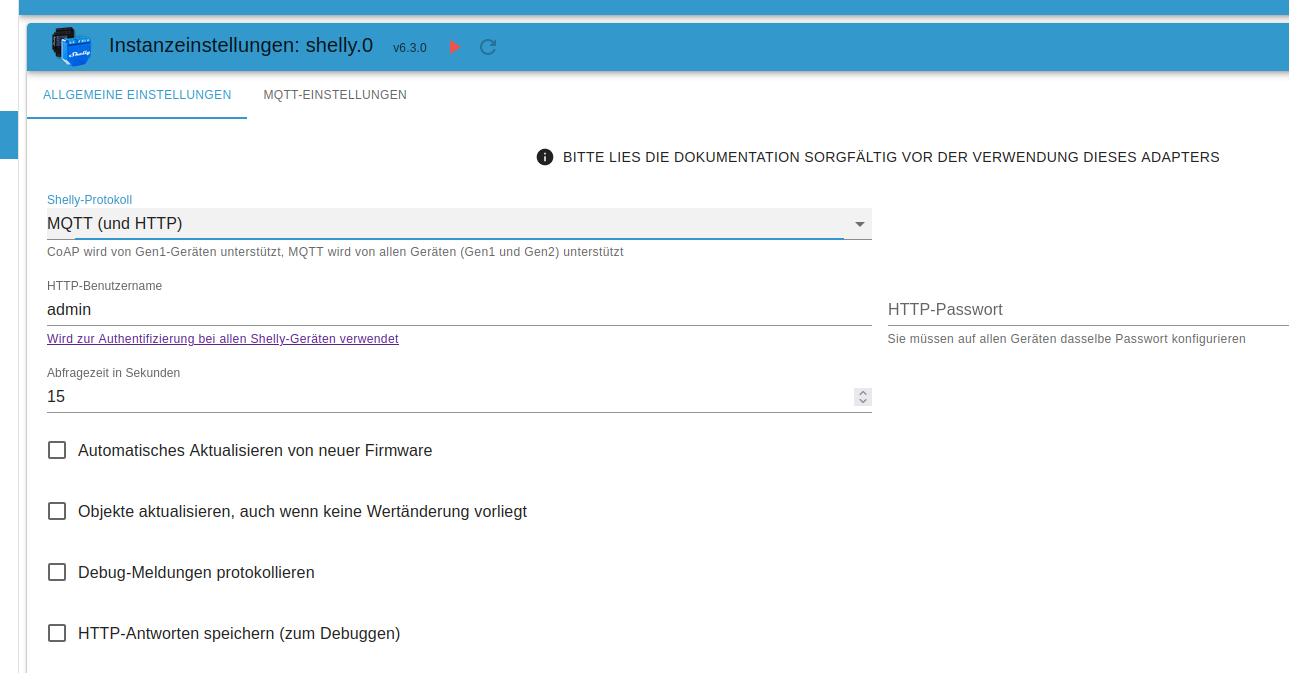
                                  Shelly Adapter


                                  8952a332-257c-4aa6-97fb-5d659a441a8f-grafik.png

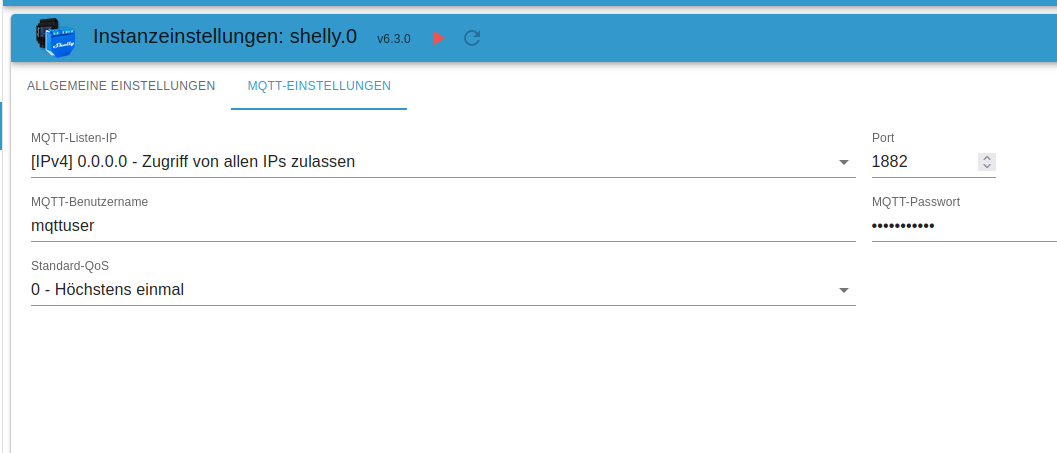
                                  und das Untermenü zur mqtt einstellung


                                  312656ef-68cf-4920-b718-98948480a352-grafik.png

                                  Da kannst Du den Port einstellen, sollte natürlich ein freier nicht genutzter sein und auch keiner der Standardmäßig schon durch andere Applikationen/Systeme besetzt ist :)
                                  Dann musst Du natürlich auch die Shellys umkonfigurieren, damit der Port auch greift.
                                  Die Frage von @Thomas-Braun bleibt, sind heute noch zwei Instanzen nötig oder kann man heute alte u. neue Shellys in einer Instanz betreiben?

                                  VG
                                  Bernd

                                  Z 1 Reply Last reply
                                  0
                                  • S Offline
                                    S Offline
                                    skinni
                                    wrote on last edited by
                                    #29

                                    Hab auch zwei shelly adapter, wegen alt und neu. Einer ist für mqtt konfiguriert, der andere für CoAP. Beides in einem geht leider nicht. Ports sind natürlich unterschiedlich

                                    1 Reply Last reply
                                    0
                                    • ? A Former User

                                      @zgadgeter sagte in Iobroker tot nach Admin update 6.3.3 zu 6.3.4:

                                      @thomas-braun Ok, danke fuer den Hinweiss ueber die Ports die fuer die Shelly eingestellt sind, bzw. benutzt werden...da muss ich nach recherchieren.
                                      DAnke fuer die viele HIlfe, und schoene Tage noch! :)

                                      Shelly Adapter


                                      8952a332-257c-4aa6-97fb-5d659a441a8f-grafik.png

                                      und das Untermenü zur mqtt einstellung


                                      312656ef-68cf-4920-b718-98948480a352-grafik.png

                                      Da kannst Du den Port einstellen, sollte natürlich ein freier nicht genutzter sein und auch keiner der Standardmäßig schon durch andere Applikationen/Systeme besetzt ist :)
                                      Dann musst Du natürlich auch die Shellys umkonfigurieren, damit der Port auch greift.
                                      Die Frage von @Thomas-Braun bleibt, sind heute noch zwei Instanzen nötig oder kann man heute alte u. neue Shellys in einer Instanz betreiben?

                                      VG
                                      Bernd

                                      Z Offline
                                      Z Offline
                                      zgadgeter
                                      wrote on last edited by
                                      #30

                                      @dp20eic Ok, danke. Muss da herum spielen. Ich hatte ja meinen IOb Port schon geandert weil ich ja motioneye hatte.

                                      1 Reply Last reply
                                      0
                                      Reply
                                      • Reply as topic
                                      Log in to reply
                                      • Oldest to Newest
                                      • Newest to Oldest
                                      • Most Votes


                                      Support us

                                      ioBroker
                                      Community Adapters
                                      Donate
                                      FAQ Cloud / IOT
                                      HowTo: Node.js-Update
                                      HowTo: Backup/Restore
                                      Downloads
                                      BLOG

                                      307

                                      Online

                                      32.6k

                                      Users

                                      82.3k

                                      Topics

                                      1.3m

                                      Posts
                                      Community
                                      Impressum | Datenschutz-Bestimmungen | Nutzungsbedingungen | Einwilligungseinstellungen
                                      ioBroker Community 2014-2025
                                      logo
                                      • Login

                                      • Don't have an account? Register

                                      • Login or register to search.
                                      • First post
                                        Last post
                                      0
                                      • Home
                                      • Recent
                                      • Tags
                                      • Unread 0
                                      • Categories
                                      • Unreplied
                                      • Popular
                                      • GitHub
                                      • Docu
                                      • Hilfe