




Wie nutze ich eine custom class / npm Modul?
-
@kentrath Sorry aber der adapter kan nicht auf debug stehen oder aber du filterst die Einträge in der Logausgabe.
Hab mir heut aus Blödsinn eine WIZ-Glühlampe gekauft (OBI Abverkauf 1,94€) und finde auch noch deinen Adapter. Funzt auf Anhieb. Sehr geil.

-
@disaster123
Tut mir leid, das Log war tatsächlich gefiltert. Habe ich nicht gesehen
wizconnect.0 2023-01-27 10:14:30.312 warn State "wizconnect.0.192_168_178_125.led.sceneId" has no existing object, this might lead to an error in future versions wizconnect.0 2023-01-27 10:14:30.299 debug Nachricht 83ff1daf-44df-48bf-86eb-9dca0cfde7ff gesendet -> 192.168.178.125 192.168.178.125 Versuch: 1 wizconnect.0 2023-01-27 10:14:00.339 warn State "wizconnect.0.192_168_178_125.led.sceneId" has no existing object, this might lead to an error in future versions wizconnect.0 2023-01-27 10:14:00.300 debug Nachricht 03c2b39f-dcce-4b8c-8a89-62a38256ceb6 gesendet -> 192.168.178.125 192.168.178.125 Versuch: 1 wizconnect.0 2023-01-27 10:14:00.300 debug Nachricht 286d0001-09e9-4305-9578-fed1a8d7e9ff gesendet -> 192.168.178.125 192.168.178.125 Versuch: 1 wizconnect.0 2023-01-27 10:14:00.299 debug Nachricht f9922605-4af7-41c2-b87d-89d474ea3f41 gesendet -> 192.168.178.125 192.168.178.125 Versuch: 1 wizconnect.0 2023-01-27 10:14:00.186 debug -> CREATE DeviceType: EVAL ESP17_SHTW9_01 wizconnect.0 2023-01-27 10:14:00.186 debug -> CREATE DeviceType: ESP17_SHTW9_01 wizconnect.0 2023-01-27 10:14:00.179 debug server error:Error: bind EADDRINUSE 0.0.0.0:38900 at node:dgram:359:20 at processTicksAndRejections (node:internal/process/task_queues:84:21) wizconnect.0 2023-01-27 10:14:00.177 debug -> CREATE Device: 192_168_178_125 wizconnect.0 2023-01-27 10:14:00.177 debug __START -> WIZ__INIT_DEVICES [ 192.168.178.125 : Schlafzimmer ] wizconnect.0 2023-01-27 10:14:00.176 info config udpip: 192.168.178.5 wizconnect.0 2023-01-27 10:14:00.176 info config udpmac: 26:8c:05:f2:0c:a9 wizconnect.0 2023-01-27 10:14:00.175 info config bind_ip: 0.0.0.0 wizconnect.0 2023-01-27 10:14:00.161 info starting. Version 0.0.5 (non-npm: disaster123/ioBroker.wizconnect#ad84f06e2e5e73de575ad53b91c9d7a24d8b9384) in /opt/iobroker/node_modules/iobroker.wizconnect, node: v16.19.0, js-controller: 4.0.24 wizconnect.0 2023-01-27 10:14:00.050 debug States connected to redis: 127.0.0.1:9000 wizconnect.0 2023-01-27 10:13:59.991 debug States create User PubSub Client wizconnect.0 2023-01-27 10:13:59.991 debug States create System PubSub Client wizconnect.0 2023-01-27 10:13:59.982 debug Redis States: Use Redis connection: 127.0.0.1:9000 wizconnect.0 2023-01-27 10:13:59.966 debug Objects connected to redis: 127.0.0.1:9001 wizconnect.0 2023-01-27 10:13:59.963 debug Objects client initialize lua scripts wizconnect.0 2023-01-27 10:13:59.935 debug Objects create User PubSub Client wizconnect.0 2023-01-27 10:13:59.934 debug Objects create System PubSub Client wizconnect.0 2023-01-27 10:13:59.934 debug Objects client ready ... initialize now wizconnect.0 2023-01-27 10:13:59.911 debug Redis Objects: Use Redis connection: 127.0.0.1:9001@kentrath sagte in Wie nutze ich eine custom class / npm Modul?:
@disaster123
Tut mir leid, das Log war tatsächlich gefiltert. Habe ich nicht gesehenwizconnect.0 2023-01-27 10:14:30.312 warn State "wizconnect.0.192_168_178_125.led.sceneId" has no existing object, this might lead to an error in future versions wizconnect.0 2023-01-27 10:14:30.299 debug Nachricht 83ff1daf-44df-48bf-86eb-9dca0cfde7ff gesendet -> 192.168.178.125 192.168.178.125 Versuch: 1 wizconnect.0 2023-01-27 10:14:00.339 warn State "wizconnect.0.192_168_178_125.led.sceneId" has no existing object, this might lead to an error in future versions wizconnect.0 2023-01-27 10:14:00.300 debug Nachricht 03c2b39f-dcce-4b8c-8a89-62a38256ceb6 gesendet -> 192.168.178.125 192.168.178.125 Versuch: 1 wizconnect.0 2023-01-27 10:14:00.300 debug Nachricht 286d0001-09e9-4305-9578-fed1a8d7e9ff gesendet -> 192.168.178.125 192.168.178.125 Versuch: 1 wizconnect.0 2023-01-27 10:14:00.299 debug Nachricht f9922605-4af7-41c2-b87d-89d474ea3f41 gesendet -> 192.168.178.125 192.168.178.125 Versuch: 1 wizconnect.0 2023-01-27 10:14:00.186 debug -> CREATE DeviceType: EVAL ESP17_SHTW9_01 wizconnect.0 2023-01-27 10:14:00.186 debug -> CREATE DeviceType: ESP17_SHTW9_01 wizconnect.0 2023-01-27 10:14:00.179 debug server error:Error: bind EADDRINUSE 0.0.0.0:38900 at node:dgram:359:20 at processTicksAndRejections (node:internal/process/task_queues:84:21) wizconnect.0 2023-01-27 10:14:00.177 debug -> CREATE Device: 192_168_178_125 wizconnect.0 2023-01-27 10:14:00.177 debug __START -> WIZ__INIT_DEVICES [ 192.168.178.125 : Schlafzimmer ] wizconnect.0 2023-01-27 10:14:00.176 info config udpip: 192.168.178.5 wizconnect.0 2023-01-27 10:14:00.176 info config udpmac: 26:8c:05:f2:0c:a9 wizconnect.0 2023-01-27 10:14:00.175 info config bind_ip: 0.0.0.0 wizconnect.0 2023-01-27 10:14:00.161 info starting. Version 0.0.5 (non-npm: disaster123/ioBroker.wizconnect#ad84f06e2e5e73de575ad53b91c9d7a24d8b9384) in /opt/iobroker/node_modules/iobroker.wizconnect, node: v16.19.0, js-controller: 4.0.24 wizconnect.0 2023-01-27 10:14:00.050 debug States connected to redis: 127.0.0.1:9000 wizconnect.0 2023-01-27 10:13:59.991 debug States create User PubSub Client wizconnect.0 2023-01-27 10:13:59.991 debug States create System PubSub Client wizconnect.0 2023-01-27 10:13:59.982 debug Redis States: Use Redis connection: 127.0.0.1:9000 wizconnect.0 2023-01-27 10:13:59.966 debug Objects connected to redis: 127.0.0.1:9001 wizconnect.0 2023-01-27 10:13:59.963 debug Objects client initialize lua scripts wizconnect.0 2023-01-27 10:13:59.935 debug Objects create User PubSub Client wizconnect.0 2023-01-27 10:13:59.934 debug Objects create System PubSub Client wizconnect.0 2023-01-27 10:13:59.934 debug Objects client ready ... initialize now wizconnect.0 2023-01-27 10:13:59.911 debug Redis Objects: Use Redis connection: 127.0.0.1:9001Sorry deine Antwort ist scheinbar untergegangern. Erstes Problem ist, dass laut Log bereits ein anderer Dienst an Port 38900 lauscht. Damit funktioniert der Adapter nicht richtig.
Siehe:
2023-01-27 10:14:00.179 debug server error:Error: bind EADDRINUSE 0.0.0.0:38900 at node:dgram:359:20 at processTicksAndRejections (node:internal/process/task_queues:84:21) -
@kentrath sagte in Wie nutze ich eine custom class / npm Modul?:
@disaster123
Tut mir leid, das Log war tatsächlich gefiltert. Habe ich nicht gesehenwizconnect.0 2023-01-27 10:14:30.312 warn State "wizconnect.0.192_168_178_125.led.sceneId" has no existing object, this might lead to an error in future versions wizconnect.0 2023-01-27 10:14:30.299 debug Nachricht 83ff1daf-44df-48bf-86eb-9dca0cfde7ff gesendet -> 192.168.178.125 192.168.178.125 Versuch: 1 wizconnect.0 2023-01-27 10:14:00.339 warn State "wizconnect.0.192_168_178_125.led.sceneId" has no existing object, this might lead to an error in future versions wizconnect.0 2023-01-27 10:14:00.300 debug Nachricht 03c2b39f-dcce-4b8c-8a89-62a38256ceb6 gesendet -> 192.168.178.125 192.168.178.125 Versuch: 1 wizconnect.0 2023-01-27 10:14:00.300 debug Nachricht 286d0001-09e9-4305-9578-fed1a8d7e9ff gesendet -> 192.168.178.125 192.168.178.125 Versuch: 1 wizconnect.0 2023-01-27 10:14:00.299 debug Nachricht f9922605-4af7-41c2-b87d-89d474ea3f41 gesendet -> 192.168.178.125 192.168.178.125 Versuch: 1 wizconnect.0 2023-01-27 10:14:00.186 debug -> CREATE DeviceType: EVAL ESP17_SHTW9_01 wizconnect.0 2023-01-27 10:14:00.186 debug -> CREATE DeviceType: ESP17_SHTW9_01 wizconnect.0 2023-01-27 10:14:00.179 debug server error:Error: bind EADDRINUSE 0.0.0.0:38900 at node:dgram:359:20 at processTicksAndRejections (node:internal/process/task_queues:84:21) wizconnect.0 2023-01-27 10:14:00.177 debug -> CREATE Device: 192_168_178_125 wizconnect.0 2023-01-27 10:14:00.177 debug __START -> WIZ__INIT_DEVICES [ 192.168.178.125 : Schlafzimmer ] wizconnect.0 2023-01-27 10:14:00.176 info config udpip: 192.168.178.5 wizconnect.0 2023-01-27 10:14:00.176 info config udpmac: 26:8c:05:f2:0c:a9 wizconnect.0 2023-01-27 10:14:00.175 info config bind_ip: 0.0.0.0 wizconnect.0 2023-01-27 10:14:00.161 info starting. Version 0.0.5 (non-npm: disaster123/ioBroker.wizconnect#ad84f06e2e5e73de575ad53b91c9d7a24d8b9384) in /opt/iobroker/node_modules/iobroker.wizconnect, node: v16.19.0, js-controller: 4.0.24 wizconnect.0 2023-01-27 10:14:00.050 debug States connected to redis: 127.0.0.1:9000 wizconnect.0 2023-01-27 10:13:59.991 debug States create User PubSub Client wizconnect.0 2023-01-27 10:13:59.991 debug States create System PubSub Client wizconnect.0 2023-01-27 10:13:59.982 debug Redis States: Use Redis connection: 127.0.0.1:9000 wizconnect.0 2023-01-27 10:13:59.966 debug Objects connected to redis: 127.0.0.1:9001 wizconnect.0 2023-01-27 10:13:59.963 debug Objects client initialize lua scripts wizconnect.0 2023-01-27 10:13:59.935 debug Objects create User PubSub Client wizconnect.0 2023-01-27 10:13:59.934 debug Objects create System PubSub Client wizconnect.0 2023-01-27 10:13:59.934 debug Objects client ready ... initialize now wizconnect.0 2023-01-27 10:13:59.911 debug Redis Objects: Use Redis connection: 127.0.0.1:9001Sorry deine Antwort ist scheinbar untergegangern. Erstes Problem ist, dass laut Log bereits ein anderer Dienst an Port 38900 lauscht. Damit funktioniert der Adapter nicht richtig.
Siehe:
2023-01-27 10:14:00.179 debug server error:Error: bind EADDRINUSE 0.0.0.0:38900 at node:dgram:359:20 at processTicksAndRejections (node:internal/process/task_queues:84:21)OK, jetzt gibt es aber ein anderes Problem, das vermutlich mit dem Update von node.js zusammen hängt. Der Adapter startet nach dem Hinzufügen eines weiteren Leuchtmittels gar nicht mehr. Auch ein löschen und neu installieren hilft nicht. Ich hätte wirklich gerne mehr Ahnung von der Materie, aber bin da (noch) völlig hilflos

Brauchst Du noch weitere Infos oder hilft das schon einmal? Node.js ist bei mir v16.19.0host.IoBroker 2023-02-21 11:49:54.769 warn adapter "wizconnect" seems to be installed for a different version of Node.js. Trying to rebuild it... 3 attempt host.IoBroker 2023-02-21 11:49:54.769 info system.adapter.wizconnect.0 will be rebuilt host.IoBroker 2023-02-21 11:49:54.769 info Adapter system.adapter.wizconnect.0 needs rebuild and will be restarted afterwards. host.IoBroker 2023-02-21 11:49:54.769 error instance system.adapter.wizconnect.0 terminated with code 1 (JS_CONTROLLER_STOPPED) host.IoBroker 2023-02-21 11:49:54.769 error Caught by controller[0]: } host.IoBroker 2023-02-21 11:49:54.769 error Caught by controller[0]: requireStack: [ '/opt/iobroker/node_modules/iobroker.wizconnect/main.js' ] host.IoBroker 2023-02-21 11:49:54.769 error Caught by controller[0]: code: 'MODULE_NOT_FOUND', host.IoBroker 2023-02-21 11:49:54.769 error Caught by controller[0]: at Function.executeUserEntryPoint [as runMain] (node:internal/modules/run_main:81:12) { host.IoBroker 2023-02-21 11:49:54.769 error Caught by controller[0]: at Function.Module._load (node:internal/modules/cjs/loader:904:12) host.IoBroker 2023-02-21 11:49:54.769 error Caught by controller[0]: at Module.load (node:internal/modules/cjs/loader:1069:32) host.IoBroker 2023-02-21 11:49:54.769 error Caught by controller[0]: at Object.Module._extensions..js (node:internal/modules/cjs/loader:1245:10) host.IoBroker 2023-02-21 11:49:54.769 error Caught by controller[0]: at Module._compile (node:internal/modules/cjs/loader:1191:14) host.IoBroker 2023-02-21 11:49:54.769 error Caught by controller[0]: at Object.<anonymous> (/opt/iobroker/node_modules/iobroker.wizconnect/main.js:10:22) host.IoBroker 2023-02-21 11:49:54.769 error Caught by controller[0]: at require (node:internal/modules/cjs/helpers:108:18) host.IoBroker 2023-02-21 11:49:54.769 error Caught by controller[0]: at Module.require (node:internal/modules/cjs/loader:1093:19) host.IoBroker 2023-02-21 11:49:54.769 error Caught by controller[0]: at Function.Module._load (node:internal/modules/cjs/loader:866:27) host.IoBroker 2023-02-21 11:49:54.769 error Caught by controller[0]: at Function.Module._resolveFilename (node:internal/modules/cjs/loader:1021:15) host.IoBroker 2023-02-21 11:49:54.769 error Caught by controller[0]: - /opt/iobroker/node_modules/iobroker.wizconnect/main.js host.IoBroker 2023-02-21 11:49:54.769 error Caught by controller[0]: Require stack: host.IoBroker 2023-02-21 11:49:54.769 error Caught by controller[0]: Error: Cannot find module '@apollon/iobroker-tools' host.IoBroker 2023-02-21 11:49:54.769 error Caught by controller[0]: ^ host.IoBroker 2023-02-21 11:49:54.768 error Caught by controller[0]: throw err; host.IoBroker 2023-02-21 11:49:54.768 error Caught by controller[0]: node:internal/modules/cjs/loader:1024 -
OK, jetzt gibt es aber ein anderes Problem, das vermutlich mit dem Update von node.js zusammen hängt. Der Adapter startet nach dem Hinzufügen eines weiteren Leuchtmittels gar nicht mehr. Auch ein löschen und neu installieren hilft nicht. Ich hätte wirklich gerne mehr Ahnung von der Materie, aber bin da (noch) völlig hilflos
Brauchst Du noch weitere Infos oder hilft das schon einmal? Node.js ist bei mir v16.19.0host.IoBroker 2023-02-21 11:49:54.769 warn adapter "wizconnect" seems to be installed for a different version of Node.js. Trying to rebuild it... 3 attempt host.IoBroker 2023-02-21 11:49:54.769 info system.adapter.wizconnect.0 will be rebuilt host.IoBroker 2023-02-21 11:49:54.769 info Adapter system.adapter.wizconnect.0 needs rebuild and will be restarted afterwards. host.IoBroker 2023-02-21 11:49:54.769 error instance system.adapter.wizconnect.0 terminated with code 1 (JS_CONTROLLER_STOPPED) host.IoBroker 2023-02-21 11:49:54.769 error Caught by controller[0]: } host.IoBroker 2023-02-21 11:49:54.769 error Caught by controller[0]: requireStack: [ '/opt/iobroker/node_modules/iobroker.wizconnect/main.js' ] host.IoBroker 2023-02-21 11:49:54.769 error Caught by controller[0]: code: 'MODULE_NOT_FOUND', host.IoBroker 2023-02-21 11:49:54.769 error Caught by controller[0]: at Function.executeUserEntryPoint [as runMain] (node:internal/modules/run_main:81:12) { host.IoBroker 2023-02-21 11:49:54.769 error Caught by controller[0]: at Function.Module._load (node:internal/modules/cjs/loader:904:12) host.IoBroker 2023-02-21 11:49:54.769 error Caught by controller[0]: at Module.load (node:internal/modules/cjs/loader:1069:32) host.IoBroker 2023-02-21 11:49:54.769 error Caught by controller[0]: at Object.Module._extensions..js (node:internal/modules/cjs/loader:1245:10) host.IoBroker 2023-02-21 11:49:54.769 error Caught by controller[0]: at Module._compile (node:internal/modules/cjs/loader:1191:14) host.IoBroker 2023-02-21 11:49:54.769 error Caught by controller[0]: at Object.<anonymous> (/opt/iobroker/node_modules/iobroker.wizconnect/main.js:10:22) host.IoBroker 2023-02-21 11:49:54.769 error Caught by controller[0]: at require (node:internal/modules/cjs/helpers:108:18) host.IoBroker 2023-02-21 11:49:54.769 error Caught by controller[0]: at Module.require (node:internal/modules/cjs/loader:1093:19) host.IoBroker 2023-02-21 11:49:54.769 error Caught by controller[0]: at Function.Module._load (node:internal/modules/cjs/loader:866:27) host.IoBroker 2023-02-21 11:49:54.769 error Caught by controller[0]: at Function.Module._resolveFilename (node:internal/modules/cjs/loader:1021:15) host.IoBroker 2023-02-21 11:49:54.769 error Caught by controller[0]: - /opt/iobroker/node_modules/iobroker.wizconnect/main.js host.IoBroker 2023-02-21 11:49:54.769 error Caught by controller[0]: Require stack: host.IoBroker 2023-02-21 11:49:54.769 error Caught by controller[0]: Error: Cannot find module '@apollon/iobroker-tools' host.IoBroker 2023-02-21 11:49:54.769 error Caught by controller[0]: ^ host.IoBroker 2023-02-21 11:49:54.768 error Caught by controller[0]: throw err; host.IoBroker 2023-02-21 11:49:54.768 error Caught by controller[0]: node:internal/modules/cjs/loader:1024@kentrath sagte in Wie nutze ich eine custom class / npm Modul?:
host.IoBroker
2023-02-21 11:49:54.769 warn adapter "wizconnect" seems to be installed for a different version of Node.js. Trying to rebuild it... 3 attempt
host.IoBroker
2023-02-21 11:49:54.769 info system.adapter.wizconnect.0 will be rebuilt
host.IoBroker
2023-02-21 11:49:54.769 info Adapter system.adapter.wizconnect.0 needs rebuild and will be restarted afterwards.Wie lange hast du das System, den Adapter, danach in Ruhe gelassen?
-
@kentrath sagte in Wie nutze ich eine custom class / npm Modul?:
host.IoBroker
2023-02-21 11:49:54.769 warn adapter "wizconnect" seems to be installed for a different version of Node.js. Trying to rebuild it... 3 attempt
host.IoBroker
2023-02-21 11:49:54.769 info system.adapter.wizconnect.0 will be rebuilt
host.IoBroker
2023-02-21 11:49:54.769 info Adapter system.adapter.wizconnect.0 needs rebuild and will be restarted afterwards.Wie lange hast du das System, den Adapter, danach in Ruhe gelassen?
@wendy2702
Wie genau meinst Du das?
Den Node.js habe ich vor einigen Tagen im Rahmen der täglichen Updates aktualisiert. Der Adapter lief vorher und nachher ohne Auffälligkeiten. Dann habe ich vorhin gesehen, dass wegen der laufenden Analyse nur eine Lampe im Adapter eingepflegt war und die anderen noch nicht. Also habe ich diese in die Liste eingetragen und der Adapter hat angefangen zu meckern. Daher habe ich ihn deinstalliert und neu installiert. Nach dem Hinzufügen einer Lampe kam es dann zu dem oben geposteten Log. -
@wendy2702
Wie genau meinst Du das?
Den Node.js habe ich vor einigen Tagen im Rahmen der täglichen Updates aktualisiert. Der Adapter lief vorher und nachher ohne Auffälligkeiten. Dann habe ich vorhin gesehen, dass wegen der laufenden Analyse nur eine Lampe im Adapter eingepflegt war und die anderen noch nicht. Also habe ich diese in die Liste eingetragen und der Adapter hat angefangen zu meckern. Daher habe ich ihn deinstalliert und neu installiert. Nach dem Hinzufügen einer Lampe kam es dann zu dem oben geposteten Log.@kentrath Naja,
der Adapter war für eine NodeJS Version kompiliert. Jetzt versucht iob das neu zu bauen. Je nach System kann das schonmal dauern.
Denke wenn du sicher sein willst:
Instanz löschen
Adapter löschen
Dann neu installierenAllerdings würde mich das aktuelle Log vom Adapter neustart im Debug level interessieren.
-
@kentrath Naja,
der Adapter war für eine NodeJS Version kompiliert. Jetzt versucht iob das neu zu bauen. Je nach System kann das schonmal dauern.
Denke wenn du sicher sein willst:
Instanz löschen
Adapter löschen
Dann neu installierenAllerdings würde mich das aktuelle Log vom Adapter neustart im Debug level interessieren.
@wendy2702
Das bringt leider keine Besserung. Hier der Log:host.IoBroker 2023-02-21 13:24:03.679 info Rebuild for adapter system.adapter.wizconnect.0 not successful in 3 tries. Adapter will not be restarted again. Please execute "npm install --production" in adapter directory manually. host.IoBroker 2023-02-21 13:24:03.679 error instance system.adapter.wizconnect.0 terminated with code 1 (JS_CONTROLLER_STOPPED) host.IoBroker 2023-02-21 13:24:03.679 error Caught by controller[0]: } host.IoBroker 2023-02-21 13:24:03.679 error Caught by controller[0]: requireStack: [ '/opt/iobroker/node_modules/iobroker.wizconnect/main.js' ] host.IoBroker 2023-02-21 13:24:03.679 error Caught by controller[0]: code: 'MODULE_NOT_FOUND', host.IoBroker 2023-02-21 13:24:03.679 error Caught by controller[0]: at Function.executeUserEntryPoint [as runMain] (node:internal/modules/run_main:81:12) { host.IoBroker 2023-02-21 13:24:03.679 error Caught by controller[0]: at Function.Module._load (node:internal/modules/cjs/loader:904:12) host.IoBroker 2023-02-21 13:24:03.679 error Caught by controller[0]: at Module.load (node:internal/modules/cjs/loader:1069:32) host.IoBroker 2023-02-21 13:24:03.679 error Caught by controller[0]: at Object.Module._extensions..js (node:internal/modules/cjs/loader:1245:10) host.IoBroker 2023-02-21 13:24:03.679 error Caught by controller[0]: at Module._compile (node:internal/modules/cjs/loader:1191:14) host.IoBroker 2023-02-21 13:24:03.679 error Caught by controller[0]: at Object.<anonymous> (/opt/iobroker/node_modules/iobroker.wizconnect/main.js:10:22) host.IoBroker 2023-02-21 13:24:03.679 error Caught by controller[0]: at require (node:internal/modules/cjs/helpers:108:18) host.IoBroker 2023-02-21 13:24:03.679 error Caught by controller[0]: at Module.require (node:internal/modules/cjs/loader:1093:19) host.IoBroker 2023-02-21 13:24:03.679 error Caught by controller[0]: at Function.Module._load (node:internal/modules/cjs/loader:866:27) host.IoBroker 2023-02-21 13:24:03.679 error Caught by controller[0]: at Function.Module._resolveFilename (node:internal/modules/cjs/loader:1021:15) host.IoBroker 2023-02-21 13:24:03.679 error Caught by controller[0]: - /opt/iobroker/node_modules/iobroker.wizconnect/main.js host.IoBroker 2023-02-21 13:24:03.679 error Caught by controller[0]: Require stack: host.IoBroker 2023-02-21 13:24:03.679 error Caught by controller[0]: Error: Cannot find module '@apollon/iobroker-tools' host.IoBroker 2023-02-21 13:24:03.679 error Caught by controller[0]: ^ host.IoBroker 2023-02-21 13:24:03.679 error Caught by controller[0]: throw err; host.IoBroker 2023-02-21 13:24:03.679 error Caught by controller[0]: node:internal/modules/cjs/loader:1024 host.IoBroker 2023-02-21 13:24:03.396 info instance system.adapter.wizconnect.0 started with pid 868324Wenn ich im Installationsverzeichnis den npm install ausführe, kommt folgendes:
root@IoBroker:/opt/iobroker/node_modules/iobroker.wizconnect# npm install --production npm WARN config production Use `--omit=dev` instead. added 3 packages, and audited 4 packages in 21s found 0 vulnerabilities -
@wendy2702
Das bringt leider keine Besserung. Hier der Log:host.IoBroker 2023-02-21 13:24:03.679 info Rebuild for adapter system.adapter.wizconnect.0 not successful in 3 tries. Adapter will not be restarted again. Please execute "npm install --production" in adapter directory manually. host.IoBroker 2023-02-21 13:24:03.679 error instance system.adapter.wizconnect.0 terminated with code 1 (JS_CONTROLLER_STOPPED) host.IoBroker 2023-02-21 13:24:03.679 error Caught by controller[0]: } host.IoBroker 2023-02-21 13:24:03.679 error Caught by controller[0]: requireStack: [ '/opt/iobroker/node_modules/iobroker.wizconnect/main.js' ] host.IoBroker 2023-02-21 13:24:03.679 error Caught by controller[0]: code: 'MODULE_NOT_FOUND', host.IoBroker 2023-02-21 13:24:03.679 error Caught by controller[0]: at Function.executeUserEntryPoint [as runMain] (node:internal/modules/run_main:81:12) { host.IoBroker 2023-02-21 13:24:03.679 error Caught by controller[0]: at Function.Module._load (node:internal/modules/cjs/loader:904:12) host.IoBroker 2023-02-21 13:24:03.679 error Caught by controller[0]: at Module.load (node:internal/modules/cjs/loader:1069:32) host.IoBroker 2023-02-21 13:24:03.679 error Caught by controller[0]: at Object.Module._extensions..js (node:internal/modules/cjs/loader:1245:10) host.IoBroker 2023-02-21 13:24:03.679 error Caught by controller[0]: at Module._compile (node:internal/modules/cjs/loader:1191:14) host.IoBroker 2023-02-21 13:24:03.679 error Caught by controller[0]: at Object.<anonymous> (/opt/iobroker/node_modules/iobroker.wizconnect/main.js:10:22) host.IoBroker 2023-02-21 13:24:03.679 error Caught by controller[0]: at require (node:internal/modules/cjs/helpers:108:18) host.IoBroker 2023-02-21 13:24:03.679 error Caught by controller[0]: at Module.require (node:internal/modules/cjs/loader:1093:19) host.IoBroker 2023-02-21 13:24:03.679 error Caught by controller[0]: at Function.Module._load (node:internal/modules/cjs/loader:866:27) host.IoBroker 2023-02-21 13:24:03.679 error Caught by controller[0]: at Function.Module._resolveFilename (node:internal/modules/cjs/loader:1021:15) host.IoBroker 2023-02-21 13:24:03.679 error Caught by controller[0]: - /opt/iobroker/node_modules/iobroker.wizconnect/main.js host.IoBroker 2023-02-21 13:24:03.679 error Caught by controller[0]: Require stack: host.IoBroker 2023-02-21 13:24:03.679 error Caught by controller[0]: Error: Cannot find module '@apollon/iobroker-tools' host.IoBroker 2023-02-21 13:24:03.679 error Caught by controller[0]: ^ host.IoBroker 2023-02-21 13:24:03.679 error Caught by controller[0]: throw err; host.IoBroker 2023-02-21 13:24:03.679 error Caught by controller[0]: node:internal/modules/cjs/loader:1024 host.IoBroker 2023-02-21 13:24:03.396 info instance system.adapter.wizconnect.0 started with pid 868324Wenn ich im Installationsverzeichnis den npm install ausführe, kommt folgendes:
root@IoBroker:/opt/iobroker/node_modules/iobroker.wizconnect# npm install --production npm WARN config production Use `--omit=dev` instead. added 3 packages, and audited 4 packages in 21s found 0 vulnerabilities@kentrath sagte in Wie nutze ich eine custom class / npm Modul?:
root
Wahrscheinlich durch nutzen des "root" users schon das System verbogen.
Was ist das für ein System?
lege dir, falls noch nicht vorhanden einen User an.
adduser <dein User Name>
usermod -aG sudo <dein User Name>
als root ausloggen und als dein User weitermachen.
iob stop
iob fix
iob start
iob diag
Bitte die Ausgaben der 4 iob Befehle zeigen
-
@kentrath sagte in Wie nutze ich eine custom class / npm Modul?:
root
Wahrscheinlich durch nutzen des "root" users schon das System verbogen.
Was ist das für ein System?
lege dir, falls noch nicht vorhanden einen User an.
adduser <dein User Name>
usermod -aG sudo <dein User Name>
als root ausloggen und als dein User weitermachen.
iob stop
iob fix
iob start
iob diag
Bitte die Ausgaben der 4 iob Befehle zeigen
von dem Fixer habe ich keine Kopie gemacht, da der diag Befehl das Terminal Fenster gelöscht hatte, kann ich bei Bedarf natürlich noch einmal nachreichen. stop und start war ohne Beanstandung.
Mit dem root ist mir schon bekannt, eventuell setze ich die VM noch einmal komplett neu auf und ohne root.
Vielen Dank erstmal

Skript v.2023-01-02 *** BASE SYSTEM *** Architecture: x86_64 Docker: false Virtualization: kvm Distributor ID: Debian Description: Debian GNU/Linux 11 (bullseye) Release: 11 Codename: bullseye PRETTY_NAME="Debian GNU/Linux 11 (bullseye)" NAME="Debian GNU/Linux" VERSION_ID="11" VERSION="11 (bullseye)" VERSION_CODENAME=bullseye ID=debian HOME_URL="https://www.debian.org/" SUPPORT_URL="https://www.debian.org/support" BUG_REPORT_URL="https://bugs.debian.org/" Systemuptime and Load: 18:43:59 up 24 days, 3:22, 1 user, load average: 0.33, 0.15, 0.11 CPU threads: 8 *** Time and Time Zones *** Tue Feb 21 17:43:59 UTC 2023 Tue Feb 21 18:43:59 CET 2023 CET +0100 Europe/Berlin *** User and Groups *** alexander /home/alexander alexander cdrom floppy sudo audio dip video plugdev netdev *** X-Server-Setup *** X-Server: false Desktop: Terminal: tty Boot Target: graphical.target *** MEMORY *** total used free shared buff/cache available Mem: 9G 1.9G 3.7G 10M 4.4G 7.8G Swap: 0B 0B 0B Total: 9G 1.9G 3.7G 9960 M total memory 1879 M used memory 1624 M active memory 4018 M inactive memory 3663 M free memory 504 M buffer memory 3914 M swap cache 0 M total swap 0 M used swap 0 M free swap *** FILESYSTEM *** Filesystem Type Size Used Avail Use% Mounted on udev devtmpfs 4.9G 0 4.9G 0% /dev tmpfs tmpfs 997M 856K 996M 1% /run /dev/sda1 ext4 63G 22G 38G 37% / tmpfs tmpfs 4.9G 0 4.9G 0% /dev/shm tmpfs tmpfs 5.0M 0 5.0M 0% /run/lock /dev/loop0 squashfs 64M 64M 0 100% /snap/core20/1778 /dev/loop3 squashfs 117M 117M 0 100% /snap/core/14447 /dev/loop4 squashfs 45M 45M 0 100% /snap/certbot/2618 /dev/loop6 squashfs 64M 64M 0 100% /snap/core20/1822 /dev/loop1 squashfs 44M 44M 0 100% /snap/certbot/2772 /dev/loop2 squashfs 117M 117M 0 100% /snap/core/14784 tmpfs tmpfs 997M 4.0K 997M 1% /run/user/0 Messages in dmesg: [Sat Jan 28 15:21:13 2023] EXT4-fs (sda1): mounted filesystem with ordered data mode. Opts: (null) [Sat Jan 28 15:21:13 2023] EXT4-fs (sda1): re-mounted. Opts: errors=remount-ro Show mounted filesystems (real ones only): TARGET SOURCE FSTYPE OPTIONS / /dev/sda1 ext4 rw,relatime,errors=remount-ro |-/snap/certbot/2772 /dev/loop1 squashfs ro,nodev,relatime |-/snap/core20/1778 /dev/loop0 squashfs ro,nodev,relatime |-/snap/core/14447 /dev/loop3 squashfs ro,nodev,relatime |-/snap/certbot/2618 /dev/loop4 squashfs ro,nodev,relatime |-/snap/core/14784 /dev/loop2 squashfs ro,nodev,relatime `-/snap/core20/1822 /dev/loop6 squashfs ro,nodev,relatime Files in neuralgic directories: /var: 8.7G /var/ 4.7G /var/lib 3.5G /var/lib/docker/overlay2 3.5G /var/lib/docker 2.4G /var/log/journal/15d3612335a04abe8c8234d7a2ed7176 /opt/iobroker/backups: 170M /opt/iobroker/backups/ /opt/iobroker/iobroker-data: du: cannot read directory '/opt/iobroker/iobroker-data/letsencrypt/keys': Permission denied du: cannot read directory '/opt/iobroker/iobroker-data/letsencrypt/accounts/acme-v02.api.letsencrypt.org/directory': Permission denied 834M /opt/iobroker/iobroker-data/ 358M /opt/iobroker/iobroker-data/files 308M /opt/iobroker/iobroker-data/sonosCache 129M /opt/iobroker/iobroker-data/backup-objects 72M /opt/iobroker/iobroker-data/files/telegram.admin The five largest files in iobroker-data are: find: Failed to change directory: /root: Permission denied find: '/opt/iobroker/iobroker-data/letsencrypt/keys': Permission denied find: '/opt/iobroker/iobroker-data/letsencrypt/accounts/acme-v02.api.letsencrypt.org/directory': Permission denied find: Failed to change directory: /root: Permission denied find: Failed to change directory: /root: Permission denied find: Failed to change directory: /root: Permission denied find: Failed to change directory: /root: Permission denied find: Failed to change directory: /root: Permission denied find: Failed to restore initial working directory: /root: Permission denied *** NodeJS-Installation *** /usr/bin/nodejs v16.19.1 /usr/bin/node v16.19.1 /usr/bin/npm 8.19.3 /usr/bin/npx 8.19.3 nodejs: Installed: 16.19.1-deb-1nodesource1 Candidate: 16.19.1-deb-1nodesource1 Version table: *** 16.19.1-deb-1nodesource1 500 500 https://deb.nodesource.com/node_16.x bullseye/main amd64 Packages 100 /var/lib/dpkg/status 12.22.12~dfsg-1~deb11u3 500 500 https://deb.debian.org/debian-security bullseye-security/main amd64 Packages 12.22.5~dfsg-2~11u1 500 500 https://deb.debian.org/debian bullseye/main amd64 Packages find: Failed to restore initial working directory: /root: Permission denied Temp directories causing npm8 problem: 0 *** ioBroker-Installation *** ioBroker Status iobroker is running on this host. Objects type: jsonl States type: jsonl Core adapters versions js-controller: 4.0.24 admin: 6.3.5 javascript: 6.1.4 Adapters from github: 4 Adapter State system.adapter.accuweather.0 : accuweather : IoBroker - enabled + system.adapter.admin.0 : admin : IoBroker - enabled, port: 8081, bind: 0.0.0.0 (SSL), run as: admin system.adapter.alexa2.0 : alexa2 : IoBroker - disabled system.adapter.alias-manager.0 : alias-manager : IoBroker - enabled system.adapter.awattar.0 : awattar : IoBroker - disabled system.adapter.backitup.0 : backitup : IoBroker - enabled system.adapter.devices.0 : devices : IoBroker - enabled system.adapter.discovery.0 : discovery : IoBroker - enabled system.adapter.dwd.0 : dwd : IoBroker - enabled system.adapter.echarts.0 : echarts : IoBroker - enabled system.adapter.feiertage.0 : feiertage : IoBroker - enabled system.adapter.flot.0 : flot : IoBroker - disabled system.adapter.go-e.0 : go-e : IoBroker - enabled system.adapter.hass.0 : hass : IoBroker - enabled, port: 8123 system.adapter.icons-material-png.0 : icons-material-png : IoBroker - disabled + system.adapter.influxdb.0 : influxdb : IoBroker - enabled, port: 8086 system.adapter.info.0 : info : IoBroker - enabled system.adapter.iot.0 : iot : IoBroker - enabled system.adapter.iqontrol.0 : iqontrol : IoBroker - enabled + system.adapter.javascript.0 : javascript : IoBroker - enabled system.adapter.motionblinds.0 : motionblinds : IoBroker - disabled + system.adapter.mqtt.0 : mqtt : IoBroker - enabled, port: 1886, bind: 192.168.178.5 system.adapter.node-red.0 : node-red : IoBroker - disabled, port: 1880, bind: 0.0.0.0 system.adapter.onkyo.0 : onkyo : IoBroker - disabled system.adapter.ping.0 : ping : IoBroker - disabled system.adapter.procon-ip.0 : procon-ip : IoBroker - disabled system.adapter.proxmox.0 : proxmox : IoBroker - disabled, port: 8006 + system.adapter.pushover.0 : pushover : IoBroker - enabled system.adapter.sayit.0 : sayit : IoBroker - enabled + system.adapter.scenes.0 : scenes : IoBroker - enabled system.adapter.schoolfree.0 : schoolfree : IoBroker - enabled + system.adapter.sonoff.0 : sonoff : IoBroker - enabled, port: 1883, bind: 0.0.0.0 + system.adapter.sonos.0 : sonos : IoBroker - enabled system.adapter.spotify-premium.0 : spotify-premium : IoBroker - enabled system.adapter.sql.0 : sql : IoBroker - disabled, port: 3306 + system.adapter.telegram.0 : telegram : IoBroker - enabled, port: 8443, bind: 0.0.0.0 system.adapter.text2command.0 : text2command : IoBroker - enabled system.adapter.tibberconnect.0 : tibberconnect : IoBroker - enabled + system.adapter.tr-064.0 : tr-064 : IoBroker - enabled system.adapter.unifi.0 : unifi : IoBroker - disabled system.adapter.vis-bars.0 : vis-bars : IoBroker - disabled system.adapter.vis-google-fonts.0 : vis-google-fonts : IoBroker - enabled system.adapter.vis-history.0 : vis-history : IoBroker - disabled system.adapter.vis-hqwidgets.0 : vis-hqwidgets : IoBroker - disabled system.adapter.vis-jqui-mfd.0 : vis-jqui-mfd : IoBroker - disabled system.adapter.vis-timeandweather.0 : vis-timeandweather : IoBroker - disabled system.adapter.vis-weather.0 : vis-weather : IoBroker - disabled system.adapter.vis.0 : vis : IoBroker - enabled system.adapter.web.0 : web : IoBroker - enabled, port: 8082, bind: 0.0.0.0 (SSL), run as: admin system.adapter.wizconnect.0 : wizconnect : IoBroker - enabled system.adapter.worx.0 : worx : IoBroker - disabled + system.adapter.zigbee.0 : zigbee : IoBroker - enabled, port: /dev/serial/by-id/usb-ITead_Sonoff_Zigbee_3.0_USB_Dongle_Plus_4edabfcdf6d8eb119f990815b9da5f8b-if00-port0 + instance is alive Enabled adapters with bindings + system.adapter.admin.0 : admin : IoBroker - enabled, port: 8081, bind: 0.0.0.0 (SSL), run as: admin system.adapter.hass.0 : hass : IoBroker - enabled, port: 8123 + system.adapter.influxdb.0 : influxdb : IoBroker - enabled, port: 8086 + system.adapter.mqtt.0 : mqtt : IoBroker - enabled, port: 1886, bind: 192.168.178.5 + system.adapter.sonoff.0 : sonoff : IoBroker - enabled, port: 1883, bind: 0.0.0.0 + system.adapter.telegram.0 : telegram : IoBroker - enabled, port: 8443, bind: 0.0.0.0 system.adapter.web.0 : web : IoBroker - enabled, port: 8082, bind: 0.0.0.0 (SSL), run as: admin + system.adapter.zigbee.0 : zigbee : IoBroker - enabled, port: /dev/serial/by-id/usb-ITead_Sonoff_Zigbee_3.0_USB_Dongle_Plus_4edabfcdf6d8eb119f990815b9da5f8b-if00-port0 ioBroker-Repositories Stable (default): http://download.iobroker.net/sources-dist.json Beta (latest) : http://download.iobroker.net/sources-dist-latest.json Active repo(s): Stable (default) Installed ioBroker-Instances Used repository: Stable (default) Adapter "accuweather" : 1.2.1 , installed 1.2.1 Adapter "admin" : 6.3.5 , installed 6.3.5 Adapter "alexa2" : 3.23.2 , installed 3.23.2 Adapter "alias-manager": 1.2.4 , installed 1.2.4 Adapter "awattar" : 1.0.6 , installed 1.0.6 Adapter "backitup" : 2.5.12 , installed 2.5.12 Adapter "device-reminder": 1.2.9 , installed 1.2.9 Adapter "devices" : 1.1.2 , installed 1.1.2 Adapter "discovergy" : 0.5.8 , installed 0.5.8 Adapter "discovery" : 3.1.0 , installed 3.1.0 Adapter "dwd" : 2.8.3 , installed 2.8.3 Adapter "echarts" : 1.0.12 , installed 1.0.12 Adapter "feiertage" : 1.1.0 , installed 1.1.0 Adapter "flot" : 1.11.0 , installed 1.11.0 Adapter "fritzdect" : 2.2.6 , installed 2.2.6 Adapter "go-e" : 1.0.23 , installed 1.0.23 Adapter "hass" : 1.3.0 , installed 1.3.0 Adapter "icons-material-png": 0.1.0, installed 0.1.0 Adapter "influxdb" : 3.2.0 , installed 3.2.0 Adapter "info" : 1.9.19 , installed 1.9.19 Adapter "iot" : 1.14.2 , installed 1.14.2 Adapter "iqontrol" : 2.1.0 , installed 2.1.0 Adapter "javascript" : 6.1.4 , installed 6.1.4 Controller "js-controller": 4.0.24 , installed 4.0.24 Adapter "mqtt" : 4.0.7 , installed 4.0.7 Adapter "node-red" : 4.0.0 , installed 4.0.0 Adapter "onkyo" : 2.1.2 , installed 2.1.2 Adapter "ping" : 1.5.3 , installed 1.5.3 Adapter "proxmox" : 1.3.4 , installed 1.3.4 Adapter "pushover" : 3.0.3 , installed 3.0.3 Adapter "sayit" : 1.12.3 , installed 1.12.3 Adapter "scenes" : 2.3.9 , installed 2.3.9 Adapter "schoolfree" : 1.0.1 , installed 1.0.1 Adapter "simple-api" : 2.7.2 , installed 2.7.2 Adapter "socketio" : 4.2.0 , installed 4.2.0 Adapter "sonoff" : 2.5.1 , installed 2.5.1 Adapter "sonos" : 2.2.3 , installed 2.2.3 Adapter "spotify-premium": 1.2.1 , installed 1.2.1 Adapter "sql" : 2.2.0 , installed 2.2.0 Adapter "telegram" : 1.15.2 , installed 1.15.2 Adapter "text2command" : 2.3.0 , installed 2.3.0 Adapter "tr-064" : 4.2.17 , installed 4.2.17 Adapter "unifi" : 0.5.10 , installed 0.5.10 Adapter "vis" : 1.4.15 , installed 1.4.15 Adapter "vis-bars" : 0.1.4 , installed 0.1.4 Adapter "vis-google-fonts": 1.0.4 , installed 1.0.4 Adapter "vis-history" : 1.0.0 , installed 1.0.0 Adapter "vis-hqwidgets": 1.3.0 , installed 1.3.0 Adapter "vis-jqui-mfd" : 1.0.12 , installed 1.0.12 Adapter "vis-timeandweather": 1.2.2, installed 1.2.2 Adapter "vis-weather" : 2.5.6 , installed 2.5.6 Adapter "web" : 4.3.0 , installed 4.3.0 Adapter "worx" : 2.0.3 , installed 2.0.3 Adapter "ws" : 1.3.0 , installed 1.3.0 Adapter "zigbee" : 1.8.10 , installed 1.8.10 Objects and States Please stand by - This may take a while Objects: 13347 States: 11513 *** OS-Repositories and Updates *** Hit:1 https://download.docker.com/linux/debian bullseye InRelease Hit:2 https://repos.influxdata.com/debian bullseye InRelease Hit:3 https://deb.debian.org/debian bullseye InRelease Hit:4 https://deb.debian.org/debian-security bullseye-security InRelease Hit:5 https://deb.nodesource.com/node_16.x bullseye InRelease Hit:6 https://deb.debian.org/debian bullseye-backports InRelease Hit:7 https://packages.grafana.com/enterprise/deb stable InRelease Hit:8 https://deb.debian.org/debian bullseye-updates InRelease Hit:9 https://packages.sury.org/php bullseye InRelease Reading package lists... Pending Updates: 0 *** Listening Ports *** Active Internet connections (only servers) Proto Recv-Q Send-Q Local Address Foreign Address State User Inode PID/Program name tcp 0 0 127.0.0.1:9001 0.0.0.0:* LISTEN 1001 64644705 1391244/iobroker.js tcp 0 0 127.0.0.1:3306 0.0.0.0:* LISTEN 106 12029 560/mariadbd tcp 0 0 0.0.0.0:22 0.0.0.0:* LISTEN 0 14049 547/sshd: /usr/sbin tcp 0 0 0.0.0.0:1883 0.0.0.0:* LISTEN 1001 64646596 1391378/io.sonoff.0 tcp 0 0 0.0.0.0:8123 0.0.0.0:* LISTEN 997 19357292 18019/python3.10 tcp 0 0 192.168.178.5:1886 0.0.0.0:* LISTEN 1001 64644046 1391444/io.mqtt.0 tcp 0 0 192.168.178.5:1887 0.0.0.0:* LISTEN 1001 64644047 1391444/io.mqtt.0 tcp 0 0 192.168.178.5:40000 0.0.0.0:* LISTEN 997 19357390 18019/python3.10 tcp 0 0 127.0.0.1:9000 0.0.0.0:* LISTEN 1001 64644712 1391244/iobroker.js tcp6 0 0 :::3500 :::* LISTEN 1001 64646779 1391578/io.sonos.0 tcp6 0 0 :::9999 :::* LISTEN 0 890 579/apache2 tcp6 0 0 :::80 :::* LISTEN 0 886 579/apache2 tcp6 0 0 :::8081 :::* LISTEN 1001 64645781 1391265/io.admin.0 tcp6 0 0 :::8086 :::* LISTEN 998 14304 456/influxd tcp6 0 0 :::22 :::* LISTEN 0 14060 547/sshd: /usr/sbin tcp6 0 0 :::3000 :::* LISTEN 108 13226 648/grafana-server tcp6 0 0 :::8123 :::* LISTEN 997 19357291 18019/python3.10 tcp6 0 0 fe80::248c:5ff:fe:40000 :::* LISTEN 997 19360006 18019/python3.10 udp 0 0 0.0.0.0:68 0.0.0.0:* 0 813 434/dhclient udp 0 0 0.0.0.0:50059 0.0.0.0:* 997 19360004 18019/python3.10 udp 0 0 0.0.0.0:1900 0.0.0.0:* 997 19360003 18019/python3.10 udp 0 0 0.0.0.0:1900 0.0.0.0:* 997 19357378 18019/python3.10 udp 0 0 0.0.0.0:36697 0.0.0.0:* 997 19360002 18019/python3.10 udp 0 0 192.168.178.5:5353 0.0.0.0:* 997 19357376 18019/python3.10 udp 0 0 0.0.0.0:55001 0.0.0.0:* 997 19357382 18019/python3.10 udp 0 0 0.0.0.0:38900 0.0.0.0:* 997 19360264 18019/python3.10 udp 0 0 0.0.0.0:32101 0.0.0.0:* 997 19360402 18019/python3.10 udp6 0 0 fe80::248c:5ff:fef2:546 :::* 0 14405 770/dhclient udp6 0 0 :::33803 :::* 997 19360018 18019/python3.10 udp6 0 0 :::1900 :::* 997 19357381 18019/python3.10 udp6 0 0 :::1900 :::* 997 19360014 18019/python3.10 udp6 0 0 :::53031 :::* 997 19360011 18019/python3.10 udp6 0 0 :::5353 :::* 997 19357372 18019/python3.10 udp6 0 0 fe80::248c:5ff:fef:5353 :::* 997 19357377 18019/python3.10 udp6 0 0 :::38636 :::* 997 19357385 18019/python3.10 *** Log File - Last 25 Lines *** 2023-02-21 18:44:25.470 - info: mqtt.0 (1391444) Client [NSPanel_WZ] publishOnSubscribe send all known states 2023-02-21 18:44:25.474 - info: sonoff.0 (1391378) Client [Heizung Ruth Bett] connected with secret 1677001465474_3560 2023-02-21 18:44:25.526 - info: mqtt.0 (1391444) Client [NSPanel_BZ] publishOnSubscribe send all known states 2023-02-21 18:44:25.527 - info: mqtt.0 (1391444) Client [NSPanel_BZ] publishOnSubscribe send all known states 2023-02-21 18:44:25.528 - info: mqtt.0 (1391444) Client [NSPanel_BZ] publishOnSubscribe send all known states 2023-02-21 18:44:25.624 - info: sonoff.0 (1391378) Client [Heizung OG TH] connected with secret 1677001465619_3105 2023-02-21 18:44:25.650 - info: mqtt.0 (1391444) Client [NSPanel_SZ] connected with secret 1677001465648_1427 2023-02-21 18:44:25.713 - info: sonoff.0 (1391378) Client [Kaffee Ecke] connected with secret 1677001465713_8012 2023-02-21 18:44:25.716 - info: mqtt.0 (1391444) Client [NSPanel_SZ] subscribes on "SmartHome/NSPanel_SZ/cmnd/#" with regex /^SmartHome\.NSPanel_SZ\.cmnd(\..*)?/ 2023-02-21 18:44:25.716 - info: mqtt.0 (1391444) Client [NSPanel_SZ] subscribes on "SmartHome/NSPanel_SZ/cmnd/#" with regex /^mqtt\.0\.SmartHome\.NSPanel_SZ\.cmnd(\..*)?/ 2023-02-21 18:44:25.716 - info: mqtt.0 (1391444) Client [NSPanel_SZ] subscribes on "SmartHome/tasmotas/cmnd/#" with regex /^SmartHome\.tasmotas\.cmnd(\..*)?/ 2023-02-21 18:44:25.716 - info: mqtt.0 (1391444) Client [NSPanel_SZ] subscribes on "SmartHome/tasmotas/cmnd/#" with regex /^mqtt\.0\.SmartHome\.tasmotas\.cmnd(\..*)?/ 2023-02-21 18:44:25.717 - info: mqtt.0 (1391444) Client [NSPanel_SZ] subscribes on "cmnd/NSPanel_SZ_fb/#" with regex /^cmnd\.NSPanel_SZ_fb(\..*)?/ 2023-02-21 18:44:25.717 - info: mqtt.0 (1391444) Client [NSPanel_SZ] subscribes on "cmnd/NSPanel_SZ_fb/#" with regex /^mqtt\.0\.cmnd\.NSPanel_SZ_fb(\..*)?/ 2023-02-21 18:44:25.724 - info: sonoff.0 (1391378) Client [Lampe grüner Sessel] connected with secret 1677001465716_5779 2023-02-21 18:44:25.916 - info: mqtt.0 (1391444) Client [NSPanel_SZ] publishOnSubscribe send all known states 2023-02-21 18:44:25.917 - info: mqtt.0 (1391444) Client [NSPanel_SZ] publishOnSubscribe send all known states 2023-02-21 18:44:25.917 - info: mqtt.0 (1391444) Client [NSPanel_SZ] publishOnSubscribe send all known states 2023-02-21 18:44:25.918 - info: sonoff.0 (1391378) Client [Wasserkocher] connected with secret 1677001465918_2838 2023-02-21 18:44:25.919 - info: sonoff.0 (1391378) Client [Heizung OG Pow] connected with secret 1677001465918_2672 2023-02-21 18:44:25.942 - info: sonoff.0 (1391378) Client [Lampe Waschbecken OG] connected with secret 1677001465940_6039 2023-02-21 18:44:26.228 - info: sonoff.0 (1391378) Client [Heizung Arbeitszimmer] connected with secret 1677001466227_2974 2023-02-21 18:44:26.242 - info: sonoff.0 (1391378) Client [Wäschetrockner] connected with secret 1677001466242_6251 2023-02-21 18:44:27.434 - info: sonoff.0 (1391378) Client [Steuerung_Wärmepumpe] connected with secret 1677001467431_6290 2023-02-21 18:44:27.635 - info: sonoff.0 (1391378) Client [Lampe KitchenAid] connected with secret 1677001467632_1074======================= SUMMARY ======================= v.2023-01-02 Operatingsystem: Debian GNU/Linux 11 (bullseye) Installation: kvm Timezone: Europe/Berlin User-ID: 1000 X-Server: false Boot Target: graphical.target Pending OS-Updates: 0 Nodejs-Installation: /usr/bin/nodejs v16.19.1 /usr/bin/node v16.19.1 /usr/bin/npm 8.19.3 /usr/bin/npx 8.19.3 ioBroker Core: js-controller 4.0.24 admin 6.3.5 ioBroker Status: iobroker is running on this host. Objects type: jsonl States type: jsonl Status admin: + system.adapter.admin.0 : admin : IoBroker - enabled, port: 8081, bind: 0.0.0.0 (SSL), run as: admin Pending iob updates: 0 Active repo(s): Stable (default) Objects: 13347 States: 11513 Size of iob-Database: find: Failed to change directory: /root: Permission denied find: Failed to restore initial working directory: /root: Permission denied find: Failed to change directory: /root: Permission denied find: Failed to restore initial working directory: /root: Permission denied =================== END OF SUMMARY ==================== -
von dem Fixer habe ich keine Kopie gemacht, da der diag Befehl das Terminal Fenster gelöscht hatte, kann ich bei Bedarf natürlich noch einmal nachreichen. stop und start war ohne Beanstandung.
Mit dem root ist mir schon bekannt, eventuell setze ich die VM noch einmal komplett neu auf und ohne root.
Vielen Dank erstmal
Skript v.2023-01-02 *** BASE SYSTEM *** Architecture: x86_64 Docker: false Virtualization: kvm Distributor ID: Debian Description: Debian GNU/Linux 11 (bullseye) Release: 11 Codename: bullseye PRETTY_NAME="Debian GNU/Linux 11 (bullseye)" NAME="Debian GNU/Linux" VERSION_ID="11" VERSION="11 (bullseye)" VERSION_CODENAME=bullseye ID=debian HOME_URL="https://www.debian.org/" SUPPORT_URL="https://www.debian.org/support" BUG_REPORT_URL="https://bugs.debian.org/" Systemuptime and Load: 18:43:59 up 24 days, 3:22, 1 user, load average: 0.33, 0.15, 0.11 CPU threads: 8 *** Time and Time Zones *** Tue Feb 21 17:43:59 UTC 2023 Tue Feb 21 18:43:59 CET 2023 CET +0100 Europe/Berlin *** User and Groups *** alexander /home/alexander alexander cdrom floppy sudo audio dip video plugdev netdev *** X-Server-Setup *** X-Server: false Desktop: Terminal: tty Boot Target: graphical.target *** MEMORY *** total used free shared buff/cache available Mem: 9G 1.9G 3.7G 10M 4.4G 7.8G Swap: 0B 0B 0B Total: 9G 1.9G 3.7G 9960 M total memory 1879 M used memory 1624 M active memory 4018 M inactive memory 3663 M free memory 504 M buffer memory 3914 M swap cache 0 M total swap 0 M used swap 0 M free swap *** FILESYSTEM *** Filesystem Type Size Used Avail Use% Mounted on udev devtmpfs 4.9G 0 4.9G 0% /dev tmpfs tmpfs 997M 856K 996M 1% /run /dev/sda1 ext4 63G 22G 38G 37% / tmpfs tmpfs 4.9G 0 4.9G 0% /dev/shm tmpfs tmpfs 5.0M 0 5.0M 0% /run/lock /dev/loop0 squashfs 64M 64M 0 100% /snap/core20/1778 /dev/loop3 squashfs 117M 117M 0 100% /snap/core/14447 /dev/loop4 squashfs 45M 45M 0 100% /snap/certbot/2618 /dev/loop6 squashfs 64M 64M 0 100% /snap/core20/1822 /dev/loop1 squashfs 44M 44M 0 100% /snap/certbot/2772 /dev/loop2 squashfs 117M 117M 0 100% /snap/core/14784 tmpfs tmpfs 997M 4.0K 997M 1% /run/user/0 Messages in dmesg: [Sat Jan 28 15:21:13 2023] EXT4-fs (sda1): mounted filesystem with ordered data mode. Opts: (null) [Sat Jan 28 15:21:13 2023] EXT4-fs (sda1): re-mounted. Opts: errors=remount-ro Show mounted filesystems (real ones only): TARGET SOURCE FSTYPE OPTIONS / /dev/sda1 ext4 rw,relatime,errors=remount-ro |-/snap/certbot/2772 /dev/loop1 squashfs ro,nodev,relatime |-/snap/core20/1778 /dev/loop0 squashfs ro,nodev,relatime |-/snap/core/14447 /dev/loop3 squashfs ro,nodev,relatime |-/snap/certbot/2618 /dev/loop4 squashfs ro,nodev,relatime |-/snap/core/14784 /dev/loop2 squashfs ro,nodev,relatime `-/snap/core20/1822 /dev/loop6 squashfs ro,nodev,relatime Files in neuralgic directories: /var: 8.7G /var/ 4.7G /var/lib 3.5G /var/lib/docker/overlay2 3.5G /var/lib/docker 2.4G /var/log/journal/15d3612335a04abe8c8234d7a2ed7176 /opt/iobroker/backups: 170M /opt/iobroker/backups/ /opt/iobroker/iobroker-data: du: cannot read directory '/opt/iobroker/iobroker-data/letsencrypt/keys': Permission denied du: cannot read directory '/opt/iobroker/iobroker-data/letsencrypt/accounts/acme-v02.api.letsencrypt.org/directory': Permission denied 834M /opt/iobroker/iobroker-data/ 358M /opt/iobroker/iobroker-data/files 308M /opt/iobroker/iobroker-data/sonosCache 129M /opt/iobroker/iobroker-data/backup-objects 72M /opt/iobroker/iobroker-data/files/telegram.admin The five largest files in iobroker-data are: find: Failed to change directory: /root: Permission denied find: '/opt/iobroker/iobroker-data/letsencrypt/keys': Permission denied find: '/opt/iobroker/iobroker-data/letsencrypt/accounts/acme-v02.api.letsencrypt.org/directory': Permission denied find: Failed to change directory: /root: Permission denied find: Failed to change directory: /root: Permission denied find: Failed to change directory: /root: Permission denied find: Failed to change directory: /root: Permission denied find: Failed to change directory: /root: Permission denied find: Failed to restore initial working directory: /root: Permission denied *** NodeJS-Installation *** /usr/bin/nodejs v16.19.1 /usr/bin/node v16.19.1 /usr/bin/npm 8.19.3 /usr/bin/npx 8.19.3 nodejs: Installed: 16.19.1-deb-1nodesource1 Candidate: 16.19.1-deb-1nodesource1 Version table: *** 16.19.1-deb-1nodesource1 500 500 https://deb.nodesource.com/node_16.x bullseye/main amd64 Packages 100 /var/lib/dpkg/status 12.22.12~dfsg-1~deb11u3 500 500 https://deb.debian.org/debian-security bullseye-security/main amd64 Packages 12.22.5~dfsg-2~11u1 500 500 https://deb.debian.org/debian bullseye/main amd64 Packages find: Failed to restore initial working directory: /root: Permission denied Temp directories causing npm8 problem: 0 *** ioBroker-Installation *** ioBroker Status iobroker is running on this host. Objects type: jsonl States type: jsonl Core adapters versions js-controller: 4.0.24 admin: 6.3.5 javascript: 6.1.4 Adapters from github: 4 Adapter State system.adapter.accuweather.0 : accuweather : IoBroker - enabled + system.adapter.admin.0 : admin : IoBroker - enabled, port: 8081, bind: 0.0.0.0 (SSL), run as: admin system.adapter.alexa2.0 : alexa2 : IoBroker - disabled system.adapter.alias-manager.0 : alias-manager : IoBroker - enabled system.adapter.awattar.0 : awattar : IoBroker - disabled system.adapter.backitup.0 : backitup : IoBroker - enabled system.adapter.devices.0 : devices : IoBroker - enabled system.adapter.discovery.0 : discovery : IoBroker - enabled system.adapter.dwd.0 : dwd : IoBroker - enabled system.adapter.echarts.0 : echarts : IoBroker - enabled system.adapter.feiertage.0 : feiertage : IoBroker - enabled system.adapter.flot.0 : flot : IoBroker - disabled system.adapter.go-e.0 : go-e : IoBroker - enabled system.adapter.hass.0 : hass : IoBroker - enabled, port: 8123 system.adapter.icons-material-png.0 : icons-material-png : IoBroker - disabled + system.adapter.influxdb.0 : influxdb : IoBroker - enabled, port: 8086 system.adapter.info.0 : info : IoBroker - enabled system.adapter.iot.0 : iot : IoBroker - enabled system.adapter.iqontrol.0 : iqontrol : IoBroker - enabled + system.adapter.javascript.0 : javascript : IoBroker - enabled system.adapter.motionblinds.0 : motionblinds : IoBroker - disabled + system.adapter.mqtt.0 : mqtt : IoBroker - enabled, port: 1886, bind: 192.168.178.5 system.adapter.node-red.0 : node-red : IoBroker - disabled, port: 1880, bind: 0.0.0.0 system.adapter.onkyo.0 : onkyo : IoBroker - disabled system.adapter.ping.0 : ping : IoBroker - disabled system.adapter.procon-ip.0 : procon-ip : IoBroker - disabled system.adapter.proxmox.0 : proxmox : IoBroker - disabled, port: 8006 + system.adapter.pushover.0 : pushover : IoBroker - enabled system.adapter.sayit.0 : sayit : IoBroker - enabled + system.adapter.scenes.0 : scenes : IoBroker - enabled system.adapter.schoolfree.0 : schoolfree : IoBroker - enabled + system.adapter.sonoff.0 : sonoff : IoBroker - enabled, port: 1883, bind: 0.0.0.0 + system.adapter.sonos.0 : sonos : IoBroker - enabled system.adapter.spotify-premium.0 : spotify-premium : IoBroker - enabled system.adapter.sql.0 : sql : IoBroker - disabled, port: 3306 + system.adapter.telegram.0 : telegram : IoBroker - enabled, port: 8443, bind: 0.0.0.0 system.adapter.text2command.0 : text2command : IoBroker - enabled system.adapter.tibberconnect.0 : tibberconnect : IoBroker - enabled + system.adapter.tr-064.0 : tr-064 : IoBroker - enabled system.adapter.unifi.0 : unifi : IoBroker - disabled system.adapter.vis-bars.0 : vis-bars : IoBroker - disabled system.adapter.vis-google-fonts.0 : vis-google-fonts : IoBroker - enabled system.adapter.vis-history.0 : vis-history : IoBroker - disabled system.adapter.vis-hqwidgets.0 : vis-hqwidgets : IoBroker - disabled system.adapter.vis-jqui-mfd.0 : vis-jqui-mfd : IoBroker - disabled system.adapter.vis-timeandweather.0 : vis-timeandweather : IoBroker - disabled system.adapter.vis-weather.0 : vis-weather : IoBroker - disabled system.adapter.vis.0 : vis : IoBroker - enabled system.adapter.web.0 : web : IoBroker - enabled, port: 8082, bind: 0.0.0.0 (SSL), run as: admin system.adapter.wizconnect.0 : wizconnect : IoBroker - enabled system.adapter.worx.0 : worx : IoBroker - disabled + system.adapter.zigbee.0 : zigbee : IoBroker - enabled, port: /dev/serial/by-id/usb-ITead_Sonoff_Zigbee_3.0_USB_Dongle_Plus_4edabfcdf6d8eb119f990815b9da5f8b-if00-port0 + instance is alive Enabled adapters with bindings + system.adapter.admin.0 : admin : IoBroker - enabled, port: 8081, bind: 0.0.0.0 (SSL), run as: admin system.adapter.hass.0 : hass : IoBroker - enabled, port: 8123 + system.adapter.influxdb.0 : influxdb : IoBroker - enabled, port: 8086 + system.adapter.mqtt.0 : mqtt : IoBroker - enabled, port: 1886, bind: 192.168.178.5 + system.adapter.sonoff.0 : sonoff : IoBroker - enabled, port: 1883, bind: 0.0.0.0 + system.adapter.telegram.0 : telegram : IoBroker - enabled, port: 8443, bind: 0.0.0.0 system.adapter.web.0 : web : IoBroker - enabled, port: 8082, bind: 0.0.0.0 (SSL), run as: admin + system.adapter.zigbee.0 : zigbee : IoBroker - enabled, port: /dev/serial/by-id/usb-ITead_Sonoff_Zigbee_3.0_USB_Dongle_Plus_4edabfcdf6d8eb119f990815b9da5f8b-if00-port0 ioBroker-Repositories Stable (default): http://download.iobroker.net/sources-dist.json Beta (latest) : http://download.iobroker.net/sources-dist-latest.json Active repo(s): Stable (default) Installed ioBroker-Instances Used repository: Stable (default) Adapter "accuweather" : 1.2.1 , installed 1.2.1 Adapter "admin" : 6.3.5 , installed 6.3.5 Adapter "alexa2" : 3.23.2 , installed 3.23.2 Adapter "alias-manager": 1.2.4 , installed 1.2.4 Adapter "awattar" : 1.0.6 , installed 1.0.6 Adapter "backitup" : 2.5.12 , installed 2.5.12 Adapter "device-reminder": 1.2.9 , installed 1.2.9 Adapter "devices" : 1.1.2 , installed 1.1.2 Adapter "discovergy" : 0.5.8 , installed 0.5.8 Adapter "discovery" : 3.1.0 , installed 3.1.0 Adapter "dwd" : 2.8.3 , installed 2.8.3 Adapter "echarts" : 1.0.12 , installed 1.0.12 Adapter "feiertage" : 1.1.0 , installed 1.1.0 Adapter "flot" : 1.11.0 , installed 1.11.0 Adapter "fritzdect" : 2.2.6 , installed 2.2.6 Adapter "go-e" : 1.0.23 , installed 1.0.23 Adapter "hass" : 1.3.0 , installed 1.3.0 Adapter "icons-material-png": 0.1.0, installed 0.1.0 Adapter "influxdb" : 3.2.0 , installed 3.2.0 Adapter "info" : 1.9.19 , installed 1.9.19 Adapter "iot" : 1.14.2 , installed 1.14.2 Adapter "iqontrol" : 2.1.0 , installed 2.1.0 Adapter "javascript" : 6.1.4 , installed 6.1.4 Controller "js-controller": 4.0.24 , installed 4.0.24 Adapter "mqtt" : 4.0.7 , installed 4.0.7 Adapter "node-red" : 4.0.0 , installed 4.0.0 Adapter "onkyo" : 2.1.2 , installed 2.1.2 Adapter "ping" : 1.5.3 , installed 1.5.3 Adapter "proxmox" : 1.3.4 , installed 1.3.4 Adapter "pushover" : 3.0.3 , installed 3.0.3 Adapter "sayit" : 1.12.3 , installed 1.12.3 Adapter "scenes" : 2.3.9 , installed 2.3.9 Adapter "schoolfree" : 1.0.1 , installed 1.0.1 Adapter "simple-api" : 2.7.2 , installed 2.7.2 Adapter "socketio" : 4.2.0 , installed 4.2.0 Adapter "sonoff" : 2.5.1 , installed 2.5.1 Adapter "sonos" : 2.2.3 , installed 2.2.3 Adapter "spotify-premium": 1.2.1 , installed 1.2.1 Adapter "sql" : 2.2.0 , installed 2.2.0 Adapter "telegram" : 1.15.2 , installed 1.15.2 Adapter "text2command" : 2.3.0 , installed 2.3.0 Adapter "tr-064" : 4.2.17 , installed 4.2.17 Adapter "unifi" : 0.5.10 , installed 0.5.10 Adapter "vis" : 1.4.15 , installed 1.4.15 Adapter "vis-bars" : 0.1.4 , installed 0.1.4 Adapter "vis-google-fonts": 1.0.4 , installed 1.0.4 Adapter "vis-history" : 1.0.0 , installed 1.0.0 Adapter "vis-hqwidgets": 1.3.0 , installed 1.3.0 Adapter "vis-jqui-mfd" : 1.0.12 , installed 1.0.12 Adapter "vis-timeandweather": 1.2.2, installed 1.2.2 Adapter "vis-weather" : 2.5.6 , installed 2.5.6 Adapter "web" : 4.3.0 , installed 4.3.0 Adapter "worx" : 2.0.3 , installed 2.0.3 Adapter "ws" : 1.3.0 , installed 1.3.0 Adapter "zigbee" : 1.8.10 , installed 1.8.10 Objects and States Please stand by - This may take a while Objects: 13347 States: 11513 *** OS-Repositories and Updates *** Hit:1 https://download.docker.com/linux/debian bullseye InRelease Hit:2 https://repos.influxdata.com/debian bullseye InRelease Hit:3 https://deb.debian.org/debian bullseye InRelease Hit:4 https://deb.debian.org/debian-security bullseye-security InRelease Hit:5 https://deb.nodesource.com/node_16.x bullseye InRelease Hit:6 https://deb.debian.org/debian bullseye-backports InRelease Hit:7 https://packages.grafana.com/enterprise/deb stable InRelease Hit:8 https://deb.debian.org/debian bullseye-updates InRelease Hit:9 https://packages.sury.org/php bullseye InRelease Reading package lists... Pending Updates: 0 *** Listening Ports *** Active Internet connections (only servers) Proto Recv-Q Send-Q Local Address Foreign Address State User Inode PID/Program name tcp 0 0 127.0.0.1:9001 0.0.0.0:* LISTEN 1001 64644705 1391244/iobroker.js tcp 0 0 127.0.0.1:3306 0.0.0.0:* LISTEN 106 12029 560/mariadbd tcp 0 0 0.0.0.0:22 0.0.0.0:* LISTEN 0 14049 547/sshd: /usr/sbin tcp 0 0 0.0.0.0:1883 0.0.0.0:* LISTEN 1001 64646596 1391378/io.sonoff.0 tcp 0 0 0.0.0.0:8123 0.0.0.0:* LISTEN 997 19357292 18019/python3.10 tcp 0 0 192.168.178.5:1886 0.0.0.0:* LISTEN 1001 64644046 1391444/io.mqtt.0 tcp 0 0 192.168.178.5:1887 0.0.0.0:* LISTEN 1001 64644047 1391444/io.mqtt.0 tcp 0 0 192.168.178.5:40000 0.0.0.0:* LISTEN 997 19357390 18019/python3.10 tcp 0 0 127.0.0.1:9000 0.0.0.0:* LISTEN 1001 64644712 1391244/iobroker.js tcp6 0 0 :::3500 :::* LISTEN 1001 64646779 1391578/io.sonos.0 tcp6 0 0 :::9999 :::* LISTEN 0 890 579/apache2 tcp6 0 0 :::80 :::* LISTEN 0 886 579/apache2 tcp6 0 0 :::8081 :::* LISTEN 1001 64645781 1391265/io.admin.0 tcp6 0 0 :::8086 :::* LISTEN 998 14304 456/influxd tcp6 0 0 :::22 :::* LISTEN 0 14060 547/sshd: /usr/sbin tcp6 0 0 :::3000 :::* LISTEN 108 13226 648/grafana-server tcp6 0 0 :::8123 :::* LISTEN 997 19357291 18019/python3.10 tcp6 0 0 fe80::248c:5ff:fe:40000 :::* LISTEN 997 19360006 18019/python3.10 udp 0 0 0.0.0.0:68 0.0.0.0:* 0 813 434/dhclient udp 0 0 0.0.0.0:50059 0.0.0.0:* 997 19360004 18019/python3.10 udp 0 0 0.0.0.0:1900 0.0.0.0:* 997 19360003 18019/python3.10 udp 0 0 0.0.0.0:1900 0.0.0.0:* 997 19357378 18019/python3.10 udp 0 0 0.0.0.0:36697 0.0.0.0:* 997 19360002 18019/python3.10 udp 0 0 192.168.178.5:5353 0.0.0.0:* 997 19357376 18019/python3.10 udp 0 0 0.0.0.0:55001 0.0.0.0:* 997 19357382 18019/python3.10 udp 0 0 0.0.0.0:38900 0.0.0.0:* 997 19360264 18019/python3.10 udp 0 0 0.0.0.0:32101 0.0.0.0:* 997 19360402 18019/python3.10 udp6 0 0 fe80::248c:5ff:fef2:546 :::* 0 14405 770/dhclient udp6 0 0 :::33803 :::* 997 19360018 18019/python3.10 udp6 0 0 :::1900 :::* 997 19357381 18019/python3.10 udp6 0 0 :::1900 :::* 997 19360014 18019/python3.10 udp6 0 0 :::53031 :::* 997 19360011 18019/python3.10 udp6 0 0 :::5353 :::* 997 19357372 18019/python3.10 udp6 0 0 fe80::248c:5ff:fef:5353 :::* 997 19357377 18019/python3.10 udp6 0 0 :::38636 :::* 997 19357385 18019/python3.10 *** Log File - Last 25 Lines *** 2023-02-21 18:44:25.470 - info: mqtt.0 (1391444) Client [NSPanel_WZ] publishOnSubscribe send all known states 2023-02-21 18:44:25.474 - info: sonoff.0 (1391378) Client [Heizung Ruth Bett] connected with secret 1677001465474_3560 2023-02-21 18:44:25.526 - info: mqtt.0 (1391444) Client [NSPanel_BZ] publishOnSubscribe send all known states 2023-02-21 18:44:25.527 - info: mqtt.0 (1391444) Client [NSPanel_BZ] publishOnSubscribe send all known states 2023-02-21 18:44:25.528 - info: mqtt.0 (1391444) Client [NSPanel_BZ] publishOnSubscribe send all known states 2023-02-21 18:44:25.624 - info: sonoff.0 (1391378) Client [Heizung OG TH] connected with secret 1677001465619_3105 2023-02-21 18:44:25.650 - info: mqtt.0 (1391444) Client [NSPanel_SZ] connected with secret 1677001465648_1427 2023-02-21 18:44:25.713 - info: sonoff.0 (1391378) Client [Kaffee Ecke] connected with secret 1677001465713_8012 2023-02-21 18:44:25.716 - info: mqtt.0 (1391444) Client [NSPanel_SZ] subscribes on "SmartHome/NSPanel_SZ/cmnd/#" with regex /^SmartHome\.NSPanel_SZ\.cmnd(\..*)?/ 2023-02-21 18:44:25.716 - info: mqtt.0 (1391444) Client [NSPanel_SZ] subscribes on "SmartHome/NSPanel_SZ/cmnd/#" with regex /^mqtt\.0\.SmartHome\.NSPanel_SZ\.cmnd(\..*)?/ 2023-02-21 18:44:25.716 - info: mqtt.0 (1391444) Client [NSPanel_SZ] subscribes on "SmartHome/tasmotas/cmnd/#" with regex /^SmartHome\.tasmotas\.cmnd(\..*)?/ 2023-02-21 18:44:25.716 - info: mqtt.0 (1391444) Client [NSPanel_SZ] subscribes on "SmartHome/tasmotas/cmnd/#" with regex /^mqtt\.0\.SmartHome\.tasmotas\.cmnd(\..*)?/ 2023-02-21 18:44:25.717 - info: mqtt.0 (1391444) Client [NSPanel_SZ] subscribes on "cmnd/NSPanel_SZ_fb/#" with regex /^cmnd\.NSPanel_SZ_fb(\..*)?/ 2023-02-21 18:44:25.717 - info: mqtt.0 (1391444) Client [NSPanel_SZ] subscribes on "cmnd/NSPanel_SZ_fb/#" with regex /^mqtt\.0\.cmnd\.NSPanel_SZ_fb(\..*)?/ 2023-02-21 18:44:25.724 - info: sonoff.0 (1391378) Client [Lampe grüner Sessel] connected with secret 1677001465716_5779 2023-02-21 18:44:25.916 - info: mqtt.0 (1391444) Client [NSPanel_SZ] publishOnSubscribe send all known states 2023-02-21 18:44:25.917 - info: mqtt.0 (1391444) Client [NSPanel_SZ] publishOnSubscribe send all known states 2023-02-21 18:44:25.917 - info: mqtt.0 (1391444) Client [NSPanel_SZ] publishOnSubscribe send all known states 2023-02-21 18:44:25.918 - info: sonoff.0 (1391378) Client [Wasserkocher] connected with secret 1677001465918_2838 2023-02-21 18:44:25.919 - info: sonoff.0 (1391378) Client [Heizung OG Pow] connected with secret 1677001465918_2672 2023-02-21 18:44:25.942 - info: sonoff.0 (1391378) Client [Lampe Waschbecken OG] connected with secret 1677001465940_6039 2023-02-21 18:44:26.228 - info: sonoff.0 (1391378) Client [Heizung Arbeitszimmer] connected with secret 1677001466227_2974 2023-02-21 18:44:26.242 - info: sonoff.0 (1391378) Client [Wäschetrockner] connected with secret 1677001466242_6251 2023-02-21 18:44:27.434 - info: sonoff.0 (1391378) Client [Steuerung_Wärmepumpe] connected with secret 1677001467431_6290 2023-02-21 18:44:27.635 - info: sonoff.0 (1391378) Client [Lampe KitchenAid] connected with secret 1677001467632_1074======================= SUMMARY ======================= v.2023-01-02 Operatingsystem: Debian GNU/Linux 11 (bullseye) Installation: kvm Timezone: Europe/Berlin User-ID: 1000 X-Server: false Boot Target: graphical.target Pending OS-Updates: 0 Nodejs-Installation: /usr/bin/nodejs v16.19.1 /usr/bin/node v16.19.1 /usr/bin/npm 8.19.3 /usr/bin/npx 8.19.3 ioBroker Core: js-controller 4.0.24 admin 6.3.5 ioBroker Status: iobroker is running on this host. Objects type: jsonl States type: jsonl Status admin: + system.adapter.admin.0 : admin : IoBroker - enabled, port: 8081, bind: 0.0.0.0 (SSL), run as: admin Pending iob updates: 0 Active repo(s): Stable (default) Objects: 13347 States: 11513 Size of iob-Database: find: Failed to change directory: /root: Permission denied find: Failed to restore initial working directory: /root: Permission denied find: Failed to change directory: /root: Permission denied find: Failed to restore initial working directory: /root: Permission denied =================== END OF SUMMARY ==================== -
@wendy2702
Das habe ich als user alexander ausgeführt, nicht als root. -
@wendy2702
Ja, allerdings nicht im iob Verzeichnis, das sollte aber doch kein Problem sein oder? -
@wendy2702
Ich habe jetzt mal einen ganz frischen lxc gestartet und iob installiert (als user nicht als root). Danach habe ich nur den wiz Adapter installiert. Es kommt eine identische Fehlermeldung:host.ioBroker 2023-02-23 19:30:28.583 info Rebuild for adapter system.adapter.wizconnect.0 not successful in 3 tries. Adapter will not be restarted again. Please execute "npm install --production" in adapter directory manually. host.ioBroker 2023-02-23 19:30:28.583 error instance system.adapter.wizconnect.0 terminated with code 1 (JS_CONTROLLER_STOPPED) host.ioBroker 2023-02-23 19:30:28.583 error Caught by controller[0]: } host.ioBroker 2023-02-23 19:30:28.583 error Caught by controller[0]: requireStack: [ '/opt/iobroker/node_modules/iobroker.wizconnect/main.js' ] host.ioBroker 2023-02-23 19:30:28.583 error Caught by controller[0]: code: 'MODULE_NOT_FOUND', host.ioBroker 2023-02-23 19:30:28.583 error Caught by controller[0]: at Function.executeUserEntryPoint [as runMain] (node:internal/modules/run_main:81:12) { host.ioBroker 2023-02-23 19:30:28.583 error Caught by controller[0]: at Function.Module._load (node:internal/modules/cjs/loader:904:12) host.ioBroker 2023-02-23 19:30:28.583 error Caught by controller[0]: at Module.load (node:internal/modules/cjs/loader:1069:32) host.ioBroker 2023-02-23 19:30:28.583 error Caught by controller[0]: at Object.Module._extensions..js (node:internal/modules/cjs/loader:1245:10) host.ioBroker 2023-02-23 19:30:28.583 error Caught by controller[0]: at Module._compile (node:internal/modules/cjs/loader:1191:14) host.ioBroker 2023-02-23 19:30:28.583 error Caught by controller[0]: at Object.<anonymous> (/opt/iobroker/node_modules/iobroker.wizconnect/main.js:10:22) host.ioBroker 2023-02-23 19:30:28.582 error Caught by controller[0]: at require (node:internal/modules/cjs/helpers:108:18) host.ioBroker 2023-02-23 19:30:28.582 error Caught by controller[0]: at Module.require (node:internal/modules/cjs/loader:1093:19) host.ioBroker 2023-02-23 19:30:28.582 error Caught by controller[0]: at Function.Module._load (node:internal/modules/cjs/loader:866:27) host.ioBroker 2023-02-23 19:30:28.582 error Caught by controller[0]: at Function.Module._resolveFilename (node:internal/modules/cjs/loader:1021:15) host.ioBroker 2023-02-23 19:30:28.582 error Caught by controller[0]: - /opt/iobroker/node_modules/iobroker.wizconnect/main.js host.ioBroker 2023-02-23 19:30:28.581 error Caught by controller[0]: Require stack: host.ioBroker 2023-02-23 19:30:28.581 error Caught by controller[0]: Error: Cannot find module '@apollon/iobroker-tools' host.ioBroker 2023-02-23 19:30:28.581 error Caught by controller[0]: ^ host.ioBroker 2023-02-23 19:30:28.580 error Caught by controller[0]: throw err; host.ioBroker 2023-02-23 19:30:28.580 error Caught by controller[0]: node:internal/modules/cjs/loader:1024 host.ioBroker 2023-02-23 19:30:28.347 info instance system.adapter.wizconnect.0 started with pid 13195 -
@wendy2702
Ich habe jetzt mal einen ganz frischen lxc gestartet und iob installiert (als user nicht als root). Danach habe ich nur den wiz Adapter installiert. Es kommt eine identische Fehlermeldung:host.ioBroker 2023-02-23 19:30:28.583 info Rebuild for adapter system.adapter.wizconnect.0 not successful in 3 tries. Adapter will not be restarted again. Please execute "npm install --production" in adapter directory manually. host.ioBroker 2023-02-23 19:30:28.583 error instance system.adapter.wizconnect.0 terminated with code 1 (JS_CONTROLLER_STOPPED) host.ioBroker 2023-02-23 19:30:28.583 error Caught by controller[0]: } host.ioBroker 2023-02-23 19:30:28.583 error Caught by controller[0]: requireStack: [ '/opt/iobroker/node_modules/iobroker.wizconnect/main.js' ] host.ioBroker 2023-02-23 19:30:28.583 error Caught by controller[0]: code: 'MODULE_NOT_FOUND', host.ioBroker 2023-02-23 19:30:28.583 error Caught by controller[0]: at Function.executeUserEntryPoint [as runMain] (node:internal/modules/run_main:81:12) { host.ioBroker 2023-02-23 19:30:28.583 error Caught by controller[0]: at Function.Module._load (node:internal/modules/cjs/loader:904:12) host.ioBroker 2023-02-23 19:30:28.583 error Caught by controller[0]: at Module.load (node:internal/modules/cjs/loader:1069:32) host.ioBroker 2023-02-23 19:30:28.583 error Caught by controller[0]: at Object.Module._extensions..js (node:internal/modules/cjs/loader:1245:10) host.ioBroker 2023-02-23 19:30:28.583 error Caught by controller[0]: at Module._compile (node:internal/modules/cjs/loader:1191:14) host.ioBroker 2023-02-23 19:30:28.583 error Caught by controller[0]: at Object.<anonymous> (/opt/iobroker/node_modules/iobroker.wizconnect/main.js:10:22) host.ioBroker 2023-02-23 19:30:28.582 error Caught by controller[0]: at require (node:internal/modules/cjs/helpers:108:18) host.ioBroker 2023-02-23 19:30:28.582 error Caught by controller[0]: at Module.require (node:internal/modules/cjs/loader:1093:19) host.ioBroker 2023-02-23 19:30:28.582 error Caught by controller[0]: at Function.Module._load (node:internal/modules/cjs/loader:866:27) host.ioBroker 2023-02-23 19:30:28.582 error Caught by controller[0]: at Function.Module._resolveFilename (node:internal/modules/cjs/loader:1021:15) host.ioBroker 2023-02-23 19:30:28.582 error Caught by controller[0]: - /opt/iobroker/node_modules/iobroker.wizconnect/main.js host.ioBroker 2023-02-23 19:30:28.581 error Caught by controller[0]: Require stack: host.ioBroker 2023-02-23 19:30:28.581 error Caught by controller[0]: Error: Cannot find module '@apollon/iobroker-tools' host.ioBroker 2023-02-23 19:30:28.581 error Caught by controller[0]: ^ host.ioBroker 2023-02-23 19:30:28.580 error Caught by controller[0]: throw err; host.ioBroker 2023-02-23 19:30:28.580 error Caught by controller[0]: node:internal/modules/cjs/loader:1024 host.ioBroker 2023-02-23 19:30:28.347 info instance system.adapter.wizconnect.0 started with pid 13195@kentrath sagte in Wie nutze ich eine custom class / npm Modul?:
nur den wiz Adapter installiert
Wie genau? Will das mal testen
EDIT: Läuft auch bei mir nicht. Denke da musst du dich am besten per Github an den Entwickler wenden wenn sonst niemandem etwas einfällt.
Bitte keine Fragen per PN, die gehören ins Forum!
Benutzt das Voting rechts unten im Beitrag wenn er euch geholfen hat.
-
@kentrath sagte in Wie nutze ich eine custom class / npm Modul?:
nur den wiz Adapter installiert
Wie genau? Will das mal testen
EDIT: Läuft auch bei mir nicht. Denke da musst du dich am besten per Github an den Entwickler wenden wenn sonst niemandem etwas einfällt.
Ich hab ihn erst letzte Woche installiert und lief sofort.
-
Sieht für mich nach nem nodejs / npm Problem aus. Ich installiere ihn normal via GUI und er läuft.
-
Ich hab ihn erst letzte Woche installiert und lief sofort.
@1topf sagte in Wie nutze ich eine custom class / npm Modul?:
Ich hab ihn erst letzte Woche installiert und lief sofort.
@disaster123 sagte in Wie nutze ich eine custom class / npm Modul?:
Sieht für mich nach nem nodejs / npm Problem aus. Ich installiere ihn normal via GUI und er läuft.
Welche Versionen habt ihr denn für Node/NPM ?
Und was bedeutet "normal via Gui" ?
Ich habe eine neue iobroker installation und befinde mich im latest:
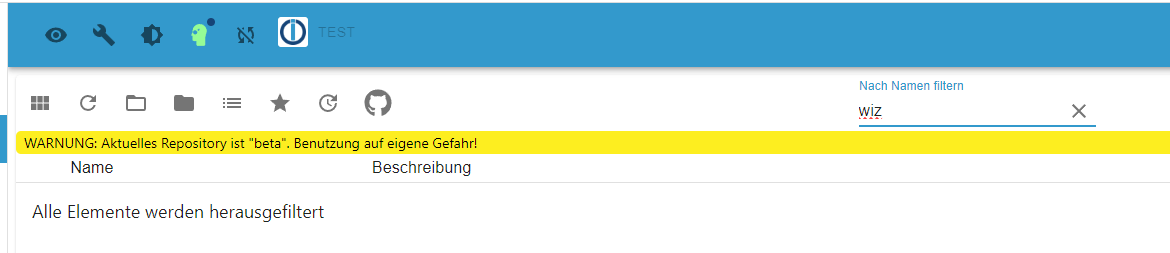
oder im Stable
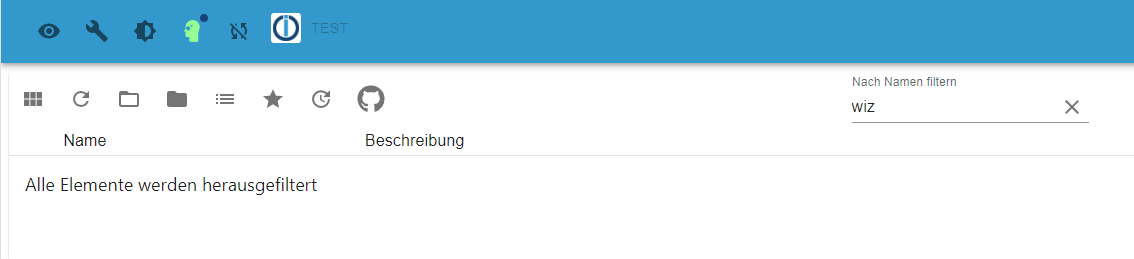
Nix "wiz" oder wie heisst der Adapter?
-
Über die Katze im Menü und dann die URL: https://github.com/disaster123/ioBroker.wizconnect

Hey! Du scheinst an dieser Unterhaltung interessiert zu sein, hast aber noch kein Konto.
Hast du es satt, bei jedem Besuch durch die gleichen Beiträge zu scrollen? Wenn du dich für ein Konto anmeldest, kommst du immer genau dorthin zurück, wo du zuvor warst, und kannst dich über neue Antworten benachrichtigen lassen (entweder per E-Mail oder Push-Benachrichtigung). Du kannst auch Lesezeichen speichern und Beiträge positiv bewerten, um anderen Community-Mitgliedern deine Wertschätzung zu zeigen.
Mit deinem Input könnte dieser Beitrag noch besser werden 💗
Registrieren AnmeldenSupport us
360
Online33.1k
Benutzende83.7k
Themen1.3m
Beiträge