Skip to content
  • Home
  • Aktuell
  • Tags
  • 0 Ungelesen 0
  • Kategorien
  • Unreplied
  • Beliebt
  • GitHub
  • Docu
  • Hilfe
Skins
  • Light
  • Brite
  • Cerulean
  • Cosmo
  • Flatly
  • Journal
  • Litera
  • Lumen
  • Lux
  • Materia
  • Minty
  • Morph
  • Pulse
  • Sandstone
  • Simplex
  • Sketchy
  • Spacelab
  • United
  • Yeti
  • Zephyr
  • Dark
  • Cyborg
  • Darkly
  • Quartz
  • Slate
  • Solar
  • Superhero
  • Vapor

  • Standard: (Kein Skin)
  • Kein Skin
Einklappen
ioBroker Logo

Community Forum

donate donate
  1. ioBroker Community Home
  2. Deutsch
  3. Praktische Anwendungen (Showcase)
  4. VIS für FireTablet *gelöst*

NEWS

  • Jahresrückblick 2025 – unser neuer Blogbeitrag ist online! ✨
    BluefoxB
    Bluefox
    17
    1
    2.4k

  • Neuer Blogbeitrag: Monatsrückblick - Dezember 2025 🎄
    BluefoxB
    Bluefox
    13
    1
    973

  • Weihnachtsangebot 2025! 🎄
    BluefoxB
    Bluefox
    25
    1
    2.3k

VIS für FireTablet *gelöst*

Geplant Angeheftet Gesperrt Verschoben Praktische Anwendungen (Showcase)
93 Beiträge 6 Kommentatoren 5.9k Aufrufe 5 Watching
  • Älteste zuerst
  • Neuste zuerst
  • Meiste Stimmen
Antworten
  • In einem neuen Thema antworten
Anmelden zum Antworten
Dieses Thema wurde gelöscht. Nur Nutzer mit entsprechenden Rechten können es sehen.
  • crunchipC crunchip

    @gluecksmann sagte in VIS für FireTablet:

    wahrscheinlich "irgendwo"

    in /opt/iobroker/backups

    probier mal den controller nochmal zu installieren

    sudo -H -u iobroker npm install iobroker.js-controller 
    

    danach

    iob status
    iob list instances
    
    G Offline
    G Offline
    gluecksmann
    schrieb am zuletzt editiert von
    #28

    @crunchip

    sieht nicht gut aus...oder?

    91f15498-b6ed-4a5b-88dd-6f0430706c6f-grafik.png

    1 Antwort Letzte Antwort
    0
    • Thomas BraunT Online
      Thomas BraunT Online
      Thomas Braun
      Most Active
      schrieb am zuletzt editiert von Thomas Braun
      #29

      @gluecksmann

      Bitte keine Urlaubsbildchen aus Konsolistan.
      Text auch als Text (in CodeTags eingebettet) posten.

      Kurz: Du stehst im falschen Verzeichnis.
      Das muss in /opt/iobroker ausgeführt werden.

      Linux-Werkzeugkasten:
      https://forum.iobroker.net/topic/42952/der-kleine-iobroker-linux-werkzeugkasten
      NodeJS Fixer Skript:
      https://forum.iobroker.net/topic/68035/iob-node-fix-skript
      iob_diag: curl -sLf -o diag.sh https://iobroker.net/diag.sh && bash diag.sh

      G 1 Antwort Letzte Antwort
      1
      • Thomas BraunT Thomas Braun

        @gluecksmann

        Bitte keine Urlaubsbildchen aus Konsolistan.
        Text auch als Text (in CodeTags eingebettet) posten.

        Kurz: Du stehst im falschen Verzeichnis.
        Das muss in /opt/iobroker ausgeführt werden.

        G Offline
        G Offline
        gluecksmann
        schrieb am zuletzt editiert von
        #30

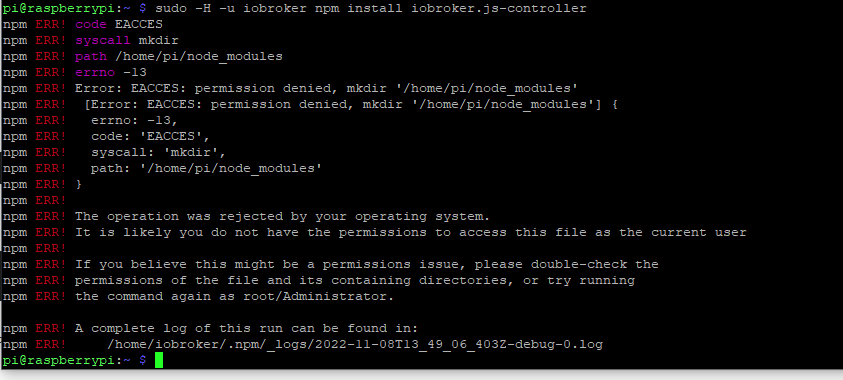
        @thomas-braun ```
        pi@raspberrypi:~ $ sudo -H -u iobroker npm install iobroker.js-controller
        npm ERR! code EACCES
        npm ERR! syscall mkdir
        npm ERR! path /home/pi/node_modules
        npm ERR! errno -13
        npm ERR! Error: EACCES: permission denied, mkdir '/home/pi/node_modules'
        npm ERR! [Error: EACCES: permission denied, mkdir '/home/pi/node_modules'] {
        npm ERR! errno: -13,
        npm ERR! code: 'EACCES',
        npm ERR! syscall: 'mkdir',
        npm ERR! path: '/home/pi/node_modules'
        npm ERR! }
        npm ERR!
        npm ERR! The operation was rejected by your operating system.
        npm ERR! It is likely you do not have the permissions to access this file as the current user
        npm ERR!
        npm ERR! If you believe this might be a permissions issue, please double-check the
        npm ERR! permissions of the file and its containing directories, or try running
        npm ERR! the command again as root/Administrator.

        npm ERR! A complete log of this run can be found in:
        npm ERR! /home/iobroker/.npm/_logs/2022-11-08T13_49_06_403Z-debug-0.log
        pi@raspberrypi:~ $

        Thomas BraunT 1 Antwort Letzte Antwort
        0
        • G gluecksmann

          @thomas-braun ```
          pi@raspberrypi:~ $ sudo -H -u iobroker npm install iobroker.js-controller
          npm ERR! code EACCES
          npm ERR! syscall mkdir
          npm ERR! path /home/pi/node_modules
          npm ERR! errno -13
          npm ERR! Error: EACCES: permission denied, mkdir '/home/pi/node_modules'
          npm ERR! [Error: EACCES: permission denied, mkdir '/home/pi/node_modules'] {
          npm ERR! errno: -13,
          npm ERR! code: 'EACCES',
          npm ERR! syscall: 'mkdir',
          npm ERR! path: '/home/pi/node_modules'
          npm ERR! }
          npm ERR!
          npm ERR! The operation was rejected by your operating system.
          npm ERR! It is likely you do not have the permissions to access this file as the current user
          npm ERR!
          npm ERR! If you believe this might be a permissions issue, please double-check the
          npm ERR! permissions of the file and its containing directories, or try running
          npm ERR! the command again as root/Administrator.

          npm ERR! A complete log of this run can be found in:
          npm ERR! /home/iobroker/.npm/_logs/2022-11-08T13_49_06_403Z-debug-0.log
          pi@raspberrypi:~ $

          Thomas BraunT Online
          Thomas BraunT Online
          Thomas Braun
          Most Active
          schrieb am zuletzt editiert von Thomas Braun
          #31

          @gluecksmann

          Du stehst noch im falschen Haus.

          cd /opt/iobroker/
          sudo -H -u iobroker npm install iobroker.js-controller
          

          Tip: Die Steuerzeichen gehören in eine neue, eigene Zeile.

          Linux-Werkzeugkasten:
          https://forum.iobroker.net/topic/42952/der-kleine-iobroker-linux-werkzeugkasten
          NodeJS Fixer Skript:
          https://forum.iobroker.net/topic/68035/iob-node-fix-skript
          iob_diag: curl -sLf -o diag.sh https://iobroker.net/diag.sh && bash diag.sh

          G 1 Antwort Letzte Antwort
          0
          • Thomas BraunT Thomas Braun

            @gluecksmann

            Du stehst noch im falschen Haus.

            cd /opt/iobroker/
            sudo -H -u iobroker npm install iobroker.js-controller
            

            Tip: Die Steuerzeichen gehören in eine neue, eigene Zeile.

            G Offline
            G Offline
            gluecksmann
            schrieb am zuletzt editiert von
            #32

            @thomas-braun sagte in VIS für FireTablet:

            sudo -H -u iobroker npm install iobroker.js-controller

            pi@raspberrypi:/opt/iobroker $ sudo -H -u iobroker npm install iobroker.js-controller
            npm ERR! code ENOTEMPTY
            npm ERR! syscall rename
            npm ERR! path /opt/iobroker/node_modules/ajv
            npm ERR! dest /opt/iobroker/node_modules/.ajv-Kze9IpmC
            npm ERR! errno -39
            npm ERR! ENOTEMPTY: directory not empty, rename '/opt/iobroker/node_modules/ajv' -> '/opt/iobroker/node_modules/.ajv-Kze9IpmC'
            
            npm ERR! A complete log of this run can be found in:
            npm ERR!     /home/iobroker/.npm/_logs/2022-11-08T14_04_54_291Z-debug-0.log
            
            
            Thomas BraunT 1 Antwort Letzte Antwort
            0
            • G gluecksmann

              @thomas-braun sagte in VIS für FireTablet:

              sudo -H -u iobroker npm install iobroker.js-controller

              pi@raspberrypi:/opt/iobroker $ sudo -H -u iobroker npm install iobroker.js-controller
              npm ERR! code ENOTEMPTY
              npm ERR! syscall rename
              npm ERR! path /opt/iobroker/node_modules/ajv
              npm ERR! dest /opt/iobroker/node_modules/.ajv-Kze9IpmC
              npm ERR! errno -39
              npm ERR! ENOTEMPTY: directory not empty, rename '/opt/iobroker/node_modules/ajv' -> '/opt/iobroker/node_modules/.ajv-Kze9IpmC'
              
              npm ERR! A complete log of this run can be found in:
              npm ERR!     /home/iobroker/.npm/_logs/2022-11-08T14_04_54_291Z-debug-0.log
              
              
              Thomas BraunT Online
              Thomas BraunT Online
              Thomas Braun
              Most Active
              schrieb am zuletzt editiert von
              #33

              @gluecksmann

              Dürfte das sein:

              https://forum.iobroker.net/topic/57337/fehler-25-bei-adapter-install-update-mit-npm8

              Linux-Werkzeugkasten:
              https://forum.iobroker.net/topic/42952/der-kleine-iobroker-linux-werkzeugkasten
              NodeJS Fixer Skript:
              https://forum.iobroker.net/topic/68035/iob-node-fix-skript
              iob_diag: curl -sLf -o diag.sh https://iobroker.net/diag.sh && bash diag.sh

              G 1 Antwort Letzte Antwort
              1
              • Thomas BraunT Thomas Braun

                @gluecksmann

                Dürfte das sein:

                https://forum.iobroker.net/topic/57337/fehler-25-bei-adapter-install-update-mit-npm8

                G Offline
                G Offline
                gluecksmann
                schrieb am zuletzt editiert von
                #34

                @thomas-braun Sieht ganz danach aus.... beim ausführen sagt er das er keine Berechtigung zum löschen hat

                Thomas BraunT 1 Antwort Letzte Antwort
                0
                • G gluecksmann

                  @thomas-braun Sieht ganz danach aus.... beim ausführen sagt er das er keine Berechtigung zum löschen hat

                  Thomas BraunT Online
                  Thomas BraunT Online
                  Thomas Braun
                  Most Active
                  schrieb am zuletzt editiert von Thomas Braun
                  #35

                  @gluecksmann

                  Dann hast du dir im Vorfeld da schon die Rechte verbogen. (aka mit 'sudo' oder gar als root herumgehampelt). Oder dein user 'pi' ist nicht in der Gruppe 'iobroker' drin.

                  iob stop
                  iob fix
                  for i in $(find /opt/iobroker/node_modules -type d -iname ".*-????????" ! -iname ".local-chromium"); do rm -rf ${i%%/}; done
                  cd /opt/iobroker
                  sudo -H -u iobroker npm install iobroker.js-controller
                  iob start
                  

                  Linux-Werkzeugkasten:
                  https://forum.iobroker.net/topic/42952/der-kleine-iobroker-linux-werkzeugkasten
                  NodeJS Fixer Skript:
                  https://forum.iobroker.net/topic/68035/iob-node-fix-skript
                  iob_diag: curl -sLf -o diag.sh https://iobroker.net/diag.sh && bash diag.sh

                  G 1 Antwort Letzte Antwort
                  0
                  • Thomas BraunT Thomas Braun

                    @gluecksmann

                    Dann hast du dir im Vorfeld da schon die Rechte verbogen. (aka mit 'sudo' oder gar als root herumgehampelt). Oder dein user 'pi' ist nicht in der Gruppe 'iobroker' drin.

                    iob stop
                    iob fix
                    for i in $(find /opt/iobroker/node_modules -type d -iname ".*-????????" ! -iname ".local-chromium"); do rm -rf ${i%%/}; done
                    cd /opt/iobroker
                    sudo -H -u iobroker npm install iobroker.js-controller
                    iob start
                    
                    G Offline
                    G Offline
                    gluecksmann
                    schrieb am zuletzt editiert von
                    #36

                    @thomas-braun sagte in VIS für FireTablet:

                    for i in $(find /opt/iobroker/node_modules -type d -iname ".*-????????" ! -iname ".local-chromium"); do rm -rf ${i%%/}; done

                    Muss ich für den dritten Schritt in ein spezielles Verzeichnis gehen ?

                    Thomas BraunT 1 Antwort Letzte Antwort
                    0
                    • G gluecksmann

                      @thomas-braun sagte in VIS für FireTablet:

                      for i in $(find /opt/iobroker/node_modules -type d -iname ".*-????????" ! -iname ".local-chromium"); do rm -rf ${i%%/}; done

                      Muss ich für den dritten Schritt in ein spezielles Verzeichnis gehen ?

                      Thomas BraunT Online
                      Thomas BraunT Online
                      Thomas Braun
                      Most Active
                      schrieb am zuletzt editiert von Thomas Braun
                      #37

                      @gluecksmann sagte in VIS für FireTablet:

                      Muss ich für den dritten Schritt in ein spezielles Verzeichnis gehen ?

                      Nein, in der Variante nicht mehr. Mit den ersten Würfen musste man das allerdings.

                      Linux-Werkzeugkasten:
                      https://forum.iobroker.net/topic/42952/der-kleine-iobroker-linux-werkzeugkasten
                      NodeJS Fixer Skript:
                      https://forum.iobroker.net/topic/68035/iob-node-fix-skript
                      iob_diag: curl -sLf -o diag.sh https://iobroker.net/diag.sh && bash diag.sh

                      G 1 Antwort Letzte Antwort
                      0
                      • Thomas BraunT Thomas Braun

                        @gluecksmann sagte in VIS für FireTablet:

                        Muss ich für den dritten Schritt in ein spezielles Verzeichnis gehen ?

                        Nein, in der Variante nicht mehr. Mit den ersten Würfen musste man das allerdings.

                        G Offline
                        G Offline
                        gluecksmann
                        schrieb am zuletzt editiert von
                        #38

                        @thomas-braun sagte in VIS für FireTablet:

                        @gluecksmann sagte in VIS für FireTablet:

                        Muss ich für den dritten Schritt in ein spezielles Verzeichnis gehen ?

                        Nein, in der Variante nicht mehr. Mit den ersten Würfen musste man das allerdings.

                        Also starte ich aus pi@raspberrypi: ? oder doch ein Verzeichnis?

                        Thomas BraunT 1 Antwort Letzte Antwort
                        0
                        • G gluecksmann

                          @thomas-braun sagte in VIS für FireTablet:

                          @gluecksmann sagte in VIS für FireTablet:

                          Muss ich für den dritten Schritt in ein spezielles Verzeichnis gehen ?

                          Nein, in der Variante nicht mehr. Mit den ersten Würfen musste man das allerdings.

                          Also starte ich aus pi@raspberrypi: ? oder doch ein Verzeichnis?

                          Thomas BraunT Online
                          Thomas BraunT Online
                          Thomas Braun
                          Most Active
                          schrieb am zuletzt editiert von Thomas Braun
                          #39

                          @gluecksmann Egal.

                          Der Befehl krabbelt automatisch in das richtige Verzeichnis.
                          Lediglich beim

                          sudo -H -u iobroker npm install iobroker.js-controller
                          

                          musst du in
                          /opt/iobroker
                          stehen.

                          Linux-Werkzeugkasten:
                          https://forum.iobroker.net/topic/42952/der-kleine-iobroker-linux-werkzeugkasten
                          NodeJS Fixer Skript:
                          https://forum.iobroker.net/topic/68035/iob-node-fix-skript
                          iob_diag: curl -sLf -o diag.sh https://iobroker.net/diag.sh && bash diag.sh

                          G 1 Antwort Letzte Antwort
                          0
                          • Thomas BraunT Thomas Braun

                            @gluecksmann Egal.

                            Der Befehl krabbelt automatisch in das richtige Verzeichnis.
                            Lediglich beim

                            sudo -H -u iobroker npm install iobroker.js-controller
                            

                            musst du in
                            /opt/iobroker
                            stehen.

                            G Offline
                            G Offline
                            gluecksmann
                            schrieb am zuletzt editiert von
                            #40

                            @thomas-braun

                            Hmmm... hab ich alles gemacht...sieht aber trotzdem nicht danach aus das es funktioniert hat

                            Thomas BraunT 1 Antwort Letzte Antwort
                            0
                            • G gluecksmann

                              @thomas-braun

                              Hmmm... hab ich alles gemacht...sieht aber trotzdem nicht danach aus das es funktioniert hat

                              Thomas BraunT Online
                              Thomas BraunT Online
                              Thomas Braun
                              Most Active
                              schrieb am zuletzt editiert von
                              #41

                              @gluecksmann sagte in VIS für FireTablet:

                              sieht aber trotzdem nicht danach aus das es funktioniert hat

                              Wie sieht / sah es denn aus?

                              Linux-Werkzeugkasten:
                              https://forum.iobroker.net/topic/42952/der-kleine-iobroker-linux-werkzeugkasten
                              NodeJS Fixer Skript:
                              https://forum.iobroker.net/topic/68035/iob-node-fix-skript
                              iob_diag: curl -sLf -o diag.sh https://iobroker.net/diag.sh && bash diag.sh

                              G 1 Antwort Letzte Antwort
                              0
                              • Thomas BraunT Thomas Braun

                                @gluecksmann sagte in VIS für FireTablet:

                                sieht aber trotzdem nicht danach aus das es funktioniert hat

                                Wie sieht / sah es denn aus?

                                G Offline
                                G Offline
                                gluecksmann
                                schrieb am zuletzt editiert von
                                #42

                                @thomas-braun ```
                                pi@raspberrypi:/opt/iobroker $ sudo -H -u iobroker npm install iobroker.js-controller
                                npm WARN skipping integrity check for git dependency ssh://git@github.com/nbuenger/ioBroker.govee.git
                                npm WARN skipping integrity check for git dependency ssh://git@github.com/ioBroker/ioBroker.icons-ultimate-png.git
                                npm WARN deprecated dgram@1.0.1: npm is holding this package for security reasons. As it's a core Node module, we will not transfer it over to other users. You may safely remove the package from your dependencies.
                                npm WARN deprecated crypto@1.0.1: This package is no longer supported. It's now a built-in Node module. If you've depended on crypto, you should switch to the one that's built-in.
                                npm WARN deprecated @types/bl@5.1.0: This is a stub types definition. bl provides its own type definitions, so you do not need this installed.
                                npm WARN deprecated source-map-url@0.4.1: See https://github.com/lydell/source-map-url#deprecated
                                npm WARN deprecated node-xmpp-tls-connect@1.0.1: this package is deprecated please use https://github.com/xmppjs/xmpp.js
                                npm WARN deprecated urix@0.1.0: Please see https://github.com/lydell/urix#deprecated
                                npm WARN deprecated har-validator@5.1.5: this library is no longer supported
                                npm WARN deprecated resolve-url@0.2.1: https://github.com/lydell/resolve-url#deprecated
                                npm WARN deprecated node-xmpp-core@5.0.9: this package is deprecated please use https://github.com/xmppjs/xmpp.js
                                npm WARN deprecated json3@3.3.2: Please use the native JSON object instead of JSON 3
                                npm WARN deprecated source-map-resolve@0.5.3: See https://github.com/lydell/source-map-resolve#deprecated
                                npm WARN deprecated querystring@0.2.1: The querystring API is considered Legacy. new code should use the URLSearchParams API instead.
                                npm WARN deprecated w3c-hr-time@1.0.2: Use your platform's native performance.now() and performance.timeOrigin.
                                npm WARN deprecated node-inspect@2.0.0: This module is part of Node.js core and does not need to be installed separately. It is now unmaintained.
                                npm WARN deprecated uuid@3.4.0: Please upgrade to version 7 or higher. Older versions may use Math.random() in certain circumstances, which is known to be problematic. See https://v8.dev/blog/math-random for details.
                                npm WARN deprecated request@2.88.2: request has been deprecated, see https://github.com/request/request/issues/3142
                                npm WARN deprecated node-xmpp-client@3.2.0: this package is deprecated please use https://www.npmjs.com/package/@xmpp/client
                                npm WARN deprecated xmldom@0.1.16: Deprecated due to CVE-2021-21366 resolved in 0.5.0

                                added 6 packages, removed 26 packages, and changed 1181 packages in 11m

                                82 packages are looking for funding
                                run npm fund for details

                                Thomas BraunT 1 Antwort Letzte Antwort
                                0
                                • G gluecksmann

                                  @thomas-braun ```
                                  pi@raspberrypi:/opt/iobroker $ sudo -H -u iobroker npm install iobroker.js-controller
                                  npm WARN skipping integrity check for git dependency ssh://git@github.com/nbuenger/ioBroker.govee.git
                                  npm WARN skipping integrity check for git dependency ssh://git@github.com/ioBroker/ioBroker.icons-ultimate-png.git
                                  npm WARN deprecated dgram@1.0.1: npm is holding this package for security reasons. As it's a core Node module, we will not transfer it over to other users. You may safely remove the package from your dependencies.
                                  npm WARN deprecated crypto@1.0.1: This package is no longer supported. It's now a built-in Node module. If you've depended on crypto, you should switch to the one that's built-in.
                                  npm WARN deprecated @types/bl@5.1.0: This is a stub types definition. bl provides its own type definitions, so you do not need this installed.
                                  npm WARN deprecated source-map-url@0.4.1: See https://github.com/lydell/source-map-url#deprecated
                                  npm WARN deprecated node-xmpp-tls-connect@1.0.1: this package is deprecated please use https://github.com/xmppjs/xmpp.js
                                  npm WARN deprecated urix@0.1.0: Please see https://github.com/lydell/urix#deprecated
                                  npm WARN deprecated har-validator@5.1.5: this library is no longer supported
                                  npm WARN deprecated resolve-url@0.2.1: https://github.com/lydell/resolve-url#deprecated
                                  npm WARN deprecated node-xmpp-core@5.0.9: this package is deprecated please use https://github.com/xmppjs/xmpp.js
                                  npm WARN deprecated json3@3.3.2: Please use the native JSON object instead of JSON 3
                                  npm WARN deprecated source-map-resolve@0.5.3: See https://github.com/lydell/source-map-resolve#deprecated
                                  npm WARN deprecated querystring@0.2.1: The querystring API is considered Legacy. new code should use the URLSearchParams API instead.
                                  npm WARN deprecated w3c-hr-time@1.0.2: Use your platform's native performance.now() and performance.timeOrigin.
                                  npm WARN deprecated node-inspect@2.0.0: This module is part of Node.js core and does not need to be installed separately. It is now unmaintained.
                                  npm WARN deprecated uuid@3.4.0: Please upgrade to version 7 or higher. Older versions may use Math.random() in certain circumstances, which is known to be problematic. See https://v8.dev/blog/math-random for details.
                                  npm WARN deprecated request@2.88.2: request has been deprecated, see https://github.com/request/request/issues/3142
                                  npm WARN deprecated node-xmpp-client@3.2.0: this package is deprecated please use https://www.npmjs.com/package/@xmpp/client
                                  npm WARN deprecated xmldom@0.1.16: Deprecated due to CVE-2021-21366 resolved in 0.5.0

                                  added 6 packages, removed 26 packages, and changed 1181 packages in 11m

                                  82 packages are looking for funding
                                  run npm fund for details

                                  Thomas BraunT Online
                                  Thomas BraunT Online
                                  Thomas Braun
                                  Most Active
                                  schrieb am zuletzt editiert von
                                  #43

                                  @gluecksmann

                                  Tip: Die Steuerzeichen (vor dem Konsolenoutput) gehören in eine neue, eigene Zeile.

                                  Ansonsten sieht das gut aus.

                                  Linux-Werkzeugkasten:
                                  https://forum.iobroker.net/topic/42952/der-kleine-iobroker-linux-werkzeugkasten
                                  NodeJS Fixer Skript:
                                  https://forum.iobroker.net/topic/68035/iob-node-fix-skript
                                  iob_diag: curl -sLf -o diag.sh https://iobroker.net/diag.sh && bash diag.sh

                                  G 1 Antwort Letzte Antwort
                                  0
                                  • Thomas BraunT Thomas Braun

                                    @gluecksmann

                                    Tip: Die Steuerzeichen (vor dem Konsolenoutput) gehören in eine neue, eigene Zeile.

                                    Ansonsten sieht das gut aus.

                                    G Offline
                                    G Offline
                                    gluecksmann
                                    schrieb am zuletzt editiert von
                                    #44

                                    @thomas-braun Aber geht nicht...

                                    Thomas BraunT 1 Antwort Letzte Antwort
                                    0
                                    • G gluecksmann

                                      @thomas-braun Aber geht nicht...

                                      Thomas BraunT Online
                                      Thomas BraunT Online
                                      Thomas Braun
                                      Most Active
                                      schrieb am zuletzt editiert von
                                      #45

                                      @gluecksmann

                                      Das heißt konkret?

                                      iobroker status
                                      

                                      sagt?

                                      Linux-Werkzeugkasten:
                                      https://forum.iobroker.net/topic/42952/der-kleine-iobroker-linux-werkzeugkasten
                                      NodeJS Fixer Skript:
                                      https://forum.iobroker.net/topic/68035/iob-node-fix-skript
                                      iob_diag: curl -sLf -o diag.sh https://iobroker.net/diag.sh && bash diag.sh

                                      G 1 Antwort Letzte Antwort
                                      0
                                      • Thomas BraunT Thomas Braun

                                        @gluecksmann

                                        Das heißt konkret?

                                        iobroker status
                                        

                                        sagt?

                                        G Offline
                                        G Offline
                                        gluecksmann
                                        schrieb am zuletzt editiert von
                                        #46

                                        @thomas-braun sagte in VIS für FireTablet:

                                        iobroker status

                                        pi@raspberrypi:/opt/iobroker $ iobroker status
                                        iobroker is running on this host.

                                        Objects type: jsonl
                                        States type: jsonl
                                        pi@raspberrypi:/opt/iobroker $

                                        Thomas BraunT 1 Antwort Letzte Antwort
                                        0
                                        • G gluecksmann

                                          @thomas-braun sagte in VIS für FireTablet:

                                          iobroker status

                                          pi@raspberrypi:/opt/iobroker $ iobroker status
                                          iobroker is running on this host.

                                          Objects type: jsonl
                                          States type: jsonl
                                          pi@raspberrypi:/opt/iobroker $

                                          Thomas BraunT Online
                                          Thomas BraunT Online
                                          Thomas Braun
                                          Most Active
                                          schrieb am zuletzt editiert von
                                          #47

                                          @gluecksmann

                                          Alles prima, ioBroker lüppt.

                                          Linux-Werkzeugkasten:
                                          https://forum.iobroker.net/topic/42952/der-kleine-iobroker-linux-werkzeugkasten
                                          NodeJS Fixer Skript:
                                          https://forum.iobroker.net/topic/68035/iob-node-fix-skript
                                          iob_diag: curl -sLf -o diag.sh https://iobroker.net/diag.sh && bash diag.sh

                                          G 1 Antwort Letzte Antwort
                                          0
                                          Antworten
                                          • In einem neuen Thema antworten
                                          Anmelden zum Antworten
                                          • Älteste zuerst
                                          • Neuste zuerst
                                          • Meiste Stimmen


                                          Support us

                                          ioBroker
                                          Community Adapters
                                          Donate

                                          406

                                          Online

                                          32.6k

                                          Benutzer

                                          82.2k

                                          Themen

                                          1.3m

                                          Beiträge
                                          Community
                                          Impressum | Datenschutz-Bestimmungen | Nutzungsbedingungen | Einwilligungseinstellungen
                                          ioBroker Community 2014-2025
                                          logo
                                          • Anmelden

                                          • Du hast noch kein Konto? Registrieren

                                          • Anmelden oder registrieren, um zu suchen
                                          • Erster Beitrag
                                            Letzter Beitrag
                                          0
                                          • Home
                                          • Aktuell
                                          • Tags
                                          • Ungelesen 0
                                          • Kategorien
                                          • Unreplied
                                          • Beliebt
                                          • GitHub
                                          • Docu
                                          • Hilfe