




-
@liv-in-sky ja so sieht es auch echt gut aus. dann hab ich wenigstens meine Datenpunkte Verwenden 👍👍👍👍
was ich aber auch nicht hinbekomme ist das waitforselector. das hab ich eingefügt wie die anderen Einträge und wird nicht übernommen...
-
@liv-in-sky ja so sieht es auch echt gut aus. dann hab ich wenigstens meine Datenpunkte Verwenden 👍👍👍👍
was ich aber auch nicht hinbekomme ist das waitforselector. das hab ich eingefügt wie die anderen Einträge und wird nicht übernommen...
mein script sieht inzwischen so aus:
<xml xmlns="https://developers.google.com/blockly/xml">
  <variables>
    <variable id="=|-HU{v0HPlybOQ*ghcR">mypath</variable>
    <variable id="(O?~p(`|c|(KIhiht#i*">myurl</variable>
    <variable id="Kg9b=20h)E,riQJeDEcb">myheight</variable>
    <variable id="d?/+]%mL0t@pakXBBv]V">mywidth</variable>
    <variable id="ELianL7RIoI]6v](.5H{">clipx</variable>
    <variable id="v7~-E}:`3zaZ=MG;7P=[">clipy</variable>
    <variable id="WKu^.B?9T66xQ_qJgB@2">clipwidth</variable>
    <variable id="$JY/m%d:K3q{;2o7?$9r">clipheight</variable>
    <variable id="*^L*3Kju!MAP#u`QL(gE">myselector</variable>
    <variable id="8,q0AR=qke3-k-JCj-2U">quality</variable>
  </variables>
  <block type="procedures_defcustomnoreturn" id="{{Bl:d;+8eDTq,0~J9H2" x="938" y="113">
    <mutation statements="false">
      <arg name="mypath" varid="=|-HU{v0HPlybOQ*ghcR"></arg>
      <arg name="myurl" varid="(O?~p(`|c|(KIhiht#i*"></arg>
      <arg name="myheight" varid="Kg9b=20h)E,riQJeDEcb"></arg>
      <arg name="mywidth" varid="d?/+]%mL0t@pakXBBv]V"></arg>
      <arg name="clipx" varid="ELianL7RIoI]6v](.5H{"></arg>
      <arg name="clipy" varid="v7~-E}:`3zaZ=MG;7P=["></arg>
      <arg name="clipwidth" varid="WKu^.B?9T66xQ_qJgB@2"></arg>
      <arg name="clipheight" varid="$JY/m%d:K3q{;2o7?$9r"></arg>
      <arg name="myselector" varid="*^L*3Kju!MAP#u`QL(gE"></arg>
      <arg name="quality" varid="8,q0AR=qke3-k-JCj-2U"></arg>
    </mutation>
    <field name="NAME">macheScreenshot</field>
    <field name="SCRIPT">c2VuZFRvKCdwdXBwZXRlZXIuMCcsICdzY3JlZW5zaG90JywgeyANCg0KICAgIHVybDogbXl1cmwgLA0KDQogICAgcGF0aDogbXlwYXRoICwgDQoNCiAgICB3aWR0aDpteXdpZHRoLA0KDQogICAgcXVhbGl0eTpxdWFsaXR5LA0KDQogICAgaGVpZ2h0Om15aGVpZ2h0LA0KDQogICAgd2FpdEZvclNlbGVjdG9yOm15c2VsZWN0b3IsDQoNCiAgICBmdWxsUGFnZTogZmFsc2UsDQoNCiAgICBjbGlwOiB7ICAgICAgICAgDQogICAgICAgIHg6IGNsaXB4LA0KICAgICAgICB5OiBjbGlweSwNCiAgICAgICAgd2lkdGg6IGNsaXB3aWR0aCwNCiAgICAgICAgaGVpZ2h0OiBjbGlwaGVpZ2h0DQogICAgICB9DQp9KTs=</field>
    <comment pinned="false" h="80" w="160">Beschreibe diese Funktion …</comment>
  </block>
  <block type="procedures_callcustomnoreturn" id="a8y(c@2xKnJ~R;]2^j%W" x="938" y="163">
    <mutation name="macheScreenshot">
      <arg name="mypath"></arg>
      <arg name="myurl"></arg>
      <arg name="myheight"></arg>
      <arg name="mywidth"></arg>
      <arg name="clipx"></arg>
      <arg name="clipy"></arg>
      <arg name="clipwidth"></arg>
      <arg name="clipheight"></arg>
      <arg name="myselector"></arg>
      <arg name="quality"></arg>
    </mutation>
    <value name="ARG0">
      <block type="get_value" id="@$eoRt:vgP2{$;eeUch0">
        <field name="ATTR">val</field>
        <field name="OID">00-ZUHAUSE.0.EPS.Test.Display-Bildpfad</field>
      </block>
    </value>
    <value name="ARG1">
      <block type="get_value" id="xlb5GgfuCSWL[Aergw[6">
        <field name="ATTR">val</field>
        <field name="OID">00-ZUHAUSE.0.EPS.Test.Display-Ziel-URL</field>
      </block>
    </value>
    <value name="ARG4">
      <block type="math_number" id="%D9jOfghJtgT{T{T7_sd">
        <field name="NUM">0</field>
      </block>
    </value>
    <value name="ARG5">
      <block type="math_number" id="AZ5@9Rh4%Q*{L9y9]_nY">
        <field name="NUM">0</field>
      </block>
    </value>
    <value name="ARG6">
      <block type="get_value" id="s$Lxum-=aMz`$(5TWW3%">
        <field name="ATTR">val</field>
        <field name="OID">00-ZUHAUSE.0.EPS.Test.Display-Breite</field>
      </block>
    </value>
    <value name="ARG7">
      <block type="get_value" id="P%oRRt;f$Ke}@s`ANY}B">
        <field name="ATTR">val</field>
        <field name="OID">00-ZUHAUSE.0.EPS.Test.Display-Höhe</field>
      </block>
    </value>
    <value name="ARG8">
      <block type="text" id="{3cIh]jtoaLdIe)!9Vp+">
        <field name="TEXT">#w00098</field>
      </block>
    </value>
    <value name="ARG9">
      <block type="math_number" id="|nkrAt*)GrI|sQV(?^Bz">
        <field name="NUM">100</field>
      </block>
    </value>
  </block>
</xml>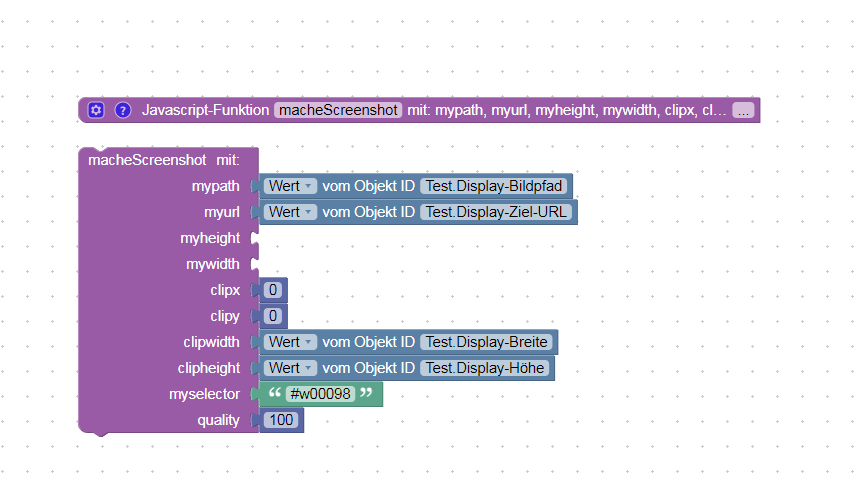
Gruß Bimmi
iobroker in einer Proxmox Umgebung auf einem ausrangierten DELL OptiPlex 3080 24GB i5 in der VM auf SSD. Nutze den slaeh zigbee Router mit Tür- und Temperatursensoren von Aqara, viele Tasmota Devices, Unifi AP, Sprinklecontrol, günstige E-INK Displays, Adguard und noch vieles mehr 😬
-
mein script sieht inzwischen so aus:
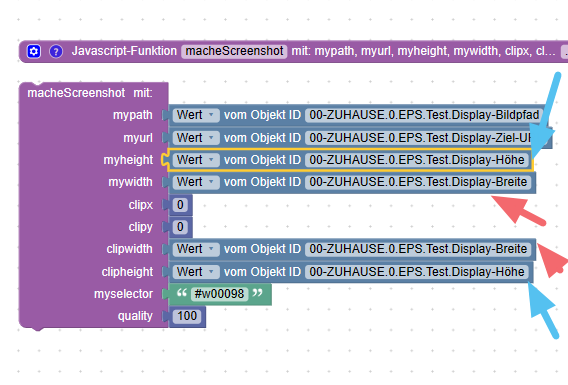
<xml xmlns="https://developers.google.com/blockly/xml"> <variables> <variable id="=|-HU{v0HPlybOQ*ghcR">mypath</variable> <variable id="(O?~p(`|c|(KIhiht#i*">myurl</variable> <variable id="Kg9b=20h)E,riQJeDEcb">myheight</variable> <variable id="d?/+]%mL0t@pakXBBv]V">mywidth</variable> <variable id="ELianL7RIoI]6v](.5H{">clipx</variable> <variable id="v7~-E}:`3zaZ=MG;7P=[">clipy</variable> <variable id="WKu^.B?9T66xQ_qJgB@2">clipwidth</variable> <variable id="$JY/m%d:K3q{;2o7?$9r">clipheight</variable> <variable id="*^L*3Kju!MAP#u`QL(gE">myselector</variable> <variable id="8,q0AR=qke3-k-JCj-2U">quality</variable> </variables> <block type="procedures_defcustomnoreturn" id="{{Bl:d;+8eDTq,0~J9H2" x="938" y="113"> <mutation statements="false"> <arg name="mypath" varid="=|-HU{v0HPlybOQ*ghcR"></arg> <arg name="myurl" varid="(O?~p(`|c|(KIhiht#i*"></arg> <arg name="myheight" varid="Kg9b=20h)E,riQJeDEcb"></arg> <arg name="mywidth" varid="d?/+]%mL0t@pakXBBv]V"></arg> <arg name="clipx" varid="ELianL7RIoI]6v](.5H{"></arg> <arg name="clipy" varid="v7~-E}:`3zaZ=MG;7P=["></arg> <arg name="clipwidth" varid="WKu^.B?9T66xQ_qJgB@2"></arg> <arg name="clipheight" varid="$JY/m%d:K3q{;2o7?$9r"></arg> <arg name="myselector" varid="*^L*3Kju!MAP#u`QL(gE"></arg> <arg name="quality" varid="8,q0AR=qke3-k-JCj-2U"></arg> </mutation> <field name="NAME">macheScreenshot</field> <field name="SCRIPT">c2VuZFRvKCdwdXBwZXRlZXIuMCcsICdzY3JlZW5zaG90JywgeyANCg0KICAgIHVybDogbXl1cmwgLA0KDQogICAgcGF0aDogbXlwYXRoICwgDQoNCiAgICB3aWR0aDpteXdpZHRoLA0KDQogICAgcXVhbGl0eTpxdWFsaXR5LA0KDQogICAgaGVpZ2h0Om15aGVpZ2h0LA0KDQogICAgd2FpdEZvclNlbGVjdG9yOm15c2VsZWN0b3IsDQoNCiAgICBmdWxsUGFnZTogZmFsc2UsDQoNCiAgICBjbGlwOiB7ICAgICAgICAgDQogICAgICAgIHg6IGNsaXB4LA0KICAgICAgICB5OiBjbGlweSwNCiAgICAgICAgd2lkdGg6IGNsaXB3aWR0aCwNCiAgICAgICAgaGVpZ2h0OiBjbGlwaGVpZ2h0DQogICAgICB9DQp9KTs=</field> <comment pinned="false" h="80" w="160">Beschreibe diese Funktion …</comment> </block> <block type="procedures_callcustomnoreturn" id="a8y(c@2xKnJ~R;]2^j%W" x="938" y="163"> <mutation name="macheScreenshot"> <arg name="mypath"></arg> <arg name="myurl"></arg> <arg name="myheight"></arg> <arg name="mywidth"></arg> <arg name="clipx"></arg> <arg name="clipy"></arg> <arg name="clipwidth"></arg> <arg name="clipheight"></arg> <arg name="myselector"></arg> <arg name="quality"></arg> </mutation> <value name="ARG0"> <block type="get_value" id="@$eoRt:vgP2{$;eeUch0"> <field name="ATTR">val</field> <field name="OID">00-ZUHAUSE.0.EPS.Test.Display-Bildpfad</field> </block> </value> <value name="ARG1"> <block type="get_value" id="xlb5GgfuCSWL[Aergw[6"> <field name="ATTR">val</field> <field name="OID">00-ZUHAUSE.0.EPS.Test.Display-Ziel-URL</field> </block> </value> <value name="ARG4"> <block type="math_number" id="%D9jOfghJtgT{T{T7_sd"> <field name="NUM">0</field> </block> </value> <value name="ARG5"> <block type="math_number" id="AZ5@9Rh4%Q*{L9y9]_nY"> <field name="NUM">0</field> </block> </value> <value name="ARG6"> <block type="get_value" id="s$Lxum-=aMz`$(5TWW3%"> <field name="ATTR">val</field> <field name="OID">00-ZUHAUSE.0.EPS.Test.Display-Breite</field> </block> </value> <value name="ARG7"> <block type="get_value" id="P%oRRt;f$Ke}@s`ANY}B"> <field name="ATTR">val</field> <field name="OID">00-ZUHAUSE.0.EPS.Test.Display-Höhe</field> </block> </value> <value name="ARG8"> <block type="text" id="{3cIh]jtoaLdIe)!9Vp+"> <field name="TEXT">#w00098</field> </block> </value> <value name="ARG9"> <block type="math_number" id="|nkrAt*)GrI|sQV(?^Bz"> <field name="NUM">100</field> </block> </value> </block> </xml>zum einem - du solltest keine variablen am function-aufruf weglassen bzw leer lassen - zur not mache :
@bimmi sagte in Puppeteer: Screenshots PhantomJS Alternative:
waitforselector
habe ich noch nicht genutzt - da wird er wohl ein element der html seite abwarten - ich nehme anstatt waitForTimeout - einfach mal die seite öffnen und schauen wie lange sie braucht. du gibst da ein widget id an -weiß nicht, ob das so funktioniert - wie stellst du das eigentlich fest, das puppeteer nict auf das widget wartet
wenn ich zeit habe teste ich mal waitForSelector - oder evtl kann uns @foxriver76 ein paar tipps geben
-
mein script sieht inzwischen so aus:
<xml xmlns="https://developers.google.com/blockly/xml"> <variables> <variable id="=|-HU{v0HPlybOQ*ghcR">mypath</variable> <variable id="(O?~p(`|c|(KIhiht#i*">myurl</variable> <variable id="Kg9b=20h)E,riQJeDEcb">myheight</variable> <variable id="d?/+]%mL0t@pakXBBv]V">mywidth</variable> <variable id="ELianL7RIoI]6v](.5H{">clipx</variable> <variable id="v7~-E}:`3zaZ=MG;7P=[">clipy</variable> <variable id="WKu^.B?9T66xQ_qJgB@2">clipwidth</variable> <variable id="$JY/m%d:K3q{;2o7?$9r">clipheight</variable> <variable id="*^L*3Kju!MAP#u`QL(gE">myselector</variable> <variable id="8,q0AR=qke3-k-JCj-2U">quality</variable> </variables> <block type="procedures_defcustomnoreturn" id="{{Bl:d;+8eDTq,0~J9H2" x="938" y="113"> <mutation statements="false"> <arg name="mypath" varid="=|-HU{v0HPlybOQ*ghcR"></arg> <arg name="myurl" varid="(O?~p(`|c|(KIhiht#i*"></arg> <arg name="myheight" varid="Kg9b=20h)E,riQJeDEcb"></arg> <arg name="mywidth" varid="d?/+]%mL0t@pakXBBv]V"></arg> <arg name="clipx" varid="ELianL7RIoI]6v](.5H{"></arg> <arg name="clipy" varid="v7~-E}:`3zaZ=MG;7P=["></arg> <arg name="clipwidth" varid="WKu^.B?9T66xQ_qJgB@2"></arg> <arg name="clipheight" varid="$JY/m%d:K3q{;2o7?$9r"></arg> <arg name="myselector" varid="*^L*3Kju!MAP#u`QL(gE"></arg> <arg name="quality" varid="8,q0AR=qke3-k-JCj-2U"></arg> </mutation> <field name="NAME">macheScreenshot</field> <field name="SCRIPT">c2VuZFRvKCdwdXBwZXRlZXIuMCcsICdzY3JlZW5zaG90JywgeyANCg0KICAgIHVybDogbXl1cmwgLA0KDQogICAgcGF0aDogbXlwYXRoICwgDQoNCiAgICB3aWR0aDpteXdpZHRoLA0KDQogICAgcXVhbGl0eTpxdWFsaXR5LA0KDQogICAgaGVpZ2h0Om15aGVpZ2h0LA0KDQogICAgd2FpdEZvclNlbGVjdG9yOm15c2VsZWN0b3IsDQoNCiAgICBmdWxsUGFnZTogZmFsc2UsDQoNCiAgICBjbGlwOiB7ICAgICAgICAgDQogICAgICAgIHg6IGNsaXB4LA0KICAgICAgICB5OiBjbGlweSwNCiAgICAgICAgd2lkdGg6IGNsaXB3aWR0aCwNCiAgICAgICAgaGVpZ2h0OiBjbGlwaGVpZ2h0DQogICAgICB9DQp9KTs=</field> <comment pinned="false" h="80" w="160">Beschreibe diese Funktion …</comment> </block> <block type="procedures_callcustomnoreturn" id="a8y(c@2xKnJ~R;]2^j%W" x="938" y="163"> <mutation name="macheScreenshot"> <arg name="mypath"></arg> <arg name="myurl"></arg> <arg name="myheight"></arg> <arg name="mywidth"></arg> <arg name="clipx"></arg> <arg name="clipy"></arg> <arg name="clipwidth"></arg> <arg name="clipheight"></arg> <arg name="myselector"></arg> <arg name="quality"></arg> </mutation> <value name="ARG0"> <block type="get_value" id="@$eoRt:vgP2{$;eeUch0"> <field name="ATTR">val</field> <field name="OID">00-ZUHAUSE.0.EPS.Test.Display-Bildpfad</field> </block> </value> <value name="ARG1"> <block type="get_value" id="xlb5GgfuCSWL[Aergw[6"> <field name="ATTR">val</field> <field name="OID">00-ZUHAUSE.0.EPS.Test.Display-Ziel-URL</field> </block> </value> <value name="ARG4"> <block type="math_number" id="%D9jOfghJtgT{T{T7_sd"> <field name="NUM">0</field> </block> </value> <value name="ARG5"> <block type="math_number" id="AZ5@9Rh4%Q*{L9y9]_nY"> <field name="NUM">0</field> </block> </value> <value name="ARG6"> <block type="get_value" id="s$Lxum-=aMz`$(5TWW3%"> <field name="ATTR">val</field> <field name="OID">00-ZUHAUSE.0.EPS.Test.Display-Breite</field> </block> </value> <value name="ARG7"> <block type="get_value" id="P%oRRt;f$Ke}@s`ANY}B"> <field name="ATTR">val</field> <field name="OID">00-ZUHAUSE.0.EPS.Test.Display-Höhe</field> </block> </value> <value name="ARG8"> <block type="text" id="{3cIh]jtoaLdIe)!9Vp+"> <field name="TEXT">#w00098</field> </block> </value> <value name="ARG9"> <block type="math_number" id="|nkrAt*)GrI|sQV(?^Bz"> <field name="NUM">100</field> </block> </value> </block> </xml>habe gerade auch bei mir einen fehler gesehen - so sollten die waitoption angegeben werden:
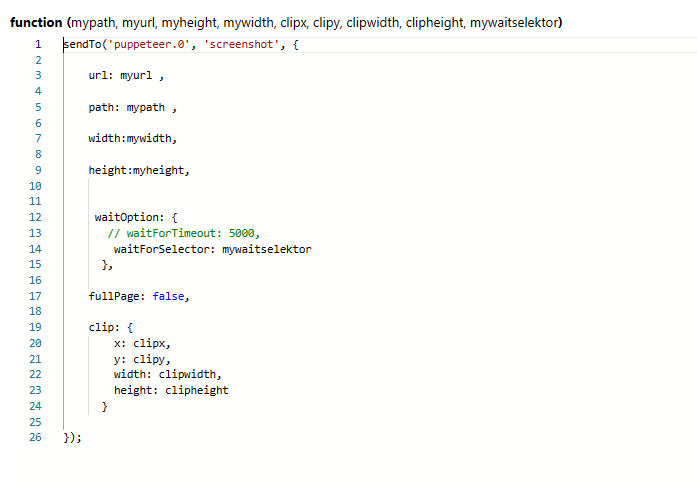
webseite:
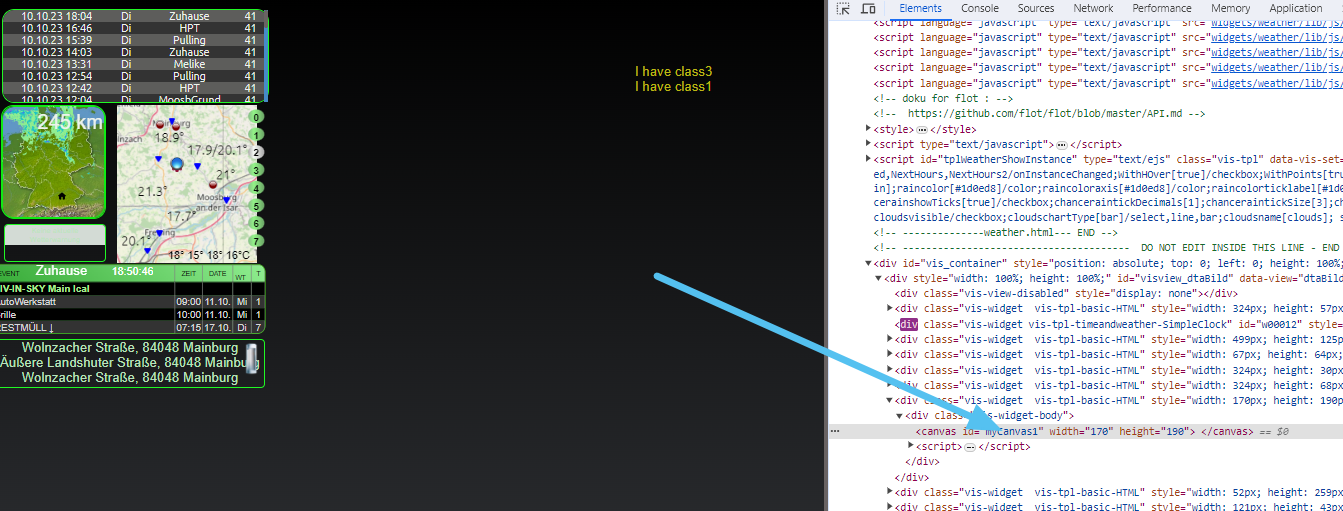
blockly:
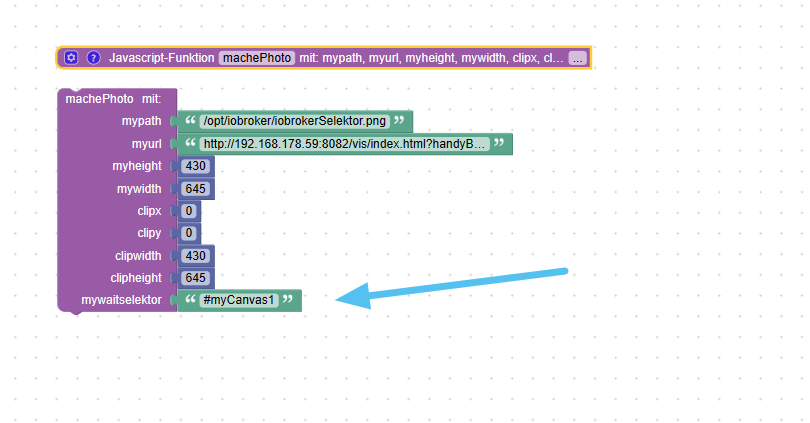
habe jetzt keine fehler mehr - scheint so zu funktionieren
-
habe gerade auch bei mir einen fehler gesehen - so sollten die waitoption angegeben werden:
webseite:
blockly:
habe jetzt keine fehler mehr - scheint so zu funktionieren
@liv-in-sky vielen Dank! Ich teste das heute Abend. ich mag den selector. das ist aus der Vis immer das letzte hinzugefügte Widget. Bei mir wäre es für #w00098. dann macht er einen Screenshot sobald der da ist.
Mein Webserver ist zwar echt schnell aber manchmal muss man auf Werte warten. daher ist der selector schon gut.
Gruß Bimmi
iobroker in einer Proxmox Umgebung auf einem ausrangierten DELL OptiPlex 3080 24GB i5 in der VM auf SSD. Nutze den slaeh zigbee Router mit Tür- und Temperatursensoren von Aqara, viele Tasmota Devices, Unifi AP, Sprinklecontrol, günstige E-INK Displays, Adguard und noch vieles mehr 😬
-
@liv-in-sky vielen Dank! Ich teste das heute Abend. ich mag den selector. das ist aus der Vis immer das letzte hinzugefügte Widget. Bei mir wäre es für #w00098. dann macht er einen Screenshot sobald der da ist.
Mein Webserver ist zwar echt schnell aber manchmal muss man auf Werte warten. daher ist der selector schon gut.
@bimmi
da gebe ich dir recht - habe ehrlich gesagt nie darauf geachtet - aber jetzt habe ich es mal eingestellt - heute morgen hat es funktioniert und konnte bild immer auf dem handy im auto anzeigen :) -
@bimmi
da gebe ich dir recht - habe ehrlich gesagt nie darauf geachtet - aber jetzt habe ich es mal eingestellt - heute morgen hat es funktioniert und konnte bild immer auf dem handy im auto anzeigen :)@liv-in-sky funktioniert perfekt! Genau wie ich es haben will! Im Prinzip ging es mir um die Qualität. Die kleinen E-INK Displays zeigen die Grafik besser an mit 100% Qualität bei der JPG Generierung!
-
Nachdem ich auch gern VIS und Grafana screens in Status-Reports verwenden würde, hab ich heute mal puppeteer ausprobiert:
Puppeteer startet nicht, und liefert folgende Fehler im log:eteer.0 2023-10-27 11:26:04.506 error Failed to launch the browser process![1027/112604.128429:FATAL:zygote_host_impl_linux.cc(127)] No usable sandbox! Update your kernel or see https://chromium.googlesource.com/chromium/src/+/main/docs/linux/suid_sandbox_development.md for more information on developing with the SUID sandbox. If you want to live dangerously and need an immediate workaround, you can try using --no-sandbox.#0 0x564aa1039f72 base::debug::CollectStackTrace()#1 0x564aa10264b3 base::debug::StackTrace::StackTrace()#2 0x564aa0f78fbf logging::LogMessage::~LogMessage()#3 0x564a9f795c16 content::ZygoteHostImpl::Init()#4 0x564aa04cfb23 content::ContentMainRunnerImpl::Initialize()#5 0x564aa04cd427 content::RunContentProcess()#6 0x564aa04cd606 content::ContentMain()#7 0x564aa0ab71fa headless::HeadlessShellMain()#8 0x564a9cbee255 ChromeMain#9 0x7fbbe3716d0a __libc_start_main#10 0x564a9cbee02a _startTROUBLESHOOTING: https://pptr.dev/troubleshooting puppeteer.0 2023-10-27 11:26:04.505 error Error: Failed to launch the browser process![1027/112604.128429:FATAL:zygote_host_impl_linux.cc(127)] No usable sandbox! Update your kernel or see https://chromium.googlesource.com/chromium/src/+/main/docs/linux/suid_sandbox_development.md for more information on developing with the SUID sandbox. If you want to live dangerously and need an immediate workaround, you can try using --no-sandbox.#0 0x564aa1039f72 base::debug::CollectStackTrace()#1 0x564aa10264b3 base::debug::StackTrace::StackTrace()#2 0x564aa0f78fbf logging::LogMessage::~LogMessage()#3 0x564a9f795c16 content::ZygoteHostImpl::Init()#4 0x564aa04cfb23 content::ContentMainRunnerImpl::Initialize()#5 0x564aa04cd427 content::RunContentProcess()#6 0x564aa04cd606 content::ContentMain()#7 0x564aa0ab71fa headless::HeadlessShellMain()#8 0x564a9cbee255 ChromeMain#9 0x7fbbe3716d0a __libc_start_main#10 0x564a9cbee02a _startTROUBLESHOOTING: https://pptr.dev/troubleshooting at Interface.onClose (/opt/iobroker/node_modules/@puppeteer/browsers/lib/cjs/launch.js:262:24) at Interface.emit (node:events:526:35) at Interface.close (node:internal/readline/interface:533:10) at Socket.onend (node:internal/readline/interface:259:10) at Socket.emit (node:events:526:35) at endReadableNT (node:internal/streams/readable:1359:12) at process.processTicksAndRejections (node:internal/process/task_queues:82:21) puppeteer.0 2023-10-27 11:26:04.503 error unhandled promise rejection: Failed to launch the browser process![1027/112604.128429:FATAL:zygote_host_impl_linux.cc(127)] No usable sandbox! Update your kernel or see https://chromium.googlesource.com/chromium/src/+/main/docs/linux/suid_sandbox_development.md for more information on developing with the SUID sandbox. If you want to live dangerously and need an immediate workaround, you can try using --no-sandbox.#0 0x564aa1039f72 base::debug::CollectStackTrace()#1 0x564aa10264b3 base::debug::StackTrace::StackTrace()#2 0x564aa0f78fbf logging::LogMessage::~LogMessage()#3 0x564a9f795c16 content::ZygoteHostImpl::Init()#4 0x564aa04cfb23 content::ContentMainRunnerImpl::Initialize()#5 0x564aa04cd427 content::RunContentProcess()#6 0x564aa04cd606 content::ContentMain()#7 0x564aa0ab71fa headless::HeadlessShellMain()#8 0x564a9cbee255 ChromeMain#9 0x7fbbe3716d0a __libc_start_main#10 0x564a9cbee02a _startTROUBLESHOOTING: https://pptr.dev/troubleshootingDie Umgebung ist ein buanet/iobroker Docker container, Version 8.1.0, also ein Debian 11.
Die package-installation ist durchgelaufen, die sind alle installiert.Kleine Anmerkung zu den Packages: In dem Image wird standardmäßig die apt package Liste gelöscht, vermutlich um Platz im Filesystem zu sparen. Deswegen muss man vor der puppeteer Installation manuell ein
apt-get updateaufrufen, dann werden die Listen wieder installiert, und apt-get install ... funktioniert.
Aber zum jetzigen "no useable sandbox" Fehler fällt mir grad nix ein ... gibts eventuell Ideen?
Dank
Werner -
da hatte ich mich letztes Jahr auch mal mit befasst... es gab n Parameter den man setzen konnte.. aber bei mir half das auch nicht..
Denke, das geht nicht im Docker. -
Muss da mal bisschen damit experimentieren, möglichst nicht auf dem "Production" System ;), aber dafür ist Docker ja perfekt.
Es gibt auf jeden Fall mal das puppeteer-troubleshooting als Ansatzpunkt:
https://github.com/puppeteer/puppeteer/blob/main/docs/troubleshooting.md#setting-up-chrome-linux-sandbox -
@arteck sagte in Puppeteer: Screenshots PhantomJS Alternative:
da müsste doch @andre was zu sagen können
Wenn ich das hier so lese, dann wird puppeteer nicht out of the box in docker laufen...
https://dev.to/cloudx/how-to-use-puppeteer-inside-a-docker-container-568c
Eventuell ist es notwendig den Container entsprechend vorzubereiten. Ggf. mit einem benutzerdefinierten Startscript.
MfG,
André -
Bin am Tablett mit meinen dicken Fingern.. verwende den buanet Docker mit Node 16
hier beim installieren:host.iobroker 2023-03-18 21:09:38.495 info iobroker npm WARN deprecated puppeteer@13.7.0: < 19.2.0 is no longer supportedDann beim starten des Adapter:
puppeteer.0 2023-03-18 21:10:24.951 error Error: Failed to launch the browser process![0318/211024.570664:FATAL:zygote_host_impl_linux.cc(117)] No usable sandbox! Update your kernel or see https://chromium.googlesource.com/chromium/src/+/main/docs/linux/suid_sandbox_development.md for more information on developing with the SUID sandbox. If you want to live dangerously and need an immediate workaround, you can try using --no-sandbox.#0 0x55aca5667b89 base::debug::CollectStackTrace()#1 0x55aca55cc433 base::debug::StackTrace::StackTrace()#2 0x55aca55df330 logging::LogMessage::~LogMessage()#3 0x55aca35c499b content::ZygoteHostImpl::Init()#4 0x55aca5175372 content::ContentMainRunnerImpl::Initialize()#5 0x55aca5173439 content::RunContentProcess()#6 0x55aca517358e content::ContentMain()#7 0x55aca51ced7a headless::(anonymous namespace)::RunContentMain()#8 0x55aca51cea85 headless::HeadlessShellMain()#9 0x55aca1c323e8 ChromeMain#10 0x7effdda9dd0a __libc_start_main#11 0x55aca1c3222a _startTROUBLESHOOTING: https://github.com/puppeteer/puppeteer/blob/main/docs/troubleshooting.md at onClose (/opt/iobroker/node_modules/puppeteer/lib/cjs/puppeteer/node/BrowserRunner.js:241:20) at Interface.<anonymous> (/opt/iobroker/node_modules/puppeteer/lib/cjs/puppeteer/node/BrowserRunner.js:231:68) at Interface.emit (node:events:525:35) at Interface.close (node:readline:590:8) at Socket.onend (node:readline:280:10) at Socket.emit (node:events:525:35) at endReadableNT (node:internal/streams/readable:1358:12) at processTicksAndRejections (node:internal/process/task_queues:83:21) puppeteer.0 2023-03-18 21:10:24.950 error unhandled promise rejection: Failed to launch the browser process![0318/211024.570664:FATAL:zygote_host_impl_linux.cc(117)] No usable sandbox! Update your kernel or see https://chromium.googlesource.com/chromium/src/+/main/docs/linux/suid_sandbox_development.md for more information on developing with the SUID sandbox. If you want to live dangerously and need an immediate workaround, you can try using --no-sandbox.#0 0x55aca5667b89 base::debug::CollectStackTrace()#1 0x55aca55cc433 base::debug::StackTrace::StackTrace()#2 0x55aca55df330 logging::LogMessage::~LogMessage()#3 0x55aca35c499b content::ZygoteHostImpl::Init()#4 0x55aca5175372 content::ContentMainRunnerImpl::Initialize()#5 0x55aca5173439 content::RunContentProcess()#6 0x55aca517358e content::ContentMain()#7 0x55aca51ced7a headless::(anonymous namespace)::RunContentMain()#8 0x55aca51cea85 headless::HeadlessShellMain()#9 0x55aca1c323e8 ChromeMain#10 0x7effdda9dd0a __libc_start_main#11 0x55aca1c3222a _startTROUBLESHOOTING: https://github.com/puppeteer/puppeteer/blob/main/docs/troubleshooting.md@ilovegym said in Puppeteer: Screenshots PhantomJS Alternative:
Bin am Tablett mit meinen dicken Fingern.. verwende den buanet Docker mit Node 16
hier beim installieren:host.iobroker 2023-03-18 21:09:38.495 info iobroker npm WARN deprecated puppeteer@13.7.0: < 19.2.0 is no longer supportedDann beim starten des Adapter:
puppeteer.0
2023-03-18 21:10:24.951	error	Error: Failed to launch the browser process![0318/211024.570664:FATAL:zygote_host_impl_linux.cc(117)] No usable sandbox! Update your kernel or see https://chromium.googlesource.com/chromium/src/+/main/docs/linux/suid_sandbox_development.md for more information on developing with the SUID sandbox. If you want to live dangerously and need an immediate workaround, you can try using --no-sandbox.#0 0x55aca5667b89 base::debug::CollectStackTrace()#1 0x55aca55cc433 base::debug::StackTrace::StackTrace()#2 0x55aca55df330 logging::LogMessage::~LogMessage()#3 0x55aca35c499b content::ZygoteHostImpl::Init()#4 0x55aca5175372 content::ContentMainRunnerImpl::Initialize()#5 0x55aca5173439 content::RunContentProcess()#6 0x55aca517358e content::ContentMain()#7 0x55aca51ced7a headless::(anonymous namespace)::RunContentMain()#8 0x55aca51cea85 headless::HeadlessShellMain()#9 0x55aca1c323e8 ChromeMain#10 0x7effdda9dd0a __libc_start_main#11 0x55aca1c3222a _startTROUBLESHOOTING: https://github.com/puppeteer/puppeteer/blob/main/docs/troubleshooting.md at onClose (/opt/iobroker/node_modules/puppeteer/lib/cjs/puppeteer/node/BrowserRunner.js:241:20) at Interface.<anonymous> (/opt/iobroker/node_modules/puppeteer/lib/cjs/puppeteer/node/BrowserRunner.js:231:68) at Interface.emit (node:events:525:35) at Interface.close (node:readline:590:8) at Socket.onend (node:readline:280:10) at Socket.emit (node:events:525:35) at endReadableNT (node:internal/streams/readable:1358:12) at processTicksAndRejections (node:internal/process/task_queues:83:21)

puppeteer.0
2023-03-18 21:10:24.950	error	unhandled promise rejection: Failed to launch the browser process![0318/211024.570664:FATAL:zygote_host_impl_linux.cc(117)] No usable sandbox! Update your kernel or see https://chromium.googlesource.com/chromium/src/+/main/docs/linux/suid_sandbox_development.md for more information on developing with the SUID sandbox. If you want to live dangerously and need an immediate workaround, you can try using --no-sandbox.#0 0x55aca5667b89 base::debug::CollectStackTrace()#1 0x55aca55cc433 base::debug::StackTrace::StackTrace()#2 0x55aca55df330 logging::LogMessage::~LogMessage()#3 0x55aca35c499b content::ZygoteHostImpl::Init()#4 0x55aca5175372 content::ContentMainRunnerImpl::Initialize()#5 0x55aca5173439 content::RunContentProcess()#6 0x55aca517358e content::ContentMain()#7 0x55aca51ced7a headless::(anonymous namespace)::RunContentMain()#8 0x55aca51cea85 headless::HeadlessShellMain()#9 0x55aca1c323e8 ChromeMain#10 0x7effdda9dd0a __libc_start_main#11 0x55aca1c3222a _startTROUBLESHOOTING: https://github.com/puppeteer/puppeteer/blob/main/docs/troubleshooting.md
Ich habe leider das gleiche Problem. Konntest du das irgendwie lösen?
-
@ilovegym said in Puppeteer: Screenshots PhantomJS Alternative:
Bin am Tablett mit meinen dicken Fingern.. verwende den buanet Docker mit Node 16
hier beim installieren:host.iobroker 2023-03-18 21:09:38.495 info iobroker npm WARN deprecated puppeteer@13.7.0: < 19.2.0 is no longer supportedDann beim starten des Adapter:
puppeteer.0
2023-03-18 21:10:24.951	error	Error: Failed to launch the browser process![0318/211024.570664:FATAL:zygote_host_impl_linux.cc(117)] No usable sandbox! Update your kernel or see https://chromium.googlesource.com/chromium/src/+/main/docs/linux/suid_sandbox_development.md for more information on developing with the SUID sandbox. If you want to live dangerously and need an immediate workaround, you can try using --no-sandbox.#0 0x55aca5667b89 base::debug::CollectStackTrace()#1 0x55aca55cc433 base::debug::StackTrace::StackTrace()#2 0x55aca55df330 logging::LogMessage::~LogMessage()#3 0x55aca35c499b content::ZygoteHostImpl::Init()#4 0x55aca5175372 content::ContentMainRunnerImpl::Initialize()#5 0x55aca5173439 content::RunContentProcess()#6 0x55aca517358e content::ContentMain()#7 0x55aca51ced7a headless::(anonymous namespace)::RunContentMain()#8 0x55aca51cea85 headless::HeadlessShellMain()#9 0x55aca1c323e8 ChromeMain#10 0x7effdda9dd0a __libc_start_main#11 0x55aca1c3222a _startTROUBLESHOOTING: https://github.com/puppeteer/puppeteer/blob/main/docs/troubleshooting.md at onClose (/opt/iobroker/node_modules/puppeteer/lib/cjs/puppeteer/node/BrowserRunner.js:241:20) at Interface.<anonymous> (/opt/iobroker/node_modules/puppeteer/lib/cjs/puppeteer/node/BrowserRunner.js:231:68) at Interface.emit (node:events:525:35) at Interface.close (node:readline:590:8) at Socket.onend (node:readline:280:10) at Socket.emit (node:events:525:35) at endReadableNT (node:internal/streams/readable:1358:12) at processTicksAndRejections (node:internal/process/task_queues:83:21)

puppeteer.0
2023-03-18 21:10:24.950	error	unhandled promise rejection: Failed to launch the browser process![0318/211024.570664:FATAL:zygote_host_impl_linux.cc(117)] No usable sandbox! Update your kernel or see https://chromium.googlesource.com/chromium/src/+/main/docs/linux/suid_sandbox_development.md for more information on developing with the SUID sandbox. If you want to live dangerously and need an immediate workaround, you can try using --no-sandbox.#0 0x55aca5667b89 base::debug::CollectStackTrace()#1 0x55aca55cc433 base::debug::StackTrace::StackTrace()#2 0x55aca55df330 logging::LogMessage::~LogMessage()#3 0x55aca35c499b content::ZygoteHostImpl::Init()#4 0x55aca5175372 content::ContentMainRunnerImpl::Initialize()#5 0x55aca5173439 content::RunContentProcess()#6 0x55aca517358e content::ContentMain()#7 0x55aca51ced7a headless::(anonymous namespace)::RunContentMain()#8 0x55aca51cea85 headless::HeadlessShellMain()#9 0x55aca1c323e8 ChromeMain#10 0x7effdda9dd0a __libc_start_main#11 0x55aca1c3222a _startTROUBLESHOOTING: https://github.com/puppeteer/puppeteer/blob/main/docs/troubleshooting.md
Ich habe leider das gleiche Problem. Konntest du das irgendwie lösen?
@freak
Dir ist aber schon klar, dass Du hier auf einen fast 1 Jahr alten Beitrag antwortest?@andre sagte in Puppeteer: Screenshots PhantomJS Alternative:
Wenn ich das hier so lese, dann wird puppeteer nicht out of the box in docker laufen...
@freak sagte in Puppeteer: Screenshots PhantomJS Alternative:
das gleiche Problem.
Sicher?
@foxriver76 sagte in Puppeteer: Screenshots PhantomJS Alternative:
Krass, die sind tatsächlich innerhalb von einem Jahr von 13 auf 19.
Zeigen!
https://forum.iobroker.net/topic/51555/hinweise-für-gute-forenbeiträge
-
@freak
Dir ist aber schon klar, dass Du hier auf einen fast 1 Jahr alten Beitrag antwortest?@andre sagte in Puppeteer: Screenshots PhantomJS Alternative:
Wenn ich das hier so lese, dann wird puppeteer nicht out of the box in docker laufen...
@freak sagte in Puppeteer: Screenshots PhantomJS Alternative:
das gleiche Problem.
Sicher?
@foxriver76 sagte in Puppeteer: Screenshots PhantomJS Alternative:
Krass, die sind tatsächlich innerhalb von einem Jahr von 13 auf 19.
Zeigen!
https://forum.iobroker.net/topic/51555/hinweise-für-gute-forenbeiträge
@codierknecht
Ja, das habe ich schon gesehen, danke für den Hinweis.
Leider bekomme ich mein Problem nicht selbst in den Griff und wollte kein neues Thema eröffnen.Mein iobroker läuft auf einer Ds1522+ mit einem AMD Ryzen R1600
Wenn ich den Puppeteer adapter installiere bekomme ich folgende Fehler im Log.
puppeteer.0
2024-02-19 08:08:23.154	error	Failed to launch the browser process![24624:24624:0219/080822.240775:FATAL:zygote_host_impl_linux.cc(127)] No usable sandbox! Update your kernel or see https://chromium.googlesource.com/chromium/src/+/main/docs/linux/suid_sandbox_development.md for more information on developing with the SUID sandbox. If you want to live dangerously and need an immediate workaround, you can try using --no-sandbox.TROUBLESHOOTING: https://pptr.dev/troubleshooting
puppeteer.0
2024-02-19 08:08:23.154	error	Error: Failed to launch the browser process![24624:24624:0219/080822.240775:FATAL:zygote_host_impl_linux.cc(127)] No usable sandbox! Update your kernel or see https://chromium.googlesource.com/chromium/src/+/main/docs/linux/suid_sandbox_development.md for more information on developing with the SUID sandbox. If you want to live dangerously and need an immediate workaround, you can try using --no-sandbox.TROUBLESHOOTING: https://pptr.dev/troubleshooting at ChildProcess.onClose (/opt/iobroker/node_modules/@puppeteer/browsers/lib/cjs/launch.js:267:24) at ChildProcess.emit (node:events:525:35) at ChildProcess._handle.onexit (node:internal/child_process:291:12)
puppeteer.0
2024-02-19 08:08:23.153	error	unhandled promise rejection: Failed to launch the browser process![24624:24624:0219/080822.240775:FATAL:zygote_host_impl_linux.cc(127)] No usable sandbox! Update your kernel or see https://chromium.googlesource.com/chromium/src/+/main/docs/linux/suid_sandbox_development.md for more information on developing with the SUID sandbox. If you want to live dangerously and need an immediate workaround, you can try using --no-sandbox.TROUBLESHOOTING: https://pptr.dev/troubleshooting
puppeteer.0
2024-02-19 08:08:23.152	error	Unhandled promise rejection. This error originated either by throwing inside of an async function without a catch block, or by rejecting a promise which was not handled with .catch().
puppeteer.0
2024-02-19 08:08:22.187	info	starting. Version 0.2.8 in /opt/iobroker/node_modules/iobroker.puppeteer, node: v18.15.0, js-controller: 5.0.17
Danke für die Unterstützung.
-
@codierknecht
Ja, das habe ich schon gesehen, danke für den Hinweis.
Leider bekomme ich mein Problem nicht selbst in den Griff und wollte kein neues Thema eröffnen.Mein iobroker läuft auf einer Ds1522+ mit einem AMD Ryzen R1600
Wenn ich den Puppeteer adapter installiere bekomme ich folgende Fehler im Log.
puppeteer.0
2024-02-19 08:08:23.154	error	Failed to launch the browser process![24624:24624:0219/080822.240775:FATAL:zygote_host_impl_linux.cc(127)] No usable sandbox! Update your kernel or see https://chromium.googlesource.com/chromium/src/+/main/docs/linux/suid_sandbox_development.md for more information on developing with the SUID sandbox. If you want to live dangerously and need an immediate workaround, you can try using --no-sandbox.TROUBLESHOOTING: https://pptr.dev/troubleshooting
puppeteer.0
2024-02-19 08:08:23.154	error	Error: Failed to launch the browser process![24624:24624:0219/080822.240775:FATAL:zygote_host_impl_linux.cc(127)] No usable sandbox! Update your kernel or see https://chromium.googlesource.com/chromium/src/+/main/docs/linux/suid_sandbox_development.md for more information on developing with the SUID sandbox. If you want to live dangerously and need an immediate workaround, you can try using --no-sandbox.TROUBLESHOOTING: https://pptr.dev/troubleshooting at ChildProcess.onClose (/opt/iobroker/node_modules/@puppeteer/browsers/lib/cjs/launch.js:267:24) at ChildProcess.emit (node:events:525:35) at ChildProcess._handle.onexit (node:internal/child_process:291:12)
puppeteer.0
2024-02-19 08:08:23.153	error	unhandled promise rejection: Failed to launch the browser process![24624:24624:0219/080822.240775:FATAL:zygote_host_impl_linux.cc(127)] No usable sandbox! Update your kernel or see https://chromium.googlesource.com/chromium/src/+/main/docs/linux/suid_sandbox_development.md for more information on developing with the SUID sandbox. If you want to live dangerously and need an immediate workaround, you can try using --no-sandbox.TROUBLESHOOTING: https://pptr.dev/troubleshooting
puppeteer.0
2024-02-19 08:08:23.152	error	Unhandled promise rejection. This error originated either by throwing inside of an async function without a catch block, or by rejecting a promise which was not handled with .catch().
puppeteer.0
2024-02-19 08:08:22.187	info	starting. Version 0.2.8 in /opt/iobroker/node_modules/iobroker.puppeteer, node: v18.15.0, js-controller: 5.0.17
Danke für die Unterstützung.
@freak sagte in Puppeteer: Screenshots PhantomJS Alternative:
Leider bekomme ich mein Problem nicht selbst in den Griff
Da bist Du offenbar nicht der Einzige.
@ilovegym sagte in Puppeteer: Screenshots PhantomJS Alternative:
Denke, das geht nicht im Docker.
@ilovegym @foxriver76 @andre
Oder hat sich an dem Umstand etwas geändert? -
@freak sagte in Puppeteer: Screenshots PhantomJS Alternative:
Leider bekomme ich mein Problem nicht selbst in den Griff
Da bist Du offenbar nicht der Einzige.
@ilovegym sagte in Puppeteer: Screenshots PhantomJS Alternative:
Denke, das geht nicht im Docker.
@ilovegym @foxriver76 @andre
Oder hat sich an dem Umstand etwas geändert?das habe ich auch gefunden. Hab halt gehofft, dass es doch jemanden gibt, der eine Lösung hat.
Danke für deine Mühe. -
@freak sagte in Puppeteer: Screenshots PhantomJS Alternative:
Leider bekomme ich mein Problem nicht selbst in den Griff
Da bist Du offenbar nicht der Einzige.
@ilovegym sagte in Puppeteer: Screenshots PhantomJS Alternative:
Denke, das geht nicht im Docker.
@ilovegym @foxriver76 @andre
Oder hat sich an dem Umstand etwas geändert?@codierknecht sagte in Puppeteer: Screenshots PhantomJS Alternative:
@freak sagte in Puppeteer: Screenshots PhantomJS Alternative:
Leider bekomme ich mein Problem nicht selbst in den Griff
Da bist Du offenbar nicht der Einzige.
@ilovegym sagte in Puppeteer: Screenshots PhantomJS Alternative:
Denke, das geht nicht im Docker.
@ilovegym @foxriver76 @andre
Oder hat sich an dem Umstand etwas geändert?nee, leider nicht, ich habe mir eine VM als Multihost-Slave in Proxmox als Workaround angelegt.
Ist auch in den Issues zu Puppeteer auf git und npm zu sehen, sandbox in the sandbox geht nicht.@Freak
wenn du Synology hast, kannst du dir auch eine VM anlegen (Paket Virtual Machine Manager installieren). Bei mir hat das zuviel Ressourcen gefressen, daher bin ich dann auf Docker umgestiegen. -
@codierknecht sagte in Puppeteer: Screenshots PhantomJS Alternative:
@freak sagte in Puppeteer: Screenshots PhantomJS Alternative:
Leider bekomme ich mein Problem nicht selbst in den Griff
Da bist Du offenbar nicht der Einzige.
@ilovegym sagte in Puppeteer: Screenshots PhantomJS Alternative:
Denke, das geht nicht im Docker.
@ilovegym @foxriver76 @andre
Oder hat sich an dem Umstand etwas geändert?nee, leider nicht, ich habe mir eine VM als Multihost-Slave in Proxmox als Workaround angelegt.
Ist auch in den Issues zu Puppeteer auf git und npm zu sehen, sandbox in the sandbox geht nicht.@Freak
wenn du Synology hast, kannst du dir auch eine VM anlegen (Paket Virtual Machine Manager installieren). Bei mir hat das zuviel Ressourcen gefressen, daher bin ich dann auf Docker umgestiegen.@ilovegym
Das habe ich mir auch schon überlegt.
Ich habe gesehen, es gibt auch Puppeteer Docker container.
Wenn dieser Container einen Screenshot einer Website erstellen kann und ihn an einem bestimmten Ort ablegt, sollte das ja nutzbar sein.
Kann das zufällig jemand bestätigen?danke




Hello! It looks like you're interested in this conversation, but you don't have an account yet.
Getting fed up of having to scroll through the same posts each visit? When you register for an account, you'll always come back to exactly where you were before, and choose to be notified of new replies (either via email, or push notification). You'll also be able to save bookmarks and upvote posts to show your appreciation to other community members.
With your input, this post could be even better 💗
Register LoginSupport us
252
Online33.0k
Users83.6k
Topics1.3m
Posts