



Skip to content
  • Home
  • Recent
  • Tags
  • 0 Unread 0
  • Categories
  • Unreplied
  • Popular
  • GitHub
  • Docu
  • Hilfe
Skins
  • Light
  • Brite
  • Cerulean
  • Cosmo
  • Flatly
  • Journal
  • Litera
  • Lumen
  • Lux
  • Materia
  • Minty
  • Morph
  • Pulse
  • Sandstone
  • Simplex
  • Sketchy
  • Spacelab
  • United
  • Yeti
  • Zephyr
  • Dark
  • Cyborg
  • Darkly
  • Quartz
  • Slate
  • Solar
  • Superhero
  • Vapor

  • Default (No Skin)
  • No Skin
Collapse
ioBroker Logo

Community Forum

donate donate
  1. ioBroker Community Home
  2. Deutsch
  3. ioBroker Allgemein
  4. esphome - ERROR: Process exited with code 25

NEWS

  • Jahresrückblick 2025 – unser neuer Blogbeitrag ist online! ✨
    BluefoxB
    Bluefox
    16
    1
    1.7k

  • Neuer Blogbeitrag: Monatsrückblick - Dezember 2025 🎄
    BluefoxB
    Bluefox
    13
    1
    883

  • Weihnachtsangebot 2025! 🎄
    BluefoxB
    Bluefox
    25
    1
    2.1k

esphome - ERROR: Process exited with code 25

Scheduled Pinned Locked Moved ioBroker Allgemein
162 Posts 12 Posters 22.2k Views 5 Watching
  • Oldest to Newest
  • Newest to Oldest
  • Most Votes
Reply
  • Reply as topic
Log in to reply
This topic has been deleted. Only users with topic management privileges can see it.
  • L LE-R.Kelly

    @thomas-braun

    pi@raspberrypi:~ $ python --version
    Python 2.7.16
    
    pi@raspberrypi:~ $ python3 --version
    Python 3.7.3
    

    Ok, da ist wohl meine Python-Version zu alt...
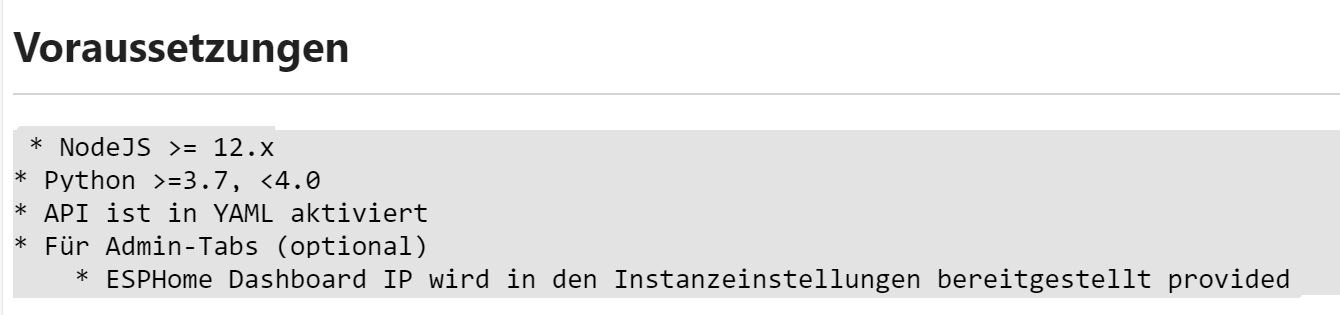
    4f2cde89-44c1-4094-bf31-50df411f5479-image.png

    Thomas BraunT Online
    Thomas BraunT Online
    Thomas Braun
    Most Active
    wrote on last edited by Thomas Braun
    #5

    @le-r-kelly

    Ja. Und python sollte auch zu python3 verlinkt werden.
    Da gab es aber soweit ich mich erinnere einen 'besseren' Weg als der von dir da aufgetriebene.

    update-alternatives --config python
    

    Linux-Werkzeugkasten:
    https://forum.iobroker.net/topic/42952/der-kleine-iobroker-linux-werkzeugkasten
    NodeJS Fixer Skript:
    https://forum.iobroker.net/topic/68035/iob-node-fix-skript
    iob_diag: curl -sLf -o diag.sh https://iobroker.net/diag.sh && bash diag.sh

    L 1 Reply Last reply
    0
    • Thomas BraunT Thomas Braun

      @le-r-kelly

      Ja. Und python sollte auch zu python3 verlinkt werden.
      Da gab es aber soweit ich mich erinnere einen 'besseren' Weg als der von dir da aufgetriebene.

      update-alternatives --config python
      
      L Offline
      L Offline
      LE-R.Kelly
      wrote on last edited by LE-R.Kelly
      #6

      @thomas-braun

      Ich hab noch das gefunden: https://wiki.ico.de/display/WIKI/Python+3+als+Standard+einstellen

      Das mit dem Verlinken verstehe ich nicht :-(

      pi@raspberrypi:~ $ update-alternatives --config python
      update-alternatives: Fehler: keine Alternativen für python
      

      Achso: Danke für Deine Hilfe :+1:

      Thomas BraunT 2 Replies Last reply
      0
      • L LE-R.Kelly

        @thomas-braun

        Ich hab noch das gefunden: https://wiki.ico.de/display/WIKI/Python+3+als+Standard+einstellen

        Das mit dem Verlinken verstehe ich nicht :-(

        pi@raspberrypi:~ $ update-alternatives --config python
        update-alternatives: Fehler: keine Alternativen für python
        

        Achso: Danke für Deine Hilfe :+1:

        Thomas BraunT Online
        Thomas BraunT Online
        Thomas Braun
        Most Active
        wrote on last edited by
        #7

        @le-r-kelly

        https://linuxconfig.org/how-to-change-from-default-to-alternative-python-version-on-debian-linux

        Ab

        Change python version system-wide with update-alternatives python

        wird es interessant.

        Linux-Werkzeugkasten:
        https://forum.iobroker.net/topic/42952/der-kleine-iobroker-linux-werkzeugkasten
        NodeJS Fixer Skript:
        https://forum.iobroker.net/topic/68035/iob-node-fix-skript
        iob_diag: curl -sLf -o diag.sh https://iobroker.net/diag.sh && bash diag.sh

        1 Reply Last reply
        0
        • L LE-R.Kelly

          @thomas-braun

          Ich hab noch das gefunden: https://wiki.ico.de/display/WIKI/Python+3+als+Standard+einstellen

          Das mit dem Verlinken verstehe ich nicht :-(

          pi@raspberrypi:~ $ update-alternatives --config python
          update-alternatives: Fehler: keine Alternativen für python
          

          Achso: Danke für Deine Hilfe :+1:

          Thomas BraunT Online
          Thomas BraunT Online
          Thomas Braun
          Most Active
          wrote on last edited by
          #8

          @le-r-kelly

          update-alternatives setzt die Links richtig. Mach das nach den beiden letzten HowTos, die machen beide das gleiche.

          Linux-Werkzeugkasten:
          https://forum.iobroker.net/topic/42952/der-kleine-iobroker-linux-werkzeugkasten
          NodeJS Fixer Skript:
          https://forum.iobroker.net/topic/68035/iob-node-fix-skript
          iob_diag: curl -sLf -o diag.sh https://iobroker.net/diag.sh && bash diag.sh

          1 Reply Last reply
          0
          • L Offline
            L Offline
            LE-R.Kelly
            wrote on last edited by
            #9

            Das war wohl nicht das Problem:

            pi@raspberrypi:~ $ python --version
            Python 3.7.3
            

            Die Installation des esphome-Adapters endet aber noch immer mit dem Fehlercode 25 :-(

            Thomas BraunT 1 Reply Last reply
            0
            • L LE-R.Kelly

              Das war wohl nicht das Problem:

              pi@raspberrypi:~ $ python --version
              Python 3.7.3
              

              Die Installation des esphome-Adapters endet aber noch immer mit dem Fehlercode 25 :-(

              Thomas BraunT Online
              Thomas BraunT Online
              Thomas Braun
              Most Active
              wrote on last edited by
              #10

              @le-r-kelly

              Mit welchen Meldungen?

              Linux-Werkzeugkasten:
              https://forum.iobroker.net/topic/42952/der-kleine-iobroker-linux-werkzeugkasten
              NodeJS Fixer Skript:
              https://forum.iobroker.net/topic/68035/iob-node-fix-skript
              iob_diag: curl -sLf -o diag.sh https://iobroker.net/diag.sh && bash diag.sh

              L 1 Reply Last reply
              0
              • Thomas BraunT Thomas Braun

                @le-r-kelly

                Mit welchen Meldungen?

                L Offline
                L Offline
                LE-R.Kelly
                wrote on last edited by
                #11

                @thomas-braun sagte in esphome - ERROR: Process exited with code 25:

                @le-r-kelly

                Mit welchen Meldungen?

                $ iobroker add esphome auto --host raspberrypi
                NPM version: 6.14.16
                Installing iobroker.esphome@0.2.4... (System call)
                > iobroker.esphome@0.2.4 install /opt/iobroker/node_modules/iobroker.esphome> npip install
                No python_modules directory; installing pip locally if needed.
                Successfully completed pip check.
                Collecting esphome>=2021.8
                Using cached esphome-2022.2.6-py2.py3-none-any.whl (2.1 MB)
                Collecting tornado>=3.2
                Using cached tornado-6.1.tar.gz (497 kB)
                Preparing metadata (setup.py): started
                Preparing metadata (setup.py): finished with status 'done'
                Collecting platformio==5.2.5
                Using cached platformio-5.2.5.tar.gz (218 kB)
                Preparing metadata (setup.py): started
                Preparing metadata (setup.py): finished with status 'done'
                Collecting aioesphomeapi==10.8.2
                Using cached aioesphomeapi-10.8.2-py2.py3-none-any.whl (49 kB)
                Collecting voluptuous==0.12.2
                Using cached voluptuous-0.12.2.tar.gz (48 kB)
                Preparing metadata (setup.py): started
                Preparing metadata (setup.py): finished with status 'done'
                Collecting kconfiglib==13.7.1
                Using cached kconfiglib-13.7.1-py2.py3-none-any.whl (145 kB)
                Collecting esptool==3.2
                Using cached esptool-3.2.tar.gz (206 kB)
                Preparing metadata (setup.py): started
                Preparing metadata (setup.py): finished with status 'done'
                Collecting tzdata>=2021.1
                Using cached tzdata-2022.1-py2.py3-none-any.whl (339 kB)
                Collecting click==8.0.3
                Using cached click-8.0.3-py3-none-any.whl (97 kB)
                Collecting paho-mqtt==1.6.1
                Using cached paho-mqtt-1.6.1.tar.gz (99 kB)
                Preparing metadata (setup.py): started
                Preparing metadata (setup.py): finished with status 'done'
                Collecting esphome-dashboard==20220209.0
                Using cached esphome_dashboard-20220209.0-py3-none-any.whl (592 kB)
                Collecting tzlocal==4.1
                Using cached tzlocal-4.1-py3-none-any.whl (19 kB)
                Collecting colorama==0.4.4
                Using cached colorama-0.4.4-py2.py3-none-any.whl (16 kB)
                Collecting zeroconf==0.38.3
                Using cached zeroconf-0.38.3-py3-none-any.whl (106 kB)
                Collecting PyYAML==6.0
                Using cached PyYAML-6.0.tar.gz (124 kB)
                Installing build dependencies: started
                Installing build dependencies: finished with status 'done'
                Getting requirements to build wheel: started
                Getting requirements to build wheel: finished with status 'done'
                Preparing metadata (pyproject.toml): started
                Preparing metadata (pyproject.toml): finished with status 'done'
                Collecting pyserial==3.5
                Using cached pyserial-3.5-py2.py3-none-any.whl (90 kB)
                Collecting noiseprotocol<1.0,>=0.3.1
                Using cached noiseprotocol-0.3.1-py3-none-any.whl (20 kB)
                Collecting protobuf<4.0,>=3.12.2
                Using cached protobuf-3.20.0-py2.py3-none-any.whl (162 kB)
                Collecting importlib-metadata
                Using cached importlib_metadata-4.11.3-py3-none-any.whl (18 kB)
                Collecting bitstring>=3.1.6
                Using cached bitstring-3.1.9-py3-none-any.whl (38 kB)
                Collecting cryptography>=2.1.4
                Using cached cryptography-36.0.2.tar.gz (572 kB)
                Installing build dependencies: started
                Installing build dependencies: finished with status 'error'
                host.raspberrypi Cannot install iobroker.esphome@0.2.4: 1
                ERROR: Process exited with code 25
                
                1 Reply Last reply
                0
                • L LE-R.Kelly

                  @le-r-kelly

                  Wenn ich das bei meiner Netzrecherche richtig verstanden habe ist Python = Python2 und auf einem Raspbian der Standard. Python3 ist zwar drauf, aber wird standardmäßig nicht verwendet, oder?

                  Da die Version von Python3 genügt, reicht es diese zum Standard zu machen? Ich habe dazu diese Seite gefunden: https://raspberrytips.com/install-latest-python-raspberry-pi/ unter "Make Python 3 the Default Version on Raspberry Pi OS"

                  haus-automatisierungH Online
                  haus-automatisierungH Online
                  haus-automatisierung
                  Developer Most Active
                  wrote on last edited by
                  #12

                  @le-r-kelly sagte in esphome - ERROR: Process exited with code 25:

                  Wenn ich das bei meiner Netzrecherche richtig verstanden habe ist Python = Python2 und auf einem Raspbian der Standard.

                  Nicht unbedingt. Auf einer frischen Bullseye Installation ist python 3 installiert und der Befehl python führt dann auch python3 aus:

                  python --version
                  Python 3.9.2
                  

                  Das Problem ist, dass der ioBroker installer aktuell python-dev installiert.

                  Das wiederum installiert python, was auf stable (aktuell bullseye) dazu führt, dass python-is-python2 installiert wird.

                  Also hat man danach einen Symlink von python auf python2, obwohl vorher alles gut war:

                  python --version
                  Python 2.7.18
                  

                  Zu dem Thema habe ich gerade auch einen Issue geöffnet:

                  https://github.com/ioBroker/ioBroker/issues/383

                  (heute getestet mit Raspbian Lite OS 64-Bit)

                  🧑‍🎓 Autor des beliebten ioBroker-Master-Kurses
                  🎥 Tutorials rund um das Thema DIY-Smart-Home: https://haus-automatisierung.com/
                  📚 Meine inoffizielle ioBroker Dokumentation

                  S HomoranH 2 Replies Last reply
                  1
                  • haus-automatisierungH haus-automatisierung

                    @le-r-kelly sagte in esphome - ERROR: Process exited with code 25:

                    Wenn ich das bei meiner Netzrecherche richtig verstanden habe ist Python = Python2 und auf einem Raspbian der Standard.

                    Nicht unbedingt. Auf einer frischen Bullseye Installation ist python 3 installiert und der Befehl python führt dann auch python3 aus:

                    python --version
                    Python 3.9.2
                    

                    Das Problem ist, dass der ioBroker installer aktuell python-dev installiert.

                    Das wiederum installiert python, was auf stable (aktuell bullseye) dazu führt, dass python-is-python2 installiert wird.

                    Also hat man danach einen Symlink von python auf python2, obwohl vorher alles gut war:

                    python --version
                    Python 2.7.18
                    

                    Zu dem Thema habe ich gerade auch einen Issue geöffnet:

                    https://github.com/ioBroker/ioBroker/issues/383

                    (heute getestet mit Raspbian Lite OS 64-Bit)

                    S Offline
                    S Offline
                    Sushibomba
                    wrote on last edited by
                    #13

                    @haus-automatisierung

                    Verstehe ich noch nicht so ganz. Bei mir schlägt die Installation von ESP Home auch fehl.
                    Was muss ich denn jetzt tun um ESP Home installieren zu können? :-S

                    HomoranH Thomas BraunT 2 Replies Last reply
                    0
                    • haus-automatisierungH haus-automatisierung

                      @le-r-kelly sagte in esphome - ERROR: Process exited with code 25:

                      Wenn ich das bei meiner Netzrecherche richtig verstanden habe ist Python = Python2 und auf einem Raspbian der Standard.

                      Nicht unbedingt. Auf einer frischen Bullseye Installation ist python 3 installiert und der Befehl python führt dann auch python3 aus:

                      python --version
                      Python 3.9.2
                      

                      Das Problem ist, dass der ioBroker installer aktuell python-dev installiert.

                      Das wiederum installiert python, was auf stable (aktuell bullseye) dazu führt, dass python-is-python2 installiert wird.

                      Also hat man danach einen Symlink von python auf python2, obwohl vorher alles gut war:

                      python --version
                      Python 2.7.18
                      

                      Zu dem Thema habe ich gerade auch einen Issue geöffnet:

                      https://github.com/ioBroker/ioBroker/issues/383

                      (heute getestet mit Raspbian Lite OS 64-Bit)

                      HomoranH Do not disturb
                      HomoranH Do not disturb
                      Homoran
                      Global Moderator Administrators
                      wrote on last edited by
                      #14

                      @haus-automatisierung sagte in esphome - ERROR: Process exited with code 25:

                      @le-r-kelly sagte in esphome - ERROR: Process exited with code 25:

                      Wenn ich das bei meiner Netzrecherche richtig verstanden habe ist Python = Python2 und auf einem Raspbian der Standard.

                      Nicht unbedingt.

                      das wird eine ältere Information gewesen sein. Bei Aufkommen von python3 wurde noch von sehr vielen Programmen python2 benutzt, resp. waren diese nicht python3 kompatibel.
                      Deswegen blieb der Aufruf python für python2 bestehen und python3 musste explizit so aufgerufen werden.
                      Mittlerweile sieht dies anders aus.

                      kein Support per PN! - Fragen im Forum stellen - es gibt fast nichts, was nicht auch für andere interessant ist.

                      Benutzt das Voting rechts unten im Beitrag wenn er euch geholfen hat.

                      der Installationsfixer: curl -fsL https://iobroker.net/fix.sh | bash -

                      1 Reply Last reply
                      0
                      • S Sushibomba

                        @haus-automatisierung

                        Verstehe ich noch nicht so ganz. Bei mir schlägt die Installation von ESP Home auch fehl.
                        Was muss ich denn jetzt tun um ESP Home installieren zu können? :-S

                        HomoranH Do not disturb
                        HomoranH Do not disturb
                        Homoran
                        Global Moderator Administrators
                        wrote on last edited by
                        #15

                        @sushibomba mach es mal in der konsole mit zusätzlichem --debug und poste den Output in code-tags

                        kein Support per PN! - Fragen im Forum stellen - es gibt fast nichts, was nicht auch für andere interessant ist.

                        Benutzt das Voting rechts unten im Beitrag wenn er euch geholfen hat.

                        der Installationsfixer: curl -fsL https://iobroker.net/fix.sh | bash -

                        1 Reply Last reply
                        1
                        • S Sushibomba

                          @haus-automatisierung

                          Verstehe ich noch nicht so ganz. Bei mir schlägt die Installation von ESP Home auch fehl.
                          Was muss ich denn jetzt tun um ESP Home installieren zu können? :-S

                          Thomas BraunT Online
                          Thomas BraunT Online
                          Thomas Braun
                          Most Active
                          wrote on last edited by
                          #16

                          @sushibomba

                          sudo apt update
                          sudo apt install python-is-python3 python-dev-is-python3
                          

                          Linux-Werkzeugkasten:
                          https://forum.iobroker.net/topic/42952/der-kleine-iobroker-linux-werkzeugkasten
                          NodeJS Fixer Skript:
                          https://forum.iobroker.net/topic/68035/iob-node-fix-skript
                          iob_diag: curl -sLf -o diag.sh https://iobroker.net/diag.sh && bash diag.sh

                          S 2 Replies Last reply
                          0
                          • S Offline
                            S Offline
                            Sushibomba
                            wrote on last edited by Sushibomba
                            #17

                            @Homoran Soll ich das erst mal probieren was @Thomas-braun vorgeschlagen hat?

                            1 Reply Last reply
                            0
                            • Thomas BraunT Thomas Braun

                              @sushibomba

                              sudo apt update
                              sudo apt install python-is-python3 python-dev-is-python3
                              
                              S Offline
                              S Offline
                              Sushibomba
                              wrote on last edited by
                              #18

                              @thomas-braun

                              Also das machen und danach nochmal versuchen über die Beta Repo zu installieren?

                              Thomas BraunT 1 Reply Last reply
                              0
                              • S Sushibomba

                                @thomas-braun

                                Also das machen und danach nochmal versuchen über die Beta Repo zu installieren?

                                Thomas BraunT Online
                                Thomas BraunT Online
                                Thomas Braun
                                Most Active
                                wrote on last edited by
                                #19

                                @sushibomba python kannst du wie oben geschrieben sauber installieren.
                                Von Beta würde ich ohne triftigen Grund die Finger lassen. Versuch erstmal mit der stable Version dein Glück.
                                Die mit --debug-Option installieren.

                                Linux-Werkzeugkasten:
                                https://forum.iobroker.net/topic/42952/der-kleine-iobroker-linux-werkzeugkasten
                                NodeJS Fixer Skript:
                                https://forum.iobroker.net/topic/68035/iob-node-fix-skript
                                iob_diag: curl -sLf -o diag.sh https://iobroker.net/diag.sh && bash diag.sh

                                FredFF 1 Reply Last reply
                                0
                                • Thomas BraunT Thomas Braun

                                  @sushibomba python kannst du wie oben geschrieben sauber installieren.
                                  Von Beta würde ich ohne triftigen Grund die Finger lassen. Versuch erstmal mit der stable Version dein Glück.
                                  Die mit --debug-Option installieren.

                                  FredFF Online
                                  FredFF Online
                                  FredF
                                  Most Active Forum Testing
                                  wrote on last edited by
                                  #20

                                  @thomas-braun sagte in esphome - ERROR: Process exited with code 25:

                                  Versuch erstmal mit der stable Version dein Glück.

                                  Den ESPHome Adapter gibt es nur als beta

                                  2021.02.27	
                                  github:	0.2.4
                                  latest:	0.2.4 for 11 months
                                  stable:	-.-.-
                                  
                                  1 Reply Last reply
                                  0
                                  • Thomas BraunT Thomas Braun

                                    @sushibomba

                                    sudo apt update
                                    sudo apt install python-is-python3 python-dev-is-python3
                                    
                                    S Offline
                                    S Offline
                                    Sushibomba
                                    wrote on last edited by
                                    #21

                                    @thomas-braun

                                    sudo apt install python-is-python3 python-dev-is-python3                  Reading package lists... Done
                                    Building dependency tree... Done
                                    Reading state information... Done
                                    The following packages were automatically installed and are no longer required:
                                      libpython2-dev libpython2.7 libpython2.7-dev python2-dev python2.7-dev
                                    Use 'sudo apt autoremove' to remove them.
                                    The following additional packages will be installed:
                                      libpython3-dev libpython3.9-dev python3-dev python3.9-dev
                                    The following packages will be REMOVED:
                                      python-dev-is-python2 python-is-python2
                                    The following NEW packages will be installed:
                                      libpython3-dev libpython3.9-dev python-dev-is-python3 python-is-python3 python3-dev
                                      python3.9-dev
                                    0 upgraded, 6 newly installed, 2 to remove and 90 not upgraded.
                                    Need to get 3,606 kB of archives.
                                    After this operation, 14.7 MB of additional disk space will be used.
                                    Do you want to continue? [Y/n]


                                    Soll ich die Installation durchführen?

                                    Thomas BraunT 1 Reply Last reply
                                    0
                                    • S Sushibomba

                                      @thomas-braun

                                      sudo apt install python-is-python3 python-dev-is-python3                  Reading package lists... Done
                                      Building dependency tree... Done
                                      Reading state information... Done
                                      The following packages were automatically installed and are no longer required:
                                        libpython2-dev libpython2.7 libpython2.7-dev python2-dev python2.7-dev
                                      Use 'sudo apt autoremove' to remove them.
                                      The following additional packages will be installed:
                                        libpython3-dev libpython3.9-dev python3-dev python3.9-dev
                                      The following packages will be REMOVED:
                                        python-dev-is-python2 python-is-python2
                                      The following NEW packages will be installed:
                                        libpython3-dev libpython3.9-dev python-dev-is-python3 python-is-python3 python3-dev
                                        python3.9-dev
                                      0 upgraded, 6 newly installed, 2 to remove and 90 not upgraded.
                                      Need to get 3,606 kB of archives.
                                      After this operation, 14.7 MB of additional disk space will be used.
                                      Do you want to continue? [Y/n]


                                      Soll ich die Installation durchführen?

                                      Thomas BraunT Online
                                      Thomas BraunT Online
                                      Thomas Braun
                                      Most Active
                                      wrote on last edited by
                                      #22

                                      @sushibomba

                                      Ja.

                                      Linux-Werkzeugkasten:
                                      https://forum.iobroker.net/topic/42952/der-kleine-iobroker-linux-werkzeugkasten
                                      NodeJS Fixer Skript:
                                      https://forum.iobroker.net/topic/68035/iob-node-fix-skript
                                      iob_diag: curl -sLf -o diag.sh https://iobroker.net/diag.sh && bash diag.sh

                                      S 1 Reply Last reply
                                      1
                                      • Thomas BraunT Thomas Braun

                                        @sushibomba

                                        Ja.

                                        S Offline
                                        S Offline
                                        Sushibomba
                                        wrote on last edited by Sushibomba
                                        #23

                                        @thomas-braun
                                        Ok hab ich. Muss ich danach noch irgendwelche Befehle ausführen um alte Dateien zu löschen oder so? Und sollte ich den Pi dann noch neustarten?

                                        Thomas BraunT 1 Reply Last reply
                                        0
                                        • S Sushibomba

                                          @thomas-braun
                                          Ok hab ich. Muss ich danach noch irgendwelche Befehle ausführen um alte Dateien zu löschen oder so? Und sollte ich den Pi dann noch neustarten?

                                          Thomas BraunT Online
                                          Thomas BraunT Online
                                          Thomas Braun
                                          Most Active
                                          wrote on last edited by
                                          #24

                                          @sushibomba

                                          Use 'sudo apt autoremove' to remove them.

                                          Aber lös den Update-Stau mal endlich auf:

                                          and 90 not upgraded.

                                          iobroker stop
                                          sudo apt update
                                          sudo apt full-upgrade
                                          sudo apt autoremove
                                          sudo reboot
                                          

                                          Linux-Werkzeugkasten:
                                          https://forum.iobroker.net/topic/42952/der-kleine-iobroker-linux-werkzeugkasten
                                          NodeJS Fixer Skript:
                                          https://forum.iobroker.net/topic/68035/iob-node-fix-skript
                                          iob_diag: curl -sLf -o diag.sh https://iobroker.net/diag.sh && bash diag.sh

                                          S 1 Reply Last reply
                                          1
                                          Reply
                                          • Reply as topic
                                          Log in to reply
                                          • Oldest to Newest
                                          • Newest to Oldest
                                          • Most Votes


                                          Support us

                                          ioBroker
                                          Community Adapters
                                          Donate
                                          FAQ Cloud / IOT
                                          HowTo: Node.js-Update
                                          HowTo: Backup/Restore
                                          Downloads
                                          BLOG

                                          706

                                          Online

                                          32.6k

                                          Users

                                          82.1k

                                          Topics

                                          1.3m

                                          Posts
                                          Community
                                          Impressum | Datenschutz-Bestimmungen | Nutzungsbedingungen | Einwilligungseinstellungen
                                          ioBroker Community 2014-2025
                                          logo
                                          • Login

                                          • Don't have an account? Register

                                          • Login or register to search.
                                          • First post
                                            Last post
                                          0
                                          • Home
                                          • Recent
                                          • Tags
                                          • Unread 0
                                          • Categories
                                          • Unreplied
                                          • Popular
                                          • GitHub
                                          • Docu
                                          • Hilfe
