



Weiter zum Inhalt
  • Home
  • Aktuell
  • Tags
  • 0 Ungelesen 0
  • Kategorien
  • Unreplied
  • Beliebt
  • GitHub
  • Docu
  • Hilfe
Skins
  • Hell
  • Brite
  • Cerulean
  • Cosmo
  • Flatly
  • Journal
  • Litera
  • Lumen
  • Lux
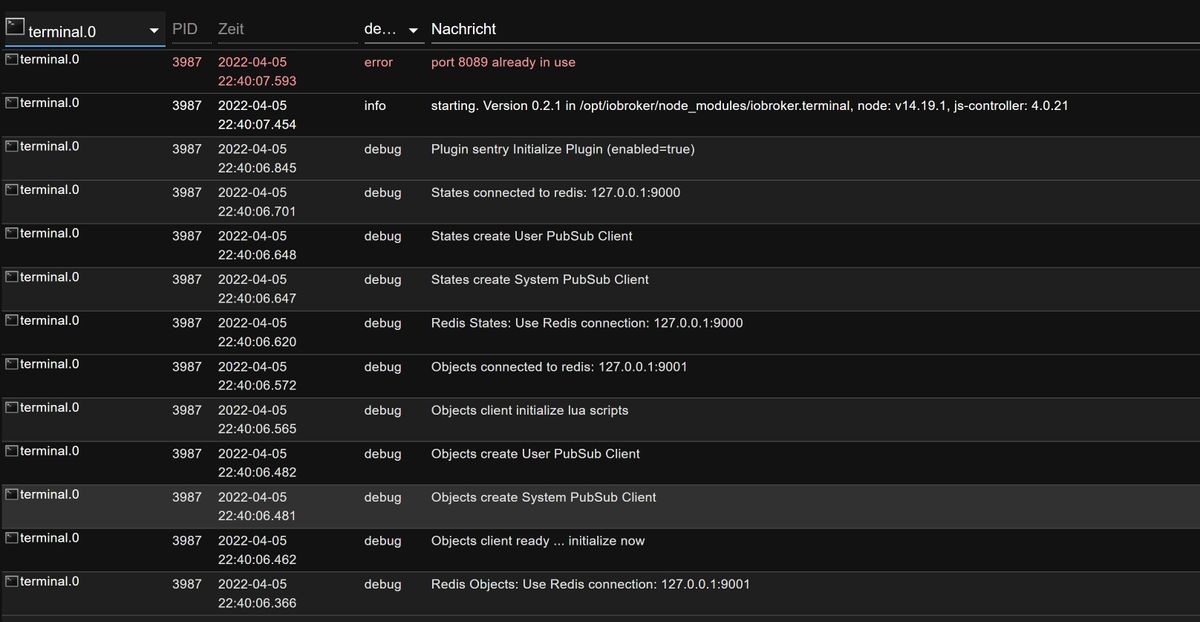
  • Materia
  • Minty
  • Morph
  • Pulse
  • Sandstone
  • Simplex
  • Sketchy
  • Spacelab
  • United
  • Yeti
  • Zephyr
  • Dunkel
  • Cyborg
  • Darkly
  • Quartz
  • Slate
  • Solar
  • Superhero
  • Vapor

  • Standard: (Kein Skin)
  • Kein Skin
Einklappen
ioBroker Logo

Community Forum

donate donate
  1. ioBroker Community Home
  2. Deutsch
  3. ioBroker Allgemein
  4. Terminal Adapter

NEWS

  • Neues YouTube-Video: Visualisierung im Devices-Adapter
    BluefoxB
    Bluefox
    11
    1
    255

  • Neuer ioBroker-Blog online: Monatsrückblick März/April 2026
    BluefoxB
    Bluefox
    8
    1
    1.8k

  • Verwendung von KI bitte immer deutlich kennzeichnen
    HomoranH
    Homoran
    11
    1
    771

Terminal Adapter

Geplant Angeheftet Gesperrt Verschoben ioBroker Allgemein
31 Beiträge 6 Kommentatoren 2.6k Aufrufe 6 Beobachtet
  • Älteste zuerst
  • Neuste zuerst
  • Meiste Stimmen
Antworten
  • In einem neuen Thema antworten
Anmelden zum Antworten
Dieses Thema wurde gelöscht. Nur Nutzer mit entsprechenden Rechten können es sehen.
  • A Atticus68

    @crunchip

    pi@ioBrokerSQL44:~ $ netstat -tuplen
    (Es konnten nicht alle Prozesse identifiziert werden; Informationen über
    nicht-eigene Processe werden nicht angezeigt; Root kann sie anzeigen.)
    Aktive Internetverbindungen (Nur Server)
    Proto Recv-Q Send-Q Local Address           Foreign Address         State       Benutzer   Inode      PID/Program name
    tcp        0      0 0.0.0.0:22              0.0.0.0:*               LISTEN      0          14807      -
    tcp        0      0 127.0.0.1:25            0.0.0.0:*               LISTEN      0          18739      -
    tcp        0      0 0.0.0.0:3306            0.0.0.0:*               LISTEN      110        14963      -
    tcp6       0      0 :::22                   :::*                    LISTEN      0          14809      -
    tcp6       0      0 ::1:25                  :::*                    LISTEN      0          18740      -
    tcp6       0      0 :::80                   :::*                    LISTEN      0          17472      -
    udp        0      0 0.0.0.0:5353            0.0.0.0:*                           108        13964      -
    udp        0      0 0.0.0.0:40374           0.0.0.0:*                           108        13966      -
    udp        0      0 0.0.0.0:68              0.0.0.0:*                           0          15933      -
    udp6       0      0 :::5353                 :::*                                108        13965      -
    udp6       0      0 :::42899                :::*                                108        13967      -
    pi@ioBrokerSQL44:~ $


    HomoranH Nicht stören
    HomoranH Nicht stören
    Homoran
    Global Moderator Administrators
    schrieb am zuletzt editiert von
    #7

    @atticus mach bitte genau das was @crunchip schrieb

    kein Support per PN! - Fragen im Forum stellen -
    Benutzt das Voting rechts unten im Beitrag wenn er euch geholfen hat.
    Das Forum freut sich über eine Spende. Benutzt dazu den Spendenbutton oben rechts. Danke!
    der Installationsfixer: curl -fsL https://iobroker.net/fix.sh | bash -

    A 1 Antwort Letzte Antwort
    1
    • HomoranH Homoran

      @atticus mach bitte genau das was @crunchip schrieb

      A Offline
      A Offline
      Atticus68
      schrieb am zuletzt editiert von
      #8

      @homoran sorry

      pi@ioBrokerSQL44:~ $ sudo netstat -tulpen
      Aktive Internetverbindungen (Nur Server)
      Proto Recv-Q Send-Q Local Address           Foreign Address         State       Benutzer   Inode      PID/Program name
      tcp        0      0 0.0.0.0:22              0.0.0.0:*               LISTEN      0          14807      567/sshd
      tcp        0      0 127.0.0.1:25            0.0.0.0:*               LISTEN      0          18739      922/exim4
      tcp        0      0 0.0.0.0:3306            0.0.0.0:*               LISTEN      110        14963      612/mysqld
      tcp6       0      0 :::22                   :::*                    LISTEN      0          14809      567/sshd
      tcp6       0      0 ::1:25                  :::*                    LISTEN      0          18740      922/exim4
      tcp6       0      0 :::80                   :::*                    LISTEN      0          17472      613/apache2
      udp        0      0 0.0.0.0:5353            0.0.0.0:*                           108        13964      367/avahi-daemon: r
      udp        0      0 0.0.0.0:40374           0.0.0.0:*                           108        13966      367/avahi-daemon: r
      udp        0      0 0.0.0.0:68              0.0.0.0:*                           0          15933      541/dhcpcd
      udp6       0      0 :::5353                 :::*                                108        13965      367/avahi-daemon: r
      udp6       0      0 :::42899                :::*                                108        13967      367/avahi-daemon: r
      pi@ioBrokerSQL44:~ $
      
      
      crunchipC 1 Antwort Letzte Antwort
      0
      • A Atticus68

        @homoran sorry

        pi@ioBrokerSQL44:~ $ sudo netstat -tulpen
        Aktive Internetverbindungen (Nur Server)
        Proto Recv-Q Send-Q Local Address           Foreign Address         State       Benutzer   Inode      PID/Program name
        tcp        0      0 0.0.0.0:22              0.0.0.0:*               LISTEN      0          14807      567/sshd
        tcp        0      0 127.0.0.1:25            0.0.0.0:*               LISTEN      0          18739      922/exim4
        tcp        0      0 0.0.0.0:3306            0.0.0.0:*               LISTEN      110        14963      612/mysqld
        tcp6       0      0 :::22                   :::*                    LISTEN      0          14809      567/sshd
        tcp6       0      0 ::1:25                  :::*                    LISTEN      0          18740      922/exim4
        tcp6       0      0 :::80                   :::*                    LISTEN      0          17472      613/apache2
        udp        0      0 0.0.0.0:5353            0.0.0.0:*                           108        13964      367/avahi-daemon: r
        udp        0      0 0.0.0.0:40374           0.0.0.0:*                           108        13966      367/avahi-daemon: r
        udp        0      0 0.0.0.0:68              0.0.0.0:*                           0          15933      541/dhcpcd
        udp6       0      0 :::5353                 :::*                                108        13965      367/avahi-daemon: r
        udp6       0      0 :::42899                :::*                                108        13967      367/avahi-daemon: r
        pi@ioBrokerSQL44:~ $
        
        
        crunchipC Abwesend
        crunchipC Abwesend
        crunchip
        Forum Testing Most Active Developer
        schrieb am zuletzt editiert von
        #9

        @atticus bin ich blind, da läuft doch nichts, ich hatte vermutet, da läuft noch influx und grafana mit drauf, das wäre der Grund gewesen ,warum der Port beim terminal schon belegt ist.

        umgestiegen von Proxmox auf Unraid

        HomoranH 1 Antwort Letzte Antwort
        0
        • crunchipC crunchip

          @atticus bin ich blind, da läuft doch nichts, ich hatte vermutet, da läuft noch influx und grafana mit drauf, das wäre der Grund gewesen ,warum der Port beim terminal schon belegt ist.

          HomoranH Nicht stören
          HomoranH Nicht stören
          Homoran
          Global Moderator Administrators
          schrieb am zuletzt editiert von Homoran
          #10

          @crunchip da läuft nur apache auf 80.
          und wenn ich das richtig erkenne war der Terminal vorher auf 80.

          ggf. hängt es da noch, zeigt aber die neue 8080 an


          Allerdings frage ich mich bei dem Hostnamen, ob das der richtige host ist.

          kein Support per PN! - Fragen im Forum stellen -
          Benutzt das Voting rechts unten im Beitrag wenn er euch geholfen hat.
          Das Forum freut sich über eine Spende. Benutzt dazu den Spendenbutton oben rechts. Danke!
          der Installationsfixer: curl -fsL https://iobroker.net/fix.sh | bash -

          crunchipC A 2 Antworten Letzte Antwort
          0
          • HomoranH Homoran

            @crunchip da läuft nur apache auf 80.
            und wenn ich das richtig erkenne war der Terminal vorher auf 80.

            ggf. hängt es da noch, zeigt aber die neue 8080 an


            Allerdings frage ich mich bei dem Hostnamen, ob das der richtige host ist.

            crunchipC Abwesend
            crunchipC Abwesend
            crunchip
            Forum Testing Most Active Developer
            schrieb am zuletzt editiert von
            #11

            @homoran hab den terminal nicht in Verwendung, daher kann ich nichts zu sagen. Müsst ich mal nachsehen, installiert isser ja noch.
            Gut möglich, das es nicht der iobroker ist

            umgestiegen von Proxmox auf Unraid

            1 Antwort Letzte Antwort
            0
            • HomoranH Homoran

              @crunchip da läuft nur apache auf 80.
              und wenn ich das richtig erkenne war der Terminal vorher auf 80.

              ggf. hängt es da noch, zeigt aber die neue 8080 an


              Allerdings frage ich mich bei dem Hostnamen, ob das der richtige host ist.

              A Offline
              A Offline
              Atticus68
              schrieb am zuletzt editiert von
              #12

              Allerdings frage ich mich bei dem Hostnamen, ob das der richtige host ist.

              pi@ioBroker482:~ $ sudo netstat -tulpe
              Aktive Internetverbindungen (Nur Server)
              Proto Recv-Q Send-Q Local Address           Foreign Address         State       Benutzer   Inode      PID/Program name
              tcp        0      0 ioBroker482.fritz.:2001 0.0.0.0:*               LISTEN      iobroker   189038     9074/io.hm-rpc.0
              tcp        0      0 127.0.0.53:domain       0.0.0.0:*               LISTEN      systemd-resolve 13897      335/systemd-resolve
              tcp        0      0 0.0.0.0:ssh             0.0.0.0:*               LISTEN      root       18547      483/sshd
              tcp        0      0 localhost:ipp           0.0.0.0:*               LISTEN      root       15788      382/cupsd
              tcp        0      0 0.0.0.0:1880            0.0.0.0:*               LISTEN      iobroker   1024133    6816/node-red
              tcp        0      0 ioBroker482:pipe-server 0.0.0.0:*               LISTEN      iobroker   187847     9081/io.hm-rpc.1
              tcp        0      0 ioBroker482.fritz.:8701 0.0.0.0:*               LISTEN      iobroker   187867     9100/io.hm-rpc.2
              tcp        0      0 ioBroker482.fritz.:8702 0.0.0.0:*               LISTEN      iobroker   189569     9115/io.hm-rpc.3
              tcp        0      0 localhost:9000          0.0.0.0:*               LISTEN      iobroker   186010     8952/iobroker.js-co
              tcp        0      0 localhost:9001          0.0.0.0:*               LISTEN      iobroker   187676     8952/iobroker.js-co
              tcp        0      0 0.0.0.0:hostmon         0.0.0.0:*               LISTEN      systemd-resolve 13891      335/systemd-resolve
              tcp        0      0 0.0.0.0:5900            0.0.0.0:*               LISTEN      root       17144      477/vncserver-x11-c
              tcp        0      0 ioBroker482.fritz:18701 0.0.0.0:*               LISTEN      iobroker   189592     9138/io.hm-rpc.4
              tcp6       0      0 [::]:tproxy             [::]:*                  LISTEN      iobroker   186063     8978/io.admin.0
              tcp6       0      0 [::]:8082               [::]:*                  LISTEN      iobroker   195709     10015/io.web.0
              tcp6       0      0 [::]:8084               [::]:*                  LISTEN      iobroker   190463     9489/io.socketio.0
              tcp6       0      0 [::]:ssh                [::]:*                  LISTEN      root       18549      483/sshd
              tcp6       0      0 [::]:8087               [::]:*                  LISTEN      iobroker   191779     9457/io.simple-api.
              tcp6       0      0 localhost:ipp           [::]:*                  LISTEN      root       15787      382/cupsd
              tcp6       0      0 [::]:hostmon            [::]:*                  LISTEN      systemd-resolve 13894      335/systemd-resolve
              tcp6       0      0 [::]:5900               [::]:*                  LISTEN      root       17143      477/vncserver-x11-c
              udp        0      0 0.0.0.0:5683            0.0.0.0:*                           iobroker   189895     9287/io.shelly.0
              udp        0      0 127.0.0.53:domain       0.0.0.0:*                           systemd-resolve 13896      335/systemd-resolve
              udp        0      0 0.0.0.0:ipp             0.0.0.0:*                           root       17047      468/cups-browsed
              udp        0      0 0.0.0.0:53421           0.0.0.0:*                           iobroker   187910     9172/io.mihome-vacu
              udp        0      0 0.0.0.0:53980           0.0.0.0:*                           avahi      15781      410/avahi-daemon: r
              udp        0      0 224.0.0.251:mdns        0.0.0.0:*                           pi         21929      682/index.html?l%5B
              udp        0      0 0.0.0.0:mdns            0.0.0.0:*                           avahi      15779      410/avahi-daemon: r
              udp        0      0 0.0.0.0:hostmon         0.0.0.0:*                           systemd-resolve 13890      335/systemd-resolve
              udp6       0      0 [::]:mdns               [::]:*                              avahi      15780      410/avahi-daemon: r
              udp6       0      0 [::]:hostmon            [::]:*                              systemd-resolve 13893      335/systemd-resolve
              udp6       0      0 [::]:36231              [::]:*                              avahi      15782      410/avahi-daemon: r
              pi@ioBroker482:~ $


              Noch mal Sorry, da hatte ich wohl die falsche Brille auf
              
              Thomas BraunT 1 Antwort Letzte Antwort
              0
              • A Atticus68

                Allerdings frage ich mich bei dem Hostnamen, ob das der richtige host ist.

                pi@ioBroker482:~ $ sudo netstat -tulpe
                Aktive Internetverbindungen (Nur Server)
                Proto Recv-Q Send-Q Local Address           Foreign Address         State       Benutzer   Inode      PID/Program name
                tcp        0      0 ioBroker482.fritz.:2001 0.0.0.0:*               LISTEN      iobroker   189038     9074/io.hm-rpc.0
                tcp        0      0 127.0.0.53:domain       0.0.0.0:*               LISTEN      systemd-resolve 13897      335/systemd-resolve
                tcp        0      0 0.0.0.0:ssh             0.0.0.0:*               LISTEN      root       18547      483/sshd
                tcp        0      0 localhost:ipp           0.0.0.0:*               LISTEN      root       15788      382/cupsd
                tcp        0      0 0.0.0.0:1880            0.0.0.0:*               LISTEN      iobroker   1024133    6816/node-red
                tcp        0      0 ioBroker482:pipe-server 0.0.0.0:*               LISTEN      iobroker   187847     9081/io.hm-rpc.1
                tcp        0      0 ioBroker482.fritz.:8701 0.0.0.0:*               LISTEN      iobroker   187867     9100/io.hm-rpc.2
                tcp        0      0 ioBroker482.fritz.:8702 0.0.0.0:*               LISTEN      iobroker   189569     9115/io.hm-rpc.3
                tcp        0      0 localhost:9000          0.0.0.0:*               LISTEN      iobroker   186010     8952/iobroker.js-co
                tcp        0      0 localhost:9001          0.0.0.0:*               LISTEN      iobroker   187676     8952/iobroker.js-co
                tcp        0      0 0.0.0.0:hostmon         0.0.0.0:*               LISTEN      systemd-resolve 13891      335/systemd-resolve
                tcp        0      0 0.0.0.0:5900            0.0.0.0:*               LISTEN      root       17144      477/vncserver-x11-c
                tcp        0      0 ioBroker482.fritz:18701 0.0.0.0:*               LISTEN      iobroker   189592     9138/io.hm-rpc.4
                tcp6       0      0 [::]:tproxy             [::]:*                  LISTEN      iobroker   186063     8978/io.admin.0
                tcp6       0      0 [::]:8082               [::]:*                  LISTEN      iobroker   195709     10015/io.web.0
                tcp6       0      0 [::]:8084               [::]:*                  LISTEN      iobroker   190463     9489/io.socketio.0
                tcp6       0      0 [::]:ssh                [::]:*                  LISTEN      root       18549      483/sshd
                tcp6       0      0 [::]:8087               [::]:*                  LISTEN      iobroker   191779     9457/io.simple-api.
                tcp6       0      0 localhost:ipp           [::]:*                  LISTEN      root       15787      382/cupsd
                tcp6       0      0 [::]:hostmon            [::]:*                  LISTEN      systemd-resolve 13894      335/systemd-resolve
                tcp6       0      0 [::]:5900               [::]:*                  LISTEN      root       17143      477/vncserver-x11-c
                udp        0      0 0.0.0.0:5683            0.0.0.0:*                           iobroker   189895     9287/io.shelly.0
                udp        0      0 127.0.0.53:domain       0.0.0.0:*                           systemd-resolve 13896      335/systemd-resolve
                udp        0      0 0.0.0.0:ipp             0.0.0.0:*                           root       17047      468/cups-browsed
                udp        0      0 0.0.0.0:53421           0.0.0.0:*                           iobroker   187910     9172/io.mihome-vacu
                udp        0      0 0.0.0.0:53980           0.0.0.0:*                           avahi      15781      410/avahi-daemon: r
                udp        0      0 224.0.0.251:mdns        0.0.0.0:*                           pi         21929      682/index.html?l%5B
                udp        0      0 0.0.0.0:mdns            0.0.0.0:*                           avahi      15779      410/avahi-daemon: r
                udp        0      0 0.0.0.0:hostmon         0.0.0.0:*                           systemd-resolve 13890      335/systemd-resolve
                udp6       0      0 [::]:mdns               [::]:*                              avahi      15780      410/avahi-daemon: r
                udp6       0      0 [::]:hostmon            [::]:*                              systemd-resolve 13893      335/systemd-resolve
                udp6       0      0 [::]:36231              [::]:*                              avahi      15782      410/avahi-daemon: r
                pi@ioBroker482:~ $


                Noch mal Sorry, da hatte ich wohl die falsche Brille auf
                
                Thomas BraunT Online
                Thomas BraunT Online
                Thomas Braun
                Most Active
                schrieb am zuletzt editiert von Thomas Braun
                #13

                @atticus

                cups...
                VNC...
                Kompletter Desktop aufgezimmert.

                Linux-Werkzeugkasten:
                https://forum.iobroker.net/topic/42952/der-kleine-iobroker-linux-werkzeugkasten
                NodeJS Fixer Skript:
                https://forum.iobroker.net/topic/68035/iob-node-fix-skript
                iob_diag: curl -sLf -o diag.sh https://iobroker.net/diag.sh && bash diag.sh

                A 2 Antworten Letzte Antwort
                0
                • Thomas BraunT Thomas Braun

                  @atticus

                  cups...
                  VNC...
                  Kompletter Desktop aufgezimmert.

                  A Offline
                  A Offline
                  Atticus68
                  schrieb am zuletzt editiert von
                  #14

                  @thomas-braun ja, ich brauch den Desktop auf diesem Rechner

                  Thomas BraunT 1 Antwort Letzte Antwort
                  0
                  • A Atticus68

                    @thomas-braun ja, ich brauch den Desktop auf diesem Rechner

                    Thomas BraunT Online
                    Thomas BraunT Online
                    Thomas Braun
                    Most Active
                    schrieb am zuletzt editiert von
                    #15

                    @atticus vnc braucht kein Mensch auf einem Server.

                    Linux-Werkzeugkasten:
                    https://forum.iobroker.net/topic/42952/der-kleine-iobroker-linux-werkzeugkasten
                    NodeJS Fixer Skript:
                    https://forum.iobroker.net/topic/68035/iob-node-fix-skript
                    iob_diag: curl -sLf -o diag.sh https://iobroker.net/diag.sh && bash diag.sh

                    A 1 Antwort Letzte Antwort
                    0
                    • Thomas BraunT Thomas Braun

                      @atticus

                      cups...
                      VNC...
                      Kompletter Desktop aufgezimmert.

                      A Offline
                      A Offline
                      Atticus68
                      schrieb am zuletzt editiert von
                      #16

                      @thomas-braun Das sollte das Terminal doch aber nicht behindern, oder?

                      1 Antwort Letzte Antwort
                      0
                      • Thomas BraunT Thomas Braun

                        @atticus vnc braucht kein Mensch auf einem Server.

                        A Offline
                        A Offline
                        Atticus68
                        schrieb am zuletzt editiert von
                        #17

                        @thomas-braun ok, vnc kann runter, ändert aber nichts an der Sache

                        A 1 Antwort Letzte Antwort
                        0
                        • A Atticus68

                          @thomas-braun ok, vnc kann runter, ändert aber nichts an der Sache

                          A Offline
                          A Offline
                          Atticus68
                          schrieb am zuletzt editiert von
                          #18

                          Hab den VNC deaktiviert

                          pi@ioBroker482:~ $ sudo netstat -tulpe
                          Aktive Internetverbindungen (Nur Server)
                          Proto Recv-Q Send-Q Local Address           Foreign Address         State       Benutzer   Inode      PID/Program name
                          tcp        0      0 ioBroker482.fritz.:2001 0.0.0.0:*               LISTEN      iobroker   22855      1313/io.hm-rpc.0
                          tcp        0      0 127.0.0.53:domain       0.0.0.0:*               LISTEN      systemd-resolve 17517      321/systemd-resolve
                          tcp        0      0 0.0.0.0:ssh             0.0.0.0:*               LISTEN      root       16107      480/sshd
                          tcp        0      0 localhost:ipp           0.0.0.0:*               LISTEN      root       15809      358/cupsd
                          tcp        0      0 0.0.0.0:1880            0.0.0.0:*               LISTEN      iobroker   23722      1233/node-red
                          tcp        0      0 ioBroker482:pipe-server 0.0.0.0:*               LISTEN      iobroker   23919      1321/io.hm-rpc.1
                          tcp        0      0 ioBroker482.fritz.:8701 0.0.0.0:*               LISTEN      iobroker   20419      1332/io.hm-rpc.2
                          tcp        0      0 ioBroker482.fritz.:8702 0.0.0.0:*               LISTEN      iobroker   20464      1365/io.hm-rpc.3
                          tcp        0      0 localhost:9000          0.0.0.0:*               LISTEN      iobroker   19947      456/iobroker.js-con
                          tcp        0      0 localhost:9001          0.0.0.0:*               LISTEN      iobroker   21868      456/iobroker.js-con
                          tcp        0      0 0.0.0.0:hostmon         0.0.0.0:*               LISTEN      systemd-resolve 17511      321/systemd-resolve
                          tcp        0      0 ioBroker482.fritz:18701 0.0.0.0:*               LISTEN      iobroker   22973      1377/io.hm-rpc.4
                          tcp6       0      0 [::]:tproxy             [::]:*                  LISTEN      iobroker   22274      1034/io.admin.0
                          tcp6       0      0 [::]:8084               [::]:*                  LISTEN      iobroker   27936      1816/io.socketio.0
                          tcp6       0      0 [::]:ssh                [::]:*                  LISTEN      root       16109      480/sshd
                          tcp6       0      0 [::]:8087               [::]:*                  LISTEN      iobroker   26886      1801/io.simple-api.
                          tcp6       0      0 localhost:ipp           [::]:*                  LISTEN      root       15808      358/cupsd
                          tcp6       0      0 [::]:hostmon            [::]:*                  LISTEN      systemd-resolve 17514      321/systemd-resolve
                          udp        0      0 0.0.0.0:5683            0.0.0.0:*                           iobroker   23123      1510/io.shelly.0
                          udp        0      0 127.0.0.53:domain       0.0.0.0:*                           systemd-resolve 17516      321/systemd-resolve
                          udp        0      0 0.0.0.0:44141           0.0.0.0:*                           avahi      15797      371/avahi-daemon: r
                          udp        0      0 0.0.0.0:ipp             0.0.0.0:*                           root       16167      453/cups-browsed
                          udp        0      0 0.0.0.0:53421           0.0.0.0:*                           iobroker   24719      1434/io.mihome-vacu
                          udp        0      0 224.0.0.251:mdns        0.0.0.0:*                           pi         19431      669/index.html?l%5B
                          udp        0      0 0.0.0.0:mdns            0.0.0.0:*                           avahi      15795      371/avahi-daemon: r
                          udp        0      0 0.0.0.0:hostmon         0.0.0.0:*                           systemd-resolve 17510      321/systemd-resolve
                          udp        0      0 ioBroker482.fritz:45815 0.0.0.0:*                           pi         27111      669/index.html?l%5B
                          udp6       0      0 [::]:mdns               [::]:*                              avahi      15796      371/avahi-daemon: r
                          udp6       0      0 [::]:hostmon            [::]:*                              systemd-resolve 17513      321/systemd-resolve
                          udp6       0      0 [::]:44848              [::]:*                              avahi      15798      371/avahi-daemon: r
                          pi@ioBroker482:~ $
                          
                          
                          Thomas BraunT crunchipC 2 Antworten Letzte Antwort
                          0
                          • A Atticus68

                            Hab den VNC deaktiviert

                            pi@ioBroker482:~ $ sudo netstat -tulpe
                            Aktive Internetverbindungen (Nur Server)
                            Proto Recv-Q Send-Q Local Address           Foreign Address         State       Benutzer   Inode      PID/Program name
                            tcp        0      0 ioBroker482.fritz.:2001 0.0.0.0:*               LISTEN      iobroker   22855      1313/io.hm-rpc.0
                            tcp        0      0 127.0.0.53:domain       0.0.0.0:*               LISTEN      systemd-resolve 17517      321/systemd-resolve
                            tcp        0      0 0.0.0.0:ssh             0.0.0.0:*               LISTEN      root       16107      480/sshd
                            tcp        0      0 localhost:ipp           0.0.0.0:*               LISTEN      root       15809      358/cupsd
                            tcp        0      0 0.0.0.0:1880            0.0.0.0:*               LISTEN      iobroker   23722      1233/node-red
                            tcp        0      0 ioBroker482:pipe-server 0.0.0.0:*               LISTEN      iobroker   23919      1321/io.hm-rpc.1
                            tcp        0      0 ioBroker482.fritz.:8701 0.0.0.0:*               LISTEN      iobroker   20419      1332/io.hm-rpc.2
                            tcp        0      0 ioBroker482.fritz.:8702 0.0.0.0:*               LISTEN      iobroker   20464      1365/io.hm-rpc.3
                            tcp        0      0 localhost:9000          0.0.0.0:*               LISTEN      iobroker   19947      456/iobroker.js-con
                            tcp        0      0 localhost:9001          0.0.0.0:*               LISTEN      iobroker   21868      456/iobroker.js-con
                            tcp        0      0 0.0.0.0:hostmon         0.0.0.0:*               LISTEN      systemd-resolve 17511      321/systemd-resolve
                            tcp        0      0 ioBroker482.fritz:18701 0.0.0.0:*               LISTEN      iobroker   22973      1377/io.hm-rpc.4
                            tcp6       0      0 [::]:tproxy             [::]:*                  LISTEN      iobroker   22274      1034/io.admin.0
                            tcp6       0      0 [::]:8084               [::]:*                  LISTEN      iobroker   27936      1816/io.socketio.0
                            tcp6       0      0 [::]:ssh                [::]:*                  LISTEN      root       16109      480/sshd
                            tcp6       0      0 [::]:8087               [::]:*                  LISTEN      iobroker   26886      1801/io.simple-api.
                            tcp6       0      0 localhost:ipp           [::]:*                  LISTEN      root       15808      358/cupsd
                            tcp6       0      0 [::]:hostmon            [::]:*                  LISTEN      systemd-resolve 17514      321/systemd-resolve
                            udp        0      0 0.0.0.0:5683            0.0.0.0:*                           iobroker   23123      1510/io.shelly.0
                            udp        0      0 127.0.0.53:domain       0.0.0.0:*                           systemd-resolve 17516      321/systemd-resolve
                            udp        0      0 0.0.0.0:44141           0.0.0.0:*                           avahi      15797      371/avahi-daemon: r
                            udp        0      0 0.0.0.0:ipp             0.0.0.0:*                           root       16167      453/cups-browsed
                            udp        0      0 0.0.0.0:53421           0.0.0.0:*                           iobroker   24719      1434/io.mihome-vacu
                            udp        0      0 224.0.0.251:mdns        0.0.0.0:*                           pi         19431      669/index.html?l%5B
                            udp        0      0 0.0.0.0:mdns            0.0.0.0:*                           avahi      15795      371/avahi-daemon: r
                            udp        0      0 0.0.0.0:hostmon         0.0.0.0:*                           systemd-resolve 17510      321/systemd-resolve
                            udp        0      0 ioBroker482.fritz:45815 0.0.0.0:*                           pi         27111      669/index.html?l%5B
                            udp6       0      0 [::]:mdns               [::]:*                              avahi      15796      371/avahi-daemon: r
                            udp6       0      0 [::]:hostmon            [::]:*                              systemd-resolve 17513      321/systemd-resolve
                            udp6       0      0 [::]:44848              [::]:*                              avahi      15798      371/avahi-daemon: r
                            pi@ioBroker482:~ $
                            
                            
                            Thomas BraunT Online
                            Thomas BraunT Online
                            Thomas Braun
                            Most Active
                            schrieb am zuletzt editiert von
                            #19

                            @atticus

                            sudo netstat -tulpen
                            

                            Das n am Ende ist wichtig!

                            Linux-Werkzeugkasten:
                            https://forum.iobroker.net/topic/42952/der-kleine-iobroker-linux-werkzeugkasten
                            NodeJS Fixer Skript:
                            https://forum.iobroker.net/topic/68035/iob-node-fix-skript
                            iob_diag: curl -sLf -o diag.sh https://iobroker.net/diag.sh && bash diag.sh

                            1 Antwort Letzte Antwort
                            0
                            • A Atticus68

                              Hab den VNC deaktiviert

                              pi@ioBroker482:~ $ sudo netstat -tulpe
                              Aktive Internetverbindungen (Nur Server)
                              Proto Recv-Q Send-Q Local Address           Foreign Address         State       Benutzer   Inode      PID/Program name
                              tcp        0      0 ioBroker482.fritz.:2001 0.0.0.0:*               LISTEN      iobroker   22855      1313/io.hm-rpc.0
                              tcp        0      0 127.0.0.53:domain       0.0.0.0:*               LISTEN      systemd-resolve 17517      321/systemd-resolve
                              tcp        0      0 0.0.0.0:ssh             0.0.0.0:*               LISTEN      root       16107      480/sshd
                              tcp        0      0 localhost:ipp           0.0.0.0:*               LISTEN      root       15809      358/cupsd
                              tcp        0      0 0.0.0.0:1880            0.0.0.0:*               LISTEN      iobroker   23722      1233/node-red
                              tcp        0      0 ioBroker482:pipe-server 0.0.0.0:*               LISTEN      iobroker   23919      1321/io.hm-rpc.1
                              tcp        0      0 ioBroker482.fritz.:8701 0.0.0.0:*               LISTEN      iobroker   20419      1332/io.hm-rpc.2
                              tcp        0      0 ioBroker482.fritz.:8702 0.0.0.0:*               LISTEN      iobroker   20464      1365/io.hm-rpc.3
                              tcp        0      0 localhost:9000          0.0.0.0:*               LISTEN      iobroker   19947      456/iobroker.js-con
                              tcp        0      0 localhost:9001          0.0.0.0:*               LISTEN      iobroker   21868      456/iobroker.js-con
                              tcp        0      0 0.0.0.0:hostmon         0.0.0.0:*               LISTEN      systemd-resolve 17511      321/systemd-resolve
                              tcp        0      0 ioBroker482.fritz:18701 0.0.0.0:*               LISTEN      iobroker   22973      1377/io.hm-rpc.4
                              tcp6       0      0 [::]:tproxy             [::]:*                  LISTEN      iobroker   22274      1034/io.admin.0
                              tcp6       0      0 [::]:8084               [::]:*                  LISTEN      iobroker   27936      1816/io.socketio.0
                              tcp6       0      0 [::]:ssh                [::]:*                  LISTEN      root       16109      480/sshd
                              tcp6       0      0 [::]:8087               [::]:*                  LISTEN      iobroker   26886      1801/io.simple-api.
                              tcp6       0      0 localhost:ipp           [::]:*                  LISTEN      root       15808      358/cupsd
                              tcp6       0      0 [::]:hostmon            [::]:*                  LISTEN      systemd-resolve 17514      321/systemd-resolve
                              udp        0      0 0.0.0.0:5683            0.0.0.0:*                           iobroker   23123      1510/io.shelly.0
                              udp        0      0 127.0.0.53:domain       0.0.0.0:*                           systemd-resolve 17516      321/systemd-resolve
                              udp        0      0 0.0.0.0:44141           0.0.0.0:*                           avahi      15797      371/avahi-daemon: r
                              udp        0      0 0.0.0.0:ipp             0.0.0.0:*                           root       16167      453/cups-browsed
                              udp        0      0 0.0.0.0:53421           0.0.0.0:*                           iobroker   24719      1434/io.mihome-vacu
                              udp        0      0 224.0.0.251:mdns        0.0.0.0:*                           pi         19431      669/index.html?l%5B
                              udp        0      0 0.0.0.0:mdns            0.0.0.0:*                           avahi      15795      371/avahi-daemon: r
                              udp        0      0 0.0.0.0:hostmon         0.0.0.0:*                           systemd-resolve 17510      321/systemd-resolve
                              udp        0      0 ioBroker482.fritz:45815 0.0.0.0:*                           pi         27111      669/index.html?l%5B
                              udp6       0      0 [::]:mdns               [::]:*                              avahi      15796      371/avahi-daemon: r
                              udp6       0      0 [::]:hostmon            [::]:*                              systemd-resolve 17513      321/systemd-resolve
                              udp6       0      0 [::]:44848              [::]:*                              avahi      15798      371/avahi-daemon: r
                              pi@ioBroker482:~ $
                              
                              
                              crunchipC Abwesend
                              crunchipC Abwesend
                              crunchip
                              Forum Testing Most Active Developer
                              schrieb am zuletzt editiert von
                              #20

                              @atticus geb den Befehl nichmal richtig ein, ansonsten stell den Adapter auf 8089, dann sollte es funktionieren

                              umgestiegen von Proxmox auf Unraid

                              A 1 Antwort Letzte Antwort
                              0
                              • crunchipC crunchip

                                @atticus geb den Befehl nichmal richtig ein, ansonsten stell den Adapter auf 8089, dann sollte es funktionieren

                                A Offline
                                A Offline
                                Atticus68
                                schrieb am zuletzt editiert von
                                #21

                                @crunchip ich hab den Port auf 8089 geändert, geht auch nicht.

                                pi@ioBroker482:~ $ sudo netstat -tulpen
                                Aktive Internetverbindungen (Nur Server)
                                Proto Recv-Q Send-Q Local Address           Foreign Address         State       Benutzer   Inode      PID/Program name
                                tcp        0      0 192.168.2.238:2001      0.0.0.0:*               LISTEN      1001       22855      1313/io.hm-rpc.0
                                tcp        0      0 127.0.0.53:53           0.0.0.0:*               LISTEN      102        17517      321/systemd-resolve
                                tcp        0      0 0.0.0.0:22              0.0.0.0:*               LISTEN      0          16107      480/sshd
                                tcp        0      0 127.0.0.1:631           0.0.0.0:*               LISTEN      0          15809      358/cupsd
                                tcp        0      0 0.0.0.0:1880            0.0.0.0:*               LISTEN      1001       23722      1233/node-red
                                tcp        0      0 192.168.2.238:2010      0.0.0.0:*               LISTEN      1001       23919      1321/io.hm-rpc.1
                                tcp        0      0 192.168.2.238:8701      0.0.0.0:*               LISTEN      1001       20419      1332/io.hm-rpc.2
                                tcp        0      0 192.168.2.238:8702      0.0.0.0:*               LISTEN      1001       20464      1365/io.hm-rpc.3
                                tcp        0      0 127.0.0.1:9000          0.0.0.0:*               LISTEN      1001       19947      456/iobroker.js-con
                                tcp        0      0 127.0.0.1:9001          0.0.0.0:*               LISTEN      1001       21868      456/iobroker.js-con
                                tcp        0      0 0.0.0.0:5355            0.0.0.0:*               LISTEN      102        17511      321/systemd-resolve
                                tcp        0      0 192.168.2.238:18701     0.0.0.0:*               LISTEN      1001       22973      1377/io.hm-rpc.4
                                tcp6       0      0 :::8081                 :::*                    LISTEN      1001       22274      1034/io.admin.0
                                tcp6       0      0 :::8082                 :::*                    LISTEN      1001       34095      2294/io.web.0
                                tcp6       0      0 :::8084                 :::*                    LISTEN      1001       27936      1816/io.socketio.0
                                tcp6       0      0 :::22                   :::*                    LISTEN      0          16109      480/sshd
                                tcp6       0      0 :::8087                 :::*                    LISTEN      1001       26886      1801/io.simple-api.
                                tcp6       0      0 ::1:631                 :::*                    LISTEN      0          15808      358/cupsd
                                tcp6       0      0 :::5355                 :::*                    LISTEN      102        17514      321/systemd-resolve
                                udp        0      0 0.0.0.0:5683            0.0.0.0:*                           1001       23123      1510/io.shelly.0
                                udp        0      0 127.0.0.53:53           0.0.0.0:*                           102        17516      321/systemd-resolve
                                udp        0      0 0.0.0.0:44141           0.0.0.0:*                           108        15797      371/avahi-daemon: r
                                udp        0      0 0.0.0.0:631             0.0.0.0:*                           0          16167      453/cups-browsed
                                udp        0      0 0.0.0.0:53421           0.0.0.0:*                           1001       24719      1434/io.mihome-vacu
                                udp        0      0 224.0.0.251:5353        0.0.0.0:*                           1000       19431      669/index.html?l%5B
                                udp        0      0 0.0.0.0:5353            0.0.0.0:*                           108        15795      371/avahi-daemon: r
                                udp        0      0 0.0.0.0:5355            0.0.0.0:*                           102        17510      321/systemd-resolve
                                udp6       0      0 :::5353                 :::*                                108        15796      371/avahi-daemon: r
                                udp6       0      0 :::5355                 :::*                                102        17513      321/systemd-resolve
                                udp6       0      0 :::44848                :::*                                108        15798      371/avahi-daemon: r
                                pi@ioBroker482:~ $
                                
                                
                                Thomas BraunT crunchipC 2 Antworten Letzte Antwort
                                0
                                • A Atticus68

                                  @crunchip ich hab den Port auf 8089 geändert, geht auch nicht.

                                  pi@ioBroker482:~ $ sudo netstat -tulpen
                                  Aktive Internetverbindungen (Nur Server)
                                  Proto Recv-Q Send-Q Local Address           Foreign Address         State       Benutzer   Inode      PID/Program name
                                  tcp        0      0 192.168.2.238:2001      0.0.0.0:*               LISTEN      1001       22855      1313/io.hm-rpc.0
                                  tcp        0      0 127.0.0.53:53           0.0.0.0:*               LISTEN      102        17517      321/systemd-resolve
                                  tcp        0      0 0.0.0.0:22              0.0.0.0:*               LISTEN      0          16107      480/sshd
                                  tcp        0      0 127.0.0.1:631           0.0.0.0:*               LISTEN      0          15809      358/cupsd
                                  tcp        0      0 0.0.0.0:1880            0.0.0.0:*               LISTEN      1001       23722      1233/node-red
                                  tcp        0      0 192.168.2.238:2010      0.0.0.0:*               LISTEN      1001       23919      1321/io.hm-rpc.1
                                  tcp        0      0 192.168.2.238:8701      0.0.0.0:*               LISTEN      1001       20419      1332/io.hm-rpc.2
                                  tcp        0      0 192.168.2.238:8702      0.0.0.0:*               LISTEN      1001       20464      1365/io.hm-rpc.3
                                  tcp        0      0 127.0.0.1:9000          0.0.0.0:*               LISTEN      1001       19947      456/iobroker.js-con
                                  tcp        0      0 127.0.0.1:9001          0.0.0.0:*               LISTEN      1001       21868      456/iobroker.js-con
                                  tcp        0      0 0.0.0.0:5355            0.0.0.0:*               LISTEN      102        17511      321/systemd-resolve
                                  tcp        0      0 192.168.2.238:18701     0.0.0.0:*               LISTEN      1001       22973      1377/io.hm-rpc.4
                                  tcp6       0      0 :::8081                 :::*                    LISTEN      1001       22274      1034/io.admin.0
                                  tcp6       0      0 :::8082                 :::*                    LISTEN      1001       34095      2294/io.web.0
                                  tcp6       0      0 :::8084                 :::*                    LISTEN      1001       27936      1816/io.socketio.0
                                  tcp6       0      0 :::22                   :::*                    LISTEN      0          16109      480/sshd
                                  tcp6       0      0 :::8087                 :::*                    LISTEN      1001       26886      1801/io.simple-api.
                                  tcp6       0      0 ::1:631                 :::*                    LISTEN      0          15808      358/cupsd
                                  tcp6       0      0 :::5355                 :::*                    LISTEN      102        17514      321/systemd-resolve
                                  udp        0      0 0.0.0.0:5683            0.0.0.0:*                           1001       23123      1510/io.shelly.0
                                  udp        0      0 127.0.0.53:53           0.0.0.0:*                           102        17516      321/systemd-resolve
                                  udp        0      0 0.0.0.0:44141           0.0.0.0:*                           108        15797      371/avahi-daemon: r
                                  udp        0      0 0.0.0.0:631             0.0.0.0:*                           0          16167      453/cups-browsed
                                  udp        0      0 0.0.0.0:53421           0.0.0.0:*                           1001       24719      1434/io.mihome-vacu
                                  udp        0      0 224.0.0.251:5353        0.0.0.0:*                           1000       19431      669/index.html?l%5B
                                  udp        0      0 0.0.0.0:5353            0.0.0.0:*                           108        15795      371/avahi-daemon: r
                                  udp        0      0 0.0.0.0:5355            0.0.0.0:*                           102        17510      321/systemd-resolve
                                  udp6       0      0 :::5353                 :::*                                108        15796      371/avahi-daemon: r
                                  udp6       0      0 :::5355                 :::*                                102        17513      321/systemd-resolve
                                  udp6       0      0 :::44848                :::*                                108        15798      371/avahi-daemon: r
                                  pi@ioBroker482:~ $
                                  
                                  
                                  Thomas BraunT Online
                                  Thomas BraunT Online
                                  Thomas Braun
                                  Most Active
                                  schrieb am zuletzt editiert von
                                  #22

                                  @atticus

                                  Neben der (sich eigentlich nicht stellenden) Sinnfrage des Desktops, wozu braucht es den Terminal-Adapter eigentlich? Der sorgt auch anderen Stellen gerne für Probleme. Würde ich (neben dem Desktop) eh rauswerfen.

                                  Linux-Werkzeugkasten:
                                  https://forum.iobroker.net/topic/42952/der-kleine-iobroker-linux-werkzeugkasten
                                  NodeJS Fixer Skript:
                                  https://forum.iobroker.net/topic/68035/iob-node-fix-skript
                                  iob_diag: curl -sLf -o diag.sh https://iobroker.net/diag.sh && bash diag.sh

                                  A 1 Antwort Letzte Antwort
                                  0
                                  • A Atticus68

                                    @crunchip ich hab den Port auf 8089 geändert, geht auch nicht.

                                    pi@ioBroker482:~ $ sudo netstat -tulpen
                                    Aktive Internetverbindungen (Nur Server)
                                    Proto Recv-Q Send-Q Local Address           Foreign Address         State       Benutzer   Inode      PID/Program name
                                    tcp        0      0 192.168.2.238:2001      0.0.0.0:*               LISTEN      1001       22855      1313/io.hm-rpc.0
                                    tcp        0      0 127.0.0.53:53           0.0.0.0:*               LISTEN      102        17517      321/systemd-resolve
                                    tcp        0      0 0.0.0.0:22              0.0.0.0:*               LISTEN      0          16107      480/sshd
                                    tcp        0      0 127.0.0.1:631           0.0.0.0:*               LISTEN      0          15809      358/cupsd
                                    tcp        0      0 0.0.0.0:1880            0.0.0.0:*               LISTEN      1001       23722      1233/node-red
                                    tcp        0      0 192.168.2.238:2010      0.0.0.0:*               LISTEN      1001       23919      1321/io.hm-rpc.1
                                    tcp        0      0 192.168.2.238:8701      0.0.0.0:*               LISTEN      1001       20419      1332/io.hm-rpc.2
                                    tcp        0      0 192.168.2.238:8702      0.0.0.0:*               LISTEN      1001       20464      1365/io.hm-rpc.3
                                    tcp        0      0 127.0.0.1:9000          0.0.0.0:*               LISTEN      1001       19947      456/iobroker.js-con
                                    tcp        0      0 127.0.0.1:9001          0.0.0.0:*               LISTEN      1001       21868      456/iobroker.js-con
                                    tcp        0      0 0.0.0.0:5355            0.0.0.0:*               LISTEN      102        17511      321/systemd-resolve
                                    tcp        0      0 192.168.2.238:18701     0.0.0.0:*               LISTEN      1001       22973      1377/io.hm-rpc.4
                                    tcp6       0      0 :::8081                 :::*                    LISTEN      1001       22274      1034/io.admin.0
                                    tcp6       0      0 :::8082                 :::*                    LISTEN      1001       34095      2294/io.web.0
                                    tcp6       0      0 :::8084                 :::*                    LISTEN      1001       27936      1816/io.socketio.0
                                    tcp6       0      0 :::22                   :::*                    LISTEN      0          16109      480/sshd
                                    tcp6       0      0 :::8087                 :::*                    LISTEN      1001       26886      1801/io.simple-api.
                                    tcp6       0      0 ::1:631                 :::*                    LISTEN      0          15808      358/cupsd
                                    tcp6       0      0 :::5355                 :::*                    LISTEN      102        17514      321/systemd-resolve
                                    udp        0      0 0.0.0.0:5683            0.0.0.0:*                           1001       23123      1510/io.shelly.0
                                    udp        0      0 127.0.0.53:53           0.0.0.0:*                           102        17516      321/systemd-resolve
                                    udp        0      0 0.0.0.0:44141           0.0.0.0:*                           108        15797      371/avahi-daemon: r
                                    udp        0      0 0.0.0.0:631             0.0.0.0:*                           0          16167      453/cups-browsed
                                    udp        0      0 0.0.0.0:53421           0.0.0.0:*                           1001       24719      1434/io.mihome-vacu
                                    udp        0      0 224.0.0.251:5353        0.0.0.0:*                           1000       19431      669/index.html?l%5B
                                    udp        0      0 0.0.0.0:5353            0.0.0.0:*                           108        15795      371/avahi-daemon: r
                                    udp        0      0 0.0.0.0:5355            0.0.0.0:*                           102        17510      321/systemd-resolve
                                    udp6       0      0 :::5353                 :::*                                108        15796      371/avahi-daemon: r
                                    udp6       0      0 :::5355                 :::*                                102        17513      321/systemd-resolve
                                    udp6       0      0 :::44848                :::*                                108        15798      371/avahi-daemon: r
                                    pi@ioBroker482:~ $
                                    
                                    
                                    crunchipC Abwesend
                                    crunchipC Abwesend
                                    crunchip
                                    Forum Testing Most Active Developer
                                    schrieb am zuletzt editiert von crunchip
                                    #23

                                    @atticus sagte in Terminal Adapter:

                                    geht auch nicht

                                    Mit welcher Meldung?
                                    Starte den Pi mal neu und probier nochmal.
                                    Ich sehe da nichts was weder den default Port noch den anderen belegen sollte.
                                    Oder mal so probieren

                                    sudo netstat -lntup | grep ":8088"
                                    

                                    umgestiegen von Proxmox auf Unraid

                                    A 1 Antwort Letzte Antwort
                                    0
                                    • crunchipC crunchip

                                      @atticus sagte in Terminal Adapter:

                                      geht auch nicht

                                      Mit welcher Meldung?
                                      Starte den Pi mal neu und probier nochmal.
                                      Ich sehe da nichts was weder den default Port noch den anderen belegen sollte.
                                      Oder mal so probieren

                                      sudo netstat -lntup | grep ":8088"
                                      
                                      A Offline
                                      A Offline
                                      Atticus68
                                      schrieb am zuletzt editiert von
                                      #24

                                      @crunchip sagte in Terminal Adapter:

                                      sudo netstat -lntup | grep ":8088"

                                      pi@ioBroker482:~ $ sudo netstat -lntup | grep ":8088"
                                      pi@ioBroker482:~ $


                                      Terminal009.JPG

                                      crunchipC 1 Antwort Letzte Antwort
                                      0
                                      • Thomas BraunT Thomas Braun

                                        @atticus

                                        Neben der (sich eigentlich nicht stellenden) Sinnfrage des Desktops, wozu braucht es den Terminal-Adapter eigentlich? Der sorgt auch anderen Stellen gerne für Probleme. Würde ich (neben dem Desktop) eh rauswerfen.

                                        A Offline
                                        A Offline
                                        Atticus68
                                        schrieb am zuletzt editiert von
                                        #25

                                        @thomas-braun ich hab an dem Raspberry ein Display angeschlossen, das die Weboberfläche des iobrokers anzeigt.
                                        Zum zweiten hatte ich schon mal den Fall, da hast du auch geantwortet, das der Raspberry durch einen Stromausfall nicht mehr richtig funktioniert, ich konnte mich am Raspberry nicht mehr anmelden, der iobroker lief aber noch, da konnte ich durch das Terminal im iobroker versuchen, den Raspbery zu retten.

                                        HomoranH 1 Antwort Letzte Antwort
                                        0
                                        • A Atticus68

                                          @thomas-braun ich hab an dem Raspberry ein Display angeschlossen, das die Weboberfläche des iobrokers anzeigt.
                                          Zum zweiten hatte ich schon mal den Fall, da hast du auch geantwortet, das der Raspberry durch einen Stromausfall nicht mehr richtig funktioniert, ich konnte mich am Raspberry nicht mehr anmelden, der iobroker lief aber noch, da konnte ich durch das Terminal im iobroker versuchen, den Raspbery zu retten.

                                          HomoranH Nicht stören
                                          HomoranH Nicht stören
                                          Homoran
                                          Global Moderator Administrators
                                          schrieb am zuletzt editiert von
                                          #26

                                          @atticus sagte in Terminal Adapter:

                                          da konnte ich durch das Terminal im iobroker versuchen, den Raspbery zu retten.

                                          das geht such über ein SSH Terminal am PC (puTTY oder Powershell)

                                          kein Support per PN! - Fragen im Forum stellen -
                                          Benutzt das Voting rechts unten im Beitrag wenn er euch geholfen hat.
                                          Das Forum freut sich über eine Spende. Benutzt dazu den Spendenbutton oben rechts. Danke!
                                          der Installationsfixer: curl -fsL https://iobroker.net/fix.sh | bash -

                                          A 1 Antwort Letzte Antwort
                                          0

                                          Hey! Du scheinst an dieser Unterhaltung interessiert zu sein, hast aber noch kein Konto.

                                          Hast du es satt, bei jedem Besuch durch die gleichen Beiträge zu scrollen? Wenn du dich für ein Konto anmeldest, kommst du immer genau dorthin zurück, wo du zuvor warst, und kannst dich über neue Antworten benachrichtigen lassen (entweder per E-Mail oder Push-Benachrichtigung). Du kannst auch Lesezeichen speichern und Beiträge positiv bewerten, um anderen Community-Mitgliedern deine Wertschätzung zu zeigen.

                                          Mit deinem Input könnte dieser Beitrag noch besser werden 💗

                                          Registrieren Anmelden
                                          Antworten
                                          • In einem neuen Thema antworten
                                          Anmelden zum Antworten
                                          • Älteste zuerst
                                          • Neuste zuerst
                                          • Meiste Stimmen


                                          Support us

                                          ioBroker
                                          Community Adapters
                                          Donate
                                          FAQ Cloud / IOT
                                          HowTo: Node.js-Update
                                          HowTo: Backup/Restore
                                          Downloads
                                          BLOG

                                          525

                                          Online

                                          32.9k

                                          Benutzer

                                          83.0k

                                          Themen

                                          1.3m

                                          Beiträge
                                          Community
                                          Impressum | Datenschutz-Bestimmungen | Nutzungsbedingungen | Einwilligungseinstellungen
                                          ioBroker Community 2014-2025
                                          logo
                                          • Anmelden

                                          • Du hast noch kein Konto? Registrieren

                                          • Anmelden oder registrieren, um zu suchen
                                          • Erster Beitrag
                                            Letzter Beitrag
                                          0
                                          • Home
                                          • Aktuell
                                          • Tags
                                          • Ungelesen 0
                                          • Kategorien
                                          • Unreplied
                                          • Beliebt
                                          • GitHub
                                          • Docu
                                          • Hilfe