




Trashschedule Adapter läuft nach update nicht mehr
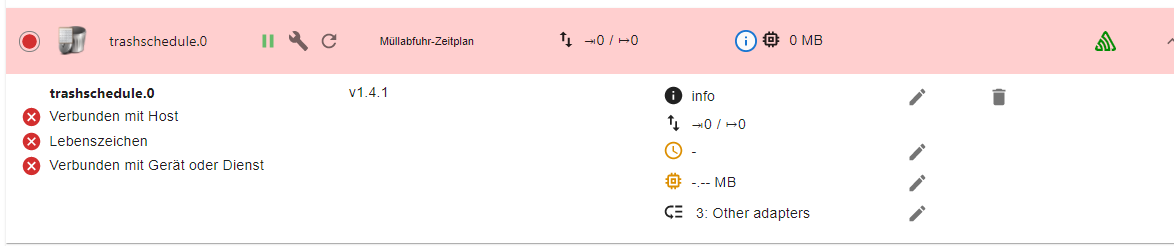
-
KOMPLETTE Ein- und Ausgaben.
@thomas-braun : hm.... bin ich zu "blöd" für.... wie bekomme ich aus Putty diese "Fenster"...
-
@thomas-braun : hm.... bin ich zu "blöd" für.... wie bekomme ich aus Putty diese "Fenster"...
Text kopieren, </> -Icon anklicken, Text zwischen die Steuerzeichen kopieren, Beitrag absenden.
-
Text kopieren, </> -Icon anklicken, Text zwischen die Steuerzeichen kopieren, Beitrag absenden.
@thomas-braun ```
pi@Raspi1:~ $ which nodejs && nodejs -v && which node && node -v && which npm & npm -v && apt policy nodejs
[1] 26902
/usr/bin/nodejs
v14.18.3
/usr/bin/node
v14.18.3
/usr/bin/npm
6.14.15
[1]+ Fertig which nodejs && nodejs -v && which node && node -v && which npm
nodejs:
Installiert: 14.18.3-deb-1nodesource1
Installationskandidat: 14.18.3-deb-1nodesource1
Versionstabelle:
*** 14.18.3-deb-1nodesource1 500
500 https://deb.nodesource.com/node_14.x buster/main armhf Packages
100 /var/lib/dpkg/status
10.24.0~dfsg-1~deb10u1 500
500 http://raspbian.raspberrypi.org/raspbian buster/main armhf Packages
pi@Raspi1:~ $ -
@thomas-braun ```
pi@Raspi1:~ $ which nodejs && nodejs -v && which node && node -v && which npm & npm -v && apt policy nodejs
[1] 26902
/usr/bin/nodejs
v14.18.3
/usr/bin/node
v14.18.3
/usr/bin/npm
6.14.15
[1]+ Fertig which nodejs && nodejs -v && which node && node -v && which npm
nodejs:
Installiert: 14.18.3-deb-1nodesource1
Installationskandidat: 14.18.3-deb-1nodesource1
Versionstabelle:
*** 14.18.3-deb-1nodesource1 500
500 https://deb.nodesource.com/node_14.x buster/main armhf Packages
100 /var/lib/dpkg/status
10.24.0~dfsg-1~deb10u1 500
500 http://raspbian.raspberrypi.org/raspbian buster/main armhf Packages
pi@Raspi1:~ $@joe-0 said in Trashschedule Adapter läuft nach update nicht mehr:
@thomas-braun ```
pi@Raspi1:~ $ which nodejs && nodejs -v && which node && node -v && which npm & npm -v && apt policy nodejs
[1] 26902
/usr/bin/nodejs
v14.18.3
/usr/bin/node
v14.18.3
/usr/bin/npm
6.14.15
[1]+ Fertig which nodejs && nodejs -v && which node && node -v && which npm
nodejs:
Installiert: 14.18.3-deb-1nodesource1
Installationskandidat: 14.18.3-deb-1nodesource1
Versionstabelle:
*** 14.18.3-deb-1nodesource1 500
500 https://deb.nodesource.com/node_14.x buster/main armhf Packages
100 /var/lib/dpkg/status
10.24.0~dfsg-1~deb10u1 500
500 http://raspbian.raspberrypi.org/raspbian buster/main armhf Packages
pi@Raspi1:~ $Hmm.... sieht nicht "hübsch" aus...
-
@joe-0 said in Trashschedule Adapter läuft nach update nicht mehr:
@thomas-braun ```
pi@Raspi1:~ $ which nodejs && nodejs -v && which node && node -v && which npm & npm -v && apt policy nodejs
[1] 26902
/usr/bin/nodejs
v14.18.3
/usr/bin/node
v14.18.3
/usr/bin/npm
6.14.15
[1]+ Fertig which nodejs && nodejs -v && which node && node -v && which npm
nodejs:
Installiert: 14.18.3-deb-1nodesource1
Installationskandidat: 14.18.3-deb-1nodesource1
Versionstabelle:
*** 14.18.3-deb-1nodesource1 500
500 https://deb.nodesource.com/node_14.x buster/main armhf Packages
100 /var/lib/dpkg/status
10.24.0~dfsg-1~deb10u1 500
500 http://raspbian.raspberrypi.org/raspbian buster/main armhf Packages
pi@Raspi1:~ $Hmm.... sieht nicht "hübsch" aus...
@joe-0 ```
code_textpi@Raspi1:~ $ sudo ln -s /usr/bin/node /usr/bin/nodejs ln: die symbolische Verknüpfung '/usr/bin/nodejs' konnte nicht angelegt werden: Die Datei existiert bereits -
@joe-0 sagte in Trashschedule Adapter läuft nach update nicht mehr:
npm 4.14.15
??
Zeige mal :
sudo ln -s /usr/bin/node /usr/bin/nodejs which nodejs node npm && nodejs -v && node -v && npm -v && sudo apt update && sudo apt update && apt policy nodejs@glasfaser ```
pi@Raspi1:~ $ sudo ln -s /usr/bin/node /usr/bin/nodejs ln: die symbolische Verknüpfung '/usr/bin/nodejs' konnte nicht angelegt werden: Die Datei existiert bereits -
@joe-0 sagte in Trashschedule Adapter läuft nach update nicht mehr:
npm 4.14.15
??
Zeige mal :
sudo ln -s /usr/bin/node /usr/bin/nodejs which nodejs node npm && nodejs -v && node -v && npm -v && sudo apt update && sudo apt update && apt policy nodejs@glasfaser ```
pi@Raspi1:~ $ which nodejs && nodejs -v && which node && node -v && which npm & npm -v && apt policy nodejs [1] 3523 /usr/bin/nodejs v14.18.3 /usr/bin/node v14.18.3 /usr/bin/npm 6.14.15 [1]+ Fertig which nodejs && nodejs -v && which node && node -v && which npm nodejs: Installiert: 14.18.3-deb-1nodesource1 Installationskandidat: 14.18.3-deb-1nodesource1 Versionstabelle: *** 14.18.3-deb-1nodesource1 500 500 https://deb.nodesource.com/node_14.x buster/main armhf Packages 100 /var/lib/dpkg/status 10.24.0~dfsg-1~deb10u1 500 500 http://raspbian.raspberrypi.org/raspbian buster/main armhf Packages -
In meinem Fall habe ich jetzt eine neue Spur.
Ich hatte mal mit einer Host_slave Konfiguration rumexperimentiert. Damals hatte ich vom Admin eine zusätzliche Slave Instanz installiert. Diese Instanz steht - wie ich eben bemerkte - noch auf 5.1.25, obwohl sie gar nicht läuft. Den Slave habe ich nicht mehr, kann aber die Slave-Instanz leider nicht löschen.Hat jemand einen Tipp, wie ich gezielt diese Instanz weg bekomme? Über die kleine Mülltonne geht's nicht.

-
In meinem Fall habe ich jetzt eine neue Spur.
Ich hatte mal mit einer Host_slave Konfiguration rumexperimentiert. Damals hatte ich vom Admin eine zusätzliche Slave Instanz installiert. Diese Instanz steht - wie ich eben bemerkte - noch auf 5.1.25, obwohl sie gar nicht läuft. Den Slave habe ich nicht mehr, kann aber die Slave-Instanz leider nicht löschen.Hat jemand einen Tipp, wie ich gezielt diese Instanz weg bekomme? Über die kleine Mülltonne geht's nicht.
iobroker list instances -
iobroker list instancespi@raspberrypi:~ $ iobroker list instances + system.adapter.admin.0 : admin : raspberrypi - enabled, port: 8081, bind: 0.0.0.0, run as: admi n system.adapter.admin.1 : admin : raspberry-sl ave - disabled, port: 8081, bind: 0.0.0.0, run as: admi n -
pi@raspberrypi:~ $ iobroker list instances + system.adapter.admin.0 : admin : raspberrypi - enabled, port: 8081, bind: 0.0.0.0, run as: admi n system.adapter.admin.1 : admin : raspberry-sl ave - disabled, port: 8081, bind: 0.0.0.0, run as: admi n@graubi77 sagte in Trashschedule Adapter läuft nach update nicht mehr:
admin.1
Versuch mal
iobroker del admin.1Und bittte ohne Unterbrechungen posten. Kann man nicht gut lesen.
-
@graubi77 sagte in Trashschedule Adapter läuft nach update nicht mehr:
admin.1
Versuch mal
iobroker del admin.1Und bittte ohne Unterbrechungen posten. Kann man nicht gut lesen.
@thomas-braun oder
iobroker host this? -
@graubi77 sagte in Trashschedule Adapter läuft nach update nicht mehr:
admin.1
Versuch mal
iobroker del admin.1Und bittte ohne Unterbrechungen posten. Kann man nicht gut lesen.
-
@thomas-braun leider keine Veränderung
@graubi77 Und welche 'keine Veränderung' konnte man in der Konsole sehen?
-
@graubi77 Und welche 'keine Veränderung' konnte man in der Konsole sehen?
pi@raspberrypi:~ $ iobroker list instances system.adapter.admin.0 : admin : raspberrypi - enabled, port: 8081, bind: 0.0.0.0, run as: admin system.adapter.admin.1 : admin : raspberry-slave - disabled, port: 8081, bind: 0.0.0.0, run as: admin -
pi@raspberrypi:~ $ iobroker list instances system.adapter.admin.0 : admin : raspberrypi - enabled, port: 8081, bind: 0.0.0.0, run as: admin system.adapter.admin.1 : admin : raspberry-slave - disabled, port: 8081, bind: 0.0.0.0, run as: admin -
-
pi@raspberrypi:~ $ iobroker del admin.1 Delete adapter "admin.1"@graubi77
Und danach springt das wieder zum login prompt? -
@graubi77
Und danach springt das wieder zum login prompt? -
@thomas-braun genau, mehr verrät mir das Fenster nicht
pi@raspberrypi:~ $ iobroker del admin.1 Delete adapter "admin.1" pi@raspberrypi:@graubi77 Wie hattest du denn den Master/Slave-Verbund aufgelöst? Gar nicht?
Versuch mal
iobroker host this




Hello! It looks like you're interested in this conversation, but you don't have an account yet.
Getting fed up of having to scroll through the same posts each visit? When you register for an account, you'll always come back to exactly where you were before, and choose to be notified of new replies (either via email, or push notification). You'll also be able to save bookmarks and upvote posts to show your appreciation to other community members.
With your input, this post could be even better 💗
Register Login170
Online32.7k
Users82.6k
Topics1.3m
Posts