



Skip to content
  • Home
  • Recent
  • Tags
  • 0 Unread 0
  • Categories
  • Unreplied
  • Popular
  • GitHub
  • Docu
  • Hilfe
Skins
  • Light
  • Brite
  • Cerulean
  • Cosmo
  • Flatly
  • Journal
  • Litera
  • Lumen
  • Lux
  • Materia
  • Minty
  • Morph
  • Pulse
  • Sandstone
  • Simplex
  • Sketchy
  • Spacelab
  • United
  • Yeti
  • Zephyr
  • Dark
  • Cyborg
  • Darkly
  • Quartz
  • Slate
  • Solar
  • Superhero
  • Vapor

  • Default (No Skin)
  • No Skin
Collapse
ioBroker Logo

Community Forum

donate donate
  1. ioBroker Community Home
  2. Deutsch
  3. ioBroker Allgemein
  4. Multihost

NEWS

  • UPDATE 31.10.: Amazon Alexa - ioBroker Skill läuft aus ?
    apollon77A
    apollon77
    48
    3
    8.7k

  • Monatsrückblick – September 2025
    BluefoxB
    Bluefox
    13
    1
    2.2k

  • Neues Video "KI im Smart Home" - ioBroker plus n8n
    BluefoxB
    Bluefox
    16
    1
    3.1k

Multihost

Scheduled Pinned Locked Moved ioBroker Allgemein
72 Posts 6 Posters 3.3k Views 4 Watching
  • Oldest to Newest
  • Newest to Oldest
  • Most Votes
Reply
  • Reply as topic
Log in to reply
This topic has been deleted. Only users with topic management privileges can see it.
  • HomoranH Homoran

    @thomas-braun sagte in Multihost:

    @apollon77 sagte in Multihost:

    EIn neu eingerichteter Slave hat immer Admin, Discovery und Backitup installiert auf "Code" ebene.

    Dann wäre das 'genaueste Vorgehen' dann meins? Also dem frisch geschlüpften ioBroker auch noch die voreingestellten Adapter abnehmen und nur die leere Hülle an den Master andocken?

    Würde ich jetzt so sehen.
    Hab's aber noch nicht selbst getestet

    @apollon77 sagte in Multihost:

    Das müsste man manuell deinstallieren damit es keine "da liegen alte Admin Files rum" Meldung bekommt

    und genau das hatte ich gemeint :cry:

    ZolexZ Offline
    ZolexZ Offline
    Zolex
    wrote on last edited by
    #48

    @homoran @apollon77
    Ich habe beide neu aufgesetzt ohne das löschen der vorhandenen Adapter auf dem Slave.
    Hat auf Anhieb funktioniert.
    Danke für die Unterstützung und die schnelle Hilfe.:+1:

    1 Reply Last reply
    1
    • Basti97B Offline
      Basti97B Offline
      Basti97
      Most Active
      wrote on last edited by
      #49

      Beim Verbinden meines Raspberrys zu meinen Master kommt folgende Meldung
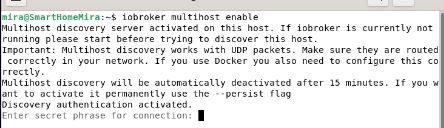
      Unbenannt.JPG

      Beim Slave diese

      pi@raspberrypi:~ $ iobroker multihost browse
      No Multihost server found. Make sure iobroker is running on the host where you enabled multihost discovery (and it is not this host)!


      Und leider lassen sich diese beiden nicht verbinden.

      Iobroker läuft als VM auf Proxmoxserver x folgende Hersteller im Einsatz Sonoff, Gosund, Siemens x Aofo über Tasmota x Zigbee x das Smarthome wächst und wächst

      HomoranH Thomas BraunT apollon77A 3 Replies Last reply
      0
      • Basti97B Basti97

        Beim Verbinden meines Raspberrys zu meinen Master kommt folgende Meldung

        Unbenannt.JPG

        Beim Slave diese

        pi@raspberrypi:~ $ iobroker multihost browse
        No Multihost server found. Make sure iobroker is running on the host where you enabled multihost discovery (and it is not this host)!


        Und leider lassen sich diese beiden nicht verbinden.

        HomoranH Do not disturb
        HomoranH Do not disturb
        Homoran
        Global Moderator Administrators
        wrote on last edited by
        #50

        @basti97 sagte in Multihost:

        Beim Verbinden meines Raspberrys zu meinen Master kommt folgende Meldung

        bitte keine Screenshots.
        Text in code-tags

        Hat sich der Hostname und / oder die IP geändert?

        kein Support per PN! - Fragen im Forum stellen - es gibt fast nichts, was nicht auch für andere interessant ist.

        Benutzt das Voting rechts unten im Beitrag wenn er euch geholfen hat.

        der Installationsfixer: curl -fsL https://iobroker.net/fix.sh | bash -

        1 Reply Last reply
        0
        • Basti97B Basti97

          Beim Verbinden meines Raspberrys zu meinen Master kommt folgende Meldung

          Unbenannt.JPG

          Beim Slave diese

          pi@raspberrypi:~ $ iobroker multihost browse
          No Multihost server found. Make sure iobroker is running on the host where you enabled multihost discovery (and it is not this host)!


          Und leider lassen sich diese beiden nicht verbinden.

          Thomas BraunT Online
          Thomas BraunT Online
          Thomas Braun
          Most Active
          wrote on last edited by
          #51

          @basti97 sagte in Multihost:

          Und leider lassen sich diese beiden nicht verbinden.

          Sind das die beiden Hosts aus deinem anderen Thread, die versionsmäßig so weit auseinander liegen? Bitte nicht wild mit fehlenden Informationen durch die Threads hüpfen.

          Linux-Werkzeugkasten:
          https://forum.iobroker.net/topic/42952/der-kleine-iobroker-linux-werkzeugkasten
          NodeJS Fixer Skript:
          https://forum.iobroker.net/topic/68035/iob-node-fix-skript
          iob_diag: curl -sLf -o diag.sh https://iobroker.net/diag.sh && bash diag.sh

          Basti97B 3 Replies Last reply
          0
          • Basti97B Offline
            Basti97B Offline
            Basti97
            Most Active
            wrote on last edited by
            #52

            @homoran ok nein sind alle ip Adressen gleich geblieben an den Master hängt wie gesagt noch ein Slave mit einer alten Version. Aber den Pi den ich Verbinden möchte sind gleich.

            Iobroker läuft als VM auf Proxmoxserver x folgende Hersteller im Einsatz Sonoff, Gosund, Siemens x Aofo über Tasmota x Zigbee x das Smarthome wächst und wächst

            1 Reply Last reply
            0
            • Thomas BraunT Thomas Braun

              @basti97 sagte in Multihost:

              Und leider lassen sich diese beiden nicht verbinden.

              Sind das die beiden Hosts aus deinem anderen Thread, die versionsmäßig so weit auseinander liegen? Bitte nicht wild mit fehlenden Informationen durch die Threads hüpfen.

              Basti97B Offline
              Basti97B Offline
              Basti97
              Most Active
              wrote on last edited by Basti97
              #53

              @thomas-braun Nein nein ist ein anderer Raspberry der mal verbunden war (IP Adresse ist gleich geblieben) . Aber jetzt hat er einen anderen Namen.

              Iobroker läuft als VM auf Proxmoxserver x folgende Hersteller im Einsatz Sonoff, Gosund, Siemens x Aofo über Tasmota x Zigbee x das Smarthome wächst und wächst

              1 Reply Last reply
              0
              • Thomas BraunT Thomas Braun

                @basti97 sagte in Multihost:

                Und leider lassen sich diese beiden nicht verbinden.

                Sind das die beiden Hosts aus deinem anderen Thread, die versionsmäßig so weit auseinander liegen? Bitte nicht wild mit fehlenden Informationen durch die Threads hüpfen.

                Basti97B Offline
                Basti97B Offline
                Basti97
                Most Active
                wrote on last edited by
                #54

                @thomas-braun

                Das sagt er beim Slave

                Multihost discovery server: disabled
                Discovery authentication:   enabled
                Persistent activation:      disabled
                Objects:                    file on 127.0.0.1
                States:                     file on 127.0.0.1


                Und das beim Master das hier wenn ich iobroker multihost status eingebe

                Multihost discovery server: disabled
                Discovery authentication:   enabled
                Persistent activation:      disabled
                Objects:                    file on 0.0.0.0
                States:                     file on 0.0.0.0


                Iobroker läuft als VM auf Proxmoxserver x folgende Hersteller im Einsatz Sonoff, Gosund, Siemens x Aofo über Tasmota x Zigbee x das Smarthome wächst und wächst

                1 Reply Last reply
                0
                • Thomas BraunT Thomas Braun

                  @basti97 sagte in Multihost:

                  Und leider lassen sich diese beiden nicht verbinden.

                  Sind das die beiden Hosts aus deinem anderen Thread, die versionsmäßig so weit auseinander liegen? Bitte nicht wild mit fehlenden Informationen durch die Threads hüpfen.

                  Basti97B Offline
                  Basti97B Offline
                  Basti97
                  Most Active
                  wrote on last edited by
                  #55

                  @thomas-braun Ok ich dachte das hat mit den anderen Thema nichts mehr zutun

                  Iobroker läuft als VM auf Proxmoxserver x folgende Hersteller im Einsatz Sonoff, Gosund, Siemens x Aofo über Tasmota x Zigbee x das Smarthome wächst und wächst

                  1 Reply Last reply
                  0
                  • Basti97B Basti97

                    Beim Verbinden meines Raspberrys zu meinen Master kommt folgende Meldung

                    Unbenannt.JPG

                    Beim Slave diese

                    pi@raspberrypi:~ $ iobroker multihost browse
                    No Multihost server found. Make sure iobroker is running on the host where you enabled multihost discovery (and it is not this host)!


                    Und leider lassen sich diese beiden nicht verbinden.

                    apollon77A Offline
                    apollon77A Offline
                    apollon77
                    wrote on last edited by
                    #56

                    @basti97 Duhast gesehen das der Master die Eingabe einer Passphrase erbittet? Ohne die wird der Discovery server nicht aktiviert und ein Slave kann bis Sanktnimmerleinstag suchen ...

                    Beitrag hat geholfen? Votet rechts unten im Beitrag :-) https://paypal.me/Apollon77 / https://github.com/sponsors/Apollon77

                    • Debug-Log für Instanz einschalten? Admin -> Instanzen -> Expertenmodus -> Instanz aufklappen - Loglevel ändern
                    • Logfiles auf Platte /opt/iobroker/log/… nutzen, Admin schneidet Zeilen ab
                    Basti97B 1 Reply Last reply
                    0
                    • apollon77A apollon77

                      @basti97 Duhast gesehen das der Master die Eingabe einer Passphrase erbittet? Ohne die wird der Discovery server nicht aktiviert und ein Slave kann bis Sanktnimmerleinstag suchen ...

                      Basti97B Offline
                      Basti97B Offline
                      Basti97
                      Most Active
                      wrote on last edited by
                      #57

                      @apollon77 Frohes Neues
                      Ja ich habe einfach auf enter gedrückt und habe nicht gelesen was dort steht.
                      Eigentlich sollte man es erst lesen bevor man die Meldung einfach wegdrückt. Nachdem ich das Passwort eingegeben habe hatte es funktioniert.

                      Iobroker läuft als VM auf Proxmoxserver x folgende Hersteller im Einsatz Sonoff, Gosund, Siemens x Aofo über Tasmota x Zigbee x das Smarthome wächst und wächst

                      HomoranH 1 Reply Last reply
                      1
                      • Basti97B Basti97

                        @apollon77 Frohes Neues
                        Ja ich habe einfach auf enter gedrückt und habe nicht gelesen was dort steht.
                        Eigentlich sollte man es erst lesen bevor man die Meldung einfach wegdrückt. Nachdem ich das Passwort eingegeben habe hatte es funktioniert.

                        HomoranH Do not disturb
                        HomoranH Do not disturb
                        Homoran
                        Global Moderator Administrators
                        wrote on last edited by
                        #58

                        @basti97 sagte in Multihost:

                        Nachdem ich das Passwort eingegeben habe hatte es funktioniert.

                        is jetzt nich wahr :joy:

                        @basti97 sagte in Multihost:

                        Ja ich habe einfach auf enter gedrückt und habe nicht gelesen was dort steht.

                        und ich habe gedacht, dass es eingegeben aber nich angezeit wird

                        kein Support per PN! - Fragen im Forum stellen - es gibt fast nichts, was nicht auch für andere interessant ist.

                        Benutzt das Voting rechts unten im Beitrag wenn er euch geholfen hat.

                        der Installationsfixer: curl -fsL https://iobroker.net/fix.sh | bash -

                        1 Reply Last reply
                        0
                        • O Offline
                          O Offline
                          ostseeskipper
                          wrote on last edited by ostseeskipper
                          #59

                          Moin
                          habe ebenfalls Probleme mit dem Verbinden und versucht das hier geschriebene umzusetzen.
                          Master läuft im Docker auf einer Synology
                          der geplante Slave ist ein Raspi3 aus dem Image und frisch aktualisiert sowie das iobroker fix laufen lassen.
                          Versionsstände gleich
                          Node 14.19.0
                          NPM 6.14.16

                          der geplante Master zeigt mir

                          root@buanet-iobroker1:/opt/iobroker# sudo iobroker multihost status                                                                                                           
                          Please check the binding of the configured file server to allow remote connections.                                                                                           
                          No configuration change needed.                                                                                                                                               
                                                                                                                                                                                                        
                                                                                                                                                                                                        
                          Multihost discovery server: enabled                                                                                                                                           
                          Discovery authentication:   enabled                                                                                                                                           
                          Persistent activation:      disabled                                                                                                                                          
                          Objects:                    file on 0.0.0.0                                                                                                                                   
                          States:                     file on 0.0.0.0                                                                                                                                   


                          Der geplante Slave

                          pi@iobroker-pi:~ $ sudo iobroker multihost status                                                                                                No configuration change needed.
                          
                          
                          Multihost discovery server: disabled
                          Discovery authentication:   enabled
                          Persistent activation:      disabled
                          Objects:                    file on 127.0.0.1
                          States:                     file on 127.0.0.1
                          pi@iobroker-pi:~ $ sudo iobroker multihost browse
                          No Multihost server found. Make sure iobroker is running on the host where you enabled multihost discovery (and it is not this host)!
                          

                          Master list instances

                          root@buanet-iobroker1:/opt/iobroker# iobroker list instances                                                                                                                  
                          + system.adapter.admin.0                  : admin                 : buanet-iobroker1                         -  enabled, port: 8081, bind: 0.0.0.0 (SSL), run as: admin       
                          + system.adapter.bydhvs.0                 : bydhvs                : buanet-iobroker1                         -  enabled                                                       
                          + system.adapter.denon.0                  : denon                 : buanet-iobroker1                         -  enabled                                                       
                          + system.adapter.discovery.0              : discovery             : buanet-iobroker1                         -  enabled                                                       
                            system.adapter.flot.0                   : flot                  : buanet-iobroker1                         -  enabled                                                       
                            system.adapter.icons-open-icon-library-png.0: icons-open-icon-library-png: buanet-iobroker1                         -  enabled                                              
                          + system.adapter.info.0                   : info                  : buanet-iobroker1                         -  enabled                                                       
                          + system.adapter.javascript.0             : javascript            : buanet-iobroker1                         -  enabled                                                       
                            system.adapter.luftdaten.0              : luftdaten             : buanet-iobroker1                         -  enabled                                                       
                          + system.adapter.modbus.0                 : modbus                : buanet-iobroker1                         -  enabled                                                       
                          + system.adapter.modbus.1                 : modbus                : buanet-iobroker1                         -  enabled                                                       
                            system.adapter.modbus.2                 : modbus                : buanet-iobroker1                         - disabled                                                       
                            system.adapter.modbus.3                 : modbus                : buanet-iobroker1                         - disabled                                                       
                            system.adapter.mqtt.0                   : mqtt                  : buanet-iobroker1                         - disabled, port: 1883, bind: 0.0.0.0                            
                            system.adapter.panasonic-comfort-cloud.0: panasonic-comfort-cloud: buanet-iobroker1                         - disabled                                                      
                            system.adapter.ping.0                   : ping                  : buanet-iobroker1                         - disabled                                                       
                            system.adapter.shelly.0                 : shelly                : buanet-iobroker1                         - disabled, port: 1882, bind: 0.0.0.0                            
                          + system.adapter.snmp.0                   : snmp                  : buanet-iobroker1                         -  enabled                                                       
                          + system.adapter.sql.0                    : sql                   : buanet-iobroker1                         -  enabled, port: 3307                                           
                            system.adapter.vis-history.0            : vis-history           : buanet-iobroker1                         -  enabled                                                       
                            system.adapter.vis-hqwidgets.0          : vis-hqwidgets         : buanet-iobroker1                         -  enabled                                                       
                            system.adapter.vis-icontwo.0            : vis-icontwo           : buanet-iobroker1                         -  enabled                                                       
                          + system.adapter.vis-inventwo.0           : vis-inventwo          : buanet-iobroker1                         -  enabled                                                       
                            system.adapter.vis-jqui-mfd.0           : vis-jqui-mfd          : buanet-iobroker1                         -  enabled                                                       
                            system.adapter.vis-justgage.0           : vis-justgage          : buanet-iobroker1                         -  enabled                                                       
                            system.adapter.vis-metro.0              : vis-metro             : buanet-iobroker1                         -  enabled                                                       
                            system.adapter.vis.0                    : vis                   : buanet-iobroker1                         -  enabled                                                       
                          + system.adapter.web.0                    : web                   : buanet-iobroker1                         -  enabled, port: 8082, bind: 0.0.0.0 (SSL), run as: admin       
                                                                                                                                                                                                        
                          + instance is alive 
                          

                          Slave list instances

                          pi@iobroker-pi:~ $ iobroker list instances
                          + system.adapter.admin.0                  : admin                 : iobroker-pi                              -  enabled, port: 8081, bind: 0.0.0.0, run as: admin
                          + system.adapter.backitup.0               : backitup              : iobroker-pi                              -  enabled
                          + system.adapter.discovery.0              : discovery             : iobroker-pi                              -  enabled
                          
                          + instance is alive


                          Im Docker habe ich angegeben das die Ports 9000 und 9001 per TCP und UDP zueinander gemappt werden
                          und aus netstat direkt der synology kommt das

                          admin@NASSy:~$ netstat -tulpe
                          (Not all processes could be identified, non-owned process info
                           will not be shown, you would have to be root to see it all.)
                          Active Internet connections (only servers)
                          Proto Recv-Q Send-Q Local Address           Foreign Address         State       User       Inode      PID/Program name
                          tcp        0      0 0.0.0.0:6690            0.0.0.0:*               LISTEN      root       54136      -
                          tcp        0      0 0.0.0.0:4196            0.0.0.0:*               LISTEN      root       13147503   -
                          tcp        0      0 0.0.0.0:49157           0.0.0.0:*               LISTEN      root       13145914   -
                          tcp        0      0 0.0.0.0:9000            0.0.0.0:*               LISTEN      root       13143982   -
                          tcp        0      0 192.168.0.99:49160      0.0.0.0:*               LISTEN      root       58543      -
                          tcp        0      0 0.0.0.0:5000            0.0.0.0:*               LISTEN      root       33227      -
                          tcp        0      0 0.0.0.0:9001            0.0.0.0:*               LISTEN      root       13147416   -
                          tcp        0      0 0.0.0.0:5001            0.0.0.0:*               LISTEN      root       33231      -
                          tcp        0      0 0.0.0.0:mysql           0.0.0.0:*               LISTEN      root       13147510   -
                          tcp        0      0 0.0.0.0:rtsp            0.0.0.0:*               LISTEN      root       62254      -
                          tcp        0      0 0.0.0.0:3307            0.0.0.0:*               LISTEN      mysql      51153      -
                          tcp        0      0 0.0.0.0:netbios-ssn     0.0.0.0:*               LISTEN      root       32276      -
                          tcp        0      0 0.0.0.0:5357            0.0.0.0:*               LISTEN      root       33237      -
                          tcp        0      0 0.0.0.0:sunrpc          0.0.0.0:*               LISTEN      root       30296      -
                          tcp        0      0 0.0.0.0:http            0.0.0.0:*               LISTEN      root       33229      -
                          tcp        0      0 192.168.0.99:50001      0.0.0.0:*               LISTEN      root       13340595   -
                          tcp        0      0 0.0.0.0:2001            0.0.0.0:*               LISTEN      root       13148226   -
                          tcp        0      0 0.0.0.0:tproxy          0.0.0.0:*               LISTEN      root       13145796   -
                          tcp        0      0 0.0.0.0:50002           0.0.0.0:*               LISTEN      root       13341284   -
                          tcp        0      0 0.0.0.0:8082            0.0.0.0:*               LISTEN      root       13147478   -
                          tcp        0      0 localhost:914           0.0.0.0:*               LISTEN      root       52809      -
                          tcp        0      0 0.0.0.0:42324           0.0.0.0:*               LISTEN      root       31439      -
                          tcp        0      0 0.0.0.0:60629           0.0.0.0:*               LISTEN      root       30361      -
                          tcp        0      0 0.0.0.0:502             0.0.0.0:*               LISTEN      root       13145905   -
                          tcp        0      0 0.0.0.0:ssh             0.0.0.0:*               LISTEN      root       18497      -
                          tcp        0      0 0.0.0.0:1880            0.0.0.0:*               LISTEN      root       13145889   -
                          tcp        0      0 0.0.0.0:8088            0.0.0.0:*               LISTEN      root       13145749   -
                          tcp        0      0 192.168.0.100:postgres  0.0.0.0:*               LISTEN      postgres   31976      -
                          tcp        0      0 localhost:postgres      0.0.0.0:*               LISTEN      postgres   31975      -
                          tcp        0      0 0.0.0.0:1881            0.0.0.0:*               LISTEN      root       13145876   -
                          tcp        0      0 localhost:18617         0.0.0.0:*               LISTEN      root       58600      -
                          tcp        0      0 0.0.0.0:1882            0.0.0.0:*               LISTEN      root       13145860   -
                          tcp        0      0 0.0.0.0:8282            0.0.0.0:*               LISTEN      root       13145725   -
                          tcp        0      0 0.0.0.0:1883            0.0.0.0:*               LISTEN      root       13148244   -
                          tcp        0      0 0.0.0.0:https           0.0.0.0:*               LISTEN      root       33233      -
                          tcp        0      0 0.0.0.0:8284            0.0.0.0:*               LISTEN      root       13144007   -
                          tcp        0      0 localhost:4700          0.0.0.0:*               LISTEN      root       29319      -
                          tcp        0      0 0.0.0.0:892             0.0.0.0:*               LISTEN      root       31367      -
                          tcp        0      0 0.0.0.0:microsoft-ds    0.0.0.0:*               LISTEN      root       32275      -
                          tcp        0      0 0.0.0.0:3262            0.0.0.0:*               LISTEN      root       13344017   -
                          tcp        0      0 localhost:exec          0.0.0.0:*               LISTEN      root       88099      -
                          tcp        0      0 0.0.0.0:nfs             0.0.0.0:*               LISTEN      root       31417      -
                          tcp        0      0 0.0.0.0:snmp            0.0.0.0:*               LISTEN      root       27166      -
                          tcp6       0      0 [::]:6690               [::]:*                  LISTEN      root       54137      -
                          tcp6       0      0 [::]:afpovertcp         [::]:*                  LISTEN      root       33828      -
                          tcp6       0      0 [::]:5000               [::]:*                  LISTEN      root       33228      -
                          tcp6       0      0 [::]:6281               [::]:*                  LISTEN      root       47216      -
                          tcp6       0      0 [::]:5001               [::]:*                  LISTEN      root       33232      -
                          tcp6       0      0 [::]:netbios-ssn        [::]:*                  LISTEN      root       32274      -
                          tcp6       0      0 [::]:43692              [::]:*                  LISTEN      root       31441      -
                          tcp6       0      0 [::]:5357               [::]:*                  LISTEN      root       33238      -
                          tcp6       0      0 [::]:sunrpc             [::]:*                  LISTEN      root       30299      -
                          tcp6       0      0 [::]:http               [::]:*                  LISTEN      root       33230      -
                          tcp6       0      0 [::]:ssh                [::]:*                  LISTEN      root       18499      -
                          tcp6       0      0 [::]:57209              [::]:*                  LISTEN      root       30365      -
                          tcp6       0      0 [::]:https              [::]:*                  LISTEN      root       33234      -
                          tcp6       0      0 [::]:892                [::]:*                  LISTEN      root       31373      -
                          tcp6       0      0 [::]:microsoft-ds       [::]:*                  LISTEN      root       32273      -
                          tcp6       0      0 [::]:3261               [::]:*                  LISTEN      root       29873      -
                          tcp6       0      0 [::]:3263               [::]:*                  LISTEN      root       29872      -
                          tcp6       0      0 [::]:3264               [::]:*                  LISTEN      root       29874      -
                          tcp6       0      0 [::]:3265               [::]:*                  LISTEN      root       13342512   -
                          tcp6       0      0 [::]:nfs                [::]:*                  LISTEN      root       31429      -
                          tcp6       0      0 [::]:snmp               [::]:*                  LISTEN      root       27167      -
                          udp        0      0 localhost:59415         0.0.0.0:*                           root       58544      -
                          udp        0      0 0.0.0.0:60217           0.0.0.0:*                           root       31438      -
                          udp        0      0 0.0.0.0:60352           0.0.0.0:*                           root       30359      -
                          udp        0      0 0.0.0.0:44372           0.0.0.0:*                           root       96930      -
                          udp        0      0 0.0.0.0:44373           0.0.0.0:*                           root       96931      -
                          udp        0      0 0.0.0.0:60914           0.0.0.0:*                           root       74840      -
                          udp        0      0 0.0.0.0:60915           0.0.0.0:*                           root       74841      -
                          udp        0      0 0.0.0.0:44609           0.0.0.0:*                           nobody     31727      -
                          udp        0      0 0.0.0.0:45738           0.0.0.0:*                           root       313172     -
                          udp        0      0 0.0.0.0:45739           0.0.0.0:*                           root       313173     -
                          udp        0      0 0.0.0.0:46924           0.0.0.0:*                           nobody     44125      -
                          udp        0      0 0.0.0.0:48487           0.0.0.0:*                           nobody     31729      -
                          udp        0      0 0.0.0.0:bootpc          0.0.0.0:*                           root       20558      -
                          udp        0      0 0.0.0.0:bootpc          0.0.0.0:*                           root       16339      -
                          udp        0      0 0.0.0.0:sunrpc          0.0.0.0:*                           root       30294      -
                          udp        0      0 192.168.0.99:ntp        0.0.0.0:*                           ntp        13341266   -
                          udp        0      0 192.168.20.20:ntp       0.0.0.0:*                           ntp        13329799   -
                          udp        0      0 192.168.0.100:ntp       0.0.0.0:*                           ntp        13329797   -
                          udp        0      0 172.17.0.1:ntp          0.0.0.0:*                           ntp        12382057   -
                          udp        0      0 localhost:ntp           0.0.0.0:*                           root       18052      -
                          udp        0      0 0.0.0.0:ntp             0.0.0.0:*                           root       18048      -
                          udp        0      0 192.168.0.25:netbios-ns 0.0.0.0:*                           root       13341011   -
                          udp        0      0 192.168.0.99:netbios-ns 0.0.0.0:*                           root       13341010   -
                          udp        0      0 192.168.0.25:netbios-ns 0.0.0.0:*                           root       13341007   -
                          udp        0      0 192.168.0.10:netbios-ns 0.0.0.0:*                           root       13341006   -
                          udp        0      0 192.168.20.2:netbios-ns 0.0.0.0:*                           root       13341003   -
                          udp        0      0 192.168.20.2:netbios-ns 0.0.0.0:*                           root       13341002   -
                          udp        0      0 0.0.0.0:netbios-ns      0.0.0.0:*                           root       13340965   -
                          udp        0      0 192.168.0.2:netbios-dgm 0.0.0.0:*                           root       13341013   -
                          udp        0      0 192.168.0.9:netbios-dgm 0.0.0.0:*                           root       13341012   -
                          udp        0      0 192.168.0.2:netbios-dgm 0.0.0.0:*                           root       13341009   -
                          udp        0      0 192.168.0.1:netbios-dgm 0.0.0.0:*                           root       13341008   -
                          udp        0      0 192.168.20.:netbios-dgm 0.0.0.0:*                           root       13341005   -
                          udp        0      0 192.168.20.:netbios-dgm 0.0.0.0:*                           root       13341004   -
                          udp        0      0 0.0.0.0:netbios-dgm     0.0.0.0:*                           root       13340966   -
                          udp        0      0 0.0.0.0:snmp            0.0.0.0:*                           root       27164      -
                          udp        0      0 0.0.0.0:49398           0.0.0.0:*                           nobody     31728      -
                          udp        0      0 localhost:680           0.0.0.0:*                           root       30354      -
                          udp        0      0 0.0.0.0:869             0.0.0.0:*                           root       30295      -
                          udp        0      0 0.0.0.0:892             0.0.0.0:*                           root       31364      -
                          udp        0      0 0.0.0.0:33972           0.0.0.0:*                           root       72101      -
                          udp        0      0 0.0.0.0:33973           0.0.0.0:*                           root       72102      -
                          udp        0      0 localhost:34086         0.0.0.0:*                           root       13340596   -
                          udp        0      0 0.0.0.0:1900            0.0.0.0:*                           root       13340598   -
                          udp        0      0 0.0.0.0:1900            0.0.0.0:*                           root       13341060   -
                          udp        0      0 0.0.0.0:1900            0.0.0.0:*                           root       58546      -
                          udp        0      0 0.0.0.0:34723           0.0.0.0:*                           root       13339461   -
                          udp        0      0 0.0.0.0:nfs             0.0.0.0:*                           root       31428      -
                          udp        0      0 0.0.0.0:52232           0.0.0.0:*                           root       98811      -
                          udp        0      0 0.0.0.0:52233           0.0.0.0:*                           root       98812      -
                          udp        0      0 0.0.0.0:36158           0.0.0.0:*                           nobody     44126      -
                          udp        0      0 0.0.0.0:19996           0.0.0.0:*                           root       65434      -
                          udp        0      0 0.0.0.0:19997           0.0.0.0:*                           root       65433      -
                          udp        0      0 0.0.0.0:19998           0.0.0.0:*                           root       65432      -
                          udp        0      0 0.0.0.0:3702            0.0.0.0:*                           nobody     31714      -
                          udp        0      0 0.0.0.0:53474           0.0.0.0:*                           root       96926      -
                          udp        0      0 0.0.0.0:53475           0.0.0.0:*                           root       96927      -
                          udp        0      0 0.0.0.0:54314           0.0.0.0:*                           nobody     66667      -
                          udp        0      0 0.0.0.0:5353            0.0.0.0:*                           root       13339459   -
                          udp     2944      0 0.0.0.0:54692           0.0.0.0:*                           root       96844      -
                          udp        0      0 0.0.0.0:54693           0.0.0.0:*                           root       96845      -
                          udp        0      0 192.168.0.99:55900      0.0.0.0:*                           root       13340597   -
                          udp        0      0 192.168.0.99:55901      0.0.0.0:*                           root       58545      -
                          udp        0      0 0.0.0.0:40318           0.0.0.0:*                           root       308919     -
                          udp        0      0 0.0.0.0:40319           0.0.0.0:*                           root       308920     -
                          udp        0      0 0.0.0.0:9000            0.0.0.0:*                           root       13147447   -
                          udp        0      0 0.0.0.0:9001            0.0.0.0:*                           root       13145660   -
                          udp        0      0 0.0.0.0:58352           0.0.0.0:*                           root       25227      -
                          udp        0      0 0.0.0.0:42494           0.0.0.0:*                           root       72106      -
                          udp        0      0 0.0.0.0:42495           0.0.0.0:*                           root       72107      -
                          udp        0      0 0.0.0.0:42623           0.0.0.0:*                           nobody     31713      -
                          udp        0      0 0.0.0.0:9997            0.0.0.0:*                           root       18012      -
                          udp        0      0 0.0.0.0:9998            0.0.0.0:*                           root       18011      -
                          udp        0      0 0.0.0.0:9999            0.0.0.0:*                           root       18010      -
                          udp        0      0 0.0.0.0:42812           0.0.0.0:*                           root       71668      -
                          udp        0      0 0.0.0.0:42813           0.0.0.0:*                           root       71669      -
                          udp6       0      0 [::]:47575              [::]:*                              root       30363      -
                          udp6       0      0 [::]:sunrpc             [::]:*                              root       30297      -
                          udp6       0      0 fe80::1439:b6ff:fe1:ntp [::]:*                              ntp        13146041   -
                          udp6       0      0 fe80::42:f9ff:fe00::ntp [::]:*                              ntp        12382060   -
                          udp6       0      0 localhost:ntp           [::]:*                              root       18060      -
                          udp6       0      0 [::]:ntp                [::]:*                              root       18045      -
                          udp6       0      0 [::]:snmp               [::]:*                              root       27165      -
                          udp6       0      0 [::]:869                [::]:*                              root       30298      -
                          udp6       0      0 [::]:892                [::]:*                              root       31370      -
                          udp6       0      0 [::]:nfs                [::]:*                              root       31430      -
                          udp6       0      0 [::]:5353               [::]:*                              root       13339460   -
                          udp6       0      0 [::]:38805              [::]:*                              root       13339462   -
                          udp6       0      0 [::]:41571              [::]:*                              root       31440      -


                          Zu guter letzt habe beide Geräte direkt allein, an eine einfache nicht konfigurierbare Switch gehängt um zu verhindern das mit UDP was eingeschränkt wird.
                          Bin mit meinen Latain am Ende.
                          Kann mir geholfen werden oder muss ich mein Multihostprojekt aufgeben:disappointed_relieved:
                          Viele Grüsse von Küste

                          Thomas BraunT 1 Reply Last reply
                          0
                          • O ostseeskipper

                            Moin
                            habe ebenfalls Probleme mit dem Verbinden und versucht das hier geschriebene umzusetzen.
                            Master läuft im Docker auf einer Synology
                            der geplante Slave ist ein Raspi3 aus dem Image und frisch aktualisiert sowie das iobroker fix laufen lassen.
                            Versionsstände gleich
                            Node 14.19.0
                            NPM 6.14.16

                            der geplante Master zeigt mir

                            root@buanet-iobroker1:/opt/iobroker# sudo iobroker multihost status                                                                                                           
                            Please check the binding of the configured file server to allow remote connections.                                                                                           
                            No configuration change needed.                                                                                                                                               
                                                                                                                                                                                                          
                                                                                                                                                                                                          
                            Multihost discovery server: enabled                                                                                                                                           
                            Discovery authentication:   enabled                                                                                                                                           
                            Persistent activation:      disabled                                                                                                                                          
                            Objects:                    file on 0.0.0.0                                                                                                                                   
                            States:                     file on 0.0.0.0                                                                                                                                   


                            Der geplante Slave

                            pi@iobroker-pi:~ $ sudo iobroker multihost status                                                                                                No configuration change needed.
                            
                            
                            Multihost discovery server: disabled
                            Discovery authentication:   enabled
                            Persistent activation:      disabled
                            Objects:                    file on 127.0.0.1
                            States:                     file on 127.0.0.1
                            pi@iobroker-pi:~ $ sudo iobroker multihost browse
                            No Multihost server found. Make sure iobroker is running on the host where you enabled multihost discovery (and it is not this host)!
                            

                            Master list instances

                            root@buanet-iobroker1:/opt/iobroker# iobroker list instances                                                                                                                  
                            + system.adapter.admin.0                  : admin                 : buanet-iobroker1                         -  enabled, port: 8081, bind: 0.0.0.0 (SSL), run as: admin       
                            + system.adapter.bydhvs.0                 : bydhvs                : buanet-iobroker1                         -  enabled                                                       
                            + system.adapter.denon.0                  : denon                 : buanet-iobroker1                         -  enabled                                                       
                            + system.adapter.discovery.0              : discovery             : buanet-iobroker1                         -  enabled                                                       
                              system.adapter.flot.0                   : flot                  : buanet-iobroker1                         -  enabled                                                       
                              system.adapter.icons-open-icon-library-png.0: icons-open-icon-library-png: buanet-iobroker1                         -  enabled                                              
                            + system.adapter.info.0                   : info                  : buanet-iobroker1                         -  enabled                                                       
                            + system.adapter.javascript.0             : javascript            : buanet-iobroker1                         -  enabled                                                       
                              system.adapter.luftdaten.0              : luftdaten             : buanet-iobroker1                         -  enabled                                                       
                            + system.adapter.modbus.0                 : modbus                : buanet-iobroker1                         -  enabled                                                       
                            + system.adapter.modbus.1                 : modbus                : buanet-iobroker1                         -  enabled                                                       
                              system.adapter.modbus.2                 : modbus                : buanet-iobroker1                         - disabled                                                       
                              system.adapter.modbus.3                 : modbus                : buanet-iobroker1                         - disabled                                                       
                              system.adapter.mqtt.0                   : mqtt                  : buanet-iobroker1                         - disabled, port: 1883, bind: 0.0.0.0                            
                              system.adapter.panasonic-comfort-cloud.0: panasonic-comfort-cloud: buanet-iobroker1                         - disabled                                                      
                              system.adapter.ping.0                   : ping                  : buanet-iobroker1                         - disabled                                                       
                              system.adapter.shelly.0                 : shelly                : buanet-iobroker1                         - disabled, port: 1882, bind: 0.0.0.0                            
                            + system.adapter.snmp.0                   : snmp                  : buanet-iobroker1                         -  enabled                                                       
                            + system.adapter.sql.0                    : sql                   : buanet-iobroker1                         -  enabled, port: 3307                                           
                              system.adapter.vis-history.0            : vis-history           : buanet-iobroker1                         -  enabled                                                       
                              system.adapter.vis-hqwidgets.0          : vis-hqwidgets         : buanet-iobroker1                         -  enabled                                                       
                              system.adapter.vis-icontwo.0            : vis-icontwo           : buanet-iobroker1                         -  enabled                                                       
                            + system.adapter.vis-inventwo.0           : vis-inventwo          : buanet-iobroker1                         -  enabled                                                       
                              system.adapter.vis-jqui-mfd.0           : vis-jqui-mfd          : buanet-iobroker1                         -  enabled                                                       
                              system.adapter.vis-justgage.0           : vis-justgage          : buanet-iobroker1                         -  enabled                                                       
                              system.adapter.vis-metro.0              : vis-metro             : buanet-iobroker1                         -  enabled                                                       
                              system.adapter.vis.0                    : vis                   : buanet-iobroker1                         -  enabled                                                       
                            + system.adapter.web.0                    : web                   : buanet-iobroker1                         -  enabled, port: 8082, bind: 0.0.0.0 (SSL), run as: admin       
                                                                                                                                                                                                          
                            + instance is alive 
                            

                            Slave list instances

                            pi@iobroker-pi:~ $ iobroker list instances
                            + system.adapter.admin.0                  : admin                 : iobroker-pi                              -  enabled, port: 8081, bind: 0.0.0.0, run as: admin
                            + system.adapter.backitup.0               : backitup              : iobroker-pi                              -  enabled
                            + system.adapter.discovery.0              : discovery             : iobroker-pi                              -  enabled
                            
                            + instance is alive


                            Im Docker habe ich angegeben das die Ports 9000 und 9001 per TCP und UDP zueinander gemappt werden
                            und aus netstat direkt der synology kommt das

                            admin@NASSy:~$ netstat -tulpe
                            (Not all processes could be identified, non-owned process info
                             will not be shown, you would have to be root to see it all.)
                            Active Internet connections (only servers)
                            Proto Recv-Q Send-Q Local Address           Foreign Address         State       User       Inode      PID/Program name
                            tcp        0      0 0.0.0.0:6690            0.0.0.0:*               LISTEN      root       54136      -
                            tcp        0      0 0.0.0.0:4196            0.0.0.0:*               LISTEN      root       13147503   -
                            tcp        0      0 0.0.0.0:49157           0.0.0.0:*               LISTEN      root       13145914   -
                            tcp        0      0 0.0.0.0:9000            0.0.0.0:*               LISTEN      root       13143982   -
                            tcp        0      0 192.168.0.99:49160      0.0.0.0:*               LISTEN      root       58543      -
                            tcp        0      0 0.0.0.0:5000            0.0.0.0:*               LISTEN      root       33227      -
                            tcp        0      0 0.0.0.0:9001            0.0.0.0:*               LISTEN      root       13147416   -
                            tcp        0      0 0.0.0.0:5001            0.0.0.0:*               LISTEN      root       33231      -
                            tcp        0      0 0.0.0.0:mysql           0.0.0.0:*               LISTEN      root       13147510   -
                            tcp        0      0 0.0.0.0:rtsp            0.0.0.0:*               LISTEN      root       62254      -
                            tcp        0      0 0.0.0.0:3307            0.0.0.0:*               LISTEN      mysql      51153      -
                            tcp        0      0 0.0.0.0:netbios-ssn     0.0.0.0:*               LISTEN      root       32276      -
                            tcp        0      0 0.0.0.0:5357            0.0.0.0:*               LISTEN      root       33237      -
                            tcp        0      0 0.0.0.0:sunrpc          0.0.0.0:*               LISTEN      root       30296      -
                            tcp        0      0 0.0.0.0:http            0.0.0.0:*               LISTEN      root       33229      -
                            tcp        0      0 192.168.0.99:50001      0.0.0.0:*               LISTEN      root       13340595   -
                            tcp        0      0 0.0.0.0:2001            0.0.0.0:*               LISTEN      root       13148226   -
                            tcp        0      0 0.0.0.0:tproxy          0.0.0.0:*               LISTEN      root       13145796   -
                            tcp        0      0 0.0.0.0:50002           0.0.0.0:*               LISTEN      root       13341284   -
                            tcp        0      0 0.0.0.0:8082            0.0.0.0:*               LISTEN      root       13147478   -
                            tcp        0      0 localhost:914           0.0.0.0:*               LISTEN      root       52809      -
                            tcp        0      0 0.0.0.0:42324           0.0.0.0:*               LISTEN      root       31439      -
                            tcp        0      0 0.0.0.0:60629           0.0.0.0:*               LISTEN      root       30361      -
                            tcp        0      0 0.0.0.0:502             0.0.0.0:*               LISTEN      root       13145905   -
                            tcp        0      0 0.0.0.0:ssh             0.0.0.0:*               LISTEN      root       18497      -
                            tcp        0      0 0.0.0.0:1880            0.0.0.0:*               LISTEN      root       13145889   -
                            tcp        0      0 0.0.0.0:8088            0.0.0.0:*               LISTEN      root       13145749   -
                            tcp        0      0 192.168.0.100:postgres  0.0.0.0:*               LISTEN      postgres   31976      -
                            tcp        0      0 localhost:postgres      0.0.0.0:*               LISTEN      postgres   31975      -
                            tcp        0      0 0.0.0.0:1881            0.0.0.0:*               LISTEN      root       13145876   -
                            tcp        0      0 localhost:18617         0.0.0.0:*               LISTEN      root       58600      -
                            tcp        0      0 0.0.0.0:1882            0.0.0.0:*               LISTEN      root       13145860   -
                            tcp        0      0 0.0.0.0:8282            0.0.0.0:*               LISTEN      root       13145725   -
                            tcp        0      0 0.0.0.0:1883            0.0.0.0:*               LISTEN      root       13148244   -
                            tcp        0      0 0.0.0.0:https           0.0.0.0:*               LISTEN      root       33233      -
                            tcp        0      0 0.0.0.0:8284            0.0.0.0:*               LISTEN      root       13144007   -
                            tcp        0      0 localhost:4700          0.0.0.0:*               LISTEN      root       29319      -
                            tcp        0      0 0.0.0.0:892             0.0.0.0:*               LISTEN      root       31367      -
                            tcp        0      0 0.0.0.0:microsoft-ds    0.0.0.0:*               LISTEN      root       32275      -
                            tcp        0      0 0.0.0.0:3262            0.0.0.0:*               LISTEN      root       13344017   -
                            tcp        0      0 localhost:exec          0.0.0.0:*               LISTEN      root       88099      -
                            tcp        0      0 0.0.0.0:nfs             0.0.0.0:*               LISTEN      root       31417      -
                            tcp        0      0 0.0.0.0:snmp            0.0.0.0:*               LISTEN      root       27166      -
                            tcp6       0      0 [::]:6690               [::]:*                  LISTEN      root       54137      -
                            tcp6       0      0 [::]:afpovertcp         [::]:*                  LISTEN      root       33828      -
                            tcp6       0      0 [::]:5000               [::]:*                  LISTEN      root       33228      -
                            tcp6       0      0 [::]:6281               [::]:*                  LISTEN      root       47216      -
                            tcp6       0      0 [::]:5001               [::]:*                  LISTEN      root       33232      -
                            tcp6       0      0 [::]:netbios-ssn        [::]:*                  LISTEN      root       32274      -
                            tcp6       0      0 [::]:43692              [::]:*                  LISTEN      root       31441      -
                            tcp6       0      0 [::]:5357               [::]:*                  LISTEN      root       33238      -
                            tcp6       0      0 [::]:sunrpc             [::]:*                  LISTEN      root       30299      -
                            tcp6       0      0 [::]:http               [::]:*                  LISTEN      root       33230      -
                            tcp6       0      0 [::]:ssh                [::]:*                  LISTEN      root       18499      -
                            tcp6       0      0 [::]:57209              [::]:*                  LISTEN      root       30365      -
                            tcp6       0      0 [::]:https              [::]:*                  LISTEN      root       33234      -
                            tcp6       0      0 [::]:892                [::]:*                  LISTEN      root       31373      -
                            tcp6       0      0 [::]:microsoft-ds       [::]:*                  LISTEN      root       32273      -
                            tcp6       0      0 [::]:3261               [::]:*                  LISTEN      root       29873      -
                            tcp6       0      0 [::]:3263               [::]:*                  LISTEN      root       29872      -
                            tcp6       0      0 [::]:3264               [::]:*                  LISTEN      root       29874      -
                            tcp6       0      0 [::]:3265               [::]:*                  LISTEN      root       13342512   -
                            tcp6       0      0 [::]:nfs                [::]:*                  LISTEN      root       31429      -
                            tcp6       0      0 [::]:snmp               [::]:*                  LISTEN      root       27167      -
                            udp        0      0 localhost:59415         0.0.0.0:*                           root       58544      -
                            udp        0      0 0.0.0.0:60217           0.0.0.0:*                           root       31438      -
                            udp        0      0 0.0.0.0:60352           0.0.0.0:*                           root       30359      -
                            udp        0      0 0.0.0.0:44372           0.0.0.0:*                           root       96930      -
                            udp        0      0 0.0.0.0:44373           0.0.0.0:*                           root       96931      -
                            udp        0      0 0.0.0.0:60914           0.0.0.0:*                           root       74840      -
                            udp        0      0 0.0.0.0:60915           0.0.0.0:*                           root       74841      -
                            udp        0      0 0.0.0.0:44609           0.0.0.0:*                           nobody     31727      -
                            udp        0      0 0.0.0.0:45738           0.0.0.0:*                           root       313172     -
                            udp        0      0 0.0.0.0:45739           0.0.0.0:*                           root       313173     -
                            udp        0      0 0.0.0.0:46924           0.0.0.0:*                           nobody     44125      -
                            udp        0      0 0.0.0.0:48487           0.0.0.0:*                           nobody     31729      -
                            udp        0      0 0.0.0.0:bootpc          0.0.0.0:*                           root       20558      -
                            udp        0      0 0.0.0.0:bootpc          0.0.0.0:*                           root       16339      -
                            udp        0      0 0.0.0.0:sunrpc          0.0.0.0:*                           root       30294      -
                            udp        0      0 192.168.0.99:ntp        0.0.0.0:*                           ntp        13341266   -
                            udp        0      0 192.168.20.20:ntp       0.0.0.0:*                           ntp        13329799   -
                            udp        0      0 192.168.0.100:ntp       0.0.0.0:*                           ntp        13329797   -
                            udp        0      0 172.17.0.1:ntp          0.0.0.0:*                           ntp        12382057   -
                            udp        0      0 localhost:ntp           0.0.0.0:*                           root       18052      -
                            udp        0      0 0.0.0.0:ntp             0.0.0.0:*                           root       18048      -
                            udp        0      0 192.168.0.25:netbios-ns 0.0.0.0:*                           root       13341011   -
                            udp        0      0 192.168.0.99:netbios-ns 0.0.0.0:*                           root       13341010   -
                            udp        0      0 192.168.0.25:netbios-ns 0.0.0.0:*                           root       13341007   -
                            udp        0      0 192.168.0.10:netbios-ns 0.0.0.0:*                           root       13341006   -
                            udp        0      0 192.168.20.2:netbios-ns 0.0.0.0:*                           root       13341003   -
                            udp        0      0 192.168.20.2:netbios-ns 0.0.0.0:*                           root       13341002   -
                            udp        0      0 0.0.0.0:netbios-ns      0.0.0.0:*                           root       13340965   -
                            udp        0      0 192.168.0.2:netbios-dgm 0.0.0.0:*                           root       13341013   -
                            udp        0      0 192.168.0.9:netbios-dgm 0.0.0.0:*                           root       13341012   -
                            udp        0      0 192.168.0.2:netbios-dgm 0.0.0.0:*                           root       13341009   -
                            udp        0      0 192.168.0.1:netbios-dgm 0.0.0.0:*                           root       13341008   -
                            udp        0      0 192.168.20.:netbios-dgm 0.0.0.0:*                           root       13341005   -
                            udp        0      0 192.168.20.:netbios-dgm 0.0.0.0:*                           root       13341004   -
                            udp        0      0 0.0.0.0:netbios-dgm     0.0.0.0:*                           root       13340966   -
                            udp        0      0 0.0.0.0:snmp            0.0.0.0:*                           root       27164      -
                            udp        0      0 0.0.0.0:49398           0.0.0.0:*                           nobody     31728      -
                            udp        0      0 localhost:680           0.0.0.0:*                           root       30354      -
                            udp        0      0 0.0.0.0:869             0.0.0.0:*                           root       30295      -
                            udp        0      0 0.0.0.0:892             0.0.0.0:*                           root       31364      -
                            udp        0      0 0.0.0.0:33972           0.0.0.0:*                           root       72101      -
                            udp        0      0 0.0.0.0:33973           0.0.0.0:*                           root       72102      -
                            udp        0      0 localhost:34086         0.0.0.0:*                           root       13340596   -
                            udp        0      0 0.0.0.0:1900            0.0.0.0:*                           root       13340598   -
                            udp        0      0 0.0.0.0:1900            0.0.0.0:*                           root       13341060   -
                            udp        0      0 0.0.0.0:1900            0.0.0.0:*                           root       58546      -
                            udp        0      0 0.0.0.0:34723           0.0.0.0:*                           root       13339461   -
                            udp        0      0 0.0.0.0:nfs             0.0.0.0:*                           root       31428      -
                            udp        0      0 0.0.0.0:52232           0.0.0.0:*                           root       98811      -
                            udp        0      0 0.0.0.0:52233           0.0.0.0:*                           root       98812      -
                            udp        0      0 0.0.0.0:36158           0.0.0.0:*                           nobody     44126      -
                            udp        0      0 0.0.0.0:19996           0.0.0.0:*                           root       65434      -
                            udp        0      0 0.0.0.0:19997           0.0.0.0:*                           root       65433      -
                            udp        0      0 0.0.0.0:19998           0.0.0.0:*                           root       65432      -
                            udp        0      0 0.0.0.0:3702            0.0.0.0:*                           nobody     31714      -
                            udp        0      0 0.0.0.0:53474           0.0.0.0:*                           root       96926      -
                            udp        0      0 0.0.0.0:53475           0.0.0.0:*                           root       96927      -
                            udp        0      0 0.0.0.0:54314           0.0.0.0:*                           nobody     66667      -
                            udp        0      0 0.0.0.0:5353            0.0.0.0:*                           root       13339459   -
                            udp     2944      0 0.0.0.0:54692           0.0.0.0:*                           root       96844      -
                            udp        0      0 0.0.0.0:54693           0.0.0.0:*                           root       96845      -
                            udp        0      0 192.168.0.99:55900      0.0.0.0:*                           root       13340597   -
                            udp        0      0 192.168.0.99:55901      0.0.0.0:*                           root       58545      -
                            udp        0      0 0.0.0.0:40318           0.0.0.0:*                           root       308919     -
                            udp        0      0 0.0.0.0:40319           0.0.0.0:*                           root       308920     -
                            udp        0      0 0.0.0.0:9000            0.0.0.0:*                           root       13147447   -
                            udp        0      0 0.0.0.0:9001            0.0.0.0:*                           root       13145660   -
                            udp        0      0 0.0.0.0:58352           0.0.0.0:*                           root       25227      -
                            udp        0      0 0.0.0.0:42494           0.0.0.0:*                           root       72106      -
                            udp        0      0 0.0.0.0:42495           0.0.0.0:*                           root       72107      -
                            udp        0      0 0.0.0.0:42623           0.0.0.0:*                           nobody     31713      -
                            udp        0      0 0.0.0.0:9997            0.0.0.0:*                           root       18012      -
                            udp        0      0 0.0.0.0:9998            0.0.0.0:*                           root       18011      -
                            udp        0      0 0.0.0.0:9999            0.0.0.0:*                           root       18010      -
                            udp        0      0 0.0.0.0:42812           0.0.0.0:*                           root       71668      -
                            udp        0      0 0.0.0.0:42813           0.0.0.0:*                           root       71669      -
                            udp6       0      0 [::]:47575              [::]:*                              root       30363      -
                            udp6       0      0 [::]:sunrpc             [::]:*                              root       30297      -
                            udp6       0      0 fe80::1439:b6ff:fe1:ntp [::]:*                              ntp        13146041   -
                            udp6       0      0 fe80::42:f9ff:fe00::ntp [::]:*                              ntp        12382060   -
                            udp6       0      0 localhost:ntp           [::]:*                              root       18060      -
                            udp6       0      0 [::]:ntp                [::]:*                              root       18045      -
                            udp6       0      0 [::]:snmp               [::]:*                              root       27165      -
                            udp6       0      0 [::]:869                [::]:*                              root       30298      -
                            udp6       0      0 [::]:892                [::]:*                              root       31370      -
                            udp6       0      0 [::]:nfs                [::]:*                              root       31430      -
                            udp6       0      0 [::]:5353               [::]:*                              root       13339460   -
                            udp6       0      0 [::]:38805              [::]:*                              root       13339462   -
                            udp6       0      0 [::]:41571              [::]:*                              root       31440      -


                            Zu guter letzt habe beide Geräte direkt allein, an eine einfache nicht konfigurierbare Switch gehängt um zu verhindern das mit UDP was eingeschränkt wird.
                            Bin mit meinen Latain am Ende.
                            Kann mir geholfen werden oder muss ich mein Multihostprojekt aufgeben:disappointed_relieved:
                            Viele Grüsse von Küste

                            Thomas BraunT Online
                            Thomas BraunT Online
                            Thomas Braun
                            Most Active
                            wrote on last edited by
                            #60

                            @ostseeskipper sagte in Multihost:

                            sudo iobroker

                            Zuerst hilft es dir, den iobroker NICHT mit sudo zu beharken...

                            Fix das:

                            iobroker stop
                            iobroker fix
                            iobroker start
                            

                            Linux-Werkzeugkasten:
                            https://forum.iobroker.net/topic/42952/der-kleine-iobroker-linux-werkzeugkasten
                            NodeJS Fixer Skript:
                            https://forum.iobroker.net/topic/68035/iob-node-fix-skript
                            iob_diag: curl -sLf -o diag.sh https://iobroker.net/diag.sh && bash diag.sh

                            O 1 Reply Last reply
                            0
                            • Thomas BraunT Thomas Braun

                              @ostseeskipper sagte in Multihost:

                              sudo iobroker

                              Zuerst hilft es dir, den iobroker NICHT mit sudo zu beharken...

                              Fix das:

                              iobroker stop
                              iobroker fix
                              iobroker start
                              
                              O Offline
                              O Offline
                              ostseeskipper
                              wrote on last edited by
                              #61

                              @thomas-braun
                              auf beiden geräten ?

                              Thomas BraunT 1 Reply Last reply
                              0
                              • O ostseeskipper

                                @thomas-braun
                                auf beiden geräten ?

                                Thomas BraunT Online
                                Thomas BraunT Online
                                Thomas Braun
                                Most Active
                                wrote on last edited by
                                #62

                                @ostseeskipper

                                Ja, wenn du in beiden Systemen mit sudo rumgesaut hast.

                                Linux-Werkzeugkasten:
                                https://forum.iobroker.net/topic/42952/der-kleine-iobroker-linux-werkzeugkasten
                                NodeJS Fixer Skript:
                                https://forum.iobroker.net/topic/68035/iob-node-fix-skript
                                iob_diag: curl -sLf -o diag.sh https://iobroker.net/diag.sh && bash diag.sh

                                O 1 Reply Last reply
                                0
                                • Thomas BraunT Thomas Braun

                                  @ostseeskipper

                                  Ja, wenn du in beiden Systemen mit sudo rumgesaut hast.

                                  O Offline
                                  O Offline
                                  ostseeskipper
                                  wrote on last edited by ostseeskipper
                                  #63

                                  @thomas-braun

                                  im docker geht kein iobroker stop
                                  warte mal mit pkill -u iobroker ging das
                                  japp

                                  Thomas BraunT 1 Reply Last reply
                                  0
                                  • O ostseeskipper

                                    @thomas-braun

                                    im docker geht kein iobroker stop
                                    warte mal mit pkill -u iobroker ging das
                                    japp

                                    Thomas BraunT Online
                                    Thomas BraunT Online
                                    Thomas Braun
                                    Most Active
                                    wrote on last edited by
                                    #64

                                    @ostseeskipper

                                    Stimmt. Das wird da mit pkill irgendwie gestoppt. Ich fahre aber keine Containerschiffe durch die Gegend, kann ich nix weiter zu sagen.

                                    Linux-Werkzeugkasten:
                                    https://forum.iobroker.net/topic/42952/der-kleine-iobroker-linux-werkzeugkasten
                                    NodeJS Fixer Skript:
                                    https://forum.iobroker.net/topic/68035/iob-node-fix-skript
                                    iob_diag: curl -sLf -o diag.sh https://iobroker.net/diag.sh && bash diag.sh

                                    O 1 Reply Last reply
                                    0
                                    • Thomas BraunT Thomas Braun

                                      @ostseeskipper

                                      Stimmt. Das wird da mit pkill irgendwie gestoppt. Ich fahre aber keine Containerschiffe durch die Gegend, kann ich nix weiter zu sagen.

                                      O Offline
                                      O Offline
                                      ostseeskipper
                                      wrote on last edited by
                                      #65

                                      @thomas-braun

                                      keine besserung:

                                      pi@iobroker-pi:~ $ iobroker multihost browse
                                      No Multihost server found. Make sure iobroker is running on the host where you enabled multihost discovery (and it is not this host)!
                                      
                                      
                                      root@buanet-iobroker1:/opt/iobroker# iobroker restart                                                                                                                         
                                      iobroker controller daemon is not running                                                                                                                                     
                                      Starting iobroker controller daemon...                                                                                                                                        
                                      iobroker controller daemon started. PID: 1655                                                                                                                                 
                                      root@buanet-iobroker1:/opt/iobroker# iobroker multihost enable                                                                                                                
                                      Multihost discovery server activated on this host. If iobroker is currently not running please start befeore trying to discover this host.                                    
                                      Important: Multihost discovery works with UDP packets. Make sure they are routed correctly in your network. If you use Docker you also need to configure this correctly.      
                                      Multihost discovery will be automatically deactivated after 15 minutes. If you want to activate it permanently use the --persist flag                                         
                                      Discovery authentication activated.                                                                                                                                           
                                      Enter secret phrase for connection:                                                                                                                                           
                                      Repeat secret phrase for connection:                                                                                                                                          
                                      Please check the binding of the configured file server to allow remote connections.                                                                                           
                                      Please restart ioBroker for the changes to take effect: "iobroker restart"                                                                                                    
                                                                                                                                                                                                                    
                                                                                                                                                                                                                    
                                      Multihost discovery server: enabled                                                                                                                                           
                                      Discovery authentication:   enabled                                                                                                                                           
                                      Persistent activation:      disabled                                                                                                                                          
                                      Objects:                    file on 0.0.0.0                                                                                                                                   
                                      States:                     file on 0.0.0.0  
                                      
                                      O 1 Reply Last reply
                                      0
                                      • O ostseeskipper

                                        @thomas-braun

                                        keine besserung:

                                        pi@iobroker-pi:~ $ iobroker multihost browse
                                        No Multihost server found. Make sure iobroker is running on the host where you enabled multihost discovery (and it is not this host)!
                                        
                                        
                                        root@buanet-iobroker1:/opt/iobroker# iobroker restart                                                                                                                         
                                        iobroker controller daemon is not running                                                                                                                                     
                                        Starting iobroker controller daemon...                                                                                                                                        
                                        iobroker controller daemon started. PID: 1655                                                                                                                                 
                                        root@buanet-iobroker1:/opt/iobroker# iobroker multihost enable                                                                                                                
                                        Multihost discovery server activated on this host. If iobroker is currently not running please start befeore trying to discover this host.                                    
                                        Important: Multihost discovery works with UDP packets. Make sure they are routed correctly in your network. If you use Docker you also need to configure this correctly.      
                                        Multihost discovery will be automatically deactivated after 15 minutes. If you want to activate it permanently use the --persist flag                                         
                                        Discovery authentication activated.                                                                                                                                           
                                        Enter secret phrase for connection:                                                                                                                                           
                                        Repeat secret phrase for connection:                                                                                                                                          
                                        Please check the binding of the configured file server to allow remote connections.                                                                                           
                                        Please restart ioBroker for the changes to take effect: "iobroker restart"                                                                                                    
                                                                                                                                                                                                                      
                                                                                                                                                                                                                      
                                        Multihost discovery server: enabled                                                                                                                                           
                                        Discovery authentication:   enabled                                                                                                                                           
                                        Persistent activation:      disabled                                                                                                                                          
                                        Objects:                    file on 0.0.0.0                                                                                                                                   
                                        States:                     file on 0.0.0.0  
                                        
                                        O Offline
                                        O Offline
                                        ostseeskipper
                                        wrote on last edited by
                                        #66

                                        und restart ist auch gemacht

                                        root@buanet-iobroker1:/opt/iobroker# iobroker restart                                                                                                                         
                                        iobroker controller daemon is not running                                                                                                                                     
                                        Starting iobroker controller daemon...                                                                                                                                        
                                        iobroker controller daemon started. PID: 1655                                                                                                                                 
                                        root@buanet-iobroker1:/opt/iobroker# iobroker multihost enable                                                                                                                
                                        Multihost discovery server activated on this host. If iobroker is currently not running please start befeore trying to discover this host.                                    
                                        Important: Multihost discovery works with UDP packets. Make sure they are routed correctly in your network. If you use Docker you also need to configure this correctly.      
                                        Multihost discovery will be automatically deactivated after 15 minutes. If you want to activate it permanently use the --persist flag                                         
                                        Discovery authentication activated.                                                                                                                                           
                                        Enter secret phrase for connection:                                                                                                                                           
                                        Repeat secret phrase for connection:                                                                                                                                          
                                        Please check the binding of the configured file server to allow remote connections.                                                                                           
                                        Please restart ioBroker for the changes to take effect: "iobroker restart"                                                                                                    
                                                                                                                                                                                                                      
                                                                                                                                                                                                                      
                                        Multihost discovery server: enabled                                                                                                                                           
                                        Discovery authentication:   enabled                                                                                                                                           
                                        Persistent activation:      disabled                                                                                                                                          
                                        Objects:                    file on 0.0.0.0                                                                                                                                   
                                        States:                     file on 0.0.0.0  
                                        
                                        Thomas BraunT 1 Reply Last reply
                                        0
                                        • O ostseeskipper

                                          und restart ist auch gemacht

                                          root@buanet-iobroker1:/opt/iobroker# iobroker restart                                                                                                                         
                                          iobroker controller daemon is not running                                                                                                                                     
                                          Starting iobroker controller daemon...                                                                                                                                        
                                          iobroker controller daemon started. PID: 1655                                                                                                                                 
                                          root@buanet-iobroker1:/opt/iobroker# iobroker multihost enable                                                                                                                
                                          Multihost discovery server activated on this host. If iobroker is currently not running please start befeore trying to discover this host.                                    
                                          Important: Multihost discovery works with UDP packets. Make sure they are routed correctly in your network. If you use Docker you also need to configure this correctly.      
                                          Multihost discovery will be automatically deactivated after 15 minutes. If you want to activate it permanently use the --persist flag                                         
                                          Discovery authentication activated.                                                                                                                                           
                                          Enter secret phrase for connection:                                                                                                                                           
                                          Repeat secret phrase for connection:                                                                                                                                          
                                          Please check the binding of the configured file server to allow remote connections.                                                                                           
                                          Please restart ioBroker for the changes to take effect: "iobroker restart"                                                                                                    
                                                                                                                                                                                                                        
                                                                                                                                                                                                                        
                                          Multihost discovery server: enabled                                                                                                                                           
                                          Discovery authentication:   enabled                                                                                                                                           
                                          Persistent activation:      disabled                                                                                                                                          
                                          Objects:                    file on 0.0.0.0                                                                                                                                   
                                          States:                     file on 0.0.0.0  
                                          
                                          Thomas BraunT Online
                                          Thomas BraunT Online
                                          Thomas Braun
                                          Most Active
                                          wrote on last edited by
                                          #67

                                          @ostseeskipper

                                          Ich mach das immer danach:

                                          https://www.iobroker.net/#de/documentation/config/multihost.md

                                          Linux-Werkzeugkasten:
                                          https://forum.iobroker.net/topic/42952/der-kleine-iobroker-linux-werkzeugkasten
                                          NodeJS Fixer Skript:
                                          https://forum.iobroker.net/topic/68035/iob-node-fix-skript
                                          iob_diag: curl -sLf -o diag.sh https://iobroker.net/diag.sh && bash diag.sh

                                          HomoranH O 3 Replies Last reply
                                          0
                                          Reply
                                          • Reply as topic
                                          Log in to reply
                                          • Oldest to Newest
                                          • Newest to Oldest
                                          • Most Votes


                                          Support us

                                          ioBroker
                                          Community Adapters
                                          Donate
                                          FAQ Cloud / IOT
                                          HowTo: Node.js-Update
                                          HowTo: Backup/Restore
                                          Downloads
                                          BLOG

                                          393

                                          Online

                                          32.4k

                                          Users

                                          81.5k

                                          Topics

                                          1.3m

                                          Posts
                                          Community
                                          Impressum | Datenschutz-Bestimmungen | Nutzungsbedingungen | Einwilligungseinstellungen
                                          ioBroker Community 2014-2025
                                          logo
                                          • Login

                                          • Don't have an account? Register

                                          • Login or register to search.
                                          • First post
                                            Last post
                                          0
                                          • Home
                                          • Recent
                                          • Tags
                                          • Unread 0
                                          • Categories
                                          • Unreplied
                                          • Popular
                                          • GitHub
                                          • Docu
                                          • Hilfe