Skip to content
  • Home
  • Recent
  • Tags
  • 0 Unread 0
  • Categories
  • Unreplied
  • Popular
  • GitHub
  • Docu
  • Hilfe
Skins
  • Light
  • Brite
  • Cerulean
  • Cosmo
  • Flatly
  • Journal
  • Litera
  • Lumen
  • Lux
  • Materia
  • Minty
  • Morph
  • Pulse
  • Sandstone
  • Simplex
  • Sketchy
  • Spacelab
  • United
  • Yeti
  • Zephyr
  • Dark
  • Cyborg
  • Darkly
  • Quartz
  • Slate
  • Solar
  • Superhero
  • Vapor

  • Default (No Skin)
  • No Skin
Collapse
ioBroker Logo

Community Forum

donate donate
  1. ioBroker Community Home
  2. Deutsch
  3. ioBroker Allgemein
  4. Backitup-Adapter: Fehlermeldung

NEWS

  • Jahresrückblick 2025 – unser neuer Blogbeitrag ist online! ✨
    BluefoxB
    Bluefox
    17
    1
    3.5k

  • Neuer Blogbeitrag: Monatsrückblick - Dezember 2025 🎄
    BluefoxB
    Bluefox
    13
    1
    1.1k

  • Weihnachtsangebot 2025! 🎄
    BluefoxB
    Bluefox
    25
    1
    2.5k

Backitup-Adapter: Fehlermeldung

Scheduled Pinned Locked Moved ioBroker Allgemein
backitup
29 Posts 5 Posters 2.0k Views 7 Watching
  • Oldest to Newest
  • Newest to Oldest
  • Most Votes
Reply
  • Reply as topic
Log in to reply
This topic has been deleted. Only users with topic management privileges can see it.
  • Thomas BraunT Online
    Thomas BraunT Online
    Thomas Braun
    Most Active
    wrote on last edited by Thomas Braun
    #8

    @qqolli

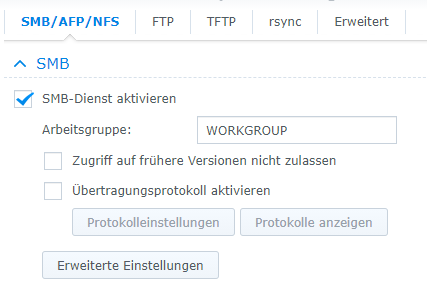
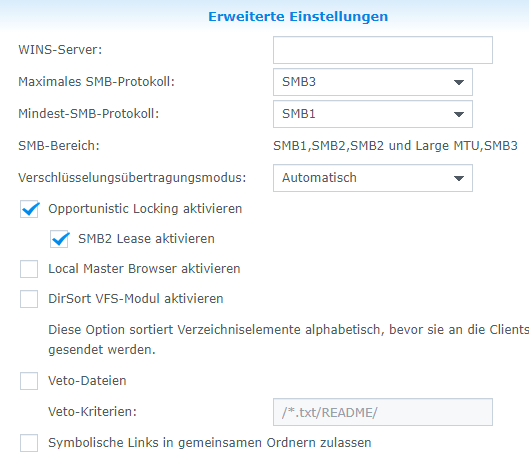
    Und die fährt mit SMB 1.0?
    Glaube ich nicht. Die kann bestimmt smb 3.0
    Linux-Werkzeugkasten:
    https://forum.iobroker.net/topic/42952/der-kleine-iobroker-linux-werkzeugkasten
    NodeJS Fixer Skript:
    https://forum.iobroker.net/topic/68035/iob-node-fix-skript
    iob_diag: curl -sLf -o diag.sh https://iobroker.net/diag.sh && bash diag.sh

    qqolliQ 1 Reply Last reply
    0
    • Thomas BraunT Thomas Braun

      @qqolli

      Und die fährt mit SMB 1.0?
      Glaube ich nicht. Die kann bestimmt smb 3.0

      qqolliQ Offline
      qqolliQ Offline
      qqolli
      wrote on last edited by
      #9

      @thomas-braun

      e88c544e-07ca-475a-a8ad-ecc1f947e8e8-image.png

      d7c50da2-20c2-43e8-bc7f-2464f82ba148-image.png

      Wie bereits gesagt, wenn ich das Backup aus dem Adapter manuell anstoße, gibt es keine Probleme. Die gibt es nur bei dem automatischen Backup. Insofern wüsste ich nicht, was die SMB-Version damit zu tun hätte; aber ich bin darin auch nicht besonders bewandert.

      Thomas BraunT 1 Reply Last reply
      0
      • qqolliQ qqolli

        @thomas-braun

        e88c544e-07ca-475a-a8ad-ecc1f947e8e8-image.png

        d7c50da2-20c2-43e8-bc7f-2464f82ba148-image.png

        Wie bereits gesagt, wenn ich das Backup aus dem Adapter manuell anstoße, gibt es keine Probleme. Die gibt es nur bei dem automatischen Backup. Insofern wüsste ich nicht, was die SMB-Version damit zu tun hätte; aber ich bin darin auch nicht besonders bewandert.

        Thomas BraunT Online
        Thomas BraunT Online
        Thomas Braun
        Most Active
        wrote on last edited by
        #10

        @qqolli

        Was ist denn das für einer?

        ls -l /opt/iobroker/backups/influxDB_2021_08_21-02_00_35_backupiobroker
        

        Linux-Werkzeugkasten:
        https://forum.iobroker.net/topic/42952/der-kleine-iobroker-linux-werkzeugkasten
        NodeJS Fixer Skript:
        https://forum.iobroker.net/topic/68035/iob-node-fix-skript
        iob_diag: curl -sLf -o diag.sh https://iobroker.net/diag.sh && bash diag.sh

        qqolliQ 1 Reply Last reply
        0
        • Thomas BraunT Thomas Braun

          @qqolli

          Was ist denn das für einer?

          ls -l /opt/iobroker/backups/influxDB_2021_08_21-02_00_35_backupiobroker
          
          qqolliQ Offline
          qqolliQ Offline
          qqolli
          wrote on last edited by
          #11

          @thomas-braun

          Na ja, wenn ich ehrlich bin, dann hatte ich den ganz am Anfang gelöscht, weil ich dachte das könnte das Problem lösen. Dann hatte ich eine Datei mit gleichem Namen "erzeugt" und dann mit unlink Dateiname wieder versucht zu "entfernen".

          Sie ist seitdem auch weg, bekomme aber weiterhin diese Meldung:

          Backitup: BackItUp:
          Your backup was not completely created. Please check the errors!!
           
          clean: Error: EISDIR: illegal operation on a directory, unlink '/opt/iobroker/backups/influxDB_2021_08_21-02_00_35_backupiobroker'
          
          
          Thomas BraunT simatecS 2 Replies Last reply
          0
          • qqolliQ qqolli

            @thomas-braun

            Na ja, wenn ich ehrlich bin, dann hatte ich den ganz am Anfang gelöscht, weil ich dachte das könnte das Problem lösen. Dann hatte ich eine Datei mit gleichem Namen "erzeugt" und dann mit unlink Dateiname wieder versucht zu "entfernen".

            Sie ist seitdem auch weg, bekomme aber weiterhin diese Meldung:

            Backitup: BackItUp:
            Your backup was not completely created. Please check the errors!!
             
            clean: Error: EISDIR: illegal operation on a directory, unlink '/opt/iobroker/backups/influxDB_2021_08_21-02_00_35_backupiobroker'
            
            
            Thomas BraunT Online
            Thomas BraunT Online
            Thomas Braun
            Most Active
            wrote on last edited by
            #12

            @qqolli sagte in Backitup-Adapter: Fehlermeldung:

            /opt/iobroker/backups/influxDB_2021_08_21-02_00_35_backupiobroker

            sudo -u iobroker touch /opt/iobroker/backups/influxDB_2021_08_21-02_00_35_backupiobroker
            

            Linux-Werkzeugkasten:
            https://forum.iobroker.net/topic/42952/der-kleine-iobroker-linux-werkzeugkasten
            NodeJS Fixer Skript:
            https://forum.iobroker.net/topic/68035/iob-node-fix-skript
            iob_diag: curl -sLf -o diag.sh https://iobroker.net/diag.sh && bash diag.sh

            qqolliQ 1 Reply Last reply
            0
            • qqolliQ qqolli

              @thomas-braun

              Na ja, wenn ich ehrlich bin, dann hatte ich den ganz am Anfang gelöscht, weil ich dachte das könnte das Problem lösen. Dann hatte ich eine Datei mit gleichem Namen "erzeugt" und dann mit unlink Dateiname wieder versucht zu "entfernen".

              Sie ist seitdem auch weg, bekomme aber weiterhin diese Meldung:

              Backitup: BackItUp:
              Your backup was not completely created. Please check the errors!!
               
              clean: Error: EISDIR: illegal operation on a directory, unlink '/opt/iobroker/backups/influxDB_2021_08_21-02_00_35_backupiobroker'
              
              
              simatecS Online
              simatecS Online
              simatec
              Developer Most Active
              wrote on last edited by
              #13

              @qqolli Setze mal auf smb 3 und versuche ggfs. die Option "noserverino" mal zu aktivieren

              • Besuche meine Github Seite
              • Beitrag hat geholfen oder willst du mich unterstützen
              • HowTo Restore ioBroker
              1 Reply Last reply
              0
              • Thomas BraunT Thomas Braun

                @qqolli sagte in Backitup-Adapter: Fehlermeldung:

                /opt/iobroker/backups/influxDB_2021_08_21-02_00_35_backupiobroker

                sudo -u iobroker touch /opt/iobroker/backups/influxDB_2021_08_21-02_00_35_backupiobroker
                
                qqolliQ Offline
                qqolliQ Offline
                qqolli
                wrote on last edited by
                #14

                @thomas-braun

                Ok, habe ich gemacht und prompt ist die Datei auch wieder im angegebenen Verzeichnis angelegt worden.

                Soll ich jetzt einfach mal abwarten, ob es mit der automatischen Sicherung heute Nacht klappt?

                Und/oder auch zusätzlich den Vorschlag von @simatec auf der NAS aktivieren?

                Thomas BraunT 1 Reply Last reply
                0
                • qqolliQ qqolli

                  @thomas-braun

                  Ok, habe ich gemacht und prompt ist die Datei auch wieder im angegebenen Verzeichnis angelegt worden.

                  Soll ich jetzt einfach mal abwarten, ob es mit der automatischen Sicherung heute Nacht klappt?

                  Und/oder auch zusätzlich den Vorschlag von @simatec auf der NAS aktivieren?

                  Thomas BraunT Online
                  Thomas BraunT Online
                  Thomas Braun
                  Most Active
                  wrote on last edited by
                  #15

                  @qqolli
                  Ja, warte mal ab.
                  Auf SMB3 solltest du eh umstellen, ich würde auch im NAS mindestens SMB3 erzwingen, wenn die sonstigen SMB-Clients das können. SMB1 ist zu vermeiden wo es nur geht.
                  noserverino hängt auch vom verwendeten Dateisystem auf dem NAS ab.

                  Linux-Werkzeugkasten:
                  https://forum.iobroker.net/topic/42952/der-kleine-iobroker-linux-werkzeugkasten
                  NodeJS Fixer Skript:
                  https://forum.iobroker.net/topic/68035/iob-node-fix-skript
                  iob_diag: curl -sLf -o diag.sh https://iobroker.net/diag.sh && bash diag.sh

                  qqolliQ 2 Replies Last reply
                  0
                  • Thomas BraunT Thomas Braun

                    @qqolli
                    Ja, warte mal ab.
                    Auf SMB3 solltest du eh umstellen, ich würde auch im NAS mindestens SMB3 erzwingen, wenn die sonstigen SMB-Clients das können. SMB1 ist zu vermeiden wo es nur geht.
                    noserverino hängt auch vom verwendeten Dateisystem auf dem NAS ab.

                    qqolliQ Offline
                    qqolliQ Offline
                    qqolli
                    wrote on last edited by
                    #16

                    @thomas-braun

                    Ok, mache ich und halte Euch auf dem laufenden.

                    1 Reply Last reply
                    0
                    • Thomas BraunT Thomas Braun

                      @qqolli
                      Ja, warte mal ab.
                      Auf SMB3 solltest du eh umstellen, ich würde auch im NAS mindestens SMB3 erzwingen, wenn die sonstigen SMB-Clients das können. SMB1 ist zu vermeiden wo es nur geht.
                      noserverino hängt auch vom verwendeten Dateisystem auf dem NAS ab.

                      qqolliQ Offline
                      qqolliQ Offline
                      qqolli
                      wrote on last edited by
                      #17

                      @thomas-braun

                      Hallo,

                      hatte mit

                      sudo -u iobroker touch /opt/iobroker/backups/influxDB_2021_08_21-02_00_35_backupiobroker
                      

                      die Datei neu angelegt. Leider blieb es bei der Fehlermeldung:

                      Backitup: BackItUp:
                      Your backup was not completely created. Please check the errors!!
                       
                      clean: Error: EISDIR: illegal operation on a directory, unlink '/opt/iobroker/backups/influxDB_2021_08_21-02_00_35_backupiobroker'
                      

                      Danach habe ich, gemäß der Empfehlung von @simatec im Adapter auf SMB 3 und "noserverino" umgestellt. Leider bleibt es bei der besagten Fehlermeldung.

                      Wie gesagt, löse ich im Backitup-Adapter das ioB-Backup per Hand aus, gibt es keinerlei Probleme oder Fehlermeldungen:

                      Started iobroker ...
                      [DEBUG] [mount] - noserverino option: true
                      [DEBUG] [mount] - cifs-mount command: "sudo mount -t cifs -o username=backup,password=****,noserverino,rw,file_mode=0777,dir_mode=0777,vers=3.0 //192.168.178.23/backup/ioBroker/ /opt/iobroker/backups"
                      [DEBUG] [mount] - mount successfully completed
                      [DEBUG] [mount] - done
                      [DEBUG] [iobroker] - host.ioBroker 21053 states saved
                      
                      [DEBUG] [iobroker] - host.ioBroker 25230 objects saved
                      
                      [DEBUG] [iobroker] - Backup created: /opt/iobroker/backups/iobroker_2021_09_05-10_32_46_backupiobroker.tar.gz
                      
                      [DEBUG] [iobroker] - done
                      [DEBUG] [influxDB] - Start InfluxDB Backup ...
                      [DEBUG] [influxDB] - InfluxDB Backup tmp directory created 
                      [DEBUG] [influxDB] - Packed 34MB so far...
                      [DEBUG] [influxDB] - Backup created: /opt/iobroker/backups/influxDB_2021_09_05-10_33_18_backupiobroker.tar.gz
                      [DEBUG] [influxDB] - Try deleting the InfluxDB tmp directory
                      [DEBUG] [influxDB] - InfluxDB tmp directory was successfully deleted
                      [DEBUG] [influxDB] - done
                      [DEBUG] [grafana] - Start Grafana Backup ...
                      [DEBUG] [grafana] - Created grafana_tmp directory: "/opt/iobroker/backups/grafana_tmp"
                      [DEBUG] [grafana] - Created dashboard directory
                      [DEBUG] [grafana] - Created dashboards_manually_restore directory
                      [DEBUG] [grafana] - Created datasource directory
                      [DEBUG] [grafana] - start Grafana request ...
                      [DEBUG] [grafana] - Grafana is available ... Status: 200
                      [DEBUG] [grafana] - found Dashboard: kuhlschrank
                      [DEBUG] [grafana] - found Dashboard: internet-speed
                      [DEBUG] [grafana] - start Grafana backup compress ...
                      [DEBUG] [grafana] - Backup created: /opt/iobroker/backups/grafana_2021_09_05-10_33_44_backupiobroker.tar.gz
                      [DEBUG] [grafana] - Try deleting the Grafana tmp directory: "/opt/iobroker/backups/grafana_tmp"
                      [DEBUG] [grafana] - Grafana tmp directory "/opt/iobroker/backups/grafana_tmp" successfully deleted
                      [DEBUG] [grafana] - done
                      [DEBUG] [javascripts] - Backup created: /opt/iobroker/backups/javascripts_2021_09_05-10_33_50_backupiobroker.tar.gz
                      [DEBUG] [javascripts] - done
                      [DEBUG] [cifs] - done
                      [DEBUG] [clean] - done
                      [DEBUG] [pushover] - done
                      [DEBUG] [historyHTML] - new history html values created
                      [DEBUG] [historyHTML] - done
                      [DEBUG] [historyJSON] - new history json values created
                      [DEBUG] [historyJSON] - done
                      [DEBUG] [umount] - mount activ, umount is started ...
                      [DEBUG] [umount] - umount successfully completed
                      [DEBUG] [umount] - done
                      [EXIT] 0
                      
                      simatecS 1 Reply Last reply
                      0
                      • qqolliQ qqolli

                        @thomas-braun

                        Hallo,

                        hatte mit

                        sudo -u iobroker touch /opt/iobroker/backups/influxDB_2021_08_21-02_00_35_backupiobroker
                        

                        die Datei neu angelegt. Leider blieb es bei der Fehlermeldung:

                        Backitup: BackItUp:
                        Your backup was not completely created. Please check the errors!!
                         
                        clean: Error: EISDIR: illegal operation on a directory, unlink '/opt/iobroker/backups/influxDB_2021_08_21-02_00_35_backupiobroker'
                        

                        Danach habe ich, gemäß der Empfehlung von @simatec im Adapter auf SMB 3 und "noserverino" umgestellt. Leider bleibt es bei der besagten Fehlermeldung.

                        Wie gesagt, löse ich im Backitup-Adapter das ioB-Backup per Hand aus, gibt es keinerlei Probleme oder Fehlermeldungen:

                        Started iobroker ...
                        [DEBUG] [mount] - noserverino option: true
                        [DEBUG] [mount] - cifs-mount command: "sudo mount -t cifs -o username=backup,password=****,noserverino,rw,file_mode=0777,dir_mode=0777,vers=3.0 //192.168.178.23/backup/ioBroker/ /opt/iobroker/backups"
                        [DEBUG] [mount] - mount successfully completed
                        [DEBUG] [mount] - done
                        [DEBUG] [iobroker] - host.ioBroker 21053 states saved
                        
                        [DEBUG] [iobroker] - host.ioBroker 25230 objects saved
                        
                        [DEBUG] [iobroker] - Backup created: /opt/iobroker/backups/iobroker_2021_09_05-10_32_46_backupiobroker.tar.gz
                        
                        [DEBUG] [iobroker] - done
                        [DEBUG] [influxDB] - Start InfluxDB Backup ...
                        [DEBUG] [influxDB] - InfluxDB Backup tmp directory created 
                        [DEBUG] [influxDB] - Packed 34MB so far...
                        [DEBUG] [influxDB] - Backup created: /opt/iobroker/backups/influxDB_2021_09_05-10_33_18_backupiobroker.tar.gz
                        [DEBUG] [influxDB] - Try deleting the InfluxDB tmp directory
                        [DEBUG] [influxDB] - InfluxDB tmp directory was successfully deleted
                        [DEBUG] [influxDB] - done
                        [DEBUG] [grafana] - Start Grafana Backup ...
                        [DEBUG] [grafana] - Created grafana_tmp directory: "/opt/iobroker/backups/grafana_tmp"
                        [DEBUG] [grafana] - Created dashboard directory
                        [DEBUG] [grafana] - Created dashboards_manually_restore directory
                        [DEBUG] [grafana] - Created datasource directory
                        [DEBUG] [grafana] - start Grafana request ...
                        [DEBUG] [grafana] - Grafana is available ... Status: 200
                        [DEBUG] [grafana] - found Dashboard: kuhlschrank
                        [DEBUG] [grafana] - found Dashboard: internet-speed
                        [DEBUG] [grafana] - start Grafana backup compress ...
                        [DEBUG] [grafana] - Backup created: /opt/iobroker/backups/grafana_2021_09_05-10_33_44_backupiobroker.tar.gz
                        [DEBUG] [grafana] - Try deleting the Grafana tmp directory: "/opt/iobroker/backups/grafana_tmp"
                        [DEBUG] [grafana] - Grafana tmp directory "/opt/iobroker/backups/grafana_tmp" successfully deleted
                        [DEBUG] [grafana] - done
                        [DEBUG] [javascripts] - Backup created: /opt/iobroker/backups/javascripts_2021_09_05-10_33_50_backupiobroker.tar.gz
                        [DEBUG] [javascripts] - done
                        [DEBUG] [cifs] - done
                        [DEBUG] [clean] - done
                        [DEBUG] [pushover] - done
                        [DEBUG] [historyHTML] - new history html values created
                        [DEBUG] [historyHTML] - done
                        [DEBUG] [historyJSON] - new history json values created
                        [DEBUG] [historyJSON] - done
                        [DEBUG] [umount] - mount activ, umount is started ...
                        [DEBUG] [umount] - umount successfully completed
                        [DEBUG] [umount] - done
                        [EXIT] 0
                        
                        simatecS Online
                        simatecS Online
                        simatec
                        Developer Most Active
                        wrote on last edited by
                        #18

                        @qqolli per Hand wird auch nicht gelöscht.
                        Lösche bitte den Ordner. Der ist nur temporär fürs Backup gewesen und wird nicht benötigt.

                        • Besuche meine Github Seite
                        • Beitrag hat geholfen oder willst du mich unterstützen
                        • HowTo Restore ioBroker
                        qqolliQ 1 Reply Last reply
                        0
                        • simatecS simatec

                          @qqolli per Hand wird auch nicht gelöscht.
                          Lösche bitte den Ordner. Der ist nur temporär fürs Backup gewesen und wird nicht benötigt.

                          qqolliQ Offline
                          qqolliQ Offline
                          qqolli
                          wrote on last edited by
                          #19

                          @simatec

                          Du meinst den hier auf dem Raspi, richtig?

                          /opt/iobroker/backups/
                          
                          simatecS 1 Reply Last reply
                          0
                          • qqolliQ qqolli

                            @simatec

                            Du meinst den hier auf dem Raspi, richtig?

                            /opt/iobroker/backups/
                            
                            simatecS Online
                            simatecS Online
                            simatec
                            Developer Most Active
                            wrote on last edited by
                            #20

                            @qqolli
                            Nein … lösche bitte wie folgt

                            
                            sudo -u iobroker rm -rf /opt/iobroker/backups/influxDB_2021_08_21-02_00_35_backupiobroker
                            
                            
                            • Besuche meine Github Seite
                            • Beitrag hat geholfen oder willst du mich unterstützen
                            • HowTo Restore ioBroker
                            qqolliQ 2 Replies Last reply
                            0
                            • simatecS simatec

                              @qqolli
                              Nein … lösche bitte wie folgt

                              
                              sudo -u iobroker rm -rf /opt/iobroker/backups/influxDB_2021_08_21-02_00_35_backupiobroker
                              
                              
                              qqolliQ Offline
                              qqolliQ Offline
                              qqolli
                              wrote on last edited by
                              #21

                              @simatec

                              Ok, habe ich gemacht. Mal sehen, ob es einen Einfluß hat. Sage morgen Bescheid.

                              1 Reply Last reply
                              0
                              • simatecS simatec

                                @qqolli
                                Nein … lösche bitte wie folgt

                                
                                sudo -u iobroker rm -rf /opt/iobroker/backups/influxDB_2021_08_21-02_00_35_backupiobroker
                                
                                
                                qqolliQ Offline
                                qqolliQ Offline
                                qqolli
                                wrote on last edited by
                                #22

                                @simatec

                                Guten Morgen,

                                leider gibt es immer noch die selbe Fehlermeldung:

                                clean: Error: EISDIR: illegal operation on a directory, unlink '/opt/iobroker/backups/influxDB_2021_08_21-02_00_35_backupiobroker'
                                

                                obwohl die Datei nicht mehr im angegebenen Ordner existiert.

                                Würde es etwas nützen, die Datei mit dem Befehl von @Thomas-Braun wieder anzulegen:

                                sudo -u iobroker touch /opt/iobroker/backups/influxDB_2021_08_21-02_00_35_backupiobroker
                                

                                und dann den unlink-Befehl auszuführen?

                                simatecS 1 Reply Last reply
                                0
                                • qqolliQ qqolli

                                  @simatec

                                  Guten Morgen,

                                  leider gibt es immer noch die selbe Fehlermeldung:

                                  clean: Error: EISDIR: illegal operation on a directory, unlink '/opt/iobroker/backups/influxDB_2021_08_21-02_00_35_backupiobroker'
                                  

                                  obwohl die Datei nicht mehr im angegebenen Ordner existiert.

                                  Würde es etwas nützen, die Datei mit dem Befehl von @Thomas-Braun wieder anzulegen:

                                  sudo -u iobroker touch /opt/iobroker/backups/influxDB_2021_08_21-02_00_35_backupiobroker
                                  

                                  und dann den unlink-Befehl auszuführen?

                                  simatecS Online
                                  simatecS Online
                                  simatec
                                  Developer Most Active
                                  wrote on last edited by
                                  #23

                                  @qqolli
                                  Der Ordner wird auch auf deinem NAS liegen und nicht nur lokal.
                                  Lösche den Ordner auch auf deinem NAS

                                  • Besuche meine Github Seite
                                  • Beitrag hat geholfen oder willst du mich unterstützen
                                  • HowTo Restore ioBroker
                                  qqolliQ 1 Reply Last reply
                                  0
                                  • simatecS simatec

                                    @qqolli
                                    Der Ordner wird auch auf deinem NAS liegen und nicht nur lokal.
                                    Lösche den Ordner auch auf deinem NAS

                                    qqolliQ Offline
                                    qqolliQ Offline
                                    qqolli
                                    wrote on last edited by
                                    #24

                                    @simatec

                                    Habe gerade auf der NAS nachgeschaut, da liegt der Ordner auch ab. Vom Inhalt her sind da viele "komische" Dateien enthalten:
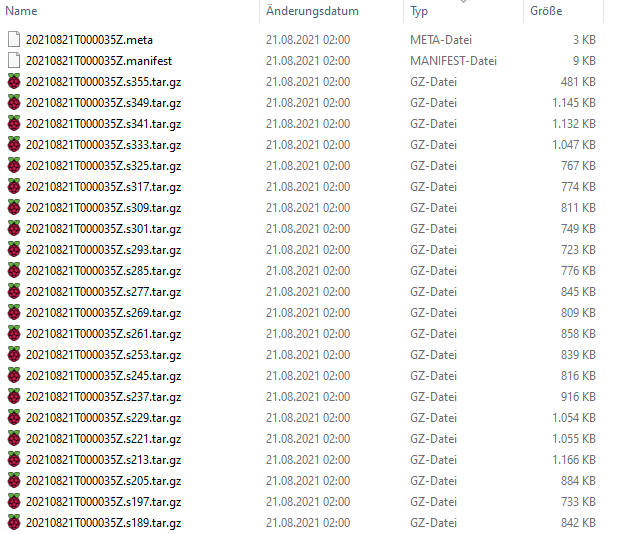
                                    91026635-81eb-42e2-b58e-f77449ee76a7-image.png

                                    Habe diesen Ordner mal an eine andere Stelle kopiert; löschen kann ich ihn dann immer noch.

                                    Mal sehen ob es etwas bringt.

                                    simatecS 2 Replies Last reply
                                    0
                                    • qqolliQ qqolli

                                      @simatec

                                      Habe gerade auf der NAS nachgeschaut, da liegt der Ordner auch ab. Vom Inhalt her sind da viele "komische" Dateien enthalten:

                                      91026635-81eb-42e2-b58e-f77449ee76a7-image.png

                                      Habe diesen Ordner mal an eine andere Stelle kopiert; löschen kann ich ihn dann immer noch.

                                      Mal sehen ob es etwas bringt.

                                      simatecS Online
                                      simatecS Online
                                      simatec
                                      Developer Most Active
                                      wrote on last edited by
                                      #25

                                      @qqolli
                                      Ja das war der Fehler

                                      • Besuche meine Github Seite
                                      • Beitrag hat geholfen oder willst du mich unterstützen
                                      • HowTo Restore ioBroker
                                      qqolliQ 1 Reply Last reply
                                      0
                                      • qqolliQ qqolli

                                        @simatec

                                        Habe gerade auf der NAS nachgeschaut, da liegt der Ordner auch ab. Vom Inhalt her sind da viele "komische" Dateien enthalten:

                                        91026635-81eb-42e2-b58e-f77449ee76a7-image.png

                                        Habe diesen Ordner mal an eine andere Stelle kopiert; löschen kann ich ihn dann immer noch.

                                        Mal sehen ob es etwas bringt.

                                        simatecS Online
                                        simatecS Online
                                        simatec
                                        Developer Most Active
                                        wrote on last edited by
                                        #26

                                        @qqolli
                                        Werde das in der neuen Version mal abfangen

                                        • Besuche meine Github Seite
                                        • Beitrag hat geholfen oder willst du mich unterstützen
                                        • HowTo Restore ioBroker
                                        1 Reply Last reply
                                        0
                                        • simatecS simatec

                                          @qqolli
                                          Ja das war der Fehler

                                          qqolliQ Offline
                                          qqolliQ Offline
                                          qqolli
                                          wrote on last edited by
                                          #27

                                          @simatec

                                          Hi,

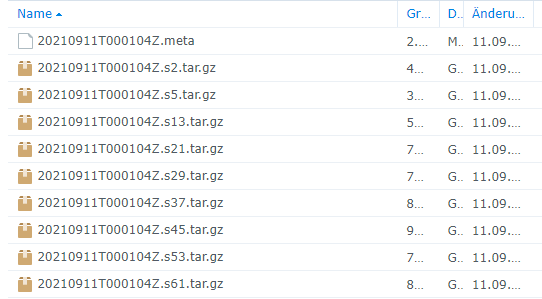
                                          leider nicht, denn egal wie oft ich diese zwei Ordner lösche, über Nacht hat er sie (oder einen) wieder angelegt und bringt die gleiche Fehlermeldung (s. letzte Posts).

                                          influxDB_2021_09_11-02_01_04_backupiobroker
                                          

                                          mit

                                          581379dc-966f-4b8d-8757-eb8ad64e46be-image.png

                                          F 1 Reply Last reply
                                          0
                                          Reply
                                          • Reply as topic
                                          Log in to reply
                                          • Oldest to Newest
                                          • Newest to Oldest
                                          • Most Votes


                                          Support us

                                          ioBroker
                                          Community Adapters
                                          Donate
                                          FAQ Cloud / IOT
                                          HowTo: Node.js-Update
                                          HowTo: Backup/Restore
                                          Downloads
                                          BLOG

                                          323

                                          Online

                                          32.7k

                                          Users

                                          82.4k

                                          Topics

                                          1.3m

                                          Posts
                                          Community
                                          Impressum | Datenschutz-Bestimmungen | Nutzungsbedingungen | Einwilligungseinstellungen
                                          ioBroker Community 2014-2025
                                          logo
                                          • Login

                                          • Don't have an account? Register

                                          • Login or register to search.
                                          • First post
                                            Last post
                                          0
                                          • Home
                                          • Recent
                                          • Tags
                                          • Unread 0
                                          • Categories
                                          • Unreplied
                                          • Popular
                                          • GitHub
                                          • Docu
                                          • Hilfe