Skip to content
  • Home
  • Recent
  • Tags
  • 0 Unread 0
  • Categories
  • Unreplied
  • Popular
  • GitHub
  • Docu
  • Hilfe
Skins
  • Light
  • Brite
  • Cerulean
  • Cosmo
  • Flatly
  • Journal
  • Litera
  • Lumen
  • Lux
  • Materia
  • Minty
  • Morph
  • Pulse
  • Sandstone
  • Simplex
  • Sketchy
  • Spacelab
  • United
  • Yeti
  • Zephyr
  • Dark
  • Cyborg
  • Darkly
  • Quartz
  • Slate
  • Solar
  • Superhero
  • Vapor

  • Default (No Skin)
  • No Skin
Collapse
ioBroker Logo

Community Forum

donate donate
  1. ioBroker Community Home
  2. Deutsch
  3. Tester
  4. Test Adapter PSA v0.0.x Peugeot Opel Citroen

NEWS

  • Monatsrückblick Januar/Februar 2026 ist online!
    BluefoxB
    Bluefox
    17
    1
    513

  • Jahresrückblick 2025 – unser neuer Blogbeitrag ist online! ✨
    BluefoxB
    Bluefox
    17
    1
    5.3k

  • Neuer Blogbeitrag: Monatsrückblick - Dezember 2025 🎄
    BluefoxB
    Bluefox
    13
    1
    1.4k

Test Adapter PSA v0.0.x Peugeot Opel Citroen

Scheduled Pinned Locked Moved Tester
citroencorsacorsa-eopelpeugeotpsae208
334 Posts 44 Posters 74.1k Views 43 Watching
  • Oldest to Newest
  • Newest to Oldest
  • Most Votes
Reply
  • Reply as topic
Log in to reply
This topic has been deleted. Only users with topic management privileges can see it.
  • D docsnyder7

    @uwe96 schon richtig, aber angesehen hab ich es noch nicht :slightly_smiling_face:
    Muss ich am abend mal testen.. wenn der Opel am Kabel hängt.. SOC auf jeden Fall

    U Offline
    U Offline
    Uwe96
    wrote on last edited by
    #218

    @docsnyder7
    Auch das ein Nachteil. Das Auto muss angeschlossen sein.
    Ich kann die Daten jederzeit auslesen.

    D 1 Reply Last reply
    0
    • U Uwe96

      @docsnyder7
      Auch das ein Nachteil. Das Auto muss angeschlossen sein.
      Ich kann die Daten jederzeit auslesen.

      D Offline
      D Offline
      docsnyder7
      wrote on last edited by
      #219

      @uwe96
      Aber wo bekommt das script die Daten her.. direkt aus dem PSA Servern? oder aus dem externen PSA Car Adapter

      U 1 Reply Last reply
      0
      • D docsnyder7

        @uwe96
        Aber wo bekommt das script die Daten her.. direkt aus dem PSA Servern? oder aus dem externen PSA Car Adapter

        U Offline
        U Offline
        Uwe96
        wrote on last edited by
        #220

        @docsnyder7
        Vom Flobz PSA Car Controller im Docker
        Wo bekommt denn dein EVCC die Daten her?

        1 Reply Last reply
        0
        • D Offline
          D Offline
          docsnyder7
          wrote on last edited by
          #221

          @uwe96
          aus dem gleichen Adapter... hab aber unter den MQTT objekten die aus EVCC kommen noch nicht geschaut, was da kommt, wenn der Opel angehängt ist. Der SOC jedenfalls wird nur angezeigt, wenn es angehängt ist...
          Doofe frage, wie importiert man ein javascript? finde keine importfunktion wie bei Blocklys

          hollywootH U 2 Replies Last reply
          0
          • D docsnyder7

            @uwe96
            aus dem gleichen Adapter... hab aber unter den MQTT objekten die aus EVCC kommen noch nicht geschaut, was da kommt, wenn der Opel angehängt ist. Der SOC jedenfalls wird nur angezeigt, wenn es angehängt ist...
            Doofe frage, wie importiert man ein javascript? finde keine importfunktion wie bei Blocklys

            hollywootH Offline
            hollywootH Offline
            hollywoot
            wrote on last edited by
            #222

            @docsnyder7
            Skripte > "Burgermenü" (drei Punkte, oben) > Skripte importieren
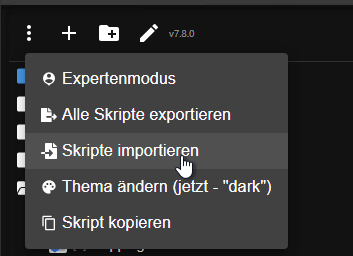
            Screenshot_20240305_121728.png

            1 Reply Last reply
            1
            • D docsnyder7

              @uwe96
              aus dem gleichen Adapter... hab aber unter den MQTT objekten die aus EVCC kommen noch nicht geschaut, was da kommt, wenn der Opel angehängt ist. Der SOC jedenfalls wird nur angezeigt, wenn es angehängt ist...
              Doofe frage, wie importiert man ein javascript? finde keine importfunktion wie bei Blocklys

              U Offline
              U Offline
              Uwe96
              wrote on last edited by
              #223

              @docsnyder7
              So wie man alle Texte kopiert?
              Text markieren, STRG-C
              Und dann bei Javascript STRG-V

              D 1 Reply Last reply
              1
              • U Uwe96

                @docsnyder7
                So wie man alle Texte kopiert?
                Text markieren, STRG-C
                Und dann bei Javascript STRG-V

                D Offline
                D Offline
                docsnyder7
                wrote on last edited by
                #224

                @uwe96 @hollywoot danke fürs Augen öffnen
                das script tut tadellos!!! :relaxed:

                1 Reply Last reply
                0
                • M Matze1909

                  @uwe96
                  Schau mal hier:
                  Script

                  Mit dem Script mache ich das... funktioniert erste Sahne.
                  Matze

                  RaspiUserR Online
                  RaspiUserR Online
                  RaspiUser
                  wrote on last edited by RaspiUser
                  #225

                  @matze1909 sagte in Test Adapter PSA v0.0.x Peugeot Opel Citroen:

                  ... funktioniert erste Sahne.

                  ... stimmt ... aber (für Laien wie mich) kann man im Script irgendwo (bzw. WIE) das Aktualisierungsintervall ändern ?

                  EDIT:
                  ... nach intensiver Suche :cold_sweat: mit 3 versch. Suchmaschinen und div. Suchbegriffen habe ich diese Syntax gefunden ... Wer's auch brauchen kann (oder, so wie ich, nicht wußte ...) ...

                  1 Reply Last reply
                  0
                  • S Offline
                    S Offline
                    sintra
                    wrote on last edited by
                    #226

                    Habe jetzt alles ans laufen bekommen und mit der Scriptvorlage kann ich beide Autos abfragen (ein Script je Auto).

                    Viele Dank schon mal für eure Tipps.

                    1 Reply Last reply
                    0
                    • hg6806H Offline
                      hg6806H Offline
                      hg6806
                      Most Active
                      wrote on last edited by
                      #227

                      Leider bekomme ich das Webinterface nicht zum Laufen.

                      Chrome meldet "Webseite ist nicht erreichbar"

                      Ich habe allerdings auch während des Installierens folgende Warnings:

                        Downloading https://www.piwheels.org/simple/dash-html-components/dash_html_components-2.0.0-py3-none-any.whl (5.2 kB)
                      Requirement already satisfied: importlib-metadata in /usr/lib/python3/dist-packages (from dash<3.0.0,>=2.9.0->psa-car-controller) (1.6.0)
                      Collecting nest-asyncio
                        WARNING: Retrying (Retry(total=4, connect=None, read=None, redirect=None, status=None)) after connection broken by 'ProtocolError('Connection aborted.', RemoteDisconnected('Remote end closed connection without response'))': /simple/nest-asyncio/nest_asyncio-1.6.0-py3-none-any.whl
                        Downloading https://www.piwheels.org/simple/nest-asyncio/nest_asyncio-1.6.0-py3-none-any.whl (5.2 kB)
                      Collecting dash-core-components==2.0.0
                      
                      
                        WARNING: The script normalizer is installed in '/home/pi/.local/bin' which is not on PATH.
                        Consider adding this directory to PATH or, if you prefer to suppress this warning, use --no-warn-script-location.
                        WARNING: The scripts iptest, iptest3, ipython and ipython3 are installed in '/home/pi/.local/bin' which is not on PATH.
                        Consider adding this directory to PATH or, if you prefer to suppress this warning, use --no-warn-script-location.
                        WARNING: The scripts futurize and pasteurize are installed in '/home/pi/.local/bin' which is not on PATH.
                        Consider adding this directory to PATH or, if you prefer to suppress this warning, use --no-warn-script-location.
                        WARNING: The scripts dash-generate-components, dash-update-components and renderer are installed in '/home/pi/.local/bin' which is not on PATH.
                        Consider adding this directory to PATH or, if you prefer to suppress this warning, use --no-warn-script-location.
                        WARNING: The script androguard is installed in '/home/pi/.local/bin' which is not on PATH.
                        Consider adding this directory to PATH or, if you prefer to suppress this warning, use --no-warn-script-location.
                        WARNING: The script psa-car-controller is installed in '/home/pi/.local/bin' which is not on PATH.
                        Consider adding this directory to PATH or, if you prefer to suppress this warning, use --no-warn-script-location.
                      Successfully installed ConfigUpdater-3.2 androguard-3.3.5 argparse-1.4.0 asn1crypto-1.5.1 backcall-0.2.0 charset-normalizer-3.3.2 dash-2.16.0 dash-bootstrap-components-1.5.0 dash-core-components-2.0.0 dash-daq-0.5.0 dash-html-components-2.0.0 dash-table-5.0.0 future-1.0.0 geojson-2.5.0 ipython-7.34.0 matplotlib-inline-0.1.6 nest-asyncio-1.6.0 networkx-3.2.1 oauth2-client-1.4.2 pickleshare-0.7.5 plotly-5.19.0 prompt-toolkit-3.0.43 psa-car-controller-3.4.1 pydantic-1.10.14 pydot-2.0.0 pyparsing-3.1.2 requests-2.31.0 reverse-geocode-1.4.1 ruamel.yaml-0.18.6 ruamel.yaml.clib-0.2.8 tenacity-8.2.3 typing-extensions-4.10.0 wcwidth-0.2.13


                      Könnte das der Grund sein?

                      1 Reply Last reply
                      0
                      • hg6806H Offline
                        hg6806H Offline
                        hg6806
                        Most Active
                        wrote on last edited by
                        #228

                        Habe es direct auf dem Pi und per VNC in Chromium per 127.0.0.1:5000 geschafft.

                        Die User Daten waren successfull, aber wie bekommt man im Chromium nun den Login Code?

                        1 Reply Last reply
                        0
                        • hg6806H Offline
                          hg6806H Offline
                          hg6806
                          Most Active
                          wrote on last edited by
                          #229

                          Ich denke ich habe den Code gefunden.
                          Jedoch bekomme ich ein

                          400 - invalid_grant : The provided access grant is invalid, expired, or revoked.
                          
                          RaspiUserR 1 Reply Last reply
                          0
                          • hg6806H hg6806

                            Ich denke ich habe den Code gefunden.
                            Jedoch bekomme ich ein

                            400 - invalid_grant : The provided access grant is invalid, expired, or revoked.
                            
                            RaspiUserR Online
                            RaspiUserR Online
                            RaspiUser
                            wrote on last edited by
                            #230

                            @hg6806 ... Beitrag #202 schon probiert ?

                            1 Reply Last reply
                            0
                            • hg6806H Offline
                              hg6806H Offline
                              hg6806
                              Most Active
                              wrote on last edited by hg6806
                              #231

                              Heute morgen hat es geklappt, ich hatte keine Fehlermeldung bekommen und somit konnte ich auch auf der OTP config Seite fortfahren.
                              Soweit sollte alles geklappt haben, sehe aber noch keine Daten. Dauert wahrscheinlich.
                              Aber selbst auf der App bekomme ich nichts.

                              Noch eine ganz komische Sache.

                              Der psa_car_controller läuft ja auch einem Pi.
                              Wenn ich alles starte komme ich NICHT von einem anderen Rechner, der logischerweise im selben Netzwerk ist, auf den Webserver, also in meinem Fall 192.168.178.97:5000
                              Das geht nur auf dem Pi selbst über VNC wenn ich im Chromium 127.0.0.1:5000 eingeben.

                              Woher kommt das. Wird da was geblockt?

                              1 Reply Last reply
                              0
                              • hollywootH Offline
                                hollywootH Offline
                                hollywoot
                                wrote on last edited by hollywoot
                                #232

                                @hg6806
                                mit dem Parameter -l kannst du eine IP mitgeben.
                                in Deinem Fall also -l 192.168.178.97

                                ich starte bspw. so:
                                psa-car-controller -f config.json -c charge_config.json -r -l 192.168.178.97

                                Quelle:

                                root@psa-carcontroller:~# psa-car-controller -h
                                usage: psa-car-controller [-h] [-f CONFIG] [-c [charge config file]] [-d [Debug level number or name]] [-l IP] [-p PORT] [-r] [-R REFRESH] [-m MAIL]
                                                         [-P PASSWORD] [--remote-disable] [--offline] [--web-conf] [-b BASE_PATH] [--version]
                                
                                options:
                                 -h, --help            show this help message and exit
                                 -f CONFIG, --config CONFIG
                                                       config file, default file: config.json
                                 -c [charge config file], --charge-control [charge config file]
                                                       enable charge control, default charge_config.json
                                 -d [Debug level number or name], --debug [Debug level number or name]
                                                       enable debug
                                 -l IP, --listen IP    change server listen address
                                 -p PORT, --port PORT  change server listen port
                                 -r, --record          save vehicle data to db
                                 -R REFRESH, --refresh REFRESH
                                                       refresh vehicles status every x min
                                 -m MAIL, --mail MAIL  set the email address
                                 -P PASSWORD, --password PASSWORD
                                                       set the password
                                 --remote-disable      disable remote control
                                 --offline             offline limited mode
                                 --web-conf            ignore if config files not existing yet
                                 -b BASE_PATH, --base-path BASE_PATH
                                                       base path for web app
                                 --version             show program's version number and exit
                                

                                hg6806H 1 Reply Last reply
                                0
                                • hollywootH hollywoot

                                  @hg6806
                                  mit dem Parameter -l kannst du eine IP mitgeben.
                                  in Deinem Fall also -l 192.168.178.97

                                  ich starte bspw. so:
                                  psa-car-controller -f config.json -c charge_config.json -r -l 192.168.178.97

                                  Quelle:

                                  root@psa-carcontroller:~# psa-car-controller -h
                                  usage: psa-car-controller [-h] [-f CONFIG] [-c [charge config file]] [-d [Debug level number or name]] [-l IP] [-p PORT] [-r] [-R REFRESH] [-m MAIL]
                                                           [-P PASSWORD] [--remote-disable] [--offline] [--web-conf] [-b BASE_PATH] [--version]
                                  
                                  options:
                                   -h, --help            show this help message and exit
                                   -f CONFIG, --config CONFIG
                                                         config file, default file: config.json
                                   -c [charge config file], --charge-control [charge config file]
                                                         enable charge control, default charge_config.json
                                   -d [Debug level number or name], --debug [Debug level number or name]
                                                         enable debug
                                   -l IP, --listen IP    change server listen address
                                   -p PORT, --port PORT  change server listen port
                                   -r, --record          save vehicle data to db
                                   -R REFRESH, --refresh REFRESH
                                                         refresh vehicles status every x min
                                   -m MAIL, --mail MAIL  set the email address
                                   -P PASSWORD, --password PASSWORD
                                                         set the password
                                   --remote-disable      disable remote control
                                   --offline             offline limited mode
                                   --web-conf            ignore if config files not existing yet
                                   -b BASE_PATH, --base-path BASE_PATH
                                                         base path for web app
                                   --version             show program's version number and exit
                                  

                                  hg6806H Offline
                                  hg6806H Offline
                                  hg6806
                                  Most Active
                                  wrote on last edited by
                                  #233

                                  @hollywoot

                                  Super! Vielen Dank! Jetzt sehe ich auch alle Werte, obwohl die iPhone App noch immer rumzickt.

                                  1 Reply Last reply
                                  0
                                  • R Offline
                                    R Offline
                                    roughestboy
                                    wrote on last edited by
                                    #234

                                    Frage. im Web IF des psa car controller tauchen ja viele Daten auf, z.B. die Fahrten (trips), oder die Ladevorgänge (charge). Ich lese die Daten in iobroker mit dem o.g. Script ein, sehe da aber viel weniger Daten. Eher nur Basics, z.B. SOC, Reichweite, Km-Stand. Aber nichts zu den Fahrten und Ladevorgängen, oder auch durchschnittlicher Verbrauch, Gesamtverbrauch. Habt ihr die ?

                                    RaspiUserR 1 Reply Last reply
                                    0
                                    • R roughestboy

                                      Frage. im Web IF des psa car controller tauchen ja viele Daten auf, z.B. die Fahrten (trips), oder die Ladevorgänge (charge). Ich lese die Daten in iobroker mit dem o.g. Script ein, sehe da aber viel weniger Daten. Eher nur Basics, z.B. SOC, Reichweite, Km-Stand. Aber nichts zu den Fahrten und Ladevorgängen, oder auch durchschnittlicher Verbrauch, Gesamtverbrauch. Habt ihr die ?

                                      RaspiUserR Online
                                      RaspiUserR Online
                                      RaspiUser
                                      wrote on last edited by
                                      #235

                                      @roughestboy sagte in Test Adapter PSA v0.0.x Peugeot Opel Citroen:

                                      Habt ihr die ?

                                      Nö ... ich denke mal, das ist dem eigentlichen PSACC vorbehalten und wäre im ioBroker auch zuviel.

                                      Interessant wäre aber, in welchen Dateien der PSACC diese Daten ablegt ...

                                      1 Reply Last reply
                                      0
                                      • R Offline
                                        R Offline
                                        roughestboy
                                        wrote on last edited by
                                        #236

                                        Ja, viel wär das schon bei den Fahrten und Ladevorgängen. Aber ein paar Daten aus dem Web-IF wären schon interessant, z.B. 'Average consumption', 'Average charge speed', 'Electricity consumption'.

                                        1 Reply Last reply
                                        0
                                        • jmeister79J Offline
                                          jmeister79J Offline
                                          jmeister79
                                          wrote on last edited by
                                          #237

                                          Hi,
                                          hab jetzt schwedren Herzens auch den Controller erstmal installiert.
                                          Hatte es zwischenzeitlich über ein OBD Stecker gelöst.

                                          Kann man via iobroker dem Controller über HTML mitgeben die Lüftung ein oder auszuschalten? Der Controller kann das ja aus seinem Webinterface.
                                          In der Peugeot App ist das ja scheinbar je nach Laune vom Papst und Mondphase abhängig ob das geht oder nicht.

                                          Nils

                                          hollywootH 1 Reply Last reply
                                          0
                                          Reply
                                          • Reply as topic
                                          Log in to reply
                                          • Oldest to Newest
                                          • Newest to Oldest
                                          • Most Votes


                                          Support us

                                          ioBroker
                                          Community Adapters
                                          Donate

                                          661

                                          Online

                                          32.7k

                                          Users

                                          82.5k

                                          Topics

                                          1.3m

                                          Posts
                                          Community
                                          Impressum | Datenschutz-Bestimmungen | Nutzungsbedingungen | Einwilligungseinstellungen
                                          ioBroker Community 2014-2025
                                          logo
                                          • Login

                                          • Don't have an account? Register

                                          • Login or register to search.
                                          • First post
                                            Last post
                                          0
                                          • Home
                                          • Recent
                                          • Tags
                                          • Unread 0
                                          • Categories
                                          • Unreplied
                                          • Popular
                                          • GitHub
                                          • Docu
                                          • Hilfe