



Weiter zum Inhalt
  • Home
  • Aktuell
  • Tags
  • 0 Ungelesen 0
  • Kategorien
  • Unreplied
  • Beliebt
  • GitHub
  • Docu
  • Hilfe
Skins
  • Hell
  • Brite
  • Cerulean
  • Cosmo
  • Flatly
  • Journal
  • Litera
  • Lumen
  • Lux
  • Materia
  • Minty
  • Morph
  • Pulse
  • Sandstone
  • Simplex
  • Sketchy
  • Spacelab
  • United
  • Yeti
  • Zephyr
  • Dunkel
  • Cyborg
  • Darkly
  • Quartz
  • Slate
  • Solar
  • Superhero
  • Vapor

  • Standard: (Kein Skin)
  • Kein Skin
Einklappen
ioBroker Logo

Community Forum

donate donate
  1. ioBroker Community Home
  2. Deutsch
  3. ioBroker Allgemein
  4. Installation

NEWS

  • Neues YouTube-Video: Visualisierung im Devices-Adapter
    BluefoxB
    Bluefox
    11
    1
    463

  • Neuer ioBroker-Blog online: Monatsrückblick März/April 2026
    BluefoxB
    Bluefox
    8
    1
    1.9k

  • Verwendung von KI bitte immer deutlich kennzeichnen
    HomoranH
    Homoran
    11
    1
    834

Installation

Geplant Angeheftet Gesperrt Verschoben ioBroker Allgemein
78 Beiträge 8 Kommentatoren 6.9k Aufrufe 5 Beobachtet
  • Älteste zuerst
  • Neuste zuerst
  • Meiste Stimmen
Antworten
  • In einem neuen Thema antworten
Anmelden zum Antworten
Dieses Thema wurde gelöscht. Nur Nutzer mit entsprechenden Rechten können es sehen.
  • Thomas BraunT Thomas Braun

    @medoc

    iobroker list adapters
    iobroker list instances
    iobroker status
    
    M Offline
    M Offline
    Medoc
    schrieb am zuletzt editiert von
    #25

    @thomas-braun sagte in Installation:

    iobroker list adapters
    iobroker list instances
    iobroker status

    pi@raspberrypi:/opt/iobroker $ iobroker list adapters
    pi@raspberrypi:/opt/iobroker $ iobroker list instances
    
    
    + instance is alive
    pi@raspberrypi:/opt/iobroker $ iobroker status
    iobroker is running on this host.
    
    
    Objects type: file
    States  type: file
    pi@raspberrypi:/opt/iobroker $ 


    old & grumpy, tasmota, solar, pixelschubser (html & css), basic, c++ & php, ansonsten try and error - wisk(e)y liebhaber


    BBTownB Thomas BraunT 2 Antworten Letzte Antwort
    0
    • M Medoc

      @thomas-braun sagte in Installation:

      iobroker list adapters
      iobroker list instances
      iobroker status

      pi@raspberrypi:/opt/iobroker $ iobroker list adapters
      pi@raspberrypi:/opt/iobroker $ iobroker list instances
      
      
      + instance is alive
      pi@raspberrypi:/opt/iobroker $ iobroker status
      iobroker is running on this host.
      
      
      Objects type: file
      States  type: file
      pi@raspberrypi:/opt/iobroker $ 
      
      
      BBTownB Offline
      BBTownB Offline
      BBTown
      schrieb am zuletzt editiert von
      #26

      @medoc wie sicher bist Du denn, dass die IP stimmt?
      was sagt denn

      ifconfig
      

      ioBroker auf NUC (VM debian v13 (Trixie ), node v22.22.2 npm v10.9.4, js-controller v7.1.1 jsonl/jsonl / HomeMatic CCU-2 (Wired und Funk) / Philips HUE / echo.DOT / Broadlink RM pro / SONOS

      M Thomas BraunT 2 Antworten Letzte Antwort
      0
      • M Medoc

        @thomas-braun sagte in Installation:

        iobroker list adapters
        iobroker list instances
        iobroker status

        pi@raspberrypi:/opt/iobroker $ iobroker list adapters
        pi@raspberrypi:/opt/iobroker $ iobroker list instances
        
        
        + instance is alive
        pi@raspberrypi:/opt/iobroker $ iobroker status
        iobroker is running on this host.
        
        
        Objects type: file
        States  type: file
        pi@raspberrypi:/opt/iobroker $ 
        
        
        Thomas BraunT Online
        Thomas BraunT Online
        Thomas Braun
        Most Active
        schrieb am zuletzt editiert von Thomas Braun
        #27

        @medoc

        Keine Ahnung. Mach die Kiste platt und installier es nochmal per Installationseinzeiler.

        €dit:
        Kann es sein, dass die IP
        192.168.178.100:8081
        lautet? Das wäre so eine typische Fritzbox-Range.

        Linux-Werkzeugkasten:
        https://forum.iobroker.net/topic/42952/der-kleine-iobroker-linux-werkzeugkasten
        NodeJS Fixer Skript:
        https://forum.iobroker.net/topic/68035/iob-node-fix-skript
        iob_diag: curl -sLf -o diag.sh https://iobroker.net/diag.sh && bash diag.sh

        M 1 Antwort Letzte Antwort
        0
        • BBTownB BBTown

          @medoc wie sicher bist Du denn, dass die IP stimmt?
          was sagt denn

          ifconfig
          
          M Offline
          M Offline
          Medoc
          schrieb am zuletzt editiert von
          #28

          @bbtown ```
          pi@raspberrypi:/opt/iobroker $ ifconfig
          eth0: flags=4099<UP,BROADCAST,MULTICAST> mtu 1500
          ether b8:27:eb:95:20:87 txqueuelen 1000 (Ethernet)
          RX packets 0 bytes 0 (0.0 B)
          RX errors 0 dropped 0 overruns 0 frame 0
          TX packets 0 bytes 0 (0.0 B)
          TX errors 0 dropped 0 overruns 0 carrier 0 collisions 0

          lo: flags=73<UP,LOOPBACK,RUNNING> mtu 65536
          inet 127.0.0.1 netmask 255.0.0.0
          inet6 ::1 prefixlen 128 scopeid 0x10<host>
          loop txqueuelen 1000 (Lokale Schleife)
          RX packets 21116 bytes 3279639 (3.1 MiB)
          RX errors 0 dropped 0 overruns 0 frame 0
          TX packets 21116 bytes 3279639 (3.1 MiB)
          TX errors 0 dropped 0 overruns 0 carrier 0 collisions 0

          wlan0: flags=4163<UP,BROADCAST,RUNNING,MULTICAST> mtu 1500
          inet 192.168.188.100 netmask 255.255.255.0 broadcast 192.168.188.255
          inet6 fe80::d55f:5969:c95d:9c05 prefixlen 64 scopeid 0x20<link>
          ether b8:27:eb:c0:75:d2 txqueuelen 1000 (Ethernet)
          RX packets 22304 bytes 21211738 (20.2 MiB)
          RX errors 0 dropped 0 overruns 0 frame 0
          TX packets 19525 bytes 2260606 (2.1 MiB)
          TX errors 0 dropped 0 overruns 0 carrier 0 collisions 0

          old & grumpy, tasmota, solar, pixelschubser (html & css), basic, c++ & php, ansonsten try and error - wisk(e)y liebhaber
          BBTownB 2 Antworten Letzte Antwort
          0
          • BBTownB BBTown

            @medoc wie sicher bist Du denn, dass die IP stimmt?
            was sagt denn

            ifconfig
            
            Thomas BraunT Online
            Thomas BraunT Online
            Thomas Braun
            Most Active
            schrieb am zuletzt editiert von
            #29

            @bbtown
            Aber es müssten dennoch adapter und instances aufgeführt werden.

            Linux-Werkzeugkasten:
            https://forum.iobroker.net/topic/42952/der-kleine-iobroker-linux-werkzeugkasten
            NodeJS Fixer Skript:
            https://forum.iobroker.net/topic/68035/iob-node-fix-skript
            iob_diag: curl -sLf -o diag.sh https://iobroker.net/diag.sh && bash diag.sh

            1 Antwort Letzte Antwort
            0
            • M Medoc

              @bbtown ```
              pi@raspberrypi:/opt/iobroker $ ifconfig
              eth0: flags=4099<UP,BROADCAST,MULTICAST> mtu 1500
              ether b8:27:eb:95:20:87 txqueuelen 1000 (Ethernet)
              RX packets 0 bytes 0 (0.0 B)
              RX errors 0 dropped 0 overruns 0 frame 0
              TX packets 0 bytes 0 (0.0 B)
              TX errors 0 dropped 0 overruns 0 carrier 0 collisions 0

              lo: flags=73<UP,LOOPBACK,RUNNING> mtu 65536
              inet 127.0.0.1 netmask 255.0.0.0
              inet6 ::1 prefixlen 128 scopeid 0x10<host>
              loop txqueuelen 1000 (Lokale Schleife)
              RX packets 21116 bytes 3279639 (3.1 MiB)
              RX errors 0 dropped 0 overruns 0 frame 0
              TX packets 21116 bytes 3279639 (3.1 MiB)
              TX errors 0 dropped 0 overruns 0 carrier 0 collisions 0

              wlan0: flags=4163<UP,BROADCAST,RUNNING,MULTICAST> mtu 1500
              inet 192.168.188.100 netmask 255.255.255.0 broadcast 192.168.188.255
              inet6 fe80::d55f:5969:c95d:9c05 prefixlen 64 scopeid 0x20<link>
              ether b8:27:eb:c0:75:d2 txqueuelen 1000 (Ethernet)
              RX packets 22304 bytes 21211738 (20.2 MiB)
              RX errors 0 dropped 0 overruns 0 frame 0
              TX packets 19525 bytes 2260606 (2.1 MiB)
              TX errors 0 dropped 0 overruns 0 carrier 0 collisions 0

              BBTownB Offline
              BBTownB Offline
              BBTown
              schrieb am zuletzt editiert von
              #30

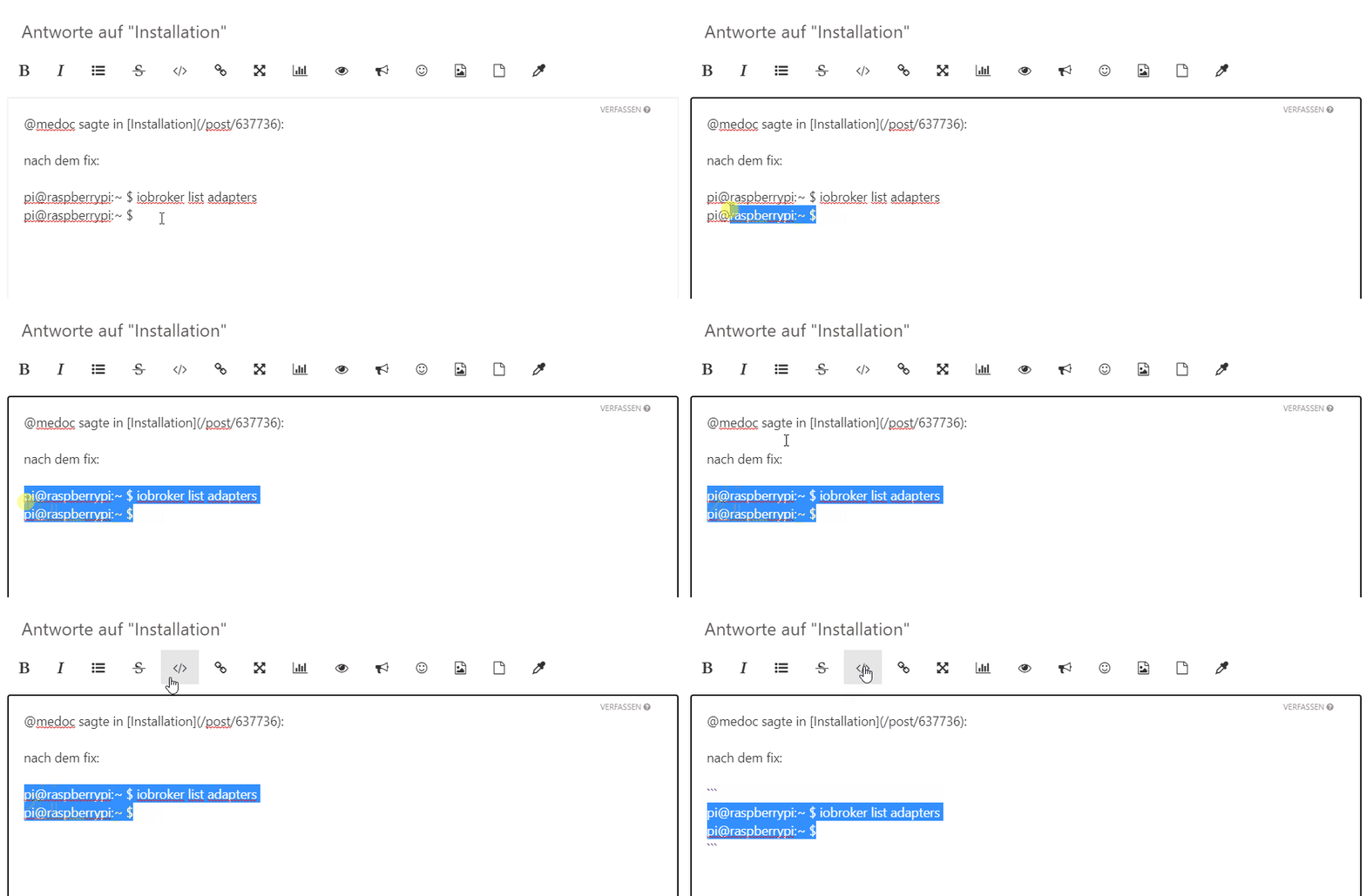
              @medoc
              editiere bitte deine posts / Ausgaben
              CodeTags.gif

              ioBroker auf NUC (VM debian v13 (Trixie ), node v22.22.2 npm v10.9.4, js-controller v7.1.1 jsonl/jsonl / HomeMatic CCU-2 (Wired und Funk) / Philips HUE / echo.DOT / Broadlink RM pro / SONOS

              1 Antwort Letzte Antwort
              0
              • M Medoc

                @bbtown ```
                pi@raspberrypi:/opt/iobroker $ ifconfig
                eth0: flags=4099<UP,BROADCAST,MULTICAST> mtu 1500
                ether b8:27:eb:95:20:87 txqueuelen 1000 (Ethernet)
                RX packets 0 bytes 0 (0.0 B)
                RX errors 0 dropped 0 overruns 0 frame 0
                TX packets 0 bytes 0 (0.0 B)
                TX errors 0 dropped 0 overruns 0 carrier 0 collisions 0

                lo: flags=73<UP,LOOPBACK,RUNNING> mtu 65536
                inet 127.0.0.1 netmask 255.0.0.0
                inet6 ::1 prefixlen 128 scopeid 0x10<host>
                loop txqueuelen 1000 (Lokale Schleife)
                RX packets 21116 bytes 3279639 (3.1 MiB)
                RX errors 0 dropped 0 overruns 0 frame 0
                TX packets 21116 bytes 3279639 (3.1 MiB)
                TX errors 0 dropped 0 overruns 0 carrier 0 collisions 0

                wlan0: flags=4163<UP,BROADCAST,RUNNING,MULTICAST> mtu 1500
                inet 192.168.188.100 netmask 255.255.255.0 broadcast 192.168.188.255
                inet6 fe80::d55f:5969:c95d:9c05 prefixlen 64 scopeid 0x20<link>
                ether b8:27:eb:c0:75:d2 txqueuelen 1000 (Ethernet)
                RX packets 22304 bytes 21211738 (20.2 MiB)
                RX errors 0 dropped 0 overruns 0 frame 0
                TX packets 19525 bytes 2260606 (2.1 MiB)
                TX errors 0 dropped 0 overruns 0 carrier 0 collisions 0

                BBTownB Offline
                BBTownB Offline
                BBTown
                schrieb am zuletzt editiert von
                #31

                @medoc
                und wie lautet die IP von der aus Du auf ioBroker zugreifen willst?
                Befindet sich der Rechner auch im Bereich 192.168.188.xxx ?

                ioBroker auf NUC (VM debian v13 (Trixie ), node v22.22.2 npm v10.9.4, js-controller v7.1.1 jsonl/jsonl / HomeMatic CCU-2 (Wired und Funk) / Philips HUE / echo.DOT / Broadlink RM pro / SONOS

                M 1 Antwort Letzte Antwort
                0
                • Thomas BraunT Thomas Braun

                  @medoc

                  Keine Ahnung. Mach die Kiste platt und installier es nochmal per Installationseinzeiler.

                  €dit:
                  Kann es sein, dass die IP
                  192.168.178.100:8081
                  lautet? Das wäre so eine typische Fritzbox-Range.

                  M Offline
                  M Offline
                  Medoc
                  schrieb am zuletzt editiert von
                  #32

                  @thomas-braun sagte in Installation:

                  @medoc

                  Keine Ahnung. Mach die Kiste platt und installier es nochmal per Installationseinzeiler.

                  €dit:
                  Kann es sein, dass die IP
                  192.168.178.100:8081
                  lautet? Das wäre so eine typische Fritzbox-Range.

                  platt gemacht mehrfach, und immer das selbe.
                  meine range läuft definitiv auf 188, da einem lte router nachgeschaltet.
                  hier in der gegend gibt es nur festnetz mit 1mbs

                  old & grumpy, tasmota, solar, pixelschubser (html & css), basic, c++ & php, ansonsten try and error - wisk(e)y liebhaber

                  1 Antwort Letzte Antwort
                  0
                  • BBTownB BBTown

                    @medoc
                    und wie lautet die IP von der aus Du auf ioBroker zugreifen willst?
                    Befindet sich der Rechner auch im Bereich 192.168.188.xxx ?

                    M Offline
                    M Offline
                    Medoc
                    schrieb am zuletzt editiert von
                    #33

                    @bbtown
                    es befindet sich hier alles auf der 188

                    old & grumpy, tasmota, solar, pixelschubser (html & css), basic, c++ & php, ansonsten try and error - wisk(e)y liebhaber

                    Thomas BraunT 1 Antwort Letzte Antwort
                    0
                    • M Medoc

                      @bbtown
                      es befindet sich hier alles auf der 188

                      Thomas BraunT Online
                      Thomas BraunT Online
                      Thomas Braun
                      Most Active
                      schrieb am zuletzt editiert von
                      #34

                      @medoc

                      Das komplettte Log der Installation wäre hilfreich, vermute ich.
                      Das riecht nach 'Netzwerkgefummel'.

                      Vielleicht hilft auch

                      iobroker logs
                      

                      weiter.

                      Linux-Werkzeugkasten:
                      https://forum.iobroker.net/topic/42952/der-kleine-iobroker-linux-werkzeugkasten
                      NodeJS Fixer Skript:
                      https://forum.iobroker.net/topic/68035/iob-node-fix-skript
                      iob_diag: curl -sLf -o diag.sh https://iobroker.net/diag.sh && bash diag.sh

                      M 1 Antwort Letzte Antwort
                      0
                      • Thomas BraunT Thomas Braun

                        @medoc

                        Das komplettte Log der Installation wäre hilfreich, vermute ich.
                        Das riecht nach 'Netzwerkgefummel'.

                        Vielleicht hilft auch

                        iobroker logs
                        

                        weiter.

                        M Offline
                        M Offline
                        Medoc
                        schrieb am zuletzt editiert von Medoc
                        #35
                        i:/opt/iobroker $ iobroker logs
                        2021-06-03 14:19:01.403  - info: host.raspberrypi iobroker.js-controller version 3.2.16 js-controller starting
                        2021-06-03 14:19:01.427  - info: host.raspberrypi Copyright (c) 2014-2021 bluefox, 2014 hobbyquaker
                        2021-06-03 14:19:01.429  - info: host.raspberrypi hostname: raspberrypi, node: v12.22.1
                        2021-06-03 14:19:01.431  - info: host.raspberrypi ip addresses: 192.168.188.100 fe80::d55f:5969:c95d:9c05
                        2021-06-03 14:19:02.124  - info: host.raspberrypi connected to Objects and States
                        2021-06-03 14:19:02.331  - info: host.raspberrypi added notifications configuration of host
                        2021-06-03 14:19:03.465  - info: host.raspberrypi no instances found
                        2021-06-03 14:32:32.368  - info: host.raspberrypi received SIGTERM
                        2021-06-03 14:32:32.657  - info: host.raspberrypi terminated
                        2021-06-03 14:32:49.241  - info: host.raspberrypi iobroker.js-controller version 3.2.16 js-controller starting
                        2021-06-03 14:32:49.271  - info: host.raspberrypi Copyright (c) 2014-2021 bluefox, 2014 hobbyquaker
                        2021-06-03 14:32:49.275  - info: host.raspberrypi hostname: raspberrypi, node: v12.22.1
                        2021-06-03 14:32:49.278  - info: host.raspberrypi ip addresses: fe80::d55f:5969:c95d:9c05
                        2021-06-03 14:32:50.288  - info: host.raspberrypi connected to Objects and States
                        2021-06-03 14:32:50.483  - info: host.raspberrypi added notifications configuration of host
                        2021-06-03 14:32:52.441  - info: host.raspberrypi no instances found
                        2021-06-03 14:58:44.221  - info: host.raspberrypi received SIGTERM
                        2021-06-03 14:58:44.287  - info: host.raspberrypi terminated
                        2021-06-03 14:59:46.357  - info: host.raspberrypi iobroker.js-controller version 3.2.16 js-controller starting
                        2021-06-03 14:59:46.375  - info: host.raspberrypi Copyright (c) 2014-2021 bluefox, 2014 hobbyquaker
                        2021-06-03 14:59:46.377  - info: host.raspberrypi hostname: raspberrypi, node: v12.22.1
                        2021-06-03 14:59:46.379  - info: host.raspberrypi ip addresses: 192.168.188.100 fe80::d55f:5969:c95d:9c05
                        2021-06-03 14:59:47.044  - info: host.raspberrypi connected to Objects and States
                        2021-06-03 14:59:47.165  - info: host.raspberrypi added notifications configuration of host
                        2021-06-03 14:59:48.719  - info: host.raspberrypi no instances found
                        2021-06-03 15:12:58.118  - info: host.raspberrypi received SIGTERM
                        2021-06-03 15:12:58.177  - info: host.raspberrypi terminated
                        2021-06-03 15:13:03.268  - info: host.raspberrypi iobroker.js-controller version 3.3.11 js-controller starting
                        2021-06-03 15:13:03.286  - info: host.raspberrypi Copyright (c) 2014-2021 bluefox, 2014 hobbyquaker
                        2021-06-03 15:13:03.288  - info: host.raspberrypi hostname: raspberrypi, node: v12.22.1
                        2021-06-03 15:13:03.290  - info: host.raspberrypi ip addresses: 192.168.188.100 fe80::d55f:5969:c95d:9c05
                        2021-06-03 15:13:03.938  - info: host.raspberrypi connected to Objects and States
                        2021-06-03 15:13:04.035  - info: host.raspberrypi added notifications configuration of host
                        2021-06-03 15:13:05.522  - info: host.raspberrypi no instances found
                        2021-06-03 15:13:05.525  - info: host.raspberrypi no instances found
                        2021-06-03 15:18:10.015  - info: host.raspberrypi received SIGTERM
                        2021-06-03 15:18:10.070  - info: host.raspberrypi terminated
                        2021-06-03 15:18:14.783  - info: host.raspberrypi iobroker.js-controller version 3.3.11 js-controller starting
                        2021-06-03 15:18:14.806  - info: host.raspberrypi Copyright (c) 2014-2021 bluefox, 2014 hobbyquaker
                        2021-06-03 15:18:14.809  - info: host.raspberrypi hostname: raspberrypi, node: v12.22.1
                        2021-06-03 15:18:14.811  - info: host.raspberrypi ip addresses: 192.168.188.100 fe80::d55f:5969:c95d:9c05
                        2021-06-03 15:18:15.433  - info: host.raspberrypi connected to Objects and States
                        2021-06-03 15:18:15.509  - info: host.raspberrypi added notifications configuration of host
                        2021-06-03 15:18:16.667  - info: host.raspberrypi no instances found
                        2021-06-03 15:18:16.670  - info: host.raspberrypi no instances found
                        pi@raspberrypi:/opt/iobroker $
                        

                        old & grumpy, tasmota, solar, pixelschubser (html & css), basic, c++ & php, ansonsten try and error - wisk(e)y liebhaber

                        Thomas BraunT BBTownB 2 Antworten Letzte Antwort
                        0
                        • M Medoc
                          i:/opt/iobroker $ iobroker logs
                          2021-06-03 14:19:01.403  - info: host.raspberrypi iobroker.js-controller version 3.2.16 js-controller starting
                          2021-06-03 14:19:01.427  - info: host.raspberrypi Copyright (c) 2014-2021 bluefox, 2014 hobbyquaker
                          2021-06-03 14:19:01.429  - info: host.raspberrypi hostname: raspberrypi, node: v12.22.1
                          2021-06-03 14:19:01.431  - info: host.raspberrypi ip addresses: 192.168.188.100 fe80::d55f:5969:c95d:9c05
                          2021-06-03 14:19:02.124  - info: host.raspberrypi connected to Objects and States
                          2021-06-03 14:19:02.331  - info: host.raspberrypi added notifications configuration of host
                          2021-06-03 14:19:03.465  - info: host.raspberrypi no instances found
                          2021-06-03 14:32:32.368  - info: host.raspberrypi received SIGTERM
                          2021-06-03 14:32:32.657  - info: host.raspberrypi terminated
                          2021-06-03 14:32:49.241  - info: host.raspberrypi iobroker.js-controller version 3.2.16 js-controller starting
                          2021-06-03 14:32:49.271  - info: host.raspberrypi Copyright (c) 2014-2021 bluefox, 2014 hobbyquaker
                          2021-06-03 14:32:49.275  - info: host.raspberrypi hostname: raspberrypi, node: v12.22.1
                          2021-06-03 14:32:49.278  - info: host.raspberrypi ip addresses: fe80::d55f:5969:c95d:9c05
                          2021-06-03 14:32:50.288  - info: host.raspberrypi connected to Objects and States
                          2021-06-03 14:32:50.483  - info: host.raspberrypi added notifications configuration of host
                          2021-06-03 14:32:52.441  - info: host.raspberrypi no instances found
                          2021-06-03 14:58:44.221  - info: host.raspberrypi received SIGTERM
                          2021-06-03 14:58:44.287  - info: host.raspberrypi terminated
                          2021-06-03 14:59:46.357  - info: host.raspberrypi iobroker.js-controller version 3.2.16 js-controller starting
                          2021-06-03 14:59:46.375  - info: host.raspberrypi Copyright (c) 2014-2021 bluefox, 2014 hobbyquaker
                          2021-06-03 14:59:46.377  - info: host.raspberrypi hostname: raspberrypi, node: v12.22.1
                          2021-06-03 14:59:46.379  - info: host.raspberrypi ip addresses: 192.168.188.100 fe80::d55f:5969:c95d:9c05
                          2021-06-03 14:59:47.044  - info: host.raspberrypi connected to Objects and States
                          2021-06-03 14:59:47.165  - info: host.raspberrypi added notifications configuration of host
                          2021-06-03 14:59:48.719  - info: host.raspberrypi no instances found
                          2021-06-03 15:12:58.118  - info: host.raspberrypi received SIGTERM
                          2021-06-03 15:12:58.177  - info: host.raspberrypi terminated
                          2021-06-03 15:13:03.268  - info: host.raspberrypi iobroker.js-controller version 3.3.11 js-controller starting
                          2021-06-03 15:13:03.286  - info: host.raspberrypi Copyright (c) 2014-2021 bluefox, 2014 hobbyquaker
                          2021-06-03 15:13:03.288  - info: host.raspberrypi hostname: raspberrypi, node: v12.22.1
                          2021-06-03 15:13:03.290  - info: host.raspberrypi ip addresses: 192.168.188.100 fe80::d55f:5969:c95d:9c05
                          2021-06-03 15:13:03.938  - info: host.raspberrypi connected to Objects and States
                          2021-06-03 15:13:04.035  - info: host.raspberrypi added notifications configuration of host
                          2021-06-03 15:13:05.522  - info: host.raspberrypi no instances found
                          2021-06-03 15:13:05.525  - info: host.raspberrypi no instances found
                          2021-06-03 15:18:10.015  - info: host.raspberrypi received SIGTERM
                          2021-06-03 15:18:10.070  - info: host.raspberrypi terminated
                          2021-06-03 15:18:14.783  - info: host.raspberrypi iobroker.js-controller version 3.3.11 js-controller starting
                          2021-06-03 15:18:14.806  - info: host.raspberrypi Copyright (c) 2014-2021 bluefox, 2014 hobbyquaker
                          2021-06-03 15:18:14.809  - info: host.raspberrypi hostname: raspberrypi, node: v12.22.1
                          2021-06-03 15:18:14.811  - info: host.raspberrypi ip addresses: 192.168.188.100 fe80::d55f:5969:c95d:9c05
                          2021-06-03 15:18:15.433  - info: host.raspberrypi connected to Objects and States
                          2021-06-03 15:18:15.509  - info: host.raspberrypi added notifications configuration of host
                          2021-06-03 15:18:16.667  - info: host.raspberrypi no instances found
                          2021-06-03 15:18:16.670  - info: host.raspberrypi no instances found
                          pi@raspberrypi:/opt/iobroker $
                          
                          Thomas BraunT Online
                          Thomas BraunT Online
                          Thomas Braun
                          Most Active
                          schrieb am zuletzt editiert von
                          #36

                          @medoc

                          iobroker install admin
                          iobroker add admin
                          

                          Linux-Werkzeugkasten:
                          https://forum.iobroker.net/topic/42952/der-kleine-iobroker-linux-werkzeugkasten
                          NodeJS Fixer Skript:
                          https://forum.iobroker.net/topic/68035/iob-node-fix-skript
                          iob_diag: curl -sLf -o diag.sh https://iobroker.net/diag.sh && bash diag.sh

                          1 Antwort Letzte Antwort
                          0
                          • M Medoc
                            i:/opt/iobroker $ iobroker logs
                            2021-06-03 14:19:01.403  - info: host.raspberrypi iobroker.js-controller version 3.2.16 js-controller starting
                            2021-06-03 14:19:01.427  - info: host.raspberrypi Copyright (c) 2014-2021 bluefox, 2014 hobbyquaker
                            2021-06-03 14:19:01.429  - info: host.raspberrypi hostname: raspberrypi, node: v12.22.1
                            2021-06-03 14:19:01.431  - info: host.raspberrypi ip addresses: 192.168.188.100 fe80::d55f:5969:c95d:9c05
                            2021-06-03 14:19:02.124  - info: host.raspberrypi connected to Objects and States
                            2021-06-03 14:19:02.331  - info: host.raspberrypi added notifications configuration of host
                            2021-06-03 14:19:03.465  - info: host.raspberrypi no instances found
                            2021-06-03 14:32:32.368  - info: host.raspberrypi received SIGTERM
                            2021-06-03 14:32:32.657  - info: host.raspberrypi terminated
                            2021-06-03 14:32:49.241  - info: host.raspberrypi iobroker.js-controller version 3.2.16 js-controller starting
                            2021-06-03 14:32:49.271  - info: host.raspberrypi Copyright (c) 2014-2021 bluefox, 2014 hobbyquaker
                            2021-06-03 14:32:49.275  - info: host.raspberrypi hostname: raspberrypi, node: v12.22.1
                            2021-06-03 14:32:49.278  - info: host.raspberrypi ip addresses: fe80::d55f:5969:c95d:9c05
                            2021-06-03 14:32:50.288  - info: host.raspberrypi connected to Objects and States
                            2021-06-03 14:32:50.483  - info: host.raspberrypi added notifications configuration of host
                            2021-06-03 14:32:52.441  - info: host.raspberrypi no instances found
                            2021-06-03 14:58:44.221  - info: host.raspberrypi received SIGTERM
                            2021-06-03 14:58:44.287  - info: host.raspberrypi terminated
                            2021-06-03 14:59:46.357  - info: host.raspberrypi iobroker.js-controller version 3.2.16 js-controller starting
                            2021-06-03 14:59:46.375  - info: host.raspberrypi Copyright (c) 2014-2021 bluefox, 2014 hobbyquaker
                            2021-06-03 14:59:46.377  - info: host.raspberrypi hostname: raspberrypi, node: v12.22.1
                            2021-06-03 14:59:46.379  - info: host.raspberrypi ip addresses: 192.168.188.100 fe80::d55f:5969:c95d:9c05
                            2021-06-03 14:59:47.044  - info: host.raspberrypi connected to Objects and States
                            2021-06-03 14:59:47.165  - info: host.raspberrypi added notifications configuration of host
                            2021-06-03 14:59:48.719  - info: host.raspberrypi no instances found
                            2021-06-03 15:12:58.118  - info: host.raspberrypi received SIGTERM
                            2021-06-03 15:12:58.177  - info: host.raspberrypi terminated
                            2021-06-03 15:13:03.268  - info: host.raspberrypi iobroker.js-controller version 3.3.11 js-controller starting
                            2021-06-03 15:13:03.286  - info: host.raspberrypi Copyright (c) 2014-2021 bluefox, 2014 hobbyquaker
                            2021-06-03 15:13:03.288  - info: host.raspberrypi hostname: raspberrypi, node: v12.22.1
                            2021-06-03 15:13:03.290  - info: host.raspberrypi ip addresses: 192.168.188.100 fe80::d55f:5969:c95d:9c05
                            2021-06-03 15:13:03.938  - info: host.raspberrypi connected to Objects and States
                            2021-06-03 15:13:04.035  - info: host.raspberrypi added notifications configuration of host
                            2021-06-03 15:13:05.522  - info: host.raspberrypi no instances found
                            2021-06-03 15:13:05.525  - info: host.raspberrypi no instances found
                            2021-06-03 15:18:10.015  - info: host.raspberrypi received SIGTERM
                            2021-06-03 15:18:10.070  - info: host.raspberrypi terminated
                            2021-06-03 15:18:14.783  - info: host.raspberrypi iobroker.js-controller version 3.3.11 js-controller starting
                            2021-06-03 15:18:14.806  - info: host.raspberrypi Copyright (c) 2014-2021 bluefox, 2014 hobbyquaker
                            2021-06-03 15:18:14.809  - info: host.raspberrypi hostname: raspberrypi, node: v12.22.1
                            2021-06-03 15:18:14.811  - info: host.raspberrypi ip addresses: 192.168.188.100 fe80::d55f:5969:c95d:9c05
                            2021-06-03 15:18:15.433  - info: host.raspberrypi connected to Objects and States
                            2021-06-03 15:18:15.509  - info: host.raspberrypi added notifications configuration of host
                            2021-06-03 15:18:16.667  - info: host.raspberrypi no instances found
                            2021-06-03 15:18:16.670  - info: host.raspberrypi no instances found
                            pi@raspberrypi:/opt/iobroker $
                            
                            BBTownB Offline
                            BBTownB Offline
                            BBTown
                            schrieb am zuletzt editiert von BBTown
                            #37

                            @medoc
                            Du könntest versuchen eine weitere admin-Instanz hinzuzufügen und über einen anderen Port den Zugriff zu probieren. Womöglich ist der Port 8081 nicht erreichbar?

                            [EDIT]
                            falls der zuvor von @Thomas-Braun aufgeführte Vorschlag nicht funktioniert

                            iobroker add admin --port 8089
                            

                            der Zugriff wäre dann per
                            http://192.168.188.100:8089

                            @Thomas-Braun wie lautet noch der Befehl um zu prüfen ob ggf. ein Port bereits belegt ist?

                            ioBroker auf NUC (VM debian v13 (Trixie ), node v22.22.2 npm v10.9.4, js-controller v7.1.1 jsonl/jsonl / HomeMatic CCU-2 (Wired und Funk) / Philips HUE / echo.DOT / Broadlink RM pro / SONOS

                            Thomas BraunT 1 Antwort Letzte Antwort
                            1
                            • BBTownB BBTown

                              @medoc
                              Du könntest versuchen eine weitere admin-Instanz hinzuzufügen und über einen anderen Port den Zugriff zu probieren. Womöglich ist der Port 8081 nicht erreichbar?

                              [EDIT]
                              falls der zuvor von @Thomas-Braun aufgeführte Vorschlag nicht funktioniert

                              iobroker add admin --port 8089
                              

                              der Zugriff wäre dann per
                              http://192.168.188.100:8089

                              @Thomas-Braun wie lautet noch der Befehl um zu prüfen ob ggf. ein Port bereits belegt ist?

                              Thomas BraunT Online
                              Thomas BraunT Online
                              Thomas Braun
                              Most Active
                              schrieb am zuletzt editiert von
                              #38

                              @bbtown @Medoc

                              sudo ss -tunlp
                              

                              Linux-Werkzeugkasten:
                              https://forum.iobroker.net/topic/42952/der-kleine-iobroker-linux-werkzeugkasten
                              NodeJS Fixer Skript:
                              https://forum.iobroker.net/topic/68035/iob-node-fix-skript
                              iob_diag: curl -sLf -o diag.sh https://iobroker.net/diag.sh && bash diag.sh

                              M 1 Antwort Letzte Antwort
                              0
                              • Thomas BraunT Thomas Braun

                                @bbtown @Medoc

                                sudo ss -tunlp
                                
                                M Offline
                                M Offline
                                Medoc
                                schrieb am zuletzt editiert von
                                #39

                                das wars, offensichtlich ist der port 8081 blockiert.
                                auf 8089 läuft es

                                old & grumpy, tasmota, solar, pixelschubser (html & css), basic, c++ & php, ansonsten try and error - wisk(e)y liebhaber

                                Thomas BraunT BBTownB 2 Antworten Letzte Antwort
                                0
                                • M Medoc

                                  das wars, offensichtlich ist der port 8081 blockiert.
                                  auf 8089 läuft es

                                  Thomas BraunT Online
                                  Thomas BraunT Online
                                  Thomas Braun
                                  Most Active
                                  schrieb am zuletzt editiert von
                                  #40

                                  @medoc
                                  Dann schau was da läuft.

                                  sudo ss -tunlp
                                  

                                  Linux-Werkzeugkasten:
                                  https://forum.iobroker.net/topic/42952/der-kleine-iobroker-linux-werkzeugkasten
                                  NodeJS Fixer Skript:
                                  https://forum.iobroker.net/topic/68035/iob-node-fix-skript
                                  iob_diag: curl -sLf -o diag.sh https://iobroker.net/diag.sh && bash diag.sh

                                  M 1 Antwort Letzte Antwort
                                  0
                                  • M Medoc

                                    das wars, offensichtlich ist der port 8081 blockiert.
                                    auf 8089 läuft es

                                    BBTownB Offline
                                    BBTownB Offline
                                    BBTown
                                    schrieb am zuletzt editiert von
                                    #41

                                    @medoc
                                    ist es denn ggf. kein jungfräulicher raspi?
                                    läuft da bereits etwas drauf?

                                    ioBroker auf NUC (VM debian v13 (Trixie ), node v22.22.2 npm v10.9.4, js-controller v7.1.1 jsonl/jsonl / HomeMatic CCU-2 (Wired und Funk) / Philips HUE / echo.DOT / Broadlink RM pro / SONOS

                                    M 1 Antwort Letzte Antwort
                                    0
                                    • BBTownB BBTown

                                      @medoc
                                      ist es denn ggf. kein jungfräulicher raspi?
                                      läuft da bereits etwas drauf?

                                      M Offline
                                      M Offline
                                      Medoc
                                      schrieb am zuletzt editiert von
                                      #42

                                      @bbtown sagte in Installation:

                                      @medoc
                                      ist es denn ggf. kein jungfräulicher raspi?
                                      läuft da bereits etwas drauf?

                                      der raspi ist alt, die karte eine jungfrau

                                      old & grumpy, tasmota, solar, pixelschubser (html & css), basic, c++ & php, ansonsten try and error - wisk(e)y liebhaber

                                      1 Antwort Letzte Antwort
                                      0
                                      • M Medoc

                                        @thomas-braun ```
                                        pi@raspberrypi:/opt/iobroker $ sudo -H -u iobroker npm install iobroker.js-controller

                                        iobroker.js-controller@3.3.11 preinstall /opt/iobroker/node_modules/iobroker.js-controller
                                        node lib/preinstallCheck.js

                                        NPM version: 6.14.12

                                        iobroker.js-controller@3.3.11 install /opt/iobroker/node_modules/iobroker.js-controller
                                        node iobroker.js setup first

                                        object _design/custom created
                                        object _design/system updated

                                        esbuild@0.11.23 postinstall /opt/iobroker/node_modules/esbuild
                                        node install.js

                                        npm WARN optional SKIPPING OPTIONAL DEPENDENCY: fsevents@~2.3.1 (node_modules/chokidar/node_modules/fsevents):
                                        npm WARN notsup SKIPPING OPTIONAL DEPENDENCY: Unsupported platform for fsevents@2.3.2: wanted {"os":"darwin","arch":"any"} (current: {"os":"linux","arch":"arm"})
                                        npm WARN optional SKIPPING OPTIONAL DEPENDENCY: osx-temperature-sensor@1.0.7 (node_modules/osx-temperature-sensor):
                                        npm WARN notsup SKIPPING OPTIONAL DEPENDENCY: Unsupported platform for osx-temperature-sensor@1.0.7: wanted {"os":"darwin","arch":"any"} (current: {"os":"linux","arch":"arm"})

                                        • iobroker.js-controller@3.3.11
                                          added 13 packages from 12 contributors, removed 3 packages and updated 6 packages in 88.888s

                                        26 packages are looking for funding
                                        run npm fund for details

                                        pi@raspberrypi:/opt/iobroker $ iobroker restart
                                        pi@raspberrypi:/opt/iobroker $

                                        GlasfaserG Offline
                                        GlasfaserG Offline
                                        Glasfaser
                                        schrieb am zuletzt editiert von
                                        #43

                                        @medoc sagte in Installation:

                                        iobroker.js-controller@3.3.11

                                        Wie kommt er denn jetzt an BETA !

                                        Zeige mal :

                                        iobroker version
                                        

                                        Synology 918+ 16GB - ioBroker in Docker v9 , VISO auf Trekstor Primebook C13 13,3" , Hikvision Domkameras mit Surveillance Station .. CCU RaspberryMatic in Synology VM .. Zigbee CC2538+CC2592 .. Sonoff .. KNX .. Modbus ..

                                        M Thomas BraunT 2 Antworten Letzte Antwort
                                        0
                                        • Thomas BraunT Thomas Braun

                                          @medoc
                                          Dann schau was da läuft.

                                          sudo ss -tunlp
                                          
                                          M Offline
                                          M Offline
                                          Medoc
                                          schrieb am zuletzt editiert von
                                          #44

                                          @thomas-braun sagte in Installation:

                                          @medoc
                                          Dann schau was da läuft.

                                          sudo ss -tunlp
                                          
                                          Netid   State    Recv-Q   Send-Q     Local Address:Port      Peer Address:Port                                                                                  
                                          udp     UNCONN   0        0                0.0.0.0:631            0.0.0.0:*      users:(("cups-browsed",pid=482,fd=7))                                          
                                          udp     UNCONN   0        0                0.0.0.0:51325          0.0.0.0:*      users:(("avahi-daemon",pid=383,fd=14))                                         
                                          udp     UNCONN   0        0            224.0.0.251:5353           0.0.0.0:*      users:(("chromium-browse",pid=917,fd=162))                                     
                                          udp     UNCONN   0        0                0.0.0.0:5353           0.0.0.0:*      users:(("avahi-daemon",pid=383,fd=12))                                         
                                          udp     UNCONN   0        0                0.0.0.0:68             0.0.0.0:*      users:(("dhcpcd",pid=415,fd=13))                                               
                                          udp     UNCONN   0        0                      *:5353                 *:*      users:(("avahi-daemon",pid=383,fd=13))                                         
                                          udp     UNCONN   0        0                      *:57202                *:*      users:(("avahi-daemon",pid=383,fd=15))                                         
                                          tcp     LISTEN   0        511            127.0.0.1:9000           0.0.0.0:*      users:(("node",pid=3124,fd=24))                                                
                                          tcp     LISTEN   0        511            127.0.0.1:9001           0.0.0.0:*      users:(("node",pid=3124,fd=19))                                                
                                          tcp     LISTEN   0        5              127.0.0.1:631            0.0.0.0:*      users:(("cupsd",pid=412,fd=7))                                                 
                                          tcp     LISTEN   0        511                    *:8081                 *:*      users:(("node",pid=3449,fd=27))                                                
                                          tcp     LISTEN   0        5                  [::1]:631               [::]:*      users:(("cupsd",pid=412,fd=6))                                                 
                                          tcp     LISTEN   0        511                    *:8089                 *:*      users:(("node",pid=3442,fd=27))                                                
                                          pi@raspberrypi:~ $
                                          

                                          old & grumpy, tasmota, solar, pixelschubser (html & css), basic, c++ & php, ansonsten try and error - wisk(e)y liebhaber

                                          Thomas BraunT M 2 Antworten Letzte Antwort
                                          0

                                          Hey! Du scheinst an dieser Unterhaltung interessiert zu sein, hast aber noch kein Konto.

                                          Hast du es satt, bei jedem Besuch durch die gleichen Beiträge zu scrollen? Wenn du dich für ein Konto anmeldest, kommst du immer genau dorthin zurück, wo du zuvor warst, und kannst dich über neue Antworten benachrichtigen lassen (entweder per E-Mail oder Push-Benachrichtigung). Du kannst auch Lesezeichen speichern und Beiträge positiv bewerten, um anderen Community-Mitgliedern deine Wertschätzung zu zeigen.

                                          Mit deinem Input könnte dieser Beitrag noch besser werden 💗

                                          Registrieren Anmelden
                                          Antworten
                                          • In einem neuen Thema antworten
                                          Anmelden zum Antworten
                                          • Älteste zuerst
                                          • Neuste zuerst
                                          • Meiste Stimmen


                                          Support us

                                          ioBroker
                                          Community Adapters
                                          Donate
                                          FAQ Cloud / IOT
                                          HowTo: Node.js-Update
                                          HowTo: Backup/Restore
                                          Downloads
                                          BLOG

                                          500

                                          Online

                                          32.9k

                                          Benutzer

                                          83.0k

                                          Themen

                                          1.3m

                                          Beiträge
                                          Community
                                          Impressum | Datenschutz-Bestimmungen | Nutzungsbedingungen | Einwilligungseinstellungen
                                          ioBroker Community 2014-2025
                                          logo
                                          • Anmelden

                                          • Du hast noch kein Konto? Registrieren

                                          • Anmelden oder registrieren, um zu suchen
                                          • Erster Beitrag
                                            Letzter Beitrag
                                          0
                                          • Home
                                          • Aktuell
                                          • Tags
                                          • Ungelesen 0
                                          • Kategorien
                                          • Unreplied
                                          • Beliebt
                                          • GitHub
                                          • Docu
                                          • Hilfe