Skip to content
  • Home
  • Recent
  • Tags
  • 0 Unread 0
  • Categories
  • Unreplied
  • Popular
  • GitHub
  • Docu
  • Hilfe
Skins
  • Light
  • Brite
  • Cerulean
  • Cosmo
  • Flatly
  • Journal
  • Litera
  • Lumen
  • Lux
  • Materia
  • Minty
  • Morph
  • Pulse
  • Sandstone
  • Simplex
  • Sketchy
  • Spacelab
  • United
  • Yeti
  • Zephyr
  • Dark
  • Cyborg
  • Darkly
  • Quartz
  • Slate
  • Solar
  • Superhero
  • Vapor

  • Default (No Skin)
  • No Skin
Collapse
ioBroker Logo

Community Forum

donate donate
  1. ioBroker Community Home
  2. Deutsch
  3. Tester
  4. Test PV Forecast Adapter

NEWS

  • Monatsrückblick Januar/Februar 2026 ist online!
    BluefoxB
    Bluefox
    10
    1
    107

  • Jahresrückblick 2025 – unser neuer Blogbeitrag ist online! ✨
    BluefoxB
    Bluefox
    17
    1
    4.3k

  • Neuer Blogbeitrag: Monatsrückblick - Dezember 2025 🎄
    BluefoxB
    Bluefox
    13
    1
    1.2k

Test PV Forecast Adapter

Scheduled Pinned Locked Moved Tester
forecastphotovoltaik
881 Posts 114 Posters 304.4k Views 108 Watching
  • Oldest to Newest
  • Newest to Oldest
  • Most Votes
Reply
  • Reply as topic
Log in to reply
This topic has been deleted. Only users with topic management privileges can see it.
  • DiginixD Diginix

    @haus-automatisierung Den kostenfreien, aber man bekommt dort zwingend ein API Key.
    Danke, dass du es dir selbst mal anschaust!

    Im Log von heute gibt es bisher keine einzige Zeile vom Adapter. Aber die DPs sind alle 08:50 Uhr zuletzt aktualisiert und werden es auch alle 10 min, nur eben zT ohne Werte.
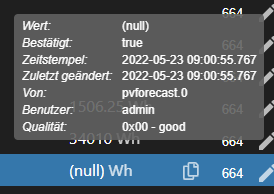
    Wenn man den Adapter nach Sonnenuntergang neu startet, bekommt man für den aktuellen Tag 0 Wh, was logisch ist. Dafür aber eben für den Folgetag dann ein Wert. Ich starte den Adapter jetzt mal neu und schaue ob dann beide einen Wert bekommen. Noch stimmt der für heute.
    c359f7bc-7ad2-4b57-91a8-b298810027eb-image.png

    Was ich gerade sehe, pvforecast.0.plants.1.energy.tomorrow wird angeblich auch immer alle 10 min geändert, obwohl den ganzen Tag schon null drin steht. Irgendwas macht der Adapter da also. Formatfehler oder Problem bei Umrechnung auf Watt?

    haus-automatisierungH Offline
    haus-automatisierungH Offline
    haus-automatisierung
    Developer Most Active
    wrote on last edited by
    #392

    @diginix sagte in Test PV Forecast Adapter:

    Irgendwas macht der Adapter da also

    Ein einfaches Debug-Log würde das alles zeigen. Aber so bekomme ich die Infos ja nur Häppchenweise und gucke auf dem eigenen System was falsch läuft :)

    Und ja, die Werte werden alle 10 Minuten neu geschrieben (aber nicht neu vom Server abgeholt). Auch das war bei der 1.x schon so.

    🧑‍🎓 Autor des beliebten ioBroker-Master-Kurses
    🎥 Tutorials rund um das Thema DIY-Smart-Home: https://haus-automatisierung.com/
    📚 Meine inoffizielle ioBroker Dokumentation

    DiginixD 1 Reply Last reply
    0
    • haus-automatisierungH haus-automatisierung

      @diginix sagte in Test PV Forecast Adapter:

      Irgendwas macht der Adapter da also

      Ein einfaches Debug-Log würde das alles zeigen. Aber so bekomme ich die Infos ja nur Häppchenweise und gucke auf dem eigenen System was falsch läuft :)

      Und ja, die Werte werden alle 10 Minuten neu geschrieben (aber nicht neu vom Server abgeholt). Auch das war bei der 1.x schon so.

      DiginixD Offline
      DiginixD Offline
      Diginix
      wrote on last edited by Diginix
      #393

      @haus-automatisierung Ich stell ihn jetzt mal auf Loglevel debug. Ist ja kein Problem das mal 11 Minuten so zu lassen. Bisher dachte ich ja es passiert erst bei Datumswechsel und stundenlang ist debuglog nicht so toll. ;-)

      Hier ist das Debuglog:

      2022-05-23 09:17:25.880 - info: pvforecast.0 (1083421) starting. Version 2.1.1 in /opt/iobroker/node_modules/iobroker.pvforecast, node: v14.19.3, js-controller: 4.0.23
      2022-05-23 09:17:25.900 - debug: pvforecast.0 (1083421) instance config: {"service":"solcast","intervall":60,"apiKey":"***","weatherEnabled":false,"latitude":"","longitude":"","everyhourEnabled":true,"everyhourStepsize":"full","watt_kw":true,"influxinstace":"","chartingEnabled":false,"chartingJustToday":false,"chartingLabelFormat":"HH:mm","chartingRoation":270,"chartingAxisStepY":1,"devices":[{"name":"1","azimuth":0,"tilt":30,"peakpower":7.7,"graphcolor":"#000000","labelcolor":"#000000"}]}
      2022-05-23 09:17:25.901 - debug: pvforecast.0 (1083421) longitude and/or latitude not set, loading system configuration
      2022-05-23 09:17:25.938 - info: pvforecast.0 (1083421) using system latitude: 50.******** longitude: 10.********
      2022-05-23 09:17:25.969 - debug: pvforecast.0 (1083421) Existing plant devices: [{"type":"device","common":{"name":"1"},"native":{},"from":"system.adapter.pvforecast.0","user":"system.user.admin","ts":1653254428333,"_id":"pvforecast.0.plants.1","acl":{"object":1636,"owner":"system.user.admin","ownerGroup":"system.group.administrator"}}] - configured: ["pvforecast.0.plants.1"]
      2022-05-23 09:17:25.969 - debug: pvforecast.0 (1083421) The interval is set to 60 minutes.
      2022-05-23 09:17:25.995 - debug: pvforecast.0 (1083421) creating states for plant: "1" (1)
      2022-05-23 09:17:26.643 - debug: pvforecast.0 (1083421) init done
      2022-05-23 09:17:26.694 - debug: pvforecast.0 (1083421) plant "1" - last update: 1653254430372, service url: https://api.solcast.com.au/world_pv_power/forecasts?format=json&hours=48&loss_factor=1&latitude=50.********&longitude=10.********&tilt=30&azimuth=-180&capacity=7.7&api_key=***
      2022-05-23 09:17:26.696 - debug: pvforecast.0 (1083421) Last update of "1" is within refresh interval - skipping
      2022-05-23 09:17:26.696 - debug: pvforecast.0 (1083421) received all data
      2022-05-23 09:17:26.698 - debug: pvforecast.0 (1083421) updateServiceDataInterval (solcast) - next service refresh in 56553302
      2022-05-23 09:17:26.699 - debug: pvforecast.0 (1083421) starting actual data update by interval
      2022-05-23 09:17:26.711 - debug: pvforecast.0 (1083421) [saveEveryHour] found time plants.1.power.hoursToday.06:00:00 - value: 921
      2022-05-23 09:17:26.715 - debug: pvforecast.0 (1083421) [saveEveryHour] found time plants.1.power.hoursToday.07:00:00 - value: 1754
      2022-05-23 09:17:26.718 - debug: pvforecast.0 (1083421) [saveEveryHour] found time plants.1.power.hoursToday.08:00:00 - value: 2552
      2022-05-23 09:17:26.720 - debug: pvforecast.0 (1083421) [saveEveryHour] found time plants.1.power.hoursToday.09:00:00 - value: 3141
      2022-05-23 09:17:26.723 - debug: pvforecast.0 (1083421) [saveEveryHour] found time plants.1.power.hoursToday.10:00:00 - value: 3610
      2022-05-23 09:17:26.726 - debug: pvforecast.0 (1083421) [saveEveryHour] found time plants.1.power.hoursToday.11:00:00 - value: 4088
      2022-05-23 09:17:26.728 - debug: pvforecast.0 (1083421) [saveEveryHour] found time plants.1.power.hoursToday.12:00:00 - value: 4615
      2022-05-23 09:17:26.731 - debug: pvforecast.0 (1083421) [saveEveryHour] found time plants.1.power.hoursToday.13:00:00 - value: 4337
      2022-05-23 09:17:26.734 - debug: pvforecast.0 (1083421) [saveEveryHour] found time plants.1.power.hoursToday.14:00:00 - value: 3437
      2022-05-23 09:17:26.736 - debug: pvforecast.0 (1083421) [saveEveryHour] found time plants.1.power.hoursToday.15:00:00 - value: 2670
      2022-05-23 09:17:26.739 - debug: pvforecast.0 (1083421) [saveEveryHour] found time plants.1.power.hoursToday.16:00:00 - value: 1710
      2022-05-23 09:17:26.742 - debug: pvforecast.0 (1083421) [saveEveryHour] found time plants.1.power.hoursToday.17:00:00 - value: 760
      2022-05-23 09:17:26.744 - debug: pvforecast.0 (1083421) [saveEveryHour] found time plants.1.power.hoursToday.18:00:00 - value: 144
      2022-05-23 09:17:26.756 - debug: pvforecast.0 (1083421) [saveEveryHour] found time plants.1.power.hoursToday.19:00:00 - value: 0
      2022-05-23 09:17:26.759 - debug: pvforecast.0 (1083421) [saveEveryHour] found time plants.1.power.hoursToday.20:00:00 - value: 0
      2022-05-23 09:17:26.762 - debug: pvforecast.0 (1083421) [saveEveryHour] found time plants.1.power.hoursToday.21:00:00 - value: 0
      2022-05-23 09:17:26.765 - debug: pvforecast.0 (1083421) [saveEveryHour] found time plants.1.power.hoursTomorrow.06:00:00 - value: 918
      2022-05-23 09:17:26.768 - debug: pvforecast.0 (1083421) [saveEveryHour] found time plants.1.power.hoursTomorrow.07:00:00 - value: 1676
      2022-05-23 09:17:26.770 - debug: pvforecast.0 (1083421) [saveEveryHour] found time plants.1.power.hoursTomorrow.08:00:00 - value: 2475
      2022-05-23 09:17:26.772 - debug: pvforecast.0 (1083421) [saveEveryHour] found time plants.1.power.hoursTomorrow.09:00:00 - value: 3182
      2022-05-23 09:17:26.774 - debug: pvforecast.0 (1083421) [saveEveryHour] found time plants.1.power.hoursTomorrow.10:00:00 - value: 3740
      2022-05-23 09:17:26.777 - debug: pvforecast.0 (1083421) [saveEveryHour] found time plants.1.power.hoursTomorrow.11:00:00 - value: 4042
      2022-05-23 09:17:26.780 - debug: pvforecast.0 (1083421) [saveEveryHour] found time plants.1.power.hoursTomorrow.12:00:00 - value: 4265
      2022-05-23 09:17:26.782 - debug: pvforecast.0 (1083421) [saveEveryHour] found time plants.1.power.hoursTomorrow.13:00:00 - value: 4375
      2022-05-23 09:17:26.784 - debug: pvforecast.0 (1083421) [saveEveryHour] found time plants.1.power.hoursTomorrow.14:00:00 - value: 4260
      2022-05-23 09:17:26.786 - debug: pvforecast.0 (1083421) [saveEveryHour] found time plants.1.power.hoursTomorrow.15:00:00 - value: 3854
      2022-05-23 09:17:26.788 - debug: pvforecast.0 (1083421) [saveEveryHour] found time plants.1.power.hoursTomorrow.16:00:00 - value: 2684
      2022-05-23 09:17:26.790 - debug: pvforecast.0 (1083421) [saveEveryHour] found time plants.1.power.hoursTomorrow.17:00:00 - value: 1436
      2022-05-23 09:17:26.792 - debug: pvforecast.0 (1083421) [saveEveryHour] found time plants.1.power.hoursTomorrow.18:00:00 - value: 578
      2022-05-23 09:17:26.794 - debug: pvforecast.0 (1083421) [saveEveryHour] found time plants.1.power.hoursTomorrow.19:00:00 - value: 0
      2022-05-23 09:17:26.797 - debug: pvforecast.0 (1083421) [saveEveryHour] found time plants.1.power.hoursTomorrow.20:00:00 - value: 0
      2022-05-23 09:17:26.799 - debug: pvforecast.0 (1083421) [saveEveryHour] found time plants.1.power.hoursTomorrow.21:00:00 - value: 0
      2022-05-23 09:17:27.129 - debug: pvforecast.0 (1083421) finished plant update: "1"
      2022-05-23 09:17:27.129 - debug: pvforecast.0 (1083421) finished plants update
      2022-05-23 09:17:27.439 - debug: pvforecast.0 (1083421) global time: {"1":[{"dayOfMonth":23,"time":"06:00:00","value":921},{"dayOfMonth":23,"time":"07:00:00","value":1754},{"dayOfMonth":23,"time":"08:00:00","value":2552},{"dayOfMonth":23,"time":"09:00:00","value":3141},{"dayOfMonth":23,"time":"10:00:00","value":3610},{"dayOfMonth":23,"time":"11:00:00","value":4088},{"dayOfMonth":23,"time":"12:00:00","value":4615},{"dayOfMonth":23,"time":"13:00:00","value":4337},{"dayOfMonth":23,"time":"14:00:00","value":3437},{"dayOfMonth":23,"time":"15:00:00","value":2670},{"dayOfMonth":23,"time":"16:00:00","value":1710},{"dayOfMonth":23,"time":"17:00:00","value":760},{"dayOfMonth":23,"time":"18:00:00","value":144},{"dayOfMonth":23,"time":"19:00:00","value":0},{"dayOfMonth":23,"time":"20:00:00","value":0},{"dayOfMonth":23,"time":"21:00:00","value":0},{"dayOfMonth":24,"time":"06:00:00","value":918},{"dayOfMonth":24,"time":"07:00:00","value":1676},{"dayOfMonth":24,"time":"08:00:00","value":2475},{"dayOfMonth":24,"time":"09:00:00","value":3182},{"dayOfMonth":24,"time":"10:00:00","value":3740},{"dayOfMonth":24,"time":"11:00:00","value":4042},{"dayOfMonth":24,"time":"12:00:00","value":4265},{"dayOfMonth":24,"time":"13:00:00","value":4375},{"dayOfMonth":24,"time":"14:00:00","value":4260},{"dayOfMonth":24,"time":"15:00:00","value":3854},{"dayOfMonth":24,"time":"16:00:00","value":2684},{"dayOfMonth":24,"time":"17:00:00","value":1436},{"dayOfMonth":24,"time":"18:00:00","value":578},{"dayOfMonth":24,"time":"19:00:00","value":0},{"dayOfMonth":24,"time":"20:00:00","value":0},{"dayOfMonth":24,"time":"21:00:00","value":0}]}
      2022-05-23 09:27:27.477 - debug: pvforecast.0 (1083421) starting actual data update by interval
      2022-05-23 09:27:27.481 - debug: pvforecast.0 (1083421) [saveEveryHour] found time plants.1.power.hoursToday.06:00:00 - value: 921
      2022-05-23 09:27:27.483 - debug: pvforecast.0 (1083421) [saveEveryHour] found time plants.1.power.hoursToday.07:00:00 - value: 1754
      2022-05-23 09:27:27.486 - debug: pvforecast.0 (1083421) [saveEveryHour] found time plants.1.power.hoursToday.08:00:00 - value: 2552
      2022-05-23 09:27:27.488 - debug: pvforecast.0 (1083421) [saveEveryHour] found time plants.1.power.hoursToday.09:00:00 - value: 3141
      2022-05-23 09:27:27.552 - debug: pvforecast.0 (1083421) [saveEveryHour] found time plants.1.power.hoursToday.10:00:00 - value: 3610
      2022-05-23 09:27:27.557 - debug: pvforecast.0 (1083421) [saveEveryHour] found time plants.1.power.hoursToday.11:00:00 - value: 4088
      2022-05-23 09:27:27.559 - debug: pvforecast.0 (1083421) [saveEveryHour] found time plants.1.power.hoursToday.12:00:00 - value: 4615
      2022-05-23 09:27:27.561 - debug: pvforecast.0 (1083421) [saveEveryHour] found time plants.1.power.hoursToday.13:00:00 - value: 4337
      2022-05-23 09:27:27.563 - debug: pvforecast.0 (1083421) [saveEveryHour] found time plants.1.power.hoursToday.14:00:00 - value: 3437
      2022-05-23 09:27:27.567 - debug: pvforecast.0 (1083421) [saveEveryHour] found time plants.1.power.hoursToday.15:00:00 - value: 2670
      2022-05-23 09:27:27.569 - debug: pvforecast.0 (1083421) [saveEveryHour] found time plants.1.power.hoursToday.16:00:00 - value: 1710
      2022-05-23 09:27:27.572 - debug: pvforecast.0 (1083421) [saveEveryHour] found time plants.1.power.hoursToday.17:00:00 - value: 760
      2022-05-23 09:27:27.574 - debug: pvforecast.0 (1083421) [saveEveryHour] found time plants.1.power.hoursToday.18:00:00 - value: 144
      2022-05-23 09:27:27.579 - debug: pvforecast.0 (1083421) [saveEveryHour] found time plants.1.power.hoursToday.19:00:00 - value: 0
      2022-05-23 09:27:27.582 - debug: pvforecast.0 (1083421) [saveEveryHour] found time plants.1.power.hoursToday.20:00:00 - value: 0
      2022-05-23 09:27:27.585 - debug: pvforecast.0 (1083421) [saveEveryHour] found time plants.1.power.hoursToday.21:00:00 - value: 0
      2022-05-23 09:27:27.589 - debug: pvforecast.0 (1083421) [saveEveryHour] found time plants.1.power.hoursTomorrow.06:00:00 - value: 918
      2022-05-23 09:27:27.594 - debug: pvforecast.0 (1083421) [saveEveryHour] found time plants.1.power.hoursTomorrow.07:00:00 - value: 1676
      2022-05-23 09:27:27.596 - debug: pvforecast.0 (1083421) [saveEveryHour] found time plants.1.power.hoursTomorrow.08:00:00 - value: 2475
      2022-05-23 09:27:27.598 - debug: pvforecast.0 (1083421) [saveEveryHour] found time plants.1.power.hoursTomorrow.09:00:00 - value: 3182
      2022-05-23 09:27:27.600 - debug: pvforecast.0 (1083421) [saveEveryHour] found time plants.1.power.hoursTomorrow.10:00:00 - value: 3740
      2022-05-23 09:27:27.603 - debug: pvforecast.0 (1083421) [saveEveryHour] found time plants.1.power.hoursTomorrow.11:00:00 - value: 4042
      2022-05-23 09:27:27.605 - debug: pvforecast.0 (1083421) [saveEveryHour] found time plants.1.power.hoursTomorrow.12:00:00 - value: 4265
      2022-05-23 09:27:27.607 - debug: pvforecast.0 (1083421) [saveEveryHour] found time plants.1.power.hoursTomorrow.13:00:00 - value: 4375
      2022-05-23 09:27:27.609 - debug: pvforecast.0 (1083421) [saveEveryHour] found time plants.1.power.hoursTomorrow.14:00:00 - value: 4260
      2022-05-23 09:27:27.611 - debug: pvforecast.0 (1083421) [saveEveryHour] found time plants.1.power.hoursTomorrow.15:00:00 - value: 3854
      2022-05-23 09:27:27.613 - debug: pvforecast.0 (1083421) [saveEveryHour] found time plants.1.power.hoursTomorrow.16:00:00 - value: 2684
      2022-05-23 09:27:27.616 - debug: pvforecast.0 (1083421) [saveEveryHour] found time plants.1.power.hoursTomorrow.17:00:00 - value: 1436
      2022-05-23 09:27:27.617 - debug: pvforecast.0 (1083421) [saveEveryHour] found time plants.1.power.hoursTomorrow.18:00:00 - value: 578
      2022-05-23 09:27:27.619 - debug: pvforecast.0 (1083421) [saveEveryHour] found time plants.1.power.hoursTomorrow.19:00:00 - value: 0
      2022-05-23 09:27:27.621 - debug: pvforecast.0 (1083421) [saveEveryHour] found time plants.1.power.hoursTomorrow.20:00:00 - value: 0
      2022-05-23 09:27:27.623 - debug: pvforecast.0 (1083421) [saveEveryHour] found time plants.1.power.hoursTomorrow.21:00:00 - value: 0
      2022-05-23 09:27:27.823 - debug: pvforecast.0 (1083421) finished plant update: "1"
      2022-05-23 09:27:27.823 - debug: pvforecast.0 (1083421) finished plants update
      2022-05-23 09:27:28.717 - debug: pvforecast.0 (1083421) global time: {"1":[{"dayOfMonth":23,"time":"06:00:00","value":921},{"dayOfMonth":23,"time":"07:00:00","value":1754},{"dayOfMonth":23,"time":"08:00:00","value":2552},{"dayOfMonth":23,"time":"09:00:00","value":3141},{"dayOfMonth":23,"time":"10:00:00","value":3610},{"dayOfMonth":23,"time":"11:00:00","value":4088},{"dayOfMonth":23,"time":"12:00:00","value":4615},{"dayOfMonth":23,"time":"13:00:00","value":4337},{"dayOfMonth":23,"time":"14:00:00","value":3437},{"dayOfMonth":23,"time":"15:00:00","value":2670},{"dayOfMonth":23,"time":"16:00:00","value":1710},{"dayOfMonth":23,"time":"17:00:00","value":760},{"dayOfMonth":23,"time":"18:00:00","value":144},{"dayOfMonth":23,"time":"19:00:00","value":0},{"dayOfMonth":23,"time":"20:00:00","value":0},{"dayOfMonth":23,"time":"21:00:00","value":0},{"dayOfMonth":24,"time":"06:00:00","value":918},{"dayOfMonth":24,"time":"07:00:00","value":1676},{"dayOfMonth":24,"time":"08:00:00","value":2475},{"dayOfMonth":24,"time":"09:00:00","value":3182},{"dayOfMonth":24,"time":"10:00:00","value":3740},{"dayOfMonth":24,"time":"11:00:00","value":4042},{"dayOfMonth":24,"time":"12:00:00","value":4265},{"dayOfMonth":24,"time":"13:00:00","value":4375},{"dayOfMonth":24,"time":"14:00:00","value":4260},{"dayOfMonth":24,"time":"15:00:00","value":3854},{"dayOfMonth":24,"time":"16:00:00","value":2684},{"dayOfMonth":24,"time":"17:00:00","value":1436},{"dayOfMonth":24,"time":"18:00:00","value":578},{"dayOfMonth":24,"time":"19:00:00","value":0},{"dayOfMonth":24,"time":"20:00:00","value":0},{"dayOfMonth":24,"time":"21:00:00","value":0}]}
      2022-05-23 09:37:28.761 - debug: pvforecast.0 (1083421) starting actual data update by interval
      2022-05-23 09:37:28.767 - debug: pvforecast.0 (1083421) [saveEveryHour] found time plants.1.power.hoursToday.06:00:00 - value: 921
      2022-05-23 09:37:28.770 - debug: pvforecast.0 (1083421) [saveEveryHour] found time plants.1.power.hoursToday.07:00:00 - value: 1754
      2022-05-23 09:37:28.772 - debug: pvforecast.0 (1083421) [saveEveryHour] found time plants.1.power.hoursToday.08:00:00 - value: 2552
      2022-05-23 09:37:28.775 - debug: pvforecast.0 (1083421) [saveEveryHour] found time plants.1.power.hoursToday.09:00:00 - value: 3141
      2022-05-23 09:37:28.777 - debug: pvforecast.0 (1083421) [saveEveryHour] found time plants.1.power.hoursToday.10:00:00 - value: 3610
      2022-05-23 09:37:28.779 - debug: pvforecast.0 (1083421) [saveEveryHour] found time plants.1.power.hoursToday.11:00:00 - value: 4088
      2022-05-23 09:37:28.782 - debug: pvforecast.0 (1083421) [saveEveryHour] found time plants.1.power.hoursToday.12:00:00 - value: 4615
      2022-05-23 09:37:28.785 - debug: pvforecast.0 (1083421) [saveEveryHour] found time plants.1.power.hoursToday.13:00:00 - value: 4337
      2022-05-23 09:37:28.787 - debug: pvforecast.0 (1083421) [saveEveryHour] found time plants.1.power.hoursToday.14:00:00 - value: 3437
      2022-05-23 09:37:28.790 - debug: pvforecast.0 (1083421) [saveEveryHour] found time plants.1.power.hoursToday.15:00:00 - value: 2670
      2022-05-23 09:37:28.792 - debug: pvforecast.0 (1083421) [saveEveryHour] found time plants.1.power.hoursToday.16:00:00 - value: 1710
      2022-05-23 09:37:28.795 - debug: pvforecast.0 (1083421) [saveEveryHour] found time plants.1.power.hoursToday.17:00:00 - value: 760
      2022-05-23 09:37:28.797 - debug: pvforecast.0 (1083421) [saveEveryHour] found time plants.1.power.hoursToday.18:00:00 - value: 144
      2022-05-23 09:37:28.800 - debug: pvforecast.0 (1083421) [saveEveryHour] found time plants.1.power.hoursToday.19:00:00 - value: 0
      2022-05-23 09:37:28.810 - debug: pvforecast.0 (1083421) [saveEveryHour] found time plants.1.power.hoursToday.20:00:00 - value: 0
      2022-05-23 09:37:28.812 - debug: pvforecast.0 (1083421) [saveEveryHour] found time plants.1.power.hoursToday.21:00:00 - value: 0
      2022-05-23 09:37:28.815 - debug: pvforecast.0 (1083421) [saveEveryHour] found time plants.1.power.hoursTomorrow.06:00:00 - value: 918
      2022-05-23 09:37:28.817 - debug: pvforecast.0 (1083421) [saveEveryHour] found time plants.1.power.hoursTomorrow.07:00:00 - value: 1676
      2022-05-23 09:37:28.820 - debug: pvforecast.0 (1083421) [saveEveryHour] found time plants.1.power.hoursTomorrow.08:00:00 - value: 2475
      2022-05-23 09:37:28.824 - debug: pvforecast.0 (1083421) [saveEveryHour] found time plants.1.power.hoursTomorrow.09:00:00 - value: 3182
      2022-05-23 09:37:28.826 - debug: pvforecast.0 (1083421) [saveEveryHour] found time plants.1.power.hoursTomorrow.10:00:00 - value: 3740
      2022-05-23 09:37:28.828 - debug: pvforecast.0 (1083421) [saveEveryHour] found time plants.1.power.hoursTomorrow.11:00:00 - value: 4042
      2022-05-23 09:37:28.830 - debug: pvforecast.0 (1083421) [saveEveryHour] found time plants.1.power.hoursTomorrow.12:00:00 - value: 4265
      2022-05-23 09:37:28.832 - debug: pvforecast.0 (1083421) [saveEveryHour] found time plants.1.power.hoursTomorrow.13:00:00 - value: 4375
      2022-05-23 09:37:28.835 - debug: pvforecast.0 (1083421) [saveEveryHour] found time plants.1.power.hoursTomorrow.14:00:00 - value: 4260
      2022-05-23 09:37:28.838 - debug: pvforecast.0 (1083421) [saveEveryHour] found time plants.1.power.hoursTomorrow.15:00:00 - value: 3854
      2022-05-23 09:37:28.841 - debug: pvforecast.0 (1083421) [saveEveryHour] found time plants.1.power.hoursTomorrow.16:00:00 - value: 2684
      2022-05-23 09:37:28.844 - debug: pvforecast.0 (1083421) [saveEveryHour] found time plants.1.power.hoursTomorrow.17:00:00 - value: 1436
      2022-05-23 09:37:28.846 - debug: pvforecast.0 (1083421) [saveEveryHour] found time plants.1.power.hoursTomorrow.18:00:00 - value: 578
      2022-05-23 09:37:28.849 - debug: pvforecast.0 (1083421) [saveEveryHour] found time plants.1.power.hoursTomorrow.19:00:00 - value: 0
      2022-05-23 09:37:28.851 - debug: pvforecast.0 (1083421) [saveEveryHour] found time plants.1.power.hoursTomorrow.20:00:00 - value: 0
      2022-05-23 09:37:28.854 - debug: pvforecast.0 (1083421) [saveEveryHour] found time plants.1.power.hoursTomorrow.21:00:00 - value: 0
      2022-05-23 09:37:29.142 - debug: pvforecast.0 (1083421) finished plant update: "1"
      2022-05-23 09:37:29.143 - debug: pvforecast.0 (1083421) finished plants update
      2022-05-23 09:37:29.276 - debug: pvforecast.0 (1083421) global time: {"1":[{"dayOfMonth":23,"time":"06:00:00","value":921},{"dayOfMonth":23,"time":"07:00:00","value":1754},{"dayOfMonth":23,"time":"08:00:00","value":2552},{"dayOfMonth":23,"time":"09:00:00","value":3141},{"dayOfMonth":23,"time":"10:00:00","value":3610},{"dayOfMonth":23,"time":"11:00:00","value":4088},{"dayOfMonth":23,"time":"12:00:00","value":4615},{"dayOfMonth":23,"time":"13:00:00","value":4337},{"dayOfMonth":23,"time":"14:00:00","value":3437},{"dayOfMonth":23,"time":"15:00:00","value":2670},{"dayOfMonth":23,"time":"16:00:00","value":1710},{"dayOfMonth":23,"time":"17:00:00","value":760},{"dayOfMonth":23,"time":"18:00:00","value":144},{"dayOfMonth":23,"time":"19:00:00","value":0},{"dayOfMonth":23,"time":"20:00:00","value":0},{"dayOfMonth":23,"time":"21:00:00","value":0},{"dayOfMonth":24,"time":"06:00:00","value":918},{"dayOfMonth":24,"time":"07:00:00","value":1676},{"dayOfMonth":24,"time":"08:00:00","value":2475},{"dayOfMonth":24,"time":"09:00:00","value":3182},{"dayOfMonth":24,"time":"10:00:00","value":3740},{"dayOfMonth":24,"time":"11:00:00","value":4042},{"dayOfMonth":24,"time":"12:00:00","value":4265},{"dayOfMonth":24,"time":"13:00:00","value":4375},{"dayOfMonth":24,"time":"14:00:00","value":4260},{"dayOfMonth":24,"time":"15:00:00","value":3854},{"dayOfMonth":24,"time":"16:00:00","value":2684},{"dayOfMonth":24,"time":"17:00:00","value":1436},{"dayOfMonth":24,"time":"18:00:00","value":578},{"dayOfMonth":24,"time":"19:00:00","value":0},{"dayOfMonth":24,"time":"20:00:00","value":0},{"dayOfMonth":24,"time":"21:00:00","value":0}]}
      2022-05-23 09:44:10.184 - info: pvforecast.0 (1083421) Got terminate signal TERMINATE_YOURSELF
      2022-05-23 09:44:10.185 - info: pvforecast.0 (1083421) terminating
      2022-05-23 09:44:10.186 - info: pvforecast.0 (1083421) Terminated (ADAPTER_REQUESTED_TERMINATION): Without reason
      

      ..:: So long! Tom ::..

      NUC7i3 (Ubuntu Proxmox VM) | Echo Dots 2+3. Gen | Xiaomi Sensoren | Mi Robot 1S | Yeelight | Sonoff | Shelly | H801 RGB | Gosund SP1 | NodeMCU+ESP32 | Kostal Plenticore PV+BYD | openWB

      1 Reply Last reply
      0
      • haus-automatisierungH Offline
        haus-automatisierungH Offline
        haus-automatisierung
        Developer Most Active
        wrote on last edited by
        #394

        @diginix sagte in Test PV Forecast Adapter:

        Wenn man den Adapter nach Sonnenuntergang neu startet, bekommt man für den aktuellen Tag 0 Wh, was logisch ist.

        Genau, das ist bei Solcast leider so. Forecastsolar gibt einem den kompletten Tag zurück - also auch in der Vergangenheit liegende Stunden beim ersten Adapter-Start / Neustart.

        Ich habe aber noch einen Bug gefunden, dass die Solcast-Daten ggf. nicht aktualisiert werden. Das erklärt aber noch nicht, warum

        @diginix sagte in Test PV Forecast Adapter:

        pvforecast.0.plants.1.energy.tomorrow weiterhin "null".

        ist. Das hat bei mir auch mit Solcast direkt funktioniert. Auch mit Version 2.1.1. Du könntest mal ein force update durchführen mit dem Datenpunkt pvforecast.0.plants.1.service.refresh

        🧑‍🎓 Autor des beliebten ioBroker-Master-Kurses
        🎥 Tutorials rund um das Thema DIY-Smart-Home: https://haus-automatisierung.com/
        📚 Meine inoffizielle ioBroker Dokumentation

        DiginixD 1 Reply Last reply
        0
        • haus-automatisierungH haus-automatisierung

          @diginix sagte in Test PV Forecast Adapter:

          Wenn man den Adapter nach Sonnenuntergang neu startet, bekommt man für den aktuellen Tag 0 Wh, was logisch ist.

          Genau, das ist bei Solcast leider so. Forecastsolar gibt einem den kompletten Tag zurück - also auch in der Vergangenheit liegende Stunden beim ersten Adapter-Start / Neustart.

          Ich habe aber noch einen Bug gefunden, dass die Solcast-Daten ggf. nicht aktualisiert werden. Das erklärt aber noch nicht, warum

          @diginix sagte in Test PV Forecast Adapter:

          pvforecast.0.plants.1.energy.tomorrow weiterhin "null".

          ist. Das hat bei mir auch mit Solcast direkt funktioniert. Auch mit Version 2.1.1. Du könntest mal ein force update durchführen mit dem Datenpunkt pvforecast.0.plants.1.service.refresh

          DiginixD Offline
          DiginixD Offline
          Diginix
          wrote on last edited by Diginix
          #395

          @haus-automatisierung sagte in Test PV Forecast Adapter:

          @diginix sagte in Test PV Forecast Adapter:

          Wenn man den Adapter nach Sonnenuntergang neu startet, bekommt man für den aktuellen Tag 0 Wh, was logisch ist.

          Genau, das ist bei Solcast leider so. Forecastsolar gibt einem den kompletten Tag zurück - also auch in der Vergangenheit liegende Stunden beim ersten Adapter-Start / Neustart.

          Das stört mich nicht, da der Adapter ja idealerweise durchläuft. Ich brauche die Stundenwerte auch nicht wirklich. Außerdem sind nur die solcast Prognosen annährend brauchbar. pvforecast (zumindest kostenfrei) ist so weit weg von der Realität. Da kann ich auch würfeln.

          Ich habe aber noch einen Bug gefunden, dass die Solcast-Daten ggf. nicht aktualisiert werden.

          Sicher nicht verkehrt diesen gefunden und gefixt zu haben. ;-)

          Das erklärt aber noch nicht, warum

          @diginix sagte in Test PV Forecast Adapter:

          pvforecast.0.plants.1.energy.tomorrow weiterhin "null".

          ist. Das hat bei mir auch mit Solcast direkt funktioniert. Auch mit Version 2.1.1. Du könntest mal ein force update durchführen mit dem Datenpunkt pvforecast.0.plants.1.service.refresh

          Wie genau geht das?
          Im Debuglog war nichts sachdienliches zum Fehlverhalten?

          ..:: So long! Tom ::..

          NUC7i3 (Ubuntu Proxmox VM) | Echo Dots 2+3. Gen | Xiaomi Sensoren | Mi Robot 1S | Yeelight | Sonoff | Shelly | H801 RGB | Gosund SP1 | NodeMCU+ESP32 | Kostal Plenticore PV+BYD | openWB

          DiginixD 1 Reply Last reply
          0
          • DiginixD Diginix

            @haus-automatisierung sagte in Test PV Forecast Adapter:

            @diginix sagte in Test PV Forecast Adapter:

            Wenn man den Adapter nach Sonnenuntergang neu startet, bekommt man für den aktuellen Tag 0 Wh, was logisch ist.

            Genau, das ist bei Solcast leider so. Forecastsolar gibt einem den kompletten Tag zurück - also auch in der Vergangenheit liegende Stunden beim ersten Adapter-Start / Neustart.

            Das stört mich nicht, da der Adapter ja idealerweise durchläuft. Ich brauche die Stundenwerte auch nicht wirklich. Außerdem sind nur die solcast Prognosen annährend brauchbar. pvforecast (zumindest kostenfrei) ist so weit weg von der Realität. Da kann ich auch würfeln.

            Ich habe aber noch einen Bug gefunden, dass die Solcast-Daten ggf. nicht aktualisiert werden.

            Sicher nicht verkehrt diesen gefunden und gefixt zu haben. ;-)

            Das erklärt aber noch nicht, warum

            @diginix sagte in Test PV Forecast Adapter:

            pvforecast.0.plants.1.energy.tomorrow weiterhin "null".

            ist. Das hat bei mir auch mit Solcast direkt funktioniert. Auch mit Version 2.1.1. Du könntest mal ein force update durchführen mit dem Datenpunkt pvforecast.0.plants.1.service.refresh

            Wie genau geht das?
            Im Debuglog war nichts sachdienliches zum Fehlverhalten?

            DiginixD Offline
            DiginixD Offline
            Diginix
            wrote on last edited by Diginix
            #396

            @haus-automatisierung Mit 2.1.2 sind sofort alle Objekte aktuell. Ob morgen dann wieder pvforecast.0.plants.1.energy.tomorrow null zeigt, wissen wir in 12 Stunden.

            ..:: So long! Tom ::..

            NUC7i3 (Ubuntu Proxmox VM) | Echo Dots 2+3. Gen | Xiaomi Sensoren | Mi Robot 1S | Yeelight | Sonoff | Shelly | H801 RGB | Gosund SP1 | NodeMCU+ESP32 | Kostal Plenticore PV+BYD | openWB

            haus-automatisierungH 1 Reply Last reply
            1
            • DiginixD Diginix

              @haus-automatisierung Mit 2.1.2 sind sofort alle Objekte aktuell. Ob morgen dann wieder pvforecast.0.plants.1.energy.tomorrow null zeigt, wissen wir in 12 Stunden.

              haus-automatisierungH Offline
              haus-automatisierungH Offline
              haus-automatisierung
              Developer Most Active
              wrote on last edited by
              #397

              @diginix sagte in Test PV Forecast Adapter:

              Mit 2.1.2 sind sofort alle Objekte aktuell.

              Perfekt, danke für den Bug-Report und die Tests. Wenn ich nichts höre, gehe ich davon aus, dass alles läuft :)

              🧑‍🎓 Autor des beliebten ioBroker-Master-Kurses
              🎥 Tutorials rund um das Thema DIY-Smart-Home: https://haus-automatisierung.com/
              📚 Meine inoffizielle ioBroker Dokumentation

              DiginixD 2 Replies Last reply
              1
              • haus-automatisierungH haus-automatisierung

                @diginix sagte in Test PV Forecast Adapter:

                Mit 2.1.2 sind sofort alle Objekte aktuell.

                Perfekt, danke für den Bug-Report und die Tests. Wenn ich nichts höre, gehe ich davon aus, dass alles läuft :)

                DiginixD Offline
                DiginixD Offline
                Diginix
                wrote on last edited by
                #398

                @haus-automatisierung Damit du nicht nur davon ausgehen musst, sondern es auch sicher weißt: Auch nach Datumswechsel funktioniert mit v2.1.2 alles. :+1:

                ..:: So long! Tom ::..

                NUC7i3 (Ubuntu Proxmox VM) | Echo Dots 2+3. Gen | Xiaomi Sensoren | Mi Robot 1S | Yeelight | Sonoff | Shelly | H801 RGB | Gosund SP1 | NodeMCU+ESP32 | Kostal Plenticore PV+BYD | openWB

                lobomauL 1 Reply Last reply
                1
                • DiginixD Diginix

                  @haus-automatisierung Damit du nicht nur davon ausgehen musst, sondern es auch sicher weißt: Auch nach Datumswechsel funktioniert mit v2.1.2 alles. :+1:

                  lobomauL Offline
                  lobomauL Offline
                  lobomau
                  wrote on last edited by
                  #399

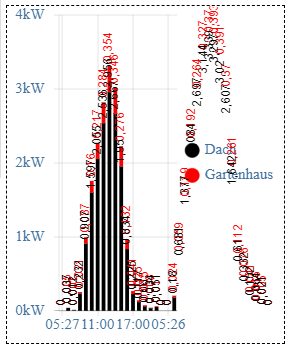
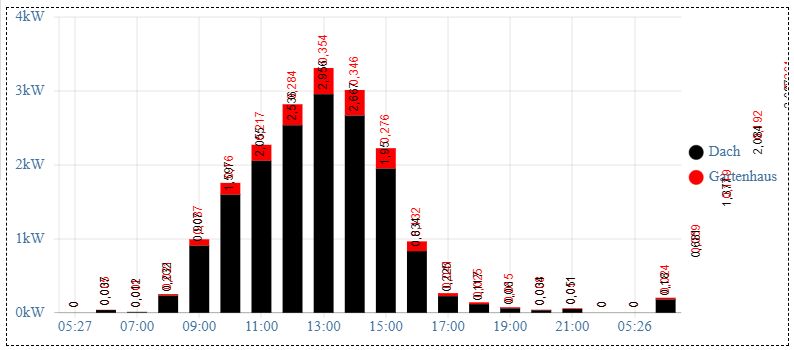
                  @haus-automatisierung Muss ich bei der Darstellung im widget "materialdesign JSON chart", Quelle: pvforecast.0.summary.JSONGraph etwas beachten oder ist da ein bug? Die Zahlen liegen auch etwas übereinander.
                  Adapterversion 2.1.2

                  Wenn ich das widget auseinanderziehe rutscht der Inhalt aus dem Sichtbereich:
                  44e8389e-3d2e-4d4e-85bc-dd4f9583dd6e-image.png

                  438f5723-0c41-4fc9-b489-27fd09b4296a-image.png

                  Host: NUC8i3 mit Proxmox:

                  • ioBroker CT Debian 13, npm 10.9.4, nodejs 22.21.0
                  • Slave: Pi4
                  LatziL haus-automatisierungH 2 Replies Last reply
                  0
                  • DiginixD Offline
                    DiginixD Offline
                    Diginix
                    wrote on last edited by
                    #400

                    @haus-automatisierung Ein Thema hab ich aber doch noch. Trotz dass der Adapter bereits vor 0 Uhr lief und somit der volle Tag verarbeitet werden kann, bekomme ich weiterhin diese Logzeilen, zum Teil auch doppelt pro Sekunde:

                    2022-05-24 00:06:05.761 - info: pvforecast.0 (1108379) hourly states missed 12 items - please check if your license allows to request all values
                    2022-05-24 00:16:06.132 - info: pvforecast.0 (1108379) hourly states missed 12 items - please check if your license allows to request all values
                    2022-05-24 00:26:06.595 - info: pvforecast.0 (1108379) hourly states missed 12 items - please check if your license allows to request all values
                    2022-05-24 00:36:06.931 - info: pvforecast.0 (1108379) hourly states missed 12 items - please check if your license allows to request all values
                    2022-05-24 00:56:07.612 - info: pvforecast.0 (1108379) hourly states missed 12 items - please check if your license allows to request all values
                    2022-05-24 01:16:08.321 - info: pvforecast.0 (1108379) hourly states missed 11 items - please check if your license allows to request all values
                    2022-05-24 01:26:08.754 - info: pvforecast.0 (1108379) hourly states missed 17 items - please check if your license allows to request all values
                    2022-05-24 01:56:09.837 - info: pvforecast.0 (1108379) hourly states missed 16 items - please check if your license allows to request all values
                    2022-05-24 02:16:10.454 - info: pvforecast.0 (1108379) hourly states missed 16 items - please check if your license allows to request all values
                    2022-05-24 02:26:10.788 - info: pvforecast.0 (1108379) hourly states missed 10 items - please check if your license allows to request all values
                    2022-05-24 02:26:10.789 - info: pvforecast.0 (1108379) hourly states missed 17 items - please check if your license allows to request all values
                    2022-05-24 02:36:11.169 - info: pvforecast.0 (1108379) hourly states missed 12 items - please check if your license allows to request all values
                    2022-05-24 02:46:11.481 - info: pvforecast.0 (1108379) hourly states missed 17 items - please check if your license allows to request all values
                    2022-05-24 02:56:12.265 - info: pvforecast.0 (1108379) hourly states missed 16 items - please check if your license allows to request all values
                    2022-05-24 03:06:12.624 - info: pvforecast.0 (1108379) hourly states missed 17 items - please check if your license allows to request all values
                    2022-05-24 03:26:13.291 - info: pvforecast.0 (1108379) hourly states missed 11 items - please check if your license allows to request all values
                    2022-05-24 03:26:13.292 - info: pvforecast.0 (1108379) hourly states missed 17 items - please check if your license allows to request all values
                    2022-05-24 03:36:13.945 - info: pvforecast.0 (1108379) hourly states missed 16 items - please check if your license allows to request all values
                    2022-05-24 03:46:14.322 - info: pvforecast.0 (1108379) hourly states missed 16 items - please check if your license allows to request all values
                    2022-05-24 03:56:14.682 - info: pvforecast.0 (1108379) hourly states missed 11 items - please check if your license allows to request all values
                    2022-05-24 03:56:14.683 - info: pvforecast.0 (1108379) hourly states missed 17 items - please check if your license allows to request all values
                    2022-05-24 04:06:15.243 - info: pvforecast.0 (1108379) hourly states missed 11 items - please check if your license allows to request all values
                    2022-05-24 04:06:15.243 - info: pvforecast.0 (1108379) hourly states missed 17 items - please check if your license allows to request all values
                    2022-05-24 04:16:15.707 - info: pvforecast.0 (1108379) hourly states missed 16 items - please check if your license allows to request all values
                    2022-05-24 04:46:16.600 - info: pvforecast.0 (1108379) hourly states missed 12 items - please check if your license allows to request all values
                    2022-05-24 04:46:16.600 - info: pvforecast.0 (1108379) hourly states missed 17 items - please check if your license allows to request all values
                    2022-05-24 05:16:17.657 - info: pvforecast.0 (1108379) hourly states missed 11 items - please check if your license allows to request all values
                    2022-05-24 05:16:17.658 - info: pvforecast.0 (1108379) hourly states missed 17 items - please check if your license allows to request all values
                    2022-05-24 05:46:19.145 - info: pvforecast.0 (1108379) hourly states missed 10 items - please check if your license allows to request all values
                    2022-05-24 05:46:19.146 - info: pvforecast.0 (1108379) hourly states missed 17 items - please check if your license allows to request all values
                    2022-05-24 05:56:19.835 - info: pvforecast.0 (1108379) hourly states missed 12 items - please check if your license allows to request all values
                    2022-05-24 06:26:20.819 - info: pvforecast.0 (1108379) hourly states missed 17 items - please check if your license allows to request all values
                    2022-05-24 06:46:21.583 - info: pvforecast.0 (1108379) hourly states missed 10 items - please check if your license allows to request all values
                    2022-05-24 06:46:21.583 - info: pvforecast.0 (1108379) hourly states missed 17 items - please check if your license allows to request all values
                    2022-05-24 06:56:21.988 - info: pvforecast.0 (1108379) hourly states missed 17 items - please check if your license allows to request all values
                    2022-05-24 07:16:23.174 - info: pvforecast.0 (1108379) hourly states missed 10 items - please check if your license allows to request all values
                    2022-05-24 07:16:23.174 - info: pvforecast.0 (1108379) hourly states missed 17 items - please check if your license allows to request all values
                    2022-05-24 07:26:23.538 - info: pvforecast.0 (1108379) hourly states missed 17 items - please check if your license allows to request all values
                    2022-05-24 08:16:25.841 - info: pvforecast.0 (1108379) hourly states missed 17 items - please check if your license allows to request all values
                    2022-05-24 08:26:26.349 - info: pvforecast.0 (1108379) hourly states missed 17 items - please check if your license allows to request all values
                    2022-05-24 08:46:27.093 - info: pvforecast.0 (1108379) hourly states missed 17 items - please check if your license allows to request all values
                    2022-05-24 08:56:27.495 - info: pvforecast.0 (1108379) hourly states missed 10 items - please check if your license allows to request all values
                    2022-05-24 08:56:27.496 - info: pvforecast.0 (1108379) hourly states missed 17 items - please check if your license allows to request all values
                    

                    Anders bzw seltener als so kann ich es aber nicht konfigurieren:
                    8eef93fd-50ee-4567-bda3-496400fdc077-image.png

                    Ich vermute dass der Check nicht mit den solcast Daten zusammen passt.
                    Ich stellt den Loglevel vorerst auf warn, wie bei vielen anderen Adaptern auch.

                    ..:: So long! Tom ::..

                    NUC7i3 (Ubuntu Proxmox VM) | Echo Dots 2+3. Gen | Xiaomi Sensoren | Mi Robot 1S | Yeelight | Sonoff | Shelly | H801 RGB | Gosund SP1 | NodeMCU+ESP32 | Kostal Plenticore PV+BYD | openWB

                    haus-automatisierungH 1 Reply Last reply
                    0
                    • lobomauL lobomau

                      @haus-automatisierung Muss ich bei der Darstellung im widget "materialdesign JSON chart", Quelle: pvforecast.0.summary.JSONGraph etwas beachten oder ist da ein bug? Die Zahlen liegen auch etwas übereinander.
                      Adapterversion 2.1.2

                      Wenn ich das widget auseinanderziehe rutscht der Inhalt aus dem Sichtbereich:
                      44e8389e-3d2e-4d4e-85bc-dd4f9583dd6e-image.png

                      438f5723-0c41-4fc9-b489-27fd09b4296a-image.png

                      LatziL Online
                      LatziL Online
                      Latzi
                      wrote on last edited by
                      #401

                      @lobomau
                      stell mal im Adapter unter Optionen die Rotation der Diagrammetiketten270 auf 0, dann kommen die Werte waagrecht (hilft zwar auch nicht viel), ist aber kein Thema des Adapters sondern vom materialdesign.
                      2c2bdbf0-ec30-4613-ad1b-d1570d47e236-image.png

                      1 Reply Last reply
                      1
                      • lobomauL lobomau

                        @haus-automatisierung Muss ich bei der Darstellung im widget "materialdesign JSON chart", Quelle: pvforecast.0.summary.JSONGraph etwas beachten oder ist da ein bug? Die Zahlen liegen auch etwas übereinander.
                        Adapterversion 2.1.2

                        Wenn ich das widget auseinanderziehe rutscht der Inhalt aus dem Sichtbereich:

                        44e8389e-3d2e-4d4e-85bc-dd4f9583dd6e-image.png

                        438f5723-0c41-4fc9-b489-27fd09b4296a-image.png

                        haus-automatisierungH Offline
                        haus-automatisierungH Offline
                        haus-automatisierung
                        Developer Most Active
                        wrote on last edited by haus-automatisierung
                        #402

                        @lobomau sagte in Test PV Forecast Adapter:

                        Muss ich bei der Darstellung im widget "materialdesign JSON chart"

                        Hatten wir weiter oben schon. Wenn Du alle Tage sehen willst, muss das Format für die Legende angepasst werden, da sonst nicht für jeden Eintrag ein Legendeneintrag existiert.

                        Stell den Diagrammtitel mal auf DD.MM. HH:mm

                        Ich ändere mal den Standard-Wert, dann rutschen nicht so viele in das Problem.

                        🧑‍🎓 Autor des beliebten ioBroker-Master-Kurses
                        🎥 Tutorials rund um das Thema DIY-Smart-Home: https://haus-automatisierung.com/
                        📚 Meine inoffizielle ioBroker Dokumentation

                        JB_SullivanJ 1 Reply Last reply
                        1
                        • DiginixD Diginix

                          @haus-automatisierung Ein Thema hab ich aber doch noch. Trotz dass der Adapter bereits vor 0 Uhr lief und somit der volle Tag verarbeitet werden kann, bekomme ich weiterhin diese Logzeilen, zum Teil auch doppelt pro Sekunde:

                          2022-05-24 00:06:05.761 - info: pvforecast.0 (1108379) hourly states missed 12 items - please check if your license allows to request all values
                          2022-05-24 00:16:06.132 - info: pvforecast.0 (1108379) hourly states missed 12 items - please check if your license allows to request all values
                          2022-05-24 00:26:06.595 - info: pvforecast.0 (1108379) hourly states missed 12 items - please check if your license allows to request all values
                          2022-05-24 00:36:06.931 - info: pvforecast.0 (1108379) hourly states missed 12 items - please check if your license allows to request all values
                          2022-05-24 00:56:07.612 - info: pvforecast.0 (1108379) hourly states missed 12 items - please check if your license allows to request all values
                          2022-05-24 01:16:08.321 - info: pvforecast.0 (1108379) hourly states missed 11 items - please check if your license allows to request all values
                          2022-05-24 01:26:08.754 - info: pvforecast.0 (1108379) hourly states missed 17 items - please check if your license allows to request all values
                          2022-05-24 01:56:09.837 - info: pvforecast.0 (1108379) hourly states missed 16 items - please check if your license allows to request all values
                          2022-05-24 02:16:10.454 - info: pvforecast.0 (1108379) hourly states missed 16 items - please check if your license allows to request all values
                          2022-05-24 02:26:10.788 - info: pvforecast.0 (1108379) hourly states missed 10 items - please check if your license allows to request all values
                          2022-05-24 02:26:10.789 - info: pvforecast.0 (1108379) hourly states missed 17 items - please check if your license allows to request all values
                          2022-05-24 02:36:11.169 - info: pvforecast.0 (1108379) hourly states missed 12 items - please check if your license allows to request all values
                          2022-05-24 02:46:11.481 - info: pvforecast.0 (1108379) hourly states missed 17 items - please check if your license allows to request all values
                          2022-05-24 02:56:12.265 - info: pvforecast.0 (1108379) hourly states missed 16 items - please check if your license allows to request all values
                          2022-05-24 03:06:12.624 - info: pvforecast.0 (1108379) hourly states missed 17 items - please check if your license allows to request all values
                          2022-05-24 03:26:13.291 - info: pvforecast.0 (1108379) hourly states missed 11 items - please check if your license allows to request all values
                          2022-05-24 03:26:13.292 - info: pvforecast.0 (1108379) hourly states missed 17 items - please check if your license allows to request all values
                          2022-05-24 03:36:13.945 - info: pvforecast.0 (1108379) hourly states missed 16 items - please check if your license allows to request all values
                          2022-05-24 03:46:14.322 - info: pvforecast.0 (1108379) hourly states missed 16 items - please check if your license allows to request all values
                          2022-05-24 03:56:14.682 - info: pvforecast.0 (1108379) hourly states missed 11 items - please check if your license allows to request all values
                          2022-05-24 03:56:14.683 - info: pvforecast.0 (1108379) hourly states missed 17 items - please check if your license allows to request all values
                          2022-05-24 04:06:15.243 - info: pvforecast.0 (1108379) hourly states missed 11 items - please check if your license allows to request all values
                          2022-05-24 04:06:15.243 - info: pvforecast.0 (1108379) hourly states missed 17 items - please check if your license allows to request all values
                          2022-05-24 04:16:15.707 - info: pvforecast.0 (1108379) hourly states missed 16 items - please check if your license allows to request all values
                          2022-05-24 04:46:16.600 - info: pvforecast.0 (1108379) hourly states missed 12 items - please check if your license allows to request all values
                          2022-05-24 04:46:16.600 - info: pvforecast.0 (1108379) hourly states missed 17 items - please check if your license allows to request all values
                          2022-05-24 05:16:17.657 - info: pvforecast.0 (1108379) hourly states missed 11 items - please check if your license allows to request all values
                          2022-05-24 05:16:17.658 - info: pvforecast.0 (1108379) hourly states missed 17 items - please check if your license allows to request all values
                          2022-05-24 05:46:19.145 - info: pvforecast.0 (1108379) hourly states missed 10 items - please check if your license allows to request all values
                          2022-05-24 05:46:19.146 - info: pvforecast.0 (1108379) hourly states missed 17 items - please check if your license allows to request all values
                          2022-05-24 05:56:19.835 - info: pvforecast.0 (1108379) hourly states missed 12 items - please check if your license allows to request all values
                          2022-05-24 06:26:20.819 - info: pvforecast.0 (1108379) hourly states missed 17 items - please check if your license allows to request all values
                          2022-05-24 06:46:21.583 - info: pvforecast.0 (1108379) hourly states missed 10 items - please check if your license allows to request all values
                          2022-05-24 06:46:21.583 - info: pvforecast.0 (1108379) hourly states missed 17 items - please check if your license allows to request all values
                          2022-05-24 06:56:21.988 - info: pvforecast.0 (1108379) hourly states missed 17 items - please check if your license allows to request all values
                          2022-05-24 07:16:23.174 - info: pvforecast.0 (1108379) hourly states missed 10 items - please check if your license allows to request all values
                          2022-05-24 07:16:23.174 - info: pvforecast.0 (1108379) hourly states missed 17 items - please check if your license allows to request all values
                          2022-05-24 07:26:23.538 - info: pvforecast.0 (1108379) hourly states missed 17 items - please check if your license allows to request all values
                          2022-05-24 08:16:25.841 - info: pvforecast.0 (1108379) hourly states missed 17 items - please check if your license allows to request all values
                          2022-05-24 08:26:26.349 - info: pvforecast.0 (1108379) hourly states missed 17 items - please check if your license allows to request all values
                          2022-05-24 08:46:27.093 - info: pvforecast.0 (1108379) hourly states missed 17 items - please check if your license allows to request all values
                          2022-05-24 08:56:27.495 - info: pvforecast.0 (1108379) hourly states missed 10 items - please check if your license allows to request all values
                          2022-05-24 08:56:27.496 - info: pvforecast.0 (1108379) hourly states missed 17 items - please check if your license allows to request all values
                          

                          Anders bzw seltener als so kann ich es aber nicht konfigurieren:

                          8eef93fd-50ee-4567-bda3-496400fdc077-image.png

                          Ich vermute dass der Check nicht mit den solcast Daten zusammen passt.
                          Ich stellt den Loglevel vorerst auf warn, wie bei vielen anderen Adaptern auch.

                          haus-automatisierungH Offline
                          haus-automatisierungH Offline
                          haus-automatisierung
                          Developer Most Active
                          wrote on last edited by haus-automatisierung
                          #403

                          @diginix sagte in Test PV Forecast Adapter:

                          Ich vermute dass der Check nicht mit den solcast Daten zusammen passt.

                          Das kann sein. Ich werfe die Log-Meldung mal raus / stelle das Level auf Debug.

                          🧑‍🎓 Autor des beliebten ioBroker-Master-Kurses
                          🎥 Tutorials rund um das Thema DIY-Smart-Home: https://haus-automatisierung.com/
                          📚 Meine inoffizielle ioBroker Dokumentation

                          1 Reply Last reply
                          1
                          • haus-automatisierungH haus-automatisierung

                            @lobomau sagte in Test PV Forecast Adapter:

                            Muss ich bei der Darstellung im widget "materialdesign JSON chart"

                            Hatten wir weiter oben schon. Wenn Du alle Tage sehen willst, muss das Format für die Legende angepasst werden, da sonst nicht für jeden Eintrag ein Legendeneintrag existiert.

                            Stell den Diagrammtitel mal auf DD.MM. HH:mm

                            Ich ändere mal den Standard-Wert, dann rutschen nicht so viele in das Problem.

                            JB_SullivanJ Offline
                            JB_SullivanJ Offline
                            JB_Sullivan
                            wrote on last edited by
                            #404

                            @haus-automatisierung sagte in Test PV Forecast Adapter:

                            Stell den Diagrammtitel mal auf DD.MM. HH:mm

                            Unter 2.1.2 funktioniert es. Kleinigkeit zum Eingabefeld - wenn man HH:mm schon drin stehen hat und will einfach nur DD.MM. DAVOR einfügen, springt der Cursor nach jedem Buchstaben / Zeichen an das Ende der Zeile.

                            Man muss die Änderung Zeichen für Zeichen eingeben und dann den Cursor immer wieder nach vorne holen. Hier man ein Beispiel, wenn man die Änderung hintereinander weg schreiben würde

                            D HH:mmD
                            DD HH:mm.
                            DD.M HH:mmM
                            DD.MM HH:mm.

                            ioBroker (since 2018) auf Intel Core i3-5005U NUC und Windwos10 Pro

                            JB_SullivanJ haus-automatisierungH 2 Replies Last reply
                            0
                            • JB_SullivanJ JB_Sullivan

                              @haus-automatisierung sagte in Test PV Forecast Adapter:

                              Stell den Diagrammtitel mal auf DD.MM. HH:mm

                              Unter 2.1.2 funktioniert es. Kleinigkeit zum Eingabefeld - wenn man HH:mm schon drin stehen hat und will einfach nur DD.MM. DAVOR einfügen, springt der Cursor nach jedem Buchstaben / Zeichen an das Ende der Zeile.

                              Man muss die Änderung Zeichen für Zeichen eingeben und dann den Cursor immer wieder nach vorne holen. Hier man ein Beispiel, wenn man die Änderung hintereinander weg schreiben würde

                              D HH:mmD
                              DD HH:mm.
                              DD.M HH:mmM
                              DD.MM HH:mm.

                              JB_SullivanJ Offline
                              JB_SullivanJ Offline
                              JB_Sullivan
                              wrote on last edited by
                              #405

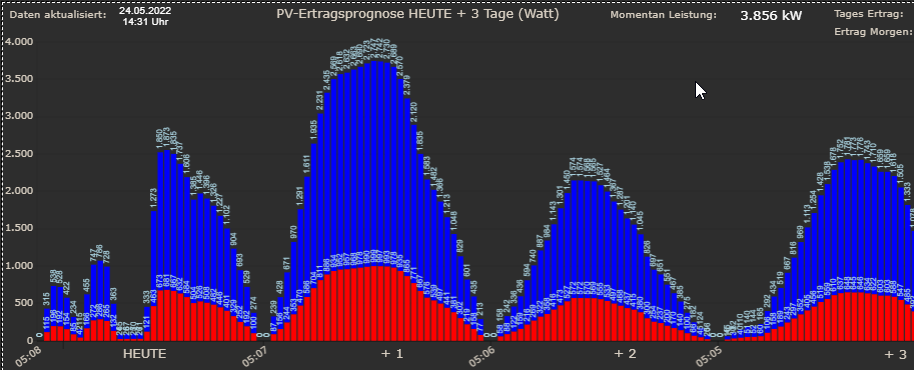
                              BtW: Ich finde die Beschriftung des Bar Graphen sehr groß gewählt, was meiner Meinung nach bei einer Mehrtages Ansicht sehr unübersichtlich wird.

                              Hier mal die Ansicht des Ur-javascript und darunter zum Vergleich der Bargarph der von deinem Adapter erzeugt wird. Ich kann dir gerne mal die Einstellungen anhängen, welche im Ur-Script wirken. Ggf. kannst du das in der Instanz Einstellung genauso frei Editierbar machen wie die Bargraphen selber.

                              Ur-Javascript
                              d026650b-c4d5-4073-a9c7-5c7376052d22-image.png

                              Dein Adapter Bar Graph

                              3f61e35f-81b9-4a16-830e-e126e380a1c3-image.png

                              ioBroker (since 2018) auf Intel Core i3-5005U NUC und Windwos10 Pro

                              1 Reply Last reply
                              0
                              • JB_SullivanJ JB_Sullivan

                                @haus-automatisierung sagte in Test PV Forecast Adapter:

                                Stell den Diagrammtitel mal auf DD.MM. HH:mm

                                Unter 2.1.2 funktioniert es. Kleinigkeit zum Eingabefeld - wenn man HH:mm schon drin stehen hat und will einfach nur DD.MM. DAVOR einfügen, springt der Cursor nach jedem Buchstaben / Zeichen an das Ende der Zeile.

                                Man muss die Änderung Zeichen für Zeichen eingeben und dann den Cursor immer wieder nach vorne holen. Hier man ein Beispiel, wenn man die Änderung hintereinander weg schreiben würde

                                D HH:mmD
                                DD HH:mm.
                                DD.M HH:mmM
                                DD.MM HH:mm.

                                haus-automatisierungH Offline
                                haus-automatisierungH Offline
                                haus-automatisierung
                                Developer Most Active
                                wrote on last edited by
                                #406

                                @jb_sullivan sagte in Test PV Forecast Adapter:

                                springt der Cursor nach jedem Buchstaben / Zeichen an das Ende der Zeile.

                                Ist ein Admin-Issue. Hat mit dem Adapter nichts zu tun und habe ich keinen Einfluss drauf :(

                                @jb_sullivan sagte in Test PV Forecast Adapter:

                                Ggf. kannst du das in der Instanz Einstellung genauso frei Editierbar machen wie die Bargraphen selber.

                                Am Ende hat der JSON Graph bestimmt 100 Parameter :) Wenn man die alle anbietet, dann nutzt das ja eh niemand mehr. Aber ja, häng mal an.

                                🧑‍🎓 Autor des beliebten ioBroker-Master-Kurses
                                🎥 Tutorials rund um das Thema DIY-Smart-Home: https://haus-automatisierung.com/
                                📚 Meine inoffizielle ioBroker Dokumentation

                                JB_SullivanJ 1 Reply Last reply
                                0
                                • haus-automatisierungH haus-automatisierung

                                  @jb_sullivan sagte in Test PV Forecast Adapter:

                                  springt der Cursor nach jedem Buchstaben / Zeichen an das Ende der Zeile.

                                  Ist ein Admin-Issue. Hat mit dem Adapter nichts zu tun und habe ich keinen Einfluss drauf :(

                                  @jb_sullivan sagte in Test PV Forecast Adapter:

                                  Ggf. kannst du das in der Instanz Einstellung genauso frei Editierbar machen wie die Bargraphen selber.

                                  Am Ende hat der JSON Graph bestimmt 100 Parameter :) Wenn man die alle anbietet, dann nutzt das ja eh niemand mehr. Aber ja, häng mal an.

                                  JB_SullivanJ Offline
                                  JB_SullivanJ Offline
                                  JB_Sullivan
                                  wrote on last edited by
                                  #407

                                  @haus-automatisierung sagte in Test PV Forecast Adapter:

                                  Aber ja, häng mal an.

                                  Bitte Schön - UR_PV_Forecast_Script.txt

                                  ioBroker (since 2018) auf Intel Core i3-5005U NUC und Windwos10 Pro

                                  1 Reply Last reply
                                  1
                                  • B Offline
                                    B Offline
                                    bastian-m
                                    wrote on last edited by
                                    #408

                                    Vielen Dank an Matthias, dass er so aktiv in die Entwicklung des Adapters eingestiegen ist.
                                    Nutzt man Forecast.solar als Dienst, kann man das Aktualisierungsintervall einstellen, bei Solcast nicht. Da wird doch nur einmal in der Nacht aktualisiert wenn ich mich recht erinnere. Warum wurde das so implementiert? Man hat bei Solcast 50 Api-Aufrufe / 24h frei, ich sehe zumindest darin kein Problem, nicht alle paar Stunden die Prognose für den Tag zu aktualisieren.
                                    Bisher nur einmal in der Nacht zu aktualisieren, hat erhebliche qualitative Nachteile für die Prognosegüte des restlichen Tags. Vergleicht man die nächtliche Prognose aus dem Adapter mit der sich auf der Homepage von Solcast regelmäßig aktualisierenden Prognose, so wird die vor allem nach Sonnenaufgang erheblich exakter. Ist auch logisch, denn Solcast arbeitet neben Modellvorhersagen auch stark mit der Analyse von Satbildern, deren Qualität nach Sonnenaufgang erheblich zunimmt. Ich weiß nicht ob es einen technischen Grund gibt, keine regelmäßige Aktualisierung bei Solcast zu implementieren. Vielleicht weil von der API die Prognosedaten nur ab dem Zeitpunkt der Aktualisierung ausgegeben werden und nicht rückwirkend bis zum Tagesbeginn? Hier würde ich stark dafür plädieren, einen Workaround zu implementieren, indem man die 30minütigen alten Prognosedaten bis zum Zeitpunkt der Aktualisierung und dann ab da mit den erneuerten Daten kombiniert und ggf. manuell eine Summe für die 24h-Prognose bildet.

                                    Grüße,
                                    Bastian

                                    haus-automatisierungH 1 Reply Last reply
                                    2
                                    • B bastian-m

                                      Vielen Dank an Matthias, dass er so aktiv in die Entwicklung des Adapters eingestiegen ist.
                                      Nutzt man Forecast.solar als Dienst, kann man das Aktualisierungsintervall einstellen, bei Solcast nicht. Da wird doch nur einmal in der Nacht aktualisiert wenn ich mich recht erinnere. Warum wurde das so implementiert? Man hat bei Solcast 50 Api-Aufrufe / 24h frei, ich sehe zumindest darin kein Problem, nicht alle paar Stunden die Prognose für den Tag zu aktualisieren.
                                      Bisher nur einmal in der Nacht zu aktualisieren, hat erhebliche qualitative Nachteile für die Prognosegüte des restlichen Tags. Vergleicht man die nächtliche Prognose aus dem Adapter mit der sich auf der Homepage von Solcast regelmäßig aktualisierenden Prognose, so wird die vor allem nach Sonnenaufgang erheblich exakter. Ist auch logisch, denn Solcast arbeitet neben Modellvorhersagen auch stark mit der Analyse von Satbildern, deren Qualität nach Sonnenaufgang erheblich zunimmt. Ich weiß nicht ob es einen technischen Grund gibt, keine regelmäßige Aktualisierung bei Solcast zu implementieren. Vielleicht weil von der API die Prognosedaten nur ab dem Zeitpunkt der Aktualisierung ausgegeben werden und nicht rückwirkend bis zum Tagesbeginn? Hier würde ich stark dafür plädieren, einen Workaround zu implementieren, indem man die 30minütigen alten Prognosedaten bis zum Zeitpunkt der Aktualisierung und dann ab da mit den erneuerten Daten kombiniert und ggf. manuell eine Summe für die 24h-Prognose bildet.

                                      Grüße,
                                      Bastian

                                      haus-automatisierungH Offline
                                      haus-automatisierungH Offline
                                      haus-automatisierung
                                      Developer Most Active
                                      wrote on last edited by
                                      #409

                                      @bastian-m sagte in Test PV Forecast Adapter:

                                      Warum wurde das so implementiert?

                                      Hast Du schon richtig erkannt :)

                                      Weil Solcast immer nur die Werte ab der aktuellen Stunde liefert. Das heißt, wenn man das um 15 Uhr abfragt, kann man damit nicht mehr den Tagesertrag ausrechnen und alle Stunden-Datenpunkte füllen. Man müsste also recht viel umbauen, damit man sich die Werte für Stunden in der Vergangenheit merkt und die zukünftigen aktualisiert.

                                      Aktuell werden die Daten einmal vom Service geholt und auf der Basis dann alle 10 Minuten aktualisiert. Da müsste man dann also noch einen Schritt zwischen packen.

                                      🧑‍🎓 Autor des beliebten ioBroker-Master-Kurses
                                      🎥 Tutorials rund um das Thema DIY-Smart-Home: https://haus-automatisierung.com/
                                      📚 Meine inoffizielle ioBroker Dokumentation

                                      ScheulerS 1 Reply Last reply
                                      0
                                      • B Offline
                                        B Offline
                                        bastian-m
                                        wrote on last edited by bastian-m
                                        #410

                                        Ich kann es nicht quantifizieren wie sehr es die Prognosegüte von Solcast im ioBroker verbessern würde, aber ich bin mir relativ sicher deutlich. Korrigier mich, aber eigentlich ist es nur das zerschneiden und aneinanderheften von zwei jsons an der richtigen Stelle immer wenn man eine Aktualisierung abrufen würde, oder?

                                        Liebe Grüße,
                                        Bastian

                                        P.S.: Ich habe mir ein Script aufgesetzt, dass jetzt die Prognosen für meine PV-Anlage morgens um 5 Uhr von Solcast und Forecast.solar speichert und um 23 Uhr mit dem tatsächlichen Ertrag meiner PV-Anlage vergleicht, so dass man nach ein paar Tagen und Wochen die Prognoseleistung der beiden Dienste objektiv mit Grafana auswerten kann :-)

                                        1 Reply Last reply
                                        0
                                        • JB_SullivanJ Offline
                                          JB_SullivanJ Offline
                                          JB_Sullivan
                                          wrote on last edited by
                                          #411

                                          Nochmal eine kleine Anmerkung am Rande zu den Graphen - warum wird die Auflösung im "Watt Modus" so stark an den oberen Rand des iframs gepresst, während dessen dieses in der kwh Ansicht deutlich gefälliger daher kommt. Kann man der Watt Skalierung ggf. ein Offset von z.B. 500 Watt mitgeben, damit auch in dieser Darstellung, ein optisch ansprechender Abstand zum oberen Bildrand entsteht?
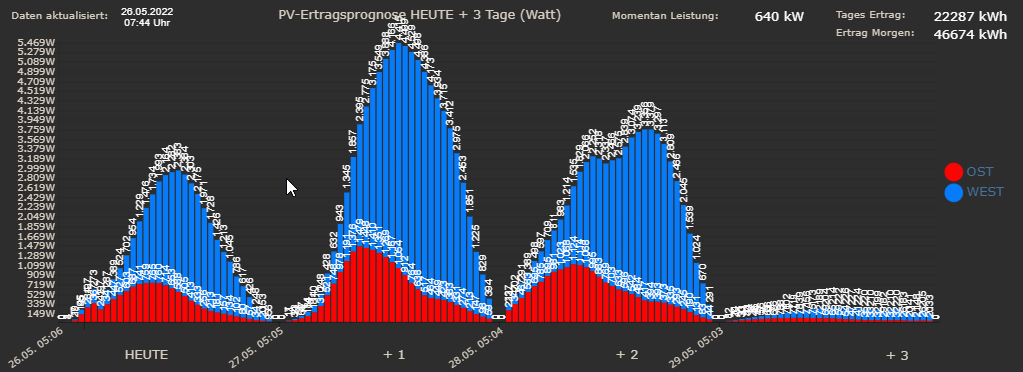
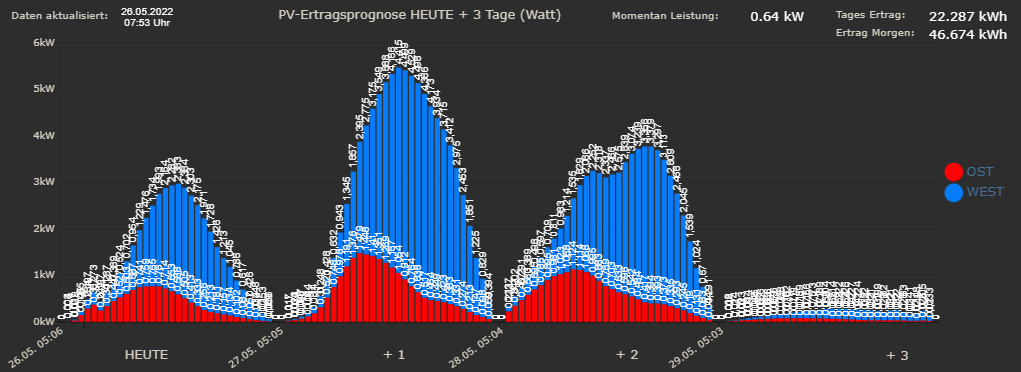
                                          3538d317-f83d-4948-9c81-793ed33c716f-image.png

                                          9496e20c-fca1-4cd6-8b30-3170316b898c-image.png

                                          ioBroker (since 2018) auf Intel Core i3-5005U NUC und Windwos10 Pro

                                          1 Reply Last reply
                                          0
                                          Reply
                                          • Reply as topic
                                          Log in to reply
                                          • Oldest to Newest
                                          • Newest to Oldest
                                          • Most Votes


                                          Support us

                                          ioBroker
                                          Community Adapters
                                          Donate

                                          294

                                          Online

                                          32.7k

                                          Users

                                          82.4k

                                          Topics

                                          1.3m

                                          Posts
                                          Community
                                          Impressum | Datenschutz-Bestimmungen | Nutzungsbedingungen | Einwilligungseinstellungen
                                          ioBroker Community 2014-2025
                                          logo
                                          • Login

                                          • Don't have an account? Register

                                          • Login or register to search.
                                          • First post
                                            Last post
                                          0
                                          • Home
                                          • Recent
                                          • Tags
                                          • Unread 0
                                          • Categories
                                          • Unreplied
                                          • Popular
                                          • GitHub
                                          • Docu
                                          • Hilfe