Skip to content
  • Home
  • Recent
  • Tags
  • 0 Unread 0
  • Categories
  • Unreplied
  • Popular
  • GitHub
  • Docu
  • Hilfe
Skins
  • Light
  • Brite
  • Cerulean
  • Cosmo
  • Flatly
  • Journal
  • Litera
  • Lumen
  • Lux
  • Materia
  • Minty
  • Morph
  • Pulse
  • Sandstone
  • Simplex
  • Sketchy
  • Spacelab
  • United
  • Yeti
  • Zephyr
  • Dark
  • Cyborg
  • Darkly
  • Quartz
  • Slate
  • Solar
  • Superhero
  • Vapor

  • Default (No Skin)
  • No Skin
Collapse
ioBroker Logo

Community Forum

donate donate
  1. ioBroker Community Home
  2. Deutsch
  3. ioBroker Allgemein
  4. Anfänger sucht Hilfe bei Install. proxmox auf INTELNUC8i3BEK
NEWS

  • Jahresrückblick 2025 – unser neuer Blogbeitrag ist online! ✨
    BluefoxB
    Bluefox
    17
    1
    3.3k

  • Neuer Blogbeitrag: Monatsrückblick - Dezember 2025 🎄
    BluefoxB
    Bluefox
    13
    1
    1.1k

  • Weihnachtsangebot 2025! 🎄
    BluefoxB
    Bluefox
    25
    1
    2.4k

Anfänger sucht Hilfe bei Install. proxmox auf INTELNUC8i3BEK

Scheduled Pinned Locked Moved ioBroker Allgemein
1.0k Posts 16 Posters 257.1k Views 15 Watching
  • Oldest to Newest
  • Newest to Oldest
  • Most Votes
Reply
  • Reply as topic
Log in to reply
This topic has been deleted. Only users with topic management privileges can see it.
  • crunchipC crunchip

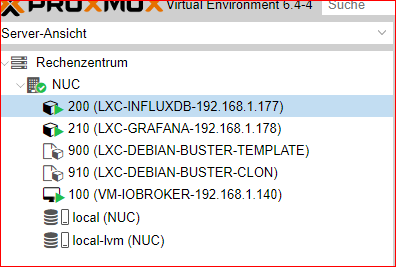
    @goetschhofer wo kommt jetzt die 910 her??
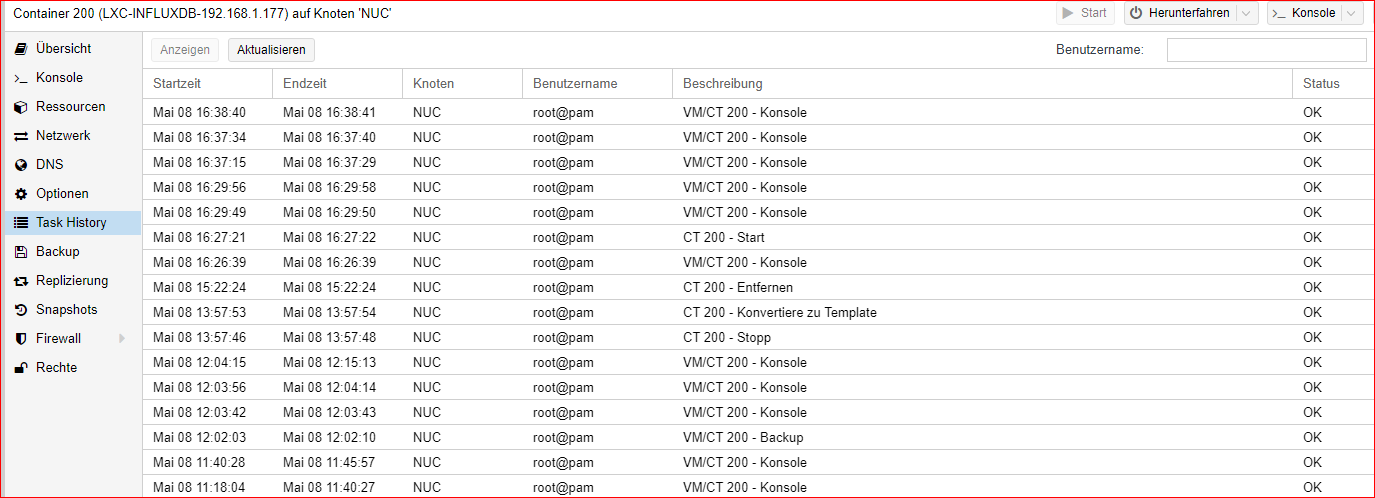
    was wird unten angezeigt bei Tasks (doppelklick aufs Ereignis)

    G Offline
    G Offline
    GOETSCHHOFER
    wrote on last edited by GOETSCHHOFER
    #285

    @crunchip

    Schaut schon gut aus !

    b3e6f8e9-1686-4411-882e-35b7a761b430-image.png
    345bb735-9b17-4638-9a2e-d02cfeab6c03-image.png:

    crunchipC G 2 Replies Last reply
    0
    • G GOETSCHHOFER

      @crunchip

      Schaut schon gut aus !

      b3e6f8e9-1686-4411-882e-35b7a761b430-image.png
      345bb735-9b17-4638-9a2e-d02cfeab6c03-image.png:

      crunchipC Away
      crunchipC Away
      crunchip
      Forum Testing Most Active
      wrote on last edited by
      #286

      @goetschhofer meinte mit Task nicht die History im CT, sondern auf deiner Hauptseite unten. Hatt sich aber durch deinen Neustart ja scheinbar erledigt.

      @goetschhofer sagte in Anfänger sucht Hilfe bei Install. proxmox auf INTELNUC8i3BEK:

      Schaut schon gut aus !

      also hast du jetzt zwei CT's angelegt, bei denen ja nun bereits die Vorbereitungen( benutzer, sudo, curl....) inbegriffen sind
      diese sind nun startklar für die weitere Installation, was du jeweilig installieren möchtest

      umgestiegen von Proxmox auf Unraid

      1 Reply Last reply
      1
      • G GOETSCHHOFER

        @crunchip

        Schaut schon gut aus !

        b3e6f8e9-1686-4411-882e-35b7a761b430-image.png
        345bb735-9b17-4638-9a2e-d02cfeab6c03-image.png:

        G Offline
        G Offline
        GOETSCHHOFER
        wrote on last edited by GOETSCHHOFER
        #287

        @crunchip

        Bin jetzt beim installieren der influxdb über putty mit meinem user:

        Habe beide Varianten von Thomas versucht, aber ich bekomme jeweils eine Fehlermeldung.

        Ich habe doch sudo Rechte mit meinem User ?

        Curl ? Wie prüfe ich ob curl auch funktioniert ?

        login as: karl
        karl@192.168.1.177's password:
        Linux INFLUXDB 5.4.106-1-pve #1 SMP PVE 5.4.106-1 (Fri, 19 Mar 2021 11:08:47 +0100) x86_64
        
        The programs included with the Debian GNU/Linux system are free software;
        the exact distribution terms for each program are described in the
        individual files in /usr/share/doc/*/copyright.
        
        Debian GNU/Linux comes with ABSOLUTELY NO WARRANTY, to the extent
        permitted by applicable law.
        Last login: Sat May  8 16:54:35 2021 from 192.168.1.3
        karl@INFLUXDB:~$ wget -qO- https://repos.influxdata.com/influxdb.key | sudo apt-key add -
        -bash: sudo: command not found
        karl@INFLUXDB:~$ wget -qO- https://repos.influxdata.com/influxdb.key | sudo gpg --dearmor > /etc/apt/trusted.gpg.d/influxdb.gpg
        -bash: /etc/apt/trusted.gpg.d/influxdb.gpg: Permission denied
        karl@INFLUXDB:~$


        @goetschhofer
        Da fehlt ein sudo vor gpg.
        
        Mach es so:
        
        wget -qO- https://repos.influxdata.com/influxdb.key | sudo apt-key add -
        source /etc/os-release
        echo "deb https://repos.influxdata.com/debian $(lsb_release -cs) stable" | sudo tee /etc/apt/sources.list.d/influxdb.list
        Könnte aber sein das im LXC das anders läuft.
        Also so probieren:
        
        wget -qO- https://repos.influxdata.com/influxdb.key | sudo gpg --dearmor > /etc/apt/trusted.gpg.d/influxdb.gpg
        
        crunchipC 1 Reply Last reply
        0
        • G GOETSCHHOFER

          @crunchip

          Bin jetzt beim installieren der influxdb über putty mit meinem user:

          Habe beide Varianten von Thomas versucht, aber ich bekomme jeweils eine Fehlermeldung.

          Ich habe doch sudo Rechte mit meinem User ?

          Curl ? Wie prüfe ich ob curl auch funktioniert ?

          login as: karl
          karl@192.168.1.177's password:
          Linux INFLUXDB 5.4.106-1-pve #1 SMP PVE 5.4.106-1 (Fri, 19 Mar 2021 11:08:47 +0100) x86_64
          
          The programs included with the Debian GNU/Linux system are free software;
          the exact distribution terms for each program are described in the
          individual files in /usr/share/doc/*/copyright.
          
          Debian GNU/Linux comes with ABSOLUTELY NO WARRANTY, to the extent
          permitted by applicable law.
          Last login: Sat May  8 16:54:35 2021 from 192.168.1.3
          karl@INFLUXDB:~$ wget -qO- https://repos.influxdata.com/influxdb.key | sudo apt-key add -
          -bash: sudo: command not found
          karl@INFLUXDB:~$ wget -qO- https://repos.influxdata.com/influxdb.key | sudo gpg --dearmor > /etc/apt/trusted.gpg.d/influxdb.gpg
          -bash: /etc/apt/trusted.gpg.d/influxdb.gpg: Permission denied
          karl@INFLUXDB:~$


          @goetschhofer
          Da fehlt ein sudo vor gpg.
          
          Mach es so:
          
          wget -qO- https://repos.influxdata.com/influxdb.key | sudo apt-key add -
          source /etc/os-release
          echo "deb https://repos.influxdata.com/debian $(lsb_release -cs) stable" | sudo tee /etc/apt/sources.list.d/influxdb.list
          Könnte aber sein das im LXC das anders läuft.
          Also so probieren:
          
          wget -qO- https://repos.influxdata.com/influxdb.key | sudo gpg --dearmor > /etc/apt/trusted.gpg.d/influxdb.gpg
          
          crunchipC Away
          crunchipC Away
          crunchip
          Forum Testing Most Active
          wrote on last edited by
          #288

          @goetschhofer sagte in Anfänger sucht Hilfe bei Install. proxmox auf INTELNUC8i3BEK:

          -bash: sudo: command not found

          da hast du dein backup nicht gemacht, nachdem du alles eingerichtet hast, sondern zuvor

          umgestiegen von Proxmox auf Unraid

          G 1 Reply Last reply
          1
          • crunchipC crunchip

            @goetschhofer sagte in Anfänger sucht Hilfe bei Install. proxmox auf INTELNUC8i3BEK:

            -bash: sudo: command not found

            da hast du dein backup nicht gemacht, nachdem du alles eingerichtet hast, sondern zuvor

            G Offline
            G Offline
            GOETSCHHOFER
            wrote on last edited by GOETSCHHOFER
            #289

            @crunchip

            Dies habe ich gemacht, bevor ich das update gemacht habe, sonst könnte ich mich doch nicht mit meinen eigens angelegten user anmelden ?

            Ich befürchte du hast Recht, denn dies war das alte Backup.

            Auf ein Neues !

            crunchipcrunchip FORUM TESTING MOST ACTIVE  about 6 hours ago
            @goetschhofer nochmal zur Reihenfolge(auch für deine zukünftigen LXC)
            nach installation deines LXC
            
            apt update & apt upgrade
            dpkg-reconfigure tzdata
            apt install sudo curl
            adduser karl
            usermod -aG sudo karl
             
            danach einmal ausloggen und mit dem Benutzer karl einloggen
            
            crunchipC 2 Replies Last reply
            -1
            • G GOETSCHHOFER

              @crunchip

              Dies habe ich gemacht, bevor ich das update gemacht habe, sonst könnte ich mich doch nicht mit meinen eigens angelegten user anmelden ?

              Ich befürchte du hast Recht, denn dies war das alte Backup.

              Auf ein Neues !

              crunchipcrunchip FORUM TESTING MOST ACTIVE  about 6 hours ago
              @goetschhofer nochmal zur Reihenfolge(auch für deine zukünftigen LXC)
              nach installation deines LXC
              
              apt update & apt upgrade
              dpkg-reconfigure tzdata
              apt install sudo curl
              adduser karl
              usermod -aG sudo karl
               
              danach einmal ausloggen und mit dem Benutzer karl einloggen
              
              crunchipC Away
              crunchipC Away
              crunchip
              Forum Testing Most Active
              wrote on last edited by
              #290

              @goetschhofer sagte in Anfänger sucht Hilfe bei Install. proxmox auf INTELNUC8i3BEK:

              sonst könnte ich mich doch nicht mit meinen eigens angelegten user anmelden

              ne am Anfang war deine installation noch etwas holprig, da hattest kein sudo installiert und auch noch nicht den Benutzer in die sudo Gruppe mit aufgenommen. Aber schon das backup erstellt, scheinbar hast du vergessen ein weiteres backup zu machen, nachdem alles fertig war.

              umgestiegen von Proxmox auf Unraid

              G 2 Replies Last reply
              1
              • crunchipC crunchip

                @goetschhofer sagte in Anfänger sucht Hilfe bei Install. proxmox auf INTELNUC8i3BEK:

                sonst könnte ich mich doch nicht mit meinen eigens angelegten user anmelden

                ne am Anfang war deine installation noch etwas holprig, da hattest kein sudo installiert und auch noch nicht den Benutzer in die sudo Gruppe mit aufgenommen. Aber schon das backup erstellt, scheinbar hast du vergessen ein weiteres backup zu machen, nachdem alles fertig war.

                G Offline
                G Offline
                GOETSCHHOFER
                wrote on last edited by GOETSCHHOFER
                #291

                @crunchip

                Ja, du hast wie immer Recht ! :grinning:

                Als sollte ich das ganze nochmals machen und wieder Template u. Klon erstellen ?

                apt update & apt upgrade
                dpkg-reconfigure tzdata
                apt install sudo curl
                adduser karl
                usermod -aG sudo karl
                 
                danach einmal ausloggen und mit dem Benutzer karl einloggen
                
                
                1 Reply Last reply
                0
                • G GOETSCHHOFER

                  @crunchip

                  Dies habe ich gemacht, bevor ich das update gemacht habe, sonst könnte ich mich doch nicht mit meinen eigens angelegten user anmelden ?

                  Ich befürchte du hast Recht, denn dies war das alte Backup.

                  Auf ein Neues !

                  crunchipcrunchip FORUM TESTING MOST ACTIVE  about 6 hours ago
                  @goetschhofer nochmal zur Reihenfolge(auch für deine zukünftigen LXC)
                  nach installation deines LXC
                  
                  apt update & apt upgrade
                  dpkg-reconfigure tzdata
                  apt install sudo curl
                  adduser karl
                  usermod -aG sudo karl
                   
                  danach einmal ausloggen und mit dem Benutzer karl einloggen
                  
                  crunchipC Away
                  crunchipC Away
                  crunchip
                  Forum Testing Most Active
                  wrote on last edited by
                  #292

                  @goetschhofer sagte in Anfänger sucht Hilfe bei Install. proxmox auf INTELNUC8i3BEK:

                  Auf ein Neues !

                  learning by doing

                  halb so wild, kannst ja immer noch ausführen im jeweiligen CT, musst deshalb nicht löschen
                  aber dein template anpassen bzw neu machen, für die Zukunft.
                  Ist jetzt auch nicht so wichtig, das template kannst auch wann anders erstellen
                  konzentriere dich erstmal nur auf einen CT und mach diesen fertig.

                  einfach im CT dieses ausführen

                  apt update & apt upgrade
                  dpkg-reconfigure tzdata
                  apt install sudo curl
                  usermod -aG sudo karl
                  

                  umgestiegen von Proxmox auf Unraid

                  1 Reply Last reply
                  1
                  • crunchipC crunchip

                    @goetschhofer sagte in Anfänger sucht Hilfe bei Install. proxmox auf INTELNUC8i3BEK:

                    sonst könnte ich mich doch nicht mit meinen eigens angelegten user anmelden

                    ne am Anfang war deine installation noch etwas holprig, da hattest kein sudo installiert und auch noch nicht den Benutzer in die sudo Gruppe mit aufgenommen. Aber schon das backup erstellt, scheinbar hast du vergessen ein weiteres backup zu machen, nachdem alles fertig war.

                    G Offline
                    G Offline
                    GOETSCHHOFER
                    wrote on last edited by GOETSCHHOFER
                    #293

                    @crunchip
                    Habe das ganze jetzt nochmals beim Klon-210-Influxdb durchgeführt, aber soweit ich dies beurteilen kann, ist da alles schon mal gelaufen ?

                    Zwischendurch möchte ich mal vielen, vielen, vielen Dank sagen für deine Geduld und Mühe. Die Zeit muss sein !
                    :+1: :+1: :+1:

                    Current default time zone: 'Europe/Vienna'
                    Local time is now:      Sat May  8 17:16:05 CEST 2021.
                    Universal Time is now:  Sat May  8 15:16:05 UTC 2021.
                    
                    root@INFLUXDB:~# apt install sudo curl
                    Reading package lists... Done
                    Building dependency tree       
                    Reading state information... Done
                    The following additional packages will be installed:
                      libcurl4
                    The following NEW packages will be installed:
                      curl libcurl4 sudo
                    0 upgraded, 3 newly installed, 0 to remove and 0 not upgraded.
                    Need to get 1841 kB of archives.
                    After this operation, 5007 kB of additional disk space will be used.
                    Do you want to continue? [Y/n] y
                    Get:1 http://security.debian.org buster/updates/main amd64 libcurl4 amd64 7.64.0-4+deb10u2 [332 kB]
                    Get:2 http://ftp.debian.org/debian buster/main amd64 sudo amd64 1.8.27-1+deb10u3 [1244 kB]
                    Get:3 http://security.debian.org buster/updates/main amd64 curl amd64 7.64.0-4+deb10u2 [265 kB]
                    Fetched 1841 kB in 0s (3715 kB/s)                     
                    Selecting previously unselected package libcurl4:amd64.
                    (Reading database ... 20541 files and directories currently installed.)
                    Preparing to unpack .../libcurl4_7.64.0-4+deb10u2_amd64.deb ...
                    Unpacking libcurl4:amd64 (7.64.0-4+deb10u2) ...
                    Selecting previously unselected package curl.
                    Preparing to unpack .../curl_7.64.0-4+deb10u2_amd64.deb ...
                    Unpacking curl (7.64.0-4+deb10u2) ...
                    Selecting previously unselected package sudo.
                    Preparing to unpack .../sudo_1.8.27-1+deb10u3_amd64.deb ...
                    Unpacking sudo (1.8.27-1+deb10u3) ...
                    Setting up sudo (1.8.27-1+deb10u3) ...
                    Setting up libcurl4:amd64 (7.64.0-4+deb10u2) ...
                    Setting up curl (7.64.0-4+deb10u2) ...
                    Processing triggers for systemd (241-7~deb10u7) ...
                    Processing triggers for man-db (2.8.5-2) ...
                    Processing triggers for libc-bin (2.28-10) ...
                    root@INFLUXDB:~# adduser karl
                    adduser: The user `karl' already exists.
                    root@INFLUXDB:~# usermod -aG sudo karl
                    
                    crunchipC Kalle BlomquistK 2 Replies Last reply
                    1
                    • G GOETSCHHOFER

                      @crunchip
                      Habe das ganze jetzt nochmals beim Klon-210-Influxdb durchgeführt, aber soweit ich dies beurteilen kann, ist da alles schon mal gelaufen ?

                      Zwischendurch möchte ich mal vielen, vielen, vielen Dank sagen für deine Geduld und Mühe. Die Zeit muss sein !
                      :+1: :+1: :+1:

                      Current default time zone: 'Europe/Vienna'
                      Local time is now:      Sat May  8 17:16:05 CEST 2021.
                      Universal Time is now:  Sat May  8 15:16:05 UTC 2021.
                      
                      root@INFLUXDB:~# apt install sudo curl
                      Reading package lists... Done
                      Building dependency tree       
                      Reading state information... Done
                      The following additional packages will be installed:
                        libcurl4
                      The following NEW packages will be installed:
                        curl libcurl4 sudo
                      0 upgraded, 3 newly installed, 0 to remove and 0 not upgraded.
                      Need to get 1841 kB of archives.
                      After this operation, 5007 kB of additional disk space will be used.
                      Do you want to continue? [Y/n] y
                      Get:1 http://security.debian.org buster/updates/main amd64 libcurl4 amd64 7.64.0-4+deb10u2 [332 kB]
                      Get:2 http://ftp.debian.org/debian buster/main amd64 sudo amd64 1.8.27-1+deb10u3 [1244 kB]
                      Get:3 http://security.debian.org buster/updates/main amd64 curl amd64 7.64.0-4+deb10u2 [265 kB]
                      Fetched 1841 kB in 0s (3715 kB/s)                     
                      Selecting previously unselected package libcurl4:amd64.
                      (Reading database ... 20541 files and directories currently installed.)
                      Preparing to unpack .../libcurl4_7.64.0-4+deb10u2_amd64.deb ...
                      Unpacking libcurl4:amd64 (7.64.0-4+deb10u2) ...
                      Selecting previously unselected package curl.
                      Preparing to unpack .../curl_7.64.0-4+deb10u2_amd64.deb ...
                      Unpacking curl (7.64.0-4+deb10u2) ...
                      Selecting previously unselected package sudo.
                      Preparing to unpack .../sudo_1.8.27-1+deb10u3_amd64.deb ...
                      Unpacking sudo (1.8.27-1+deb10u3) ...
                      Setting up sudo (1.8.27-1+deb10u3) ...
                      Setting up libcurl4:amd64 (7.64.0-4+deb10u2) ...
                      Setting up curl (7.64.0-4+deb10u2) ...
                      Processing triggers for systemd (241-7~deb10u7) ...
                      Processing triggers for man-db (2.8.5-2) ...
                      Processing triggers for libc-bin (2.28-10) ...
                      root@INFLUXDB:~# adduser karl
                      adduser: The user `karl' already exists.
                      root@INFLUXDB:~# usermod -aG sudo karl
                      
                      crunchipC Away
                      crunchipC Away
                      crunchip
                      Forum Testing Most Active
                      wrote on last edited by
                      #294

                      @goetschhofer sagte in Anfänger sucht Hilfe bei Install. proxmox auf INTELNUC8i3BEK:

                      ist da alles schon mal gelaufen

                      nein das lief noch nicht, bis auf add user, der war schon vorhanden, deshalb habe ich das auch weg gelassen, sieh oben

                      umgestiegen von Proxmox auf Unraid

                      G 1 Reply Last reply
                      1
                      • crunchipC crunchip

                        @goetschhofer sagte in Anfänger sucht Hilfe bei Install. proxmox auf INTELNUC8i3BEK:

                        ist da alles schon mal gelaufen

                        nein das lief noch nicht, bis auf add user, der war schon vorhanden, deshalb habe ich das auch weg gelassen, sieh oben

                        G Offline
                        G Offline
                        GOETSCHHOFER
                        wrote on last edited by GOETSCHHOFER
                        #295

                        @crunchip

                        Ergebnis nach neuem Versuch.

                        Current default time zone: 'Europe/Vienna'
                        Local time is now:      Sat May  8 17:24:08 CEST 2021.
                        Universal Time is now:  Sat May  8 15:24:08 UTC 2021.
                        
                        root@INFLUXDB:~# 
                        root@INFLUXDB:~# apt install sudo curl
                        Reading package lists... Done
                        Building dependency tree       
                        Reading state information... Done
                        sudo is already the newest version (1.8.27-1+deb10u3).
                        curl is already the newest version (7.64.0-4+deb10u2).
                        0 upgraded, 0 newly installed, 0 to remove and 0 not upgraded.
                        root@INFLUXDB:~# usermod -aG sudo karl
                        
                        crunchipC 1 Reply Last reply
                        0
                        • G GOETSCHHOFER

                          @crunchip
                          Habe das ganze jetzt nochmals beim Klon-210-Influxdb durchgeführt, aber soweit ich dies beurteilen kann, ist da alles schon mal gelaufen ?

                          Zwischendurch möchte ich mal vielen, vielen, vielen Dank sagen für deine Geduld und Mühe. Die Zeit muss sein !
                          :+1: :+1: :+1:

                          Current default time zone: 'Europe/Vienna'
                          Local time is now:      Sat May  8 17:16:05 CEST 2021.
                          Universal Time is now:  Sat May  8 15:16:05 UTC 2021.
                          
                          root@INFLUXDB:~# apt install sudo curl
                          Reading package lists... Done
                          Building dependency tree       
                          Reading state information... Done
                          The following additional packages will be installed:
                            libcurl4
                          The following NEW packages will be installed:
                            curl libcurl4 sudo
                          0 upgraded, 3 newly installed, 0 to remove and 0 not upgraded.
                          Need to get 1841 kB of archives.
                          After this operation, 5007 kB of additional disk space will be used.
                          Do you want to continue? [Y/n] y
                          Get:1 http://security.debian.org buster/updates/main amd64 libcurl4 amd64 7.64.0-4+deb10u2 [332 kB]
                          Get:2 http://ftp.debian.org/debian buster/main amd64 sudo amd64 1.8.27-1+deb10u3 [1244 kB]
                          Get:3 http://security.debian.org buster/updates/main amd64 curl amd64 7.64.0-4+deb10u2 [265 kB]
                          Fetched 1841 kB in 0s (3715 kB/s)                     
                          Selecting previously unselected package libcurl4:amd64.
                          (Reading database ... 20541 files and directories currently installed.)
                          Preparing to unpack .../libcurl4_7.64.0-4+deb10u2_amd64.deb ...
                          Unpacking libcurl4:amd64 (7.64.0-4+deb10u2) ...
                          Selecting previously unselected package curl.
                          Preparing to unpack .../curl_7.64.0-4+deb10u2_amd64.deb ...
                          Unpacking curl (7.64.0-4+deb10u2) ...
                          Selecting previously unselected package sudo.
                          Preparing to unpack .../sudo_1.8.27-1+deb10u3_amd64.deb ...
                          Unpacking sudo (1.8.27-1+deb10u3) ...
                          Setting up sudo (1.8.27-1+deb10u3) ...
                          Setting up libcurl4:amd64 (7.64.0-4+deb10u2) ...
                          Setting up curl (7.64.0-4+deb10u2) ...
                          Processing triggers for systemd (241-7~deb10u7) ...
                          Processing triggers for man-db (2.8.5-2) ...
                          Processing triggers for libc-bin (2.28-10) ...
                          root@INFLUXDB:~# adduser karl
                          adduser: The user `karl' already exists.
                          root@INFLUXDB:~# usermod -aG sudo karl
                          
                          Kalle BlomquistK Offline
                          Kalle BlomquistK Offline
                          Kalle Blomquist
                          wrote on last edited by Kalle Blomquist
                          #296

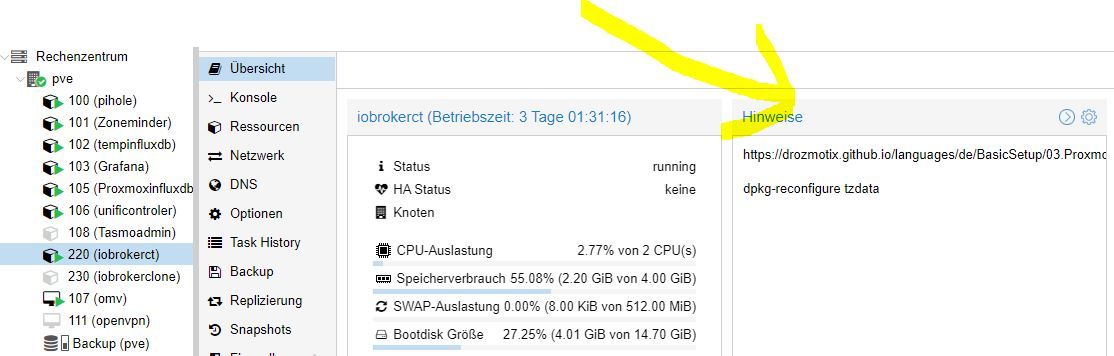
                          @goetschhofer kleiner Hinweis von mir.
                          Du kannst in Proxmox unter "Hinweis" Notizen schreiben, oder Befehle wie "dpkg-reconfigure tzdata".
                          Hat den Vorteil, dass du dir die ganzen Befehle nicht immer neu suchen oder merken mußt, zumindest für den Anfang.
                          Ich bin jetzt nicht den ganzen Faden durchgegeangen, ob es schon jemand geschrieben hat.
                          Vielleicht hilft´s
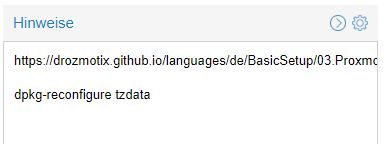
                          proxmox.JPG

                          Gruß Kalle

                          crunchipC G 2 Replies Last reply
                          2
                          • G GOETSCHHOFER

                            @crunchip

                            Ergebnis nach neuem Versuch.

                            Current default time zone: 'Europe/Vienna'
                            Local time is now:      Sat May  8 17:24:08 CEST 2021.
                            Universal Time is now:  Sat May  8 15:24:08 UTC 2021.
                            
                            root@INFLUXDB:~# 
                            root@INFLUXDB:~# apt install sudo curl
                            Reading package lists... Done
                            Building dependency tree       
                            Reading state information... Done
                            sudo is already the newest version (1.8.27-1+deb10u3).
                            curl is already the newest version (7.64.0-4+deb10u2).
                            0 upgraded, 0 newly installed, 0 to remove and 0 not upgraded.
                            root@INFLUXDB:~# usermod -aG sudo karl
                            
                            crunchipC Away
                            crunchipC Away
                            crunchip
                            Forum Testing Most Active
                            wrote on last edited by
                            #297

                            @goetschhofer ja jetzt siehst du
                            is already the newest, ein post weiter oben hatte es noch gefehlt, also hat schon seine richtigkeit

                            umgestiegen von Proxmox auf Unraid

                            G 1 Reply Last reply
                            1
                            • Kalle BlomquistK Kalle Blomquist

                              @goetschhofer kleiner Hinweis von mir.
                              Du kannst in Proxmox unter "Hinweis" Notizen schreiben, oder Befehle wie "dpkg-reconfigure tzdata".
                              Hat den Vorteil, dass du dir die ganzen Befehle nicht immer neu suchen oder merken mußt, zumindest für den Anfang.
                              Ich bin jetzt nicht den ganzen Faden durchgegeangen, ob es schon jemand geschrieben hat.
                              Vielleicht hilft´s

                              proxmox.JPG

                              Gruß Kalle

                              crunchipC Away
                              crunchipC Away
                              crunchip
                              Forum Testing Most Active
                              wrote on last edited by crunchip
                              #298

                              @4-7kohm stimmt, kann man sich generelle Notizen eintragen, dafür war das selbst erstellte template gedacht, das man an solche sachen nicht mehr denken bzw machen muss
                              aber für links, persönliche Notizen, etc ist das manchmal goldwert

                              umgestiegen von Proxmox auf Unraid

                              Kalle BlomquistK 1 Reply Last reply
                              1
                              • crunchipC crunchip

                                @4-7kohm stimmt, kann man sich generelle Notizen eintragen, dafür war das selbst erstellte template gedacht, das man an solche sachen nicht mehr denken bzw machen muss
                                aber für links, persönliche Notizen, etc ist das manchmal goldwert

                                Kalle BlomquistK Offline
                                Kalle BlomquistK Offline
                                Kalle Blomquist
                                wrote on last edited by
                                #299

                                @crunchip :+1:

                                1 Reply Last reply
                                0
                                • Kalle BlomquistK Kalle Blomquist

                                  @goetschhofer kleiner Hinweis von mir.
                                  Du kannst in Proxmox unter "Hinweis" Notizen schreiben, oder Befehle wie "dpkg-reconfigure tzdata".
                                  Hat den Vorteil, dass du dir die ganzen Befehle nicht immer neu suchen oder merken mußt, zumindest für den Anfang.
                                  Ich bin jetzt nicht den ganzen Faden durchgegeangen, ob es schon jemand geschrieben hat.
                                  Vielleicht hilft´s

                                  proxmox.JPG

                                  Gruß Kalle

                                  G Offline
                                  G Offline
                                  GOETSCHHOFER
                                  wrote on last edited by
                                  #300

                                  @4-7kohm

                                  Hallo kalle,

                                  ich finde den Punkt Hinweise nicht.
                                  Unter backup habe ich den Punkt Hinweise bearbeiten ?

                                  Danke

                                  Kalle BlomquistK 1 Reply Last reply
                                  0
                                  • G GOETSCHHOFER

                                    @4-7kohm

                                    Hallo kalle,

                                    ich finde den Punkt Hinweise nicht.
                                    Unter backup habe ich den Punkt Hinweise bearbeiten ?

                                    Danke

                                    Kalle BlomquistK Offline
                                    Kalle BlomquistK Offline
                                    Kalle Blomquist
                                    wrote on last edited by Kalle Blomquist
                                    #301

                                    @goetschhofer !proxmox1.JPG

                                    Rechts auf das Zahnrad gehen, dann bearbeiten, äh und speichern

                                    G 1 Reply Last reply
                                    1
                                    • Kalle BlomquistK Kalle Blomquist

                                      @goetschhofer !proxmox1.JPG

                                      Rechts auf das Zahnrad gehen, dann bearbeiten, äh und speichern

                                      G Offline
                                      G Offline
                                      GOETSCHHOFER
                                      wrote on last edited by
                                      #302

                                      @4-7kohm
                                      Das Gute liegt so nah ! :+1:

                                      1 Reply Last reply
                                      0
                                      • crunchipC crunchip

                                        @goetschhofer ja jetzt siehst du
                                        is already the newest, ein post weiter oben hatte es noch gefehlt, also hat schon seine richtigkeit

                                        G Offline
                                        G Offline
                                        GOETSCHHOFER
                                        wrote on last edited by
                                        #303

                                        @crunchip

                                        Es will und will offenbar nicht ? Fehlermeldung beim Installieren InfluxDB ?

                                         karl@INFLUXDB:~$ login as: karl
                                        > the exact distribution terms for each program are described in the
                                        > individual files in /usr/share/doc/*/copyright.
                                        >
                                        > Debian GNU/Linux comes with ABSOLUTELY NO WARRANTY, to the extent
                                        > permitted by applicable law.
                                        > Last login: Sat May  8 17:39:53 2021 from 192.168.1.3
                                        > karl@INFLUXDB:~$ wget -qO- https://repos.influxdata.com/influxdb.key | sudo ap           t-key add -
                                        > [sudo] password for karl:
                                        > E: gnupg, gnupg2 and gnupg1 do not seem to be installed, but one of them is re           quired for this operation
                                        > karl@INFLUXDB:~$ source /etc/os-release
                                        > karl@INFLUXDB:~$ echo "deb https://repos.influxdata.com/debian $(lsb_release -           cs) stable" | sudo tee /etc/apt/sources.list.d/influxdb.list
                                        > -bash: lsb_release: command not found
                                        
                                        
                                        Kalle BlomquistK 1 Reply Last reply
                                        0
                                        • G GOETSCHHOFER

                                          @crunchip

                                          Es will und will offenbar nicht ? Fehlermeldung beim Installieren InfluxDB ?

                                           karl@INFLUXDB:~$ login as: karl
                                          > the exact distribution terms for each program are described in the
                                          > individual files in /usr/share/doc/*/copyright.
                                          >
                                          > Debian GNU/Linux comes with ABSOLUTELY NO WARRANTY, to the extent
                                          > permitted by applicable law.
                                          > Last login: Sat May  8 17:39:53 2021 from 192.168.1.3
                                          > karl@INFLUXDB:~$ wget -qO- https://repos.influxdata.com/influxdb.key | sudo ap           t-key add -
                                          > [sudo] password for karl:
                                          > E: gnupg, gnupg2 and gnupg1 do not seem to be installed, but one of them is re           quired for this operation
                                          > karl@INFLUXDB:~$ source /etc/os-release
                                          > karl@INFLUXDB:~$ echo "deb https://repos.influxdata.com/debian $(lsb_release -           cs) stable" | sudo tee /etc/apt/sources.list.d/influxdb.list
                                          > -bash: lsb_release: command not found
                                          
                                          
                                          Kalle BlomquistK Offline
                                          Kalle BlomquistK Offline
                                          Kalle Blomquist
                                          wrote on last edited by Kalle Blomquist
                                          #304

                                          @goetschhofer sagte in Anfänger sucht Hilfe bei Install. proxmox auf INTELNUC8i3BEK:

                                          Könnte sein, dass dies fehlt?

                                          E: gnupg, gnupg2 and gnupg1 do not seem to be installed, but one of them is required for this operation
                                          
                                          sudo apt install gnupg2
                                          
                                          G 2 Replies Last reply
                                          1
                                          Reply
                                          • Reply as topic
                                          Log in to reply
                                          • Oldest to Newest
                                          • Newest to Oldest
                                          • Most Votes


                                          Support us

                                          ioBroker
                                          Community Adapters
                                          Donate
                                          FAQ Cloud / IOT
                                          HowTo: Node.js-Update
                                          HowTo: Backup/Restore
                                          Downloads
                                          BLOG

                                          631

                                          Online

                                          32.7k

                                          Users

                                          82.3k

                                          Topics

                                          1.3m

                                          Posts
                                          Community
                                          Impressum | Datenschutz-Bestimmungen | Nutzungsbedingungen | Einwilligungseinstellungen
                                          ioBroker Community 2014-2025
                                          logo
                                          • Login

                                          • Don't have an account? Register

                                          • Login or register to search.
                                          • First post
                                            Last post
                                          0
                                          • Home
                                          • Recent
                                          • Tags
                                          • Unread 0
                                          • Categories
                                          • Unreplied
                                          • Popular
                                          • GitHub
                                          • Docu
                                          • Hilfe