



Skip to content
  • Home
  • Recent
  • Tags
  • 0 Unread 0
  • Categories
  • Unreplied
  • Popular
  • GitHub
  • Docu
  • Hilfe
Skins
  • Light
  • Brite
  • Cerulean
  • Cosmo
  • Flatly
  • Journal
  • Litera
  • Lumen
  • Lux
  • Materia
  • Minty
  • Morph
  • Pulse
  • Sandstone
  • Simplex
  • Sketchy
  • Spacelab
  • United
  • Yeti
  • Zephyr
  • Dark
  • Cyborg
  • Darkly
  • Quartz
  • Slate
  • Solar
  • Superhero
  • Vapor

  • Default (No Skin)
  • No Skin
Collapse
ioBroker Logo

Community Forum

donate donate
  1. ioBroker Community Home
  2. Deutsch
  3. Error/Bug
  4. mihome-vacuum Verbindungsprobleme

NEWS

  • Neuer ioBroker-Blog online: Monatsrückblick März/April 2026
    BluefoxB
    Bluefox
    5
    1
    109

  • Verwendung von KI bitte immer deutlich kennzeichnen
    HomoranH
    Homoran
    8
    1
    150

  • Monatsrückblick Januar/Februar 2026 ist online!
    BluefoxB
    Bluefox
    18
    1
    865

mihome-vacuum Verbindungsprobleme

Scheduled Pinned Locked Moved Unsolved Error/Bug
mihome-vacuumverbindungsproblemexiaomi mi vacuum mop pro
35 Posts 5 Posters 4.6k Views 3 Watching
  • Oldest to Newest
  • Newest to Oldest
  • Most Votes
Reply
  • Reply as topic
Log in to reply
This topic has been deleted. Only users with topic management privileges can see it.
  • haselchenH haselchen

    @Schranzer

    Okay, das passt soweit.
    In der App , welche Region hast du da eingestellt?

    S Offline
    S Offline
    Schranzer
    wrote on last edited by
    #7

    @haselchen Bei Ländereinstellung Deutschland und bei Sprache Deutsch

    haselchenH 1 Reply Last reply
    0
    • S Schranzer

      @haselchen Bei Ländereinstellung Deutschland und bei Sprache Deutsch

      haselchenH Offline
      haselchenH Offline
      haselchen
      Most Active
      wrote on last edited by haselchen
      #8

      @Schranzer

      In der App bei Netzwerkinformationen, dort alles okay?

      Saugroboter -> Einstellungen -> zusätzliche Einstellungen

      Neueste App Version?
      Neueste Firmware auf dem Saugi?

      Synology DS218+ & 2 x Fujitsu Esprimo (VM/Container) + FritzBox7590 + 2 AVM 3000 Repeater & Homematic & HUE & Osram & Xiaomi, NPM 10.9.4, Nodejs 22.21.0 ,JS Controller 7.0.7 ,Admin 7.7.19

      S 1 Reply Last reply
      0
      • haselchenH haselchen

        @Schranzer

        In der App bei Netzwerkinformationen, dort alles okay?

        Saugroboter -> Einstellungen -> zusätzliche Einstellungen

        Neueste App Version?
        Neueste Firmware auf dem Saugi?

        S Offline
        S Offline
        Schranzer
        wrote on last edited by
        #9

        @haselchen Passt eigentlich alles 0% Paketverlust und Stärke des Signals ist bei 100%... Er ist auch direkt mit dem Router verbunden, nicht über einen Repeater....

        S 1 Reply Last reply
        0
        • S Schranzer

          @haselchen Passt eigentlich alles 0% Paketverlust und Stärke des Signals ist bei 100%... Er ist auch direkt mit dem Router verbunden, nicht über einen Repeater....

          S Offline
          S Offline
          Schranzer
          wrote on last edited by
          #10

          @Schranzer ja neuste Firmware und neuste Appversion ...ich habe Ihn erst seit 3 Tagen

          haselchenH 1 Reply Last reply
          0
          • S Schranzer

            @Schranzer ja neuste Firmware und neuste Appversion ...ich habe Ihn erst seit 3 Tagen

            haselchenH Offline
            haselchenH Offline
            haselchen
            Most Active
            wrote on last edited by haselchen
            #11

            @Schranzer

            Hm, hast alles wie bei mir. Quasi identisch.
            Bleibt noch die Entwickler @Meistertr @dirkhe zu fragen, was man noch machen könnte.
            Wir gehen einfach mal davon aus, dass dein Saugroboter vom Adapter unterstützt wird.
            Ein Log vom Adapterstart wird den Jungs bestimmt helfen bei der Fehlersuche.

            Edit: paar Kleinigkeiten,die man noch durchgehen kann.
            Hat der Robbi ne feste IP?
            Iobroker mal neu gestartet?
            Saugi mal neu gestartet?

            Synology DS218+ & 2 x Fujitsu Esprimo (VM/Container) + FritzBox7590 + 2 AVM 3000 Repeater & Homematic & HUE & Osram & Xiaomi, NPM 10.9.4, Nodejs 22.21.0 ,JS Controller 7.0.7 ,Admin 7.7.19

            S 1 Reply Last reply
            0
            • haselchenH haselchen

              @Schranzer

              Hm, hast alles wie bei mir. Quasi identisch.
              Bleibt noch die Entwickler @Meistertr @dirkhe zu fragen, was man noch machen könnte.
              Wir gehen einfach mal davon aus, dass dein Saugroboter vom Adapter unterstützt wird.
              Ein Log vom Adapterstart wird den Jungs bestimmt helfen bei der Fehlersuche.

              Edit: paar Kleinigkeiten,die man noch durchgehen kann.
              Hat der Robbi ne feste IP?
              Iobroker mal neu gestartet?
              Saugi mal neu gestartet?

              S Offline
              S Offline
              Schranzer
              wrote on last edited by
              #12

              @haselchen Ne keine feste ip...ja habe ich neugestartet ....Ne den Saugi habe ich so noch nicht neugestartet......Ich bin jetzt nicht der absolute Pro was das angeht, wie kann ich den den Log richtig auslesen?

              haselchenH 1 Reply Last reply
              0
              • S Schranzer

                @haselchen Ne keine feste ip...ja habe ich neugestartet ....Ne den Saugi habe ich so noch nicht neugestartet......Ich bin jetzt nicht der absolute Pro was das angeht, wie kann ich den den Log richtig auslesen?

                haselchenH Offline
                haselchenH Offline
                haselchen
                Most Active
                wrote on last edited by haselchen
                #13

                @Schranzer

                Also in der Fritzbox, wenn du eine hast, würde ich dem Robbi immer dieselbe IP zuweisen.
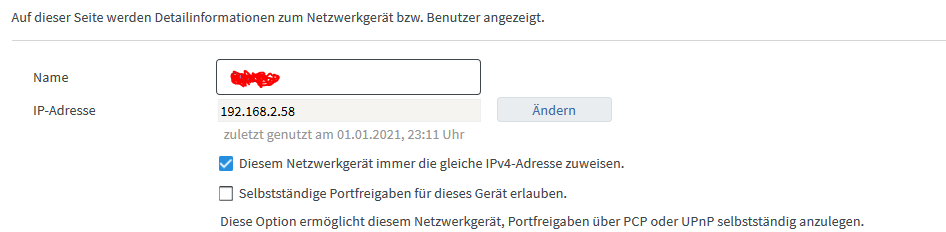
                00d7e289-57b3-4061-adae-deb533b138a6-grafik.png

                In der App sollte es eine Möglichkeit zum Neustarten geben. Ansonsten Aus und wieder An mit dem Knopf am Gerät.
                Aber erst die IP Adresse vorher festlegen.

                In der Instanzen Einstellung klickst du oben auf das Männchen für Experteneinstellung. Und dann erscheint rechts die Möglichkeit durch anklicken von Info auf Debug zu stellen.
                Und dann bei Adapterstart ins Log gucken.

                37de3955-5103-4b3d-9f11-0ef3d3b2d57c-grafik.png

                Kannst dann auch das Log runterladen. Müssten die Infos, dann nach Adapterstart drinstehen, die man braucht.

                030e32b2-89a7-4bb4-b31b-0a779244ee83-grafik.png

                Synology DS218+ & 2 x Fujitsu Esprimo (VM/Container) + FritzBox7590 + 2 AVM 3000 Repeater & Homematic & HUE & Osram & Xiaomi, NPM 10.9.4, Nodejs 22.21.0 ,JS Controller 7.0.7 ,Admin 7.7.19

                S 1 Reply Last reply
                0
                • haselchenH haselchen

                  @Schranzer

                  Also in der Fritzbox, wenn du eine hast, würde ich dem Robbi immer dieselbe IP zuweisen.
                  00d7e289-57b3-4061-adae-deb533b138a6-grafik.png

                  In der App sollte es eine Möglichkeit zum Neustarten geben. Ansonsten Aus und wieder An mit dem Knopf am Gerät.
                  Aber erst die IP Adresse vorher festlegen.

                  In der Instanzen Einstellung klickst du oben auf das Männchen für Experteneinstellung. Und dann erscheint rechts die Möglichkeit durch anklicken von Info auf Debug zu stellen.
                  Und dann bei Adapterstart ins Log gucken.

                  37de3955-5103-4b3d-9f11-0ef3d3b2d57c-grafik.png

                  Kannst dann auch das Log runterladen. Müssten die Infos, dann nach Adapterstart drinstehen, die man braucht.

                  030e32b2-89a7-4bb4-b31b-0a779244ee83-grafik.png

                  S Offline
                  S Offline
                  Schranzer
                  wrote on last edited by
                  #14

                  @haselchen Also er hat jetzt ein Feste IP....Ich hab Ihn neugestartet (hab jetzt nen halben Kotzreitz gekriegt weil er wieso auch immer die Karte gelöscht hat) den Log hab ich ja eigentlich oben schon reingeschickt mehr gibt er im Log auch nicht aus

                  haselchenH 1 Reply Last reply
                  0
                  • S Schranzer

                    @haselchen Also er hat jetzt ein Feste IP....Ich hab Ihn neugestartet (hab jetzt nen halben Kotzreitz gekriegt weil er wieso auch immer die Karte gelöscht hat) den Log hab ich ja eigentlich oben schon reingeschickt mehr gibt er im Log auch nicht aus

                    haselchenH Offline
                    haselchenH Offline
                    haselchen
                    Most Active
                    wrote on last edited by haselchen
                    #15

                    @Schranzer

                    Die Karte kann man speichern in der App ;)
                    Und wenn du Debug eingestellt hast, kommt mehr als du oben gepostet hast.

                    Verbindet er sich immer noch nicht?

                    Synology DS218+ & 2 x Fujitsu Esprimo (VM/Container) + FritzBox7590 + 2 AVM 3000 Repeater & Homematic & HUE & Osram & Xiaomi, NPM 10.9.4, Nodejs 22.21.0 ,JS Controller 7.0.7 ,Admin 7.7.19

                    S 1 Reply Last reply
                    0
                    • haselchenH haselchen

                      @Schranzer

                      Die Karte kann man speichern in der App ;)
                      Und wenn du Debug eingestellt hast, kommt mehr als du oben gepostet hast.

                      Verbindet er sich immer noch nicht?

                      S Offline
                      S Offline
                      Schranzer
                      wrote on last edited by Schranzer
                      #16

                      @haselchen Der Haken bei Karte speichern ist drinen :( und er hat es trotzdem gelöscht. ok Danke ! Ne er verbindet sich immer noch nicht. Aber wie schick ich den Link rein, er geht ja immer auf eine andere Seite.
                      Edit: soll ich des mit filezilla oder so machen?

                      haselchenH 1 Reply Last reply
                      0
                      • S Schranzer

                        @haselchen Der Haken bei Karte speichern ist drinen :( und er hat es trotzdem gelöscht. ok Danke ! Ne er verbindet sich immer noch nicht. Aber wie schick ich den Link rein, er geht ja immer auf eine andere Seite.
                        Edit: soll ich des mit filezilla oder so machen?

                        haselchenH Offline
                        haselchenH Offline
                        haselchen
                        Most Active
                        wrote on last edited by
                        #17

                        @Schranzer

                        Welche Seite meinst Du?

                        Synology DS218+ & 2 x Fujitsu Esprimo (VM/Container) + FritzBox7590 + 2 AVM 3000 Repeater & Homematic & HUE & Osram & Xiaomi, NPM 10.9.4, Nodejs 22.21.0 ,JS Controller 7.0.7 ,Admin 7.7.19

                        S 1 Reply Last reply
                        0
                        • haselchenH haselchen

                          @Schranzer

                          Welche Seite meinst Du?

                          S Offline
                          S Offline
                          Schranzer
                          wrote on last edited by
                          #18

                          @haselchen Ja wenn ich auf Log Herunterladen klicke dann öffnet er einen neuen tab http://192.168.188.61:8081/log/file1/iobroker.2021-01-01.log

                          haselchenH 1 Reply Last reply
                          0
                          • S Schranzer

                            @haselchen Ja wenn ich auf Log Herunterladen klicke dann öffnet er einen neuen tab http://192.168.188.61:8081/log/file1/iobroker.2021-01-01.log

                            haselchenH Offline
                            haselchenH Offline
                            haselchen
                            Most Active
                            wrote on last edited by
                            #19

                            @Schranzer

                            Müsste eine neue Browserseite sein.
                            Und da stehen alle Ereignisse drin.
                            Die von dem Adapter hier reinkopieren in Codetags.

                            Synology DS218+ & 2 x Fujitsu Esprimo (VM/Container) + FritzBox7590 + 2 AVM 3000 Repeater & Homematic & HUE & Osram & Xiaomi, NPM 10.9.4, Nodejs 22.21.0 ,JS Controller 7.0.7 ,Admin 7.7.19

                            S 1 Reply Last reply
                            0
                            • haselchenH haselchen

                              @Schranzer

                              Müsste eine neue Browserseite sein.
                              Und da stehen alle Ereignisse drin.
                              Die von dem Adapter hier reinkopieren in Codetags.

                              S Offline
                              S Offline
                              Schranzer
                              wrote on last edited by
                              #20

                              @haselchen richtig! Aber wie stelle ich den Log hierein xD?

                              haselchenH 1 Reply Last reply
                              0
                              • S Schranzer

                                @haselchen richtig! Aber wie stelle ich den Log hierein xD?

                                haselchenH Offline
                                haselchenH Offline
                                haselchen
                                Most Active
                                wrote on last edited by
                                #21

                                @Schranzer

                                6fc778f7-09c1-411e-a061-d9197b778d04-grafik.png

                                Synology DS218+ & 2 x Fujitsu Esprimo (VM/Container) + FritzBox7590 + 2 AVM 3000 Repeater & Homematic & HUE & Osram & Xiaomi, NPM 10.9.4, Nodejs 22.21.0 ,JS Controller 7.0.7 ,Admin 7.7.19

                                S 1 Reply Last reply
                                0
                                • haselchenH haselchen

                                  @Schranzer

                                  6fc778f7-09c1-411e-a061-d9197b778d04-grafik.png

                                  S Offline
                                  S Offline
                                  Schranzer
                                  wrote on last edited by
                                  #22

                                  @haselchen Wenn ich das mache sagt er das der Code zu lang ist

                                  haselchenH 1 Reply Last reply
                                  0
                                  • S Schranzer

                                    @haselchen Wenn ich das mache sagt er das der Code zu lang ist

                                    haselchenH Offline
                                    haselchenH Offline
                                    haselchen
                                    Most Active
                                    wrote on last edited by
                                    #23

                                    @Schranzer

                                    Es reichen nur die Zeilen die deinen Robbi betreffen

                                    Synology DS218+ & 2 x Fujitsu Esprimo (VM/Container) + FritzBox7590 + 2 AVM 3000 Repeater & Homematic & HUE & Osram & Xiaomi, NPM 10.9.4, Nodejs 22.21.0 ,JS Controller 7.0.7 ,Admin 7.7.19

                                    S 1 Reply Last reply
                                    0
                                    • haselchenH haselchen

                                      @Schranzer

                                      Es reichen nur die Zeilen die deinen Robbi betreffen

                                      S Offline
                                      S Offline
                                      Schranzer
                                      wrote on last edited by Schranzer
                                      #24

                                      @Schranzer ```

                                      2021-01-01 23:16:41.291 - info: host.IOBROKER-PI4 "system.adapter.mihome-vacuum.0" disabled
                                      2021-01-01 23:16:41.302 - info: host.IOBROKER-PI4 stopInstance system.adapter.mihome-vacuum.0 (force=false, process=true)
                                      2021-01-01 23:16:41.314 - info: mihome-vacuum.0 (23795) Got terminate signal TERMINATE_YOURSELF
                                      2021-01-01 23:16:41.307 - info: host.IOBROKER-PI4 stopInstance system.adapter.mihome-vacuum.0 send kill signal
                                      2021-01-01 23:16:41.318 - info: mihome-vacuum.0 (23795) terminating
                                      2021-01-01 23:16:41.320 - info: mihome-vacuum.0 (23795) Terminated (ADAPTER_REQUESTED_TERMINATION): Without reason
                                      2021-01-01 23:16:41.864 - info: host.IOBROKER-PI4 instance system.adapter.mihome-vacuum.0 terminated with code 11 (ADAPTER_REQUESTED_TERMINATION)
                                      2021-01-01 23:18:56.130 - info: host.IOBROKER-PI4 "system.adapter.mihome-vacuum.0" enabled
                                      2021-01-01 23:18:56.187 - info: host.IOBROKER-PI4 instance system.adapter.mihome-vacuum.0 started with pid 31143
                                      2021-01-01 23:18:59.624 - info: mihome-vacuum.0 (31143) starting. Version 2.1.1 in /opt/iobroker/node_modules/iobroker.mihome-vacuum, node: v12.20.0, js-controller: 3.1.6
                                      2021-01-01 23:18:59.696 - info: mihome-vacuum.0 (31143) Expert mode disabled, states deleted
                                      2021-01-01 23:18:59.699 - info: mihome-vacuum.0 (31143) Cloud control disabled
                                      2021-01-01 23:18:59.818 - info: mihome-vacuum.0 (31143) connecting, this can take up to 10 minutes ...
                                      2021-01-01 23:19:00.236 - info: mihome-vacuum.0 (31143) set nächster Timer: Nicht verfügbar
                                      2021-01-01 23:19:19.780 - info: mihome-vacuum.0 (31143) connecting, this can take up to 10 minutes ...
                                      2021-01-01 23:19:39.748 - info: mihome-vacuum.0 (31143) connecting, this can take up to 10 minutes ...
                                      2021-01-01 23:19:59.818 - info: mihome-vacuum.0 (31143) connecting, this can take up to 10 minutes ...
                                      2021-01-01 23:20:19.790 - info: mihome-vacuum.0 (31143) connecting, this can take up to 10 minutes ...
                                      2021-01-01 23:20:39.756 - info: mihome-vacuum.0 (31143) connecting, this can take up to 10 minutes ...
                                      2021-01-01 23:20:59.825 - info: mihome-vacuum.0 (31143) connecting, this can take up to 10 minutes ...
                                      2021-01-01 23:21:19.794 - info: mihome-vacuum.0 (31143) connecting, this can take up to 10 minutes ...
                                      2021-01-01 23:21:39.764 - info: mihome-vacuum.0 (31143) connecting, this can take up to 10 minutes ...
                                      2021-01-01 23:21:59.832 - info: mihome-vacuum.0 (31143) connecting, this can take up to 10 minutes ...
                                      2021-01-01 23:22:19.801 - info: mihome-vacuum.0 (31143) connecting, this can take up to 10 minutes ...
                                      2021-01-01 23:22:39.768 - info: mihome-vacuum.0 (31143) connecting, this can take up to 10 minutes ...
                                      2021-01-01 23:22:59.838 - info: mihome-vacuum.0 (31143) connecting, this can take up to 10 minutes ...
                                      2021-01-01 23:23:19.807 - info: mihome-vacuum.0 (31143) connecting, this can take up to 10 minutes ...
                                      2021-01-01 23:23:39.775 - info: mihome-vacuum.0 (31143) connecting, this can take up to 10 minutes ...
                                      2021-01-01 23:23:59.848 - info: mihome-vacuum.0 (31143) connecting, this can take up to 10 minutes ...
                                      2021-01-01 23:24:19.816 - info: mihome-vacuum.0 (31143) connecting, this can take up to 10 minutes ...
                                      2021-01-01 23:24:39.782 - info: mihome-vacuum.0 (31143) connecting, this can take up to 10 minutes ...
                                      2021-01-01 23:24:59.856 - info: mihome-vacuum.0 (31143) connecting, this can take up to 10 minutes ...
                                      2021-01-01 23:25:19.820 - info: mihome-vacuum.0 (31143) connecting, this can take up to 10 minutes ...
                                      2021-01-01 23:25:39.795 - info: mihome-vacuum.0 (31143) connecting, this can take up to 10 minutes ...
                                      2021-01-01 23:25:59.859 - info: mihome-vacuum.0 (31143) connecting, this can take up to 10 minutes ...
                                      2021-01-01 23:26:19.830 - info: mihome-vacuum.0 (31143) connecting, this can take up to 10 minutes ...
                                      2021-01-01 23:26:39.795 - info: mihome-vacuum.0 (31143) connecting, this can take up to 10 minutes ...
                                      2021-01-01 23:26:59.866 - info: mihome-vacuum.0 (31143) connecting, this can take up to 10 minutes ...
                                      2021-01-01 23:27:19.834 - info: mihome-vacuum.0 (31143) connecting, this can take up to 10 minutes ...
                                      2021-01-01 23:27:39.802 - info: mihome-vacuum.0 (31143) connecting, this can take up to 10 minutes ...
                                      2021-01-01 23:27:59.873 - info: mihome-vacuum.0 (31143) connecting, this can take up to 10 minutes ...
                                      2021-01-01 23:28:19.841 - info: mihome-vacuum.0 (31143) connecting, this can take up to 10 minutes ...
                                      2021-01-01 23:28:39.809 - info: mihome-vacuum.0 (31143) connecting, this can take up to 10 minutes ...
                                      2021-01-01 23:28:59.880 - info: mihome-vacuum.0 (31143) connecting, this can take up to 10 minutes ...
                                      2021-01-01 23:29:19.848 - info: mihome-vacuum.0 (31143) connecting, this can take up to 10 minutes ...
                                      ```
                                      S haselchenH 2 Replies Last reply
                                      0
                                      • S Schranzer

                                        @Schranzer ```

                                        2021-01-01 23:16:41.291 - info: host.IOBROKER-PI4 "system.adapter.mihome-vacuum.0" disabled
                                        2021-01-01 23:16:41.302 - info: host.IOBROKER-PI4 stopInstance system.adapter.mihome-vacuum.0 (force=false, process=true)
                                        2021-01-01 23:16:41.314 - info: mihome-vacuum.0 (23795) Got terminate signal TERMINATE_YOURSELF
                                        2021-01-01 23:16:41.307 - info: host.IOBROKER-PI4 stopInstance system.adapter.mihome-vacuum.0 send kill signal
                                        2021-01-01 23:16:41.318 - info: mihome-vacuum.0 (23795) terminating
                                        2021-01-01 23:16:41.320 - info: mihome-vacuum.0 (23795) Terminated (ADAPTER_REQUESTED_TERMINATION): Without reason
                                        2021-01-01 23:16:41.864 - info: host.IOBROKER-PI4 instance system.adapter.mihome-vacuum.0 terminated with code 11 (ADAPTER_REQUESTED_TERMINATION)
                                        2021-01-01 23:18:56.130 - info: host.IOBROKER-PI4 "system.adapter.mihome-vacuum.0" enabled
                                        2021-01-01 23:18:56.187 - info: host.IOBROKER-PI4 instance system.adapter.mihome-vacuum.0 started with pid 31143
                                        2021-01-01 23:18:59.624 - info: mihome-vacuum.0 (31143) starting. Version 2.1.1 in /opt/iobroker/node_modules/iobroker.mihome-vacuum, node: v12.20.0, js-controller: 3.1.6
                                        2021-01-01 23:18:59.696 - info: mihome-vacuum.0 (31143) Expert mode disabled, states deleted
                                        2021-01-01 23:18:59.699 - info: mihome-vacuum.0 (31143) Cloud control disabled
                                        2021-01-01 23:18:59.818 - info: mihome-vacuum.0 (31143) connecting, this can take up to 10 minutes ...
                                        2021-01-01 23:19:00.236 - info: mihome-vacuum.0 (31143) set nächster Timer: Nicht verfügbar
                                        2021-01-01 23:19:19.780 - info: mihome-vacuum.0 (31143) connecting, this can take up to 10 minutes ...
                                        2021-01-01 23:19:39.748 - info: mihome-vacuum.0 (31143) connecting, this can take up to 10 minutes ...
                                        2021-01-01 23:19:59.818 - info: mihome-vacuum.0 (31143) connecting, this can take up to 10 minutes ...
                                        2021-01-01 23:20:19.790 - info: mihome-vacuum.0 (31143) connecting, this can take up to 10 minutes ...
                                        2021-01-01 23:20:39.756 - info: mihome-vacuum.0 (31143) connecting, this can take up to 10 minutes ...
                                        2021-01-01 23:20:59.825 - info: mihome-vacuum.0 (31143) connecting, this can take up to 10 minutes ...
                                        2021-01-01 23:21:19.794 - info: mihome-vacuum.0 (31143) connecting, this can take up to 10 minutes ...
                                        2021-01-01 23:21:39.764 - info: mihome-vacuum.0 (31143) connecting, this can take up to 10 minutes ...
                                        2021-01-01 23:21:59.832 - info: mihome-vacuum.0 (31143) connecting, this can take up to 10 minutes ...
                                        2021-01-01 23:22:19.801 - info: mihome-vacuum.0 (31143) connecting, this can take up to 10 minutes ...
                                        2021-01-01 23:22:39.768 - info: mihome-vacuum.0 (31143) connecting, this can take up to 10 minutes ...
                                        2021-01-01 23:22:59.838 - info: mihome-vacuum.0 (31143) connecting, this can take up to 10 minutes ...
                                        2021-01-01 23:23:19.807 - info: mihome-vacuum.0 (31143) connecting, this can take up to 10 minutes ...
                                        2021-01-01 23:23:39.775 - info: mihome-vacuum.0 (31143) connecting, this can take up to 10 minutes ...
                                        2021-01-01 23:23:59.848 - info: mihome-vacuum.0 (31143) connecting, this can take up to 10 minutes ...
                                        2021-01-01 23:24:19.816 - info: mihome-vacuum.0 (31143) connecting, this can take up to 10 minutes ...
                                        2021-01-01 23:24:39.782 - info: mihome-vacuum.0 (31143) connecting, this can take up to 10 minutes ...
                                        2021-01-01 23:24:59.856 - info: mihome-vacuum.0 (31143) connecting, this can take up to 10 minutes ...
                                        2021-01-01 23:25:19.820 - info: mihome-vacuum.0 (31143) connecting, this can take up to 10 minutes ...
                                        2021-01-01 23:25:39.795 - info: mihome-vacuum.0 (31143) connecting, this can take up to 10 minutes ...
                                        2021-01-01 23:25:59.859 - info: mihome-vacuum.0 (31143) connecting, this can take up to 10 minutes ...
                                        2021-01-01 23:26:19.830 - info: mihome-vacuum.0 (31143) connecting, this can take up to 10 minutes ...
                                        2021-01-01 23:26:39.795 - info: mihome-vacuum.0 (31143) connecting, this can take up to 10 minutes ...
                                        2021-01-01 23:26:59.866 - info: mihome-vacuum.0 (31143) connecting, this can take up to 10 minutes ...
                                        2021-01-01 23:27:19.834 - info: mihome-vacuum.0 (31143) connecting, this can take up to 10 minutes ...
                                        2021-01-01 23:27:39.802 - info: mihome-vacuum.0 (31143) connecting, this can take up to 10 minutes ...
                                        2021-01-01 23:27:59.873 - info: mihome-vacuum.0 (31143) connecting, this can take up to 10 minutes ...
                                        2021-01-01 23:28:19.841 - info: mihome-vacuum.0 (31143) connecting, this can take up to 10 minutes ...
                                        2021-01-01 23:28:39.809 - info: mihome-vacuum.0 (31143) connecting, this can take up to 10 minutes ...
                                        2021-01-01 23:28:59.880 - info: mihome-vacuum.0 (31143) connecting, this can take up to 10 minutes ...
                                        2021-01-01 23:29:19.848 - info: mihome-vacuum.0 (31143) connecting, this can take up to 10 minutes ...
                                        ```
                                        S Offline
                                        S Offline
                                        Schranzer
                                        wrote on last edited by
                                        #25

                                        @Schranzer Danke :)

                                        1 Reply Last reply
                                        0
                                        • S Schranzer

                                          @Schranzer ```

                                          2021-01-01 23:16:41.291 - info: host.IOBROKER-PI4 "system.adapter.mihome-vacuum.0" disabled
                                          2021-01-01 23:16:41.302 - info: host.IOBROKER-PI4 stopInstance system.adapter.mihome-vacuum.0 (force=false, process=true)
                                          2021-01-01 23:16:41.314 - info: mihome-vacuum.0 (23795) Got terminate signal TERMINATE_YOURSELF
                                          2021-01-01 23:16:41.307 - info: host.IOBROKER-PI4 stopInstance system.adapter.mihome-vacuum.0 send kill signal
                                          2021-01-01 23:16:41.318 - info: mihome-vacuum.0 (23795) terminating
                                          2021-01-01 23:16:41.320 - info: mihome-vacuum.0 (23795) Terminated (ADAPTER_REQUESTED_TERMINATION): Without reason
                                          2021-01-01 23:16:41.864 - info: host.IOBROKER-PI4 instance system.adapter.mihome-vacuum.0 terminated with code 11 (ADAPTER_REQUESTED_TERMINATION)
                                          2021-01-01 23:18:56.130 - info: host.IOBROKER-PI4 "system.adapter.mihome-vacuum.0" enabled
                                          2021-01-01 23:18:56.187 - info: host.IOBROKER-PI4 instance system.adapter.mihome-vacuum.0 started with pid 31143
                                          2021-01-01 23:18:59.624 - info: mihome-vacuum.0 (31143) starting. Version 2.1.1 in /opt/iobroker/node_modules/iobroker.mihome-vacuum, node: v12.20.0, js-controller: 3.1.6
                                          2021-01-01 23:18:59.696 - info: mihome-vacuum.0 (31143) Expert mode disabled, states deleted
                                          2021-01-01 23:18:59.699 - info: mihome-vacuum.0 (31143) Cloud control disabled
                                          2021-01-01 23:18:59.818 - info: mihome-vacuum.0 (31143) connecting, this can take up to 10 minutes ...
                                          2021-01-01 23:19:00.236 - info: mihome-vacuum.0 (31143) set nächster Timer: Nicht verfügbar
                                          2021-01-01 23:19:19.780 - info: mihome-vacuum.0 (31143) connecting, this can take up to 10 minutes ...
                                          2021-01-01 23:19:39.748 - info: mihome-vacuum.0 (31143) connecting, this can take up to 10 minutes ...
                                          2021-01-01 23:19:59.818 - info: mihome-vacuum.0 (31143) connecting, this can take up to 10 minutes ...
                                          2021-01-01 23:20:19.790 - info: mihome-vacuum.0 (31143) connecting, this can take up to 10 minutes ...
                                          2021-01-01 23:20:39.756 - info: mihome-vacuum.0 (31143) connecting, this can take up to 10 minutes ...
                                          2021-01-01 23:20:59.825 - info: mihome-vacuum.0 (31143) connecting, this can take up to 10 minutes ...
                                          2021-01-01 23:21:19.794 - info: mihome-vacuum.0 (31143) connecting, this can take up to 10 minutes ...
                                          2021-01-01 23:21:39.764 - info: mihome-vacuum.0 (31143) connecting, this can take up to 10 minutes ...
                                          2021-01-01 23:21:59.832 - info: mihome-vacuum.0 (31143) connecting, this can take up to 10 minutes ...
                                          2021-01-01 23:22:19.801 - info: mihome-vacuum.0 (31143) connecting, this can take up to 10 minutes ...
                                          2021-01-01 23:22:39.768 - info: mihome-vacuum.0 (31143) connecting, this can take up to 10 minutes ...
                                          2021-01-01 23:22:59.838 - info: mihome-vacuum.0 (31143) connecting, this can take up to 10 minutes ...
                                          2021-01-01 23:23:19.807 - info: mihome-vacuum.0 (31143) connecting, this can take up to 10 minutes ...
                                          2021-01-01 23:23:39.775 - info: mihome-vacuum.0 (31143) connecting, this can take up to 10 minutes ...
                                          2021-01-01 23:23:59.848 - info: mihome-vacuum.0 (31143) connecting, this can take up to 10 minutes ...
                                          2021-01-01 23:24:19.816 - info: mihome-vacuum.0 (31143) connecting, this can take up to 10 minutes ...
                                          2021-01-01 23:24:39.782 - info: mihome-vacuum.0 (31143) connecting, this can take up to 10 minutes ...
                                          2021-01-01 23:24:59.856 - info: mihome-vacuum.0 (31143) connecting, this can take up to 10 minutes ...
                                          2021-01-01 23:25:19.820 - info: mihome-vacuum.0 (31143) connecting, this can take up to 10 minutes ...
                                          2021-01-01 23:25:39.795 - info: mihome-vacuum.0 (31143) connecting, this can take up to 10 minutes ...
                                          2021-01-01 23:25:59.859 - info: mihome-vacuum.0 (31143) connecting, this can take up to 10 minutes ...
                                          2021-01-01 23:26:19.830 - info: mihome-vacuum.0 (31143) connecting, this can take up to 10 minutes ...
                                          2021-01-01 23:26:39.795 - info: mihome-vacuum.0 (31143) connecting, this can take up to 10 minutes ...
                                          2021-01-01 23:26:59.866 - info: mihome-vacuum.0 (31143) connecting, this can take up to 10 minutes ...
                                          2021-01-01 23:27:19.834 - info: mihome-vacuum.0 (31143) connecting, this can take up to 10 minutes ...
                                          2021-01-01 23:27:39.802 - info: mihome-vacuum.0 (31143) connecting, this can take up to 10 minutes ...
                                          2021-01-01 23:27:59.873 - info: mihome-vacuum.0 (31143) connecting, this can take up to 10 minutes ...
                                          2021-01-01 23:28:19.841 - info: mihome-vacuum.0 (31143) connecting, this can take up to 10 minutes ...
                                          2021-01-01 23:28:39.809 - info: mihome-vacuum.0 (31143) connecting, this can take up to 10 minutes ...
                                          2021-01-01 23:28:59.880 - info: mihome-vacuum.0 (31143) connecting, this can take up to 10 minutes ...
                                          2021-01-01 23:29:19.848 - info: mihome-vacuum.0 (31143) connecting, this can take up to 10 minutes ...
                                          ```
                                          haselchenH Offline
                                          haselchenH Offline
                                          haselchen
                                          Most Active
                                          wrote on last edited by haselchen
                                          #26

                                          @Schranzer

                                          Du bist immer noch bei INFO

                                          DEBUG musst du bitte einstellen, wie ich es eben beschrieben habe.

                                          Instanzen, Info anklicken und Debug auswählen. Vorher Expert Modus einstellen.

                                          Synology DS218+ & 2 x Fujitsu Esprimo (VM/Container) + FritzBox7590 + 2 AVM 3000 Repeater & Homematic & HUE & Osram & Xiaomi, NPM 10.9.4, Nodejs 22.21.0 ,JS Controller 7.0.7 ,Admin 7.7.19

                                          S 1 Reply Last reply
                                          0

                                          Hello! It looks like you're interested in this conversation, but you don't have an account yet.

                                          Getting fed up of having to scroll through the same posts each visit? When you register for an account, you'll always come back to exactly where you were before, and choose to be notified of new replies (either via email, or push notification). You'll also be able to save bookmarks and upvote posts to show your appreciation to other community members.

                                          With your input, this post could be even better 💗

                                          Register Login
                                          Reply
                                          • Reply as topic
                                          Log in to reply
                                          • Oldest to Newest
                                          • Newest to Oldest
                                          • Most Votes


                                          Support us

                                          ioBroker
                                          Community Adapters
                                          Donate

                                          515

                                          Online

                                          32.8k

                                          Users

                                          82.7k

                                          Topics

                                          1.3m

                                          Posts
                                          Community
                                          Impressum | Datenschutz-Bestimmungen | Nutzungsbedingungen | Einwilligungseinstellungen
                                          ioBroker Community 2014-2025
                                          logo
                                          • Login

                                          • Don't have an account? Register

                                          • Login or register to search.
                                          • First post
                                            Last post
                                          0
                                          • Home
                                          • Recent
                                          • Tags
                                          • Unread 0
                                          • Categories
                                          • Unreplied
                                          • Popular
                                          • GitHub
                                          • Docu
                                          • Hilfe
