




mihome-vacuum Verbindungsprobleme
-
@haselchen Bei Ländereinstellung Deutschland und bei Sprache Deutsch
In der App bei Netzwerkinformationen, dort alles okay?
Saugroboter -> Einstellungen -> zusätzliche Einstellungen
Neueste App Version?
Neueste Firmware auf dem Saugi? -
In der App bei Netzwerkinformationen, dort alles okay?
Saugroboter -> Einstellungen -> zusätzliche Einstellungen
Neueste App Version?
Neueste Firmware auf dem Saugi?@haselchen Passt eigentlich alles 0% Paketverlust und Stärke des Signals ist bei 100%... Er ist auch direkt mit dem Router verbunden, nicht über einen Repeater....
-
@haselchen Passt eigentlich alles 0% Paketverlust und Stärke des Signals ist bei 100%... Er ist auch direkt mit dem Router verbunden, nicht über einen Repeater....
-
@Schranzer ja neuste Firmware und neuste Appversion ...ich habe Ihn erst seit 3 Tagen
Hm, hast alles wie bei mir. Quasi identisch.
Bleibt noch die Entwickler @Meistertr @dirkhe zu fragen, was man noch machen könnte.
Wir gehen einfach mal davon aus, dass dein Saugroboter vom Adapter unterstützt wird.
Ein Log vom Adapterstart wird den Jungs bestimmt helfen bei der Fehlersuche.Edit: paar Kleinigkeiten,die man noch durchgehen kann.
Hat der Robbi ne feste IP?
Iobroker mal neu gestartet?
Saugi mal neu gestartet? -
Hm, hast alles wie bei mir. Quasi identisch.
Bleibt noch die Entwickler @Meistertr @dirkhe zu fragen, was man noch machen könnte.
Wir gehen einfach mal davon aus, dass dein Saugroboter vom Adapter unterstützt wird.
Ein Log vom Adapterstart wird den Jungs bestimmt helfen bei der Fehlersuche.Edit: paar Kleinigkeiten,die man noch durchgehen kann.
Hat der Robbi ne feste IP?
Iobroker mal neu gestartet?
Saugi mal neu gestartet? -
@haselchen Ne keine feste ip...ja habe ich neugestartet ....Ne den Saugi habe ich so noch nicht neugestartet......Ich bin jetzt nicht der absolute Pro was das angeht, wie kann ich den den Log richtig auslesen?
Also in der Fritzbox, wenn du eine hast, würde ich dem Robbi immer dieselbe IP zuweisen.
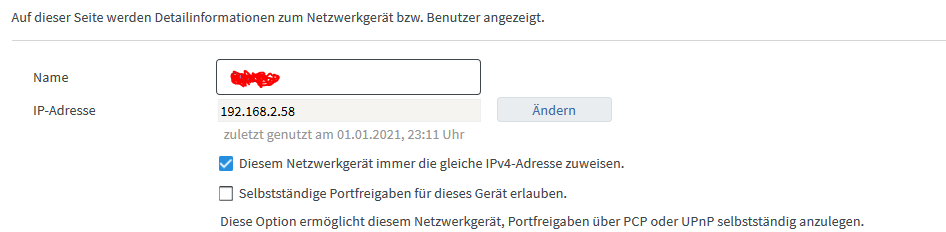
In der App sollte es eine Möglichkeit zum Neustarten geben. Ansonsten Aus und wieder An mit dem Knopf am Gerät.
Aber erst die IP Adresse vorher festlegen.In der Instanzen Einstellung klickst du oben auf das Männchen für Experteneinstellung. Und dann erscheint rechts die Möglichkeit durch anklicken von Info auf Debug zu stellen.
Und dann bei Adapterstart ins Log gucken.
Kannst dann auch das Log runterladen. Müssten die Infos, dann nach Adapterstart drinstehen, die man braucht.

-
Also in der Fritzbox, wenn du eine hast, würde ich dem Robbi immer dieselbe IP zuweisen.
In der App sollte es eine Möglichkeit zum Neustarten geben. Ansonsten Aus und wieder An mit dem Knopf am Gerät.
Aber erst die IP Adresse vorher festlegen.In der Instanzen Einstellung klickst du oben auf das Männchen für Experteneinstellung. Und dann erscheint rechts die Möglichkeit durch anklicken von Info auf Debug zu stellen.
Und dann bei Adapterstart ins Log gucken.Kannst dann auch das Log runterladen. Müssten die Infos, dann nach Adapterstart drinstehen, die man braucht.
@haselchen Also er hat jetzt ein Feste IP....Ich hab Ihn neugestartet (hab jetzt nen halben Kotzreitz gekriegt weil er wieso auch immer die Karte gelöscht hat) den Log hab ich ja eigentlich oben schon reingeschickt mehr gibt er im Log auch nicht aus
-
@haselchen Also er hat jetzt ein Feste IP....Ich hab Ihn neugestartet (hab jetzt nen halben Kotzreitz gekriegt weil er wieso auch immer die Karte gelöscht hat) den Log hab ich ja eigentlich oben schon reingeschickt mehr gibt er im Log auch nicht aus
Die Karte kann man speichern in der App ;)
Und wenn du Debug eingestellt hast, kommt mehr als du oben gepostet hast.Verbindet er sich immer noch nicht?
-
Die Karte kann man speichern in der App ;)
Und wenn du Debug eingestellt hast, kommt mehr als du oben gepostet hast.Verbindet er sich immer noch nicht?
@haselchen Der Haken bei Karte speichern ist drinen :( und er hat es trotzdem gelöscht. ok Danke ! Ne er verbindet sich immer noch nicht. Aber wie schick ich den Link rein, er geht ja immer auf eine andere Seite.
Edit: soll ich des mit filezilla oder so machen? -
@haselchen Der Haken bei Karte speichern ist drinen :( und er hat es trotzdem gelöscht. ok Danke ! Ne er verbindet sich immer noch nicht. Aber wie schick ich den Link rein, er geht ja immer auf eine andere Seite.
Edit: soll ich des mit filezilla oder so machen?Welche Seite meinst Du?
-
Welche Seite meinst Du?
@haselchen Ja wenn ich auf Log Herunterladen klicke dann öffnet er einen neuen tab http://192.168.188.61:8081/log/file1/iobroker.2021-01-01.log
-
@haselchen Ja wenn ich auf Log Herunterladen klicke dann öffnet er einen neuen tab http://192.168.188.61:8081/log/file1/iobroker.2021-01-01.log
Müsste eine neue Browserseite sein.
Und da stehen alle Ereignisse drin.
Die von dem Adapter hier reinkopieren in Codetags. -
Müsste eine neue Browserseite sein.
Und da stehen alle Ereignisse drin.
Die von dem Adapter hier reinkopieren in Codetags. -
@haselchen richtig! Aber wie stelle ich den Log hierein xD?
-
@haselchen Wenn ich das mache sagt er das der Code zu lang ist
Es reichen nur die Zeilen die deinen Robbi betreffen
-
Es reichen nur die Zeilen die deinen Robbi betreffen
@Schranzer ```
2021-01-01 23:16:41.291 - info: host.IOBROKER-PI4 "system.adapter.mihome-vacuum.0" disabled 2021-01-01 23:16:41.302 - info: host.IOBROKER-PI4 stopInstance system.adapter.mihome-vacuum.0 (force=false, process=true) 2021-01-01 23:16:41.314 - info: mihome-vacuum.0 (23795) Got terminate signal TERMINATE_YOURSELF 2021-01-01 23:16:41.307 - info: host.IOBROKER-PI4 stopInstance system.adapter.mihome-vacuum.0 send kill signal 2021-01-01 23:16:41.318 - info: mihome-vacuum.0 (23795) terminating 2021-01-01 23:16:41.320 - info: mihome-vacuum.0 (23795) Terminated (ADAPTER_REQUESTED_TERMINATION): Without reason 2021-01-01 23:16:41.864 - info: host.IOBROKER-PI4 instance system.adapter.mihome-vacuum.0 terminated with code 11 (ADAPTER_REQUESTED_TERMINATION) 2021-01-01 23:18:56.130 - info: host.IOBROKER-PI4 "system.adapter.mihome-vacuum.0" enabled 2021-01-01 23:18:56.187 - info: host.IOBROKER-PI4 instance system.adapter.mihome-vacuum.0 started with pid 31143 2021-01-01 23:18:59.624 - info: mihome-vacuum.0 (31143) starting. Version 2.1.1 in /opt/iobroker/node_modules/iobroker.mihome-vacuum, node: v12.20.0, js-controller: 3.1.6 2021-01-01 23:18:59.696 - info: mihome-vacuum.0 (31143) Expert mode disabled, states deleted 2021-01-01 23:18:59.699 - info: mihome-vacuum.0 (31143) Cloud control disabled 2021-01-01 23:18:59.818 - info: mihome-vacuum.0 (31143) connecting, this can take up to 10 minutes ... 2021-01-01 23:19:00.236 - info: mihome-vacuum.0 (31143) set nächster Timer: Nicht verfügbar 2021-01-01 23:19:19.780 - info: mihome-vacuum.0 (31143) connecting, this can take up to 10 minutes ... 2021-01-01 23:19:39.748 - info: mihome-vacuum.0 (31143) connecting, this can take up to 10 minutes ... 2021-01-01 23:19:59.818 - info: mihome-vacuum.0 (31143) connecting, this can take up to 10 minutes ... 2021-01-01 23:20:19.790 - info: mihome-vacuum.0 (31143) connecting, this can take up to 10 minutes ... 2021-01-01 23:20:39.756 - info: mihome-vacuum.0 (31143) connecting, this can take up to 10 minutes ... 2021-01-01 23:20:59.825 - info: mihome-vacuum.0 (31143) connecting, this can take up to 10 minutes ... 2021-01-01 23:21:19.794 - info: mihome-vacuum.0 (31143) connecting, this can take up to 10 minutes ... 2021-01-01 23:21:39.764 - info: mihome-vacuum.0 (31143) connecting, this can take up to 10 minutes ... 2021-01-01 23:21:59.832 - info: mihome-vacuum.0 (31143) connecting, this can take up to 10 minutes ... 2021-01-01 23:22:19.801 - info: mihome-vacuum.0 (31143) connecting, this can take up to 10 minutes ... 2021-01-01 23:22:39.768 - info: mihome-vacuum.0 (31143) connecting, this can take up to 10 minutes ... 2021-01-01 23:22:59.838 - info: mihome-vacuum.0 (31143) connecting, this can take up to 10 minutes ... 2021-01-01 23:23:19.807 - info: mihome-vacuum.0 (31143) connecting, this can take up to 10 minutes ... 2021-01-01 23:23:39.775 - info: mihome-vacuum.0 (31143) connecting, this can take up to 10 minutes ... 2021-01-01 23:23:59.848 - info: mihome-vacuum.0 (31143) connecting, this can take up to 10 minutes ... 2021-01-01 23:24:19.816 - info: mihome-vacuum.0 (31143) connecting, this can take up to 10 minutes ... 2021-01-01 23:24:39.782 - info: mihome-vacuum.0 (31143) connecting, this can take up to 10 minutes ... 2021-01-01 23:24:59.856 - info: mihome-vacuum.0 (31143) connecting, this can take up to 10 minutes ... 2021-01-01 23:25:19.820 - info: mihome-vacuum.0 (31143) connecting, this can take up to 10 minutes ... 2021-01-01 23:25:39.795 - info: mihome-vacuum.0 (31143) connecting, this can take up to 10 minutes ... 2021-01-01 23:25:59.859 - info: mihome-vacuum.0 (31143) connecting, this can take up to 10 minutes ... 2021-01-01 23:26:19.830 - info: mihome-vacuum.0 (31143) connecting, this can take up to 10 minutes ... 2021-01-01 23:26:39.795 - info: mihome-vacuum.0 (31143) connecting, this can take up to 10 minutes ... 2021-01-01 23:26:59.866 - info: mihome-vacuum.0 (31143) connecting, this can take up to 10 minutes ... 2021-01-01 23:27:19.834 - info: mihome-vacuum.0 (31143) connecting, this can take up to 10 minutes ... 2021-01-01 23:27:39.802 - info: mihome-vacuum.0 (31143) connecting, this can take up to 10 minutes ... 2021-01-01 23:27:59.873 - info: mihome-vacuum.0 (31143) connecting, this can take up to 10 minutes ... 2021-01-01 23:28:19.841 - info: mihome-vacuum.0 (31143) connecting, this can take up to 10 minutes ... 2021-01-01 23:28:39.809 - info: mihome-vacuum.0 (31143) connecting, this can take up to 10 minutes ... 2021-01-01 23:28:59.880 - info: mihome-vacuum.0 (31143) connecting, this can take up to 10 minutes ... 2021-01-01 23:29:19.848 - info: mihome-vacuum.0 (31143) connecting, this can take up to 10 minutes ... ``` -
@Schranzer ```
2021-01-01 23:16:41.291 - info: host.IOBROKER-PI4 "system.adapter.mihome-vacuum.0" disabled 2021-01-01 23:16:41.302 - info: host.IOBROKER-PI4 stopInstance system.adapter.mihome-vacuum.0 (force=false, process=true) 2021-01-01 23:16:41.314 - info: mihome-vacuum.0 (23795) Got terminate signal TERMINATE_YOURSELF 2021-01-01 23:16:41.307 - info: host.IOBROKER-PI4 stopInstance system.adapter.mihome-vacuum.0 send kill signal 2021-01-01 23:16:41.318 - info: mihome-vacuum.0 (23795) terminating 2021-01-01 23:16:41.320 - info: mihome-vacuum.0 (23795) Terminated (ADAPTER_REQUESTED_TERMINATION): Without reason 2021-01-01 23:16:41.864 - info: host.IOBROKER-PI4 instance system.adapter.mihome-vacuum.0 terminated with code 11 (ADAPTER_REQUESTED_TERMINATION) 2021-01-01 23:18:56.130 - info: host.IOBROKER-PI4 "system.adapter.mihome-vacuum.0" enabled 2021-01-01 23:18:56.187 - info: host.IOBROKER-PI4 instance system.adapter.mihome-vacuum.0 started with pid 31143 2021-01-01 23:18:59.624 - info: mihome-vacuum.0 (31143) starting. Version 2.1.1 in /opt/iobroker/node_modules/iobroker.mihome-vacuum, node: v12.20.0, js-controller: 3.1.6 2021-01-01 23:18:59.696 - info: mihome-vacuum.0 (31143) Expert mode disabled, states deleted 2021-01-01 23:18:59.699 - info: mihome-vacuum.0 (31143) Cloud control disabled 2021-01-01 23:18:59.818 - info: mihome-vacuum.0 (31143) connecting, this can take up to 10 minutes ... 2021-01-01 23:19:00.236 - info: mihome-vacuum.0 (31143) set nächster Timer: Nicht verfügbar 2021-01-01 23:19:19.780 - info: mihome-vacuum.0 (31143) connecting, this can take up to 10 minutes ... 2021-01-01 23:19:39.748 - info: mihome-vacuum.0 (31143) connecting, this can take up to 10 minutes ... 2021-01-01 23:19:59.818 - info: mihome-vacuum.0 (31143) connecting, this can take up to 10 minutes ... 2021-01-01 23:20:19.790 - info: mihome-vacuum.0 (31143) connecting, this can take up to 10 minutes ... 2021-01-01 23:20:39.756 - info: mihome-vacuum.0 (31143) connecting, this can take up to 10 minutes ... 2021-01-01 23:20:59.825 - info: mihome-vacuum.0 (31143) connecting, this can take up to 10 minutes ... 2021-01-01 23:21:19.794 - info: mihome-vacuum.0 (31143) connecting, this can take up to 10 minutes ... 2021-01-01 23:21:39.764 - info: mihome-vacuum.0 (31143) connecting, this can take up to 10 minutes ... 2021-01-01 23:21:59.832 - info: mihome-vacuum.0 (31143) connecting, this can take up to 10 minutes ... 2021-01-01 23:22:19.801 - info: mihome-vacuum.0 (31143) connecting, this can take up to 10 minutes ... 2021-01-01 23:22:39.768 - info: mihome-vacuum.0 (31143) connecting, this can take up to 10 minutes ... 2021-01-01 23:22:59.838 - info: mihome-vacuum.0 (31143) connecting, this can take up to 10 minutes ... 2021-01-01 23:23:19.807 - info: mihome-vacuum.0 (31143) connecting, this can take up to 10 minutes ... 2021-01-01 23:23:39.775 - info: mihome-vacuum.0 (31143) connecting, this can take up to 10 minutes ... 2021-01-01 23:23:59.848 - info: mihome-vacuum.0 (31143) connecting, this can take up to 10 minutes ... 2021-01-01 23:24:19.816 - info: mihome-vacuum.0 (31143) connecting, this can take up to 10 minutes ... 2021-01-01 23:24:39.782 - info: mihome-vacuum.0 (31143) connecting, this can take up to 10 minutes ... 2021-01-01 23:24:59.856 - info: mihome-vacuum.0 (31143) connecting, this can take up to 10 minutes ... 2021-01-01 23:25:19.820 - info: mihome-vacuum.0 (31143) connecting, this can take up to 10 minutes ... 2021-01-01 23:25:39.795 - info: mihome-vacuum.0 (31143) connecting, this can take up to 10 minutes ... 2021-01-01 23:25:59.859 - info: mihome-vacuum.0 (31143) connecting, this can take up to 10 minutes ... 2021-01-01 23:26:19.830 - info: mihome-vacuum.0 (31143) connecting, this can take up to 10 minutes ... 2021-01-01 23:26:39.795 - info: mihome-vacuum.0 (31143) connecting, this can take up to 10 minutes ... 2021-01-01 23:26:59.866 - info: mihome-vacuum.0 (31143) connecting, this can take up to 10 minutes ... 2021-01-01 23:27:19.834 - info: mihome-vacuum.0 (31143) connecting, this can take up to 10 minutes ... 2021-01-01 23:27:39.802 - info: mihome-vacuum.0 (31143) connecting, this can take up to 10 minutes ... 2021-01-01 23:27:59.873 - info: mihome-vacuum.0 (31143) connecting, this can take up to 10 minutes ... 2021-01-01 23:28:19.841 - info: mihome-vacuum.0 (31143) connecting, this can take up to 10 minutes ... 2021-01-01 23:28:39.809 - info: mihome-vacuum.0 (31143) connecting, this can take up to 10 minutes ... 2021-01-01 23:28:59.880 - info: mihome-vacuum.0 (31143) connecting, this can take up to 10 minutes ... 2021-01-01 23:29:19.848 - info: mihome-vacuum.0 (31143) connecting, this can take up to 10 minutes ... ```@Schranzer Danke :)
-
@Schranzer ```
2021-01-01 23:16:41.291 - info: host.IOBROKER-PI4 "system.adapter.mihome-vacuum.0" disabled 2021-01-01 23:16:41.302 - info: host.IOBROKER-PI4 stopInstance system.adapter.mihome-vacuum.0 (force=false, process=true) 2021-01-01 23:16:41.314 - info: mihome-vacuum.0 (23795) Got terminate signal TERMINATE_YOURSELF 2021-01-01 23:16:41.307 - info: host.IOBROKER-PI4 stopInstance system.adapter.mihome-vacuum.0 send kill signal 2021-01-01 23:16:41.318 - info: mihome-vacuum.0 (23795) terminating 2021-01-01 23:16:41.320 - info: mihome-vacuum.0 (23795) Terminated (ADAPTER_REQUESTED_TERMINATION): Without reason 2021-01-01 23:16:41.864 - info: host.IOBROKER-PI4 instance system.adapter.mihome-vacuum.0 terminated with code 11 (ADAPTER_REQUESTED_TERMINATION) 2021-01-01 23:18:56.130 - info: host.IOBROKER-PI4 "system.adapter.mihome-vacuum.0" enabled 2021-01-01 23:18:56.187 - info: host.IOBROKER-PI4 instance system.adapter.mihome-vacuum.0 started with pid 31143 2021-01-01 23:18:59.624 - info: mihome-vacuum.0 (31143) starting. Version 2.1.1 in /opt/iobroker/node_modules/iobroker.mihome-vacuum, node: v12.20.0, js-controller: 3.1.6 2021-01-01 23:18:59.696 - info: mihome-vacuum.0 (31143) Expert mode disabled, states deleted 2021-01-01 23:18:59.699 - info: mihome-vacuum.0 (31143) Cloud control disabled 2021-01-01 23:18:59.818 - info: mihome-vacuum.0 (31143) connecting, this can take up to 10 minutes ... 2021-01-01 23:19:00.236 - info: mihome-vacuum.0 (31143) set nächster Timer: Nicht verfügbar 2021-01-01 23:19:19.780 - info: mihome-vacuum.0 (31143) connecting, this can take up to 10 minutes ... 2021-01-01 23:19:39.748 - info: mihome-vacuum.0 (31143) connecting, this can take up to 10 minutes ... 2021-01-01 23:19:59.818 - info: mihome-vacuum.0 (31143) connecting, this can take up to 10 minutes ... 2021-01-01 23:20:19.790 - info: mihome-vacuum.0 (31143) connecting, this can take up to 10 minutes ... 2021-01-01 23:20:39.756 - info: mihome-vacuum.0 (31143) connecting, this can take up to 10 minutes ... 2021-01-01 23:20:59.825 - info: mihome-vacuum.0 (31143) connecting, this can take up to 10 minutes ... 2021-01-01 23:21:19.794 - info: mihome-vacuum.0 (31143) connecting, this can take up to 10 minutes ... 2021-01-01 23:21:39.764 - info: mihome-vacuum.0 (31143) connecting, this can take up to 10 minutes ... 2021-01-01 23:21:59.832 - info: mihome-vacuum.0 (31143) connecting, this can take up to 10 minutes ... 2021-01-01 23:22:19.801 - info: mihome-vacuum.0 (31143) connecting, this can take up to 10 minutes ... 2021-01-01 23:22:39.768 - info: mihome-vacuum.0 (31143) connecting, this can take up to 10 minutes ... 2021-01-01 23:22:59.838 - info: mihome-vacuum.0 (31143) connecting, this can take up to 10 minutes ... 2021-01-01 23:23:19.807 - info: mihome-vacuum.0 (31143) connecting, this can take up to 10 minutes ... 2021-01-01 23:23:39.775 - info: mihome-vacuum.0 (31143) connecting, this can take up to 10 minutes ... 2021-01-01 23:23:59.848 - info: mihome-vacuum.0 (31143) connecting, this can take up to 10 minutes ... 2021-01-01 23:24:19.816 - info: mihome-vacuum.0 (31143) connecting, this can take up to 10 minutes ... 2021-01-01 23:24:39.782 - info: mihome-vacuum.0 (31143) connecting, this can take up to 10 minutes ... 2021-01-01 23:24:59.856 - info: mihome-vacuum.0 (31143) connecting, this can take up to 10 minutes ... 2021-01-01 23:25:19.820 - info: mihome-vacuum.0 (31143) connecting, this can take up to 10 minutes ... 2021-01-01 23:25:39.795 - info: mihome-vacuum.0 (31143) connecting, this can take up to 10 minutes ... 2021-01-01 23:25:59.859 - info: mihome-vacuum.0 (31143) connecting, this can take up to 10 minutes ... 2021-01-01 23:26:19.830 - info: mihome-vacuum.0 (31143) connecting, this can take up to 10 minutes ... 2021-01-01 23:26:39.795 - info: mihome-vacuum.0 (31143) connecting, this can take up to 10 minutes ... 2021-01-01 23:26:59.866 - info: mihome-vacuum.0 (31143) connecting, this can take up to 10 minutes ... 2021-01-01 23:27:19.834 - info: mihome-vacuum.0 (31143) connecting, this can take up to 10 minutes ... 2021-01-01 23:27:39.802 - info: mihome-vacuum.0 (31143) connecting, this can take up to 10 minutes ... 2021-01-01 23:27:59.873 - info: mihome-vacuum.0 (31143) connecting, this can take up to 10 minutes ... 2021-01-01 23:28:19.841 - info: mihome-vacuum.0 (31143) connecting, this can take up to 10 minutes ... 2021-01-01 23:28:39.809 - info: mihome-vacuum.0 (31143) connecting, this can take up to 10 minutes ... 2021-01-01 23:28:59.880 - info: mihome-vacuum.0 (31143) connecting, this can take up to 10 minutes ... 2021-01-01 23:29:19.848 - info: mihome-vacuum.0 (31143) connecting, this can take up to 10 minutes ... ```Du bist immer noch bei INFO
DEBUG musst du bitte einstellen, wie ich es eben beschrieben habe.
Instanzen, Info anklicken und Debug auswählen. Vorher Expert Modus einstellen.
-
Du bist immer noch bei INFO
DEBUG musst du bitte einstellen, wie ich es eben beschrieben habe.
Instanzen, Info anklicken und Debug auswählen. Vorher Expert Modus einstellen.



Hey! Du scheinst an dieser Unterhaltung interessiert zu sein, hast aber noch kein Konto.
Hast du es satt, bei jedem Besuch durch die gleichen Beiträge zu scrollen? Wenn du dich für ein Konto anmeldest, kommst du immer genau dorthin zurück, wo du zuvor warst, und kannst dich über neue Antworten benachrichtigen lassen (entweder per E-Mail oder Push-Benachrichtigung). Du kannst auch Lesezeichen speichern und Beiträge positiv bewerten, um anderen Community-Mitgliedern deine Wertschätzung zu zeigen.
Mit deinem Input könnte dieser Beitrag noch besser werden 💗
Registrieren AnmeldenSupport us
499
Online33.0k
Benutzer83.6k
Themen1.3m
Beiträge