Skip to content
  • Home
  • Recent
  • Tags
  • 0 Unread 0
  • Categories
  • Unreplied
  • Popular
  • GitHub
  • Docu
  • Hilfe
Skins
  • Light
  • Brite
  • Cerulean
  • Cosmo
  • Flatly
  • Journal
  • Litera
  • Lumen
  • Lux
  • Materia
  • Minty
  • Morph
  • Pulse
  • Sandstone
  • Simplex
  • Sketchy
  • Spacelab
  • United
  • Yeti
  • Zephyr
  • Dark
  • Cyborg
  • Darkly
  • Quartz
  • Slate
  • Solar
  • Superhero
  • Vapor

  • Default (No Skin)
  • No Skin
Collapse
ioBroker Logo

Community Forum

donate donate
  1. ioBroker Community Home
  2. Deutsch
  3. ioBroker Allgemein
  4. [ Geklärt ] Problem bei Influx Installation

NEWS

  • Jahresrückblick 2025 – unser neuer Blogbeitrag ist online! ✨
    BluefoxB
    Bluefox
    17
    1
    3.0k

  • Neuer Blogbeitrag: Monatsrückblick - Dezember 2025 🎄
    BluefoxB
    Bluefox
    13
    1
    1.1k

  • Weihnachtsangebot 2025! 🎄
    BluefoxB
    Bluefox
    25
    1
    2.4k

[ Geklärt ] Problem bei Influx Installation

Scheduled Pinned Locked Moved ioBroker Allgemein
influxdb
178 Posts 12 Posters 36.3k Views 11 Watching
  • Oldest to Newest
  • Newest to Oldest
  • Most Votes
Reply
  • Reply as topic
Log in to reply
This topic has been deleted. Only users with topic management privileges can see it.
  • A Altersrentner

    @crunchip
    Die ini ist bearbeitet

    DEBUG] [grafana] - Start Grafana Restore ...
    [DEBUG] [grafana] - filename for restore: /opt/iobroker/backups/grafana_2021_03_08-02_18_32_backupiobroker.tar.gz
    [DEBUG] [grafana] - Grafana tmp directory created: /opt/iobroker/backups/grafana_tmp
    [DEBUG] [grafana] - start decompress
    [DEBUG] [grafana] - Grafana request started
    [DEBUG] [grafana] - Grafana is available ... Status: 200
    [DEBUG] [grafana] - Try to Restore: /opt/iobroker/backups/grafana_tmp/datasource/InfluxDB-1.json
    [DEBUG] [grafana] - Try to Restore: /opt/iobroker/backups/grafana_tmp/datasource/InfluxDB.json
    [DEBUG] [grafana] - datasoure restore "InfluxDB-1" finish: {"datasource":{"id":2,"uid":"s1r54cgRz","orgId":1,"name":"InfluxDB-1","type":"influxdb","typeLogoUrl":"","access":"proxy","url":"http://192.168.178.41:8086","password":"","user":"admin","database":"iobroker","basicAuth":false,"basicAuthUser":"","basicAuthPassword":"","withCredentials":false,"isDefault":false,"jsonData":{"httpMode":"GET"},"secureJsonFields":{},"version":1,"readOnly":false},"id":2,"message":"Datasource added","name":"InfluxDB-1"}
    [DEBUG] [grafana] - cannot restore datasource "InfluxDB": "data source with the same name already exists"
    [DEBUG] [grafana] - Try to Restore: /opt/iobroker/backups/grafana_tmp/dashboards/n1-aussen-wz.json
    [DEBUG] [grafana] - cannot restore dashboard "n1-aussen-wz": {"message":"invalid API key"}
    [DEBUG] [grafana] - Grafana request ended
    [DEBUG] [grafana] - Try deleting the Grafana tmp directory
    [DEBUG] [grafana] - Grafana tmp directory was successfully deleted
    [DEBUG] [grafana] - Grafana Restore completed successfully
    [EXIT] Grafana restore done
    

    Da stehen die Daten:

    /opt/iobroker/backups/grafana_tmp/dashboards/n1-aussen-wz.json
    [DEBUG] [grafana] - cannot restore dashboard "n1-aussen-wz": 
    

    irgend etwas stimmt noch nicht

    crunchipC Away
    crunchipC Away
    crunchip
    Forum Testing Most Active
    wrote on last edited by
    #154

    @altersrentner laut deinem log

    • hast du ne InfluxDB.json und eine InfluxDB.json1, InfluxDB.json existiert aber scheinbar schon
    • für n1-aussen-wz.json stimmt scheinbar dein api key nicht

    ich bin da nicht so fit drin, da ich diese backup Funktion via backitup nicht verwende

    du hast doch ein backup von Grafana erstellt grafana_2021_03_07-19_42_25_backupiobroker.tar.gz und dieses muss zurückgespielt werden.
    was beinhaltet dieses backup?

    umgestiegen von Proxmox auf Unraid

    A 1 Reply Last reply
    0
    • crunchipC crunchip

      @altersrentner laut deinem log

      • hast du ne InfluxDB.json und eine InfluxDB.json1, InfluxDB.json existiert aber scheinbar schon
      • für n1-aussen-wz.json stimmt scheinbar dein api key nicht

      ich bin da nicht so fit drin, da ich diese backup Funktion via backitup nicht verwende

      du hast doch ein backup von Grafana erstellt grafana_2021_03_07-19_42_25_backupiobroker.tar.gz und dieses muss zurückgespielt werden.
      was beinhaltet dieses backup?

      A Offline
      A Offline
      Altersrentner
      wrote on last edited by
      #155

      @crunchip
      Das Backup habe ich schon mehrmals zurückgespielt.
      Es ist von der alten Platte .
      Habe mir jetzt das Skript aus Grafana der alten Platte geladen

      {
        "datasource": "InfluxDB-1",
        "aliasColors": {
          "Temperatur Wohnzimmer": "rgb(221, 176, 63)"
        },
        "bars": false,
        "dashLength": 10,
        "dashes": false,
        "decimals": 1,
        "fill": 1,
        "fillGradient": 0,
        "gridPos": {
          "h": 9,
          "w": 12,
          "x": 12,
          "y": 0
        },
        "hiddenSeries": false,
        "id": 4,
        "legend": {
          "avg": false,
          "current": true,
          "max": true,
          "min": true,
          "show": true,
          "total": false,
          "values": true
        },
        "lines": true,
        "linewidth": 1,
        "nullPointMode": "null",
        "options": {
          "dataLinks": [
            {
              "title": "",
              "url": ""
            }
          ]
        },
        "percentage": false,
        "pointradius": 2,
        "points": false,
        "renderer": "flot",
        "seriesOverrides": [
          {
            "alias": "Außentemperatur",
            "fill": 3,
            "fillGradient": 0,
            "yaxis": 1
          },
          {
            "alias": "Temperatur Wohnzimmer",
            "yaxis": 1
          },
          {
            "alias": "Power",
            "yaxis": 2
          }
        ],
        "spaceLength": 10,
        "stack": false,
        "steppedLine": false,
        "targets": [
          {
            "alias": "Außentemperatur",
            "groupBy": [
              {
                "params": [
                  "$__interval"
                ],
                "type": "time"
              },
              {
                "params": [
                  "previous"
                ],
                "type": "fill"
              }
            ],
            "measurement": "mihome.0.devices.weather_v1_158d00023213f6.temperature",
            "orderByTime": "ASC",
            "policy": "default",
            "refId": "A",
            "resultFormat": "time_series",
            "select": [
              [
                {
                  "params": [
                    "value"
                  ],
                  "type": "field"
                },
                {
                  "params": [],
                  "type": "max"
                }
              ]
            ],
            "tags": []
          },
          {
            "alias": "Temperatur Heizkessel",
            "groupBy": [
              {
                "params": [
                  "$__interval"
                ],
                "type": "time"
              },
              {
                "params": [
                  "previous"
                ],
                "type": "fill"
              }
            ],
            "measurement": "fhem.0.Temp_Heizkessel.temperature",
            "orderByTime": "ASC",
            "policy": "default",
            "refId": "B",
            "resultFormat": "time_series",
            "select": [
              [
                {
                  "params": [
                    "value"
                  ],
                  "type": "field"
                },
                {
                  "params": [],
                  "type": "max"
                }
              ]
            ],
            "tags": []
          },
          {
            "alias": "Temperatur Puffer",
            "groupBy": [
              {
                "params": [
                  "$__interval"
                ],
                "type": "time"
              },
              {
                "params": [
                  "previous"
                ],
                "type": "fill"
              }
            ],
            "measurement": "hm-rpc.0.OEQ0673599.2.TEMPERATURE",
            "orderByTime": "ASC",
            "policy": "default",
            "refId": "C",
            "resultFormat": "time_series",
            "select": [
              [
                {
                  "params": [
                    "value"
                  ],
                  "type": "field"
                },
                {
                  "params": [],
                  "type": "max"
                }
              ]
            ],
            "tags": []
          },
          {
            "alias": "Power",
            "groupBy": [
              {
                "params": [
                  "$__interval"
                ],
                "type": "time"
              },
              {
                "params": [
                  "previous"
                ],
                "type": "fill"
              }
            ],
            "measurement": "shelly.0.SHSW-PM#8CAAB542C16C#1.Relay0.Power",
            "orderByTime": "ASC",
            "policy": "default",
            "refId": "E",
            "resultFormat": "time_series",
            "select": [
              [
                {
                  "params": [
                    "value"
                  ],
                  "type": "field"
                },
                {
                  "params": [],
                  "type": "max"
                }
              ]
            ],
            "tags": []
          }
        ],
        "thresholds": [],
        "timeFrom": null,
        "timeRegions": [],
        "timeShift": null,
        "title": "Temperatur Außen  / Temperatur Kessel /Temperatur Puffer9 / KesselStatus",
        "tooltip": {
          "shared": true,
          "sort": 0,
          "value_type": "individual"
        },
        "type": "graph",
        "xaxis": {
          "buckets": null,
          "mode": "time",
          "name": null,
          "show": true,
          "values": []
        },
        "yaxes": [
          {
            "decimals": 1,
            "format": "celsius",
            "label": null,
            "logBase": 1,
            "max": null,
            "min": null,
            "show": true
          },
          {
            "decimals": 1,
            "format": "watt",
            "label": null,
            "logBase": 1,
            "max": null,
            "min": null,
            "show": true
          }
        ],
        "yaxis": {
          "align": false,
          "alignLevel": null
        }
      }
      

      Kann man das einbinden?
      MfG Michael

      crunchipC 2 Replies Last reply
      0
      • A Altersrentner

        @crunchip
        Das Backup habe ich schon mehrmals zurückgespielt.
        Es ist von der alten Platte .
        Habe mir jetzt das Skript aus Grafana der alten Platte geladen

        {
          "datasource": "InfluxDB-1",
          "aliasColors": {
            "Temperatur Wohnzimmer": "rgb(221, 176, 63)"
          },
          "bars": false,
          "dashLength": 10,
          "dashes": false,
          "decimals": 1,
          "fill": 1,
          "fillGradient": 0,
          "gridPos": {
            "h": 9,
            "w": 12,
            "x": 12,
            "y": 0
          },
          "hiddenSeries": false,
          "id": 4,
          "legend": {
            "avg": false,
            "current": true,
            "max": true,
            "min": true,
            "show": true,
            "total": false,
            "values": true
          },
          "lines": true,
          "linewidth": 1,
          "nullPointMode": "null",
          "options": {
            "dataLinks": [
              {
                "title": "",
                "url": ""
              }
            ]
          },
          "percentage": false,
          "pointradius": 2,
          "points": false,
          "renderer": "flot",
          "seriesOverrides": [
            {
              "alias": "Außentemperatur",
              "fill": 3,
              "fillGradient": 0,
              "yaxis": 1
            },
            {
              "alias": "Temperatur Wohnzimmer",
              "yaxis": 1
            },
            {
              "alias": "Power",
              "yaxis": 2
            }
          ],
          "spaceLength": 10,
          "stack": false,
          "steppedLine": false,
          "targets": [
            {
              "alias": "Außentemperatur",
              "groupBy": [
                {
                  "params": [
                    "$__interval"
                  ],
                  "type": "time"
                },
                {
                  "params": [
                    "previous"
                  ],
                  "type": "fill"
                }
              ],
              "measurement": "mihome.0.devices.weather_v1_158d00023213f6.temperature",
              "orderByTime": "ASC",
              "policy": "default",
              "refId": "A",
              "resultFormat": "time_series",
              "select": [
                [
                  {
                    "params": [
                      "value"
                    ],
                    "type": "field"
                  },
                  {
                    "params": [],
                    "type": "max"
                  }
                ]
              ],
              "tags": []
            },
            {
              "alias": "Temperatur Heizkessel",
              "groupBy": [
                {
                  "params": [
                    "$__interval"
                  ],
                  "type": "time"
                },
                {
                  "params": [
                    "previous"
                  ],
                  "type": "fill"
                }
              ],
              "measurement": "fhem.0.Temp_Heizkessel.temperature",
              "orderByTime": "ASC",
              "policy": "default",
              "refId": "B",
              "resultFormat": "time_series",
              "select": [
                [
                  {
                    "params": [
                      "value"
                    ],
                    "type": "field"
                  },
                  {
                    "params": [],
                    "type": "max"
                  }
                ]
              ],
              "tags": []
            },
            {
              "alias": "Temperatur Puffer",
              "groupBy": [
                {
                  "params": [
                    "$__interval"
                  ],
                  "type": "time"
                },
                {
                  "params": [
                    "previous"
                  ],
                  "type": "fill"
                }
              ],
              "measurement": "hm-rpc.0.OEQ0673599.2.TEMPERATURE",
              "orderByTime": "ASC",
              "policy": "default",
              "refId": "C",
              "resultFormat": "time_series",
              "select": [
                [
                  {
                    "params": [
                      "value"
                    ],
                    "type": "field"
                  },
                  {
                    "params": [],
                    "type": "max"
                  }
                ]
              ],
              "tags": []
            },
            {
              "alias": "Power",
              "groupBy": [
                {
                  "params": [
                    "$__interval"
                  ],
                  "type": "time"
                },
                {
                  "params": [
                    "previous"
                  ],
                  "type": "fill"
                }
              ],
              "measurement": "shelly.0.SHSW-PM#8CAAB542C16C#1.Relay0.Power",
              "orderByTime": "ASC",
              "policy": "default",
              "refId": "E",
              "resultFormat": "time_series",
              "select": [
                [
                  {
                    "params": [
                      "value"
                    ],
                    "type": "field"
                  },
                  {
                    "params": [],
                    "type": "max"
                  }
                ]
              ],
              "tags": []
            }
          ],
          "thresholds": [],
          "timeFrom": null,
          "timeRegions": [],
          "timeShift": null,
          "title": "Temperatur Außen  / Temperatur Kessel /Temperatur Puffer9 / KesselStatus",
          "tooltip": {
            "shared": true,
            "sort": 0,
            "value_type": "individual"
          },
          "type": "graph",
          "xaxis": {
            "buckets": null,
            "mode": "time",
            "name": null,
            "show": true,
            "values": []
          },
          "yaxes": [
            {
              "decimals": 1,
              "format": "celsius",
              "label": null,
              "logBase": 1,
              "max": null,
              "min": null,
              "show": true
            },
            {
              "decimals": 1,
              "format": "watt",
              "label": null,
              "logBase": 1,
              "max": null,
              "min": null,
              "show": true
            }
          ],
          "yaxis": {
            "align": false,
            "alignLevel": null
          }
        }
        

        Kann man das einbinden?
        MfG Michael

        crunchipC Away
        crunchipC Away
        crunchip
        Forum Testing Most Active
        wrote on last edited by
        #156

        @altersrentner ist das dein einziges Dashboard? Ja das kann man einfügen.
        Auf deiner Grafana Seite, links auf das +,dann Import
        unterhalb von Import via panel json, kannst du es einfügen.

        @altersrentner sagte in [ Geklärt ] Problem bei Influx Installation:

        Das Backup habe ich schon mehrmals zurückgespielt.

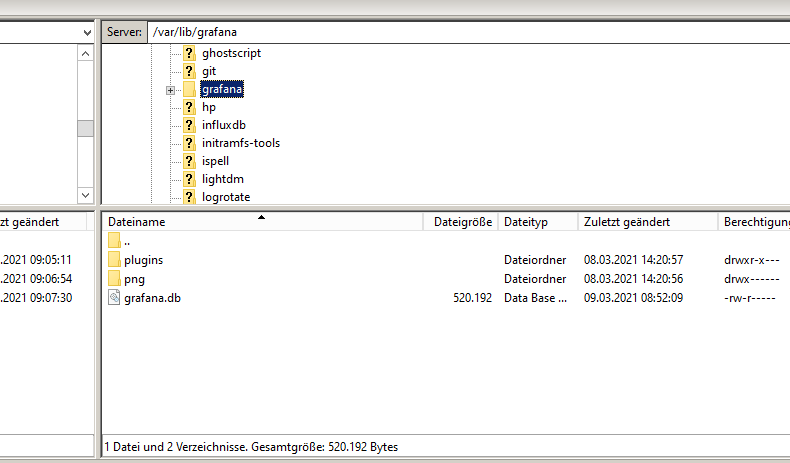
        dann ist es ja scheinbar schon vorhanden. Schau doch mal unter folgendem Pfad was du so findest

        var/lib/grafana
        

        umgestiegen von Proxmox auf Unraid

        1 Reply Last reply
        0
        • A Altersrentner

          @crunchip
          Das Backup habe ich schon mehrmals zurückgespielt.
          Es ist von der alten Platte .
          Habe mir jetzt das Skript aus Grafana der alten Platte geladen

          {
            "datasource": "InfluxDB-1",
            "aliasColors": {
              "Temperatur Wohnzimmer": "rgb(221, 176, 63)"
            },
            "bars": false,
            "dashLength": 10,
            "dashes": false,
            "decimals": 1,
            "fill": 1,
            "fillGradient": 0,
            "gridPos": {
              "h": 9,
              "w": 12,
              "x": 12,
              "y": 0
            },
            "hiddenSeries": false,
            "id": 4,
            "legend": {
              "avg": false,
              "current": true,
              "max": true,
              "min": true,
              "show": true,
              "total": false,
              "values": true
            },
            "lines": true,
            "linewidth": 1,
            "nullPointMode": "null",
            "options": {
              "dataLinks": [
                {
                  "title": "",
                  "url": ""
                }
              ]
            },
            "percentage": false,
            "pointradius": 2,
            "points": false,
            "renderer": "flot",
            "seriesOverrides": [
              {
                "alias": "Außentemperatur",
                "fill": 3,
                "fillGradient": 0,
                "yaxis": 1
              },
              {
                "alias": "Temperatur Wohnzimmer",
                "yaxis": 1
              },
              {
                "alias": "Power",
                "yaxis": 2
              }
            ],
            "spaceLength": 10,
            "stack": false,
            "steppedLine": false,
            "targets": [
              {
                "alias": "Außentemperatur",
                "groupBy": [
                  {
                    "params": [
                      "$__interval"
                    ],
                    "type": "time"
                  },
                  {
                    "params": [
                      "previous"
                    ],
                    "type": "fill"
                  }
                ],
                "measurement": "mihome.0.devices.weather_v1_158d00023213f6.temperature",
                "orderByTime": "ASC",
                "policy": "default",
                "refId": "A",
                "resultFormat": "time_series",
                "select": [
                  [
                    {
                      "params": [
                        "value"
                      ],
                      "type": "field"
                    },
                    {
                      "params": [],
                      "type": "max"
                    }
                  ]
                ],
                "tags": []
              },
              {
                "alias": "Temperatur Heizkessel",
                "groupBy": [
                  {
                    "params": [
                      "$__interval"
                    ],
                    "type": "time"
                  },
                  {
                    "params": [
                      "previous"
                    ],
                    "type": "fill"
                  }
                ],
                "measurement": "fhem.0.Temp_Heizkessel.temperature",
                "orderByTime": "ASC",
                "policy": "default",
                "refId": "B",
                "resultFormat": "time_series",
                "select": [
                  [
                    {
                      "params": [
                        "value"
                      ],
                      "type": "field"
                    },
                    {
                      "params": [],
                      "type": "max"
                    }
                  ]
                ],
                "tags": []
              },
              {
                "alias": "Temperatur Puffer",
                "groupBy": [
                  {
                    "params": [
                      "$__interval"
                    ],
                    "type": "time"
                  },
                  {
                    "params": [
                      "previous"
                    ],
                    "type": "fill"
                  }
                ],
                "measurement": "hm-rpc.0.OEQ0673599.2.TEMPERATURE",
                "orderByTime": "ASC",
                "policy": "default",
                "refId": "C",
                "resultFormat": "time_series",
                "select": [
                  [
                    {
                      "params": [
                        "value"
                      ],
                      "type": "field"
                    },
                    {
                      "params": [],
                      "type": "max"
                    }
                  ]
                ],
                "tags": []
              },
              {
                "alias": "Power",
                "groupBy": [
                  {
                    "params": [
                      "$__interval"
                    ],
                    "type": "time"
                  },
                  {
                    "params": [
                      "previous"
                    ],
                    "type": "fill"
                  }
                ],
                "measurement": "shelly.0.SHSW-PM#8CAAB542C16C#1.Relay0.Power",
                "orderByTime": "ASC",
                "policy": "default",
                "refId": "E",
                "resultFormat": "time_series",
                "select": [
                  [
                    {
                      "params": [
                        "value"
                      ],
                      "type": "field"
                    },
                    {
                      "params": [],
                      "type": "max"
                    }
                  ]
                ],
                "tags": []
              }
            ],
            "thresholds": [],
            "timeFrom": null,
            "timeRegions": [],
            "timeShift": null,
            "title": "Temperatur Außen  / Temperatur Kessel /Temperatur Puffer9 / KesselStatus",
            "tooltip": {
              "shared": true,
              "sort": 0,
              "value_type": "individual"
            },
            "type": "graph",
            "xaxis": {
              "buckets": null,
              "mode": "time",
              "name": null,
              "show": true,
              "values": []
            },
            "yaxes": [
              {
                "decimals": 1,
                "format": "celsius",
                "label": null,
                "logBase": 1,
                "max": null,
                "min": null,
                "show": true
              },
              {
                "decimals": 1,
                "format": "watt",
                "label": null,
                "logBase": 1,
                "max": null,
                "min": null,
                "show": true
              }
            ],
            "yaxis": {
              "align": false,
              "alignLevel": null
            }
          }
          

          Kann man das einbinden?
          MfG Michael

          crunchipC Away
          crunchipC Away
          crunchip
          Forum Testing Most Active
          wrote on last edited by
          #157

          @altersrentner ansonsten, wenn es speziell um's Backup geht, könntest du dort mal nachfragen

          umgestiegen von Proxmox auf Unraid

          A 1 Reply Last reply
          1
          • A Offline
            A Offline
            Altersrentner
            wrote on last edited by
            #158

            @crunchip Guten Morgen,
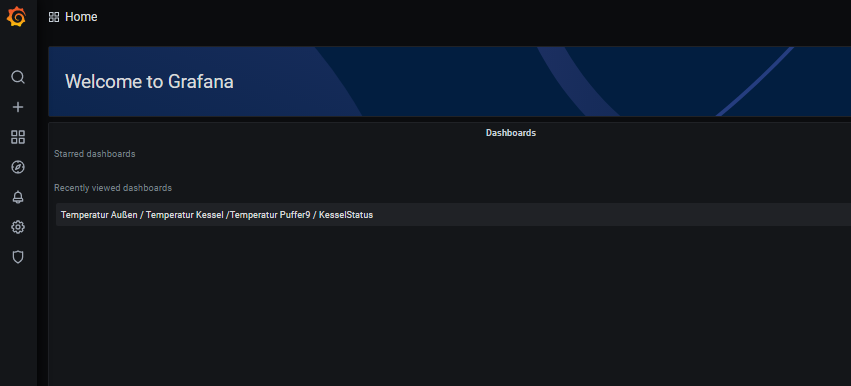
            Import ist erfolgtGraf4.png
            Graf3.png
            Hier ist auch die heutige eingefügte grafanaDB zu sehen.
            Nur es gibt keine graphische Darstellung.
            Mit freundlichen Grüßen
            Michael

            crunchipC 1 Reply Last reply
            0
            • A Altersrentner

              @crunchip Guten Morgen,
              Import ist erfolgtGraf4.png
              Graf3.png
              Hier ist auch die heutige eingefügte grafanaDB zu sehen.
              Nur es gibt keine graphische Darstellung.
              Mit freundlichen Grüßen
              Michael

              crunchipC Away
              crunchipC Away
              crunchip
              Forum Testing Most Active
              wrote on last edited by
              #159

              @altersrentner sagte in [ Geklärt ] Problem bei Influx Installation:

              Nur es gibt keine graphische Darstellung.

              Lässt sich das Dashboard nicht öffnen, oder ist leer?

              umgestiegen von Proxmox auf Unraid

              1 Reply Last reply
              0
              • crunchipC crunchip

                @altersrentner ansonsten, wenn es speziell um's Backup geht, könntest du dort mal nachfragen

                A Offline
                A Offline
                Altersrentner
                wrote on last edited by
                #160

                @crunchip Hallo,
                Ich bedanke mich für die Unterstützung.
                Die dortige Nachfrage hat mich auf den richtigen Weg gebracht.
                Ich hatte vermutlich den API key nicht als Admin angelegt sondern als viewer.
                Mit freundlichen Grüßen
                Michael

                crunchipC 1 Reply Last reply
                0
                • wendy2702W wendy2702

                  @altersrentner Hatt ich zwar schon geschrieben kannst aber auch gerne nochmal hier schauen

                  cat /etc/hosts
                  
                  A Offline
                  A Offline
                  Altersrentner
                  wrote on last edited by
                  #161

                  @wendy2702 Hallo,
                  Auch Dir nochmal besten Dank für die Unterstützung
                  Mit freundlichen Grüßen
                  Michael

                  wendy2702W 1 Reply Last reply
                  0
                  • A Altersrentner

                    @crunchip Hallo,
                    Ich bedanke mich für die Unterstützung.
                    Die dortige Nachfrage hat mich auf den richtigen Weg gebracht.
                    Ich hatte vermutlich den API key nicht als Admin angelegt sondern als viewer.
                    Mit freundlichen Grüßen
                    Michael

                    crunchipC Away
                    crunchipC Away
                    crunchip
                    Forum Testing Most Active
                    wrote on last edited by
                    #162

                    @altersrentner habe es dort gerade gelesen
                    dann läuft ja wieder alles:+1:

                    umgestiegen von Proxmox auf Unraid

                    ? 1 Reply Last reply
                    0
                    • A Altersrentner

                      @wendy2702 Hallo,
                      Auch Dir nochmal besten Dank für die Unterstützung
                      Mit freundlichen Grüßen
                      Michael

                      wendy2702W Online
                      wendy2702W Online
                      wendy2702
                      wrote on last edited by
                      #163

                      @altersrentner Habe gerne im Rahmen meiner Möglichkeiten geholfen.

                      Schön das es wieder läuft.

                      Bitte keine Fragen per PN, die gehören ins Forum!

                      Benutzt das Voting rechts unten im Beitrag wenn er euch geholfen hat.

                      1 Reply Last reply
                      1
                      • crunchipC crunchip

                        @altersrentner habe es dort gerade gelesen
                        dann läuft ja wieder alles:+1:

                        ? Offline
                        ? Offline
                        A Former User
                        wrote on last edited by
                        #164

                        @crunchip

                        Hi, der Beitrag ist zwar schon etwas älter aber habe hier am meisten zu meinem influxdb Problem gefunden.

                        Habe eben den Raspberry Pi aktualisiert und seitdem läuft mir der log mit Verbindungsproblemen zur influxdb voll. Ja, influxdb wurde auch etwas aktualisiert genau habe ich es aber nicht in der Kommandozeile lesen können.
                        Nach Versuchen in der conf habe ich festgestellt, dass influxdb gar nicht startet, aber warum?
                        Nach Netzsuche bekäme ich jetzt höchsten die influxdb gelöscht und frisch installiert, aber dann wären meine Daten futsch.
                        Habt ihr einen Tip? Besten Dank vorab!

                        pi@IOBroker:~ $ apt policy influxdb
                        influxdb:
                          Installiert:           1.8.7-1
                          Installationskandidat: 1.8.7-1
                          Versionstabelle:
                         *** 1.8.7-1 500
                                500 https://repos.influxdata.com/debian buster/stable armhf Packages
                                100 /var/lib/dpkg/status
                             1.6.4-1+deb10u1 500
                                500 http://raspbian.raspberrypi.org/raspbian buster/main armhf Packages
                        pi@IOBroker:~ $ sudo systemctl unmask influxdb.service
                        pi@IOBroker:~ $ sudo systemctl start influxdb
                        Job for influxdb.service failed because the control process exited with error code.
                        See "systemctl status influxdb.service" and "journalctl -xe" for details.
                        pi@IOBroker:~ $ sudo systemctl stop influxdb
                        pi@IOBroker:~ $ sudo systemctl unmask influxdb.service
                        pi@IOBroker:~ $ sudo systemctl start influxdb
                        Job for influxdb.service failed because the control process exited with error code.
                        See "systemctl status influxdb.service" and "journalctl -xe" for details.
                        pi@IOBroker:~ $ systemctl status influxdb.service
                        ● influxdb.service - InfluxDB is an open-source, distributed, time series database
                           Loaded: loaded (/lib/systemd/system/influxdb.service; enabled; vendor preset: enabled)
                           Active: failed (Result: exit-code) since Thu 2021-07-29 23:21:03 CEST; 3min 31s ago
                             Docs: https://docs.influxdata.com/influxdb/
                          Process: 7021 ExecStart=/usr/lib/influxdb/scripts/influxd-systemd-start.sh (code=exited, status=203/EXEC)
                        
                        Jul 29 23:21:03 IOBroker systemd[1]: influxdb.service: Service RestartSec=100ms expired, scheduling restart.
                        Jul 29 23:21:03 IOBroker systemd[1]: influxdb.service: Scheduled restart job, restart counter is at 5.
                        Jul 29 23:21:03 IOBroker systemd[1]: Stopped InfluxDB is an open-source, distributed, time series database.
                        Jul 29 23:21:03 IOBroker systemd[1]: influxdb.service: Start request repeated too quickly.
                        Jul 29 23:21:03 IOBroker systemd[1]: influxdb.service: Failed with result 'exit-code'.
                        Jul 29 23:21:03 IOBroker systemd[1]: Failed to start InfluxDB is an open-source, distributed, time series database.
                        pi@IOBroker:~ $
                        
                        
                        P 1 Reply Last reply
                        0
                        • ? A Former User

                          @crunchip

                          Hi, der Beitrag ist zwar schon etwas älter aber habe hier am meisten zu meinem influxdb Problem gefunden.

                          Habe eben den Raspberry Pi aktualisiert und seitdem läuft mir der log mit Verbindungsproblemen zur influxdb voll. Ja, influxdb wurde auch etwas aktualisiert genau habe ich es aber nicht in der Kommandozeile lesen können.
                          Nach Versuchen in der conf habe ich festgestellt, dass influxdb gar nicht startet, aber warum?
                          Nach Netzsuche bekäme ich jetzt höchsten die influxdb gelöscht und frisch installiert, aber dann wären meine Daten futsch.
                          Habt ihr einen Tip? Besten Dank vorab!

                          pi@IOBroker:~ $ apt policy influxdb
                          influxdb:
                            Installiert:           1.8.7-1
                            Installationskandidat: 1.8.7-1
                            Versionstabelle:
                           *** 1.8.7-1 500
                                  500 https://repos.influxdata.com/debian buster/stable armhf Packages
                                  100 /var/lib/dpkg/status
                               1.6.4-1+deb10u1 500
                                  500 http://raspbian.raspberrypi.org/raspbian buster/main armhf Packages
                          pi@IOBroker:~ $ sudo systemctl unmask influxdb.service
                          pi@IOBroker:~ $ sudo systemctl start influxdb
                          Job for influxdb.service failed because the control process exited with error code.
                          See "systemctl status influxdb.service" and "journalctl -xe" for details.
                          pi@IOBroker:~ $ sudo systemctl stop influxdb
                          pi@IOBroker:~ $ sudo systemctl unmask influxdb.service
                          pi@IOBroker:~ $ sudo systemctl start influxdb
                          Job for influxdb.service failed because the control process exited with error code.
                          See "systemctl status influxdb.service" and "journalctl -xe" for details.
                          pi@IOBroker:~ $ systemctl status influxdb.service
                          ● influxdb.service - InfluxDB is an open-source, distributed, time series database
                             Loaded: loaded (/lib/systemd/system/influxdb.service; enabled; vendor preset: enabled)
                             Active: failed (Result: exit-code) since Thu 2021-07-29 23:21:03 CEST; 3min 31s ago
                               Docs: https://docs.influxdata.com/influxdb/
                            Process: 7021 ExecStart=/usr/lib/influxdb/scripts/influxd-systemd-start.sh (code=exited, status=203/EXEC)
                          
                          Jul 29 23:21:03 IOBroker systemd[1]: influxdb.service: Service RestartSec=100ms expired, scheduling restart.
                          Jul 29 23:21:03 IOBroker systemd[1]: influxdb.service: Scheduled restart job, restart counter is at 5.
                          Jul 29 23:21:03 IOBroker systemd[1]: Stopped InfluxDB is an open-source, distributed, time series database.
                          Jul 29 23:21:03 IOBroker systemd[1]: influxdb.service: Start request repeated too quickly.
                          Jul 29 23:21:03 IOBroker systemd[1]: influxdb.service: Failed with result 'exit-code'.
                          Jul 29 23:21:03 IOBroker systemd[1]: Failed to start InfluxDB is an open-source, distributed, time series database.
                          pi@IOBroker:~ $
                          
                          
                          P Offline
                          P Offline
                          picky
                          wrote on last edited by
                          #165

                          @pete0815 Hatte gestern meinen Raspi auch updatet, und auch das Problem gehabt das influxdb nicht mehr starten konnte. Bei mir hat geholfen

                          sudo chmod +x /usr/lib/influxdb/scripts/influxd-systemd-start.sh
                          und dann ließ es sich starten mit
                          sudo systemctl start influxdb

                          ? P 2 Replies Last reply
                          2
                          • P picky

                            @pete0815 Hatte gestern meinen Raspi auch updatet, und auch das Problem gehabt das influxdb nicht mehr starten konnte. Bei mir hat geholfen

                            sudo chmod +x /usr/lib/influxdb/scripts/influxd-systemd-start.sh
                            und dann ließ es sich starten mit
                            sudo systemctl start influxdb

                            ? Offline
                            ? Offline
                            A Former User
                            wrote on last edited by A Former User
                            #166

                            @picky
                            Vielen Dank!!!! Das war Lösung und läuft wieder.

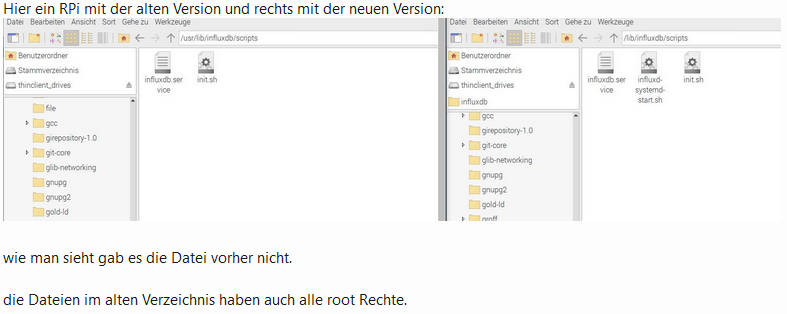
                            Hatte auch einen Beitrag ergoogelt im computerbase forum, dort wird gezeigt, dass der Ordner /usr/lib/influxdb/scripts/ sich verändert hat und hier genau die1 Datei (influxd-systemd-start.sh) hinzu gekommen ist. Wie genau die Nutzerechte hier den services und skripte funktionieren bzw. sich geändert haben muss ich passen, aber es läuft wieder.

                            Links zu anderen Foren waren nicht erlaubt, aber die Info darf man zitieren?
                            990b2e7c-f910-41f0-99bd-b9689bee7395-grafik.png
                            (Quelle: ComputerBaseForum

                            1 Reply Last reply
                            0
                            • P picky

                              @pete0815 Hatte gestern meinen Raspi auch updatet, und auch das Problem gehabt das influxdb nicht mehr starten konnte. Bei mir hat geholfen

                              sudo chmod +x /usr/lib/influxdb/scripts/influxd-systemd-start.sh
                              und dann ließ es sich starten mit
                              sudo systemctl start influxdb

                              P Offline
                              P Offline
                              PeterHansen
                              wrote on last edited by
                              #167

                              @picky Hi, nach 3 Tagen Google-Suche - Forenstöbern etc. ... BIST DU MEINe Mann/Frau !!!.
                              Du hast den heutigen HeldenGlobe von mir gewonnen !!!

                              Das war die Lösung für meine Fehlermeldung:
                              Failed to start InfluxDB is an open-source, distributed, time series database.

                              endlich :-)
                              Danke

                              1 Reply Last reply
                              0
                              • Basti97B Offline
                                Basti97B Offline
                                Basti97
                                Most Active
                                wrote on last edited by
                                #168

                                nachdem ich influx eingeben habe kommt ein >
                                bei mir. Was muss ich bei dieser Meldung machen?

                                ERR: error parsing query: found Mira, expected SELECT, DELETE, SHOW, CREATE, DROP, EXPLAIN, GRANT, REVOKE, ALTER, SET, KILL at line 1, char 1
                                Warning: It is possible this error is due to not setting a database.
                                Please set a database with the command "use <database>".
                                > database


                                Folgende Anleitung habe ich genutzt
                                https://www.verdrahtet.info/2020/02/14/installation-von-influxdb-grafana-inkl-verbindung-zu-iobroker/
                                `
                                und bin bis zum Anbschnitt influxdb gekommen

                                Iobroker läuft als VM auf Proxmoxserver x folgende Hersteller im Einsatz Sonoff, Gosund, Siemens x Aofo über Tasmota x Zigbee x das Smarthome wächst und wächst

                                crunchipC 1 Reply Last reply
                                0
                                • Basti97B Basti97

                                  nachdem ich influx eingeben habe kommt ein >
                                  bei mir. Was muss ich bei dieser Meldung machen?

                                  ERR: error parsing query: found Mira, expected SELECT, DELETE, SHOW, CREATE, DROP, EXPLAIN, GRANT, REVOKE, ALTER, SET, KILL at line 1, char 1
                                  Warning: It is possible this error is due to not setting a database.
                                  Please set a database with the command "use <database>".
                                  > database


                                  Folgende Anleitung habe ich genutzt
                                  https://www.verdrahtet.info/2020/02/14/installation-von-influxdb-grafana-inkl-verbindung-zu-iobroker/
                                  `
                                  und bin bis zum Anbschnitt influxdb gekommen

                                  crunchipC Away
                                  crunchipC Away
                                  crunchip
                                  Forum Testing Most Active
                                  wrote on last edited by crunchip
                                  #169

                                  @basti97 sagte in [ Geklärt ] Problem bei Influx Installation:

                                  Please set a database

                                  Das macht die InfluxDb Instanz automatisch für dich, wenn du die Datenbank einträgst und die Instanz gestartet hast
                                  Dann brauchst du nicht uber die Influx CLI extra eine Datenbank anlegen.

                                  umgestiegen von Proxmox auf Unraid

                                  Basti97B 1 Reply Last reply
                                  0
                                  • crunchipC crunchip

                                    @basti97 sagte in [ Geklärt ] Problem bei Influx Installation:

                                    Please set a database

                                    Das macht die InfluxDb Instanz automatisch für dich, wenn du die Datenbank einträgst und die Instanz gestartet hast
                                    Dann brauchst du nicht uber die Influx CLI extra eine Datenbank anlegen.

                                    Basti97B Offline
                                    Basti97B Offline
                                    Basti97
                                    Most Active
                                    wrote on last edited by
                                    #170

                                    @crunchip Danke für deine Hilfe jetzt funktioniert es. Die Anleitungen im Internet verwirren sehr.

                                    Iobroker läuft als VM auf Proxmoxserver x folgende Hersteller im Einsatz Sonoff, Gosund, Siemens x Aofo über Tasmota x Zigbee x das Smarthome wächst und wächst

                                    1 Reply Last reply
                                    0
                                    • A Altersrentner

                                      @crunchip Guten Morgen und einen schönen Feiertag;
                                      Bin jetzt damit beschäftigt Grafana einzurichten.
                                      Aber auch hier ist alles anders wie normal.
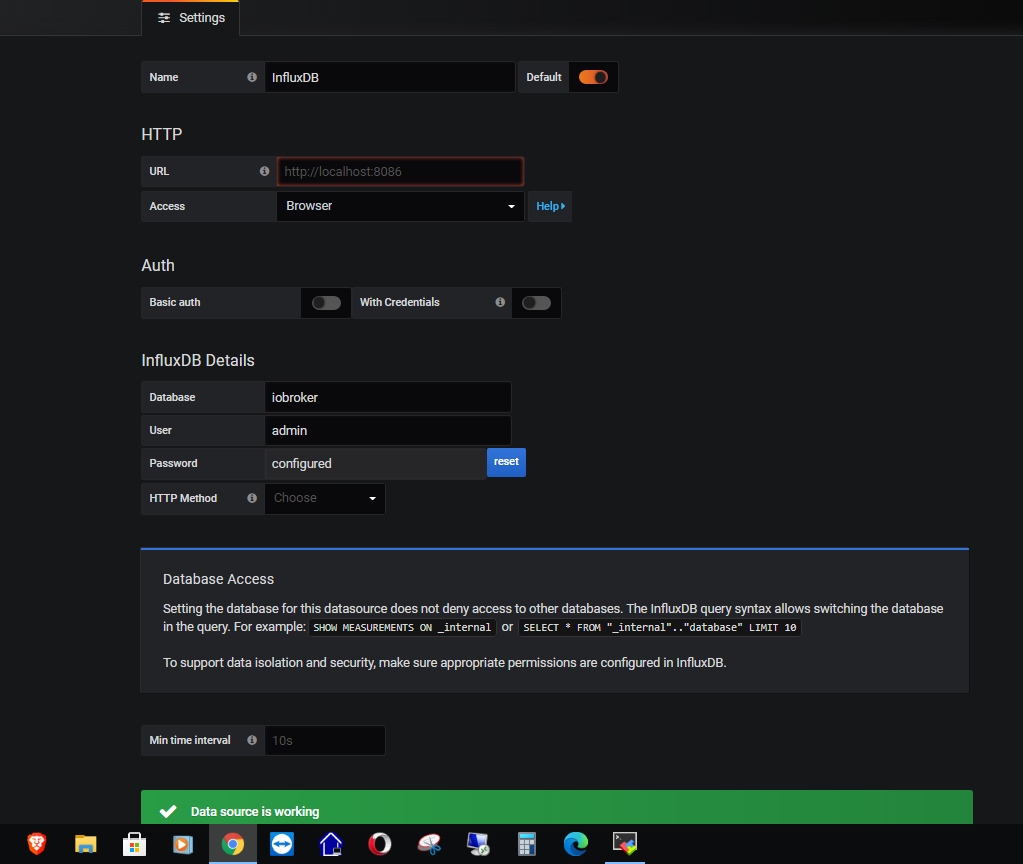
                                      Es beginnt schon mit der Eingabe der Settings
                                      Grafana_1.PNG
                                      Grafana verbindet sich nur wenn unter Access "BROWSER" ausgewählt ist.
                                      Habe viel gesucht und überall nur Verbindung über Server gefunden.
                                      Deshalb die Frage ist Browser OK oder eher nicht.

                                      Nach diesem Video habe ich dann meine Datenpunkte konfiguriert und überprüft.
                                      https://www.youtube.com/watch?v=VXfpds4Rtqc&t=4072s
                                      Alles prima..

                                      In den Dashboard Einstellungen sollten dann die in influxdb geloggten Daten
                                      unter dem Reiter "select measurement" erscheinen. Das Feld bleibt aber leer.
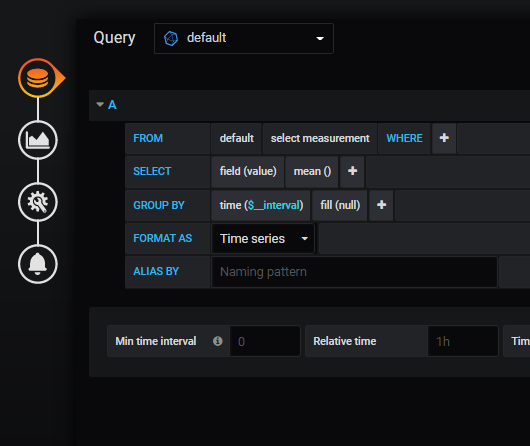
                                      Grafana_2.PNG
                                      Wie kann ich prüfen, ob besagte date überhaupt in der influxdb auftauchen.
                                      Z. B. mit einem Befehl im Terminal.

                                      Ich bin doch noch etwas weiter gekommen.:blush:

                                      Connected to http://localhost:8086 version 1.8.3
                                      InfluxDB shell version: 1.8.3
                                      > show databases
                                      name: databases
                                      name
                                      ----
                                      _internal
                                      iobroker
                                      > use iobroker
                                      Using database iobroker
                                      > show measurements
                                      name: measurements
                                      name
                                      ----
                                      influxdb.0.info.connection
                                      mihome.0.devices.magnet_158d00020910b2.state
                                      mihome.0.devices.magnet_158d00020b5d12.state
                                      mihome.0.devices.magnet_158d00020b5d69.state
                                      mihome.0.devices.magnet_158d0003e72274.state
                                      mihome.0.devices.magnet_158d0003e741ac.state
                                      mihome.0.devices.magnet_158d0003e74624.state
                                      mihome.0.devices.magnet_158d0003e746aa.state
                                      mihome.0.devices.magnet_158d0003e747f7.state
                                      mihome.0.devices.weather_v1_158d00023213f6.humidity
                                      mihome.0.devices.weather_v1_158d00023213f6.temperature
                                      mihome.0.devices.weather_v1_158d000232801d.humidity
                                      mihome.0.devices.weather_v1_158d000232801d.temperature
                                      mihome.0.devices.weather_v1_158d0002329079.humidity
                                      mihome.0.devices.weather_v1_158d0002329079.temperature
                                      mihome.0.devices.weather_v1_158d00023290a8.humidity
                                      mihome.0.devices.weather_v1_158d00023290a8.temperature
                                      mihome.0.devices.weather_v1_158d00023290e8.humidity
                                      mihome.0.devices.weather_v1_158d00023290e8.temperature
                                      mihome.0.devices.weather_v1_158d00024906fa.humidity
                                      mihome.0.devices.weather_v1_158d00024906fa.temperature
                                      mihome.0.devices.weather_v1_158d00036b52b9.humidity
                                      mihome.0.devices.weather_v1_158d00036b52b9.temperature
                                      mihome.0.devices.weather_v1_158d00036b53b3.humidity
                                      mihome.0.devices.weather_v1_158d00036b53b3.temperature
                                      mihome.0.devices.weather_v1_158d00036b53ce.humidity
                                      mihome.0.devices.weather_v1_158d00036b53ce.temperature
                                      mihome.0.devices.weather_v1_158d00036bd6ea.humidity
                                      mihome.0.devices.weather_v1_158d00036bd6ea.temperature
                                      mihome.0.devices.weather_v1_158d00036bd78e.humidity
                                      mihome.0.devices.weather_v1_158d00036bd78e.temperature
                                      > show series
                                      key
                                      ---
                                      influxdb.0.info.connection
                                      mihome.0.devices.magnet_158d00020910b2.state
                                      mihome.0.devices.magnet_158d00020b5d12.state
                                      mihome.0.devices.magnet_158d00020b5d69.state
                                      mihome.0.devices.magnet_158d0003e72274.state
                                      mihome.0.devices.magnet_158d0003e741ac.state
                                      mihome.0.devices.magnet_158d0003e74624.state
                                      mihome.0.devices.magnet_158d0003e746aa.state
                                      mihome.0.devices.magnet_158d0003e747f7.state
                                      mihome.0.devices.weather_v1_158d00023213f6.humidity
                                      mihome.0.devices.weather_v1_158d00023213f6.temperature
                                      mihome.0.devices.weather_v1_158d000232801d.humidity
                                      mihome.0.devices.weather_v1_158d000232801d.temperature
                                      mihome.0.devices.weather_v1_158d0002329079.humidity
                                      mihome.0.devices.weather_v1_158d0002329079.temperature
                                      mihome.0.devices.weather_v1_158d00023290a8.humidity
                                      mihome.0.devices.weather_v1_158d00023290a8.temperature
                                      mihome.0.devices.weather_v1_158d00023290e8.humidity
                                      mihome.0.devices.weather_v1_158d00023290e8.temperature
                                      mihome.0.devices.weather_v1_158d00024906fa.humidity
                                      mihome.0.devices.weather_v1_158d00024906fa.temperature
                                      mihome.0.devices.weather_v1_158d00036b52b9.humidity
                                      mihome.0.devices.weather_v1_158d00036b52b9.temperature
                                      mihome.0.devices.weather_v1_158d00036b53b3.humidity
                                      mihome.0.devices.weather_v1_158d00036b53b3.temperature
                                      mihome.0.devices.weather_v1_158d00036b53ce.humidity
                                      mihome.0.devices.weather_v1_158d00036b53ce.temperature
                                      mihome.0.devices.weather_v1_158d00036bd6ea.humidity
                                      mihome.0.devices.weather_v1_158d00036bd6ea.temperature
                                      mihome.0.devices.weather_v1_158d00036bd78e.humidity
                                      mihome.0.devices.weather_v1_158d00036bd78e.temperature
                                      > > Das Initallisieren des Grafana Server:
                                      ERR: error parsing query: found >, expected SELECT, DELETE, SHOW, CREATE, DROP, EXPLAIN, GRANT, REVOKE, ALTER, SET, KILL at line 1, char 1
                                      > show tag keys
                                      > show field keys
                                      name: influxdb.0.info.connection
                                      fieldKey fieldType
                                      -------- ---------
                                      ack      boolean
                                      from     string
                                      q        float
                                      value    string
                                      
                                      name: mihome.0.devices.magnet_158d00020910b2.state
                                      fieldKey fieldType
                                      -------- ---------
                                      ack      boolean
                                      from     string
                                      q        float
                                      value    boolean
                                      
                                      name: mihome.0.devices.magnet_158d00020b5d12.state
                                      fieldKey fieldType
                                      -------- ---------
                                      ack      boolean
                                      from     string
                                      q        float
                                      value    boolean
                                      
                                      name: mihome.0.devices.magnet_158d00020b5d69.state
                                      fieldKey fieldType
                                      -------- ---------
                                      ack      boolean
                                      from     string
                                      q        float
                                      value    boolean
                                      
                                      name: mihome.0.devices.magnet_158d0003e72274.state
                                      fieldKey fieldType
                                      -------- ---------
                                      ack      boolean
                                      from     string
                                      q        float
                                      value    boolean
                                      
                                      name: mihome.0.devices.magnet_158d0003e741ac.state
                                      fieldKey fieldType
                                      -------- ---------
                                      ack      boolean
                                      from     string
                                      q        float
                                      value    boolean
                                      
                                      name: mihome.0.devices.magnet_158d0003e74624.state
                                      fieldKey fieldType
                                      -------- ---------
                                      ack      boolean
                                      from     string
                                      q        float
                                      value    boolean
                                      
                                      name: mihome.0.devices.magnet_158d0003e746aa.state
                                      fieldKey fieldType
                                      -------- ---------
                                      ack      boolean
                                      from     string
                                      q        float
                                      value    boolean
                                      
                                      name: mihome.0.devices.magnet_158d0003e747f7.state
                                      fieldKey fieldType
                                      -------- ---------
                                      ack      boolean
                                      from     string
                                      q        float
                                      value    boolean
                                      
                                      name: mihome.0.devices.weather_v1_158d00023213f6.humidity
                                      fieldKey fieldType
                                      -------- ---------
                                      ack      boolean
                                      from     string
                                      q        float
                                      value    float
                                      
                                      name: mihome.0.devices.weather_v1_158d00023213f6.temperature
                                      fieldKey fieldType
                                      -------- ---------
                                      ack      boolean
                                      from     string
                                      q        float
                                      value    float
                                      
                                      name: mihome.0.devices.weather_v1_158d000232801d.humidity
                                      fieldKey fieldType
                                      -------- ---------
                                      ack      boolean
                                      from     string
                                      q        float
                                      value    float
                                      
                                      name: mihome.0.devices.weather_v1_158d000232801d.temperature
                                      fieldKey fieldType
                                      -------- ---------
                                      ack      boolean
                                      from     string
                                      q        float
                                      value    float
                                      
                                      name: mihome.0.devices.weather_v1_158d0002329079.humidity
                                      fieldKey fieldType
                                      -------- ---------
                                      ack      boolean
                                      from     string
                                      q        float
                                      value    float
                                      
                                      name: mihome.0.devices.weather_v1_158d0002329079.temperature
                                      fieldKey fieldType
                                      -------- ---------
                                      ack      boolean
                                      from     string
                                      q        float
                                      value    float
                                      
                                      name: mihome.0.devices.weather_v1_158d00023290a8.humidity
                                      fieldKey fieldType
                                      -------- ---------
                                      ack      boolean
                                      from     string
                                      q        float
                                      value    float
                                      
                                      name: mihome.0.devices.weather_v1_158d00023290a8.temperature
                                      fieldKey fieldType
                                      -------- ---------
                                      ack      boolean
                                      from     string
                                      q        float
                                      value    float
                                      
                                      name: mihome.0.devices.weather_v1_158d00023290e8.humidity
                                      fieldKey fieldType
                                      -------- ---------
                                      ack      boolean
                                      from     string
                                      q        float
                                      value    float
                                      
                                      name: mihome.0.devices.weather_v1_158d00023290e8.temperature
                                      fieldKey fieldType
                                      -------- ---------
                                      ack      boolean
                                      from     string
                                      q        float
                                      value    float
                                      
                                      name: mihome.0.devices.weather_v1_158d00024906fa.humidity
                                      fieldKey fieldType
                                      -------- ---------
                                      ack      boolean
                                      from     string
                                      q        float
                                      value    float
                                      
                                      name: mihome.0.devices.weather_v1_158d00024906fa.temperature
                                      fieldKey fieldType
                                      -------- ---------
                                      ack      boolean
                                      from     string
                                      q        float
                                      value    float
                                      
                                      name: mihome.0.devices.weather_v1_158d00036b52b9.humidity
                                      fieldKey fieldType
                                      -------- ---------
                                      ack      boolean
                                      from     string
                                      q        float
                                      value    float
                                      
                                      name: mihome.0.devices.weather_v1_158d00036b52b9.temperature
                                      fieldKey fieldType
                                      -------- ---------
                                      ack      boolean
                                      from     string
                                      q        float
                                      value    float
                                      
                                      name: mihome.0.devices.weather_v1_158d00036b53b3.humidity
                                      fieldKey fieldType
                                      -------- ---------
                                      ack      boolean
                                      from     string
                                      q        float
                                      value    float
                                      
                                      name: mihome.0.devices.weather_v1_158d00036b53b3.temperature
                                      fieldKey fieldType
                                      -------- ---------
                                      ack      boolean
                                      from     string
                                      q        float
                                      value    float
                                      
                                      name: mihome.0.devices.weather_v1_158d00036b53ce.humidity
                                      fieldKey fieldType
                                      -------- ---------
                                      ack      boolean
                                      from     string
                                      q        float
                                      value    float
                                      
                                      name: mihome.0.devices.weather_v1_158d00036b53ce.temperature
                                      fieldKey fieldType
                                      -------- ---------
                                      ack      boolean
                                      from     string
                                      q        float
                                      value    float
                                      
                                      name: mihome.0.devices.weather_v1_158d00036bd6ea.humidity
                                      fieldKey fieldType
                                      -------- ---------
                                      ack      boolean
                                      from     string
                                      q        float
                                      value    float
                                      
                                      name: mihome.0.devices.weather_v1_158d00036bd6ea.temperature
                                      fieldKey fieldType
                                      -------- ---------
                                      ack      boolean
                                      from     string
                                      q        float
                                      value    float
                                      
                                      name: mihome.0.devices.weather_v1_158d00036bd78e.humidity
                                      fieldKey fieldType
                                      -------- ---------
                                      ack      boolean
                                      from     string
                                      q        float
                                      value    float
                                      
                                      name: mihome.0.devices.weather_v1_158d00036bd78e.temperature
                                      fieldKey fieldType
                                      -------- ---------
                                      ack      boolean
                                      from     string
                                      q        float
                                      value    float
                                      >


                                      Ist soweit alles richtig?

                                      Soweit erst mal zum aktuellen Stand.
                                      Freundliche Grüße
                                      Michael

                                      B Offline
                                      B Offline
                                      benziman
                                      wrote on last edited by benziman
                                      #171

                                      @altersrentner said in [[ Geklärt ] Problem bei Influx Installation](/post

                                      Hi, ich muss den Post mal aufnehmen da ich an dieser Stelle mit der DB scheitere!

                                      Connected to http://localhost:8086 version 1.8.3
                                      InfluxDB shell version: 1.8.3
                                      > show databases
                                      name: databases
                                      name
                                      ----
                                      _internal
                                      iobroker
                                      > use iobroker
                                      Using database iobroker
                                      

                                      Da mein Startwert für meinen Wasserverbrauch in Grafana viel zu hoch ist, wollte ich diesen einen Wert aus der InfluxDB löschen. Allerdings bekomme ich bei show databases nur:
                                      ERR: unable to parse authentication credentials
                                      Warning: It is possible this error is due to not setting a database.
                                      Please set a database with the command "use <database>".

                                      und wenn ich die Datenbank auswähle die ich ja erstellt habe und die auch Daten für Grafana bereitstellt erahtle ich:
                                      ERR: unable to parse authentication credentials
                                      DB does not exist!

                                      jemand eine Idee was ich falsch mache?

                                      crunchipC 1 Reply Last reply
                                      0
                                      • B benziman

                                        @altersrentner said in [[ Geklärt ] Problem bei Influx Installation](/post

                                        Hi, ich muss den Post mal aufnehmen da ich an dieser Stelle mit der DB scheitere!

                                        Connected to http://localhost:8086 version 1.8.3
                                        InfluxDB shell version: 1.8.3
                                        > show databases
                                        name: databases
                                        name
                                        ----
                                        _internal
                                        iobroker
                                        > use iobroker
                                        Using database iobroker
                                        

                                        Da mein Startwert für meinen Wasserverbrauch in Grafana viel zu hoch ist, wollte ich diesen einen Wert aus der InfluxDB löschen. Allerdings bekomme ich bei show databases nur:
                                        ERR: unable to parse authentication credentials
                                        Warning: It is possible this error is due to not setting a database.
                                        Please set a database with the command "use <database>".

                                        und wenn ich die Datenbank auswähle die ich ja erstellt habe und die auch Daten für Grafana bereitstellt erahtle ich:
                                        ERR: unable to parse authentication credentials
                                        DB does not exist!

                                        jemand eine Idee was ich falsch mache?

                                        crunchipC Away
                                        crunchipC Away
                                        crunchip
                                        Forum Testing Most Active
                                        wrote on last edited by
                                        #172

                                        @benziman welche Version?
                                        Was wo und wie gibst du denn ein?

                                        umgestiegen von Proxmox auf Unraid

                                        B 1 Reply Last reply
                                        0
                                        • crunchipC crunchip

                                          @benziman welche Version?
                                          Was wo und wie gibst du denn ein?

                                          B Offline
                                          B Offline
                                          benziman
                                          wrote on last edited by
                                          #173

                                          @crunchip

                                          ich bin auf der VM wo influx isntalliert ist und gebe dort influx ein, danach show database oder use iobroker (die DB wird aktuell von Grafana abgefragt)

                                          crunchipC 1 Reply Last reply
                                          0
                                          Reply
                                          • Reply as topic
                                          Log in to reply
                                          • Oldest to Newest
                                          • Newest to Oldest
                                          • Most Votes


                                          Support us

                                          ioBroker
                                          Community Adapters
                                          Donate
                                          FAQ Cloud / IOT
                                          HowTo: Node.js-Update
                                          HowTo: Backup/Restore
                                          Downloads
                                          BLOG

                                          817

                                          Online

                                          32.7k

                                          Users

                                          82.3k

                                          Topics

                                          1.3m

                                          Posts
                                          Community
                                          Impressum | Datenschutz-Bestimmungen | Nutzungsbedingungen | Einwilligungseinstellungen
                                          ioBroker Community 2014-2025
                                          logo
                                          • Login

                                          • Don't have an account? Register

                                          • Login or register to search.
                                          • First post
                                            Last post
                                          0
                                          • Home
                                          • Recent
                                          • Tags
                                          • Unread 0
                                          • Categories
                                          • Unreplied
                                          • Popular
                                          • GitHub
                                          • Docu
                                          • Hilfe