




Keine Adapter Installation mehr möglich! (Windows Iobroker)
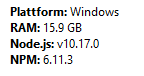
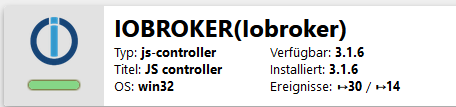
-
Ich habs!
Nach dem Downgrade habe ich jetzt den VIS Adapter nochmal deinstalliert und die aktuellste Version installiert und jetzt klappts.Vielen, vielen Dank für deine Hilfe.
Hast mein Tag heute gerettet :-)@nik82 sehr gut das es jetzt geht.
-
@sigi234
Ich hänge mich jetzt einfach mit an diesen Thread dran. Ich teste das Updaten aktuell auf einer virtuellen Maschine, also ist mein Produktivsystem nicht betroffen.Ich bin exakt der Anleitung (mehrere Male) gefolgt aber ich schaffe es nicht das System zum Laufen zu bekommen. Der js-controller wird auf 3.1.6 aktualisiert und ioBroker startet auch danach; sobald aber die ganzen Adapter nachinstalliert bzw. installiert werden, kommt bei jedem Adapter die Fehlermeldung.
2020-10-23 14:25:40.719 - info: host.DESKTOP-T6J3LJO(SmartHome) iobroker npm-install: gyp 2020-10-23 14:25:40.720 - info: host.DESKTOP-T6J3LJO(SmartHome) iobroker npm-install: ERR! build error gyp 2020-10-23 14:25:40.720 - info: host.DESKTOP-T6J3LJO(SmartHome) iobroker npm-install: ERR! 2020-10-23 14:25:40.721 - info: host.DESKTOP-T6J3LJO(SmartHome) iobroker npm-install: stack 2020-10-23 14:25:40.723 - info: host.DESKTOP-T6J3LJO(SmartHome) iobroker npm-install: Error: `C:\Program Files (x86)\Microsoft Visual Studio\2017\BuildTools\MSBuild\15.0\Bin\MSBuild.exe` failed with exit code: 1 2020-10-23 14:25:40.725 - info: host.DESKTOP-T6J3LJO(SmartHome) iobroker npm-install: gyp 2020-10-23 14:25:40.727 - info: host.DESKTOP-T6J3LJO(SmartHome) iobroker npm-install: 2020-10-23 14:25:40.729 - info: host.DESKTOP-T6J3LJO(SmartHome) iobroker npm-install: ERR! 2020-10-23 14:25:40.731 - info: host.DESKTOP-T6J3LJO(SmartHome) iobroker npm-install: 2020-10-23 14:25:40.733 - info: host.DESKTOP-T6J3LJO(SmartHome) iobroker npm-install: stack 2020-10-23 14:25:40.735 - info: host.DESKTOP-T6J3LJO(SmartHome) iobroker npm-install: at ChildProcess.onExit (C:\Program Files\iobroker\SmartHomeUpdate\nodejs\node_modules\npm\node_modules\node-gyp\lib\build.js:193:23) 2020-10-23 14:25:40.736 - info: host.DESKTOP-T6J3LJO(SmartHome) iobroker npm-install: gyp 2020-10-23 14:25:40.753 - info: host.DESKTOP-T6J3LJO(SmartHome) iobroker npm-install: 2020-10-23 14:25:40.755 - info: host.DESKTOP-T6J3LJO(SmartHome) iobroker npm-install: ERR! 2020-10-23 14:25:40.756 - info: host.DESKTOP-T6J3LJO(SmartHome) iobroker npm-install: 2020-10-23 14:25:40.757 - info: host.DESKTOP-T6J3LJO(SmartHome) iobroker npm-install: stack 2020-10-23 14:25:40.759 - info: host.DESKTOP-T6J3LJO(SmartHome) iobroker npm-install: at ChildProcess.emit (events.js:198:13) 2020-10-23 14:25:40.761 - info: host.DESKTOP-T6J3LJO(SmartHome) iobroker npm-install: gyp 2020-10-23 14:25:40.763 - info: host.DESKTOP-T6J3LJO(SmartHome) iobroker npm-install: 2020-10-23 14:25:40.764 - info: host.DESKTOP-T6J3LJO(SmartHome) iobroker npm-install: ERR! 2020-10-23 14:25:40.765 - info: host.DESKTOP-T6J3LJO(SmartHome) iobroker npm-install: 2020-10-23 14:25:40.766 - info: host.DESKTOP-T6J3LJO(SmartHome) iobroker npm-install: stack 2020-10-23 14:25:40.767 - info: host.DESKTOP-T6J3LJO(SmartHome) iobroker npm-install: at Process.ChildProcess._handle.onexit (internal/child_process.js:248:12) 2020-10-23 14:25:40.768 - info: host.DESKTOP-T6J3LJO(SmartHome) iobroker npm-install: gyp 2020-10-23 14:25:40.769 - info: host.DESKTOP-T6J3LJO(SmartHome) iobroker npm-install: 2020-10-23 14:25:40.771 - info: host.DESKTOP-T6J3LJO(SmartHome) iobroker npm-install: ERR! 2020-10-23 14:25:40.808 - info: host.DESKTOP-T6J3LJO(SmartHome) iobroker npm-install: 2020-10-23 14:25:40.809 - info: host.DESKTOP-T6J3LJO(SmartHome) iobroker npm-install: System 2020-10-23 14:25:40.812 - info: host.DESKTOP-T6J3LJO(SmartHome) iobroker npm-install: Windows_NT 10.0.18363 2020-10-23 14:25:40.813 - info: host.DESKTOP-T6J3LJO(SmartHome) iobroker npm-install: gyp 2020-10-23 14:25:40.815 - info: host.DESKTOP-T6J3LJO(SmartHome) iobroker npm-install: 2020-10-23 14:25:40.816 - info: host.DESKTOP-T6J3LJO(SmartHome) iobroker npm-install: ERR! 2020-10-23 14:25:40.820 - info: host.DESKTOP-T6J3LJO(SmartHome) iobroker npm-install: 2020-10-23 14:25:40.822 - info: host.DESKTOP-T6J3LJO(SmartHome) iobroker npm-install: command 2020-10-23 14:25:40.823 - info: host.DESKTOP-T6J3LJO(SmartHome) iobroker npm-install: "C:\\Program Files\\iobroker\\SmartHomeUpdate\\nodejs\\node.exe" "C:\\Program Files\\iobroker\\SmartHomeUpdate\\nodejs\\node_modules\\npm\\node_modules\\node-gyp\\bin\\node-gyp.js" "rebuild" 2020-10-23 14:25:40.825 - info: host.DESKTOP-T6J3LJO(SmartHome) iobroker npm-install: gyp 2020-10-23 14:25:40.827 - info: host.DESKTOP-T6J3LJO(SmartHome) iobroker npm-install: 2020-10-23 14:25:40.829 - info: host.DESKTOP-T6J3LJO(SmartHome) iobroker npm-install: ERR! 2020-10-23 14:25:40.831 - info: host.DESKTOP-T6J3LJO(SmartHome) iobroker npm-install: 2020-10-23 14:25:40.832 - info: host.DESKTOP-T6J3LJO(SmartHome) iobroker npm-install: cwd 2020-10-23 14:25:40.833 - info: host.DESKTOP-T6J3LJO(SmartHome) iobroker npm-install: C:\Program Files\iobroker\SmartHomeUpdate\node_modules\authenticate-pam 2020-10-23 14:25:40.835 - info: host.DESKTOP-T6J3LJO(SmartHome) iobroker npm-install: gyp 2020-10-23 14:25:40.836 - info: host.DESKTOP-T6J3LJO(SmartHome) iobroker npm-install: 2020-10-23 14:25:40.837 - info: host.DESKTOP-T6J3LJO(SmartHome) iobroker npm-install: ERR! 2020-10-23 14:25:40.838 - info: host.DESKTOP-T6J3LJO(SmartHome) iobroker npm-install: 2020-10-23 14:25:40.839 - info: host.DESKTOP-T6J3LJO(SmartHome) iobroker npm-install: node -v 2020-10-23 14:25:40.840 - info: host.DESKTOP-T6J3LJO(SmartHome) iobroker npm-install: v10.17.0 2020-10-23 14:25:40.841 - info: host.DESKTOP-T6J3LJO(SmartHome) iobroker npm-install: gyp 2020-10-23 14:25:40.843 - info: host.DESKTOP-T6J3LJO(SmartHome) iobroker npm-install: 2020-10-23 14:25:40.846 - info: host.DESKTOP-T6J3LJO(SmartHome) iobroker npm-install: ERR! 2020-10-23 14:25:40.847 - info: host.DESKTOP-T6J3LJO(SmartHome) iobroker npm-install: 2020-10-23 14:25:40.848 - info: host.DESKTOP-T6J3LJO(SmartHome) iobroker npm-install: node-gyp -v 2020-10-23 14:25:40.848 - info: host.DESKTOP-T6J3LJO(SmartHome) iobroker npm-install: v5.0.3 2020-10-23 14:25:40.849 - info: host.DESKTOP-T6J3LJO(SmartHome) iobroker npm-install: gyp 2020-10-23 14:25:40.849 - info: host.DESKTOP-T6J3LJO(SmartHome) iobroker npm-install: 2020-10-23 14:25:40.850 - info: host.DESKTOP-T6J3LJO(SmartHome) iobroker npm-install: ERR! 2020-10-23 14:25:40.850 - info: host.DESKTOP-T6J3LJO(SmartHome) iobroker npm-install: 2020-10-23 14:25:40.851 - info: host.DESKTOP-T6J3LJO(SmartHome) iobroker npm-install: not ok 2020-10-23 14:25:40.852 - info: host.DESKTOP-T6J3LJO(SmartHome) iobroker npm-install: -
@sigi234
Ich hänge mich jetzt einfach mit an diesen Thread dran. Ich teste das Updaten aktuell auf einer virtuellen Maschine, also ist mein Produktivsystem nicht betroffen.Ich bin exakt der Anleitung (mehrere Male) gefolgt aber ich schaffe es nicht das System zum Laufen zu bekommen. Der js-controller wird auf 3.1.6 aktualisiert und ioBroker startet auch danach; sobald aber die ganzen Adapter nachinstalliert bzw. installiert werden, kommt bei jedem Adapter die Fehlermeldung.
2020-10-23 14:25:40.719 - info: host.DESKTOP-T6J3LJO(SmartHome) iobroker npm-install: gyp 2020-10-23 14:25:40.720 - info: host.DESKTOP-T6J3LJO(SmartHome) iobroker npm-install: ERR! build error gyp 2020-10-23 14:25:40.720 - info: host.DESKTOP-T6J3LJO(SmartHome) iobroker npm-install: ERR! 2020-10-23 14:25:40.721 - info: host.DESKTOP-T6J3LJO(SmartHome) iobroker npm-install: stack 2020-10-23 14:25:40.723 - info: host.DESKTOP-T6J3LJO(SmartHome) iobroker npm-install: Error: `C:\Program Files (x86)\Microsoft Visual Studio\2017\BuildTools\MSBuild\15.0\Bin\MSBuild.exe` failed with exit code: 1 2020-10-23 14:25:40.725 - info: host.DESKTOP-T6J3LJO(SmartHome) iobroker npm-install: gyp 2020-10-23 14:25:40.727 - info: host.DESKTOP-T6J3LJO(SmartHome) iobroker npm-install: 2020-10-23 14:25:40.729 - info: host.DESKTOP-T6J3LJO(SmartHome) iobroker npm-install: ERR! 2020-10-23 14:25:40.731 - info: host.DESKTOP-T6J3LJO(SmartHome) iobroker npm-install: 2020-10-23 14:25:40.733 - info: host.DESKTOP-T6J3LJO(SmartHome) iobroker npm-install: stack 2020-10-23 14:25:40.735 - info: host.DESKTOP-T6J3LJO(SmartHome) iobroker npm-install: at ChildProcess.onExit (C:\Program Files\iobroker\SmartHomeUpdate\nodejs\node_modules\npm\node_modules\node-gyp\lib\build.js:193:23) 2020-10-23 14:25:40.736 - info: host.DESKTOP-T6J3LJO(SmartHome) iobroker npm-install: gyp 2020-10-23 14:25:40.753 - info: host.DESKTOP-T6J3LJO(SmartHome) iobroker npm-install: 2020-10-23 14:25:40.755 - info: host.DESKTOP-T6J3LJO(SmartHome) iobroker npm-install: ERR! 2020-10-23 14:25:40.756 - info: host.DESKTOP-T6J3LJO(SmartHome) iobroker npm-install: 2020-10-23 14:25:40.757 - info: host.DESKTOP-T6J3LJO(SmartHome) iobroker npm-install: stack 2020-10-23 14:25:40.759 - info: host.DESKTOP-T6J3LJO(SmartHome) iobroker npm-install: at ChildProcess.emit (events.js:198:13) 2020-10-23 14:25:40.761 - info: host.DESKTOP-T6J3LJO(SmartHome) iobroker npm-install: gyp 2020-10-23 14:25:40.763 - info: host.DESKTOP-T6J3LJO(SmartHome) iobroker npm-install: 2020-10-23 14:25:40.764 - info: host.DESKTOP-T6J3LJO(SmartHome) iobroker npm-install: ERR! 2020-10-23 14:25:40.765 - info: host.DESKTOP-T6J3LJO(SmartHome) iobroker npm-install: 2020-10-23 14:25:40.766 - info: host.DESKTOP-T6J3LJO(SmartHome) iobroker npm-install: stack 2020-10-23 14:25:40.767 - info: host.DESKTOP-T6J3LJO(SmartHome) iobroker npm-install: at Process.ChildProcess._handle.onexit (internal/child_process.js:248:12) 2020-10-23 14:25:40.768 - info: host.DESKTOP-T6J3LJO(SmartHome) iobroker npm-install: gyp 2020-10-23 14:25:40.769 - info: host.DESKTOP-T6J3LJO(SmartHome) iobroker npm-install: 2020-10-23 14:25:40.771 - info: host.DESKTOP-T6J3LJO(SmartHome) iobroker npm-install: ERR! 2020-10-23 14:25:40.808 - info: host.DESKTOP-T6J3LJO(SmartHome) iobroker npm-install: 2020-10-23 14:25:40.809 - info: host.DESKTOP-T6J3LJO(SmartHome) iobroker npm-install: System 2020-10-23 14:25:40.812 - info: host.DESKTOP-T6J3LJO(SmartHome) iobroker npm-install: Windows_NT 10.0.18363 2020-10-23 14:25:40.813 - info: host.DESKTOP-T6J3LJO(SmartHome) iobroker npm-install: gyp 2020-10-23 14:25:40.815 - info: host.DESKTOP-T6J3LJO(SmartHome) iobroker npm-install: 2020-10-23 14:25:40.816 - info: host.DESKTOP-T6J3LJO(SmartHome) iobroker npm-install: ERR! 2020-10-23 14:25:40.820 - info: host.DESKTOP-T6J3LJO(SmartHome) iobroker npm-install: 2020-10-23 14:25:40.822 - info: host.DESKTOP-T6J3LJO(SmartHome) iobroker npm-install: command 2020-10-23 14:25:40.823 - info: host.DESKTOP-T6J3LJO(SmartHome) iobroker npm-install: "C:\\Program Files\\iobroker\\SmartHomeUpdate\\nodejs\\node.exe" "C:\\Program Files\\iobroker\\SmartHomeUpdate\\nodejs\\node_modules\\npm\\node_modules\\node-gyp\\bin\\node-gyp.js" "rebuild" 2020-10-23 14:25:40.825 - info: host.DESKTOP-T6J3LJO(SmartHome) iobroker npm-install: gyp 2020-10-23 14:25:40.827 - info: host.DESKTOP-T6J3LJO(SmartHome) iobroker npm-install: 2020-10-23 14:25:40.829 - info: host.DESKTOP-T6J3LJO(SmartHome) iobroker npm-install: ERR! 2020-10-23 14:25:40.831 - info: host.DESKTOP-T6J3LJO(SmartHome) iobroker npm-install: 2020-10-23 14:25:40.832 - info: host.DESKTOP-T6J3LJO(SmartHome) iobroker npm-install: cwd 2020-10-23 14:25:40.833 - info: host.DESKTOP-T6J3LJO(SmartHome) iobroker npm-install: C:\Program Files\iobroker\SmartHomeUpdate\node_modules\authenticate-pam 2020-10-23 14:25:40.835 - info: host.DESKTOP-T6J3LJO(SmartHome) iobroker npm-install: gyp 2020-10-23 14:25:40.836 - info: host.DESKTOP-T6J3LJO(SmartHome) iobroker npm-install: 2020-10-23 14:25:40.837 - info: host.DESKTOP-T6J3LJO(SmartHome) iobroker npm-install: ERR! 2020-10-23 14:25:40.838 - info: host.DESKTOP-T6J3LJO(SmartHome) iobroker npm-install: 2020-10-23 14:25:40.839 - info: host.DESKTOP-T6J3LJO(SmartHome) iobroker npm-install: node -v 2020-10-23 14:25:40.840 - info: host.DESKTOP-T6J3LJO(SmartHome) iobroker npm-install: v10.17.0 2020-10-23 14:25:40.841 - info: host.DESKTOP-T6J3LJO(SmartHome) iobroker npm-install: gyp 2020-10-23 14:25:40.843 - info: host.DESKTOP-T6J3LJO(SmartHome) iobroker npm-install: 2020-10-23 14:25:40.846 - info: host.DESKTOP-T6J3LJO(SmartHome) iobroker npm-install: ERR! 2020-10-23 14:25:40.847 - info: host.DESKTOP-T6J3LJO(SmartHome) iobroker npm-install: 2020-10-23 14:25:40.848 - info: host.DESKTOP-T6J3LJO(SmartHome) iobroker npm-install: node-gyp -v 2020-10-23 14:25:40.848 - info: host.DESKTOP-T6J3LJO(SmartHome) iobroker npm-install: v5.0.3 2020-10-23 14:25:40.849 - info: host.DESKTOP-T6J3LJO(SmartHome) iobroker npm-install: gyp 2020-10-23 14:25:40.849 - info: host.DESKTOP-T6J3LJO(SmartHome) iobroker npm-install: 2020-10-23 14:25:40.850 - info: host.DESKTOP-T6J3LJO(SmartHome) iobroker npm-install: ERR! 2020-10-23 14:25:40.850 - info: host.DESKTOP-T6J3LJO(SmartHome) iobroker npm-install: 2020-10-23 14:25:40.851 - info: host.DESKTOP-T6J3LJO(SmartHome) iobroker npm-install: not ok 2020-10-23 14:25:40.852 - info: host.DESKTOP-T6J3LJO(SmartHome) iobroker npm-install:@Phinix
Wäre mir neu, dass pamd unter Windows laufen würde.Linux-Werkzeugkasten:
https://forum.iobroker.net/topic/42952/der-kleine-iobroker-linux-werkzeugkasten
NodeJS Fixer Skript:
https://forum.iobroker.net/topic/68035/iob-node-fix-skript
iob_diag: curl -sLf -o diag.sh https://iobroker.net/diag.sh && bash diag.sh -
@Phinix
Wäre mir neu, dass pamd unter Windows laufen würde. -
@Thomas-Braun hm, also ioBroker läuft bei mir von Anbeginn unter Windows. Lässt sich das Problem irgendwie beheben?
@Phinix sagte in Keine Adapter Installation mehr möglich! (Windows Iobroker):
Lässt sich das Problem irgendwie beheben?
Den ioBroker auf Linux laufen lassen... 😆
-
@Phinix sagte in Keine Adapter Installation mehr möglich! (Windows Iobroker):
Lässt sich das Problem irgendwie beheben?
Den ioBroker auf Linux laufen lassen... 😆
-
@Thomas-Braun sehr schlechte Idee

@Phinix Eine grandiose Idee!
-
@Phinix
Wäre mir neu, dass pamd unter Windows laufen würde.@Thomas-Braun sagte in Keine Adapter Installation mehr möglich! (Windows Iobroker):
@Phinix
Wäre mir neu, dass pamd unter Windows laufen würde.Wieder dumme Frage, aber ich will ja gerne etwas lernen: Was ist "pamd" ? :-)
-
@Thomas-Braun sagte in Keine Adapter Installation mehr möglich! (Windows Iobroker):
@Phinix
Wäre mir neu, dass pamd unter Windows laufen würde.Wieder dumme Frage, aber ich will ja gerne etwas lernen: Was ist "pamd" ? :-)
@nik82
Das ist der daemon dazu:
https://de.wikipedia.org/wiki/Pluggable_Authentication_Modules
Also eigentlich ein reines Unix-Ding. Warum npm das auf deinem Windows heranzieht weiß ich allerdings auch nicht.
Visual Studio ist aber installiert?Linux-Werkzeugkasten:
https://forum.iobroker.net/topic/42952/der-kleine-iobroker-linux-werkzeugkasten
NodeJS Fixer Skript:
https://forum.iobroker.net/topic/68035/iob-node-fix-skript
iob_diag: curl -sLf -o diag.sh https://iobroker.net/diag.sh && bash diag.sh -
@nik82
Das ist der daemon dazu:
https://de.wikipedia.org/wiki/Pluggable_Authentication_Modules
Also eigentlich ein reines Unix-Ding. Warum npm das auf deinem Windows heranzieht weiß ich allerdings auch nicht.
Visual Studio ist aber installiert?@Thomas-Braun sagte in Keine Adapter Installation mehr möglich! (Windows Iobroker):
@nik82
Das ist der daemon dazu:
https://de.wikipedia.org/wiki/Pluggable_Authentication_Modules
Also eigentlich ein reines Unix-Ding. Warum npm das auf deinem Windows heranzieht weiß ich allerdings auch nicht.
Visual Studio ist aber installiert?Danke dir, aber was hat das PAM jetzt mit Iobroker zu tun? Wegen der VM? Steh das auf dem Schlauch?
Bei mir läuft ja alles, ich hab direkt im Windows eine Iobroker Installation, alles gut, das PAM kommt ja bei @Phinix , nicht bei mir, mich hat das nur interessiert :-) -
@Thomas-Braun sagte in Keine Adapter Installation mehr möglich! (Windows Iobroker):
@nik82
Das ist der daemon dazu:
https://de.wikipedia.org/wiki/Pluggable_Authentication_Modules
Also eigentlich ein reines Unix-Ding. Warum npm das auf deinem Windows heranzieht weiß ich allerdings auch nicht.
Visual Studio ist aber installiert?Danke dir, aber was hat das PAM jetzt mit Iobroker zu tun? Wegen der VM? Steh das auf dem Schlauch?
Bei mir läuft ja alles, ich hab direkt im Windows eine Iobroker Installation, alles gut, das PAM kommt ja bei @Phinix , nicht bei mir, mich hat das nur interessiert :-) -
@Thomas-Braun ja Visual Studio wurde vom Installer installiert. Ich hatte es auch schon deinstalliert und erneut installieren lassen. Es kommt der gleiche Fehler erneut.



Hey! Du scheinst an dieser Unterhaltung interessiert zu sein, hast aber noch kein Konto.
Hast du es satt, bei jedem Besuch durch die gleichen Beiträge zu scrollen? Wenn du dich für ein Konto anmeldest, kommst du immer genau dorthin zurück, wo du zuvor warst, und kannst dich über neue Antworten benachrichtigen lassen (entweder per E-Mail oder Push-Benachrichtigung). Du kannst auch Lesezeichen speichern und Beiträge positiv bewerten, um anderen Community-Mitgliedern deine Wertschätzung zu zeigen.
Mit deinem Input könnte dieser Beitrag noch besser werden 💗
Registrieren Anmelden466
Online33.0k
Benutzende83.7k
Themen1.3m
Beiträge